Your Company Page gets a few reactions, but the inquiry inbox stays quiet. You keep publishing because stopping feels wrong, yet you cannot tell whether the work is bringing potential buyers closer.
That uncertainty makes content expensive, even when posting is free. Another afternoon disappears into updates, and you still have no clear route from a useful post to a sales conversation.
A small Page can give interested people that route without a large advertising budget. Here’s how to connect your content to a relevant offer, capture interest, and judge the effort by qualified inquiries.
Choose an Offer That Attracts Qualified Buyers
Decide what a worthwhile inquiry looks like before choosing what to post. Name the buyer, the problem you solve, and the signs that someone wants help.
For the running example, imagine you run a bookkeeping service for small architecture studios. You offer a free month-end bookkeeping checklist. The business, sample copy, deliverables, and figures throughout this article are illustrations.
A qualified lead would be a studio owner or operations manager who has a bookkeeping problem your service covers and wants to discuss support. A student downloading the checklist for an assignment is a contact, but probably not a buyer.
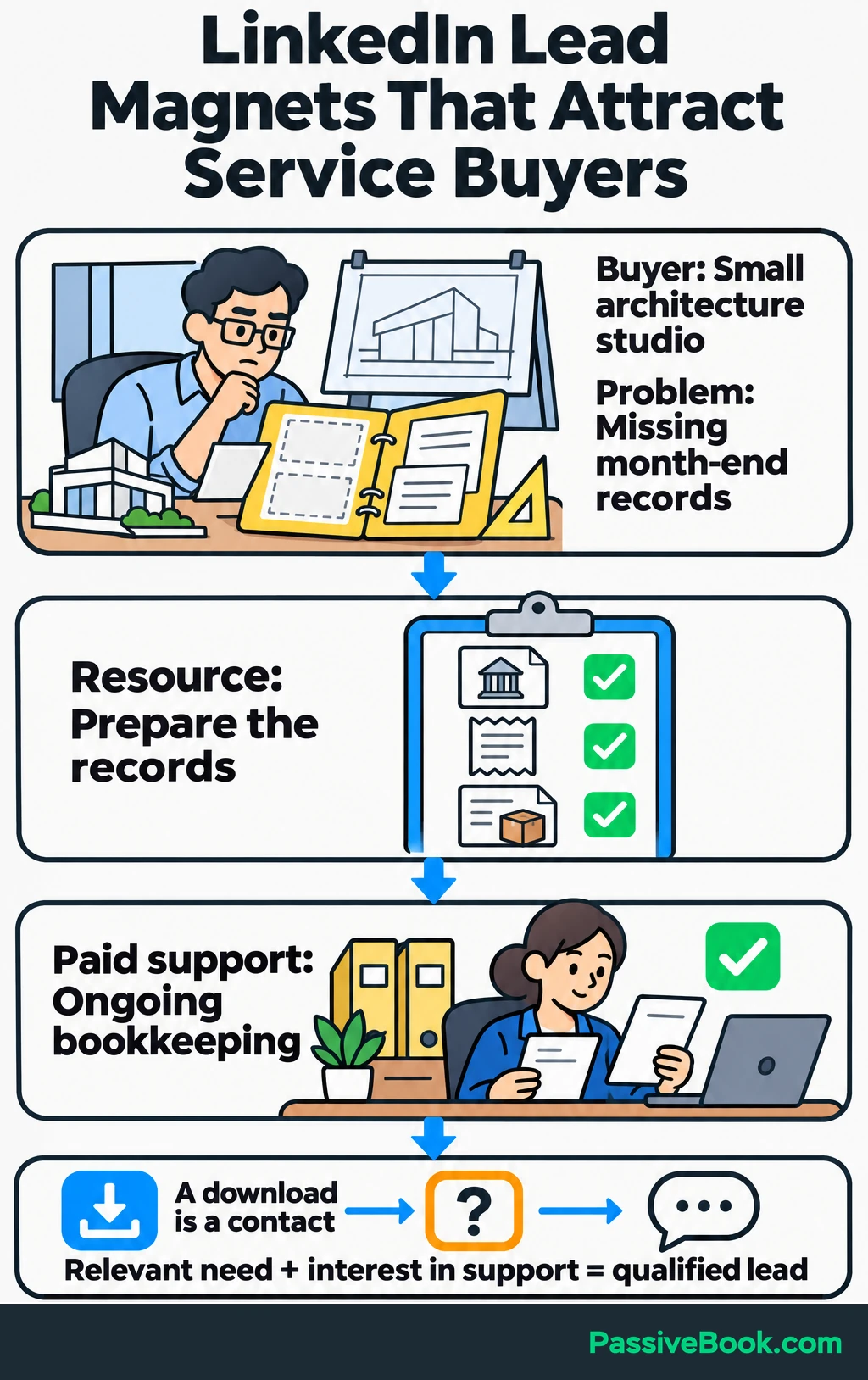
Choose a resource that helps with part of the problem your paid offer solves. The checklist helps studios gather their records, and ongoing bookkeeping support handles work they may want to hand over.
I would give visitors two routes:
- Download the checklist to prepare their records.
- Ask about ongoing bookkeeping support.
These serve different levels of interest. Someone ready to discuss your service should not have to join a mailing list first.
Give Visitors a Clear Route to Become Leads
Start with a free Company Page and your existing website tools. LinkedIn has discontinued organic lead forms for Company Pages and Showcase Pages. Paid Lead Gen Forms are still available. LinkedIn’s Page form notice
For the organic process, send people to a website form or invite them to message your Page.
Build a Focused Landing Page
Give the resource its own page with one main action. Explain what visitors get, show a small preview, and put the form beside that promise.
For the bookkeeping checklist, a headline could be:
Get Your Architecture Studio’s Records Ready for Month-End
Follow it with a concrete description:
Use this checklist to gather bank statements, project receipts, supplier bills, and unanswered questions before handing your records over.
Ask for an email address and one short question, such as “What usually delays your studio’s month-end reporting?” You can make the question optional if answering it is unnecessary for delivery.
Explain how you will use the details and offer a separate, unticked signup for promotional emails. Check the rules that apply to your recipients; UK guidance, for example, distinguishes companies from sole traders and some partnerships. ICO guidance on business email marketing
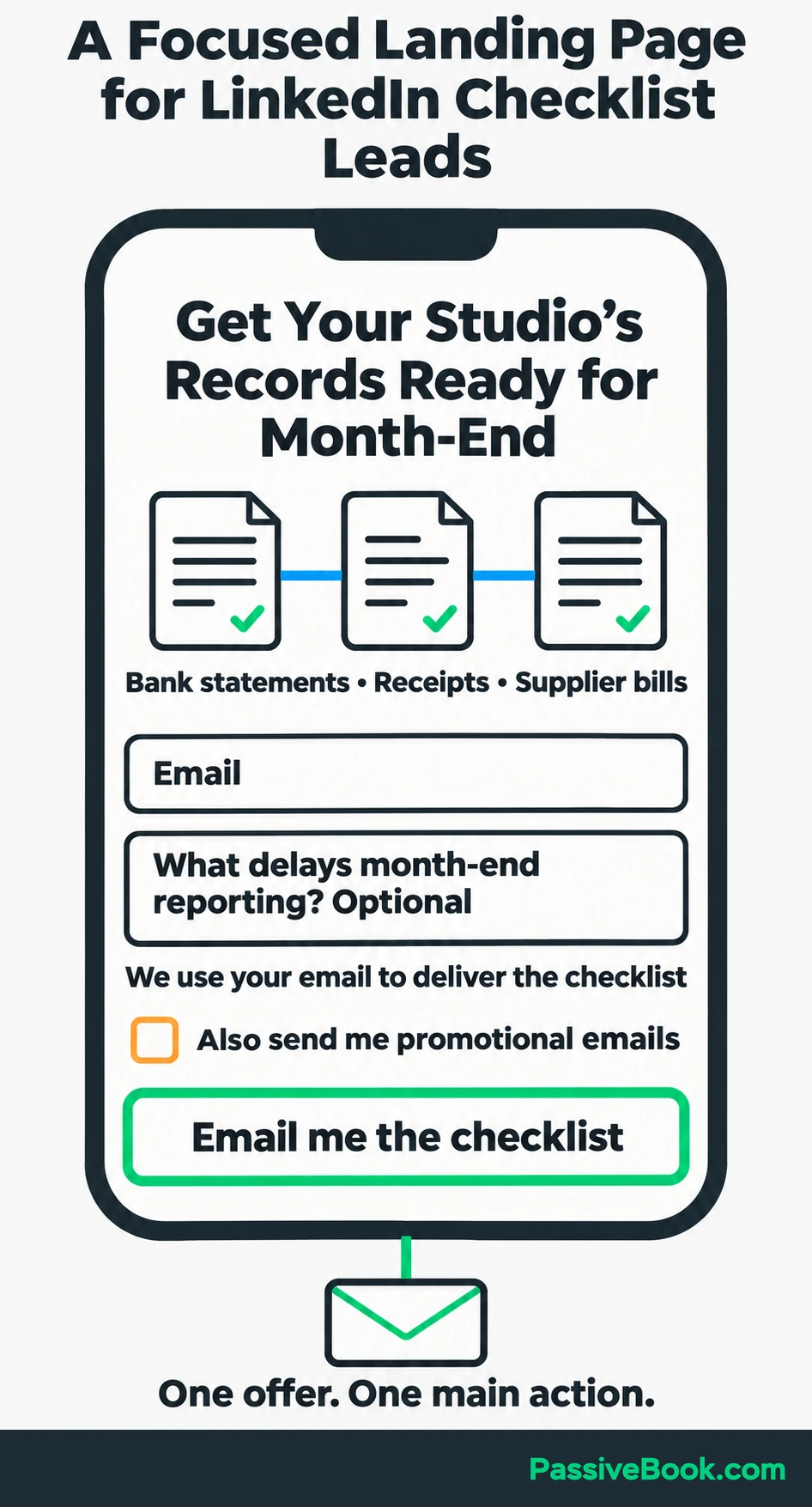
Use your existing form and email tools. On WordPress, my preference is Fluent Forms for capture and FluentCRM for delivery and follow-up. There is little reason to buy another platform for one download.
Add tracking tags to each destination link. These are extra values in the URL that identify where a visit came from. Use:
utm_source=linkedinutm_medium=organic_socialutm_campaign=studio_month_endutm_content=receipt_post, or another name identifying the placement
Keep the first three consistent for the campaign and change the last value for each post or Page link. Google Analytics can use these tags to report campaign traffic. Google’s campaign tracking guidance
Configure your form to save those values in hidden fields with each submission; adding them to a URL does not automatically put them in your contact records.
Then test the journey on your phone. Open the tagged link, submit the form, receive the checklist, and check that the contact, source, and email preference were saved.
Point Your Company Page Toward the Offer
Your tagline and opening About paragraph should make the business easy to understand. Say whom you help and what you do.
For example:
Bookkeeping for small architecture studios that need organized records and a clearer month-end handover.
Complete the business details and contact information, add a recognizable logo, and use a cover image that supports the same message.
Point the website link and custom call-to-action button toward the checklist page. On free Pages, the custom button sits inside the More menu. Premium Company Pages offer more visible placement, but I would test the free setup before paying for that difference. LinkedIn’s button placement comparison
Because the free button is less visible, include direct links in relevant posts. Publish an offer post explaining whom the checklist helps and what it contains.
Finally, view the Page as a visitor. Can you quickly understand the service and find a useful next step?
Enable Inbound Page Messages
Messaging gives interested visitors a way to ask a question before completing a website form.
Enable Page messaging, choose relevant conversation topics, and assign someone to check the inbox. If that person is you, put a short check into your working day.
Invite a specific question:
Message us about what is delaying your studio’s month-end reporting.
Use this route for incoming inquiries and the conversations that follow. LinkedIn only lets admins message a member as the Page after that member contacts the Page first. LinkedIn’s Page messaging rules
Publish Content That Moves Buyers Toward an Inquiry
Start with questions people ask before buying. Look through inquiries, customer conversations, and service discussions for problems you can explain clearly.
One substantial question can support several posts, provided each teaches something different. “What should we send our bookkeeper?” could become:
- A short explanation of how to prepare project receipts.
- An annotated example showing useful file names.
- A checklist excerpt covering missing records.
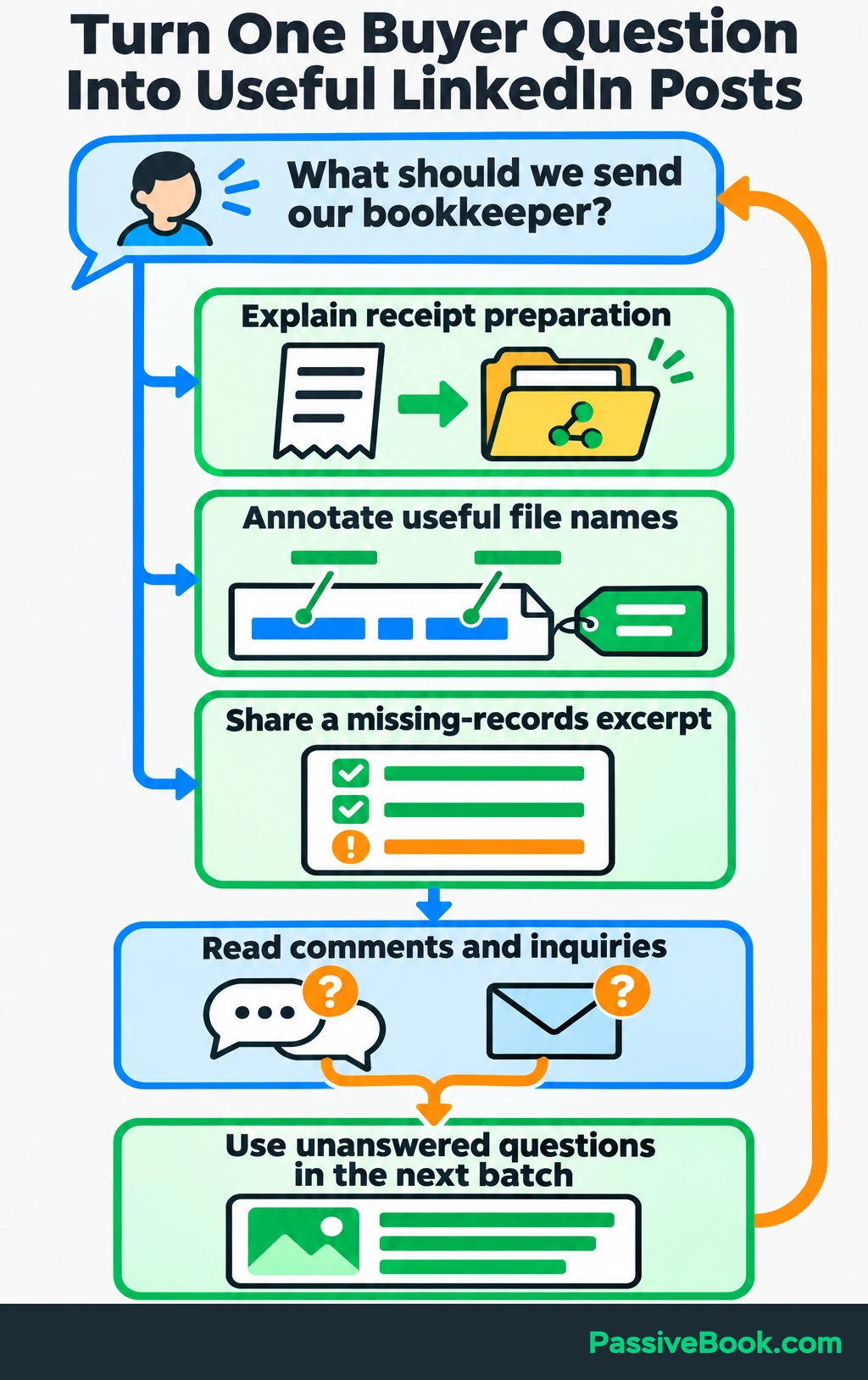
I would start with two useful posts a week and adjust to the time available. That is a manageable starting schedule, not a LinkedIn performance rule.
Batch the drafts and use LinkedIn’s native Page scheduler. Before preparing another batch, read the comments and inquiries. Let unanswered buyer questions influence what comes next.
Teach a Useful Fix
Solve one problem inside the post before asking readers to leave LinkedIn. A useful answer gives them a reason to trust the larger resource.
Choose the simplest format for the lesson: text for a short explanation, an image for an annotated sample, or a document for a walkthrough. You do not need to appear on camera.
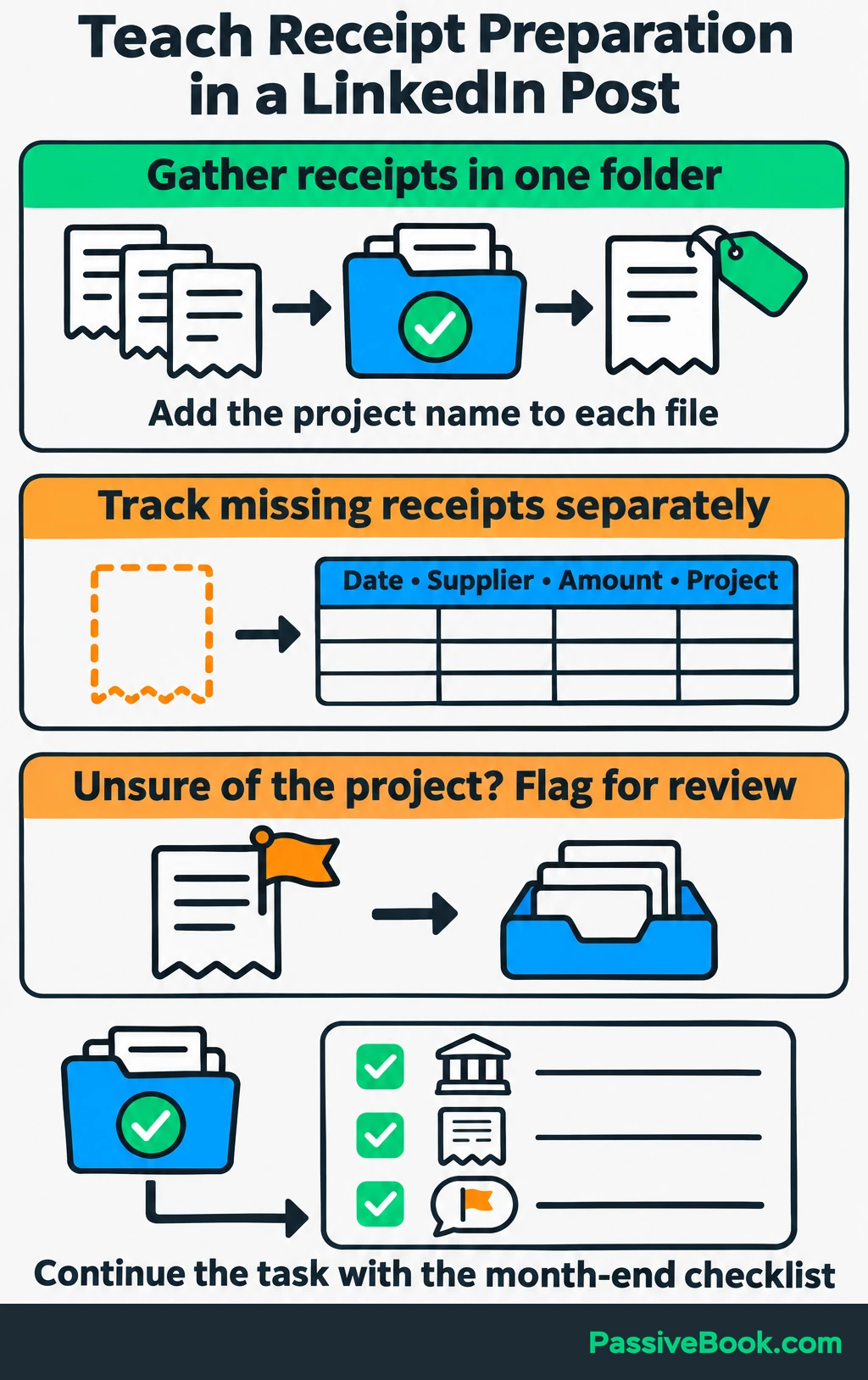
Here is a complete example post you can adapt:
Still chasing project receipts at month-end?
Before sending records to your bookkeeper, put each receipt in one shared folder and add the project name to its file name.
Keep a separate list of payments where the receipt is missing. Include the date, supplier, amount, and project so the gap is easy to investigate.
If you are unsure which project a cost belongs to, flag it for review rather than guessing.
This prepares the receipts, but your handover also needs bank statements, supplier bills, and answers to outstanding questions.
Download our free month-end bookkeeping checklist for small architecture studios to check what is still missing: [checklist link].
Submit the short form and receive the checklist by email.
The post delivers a useful action, and the checklist continues the same task. That connection matters more than a clever closing line.
If you have a buyer question but are struggling to turn it into a post, AI Social Copy Studio can draft three posts around your answer. Each connects the lesson to your existing offer, so you are not starting from a blank page.

Free AI Social Copy Studio




Show Buyers How Your Service Works
Useful tips show that you understand the work. A service demonstration helps buyers understand what hiring you would involve.
Show a small deliverable and explain how someone would use it. This illustrative month-end handover gives a clearer picture than “we simplify your finances”:
| Handover Item | Example Entry |
|---|---|
| Records received | Bank statements and supplier bills are in the shared folder. |
| Missing information | Two card payments still need receipts. |
| Studio input needed | The studio needs to identify the project for one supplier charge. |
| Next step | The studio provides the missing receipts and project details so bookkeeping can continue. |
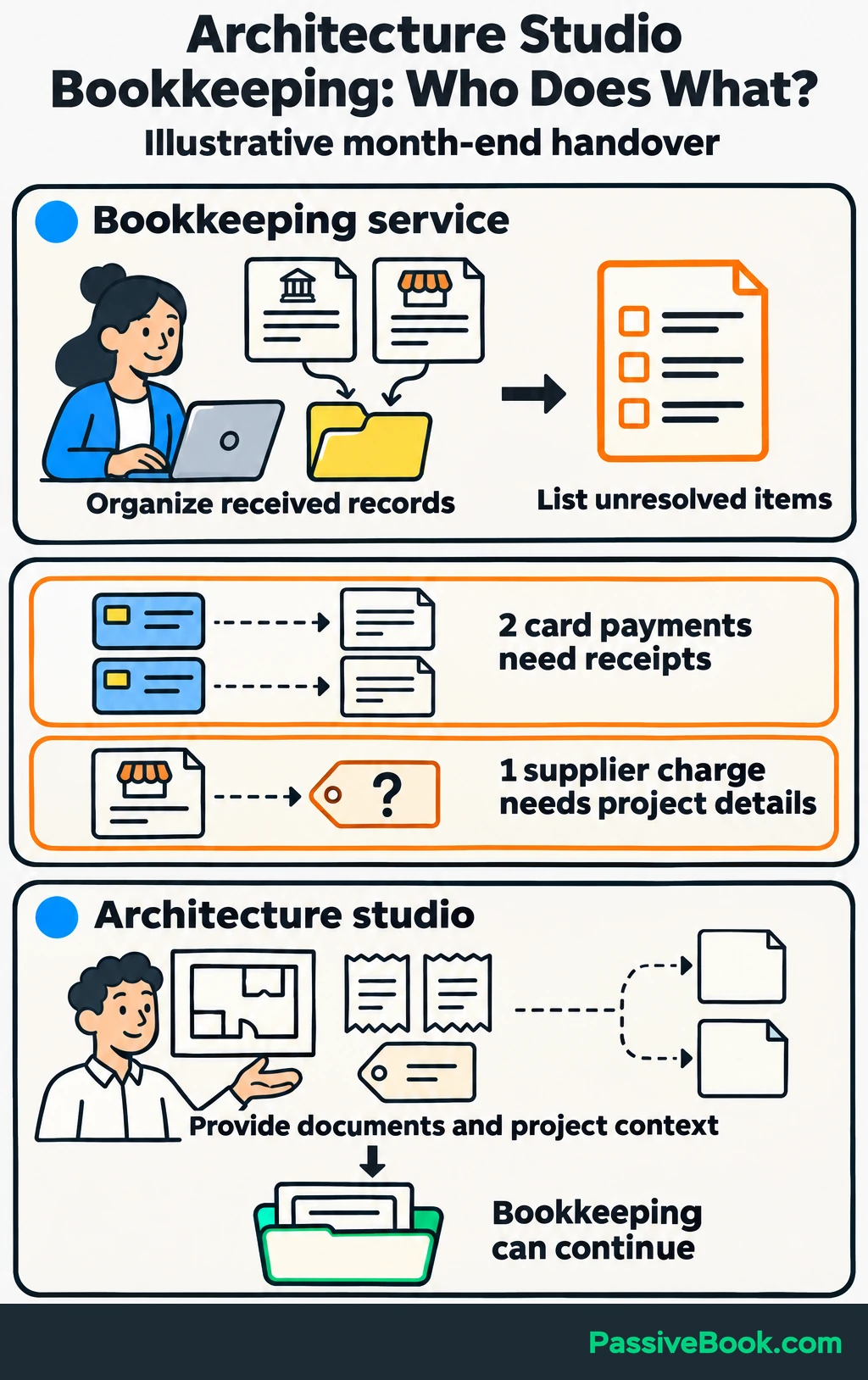
Explain the division of work. In this example, the service organizes records and prepares a list of unresolved items, while the studio provides missing documents and project context.
That helps a potential buyer decide whether the support fits their needs. It also exposes misunderstandings before a sales call.
Make the Next Action Specific
Match the invitation to the lesson and the reader’s readiness.
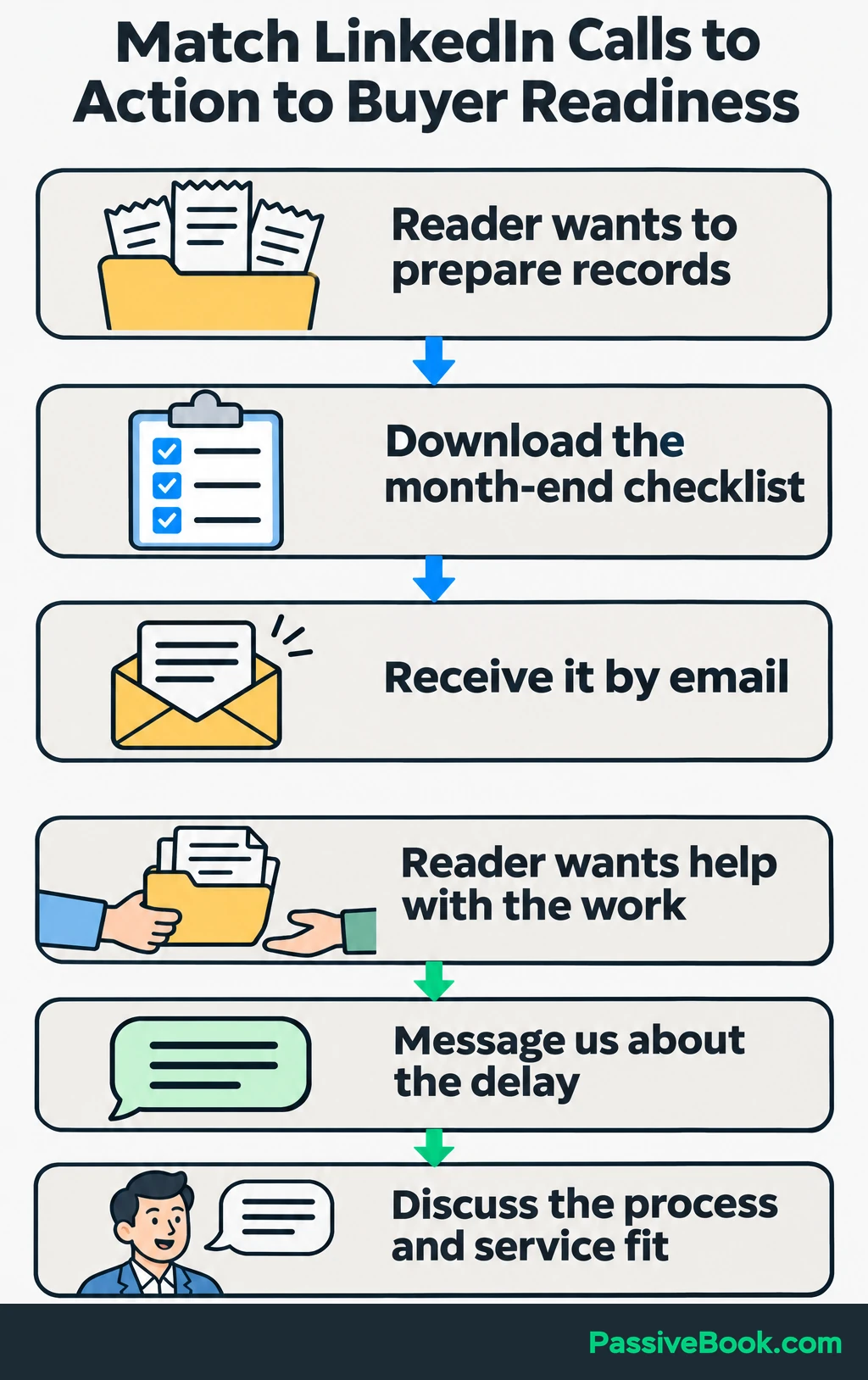
A preparation post can lead to the checklist:
Use the month-end checklist to check which records your studio still needs to gather.
A service demonstration can invite an inquiry:
Message us with the part of month-end reporting that keeps getting delayed. We’ll ask about your current process and explain whether our bookkeeping support fits.
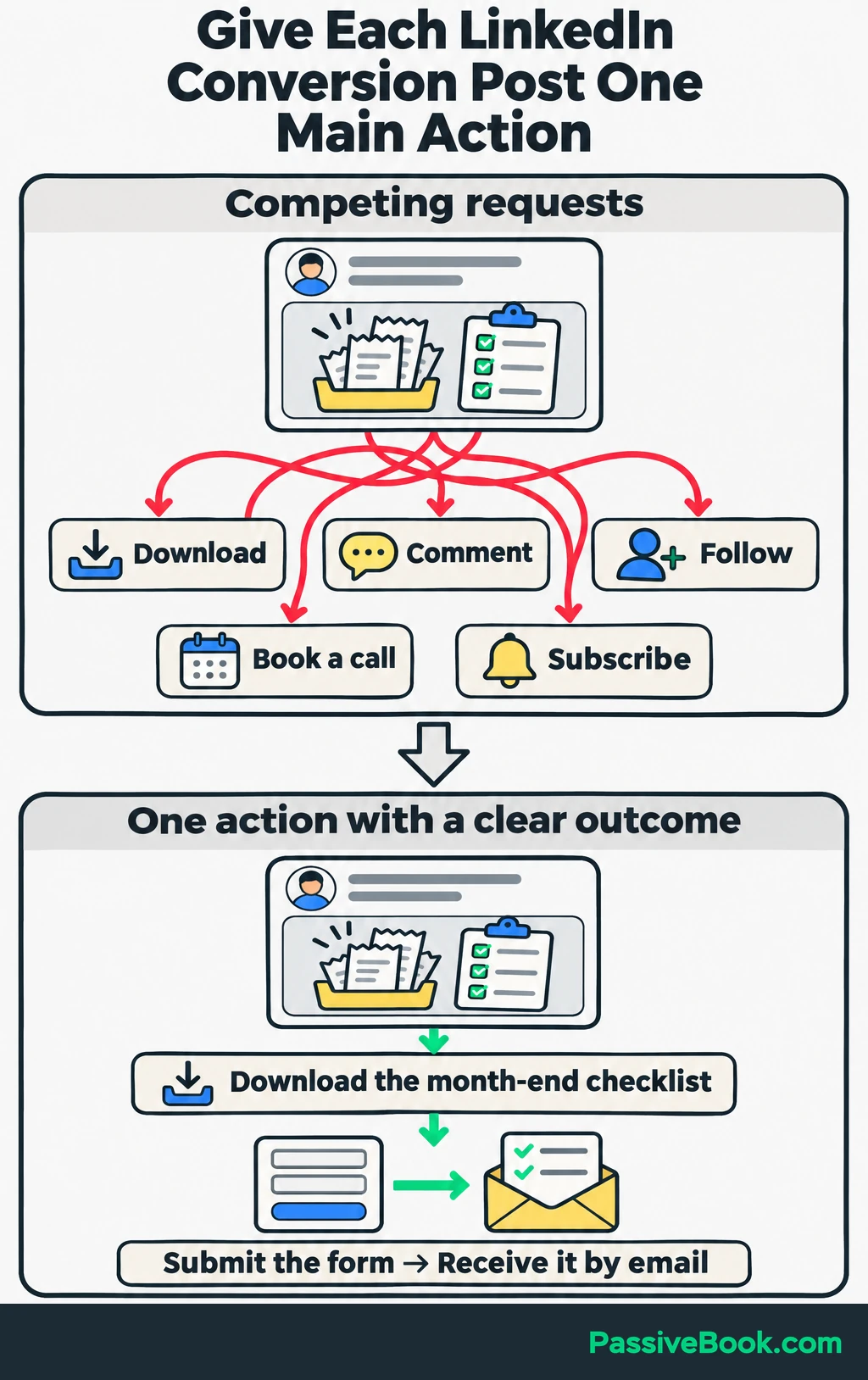
Give each conversion post one primary action. Asking people to download, comment, follow, book a call, and subscribe leaves them with a small administrative project.
Explain what happens after the action. A download should arrive promptly, and an inquiry should receive a relevant reply.
Bring Relevant People to Your Page Content
Publishing gives you something useful to share, but you still need ways for suitable people to discover it.
For the bookkeeping service, look for public conversations about running architecture practices, managing project paperwork, and preparing financial records. Contribute a useful answer as the Page where commenting is available.
For example, explain a simple way to separate missing receipts from completed records. Share the checklist when it directly helps the discussion. Pasting the same link under unrelated posts is not distribution; it is littering.
You can also build discovery through existing relationships:
- Invite suitable first-degree connections to follow after completing the required Page details. Use the invitation credits shown in your account.
- Share a useful Page post through your website or existing newsletter, explaining why it deserves attention.
- Ask willing founders or colleagues to share selected posts with their own perspective.
- Answer substantive comments with enough detail to help, and suggest the checklist or inquiry route when it fits.
Personal profiles can help people discover your business, while the Company Page provides a consistent place to check the service and offer. You do not need to force every interaction to begin on the Page.
Turn Captured Contacts Into Qualified Conversations
Deliver the requested resource first. For a direct inquiry, answer the question the person actually asked before moving into qualification.
Then ask one focused question:
What usually delays your studio’s month-end reporting?
If they already answered it on the form, use that answer. Nobody enjoys repeating themselves to prove your software works.
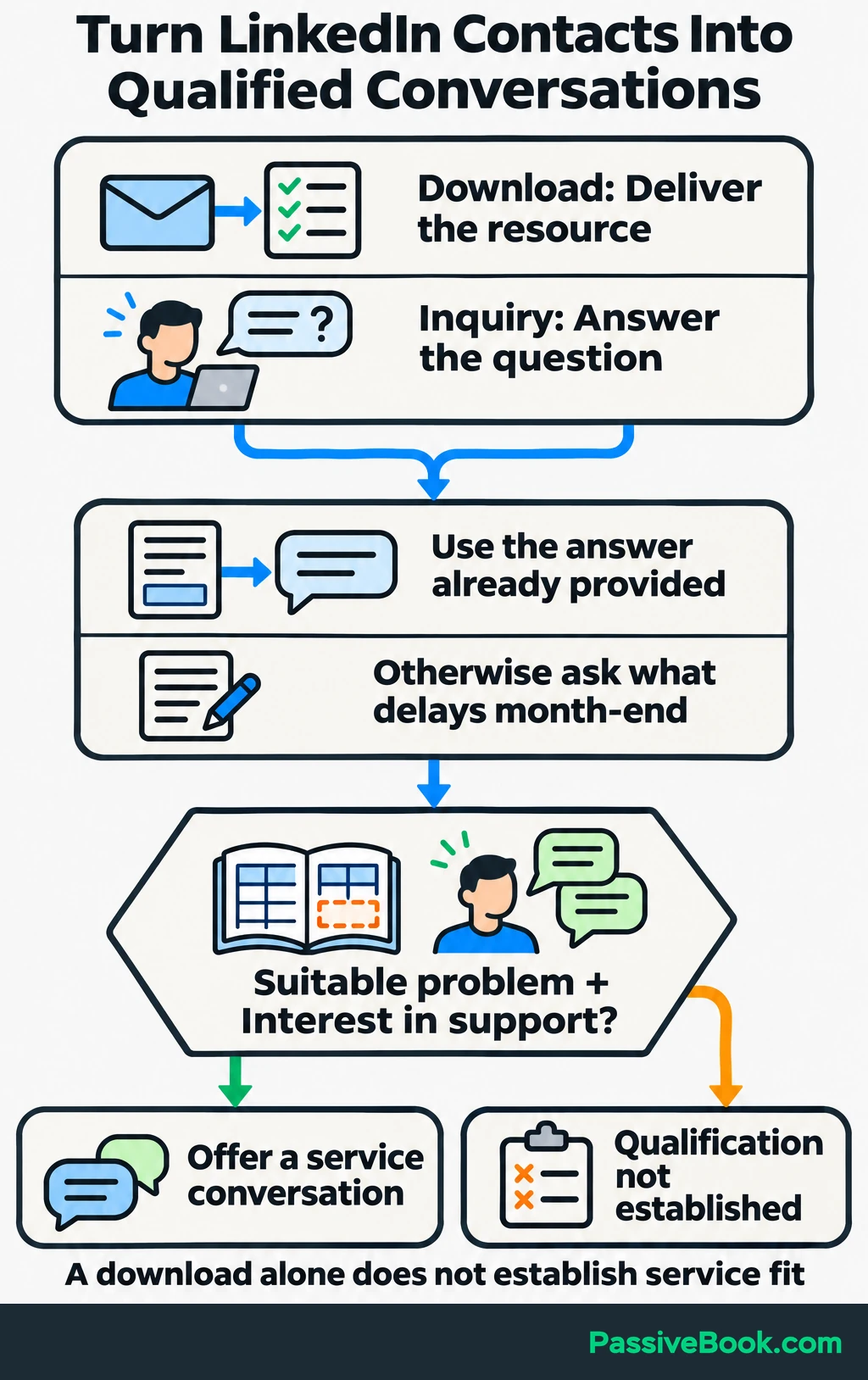
A response about recurring missing records may reveal a need your service covers. Ask whether they want help with that process, and offer a conversation when there is both a suitable problem and interest in support.
Record the details in a spreadsheet or your existing customer relationship management (CRM) tool, which tracks contacts and sales conversations:
- Source and capture route.
- Stated problem and relevant business details.
- Qualification status.
- Person responsible for the reply.
- Next action and follow-up date.
A download establishes interest in the resource. Qualification establishes whether there is a potential service conversation.
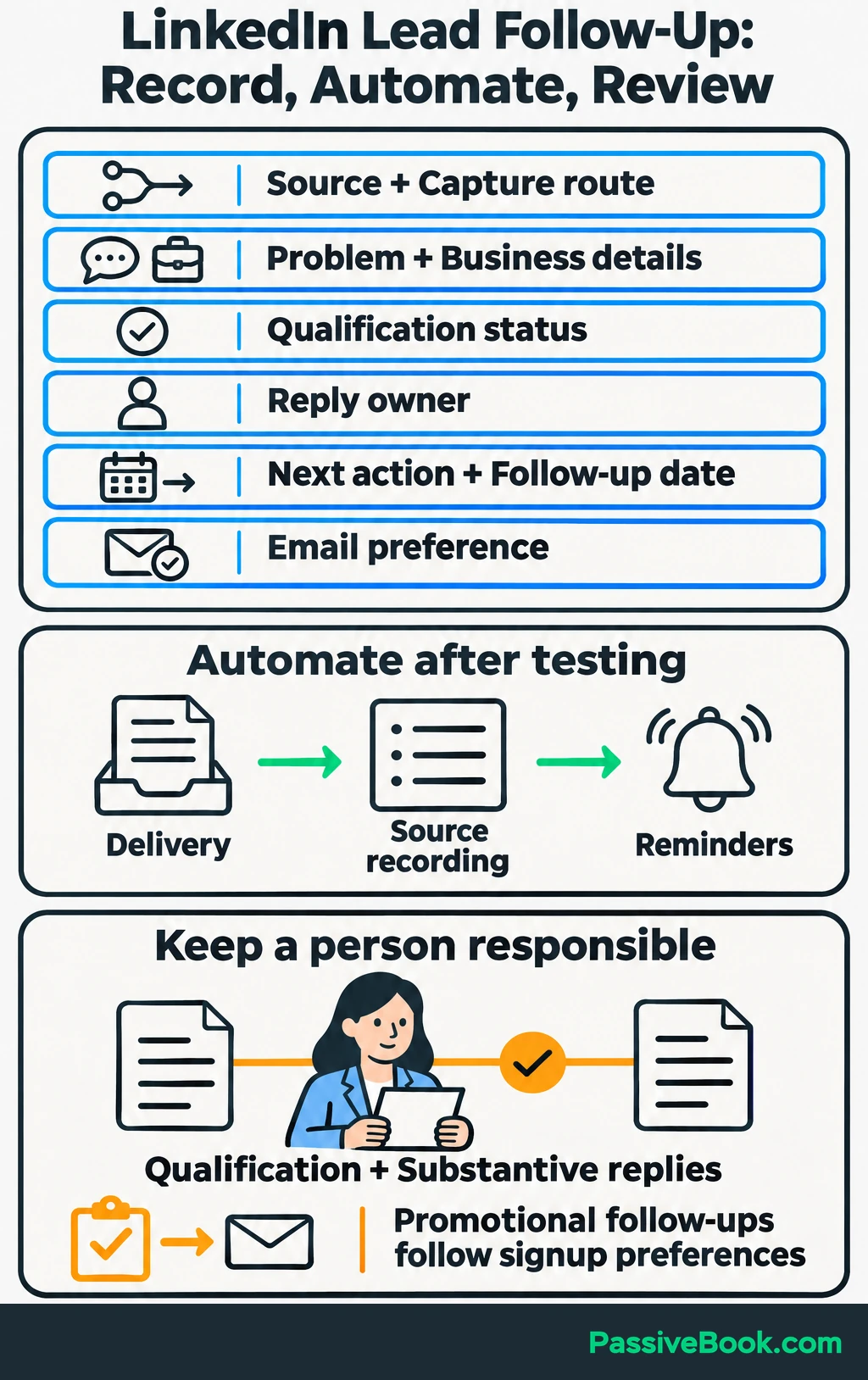
Automate delivery, source recording, and reminders once you have tested them. Use the signup preferences to decide who receives promotional follow-ups, and keep a person responsible for qualification and substantive replies.
On a digital-product site, I once drafted a follow-up that sounded polished but ignored the reason for the download. Reading the form response beside it made the mismatch obvious. I rewrote the reply around the person’s question. That is the check I would keep here, even when AI produces the first draft.
AI can also group recurring questions and draft posts from approved material. Use native LinkedIn features or authorized integrations for activity on the platform; LinkedIn prohibits scraping and unauthorized messaging or engagement bots. LinkedIn’s prohibited software policy
Measure Qualified Leads and Improve the Weakest Step
I spent six months chasing followers on Instagram and Twitter/X in another niche, with little financial progress to show for it. During that stretch, I paid more attention to reactions than to what an interested person could buy.
That experience shapes how I judge social content. It does not tell us how LinkedIn performs, but it gives me a good reason to track business outcomes.
Use Page analytics to assess which content gets discovered and whether visitors and followers resemble your buyers. Then use website reporting and contact records to follow inquiries through to sales.
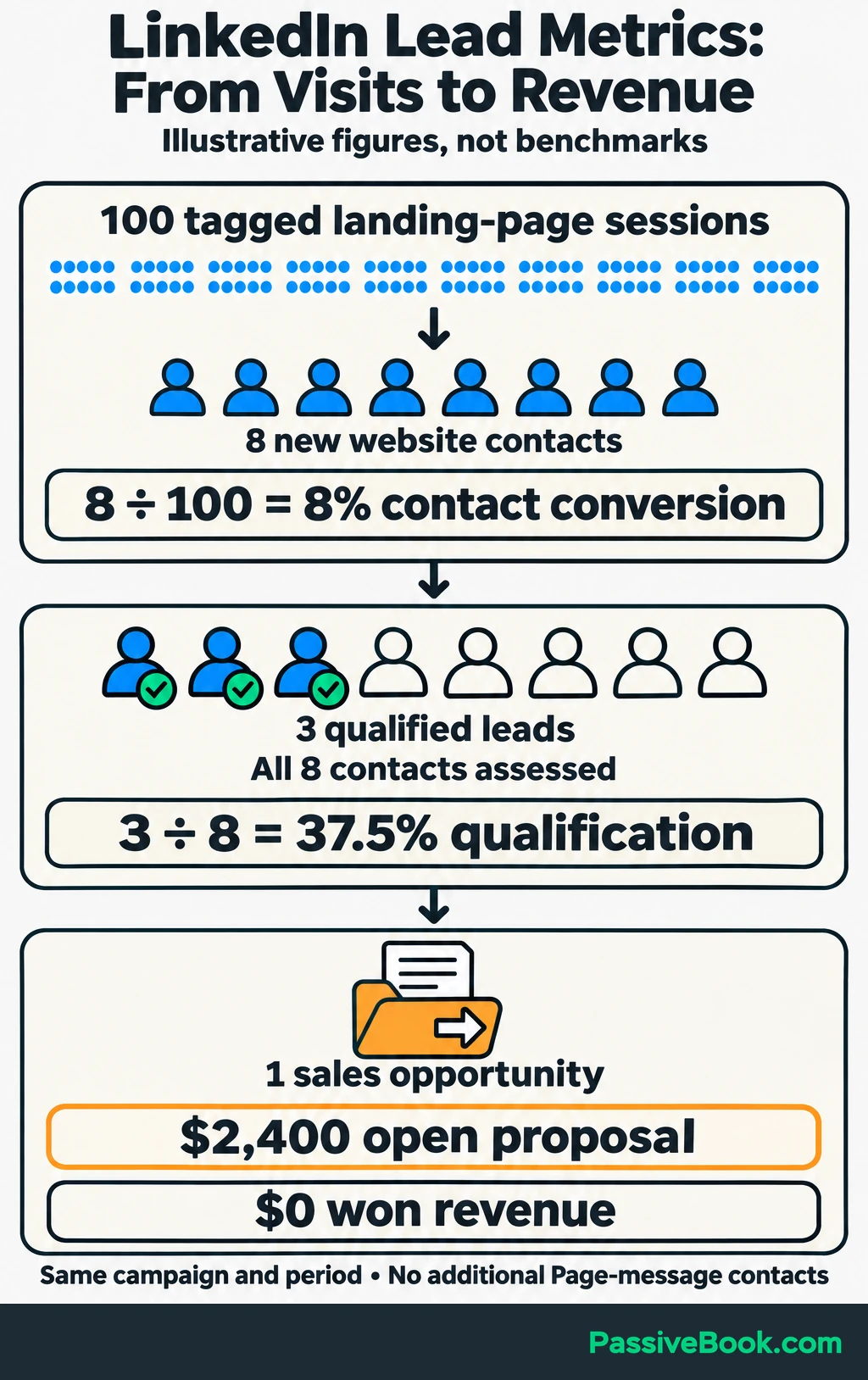
For each post or Page link, track landing-page visits (sessions), new contacts from forms or Page messages, and qualified leads. Record which leads become sales opportunities: buyers with an identified need and an agreed next step. Add open proposal value and won revenue, and merge duplicate contacts who both submit a form and message the Page.
To measure website conversion, count new contacts and all landing-page sessions from the same campaign and period. Divide those contacts by those sessions. For the qualification rate, divide qualified leads by the contacts you assessed from that same group.
For illustration, take one month’s tagged checklist traffic and allow time for your initial qualification process. In this example, all eight contacts have been assessed, and there are no additional Page-message contacts:
| Measure | Illustrative Result |
|---|---|
| Tagged checklist-page sessions | 100 |
| New website contacts from those sessions | 8 |
| Website contact conversion | 8 ÷ 100 = 8% |
| Qualified leads among those eight contacts | 3 |
| Qualification rate | 3 ÷ 8 = 37.5% |
| Sales opportunities | 1 buyer with an identified need and an agreed proposal step |
| Open proposal value | $2,400 |
| Won revenue | $0 while the proposal remains open |
These figures demonstrate the arithmetic, not typical performance. The proposal may become revenue later, but it has not done so yet.
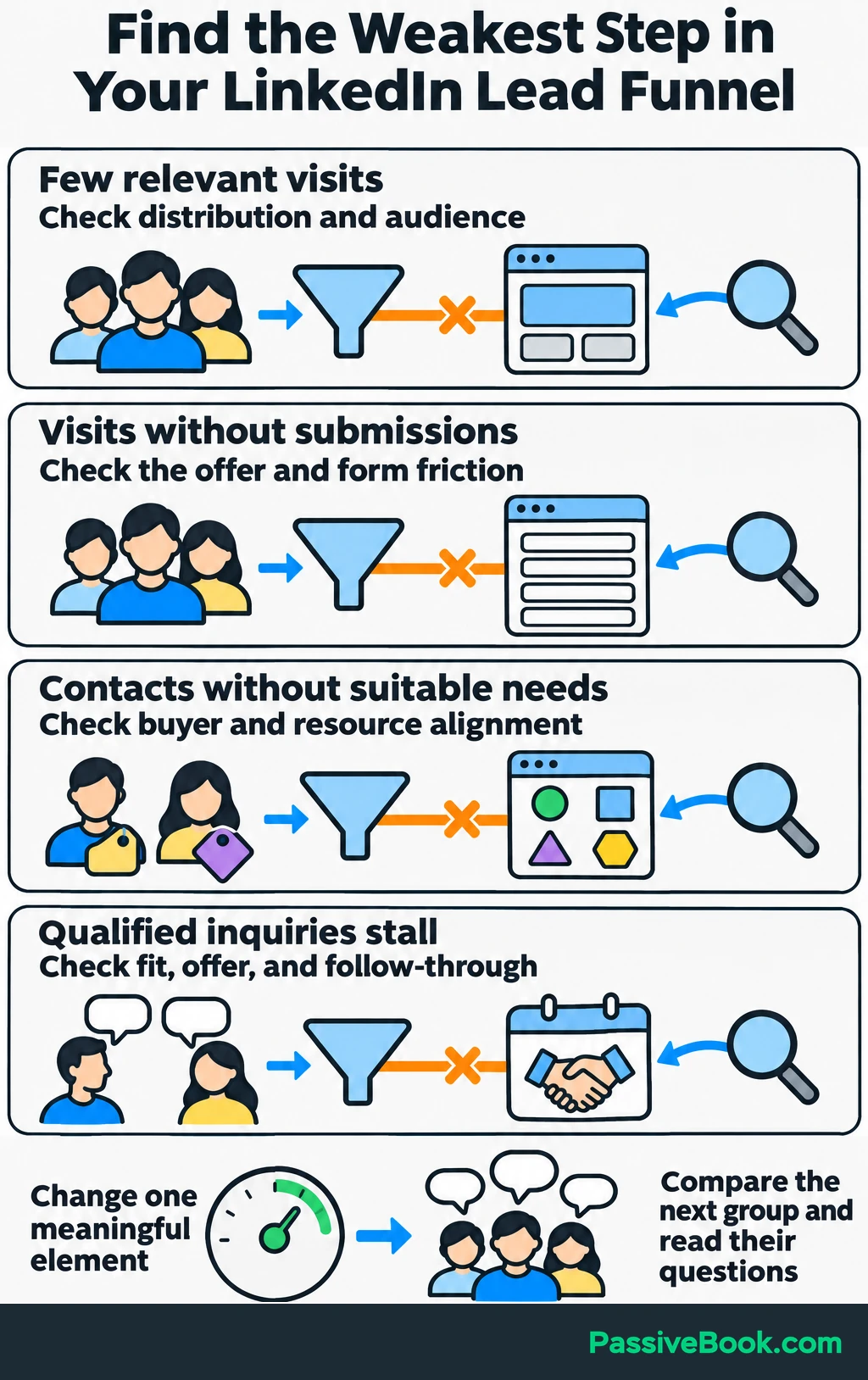
Use the report to decide where to work:
- Few relevant visits suggest a distribution or audience problem.
- Visits without submissions suggest an unclear offer or unnecessary form friction.
- Contacts without suitable needs suggest the content or resource attracts the wrong people.
- Qualified inquiries that stall suggest a problem with fit, the offer, or follow-through.
Change one meaningful element and watch the next comparable group. With only a few contacts, a single outcome can move the percentage sharply, so read their actual questions alongside the numbers.
Tagged links also miss some journeys, including private sharing and later direct visits. Add an optional “How did you hear about us?” question to the inquiry form to fill some of those gaps.
When Should You Test LinkedIn Lead Gen Forms?
I would test paid forms after the organic process has a defined buyer, a relevant offer, and working follow-up. Advertising adds another capture route, so it helps to know what you will do with the contacts before paying for them.
LinkedIn’s advertising Lead Gen Forms can prefill member profile information. There is no separate form charge beyond the associated advertising costs. LinkedIn’s Lead Gen Forms overview
In Campaign Manager, LinkedIn’s advertising dashboard, choose the lead generation objective and a supported ad format. Keep the ad, form, and confirmation message focused on the same checklist promise.
Start with three or four useful fields in total, such as name, email, company, and one question about the studio’s bookkeeping problem. Ask for information you will use rather than collecting a miniature personnel file.
Provide the required privacy policy URL, explain how you will use the information, and add the consent choices needed for additional uses. LinkedIn’s form privacy requirements
Put the checklist link on the confirmation screen and arrange lead retrieval and delivery. Submit a test and confirm that the contact reaches the person responsible for follow-up before spending.
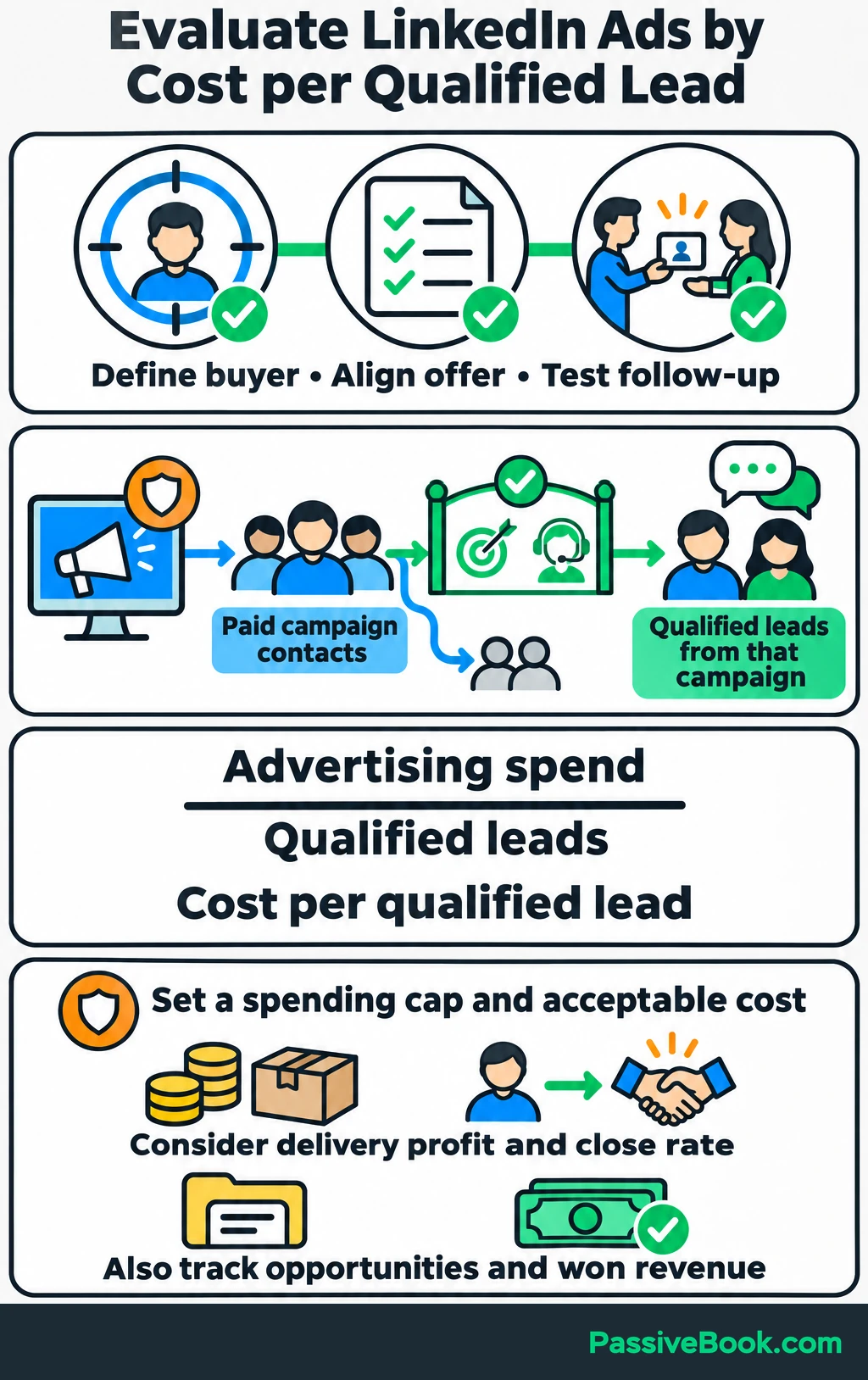
Set a spending cap and an acceptable cost per qualified lead. Base that limit on your profit after delivery costs and how often qualified leads become customers.
To assess the test, divide advertising spend by qualified leads from that paid campaign. Also track opportunities and won revenue. Cheap downloads can still be expensive if the people downloading have no suitable need.
What Next?
Choose one buyer problem and write the offer sentence for a resource that helps solve it. Then test the route from a LinkedIn post to delivery and a recorded contact before preparing a month of content.
Use the social buttons to share this guide when your team needs a common plan for turning Page activity into qualified inquiries.
Where does your current process lose momentum: attracting relevant visitors, capturing interest, or following up? Share your experience in the comments, and bring any other questions too.
Share this post with your friends & followers:

