A client has booked and paid, but their answers are still in your inbox. The appointment is on your calendar, yet nobody has prepared for it. You’re doing the service and remembering every small step around it.
That extra work makes each new booking harder to absorb. A missed handoff can also leave the client waiting without knowing what happens next. This guide follows a booking from intake to an approved plan and check-in, showing how to automate the handoffs and catch stalled work before the client has to chase you.
1. Choose the First Workflow to Automate
Start with one repeated handoff whose result you can easily check. Completed intake becoming an assigned preparation task is a good candidate. Automatically handling a complaint is a poor first project.
To decide what deserves attention, compare four things:
- Frequency: How often do you repeat the task?
- Manual Effort: How much copying, checking, or chasing does it require?
- Clear Rules: Can you explain when it should happen and what counts as finished?
- Failure Cost: What happens if it runs late, twice, or with the wrong information?
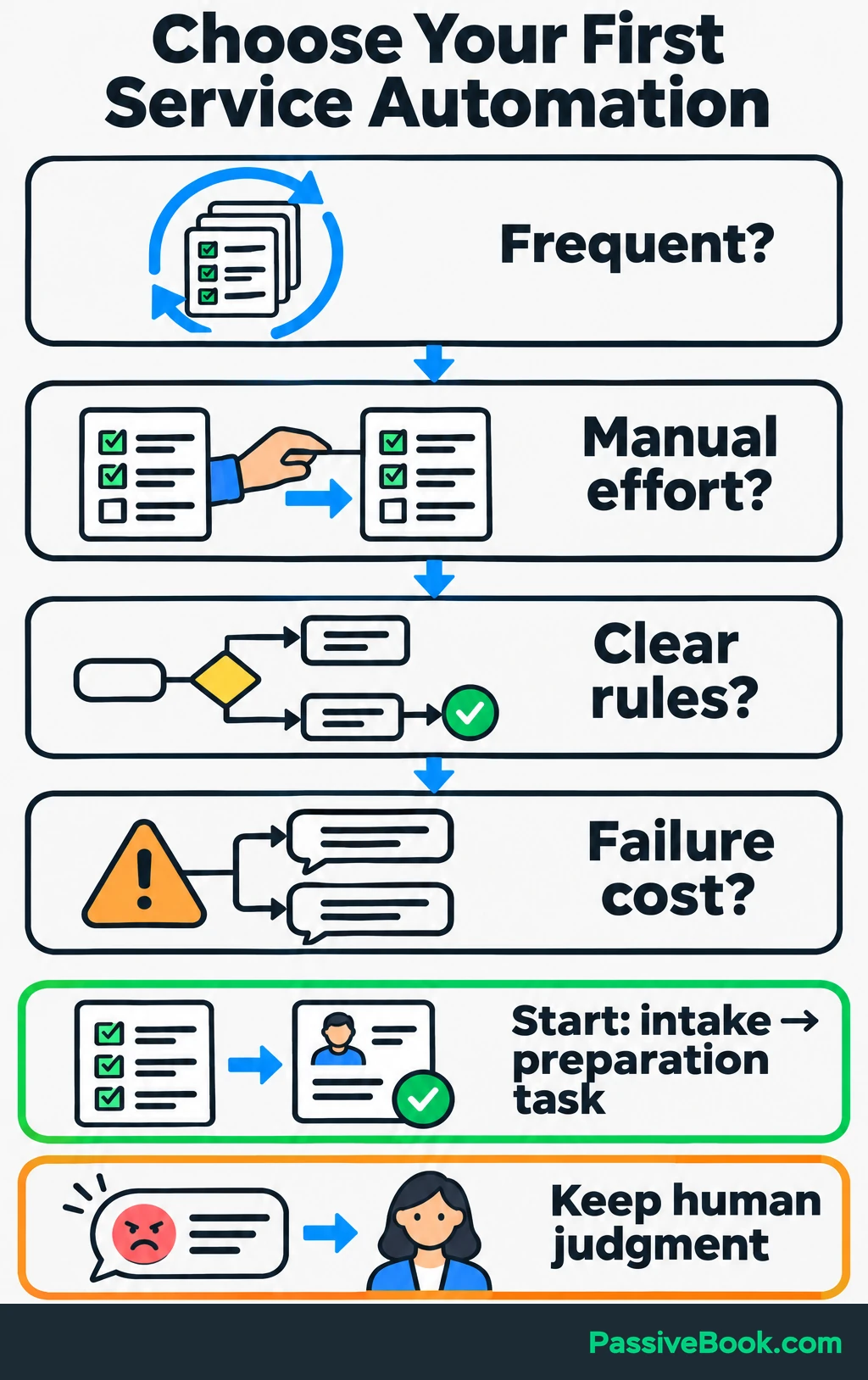
I would choose a frequent task with clear rules and a visible result. Leave decisions about unusual requests, complaints, and personalized recommendations with a person. Automation can gather the background and assign the case.
Before building anything, remove unnecessary work. If you copy the same answers into three places, decide which place actually needs them. Automating all three copies just makes the clutter arrive faster.
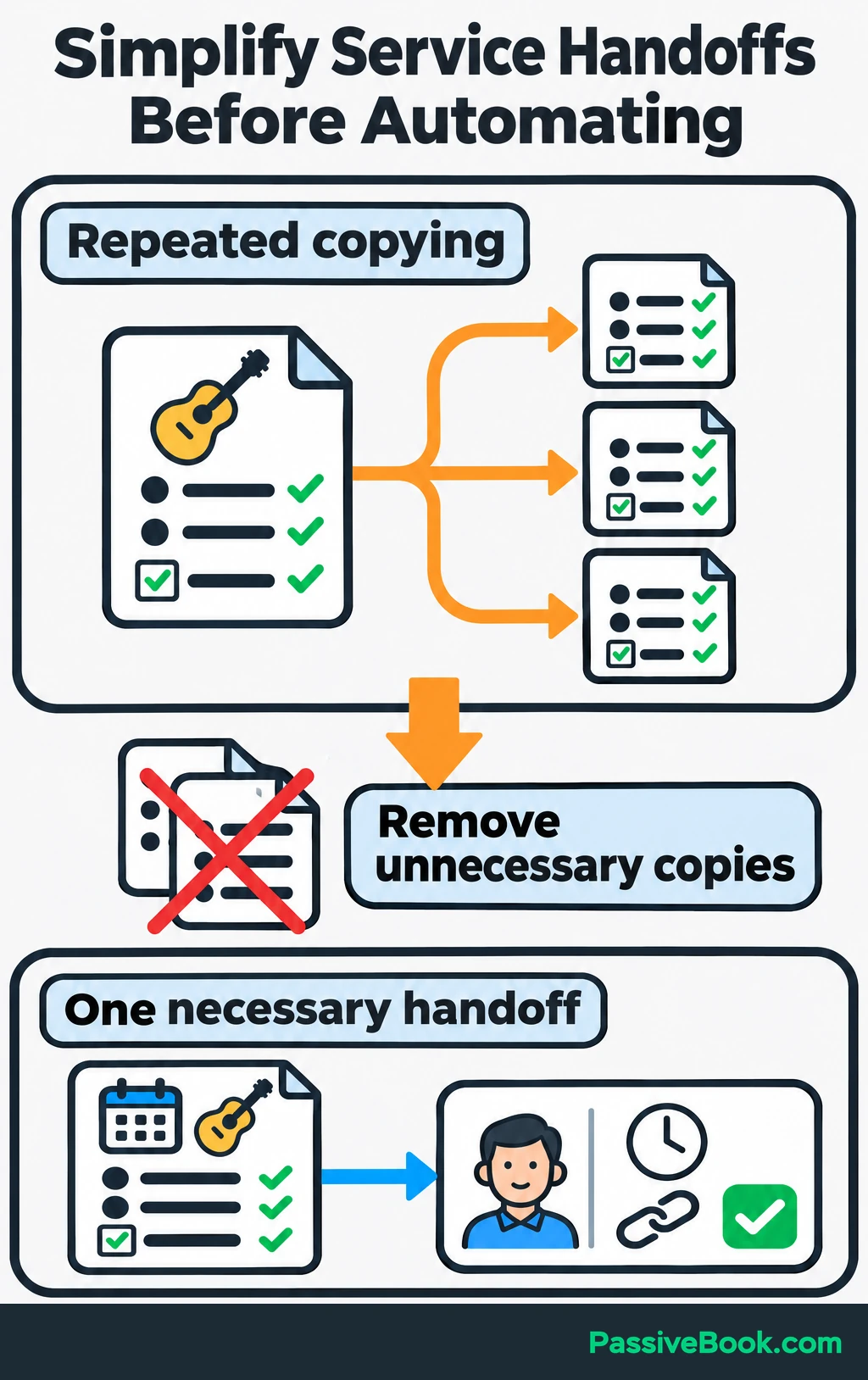
Throughout this guide, imagine you run an online beginner guitar-coaching service. A booking leads to intake, preparation, a lesson, an approved practice plan, and a check-in. The business and its sample details are illustrative.
Your first automation will turn complete intake into a preparation task. Before changing that handoff, record how long it takes, how often preparation starts late, and how often you correct missing or misplaced information. Those notes give you something useful to compare later.
2. Map the Service From Booking to Completion
Write down what starts the service and what you promised to deliver. Then list the events between those points, including the decisions a person must make.
For the coaching service, a confirmed appointment starts the process. If payment is required upfront, payment must also be confirmed before fulfillment begins. The core service finishes when the lesson is complete and the approved practice plan has been sent. Follow-up comes afterward.
The sequence is:
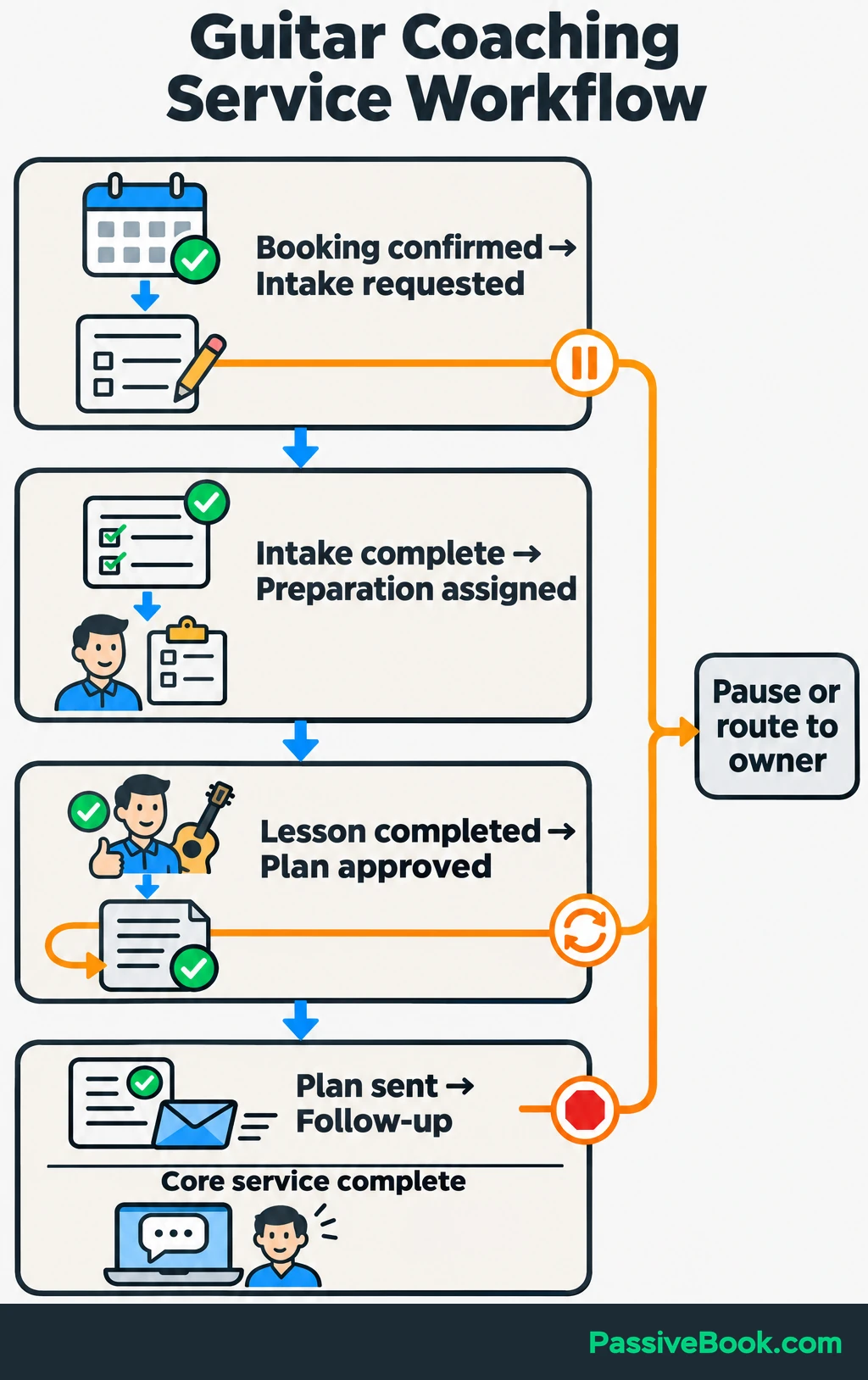
Confirmed booking → intake requested → intake complete → preparation assigned → lesson completed → plan approved → plan sent → follow-up.
Turn that sequence into a working map. Each row should explain what moves the booking forward and where a problem goes.
| Stage | Trigger | Required Information | Action | Owner | Completion Condition | Exception Route |
|---|---|---|---|---|---|---|
| Intake request | Booking confirmed | Booking ID, email, appointment, payment status if prepaid | Send linked questionnaire | Service owner | Request sent and recorded | Missing details go to owner |
| Preparation—automate first | Required intake received | Matched booking, answers, instructor, due time | Create preparation task | Instructor | Task exists and is assigned | Unmatched or incomplete intake waits for review |
| Lesson readiness | Preparation task completed | Reviewed answers and lesson outline | Mark ready for lesson | Instructor | Preparation confirmed | Late preparation alerts owner |
| Practice-plan draft | Instructor marks lesson completed | Lesson notes and booking ID | Create plan task | Instructor | Draft ready for review | Missing notes return to instructor |
| Approval | Draft submitted | Current version, recipient, file or link | Review and approve or reject | Instructor | Approval tied to that version | Rejected draft returns for revision |
| Delivery | Current version approved | Active booking, approved plan, correct recipient | Send plan and record result | Service owner | Provider confirms sending action | Failed or uncertain send goes to repair |
| Follow-up | Plan successfully sent | Sending time and current client status | Schedule check-in | Instructor | Check-in sent or deliberately skipped | Reply or unresolved problem routes to instructor |
Choose one place in your existing client database or task system to track booking progress. Each booking’s record should hold the booking ID, client, appointment time and time zone, assigned owner, status, next deadline, and deliverable link.
Use a separate record for each appointment. One client email can belong to several bookings.
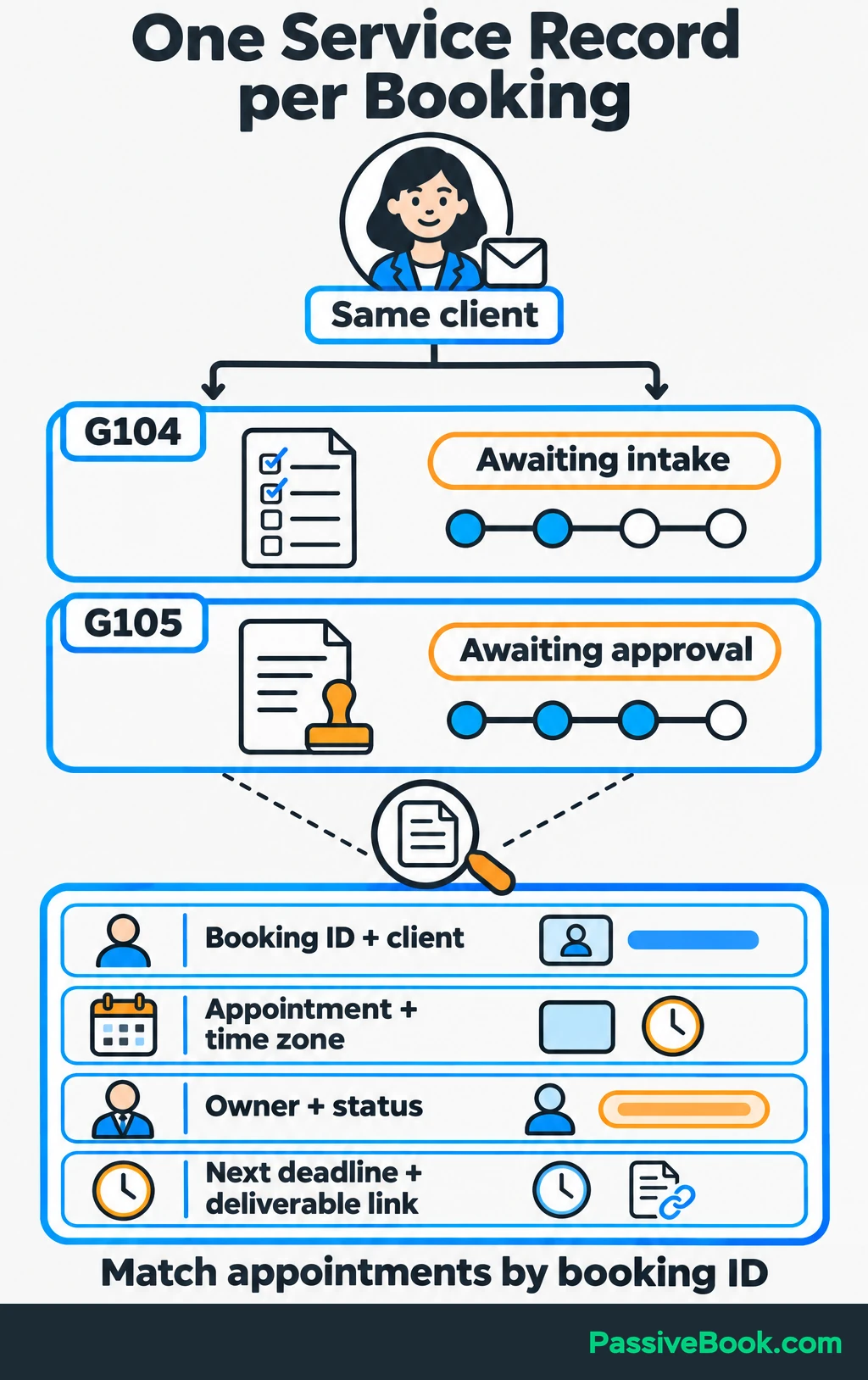
Statuses should describe real progress: “awaiting intake,” “preparation assigned,” “ready for lesson,” and “awaiting approval.” A calendar event ending does not prove the lesson happened, so require the instructor to confirm completion.
Put exceptions beside the normal path. Missing intake waits for information. Rescheduling updates deadlines. Cancellation stops pending work and messages. A rejected plan returns for revision.
That is the map you will build from. It also becomes your manual checklist if the automation needs to pause.
Now turn the example into a brief for your own service. Start with one handoff and describe the tools, information, and human decisions involved.

Free AI Automation Planner




3. Choose Tools That Fit the Workflow
Check what your current tools already do before adding another subscription. Your booking app may handle confirmations and reminders perfectly well. An integration builder earns its place when information needs to move between separate apps.
For example, the booking app can send appointment reminders while Make connects intake submissions to preparation tasks. These approaches can work together.
| Approach | Suitable Workflow | Hosting and Maintenance Responsibility | Billing Basis |
|---|---|---|---|
| Existing built-in automation | Confirmations, reminders, and status changes within one app | Provider maintains the platform; you maintain its rules | Existing subscription or an automation add-on |
| Make | Visual workflows connecting forms, records, tasks, and email across apps | Make hosts the builder; you maintain connections and workflow logic | Credits consumed by operations and certain features |
| n8n Cloud | Multi-step workflows when you want n8n without server administration | n8n manages infrastructure; you maintain workflow logic | Monthly workflow executions rather than individual steps |
| Self-hosted n8n | Workflows where you need deployment control and can maintain a server | You handle hosting, updates, backups, security, and workflow logic | Community edition has no software subscription fee; infrastructure and operating time still cost money |
Make generally uses one credit per non-AI operation, while some AI and advanced features consume credits differently. Use its credit documentation when estimating a test run.
For n8n Cloud, compare your expected number of workflow runs with its execution-based plans. A booking can trigger several runs as intake, approval, and delivery happen.
Self-hosted n8n requires someone to own the infrastructure. Its deployment guide explains the managed and self-hosted options.
I use n8n to connect tools across my websites without writing code for every handoff. That experience makes me comfortable with the builder, but it doesn’t make server maintenance disappear. For a first cross-app workflow, I would choose Make unless you already know n8n or have someone maintaining it.
Before committing, test the exact actions you need:
- Detect a completed intake submission.
- Find its booking record.
- Update that record.
- Create and assign a task.
- Send a notification.
- Record success or route failure to an owner.
An app appearing in an integration directory does not settle whether the specific action is available with your permissions and plan.
Run one representative booking through the whole process and inspect usage. Estimate monthly cost from booking volume, then include reminders, repeated checks for updates, retries, connected-app subscriptions, AI usage, and maintenance time.
4. Build the Booking-to-Follow-Up Workflow
Build the intake-to-preparation handoff first. Prove that it creates the right task for the right booking, then connect the stages around it.
In a visual builder, the basic pattern is: trigger → find record → check conditions → perform action → record result. Add a separate route for cases that fail the checks.
Connect Booking and Intake
Connect each account through the builder’s authorization or credential system. Grant access only to the resources the workflow needs, and keep passwords and API keys out of forms, task descriptions, and AI prompts.
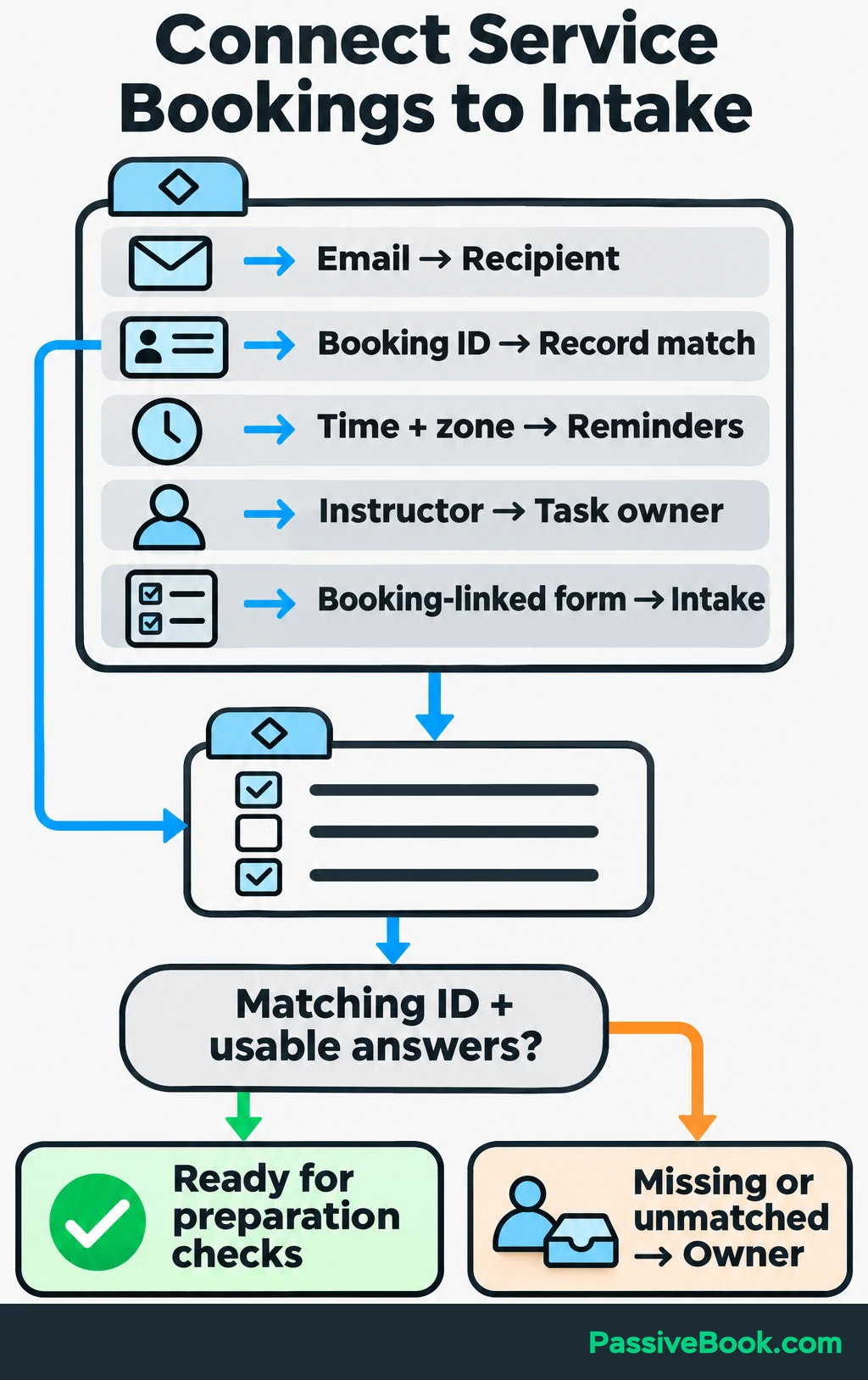
When a booking arrives, look up its booking ID. Update the matching service record, or create one if no match exists. Do not merge appointments just because they share an email address.
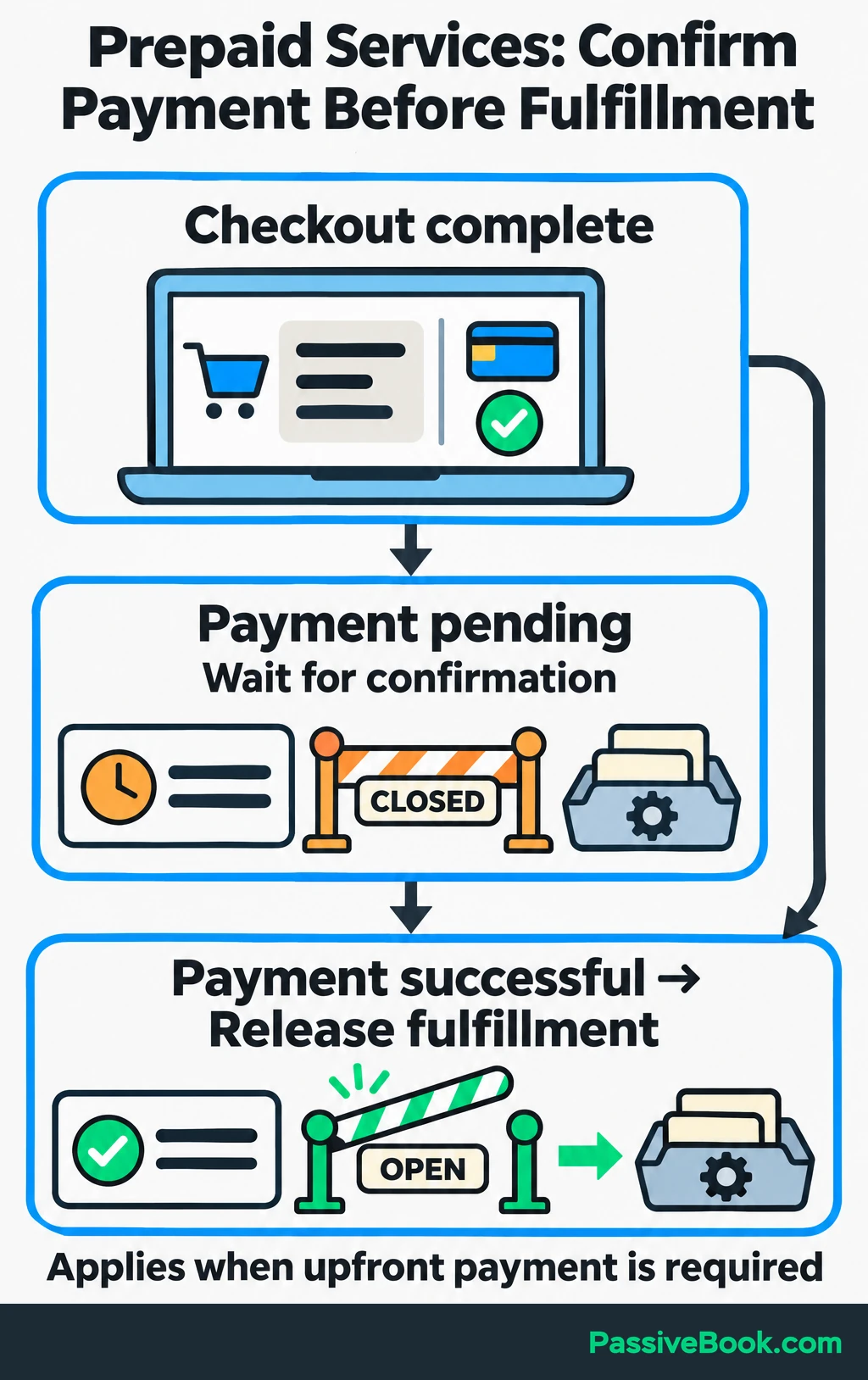
For prepaid services, wait for the payment provider to confirm successful payment. Stripe’s fulfillment guidance explains that some payment methods finish checkout while payment is still pending. A notification that checkout is complete is therefore not enough to release the service.
Map each field deliberately:
- Recipient: The client’s email address.
- Record Match: The unique booking ID.
- Reminder Timing: Appointment time and time zone.
- Task Assignment: The assigned instructor’s account.
- Intake Link: A questionnaire associated with that booking.
Send the intake request and mark the record “awaiting intake.” For the guitar lesson, collect playing experience, the skill the client wants to improve, and available equipment.
Keep the request plain:
Complete your lesson questionnaire before your appointment so your instructor can prepare: [questionnaire link]. Reply here if you need help.
When a submission arrives, match its booking ID and check that the required answers are usable. Missing or unmatched submissions should reach the service owner rather than silently disappearing.
Assign Preparation and Use AI for Checkable Drafts
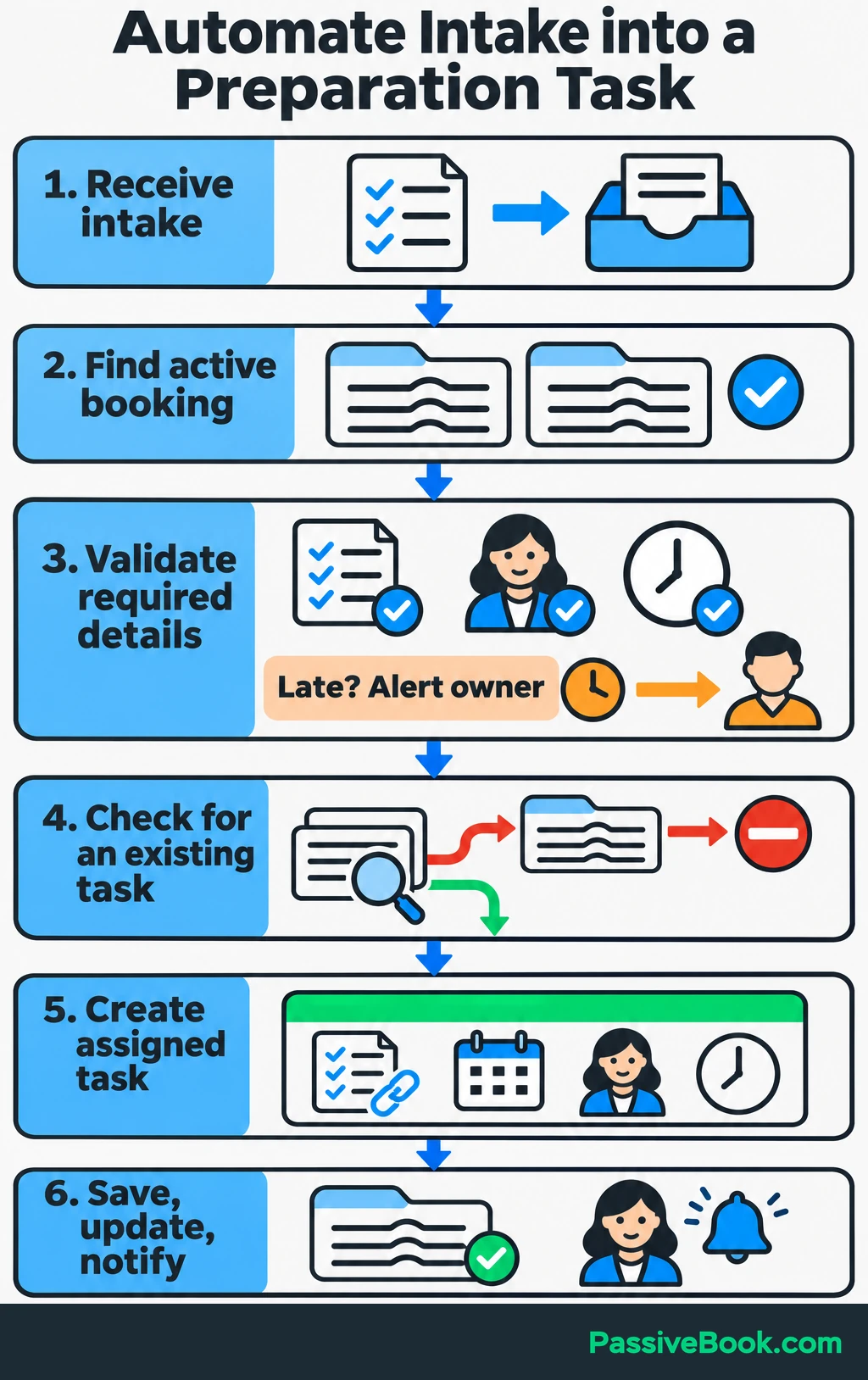
Now build the first complete handoff:
- Receive the intake submission.
- Find its booking record and confirm the booking is active.
- Check that required answers, an instructor, and a preparation deadline are present.
- Check that this booking’s preparation task has not already been created.
- Create the task with the original answers, appointment details, due time, and record link.
- Save the task ID, mark “preparation assigned,” and notify the instructor.
If the preparation deadline has already passed, alert the owner for immediate handling. Do not create an overdue task and hope somebody notices.
Use fixed rules for dates, payment checks, routing, and status changes. AI can help with text that a person can compare against its source.
For an optional intake summary, an instruction could be:
Summarize the supplied guitar-learning goals and list missing information. Use only the supplied answers. Leave unknown details blank and flag contradictions.
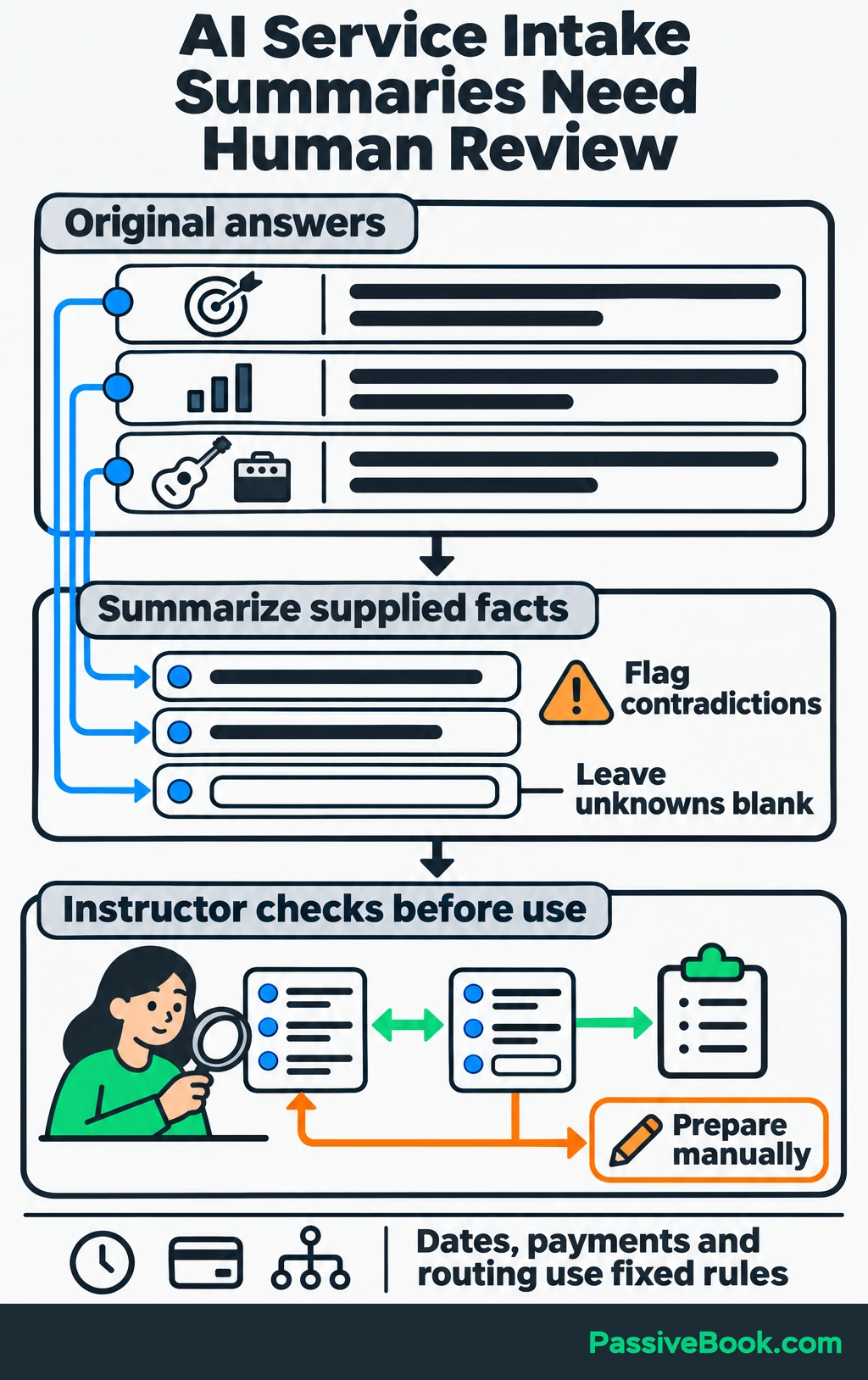
Send only the information needed for that task. The instructor should see the original answers beside the summary and check them before preparing the lesson. Contradictory or unusable output goes to manual preparation.
In my own content workflows, I found that a polished draft was easy to mistake for finished work. I added a separate review state because “the tool produced something” was too weak a completion rule. I would use the same distinction here: summarized intake still needs an instructor’s judgment.
Keep client reminders equally deliberate. Before sending one, look up the current appointment and intake status. Skip an intake reminder when the questionnaire is already complete, and replace old appointment details after rescheduling.
Deliver the Approved Plan
Require an explicit “lesson completed” update before creating the practice-plan task. Use the instructor’s notes as the source for the draft.
Give each plan a predictable structure:
- Lesson Goal: What the client worked on.
- Exercises: The exercises chosen by the instructor.
- Practice Instructions: The instructor’s directions for how to practice.
- Next Session: Questions or observations to bring back.
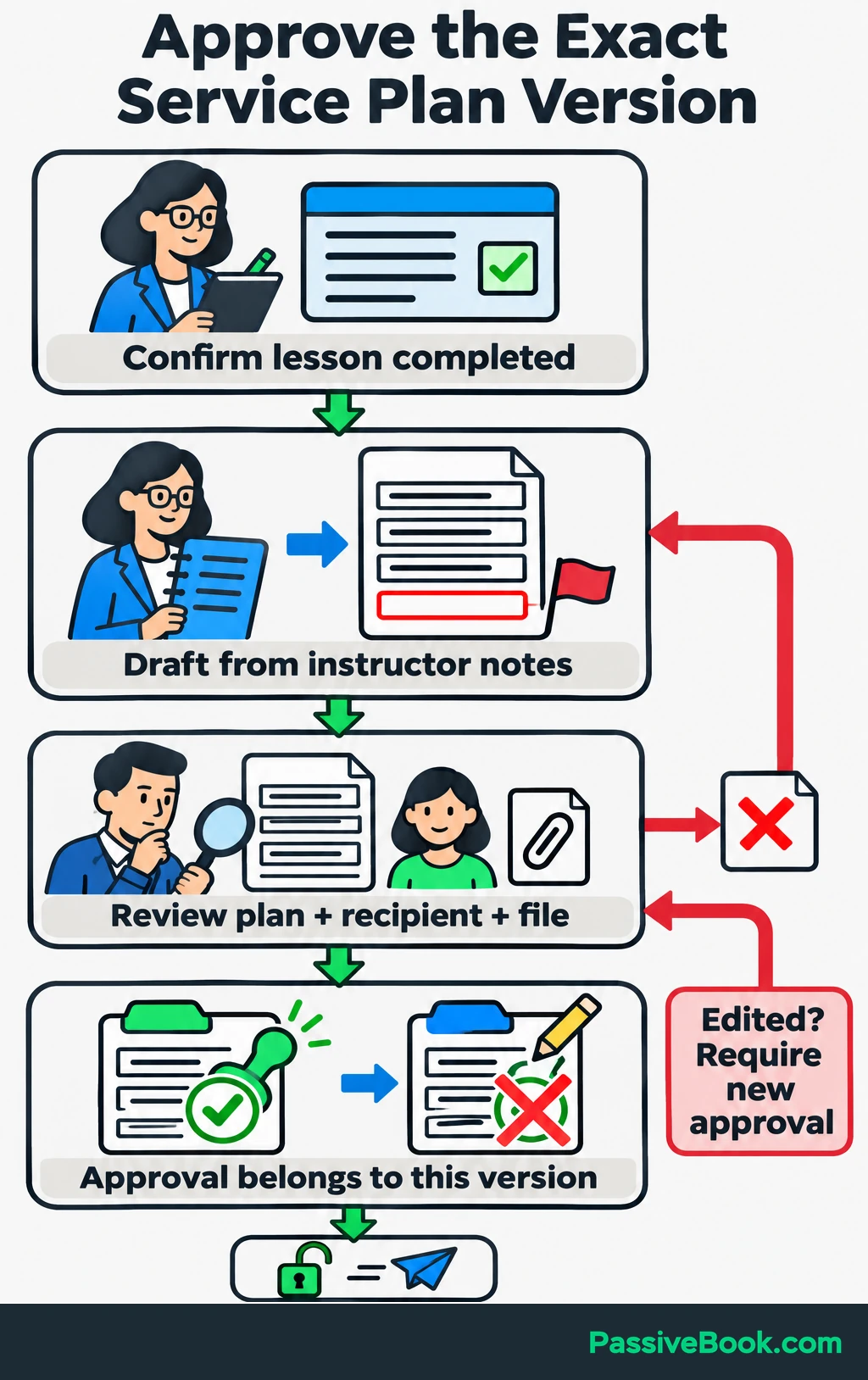
AI can organize supplied notes into that structure. It should flag missing instructions rather than inventing exercises or practice durations.
Separate drafting, approval, and sending. Show the reviewer the proposed plan, recipient, and exact attachment or link. Save approval against that version.
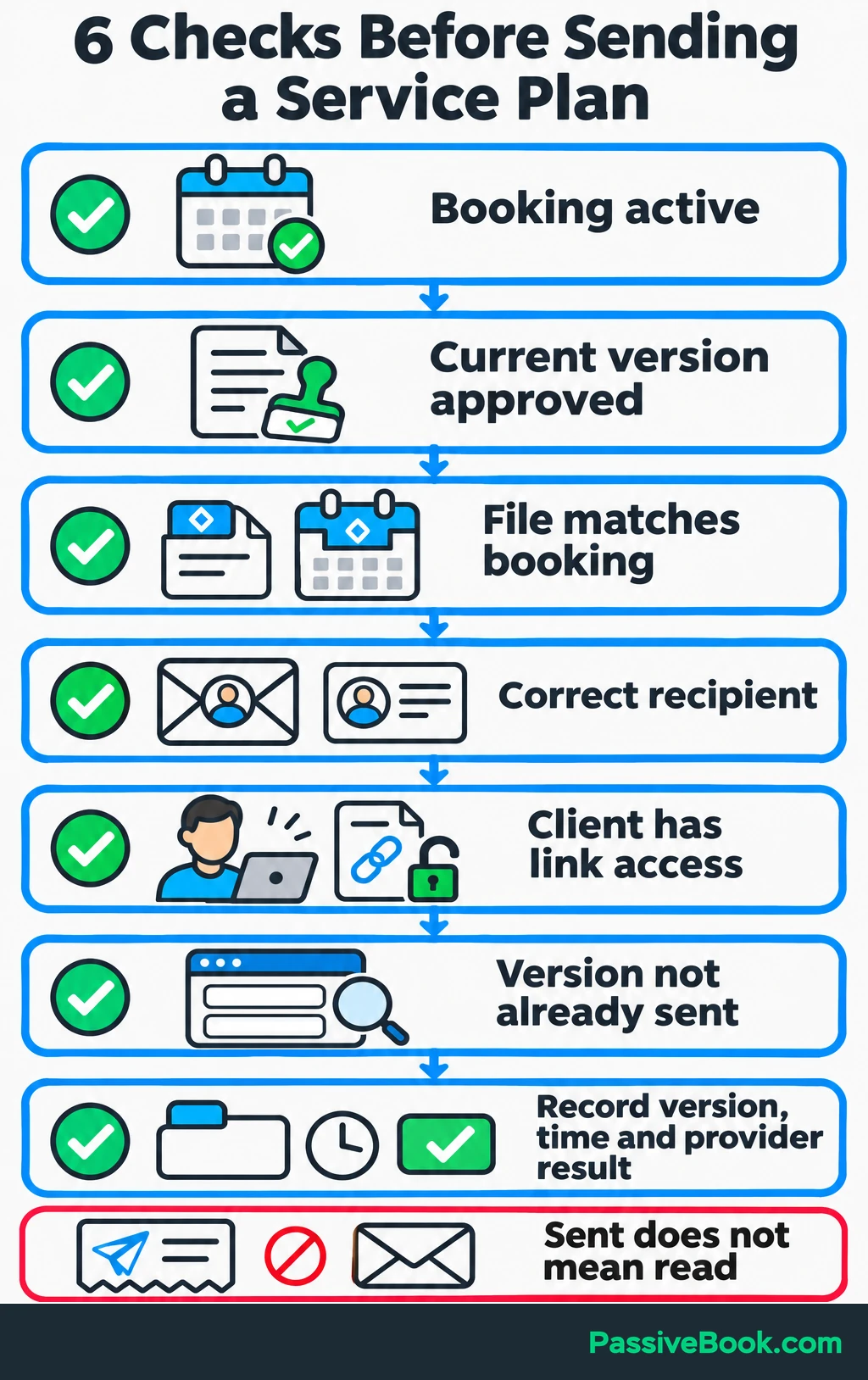
If the plan changes afterward, remove its approved status and require another review. Rejected work stays in revision.
Immediately before sending, check that:
- The booking remains active.
- The current plan version is approved.
- The file belongs to this booking.
- The recipient matches the service record.
- The intended client has permission to open the link.
- That version has not already been sent.
Record the version, sending timestamp, and provider result. Use “sent” for the recorded sending action; it does not establish that the client opened or read the plan.
Follow Up From the Actual Delivery Event
Schedule the check-in from the plan’s successful sending event. Scheduling from the lesson date could produce a message asking about a plan that is still awaiting approval.
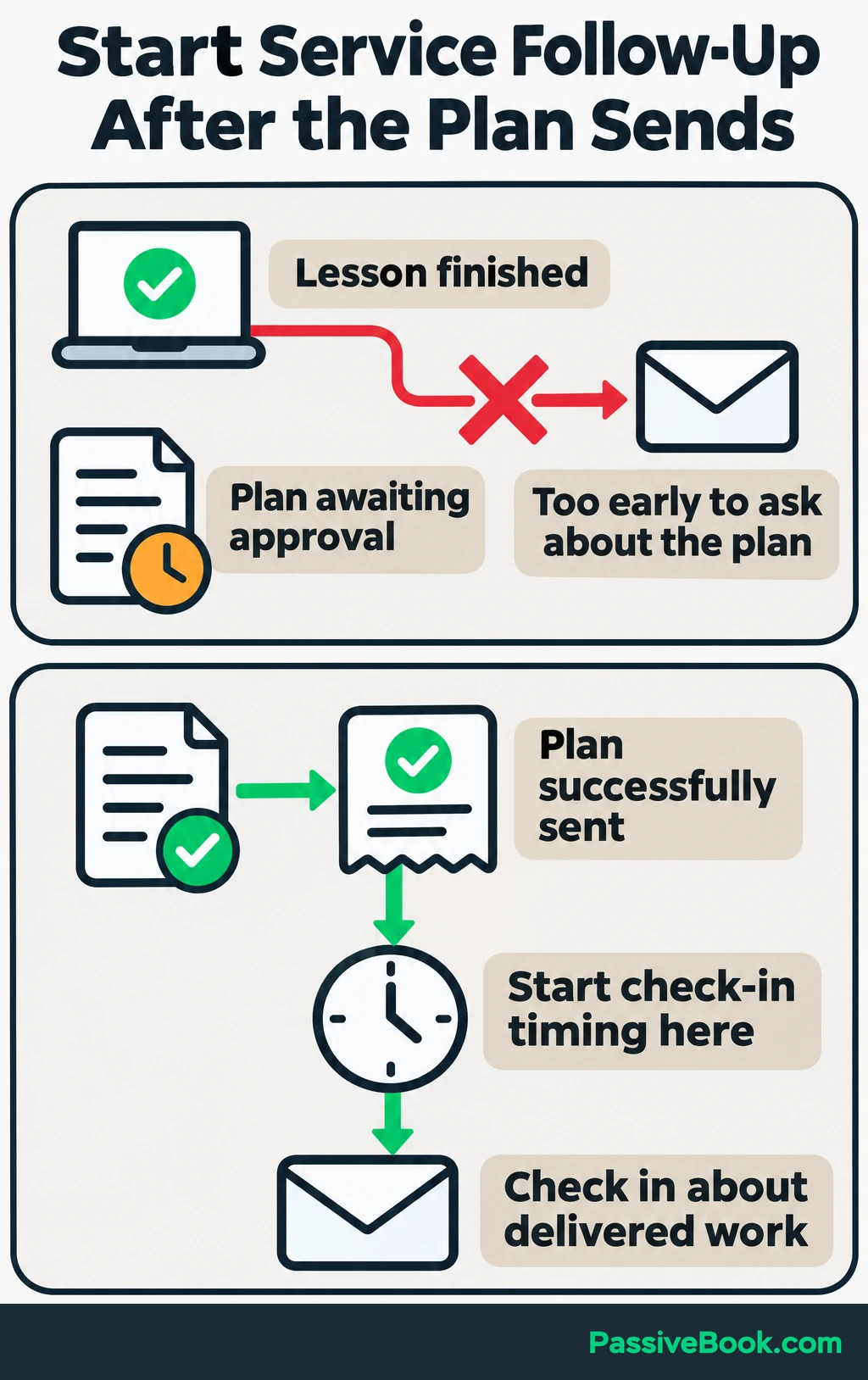
Before the check-in goes out, read the service record again. Skip or redirect it if the client has replied, the service has been canceled, or an unresolved problem needs personal attention.
Ask about the delivered work:
Which exercise felt manageable, and where did you get stuck?
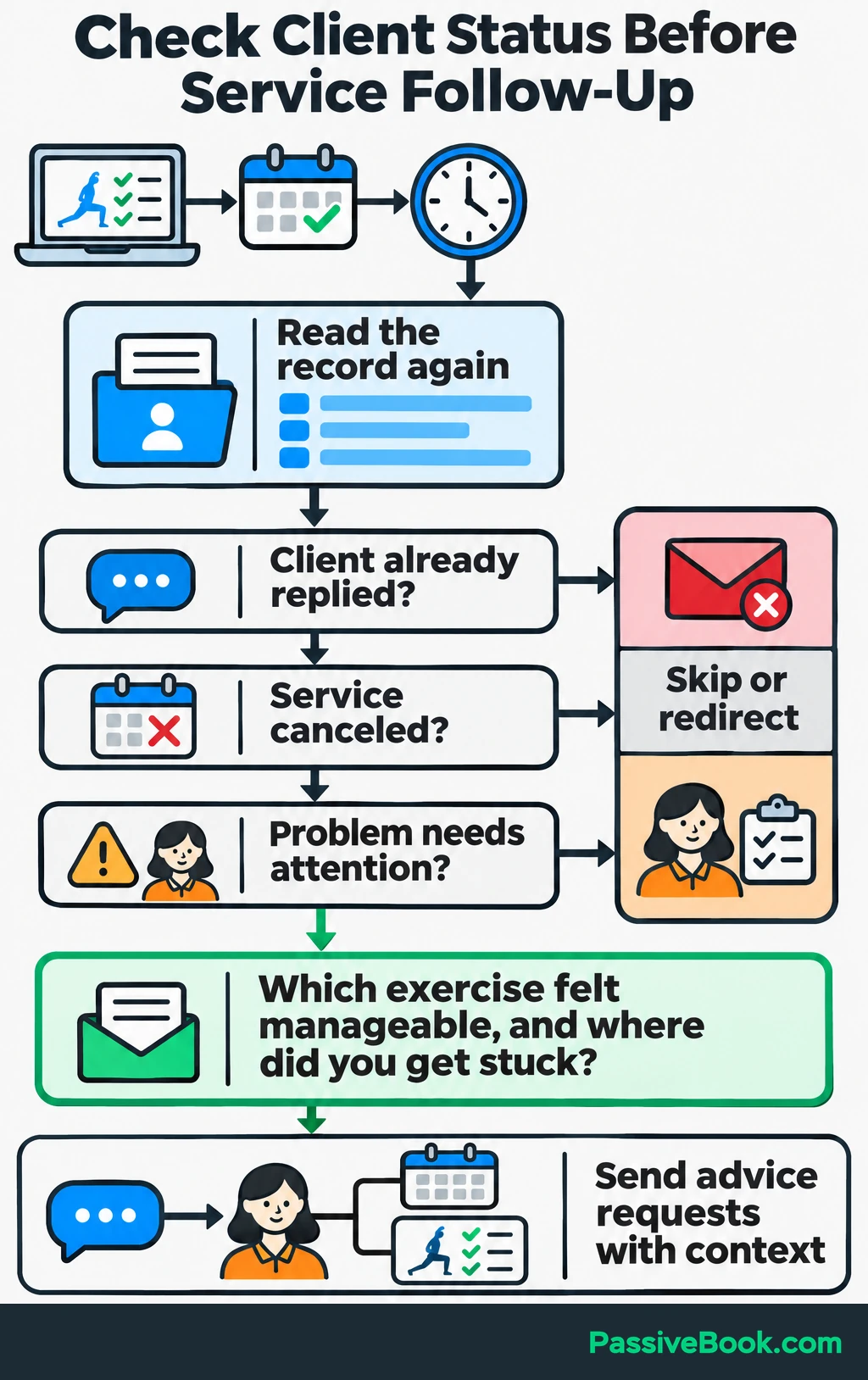
Route replies needing advice to the instructor with the booking and plan attached. A useful reply should not force the client to explain the whole service again.
Give clients a working reply route throughout the process. You can automate the handoffs and still answer people like a person.
5. Make Failures Recoverable
A reliable workflow needs to recognize work it has already done. Apps send event notifications to report changes, such as a payment succeeding. Stripe documents that its notifications can arrive more than once or out of order in its event-delivery guidance.
Record the ID of each notification you process, and give each intended action its own identifier. Two different notifications may otherwise create the same task or send the same message.
Useful action identifiers combine the booking, action, and occurrence:
G104:preparation-taskG104:appointment-reminder:appointment-version-2G104:send-plan:version-3
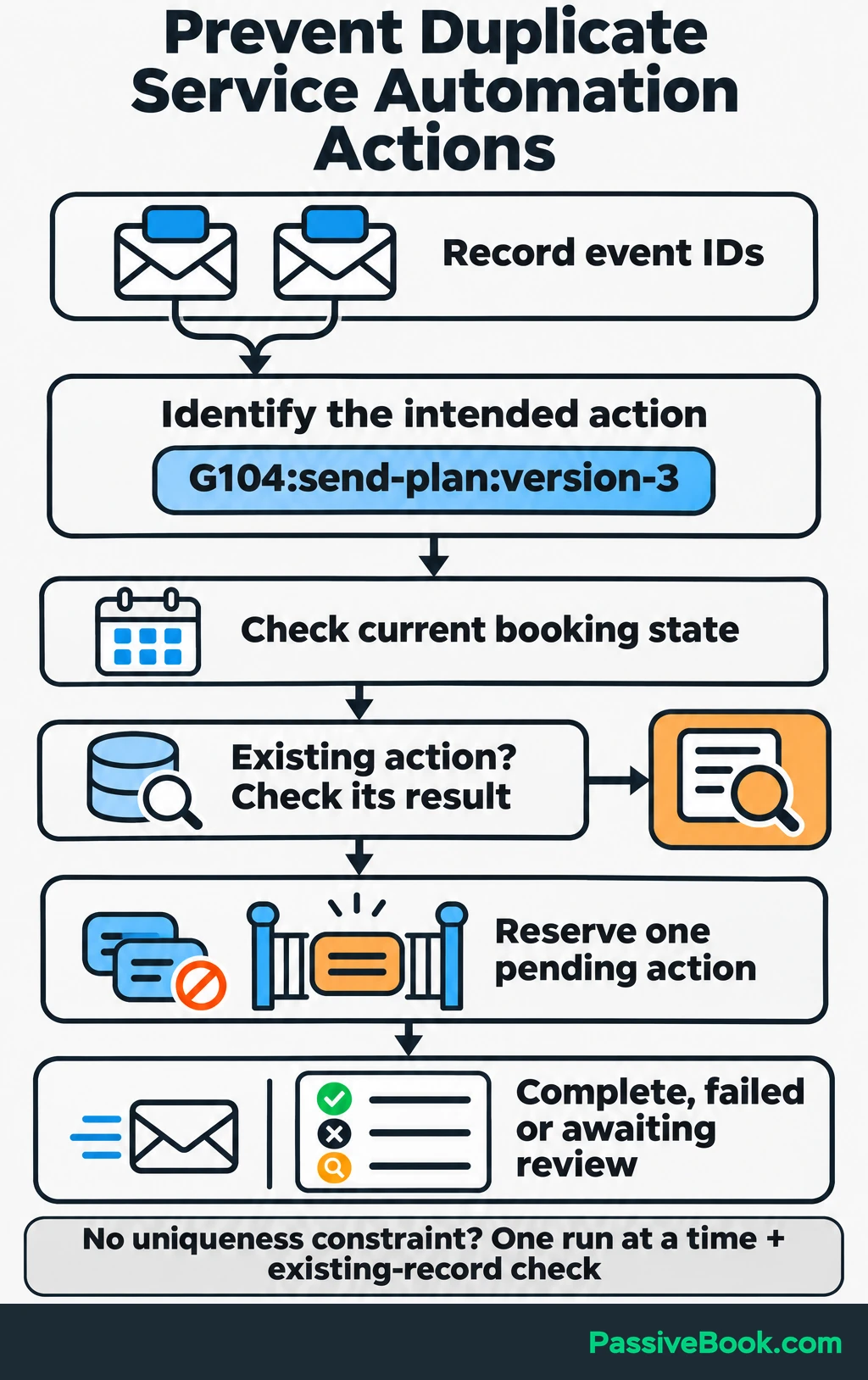
Save a “pending” action record before creating the task or sending the message. Configure the database to allow only one record per action identifier. If your setup cannot enforce that limit, allow only one workflow run at a time and check for an existing action record first. Afterward, mark the action confirmed complete, failed, or awaiting review. Check the result of an existing pending action before trying it again.
Read the current booking state before acting on a delayed event. An old intake event should not reopen a canceled booking.
For temporary connection failures, use delayed retries with a maximum attempt count. Invalid information, expired account access, and exhausted retries should enter a visible repair queue.
Each repair item needs:
- Booking: The affected booking ID and record link.
- Failure: The step that failed and the useful error detail.
- Owner: The person responsible for fixing it.
- Deadline: When the service or next action is due.
- Next Action: What to check, repair, or complete manually.
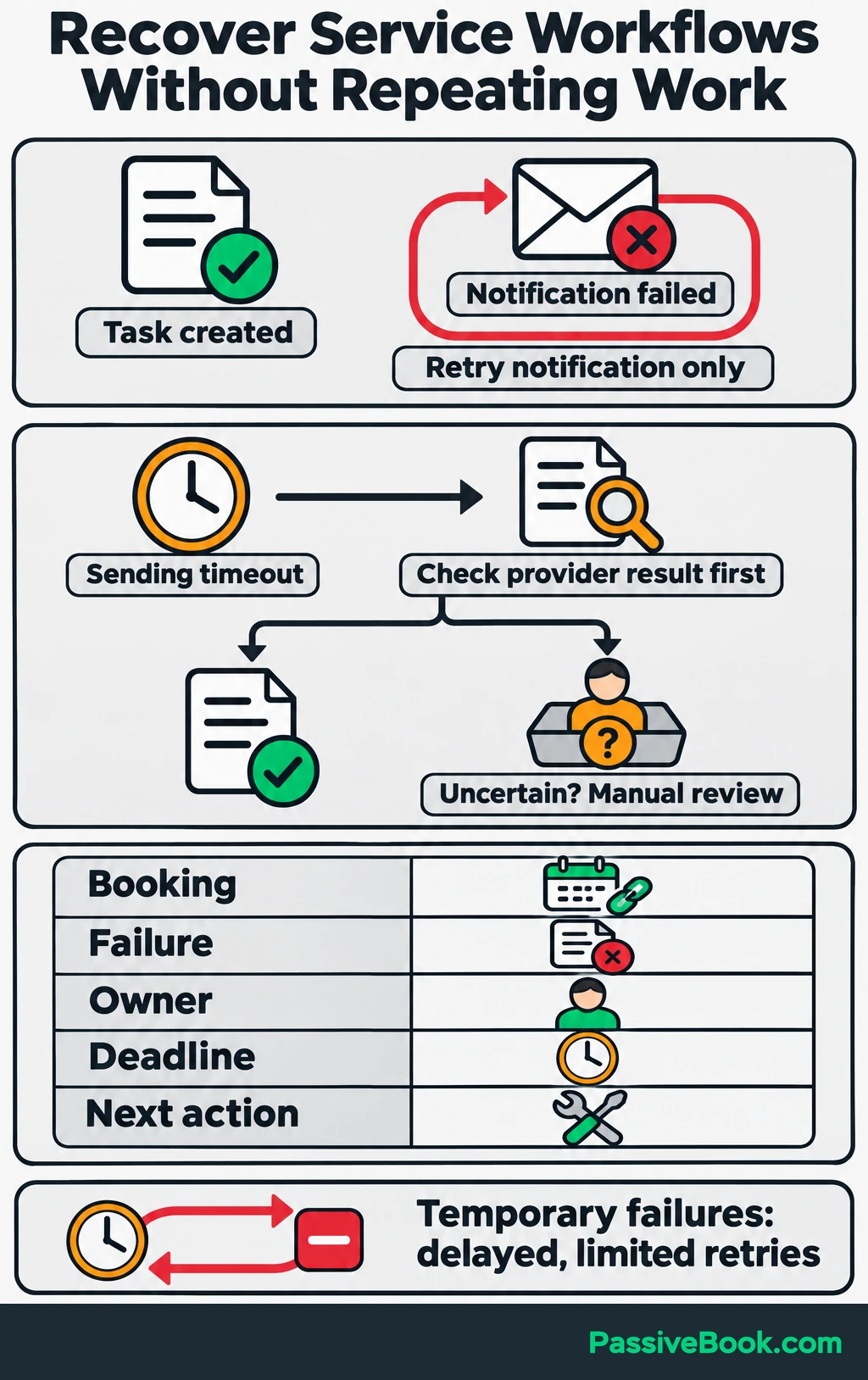
Preserve completed work and resume from the last confirmed action. If task creation succeeded but notification failed, retry the notification.
A sending timeout needs special care because the message may have been accepted before the connection failed. Check the email provider’s result before sending again. If you cannot establish what happened, route it to manual review.
Also check for work that never produced an error: overdue records and confirmed bookings missing from the service system. An alert inside a workflow cannot catch a booking that never entered it.
Finally, define a pause procedure. It should stop new actions and suppress queued reminders or follow-ups for affected bookings. Record manual actions before resuming so the automation does not repeat them.
6. Test the Customer Journey Before Expanding
Use dummy bookings and internal email addresses first. Inspect the actual task, record, file, and message. A successful run in the builder is only part of the check.
| Scenario | Expected Status | Expected Action or Message | Pass Condition |
|---|---|---|---|
| Normal delivery | Moves through preparation, approval, and sent | Correct task, approved plan, then check-in | Each action happens once and records match |
| Missing intake | Awaiting intake | Reminder or owner alert under your rules | No preparation-ready status without required answers |
| Duplicate event | Current valid status preserved | Existing action recognized | No duplicate task or message |
| Delayed event | Latest valid status preserved | Obsolete action skipped | Old event cannot reverse cancellation or later progress |
| Rescheduling | Deadlines updated | Old reminder suppressed; new timing used | Client sees only current appointment details |
| Cancellation | Canceled | Pending work and messages stopped | No later preparation, delivery, or check-in |
| Rejected approval | Revision required | Draft returns to instructor | Rejected version cannot be sent; edits require new approval |
| Expired connection | Repair required | Assigned owner receives an alert | Failure is visible with a next action |
| Sending timeout | Awaiting result check | Provider result checked before retry | Confirmed send is recorded once; uncertainty reaches owner |
Also test a paid booking whose payment is still pending, and submit intake that cannot be matched to a booking.
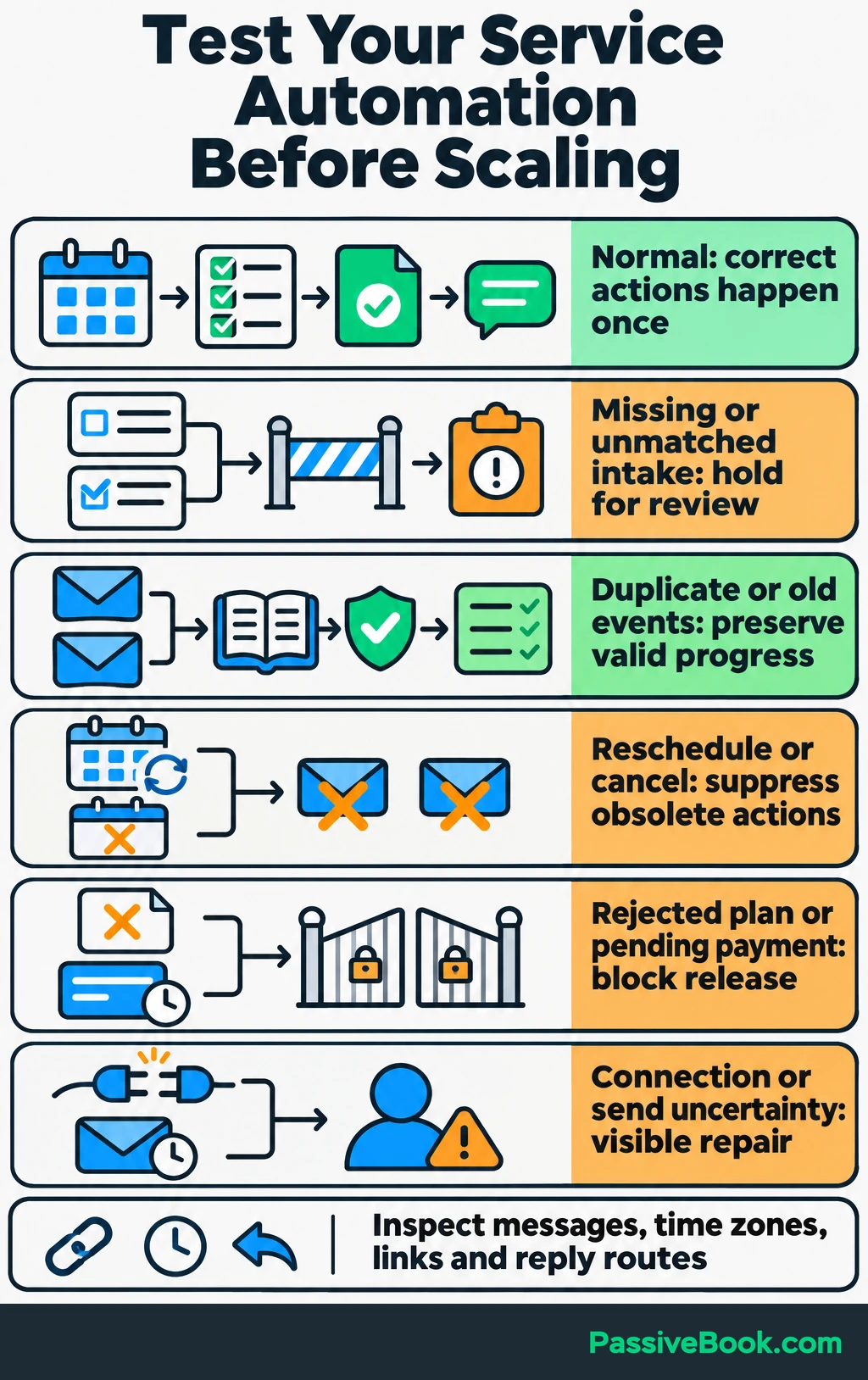
Read the messages as the client would. Check the displayed time zone, links, file permissions, wording, reminder timing, and reply address.
I would start with a live batch small enough to inspect every booking through completion. Keep manual oversight until normal delivery and the recovery paths have passed. Then increase volume without adding several new automations at once.
7. Measure Time Saved and Maintain Service Quality
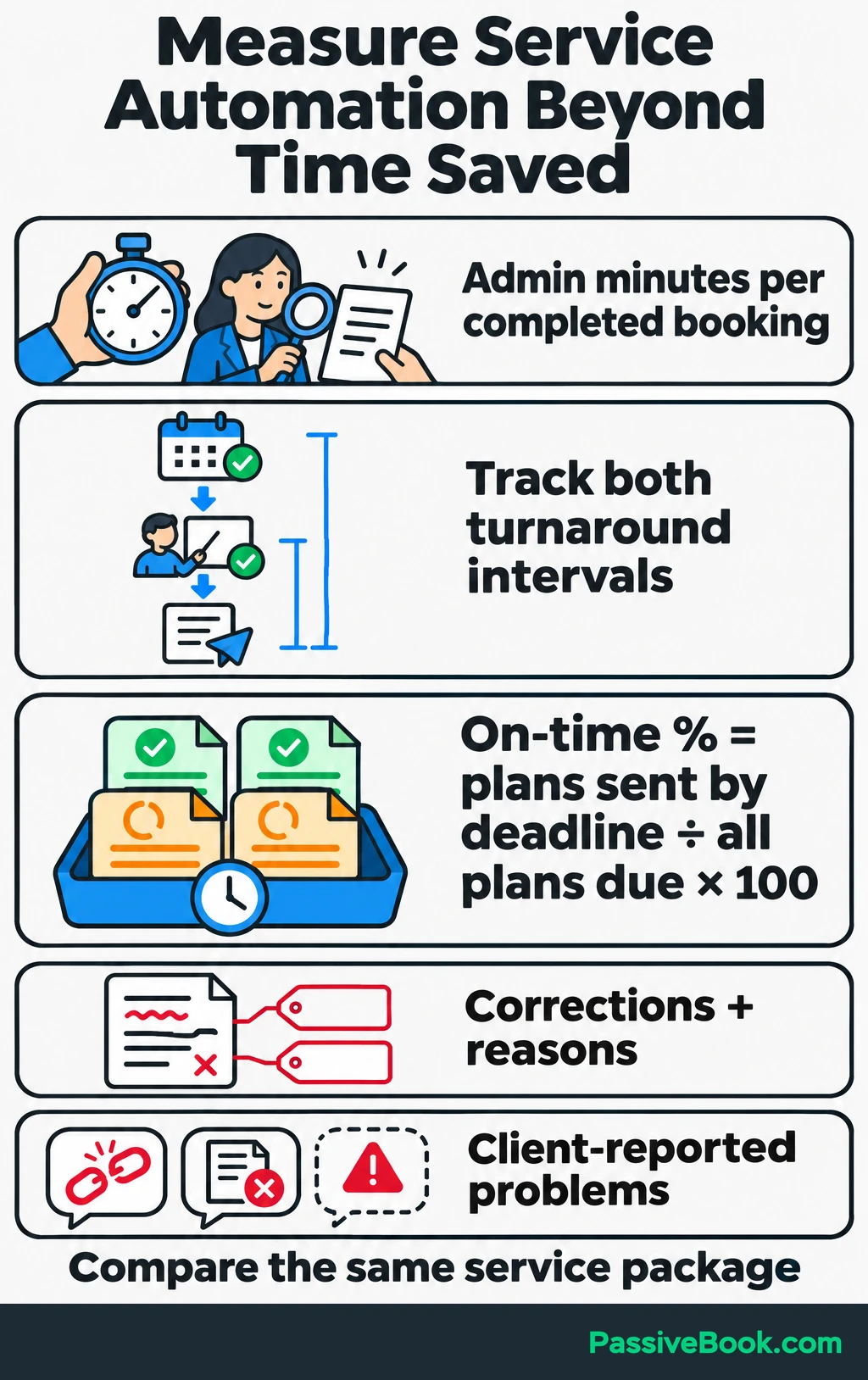
Compare the same service package before and after automation. Otherwise, a shorter lesson or simpler deliverable can make the workflow look better than it is.
Track a small set of measures:
| Measure | What to Record |
|---|---|
| Administrative time | Hands-on minutes per completed booking, including draft review and routine corrections |
| Turnaround | Time from confirmed booking to plan sent; separately track lesson completion to plan sent to show how long drafting, approval, and sending take |
| On-time delivery | Among all plans due in the period, the percentage sent by their deadlines; include unfinished plans in the total due |
| Corrections | Plans or records requiring fixes, with the reason |
| Client-reported problems | Reports of missing messages, wrong details, broken links, or confusing instructions |
To calculate net time saved, count the hands-on minutes removed from completed bookings, then subtract ongoing monitoring, repair, and maintenance time that you have not already counted.
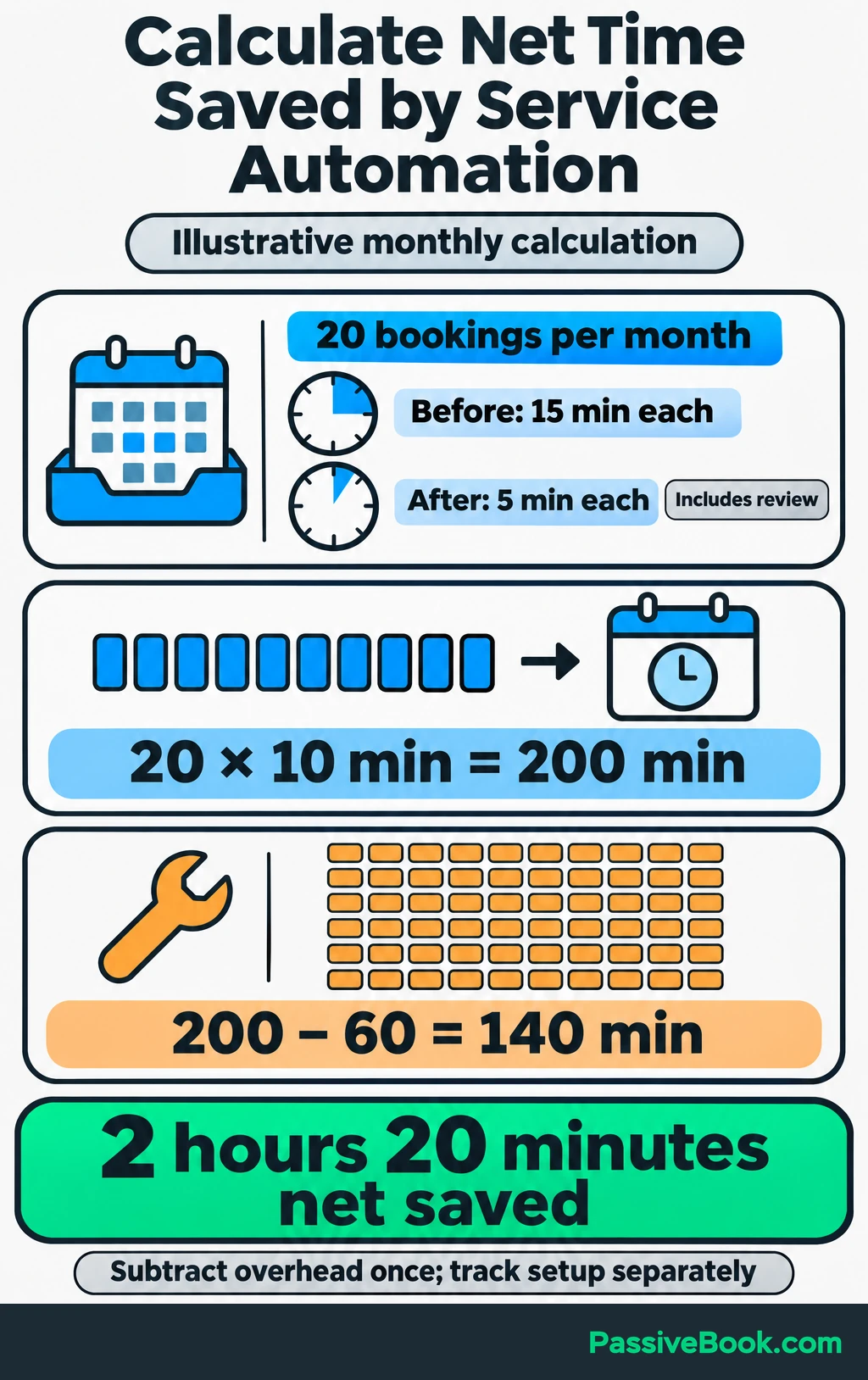
For illustration, suppose 20 monthly bookings previously needed 15 administrative minutes each and now need 5, including review.
That removes 10 minutes per booking:
20 bookings × 10 minutes = 200 minutes saved.
If monthly monitoring and maintenance take another 60 minutes, the net saving is 140 minutes, or 2 hours 20 minutes. Track initial setup time separately so you can judge how long it takes to recover that investment.
Time saved is useful, but repeated corrections or client confusion tell you where the system needs work. Fix that stage before adding more automation.
Keep a short operating guide with the workflow owner, connected accounts, status rules, alert destinations, pause procedure, and recovery steps. Save a working version before making changes, and retest affected paths when forms, apps, or service requirements change.
What Next?
Map one repeated handoff today and write down its trigger, required information, owner, and completion check. Choose one you can verify without guessing, then build that small connection first.
Use the social buttons to share this guide when you’re comparing ways to cut service admin while keeping delivery dependable.
Which handoff would give you the most time back if it worked reliably? Leave your answer in the comments, along with any questions about building it.
Share this post with your friends & followers:

