You have useful customer feedback in emails and messages, but your booking page still asks visitors to take your word for everything. Getting those comments onto the page should be simple.
Then you compare plugins. One collects submissions, another imports Google reviews, and the attractive slider in the demo needs a paid upgrade. A small website improvement starts looking like another software project. The comparison below weighs collection tools, display options, paid upgrades and ongoing upkeep so you can choose a plugin that puts those comments to work without adding a daily chore.
Which WordPress Testimonial Plugin Fits Your Site?
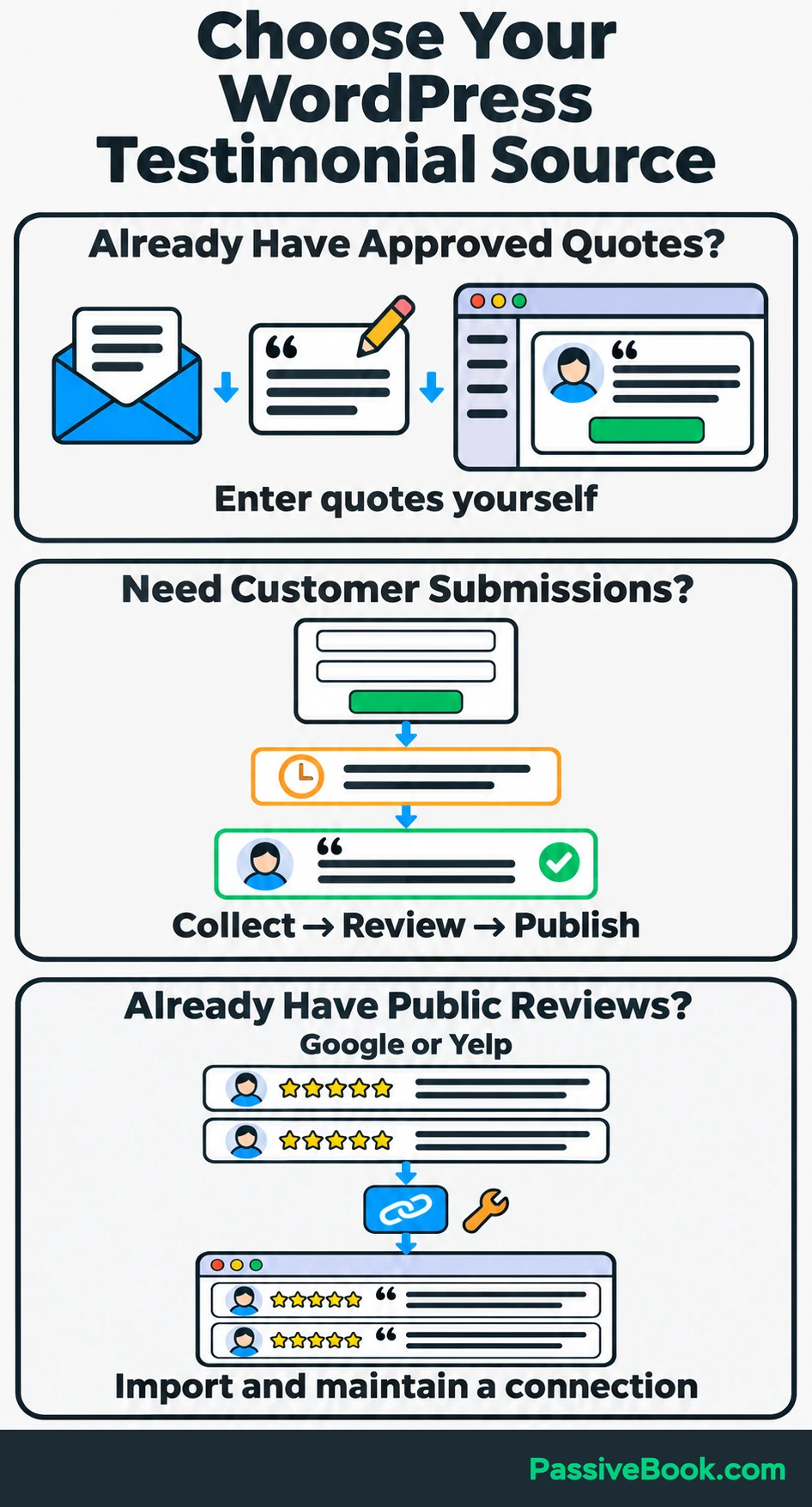
The best WordPress testimonial plugins solve different problems. Choose where your feedback will come from before choosing how it should look.
- Existing Quotes: You enter approved comments yourself. Your current page builder may already have enough features for a few quote cards.
- Customer Submissions: Customers complete a form on your website, and you review their feedback before publishing it.
- Public Reviews: A plugin brings reviews from Google, Yelp or another platform onto your pages.
You can combine collection and public-review feeds, but I would start with one source. Two systems mean two places to check when something stops working.
Throughout this comparison, imagine you run Gentle Coat, a senior-dog grooming business. You want to collect feedback after appointments and show relevant customer stories beside the booking button.
For that setup, I would shortlist Real Testimonials first. Strong Testimonials is another option for a form-and-approval workflow, while Site Reviews makes more sense if you want ratings attached to individual service pages. If useful feedback already lives on Google, consider Rich Showcase before paying for a broader feed tool.
Next, choose the display. I would put two or three readable quotes near the booking button and save a larger grid for a separate reviews page. A slider is useful when space is tight, but it adds movement and controls that you need to check.
On one of my digital-product sites, I copied the same buyer comment onto two pages. Later, I updated the attribution on one and missed the other. That small mess changed what I look for: reusable testimonial records become useful once the same feedback appears in several places.
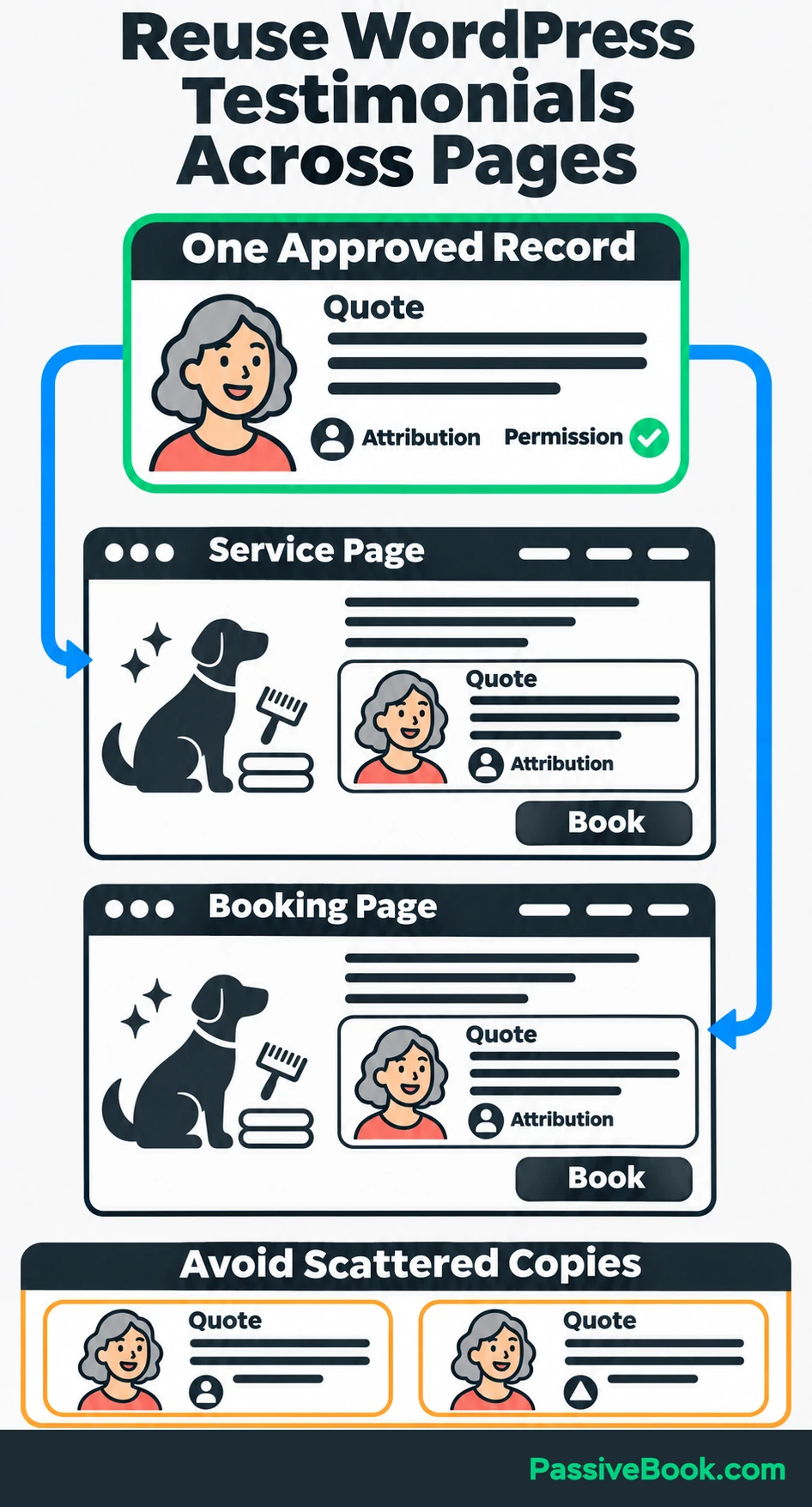
I prefer self-hosted WordPress because I want control over those records, and I avoid another subscription unless it removes work I actually have. A free plugin is a sensible permanent choice when it covers the job.
Before committing, check three things:
- Compatibility: Your setup must allow plugin installation and meet the plugin’s WordPress and PHP requirements.
- Editor Support: Elementor is a page builder, and a native element lets you add testimonials inside it. A shortcode is a short code you paste into a page to insert a saved display; you usually change that display’s settings in the plugin.
- Ongoing Cost: Compare the required feature tier, renewal price, site allowance and work involved in approvals or review connections.
I would also ignore promises of stars in Google search results as a reason to upgrade. Google excludes reviews about a local business or organization from review-star eligibility on that business or organization’s own website, including reviews embedded through third-party widgets. Gentle Coat displaying its own Google reviews does not escape that rule. Google’s review-snippet guidelines
The 9 Best WordPress Testimonial Plugins Compared
These recommendations reflect documented features and reader fit. They are not results from a hands-on speed, security or conversion comparison.
The table puts paid prices in one place. Dollar amounts are USD, and euro pricing stays in euros. Promotional first-year prices are separated from renewals; use the linked vendor pages to confirm your selected license before buying.
For review feeds, an API key is a code that lets the plugin request reviews through your account with the review platform.
| Plugin | Best Use | Feedback Source | Useful Free Features | Main Limitation | Editor Integration | Relevant Paid Price, Renewal and Sites |
|---|---|---|---|---|---|---|
| Real Testimonials | Free collection and display | WordPress submissions and manual entries | Moderated forms, grids, sliders, carousels, CSV import/export | Video capture and popup collection require Pro | Native blocks, Elementor integration and shortcodes | Pro: $49/year for one site, with one year of updates and support; no separate introductory rate shown |
| Strong Testimonials | A straightforward collection workflow | WordPress submissions and manual entries | One collection form and reusable displays | Multiple collection forms require Business; detailed styling may need CSS | WordPress block, widget and shortcodes; shortcode placement in Elementor | Basic: $27.30 first year, then $78/year, one site; Business: $69.30 first year, then $198/year, five sites |
| Site Reviews | Ratings and ongoing review management | WordPress submissions and CSV imports | Approval, replies, rating summaries and page assignments | Custom forms and grid/carousel layouts require paid add-ons | Native blocks and Elementor elements; shortcodes | Premium: €89/year for one site; active license required for add-on updates and support |
| Smash Balloon Reviews Feed | Reviews from several platforms | Google and Yelp free; more sources paid | Review feeds and an initial no-key import | Free ongoing refreshes require your own API keys | WordPress block and shortcodes, including Elementor placement | Basic: $49 first year, then $98/year, one site; Plus: $99 first year, then $198/year, five sites |
| Thrive Ovation | A reusable testimonial library | Captured testimonials, manual entries and WordPress comments | No free edition | A paid commitment from the start; Architect is separate | WordPress shortcodes; dedicated Thrive Architect display element | Standalone: $49 first year, then $99/year, one site |
| Stars Testimonials | Simple Elementor grids | Manual entries free; customer submissions paid | Quote cards, photos, star ratings and color controls | Sliders, masonry layouts and collection require paid plans | Elementor element and shortcodes | Starting at $25/year or $79 lifetime; select site allowance before purchase; no separate renewal rate stated |
| Testimonial Slider and Showcase by RadiusTheme | Configurable sliders | Manual entries free; front-end submissions paid | Grid and slider layouts, typography and responsive columns | Free edition does not include customer submissions | Native block, Elementor widgets and shortcodes | One site: $29 first year, then $23/year, with one year of updates and support |
| Rich Showcase for Google Reviews | A free Google-review display | Google Business reviews | Sliders, grids, lists and rating badges | Google only; automatic refresh requires your own API key | Native block, sidebar widget and shortcodes; Elementor shortcode placement | Free; Google API usage may add costs |
| BNE Testimonials | Classic sidebar widgets | Manual entries | Lists, rotating sliders, images and categories | Submission forms and star ratings require Pro | Sidebar widgets and shortcodes | Free edition available; Pro is offered by inquiry without a public price |
1. Real Testimonials — Best Free Starting Point
Real Testimonials is my first recommendation when you need to collect feedback and display it within WordPress.
Its free edition includes moderated submission forms, grids, sliders, carousels, native blocks, CSV import/export and page-builder integrations, including Elementor. That covers the basic collection-and-display job without a paid license. Real Testimonials’ free features
Start by creating a short collection form and keeping new submissions pending approval. Then create a display you can reuse on more than one page.
Your form gives customers a place to respond, but they still need to know what to share. Start with a short request about their experience and explain where you plan to publish it.

Free AI Customer Proof Studio




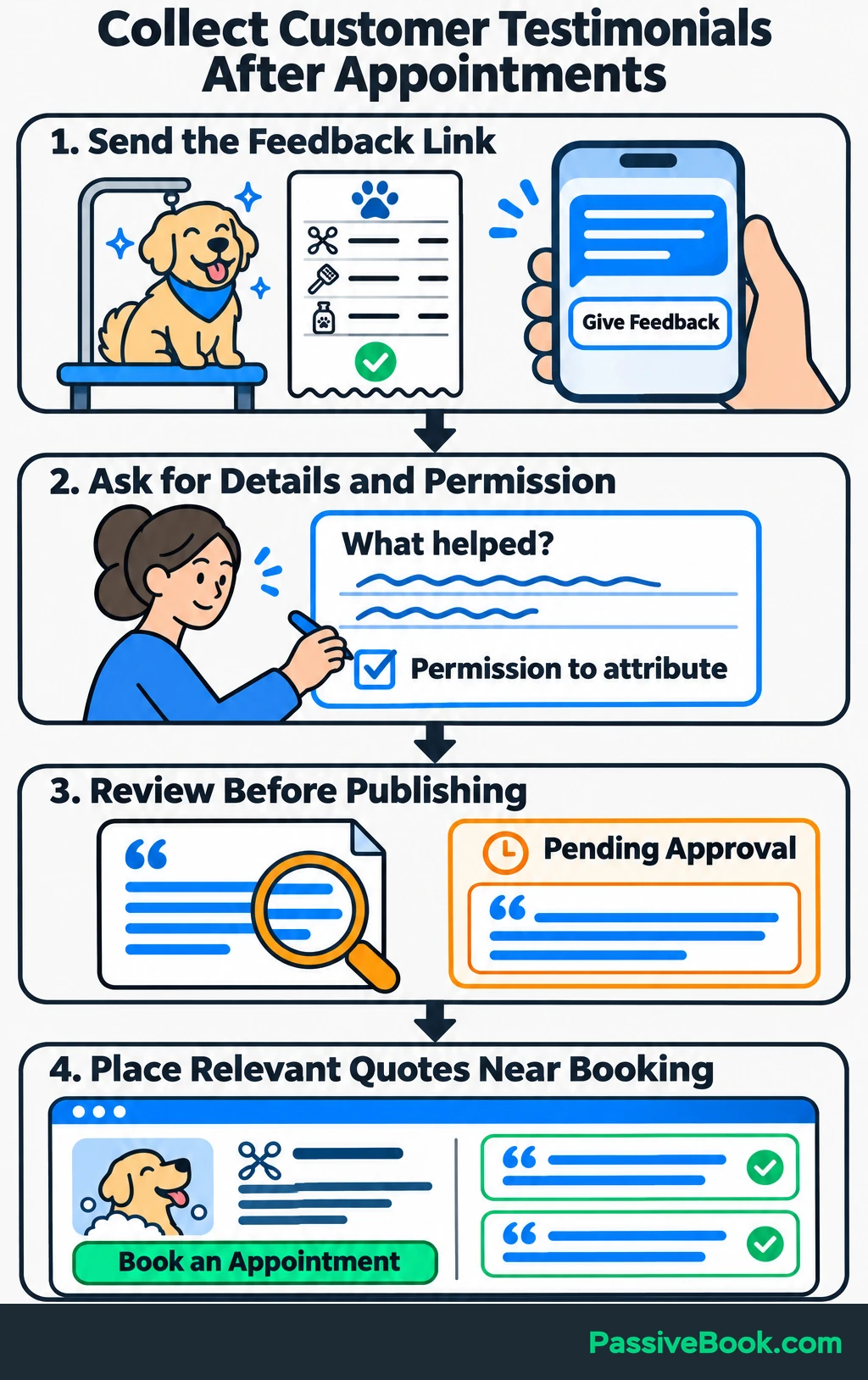
For Gentle Coat, I would use this workflow:
- Send the feedback-form link after an appointment.
- Ask what the customer found helpful, and collect permission for public attribution.
- Review the submission before publishing it.
- Place a few relevant comments beside the booking button.
An illustrative excerpt might be: “You let Milo rest between stages and explained what you were doing.”
That gives a visitor something concrete to assess. It is more useful than another unsupported sentence about excellent service.
Before adjusting every color, preview a free layout using quotes of different lengths. A tidy demo with matching one-line comments tells you little about your actual content.
Keep the free edition if text testimonials and its layouts meet your needs. I would upgrade for a specific requirement, such as customer video recording and submission or popup collection forms.
2. Strong Testimonials — Best for a Straightforward Collection Workflow
Strong Testimonials organizes its output into “views.” A view is a saved set of instructions for showing a collection form, a static display or a slideshow.
The free edition provides one collection form, and you can create multiple display views. Place them through its WordPress block, widget or shortcode; a shortcode also works inside Elementor. Styling largely follows your theme, and changes to fonts, margins or borders may require CSS. Strong Testimonials’ collection and display features
I like this approach when one feedback form is enough. Gentle Coat could use one form after every appointment and maintain separate displays for different pages.
The trade-off is design control. If you want to adjust every detail through visual controls, compare its styling options with Real Testimonials before settling in.
Multiple collection forms sit in the Business tier. I would not buy that tier solely to separate two feedback requests until I had checked whether Real Testimonials’ free collection tools covered them.
3. Site Reviews — Best for Free Ratings and Review Management
Choose Site Reviews when you want an ongoing review system rather than a handful of quote cards.
Its free tools include ratings, written reviews, approval controls, replies, spam controls, rating summaries and CSV importing. Reviews can be assigned to particular pages or services, and the plugin includes native WordPress blocks and Elementor elements. Its documented minimum requirements include WordPress 6.8 and PHP 8.1.2. Site Reviews’ features and requirements
That assignment feature matters when your offers differ. For Gentle Coat, feedback about a short maintenance visit should appear with that service rather than being mixed indiscriminately into every booking page.
I would choose Site Reviews if customers should leave a rating and you expect to manage those reviews regularly. I would choose Real Testimonials for a smaller collection of selected customer stories.
Premium adds custom forms, design tools, grid and carousel layouts, and review filtering. Start with the free review workflow and upgrade only when a missing display or form feature becomes a real obstacle.
4. Smash Balloon Reviews Feed — Best for Reviews From Multiple Platforms
Reviews Feed makes sense when customers have already left useful reviews elsewhere.
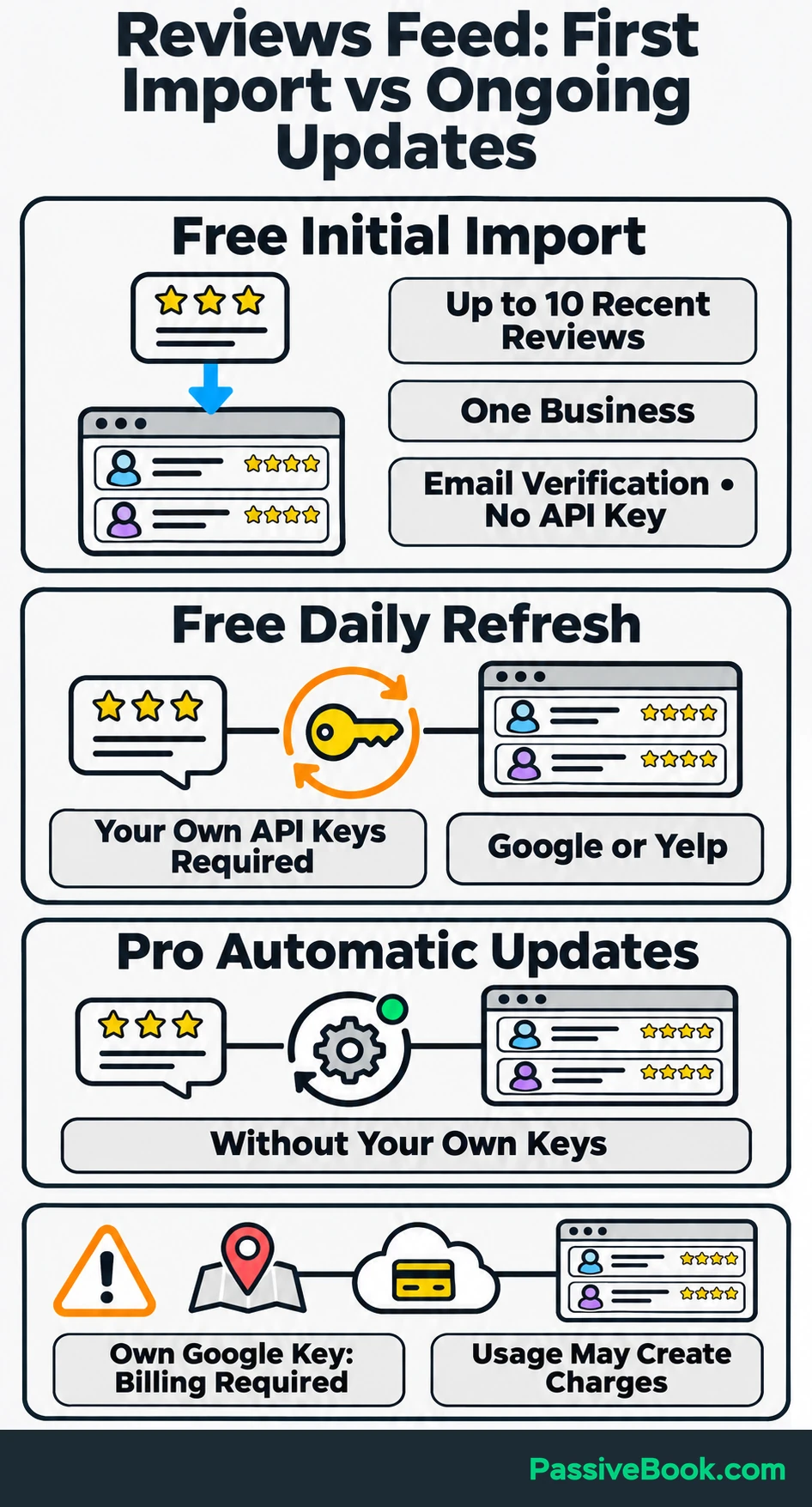
The free edition displays Google and Yelp reviews. Without an API key, you can display up to ten recent reviews for one business after email verification. Ongoing daily refreshes in the free edition require your own API keys. Pro supports automatic updates without your own keys and can display submissions collected through WPForms or Formidable Forms. Reviews Feed’s free and Pro features
That distinction changes the buying decision. Showing an initial batch of reviews and maintaining a refreshed feed are separate jobs.
Basic adds filtering, visual moderation and carousel layouts for Google and Yelp. Facebook and Trustpilot require Plus, so choose your source before comparing the headline price.
If Gentle Coat already has feedback across Google and Facebook, I would consider Plus. If the main goal is asking customers for testimonials after appointments, I would begin with a standalone collection plugin.
Using your own Google Places API key requires a billing-enabled Google Cloud project, and usage can create charges. That applies to the automatic Google connection in Rich Showcase too. A free plugin does not necessarily mean a free connection. Google Places API prerequisites
5. Thrive Ovation — Best for Organizing a Reusable Testimonial Library
Thrive Ovation earns its place when organizing feedback becomes more work than displaying it.
Its central library includes tags, approval states, WordPress-comment conversion and permission-request emails. These tools help you find an appropriate testimonial and track whether the customer has approved its use. Thrive Ovation’s management features
For Gentle Coat, tags could separate comments about first appointments, nervous dogs and maintenance visits. The owner could then reuse relevant stories across booking pages without searching old messages.
You can display testimonials through WordPress shortcodes or Thrive Architect’s dedicated display element. Architect offers the deeper visual editing workflow, but it is a separate product from the standalone Ovation license.
I would consider Ovation for a growing library used across many pages, especially on a site already using Thrive tools. For three quotes beside one button, I would start free. Buying a filing cabinet before you have any files is still shopping.
6. Stars Testimonials — Best for Simple Elementor Grids
Stars Testimonials suits a small, manually maintained collection of testimonial cards.
The free edition supports customer photos, star ratings, color controls and grids. Its Elementor element lets you select a saved display, and you can also place displays through shortcodes. Sliders, masonry layouts and customer collection belong to the paid edition. Stars Testimonials’ free and paid features

I would shortlist it when you already have approved quotes and mainly want them to look tidy inside an Elementor page.
For Gentle Coat, that could mean maintaining a short grid beside the booking information and updating it when a more relevant customer story becomes available.
The paid collection feature accepts submissions through a button or direct link and holds them for approval. Still, if submissions or a slider are essential from day one, compare the free options first.
The starting price alone should not decide this one. Select the number of sites you need and check the resulting total before buying.
7. Testimonial Slider and Showcase by RadiusTheme — Best for Configurable Sliders
RadiusTheme’s plugin is worth comparing when control over the display matters more than free customer submissions.
The free edition includes two grid layouts and two slider layouts, typography and color settings, responsive columns, shortcode generation, a WordPress block and Elementor widgets. RadiusTheme’s free features
That gives you room to match a testimonial section to your existing page without immediately buying more templates.
I would compare its shortcode and Elementor demos using the actual space available near your booking button. Look at the text size, navigation controls and how much of a longer quote remains visible.
Pro adds front-end submissions, more layouts and filtering. Its video layouts display existing YouTube or Vimeo recordings; they do not replace a customer video-recording tool.
Choose this plugin when you want to shape a slider carefully. If collecting feedback is the main job, I would compare Real Testimonials or Strong Testimonials first.
8. Rich Showcase for Google Reviews — Best for a Free Google-review Display
Rich Showcase is my narrower pick when Google reviews are all you need.
The free plugin offers sliders, grids, lists and rating badges, with a native WordPress block, sidebar widget and shortcodes that work inside Elementor. Initial setup can display up to ten Google reviews without an API key.
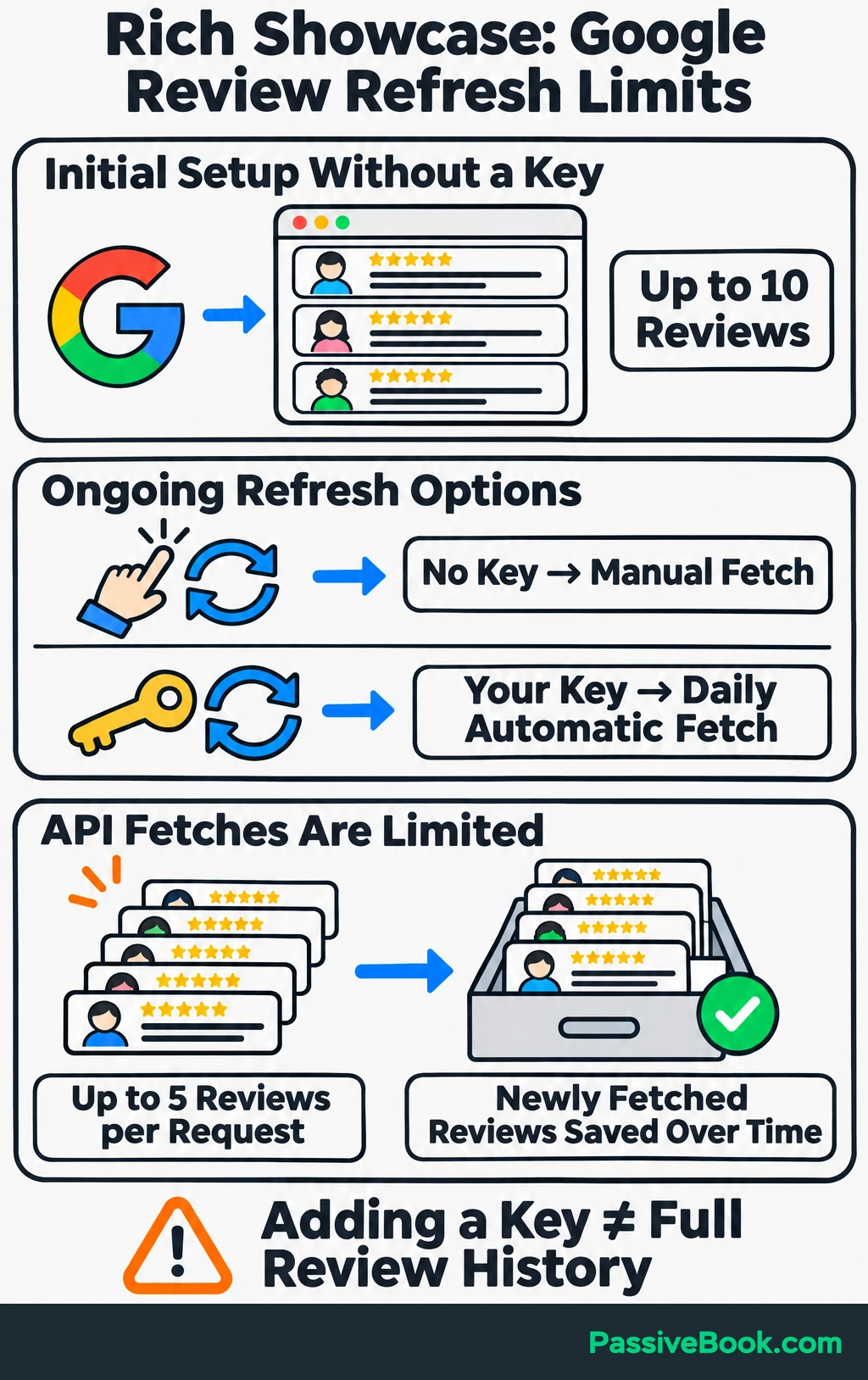
Without a key, you fetch fresh reviews manually. Daily automatic refreshes require your own key, and the Google Places API returns up to five reviews per request. The plugin saves newly fetched reviews over time, so adding a key does not immediately import your complete review history. Rich Showcase’s features and refresh limits
For Gentle Coat, I would choose it if the existing Google listing already contains useful customer feedback and there is no need to combine platforms.
Its review-request button sends customers to Google. It does not collect private testimonials directly into WordPress.
Choose Reviews Feed for broader platform coverage, or a collection plugin when you want customers to submit feedback on your own site.
9. BNE Testimonials — Best for Classic Sidebar Widgets
BNE Testimonials has a clear use: manually entered quotes in an existing widget area.
The free edition displays testimonials as lists or rotating sliders through shortcodes and sidebar widgets. Entries support images, taglines, links and categories, and the styling follows your theme. Star ratings and front-end submission forms are Pro features. BNE Testimonials’ features
I would consider it for a compact quote in Gentle Coat’s existing sidebar, particularly if that area already fits the site’s design.
I would not move to a sidebar layout just to use this plugin. Feedback should sit where it helps someone assess the service, and a quote buried below unrelated widgets may add little.
Compare BNE primarily on its free features. If you need collection forms or ratings, the other free options give you a clearer starting point than requesting a Pro quote.
Check Your Chosen Plugin Before Publishing
A feature list can narrow the choice, but your actual page has the final vote.
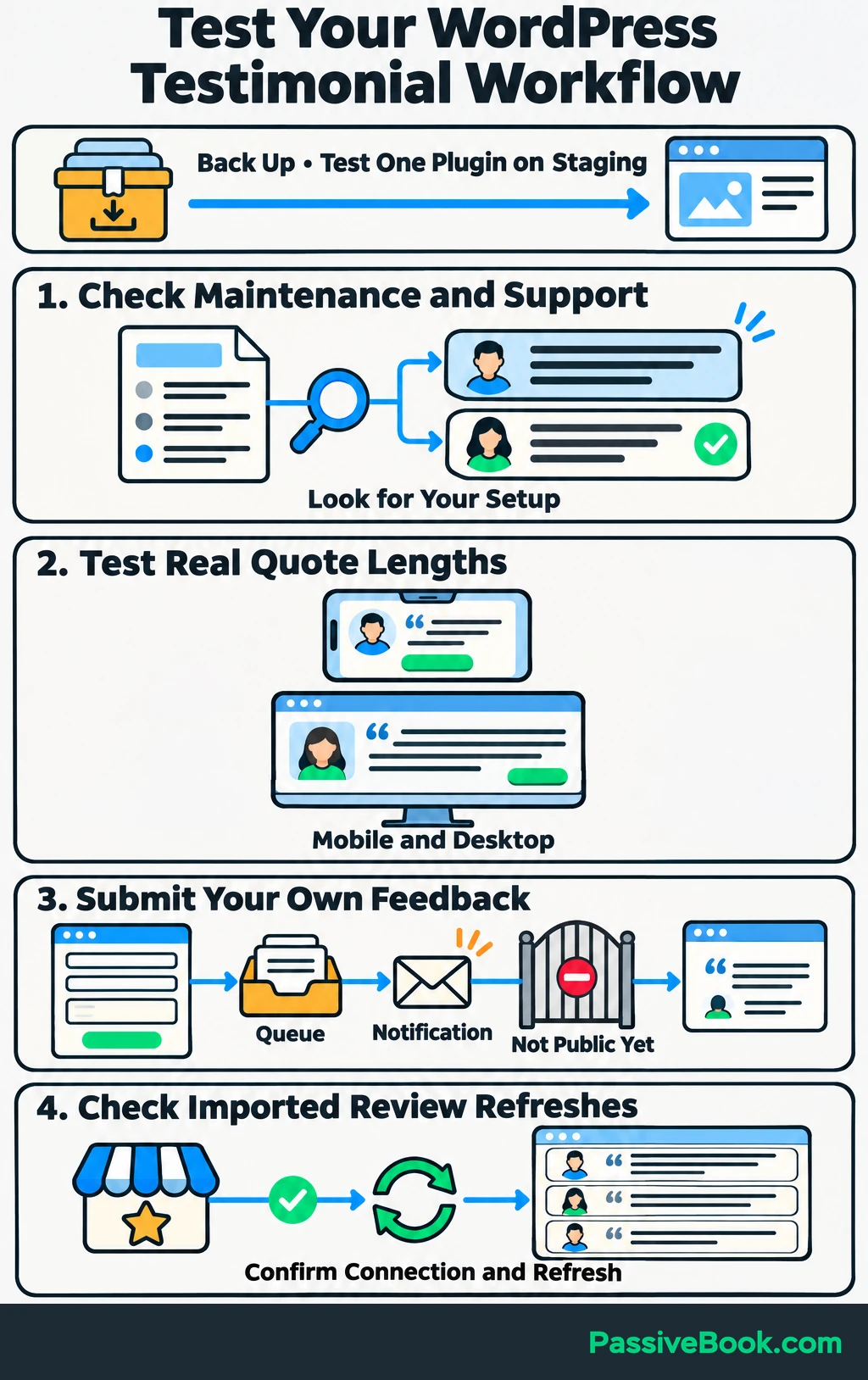
Back up the site and test one candidate on staging, which is a separate copy of your website. Avoid installing several candidates together because you want to know which plugin caused any change.
Use this check before publishing:
- Maintenance and Support: Read the changelog and recent support discussions. Look for problems involving your editor, theme, forms or review source, and check whether the replies address those problems.
- Real Page Layout: Add a short quote, a longer quote and a customer photo. Inspect the booking page on mobile and desktop, including the published Elementor layout.
- Submission Workflow: Submit feedback yourself. Confirm that it reaches the approval queue, notifications arrive and unpublished feedback stays off the public page.
- Review Refresh: For imported reviews, check the connection and latest successful refresh. Confirm what appears when a source has no new reviews.
- Readable Controls: Check text size, contrast, keyboard navigation and any “read more” buttons. A moving slider needs a usable way to pause it; W3C’s carousel guidance explains these controls. W3C carousel accessibility guidance
- Loading Behavior: Compare the same page before and after activation under the same conditions. Investigate oversized photos, slower loading or shifting content before adding more displays.
- Export and Recovery: If the plugin offers an export, inspect a sample file. Check whether it includes testimonial text, attribution, images and permission records, and save missing items separately. Expect display layouts and shortcodes to need rebuilding if you switch plugins.
- Form Data: Inspect what the form stores and what notification emails contain. Keep contact details out of public displays, and make permission for names and photos clear.
For Gentle Coat, I would collect only the information needed to review and publish useful feedback. An appointment-feedback form does not need a customer’s full address or a detailed account of their dog’s medical history.
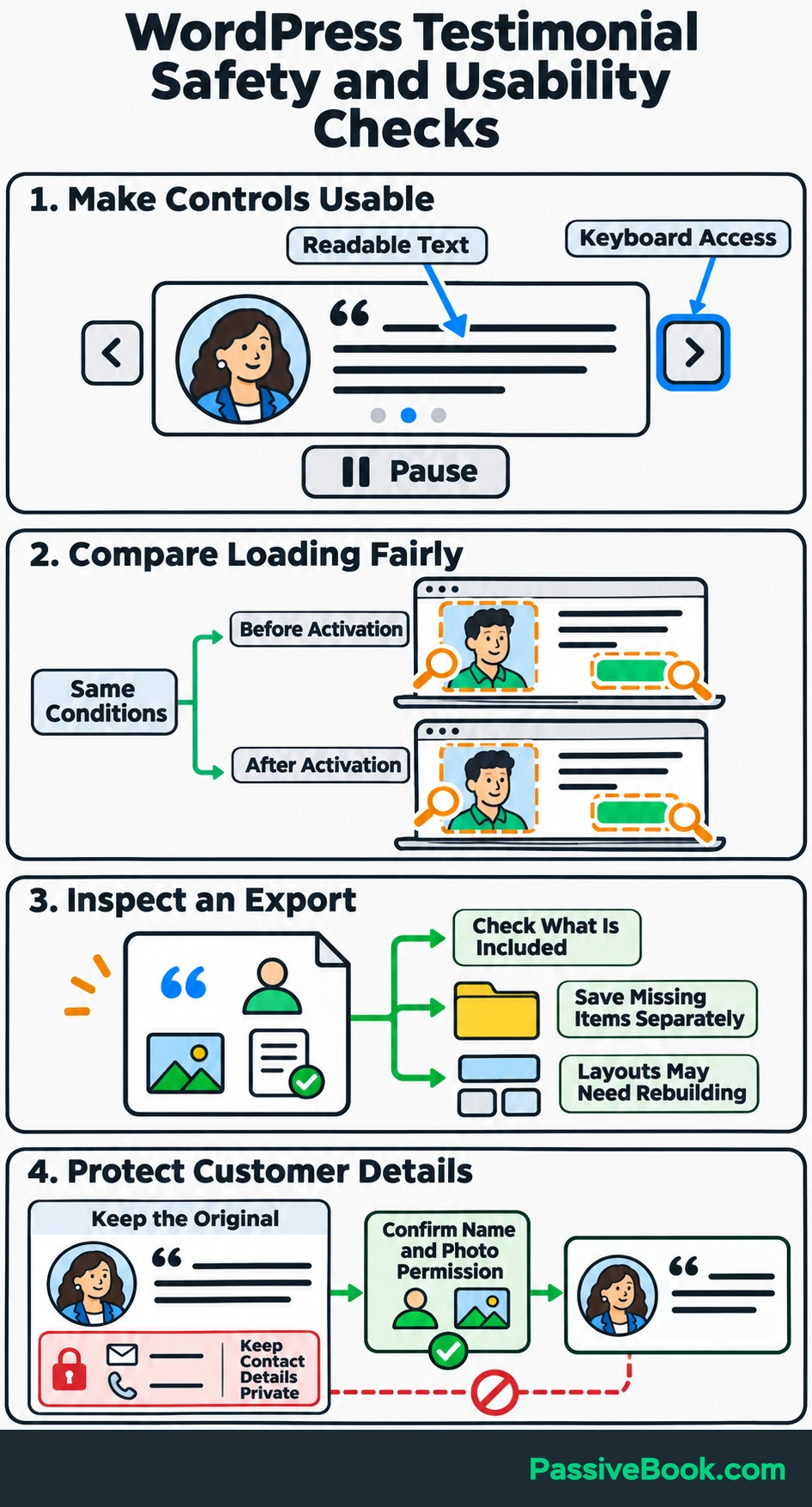
Keep the original comment alongside any approved excerpt so you can check its meaning later. If an edit makes the experience sound better than the customer described, use a different excerpt.
I would launch with one display near the booking button. After it looks right and the collection or refresh workflow works, reuse it elsewhere. There is no prize for placing the same carousel on every page.
What Next?
Choose your feedback source and test one matching plugin on a copy of your booking page. Start with Real Testimonials for collection, Site Reviews for ratings, or Rich Showcase for Google-only reviews.
Use the social buttons to share this comparison when a plugin discussion needs to move from attractive demos to actual requirements.
Which part of your testimonial workflow needs the most help: collecting feedback, approving it or displaying it? Tell me in the comments, and bring any other questions there too.
Share this post with your friends & followers:

