You shortlist a free SEO plugin, then discover the redirect tool you wanted needs a paid plan. Another plugin includes it, but brings a dashboard full of settings you don’t understand.
Now the choice involves more than feature counts. You need something you can configure, afford to renew and trust with your existing pages.
I’ve had SEO tools turn a quick edit into an afternoon of fiddling. This comparison helps you choose a useful setup, understand the costs and check a switch before it reaches your live site.
Which WordPress SEO Plugin Should You Choose?
For a new site, I would start with Rank Math Free. It handles metadata such as page titles and descriptions without an immediate subscription. It also creates sitemaps that list your pages and schema that describes your content to search engines. But the best WordPress SEO plugins suit different ways of working:
- Rank Math Free suits you if you want plenty of features and don’t mind reviewing settings.
- Yoast SEO suits you if writing and readability feedback help you publish.
- The SEO Framework suits you if you want automatic defaults with control over important pages.
- SEOPress Pro is my paid shortlist choice when you need WooCommerce features, advanced schema and redirects at a modest renewal cost.
These are editorial recommendations based on verified features and published costs. I use Rank Math, and the performance figures later come from a separate published benchmark.
Choose one primary SEO plugin. Plugins 1–8 below provide that foundation. Redirection, Link Whisper and Schema Pro handle narrower jobs, so add one only when your main plugin leaves a useful gap.
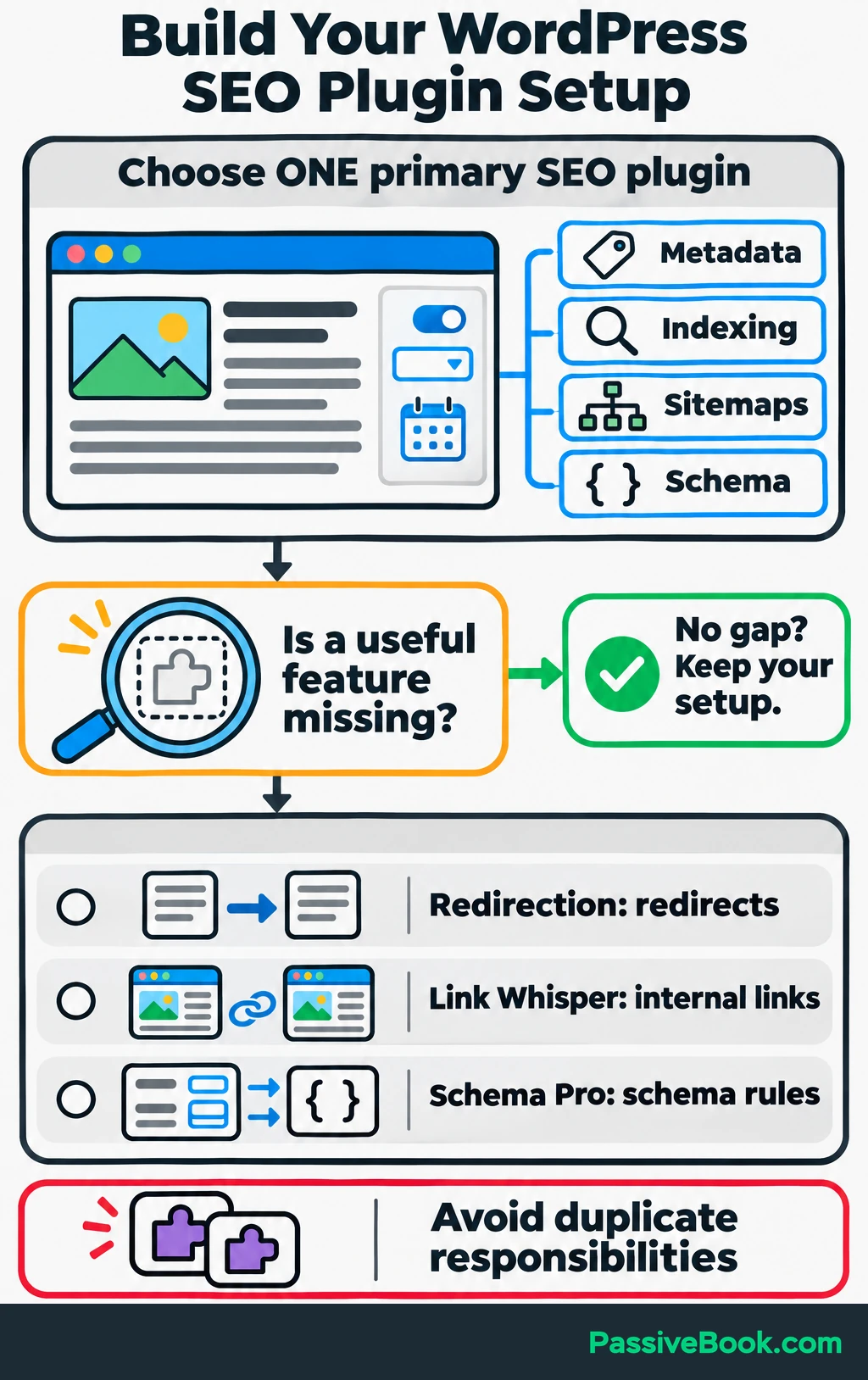
If your existing plugin already meets your needs, keep it. A different dashboard is a poor reason to migrate a working site.
The table below shows full annual payments for selected plans. Free editions have no license charge. Figures exclude applicable taxes; compare your final checkout totals in the same currency. Where a vendor doesn’t state a separate renewal charge, the table identifies its listed annual rate. Check the linked pricing pages before buying, since offers and plan details can change.
| Plugin | Role | Strongest Use Case | Free Features | Paid Upgrade Trigger | First-Year Annual Payment | Annual Renewal | Paid Site Allowance |
|---|---|---|---|---|---|---|---|
| Rank Math | Primary | Broad free toolkit | Metadata, sitemaps, schema, redirects, 404 monitoring | Advanced schema and product controls | Pro: €67.08 introductory offer | €107.88 | Unlimited personally owned sites; excludes clients |
| Yoast SEO | Primary | Writing feedback | SEO and readability analysis, metadata, sitemaps, schema | Redirects, internal-link suggestions, support; enhanced store features | Premium: US$118.80; WooCommerce package: US$178.80 | Same listed annual rates; no separate introductory discount shown | One site per subscription |
| SEOPress | Primary | Affordable premium features | Metadata, sitemaps, content analysis | WooCommerce SEO, advanced schema, redirects, 404 monitoring | Pro: US$49 / US$59 / US$149 | Same price | One / five / unlimited sites, respectively |
| The SEO Framework | Primary | Automatic essentials with overrides | Generated metadata, canonicals, sitemaps, schema | Premium extensions and private support | Pro: US$84 | US$84 listed annual rate | Two sites with all extensions |
| Slim SEO | Primary; Pro is a companion | Minimal setup | Automatic metadata, schema, sitemaps, redirects, 404 monitoring | Visual schema builder, link tools, writing feedback | Pro Personal: US$59 | US$59 | One site |
| All in One SEO | Primary | Guided setup and management | Metadata, sitemaps, TruSEO checks | WooCommerce SEO on Basic; Link Assistant on Pro | Basic: US$49.50 introductory; Pro: US$199.50 introductory | Basic: US$99; Pro: US$399 | Basic: one site; Pro: ten |
| Squirrly SEO | Primary | Guided optimization tasks | Limited keyword research, Focus Pages and audits | Larger cloud-tool allowances | Pro: US$239.88 | US$239.88; vendor states renewal at purchase price | Five sites |
| SmartCrawl | Primary | Scheduled checks | Metadata, sitemaps, content analysis, checkup reports | Scheduled audits, crawls and automatic linking | Pro Basic: US$50 | Separate renewal figure not stated; listed annual rate is US$50 | One site |
| Redirection | Specialist | Redirect management | Redirects, 404 logs, imports and exports | No paid edition | US$0 | US$0 | No paid site limit |
| Link Whisper | Specialist | Internal-link maintenance | Link suggestions and basic reports | Bulk insertion, automatic linking, fuller broken-link reports | Starter: US$97 | US$97 listed annual rate; automatic renewal | One site |
| Schema Pro | Specialist | Custom-field schema mapping | No free edition | Reusable schema rules beyond your main plugin | US$69 introductory offer | US$79 | Unlimited sites |
Keep the paid feature you actually need in view. A cheap entry plan doesn’t help if the tool that prompted your purchase sits two tiers above it.
What Matters When Comparing WordPress SEO Plugins?
Start with the controls your site needs, then compare the editing experience and total cost.
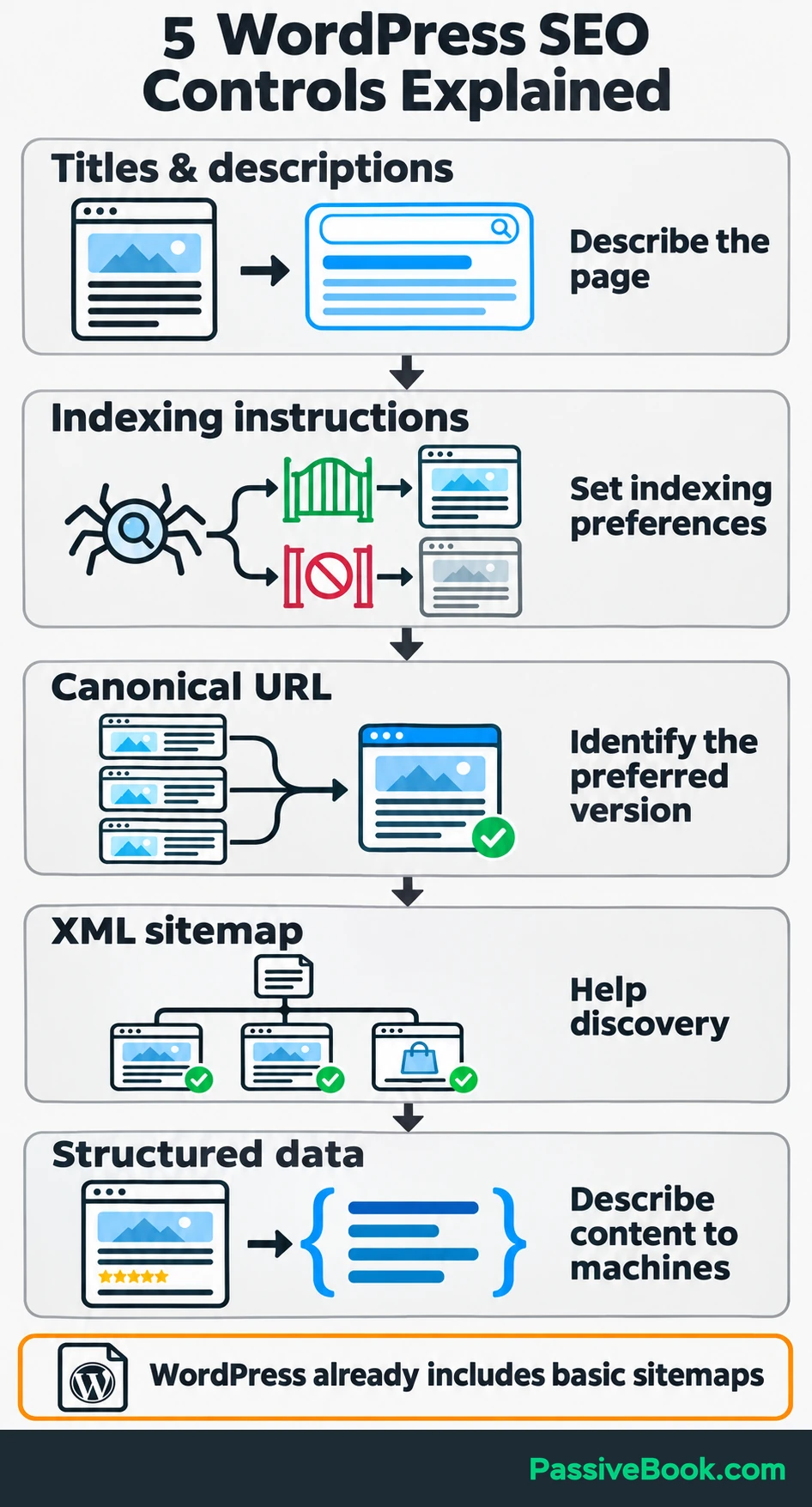
A useful primary plugin should let you manage:
- Page titles and descriptions.
- Indexing instructions, including which pages should stay out of search results.
- Canonical URLs, which identify the preferred version of a page.
- XML sitemaps that list pages you want search engines to discover.
- Relevant structured data, also called schema, which describes your content in a machine-readable form.
WordPress already includes basic XML sitemaps. A plugin earns its place through added controls and the other jobs it handles, rather than the mere presence of a sitemap.
Next, consider how you edit. Some people benefit from feedback beside every draft. Others want sensible defaults and fewer interruptions.
On one of my digital-product sites, I caught myself rewriting a clear sentence because the SEO panel wanted another keyword mention. The new sentence explained less. I kept the clearer version, and I now treat content scores as prompts to inspect something—not instructions to obey.
For cost, compare the tier containing your required features. Include renewals, site allowances, extensions and separately billed AI services.
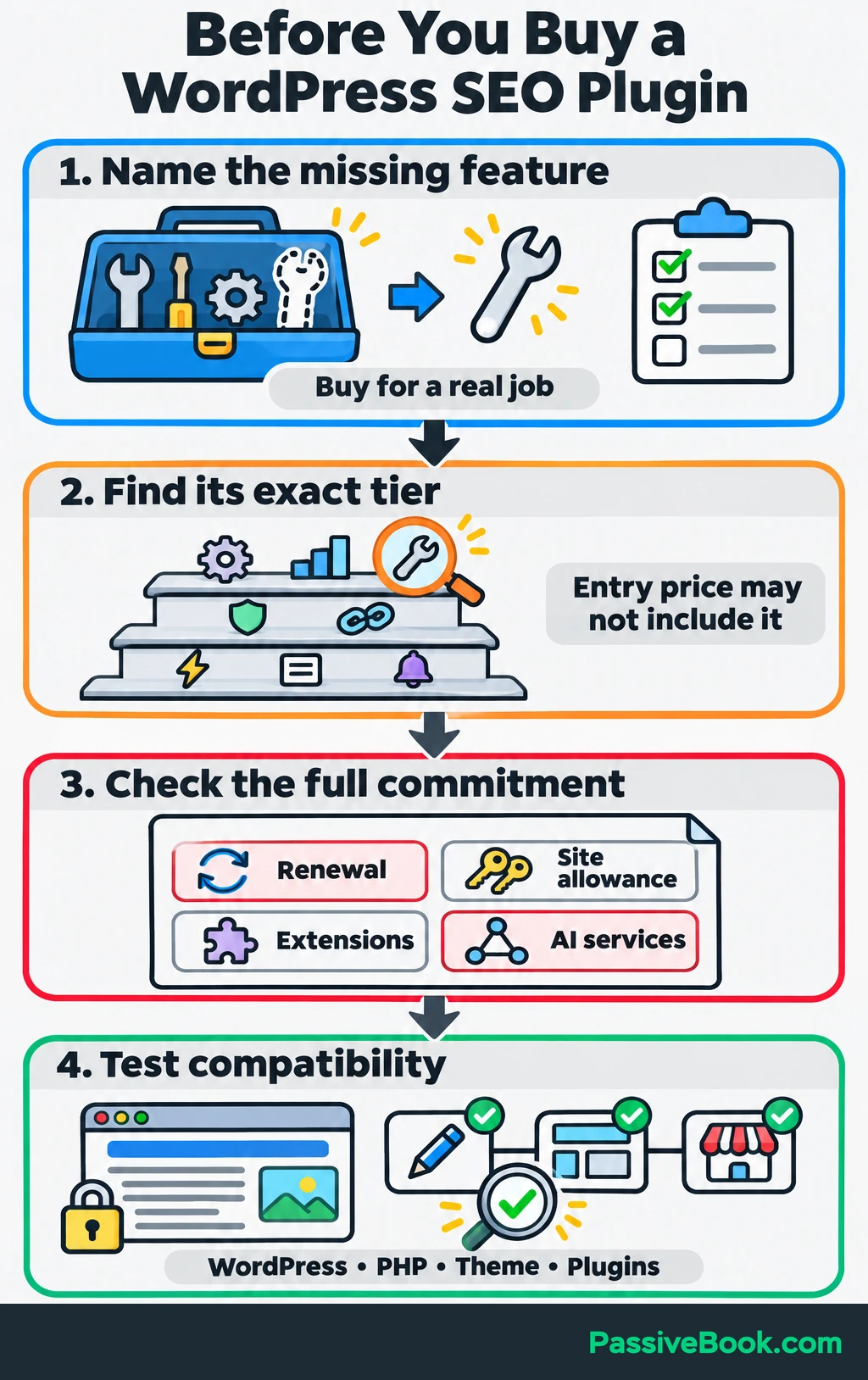
Once two plugins cover your needs, put their full costs side by side. The cheaper introductory offer may not be cheaper to keep.

Free Software Cost Calculator




Compatibility deserves the same attention. Before installing, check the plugin’s current WordPress and PHP requirements, recent updates, and documented support for your editor, theme and other important plugins. PHP is the server software WordPress runs on; your host can confirm its version.
If you use WooCommerce or a multilingual plugin, check that combination specifically. Then try it on staging, a private copy of your site where you can test changes.
WooCommerce Support
For a store, check product and category metadata, product schema, sitemap exclusions and any identifiers or variations your catalog uses.
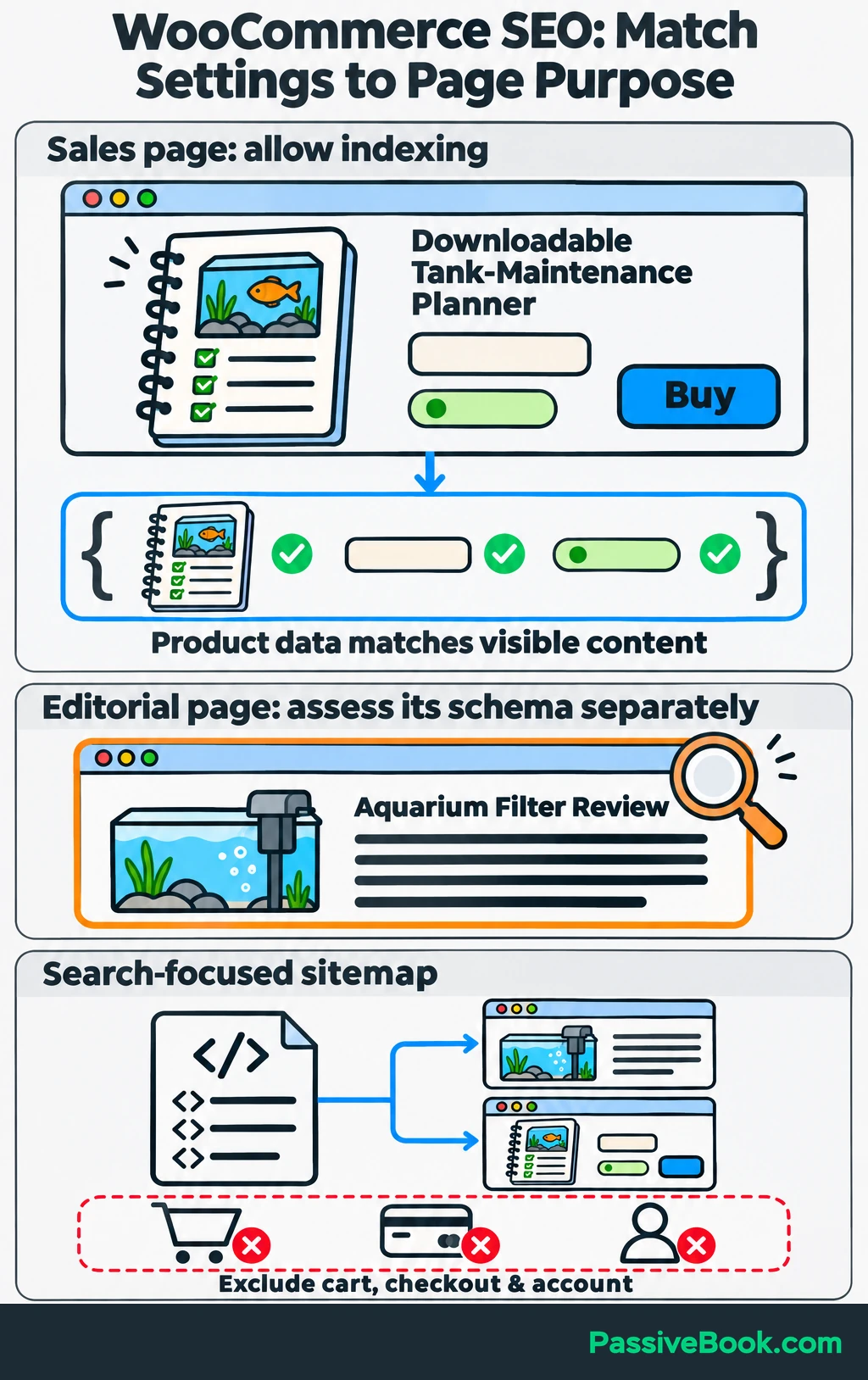
Imagine you run an aquarium-care blog and sell a downloadable tank-maintenance planner through WooCommerce. I would first check that:
- The planner’s sales page can be indexed.
- Its title and description explain what buyers receive.
- Structured product information matches the visible price and availability.
- Cart, checkout and account pages stay out of your search-focused sitemap.
Start by comparing Rank Math’s free WooCommerce module with SEOPress Pro and Yoast’s WooCommerce package. Paying becomes useful when you can name the missing product feature.
Also match schema to the page’s purpose. Your planner’s sales page lets people buy something; an article reviewing aquarium filters serves a different purpose. Google distinguishes pages where customers can purchase from editorial product pages in its product structured-data guidance.
Best All-in-one WordPress SEO Plugins
1. Rank Math — Best for Broad Free Features
Rank Math is my default recommendation for a new site because its free edition handles metadata, XML sitemaps, schema, redirects and 404 monitoring. A 404 log records requests for pages that couldn’t be found.
I use Rank Math and prefer its free feature set over Yoast’s. That preference comes with a condition: you need to review what you enable. Having more controls also means making more decisions.
For the aquarium site, I would begin with article metadata, sitemaps and the WooCommerce module. I would leave unrelated modules off until there was a reason to use them.
Pro becomes relevant for advanced schema and more detailed product controls, including variation identifiers and product-specific analysis. Its license covers your own sites, while client work needs another plan.
Separately sold AI subscriptions add to the plugin cost. I would skip those until a recurring task justifies them.
2. Yoast SEO — Best for Writing and Readability Feedback
Yoast makes sense when you want feedback while drafting. Its free edition combines SEO and readability analysis with metadata, XML sitemaps and structured data.
I would choose it over a more automatic plugin if those checks help you catch unclear passages or missing page details. You still need to judge each suggestion. A readability warning can flag a sentence worth fixing, but a green indicator doesn’t establish that an article answers the reader’s question.
Premium adds redirect management, internal-link suggestions, AI assistance and premium support. It also includes the Local, News and Video SEO plugins.
For enhanced product schema and product-specific analysis, compare the WooCommerce package. It includes Premium, so the two prices in the comparison table are alternatives. Don’t add them together.
If Yoast Free already fits your workflow, there’s no need to upgrade just to keep using it.
3. SEOPress — Best for Affordable Premium Features
SEOPress Free covers metadata, sitemaps and content analysis with unlimited target keywords. It also supports editing through common page builders.
The stronger reason to shortlist it is Pro. WooCommerce SEO, advanced schema, redirects and 404 monitoring sit in the same premium offering, and the vendor lists renewal at the same price.
For the aquarium planner, I would compare SEOPress Pro with the specific paid features missing from Rank Math Free. If nothing useful is missing, I would keep the money.
SEOPress is also worth comparing when you own several sites because its five-site and unlimited-site licenses change the cost substantially.
Optional AI credits or usage through your own provider account cost extra. The plugin license doesn’t cover every connected service.
4. The SEO Framework — Best for Automated Essentials With Manual Control
The SEO Framework suits you if you want core settings handled automatically while keeping the ability to override them.
It generates metadata and manages canonical URLs, sitemaps and structured data. I would shortlist it for a content site whose owner finds large SEO dashboards distracting.
Automatic settings still deserve a review on important pages. For the aquarium planner, I would write a deliberate sales-page title rather than assume a generated title makes the clearest offer.
Its paid Focus extension adds feedback on your use of chosen keywords. That gives you a route to more writing support without choosing a plugin centered on content scoring.
The free core is the starting point I would choose. Pay for Pro when a particular extension or private support solves a problem you already have.
5. Slim SEO — Best for Minimal Setup
Slim SEO makes fewer demands during setup. The free plugin automatically handles metadata, schema and XML sitemaps. It also adds tags that control link previews on social media, plus redirects and 404 monitoring.
I would choose it when reducing configuration work matters more than having a detailed optimization panel beside every draft.
Review generated metadata on your homepage, strongest articles and product pages. For example, a planner description should explain that it is a downloadable tool for tracking tank maintenance. Automatically pulling the opening text may produce something less useful.
Slim SEO Pro adds a visual schema builder, contextual link suggestions, link-health tools, Search Console reporting and a writing assistant.
Pro is a separate companion plugin and can complement another primary SEO plugin. Its presence doesn’t require switching your whole SEO setup. Optional AI generation through your own provider brings separate usage charges.
6. All in One SEO — Best for Guided SEO Management
All in One SEO, usually called AIOSEO, is worth considering when guided setup and visible content checks help you stay consistent.
The free Lite edition lets you edit metadata and manage sitemaps. Its TruSEO analysis flags issues with titles, descriptions and keyword use. Start there if those functions cover your needs.
The main buying decision is the paid tier. WooCommerce SEO is included in Basic, Local SEO starts on Plus, and Link Assistant starts on Pro. Search Statistics with keyword tracking sits on Elite.
I would pay particular attention to the Pro renewal before buying it for internal linking. Compare that annual commitment with a specialist plugin and with the linking tools you already own.
The Writing Assistant also has a separate cost consideration. Its full capabilities require an SEOBoost subscription. That service is distinct from AIOSEO’s other AI features and credits.
7. Squirrly SEO — Best for Guided Optimization Tasks
Squirrly suits people who want a prioritized set of SEO tasks. Live Assistant gives feedback as you write, and Focus Pages collects checks for pages you want to improve. Keyword research and suggested goals help you choose search terms and decide what to work on next.
You’ll find it in the WordPress directory as GEO Plugin by Squirrly SEO. Its cloud tools require a Squirrly account.
The free allowance covers one site, one Focus Page, five keyword researches per month and one audit page per month. Try that allowance before committing to Pro.
For the aquarium site, I would use the planner’s sales page to assess whether the guidance produces useful work. Does it help you spot and fix something meaningful, or mainly give you another list to maintain?
I would choose Pro only if its guidance and cloud allowances earn their place in your publishing routine. Basic title and sitemap controls alone wouldn’t justify that subscription for me.
8. SmartCrawl — Best for Scheduled SEO Checks
SmartCrawl’s free edition covers metadata, XML sitemaps, content analysis and SEO checkup reports.
Pro adds scheduled audits, URL crawls and automatic linking. A crawl visits your site’s URLs to look for issues, such as broken links.
That makes SmartCrawl worth comparing when you repeatedly perform the same checks by hand. I would start with the report, though. A scheduled scan saves little time if you never act on what it finds.
For the aquarium site, useful recurring checks might include broken links in older guides and problems affecting the planner page. Those are concrete jobs you can compare against your existing tools.
Look at the standalone Pro license before buying a broader WPMU DEV membership. Choose the bundle only when its other products also serve a purpose.
Best Specialist WordPress SEO Plugins
A specialist should fill a named gap. Check your primary plugin first so you don’t pay twice for redirects, link suggestions or schema.
These three plugins perform different jobs. You might need one, several or none.
9. Redirection — Best Free Redirect Manager
Redirection handles 301 redirects, 404 logs, permalink-change monitoring and redirect imports or exports. A 301 redirect sends visitors and search engines from an old URL to its permanent replacement.
It’s free, with no premium edition.
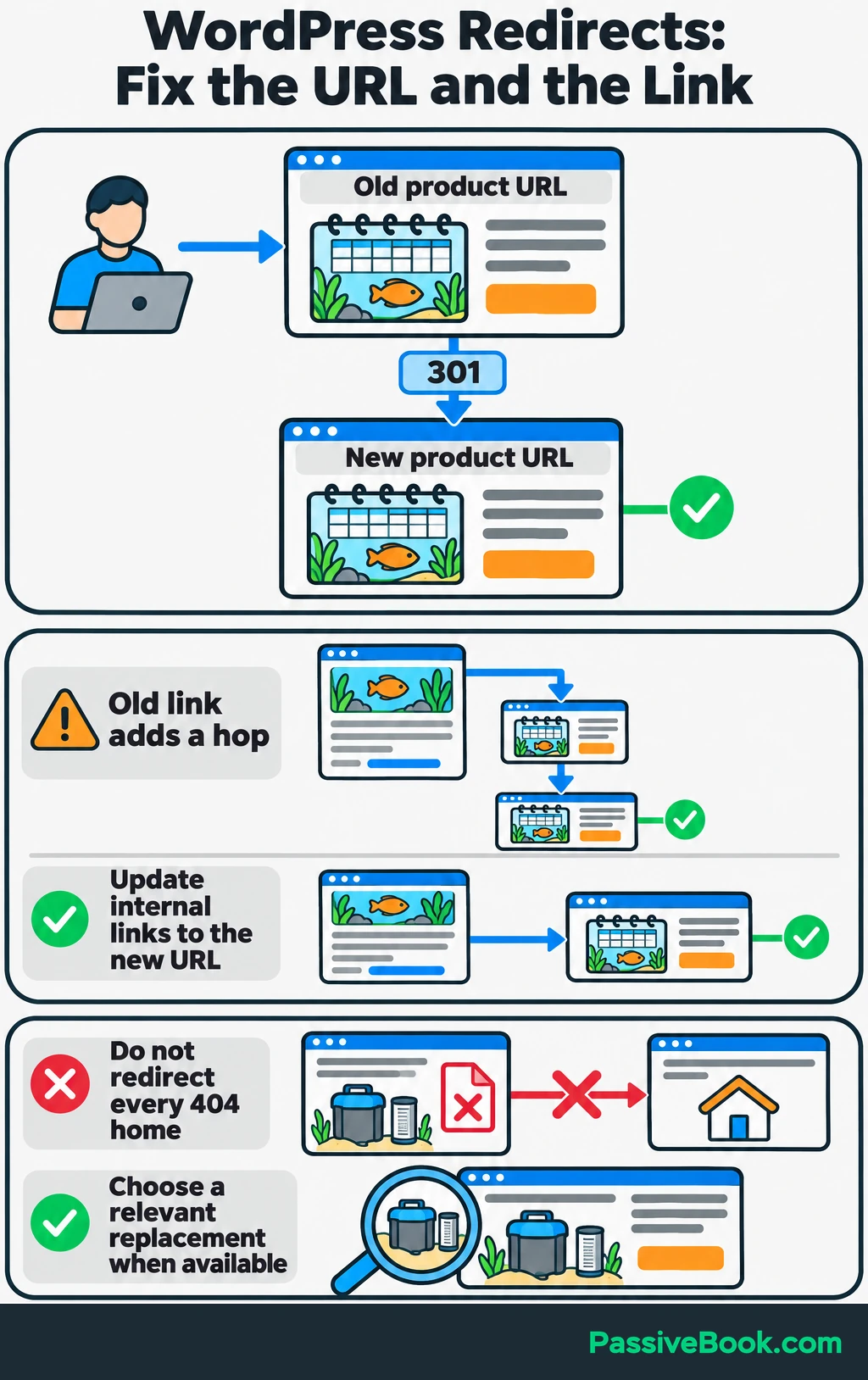
I would add it when my primary SEO plugin lacks the redirect controls I need. Keep redirect rules in one tool so you have one place to inspect them.
If you rename the aquarium planner’s product URL, send the old address directly to the new product page. Then update internal links to use the new address, which avoids making every visitor take an extra hop.
Don’t send every missing page to the homepage. Choose a relevant replacement where one exists.
Set a useful retention period for logs so old diagnostic records don’t accumulate indefinitely.
10. Link Whisper — Best for Internal-link Maintenance
Link Whisper helps you find places where one article could usefully link to another. The free edition supplies suggestions and basic reports.
Premium adds bulk link insertion, automatic linking and fuller broken-link reporting. Starter includes 2,000 AI credits refreshed annually, and the subscription renews automatically.
I would consider paying when maintaining an established article library takes meaningful time. For a small site, reviewing links while editing may be enough.
Check every suggestion for relevance and natural wording. In an aquarium water-change guide, a link to a filter-cleaning article can answer the reader’s next question. A link to an unrelated fish-food review adds clutter.
Compare that workflow with linking features included in your main plugin before buying. The useful saving is less maintenance work, rather than a larger number of links.
11. Schema Pro — Best for Custom-field Schema Mapping
Schema Pro is useful when you need repeatable schema rules beyond your main plugin’s controls. It supports unlimited sites and integrates with Advanced Custom Fields, a plugin for storing extra information in WordPress.
For the aquarium planner, I would first inspect what WooCommerce and the primary SEO plugin already produce. Standard product information may be covered without another subscription.
Schema Pro becomes more interesting when you maintain custom fields and want their values mapped into structured data across many pages.
Give each part of your setup a clear responsibility and check the combined output. Structured data should agree with what readers can see.
Valid markup can make a page eligible for supported rich results: search listings with extras such as prices or review stars. But Google’s structured-data requirements make clear that correct markup doesn’t guarantee their display.
Which Plugins Have the Lowest Performance Overhead?
Slim SEO and The SEO Framework recorded the lowest front-end and editor execution times in Accelera’s published benchmark.
The test used a clean WordPress installation, a lightweight default theme, no page or object caching, and no external-service connections. Selected modules were disabled. The tester used Code Profiler to measure how long each plugin’s code took to run, then averaged three runs.
| Plugin | Tested Version | Front-end Execution Time | Editor Execution Time |
|---|---|---|---|
| Slim SEO | 3.25.3 | 23 ms | 20 ms |
| The SEO Framework | 5.0.6 | 35 ms | 20 ms |
| SEOPress | 8.0 | 63 ms | 100 ms |
| Rank Math | 1.0.224 | 69 ms | 96 ms |
| Yoast SEO | 23.1 | 71 ms | 177 ms |
| AIOSEO | 4.6.7.1 | 103 ms | 176 ms |
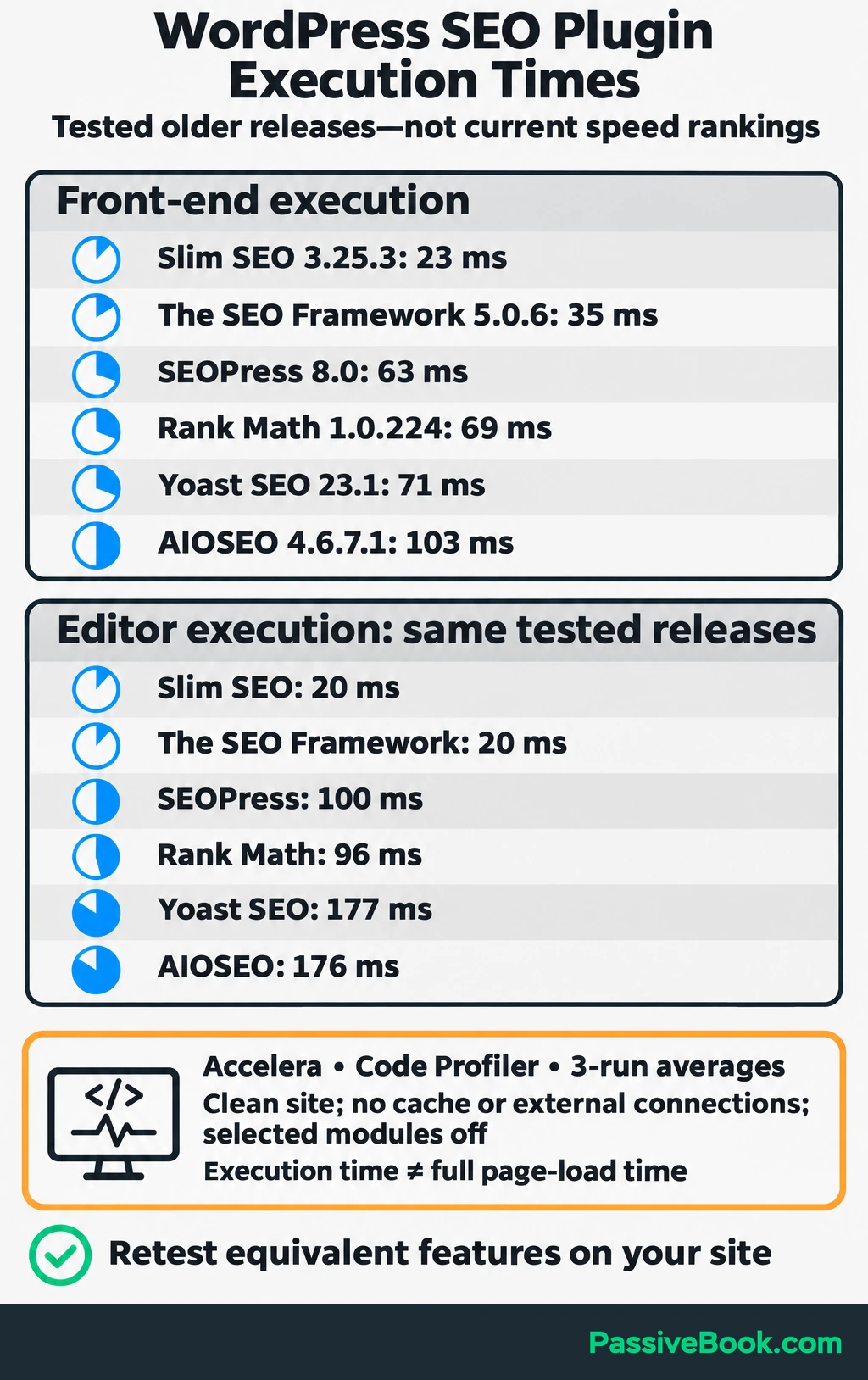
These older-version results measure plugin execution time, not complete page-loading speed. They don’t establish which current release is fastest.
I would use them to shortlist options, then test on staging. Keep hosting, caching and enabled features equivalent, and compare repeated loads of the same article and planner product page. Also check editor responsiveness and what happens during background scans.
How to Install or Switch SEO Plugins Safely
Back up Your Site and Preserve Existing SEO Settings
Create a backup you can restore, then test the installation or switch on staging.
For an existing site, record more than the title and description fields. Save your:
- Important page titles and descriptions.
- Canonical URLs and indexing instructions.
- Schema settings.
- Sitemap inclusions and exclusions.
- Redirect rules.
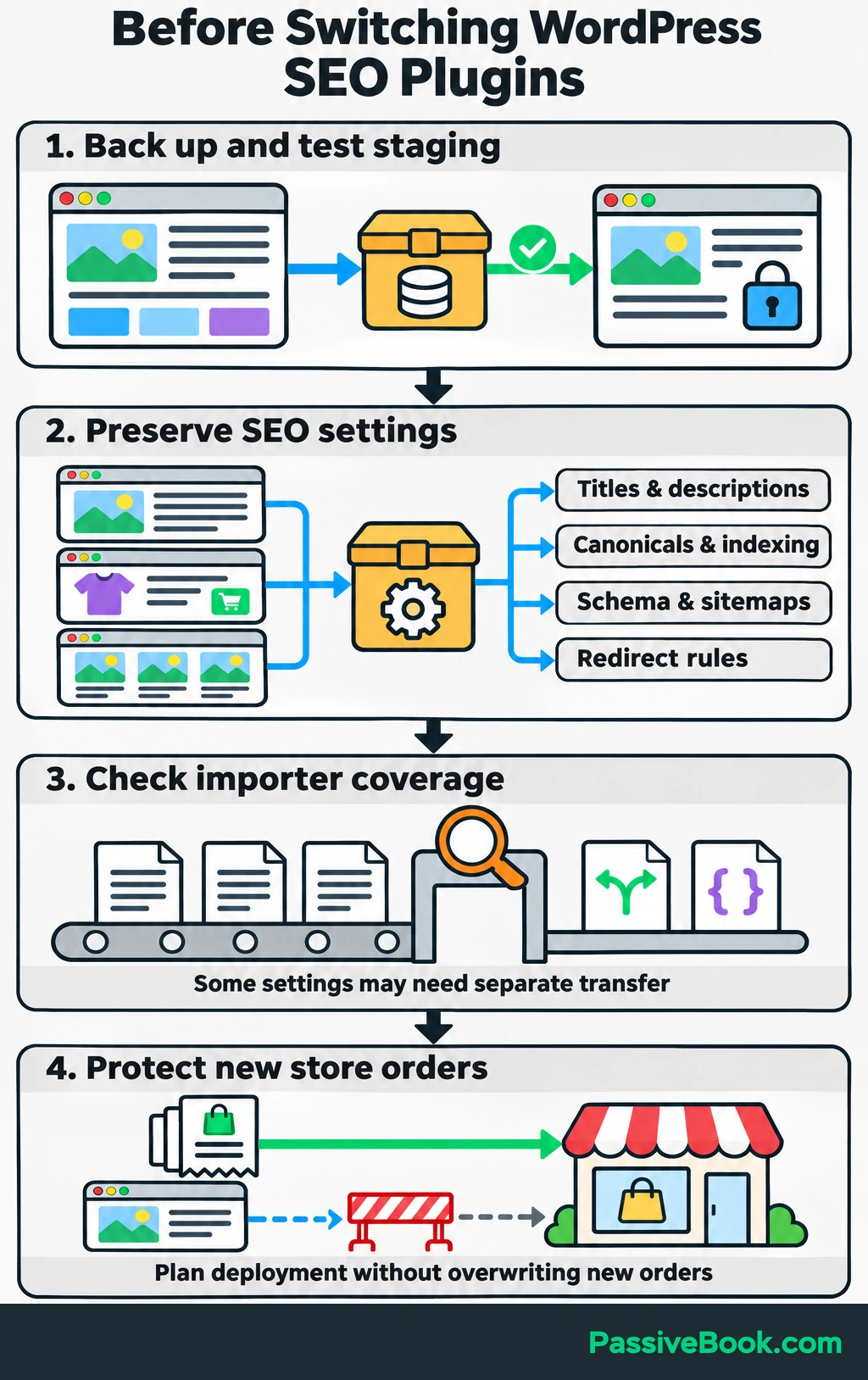
Take screenshots or export settings where possible. Pick representative articles, products and archive pages so you have something concrete to compare after the change.
Check exactly what the destination importer transfers. An importer that moves titles and descriptions may leave redirect rules, schema choices or archive settings behind.
For a live store, plan the deployment so restoring a backup or copying staging won’t overwrite new orders.
Configure One Primary SEO Plugin
Install the plugin from the official WordPress directory or the vendor. For a free plugin, find it in WordPress’s plugin installer, confirm the developer, then install and activate it.
If you’re switching, follow the destination plugin’s migration sequence. Some importers need the old plugin’s data available during setup. Finish with one primary SEO plugin active.
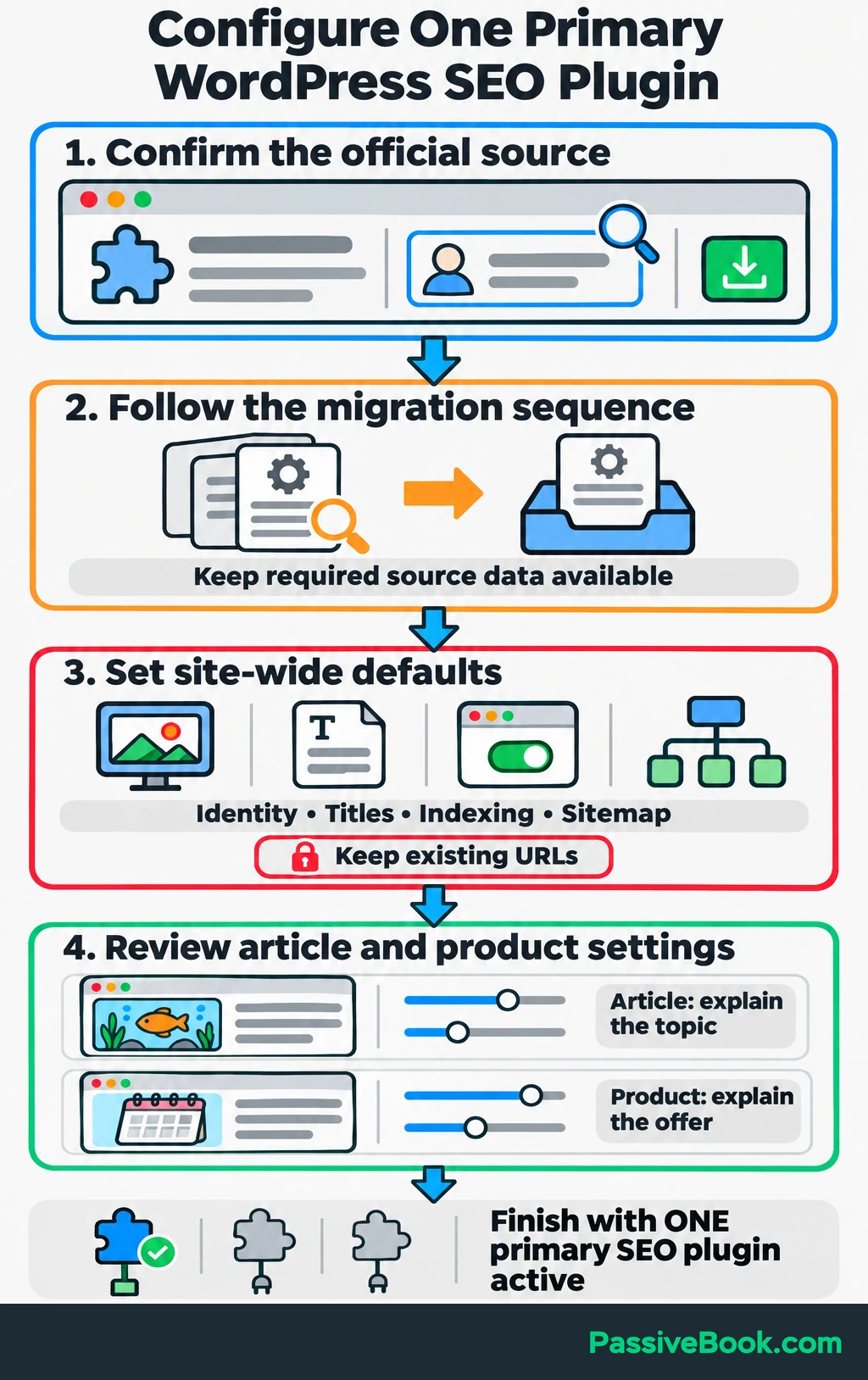
Work through site identity, title defaults, indexing choices and sitemap content. Keep existing URLs during the switch so you aren’t changing two things at once.
For the aquarium site, review an article and the planner product separately. They serve different purposes, so they shouldn’t automatically receive identical settings.
You might use an article title such as “How to Plan Your Aquarium Water Changes,” while the product title clearly names the “Downloadable Tank-Maintenance Planner.”
Verify the Output Before Completing the Change
Check what the site actually outputs. Settings that look correct in a dashboard still need to appear correctly on the page.
Inspect representative articles, products and archives for:
- The expected title and description.
- The correct canonical URL.
- Indexing instructions that match your choices.
- Structured data consistent with the page.
- Working redirects where URLs have changed.
Use a structured-data testing tool to inspect product markup, then test the store’s purchase flow. For the planner, complete a test purchase and confirm that the download arrives.
Clear caches and confirm that the live sitemap contains the intended pages. Use Search Console’s URL inspection to check important URLs, and repeat your performance checks.
Keep the backup until the replacement works correctly. If something is missing, resolve it before treating the migration as finished.
What Next?
Write down the three SEO functions your site needs and check whether your current plugin already covers them. If you’re starting fresh, install Rank Math Free on staging and review one article and one sales page before considering an upgrade.
Use the social buttons to share this comparison when your WordPress group starts debating free features and renewal costs.
Which part of choosing a plugin still feels uncertain: features, speed, cost or switching? Tell me in the comments, and bring any other questions along.
Share this post with your friends & followers:

