You’re ready to charge for a private lesson library, but every plugin seems to promise the same thing: protected content and recurring revenue. Then you discover that one needs a billing extension, another charges a percentage of sales, and a third puts your essential feature on a higher plan.
Those differences can mean another annual bill, manual access changes, or a rebuild after members have already joined. This comparison explains where each plugin fits, what the complete setup costs, and how to check that payments give members the access they bought.
Which WordPress Membership Plugin Should You Choose?
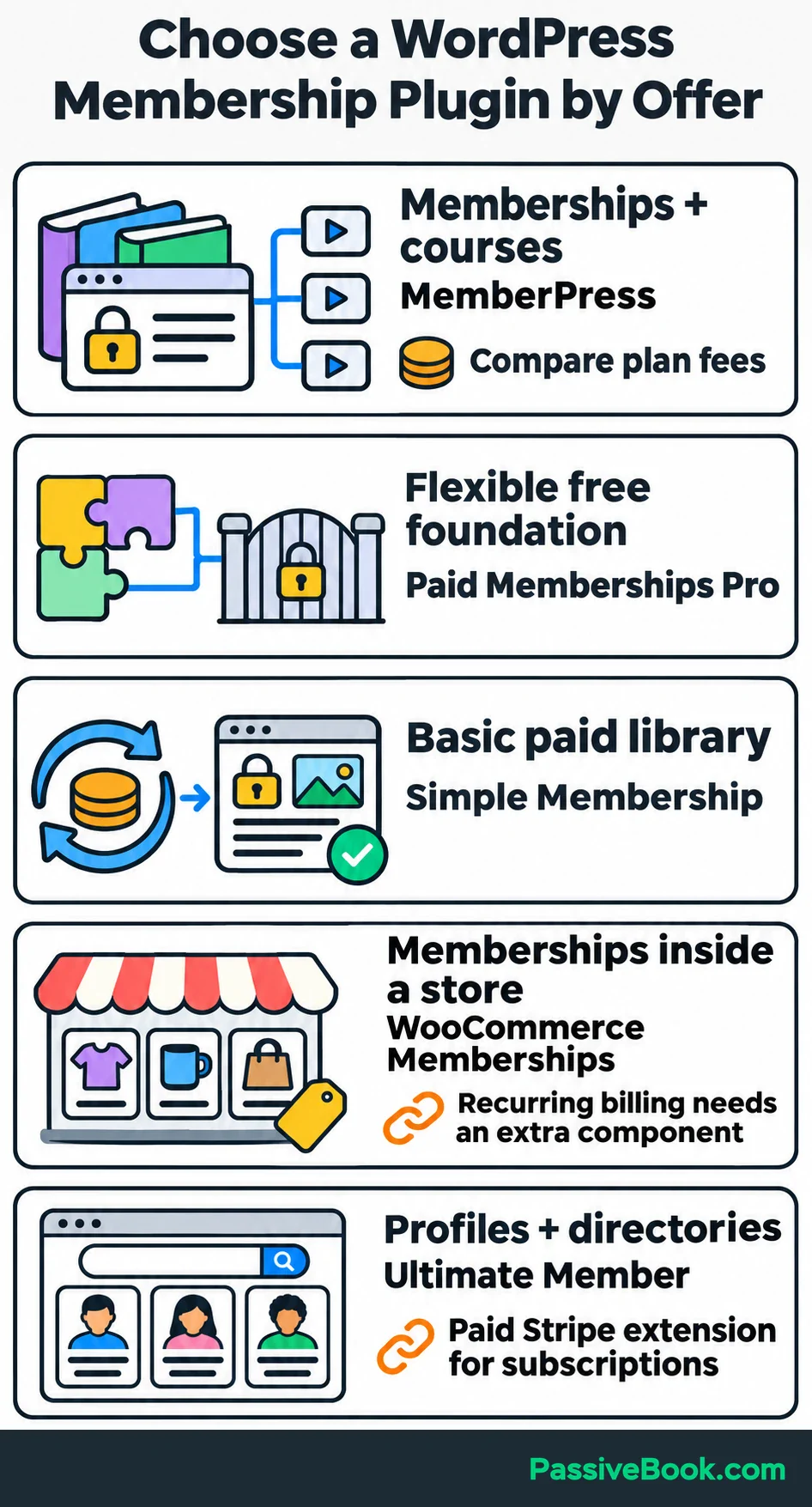
I would start with these five options and narrow the list around your offer:
- Integrated Memberships and Courses: MemberPress brings content protection, subscriptions, member accounts, and courses into one product ecosystem. Compare the required plan carefully because its entry plan adds a transaction fee.
- Flexible Free Foundation: Paid Memberships Pro (PMPro) offers a free core with membership levels, payment processing, and content protection. It suits owners willing to choose and maintain extensions, or add-ons for extra features.
- Basic Paid Access: Simple Membership provides protected posts and pages with recurring PayPal or Stripe payments and no core license charge.
- Memberships Inside a Store: WooCommerce Memberships fits an existing shop where access, products, and member discounts belong together. Automatic recurring billing needs another component.
- Profiles and Directories: Ultimate Member makes sense when members’ profiles and a searchable directory are central benefits. Its Stripe extension adds paid subscriptions.
For a new content library, I would compare Simple Membership with Paid Memberships Pro first. I would add MemberPress when courses or a more integrated setup justify the ongoing cost.
The full comparison below includes more specialized choices. The recommendations draw on documented features and terms; the final section shows how to test your own setup.
Throughout the article, imagine you run a scent-work club that teaches owners to train their dogs to find hidden scents. Members pay for access to an existing lesson library and printable practice plans. That gives us a concrete way to judge whether a feature earns its place.
What Should You Compare Before Choosing?
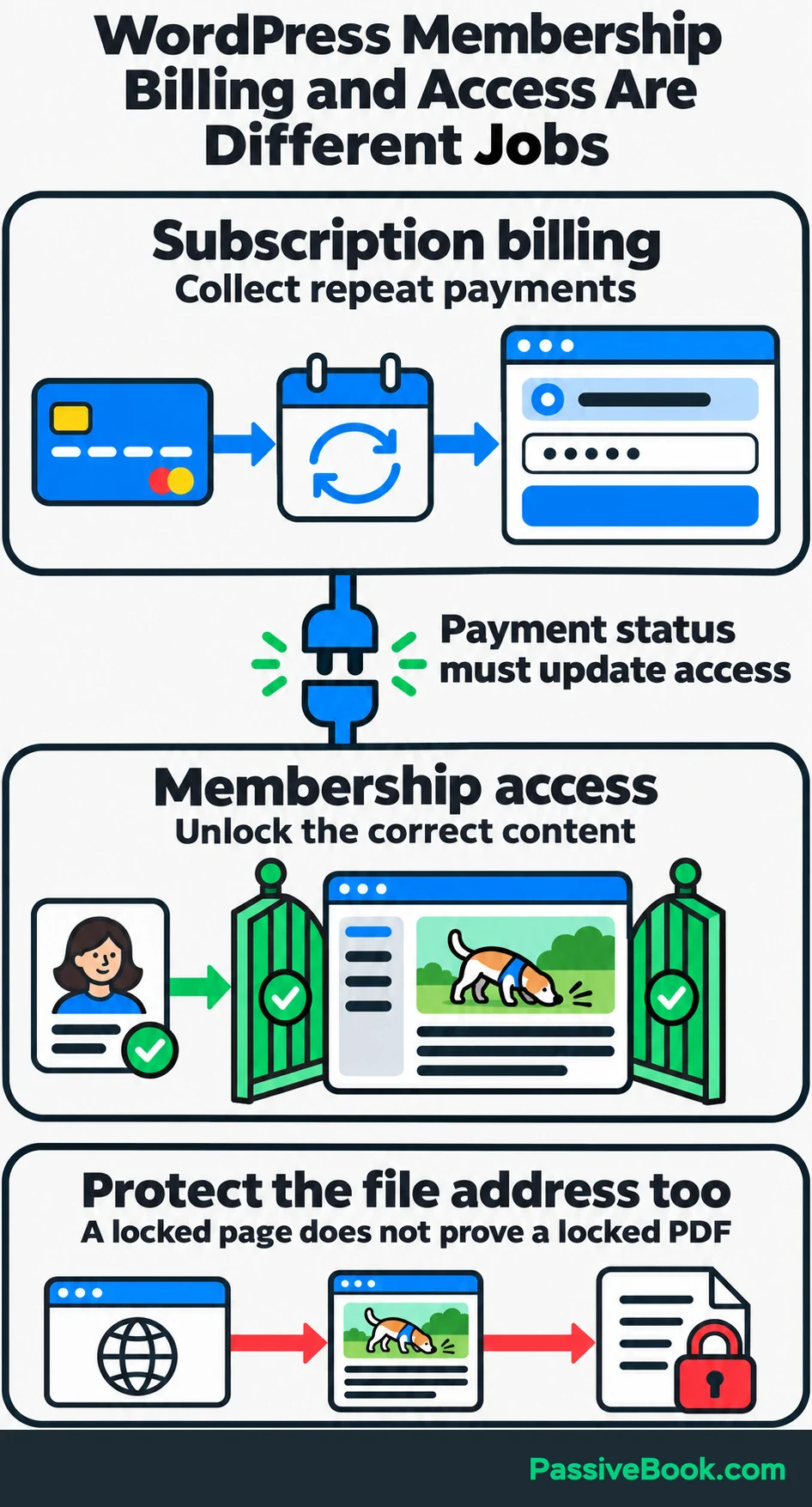
Start by deciding what a purchase should do. A membership controls access, and a subscription collects repeat payments. Automatically renewing access needs both functions, whether one plugin supplies them or connected tools share the work.
Write down these requirements before comparing plans:
- Offer: Will registration be free, will buyers pay once, or will access renew automatically? Fixed-term access can end after a set period without another charge.
- Access: Which posts, pages, courses, and files should each plan unlock? Decide whether members get everything immediately or receive lessons over time, a feature called content dripping.
- Payments: A payment gateway connects your site to a payment service such as Stripe or PayPal. Confirm support for your business country, currency, billing interval, and payment methods. Check how cancellations, refunds, payment-method updates, and plan changes work.
- Connections: Identify the tools responsible for checkout, billing, access, and email. Check the exact integration you need, including whether it requires another paid extension.
- Ongoing Work: Note anything you would have to approve, reconcile, or change manually after a member pays.
For the scent-work club, I would begin with one recurring plan that unlocks the existing library. I would add scheduled lessons only if the teaching sequence benefits from them. “We can release it weekly” is a software feature, but it is not a reason to delay useful material.
Downloads need a separate check. Restricting the lesson page does not establish that its linked PDF is protected. Someone may still be able to open the file’s direct address.
The offer also needs to fit the time you have.
I spent six months building a membership site while working my corporate job, and I eventually abandoned it because the content workload became unsustainable. I kept thinking about the next premium upload before I had finished the current one. That experience changed what I would promise members: useful access I can maintain, with improvements I can sustain.
For the scent-work club, that means selling a clear library and practice system before promising an endless stream of new lessons.
Then compare the full ownership cost. Count licenses, required extensions, connected services, and transaction charges. Keep the first-year discount separate from the amount you will need to budget later.
Amounts are annual unless marked otherwise, and currencies are shown explicitly. “Regular” means the advertised list price; a confirmed renewal is labeled separately. Processing charges, applicable taxes, hosting, and other operating costs are additional. Check the linked pricing pages for current offers and confirm any unspecified plugin fees before purchase.
| Plugin | Strongest Fit | Free-Version Scope | Advertised Paid Price and Currency | Renewal or Regular Price | Required Billing Extras and Plugin Fees | Main Tradeoff |
|---|---|---|---|---|---|---|
| MemberPress | Memberships and courses together | No free core | USD $199.50 Launch; $349.50 Growth, first year | Confirmed renewals: $399 Launch; $699 Growth | Launch adds 4.9% per successful payment; Growth removes that plugin fee | Gateway choice and scheduled content require the right tier |
| Paid Memberships Pro | Flexible membership setup | Levels, restrictions, gateways, and free extensions | USD $499 Standard | Listed annual price; separate renewal amount not stated | Conditional 2% Stripe application fee, explained below | Specialized requirements can mean several extensions |
| Paid Member Subscriptions | Paid content subscriptions | Plans, registration, restrictions, and recurring payments | EUR €99 Basic; €169 Pro | Listed annual prices; renewal amounts not separately stated | Free version adds 2% on Stripe; valid paid license removes it | File restriction and content dripping need Pro |
| ARMember | Wider gateway choice | Membership plans and two gateways | USD $89 Standard; $139 Professional | Same advertised renewal prices | Standard includes multiple gateways; plugin fee not specified | Digital downloads and gift memberships need Professional |
| Kadence Memberships | Owners researching Restrict Content Pro | Levels, Stripe, renewals, and member accounts | USD $350 for the advertised one-site software package | Listed annual package price; existing account terms can differ | Stripe in free core; plugin fee not specified | A broad package may be unnecessary for membership alone |
| WishList Member | Flexible levels and release schedules | No free core | USD $149.50 Basic; $349.50 Pro, first year | Confirmed renewals: $299 Basic; $699 Pro | Basic includes Stripe and PayPal Checkout; no plugin transaction fee | File-and-folder protection needs Pro |
| MemberMouse | Additional purchases by existing members | No free core | USD $149.50 Basic, first year | Confirmed renewal: $299 | Stripe in Basic; PayPal and Braintree need Plus; plugin fee not specified | Gateway and reporting requirements can push you up a tier |
| ProfilePress | Paid access with custom forms and profiles | Registration, profiles, restrictions, and Stripe payments | USD $129 Standard; $299 Plus | Listed annual prices; separate renewal amounts not stated | Free version adds 2% on Stripe; paid plans remove it | Premium features stop when the license expires |
| Ultimate Membership Pro | Bundled access and billing features | No free core | USD $79.30 Pro | Advertised regular price: $122; renewal amount not confirmed | Built-in gateways; plugin fee not specified | Its WooCommerce payment route uses renewal reminders |
| WooCommerce Memberships | Access and benefits inside a shop | No free edition of this extension | USD $199 | Listed annual price; separate renewal amount not stated | WooCommerce Subscriptions adds $279 annually for recurring billing; combined extensions: $478 | A new content-only site takes on a store setup |
| SureMembers | Access control with a separate checkout | Core content restrictions | USD $69 Starter, first year | Confirmed renewal: $99 | Connected checkout required; SureCart’s free plan adds a 2.9% platform fee | Total cost depends on the checkout you connect |
| Simple Membership | Basic paid content access | Levels, protected posts/pages, and PayPal/Stripe payments | USD $0 core; optional extensions vary | No core license renewal | One-time and recurring payments included; plugin fee not specified | Specialized workflows may need extensions |
| s2Member | A one-time paid license | Content protection and PayPal Standard buttons | USD $89 once for single-site Pro | No annual license renewal; lifetime version updates included | Pro adds Stripe and other integrations; plugin fee not specified | Support comes from volunteers and community resources |
| WP-Members | Registration-based libraries | Restrictions, registration fields, profiles, and approval | PayPal Subscriptions from USD $49 annually | Listed annual extension price; separate renewal amount not stated | Paid access needs a payment component; file protection is another extension | Free core does not supply recurring billing |
| Ultimate Member | Profiles and directories | Registration, profiles, directories, and restrictions | USD $65 Stripe extension; $348 Pro bundle | Annual subscriptions; separate renewal prices not stated | Stripe extension supplies one-time and recurring plans; plugin fee not specified | Community extensions can increase the total |
| LearnDash | Structured courses | No free edition of the advertised package | USD $350 one-site software package | Listed annual package price; existing account terms can differ | Included MemberDash supplies memberships and subscriptions; plugin fee not specified | More course configuration than a basic library needs |
| LifterLMS | Courses bundled with other content | Courses, memberships, and manual payment handling | USD $159.20 Earth bundle, introductory price | Confirmed renewal: $398 | Earth includes Stripe, PayPal, and WooCommerce integrations; plugin fee not specified | Automatic collection needs a paid payment integration |
A percentage fee deserves more attention than a small first-year discount.
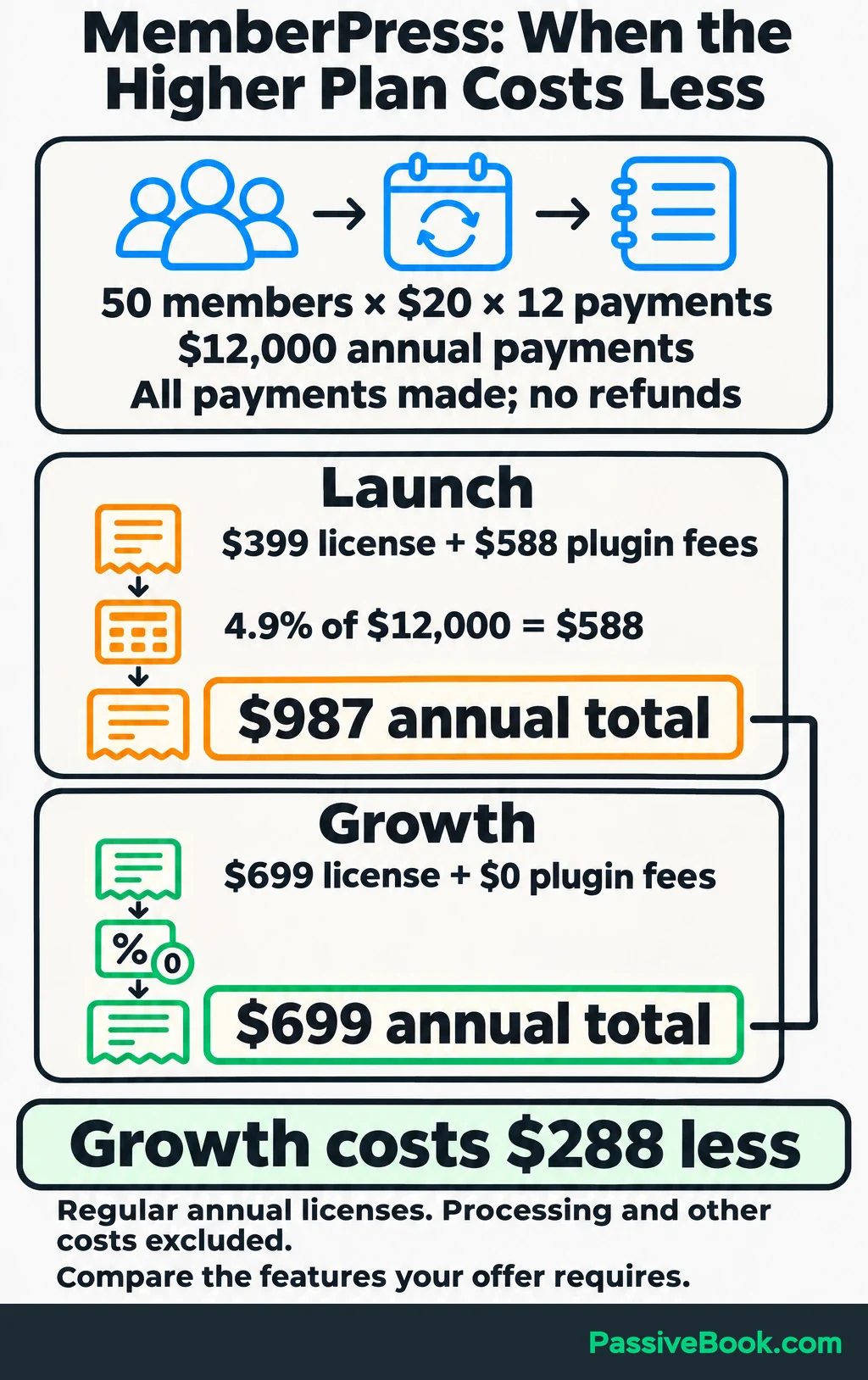
For illustration, suppose the scent-work club has 50 members who each make all 12 monthly payments of USD $20, with no refunds. That produces $12,000 in annual payments. Using the regular license prices above:
- MemberPress Launch: $399 license + $588 in plugin fees = $987.
- MemberPress Growth: $699 license with no plugin transaction fee = $699.
- Difference: Growth costs $288 less at that payment volume.
Both totals exclude processing and other expenses. Growth also includes features that Launch does not, so compare the plan your offer actually requires. A cheaper license can be an expensive way to collect payments.
The example above uses one payment volume, but your numbers may favor a different setup. Use the calculator to compare your shortlist, including the extra tools and renewal prices.

Free Software Cost Calculator




The 17 Best WordPress Membership Plugins Compared
1. MemberPress — Best for Integrated Memberships and Courses
MemberPress is my starting point when you want protected content, recurring subscriptions, member accounts, and courses within one product ecosystem.
Launch supports Stripe and the core membership and course tools. Growth adds PayPal, Square, and content dripping, which releases material on a schedule.
For the scent-work club, Launch is worth considering if members get immediate library access and Stripe meets the payment requirement. Scheduled lessons make Growth the relevant comparison.
The consequential limitation is the entry plan’s transaction fee. Use the cost example above, and check the required tier before choosing based on the first-year license price.
2. Paid Memberships Pro — Best for a Flexible Free Foundation
Paid Memberships Pro is a strong choice when you want to start with a free membership core and add features as the offer develops. It covers membership levels, protected content, and payment gateways. Standard adds premium extensions and support for one self-hosted site.
Its flexibility also creates work: you must choose the extensions that complete your setup.
The additional 2% Stripe fee depends on how you connect your account. With Stripe Connect, the plugin’s guided connection, the fee applies unless a paid license is active and successfully validated on your site. It does not apply when you connect using your own Stripe API keys, the credentials that identify your account. PMPro’s Stripe fee conditions
I would compare a completed PMPro setup with the MemberPress tier that meets the same requirements.
3. Paid Member Subscriptions — Best for Focused Paid-content Subscriptions
Cozmoslabs’ Paid Member Subscriptions suits a site that needs registration, subscription plans, restricted content, and recurring payments without organizing everything as a formal course.
Basic includes PayPal, Stripe, recurring payments, and WooCommerce integration. Pro adds content dripping, file restriction, prorated plan changes, and group memberships. Prorated changes credit unused subscription time when members switch between eligible plans.
That makes Pro the useful comparison for the scent-work club if protected practice-plan downloads are essential. Basic’s lower price would leave out a requirement.
The free version can help you explore the setup, but it adds a 2% fee to Stripe transactions. A valid paid license removes that additional charge. Free-version payment terms
4. ARMember — Best for a Wider Choice of Payment Gateways
ARMember belongs on your shortlist when your preferred payment service extends beyond Stripe and PayPal. Standard lists gateways including Razorpay, Mollie, Paystack, and Square.
I would choose the gateway requirement first, then confirm that its integration supports the recurring schedule and member actions you need. Being listed as an available gateway does not answer every billing question.
Standard offers a wide selection, but digital downloads and gift memberships require Professional.
For the scent-work club, that means comparing Professional if members must download protected practice plans.
5. Kadence Memberships — Best for Sites Considering Restrict Content Pro
If you have been researching Restrict Content Pro, check Kadence Memberships. The WordPress restrict-content listing now uses that name.
The free features include membership levels, Stripe payments, automatic renewals, prorated upgrades, and member accounts. Premium capabilities add scheduled content and further integrations.
The main buying question is the package. The advertised purchase route leads to a broader software collection, which may offer little extra value if you need only memberships.
Existing Restrict Content Pro subscriptions are excluded from the announced package conversion, so use your account’s terms when calculating an existing site’s renewal cost. Subscription exclusions
6. WishList Member — Best for Flexible Membership Levels and Content Schedules
WishList Member is worth comparing when you sell several membership offerings or need different protection rules and release schedules.
Basic includes unlimited memberships, upgrade paths, scheduled content, a member-managed dashboard, Stripe, PayPal Checkout, and CourseCure courses. Those features make it a practical candidate for a library that later develops into several paid programs.
The important plan boundary is file protection. Team accounts and file-and-folder protection require Pro.
For the scent-work club, I would price Pro from the start if those protected downloads are part of the promise.
7. MemberMouse — Best for Selling Additional Access to Existing Members
MemberMouse stands out when the business includes purchases beyond the main membership. Basic includes one-click purchases, upsells, drip schedules, additional content purchases, Stripe, and course tools.
That could suit a scent-work library with an optional advanced lesson pack sold separately to existing members.
I would skip the extra selling features if the offer is simply one subscription with everything included. More checkout possibilities also mean more decisions to configure.
Check the gateway and reporting tier carefully. Plus adds PayPal and Braintree, while Pro adds the full analytics and reporting suite. Basic’s price does not cover every administration requirement.
8. ProfilePress — Best for Paid Access With Custom Registration and Profiles
ProfilePress combines paid access with registration forms, member profiles, and content restrictions. It is worth considering when the signup and account experience matters as much as the protected library.
Standard removes the free version’s additional Stripe fee. Plus adds metered paywalls, content dripping, subscription pausing, team memberships, and WooCommerce integration.
A metered paywall lets visitors view a limited amount before requiring payment. I would skip that feature for a straightforward private lesson library unless free previews are part of the sales approach.
The renewal policy deserves attention: premium features stop working when the paid license expires. Budget for continued renewal or compare the available lifetime option.
9. Ultimate Membership Pro — Best for Bundled Membership and Billing Features
Ultimate Membership Pro includes recurring subscriptions, restrictions, drip schedules, member accounts, and built-in payment integrations. It is a separate product from Ultimate Member, which appears later in this comparison.
Pro covers a broad membership setup. Full Package adds group memberships and additional recurring-payment gateways.
The important distinction is how you collect payments. Its built-in recurring gateways support automatic charges, but memberships sold through its WooCommerce payment route renew through reminder emails. Renewal behavior by payment route
For the scent-work club, I would use a supported built-in recurring gateway when automatic collection is essential. A renewal reminder still leaves the member with a payment task.
10. WooCommerce Memberships — Best for Memberships Attached to an Existing Store
WooCommerce Memberships fits best when you already have a shop and want purchases, access, and member benefits to work together.
It supports product-linked access, restricted products, member discounts, and content dripping. For example, the scent-work library could sit alongside training supplies, with membership benefits managed inside the store.
Memberships controls access, and WooCommerce Subscriptions supplies recurring billing in the setup priced above. Count both extensions when comparing an automatically renewing offer.
I would choose this route for a store that already earns its place in the business. For a new content-only library, I would first compare a dedicated membership plugin with fewer commerce settings.
11. SureMembers — Best for Keeping Access Control Separate From Checkout
SureMembers manages access while a connected commerce system handles purchases and billing.
Its free Core plugin provides content restrictions. The paid SureMembers Pro plugin adds content dripping, block-level restrictions, and download protection. These features are included in the Starter license listed above. Block-level restrictions let you hide selected parts of a page rather than the entire page.
This separation can suit a site whose checkout already works well. You can evaluate access rules without replacing the whole buying process.
The tradeoff is that the SureMembers license is only part of the bill. Include the connected checkout’s license or platform fee. For example, SureCart’s free plan adds a 2.9% platform fee, while its paid plans remove that fee. Processor charges remain separate. SureCart payment plans
12. Simple Membership — Best for Basic Paid Access Without a Core License Fee
Simple Membership is where I would start for a small, straightforward paid library.
The free core supports protected posts and pages, multiple membership levels, and one-time or recurring PayPal and Stripe payments. That covers the central job of charging for access without an annual core license.
For the scent-work club, it is a sensible candidate when one paid level unlocking the lesson library is enough.
The limit is how far you need to extend that setup. List the required integrations, download protection, and special member actions before treating the free core as the full solution. Choose it for a simple offer, then test that offer completely.
13. s2Member — Best for a One-time Paid License
s2Member is worth considering when avoiding an annual plugin license is a priority.
The free Framework includes content protection and PayPal Standard payment buttons. Pro adds Stripe, checkout and registration forms called Pro-Forms, and unlimited membership levels. Its single-site license includes lifetime access to new versions.
The cost structure is appealing, but support changes the decision. Help comes through volunteers, community interaction, and documentation rather than vendor-provided support.
I would choose it if you are comfortable following documentation or have someone available to help. If you expect guided configuration, include that outside help in the budget before comparing its price with an annual license.
14. WP-Members — Best for Registration-based Content Libraries
WP-Members suits a library where registration and access control are the main requirements.
Its free core includes content restrictions, custom registration fields, profiles, and optional approval of new registrations. It is useful when you want to decide who can join before introducing a more involved payment setup.
Paid access needs another component. The PayPal Subscriptions extension uses payment notifications to update subscription expiration, and file protection is available through a separate extension.
For the scent-work club, I would compare the complete combination of registration, payments, and protected downloads. The free core alone does not supply recurring billing.
15. Ultimate Member — Best for Profiles and Member Directories
Ultimate Member makes sense when finding and connecting with other members is part of the offer.
Its free core includes front-end registration, profiles, directories, member accounts, and content restrictions. The Stripe extension adds one-time and recurring paid plans.
For the scent-work club, I would consider it if members need profiles and a directory to find each other. If they only need lessons and practice plans, those community features add little to the buying decision.
Compare individual extensions with the Pro bundle before purchasing. A modest starting cost can grow when you add several community functions, so write down the ones your members will actually use.
16. LearnDash — Best for Memberships Built Around Structured Courses
LearnDash is the stronger fit when course progression, quizzes, assignments, and certificates are central to the offer.
It supplies the learning tools, and included MemberDash handles membership tiers, subscriptions, content restrictions, and member accounts. That lets you sell access around a structured learning program.
For the scent-work club, I would consider LearnDash when members follow a sequence and complete assessments. A searchable library of independent lessons may not need that structure.
The advertised software package also includes Kadence. Count that package once if you plan to use both products. The main tradeoff is configuration: you are building a learning experience as well as a protected area.
17. LifterLMS — Best for Memberships Combining Courses and Other Content
LifterLMS fits memberships that bundle courses with protected posts and pages. Memberships can also automatically enroll members into included courses.
That suits a scent-work offer combining a beginner course, a reference library, and supporting resources. The membership defines the bundle, and the course tools organize the teaching.
The free core includes manual payment handling, which requires you to record payments yourself. For automatic collection, include a paid integration; the Earth bundle includes Stripe, PayPal, and WooCommerce payment integrations.
I would compare it with LearnDash when structured teaching matters. For a basic resource library, I would first see whether a simpler membership plugin covers the offer.
How Should You Test Your Shortlist Before Committing?
Reduce the list to two candidates that meet every essential requirement. Then create the same small offer in each.
Use a staging copy, which is a private copy of your site for checking changes. Include your actual theme, page builder, email system, and caching configuration, and put the payment gateway in test mode. Keep copied live subscriptions and outgoing member emails disabled so staging tests do not affect paying members.
Build only what you need to evaluate the purchase and access process:
- Paid Plan: One recurring membership with the billing interval you intend to sell.
- Protected Lesson: One page that only the correct membership can open.
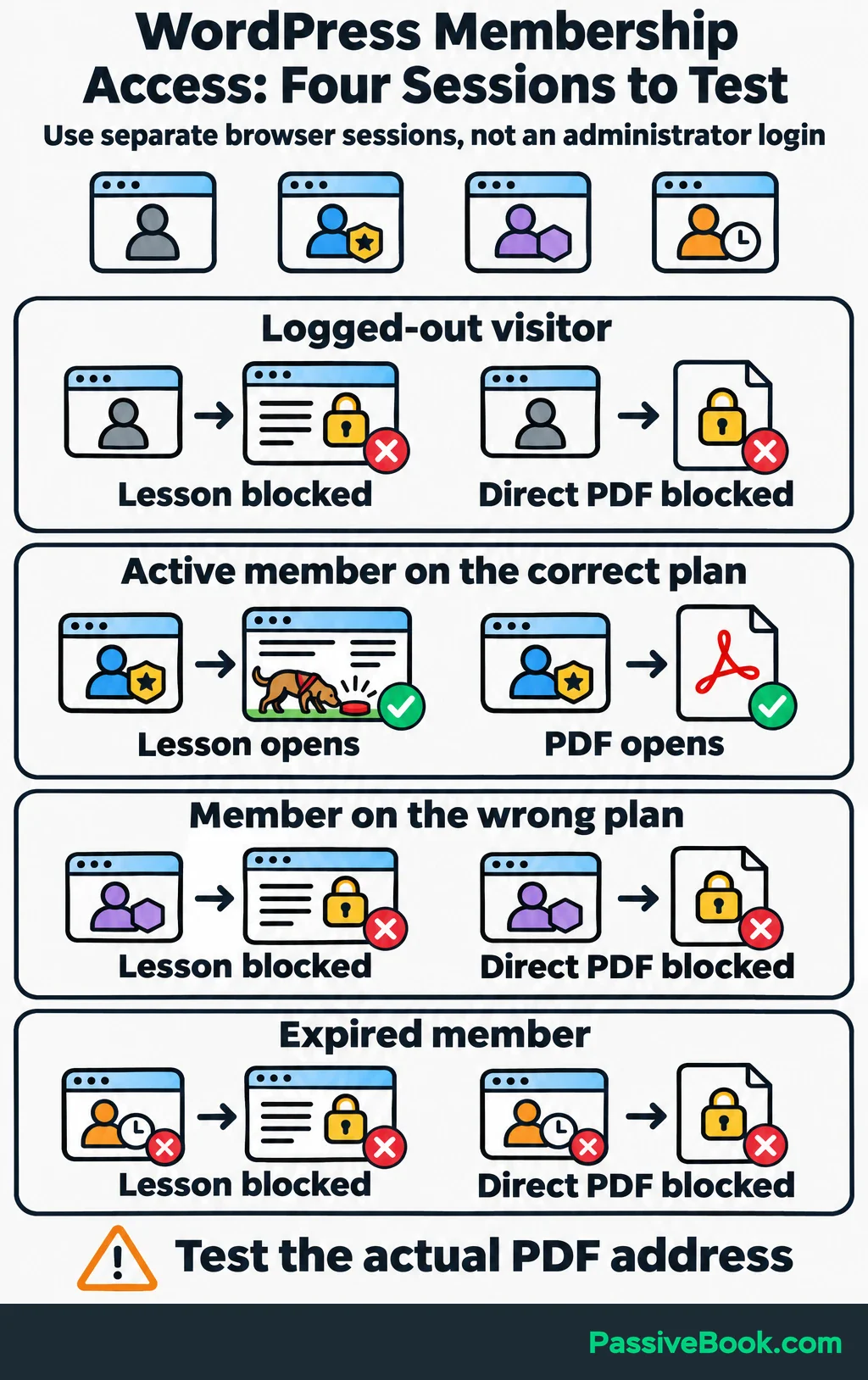
- Protected Download: One practice-plan PDF with access checked at the file address.
- Member Account: A place to view membership status and perform the billing actions you require.
- Member Emails: The confirmation, password reset, and payment messages needed to use the site.
For the scent-work club, the test purchase should unlock one lesson and its practice plan. This small version exposes missing connections before you load an entire library.
Check both the payment result and the resulting access. A successful charge and a successful membership activation are separate things to verify.
| Test | What Should Happen |
|---|---|
| Successful signup | The payment succeeds, the correct membership activates, and the member can open the lesson |
| Successful renewal | The payment is recorded and access continues |
| Declined renewal | The configured retry or grace-period rules apply, and the member receives a useful notice |
| Payment-method update | The member can update their details through the supported account process |
| Cancellation | Future billing stops, and access ends when your stated policy says it should |
| Refund | The payment record and access status follow your refund policy |
| Expiration | Access ends at the correct time |
| Wrong membership level | A member on another plan cannot open restricted material |
| Direct download attempt | A visitor or expired member cannot retrieve the protected file |
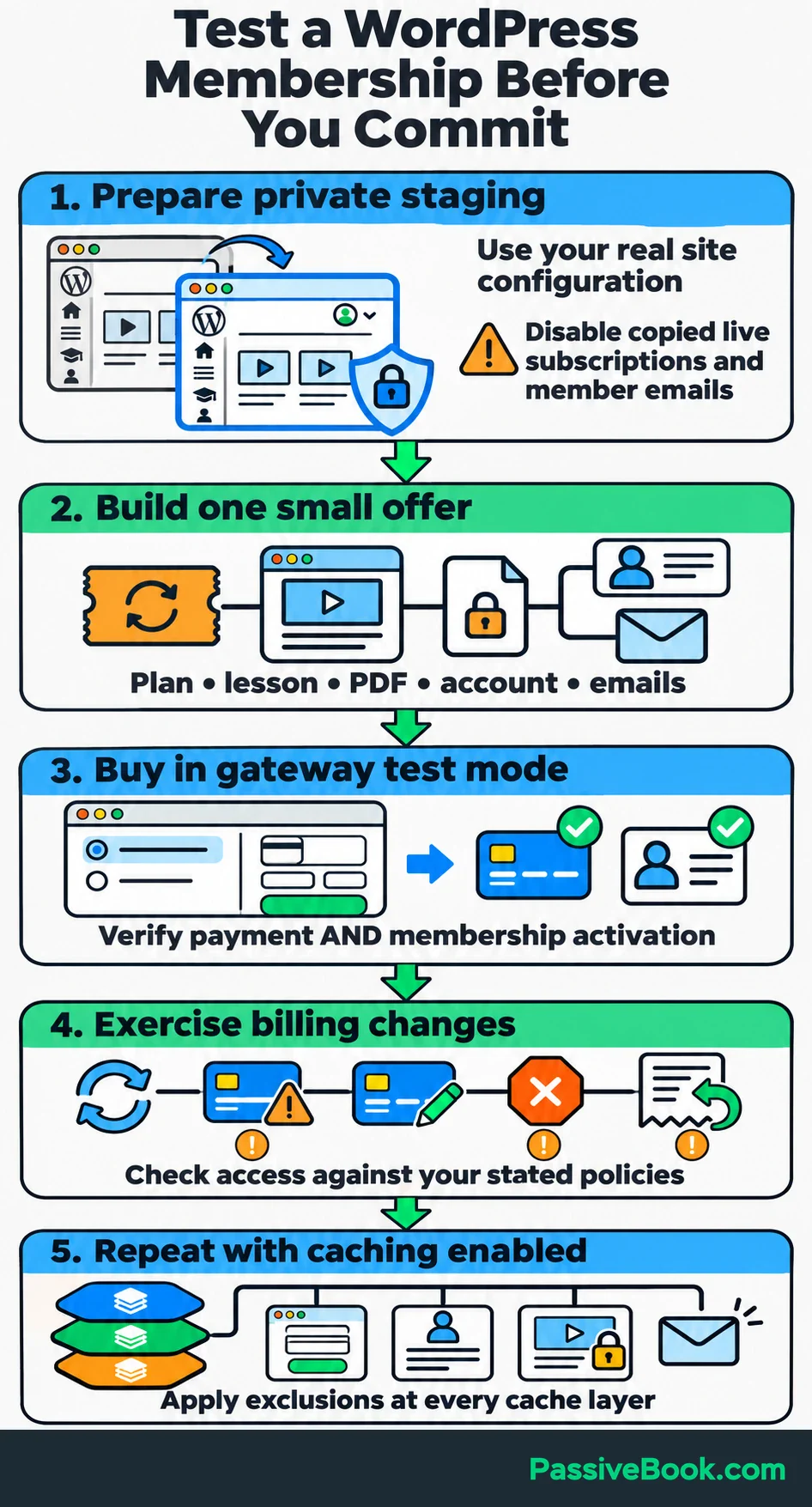
Cancellation needs particular care. If members have paid through the end of the month, decide whether they should retain access until then and configure that behavior deliberately.
Repeat the access checks while logged out, as an active member, as a member on the wrong plan, and as an expired member. Use separate browser sessions so an administrator login does not hide an access problem.
Check the file-protection method with your host. For example, MemberPress’s server-level file protection requires support for .htaccess; another method may be necessary on a different server setup. MemberPress file-protection requirements
Apply the plugin’s caching exclusions at every layer you use, including WordPress, hosting, and Cloudflare where applicable. Check registration, account pages, protected content, and payment notifications after caching is enabled.
Also test the email connection you intend to keep. I would use FluentCRM for on-site email automation when its integration supports the chosen membership setup, and check that membership changes trigger the correct messages. Once a member’s paid access ends, they should stop receiving instructions intended for active subscribers.
Before choosing, inspect the export and migration route. You need membership levels, access status, and subscription identifiers as well as WordPress user accounts.
Exporting users does not automatically connect existing billing agreements to another plugin. PMPro, for example, requires existing Stripe subscriptions to be linked to the correct members and membership levels. PMPro’s Stripe migration requirements
Use an available demo to explore features, then test compatibility on your own staging site. If paid features require a purchase, read the trial or refund conditions before relying on that window.
Finally, ask support one concrete question tied to your setup. For example: “Can this plan protect direct PDF downloads on my host and keep access active until the paid period ends after cancellation?”
Choose the setup that passes your workflows at an acceptable ongoing cost. I would give routine manual work more weight than a slightly prettier member dashboard. You will see that work every month.
What Next?
Write a one-page requirements list and choose two plugins to test with one paid plan, one lesson, and one protected download. Price the complete setup at renewal before buying.
Use the social buttons to share this comparison when a plugin shortlist needs a clearer view of billing costs and access limits.
Which requirement is making your choice hardest: payments, protected downloads, courses, or moving existing members? Tell me in the comments, and bring any other questions too.
Share this post with your friends & followers:

