You have enough knowledge for a useful course, but choosing how to sell it can take longer than planning the lessons. One plugin includes checkout. Another needs extensions. A third looks affordable until you add quizzes and reach the renewal bill.
The cost of choosing badly goes beyond the license. You may have to rebuild lessons, move student records, or keep fixing a checkout you barely understand.
This comparison explains what each option includes, where paid upgrades become necessary, and how to test your shortlist before moving your whole course into WordPress.
The Best WordPress LMS Plugins at a Glance
My starting recommendation is Tutor LMS for a standalone course business. I would also shortlist Masteriyo when the budget is tight, LearnDash when assessment matters most, and Sensei when WooCommerce already handles your sales.
These are recommendations based on documented features and license terms. The numbering organizes the comparison; it does not represent measured rankings or speed tests.
Start by choosing the kind of system your offer needs:
- Dedicated LMS: Organizes lessons, quizzes, enrollment, and progress. This is where I would start for a single course.
- Membership System: Controls access to courses alongside a wider library of protected content.
- Community System: Makes discussions and interaction central to the learning experience.
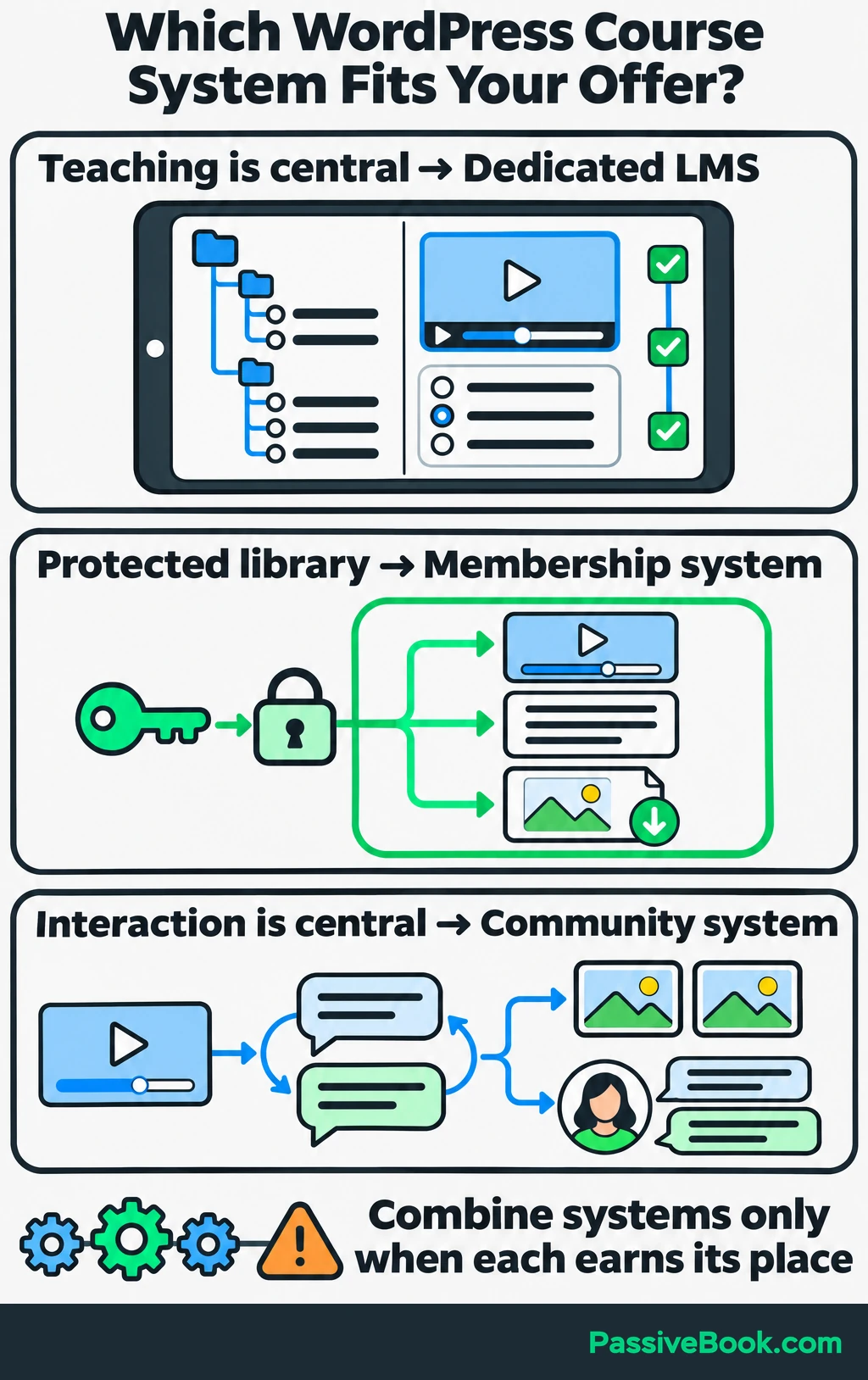
These systems can work together, but adding all three gives you three things to manage. Each should earn its place.
Throughout this guide, imagine your watercolor tutorial blog is adding a beginner landscape-painting course. It needs video lessons, printable practice sheets, and a completion quiz. That gives us a concrete offer to compare without buying features for an imaginary academy.
All prices below are in USD. Introductory offers are marked, and payment-processing charges are separate. Price links lead to the vendor’s current details. The paid configurations shown are relevant options, not necessarily the cheapest way to use each plugin.
Some plugins include checkout, labeled “native” below. Others use a separate selling plugin, such as WooCommerce, FluentCart, or Paymattic. Stripe and PayPal process the payments.
| Plugin | Strongest Fit | Free Teaching/Selling Boundary | Checkout Route | Relevant Paid Price and Site Allowance | Renewal or Update Terms | Main Tradeoff |
|---|---|---|---|---|---|---|
| Tutor LMS | Standalone course sales | Free course building and basic quizzes; native Stripe requires Pro | Native checkout; WooCommerce optional | Individual: $199/year, 1 site; lifetime: $499 | Annual includes one year of updates; lifetime includes lifetime updates | Advanced teaching and native Stripe sit behind Pro |
| LearnDash | Assessments and controlled progression | No free core listed | Direct Stripe Connect or commerce integrations | Advertised package: $350/year, 1 site | Annual subscription | Package includes other products you may not need |
| Masteriyo | Free direct checkout and certificates | Free quizzes, Stripe, PayPal, and certificates; advanced assessment is paid | Native checkout; integrations available | Basic: $99 introductory; Pro: $149 introductory; each 1 site | Basic renews at $199/year; Pro at $299/year | Assignments and advanced tracking require a higher tier |
| LifterLMS | Linked courses and memberships | Free teaching and offline payments; online gateways are paid | Stripe, PayPal, or WooCommerce add-ons | Earth: $199 introductory, 1 live site | Renews at $398/year | Advanced teaching extensions can increase the total |
| Sensei LMS | Existing WooCommerce stores | Free courses, basic quizzes, and certificates; selling requires Pro | WooCommerce | Pro: $179/year, 1 site | Annual billing | Extra billing features may need WooCommerce extensions |
| MemberPress Courses | Membership course libraries | No free core; Launch includes courses but omits quizzes | Membership checkout | Growth: $349.50 introductory, 1 site | Growth renews at $699/year | Launch has a 4.9% plugin transaction fee; Growth removes it |
| Thrive Apprentice | Visual presentation and scheduled releases | No free core | Native Stripe or connected checkout | Standalone: $149 introductory, 1 site; Suite: $299 introductory, 5 sites | Renews at $299/year standalone or $599/year for Suite | Progression quizzes need separate Thrive Quiz Builder |
| LearnPress | Buying selected extensions | Free lessons, quizzes, and PayPal; Stripe and WooCommerce extensions are paid | Included PayPal or paid gateway extensions | Pro bundle: $299, 1 site | Includes 12 months of updates/support; an additional year is listed at $209 | Several required extensions can complicate the setup |
| MasterStudy LMS | Courses that include live teaching | Free course building, quizzes, and selling; advanced teaching is paid | Native payments; paid WooCommerce integration | Paid single-site plugin: $149/year | One year of updates and priority ticket support | Live delivery adds scheduling and meeting-service costs |
| WP Courseware | Included subscriptions and installments | No free core; vendor demo available | Built-in Stripe and PayPal; integrations optional | Teacher: $159/year, 2 sites | Keeps operating after expiry; renew for updates/support | Smallest license covers two sites, even if you need one |
| FluentCommunity | Courses built around discussion | Free community features; course creation requires Pro | Connected FluentCart or Paymattic product | Annual: $159 first year, 1 site; lifetime: $399 | Annual includes one year of updates/support; $199 regular price shown, renewal charge unstated | Commerce is a separate component |
| WishList Member With CourseCure | Existing WishList access rules | No free core; Basic includes courses, Pro adds quizzes | Membership checkout, including Stripe and PayPal | Pro: $349.50 introductory, up to 5 sites | Pro renews at $699/year | A required quiz moves you well above Basic |
| Courses for MemberMouse | Membership billing and upsells | No free core; Basic includes courses, Plus adds quizzes/certificates | MemberMouse checkout | Plus: $249.50 introductory; live-site allowance not stated on pricing page | Plus renews at $499/year; staging license included | Teaching needs may be simpler than the membership system |
| Creator LMS | Moving into coached groups | Free courses, Stripe, quizzes, and certificates | Native Stripe; more gateways on higher tiers | Starter: $70/year offer, 1 site; Business: $200/year offer, 10 sites | Regular annual prices shown as $139.99 and $399.99; renewal charge unstated | Cohorts and Zoom classes require Business |
| WP Courses | Adding lessons to a content site | Free lessons and progress; selling integrations and attachments require Premium | WooCommerce or Paid Memberships Pro | Premium: $99 advertised, 1 site; billing period unstated | Active subscription required for updates/support | Recurring cost needs confirmation before budgeting |
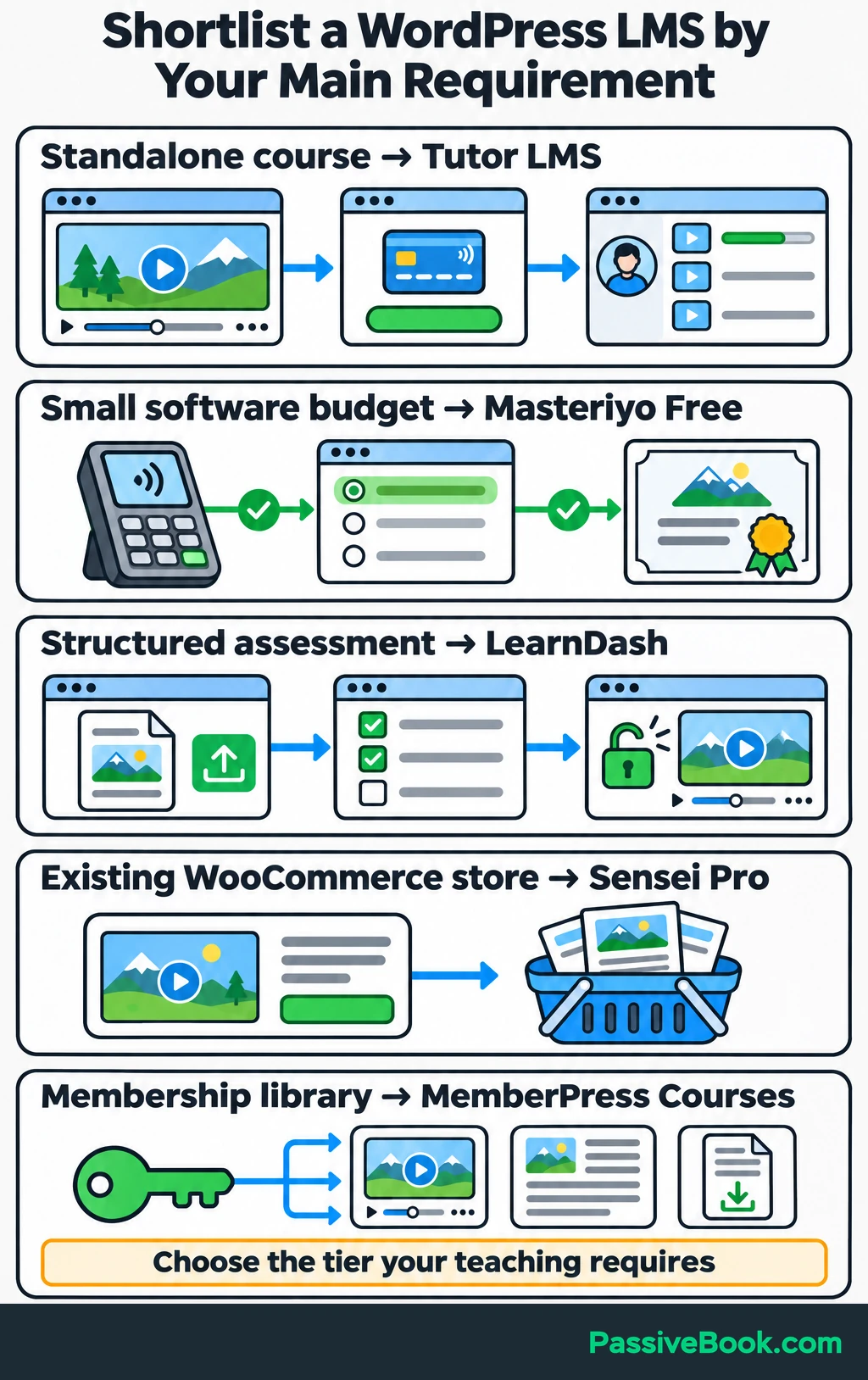
For a quick shortlist, I would choose:
- Standalone Course Business: Tutor LMS.
- Smallest Software Budget: Masteriyo Free.
- Assessment-Heavy Course: LearnDash.
- Existing WooCommerce Store: Sensei Pro.
- Membership Library: MemberPress Courses, priced at the tier your teaching features require.
The best WordPress LMS plugins solve different problems. A longer feature list only helps when those features belong in your offer.
What Does a Complete WordPress LMS Setup Cost?
The LMS license is one line in the budget. Your course also needs somewhere to run, a way to deliver video, and reliable account emails.
Make separate columns for the first year and renewal. For an existing website, also separate new course expenses from bills you already pay.
| Expense | What to Include |
|---|---|
| LMS license | The tier that includes your required quizzes, assignments, downloads, and reports |
| Extensions | Checkout connections, subscriptions, certificates, email integrations, or other missing features |
| Hosting and domain | A new site’s full cost, or the upgrade needed for an existing site |
| Video delivery | Storage, playback, bandwidth, and any required privacy controls |
| Transactional email | Delivery of receipts, account messages, and password resets |
| Backups and maintenance | File and database backups, restoration, updates, and paid help where needed |
| Selling costs | Processor charges, any plugin transaction fee, and tools needed for your tax workflow |
Compare configurations that meet the same requirements. A free builder plus four paid extensions may cost more than an inclusive paid plugin. It may also give you four more licenses to track.
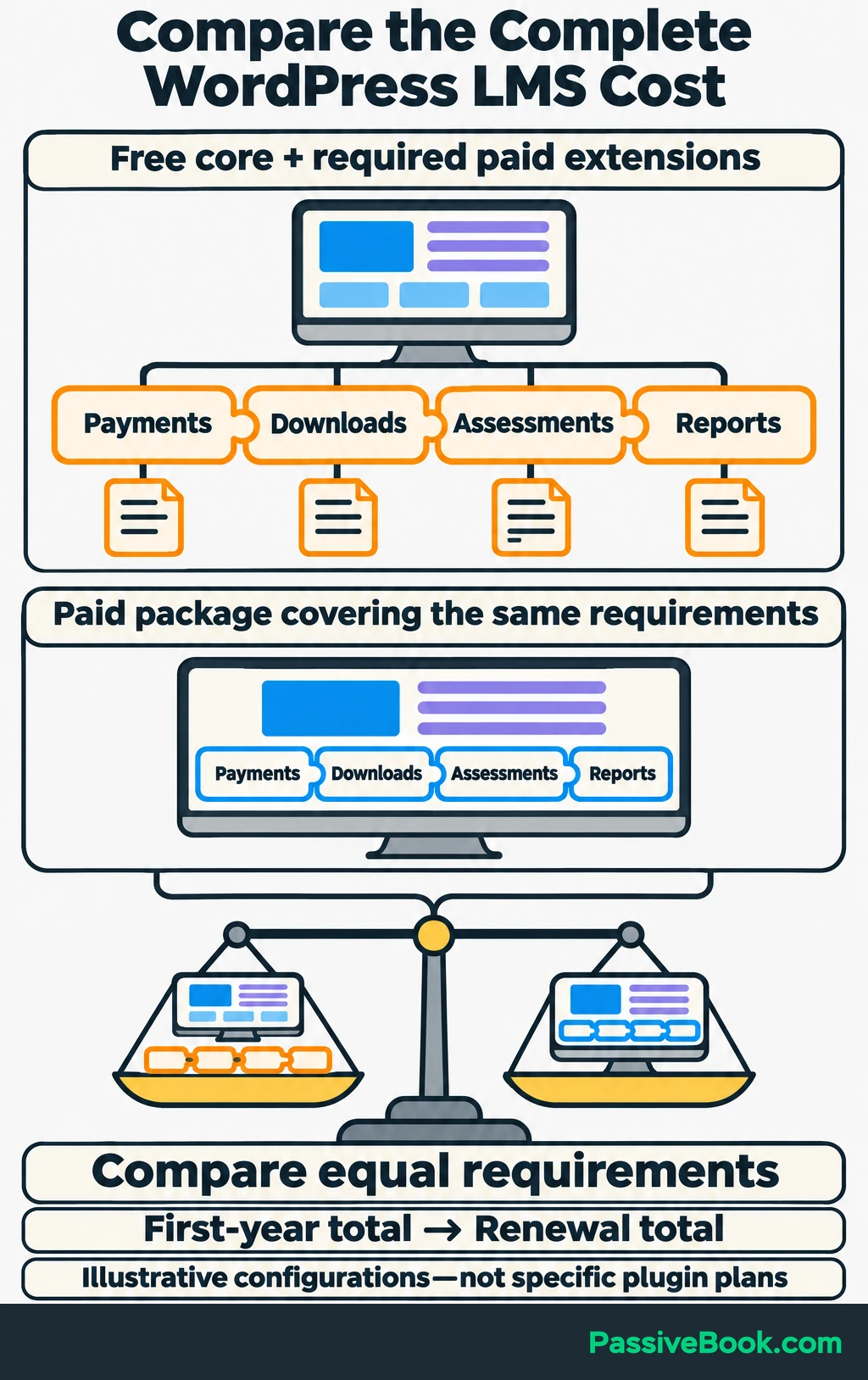
The cheaper license is not always the cheaper setup. Use the Software Cost Comparator to put two complete options side by side, including renewals and selling fees.
Free Software Cost Comparator




For the watercolor course, I would begin with one-time payment, immediate enrollment, downloadable practice sheets, and a short quiz. I would leave graded painting submissions out unless personal feedback is part of the promise. Reviewing submissions is work, even when the upload button is automated.
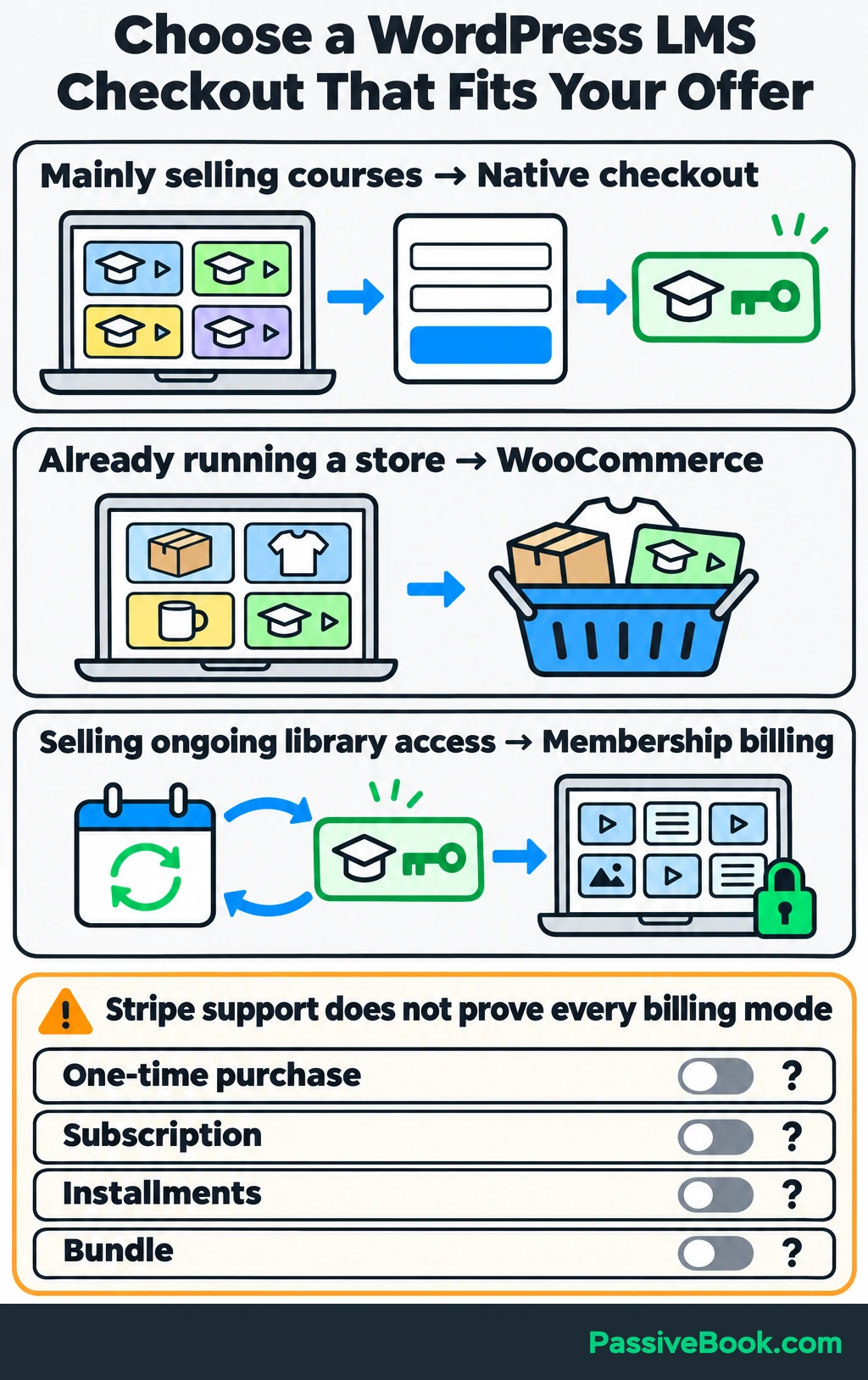
Checkout deserves its own decision:
- Native Payments: Useful when you mainly sell courses and want checkout inside the LMS.
- WooCommerce: Worth considering when your store already sells other products.
- Membership Billing: Fits access to a library or an ongoing program.
Check one-time purchases, subscriptions, installments, and bundles individually. “Supports Stripe” does not establish that an integration supports all four.
Before choosing a Stripe-based route, confirm that your business can open an account through its country-availability page. Use the regional pricing page to budget processing charges separately from plugin fees.
I abandoned a membership site after six months because producing ongoing premium content alongside my corporate job became unsustainable. That experience shapes how I judge recurring offers. Automated billing was never going to produce the next piece of useful content for me.
For a finished watercolor course, I would choose a one-time purchase unless ongoing access comes with a clear reason to renew. Monthly painting feedback could justify a subscription, but it also creates a monthly commitment.
Finally, budget for updates. Permission to keep using an installed plugin does not necessarily include future compatibility fixes, security updates, or support.
15 WordPress LMS Plugins Compared
1. Tutor LMS — Best for a Standalone Course Business
Tutor LMS is my first shortlist choice when the course itself is the main product. Its visual builder, learner dashboards, and quizzes provide a focused starting point, and native ecommerce makes WooCommerce optional.
The free core lets you build the teaching side before paying for more features. Budget for Pro when you need assignments, detailed reports, native Stripe payments, or rules requiring students to complete one course before starting another. The vendor explicitly requires an active Pro subscription for its Stripe gateway.
For the watercolor course, I would test Tutor’s learner dashboard and worksheet delivery first. Those are tasks students will repeat. A dashboard that makes returning to a lesson obvious matters more than another decorative badge.
2. LearnDash — Best for Structured Assessments
LearnDash belongs near the top of your shortlist when learning requires more than watching lessons and clicking “complete.” It supports assignments, structured progression, and quizzes with eight question types.
Its advertised package includes other WordPress products alongside LearnDash. I would judge the purchase by the course features you need, rather than counting every bundled product as a saving.
Direct Stripe Connect supports one-time and recurring payments. One operational detail matters: refunds through this integration do not automatically remove course access. You must include that action in your refund process. LearnDash documents that behavior here.
For a simple painting completion quiz, LearnDash may offer more assessment machinery than you need. It becomes more compelling when students submit work, pass required checks, and follow a controlled learning path.
3. Masteriyo — Best Free Option for Direct Payments and Certificates
Masteriyo is where I would start when the first course needs direct checkout on a cautious budget. Its free features include quizzes, Stripe and PayPal payments, and completion certificates.
The free drag-and-drop certificate designer allows two published certificate templates. That is a template limit, not a limit of two students receiving certificates. Paid access removes the restriction and adds premium fields and designs. Masteriyo explains the distinction in its certificate documentation.
For one watercolor course, a basic quiz and one certificate design may be enough. I would test that configuration before upgrading.
Choose the paid tier around the missing task. Basic adds course attachments and premium support. Pro becomes relevant for assignments, a gradebook for student scores, required prior courses, and advanced quizzes.
4. LifterLMS — Best for Course Memberships and Learning Paths
LifterLMS makes sense when several courses connect. Its free core includes course creation, quizzes, progress tracking, certificates, and memberships.
The important cost boundary is online selling. Free course delivery and offline payments are different from automatic enrollment after a successful card payment. Earth adds the ecommerce connections shown in the table.
I would consider LifterLMS if the watercolor course later becomes the first part of a wider learning path. A student might finish beginner landscapes before entering a more advanced course.
Price that future configuration carefully. Assignments, advanced quizzes, groups, and other extensions can move the total beyond Earth. Buying the entry bundle without checking those needs is how an affordable shortlist becomes an expensive installation.
5. Sensei LMS — Best for Existing WooCommerce Stores
Sensei is a natural candidate when you already use WooCommerce and prefer writing lessons in the WordPress block editor.
The free plugin handles free courses, basic quizzes, and certificates. Its Learning Mode gives students a lesson view with fewer distractions. Pro adds selling through WooCommerce, advanced quizzes, interactive lessons, groups, and cohorts.
For the watercolor blog, an existing store selling practice-sheet packs would give Sensei a clear reason to make the shortlist. You could keep course purchases within the commerce system you already manage.
A new store changes that calculation. WooCommerce brings its own settings, extensions, and maintenance. Include any extensions needed for subscriptions or other billing arrangements.
Also, the separate Interactive Blocks product does not replace Pro’s course-selling features. Buy it for interactive content, not as a cheaper checkout route.
6. MemberPress Courses — Best for Membership-Based Course Libraries
Choose MemberPress when membership rules organize the offer. Courses can sit beside protected articles, downloads, and other resources under the same access system.
The plan boundary matters here. Launch includes courses and Stripe payments, but adds the plugin transaction fee shown in the table. Growth removes that fee and adds quizzes, assignments, certificates, and content dripping—releasing lessons over time.
That makes Growth the relevant comparison for our watercolor course because the completion quiz is required. Comparing Launch’s entry price with another plugin’s assessed-course setup would hide a real cost difference.
I would choose MemberPress for a painting resource library sold through membership tiers. For one standalone course, I would first test a dedicated LMS.
Scale’s centralized gradebook only earns its higher cost when you need that wider view of assessment.
7. Thrive Apprentice — Best for Visual Course Design
Thrive Apprentice is worth considering when branded lesson layouts and flexible release schedules are priorities. It combines visual course presentation with access controls, certificates, and content dripping—releasing lessons over time.
Its native Stripe integration supports direct selling, including one-time and subscription payments.
The quiz dependency needs attention. Quizzes used to control lesson progression come through the separate Thrive Quiz Builder integration. Thrive Suite includes that product, so the standalone Apprentice price is not the complete assessed-course comparison. The quiz documentation shows how the two work together.
For a watercolor course, attractive lesson pages are useful because the subject is visual. I would still finish the payment and quiz test before spending an afternoon adjusting the course header. The header is unlikely to complain. A locked-out student will.
8. LearnPress — Best for Selecting Add-Ons Individually
LearnPress suits a course with a short, known list of requirements. Its free foundation covers lessons, quizzes, and PayPal selling, while paid extensions add routes such as Stripe and WooCommerce.
Start with the missing tasks: perhaps Stripe checkout, certificates, and scheduled lesson releases. Then compare those individual extensions with the Pro bundle.
I like this approach when you genuinely need only a few extras. It becomes less appealing when every new requirement sends you back to the extension shop.
For the watercolor course, confirm how worksheets are delivered and which reports you need before buying. “Reporting” can mean a useful student-progress view or a report you never open.
The license distinction also matters: continued use of purchased add-ons and continued updates are separate. The table shows the published maintenance extension.
9. MasterStudy LMS — Best for Courses With Live Teaching
MasterStudy offers a free starting point for multimedia lessons, quizzes, progress tracking, and course selling. Paid features extend into assignments, grading, drip content, and live teaching.
That makes it worth comparing when your course may include scheduled workshops. For the watercolor offer, a recorded landscape course and a live painting session are related products, but they create different workloads.
I would keep the recorded course simple first. Add live delivery when students are buying that interaction, and include the connected meeting service in the budget.
MasterStudy also has both a theme-related product and a separately sold paid plugin. Use the license for the product you intend to install; a theme purchase and the standalone plugin are not interchangeable purchases. The vendor explains those product differences here.
10. WP Courseware — Best for Built-In Subscriptions and Installments
WP Courseware deserves a close look when payment flexibility matters. Its built-in Stripe and PayPal connections support one-time purchases, subscriptions, and installments, so a separate ecommerce plugin is optional.
Teaching features include modules and units, quizzes, progression rules, drip content, gradebooks, and certificates.
For the watercolor course, I would test the straightforward one-time purchase first. If you later offer installments, compare the included workflow with the extensions required by your other finalist.
The vendor provides an administration and learner demo. Use both. Being able to arrange lessons easily is helpful, but students also need to find their next lesson without instructions from you.
The plugin continues operating after the license expires. Updates and support require renewal, so keep those in the ongoing budget.
11. FluentCommunity — Best for Discussion-Centered Courses
FluentCommunity fits an offer where students share work, discuss lessons, and learn from one another. Paid course features include modules, lessons, discussions, and progress tracking.
Course creation requires Pro. The free community plugin is not a free course builder. To sell course access, link the course to a product sold through FluentCart or Paymattic. Include that checkout setup in your budget. Its documentation confirms both boundaries.
For the watercolor course, I would consider it if sharing paintings and discussing technique form a substantial part of the promise.
I would skip it when students mainly need to buy, watch, download, and finish. A discussion space creates value when people use it, and moderation becomes part of the job when they do.
12. WishList Member With CourseCure — Best for Existing WishList Memberships
CourseCure is most compelling when WishList Member already controls access to your site. Basic includes courses, content dripping, and payment integrations including Stripe and PayPal.
Reusing those membership rules can avoid introducing another system for deciding who can see what.
The catch for our example is assessment. Quizzes require Pro. Gamification features, such as points and badges, are included from Plus upward. Because the watercolor course includes a completion quiz, Basic is not the configuration to compare.
I would price the Pro upgrade against a dedicated LMS before committing. Keeping an existing membership system has value, but that convenience should be weighed against the full renewal cost.
For a library without formal quizzes, the lower tier may fit much better.
13. Courses for MemberMouse — Best for Membership Checkout and Upsells
MemberMouse is worth considering when course access belongs inside a membership business with recurring billing, content dripping, and one-click purchases.
Basic includes Courses for MemberMouse, Stripe, email integrations, and standard reporting. Plus adds PayPal, quizzes, and certificates, making it the relevant tier for our assessed watercolor course.
I would choose this route when membership checkout and follow-on purchases are central to the business. I would be slower to choose it for a single self-paced course that needs little beyond lessons and a quiz.
Pro adds a fuller analytics suite, but first decide what you need to learn from the reports. “More analytics” is not a business requirement. “Find students who bought but never started” is.
14. Creator LMS — Best for Expanding Into Coaching Cohorts
Creator LMS offers a useful free configuration: courses, students, native Stripe checkout, quizzes, and certificates. That makes it worth testing for a simple paid course. Its WordPress listing describes the free features.
The paid Starter plan advertises memberships, subscriptions, and advanced reports. Business adds cohorts and live Zoom classes.
A cohort means students start and move through a program together. For the watercolor business, that could become a scheduled painting program with shared deadlines and live sessions.
I would buy for the format you can deliver now. A future coaching idea does not justify paying for the larger setup before you have planned the sessions.
The pricing table separates advertised offers from regular prices because the page does not state the renewal charge.
15. WP Courses — Best for Adding Courses to an Existing Content Site
WP Courses is worth considering when you want to add organized lessons to an existing WordPress content site. Its free core covers multimedia lessons, course navigation, and learner progress.
Premium adds WooCommerce and Paid Memberships Pro integrations, certificates, triggered emails, and lesson attachments. Those selling connections and attachments make Premium relevant to the watercolor course.
The pricing page advertises a price without stating its billing period. Confirm the recurring charge before comparing annual totals.
Its license FAQ specifies one site and explains that the plugin remains usable after cancellation, while updates and support depend on an active subscription.
I would include it in a focused lesson-publishing shortlist once that billing question is answered.
Test Two Finalists Before Committing
A comparison can narrow the field, but your final decision should come from completing your own teaching and selling workflow.
Choose two plugins that meet the requirements and fit the renewal budget. Test the paid capabilities you intend to buy through an appropriate demo, trial, or staging installation—a private copy of your site.
Build and Take the Same Sample Course
Build a small version of the course in each finalist before importing everything.
For the watercolor example, use the same materials:
| Course Element | What to Build |
|---|---|
| First module | “Water, Paint, and Paper,” with a short technique video |
| Second module | “Your First Landscape,” with a guided painting lesson |
| Download | A printable practice sheet for washes and brush marks |
| Completion quiz | A few questions about water control and lesson technique |
| Certificate | Include one only if the offer promises it |
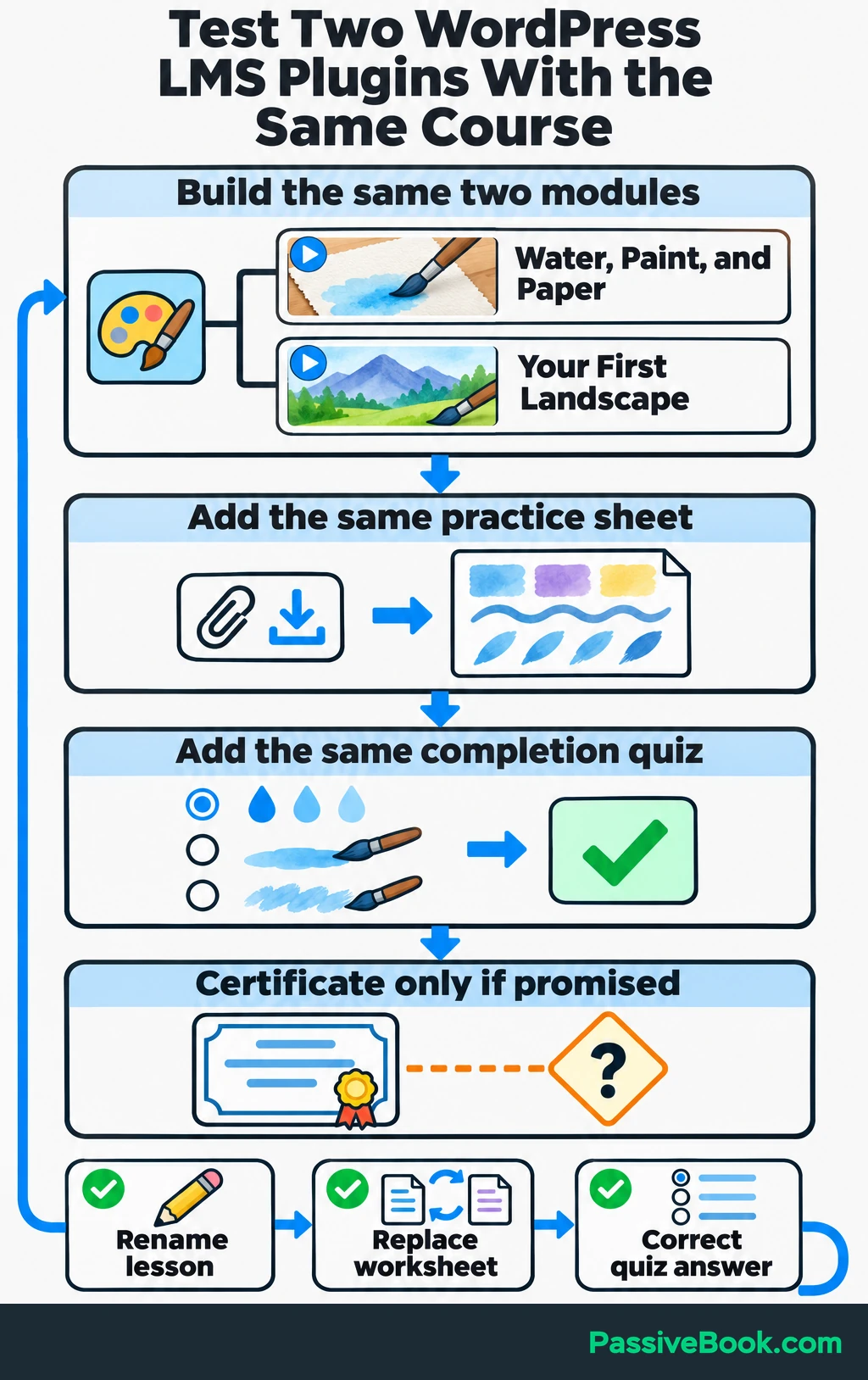
Compare the effort required to publish and revise it. Change a lesson title, replace the worksheet, and correct a quiz answer. You will do those jobs after launch, too.
Then take the course as a student on desktop and mobile:
- Sign in and find the purchased course.
- Leave halfway through a lesson and return later.
- Download and open the practice sheet.
- Submit the quiz and understand the result.
- Find the next lesson and view progress.
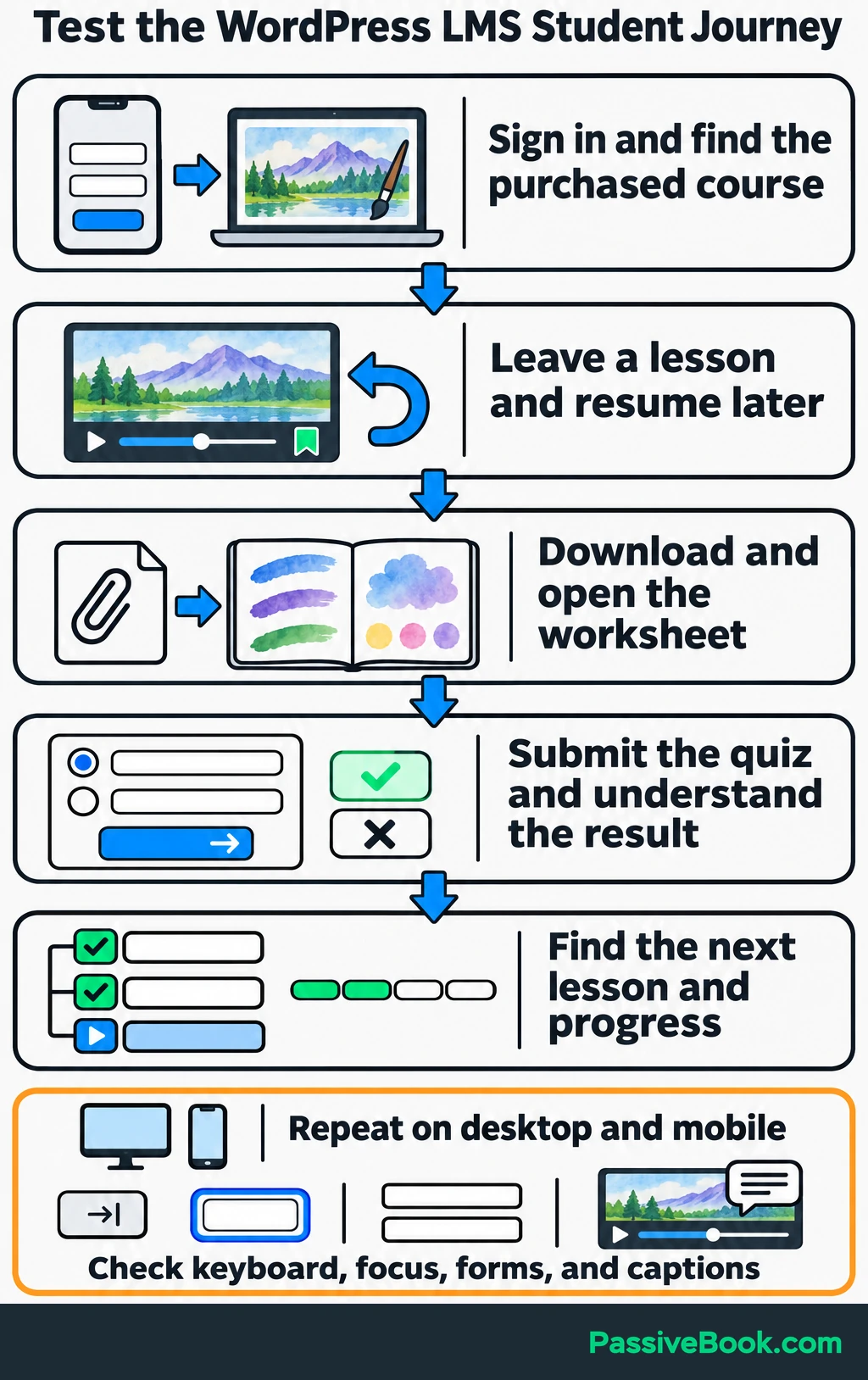
Check keyboard navigation, visible focus, readable forms, and video captions during the walkthrough. A beautiful course page still needs to work when someone navigates without a mouse.
I would favor the system that makes these repeated actions clear. Your course should not need a course explaining how to use it.
Verify Payments, Access, and Integrations
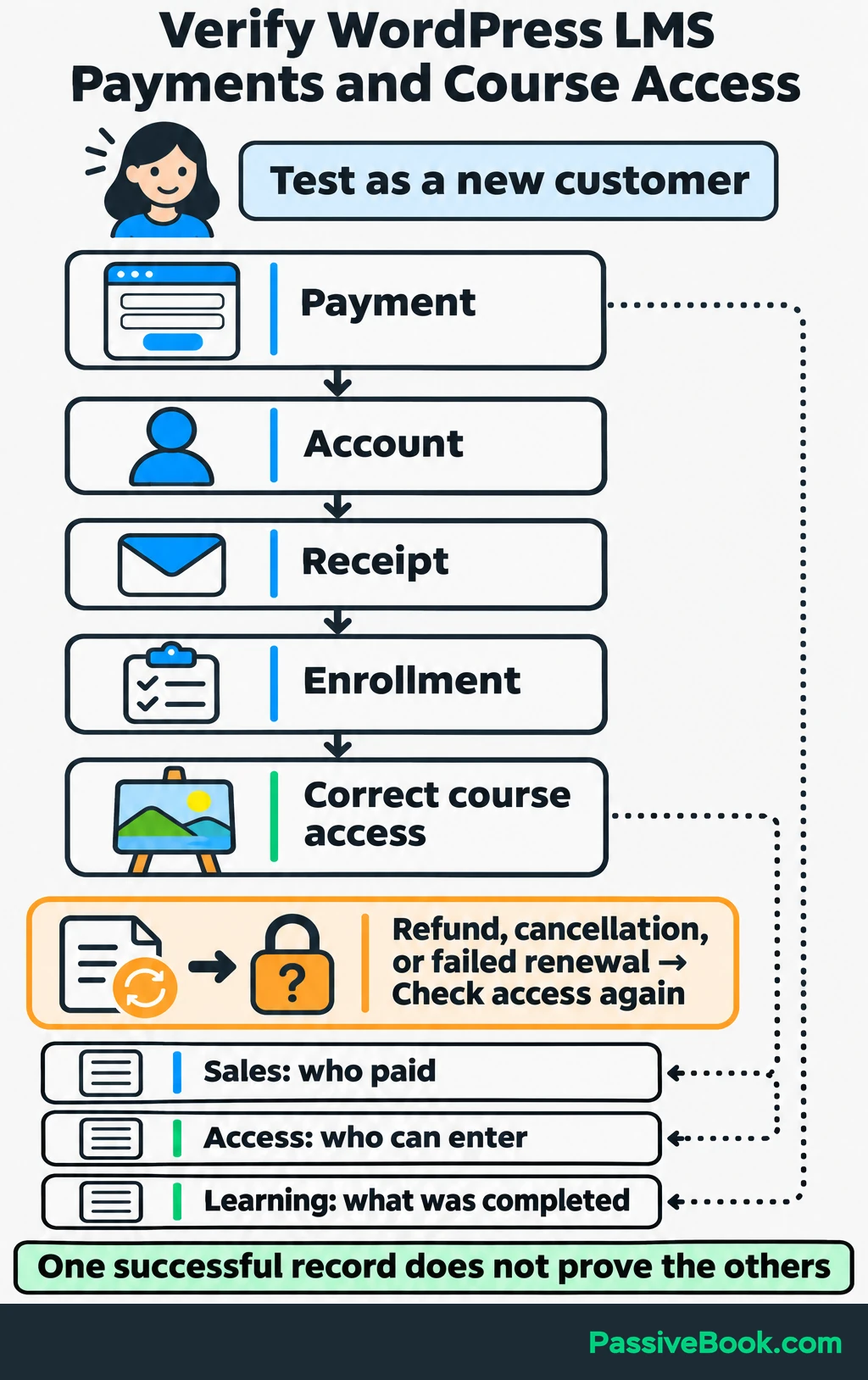
Make a test purchase as a new customer. An administrator account can hide access problems because it already has broad permissions.
Confirm the whole chain: payment, account creation, receipt delivery, enrollment, and access to the correct course. Test password recovery as well.
Next, refund the purchase and record what happens to access. For subscriptions, also test cancellation and a failed renewal. Decide whether access should end immediately or remain until the paid period expires, then confirm the system follows that rule.
Connect your intended email service and test one useful automation. I prefer FluentCRM for WordPress-based email systems, but the important question here is whether the selected LMS connection handles the event you need.
For example, enrollment could trigger a welcome message linking to the first watercolor lesson. Check that the message arrives once, links to the right place, and does not restart unnecessarily.
Keep three records separate during testing:
- Sales: Who paid, how much, and for which offer.
- Access: Who can currently enter each course.
- Learning: Who started, where they stopped, and what they completed.
A successful payment does not prove that enrollment worked. A student account does not prove that someone paid.
Check Performance, Support, and Portability
Test logged-in lessons, quizzes, and checkout with your actual theme and essential plugins. A fast public sales page tells you little about the experience inside a personalized student dashboard.
Ask your host about expected simultaneous learner activity and video delivery. An unlimited-student license describes the software’s licensing; it does not establish your server’s capacity.
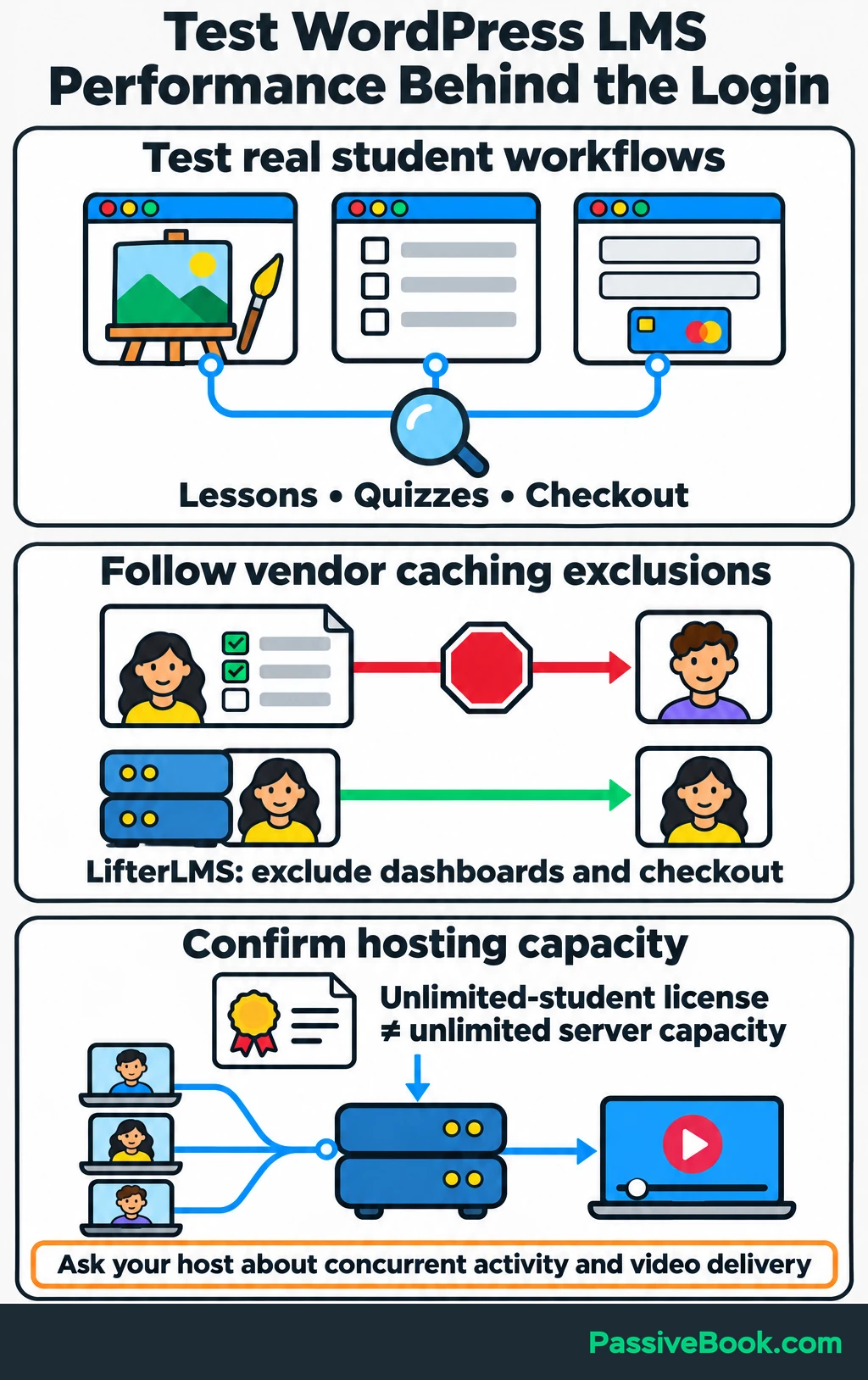
Follow the LMS vendor’s caching exclusions. Caching saves copies of pages, and personalized learning screens need special care. LifterLMS, for example, warns that incorrect caching can show outdated or another student’s information. Its caching guidance identifies dashboards and checkout as exclusions.
Before launch, assign responsibility for updates, administrator access, and restorable backups of both files and the database. WordPress’s security guidance provides a useful foundation. Someone needs to own that work, even if a host handles part of it.
Send support one concrete question about your planned setup. For example, ask whether your selected checkout integration removes access after a refund. Compare the answer’s usefulness with the documented support scope and the maintenance history of the integrations you need.
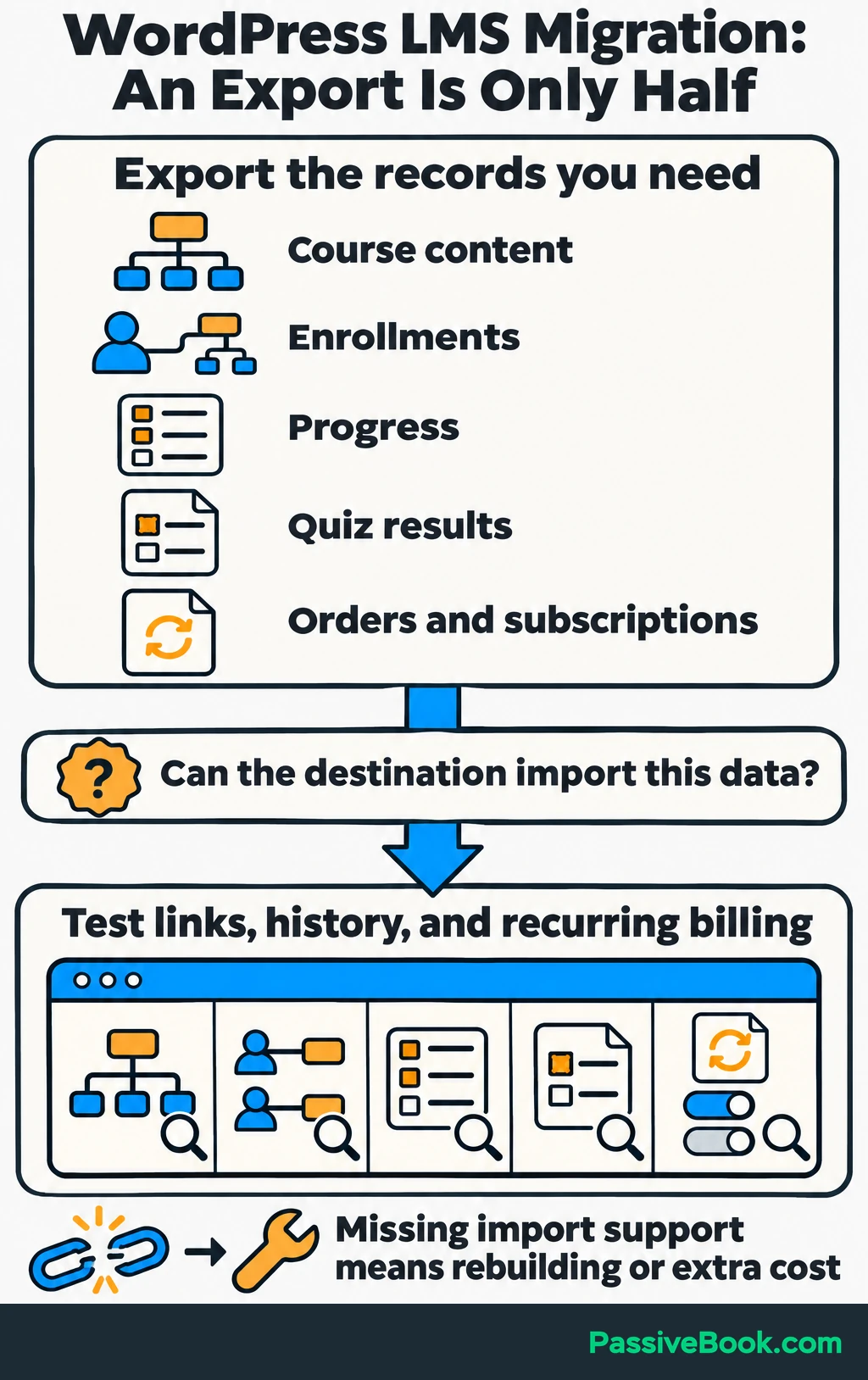
Finally, test leaving:
| Export | What to Check |
|---|---|
| Course content | Whether lessons, media references, and structure can move |
| Enrollments | Whether students remain linked to the correct courses |
| Progress | Whether the destination can preserve completion records |
| Quiz results | Whether attempts, answers, and grades can be imported |
| Orders and subscriptions | Whether records can move and recurring billing can continue |
An export button is only half the question. The destination must be able to use the data, or you need to budget for rebuilding it.
Choose the finalist that completes the required workflow at an ongoing cost and workload you can manage. That is a better purchase than the plugin with the most impressive demo.
What Next?
Write down your five essential course requirements and use the table to choose two finalists. Build one lesson, add your download, and complete a test purchase before moving the rest of your material.
Use the social buttons to share this comparison when a course-planning discussion gets stuck on plugin choices. Comparing the complete setup can save a lot of rebuilding.
Which requirement is shaping your choice most: teaching features, payments, or maintenance? Share your answer in the comments, and bring any other questions about your shortlist.
Share this post with your friends & followers:

