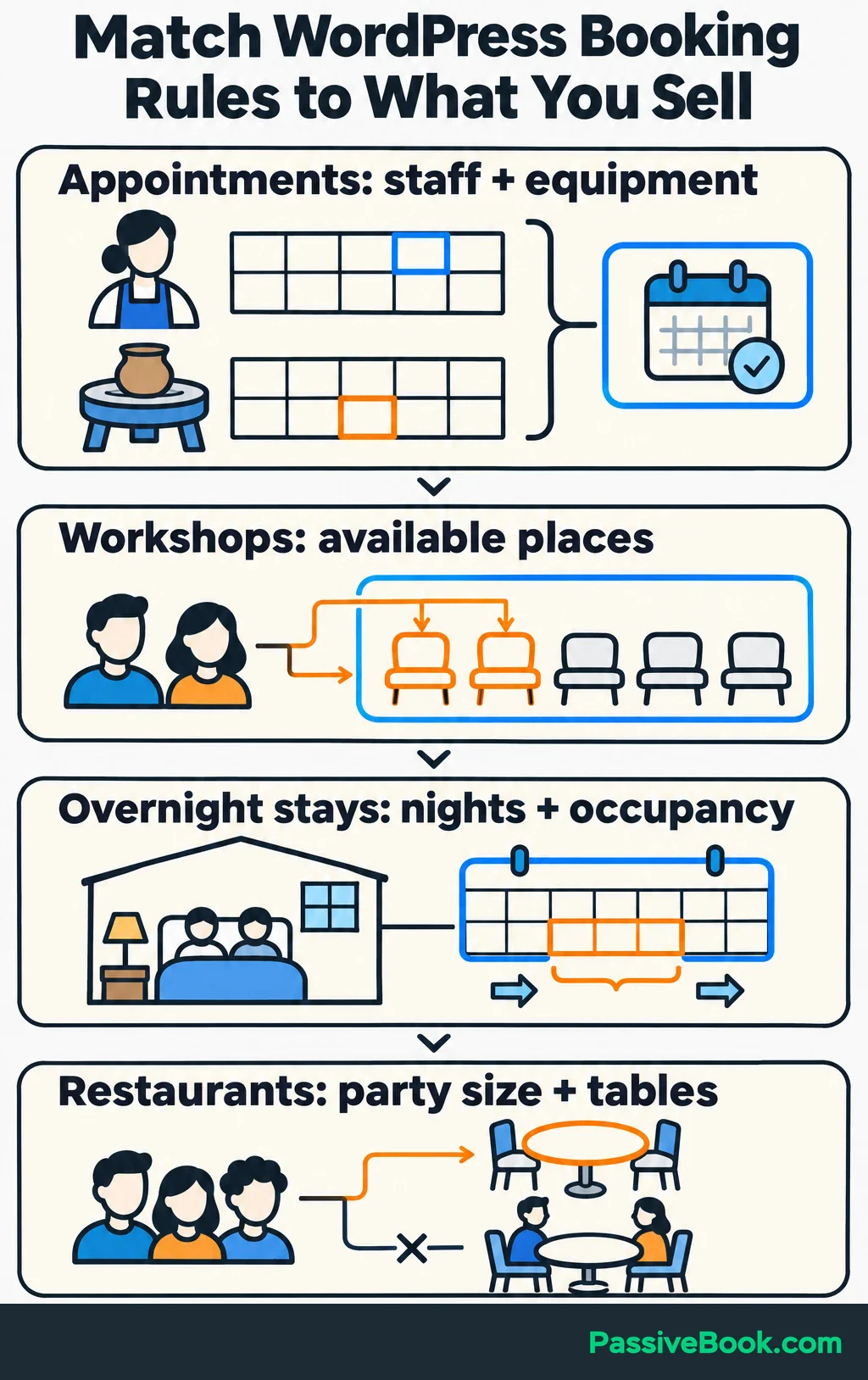
A customer wants an hour with you. Another wants two places in Saturday’s workshop. Both need to book online, but they need different availability rules.
Pick a plugin because its calendar looks good, and you may discover that payments, staff schedules or shared equipment require a different edition. Then your “quick setup” becomes another project.
That extra work is easier to avoid when you can see each plugin’s limits before installing it. This comparison shows which booking jobs the 13 plugins support, where paid upgrades change the cost, and what I would test before trusting one with customer reservations.
Best WordPress Booking Plugins at a Glance
For appointments and classes in one system, I would start with Amelia. For free solo scheduling, I would try Simply Schedule Appointments. For free scheduling across several employees, MotoPress Appointment Booking Lite deserves a look.
Those are starting points. The best WordPress booking plugins serve different jobs, so an appointment scheduler should not automatically be your choice for overnight stays, restaurant tables or ticket sales.
Before comparing prices, write down your requirements:
- Schedule: Service length, working hours, holidays, advance notice and time between bookings.
- Capacity: How many customers, staff members, rooms or pieces of equipment each booking needs.
- Payments: Full payment, deposits, pay on arrival and your preferred payment provider.
- Calendars: Whether outside busy events must block availability.
- Notifications: Customer confirmations, staff alerts and scheduled reminders.
- Customer Control: Whether customers can cancel, reschedule or view previous bookings.
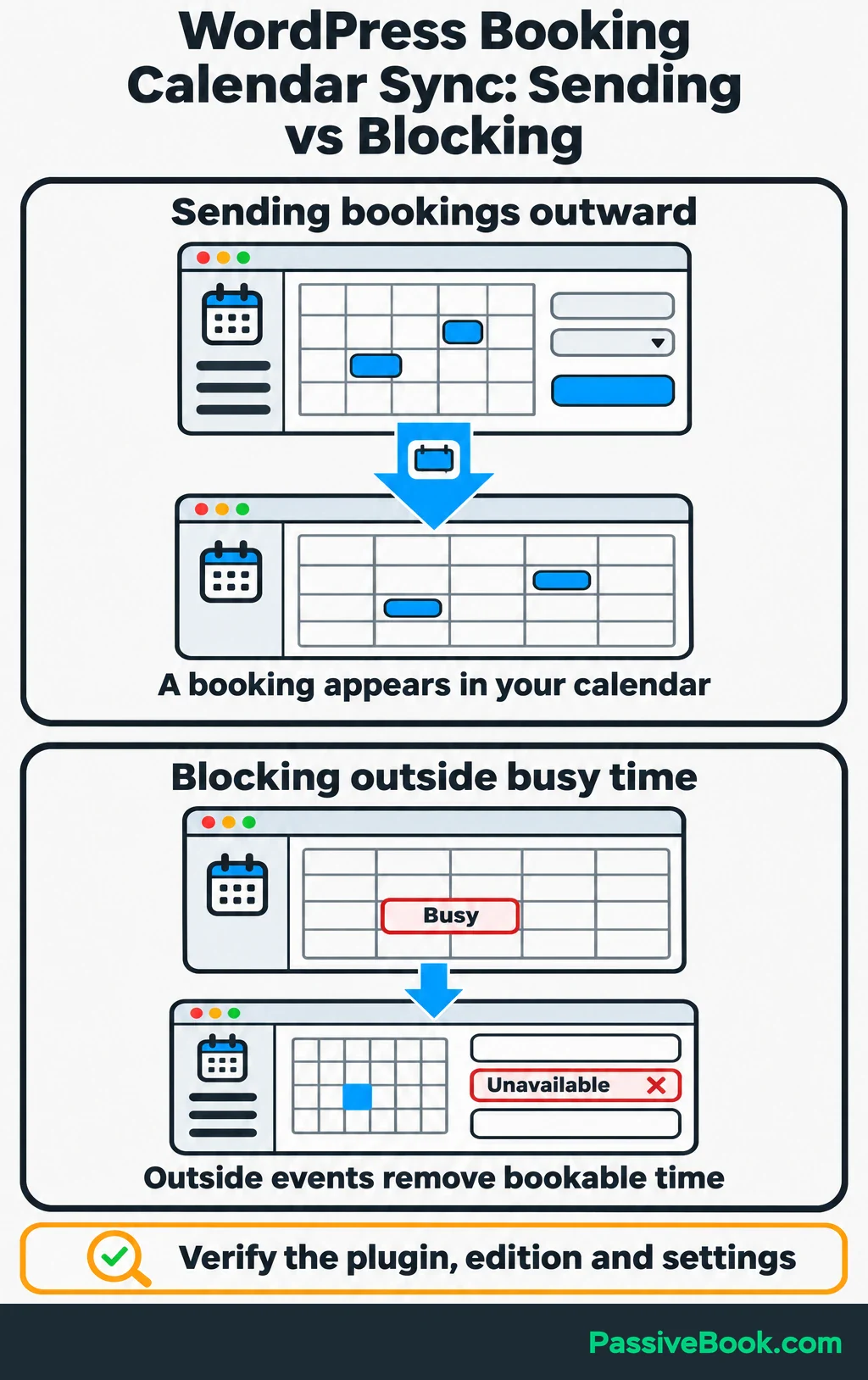
A calendar connection needs particular attention. Sending bookings to Google Calendar does not necessarily mean that a busy event created in Google will block a new booking on your website.
To see why these rules matter, imagine you run Willow Clay, a small pottery studio. A private wheel lesson needs an available instructor and a teaching wheel. A hand-building workshop needs a fixed number of places. An instructor can be free while every wheel is occupied, so staff scheduling alone would leave a gap.
I based this shortlist on official feature lists and pricing; I haven’t tested all 13 plugins side by side.
The table keeps prices together for comparison. Amounts are USD except where marked in euros, and annual unless stated otherwise. “Promo/reference” shows the advertised sale price and regular comparison price; it does not establish the renewal charge. Explicit renewal terms appear separately. Follow the plan links for current offers.
| Plugin | Best-Fit Booking Type | Free Option and Scope | Qualifying Paid Edition, Sites and Price | Payments | Calendar Behavior | Main Trade-Off |
|---|---|---|---|---|---|---|
| Amelia | Appointments plus classes or events | Lite: basic appointments, events and Square payments | Pro: starts at $149 promo/$199 reference annually for the one-domain option; five-domain option also available | Square in Lite; premium adds Stripe, PayPal and others | Paid Google integration supports busy-time blocking | Shared resources require Pro or Elite |
| LatePoint | Appointments with payments from the start | Single-location scheduling, event capacity, customer dashboard and online payments | Starter: one site, $79 introductory/$99 regular annually; renewals use full checkout price | Free Stripe, PayPal and Razorpay; additional 2.9% plugin transaction fee | Pro supports two-way Google, Outlook and Apple connections | Free payments carry an extra plugin fee |
| Simply Schedule Appointments | Solo appointments | Basic: unlimited appointment types, blackout dates and notification emails | One-site editions: Plus $99 intro/$129 renewal; Professional $199/$249; Business $399/$499 annually | Stripe and PayPal require Professional or Business | Google conflict checking starts with Plus | Payments, teams and resources sit in higher editions |
| FluentBooking | Consultations and team meetings | One-to-one scheduling, buffers, booking questions and emails | Solo Pro: one site, $63 introductory/$79 standard annually | Pro adds Stripe and PayPal | External calendar integrations require Pro | Best suited to scheduling people and meetings |
| Booknetic | Service booking with configurable automation | Developer offers a free download and sandbox; confirm included features before relying on it | Standard: one production domain, $99 promo/$199 reference; Premium: five domains, $149/$399 annually | Basic supports local payment; Standard adds Stripe and PayPal | Google conflict checking from Standard; Outlook from Premium | Shared resources require Premium or Elite |
| Bookly | Linked services and complex appointments | Basic scheduling with up to five services | Business: one site, $69 promo/$129 reference; Ultimate: one site, $159/$199 annually | Business includes Stripe, PayPal Standard and deposits | Pro lists one-way Google sync; Business adds Advanced Google and Outlook integrations | Complex service combinations require Ultimate |
| BookingPress | Appointments where gateway choice matters | Unlimited services and appointments with PayPal | Standard: one site, $89 promo/$99 reference; Professional: three sites, $139/$199 annually | Premium adds Stripe, Square, Razorpay, Mollie and others | Premium Google, Outlook and Apple integrations | Download and update through the developer |
| MotoPress Appointment Booking | Appointments across multiple employees | Lite: staff, services, locations, group capacity, customer records and email reminders | Premium: one site, $49/year or $149 lifetime | Lite is pay on site; premium adds Stripe and PayPal | Premium sends bookings to employee Google calendars in one direction | External calendar changes do not update bookings |
| WooCommerce Bookings | Appointments, classes or rentals within a store | No free edition | Bookings: one site, $249/year | Uses WooCommerce payment gateways | One-way or two-way Google connection; incoming events affect store availability | Requires WooCommerce; some workflows need extra extensions |
| Booking Calendar | Date-based resource reservations | One resource, booking requests and email notifications | Business Small: one site, $78.97 promo/$149 reference, one-time; six months of updates included | Stripe and PayPal from Business Small | Google event imports and ICS calendar feeds | Deposits, seasonal rates and shared capacity need higher editions |
| MotoPress Hotel Booking | Overnight accommodation | Lite: direct reservations and full or deposit PayPal payments | Premium: one site, $139/year or $499 lifetime | Premium adds gateways including Stripe | Pro exchanges availability through iCal | Channel updates are periodic, without an instant inventory lock |
| Five Star Restaurant Reservations | Restaurant reservation requests and tables | Basic requests, opening schedules, approvals and emails | Ultimate: one site, €297 promo/€397 reference annually | Ultimate supports Stripe and PayPal deposits | Uses restaurant schedules and seating rules; external conflict checking is not established here | Table assignment and deposits require Ultimate |
| Event Tickets | Ticketed workshops and events | RSVPs, attendee management and Tickets Commerce | Nexcess software package: one site, $350/year; includes premium event tools, not a standalone Plus license | Free PayPal, Stripe and Square; free Stripe/Square sales carry a 2% plugin commission | Event attendance, not staff appointment availability | Premium access must be weighed against the whole package cost |
For an existing store, I would also shortlist WooCommerce Bookings. For overnight accommodation, start with MotoPress Hotel Booking. Five Star suits dining reservations, and Event Tickets suits attendance at a scheduled event.
Ticketing can sit alongside appointment scheduling, but I would first check whether one system can handle both jobs. Two systems mean two sets of settings to maintain.
The 13 Best WordPress Booking Plugins
1. Amelia — Best for Appointments and Classes in One System
Amelia is my first shortlist choice when you sell both individual appointments and scheduled classes. Keeping those bookings together can make daily administration simpler than running separate appointment and event plugins.
Amelia Lite supports basic appointments for one employee, events and Square payments. Premium adds options such as customer and employee panels, recurring bookings, packages, deposits and additional gateways.
The feature that matters most for Willow Clay is resource management. It can limit appointments by equipment availability as well as employee schedules, and it requires Pro or Elite.
For a private lesson, I would assign the teaching wheels as resources. The website should offer a time only when an instructor and the required wheel capacity are available. That is the rule I would test first.
Amelia is worth considering when those different booking needs belong together. For a single free consultation calendar, I would start with something smaller.
2. LatePoint — Best for Accepting Booking Payments Without an Upfront License
LatePoint is useful when you want to accept paid bookings before buying an annual license. Its free plugin supports Stripe, PayPal and Razorpay, along with email notifications, a customer dashboard and single-location scheduling. It also supports event registrations with capacity limits.
The catch is the additional plugin transaction fee. The free plan adds 2.9% per transaction, separate from your payment processor’s charges. Paid plans remove that fee. LatePoint’s payment-fee explanation.
I would use free to validate a small booking offer, then compare its fees with the paid license once payments become regular.
Pro also adds multiple staff, recurring appointments, customer rescheduling, scheduled reminders and calendar integrations. Its Google, Outlook and Apple connections support two-way synchronization, but you still need to connect the right calendars and enable automatic syncing.
The paid plans share their feature set, so choose the website allowance you need.
3. Simply Schedule Appointments — Best for Free Solo Appointment Scheduling
Simply Schedule Appointments has a useful free edition for one-person scheduling. Basic includes unlimited appointment types, blackout dates, scheduling restrictions and customizable notification emails.
I would start here if you manage availability in WordPress and do not need online payments or outside calendar events to block bookings. You can set your hours, block holidays and offer different appointment lengths without immediately buying a license.
The upgrade decision is clear:
- Plus: Google Calendar conflict checking and group bookings.
- Professional: Stripe or PayPal payments and SMS.
- Business: Team members and shared resources.
For Willow Clay, Basic could cover an instructor offering individual lessons without shared equipment constraints. Once several instructors need access to a limited number of teaching wheels, Business becomes the relevant comparison.
That jump matters. Judge the plugin by the edition your actual workflow requires, even if its free scheduler first caught your attention.
4. FluentBooking — Best for Consultations and Team Meetings
FluentBooking suits bookings built around conversations: consultations, phone appointments, online sessions and meetings.
Free includes one-to-one scheduling, changes to your usual hours, time between appointments, booking questions and email notifications. Pro adds group sessions and can distribute bookings among available hosts, called round-robin scheduling. It also adds external calendar connections, payments and conferencing integrations. Pro’s webhooks can send booking details to another tool after a booking or cancellation.
I already use FluentCRM for email automation, so that connection puts FluentBooking on my shortlist when booking activity should guide customer follow-up. It also works independently, so you do not need to adopt the rest of the Fluent tools.
At Willow Clay, I would consider it for introductory calls about private lessons. I would favor a resource-aware scheduler for the lessons themselves if teaching-wheel availability controls what can be sold.
5. Booknetic — Best for Customizable Booking Automation
Booknetic deserves a look when the booking needs to trigger a defined process across services, staff and locations.
Its workflow tools support reminders and follow-ups. I would use those for messages with a clear purpose, such as preparing the customer for a lesson or requesting feedback afterward. A booking should not become an excuse for an avalanche of email.
Basic lets customers pay on site and includes automated email workflows. Standard adds Stripe, PayPal, custom booking forms, a customer panel and Google Calendar conflict checking.
For Willow Clay, I would skip Standard if each lesson must reserve a teaching wheel. Shared-resource scheduling requires Premium or Elite. Outlook integration also starts at Premium.
I would explore the free download or sandbox before paying, then build the complete workflow in the qualifying edition. Testing only the booking form would miss much of the reason to choose Booknetic.
6. Bookly — Best for Complex Service Combinations
Bookly becomes more interesting when a customer needs several linked services, a package or an appointment involving multiple staff members.
Business covers conventional paid team scheduling with Stripe, PayPal Standard, deposits and customer self-service. Ultimate adds packages and more complex arrangements through chain, compound and collaborative services. Bookly’s bundle comparison.
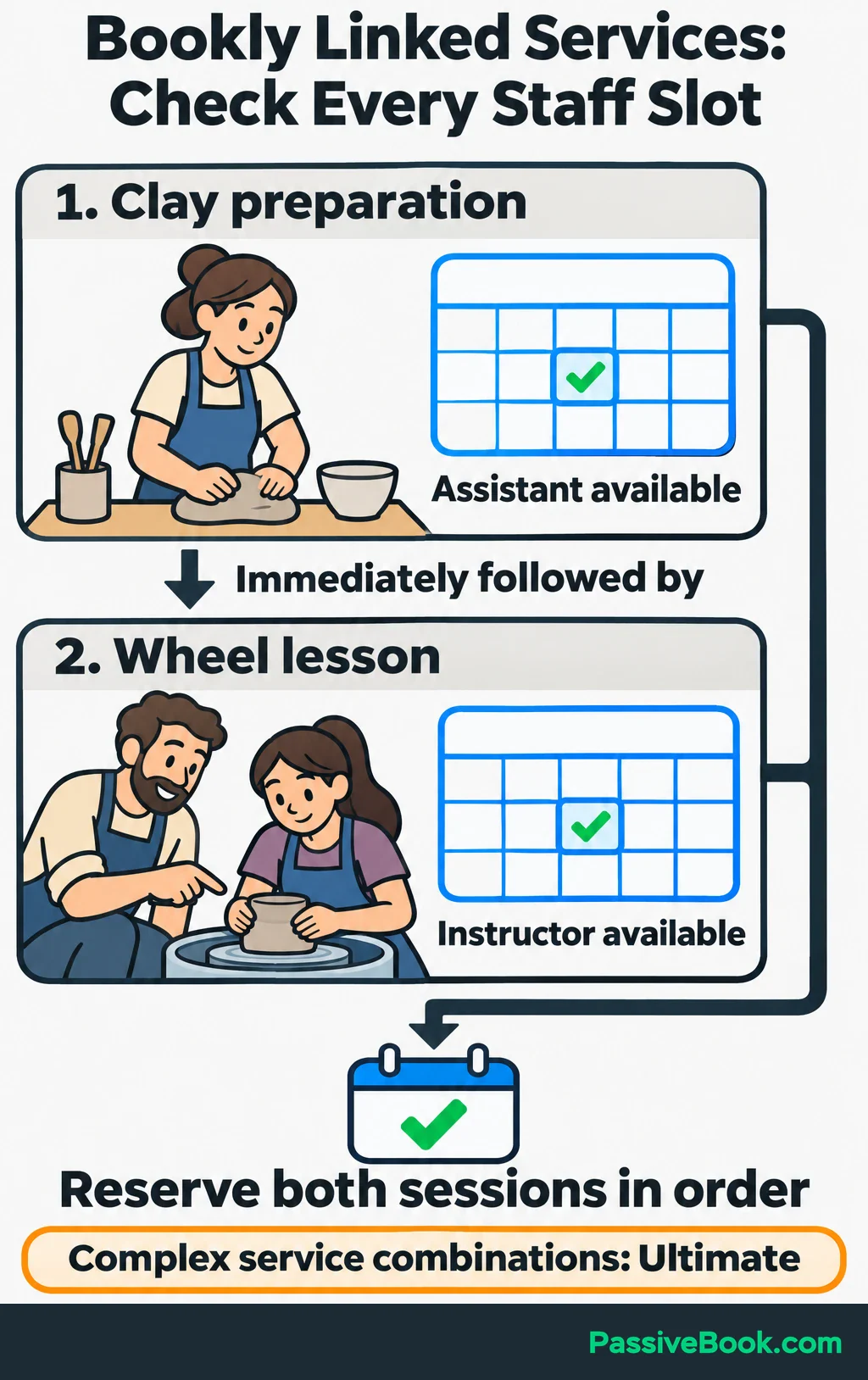
I would shortlist it when the sequence of services matters. At Willow Clay, that might mean booking a clay-preparation session with an assistant followed immediately by a wheel lesson with an instructor. I would test whether the plugin reserves both sessions in order and checks each person’s availability.
Free supports basic scheduling with up to five services, but online payments, unlimited staff or services, and add-on installation require paid functionality.
Calendar support also changes by bundle. Pro lists one-way Google synchronization; Business adds Advanced Google and Outlook integrations.
Choose Bookly because you need its service rules. For a simple appointment calendar, those options may add setup work without solving another problem.
7. BookingPress — Best for a Wide Choice of Payment Gateways
BookingPress belongs on your shortlist when your payment provider is a firm requirement.
Free includes unlimited services and appointments with PayPal. Premium adds providers such as Stripe, Square, Razorpay and Mollie, along with staff management and calendar integrations.
Standard covers conventional paid appointment scheduling. Professional adds features including recurring appointments, packages, multiple locations and multi-staff or multi-service bookings.
There is also a distribution detail to understand before installing it. The WordPress.org listing is closed for a guideline violation, so obtain the plugin through the developer and follow its update process. WordPress.org closure notice.
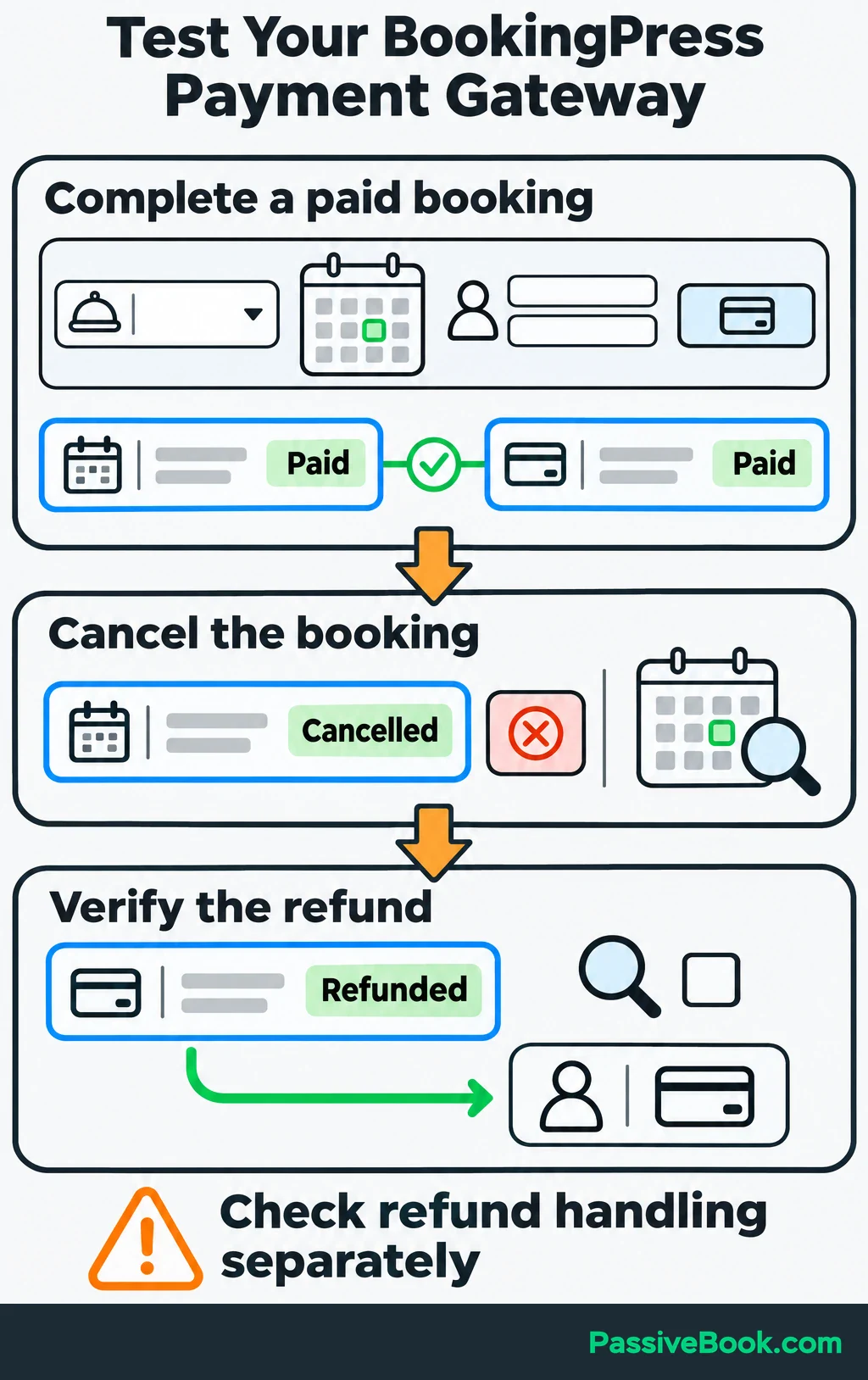
I would consider BookingPress when its gateway support solves a specific problem. Before committing, I would confirm how updates reach the site and test the chosen gateway through a complete booking, cancellation and refund.
A long list of supported providers matters only if your required provider works through your intended booking flow.
8. MotoPress Appointment Booking — Best for Free Multi-staff Scheduling
MotoPress Appointment Booking Lite is a strong free candidate when several employees need separate schedules.
Lite supports multiple employees, services and locations, individual working hours, group capacity, customer records and email reminders. That covers more than a simple request form, provided customers can pay on site.
Premium adds built-in online payments, including Stripe and PayPal. WooCommerce payment integration and Twilio SMS need separate paid extensions.
The calendar limitation matters if staff manage their day elsewhere. The employee Google Calendar connection sends website bookings outward in one direction. Changes made in Google do not update the WordPress booking schedule. Customer add-to-calendar links serve a separate purpose. MotoPress’s calendar documentation.
I would choose Lite when WordPress will hold the working schedule. If employees expect their outside calendar events to block new appointments automatically, I would shortlist a plugin with that documented behavior.
9. WooCommerce Bookings — Best for Bookings in an Existing Store
WooCommerce Bookings makes sense when appointments should share your store’s checkout, gateways, customer records and order management.
It supports fixed or customer-selected durations, participant limits, resources and variable pricing. At Willow Clay, that could put private lessons beside an existing ceramics catalog.
On one digital-product site, I kept customer follow-up notes in a separate spreadsheet after orders arrived in WooCommerce. Correcting a customer detail meant checking both places. I eventually brought the working record back into WordPress. That experience makes me favor fewer places to maintain customer information.
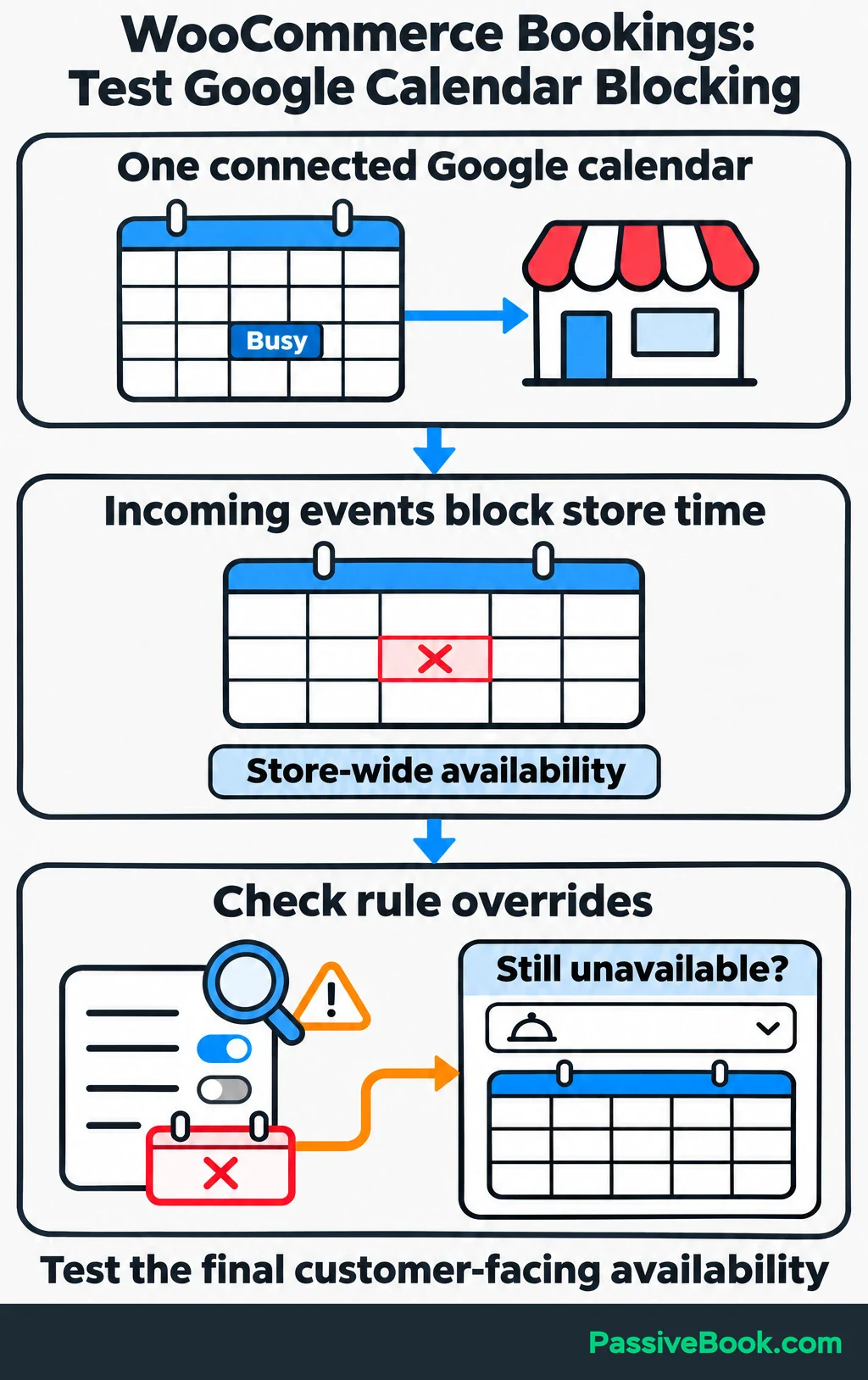
For bookings, I would still check the calendar connection carefully. Incoming Google events block time through store-wide availability rules, which other rules can override. The built-in connection uses one Google calendar for the site, so I would test both those blocking rules and the staff scheduling requirements. WooCommerce’s Google Calendar documentation.
Also budget for required extensions, such as deposits or expanded automation. Core Bookings does not automatically create recurring reservations; recurring billing is a separate requirement.
I would choose it for an established store. Without one, a dedicated scheduler is a more direct starting point.
10. Booking Calendar — Best for Date-based Resource Reservations
Booking Calendar by wpdevelop suits reservations centered on an item or space and its available dates.
Free covers one booking resource, booking requests, email notifications and reservation administration. Paid editions add rules in stages:
- Personal: Multiple resources.
- Business Small: Online payments, including Stripe and PayPal.
- Business Medium: Deposits and seasonal rates.
- Business Large: Shared capacity and availability search.
At Willow Clay, I would consider it for reserving studio space or equipment. The deciding question is whether one booking takes the whole resource or customers can reserve places within a shared capacity.
That distinction determines the edition. “Rent the room” and “reserve one place in the room” need different rules.
Its purchase model also differs from most annual licenses here. The software purchase is permanent, but the included update period is limited. Account for later update and support costs when comparing it with subscriptions.
11. MotoPress Hotel Booking — Best for Overnight Accommodation
MotoPress Hotel Booking is a separate product from MotoPress Appointment Booking. Choose it when customers reserve nights using check-in and check-out dates.
It handles accommodation inventory, occupancy, seasonal rates, minimum stays and extras. Lite supports direct reservations with PayPal, including full or deposit payments. Pro adds automatic calendar exchange with outside accommodation platforms and more gateways, including Stripe.
The important limit is how that calendar exchange works. iCal shares reserved or blocked dates, but it does not transfer complete booking details or prices. Each platform imports changes on its own schedule, so it does not create an instant inventory lock across channels. MotoPress’s iCal explanation.
I would choose it for an accommodation business whose rules fit that model. I would not force overnight reservations into an hourly appointment form just because the form was already installed.
12. Five Star Restaurant Reservations — Best for Restaurant Table Bookings
Five Star Restaurant Reservations fits the way dining reservations work: guests choose a party size, request a time and receive confirmation.
Free covers basic requests, opening schedules, approval or rejection, and customer email notifications. Premium adds reservation or seat limits. Ultimate adds table selection and assignment, Stripe or PayPal deposits, reminders, SMS and the companion app.
The choice depends on what “confirmed” means in your business.
If you review every request yourself, a request-based workflow may be enough. If customers should receive confirmation against table and seating limits, choose and test the edition that enforces those limits.
I would pay particular attention to party size, dining duration and how tables can be combined. A calendar can have an open time while the room lacks a suitable table.
13. Event Tickets — Best for Ticketed Events and Workshops
Event Tickets fits attendance at a scheduled event. It handles RSVPs, ticket sales and attendee management, while The Events Calendar is optional for public calendar listings.
At Willow Clay, I would consider it for a hand-building workshop with a fixed number of places. It would not replace the system that checks an individual instructor’s appointment availability.
Free includes Tickets Commerce with PayPal, Stripe and Square. Free Stripe and Square sales carry a 2% plugin commission in addition to processor charges. Event Tickets Plus removes that commission and adds attendee registration forms, QR check-in and WooCommerce ticketing. Event Tickets’ feature and fee details.
Be careful with the premium price in the table: it covers the wider Nexcess software package. Judge that whole purchase against your needs.
For occasional workshops, I would first calculate the free edition’s fees and check whether its registration tools are sufficient.
What Will Your Booking Plugin Really Cost?
Compare the lowest edition that meets every essential requirement. A free plugin is enough when it handles your complete workflow, including availability, payments, notifications and calendar behavior.
I would not upgrade simply because the paid edition exists. I also would not spend every Friday fixing a schedule to avoid buying the feature that manages it.
Your ongoing cost can include:
- Licensing: The qualifying edition and the correct website allowance.
- Extensions: Required payment, deposit, messaging or automation add-ons.
- Maintenance: Update and support renewals, including those attached to a one-time software purchase.
- Usage: SMS, WhatsApp or other metered services.
- Plugin Fees: Any percentage charged on eligible booking payments.
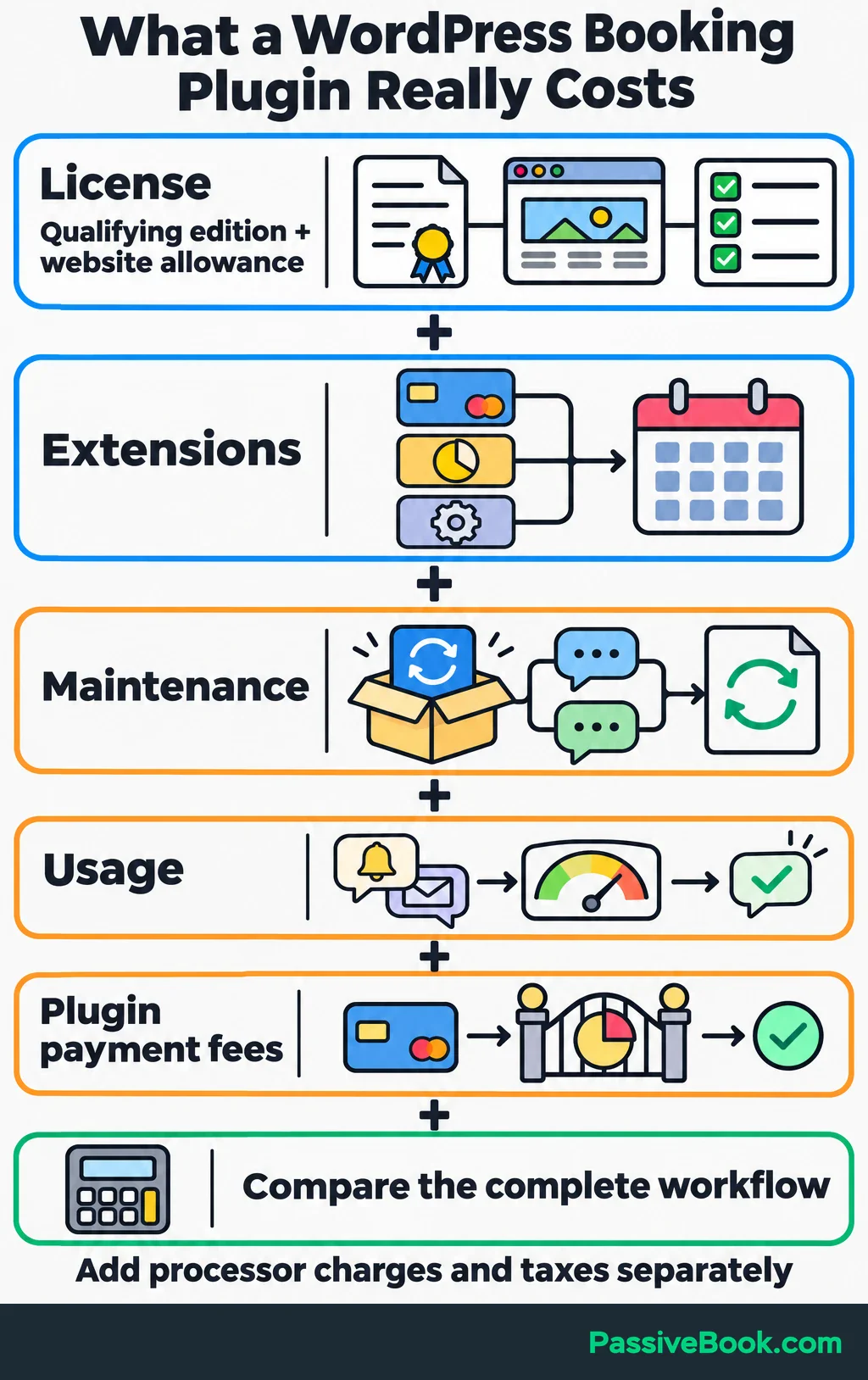
Add processor charges and applicable taxes separately.
A fee-based free plan makes the comparison more concrete. Count only payments subject to the plugin fee, rather than all business revenue.
Suppose Willow Clay processes $5,000 in annual payments that attract LatePoint’s free-plan fee:
$5,000 × 2.9% = $145 in plugin fees
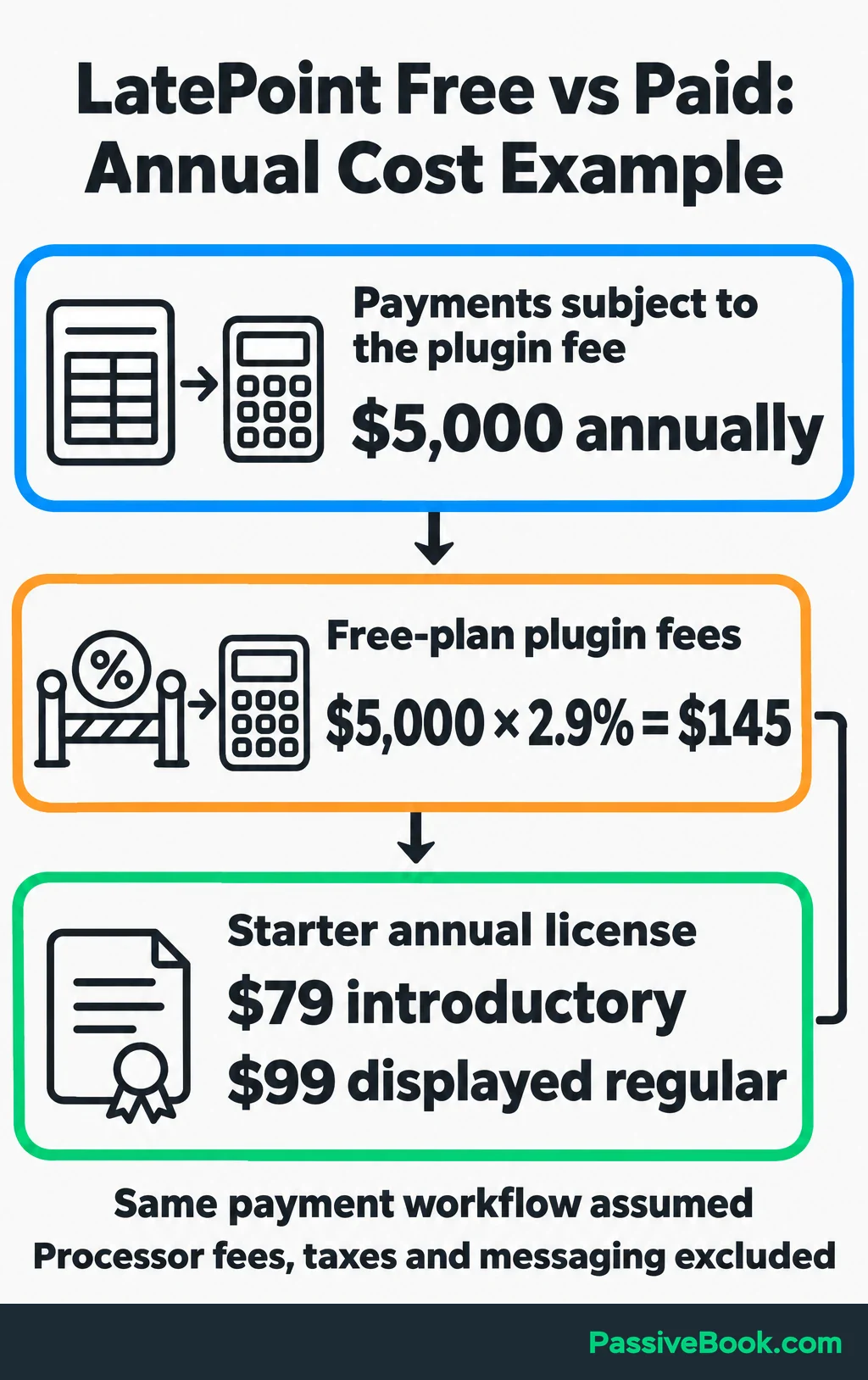
That exceeds both the introductory Starter license and its displayed regular price in the comparison table. This illustration assumes the same payment workflow and excludes processor charges, taxes and messaging costs.
With only occasional paid bookings, the result could favor free. With regular payments, paying for the license may cost less.
Your own payment volume may put that break-even point somewhere else. Once two options meet your booking requirements, compare their renewal prices and transaction fees using your numbers.

Free Software Cost Calculator




Also separate staff allowance from website allowance. Several employees working through one website do not automatically require several website licenses.
Test Your Shortlisted Plugin Before Accepting Bookings
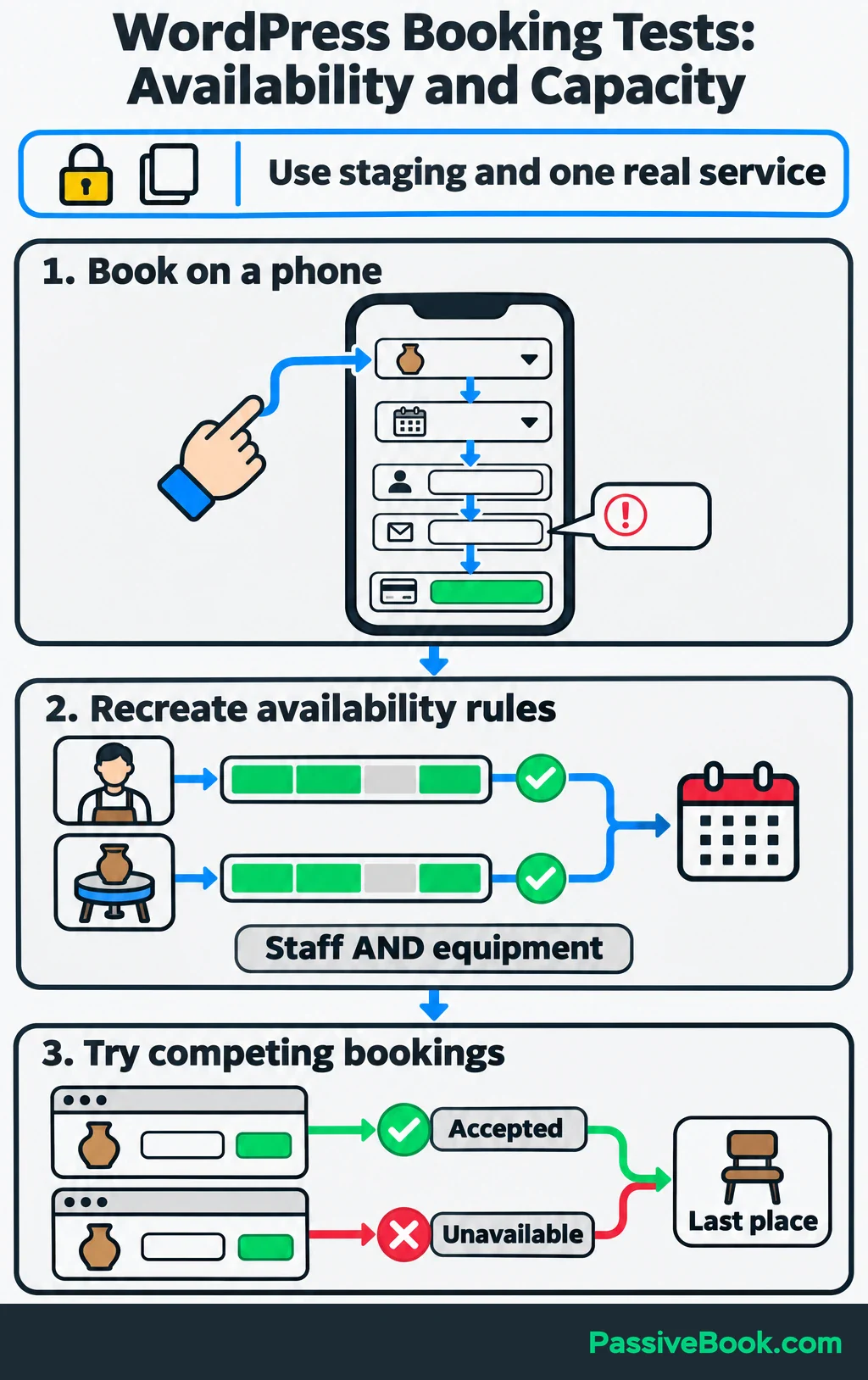
Choose two candidates and test one real service in each. Start on a staging copy—a private copy of your website—using your theme, essential plugins, WordPress and PHP versions, and intended payment gateway.
A demo can show you the interface. Your own setup shows whether the whole process works.
I would run these checks before sending customers to the form:
- Complete a booking on a phone. Choose a service, find a time, enter details and pay. Check whether labels, buttons and error messages remain clear on a small screen.
- Recreate the availability rules. Set working hours, holidays, advance notice and cleanup time. At Willow Clay, a lesson must reserve both the instructor and a teaching wheel.
- Try competing bookings. Open separate browser sessions and attempt overlapping lessons. Then try to buy the last workshop place from both sessions. Confirm that the system accepts only the capacity you intended.
- Check the outside calendar. If outside events must block website bookings, create an event marked busy and confirm that the website blocks that time. Reschedule and cancel a website booking, then inspect both the booking record and the connected calendar. Allow for the connection’s documented refresh interval.
- Test payment failures as well as success. Use the gateway’s test mode for successful, declined and abandoned payments. Check when unpaid bookings release availability. Then test cancellation and refund handling, because those actions may need separate steps.
- Verify messages and records. Confirm that customers and staff receive the right emails, scheduled reminders actually arrive, and customer records remain usable. Try an export so you know what information you can retrieve.
- Check access and support. Move through the form with a keyboard and look for visible labels and understandable errors. Review recent support discussions about your required gateway, calendar or integration, and confirm what support your edition includes.
If emails fail, check both the plugin’s notification settings and your website’s email delivery. On my WordPress sites, I use FluentSMTP with Amazon SES, but the important check is whether the customer actually receives the message.
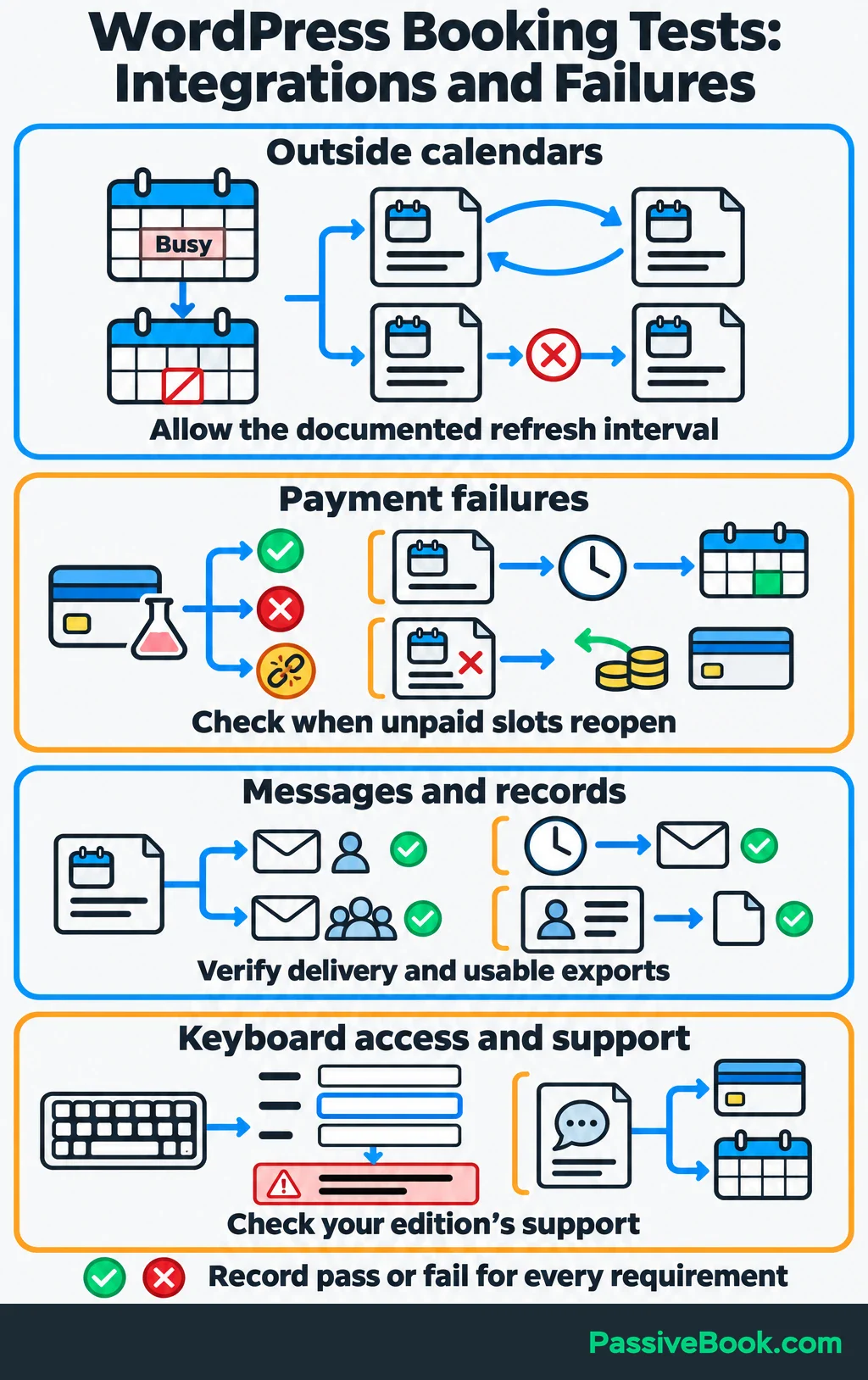
Record each result as pass or fail against your essential requirements. A polished form does not compensate for a failed capacity check.
When replacing an existing booking system, reconcile every future reservation before switching the public form. Keep the old records available until you have confirmed that customers, payments and reserved times match.
What Next?
Write down the rules for your most common booking and test that service in two shortlisted plugins. Use the comparison table to choose the editions that actually cover those rules.
If this helped you narrow the field, use the social buttons to share the comparison and spare another booking setup some trial and error.
Which requirement is hardest to find within your budget? Tell me in the comments, and bring any other questions about choosing your plugin.
Share this post with your friends & followers:

