A merchant sends you a replacement affiliate link, and the old one appears in recipes, buying guides, and a resources page. Changing it should be a small job, but finding every copy can eat an afternoon.
Then you compare plugins and find tools for redirects, keyword linking, product tables, and international stores. Several promise to make affiliate marketing easier, but they solve different problems.
Choosing the wrong one can leave you paying for features while the original maintenance job remains. This comparison explains which plugin fits each task, what you need alongside it, and which costs deserve a second look.
Which WordPress Affiliate Link Plugin Should You Choose?
For ordinary text recommendations, I would start with a free link manager. Pretty Links gives you reusable addresses on your domain that redirect visitors to merchants. Choose ThirstyAffiliates for an organized library you can search while writing, or Easy Affiliate Links for free bulk imports and updates.
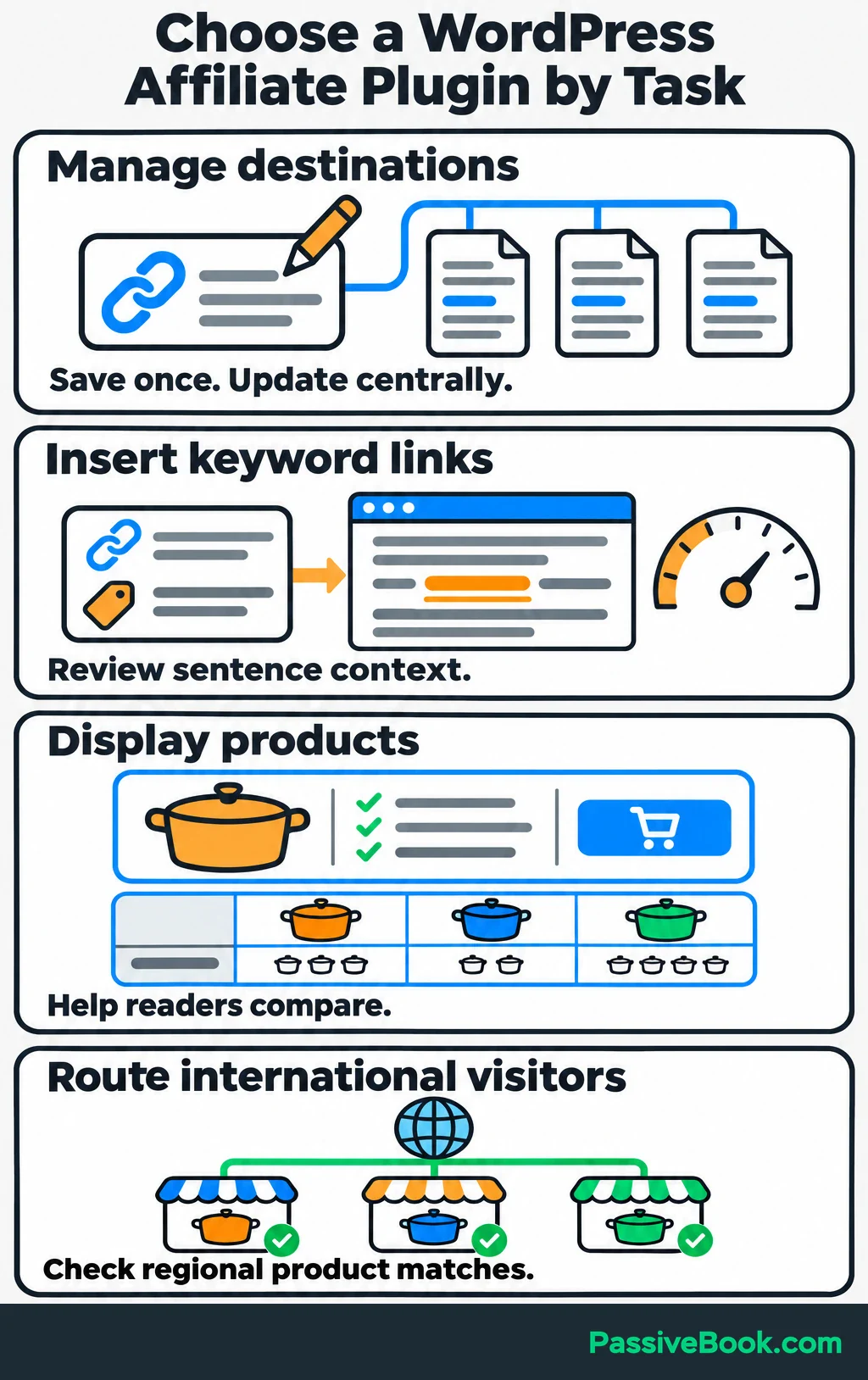
The best WordPress affiliate link plugins fit the work you already do. Start by separating four jobs:
- Link Management: Save a destination once, reuse it, and change it centrally.
- Keyword Insertion: Automatically link selected words or product names.
- Product Displays: Add recommendation boxes, grids, or comparison tables.
- International Routing: Send visitors to an appropriate regional store.
Some plugins handle several jobs. That can save you another installation, but only when their features match your needs.
These tools support recommendations that send visitors to other merchants. If you want people to promote your own products and receive commissions, you need affiliate-program software instead.
On one of my niche sites, I kept product names in a spreadsheet but pasted affiliate destinations straight into drafts. The sheet told me what I recommended, but it could not tell me where every link appeared. When a merchant changed its destination, that gap became my problem. Central link management is the first job I would solve before adding more elaborate displays.
For the examples below, imagine you run a sourdough baking blog recommending Dutch ovens, kitchen scales, and baking supplies.
A saved kitchen-scale link needs a manager. A Dutch-oven comparison needs a display tool. Visitors shopping through different Amazon stores may need regional routing. You do not automatically need all three.
My shortlist would be:
- Simple Branded Links: Pretty Links.
- Links Chosen While Writing: ThirstyAffiliates.
- Free Bulk Management: Easy Affiliate Links.
- Displays Across Different Merchants: Lasso.
- Amazon-focused Boxes And Tables: AAWP, with AzonPress worth comparing for its lower regular license price.
- Offers From Several Retailers: Content Egg Pro.
The table compares relevant paid options, but several free versions can handle a whole site’s basic link management. A growing link count alone is not a reason to upgrade.
CSV and XML files let you move link records between tools; CSV files also open in a spreadsheet. An API connection lets a plugin retrieve product data from a merchant, but access may require separate approval.
Prices appear here so you can compare them in one place. Dollar amounts are USD. “Not separately specified” means the linked page does not explicitly confirm a renewal amount. Regular prices exclude temporary promotions, and the Geniuslink annual base assumes 12 paid months. Check the linked pages for current prices and limits.
| Plugin | Main Job | Useful Free Features | Relevant Paid Tier | First-Year Cost | Confirmed Renewal Cost | Site Allowance For Listed Tier | Required Accounts Or Services |
|---|---|---|---|---|---|---|---|
| Pretty Links | Branded redirects | Redirects, click reports, CSV importing | Beginner; Marketer for keyword linking | Beginner: $99.60 introductory; Marketer: $149.60 introductory | Beginner: $249/year; Marketer: $374/year | Beginner: 1; Marketer: 2 | Merchant or affiliate-network accounts for the offers you promote |
| ThirstyAffiliates | Link library and editor insertion | Categories, branded links, insertion, click reports | Basic | $99.60 introductory | $249/year | 1 | Affiliate accounts; relevant API access for optional product imports |
| Easy Affiliate Links | Bulk link management | CSV/XML import and export, categories, click counts | Premium | $29/year listed | Not separately specified | 1 live site; staging does not need another license | Affiliate accounts; no separate service needed for basic management |
| BetterLinks | Visual organization and routing | Redirects, categories, tags, analytics, CSV import/export | Individual | $99 regular annual price, before promotions | Not separately specified | 1 | Affiliate accounts; approved regional destinations for routing |
| Auto Affiliate Links | Keyword insertion | Basic keyword rules and placement limits | Economic annual plan | $97/year listed | Not separately specified | Advertised as multi-site; numerical allowance not stated | Affiliate accounts; network credentials for connected modules |
| Tasty Links | Links in recipe content | No free Tasty Links tier listed | Standalone Links license | $99/year listed | Not separately specified | 1 | Affiliate accounts; Tasty Recipes for its recipe integration |
| Lasso | Displays across merchants | Single-product displays and link dashboard | Creator; Pro for international localization | Creator: $190 annually; Pro: $289 annually | Not separately specified | Creator: 1 property; Pro: 3 | Lasso account; own Amazon API access for Amazon images on Free |
| AAWP | Amazon boxes and tables | No free plugin tier listed | Starter annual license | €79 excluding tax; optional AAWP API service starts at €7/month for up to 150 products/month | Not separately specified | 1 | Amazon Associates; own API access or separate AAWP API subscription |
| AzonPress | Amazon product displays | No free tier listed | Single Site annual license | $39 regular annual price, before promotions | Not separately specified | 1 domain | Amazon Associates and Creators API credentials for automated Amazon data |
| Content Egg Pro | Multi-store offer comparisons | No free Pro tier | One-site annual or one-time license | $59 annual; $149 one-time option | Annual: not separately specified; one-time: no license renewal | 1 | Accounts and API credentials or feeds for selected merchants and networks |
| Amazon Link Engine / Geniuslink | International Amazon routing | Free plugin and localization; your international commission attribution needs a connected account | Geniuslink service | $72 annual base: $6/month includes 1,000 clicks/month; then $3.50 per additional 1,000 | Monthly usage billing rather than an annual plugin renewal | Plugin can be used across sites; service charges follow click volume | For your own international commissions: a paid Geniuslink account and your Associates IDs for participating marketplaces |
I would install one manager first. Add a display or routing tool only when it supplies something the manager cannot do.
What Should You Check Before Buying?
Start with your site’s ability to install plugins. Self-hosted WordPress gives you that control, and WordPress.com permits installation on its paid plans. Then compare the candidate’s WordPress and PHP requirements with your hosting setup.
Also check your editor. A plugin may support ordinary paragraphs but need a different insertion method inside a page builder, recipe card, or WooCommerce product description. Test the place where you actually publish recommendations.
WooCommerce may already cover a simple affiliate catalog. Its built-in External/Affiliate product type lets you enter another merchant’s destination and change the purchase-button text. I would use that before buying an import tool for a handful of manually maintained products. Imports, automatic updates, and comparisons between stores are stronger reasons to pay.
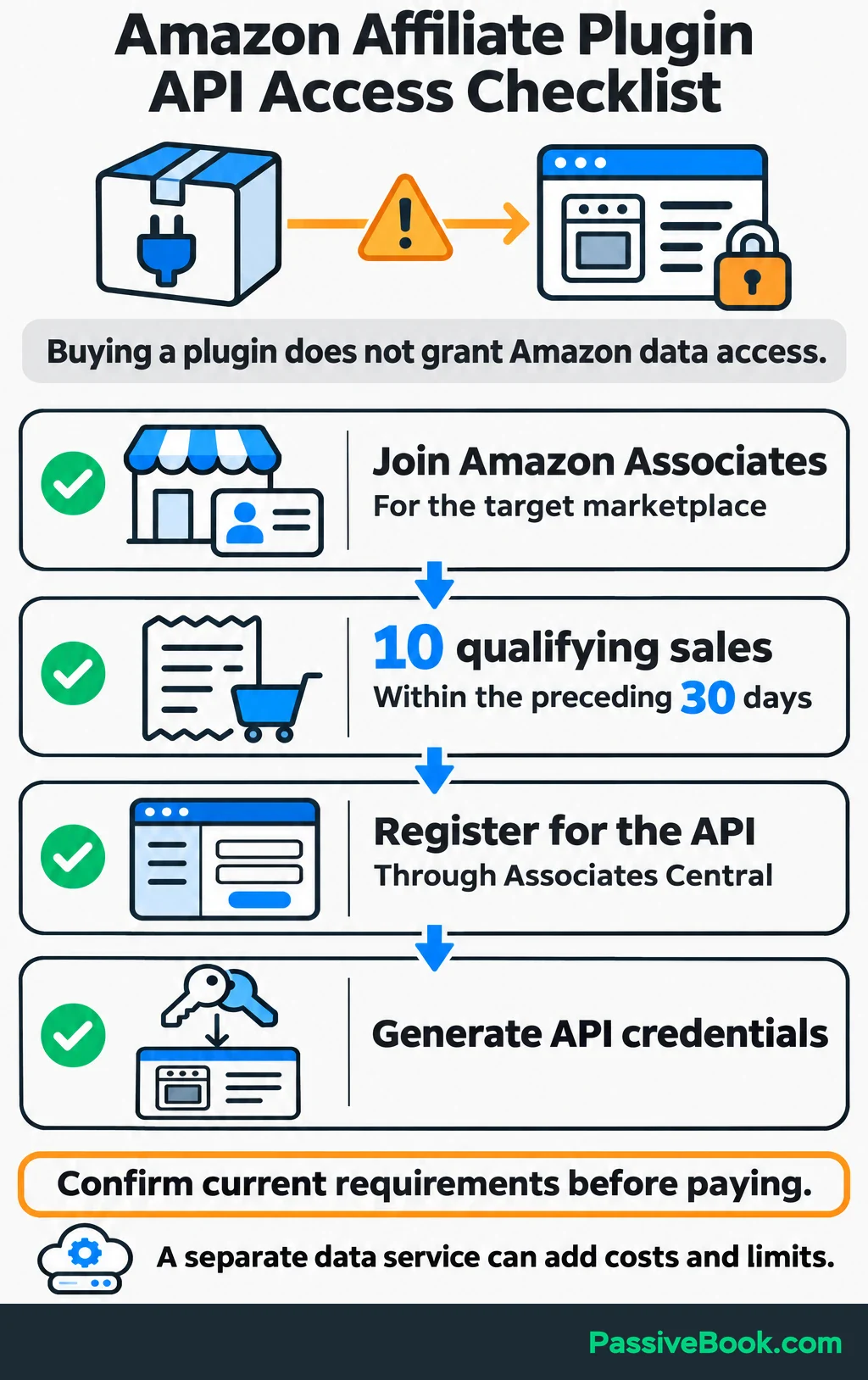
For Amazon displays, check API eligibility before choosing a plugin. Buying the plugin does not give you access to Amazon’s product data.
For your own Creators API access, Amazon lists these prerequisites:
- Enrollment in Amazon Associates for the target marketplace.
- At least 10 qualifying sales within the preceding 30 days.
- API registration through Associates Central.
- Generated API credentials.
Confirm those requirements before paying for a workflow that depends on your own access. Some tools offer a separate data service, but that changes the cost and sometimes the available features. Amazon’s Creators API prerequisites
Check the affiliate program’s linking rules too. Amazon prohibits hiding the referring site in ways that prevent it from identifying the source, and links must make the Amazon destination clear. Its product images, prices, and other content also come with usage conditions. A plugin’s “cloaking” option is not blanket permission to use it with every program. Amazon Associates linking and content requirements
Finally, decide what you want reporting to answer. Plugin click reports show link activity. Your affiliate network or merchant reports confirm attributed sales and commissions. More recorded clicks can be useful evidence, but they are not revenue.
The 11 Best WordPress Affiliate Link Plugins
These recommendations use documented features, published pricing, and workflow fit. They are not results from a hands-on performance test.
Where directory ratings appear below, they describe user feedback. They do not establish comparative reliability or compatibility with your particular site.
1. Pretty Links — Best for Branded Redirects
Pretty Links is my starting choice when the main problem is maintaining reusable links on your own domain.
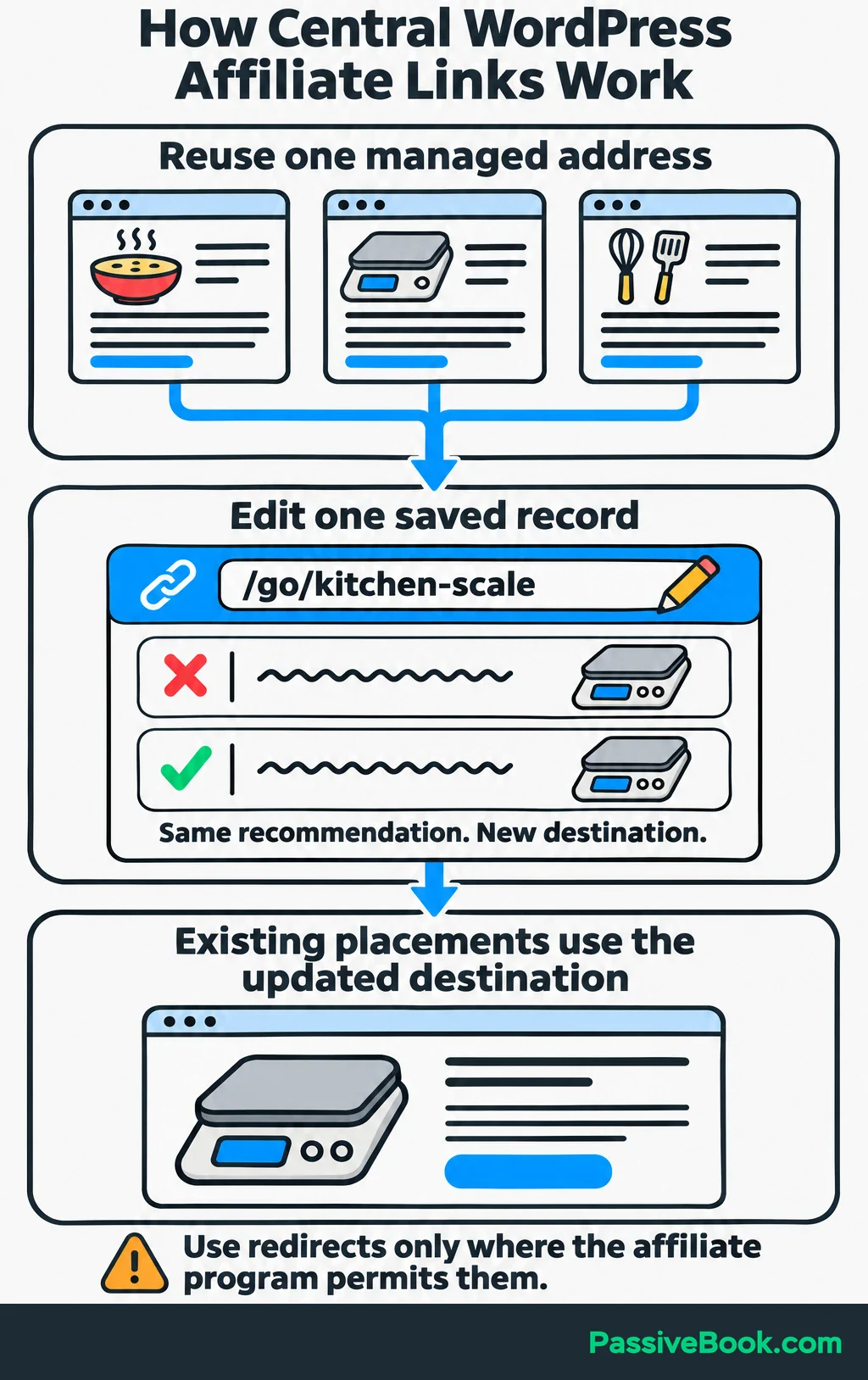
You save a destination behind a short address, then use that address wherever the recommendation belongs. When the merchant supplies a new destination, you edit the saved link.
For the baking blog, that might mean using /go/kitchen-scale in a beginner’s equipment guide and several recipes, provided the partnership permits redirects. Keep the address tied to the same recommendation; silently switching it to an unrelated product would make older articles misleading.
The free version includes permanent and temporary redirects, click reporting, and CSV link importing. WordPress.org lists a 4.8/5 rating. Pretty Links free features and feedback
I would stay free for that workflow. Beginner adds paid management features, but keyword auto-linking and split testing start at Marketer. If automatic keyword placement is your main reason to pay, compare ThirstyAffiliates Basic before choosing.
2. ThirstyAffiliates — Best for Organizing Links While Writing
ThirstyAffiliates makes sense when you choose recommendations as you write and want a searchable library close to the editor.
Its free plugin supports branded links, hierarchical categories, editor insertion, and click reports. You can organize the baking blog’s recommendations under cookware, measuring equipment, and ingredients, then search for the saved kitchen scale without hunting through merchant dashboards.
That organization is the reason I would choose it over a manager built mainly around short-link creation. WordPress.org lists a 4.6/5 rating from 251 ratings. ThirstyAffiliates features and feedback
Basic adds keyword auto-linking, geographic redirects, and CSV import/export. Those are useful upgrades when they replace recurring work, but the free library may remain enough.
I would also keep broad keyword rules switched off until I had reviewed their matches. The right product in the wrong sentence is still a bad recommendation.
3. Easy Affiliate Links — Best for Free Bulk Link Management
Easy Affiliate Links is the first option I would compare when portability and bulk editing matter more than a large automation package.
The free version handles shortened and unshortened links, categories, monthly and lifetime click counts, and CSV/XML imports and exports. It also supports WordPress’s block editor (Gutenberg), the Classic Editor, and the text widget in the Elementor page builder. WordPress.org lists a 4.2/5 rating from 34 ratings. Easy Affiliate Links free capabilities and feedback
For the baking blog, a CSV export gives you a practical way to review several baking-supply destinations together. You can update the relevant records and import the changes instead of opening every link separately.
Premium adds detailed statistics, broken-link email alerts, geographic or device conditions, and replacement links. Its installed version remains usable after the subscription expires, while updates and priority support require renewal.
I would choose the free version unless one of those paid features solves an existing maintenance problem.
4. BetterLinks — Best for Visual Organization and Routing Rules
BetterLinks suits a link library you want to sort visually. Categories, tags, list and board views, and search filters give you several ways to find recommendations.
The free plugin includes branded redirects, core analytics, and CSV import/export. Pro adds keyword insertion, broken-link scanning, split testing, scheduling, and routing controls.
Routing matters when a merchant gives you approved destinations for different countries or devices. For example, the baking blog could send visitors to the merchant’s appropriate regional cookware page rather than the same storefront every time.
I would choose BetterLinks when its organization views and routing rules fit how you maintain the site. I would skip the upgrade if all I needed was a reusable kitchen-scale link.
Each routing rule creates something else to check. Write down the intended destination for each condition, then test it before adding another rule. A busy dashboard is not a maintenance strategy.
5. Auto Affiliate Links — Best for Keyword-based Insertion
Auto Affiliate Links focuses on turning selected phrases into links when a page is displayed. It does not need to rewrite the article stored in your WordPress database.
That distinction matters when you want to apply or remove keyword rules across older content. The free version supports basic keyword linking and placement limits, while Pro adds automated link generation and click statistics.
I would begin with a specific product name. A phrase such as “digital scale” can appear in buying advice, a warning, or a comparison with something you do not recommend. A named kitchen-scale model gives the rule a clearer target.
Review several matching posts before expanding the rule. Include an article where the product is mentioned critically.
Choose this plugin when repeated insertion is the job you want to automate. If every placement needs an editorial decision, I would use a saved-link manager and insert the recommendation myself.
6. Tasty Links — Best for Equipment Links in Recipe Content
Tasty Links earns its place through its recipe workflow. It automatically links selected keywords, lets you limit replacements, supports chosen post types, and integrates with Tasty Recipes.
For the sourdough blog, that could mean reusing an equipment recommendation inside relevant recipe content. You maintain the Dutch-oven destination centrally rather than treating every recipe as a separate linking job.
I would choose it when the Tasty Recipes connection is useful. If you only need keyword linking in ordinary articles, compare a general manager first. A bundle only makes sense when its other plugins solve needs you already have.
The expiration terms deserve attention. After the 15-day grace period, an expired subscription leaves Tasty Links settings and content editing view-only, although existing output continues running.
That makes renewal part of your ability to maintain recommendations. I would choose another workflow if continued destination editing without an active subscription were essential.
7. Lasso — Best for Product Displays Across Merchants
Lasso combines link management with reusable product displays. I would shortlist it when recommendations need a consistent visual format across several merchants.
Its free plan covers one property and single-product displays. Amazon images on that plan use your own API access. Creator adds tables, grids, broken-link alerts, simple analytics, and vendor-provided Amazon images and pricing without your own credentials. Pro adds international localization and more properties.
For the baking blog, a Dutch-oven box could bring together the product, your reason for recommending it, and a clear purchase button. A comparison table becomes useful when readers need to weigh capacity, weight, or dimensions.
I would start with one display format and check it on mobile before rebuilding an archive.
Downgrading to Lasso’s free plan lets you keep editing existing links. Canceling completely leaves links live but removes access to editing; deactivating the plugin can break redirects and displays. I would check the downgrade option before planning a move. Lasso’s downgrade and cancellation guidance
8. AAWP — Best for Amazon-focused Product Tables
AAWP is a focused choice for Amazon product boxes, comparison tables, text links, and bestseller lists using cached product data.
I would consider it when Amazon recommendations are a substantial part of the site. A Dutch-oven table could compare capacity and dimensions, while the accompanying article explains which size suits a particular loaf. The table should make your buying advice easier to use.
Current releases support Creators API and require at least WordPress 6.3 and PHP 8.1. That is a hosting check to make before installation.
Without your own Amazon API access, you can pay for the separate AAWP API service; its starting cost and product limit appear in the comparison table above. It supports boxes and comparison tables, but not lists such as bestsellers. AAWP API costs and limitations
I would choose a general link manager instead if most recommendations were ordinary text links to several different merchants.
9. AzonPress — Best for a Lower-cost Amazon Display License
AzonPress is worth comparing when you want Amazon boxes, grids, or tables with a lower regular annual license cost.
It also supports manually entered custom-product displays. That gives you two different workflows: automated product information through a connection, or displays whose details you maintain yourself.
Current versions use Creators API credentials for automated Amazon product retrieval. Do not plan a new setup around older instructions for the previous API. AzonPress Creators API integration
For the baking blog, I would build one Dutch-oven comparison and check the layout, mobile display, and data connection before committing.
Its lower license price is a reason to investigate, not enough reason to buy. Compare the exact fields you need and how they will stay accurate. A manually entered box can be perfectly useful, but it does not become an automatically maintained product listing just because it looks like one.
10. Content Egg Pro — Best for Comparing Offers From Multiple Stores
Content Egg Pro fits content where readers need to compare offers from different retailers.
It imports product information through supported network connections or merchant feeds, then displays offers together. It also supports WooCommerce product creation and data synchronization.
For the baking blog, the useful comparison is the same Dutch oven at participating stores. Match the exact model, capacity, condition, and included accessories. A used pot without its lid is not a cheaper equivalent of a new complete set.
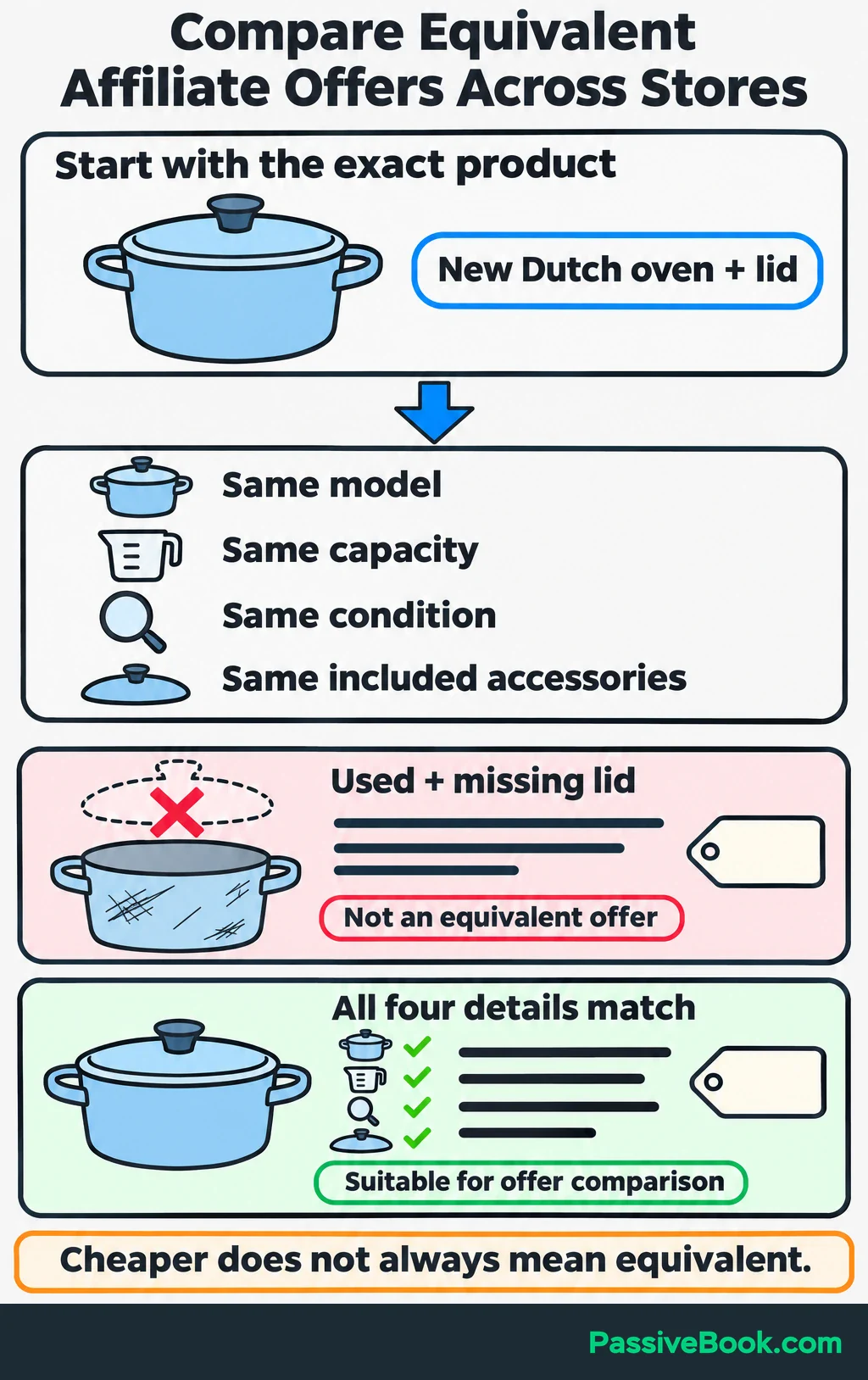
I would choose Content Egg Pro when maintaining those comparisons justifies connecting accounts, configuring feeds, and checking matches. Confirm that the networks and merchants you need have suitable integrations before buying.
The one-time license includes plugin updates and one year of support. The annual option keeps working after expiration, but updates and support stop.
For recommendations with one destination each, I would use a conventional manager and skip the extra setup.
11. Amazon Link Engine — Best for International Amazon Routing
Amazon Link Engine addresses a different problem: sending visitors to regional Amazon storefronts.
It works through Geniuslink and supplies localization rather than product boxes or comparison tables. The plugin can localize links without a paid account, but earning international commissions through your own accounts requires connecting Geniuslink and adding your Associates IDs for participating marketplaces.
I would investigate it when the baking blog already receives international Amazon clicks. Visitors reaching a store they cannot conveniently use give you a concrete routing problem to solve.
Check regional product matches carefully. The closest local result may differ in size, model, or included accessories. Also verify that the destination uses your intended affiliate tag.
Because the service bill follows click volume, compare its ongoing cost with the international commission opportunity. I would not add it simply because visitors could arrive from another country.
Test Your Shortlist Before Moving Your Links
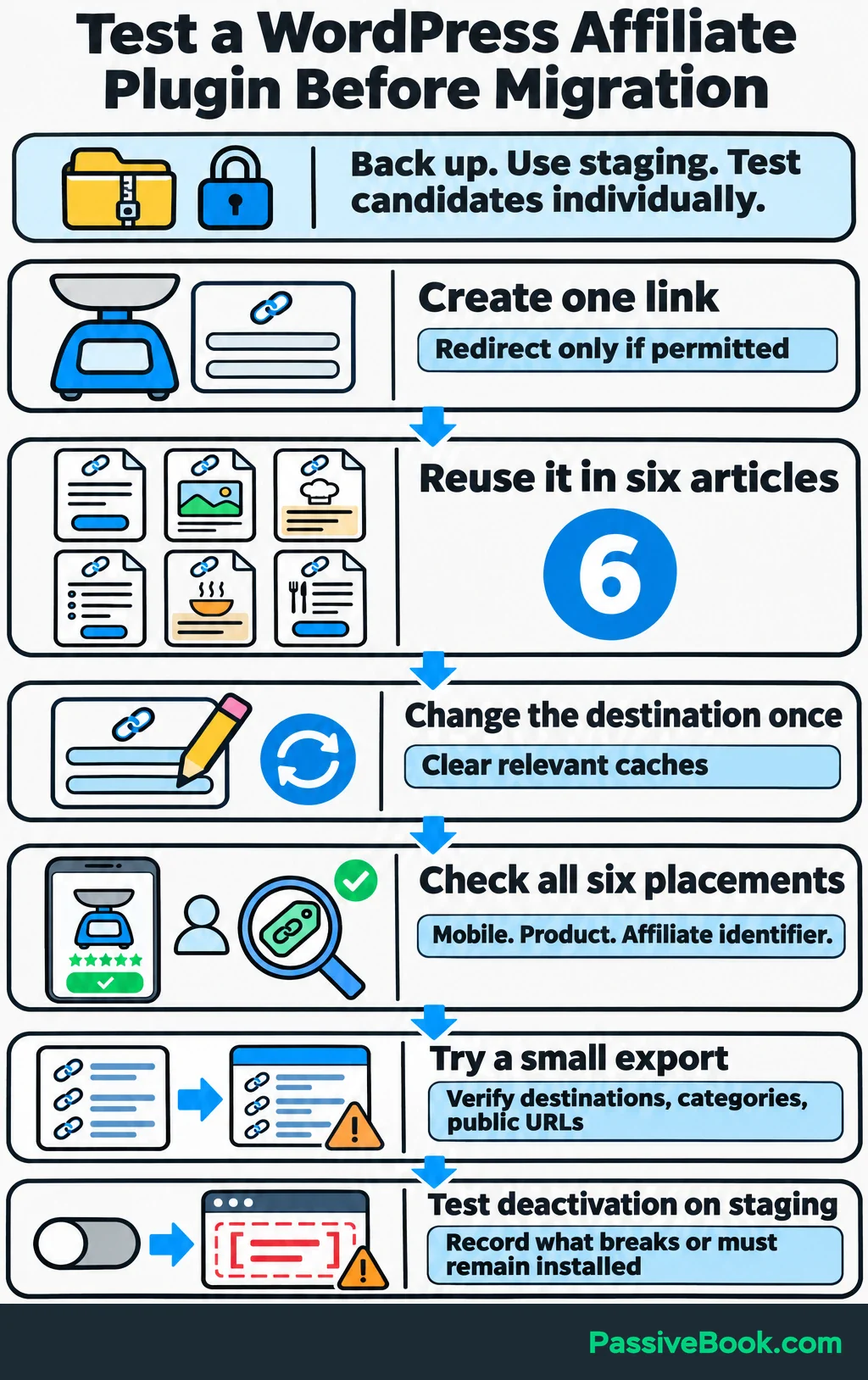
Choose two candidates that cover the same required job, then test them individually on a staging copy of your site. Staging is a private copy where you can try changes before visitors encounter them.
Back up the site first. Include your real theme, editor, caching setup, and relevant WooCommerce or recipe pages. A blank WordPress installation will not answer whether the plugin works with your publishing setup.
Use one small test that follows a recommendation from creation through maintenance:
- Create The Link: Save a kitchen-scale affiliate destination and give it a clear name. Use a redirect only where the program permits it.
- Reuse It: Insert the managed link into six test articles, including your usual paragraph, button, or recipe format.
- Change The Destination: Replace the destination once in the manager and clear relevant caches.
- Check Every Placement: Open all six articles while logged out and on mobile. Follow the links and confirm that the intended product and affiliate identifier reach the merchant.
- Try An Export: If both tools support transferring records, export a small sample in a format the alternative accepts. Import it, then check destinations, categories, and public link addresses before considering a full move.
- Test Deactivation: On staging, deactivate the plugin you are testing and inspect links and displays. Look for exposed shortcodes—the placeholders a plugin turns into page content. Record what needs to remain installed or be replaced.
That last step can change the purchase decision. A plugin that imports your destinations may still leave old display shortcodes behind. “Import supported” does not tell you whether every part of the page survives the move.
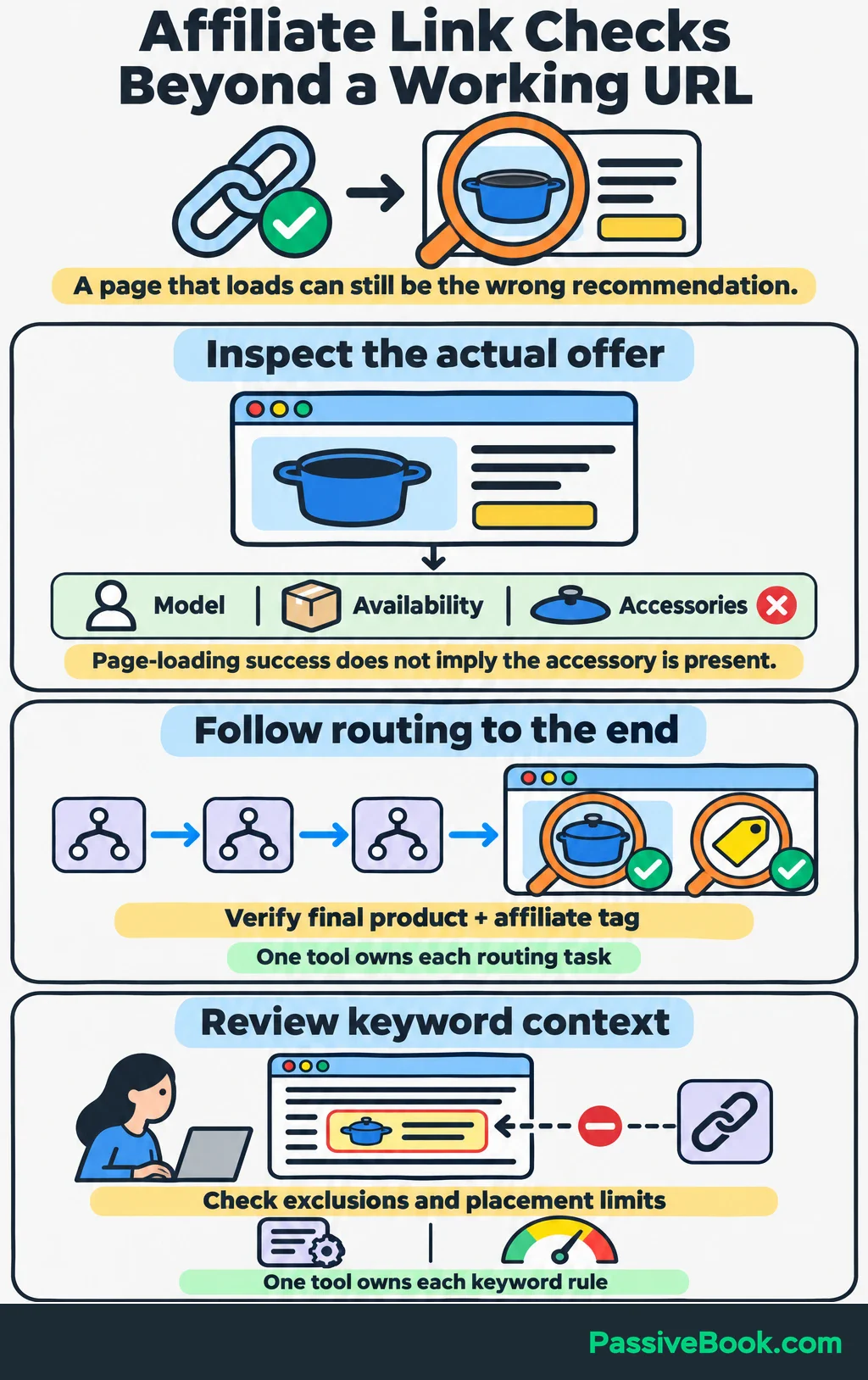
For keyword insertion, inspect matching sentences and placement limits. Check exclusions too, including pages where recommendations should not appear. Assign each keyword rule to one tool so two plugins do not compete to insert the same link.
Apply the same principle to regional routing. Give one tool responsibility for each routing task, then check the final destination rather than stopping at the first redirect.
Treat broken-link alerts as prompts to inspect an offer. A page can load successfully while showing the wrong model, an unavailable product, or an unrelated replacement. Technical availability and a useful recommendation are separate checks.
Before publishing, make compensation disclosures clear and conspicuous near the recommendations where FTC rules apply. Readers should understand the relationship before acting on the endorsement. FTC affiliate disclosure guidance
Mark paid links with rel="sponsored". Google also accepts nofollow, although it prefers sponsored for paid placements. This link attribute serves search engines and does not replace a reader-facing disclosure. Google’s paid-link guidance
I would buy the lowest-cost setup that passes these checks, preserves existing links, and lets me keep editing destinations. Count renewals and required services alongside the license. Then stop shopping until another recurring task earns another feature.
Once two plugins pass your tests, compare what each setup would cost over the time you expect to use it. A lower introductory price does not always mean lower spending.

Free Software Cost Calculator




What Next?
Pick one recommendation used in several articles and test whether a free manager lets you update it centrally. That small trial will tell you more about the right fit than another afternoon comparing feature lists.
Use the social buttons to share this guide when your next plugin discussion needs a clearer comparison of costs, link management, and product displays.
Which part of maintaining affiliate recommendations takes the most time on your site? Tell me in the comments, and bring any other questions about choosing a plugin.
Share this post with your friends & followers:

