You have a dog clip worth sharing, but signup raises questions you weren’t expecting. Should you use your email or phone number? Will TikTok suggest the account to your contacts? Does selling a product mean you need a Business Account?
Rushing through those choices can leave you with the wrong profile or recovery details you can’t use later.
Basic signup is free, and you can start with your existing phone. This guide explains how to set up a TikTok account with a secure login, deliberate privacy settings, and a profile ready for its first post.
1. Create Your TikTok Account
Download the official TikTok app from the App Store or Google Play where it’s available. Open it and follow the signup prompt. If the app opens on a video feed, tap Profile to get started.
Enter your actual birthday when asked. TikTok generally requires users to be at least 13, but higher local requirements apply in some places. Your age also affects privacy defaults and available features, so use your own birthday even when the account represents your pet. TikTok’s age and privacy guidance.
Throughout this guide, we’ll use Moss & Mutt, an imaginary handmade dog-bandana shop. Its profile and video examples show the choices you’d make during setup.
Choose Your Signup Method
Use an email address, phone number, or third-party login offered on your signup screen.
I would choose email for a separate shop profile because it’s easy to keep its login details with the rest of the business records. You can start through email without entering a phone number, though you should complete any additional security checks TikTok requests.
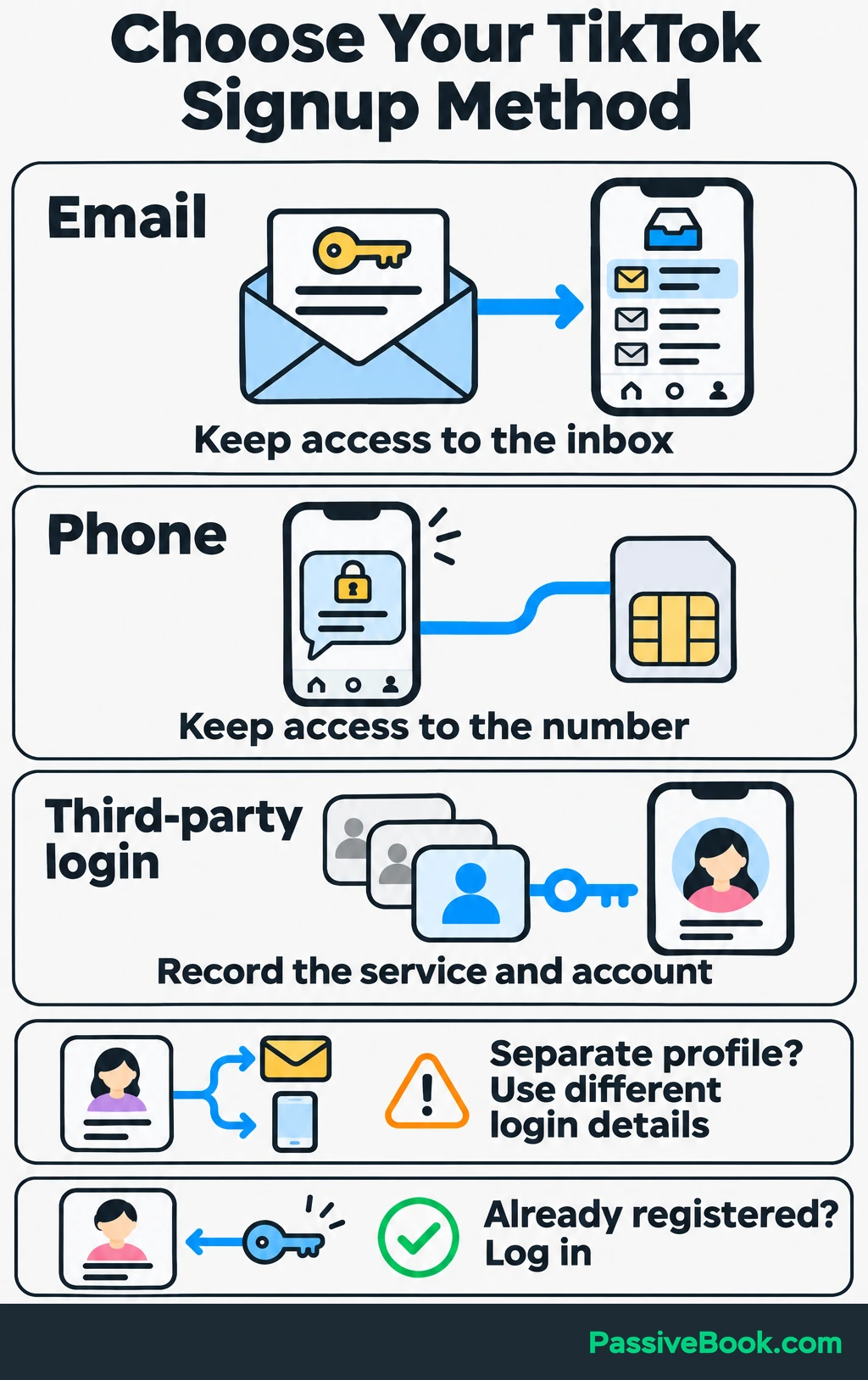
Whichever method you choose, use an inbox or number you control and expect to keep. A temporary inbox is a poor home for password-reset messages.
Before registering, check whether you already have an account. Each email address and phone number can be linked to only one TikTok account. You can use your existing email if it isn’t already attached to another profile. TikTok’s email and phone rules.
If you already use TikTok and want a separate Moss & Mutt profile:
- Open the account switcher from your profile.
- Choose Add account.
- Register with different login details.
Choose Log in instead when you’re adding an account you already created. You don’t need another phone to manage a separate profile.
Complete Verification and Registration
Follow the prompts for your chosen signup method. Their order may differ, but the essentials are the same:
- Enter the requested account details.
- Complete any email confirmation, text-message code, or third-party approval.
- Create a unique password when requested and save it in a password manager.
- Continue until you can open your profile.
Decline contact syncing during onboarding if you want to keep this presence separate from personal connections. You’ll review the discovery settings properly in section 4.
Save your username and login method alongside your credentials. If you chose a third-party login, record which service and which account you selected. “Continue with Google” is much less useful when you have three Google accounts and no idea which one you used.
Fix Signup or Verification Problems
Work through the problem you’re seeing before starting another registration.
- No verification code: Check the email spelling or phone number, including its country code. Look in spam folders or filtered messages, wait for the displayed resend timer, and use the newest code.
- An existing account opens: Check whether you reused its email, number, or third-party login. Recover that account if it’s the one you want. Use different details for a separate profile.
- Forgotten password: On the login screen, choose the phone, email, or username option and use Forgot password? to request a reset. If you registered through another service, recover access through that service.
- Persistent error: Update and restart TikTok, check your connection, and use Report a problem. Include the error message and signup method, but never your password or verification code.
If TikTok displays a waiting period, follow it. Repeatedly tapping resend won’t make the countdown feel appreciated.
2. Secure Your Login and Recovery Access
Secure the account before you spend time polishing it.
Open your profile menu and select Settings and privacy. In Security & permissions, open Security checkup to review your login protection.
Work through these items:
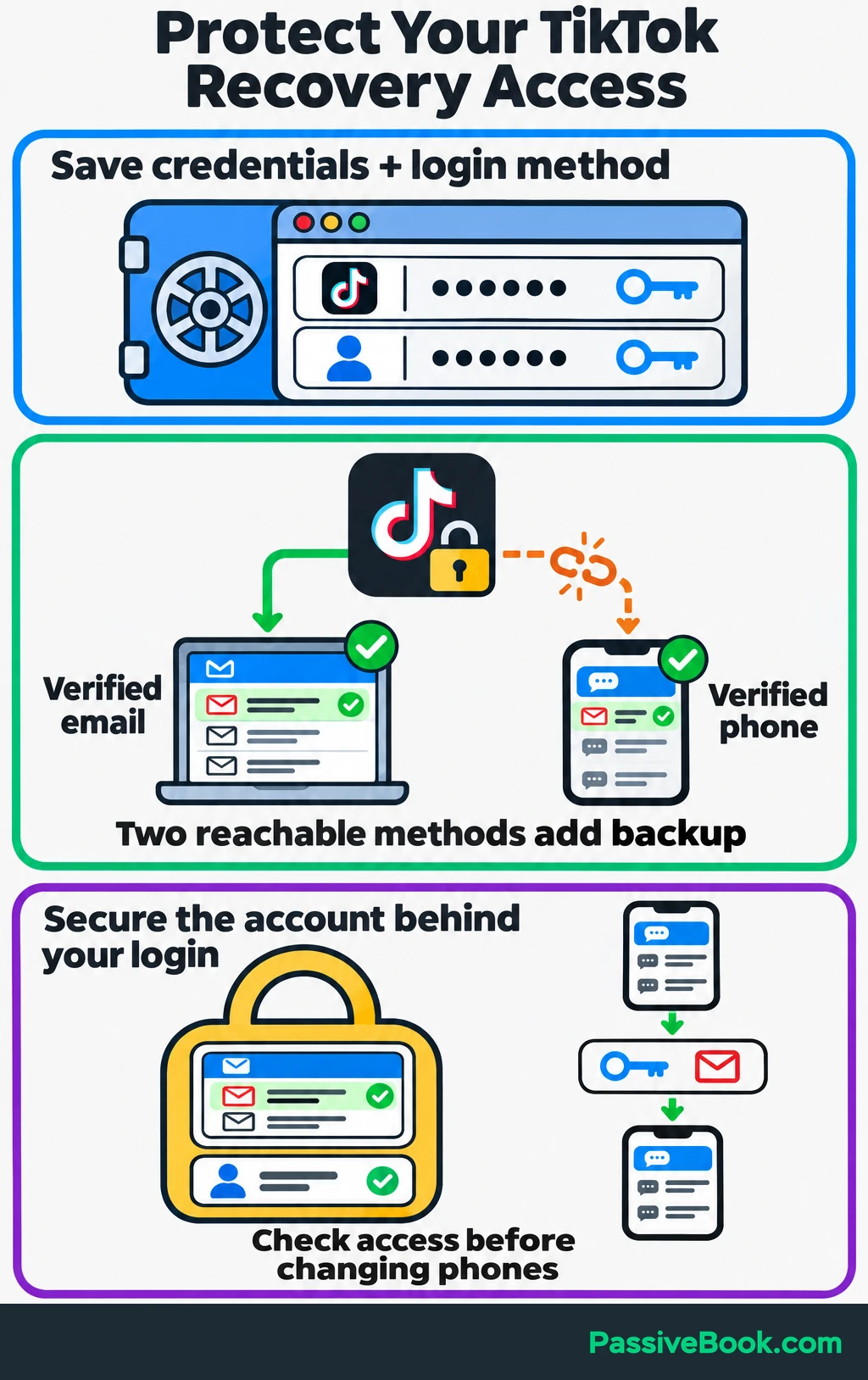
- Recovery access: Confirm that your linked contact details are correct and finish any verification prompts. TikTok recommends linking both an email address and phone number so you have a backup login method.
- Two-step verification: Enable it and complete the setup prompts. This adds another check when someone tries to sign in from an unfamiliar device.
- Logged-in devices: Review the list and remove anything you don’t recognize.
These are the main checks in TikTok’s Security Checkup guidance.
If you only have one usable recovery method, verify it now. Add a second when you can, and remember that a number already linked to another TikTok account can’t also serve this one.
Protect the email account or third-party service behind your login too. Before signing out or changing phones, make sure you can reach your saved credentials and receive recovery messages.
3. Choose a Personal or Business Account
Choose according to what the account is mainly for. You don’t need a Business Account simply because you hope to build an audience.
| Account Type | Suitable Purpose | Visibility | Music Access |
|---|---|---|---|
| Personal Account | Watching videos, sharing your dog’s life, or building a creator presence | Public or private | General music library and Commercial Music Library |
| Business Account | Promoting a shop, product, or service | Public | Commercial Music Library; no access to the general music library |
These differences come from TikTok’s account-type guidance.
For Moss & Mutt, I would choose Business because the account represents the bandana shop. Open the Account section in your settings, choose Switch to Business Account, and complete the category prompts.
Music needs a separate decision. On either account type, promotional posts need music cleared for commercial use. I would use TikTok’s Commercial Music Library or original audio without copyrighted background music. Access to a popular song in the general library does not give you permission to use it in an advertisement or product promotion. TikTok’s commercial music rules.
4. Set Your Privacy Preferences
Choose Who Can See and Interact With Your Content
Open Privacy in Settings and privacy. For a Personal Account, turn on Private account if you want to approve followers before they can watch your content. Choose public visibility when you want people beyond that approved group to discover your posts. Business Accounts remain public.
Private visibility still leaves your nickname, username, and profile photo visible. Choose those details with that in mind. You can represent the account with a shop name and logo or a pet photo instead of a personal portrait. Privacy International’s TikTok settings guide.
In your privacy settings, review the interactions you want to allow:
- Comments: Choose who can comment and review the available filtering options.
- Messages: Decide who can contact you or send message requests.
- Downloads: Choose whether others can download your videos.
- Content reuse: Review permissions for features such as Duet and Stitch, which let people build videos around yours.
Use the options available for your age and account. For Moss & Mutt, I would allow customer questions in comments but leave downloads off initially.
Also check what your footage reveals. A parcel label on the cutting table can expose more than your bio does. Keep home addresses, private phone numbers, and identifying background details out of view.
Control Discovery Through Personal Contacts
If you don’t want TikTok to upload your personal connections, open Sync contacts and Facebook friends in Privacy and turn both syncing options off. Choose Remove previously synced contacts too, because stopping future syncing does not erase earlier uploads.
Next, review Suggest your account to others. Check the controls for:
- Contacts.
- Facebook friends.
- People who open or send links to you.
Adding an email or phone number for recovery and uploading your address book are separate choices. However, account suggestions can still connect people through contact details when the relevant suggestion setting is enabled.
Turning these controls off also does not guarantee separation. TikTok says your account may still be suggested through follows, interactions, or mutual connections. Use these settings to reduce unwanted discovery, without treating them as an invisibility switch. TikTok’s suggested-account controls.
5. Complete Your TikTok Profile
Open Edit profile and make it easy for a visitor to understand what they’ll find.
Choose a readable username first. This is your unique @handle, and it forms part of your profile link. Your display name, also called your nickname, is the name people see across TikTok.
Here’s how those choices could look for Moss & Mutt:
- Username:
@mossandmutt, if available. - Display Name: Moss & Mutt | Dog Bandanas.
- Profile Image: A simple shop logo that remains clear inside a small circle.
- Bio: Handmade dog bandanas. Prints, sizing tips, and everyday styling.
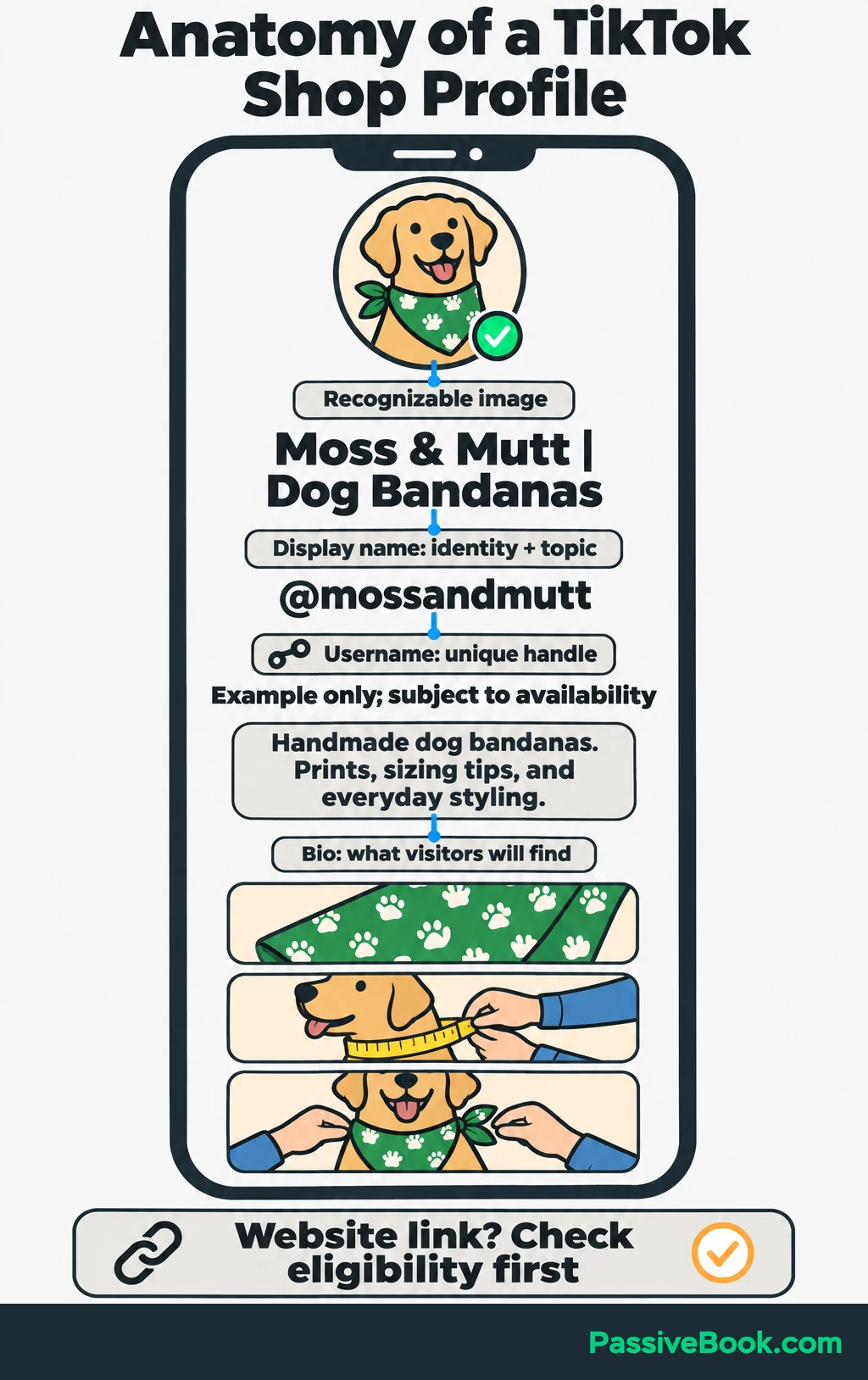
If your preferred handle is taken, try a clear variation such as @mossandmuttshop, subject to availability. I would skip a string of random numbers that customers have to copy carefully.
Your bio should say what you share or sell. You can improve the wording later, but visitors need something concrete now.
Add a clickable website link when you’re eligible. Personal Accounts need at least 1,000 followers under TikTok’s account-type rules. For business profiles, public display of the bio link is tied to business verification under TikTok’s business-feature requirements. Switching account type alone does not guarantee link access.
Complete the profile even if that field is unavailable. For Moss & Mutt, people can still understand the products and recognize the shop.
Save your changes and check the finished profile for spelling, image clarity, and unintended personal details. Keep private recovery information separate from contact information you deliberately publish.
6. Try Your First Post
Start by finding your way around the app. Search for a topic you want to watch and follow a relevant account. For You shows recommended videos, while Following shows content from accounts you follow.
Then make one simple clip:
- Tap the create button marked
+. - Grant the camera, microphone, or photo access needed for what you’re doing.
- Record a clip or upload one you’ve already saved.
- Trim unnecessary footage and preview the result.
- Add a clear description and check captions if there’s spoken audio.
For Moss & Mutt, show one bandana on a plain surface, turn it over, and demonstrate the fastening. Your face doesn’t need to appear.
If you’re unsure what to show or say, outline the clip before recording. Start with one thing you want viewers to understand and the footage you can realistically capture.

Free AI Social Copy Studio




A short text overlay could say:
A closer look at the print and fastening.
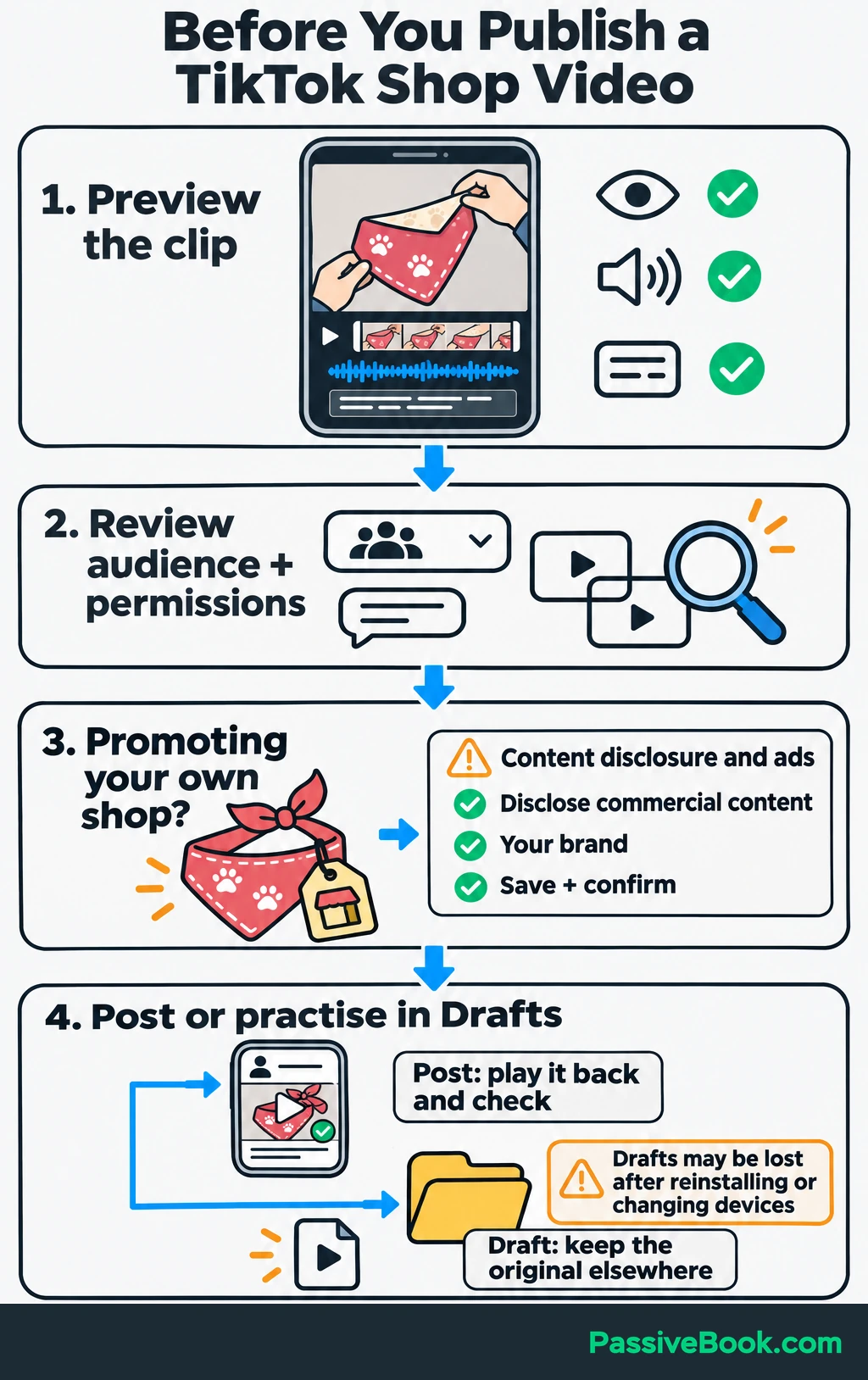
Before publishing, review the post audience, comments, and reuse permissions. If the video promotes your own shop, disclose that before posting. Open Content disclosure and ads, under More options if needed. Turn on Disclose commercial content, choose Your brand, then save and confirm. TikTok requires disclosure for posts promoting your own business as well as paid brand partnerships. TikTok’s promotional-content requirements.
Tap Post when you’re ready, or choose Drafts to practise without publishing. Drafts aren’t visible to others unless posted, but keep the original clip elsewhere. TikTok warns that drafts may be lost after reinstalling the app or moving to another device. TikTok’s draft guidance.
After publishing, play the video from your profile and confirm that the picture, sound, text, and settings match your choices.
Before you finish, check that you have:
- Saved your login details and signup method.
- Verified your available recovery methods.
- Enabled two-step verification.
- Chosen an account type that matches your purpose.
- Reviewed visibility, interactions, syncing, and account suggestions.
- Completed your profile and checked your first post or draft.
What Next?
Record one simple clip and save it as a draft so you can practise the publishing screen before sharing publicly.
Use the social buttons to pass along this guide when your next conversation about posting dog videos turns into a debate about privacy settings.
What do you want your first post to help viewers understand? Share your answer in the comments, and bring any setup questions with it.
Share this post with your friends & followers:

