You have an article ready to publish, but the optimization tool wants another twelve terms, three headings and several hundred words. Would those additions help the reader, or just improve the number beside your draft?
That uncertainty gets expensive when you pay for several tools that keep giving you more editing work. A higher score is satisfying, but it doesn’t tell you whether the article answers the question.
This comparison helps you choose software for the work you actually need: finding missing answers, improving the writing, publishing cleanly and deciding which older articles deserve another hour.
Which SEO Content Optimization Tools Should You Choose?
For a small site, I would start with Google Search Console, a free content checker and the publishing controls already available on your website. Add one paid editor when reviewing topic coverage becomes a regular problem.
These are my first choices for different needs:
- Guided Editing: Surfer puts optimization feedback alongside your draft.
- Lower-Cost Editing: NEURONwriter offers a dedicated content editor with a smaller starting subscription.
- Research And Drafting: Frase suits a workflow where gathering information and building an article take the most time.
- Existing-Page Updates: Content Raptor helps you choose what to refresh using your Search Console data.
- Free Starting Point: SEO Review Tools checks drafts, while Search Console shows how published pages perform.
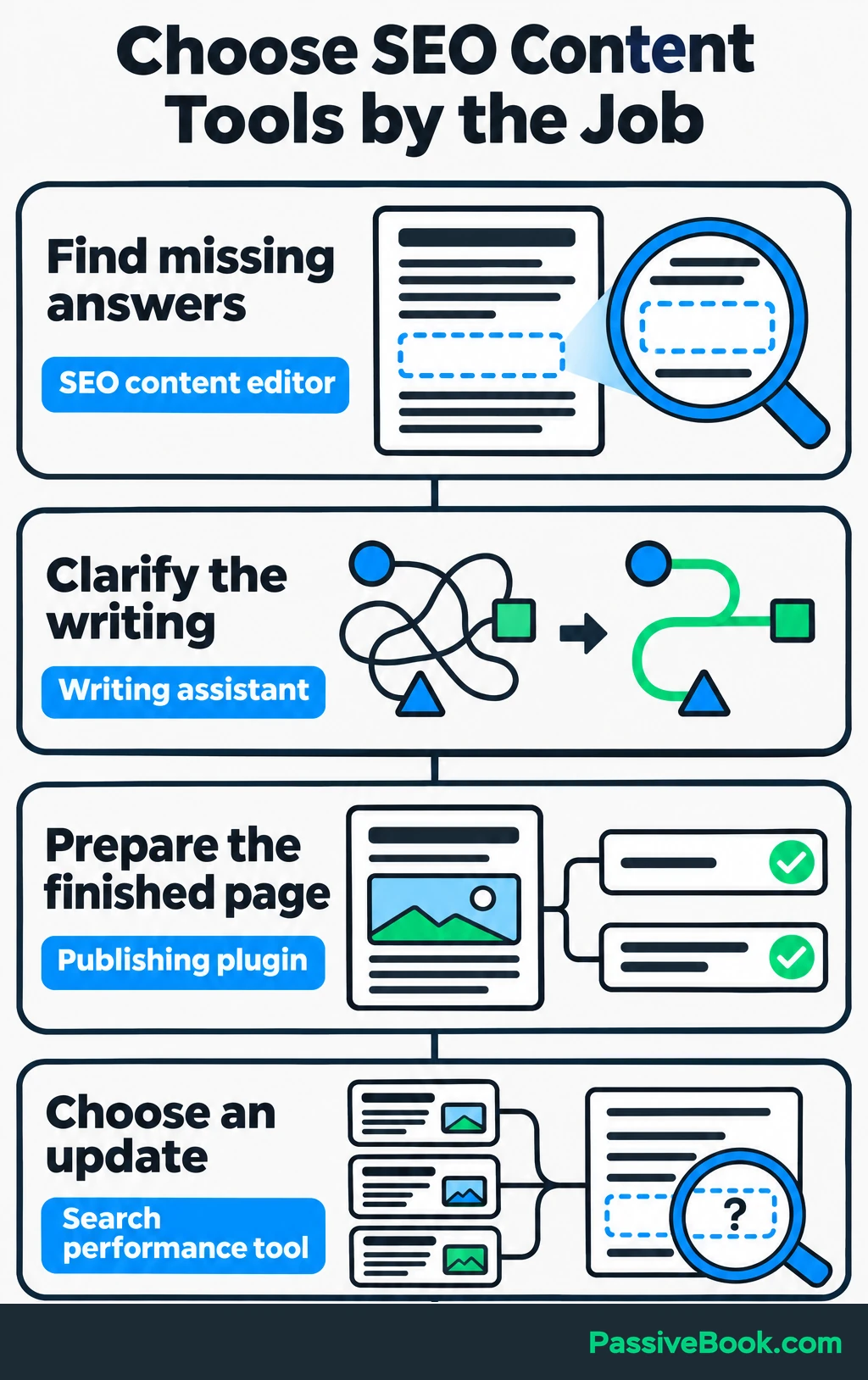
The best SEO content optimization tools do different jobs. A writing assistant can clarify a paragraph, a dedicated SEO editor can suggest missing topics, and a WordPress plugin can handle the finished page’s title and description. You may need those jobs covered, but you don’t need three subscriptions doing the same one.
The selections below compare published features, prices and suitability. The numbered entries organize the tools; they are not a ranking based on testing all 27.
Check whether each tool supports your language, target location, publishing platform and expected workload. During the trial, judge how much time you spend accepting useful suggestions and removing unhelpful ones.
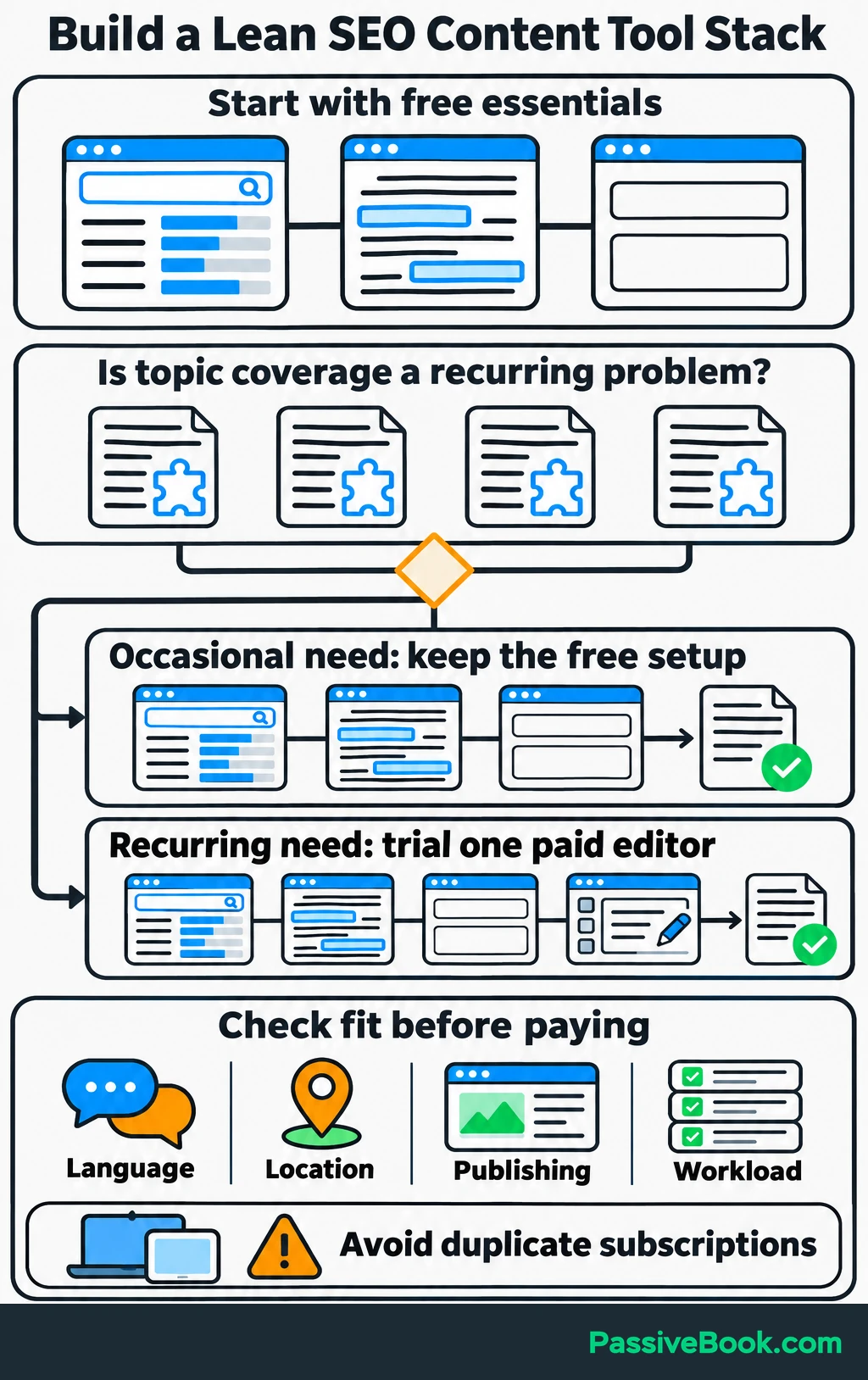
Treat every optimization score as a vendor’s checklist. Google says it has no preferred word count, so I would add a useful explanation before adding words to satisfy a length target. Google’s people-first content guidance supports that approach.
Annual totals are paid upfront, and currencies are shown as listed. Check the linked pages for current prices, allowances and renewal terms.
| Tool | Strongest Use Case | Free Access Or Trial | Paid Price, Commitment And Allowance | Principal Drawback |
|---|---|---|---|---|
| Surfer | Guidance while editing | Free signup advertised; editor trial allowance unspecified | Discovery: €588/year (€49/month); 120 documents/year | Listed integrations require a higher plan |
| NEURONwriter | Lower-cost topic coverage checks | Seven-day trial: Gold features, three analyses; no card | Bronze: $23/month or $230/year; two projects, 25 documents/month and 15,000 AI credits | WordPress, Shopify and Search Console integrations require Gold at $69/month |
| Frase | Turning research into an article | Seven days; no card | Starter: $49/month or $468/year; one seat, one site, ten articles and 50 audit pages/month | Starter stops at its monthly limits |
| Clearscope | Shared editorial standards | 14-day trial | Essentials: $129/month; 20 topic research checks (“Discoveries”) and 20 drafts/month; 50 monitored pages | Costly for occasional publishing |
| SEOBoost | Connecting briefs, editing and audits | 14-day trial | Essential: $30/month or $270/year initially; after 12 months, $75/month or $675/year. Three seats; ten reports, briefs and audits each/month | Renewal costs considerably more |
| Dashword | Repeated scoring against one report | First report free; no card | Startup: $99/month; 30 reports, five seats, 100,000 AI writing words and unlimited scoring | Each new report consumes the allowance |
| Content Harmony | Giving writers clear instructions | $10 trial: ten workflows; no time limit or automatic subscription | Standard–5: $50/month; five workflows/month, unlimited users and projects | Monthly credits expire after 90 days |
| Rankability | Assigning work across writers | Seven days; card required; becomes paid unless canceled | Starter: $97/month; 20 content projects/month, unlimited team members and client workspaces | Workspaces share the project allowance |
| Ahrefs AI Content Helper | Finding missing explanations | One document/month with Ahrefs Free | $99/month; 50 documents/month | Content package priced separately from the main SEO suite |
| SEO Review Tools Content Editor | Free keyword, title, description and draft checks | Free browser editor | No subscription required | Does not manage your wider workflow |
| PageOptimizer Pro | Detailed page revisions | No ongoing free plan listed | Basic: $40/month; 20 credits/month. New reports use two; score-update reruns use one; setup or page-change reruns use two | Repeated checks consume credits |
| Scalenut | Combining planning, drafting and refreshes | Seven-day trial advertised | Standard monthly Starter: $59/month; one workspace, five new articles and five existing-article optimizations/month | Audits and internal linking require a higher plan |
| SE Ranking Content Editor | Replacing research and tracking subscriptions | 14 days; no card | Core: $129/month or $1,238.40/year; 25 content articles/month plus suite allowances | Poor value if the wider suite goes unused |
| Semrush SEO Writing Assistant | Editing within an existing Semrush setup | Free and Pro SEO Toolkit accounts: two documents per account, without a monthly reset | Guru and Business SEO Toolkit entitlements provide unlimited documents; confirm your offered plan’s price and access | AI writing and originality checks have separate limits |
| cognitiveSEO Content Optimizer | Research and content analysis together | Seven days; card or PayPal verification; becomes paid unless canceled | Starter: $129.99/month; 150 content optimization audit credits | Costly if you only need draft editing |
| Content Raptor | Choosing existing pages to improve | Limited free Hobby access and a seven-day Pro trial | Pro: $47/month; one site, unlimited optimizer use and 150 tracked keywords | Little search history means less evidence for prioritizing updates |
| MarketMuse | Finding gaps across a content library | One user and ten queries/month | Contact sales; paid inventory and brief allowances vary by plan | Free access excludes site inventory and briefs |
| WebSite Auditor | Turning page audits into content changes | Crawl up to 500 URLs; no project saving | Standalone Professional: $149/year; unlimited crawling, project saving and in-app optimization | Requires desktop installation |
| Google Search Console | Selecting and reviewing updates | Free for properties you can access | No subscription; page and query performance, plus indexing tools | Shows performance rather than writing the fix |
| Claude | Revising long articles with source notes | Free access available | Pro: $20/month or $200/year; usage varies with model, task, files and conversation length | Needs your evidence and editorial instructions |
| ChatGPT | Reviewing drafts beside exported search data | Free access available | Plus: $20/month, billed monthly; usage limits apply | API automation is billed separately |
| Grammarly | Everyday sentence corrections | Free basic corrections | US Pro: $30/member/month or $144/member/year; paid writing features vary | Does not replace topic-coverage research |
| Hemingway Editor | Finding difficult passages | Free browser checks; two-week Plus trial, no card | Individual 5K: $100/year; 5,000 AI sentence rewrites/month | Does not assess search intent |
| Rank Math | Free WordPress publishing checks | Free plugin | PRO promotion: $67.08/year; renews at $107.88/year, before VAT | Ongoing AI access is separate |
| Yoast SEO | Readability guidance while publishing | Free version | Premium: $118.80/year, excluding VAT; adds internal-link suggestions and AI assistance | Paid checks may overlap with your existing plugin |
| All in One SEO | Content checks inside WordPress | Free plugin | Basic: $49.50 first year, then $99/year, for one site. Pro: $199.50 first year, then $399/year; includes Internal Link Assistant | SEOBoost-powered Writing Assistant requires a separate paid SEOBoost subscription |
| Link Whisper | Maintaining links across many posts | Limited free plugin | Starter: $97/year; one WordPress site and 2,000 base AI credits | Another license when manual linking may still suffice |
For the practical examples, imagine you run a freshwater-aquarium blog and are improving a guide to choosing plants for a small tank. The draft, queries and editing decisions are illustrative.
Content Editors for Research, Briefs, and Topic Coverage
These tools help you decide what an article should cover and what its draft still needs. Many also create a brief: a short writing plan that states the reader’s question, required sections and supporting sources.
I would choose one editor from this group. Start by finding out whether you need better research, clearer instructions or feedback on an existing draft.
1. Surfer — Best for Guided Content Optimization
Surfer suits you when you want recommendations visible while you write. Its Content Editor combines a score with topic guidance, so you can review gaps without moving between a draft and a separate checklist.
I would use it after deciding what the page should help the reader do. Otherwise, a list of suggested terms can quietly become the article’s outline.
For the aquarium guide, a useful recommendation would prompt an explanation of how to compare plant choices. Repeating “small aquarium plants” in another paragraph would need a better reason.
Discovery’s advertised annual rate requires paying for the year upfront. Check the tier needed for your preferred publishing integration before comparing it with a cheaper editor.
2. NEURONwriter — Best for Lower-Cost Competitor-Based Editing
NEURONwriter is my first shortlist choice when you want a dedicated editor but need to control recurring costs. It lets you compare competing content, inspect suggested terms and revise your draft in one workspace.
The important buying decision is whether you can work comfortably without the higher-tier integrations. Copying a finished article into WordPress may be perfectly reasonable when you publish a few posts a month.
The trial includes Gold features, so it can make Bronze seem more capable than it is. Before choosing Bronze, check whether it includes the features you relied on during the trial.
3. Frase — Best for Research and Drafting in One Workflow
Frase deserves a trial when research takes longer than writing. It brings search-result analysis, questions, briefs and drafting into a connected process.
I would choose it when I regularly finish research with a heap of notes but no clear article structure. A useful brief should turn those notes into writing decisions: what to answer first, what evidence belongs in each section and what can be left out.
For the aquarium guide, that means organizing the reader’s selection process before generating plant descriptions. A polished list still needs a reason for the reader to choose one option over another.
Starter has firm monthly article and audit limits, so count both new posts and refreshes before subscribing.
4. Clearscope — Best for Consistent Editorial Guidance
Clearscope combines term guidance with a live content grade, and its writing tools work with Google Docs, Microsoft Word and WordPress.
Its strongest case is consistency. When several people contribute to a site, shared feedback can give the writer and editor a common starting point. You can then discuss the missing explanation instead of exchanging vague requests to “make this more comprehensive.”
I would be slower to choose it for occasional solo publishing. Unlimited users and projects are useful when you have people and projects to share.
Judge the trial by how well its guidance improves your briefs and reviews. A clear grade helps organize editing, but you still need to decide whether the recommended coverage belongs on the page.
5. SEOBoost — Best for Briefs, Editing, and Audits Together
SEOBoost connects topic reports, content briefs, optimization and audits. That makes it worth considering when your process is scattered across documents and separate checkers.
Use the audit to identify a concrete weakness, turn that into a brief, and edit against the brief. For the aquarium article, the instruction might be: explain the selection criteria before presenting the shortlist.
I like that sequence because it gives the revision a purpose before you start adding text.
The introductory subscription is the main cost issue. Compare the renewal amount with the other tools you are considering. A discount can help you test a workflow, but I would keep the subscription only if its regular cost makes sense.
6. Dashword — Best for Reusable Briefs and Repeated Draft Scoring
Dashword is appealing when you build a report once and revise the article several times. Its pricing separates report creation from scoring, which is free and unlimited.
That distinction matters if your draft moves through research, writing and editing before publication. You can assess those revisions without treating every score check as a new report.
Dashword also provides connections that let compatible AI assistants create reports, read briefs and score drafts. Those connections can reduce copying between tools.
I would establish a useful manual process before automating it. First decide which recommendations you accept and why. Then automate the handoffs. An assistant can move an unhelpful brief through your workflow very efficiently.
7. Content Harmony — Best for Structured Brief-to-Draft Workflows
Content Harmony groups a keyword report, customizable brief and Content Grader into one workflow. The package is designed around researching and optimizing a page.
I would shortlist it when you need better writing instructions, particularly when handing work to a freelancer. A brief should say what the reader needs to understand and which sources support the answer.
For the aquarium guide, “write about easy plants” is weak direction. “Help readers compare mature size, light requirements and planting method” gives the writer something concrete to build.
Its paid trial has no time limit and does not automatically start a subscription. That suits a publishing schedule built around spare evenings, provided you understand that ongoing monthly credits expire.
8. Rankability — Best for Assigning Content Projects to Writers
Rankability packages research, a brief, an outline, AI-assisted drafting, optimization guidance and export into a content project.
Its appeal is the handoff. When you assign work, the research and instructions can stay connected to the draft instead of disappearing into an old message thread.
I would consider it when coordinating writers has become a recurring part of publishing. A solo operator should compare that benefit with the cost of a simpler editor.
Unlimited team members and client workspaces do not increase the monthly project pool. Count the pages you expect to create or refresh across the whole account. The trial also requires a card and becomes a paid monthly subscription unless canceled.
9. Ahrefs AI Content Helper — Best for Search-Intent and Topic-Coverage Analysis
Ahrefs AI Content Helper reviews search intent and grades topic coverage against competing pages. It also offers competitor-heading comparisons and inline editing help.
Search intent means what the person searching is trying to accomplish. A reader choosing plants needs a comparison that helps them decide, while someone identifying an unfamiliar plant needs a different answer.
I would use the free monthly document to see whether the tool recognizes those distinctions in your niche. Look for recommendations that improve the decision your article supports.
Compare its paid content package directly with other editors. The starting price of the broader Ahrefs suite does not tell you what this particular package costs or includes.
10. SEO Review Tools Content Editor — Best Free Starting Editor
SEO Review Tools is a sensible place to begin when you want draft feedback without another subscription. Its browser editor checks keyword focus, titles, descriptions and other content elements, and it includes related-keyword suggestions.
Use it for a focused review, then move the finished text into your publishing system. Keep your working draft saved separately.
I would start here if the alternative is buying software before you have a steady publishing routine. You can learn which checks help you and which ones encourage unnecessary changes.
Consider a paid workspace when you repeatedly need shared briefs, stronger workflow controls or integrations. A free editor can handle useful checks even when it doesn’t manage your entire content operation.
11. PageOptimizer Pro — Best for Detailed Page-Level Recommendations
PageOptimizer Pro suits editors who want detailed recommendations about terms, their placement and page structure.
That level of detail is useful when you enjoy inspecting individual changes. It is less attractive if you want a short list of the most important fixes and little else.
I would use it on an article whose purpose is already clear. Resolve a weak comparison or missing explanation before spending time adjusting individual term placements.
Its credit model needs attention because new reports and reruns consume different amounts. Budget for the whole revision process. A plan with twenty credits does not mean twenty newly analyzed articles with unlimited follow-up checks.
12. Scalenut — Best for Combining Planning, Drafting, and Refreshes
Scalenut combines keyword clustering, article creation and existing-content optimization. Keyword clustering groups related searches so you can plan which questions belong together.
It is worth considering when you keep transferring the same research between a planning tool, an AI writer and an editor.
I would test one complete production cycle during the trial. Take an article from its initial question through research, drafting, revision and export. Notice where you still need to intervene.
The standard monthly Starter allowance separates new article creation from existing-article optimization. Match both to your workload, and check the higher tier if audits or internal linking are essential. The comparison table uses standard monthly allowances rather than temporary promotional increases.
13. SE Ranking Content Editor — Best for Replacing Separate SEO Subscriptions
SE Ranking combines content editing with a broader set of research, auditing and tracking tools. Its editor supports custom briefs, related-term suggestions, readability checks and live feedback.
The strongest reason to choose it is that the wider suite replaces software you already need.
List those jobs before subscribing. If you regularly research keywords, monitor rankings and audit pages, the combined package may simplify your setup. If you only want feedback on two drafts each month, a dedicated editor deserves a closer look.
I would also test the publishing handoff. Saving a small amount on subscriptions is less useful if moving each finished article creates another round of formatting work.
14. Semrush SEO Writing Assistant — Best for Existing Semrush Workflows
Semrush SEO Writing Assistant reviews SEO recommendations, readability, tone and originality. It is most appealing when Semrush already supplies the research behind your articles.
The access rules deserve a careful look. Free accounts and Pro SEO Toolkit accounts receive two documents per account. That allowance does not renew every month. Guru and Business SEO Toolkit entitlements provide unlimited documents, while AI writing and originality checks have separate limits.
I would confirm those entitlements before upgrading. Paying for a Semrush subscription does not automatically mean you can optimize an unlimited number of drafts.
For a small site, I would buy into the wider platform only when its research and tracking also solve recurring work.
15. cognitiveSEO Content Optimizer — Best for Combining Keyword Research and Content Analysis
cognitiveSEO brings its Keyword Tool and Content Assistant together within a larger SEO suite. You can investigate related terms, review competing results and assess content coverage.
I would consider it when research and draft analysis both need a home. That connection can help you carry the purpose of the page into the editing stage.
For the aquarium article, the useful question is whether the research reveals another decision the reader needs help making. A longer list of terms is only a starting point.
Its broader subscription is harder to justify if content editing is your only regular need. Also account for the trial’s payment verification and automatic move to paid access unless canceled.
Tools for Prioritizing Content Updates
An editor helps improve a page you have already chosen. These tools help when choosing the page is the harder part.
I would start by reviewing existing search data. A disappointing article may need clearer content, but it may also have an indexing problem or be targeting a question it doesn’t answer.
16. Content Raptor — Best for Finding Existing-Page Opportunities
Content Raptor uses Search Console data to prioritize pages and queries, then provides editing and monitoring tools.
That makes it a useful shortlist choice when your site has a growing article library and you keep wondering what to update next. It brings the selection and revision stages closer together.
For the aquarium guide, a relevant opportunity would be a query the page already appears for but answers poorly. You would still inspect the article before deciding what to add.
I would be less eager to pay for prioritization on a new site with little search history. There is less evidence to sort. Start with its limited access and see whether the opportunities lead to worthwhile editing decisions.
17. MarketMuse — Best for Planning Coverage Across a Content Library
MarketMuse is built for looking across related pages, rather than treating every article as a separate project. Its inventory features help assess what your site covers and where further work may belong.
That becomes useful when you have enough content that you can no longer remember which page answers which question.
I would choose a simpler editor when I already know the next article to improve. Site-wide planning earns its place when the decision involves several related pages, gaps or competing priorities.
The free plan lets you explore limited applications, but it excludes site inventory and content briefs. Evaluate those paid capabilities separately if they are the reason you are considering MarketMuse.
18. SEO PowerSuite WebSite Auditor — Best for Connecting Page Audits With Editing
WebSite Auditor is a desktop application with a Content Editor for revising published pages, titles and descriptions.
Its value here is connecting an audit finding to an edit. If a page’s title promises a comparison but the body offers an unexplained list, you have a concrete content problem to fix.
I would use it when page audits already belong in my regular maintenance process. The standalone license also means you can consider this tool without buying the full SEO PowerSuite package.
The free evaluation permits limited crawling but does not save projects. Test whether the desktop workflow suits you before paying for ongoing use, particularly if you normally work entirely in browser-based tools.
19. Google Search Console — Best Free Tool for Selecting and Reviewing Updates
Search Console is part of my SEO stack because it shows how my own pages appear in Google Search. I use it to review page and query performance and to investigate indexing.
Start by selecting a page, then inspect the searches associated with it. Look for relevant questions the article could answer more clearly. Check the page itself before treating every query as a request for another section.
If a page barely appears in search, inspect its indexing status before rewriting it. A writing tool cannot solve every visibility problem.
I would keep Search Console even with a paid editor. The editor helps shape the revision, while Search Console helps you choose and review the work.
Writing Assistants for Clearer Drafts
These tools improve the text you supply. Give them your research, brief and source notes so their suggestions have something solid to work from.
Review proposed factual changes before accepting them. A sentence can become easier to read while losing the condition that made it accurate.
20. Claude — Best for Revising Long Drafts With Context
Claude is my primary assistant for long-form writing and content strategy. I use it to review structure, find unanswered questions and revise selected passages with the wider article in view.
I once accepted a smoother rewrite and then checked it against my notes. The wording was cleaner, but a condition that limited the advice had disappeared. I restored the condition and changed how I requested edits.
Now I ask for a missing-answer review before a rewrite, and I supply the facts the revision must preserve.
For your article, provide the reader’s question, draft, source notes and a short voice example. Start with one section. A useful editing instruction is easier to reuse than a vague request to “optimize everything.”
21. ChatGPT — Best for Reviewing Drafts Alongside Exported Data
ChatGPT can help you review an article beside exported Search Console data. Supply the draft and selected page-level queries, then ask it to group related searches and identify questions the page leaves unanswered.
Keep the task narrow. A query export is evidence to inspect, and the assistant should explain how each proposed change relates to the article.
I would compare ChatGPT and Claude on the same editing job before paying for both. Keep both only when they solve different, recurring needs.
If you later automate this work through an API, budget for that separately. A Plus subscription covers the ChatGPT service under its usage limits; it does not include separately billed API usage.
22. Grammarly — Best for Everyday Proofreading
Grammarly is a practical companion for catching spelling, grammar and sentence-level clarity problems while you write.
I would start with its free corrections. Consider Pro when you repeatedly need its additional rewriting or tone features and prefer receiving those suggestions within your usual writing environment.
Review changes that affect meaning. In the aquarium guide, a necessary qualification should survive even if removing it makes a sentence shorter.
Grammarly’s place in this workflow is the final language pass. Keep a separate method for checking whether the article answers the searcher’s question and covers the right topics. Clear grammar makes an answer easier to use, but it cannot supply a missing explanation.
23. Hemingway Editor — Best for Spotting Difficult Passages
Hemingway highlights writing that may be hard to follow, including dense sentences and complicated phrasing. That makes it useful when a technically accurate draft still feels tiring to read.
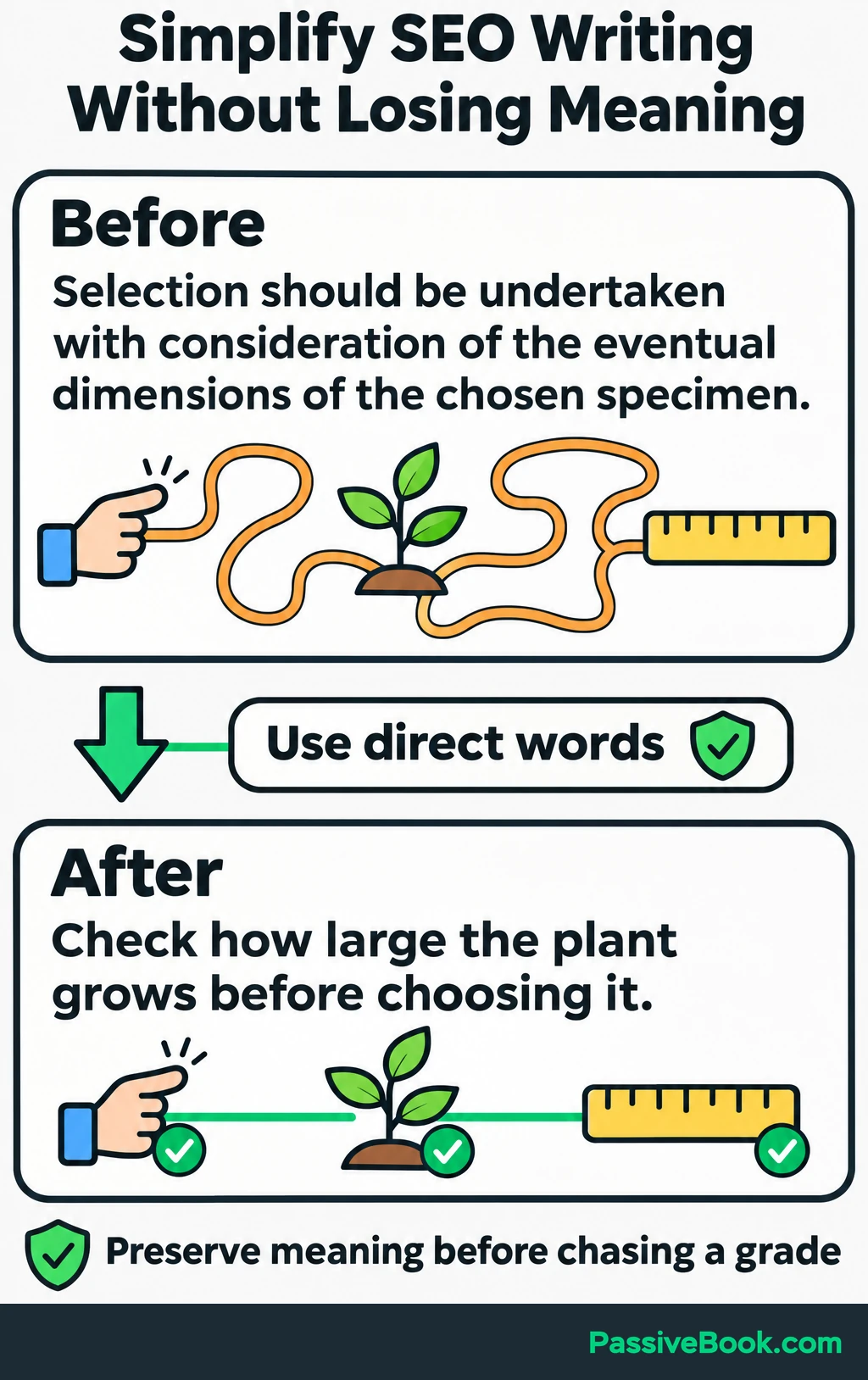
I would work through one difficult passage at a time. Replace abstract words, separate unrelated ideas and keep connected ideas together.
For example:
“Selection should be undertaken with consideration of the eventual dimensions of the chosen specimen.”
Becomes:
“Check how large the plant grows before choosing it.”
Use the highlights as prompts to inspect the writing. Some necessary explanations take more space. I would preserve the meaning before trying to reach a particular readability grade.
WordPress Tools for Publishing and Internal Links
Use these tools when your website runs on WordPress. Choose one primary SEO plugin from Rank Math, Yoast or All in One SEO.
A dedicated linking tool becomes useful when finding and maintaining links across existing posts takes more time than your current setup can comfortably handle.
24. Rank Math — Best Free WordPress Publishing Companion
Rank Math is my preferred WordPress SEO plugin because its free features cover much of what I need during publishing.
Use it to review the finished article’s search title, description and on-page checks. Make sure the title describes the actual answer, the headings guide the reader and the description gives a clear reason to visit.
I would begin with the free plugin and upgrade for a specific paid capability. My preference is about features and workflow, rather than a claim that switching plugins improves rankings.
Keep the plugin purchase separate from its AI offering. A PRO license or included trial does not establish ongoing AI usage. The comparison table separates the displayed promotion from the renewal commitment.
25. Yoast SEO — Best for Readability Guidance Inside WordPress
Yoast brings keyphrase and readability feedback into the WordPress publishing process. Premium adds features such as internal-link suggestions, multiple-keyphrase analysis and AI assistance.
I would consider it when you like reviewing writing feedback inside the page you are about to publish.
For the aquarium guide, that final review should check whether headings describe useful decisions and whether difficult passages need attention. It should also catch a title that promises more than the article delivers.
If your existing free plugin handles those jobs well, identify the exact Premium feature you need before changing your setup. A plugin switch creates work, so it should solve a recurring problem you can name.
26. All in One SEO — Best for Integrated WordPress Content Checks
All in One SEO uses TruSEO analysis to provide content checks within WordPress. It is worth considering when you want those checks connected to your wider publishing controls.
Choose the tier around the feature you need. Basic covers one site, but Internal Link Assistant starts on Pro. The SEOBoost-powered Writing Assistant also requires a separate paid SEOBoost subscription.
Those distinctions change the purchase. An entry-level license may be enough for publishing checks without including the writing or linking workflow that attracted you.
I would write down the required feature, its plan and any separate subscription before buying. Then compare that full setup with the plugin and editor you already use.
27. Link Whisper — Best for Maintaining Internal Links Across Many Posts
Link Whisper helps find internal-link opportunities and pages with few or no incoming internal links. Pages with no incoming internal links are called orphan pages.
Its free WordPress plugin provides limited suggestions and reporting. Premium adds capabilities that make inserting and maintaining links across a larger library more convenient.
I would add it when reviewing older posts for relevant links becomes a regular chore. For a small library, manual linking may still be easy enough.
Review every proposed destination and anchor text. A useful link gives the reader a sensible next step. In the aquarium guide, that could be a supporting article that explains a selection criterion in more detail.
How to Compare Free and Paid Plans
Start with the work you expect to finish. A tool allowance is useful only when it matches that workload.
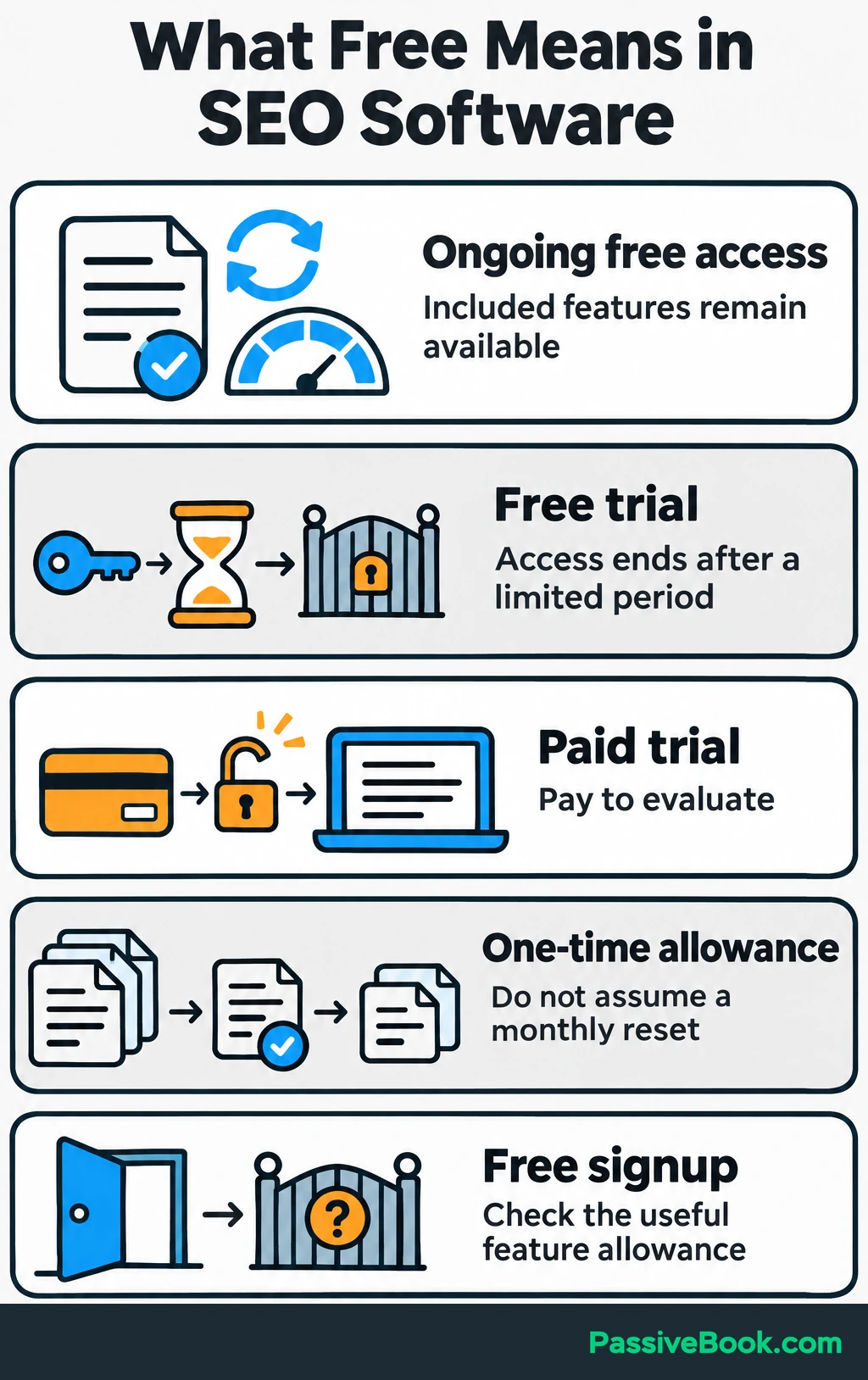
“Free” can mean several different things:
- Ongoing Free Access: You can keep using the included features, subject to limits.
- Free Trial: Paid features are available for a limited period.
- Paid Trial: You pay to evaluate the tool or receive a small batch of credits.
- One-Time Allowance: The account receives a fixed number of documents or checks, rather than a monthly reset.
- Free Signup: Creating an account costs nothing, but the useful feature allowance still needs checking.
Next, count the vendor’s billing unit. Reports, documents, workflows, AI credits and finished articles are different things.
Suppose your monthly plan is four new articles and two updates. Check whether each new brief consumes a unit, whether refreshing an existing page consumes another, and whether repeated scoring costs extra. An allowance that looks generous on the pricing page may feel smaller after those steps.
I would also compare the amount due now with the renewal amount. Keep annual commitments visible and currencies separate. A monthly equivalent can help with budgeting, but you still need enough cash for the upfront payment.
To assess software cost per completed article, count what you spent during the period and the articles you actually finished during that same period.
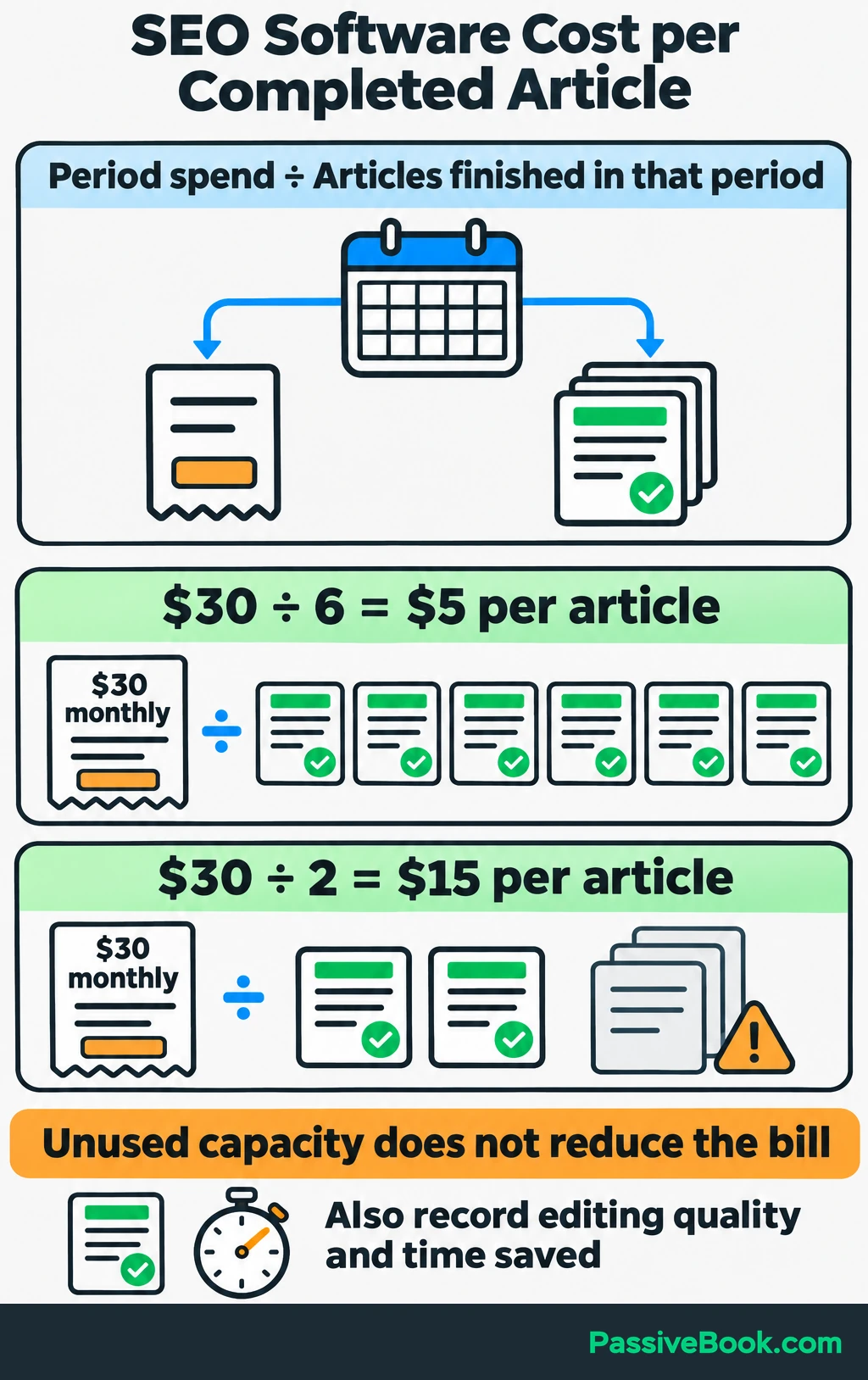
For example, a $30 monthly subscription used to finish six articles that month costs $5 per completed article. If you finish two that month, it costs $15 per article. Unused capacity does not reduce the bill.
That calculation is only a starting point. An editor may earn its cost by helping you make better revisions or finish work with less effort. Record those benefits instead of assuming a large allowance creates value.
For a lean setup, I would choose:
- Starting From Free: Search Console, SEO Review Tools, a free language checker and your website’s publishing controls.
- Adding Coverage Guidance: Keep the free companions and trial one dedicated editor, such as NEURONwriter or Surfer.
- Improving An Existing Library: Use Search Console to inspect opportunities and consider Content Raptor when prioritizing updates becomes difficult.
- Consolidating Subscriptions: Consider a broader suite when its research, auditing and tracking replace tools you already need.
My own stack includes Claude, Search Console and Rank Math. I would add another subscription only when I could point to the repeated task it would improve.
How to Test Your Shortlist on One Article
A trial becomes useful when it answers a buying question. Comparing two dashboards without doing the work tells you very little.
Choose two tools that solve the same problem and give them one article you care about improving.
Give Both Finalists the Same Editing Task
Save the original draft before making changes. Then define what the reader should understand after reading it.
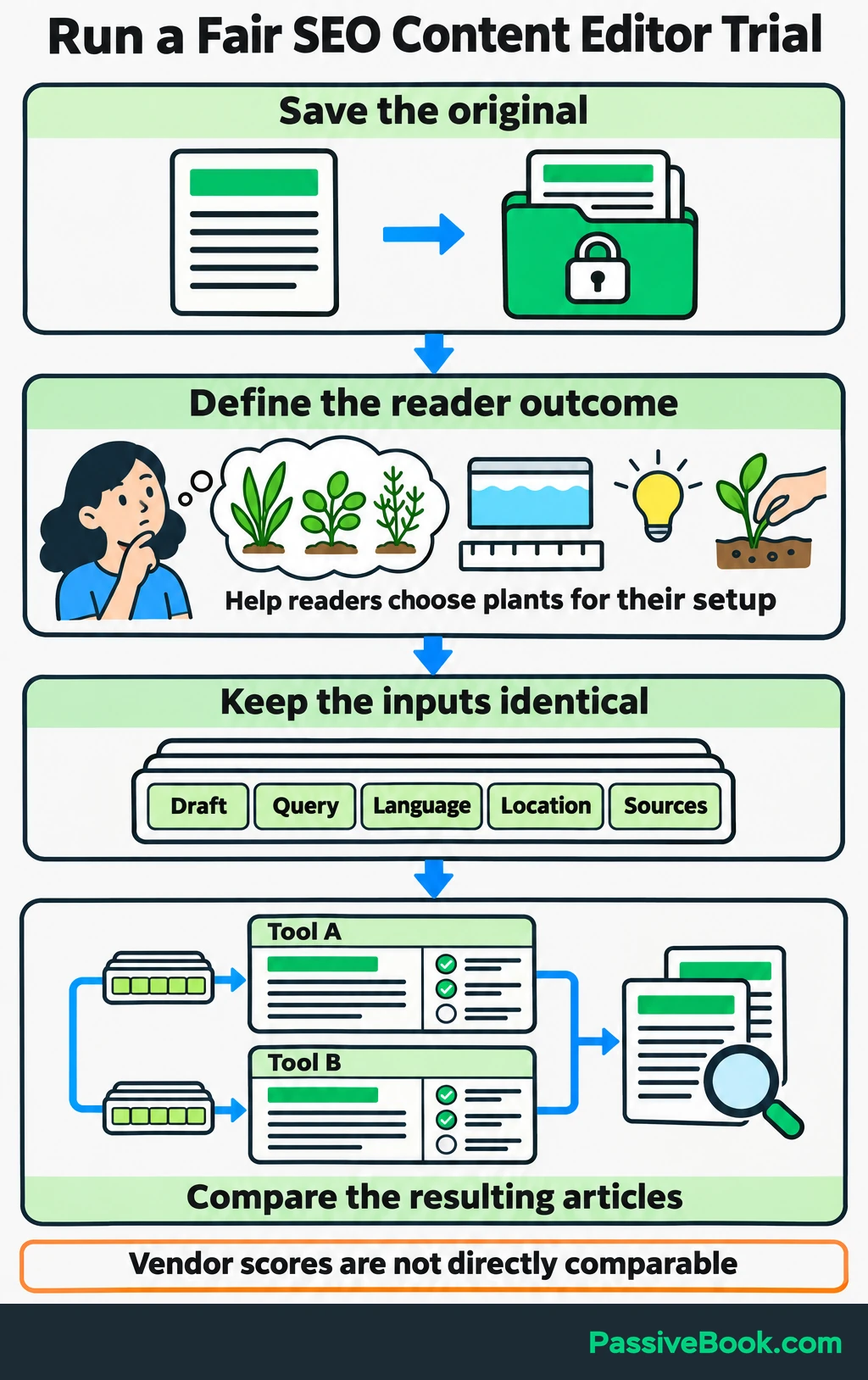
For the illustrative aquarium guide, the outcome is:
“Readers can compare plant choices with their tank’s size, lighting and intended setup before buying.”
Give both tools the same draft, target query, language, location and source notes. If the tool lets you choose comparison pages, select pages that answer the same kind of question.
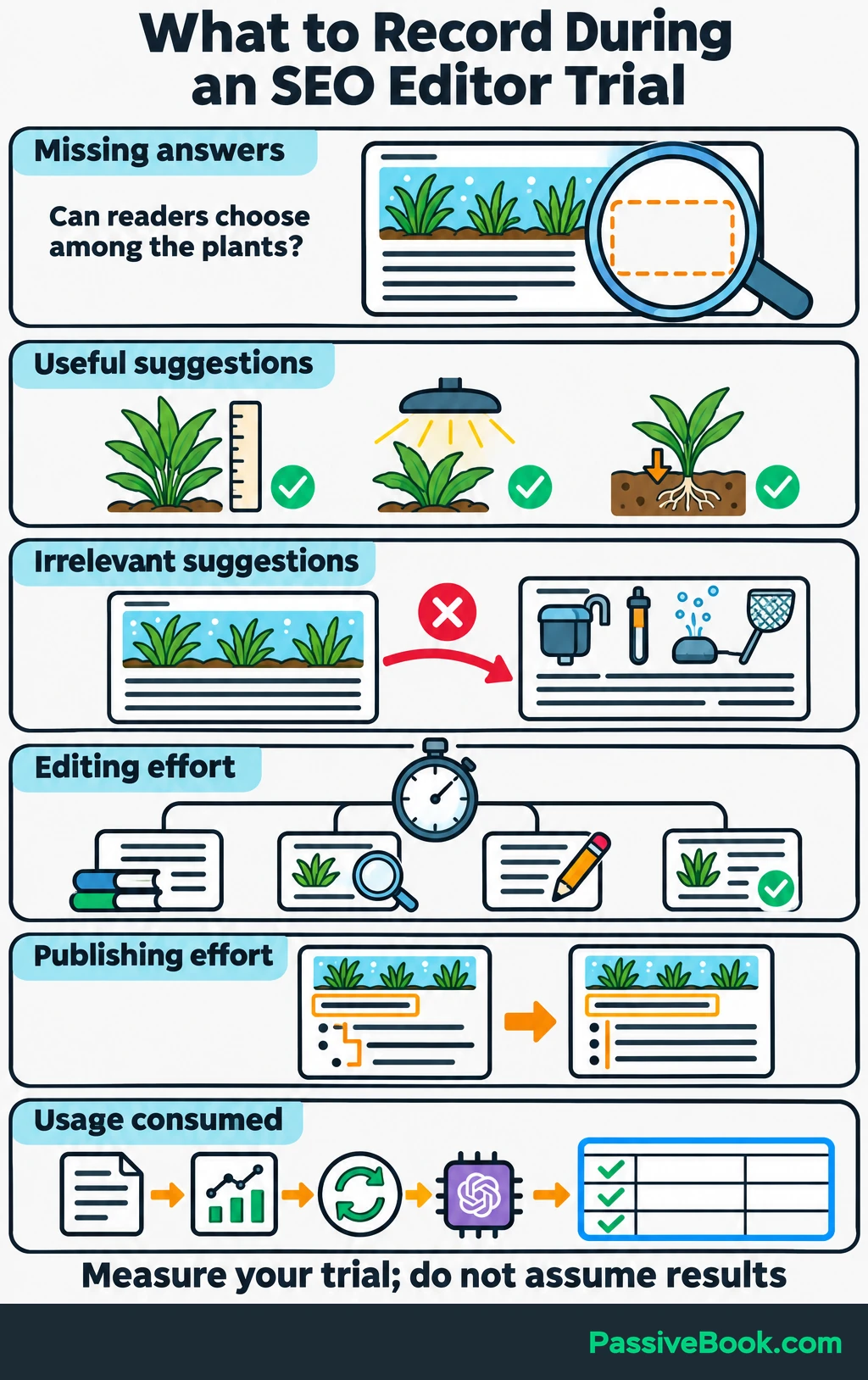
Now compare the editing decisions each tool helps you make:
| What To Review | Record For The Aquarium Guide |
|---|---|
| Missing answers | The draft calls plants easy to grow but gives readers no way to choose among them. |
| Relevant suggestions | Explain how mature size, light requirements and planting method affect the choice. |
| Irrelevant suggestions | Leave out a long section on unrelated aquarium equipment. |
| Editing effort | Not measured here; record minutes spent reviewing recommendations, researching, rewriting and checking facts. |
| Publishing effort | Not tested here; record copying time and any formatting corrections after export. |
| Usage consumed | Not recorded here; count documents, reports, reruns and AI credits used for the revision. |
Keep the original and revised drafts so you can inspect the difference. Scores from different vendors are not directly comparable, so judge the resulting article.
Apply Recommendations That Improve the Answer
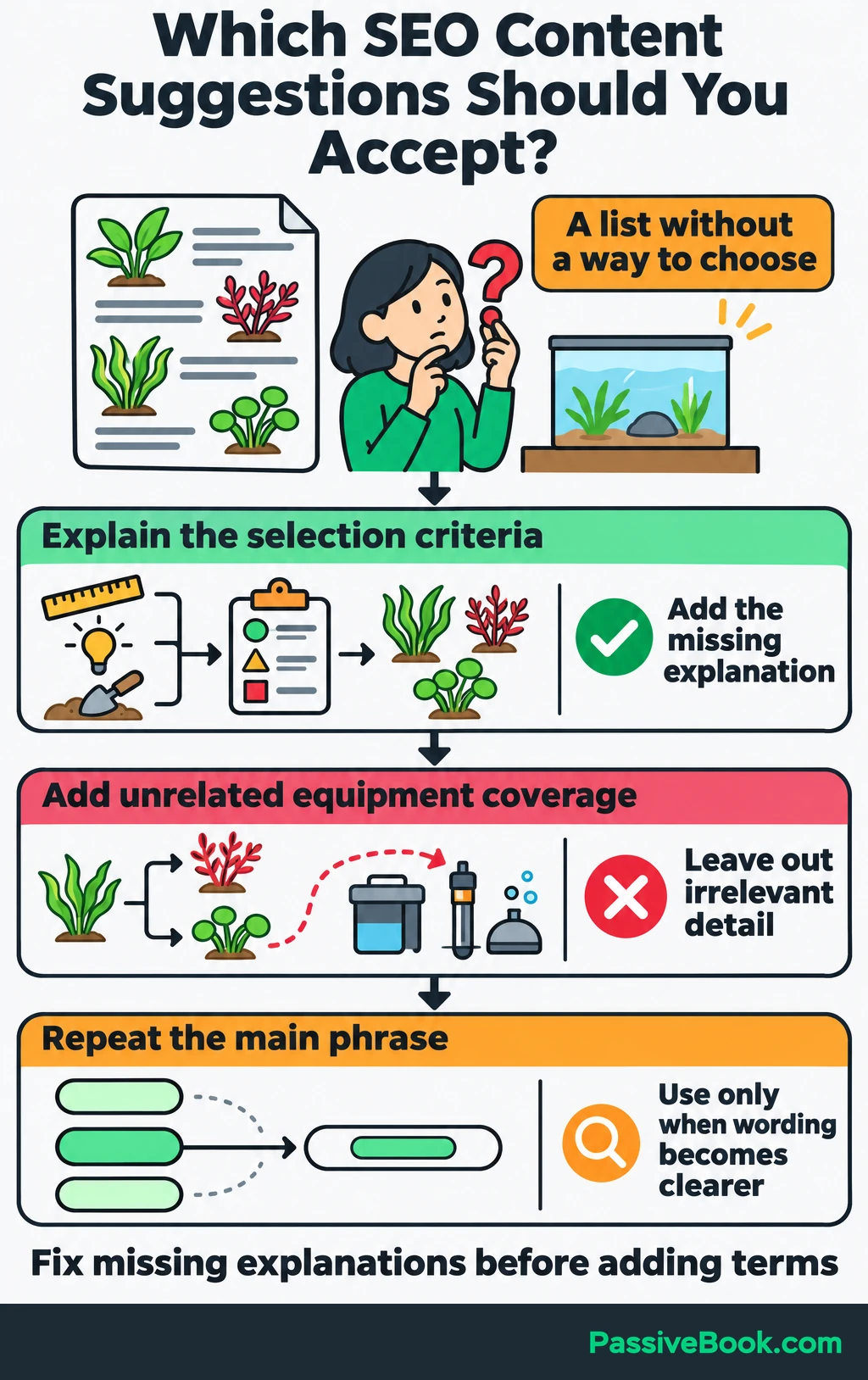
Fix missing explanations before adding individual terms.
Suppose the aquarium draft lists several plants and calls them easy to grow, but never explains how to choose among them. A useful revision would introduce selection criteria and compare the listed options using verified source notes.
A short passage could read:
“Start with the space each plant needs when fully grown, then check its light requirements and planting method. Use the comparison below to rule out options that do not fit your setup.”
The comparison itself needs the supporting facts. If your notes lack a plant’s mature size or requirements, research that gap before filling the cell.
Here is how I would assess three possible recommendations in this example:
| Recommendation | Editorial Decision |
|---|---|
| Explain how readers should compare the listed plants | Add the missing explanation before the shortlist |
| Include a long section on unrelated aquarium equipment | Leave it out unless readers need it to make this choice |
| Repeat the main phrase several more times | Add wording only where it makes a sentence clearer |
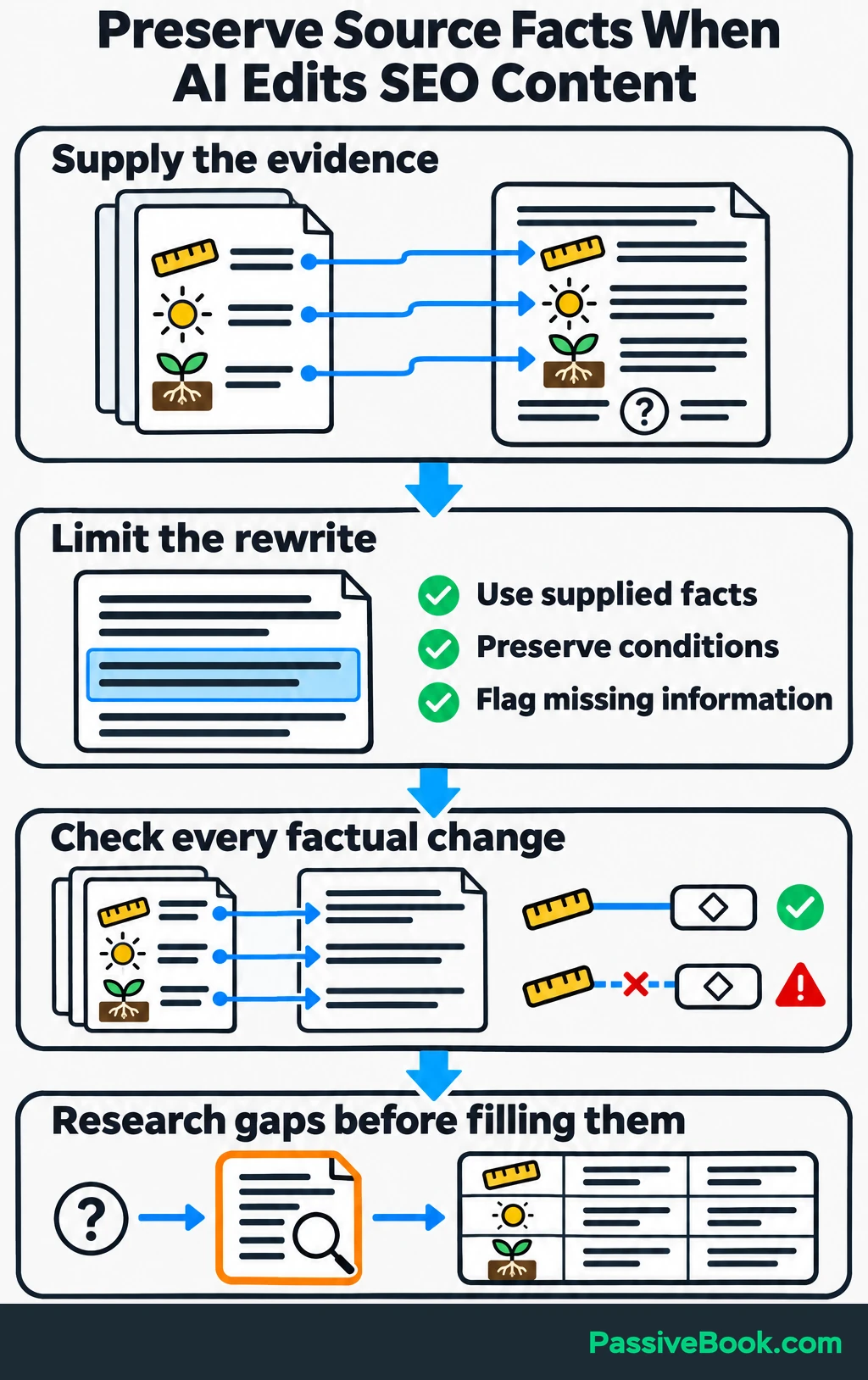
When using AI, give it a focused instruction:
“Rewrite this paragraph using only the supplied facts. Make the comparison clearer, preserve its conditions, and flag missing information.”
Read the result beside your notes. Then check the finished page’s title, headings, description and relevant internal links.
If you want help applying that review, the AI Skill below returns replacement copy and a claim-to-source review. Start with one section so you can check the wording against your sources before using it.

Free AI Copywriting Studio




Keep the Tool That Earns Its Cost
After the trial, review the improvements you accepted and the effort required to produce them.
I would keep the tool that consistently reveals useful gaps and helps me resolve them with manageable editing. An impressive report earns no subscription if I still have to find the missing answers myself.
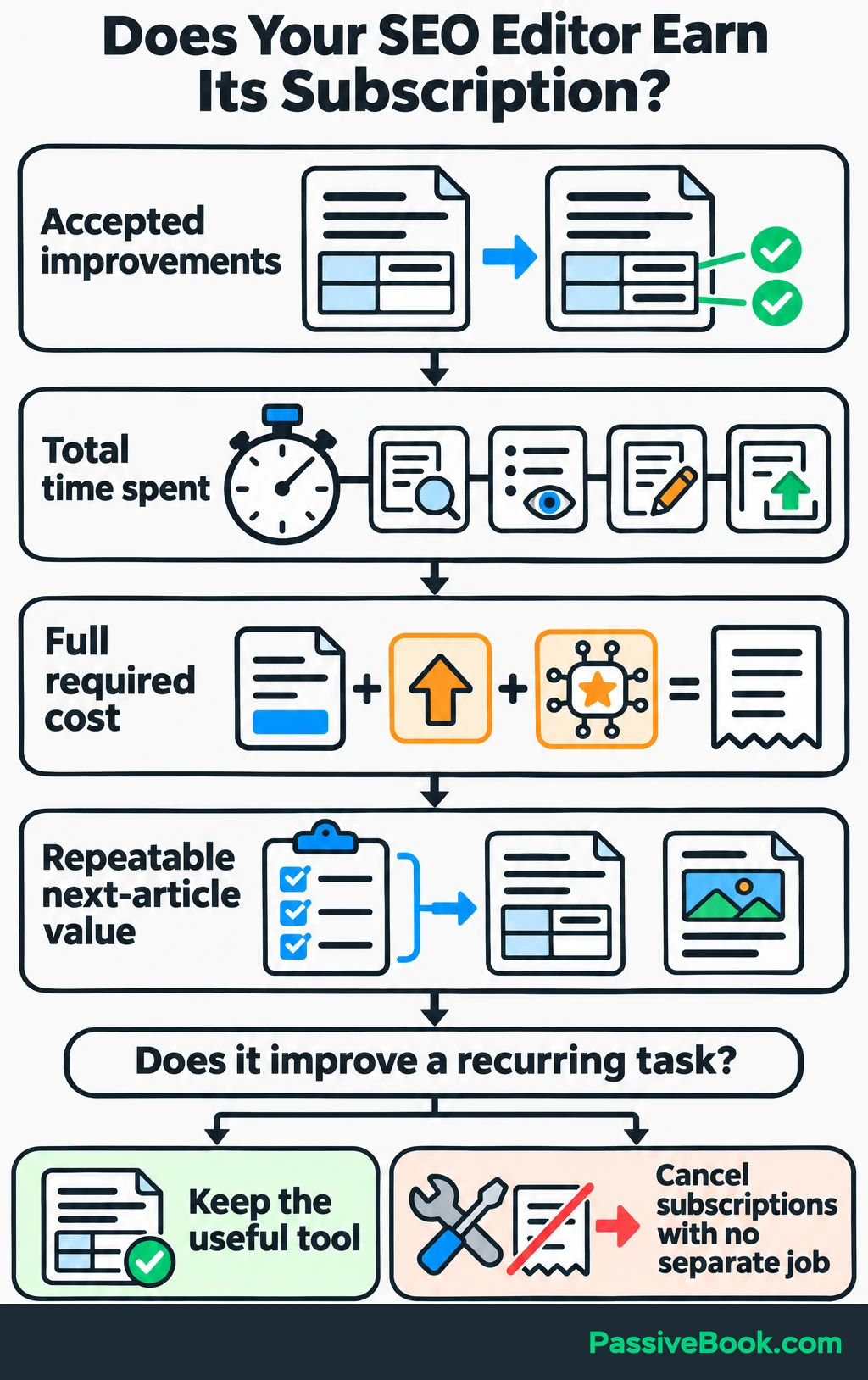
Record:
- Accepted Improvements: Missing answers, clearer comparisons or structural changes you kept.
- Time Spent: Research, recommendation review, rewriting and publishing.
- Total Cost: The plan you need, required upgrades and any separate AI charges.
- Next-Article Value: Whether the process is clear enough to repeat.
Cancel overlapping subscriptions that solve no separate recurring task, and save the useful checklist for the next article.
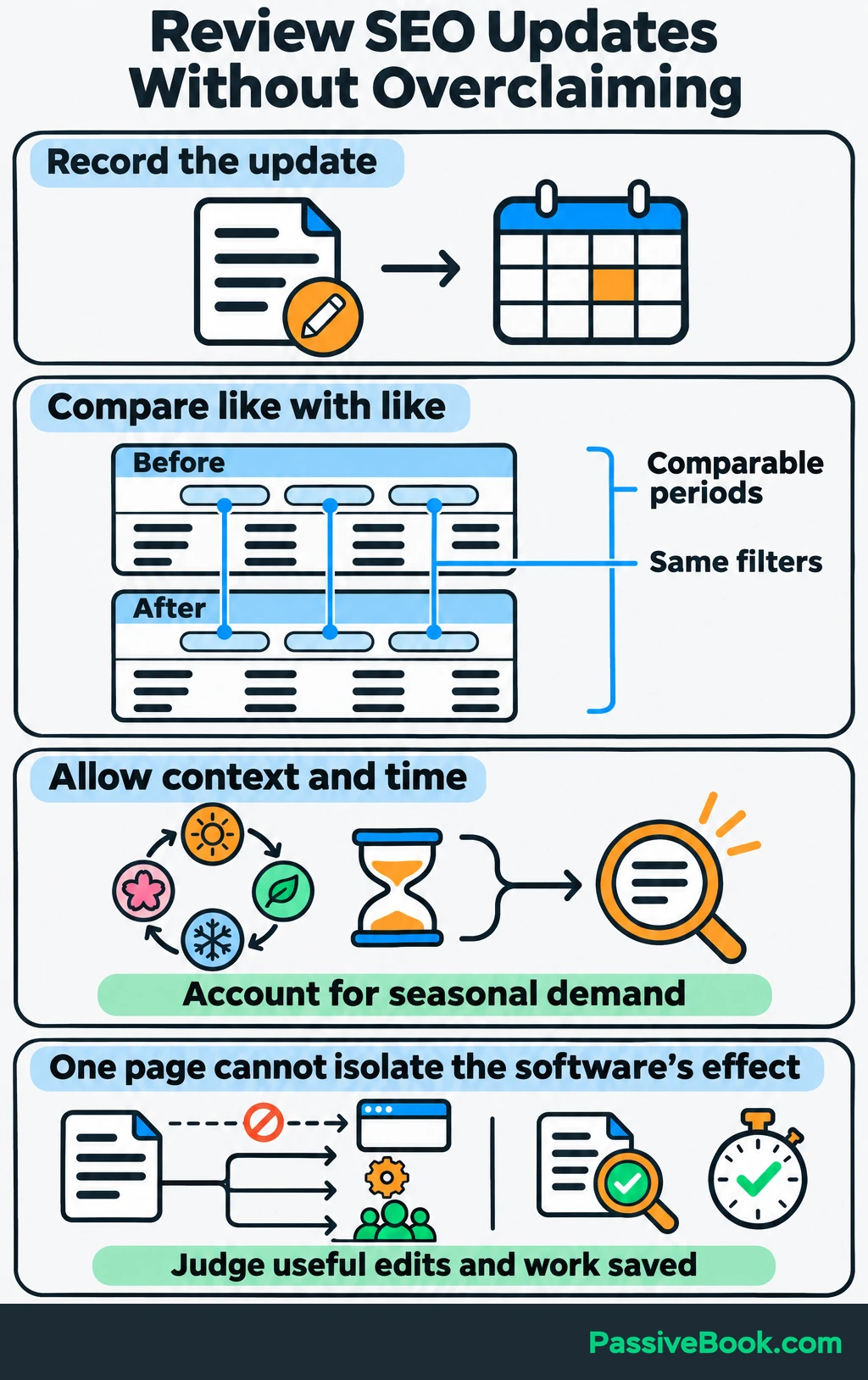
After publishing, record the update date and review Search Console over comparable periods with the same filters. Account for seasonal demand where it matters, and allow enough time for useful data to accumulate.
Search results can help you assess the update, but a before-and-after change on one page cannot isolate the software’s effect. Judge the tool’s immediate value through the quality of its recommendations, the edits you kept and the work it saved.
What Next?
Choose one article today, save its current draft and write down the question it should answer. Use a free checker first, then trial one paid editor if you can name the gap you still need help closing.
Use the social buttons to share this comparison with your publishing group and compare which tools actually earn a place in the monthly budget.
Which part of your workflow needs the most help: choosing updates, finding missing answers or finishing the edit? Share your answer in the comments, and bring any other questions about choosing a tool.
Share this post with your friends & followers:

