You want to know which searches are worth targeting and why your pages aren’t getting more visitors. Instead, you’re comparing crawl credits, keyword limits and three subscriptions that seem to do the same thing.
The bill is easy to measure. Whether those tools help you finish useful work is harder.
Publishing long-form content at Passive Book has made me picky about that difference. This guide compares 27 SEO tools by the work they support, where free access helps and what makes an upgrade worthwhile, so you can build a useful system without paying several companies to answer the same question.
The Best SEO Tools at a Glance
My starting choices are Google Search Console for understanding Google performance, Ubersuggest for beginner research, Ahrefs for backlink investigation, Semrush for broader research and monitoring, and Screaming Frog for detailed technical audits.
Those choices serve different needs. You don’t need all five.
For a free starting stack, I would use Search Console, Google Analytics 4, Google Trends, PageSpeed Insights and Screaming Frog’s free edition. Add Rank Math if your website runs on WordPress. Together, they cover search performance, visitor actions, seasonal interest, technical checks and publishing controls.
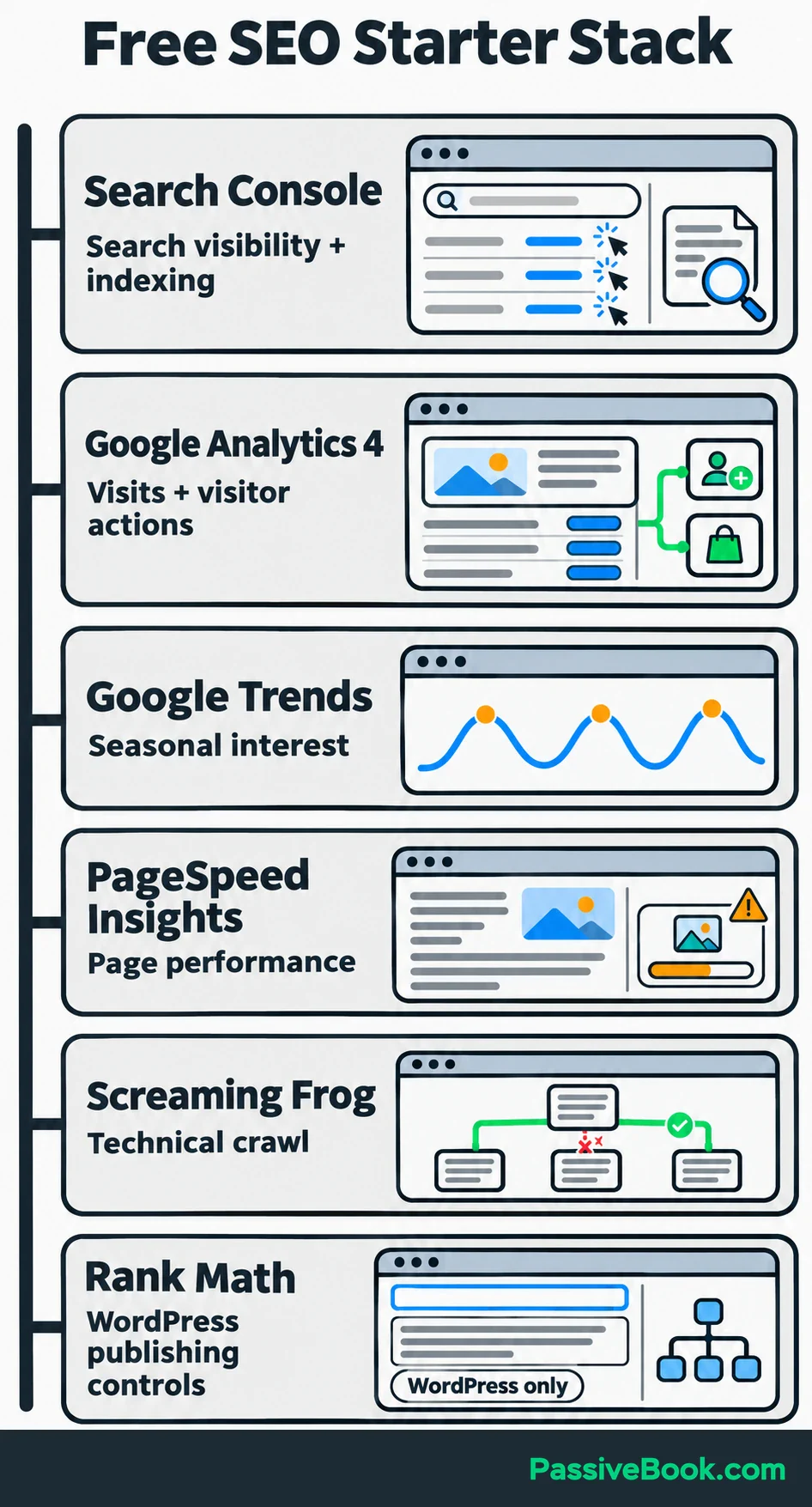
Then add one research platform when you have a clear need for it.
This is a researched shortlist organized by use case, and the numbers follow the categories. I haven’t tested all 27 tools against one another. A browser extension and a competitor-research platform don’t belong on the same winners’ podium.
The table puts prices and important allowances in one place. Credits are usage allowances; each vendor decides which searches or reports use them. Check linked vendor pages for current terms. Prices use the currencies displayed by those sources, so compare checkout totals in your currency, including tax. Annual plans require an upfront yearly payment.
| Tool | Free Access or Trial | Paid Option and Key Limit |
|---|---|---|
| 1. Google Search Console | Verified websites | No paid plan |
| 2. Google Analytics 4 | Standard analytics | Analytics 360 for enterprise needs |
| 3. Bing Webmaster Tools | Verified websites | No paid plan |
| 4. Ubersuggest | Limited account; seven-day free trial | Individual: $29 monthly; one project, 125 keywords tracked weekly; lifetime option available |
| 5. Keysearch | Seven-day trial | Starter: $24 monthly; 200 searches daily, 80 tracked keywords |
| 6. Mangools | Limited account | Basic: regional pricing; 100 lookups daily, 200 keywords tracked weekly; Agency required for daily updates |
| 7. Ahrefs | Limited verified-site tools | Starter: $29 monthly, 200 monthly research credits, no exports; Lite: $129 monthly |
| 8. Semrush | Limited account; trial | SEO: €134 monthly; five websites, 500 keywords tracked daily |
| 9. SE Ranking | Fourteen-day trial | Core: €109 monthly; ten projects, one manager seat, 2,000 keywords tracked daily |
| 10. Google Trends | Relative interest comparisons | No paid plan |
| 11. Google Keyword Planner | Ads setup and billing details required | No separate tool charge |
| 12. AlsoAsked | Monthly credits without registration | Basic: $12 monthly plus tax; 100 monthly credits |
| 13. AnswerThePublic | Limited searches | Starter: €10/month billed yearly; 100 monthly searches |
| 14. LowFruits | Limited exploration | $25 for 2,000 credits valid for one year; subscriptions available |
| 15. Screaming Frog SEO Spider | Up to 500 URLs per crawl | $279 per person annually; larger and saved crawls, scheduling |
| 16. Sitebulb | Fourteen-day desktop trial | Lite: 10,000 URLs per audit; check linked monthly or annual price |
| 17. PageSpeed Insights | Individual URL tests | No paid plan |
| 18. Google Rich Results Test | URL or code checks | No paid plan |
| 19. Detailed SEO Extension | Page inspections in Chrome and Firefox | No paid plan |
| 20. Rank Math | Core WordPress SEO controls | Annual licences; some AI features cost extra |
| 21. Surfer | Trial access | Discovery: €49/month billed yearly; 120 documents annually |
| 22. Clearscope | Fourteen-day trial | Essentials: $129 monthly; 20 drafts and 20 topic discoveries monthly; 50 AI queries and 50 pages monitored |
| 23. Claude | Limited usage | Pro: $20 monthly or $200 annually; usage limits still apply |
| 24. Nightwatch | Fourteen-day trial | Starter: €948 annually; 500 keywords tracked daily, five websites |
| 25. Google Data Studio | Core dashboards | Optional Pro subscription for team management |
| 26. Google Business Profile | Eligible in-person businesses | No paid profile plan |
| 27. BrightLocal | Trial access | Track: $369 annually for one location |
When comparing the paid platforms, check the target country, website allowance, seats, exports and how often rankings update. A generous keyword allowance is less useful if the plan cannot export the findings you need.
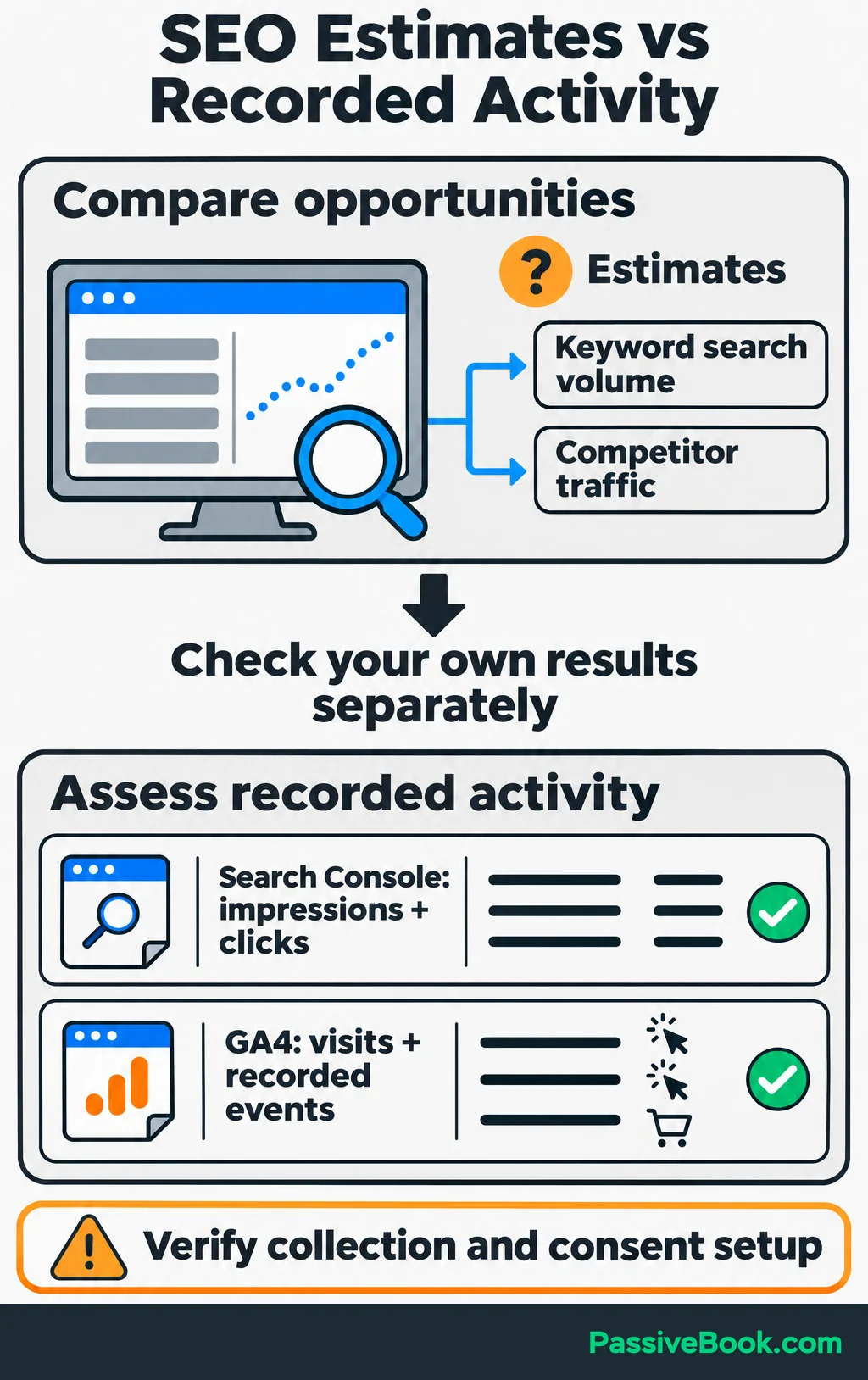
Also separate estimates from recorded activity. Ahrefs explains that keyword search volumes are estimates, and competitor traffic reports estimate visits rather than reading another website’s analytics. Use those figures to compare opportunities. Use your own Search Console and Analytics reports to assess what happened on your website.
To make the choices concrete, imagine you run a beginner sewing website that sells downloadable apron patterns. A guide to sewing an apron helps people complete their first project and introduces the patterns. The example searches below illustrate possible research directions; they aren’t verified demand findings.
Free Tools for Understanding Your Website
1. Google Search Console: Google Search Performance and Indexing
Search Console is where I would start before buying research software. It shows how often your pages appear in Google results (impressions) and which searches bring clicks. It also helps you check whether Google has indexed a page, making it eligible to appear in search results.
Begin with an existing page and look at its relevant queries. Then read the page alongside the search results. You’re looking for a useful improvement you can explain.
For the apron guide, that might mean adding clearer fabric measurements if related queries reveal that need and the guide leaves it unanswered. Changing the title alone won’t fix missing instructions.
Use URL Inspection when an individual page’s indexing status needs investigation. That answers a different question from whether its content deserves an update.
2. Google Analytics 4: Organic Visits and Business Outcomes
Search Console helps you understand discovery. Google Analytics 4 helps you understand recorded visits and what people do afterward.
Before comparing the pages visitors first arrive on, set up Analytics to record purchases and newsletter signups as events. Then test that setup. Complete a signup and check that it appears correctly. Check that a purchase records once and carries the expected value.
For the sewing website, review organic landing pages alongside pattern purchases and registrations for a free sewing checklist. A popular tutorial and a useful sales entry point may be different pages.
Set collection and consent controls for your visitors’ requirements. Reports only describe the activity your setup successfully collects, so verify that setup before building conclusions on it.
3. Bing Webmaster Tools: Bing Performance and Site Diagnostics
Bing Webmaster Tools gives you a separate view of performance in Bing and includes Site Scan for common technical problems.
I would add it when you want Bing visibility data or another way to investigate a website issue. If an apron tutorial receives Bing impressions, you can review the searches behind them rather than assuming Google’s report tells the whole story.
Keep the response practical. A broken link deserves a fix before you spend an afternoon designing another dashboard.
Submitting a sitemap helps communicate your URLs. It doesn’t guarantee indexing or inclusion in an AI answer.
Platforms for Keyword and Competitor Research
These six platforms overlap. Compare them using the same website, target country and research task.
For example, ask each one to help you find a relevant topic, inspect a competing page and save a useful shortlist. Check the included audit and tracking functions during that comparison. You may already be buying the specialist feature you were about to add.
4. Ubersuggest: A Beginner Research Platform
Ubersuggest is my starting recommendation for beginners and budget-conscious creators because it brings keyword ideas, competitor research, audits and tracking into one place.
That is a preference about fit. It isn’t a claim that its estimates are more accurate than everyone else’s.
Start with a subject you can cover well, collect related searches and inspect the promising results. For the sewing website, explore apron construction, fabric choice and pattern selection, then separate tutorial needs from shopping needs.
I would begin with limited free access and try the paid version when those limits interrupt an actual research session. Buying more ideas makes sense when you’re ready to choose and publish one.
5. Keysearch: Budget Keyword and Search-result Research
Keysearch belongs on the shortlist when your main job is finding topics and reviewing the pages already ranking for them.
A difficulty score estimates how hard it may be to rank for a search, but I wouldn’t choose a topic on that number alone. Check whether searchers want instructions, downloadable patterns, videos or product listings, and ask whether you can provide the right kind of answer.
For an apron tutorial, a manageable score would mean little if the results mainly serve people ready to buy a finished apron.
During the trial, finish a small research brief and save the findings. I would also try its included audit and tracking functions before paying another company for those jobs.
6. Mangools: A Focused Keyword and SERP Toolkit
Mangools divides the work among focused tools. KWFinder helps with keyword discovery, SERPChecker examines search results and LinkMiner investigates backlinks. A SERP is simply a search results page.
That arrangement suits a repeatable research session: find a phrase, inspect its results and investigate relevant competing pages.
The tracking schedule deserves attention. Weekly updates may be enough for a small publishing operation, while a project that requires daily checks needs the appropriate tier.
I would choose Mangools for that focused workflow and budget separately for a detailed crawler if the website needs one. Don’t assume every research bundle includes a full technical audit tool.
7. Ahrefs: Backlink and Competitor Investigation
Ahrefs is the option I would investigate when backlinks and competing websites drive the research question.
A backlink is a link from another website. Looking at the sites linking to a useful competing tutorial can reveal relevant publications, resources and communities.
For the apron guide, investigate why another page earned those links. It might offer clear construction photos or a reference people find worth sharing. That observation can inform what you create, but copying its backlink list isn’t a link strategy.
Starter suits limited investigation. Check how quickly a representative task uses its credits and whether the lack of exports blocks your work before choosing it.
8. Semrush: Broad SEO Research and Monitoring
Semrush makes more sense when several recurring jobs belong in one subscription: keyword gaps, competitor research, audits and position tracking.
A keyword gap shows searches associated with competing websites that your website may not cover. Treat that as a starting list. Competitors can rank for plenty of things your customers don’t need.
For the sewing website, I would keep gaps connected to beginner projects and pattern sales, then discard the rest.
Check the specific plan carefully. Content tools, advanced reporting and AI-search features may sit in separate products or higher tiers. I would buy the functions I can name a use for.
9. SE Ranking: Research and Monitoring Across Several Websites
SE Ranking is worth comparing when you manage several websites and need a repeatable process for research, audits, tracking and reporting.
Its project capacity can matter more than a small difference in headline price. So can its seat allowance if another person needs access.
For one modest sewing website, a large allowance may sit unused. For a portfolio, the same capacity could replace several smaller subscriptions.
I would compare it with Semrush using a real reporting cycle: inspect a website, save an issue list, review selected rankings and produce the report you need. Capacity earns its cost through work you complete.
Specialist Tools for Finding Search Opportunities
Add a specialist when it supplies a view your main platform doesn’t handle well. That might be seasonal interest, connected questions or a faster way to screen search results.
It doesn’t have to become a permanent subscription.
10. Google Trends: Relative Interest and Publishing Timing
Google Trends helps you compare interest over time within a chosen geography.
Its 0–100 scale shows relative search interest, rather than a count of searches. A value of 100 marks the highest relative interest within the comparison you selected.
Use it to investigate whether apron-related topics show recurring seasonal peaks before scheduling content. Keep the geography and time window consistent, and distinguish a topic from an individual search term.
I would use Trends for timing and direction, then turn to a research platform for phrase-level demand estimates. When reviewing performance, compare equivalent seasonal periods so an ordinary seasonal dip doesn’t become an unnecessary rewrite.
11. Google Keyword Planner: Google Keyword Ideas and Demand Estimates
Keyword Planner can expand a seed topic and provide historical search estimates without a separate SEO subscription.
Google requires completed Ads account setup, including billing information, for basic keyword-idea access. Its “competition” metric describes advertisers competing for a keyword. It does not measure how hard an organic page will be to rank. Both points appear in Google’s Keyword Planner guidance.
Set the target geography and search network before comparing ideas. Then inspect organic results yourself.
For the apron website, the useful output is a shortlist of relevant searches. An advertising metric cannot decide whether your tutorial answers them well.
12. AlsoAsked: Related Questions From People Also Ask
AlsoAsked explores relationships among questions found in Google’s People Also Ask results.
That makes it useful when you understand the main topic but need to identify the decisions a page should help readers make.
For the apron guide, you might investigate fabric choice, measurements and construction order. Keep the questions that help someone finish that project, and leave unrelated sewing projects for separate pages.
I would use free credits first. Upgrade when this question research becomes a regular part of creating briefs. A map full of questions is useful only after you decide which ones belong in the article.
13. AnswerThePublic: Question and Phrase Discovery
AnswerThePublic helps broaden the language around a subject through questions, comparisons and related phrases.
Use it when your initial topic list feels narrow. Explore the phrasing, select promising ideas and inspect their search results before choosing a page to create.
For the sewing website, a comparison about apron fabrics might deserve a section in the main guide or a separate article. The reader’s task should decide which.
I would choose AnswerThePublic for broad phrasing discovery and AlsoAsked for relationships among People Also Ask questions. Try their useful output before paying for both.
14. LowFruits: Screening Long-tail Search Results
LowFruits helps screen longer, more specific searches for results that may deserve closer investigation.
Its weak-result signals can help you shorten a research list. They don’t tell you the probability that your page will rank.
Open the promising results and check their purpose, format and quality. A small website can publish an excellent answer, and a large website can publish a thin one.
For occasional research batches, I would consider pay-as-you-go credits before a subscription. Keep the expiry rules in mind: purchased credit packs have a validity period, while subscription credits reset monthly without rolling over.
Tools for Diagnosing Technical SEO Problems
15. Screaming Frog SEO Spider: Detailed Site Crawling
Screaming Frog is a desktop crawler. It follows website URLs and gathers information you can inspect in bulk.
Use it to find broken internal links, redirects that send visitors through several URLs, instructions that keep pages out of search, and repeated titles or descriptions. Start with problems that affect important tutorials and purchase pages.
For the sewing website, fixing a broken link from the apron guide to its pattern page is a clearer priority than polishing an unimportant archive description.
I would use the free edition until its crawl limit or a missing function blocks the audit. Finding orphan pages—pages without internal links—requires another URL source to compare against the crawl. Following links alone won’t reveal every unlinked page.
16. Sitebulb: Visual Audits With Issue Explanations
Sitebulb is another crawler, with visual maps and explanations that can make technical findings easier to understand.
I would compare it with Screaming Frog on the same website and a specific question. Can you find the issue, understand its effect and decide how to fix it?
For example, a crawl map may help reveal that an important pattern page sits far from the website’s main navigation.
Keep the crawler whose reports you can reliably turn into changes. A longer issue list isn’t automatically a better audit, and buying two crawlers rarely helps a small website with an unfinished first audit.
17. PageSpeed Insights: Page-performance Diagnosis
PageSpeed Insights combines real-user measurements, when available, with Lighthouse diagnostics from a simulated test. Google explains the distinction in its PageSpeed Insights documentation.
Use the real-user section to understand reported visitor experience and the simulated test to investigate possible causes.
Test representative pages: a tutorial with several photos and a pattern product page, for example. If oversized images are part of the reported problem, fix those and retest.
Check whether the real-user figures describe that page or combine results across the website. Those measurements cover the previous 28 days, so they won’t immediately reflect a change you just published.
18. Google Rich Results Test: Supported Structured-data Checks
Structured data adds machine-readable information about a page. Google’s Rich Results Test checks markup for supported Google search features.
Use it after adding or changing relevant markup. Test the URL, review reported errors and check that the markup matches what visitors can see.
For a pattern product page, that means keeping product information consistent with the actual offer.
A passing result doesn’t guarantee a special search appearance, as Google’s structured-data policies explain. The test checks Google-supported features; it doesn’t validate every type of structured data. Add markup because it accurately describes the page and supports an appropriate feature.
19. Detailed SEO Extension: Quick Page Inspections
Detailed SEO Extension gives you a quick view of a page’s headings, metadata, canonical information, links and structured data.
A canonical tag identifies the preferred URL for a page or a group of similar pages. Checking it can help catch an unexpected publishing setting.
I would use the extension after publishing the apron guide to confirm the title, main heading and other page details. It also helps you inspect how a competing tutorial is organized.
Use a crawler when you need to find the same issue across the website. An extension is useful for a page check, but manually opening every URL soon becomes its own occupation.
Tools for Publishing and Improving Content
These tools have different jobs. Rank Math controls SEO output in WordPress, Surfer and Clearscope support content review, and Claude helps you work with research and drafts.
Choose according to the work that needs help.
20. Rank Math: WordPress SEO Publishing Controls
Rank Math is my preferred WordPress SEO plugin because its free features cover many routine publishing needs.
Use it to manage titles, descriptions, sitemaps and supported structured data. Then inspect the published page to confirm that the intended output appears.
For the apron guide, write a title that describes the project and check that the page’s indexing settings match your intention. Keep one primary SEO plugin active so two plugins aren’t trying to control the same output.
I would stay with the free core until a specific paid feature earns its place. Plugin scores can prompt a review, but a green score doesn’t promise rankings.
21. Surfer: Guided Content Optimization
Surfer provides an editor with suggestions informed by competing content.
Before opening it, decide what the page must help the reader accomplish. For the apron guide, that could be choosing materials, cutting the pieces and completing the construction.
Then judge suggestions against that purpose. An edit explaining seam allowance may help. A loosely related paragraph added to raise a score may make the tutorial harder to follow.
I would consider Surfer when briefing and revision happen often enough to justify a dedicated editor. Compare its document allowance with the work you expect to finish, including updates to existing articles.
22. Clearscope: Shared Editorial Review
Clearscope is worth comparing when several people need a shared way to review coverage and discuss drafts.
The useful question is whether the editor helps you spot an important omission and communicate the fix.
Try it on the same apron article you use to assess Surfer. Compare the suggested edits, ease of review and finished draft. Keep your own construction instructions and observations where they add value.
For a solo operation, I would first decide whether editorial coordination is a real problem. Shared review software can help a team, but it can also become an expensive place to edit alone.
23. Claude: AI Assistance With Research, Editing, and Analysis
Claude is my main AI tool for long-form writing and content strategy. I would use it to organize supplied research, review an article or explain an exported issue list.
Give it the evidence needed for the task. A language model shouldn’t be asked to invent keyword volumes, backlinks or crawl findings.
For the sewing guide, you could use this prompt:
Review this apron-sewing guide and the attached Search Console queries. Identify unanswered questions that belong within this project. Preserve my construction notes and observations. Separate suggested edits from factual gaps, and show the supplied evidence behind each recommendation.
Check the output against the source material and the affected page. I would upgrade for useful recurring work that exceeds free limits.
Tools for Rank Tracking and Reporting
A tracker monitors selected search positions. A dashboard brings connected reports into one view.
Add either when it answers a recurring question your existing tools leave unresolved.
24. Nightwatch: Dedicated Keyword and Location Tracking
Nightwatch belongs on the shortlist when you need dedicated tracking across particular queries, locations, devices or search engines.
Define those requirements before comparing subscriptions. The same phrase checked across several locations or devices can change the amount of tracking capacity you need.
For the sewing website, I would start with a small set connected to important tutorials and pattern pages. Monitoring every phrase you discover creates a bigger report without necessarily improving a decision.
Use your research platform’s included tracking first. Add Nightwatch when it fills a specific gap, such as required location coverage or a reporting process you cannot reproduce efficiently.
25. Google Data Studio: Reusable SEO Dashboards
Google Data Studio brings connected data into reusable reports. If you remember it as Looker Studio, Google’s documentation confirms the current name.
For the sewing website, a useful report could show Google search clicks, organic landing-page visits, checklist registrations and pattern purchases.
Keep those measures distinct. Putting them on one page doesn’t mean every signup or sale came from the search query shown beside it.
I would build the report around recurring decisions: which page to improve, which offer attracts interest and whether tracking is working. Include any third-party connector fees in the cost. Direct reports are enough when they already answer those questions.
Tools for Businesses Serving Local Customers
The online-only sewing website can skip this category.
If you also meet customers in person—for example, through qualifying sewing classes or alterations—the local tools become relevant. Google Business Profile manages your presence, while BrightLocal adds monitoring and audits.
26. Google Business Profile: An Eligible Local Presence
Google Business Profile lets an eligible business manage information in Google Search and Maps.
Check eligibility before creating a profile. Ordinary businesses must have qualifying in-person customer contact, either at their location or by travelling to customers. Online-only businesses are ineligible under Google’s business eligibility guidelines.
Selling downloadable apron patterns alone wouldn’t qualify. A separate in-person service may qualify if it meets the rules.
For an eligible operation, maintain accurate categories, contact details, hours and location or service-area information. I would get that basic information right before considering paid local monitoring.
27. BrightLocal: Local Rankings and Listing Audits
BrightLocal adds location-specific ranking checks, search-grid views, citation monitoring and Business Profile audits. A citation is a business mention in a directory or similar listing.
For the in-person sewing service, a search grid can help investigate how visibility differs across the area customers search from.
I would compare those functions with any local tools already included in your research platform. Pay for BrightLocal when its checks support recurring local decisions.
Confirm that each required feature supports your country. Coverage differs across its tools, so the availability of one report doesn’t establish that every other report will work for your location.
Build a Stack That Earns Its Cost
Start With Free Tools and One Useful Improvement
Choose one page and take it through the full process before building a larger software stack.
Here is how I would handle the apron-sewing guide:
- Review its Search Console queries and choose a relevant reader need worth investigating.
- Inspect the guide and competing results. Identify what would help someone complete the project more easily.
- Fill the gaps you found. That might mean clearer cutting measurements, an extra construction photo or a better explanation of seam allowance.
- Check the published page with Detailed SEO Extension and test its performance with PageSpeed Insights.
- Crawl the website for technical blockers affecting the guide or the pattern purchase page.
- Confirm that the pattern link works and that purchase and signup events record correctly.
- Record the change date and review later search clicks, organic visits and relevant visitor actions.
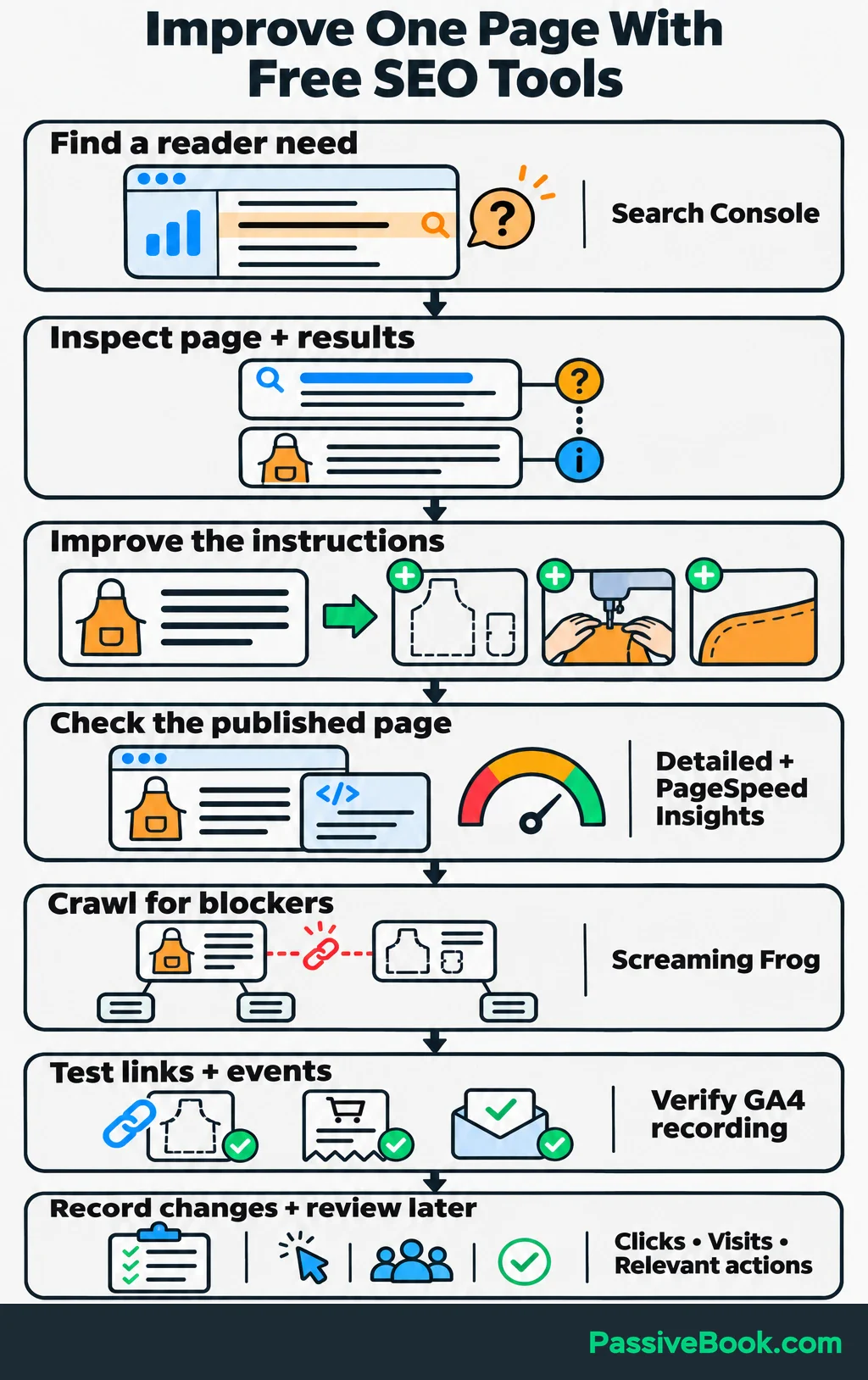
That is a complete workflow without a paid research subscription. It won’t answer every research question, but it lets you finish a meaningful improvement.
My abandoned productivity blog taught me why that matters. I published more than 127 posts in a niche that was too competitive and difficult for me to monetize. There was always another topic to write about, so choosing the next one felt like progress. The harder question was whether the website had a useful commercial direction.
For your next page, settle that question before collecting another hundred keywords.
Add Paid Tools Where the Work Gets Stuck
Buy a research platform when free access prevents useful keyword selection or competitor investigation. Choose one, finish a research batch and see whether its findings change what you publish.
Then consider a specialist only where a requirement remains unmet:
- A crawler upgrade when crawl size or advanced functions block the audit.
- A content editor when repeated briefing and revision justify the allowance.
- A tracker when included tracking cannot cover required queries or locations.
- AI assistance when organizing evidence and revising drafts become recurring bottlenecks.
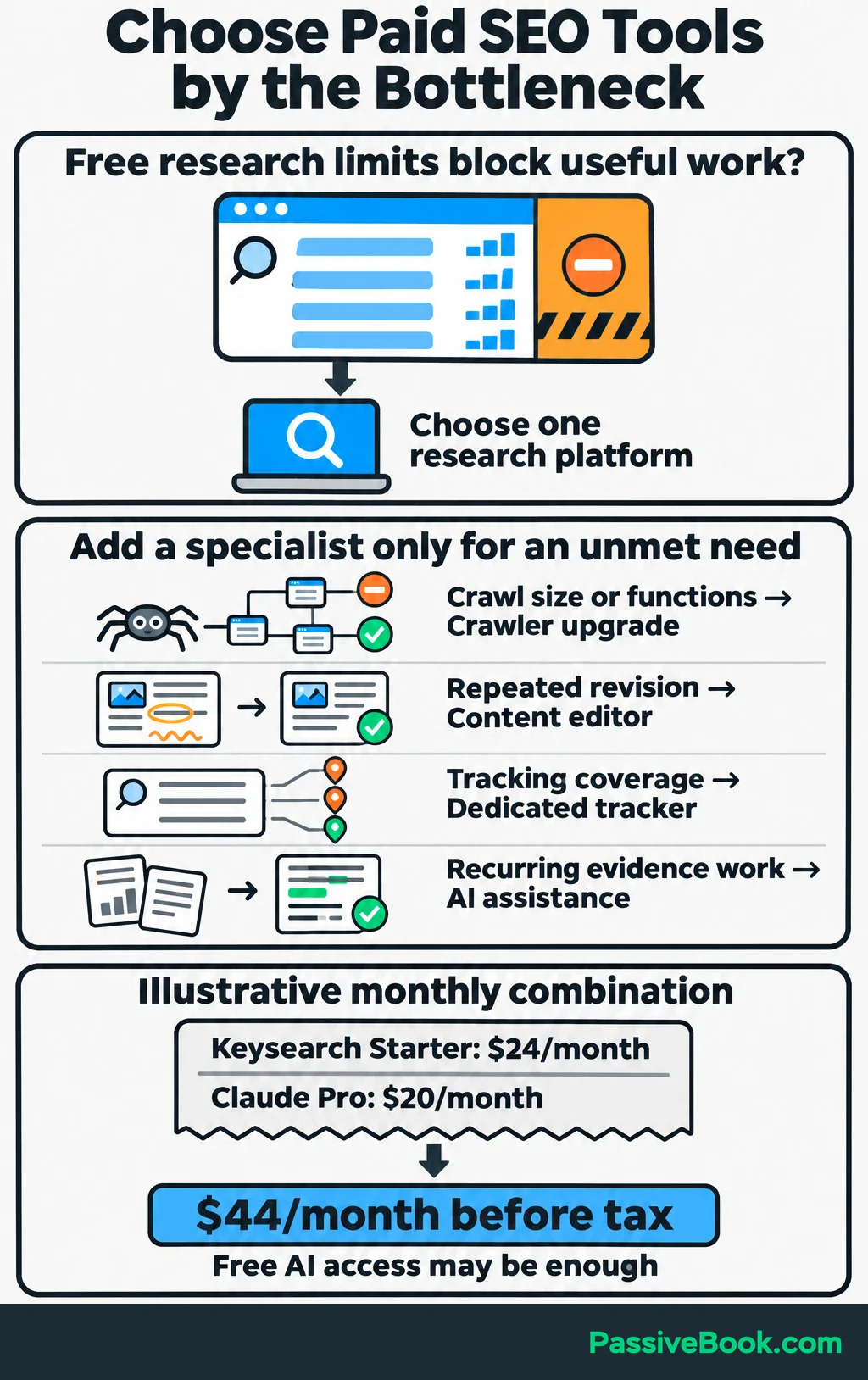
For a simple cost illustration, count one research subscription and one AI subscription, both paid monthly. At the table’s monthly rates, Keysearch Starter plus Claude Pro totals $44 before tax.
That combination earns consideration only if research and AI-assisted editing each solve a recurring need. You can start with the research tool and free AI access instead.
Keep Subscriptions Tied to Completed Work
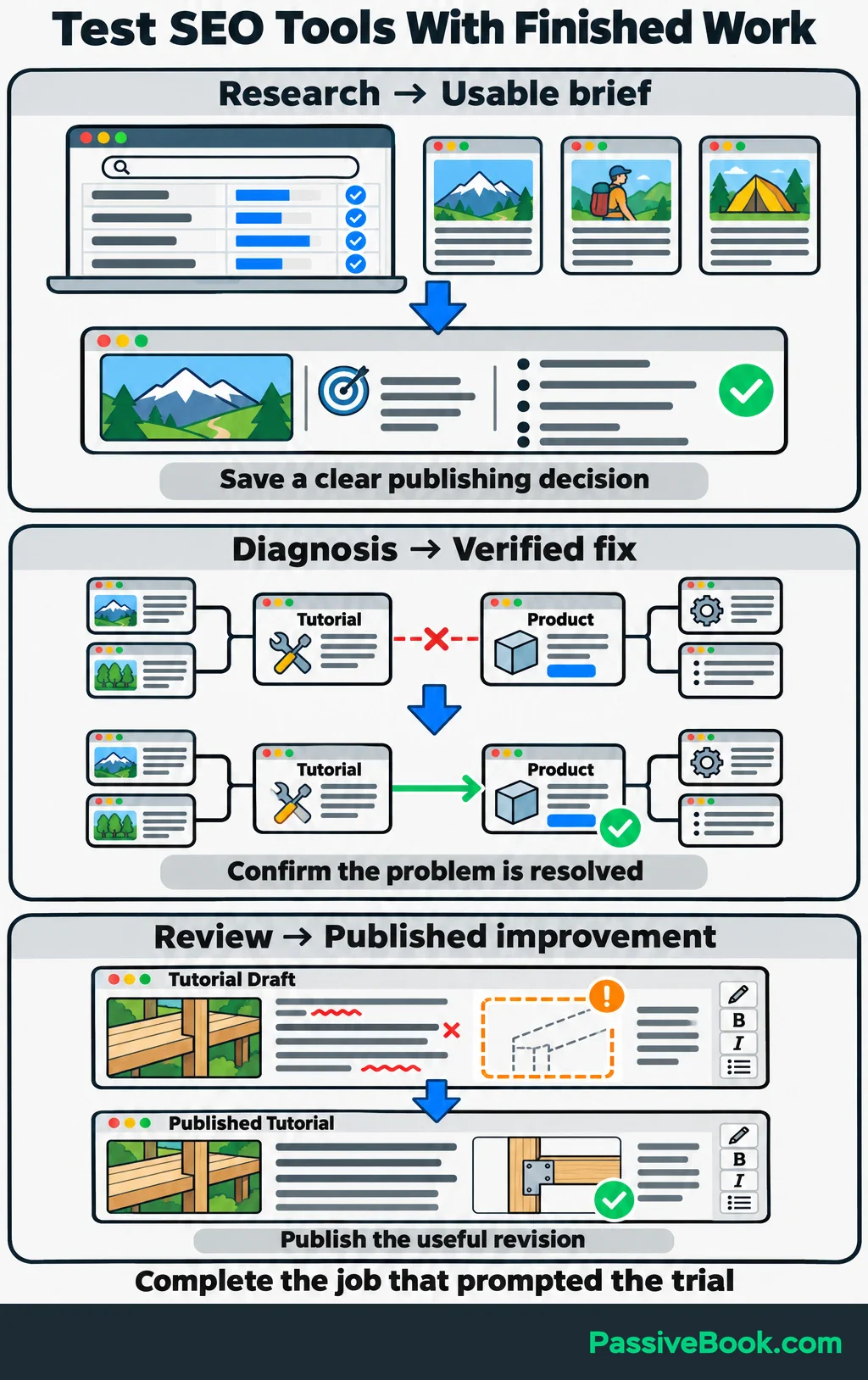
During a trial or initial month, finish the task that prompted the purchase.
Research an opportunity and save a usable brief. Diagnose a problem and verify the fix. Improve a draft and publish it. A trial spent touring dashboards tells you less than one completed job.
Before committing, check the bill at your required number of websites, seats, tracked keywords, locations and documents. Include annual prepayment, renewal terms, connectors and necessary add-ons.
A lower monthly equivalent doesn’t always mean a smaller bill today. Put two plans that meet your needs on the same timeline before choosing one.

Free Software Cost Calculator




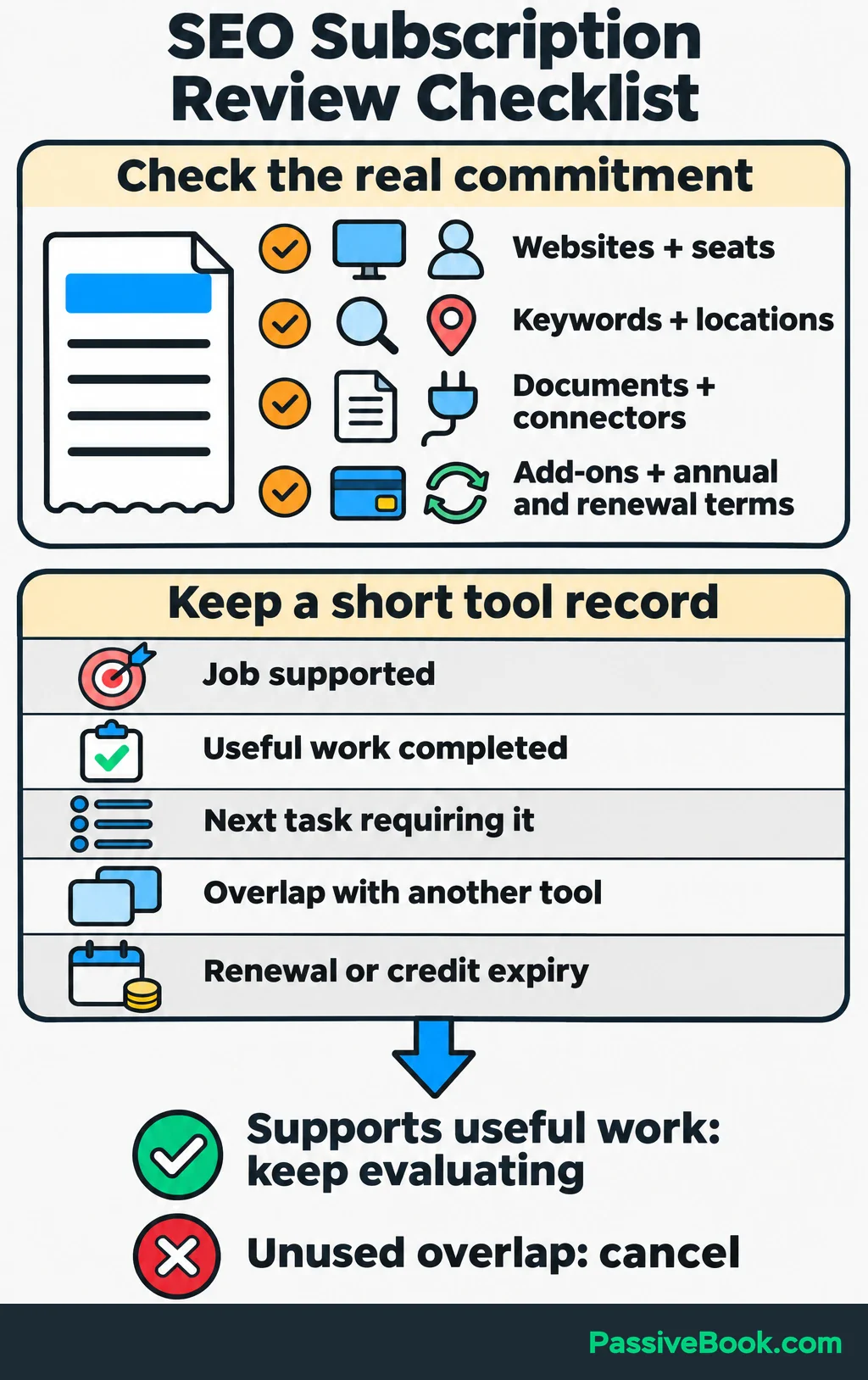
I would keep a short subscription record:
- The job the tool supports.
- The useful work completed with it.
- The next task that requires it.
- Any overlap with another subscription.
- The next renewal or credit-expiry date.
Automate repeatable reporting after you know which report matters. Otherwise, you’ve built a reliable way to deliver information nobody acts on.
The best SEO tools make useful decisions easier. Keep evaluating progress through relevant search visibility, visits, signups and purchases, and cancel overlapping subscriptions when they stop supporting completed improvements. Software gives you evidence and capabilities; buying it doesn’t guarantee growth.
What Next?
Choose one existing page and write down the single question you need to answer before improving it. Start with the free tool that can answer that question.
Use the social buttons to share this guide when a tool comparison could help cut an overlapping subscription or unblock useful SEO work.
Which part of your SEO workflow keeps getting stuck: research, technical fixes, content updates or measurement? Tell me in the comments, and bring any other questions about choosing your stack.
Share this post with your friends & followers:

