A reader finishes a useful article on your site and clicks your podcast link. Now they face an archive of episode numbers, guest names, and titles that assume they already know the show.
They came with a problem to solve, but choosing an episode has become another task. And your traffic report won’t tell you whether they found anything worth playing. This guide focuses on the podcast pages behind those visits: how to help someone choose an episode worth hearing, and how to tell whether more visitors go on to listen.
Give Each Visitor a Relevant Starting Episode
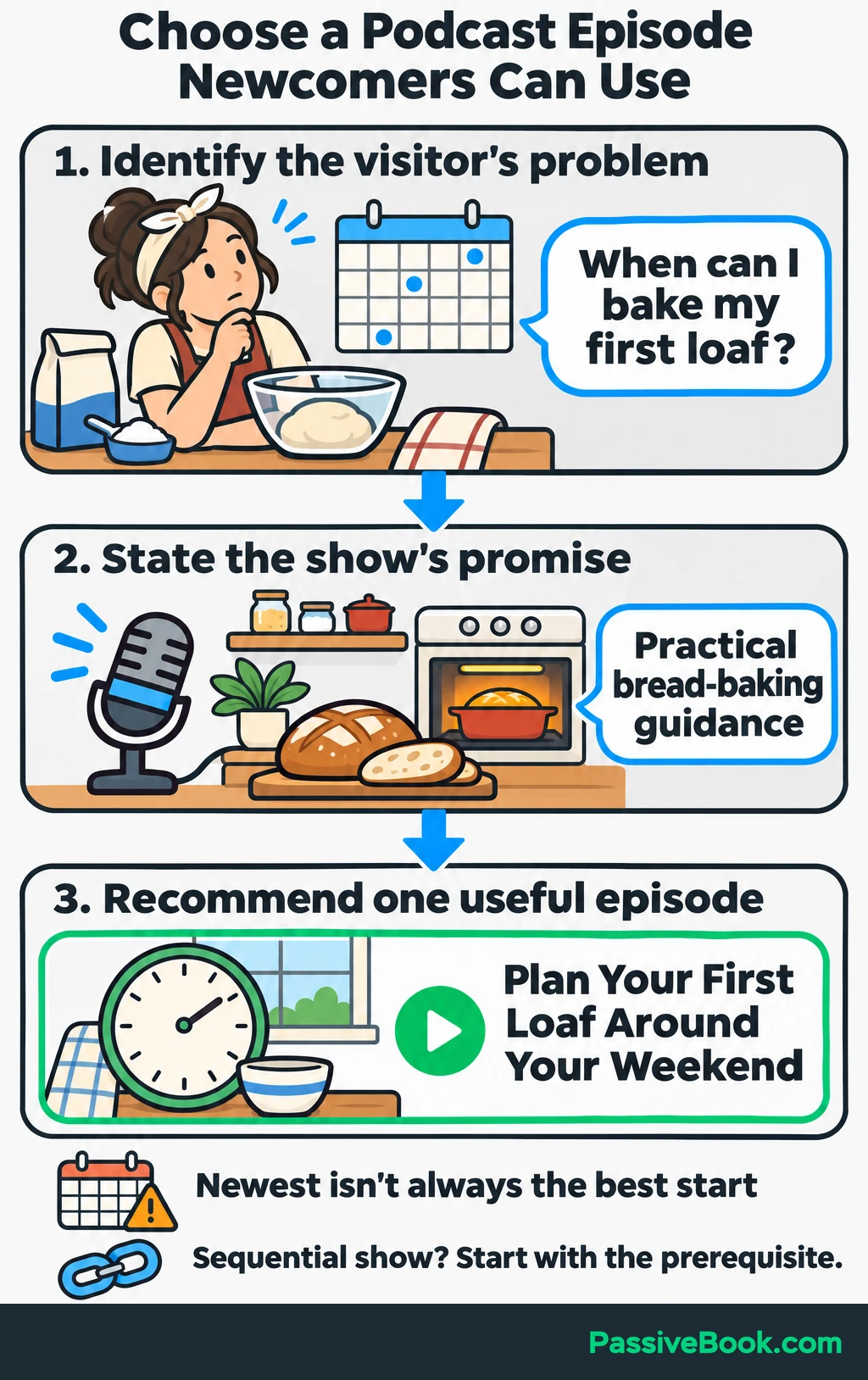
Start with the problem your show helps people solve. A new visitor needs a reason to listen before they need your publishing history.
“Welcome to our podcast” tells them almost nothing. A useful promise explains what they can get from spending time with you.
Throughout this guide, imagine you sell a beginner bread-baking course and publish a companion podcast, Bread at Home. The business, sample copy, and figures are illustrative.
Your show’s promise could be:
Practical bread-baking guidance for your home kitchen.
Then recommend an episode that delivers on that promise without requiring previous listening. For Bread at Home, that’s “Plan Your First Loaf Around Your Weekend.”
I would put that recommendation above the latest release and the full archive. Newest isn’t automatically the best place to start. If your show follows a sequence, recommend the first installment a newcomer needs.
The starting point should also change with the page:
| Where the visitor arrives | What to put in front of them |
|---|---|
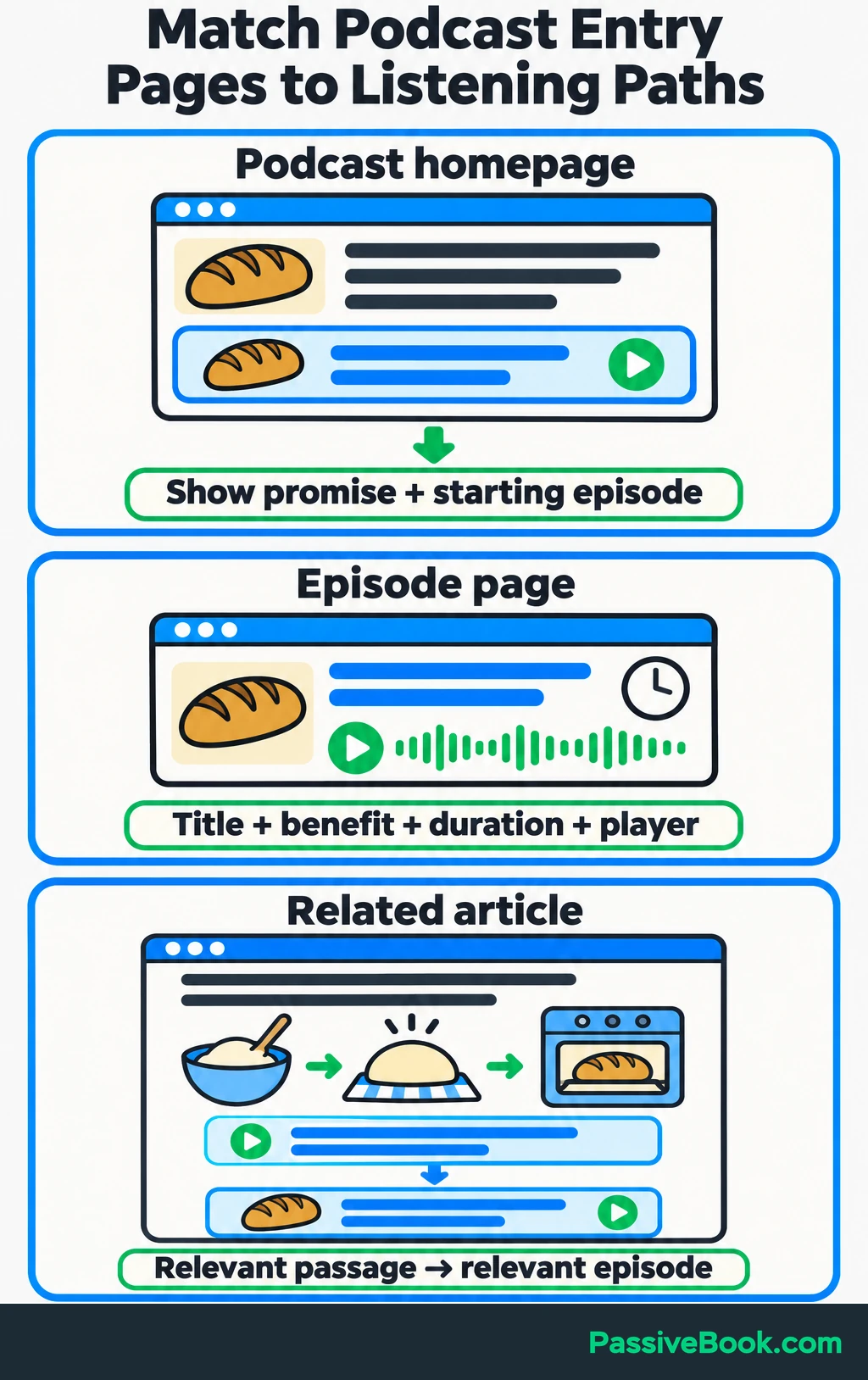
| Podcast homepage | A clear show promise and one recommended starting episode |
| Individual episode page | That episode’s title, benefit, duration, and player |
| Related website article | An invitation to the episode that expands the passage they’re reading |
On an episode page, skip the general welcome and get straight to the subject. Keep the title and opening description close to the promise made by the link that brought the visitor there.
In an article, place the listening invitation where it becomes useful. After explaining how to plan baking time, you might write:
Hear a baker walk through planning your first loaf around your weekend, including when to mix, leave the dough to rise, and bake.
Link directly to that episode or embed it beside the passage.
The invitation explains what audio adds: a guided walkthrough. “Listen to our podcast” makes the reader work that out alone.
Build the Page Around the Play Button
Put the Listening Decision Near the Top
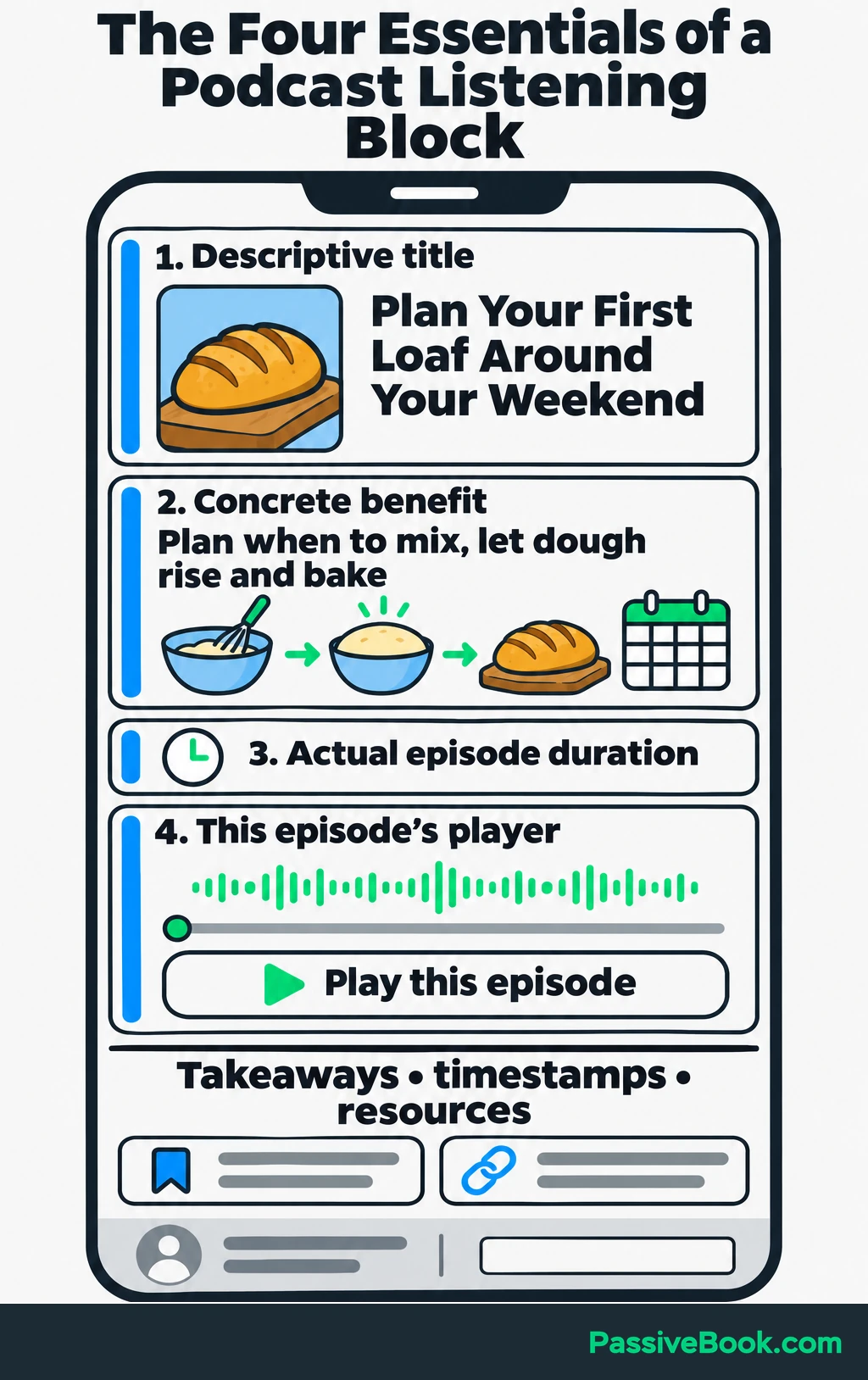
Give visitors enough information to choose, then let them start. I would arrange the listening block in this order:
- A descriptive episode title.
- One or two sentences explaining the benefit.
- The episode’s actual duration.
- A player for that specific episode.
For the featured Bread at Home episode, the benefit statement could be:
Work out when to mix, let the dough rise, and bake before you begin. Follow a sample weekend schedule and choose a starting time that fits your plans.
Show the real runtime beside it. Someone deciding whether to listen during a short break shouldn’t have to start playback to discover the commitment.
If you’re struggling to turn your episode notes into a clear reason to listen, AI Podcast Studio can draft the listening block for you. Use your own episode material so the invitation matches what the audio delivers.
Free AI Podcast Studio




Use a single-episode player for the recommendation. A large playlist immediately introduces another choice, and a link to your podcast homepage sends the visitor back to browsing.
Keep playback available without registration or purchase. Put long biographies, extended show notes, course promotions, and email forms below the listening opportunity.
On one of my digital-product pages, I once used “Explore” as the main button label. During a review, I realized I couldn’t tell from the button whether it opened a lesson, a sales page, or a menu. I replaced it with the action it actually performed. I use the same check here: “Play this episode” makes a clearer promise than “Discover more.”
Let visitors start the audio themselves. Spotify specifically advises against autoplay and audio preloading on external websites to help preserve accurate statistics. That supports keeping playback visitor-initiated. Spotify’s embedding guidance
Below the player, add a short list of takeaways, links to resources mentioned, and useful timestamps. These should help someone find the right passage without becoming an essay they must scroll through before listening.
Make Playback Easy on Mobile
Test the published page while logged out on both a phone and a desktop. Your editing screen is a poor substitute for the page visitors receive.
Run through a short check:
- Find the player without searching through the page.
- Start the episode and confirm it is the one advertised.
- Pause, resume, and move to a later passage.
- Check that popups and floating banners leave the controls usable.
- Follow a listening-app link and return to the page.
If a large image or introduction pushes the player far down the screen, shorten it. Remove unnecessary embeds and scripts that delay access to the listening block before shopping for a new theme.
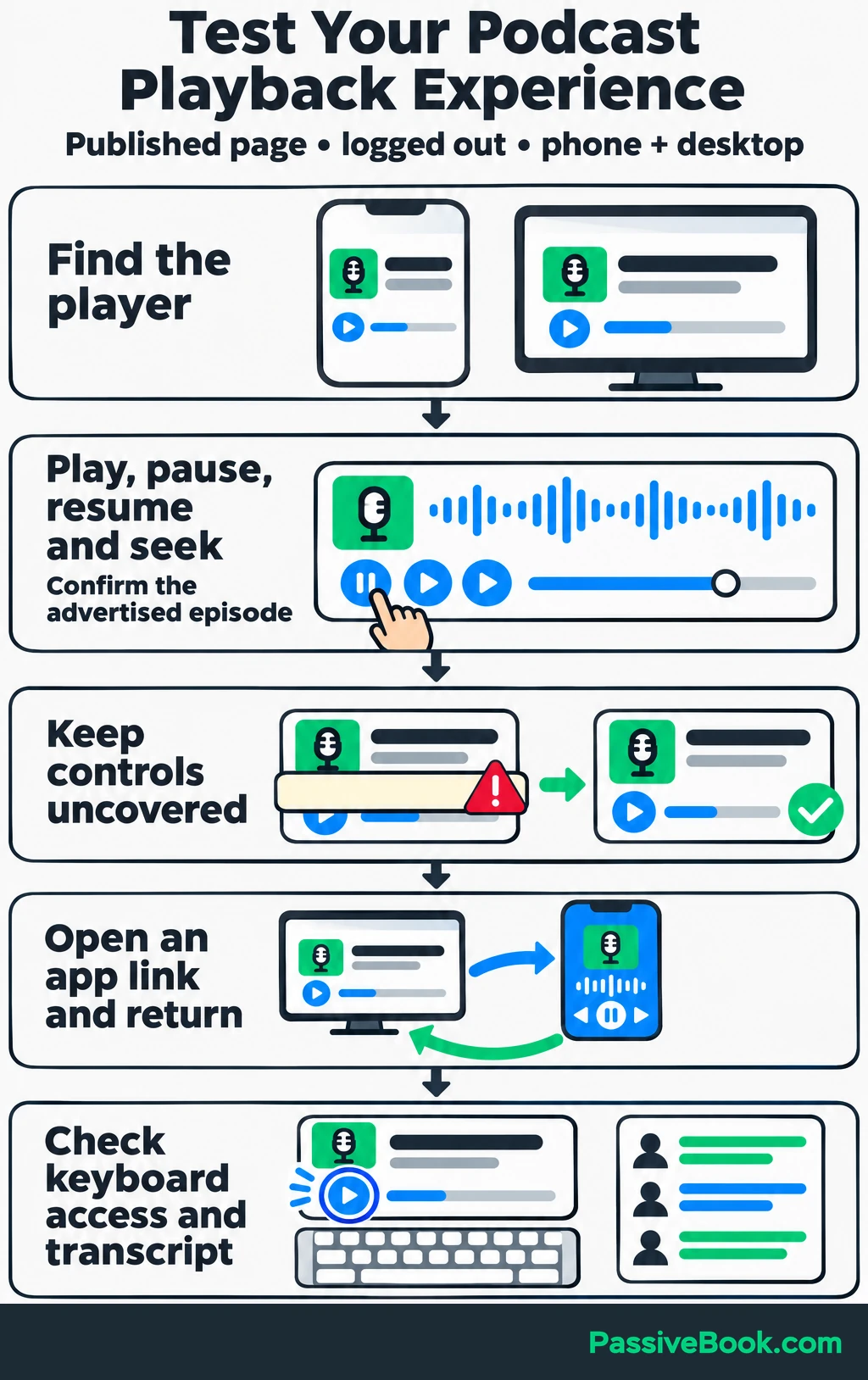
Also test the controls with a keyboard. You should be able to reach them, see which control has focus, and understand their labels. These are among the requirements described in W3C’s accessible media-player guidance.
Provide an easy-to-find transcript near the player. Correct transcription errors, identify speakers, and include meaningful sounds needed to understand the episode, following W3C’s transcript guidance.
Finally, ask someone unfamiliar with the site to find and start the recommended episode. Watch where they hesitate before explaining anything. If they mistake your cover image for a play button, that is a useful finding. Your explanation won’t be there for the next visitor.
Offer a Direct Route to the Listener’s Preferred App
Some visitors will listen on your site. Others want the episode in the app they already use.
Place clearly labeled app links beside or immediately below the player. Feature the services where your show is published, and put additional destinations under “More listening options.”
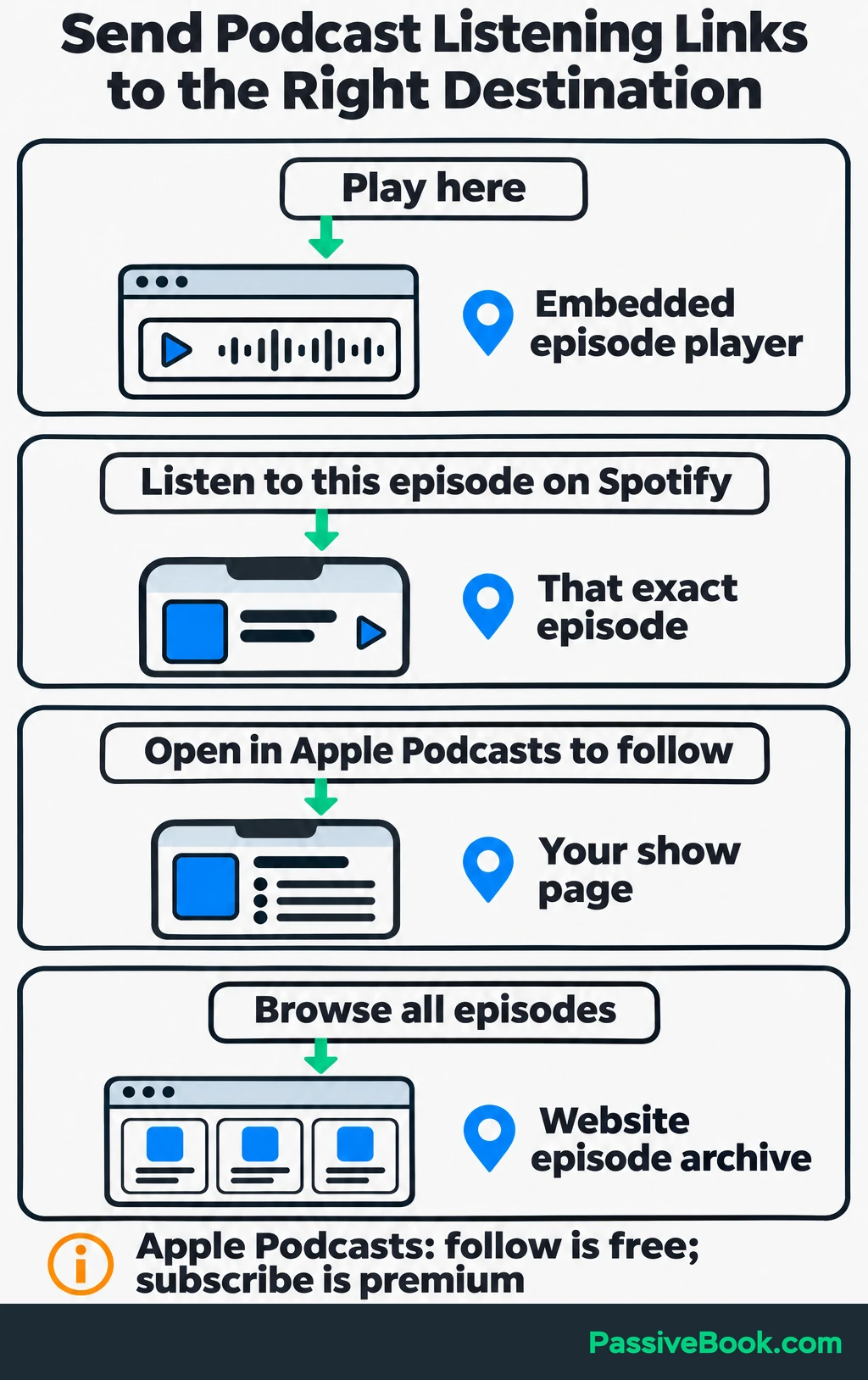
The destination should match the invitation:
| Invitation | Destination |
|---|---|
| “Play here” | The page’s embedded episode player |
| “Listen to this episode on Spotify” | That episode on Spotify |
| “Open in Apple Podcasts to follow” | Your show on Apple Podcasts |
| “Browse all episodes” | Your website’s episode archive |
Don’t promise a particular episode and then send people to the show’s general page. That makes them find the episode again.
Be careful with “subscribe,” too. On Apple Podcasts, following a show is free, while a subscription purchases a premium experience. Use “follow” when you mean receiving future free episodes. Apple’s explanation of followers and subscribers
I would use a few clear text links before adding a wall of platform badges. The reader needs their destination, and twelve logos don’t make that decision easier.
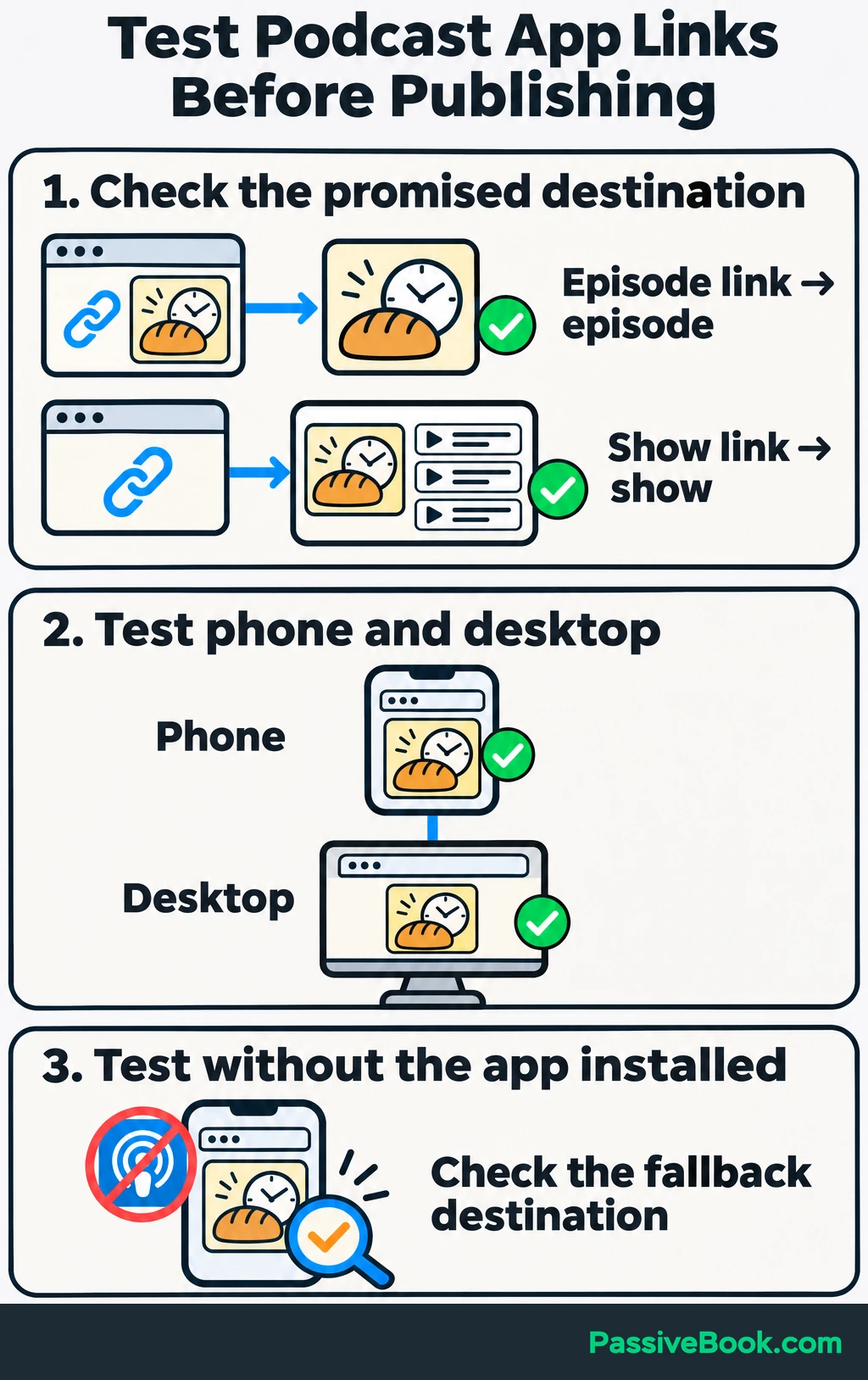
Check every link on mobile and desktop. Confirm that episode links reach the right episode and show links reach the right show, including when the app isn’t installed.
Help First-time Listeners Return
Recommend the Next Useful Episode
After giving someone a starting point, give them a sensible continuation.
Close the episode page with one related recommendation and explain the connection. For Bread at Home, you could write:
Have your baking time planned? Listen next to “How to Tell When Your Dough Has Risen” so you know what to check as you work through that schedule.
That connection is more useful than a list of unrelated recent releases. It answers the question the first episode is likely to leave behind.
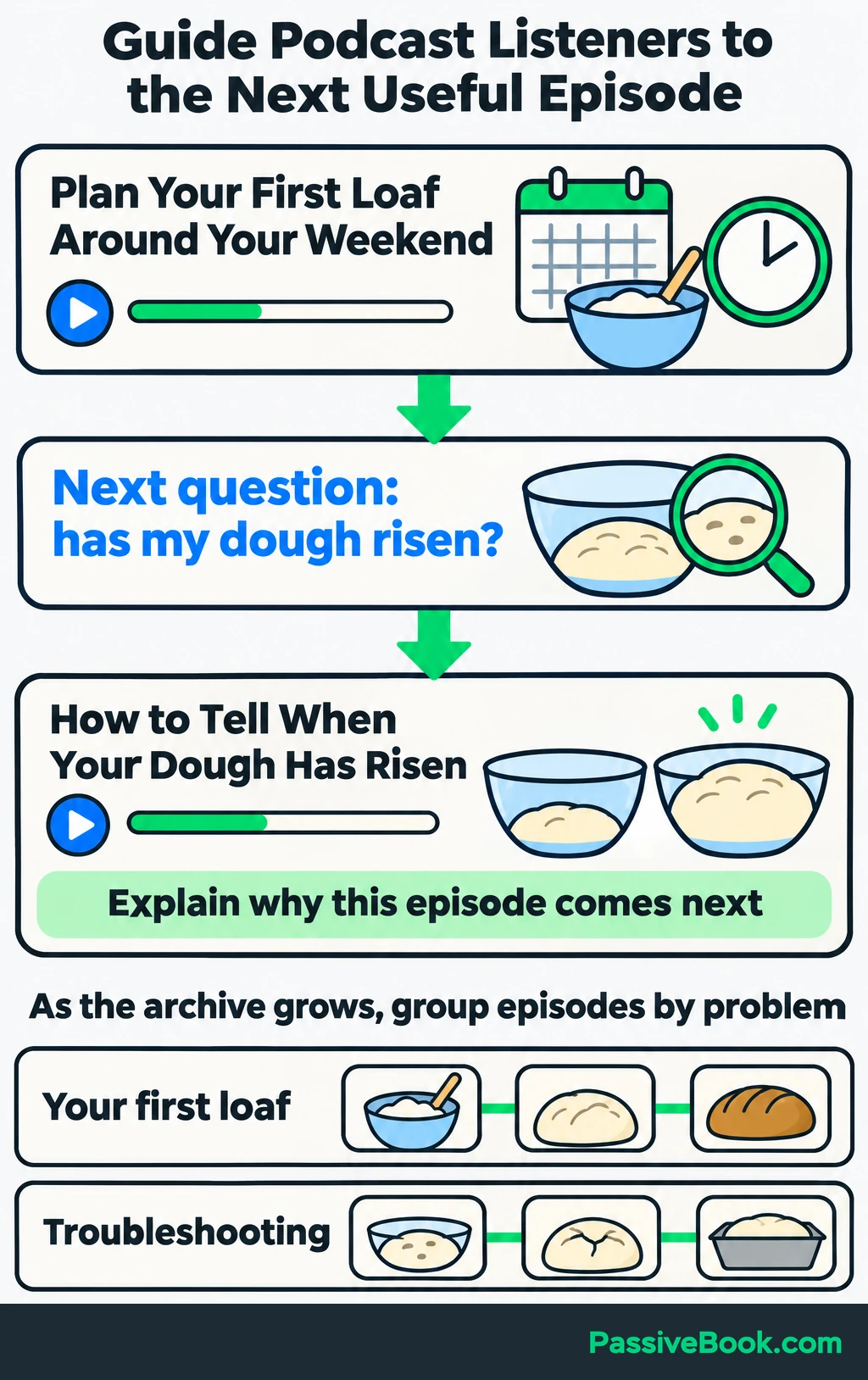
Once your archive becomes harder to browse, create a few topic collections. “Your first loaf” and “Troubleshooting” give visitors a way to continue with the problem they are solving. You don’t need a complicated directory to organize a small archive.
The audio itself also needs to deliver the page’s promise promptly. If the page promises help planning a weekend loaf, the opening should begin with that problem. A long introduction about the show delays the reason someone pressed play.
I would review the opening before spending time on another promotional graphic. A clear invitation gets someone to start, but the episode has to carry the promise forward.
Offer Episode Reminders by Email
Place the email invitation after the listening block or near the end of the page. Explain what will arrive:
Get new bread-baking episodes in your inbox, with a short note on what each one helps you do.
A supporting download can make the invitation more useful. Pair the planning episode with a printable baking planner, but leave the episode available to everyone.
Keep the connection close. A planner used alongside the episode has a clear purpose. A large bundle of unrelated downloads creates another thing to sort through.
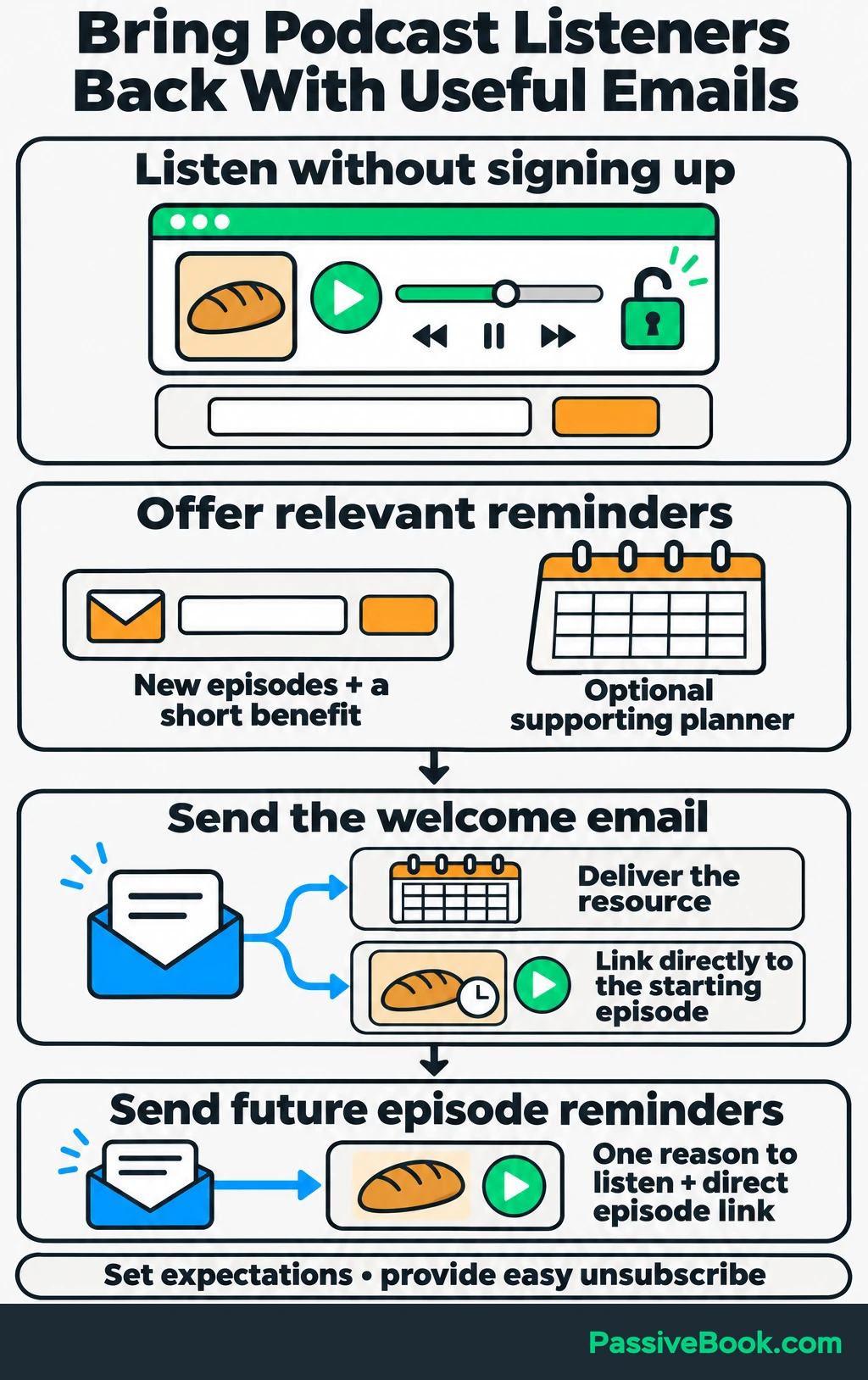
Automate a welcome email that delivers the resource and links directly to the starting episode. Here is a complete sample to adapt. Replace the bracketed details and attach the appropriate links before using it.
Subject: Your baking planner and a place to start
Hi,
Thanks for joining the Bread at Home episode list.
Download your printable baking planner here: [planner link].
Start with “Plan Your First Loaf Around Your Weekend”: [episode link].
In this episode, we walk through when to mix, leave the dough to rise, and bake. Keep the planner beside you and use it to sketch a schedule around your weekend.
I’ll also email you when a new Bread at Home episode is published, with a short explanation of what it covers.
Happy baking,
[Host name]
Bread at Home
Unsubscribe: [unsubscribe link]
[Business contact details and postal address]
For future episode emails, give one concrete reason to listen and a direct link. You don’t need to paste the entire transcript into the message.
If your site runs on WordPress, I would use FluentCRM for the welcome automation. If you already have an email service that handles it, keep using that. Moving tools is extra work unless something important is missing.
Make the signup specifically about podcast emails and include an easy unsubscribe option. Follow the email-marketing rules that apply to your business and audience. For UK requirements, the ICO explains consent, limited exceptions, and opt-out obligations. ICO’s electronic-mail marketing guidance
Measure Listening Starts Separately From Clicks
A page visit, an app click, and an episode start tell you different things. Keep them separate so you can see where the path needs work.
Check whether your player or podcast host can report when audio starts on your site. If it can, send that event—a recorded action—to your website analytics with the page and episode details.
For example, Spotify’s embed API reports playback_started when audio begins. Its ready event only means the player is ready to stream.
Test the tracking before collecting data:
- Loading the page should not count as an episode start.
- Starting audio should record the correct page and episode.
- Multiple starts during one visit should count as one visit with playback.
- Record email signups only after successful submission.
In Google Analytics 4 (GA4), enhanced measurement can record outbound clicks—links to other domains. Filter those results to your listening-app destinations. This feature doesn’t confirm playback inside embedded players.
To calculate your website listening-start rate, count measured sessions (visits recorded by your analytics) on one page. Find how many of those sessions included a confirmed start of its featured episode. Count each session once in each group, using the same reporting period and tracking conditions.
The calculation is:
Sessions containing a confirmed episode start ÷ measured sessions on that page × 100
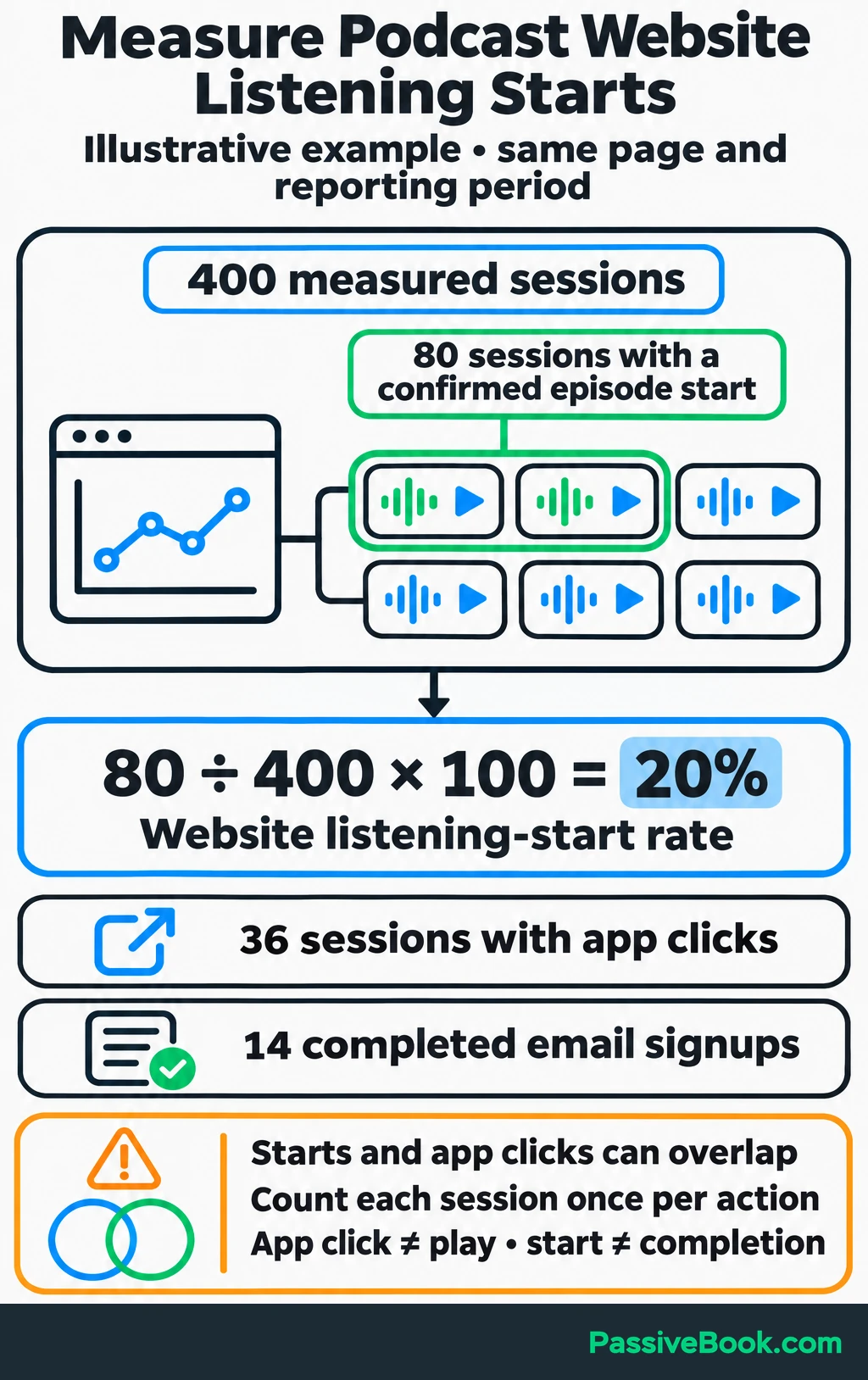
Suppose the page had 400 measured sessions and 80 of those sessions included a confirmed start:
80 ÷ 400 × 100 = 20%
This is a worked example, not an industry benchmark.
A compact report could look like this:
| Page | Measured sessions | Sessions with starts | Start rate | Sessions with app clicks | Completed email signups |
|---|---|---|---|---|---|
| First-loaf weekend episode | 400 | 80 | 20% | 36 | 14 |
All figures are illustrative and cover the same reporting period. Count new confirmed signups from this page in the final column.
Calculate app-click rate separately. Some sessions may include both a website start and an app click, so adding the two rates would double-count part of the audience.
If your player has no supported playback event, report clicks as clicks. A confirmed start doesn’t prove completion, and an app click doesn’t prove a play or follow.
Review platform listening and follower trends alongside your website report. Apple Podcasts Analytics provides aggregated engagement data; keep it separate from actions recorded during a particular website visit. Keep course purchases in a separate business report.
Improve the Weakest Listening Step First
Start with pages already receiving relevant visitors. You can use your website analytics to find them.
Fix broken playback, covered controls, and incorrect destinations immediately. Then record the page’s current start and app-click rates so you can compare them with results after a change.
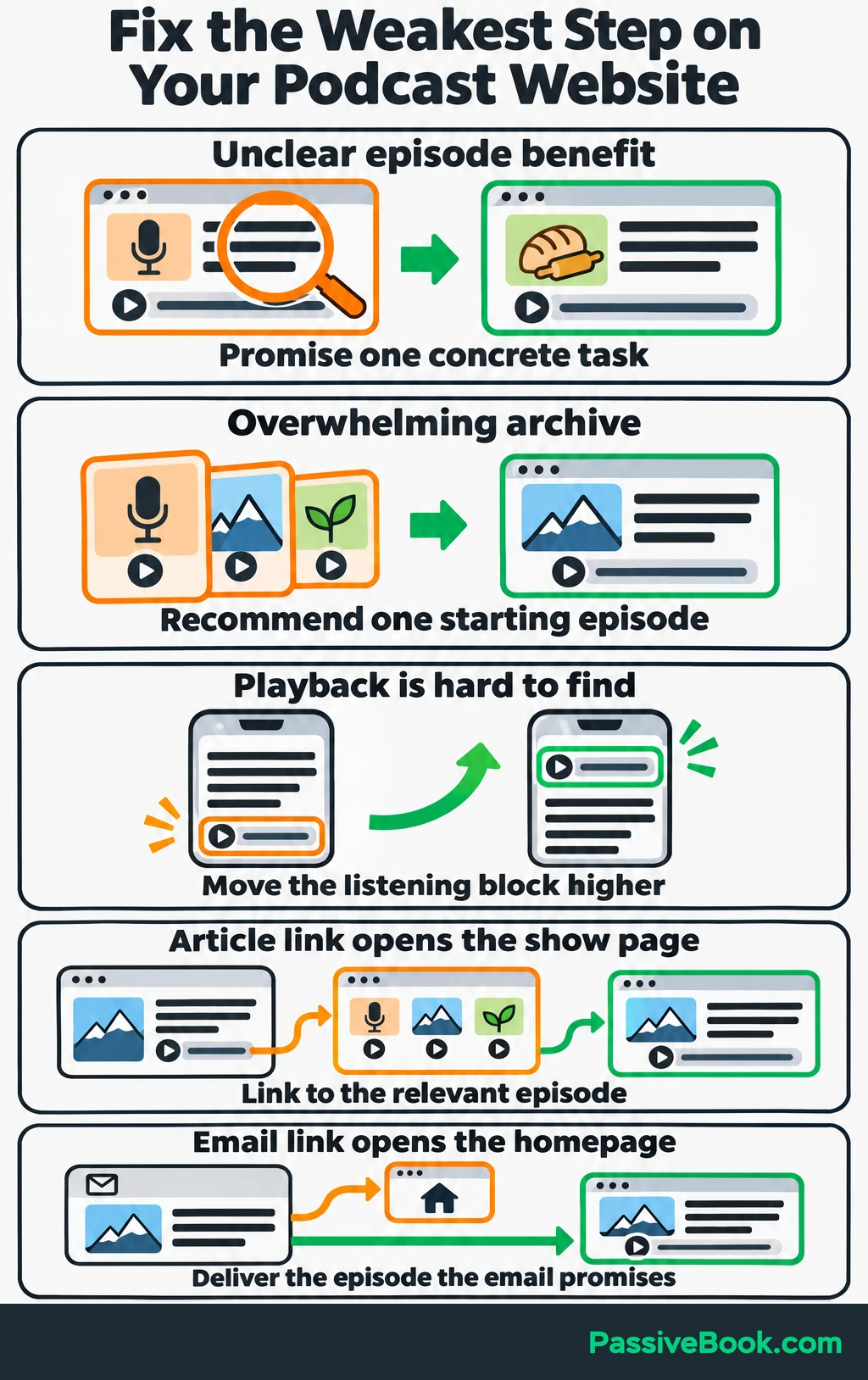
Choose the change that matches the problem you observe:
| What you observe | What I would change first |
|---|---|
| Visitors can’t explain what the episode offers | Rewrite the benefit statement around one concrete task |
| Newcomers face a large archive | Recommend one suitable starting episode |
| Test visitors struggle to find playback | Move the listening block higher |
| Article invitations lead to a general show page | Recommend and link to the relevant episode |
| Email clicks reach the homepage | Send readers directly to the episode promised in the email |
Change one substantial element at a time. If you rewrite the title, move the player, and replace the episode together, you won’t know which change helped.
Compare the same action across similar traffic sources and devices. A rise in desktop visits from regular email readers can make a page look stronger even if the change did little for new mobile visitors.
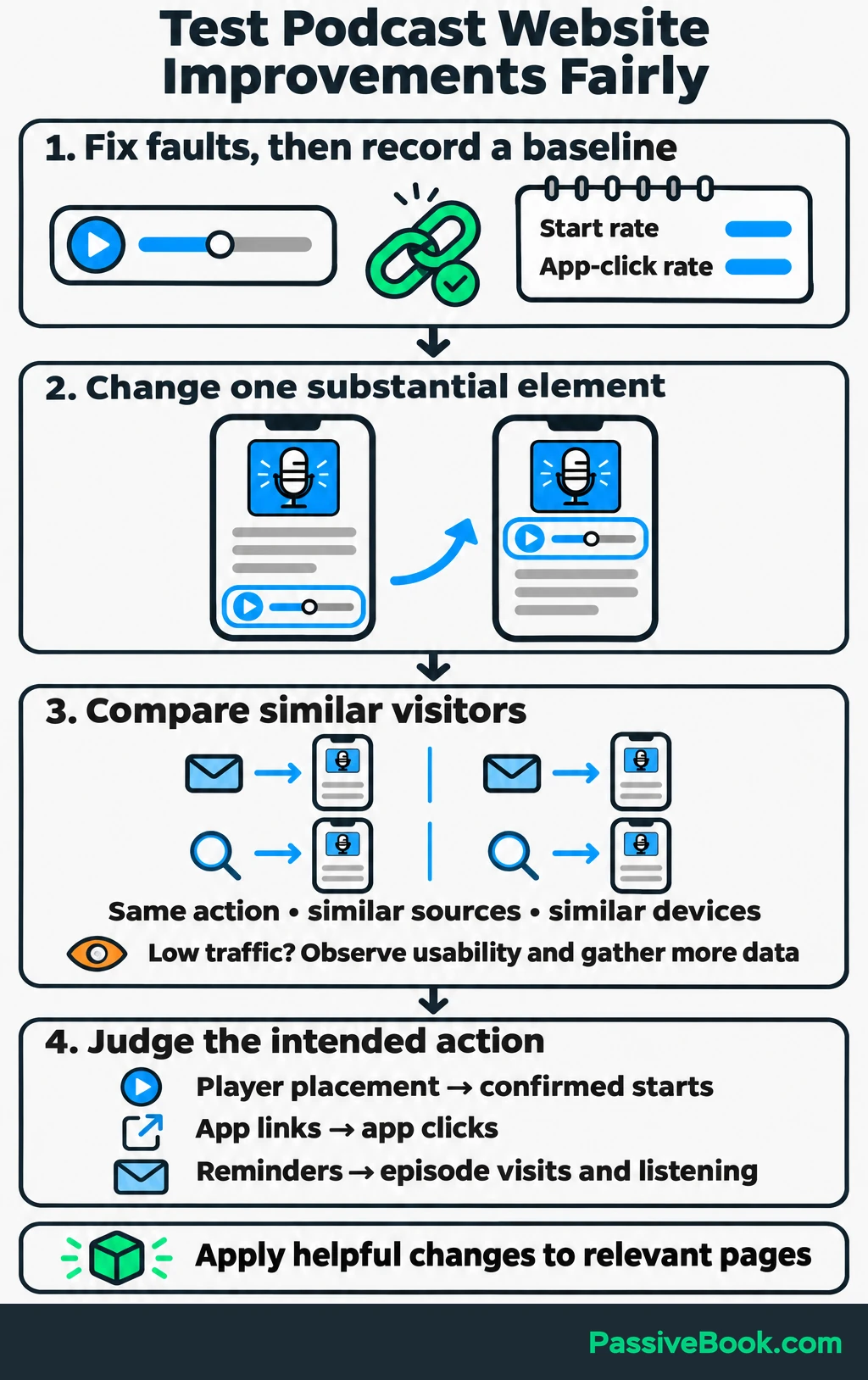
With little traffic, watch usability tests and collect more data before declaring a winner. Three additional starts can be encouraging without settling the question.
Judge each change by the action it should improve. Player placement should be assessed through confirmed starts. App-link changes should be assessed through app clicks. Reminder emails should be assessed through the episode visits and listening actions they generate.
When a change helps, apply it to other relevant pages. I would rather improve a listening block once and reuse it than keep polishing individual pages from scratch.
What Next?
Open one episode page on your phone and try to start listening while logged out. Fix the first obstacle you encounter, then check that your analytics records the action correctly.
Use the social buttons to share this guide if it would help turn a discussion about podcast traffic into a practical page review.
Which part of your listening path needs attention first: choosing an episode, starting playback, or returning for another? Share your answer in the comments, and bring any other questions too.
Share this post with your friends & followers:

