Two subscribers choose different interests on your signup form, but both receive the same product pitch. You collected a useful preference and then ignored it.
AI can produce more versions of that pitch, but extra copy won’t help if the offer stays irrelevant or the wrong people receive it.
That leaves you reviewing more copy while the original mismatch remains. This guide follows one welcome campaign from customer preferences to approved emails and automated delivery, with a cost check to help you decide whether it deserves more investment.
Choose One Campaign With a Clear Personalization Opportunity
Start with an interaction where customer information should change the advice, offer, or next action. Adding a first name doesn’t count for much if everything after it could go to anyone.
Throughout this guide, imagine you run a shop selling beginner watercolor courses and practice packs. Subscribers can choose flowers or landscapes as their painting interest. The products, copy, and figures are illustrations.
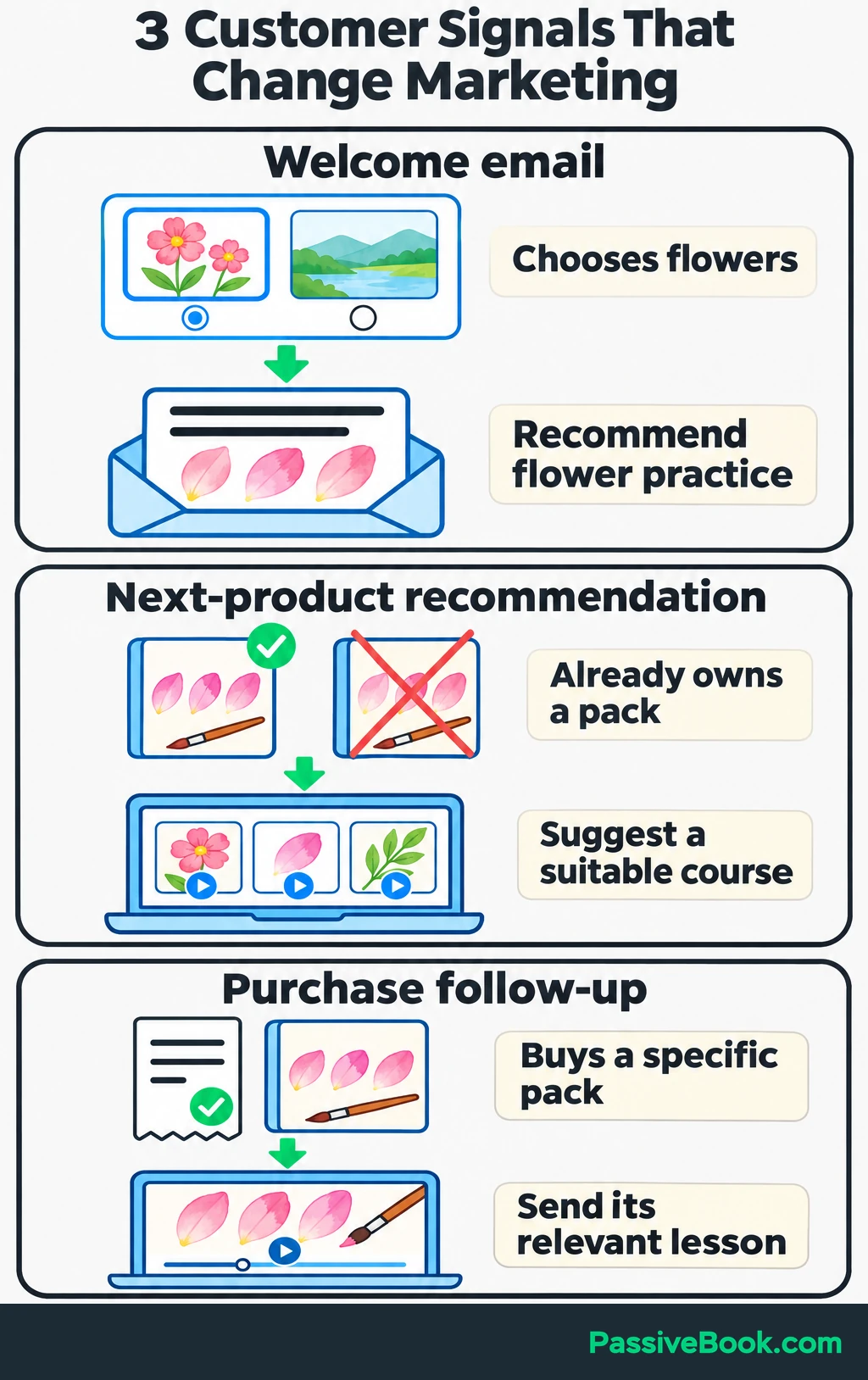
Here are three useful personalization opportunities:
| Campaign | Customer Signal | Personalized Element | Primary Outcome |
|---|---|---|---|
| Welcome email | Subscriber selects flowers or landscapes | Recommend the matching practice pack | Practice-pack purchase |
| Next-product recommendation | Customer already owns a practice pack | Exclude that pack and suggest a suitable course | Course purchase |
| Purchase follow-up | Customer buys a specific pack | Send a lesson that helps them use it | Click to the relevant lesson |
I would start with the welcome email. You have a clear preference, two possible offers, and a straightforward way to check purchases.
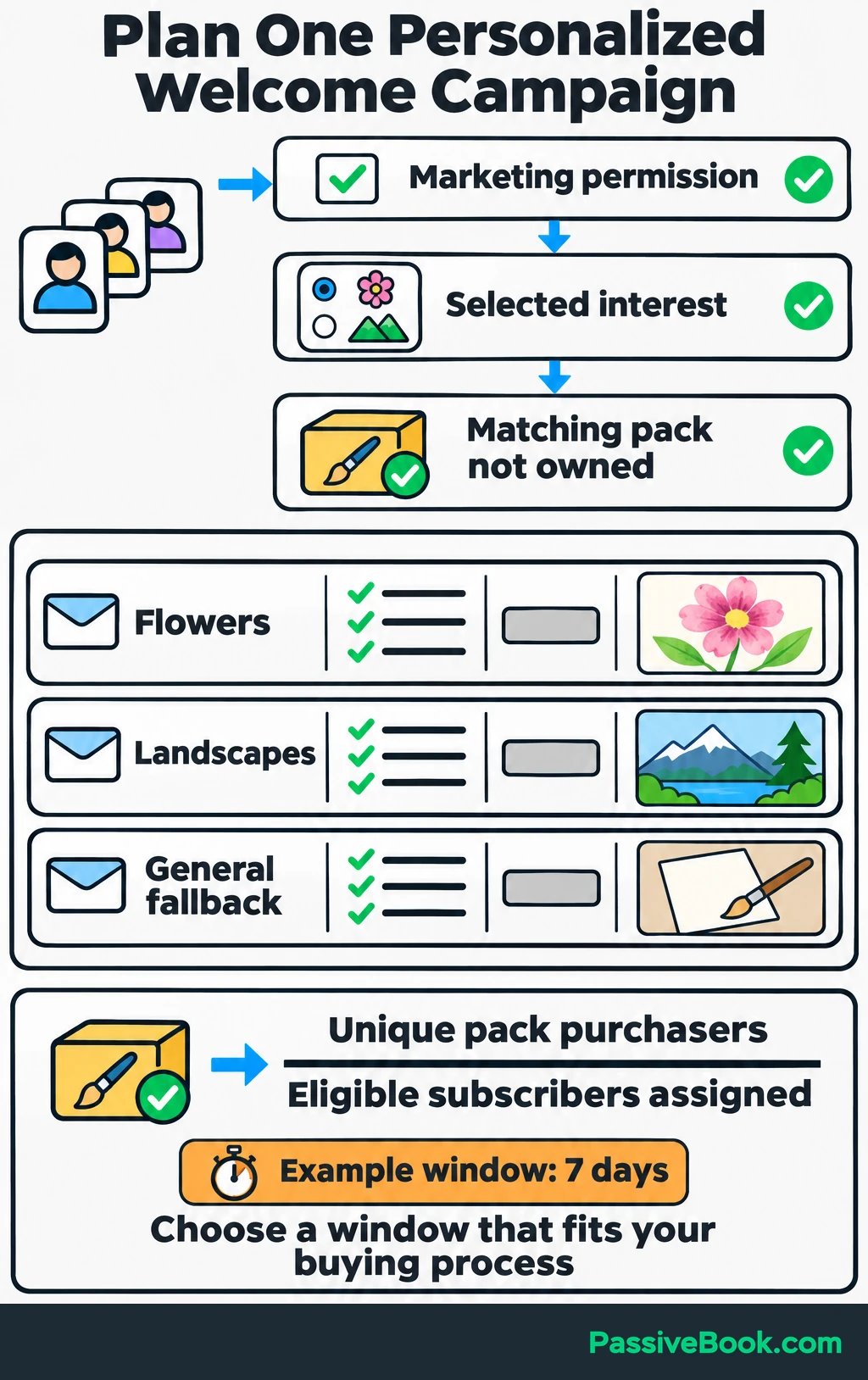
Write a short campaign brief before opening an AI tool:
- Eligible Audience: New marketing subscribers who selected an interest and don’t own the matching pack.
- Desired Action: Purchase the recommended practice pack.
- Conversion Window: Within seven days of assignment to the campaign.
- Primary Measure: Unique practice-pack purchasers divided by eligible subscribers assigned.
Seven days is an example, so choose a window that fits your normal buying process.
Begin with two reusable versions and a general fallback. You don’t need a unique email for every subscriber when the same useful message serves everyone with that interest.
Prepare Only the Customer Data the Campaign Needs
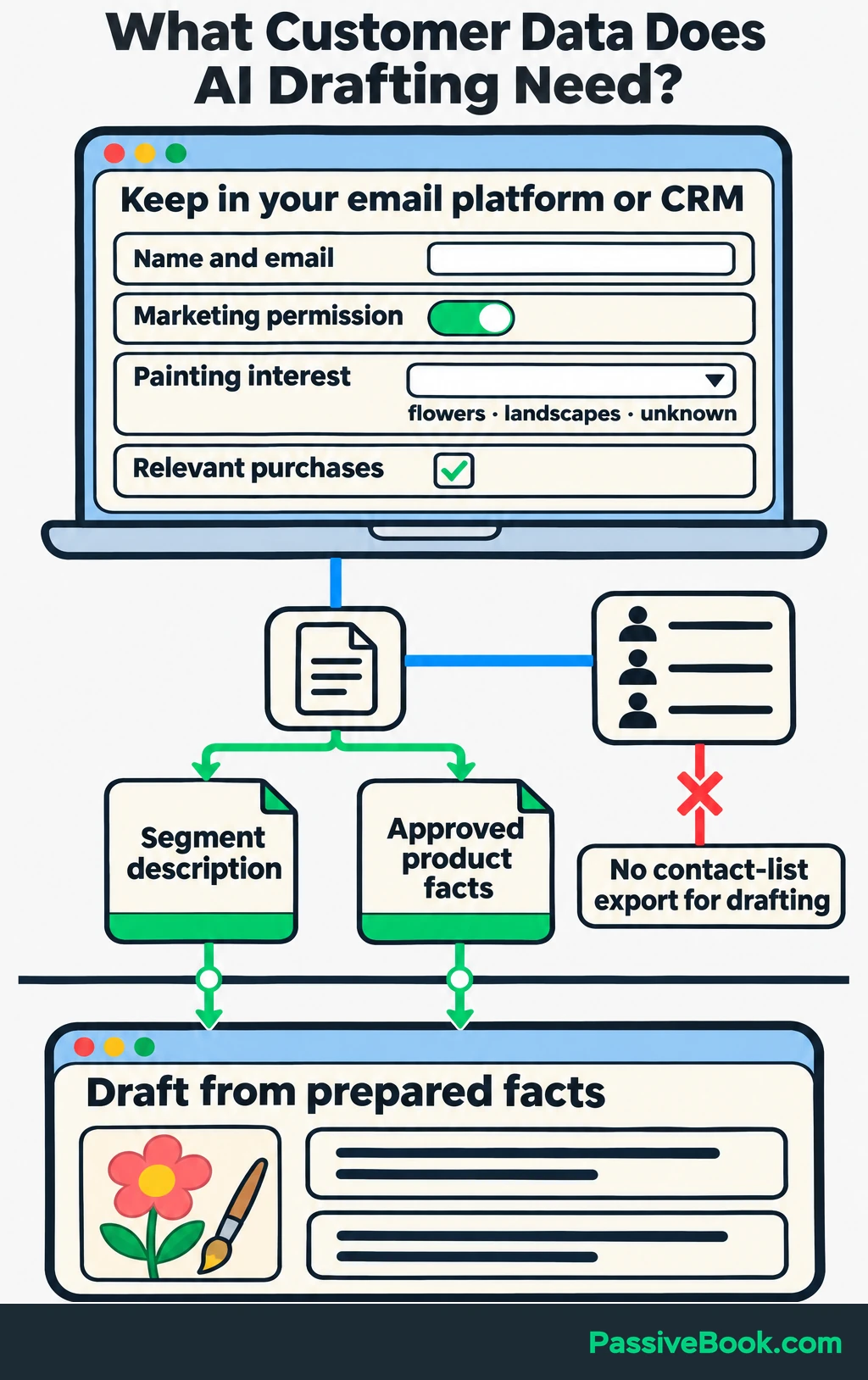
Work backward from the decision you want to make. For this welcome campaign, you need the subscriber’s painting interest, marketing-permission status, and relevant purchase history.
You don’t need their age, income, or a prediction about their personality. A simple preference question can give you enough information to begin without training a prediction model.
Keep names and email addresses in your email platform or customer relationship management system, usually called a CRM. Store the painting preference in a field with consistent values: flowers, landscapes, or unknown.
Clean up duplicate contacts and connect purchase updates before relying on ownership checks. Otherwise, your beautifully tailored message may recommend something the customer bought yesterday.
When a preference is missing, send a general introduction. You can ask:
What would you most like to paint: flowers or landscapes?
Let the answer update the preference field. Don’t turn silence into a guess.
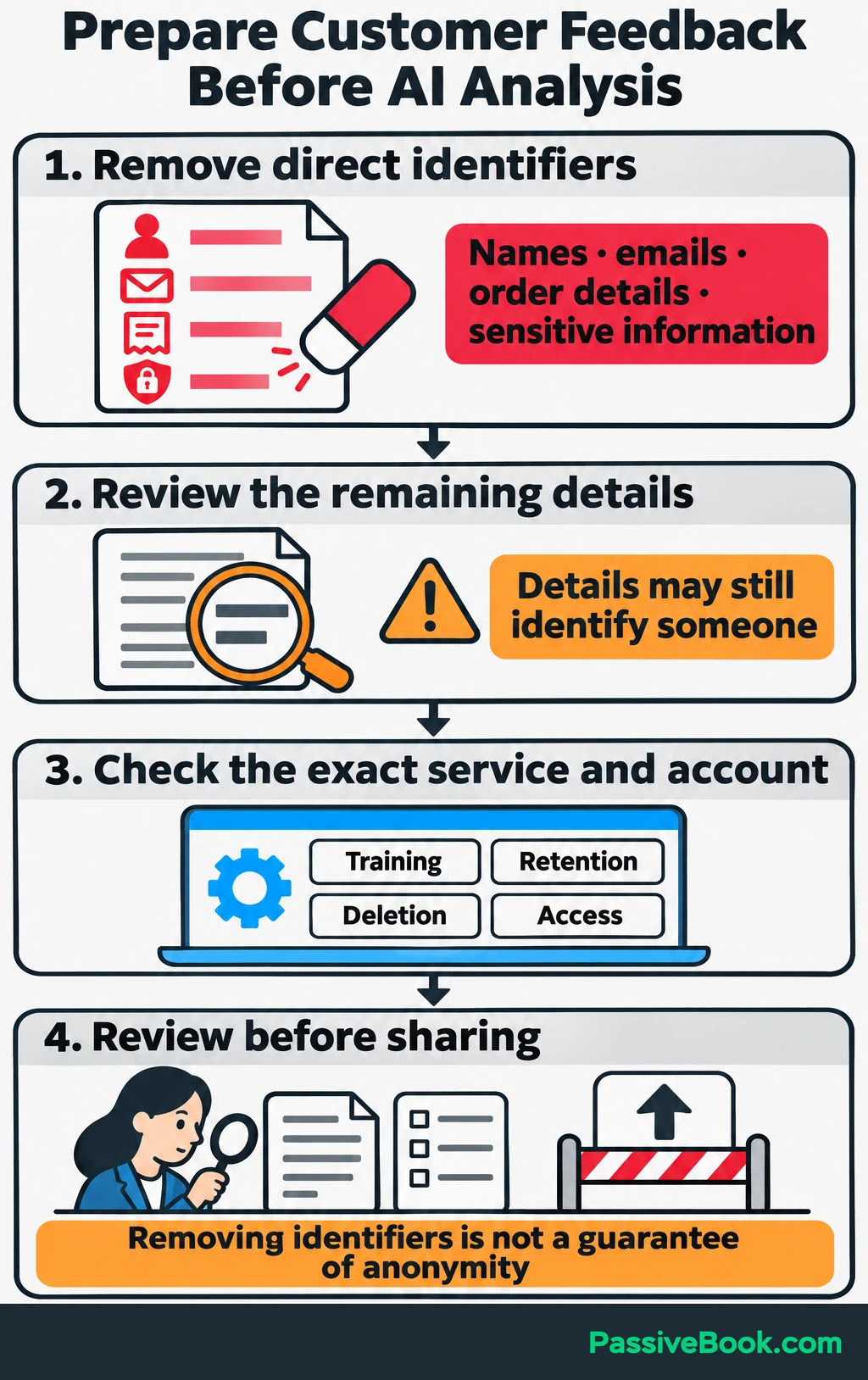
For AI drafting, provide segment descriptions and approved product facts rather than exporting your contact list. If you want help analyzing feedback, remove names, email addresses, order details, and sensitive information from the excerpts.
Removing identifiers reduces what you share, but an excerpt may still identify someone through its details. Review the text itself.
Before sharing customer-level information, check the exact service and account’s training, retention, deletion, and access terms. For example, Anthropic’s commercial retention policy distinguishes requests sent by software through its API from conversations saved in its commercial products. Don’t assume every account handles data the same way.
Your campaign also needs to meet the privacy and messaging rules that apply to its audience and channel. Explain the intended uses, establish the required legal basis, obtain consent where required, and honor opt-outs. For UK campaigns, the ICO’s direct-marketing guidance covers both data-protection requirements and the separate rules for electronic marketing.
Choose Tools Around the Campaign Workflow
Separate the work into three jobs. This makes it easier to see what you already have and what, if anything, you need to buy.
| Job | What the Tool Does | My Starting Choice |
|---|---|---|
| Drafting and interpretation | Organizes prepared feedback and writes message variants | Claude, which I use for writing and content strategy |
| Contact management and delivery | Stores preferences, checks eligibility, sends emails, and records results | Your existing email platform, if it supports the workflow |
| Connections between systems | Moves purchase and preference updates where they’re needed | Existing integrations first; n8n when a connection is missing |
Test the AI writer with one campaign brief. Check whether it follows the supplied facts, makes the two versions meaningfully different, and saves editing time. Fluent writing is only part of the job.
Before switching email platforms, check whether your current one can:
- Store Preferences: Keep a reliable interest field or tag.
- Branch Messages: Choose a version based on that preference.
- Receive Purchases: Update ownership after an order.
- Exclude Contacts: Stop promotional sends to unsubscribed or otherwise ineligible people.
- Report Outcomes: Connect campaign groups with clicks and purchases.
For a WordPress shop using WooCommerce to manage products and orders, I would consider FluentCRM for storing contacts and sending email. It’s what I use for Passive Book. Its WooCommerce automation triggers require FluentCRM Pro, with WooCommerce installed and active.
If you prefer an email service that handles hosting for you, I would consider Kit. Its automation conditions support branching by tags and custom fields on Creator and Creator Pro plans. Check the connection to your checkout before committing.
I use n8n to connect tools, but I wouldn’t add it just to make the workflow look impressive. Add an integration tool when the existing connections cannot move a required update.
Compare the whole operating cost: required plans, contacts or sends, AI use, hosting where relevant, setup, maintenance, and review time. A cheap subscription that creates another weekly repair job is still expensive.
Turn Customer Signals Into Actionable Segments
A useful segment changes what someone receives. If two groups get essentially the same advice and offer, merge them.
Write down who receives each version, who gets the general fallback, and who should receive nothing.
| Subscriber’s Situation | What to Send |
|---|---|
| No marketing permission | No promotional email, including the general fallback |
| Marketing permission; latest stated interest is flowers; matching pack is available and not owned | Flower welcome email recommending the Flower Practice Pack |
| Marketing permission; latest stated interest is landscapes; matching pack is available and not owned | Landscape welcome email recommending the Landscape Practice Pack |
| Marketing permission; matching pack is already owned or unavailable | General introduction without the pack offer |
| Marketing permission; interest is missing or unclear | General introduction and preference question; keep this version until a reliable answer arrives |
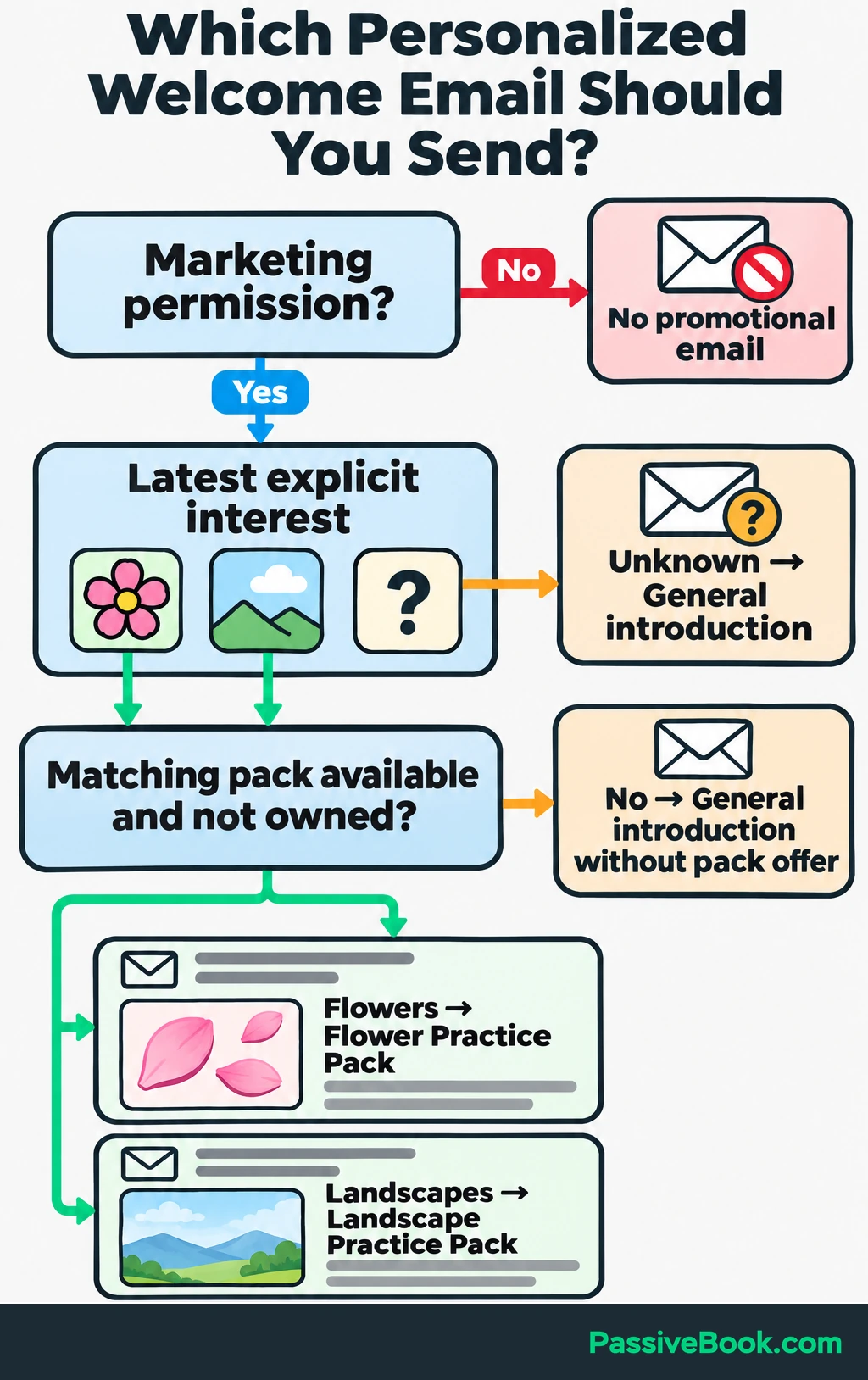
Use the latest explicit preference rather than collecting conflicting tags forever.
AI becomes more useful when people answer in their own words. Give each prepared response an identifier, then ask:
Group these responses by the painting interest explicitly described. Return each theme, supporting response IDs, and a suggested message angle. Put ambiguous responses in “unknown.” Do not infer personal circumstances or ability.
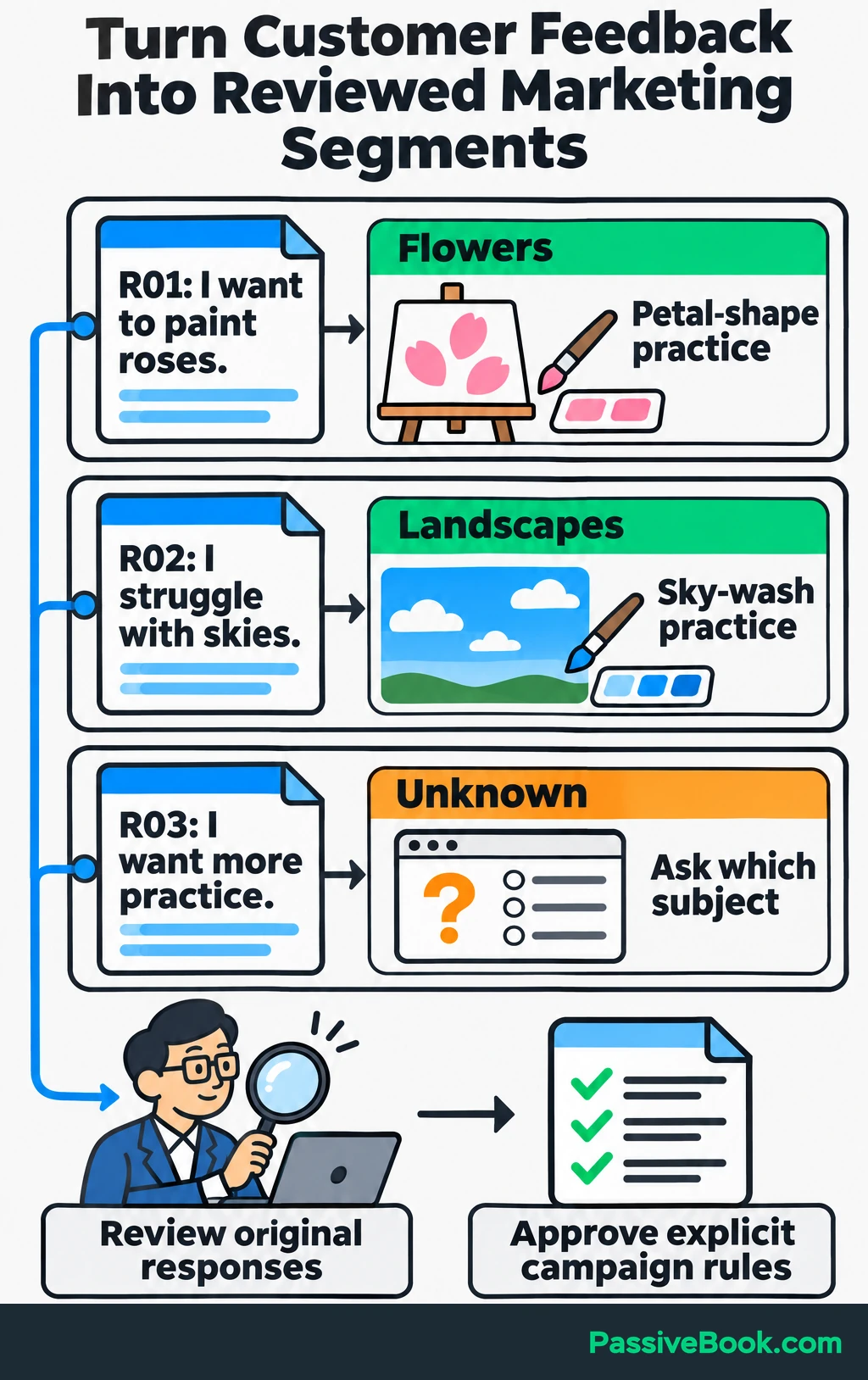
A short result might look like this:
| Response | Suggested Theme | Message Angle |
|---|---|---|
| R01: “I want to paint roses.” | Flowers | Introduce petal-shape practice |
| R02: “I struggle with skies.” | Landscapes | Introduce sky-wash practice |
| R03: “I want more practice.” | Unknown | Ask which subject they want to paint |
Review the original responses before accepting those themes. Then turn the accepted categories into explicit campaign rules.
I would favor stated preferences and purchases over opens alone. Apple’s Mail Privacy Protection can download remote content regardless of whether someone engages with the email, so an apparent open doesn’t reliably establish interest.
Create Personalized Messages and Recommendations
Match Recommendations to an Approved Catalog
Decide which products are eligible before asking AI to describe them. Otherwise, you’re asking a writing tool to invent your merchandising policy.
Build a small approved catalog with identifiers, verified descriptions, intended uses, ownership exclusions, availability, and destination links.
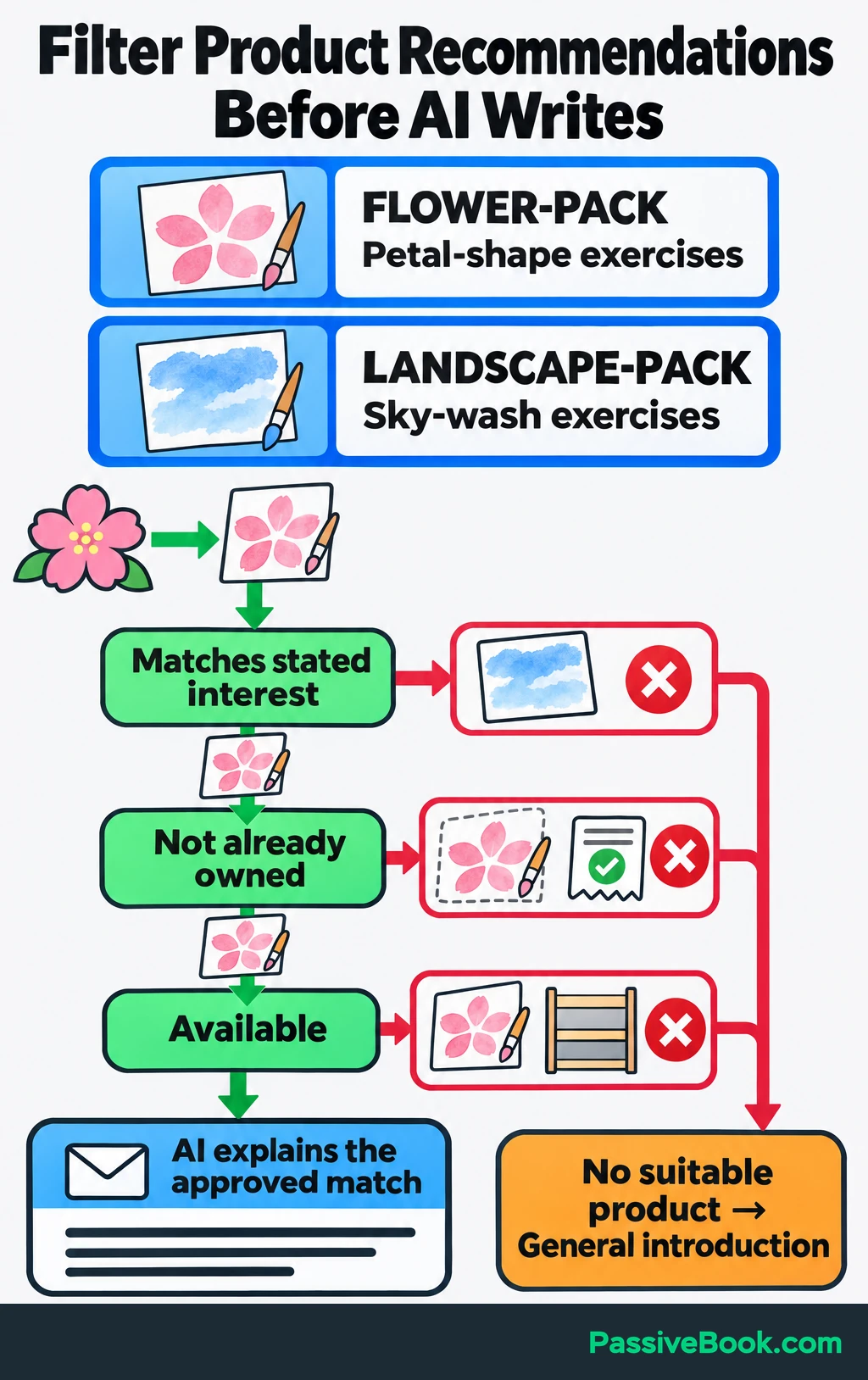
For the watercolor shop, the starting catalog could be:
| Product ID | Verified Contents and Intended Use | Exclude When | Approved Destination |
|---|---|---|---|
| FLOWER-PACK | Petal-shape exercises for flower-painting practice | Already owned or unavailable | /practice-packs/flowers/ |
| LANDSCAPE-PACK | Sky-wash exercises for landscape-painting practice | Already owned or unavailable | /practice-packs/landscapes/ |
The routing rule matches the interest to the pack and checks ownership and availability. AI explains why that approved pack fits.
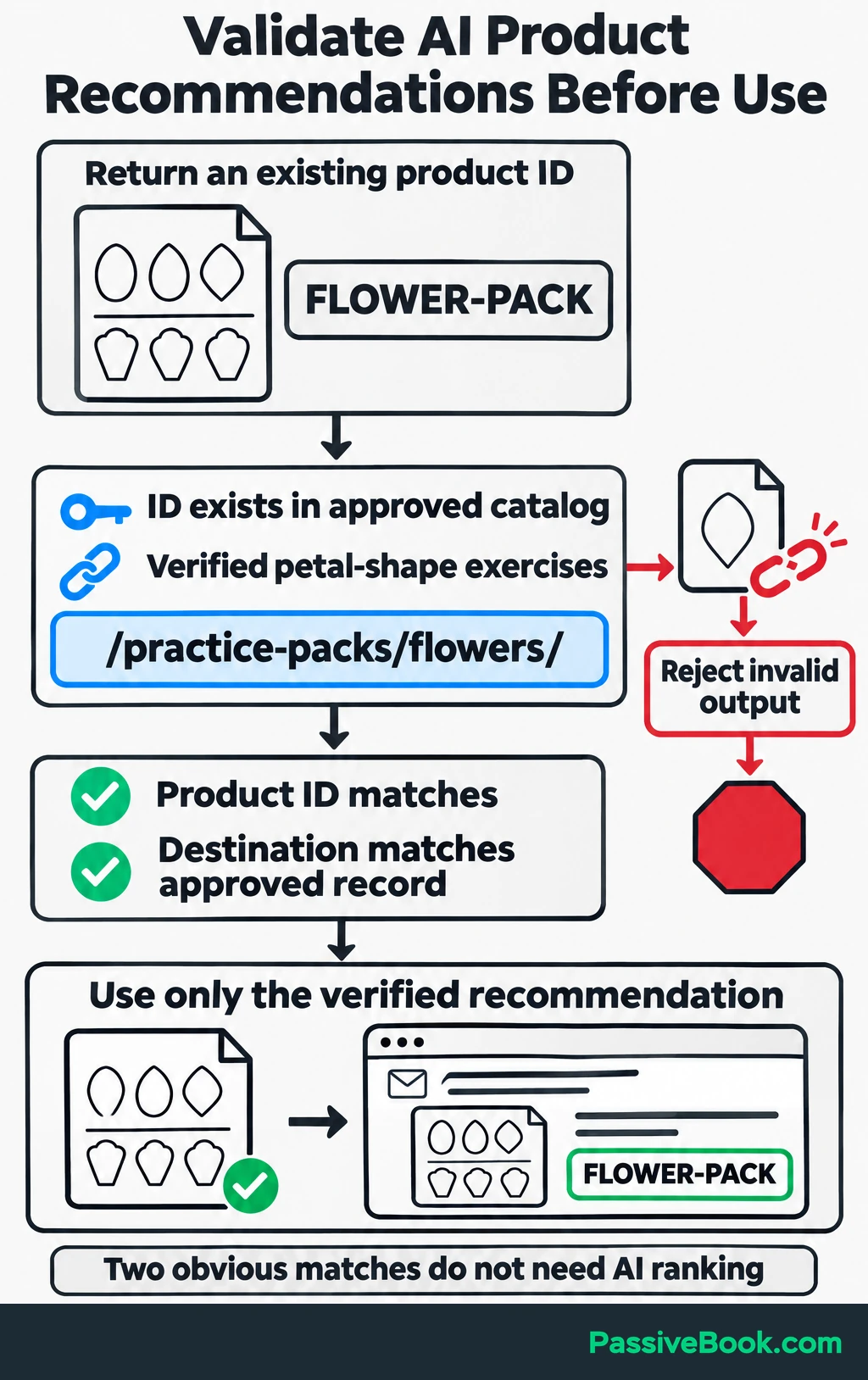
With two obvious matches, I would skip AI ranking entirely. Ranking becomes useful when several eligible products require interpretation.
Require any generated recommendation to return an existing product identifier. Validate that identifier and its destination before using the output.
If no suitable product remains, send the general introduction without an offer. An empty recommendation slot is better than an irrelevant product pitch.
Draft Messages From a Controlled Brief
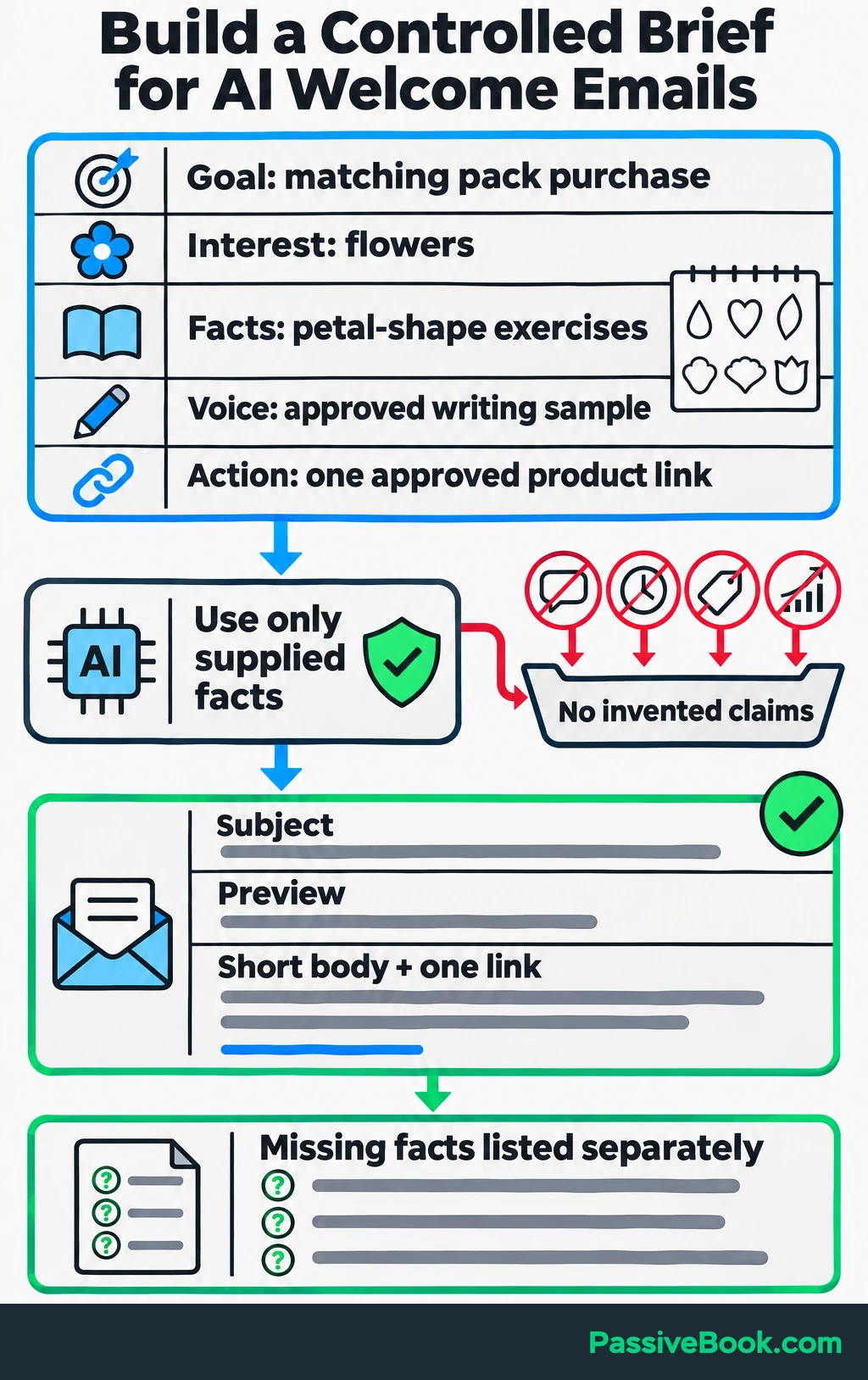
Give the AI enough information to write a useful message without making things up:
- Campaign Goal: Encourage a matching practice-pack purchase.
- Segment Need: Practice flowers or landscapes, based on the selected interest.
- Approved Product: Catalog identifier, verified contents, and destination.
- Voice: Plain, friendly, and direct, supported by a short approved writing sample.
- Action: One product-page link.
- Output: Subject line, preview text, short body, and missing facts listed separately.
Use this reusable prompt:
Using only the supplied facts, draft a welcome email for subscribers interested in [flowers/landscapes]. Explain how [approved practice pack] supports that interest through [verified exercises]. Include one action linking to [approved destination]. Use the supplied voice example. Return a subject line, preview text, and short body. List missing facts separately. Do not invent testimonials, deadlines, discounts, or results.
Here is a complete flower version you can adapt. Replace the example destination with your approved URL and let your email platform add the required sender details and unsubscribe link.
Subject: A starting point for painting flowers
Preview: Explore petal shapes with the Flower Practice Pack.
Hi,
Thanks for joining. You selected flowers as your painting interest, so here’s a practice pack that matches.
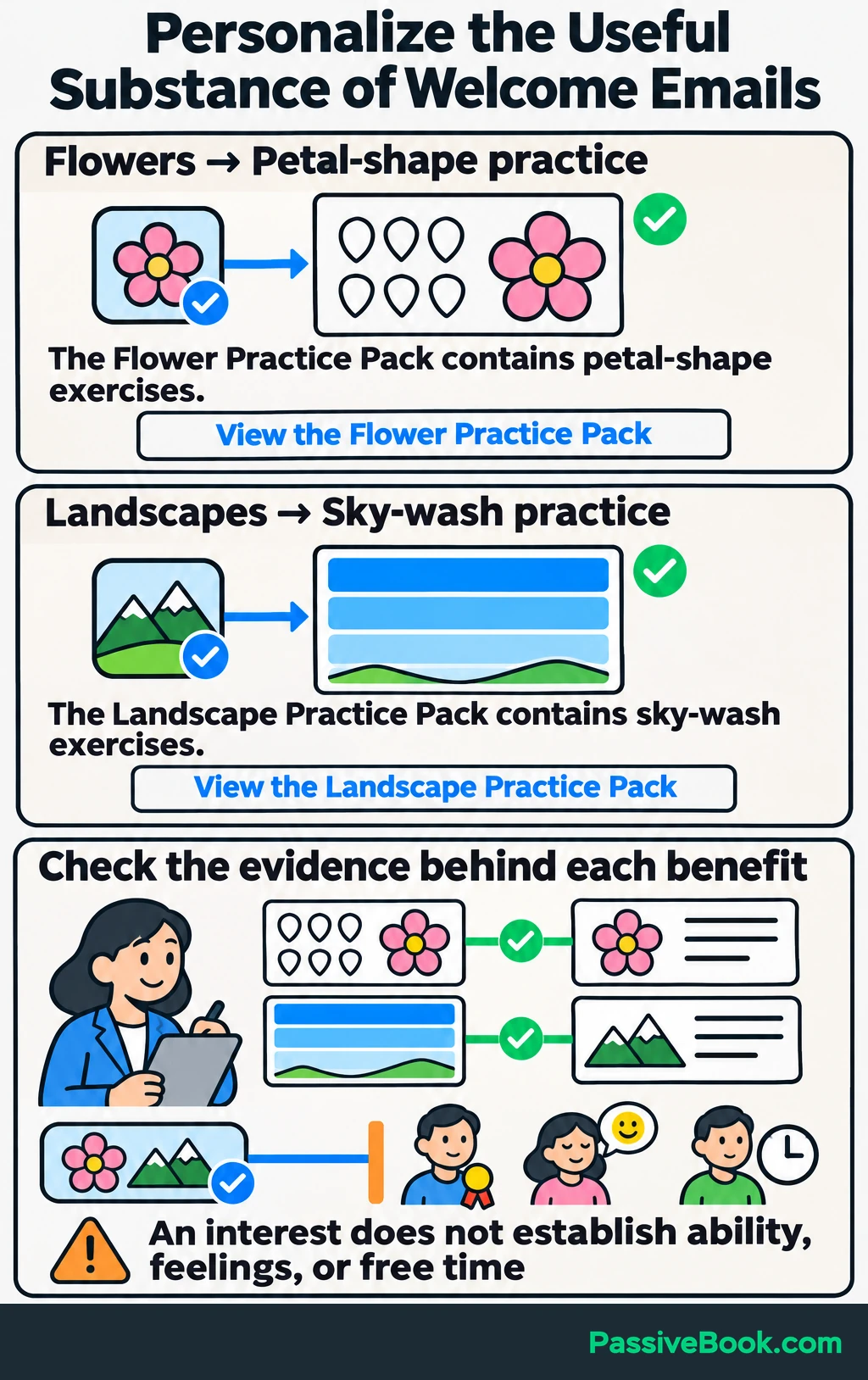
The Flower Practice Pack contains petal-shape exercises. If you want something specific to practice, you can use those exercises to focus on the shapes that make up a flower.
Happy painting,
The Watercolor Shop
The landscape adaptation changes the useful substance:
You selected landscapes as your painting interest. The Landscape Practice Pack contains sky-wash exercises, giving you a specific part of landscape painting to practice.
That is a meaningful difference. Swapping “beautiful flowers” for “beautiful landscapes” throughout a generic sales email wouldn’t do much.
You can use AI Copywriting Studio to turn your own offers and customer preferences into a first set of messages. It also puts the product claims beside your supplied facts so you can review them before sending.

Free AI Copywriting Studio




While testing drafts for one of my digital products, I found an AI-written benefit I couldn’t trace to anything the buyer received. The sentence sounded convincing until I checked it against the product. I removed it and added a short approved-facts brief to the prompt.
That experience is why I would fix missing inputs before polishing the output. If the draft says “build confidence,” but never explains what’s inside the pack, supply the actual exercise and regenerate that passage.
Before approval, check whether each version addresses its stated interest, sounds natural, and sticks to supported facts. Selecting flowers doesn’t tell you someone is a beginner, feels frustrated, or has ten spare minutes each evening.
Automate Delivery and Test Every Route
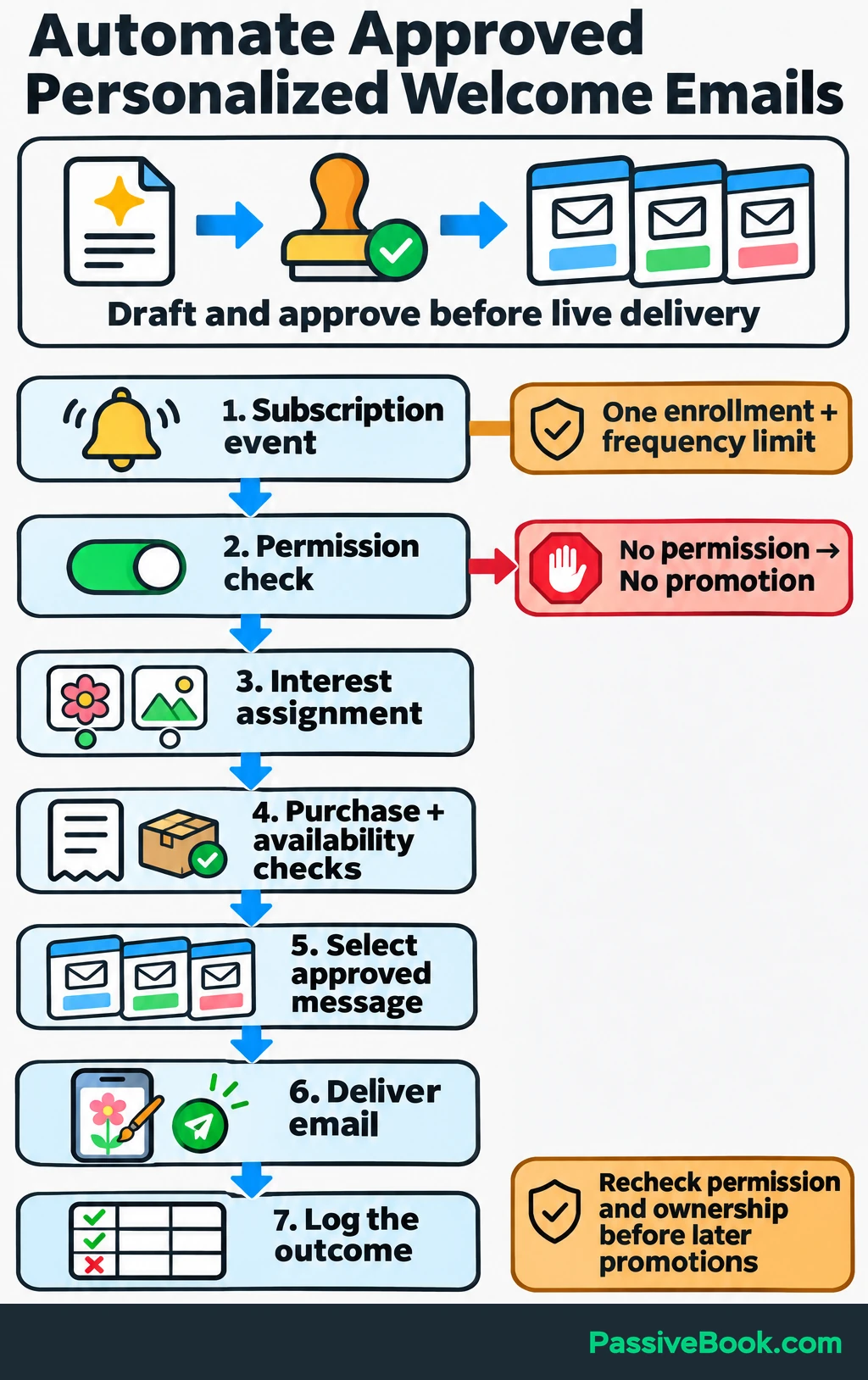
Once the messages are approved, connect them to the campaign rules:
Subscription event → permission check → interest assignment → purchase and availability checks → approved message selection → delivery → outcome logging.
Keep AI generation outside the live delivery process at first. Draft and approve the reusable versions, then let the email platform select them.
I would introduce live generation only when customer-specific information materially improves the message and the output can be checked before delivery. Two painting interests don’t justify that extra machinery.
Before later promotional messages, recheck subscription status and ownership. Stop promoting a pack once someone buys it.
Prevent duplicate enrollment and set a frequency limit across campaigns. A welcome sequence shouldn’t ignore the other promotional emails already scheduled for that person.
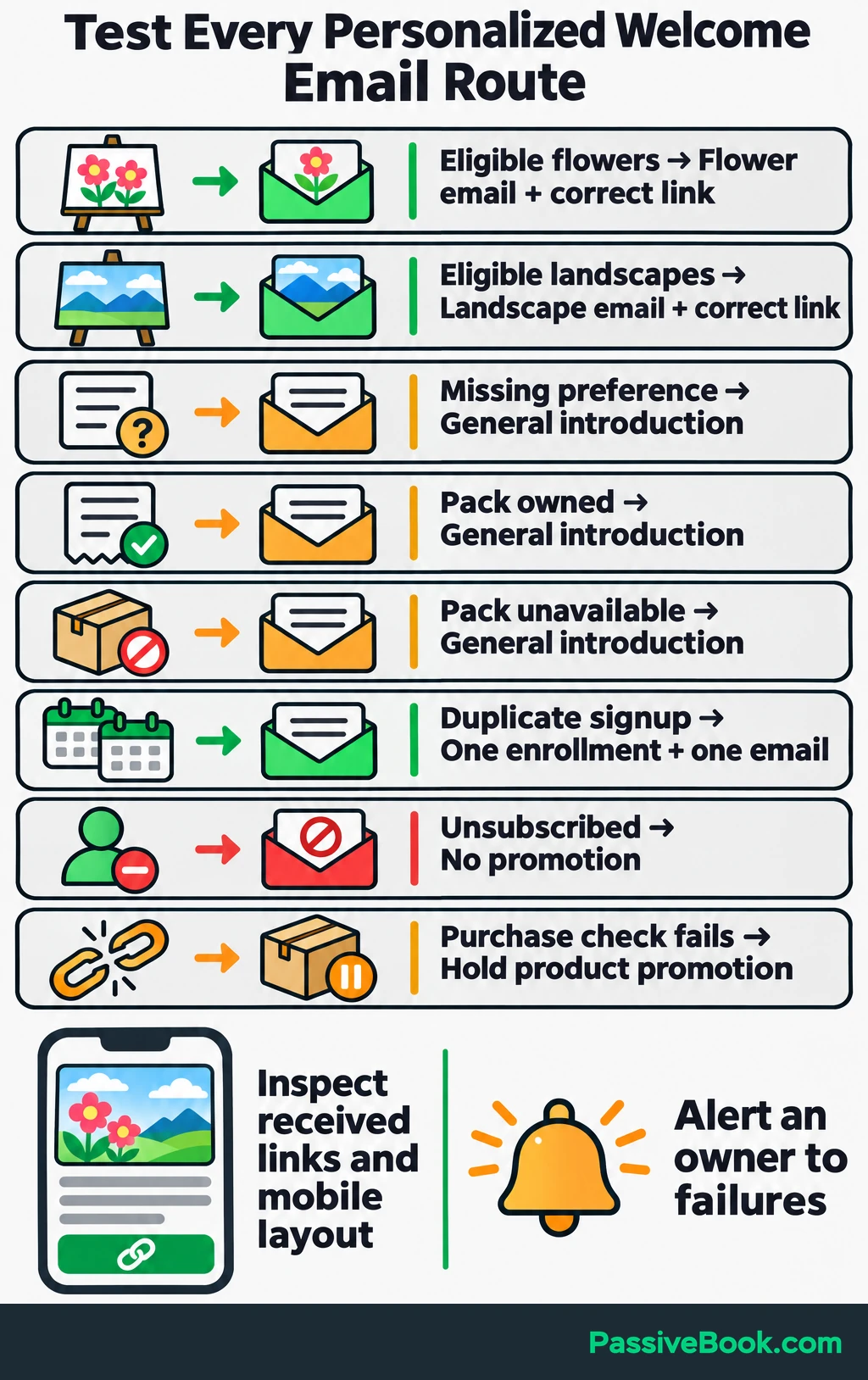
Use test contacts to cover the routes that can go wrong:
| Test Contact or Event | Expected Result |
|---|---|
| Flowers selected; matching pack not owned | Flower message with the correct link |
| Landscapes selected; matching pack not owned | Landscape message with the correct link |
| Preference missing | General introduction |
| Matching pack already owned | General introduction without that pack offer |
| Matching pack unavailable | General introduction without that pack offer |
| Duplicate signup event | One enrollment and one welcome email |
| Unsubscribed contact | No promotional email |
Inspect the messages as received, including their links and mobile layout.
Also decide what happens when a connection fails. Missing interest can use the general message. An unavailable purchase check should hold the product promotion rather than assume the subscriber owns nothing.
Log the segment, content version, recommendation, and send outcome. Assign someone to inspect failures and pause incorrect sends. In a one-person business, that someone is you, so make the failure alert easy to notice.
Measure Whether Personalization Earns Its Cost
Compare the personalized message with the existing general message. Don’t compare this month’s personalized campaign with last month’s different offer and call the gap an AI win.
Within each eligible interest segment, randomly assign subscribers to either version. Keep timing, product availability, and offer conditions consistent.
For the watercolor campaign, keep both packs available to both groups at the same prices. The personalized email links to the matching pack, while the general email keeps its usual shop link. Keep the test groups separate from other conflicting promotions.
Count each eligible subscriber once, and wait until everyone included in the analysis has completed the seven-day conversion window.
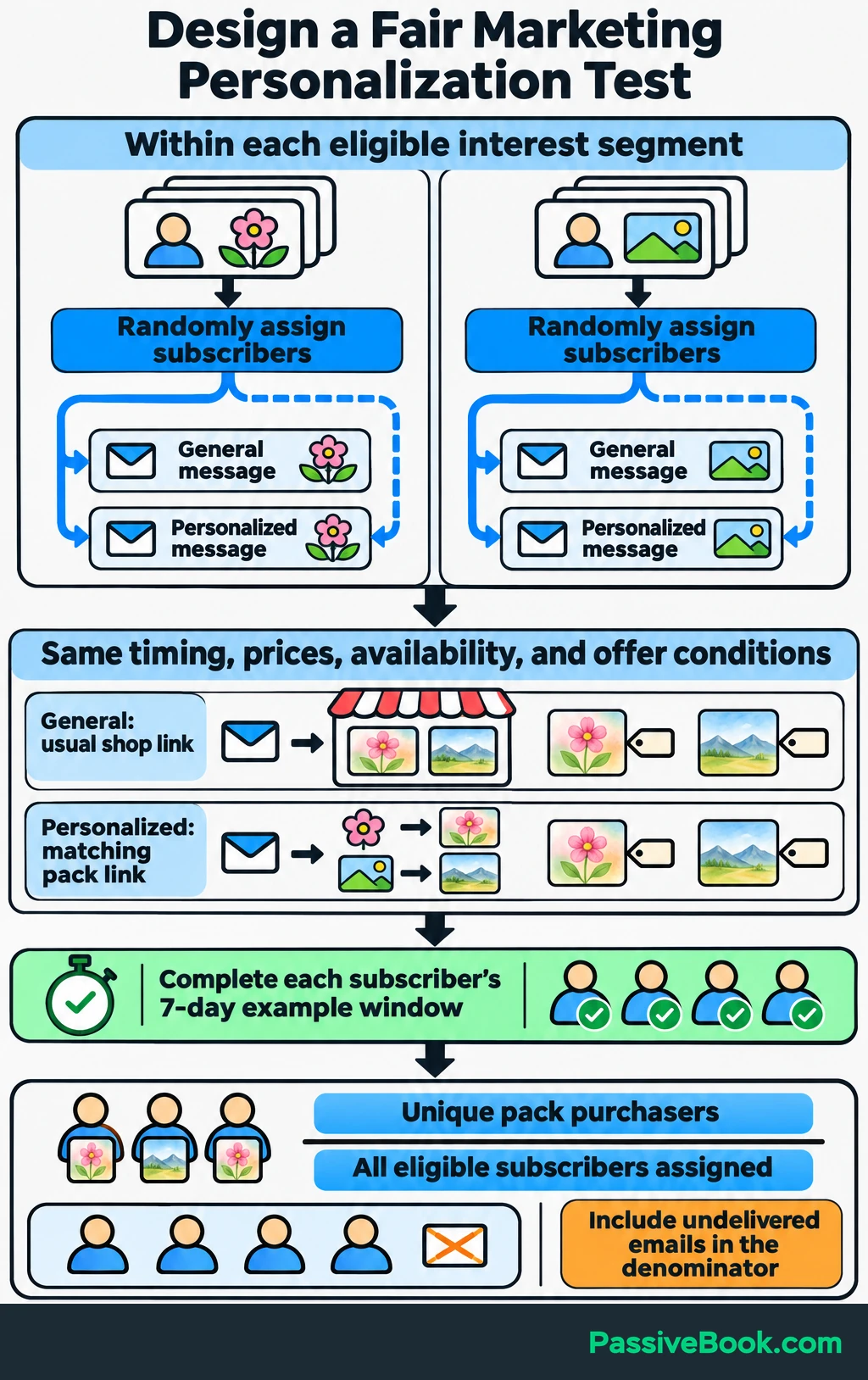
For each group, count the assigned eligible subscribers who bought a practice pack during their seven-day window. Divide that count by all eligible subscribers assigned to the same group. Include subscribers whose email wasn’t delivered, so sending problems remain visible.
Here is an illustrative result:
| Group | Eligible Subscribers Assigned | Unique Purchasers Within Seven Days | Purchase Conversion Rate |
|---|---|---|---|
| General message | 1,000 | 20 | 2% |
| Personalized message | 1,000 | 30 | 3% |
The calculations are:
- General Conversion: 20 ÷ 1,000 = 2%.
- Personalized Conversion: 30 ÷ 1,000 = 3%.
- Absolute Increase: 3% − 2% = 1 percentage point.
- Relative Lift: (3% − 2%) ÷ 2% = 50%.
Those figures describe the observed difference. They don’t establish that the improvement is reliable. With sparse purchases, a few orders can change the result substantially, so collect more comparable outcomes before expanding.
Then check whether a gain of that size would pay for the system.
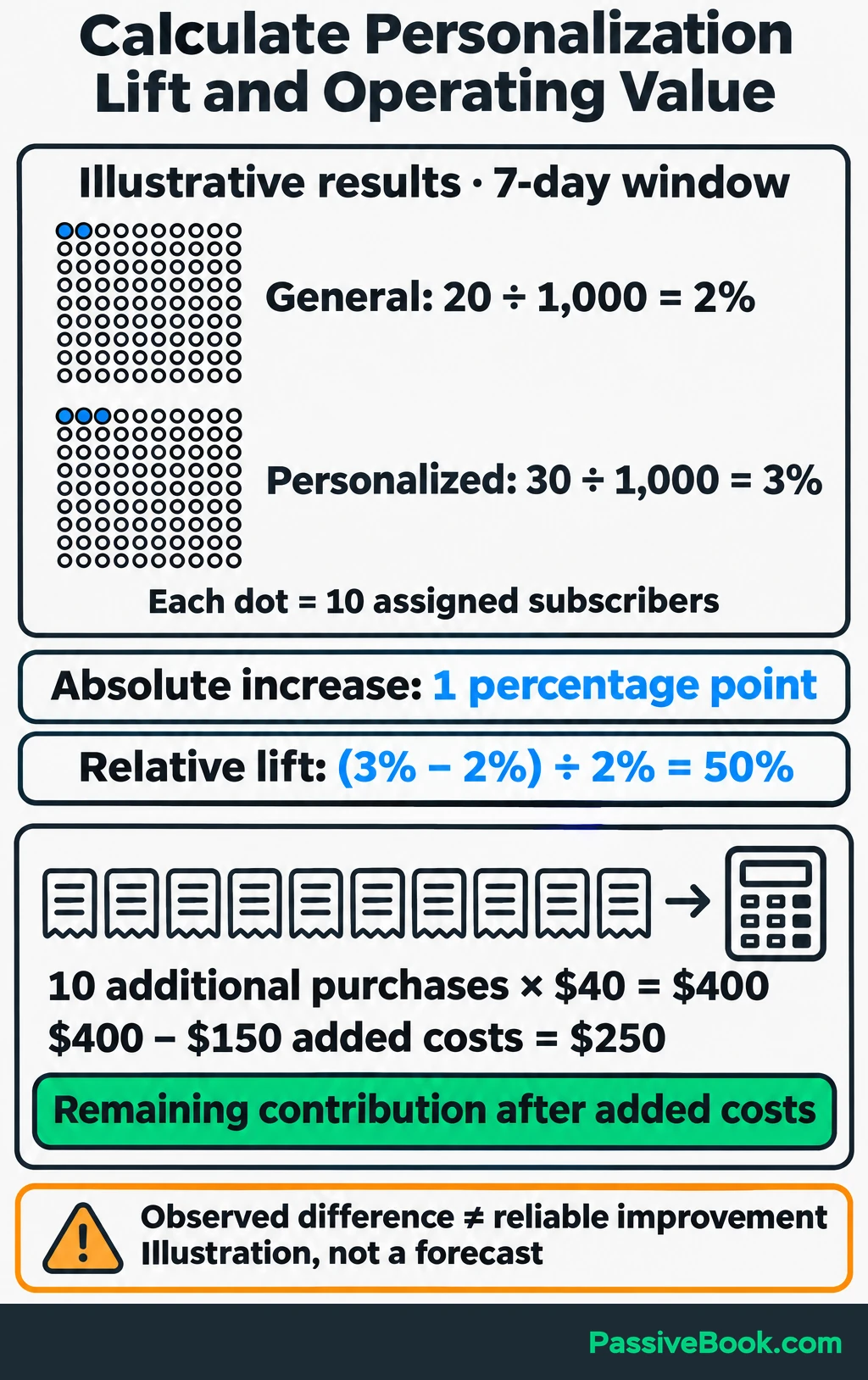
Suppose each additional purchase contributes $40 after variable costs. Ten additional purchases would contribute $400. Subtract an assumed $150 in added software, AI, integration, and labor costs, and the remaining contribution would be $250.
That is an illustration of the economics, not a forecast.
Record production and review time separately, including the initial setup. Reusable variants may reduce ongoing work, but you need the time record to see whether that happens.
Use supporting measures to decide what to inspect next:
- Weak Clicks: Review message relevance, the recommendation, and the link.
- Clicks Without Purchases: Inspect the destination, offer, and checkout.
- Rising Unsubscribes or Complaints: Check routing, expectations, and frequency.
Clicks help explain the journey, but purchases and operating costs decide whether this campaign deserves more investment.
What Next?
Write one sentence naming the customer signal that should change your next campaign, then draft the two versions it requires.
Use the social buttons to share this guide when a conversation about AI marketing needs a practical campaign to test.
Which customer preference would most change what you send? Leave your answer in the comments, along with any questions about putting the workflow together.
Share this post with your friends & followers:

