A customer asks for a refund, the parcel arrives, and someone puts it beside the packing table. Two days later, you’re still checking whether the money went back and whether the item can go on sale.
That uncertainty creates extra work. Customers chase updates, staff repeat checks, and returned stock sits idle while everyone assumes someone else is handling it.
Learning how to manage ecommerce returns means connecting those loose ends. This guide walks through the decisions, records, and handoffs that take a request through to a finished refund or exchange and a clear destination for the product.
1. Set a Return Policy You Can Support
Build your policy around a process your team can carry out:
Request → eligibility review → shipping when needed → inspection → refund, exchange, or credit → inventory update → closure.
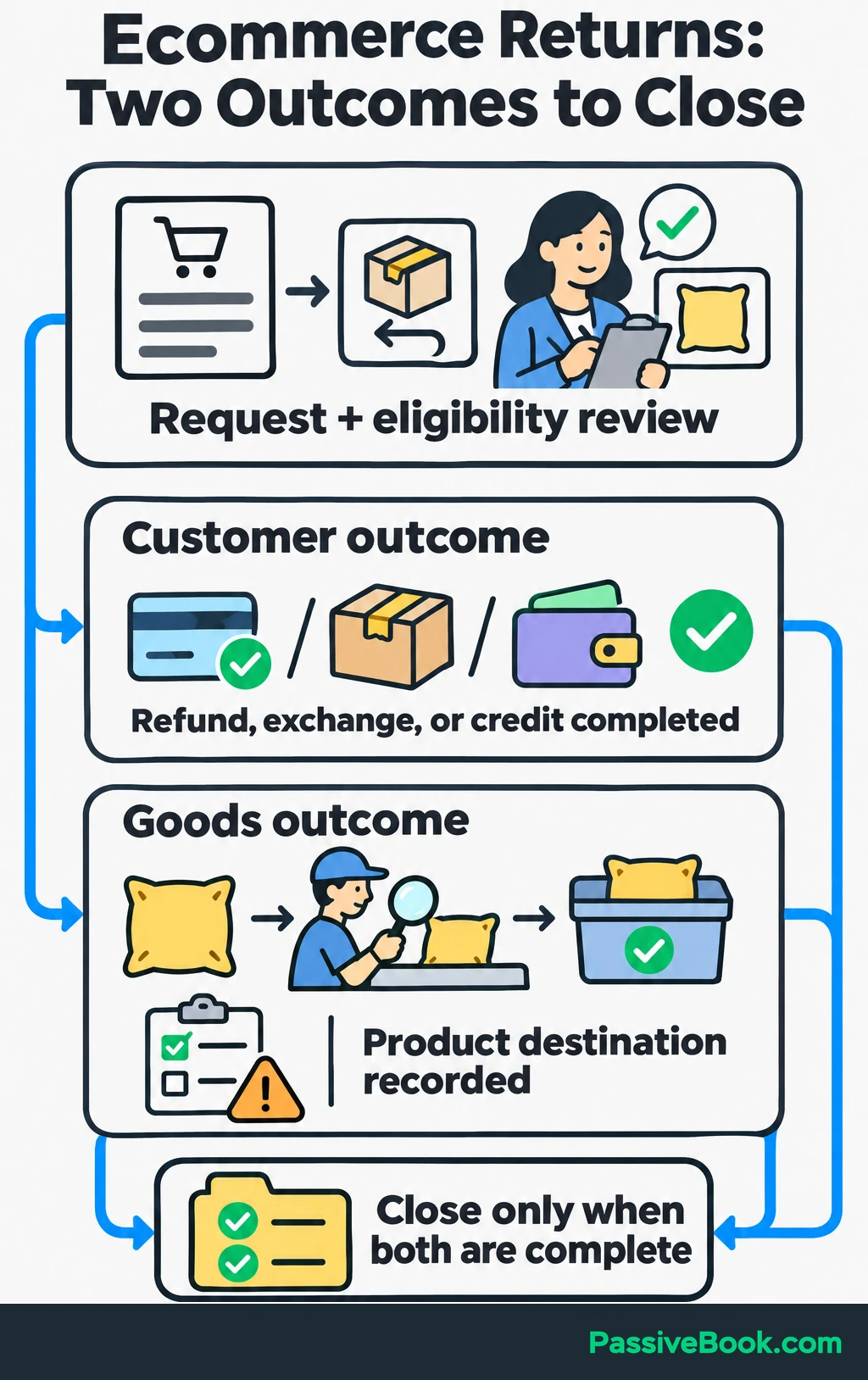
Track two outcomes separately: what happens for the customer and what happens to the goods. A refund can be complete while a damaged item still awaits disposal.
Start with your order system, a shared returns tracker, and a receiving checklist. Assign each case an owner, status, and deadline for its next action.
Throughout this guide, imagine you sell cotton cushion covers in several sizes and colors. The store, case details, and figures are illustrations.
Understand the Costs Behind Your Policy
Before promising free returns, estimate what each return requires:
- Shipping the item back.
- Answering messages and reviewing the request.
- Receiving, inspecting, and repacking the goods.
- Paying warehouse or processing partners.
- Repairing the item or accepting a loss in its value.
Count your own time too. An evening spent sorting returns is still an evening spent working.
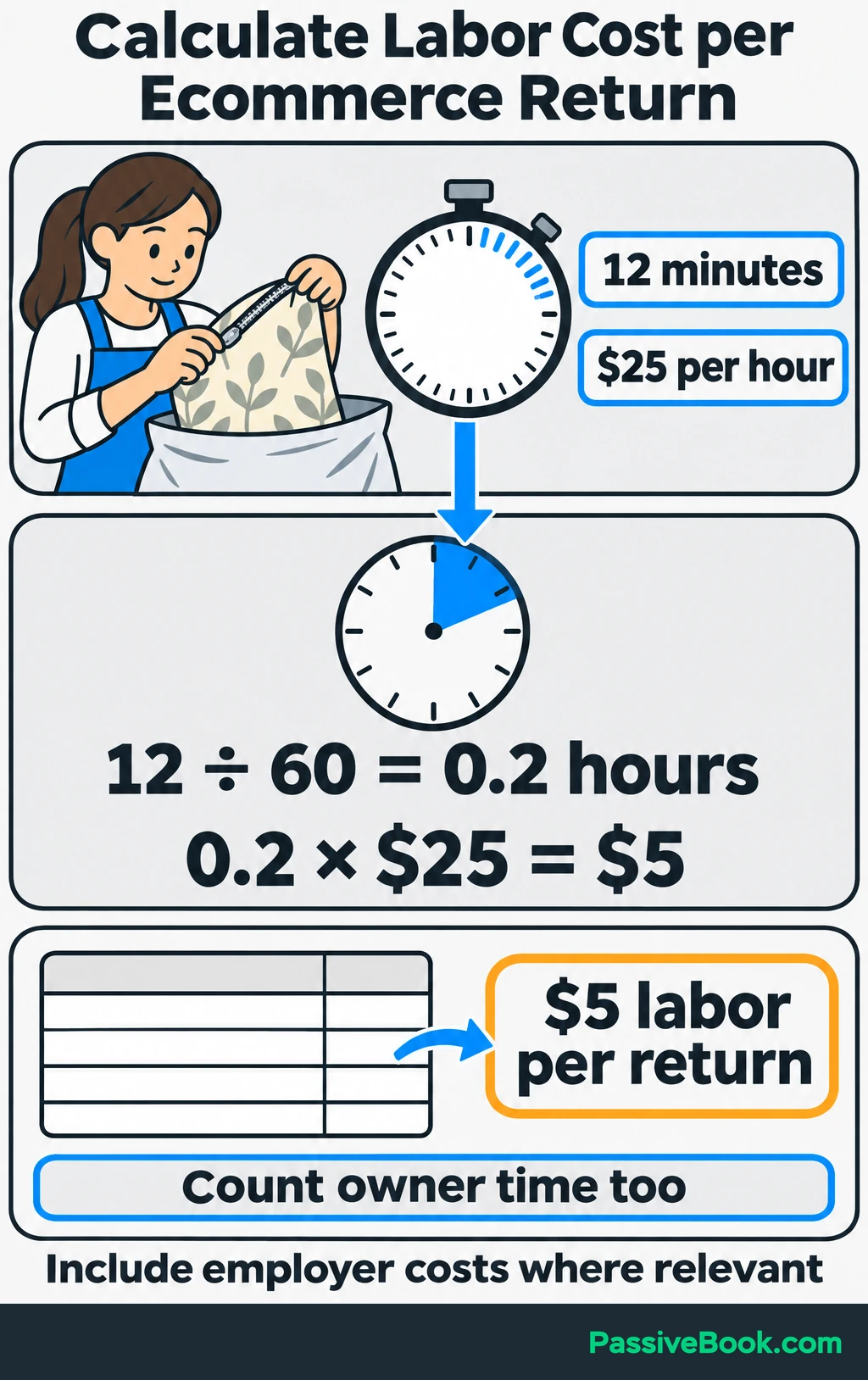
To estimate labor cost, convert the minutes spent on a return into hours and multiply by an hourly cost that includes employer costs where relevant.
For example, 12 minutes at $25 per hour costs:
12 ÷ 60 × $25 = $5 in labor.
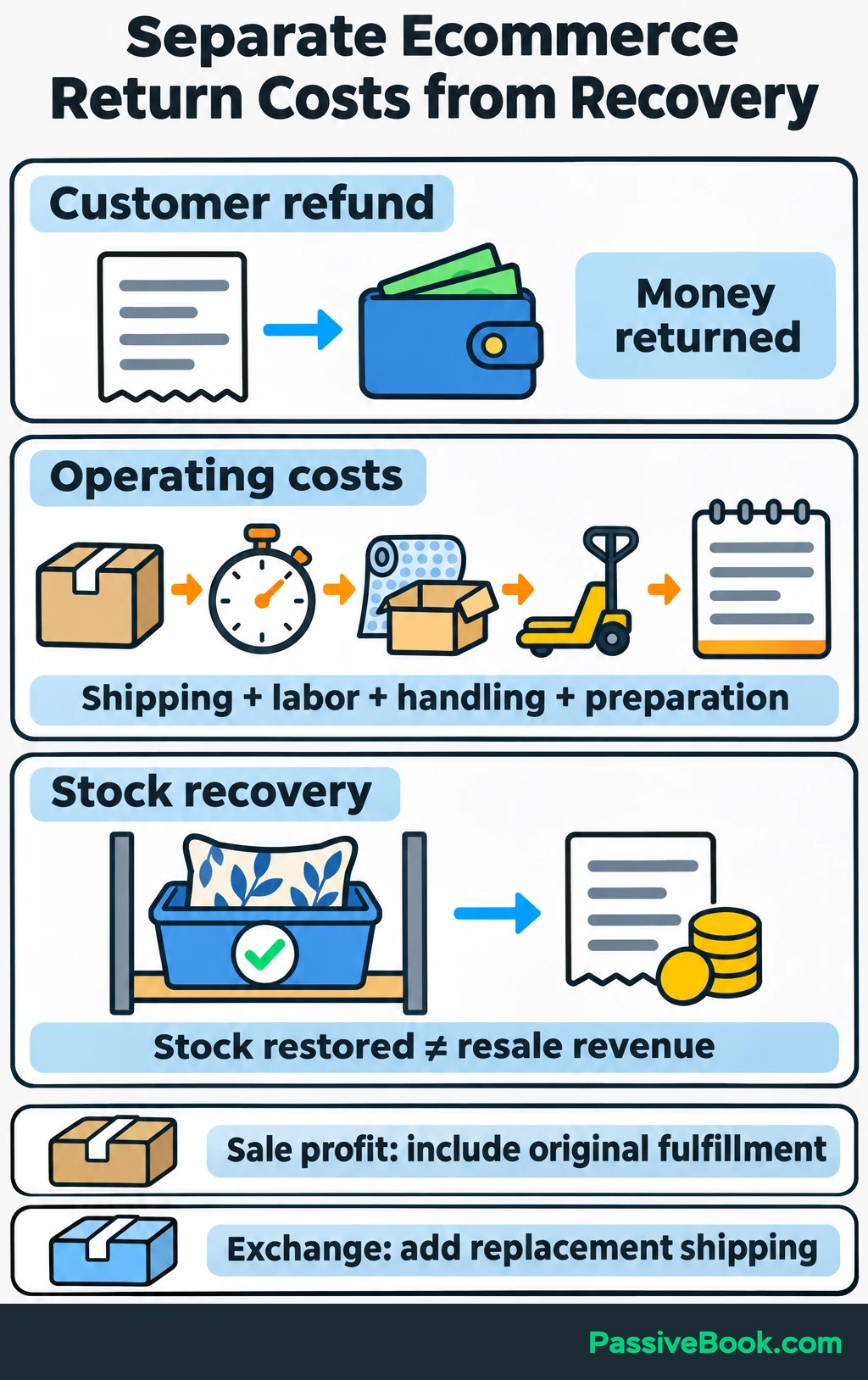
Track refunds, operating costs, and recovered stock value separately. Include original fulfillment and delivery costs when judging the sale’s profit. For exchanges, add replacement shipping and incentives.
Payment fees can remain a cost too. Stripe, for example, does not return the original transaction’s processing fees when you refund a payment. See its refund and fee guidance.
My online jewellery store left me with unsold stock and cost me most of my roughly $1,200 investment. For returns, I’d judge stock by what it can recover now.
Define Eligibility, Charges, and Deadlines
Your policy should answer the questions customers and staff will otherwise ask separately:
| Policy decision | What to make clear |
|---|---|
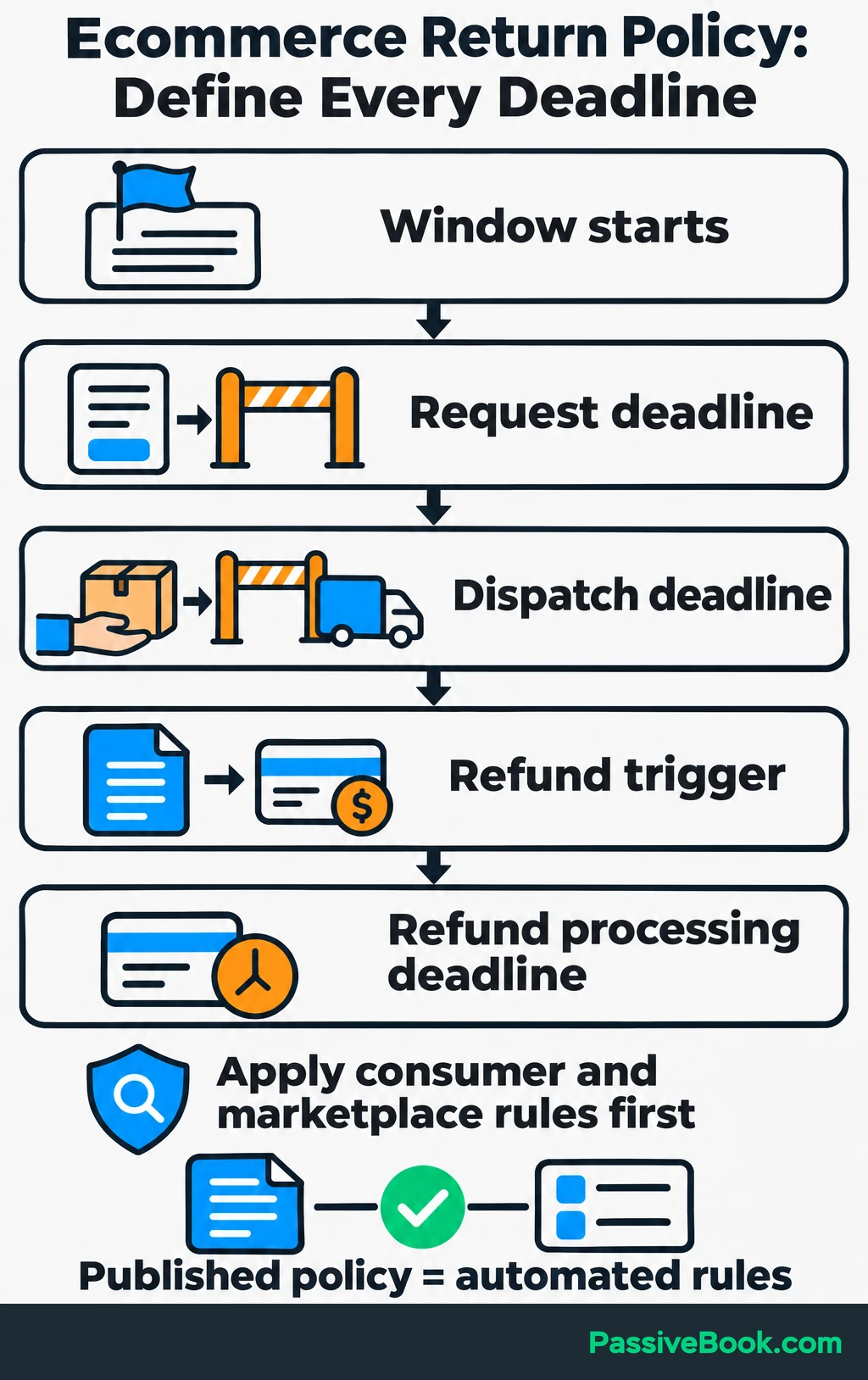
| Return window | When the window starts; request and dispatch deadlines |
| Eligible condition | Allowed handling, accepted condition, and exclusions |
| Purchase verification | Order details and accepted alternative proof of purchase |
| Shipping responsibility | Who pays for each return type and how any permitted charge works |
| Available resolutions | Eligibility for refunds, exchanges, or optional credit |
| Refund commitment | What starts the refund process, processing deadline, and treatment of tax and delivery charges |
Separate a change of mind from a defective item, an inaccurate listing, or a fulfillment error. “I ordered the wrong size” needs a different response from “the cover is smaller than advertised.”
Apply consumer law and marketplace rules before setting restrictions. UK online buyers generally have cancellation rights even for non-faulty goods, subject to exceptions. A policy cannot remove those rights; see the UK government’s returns guidance.
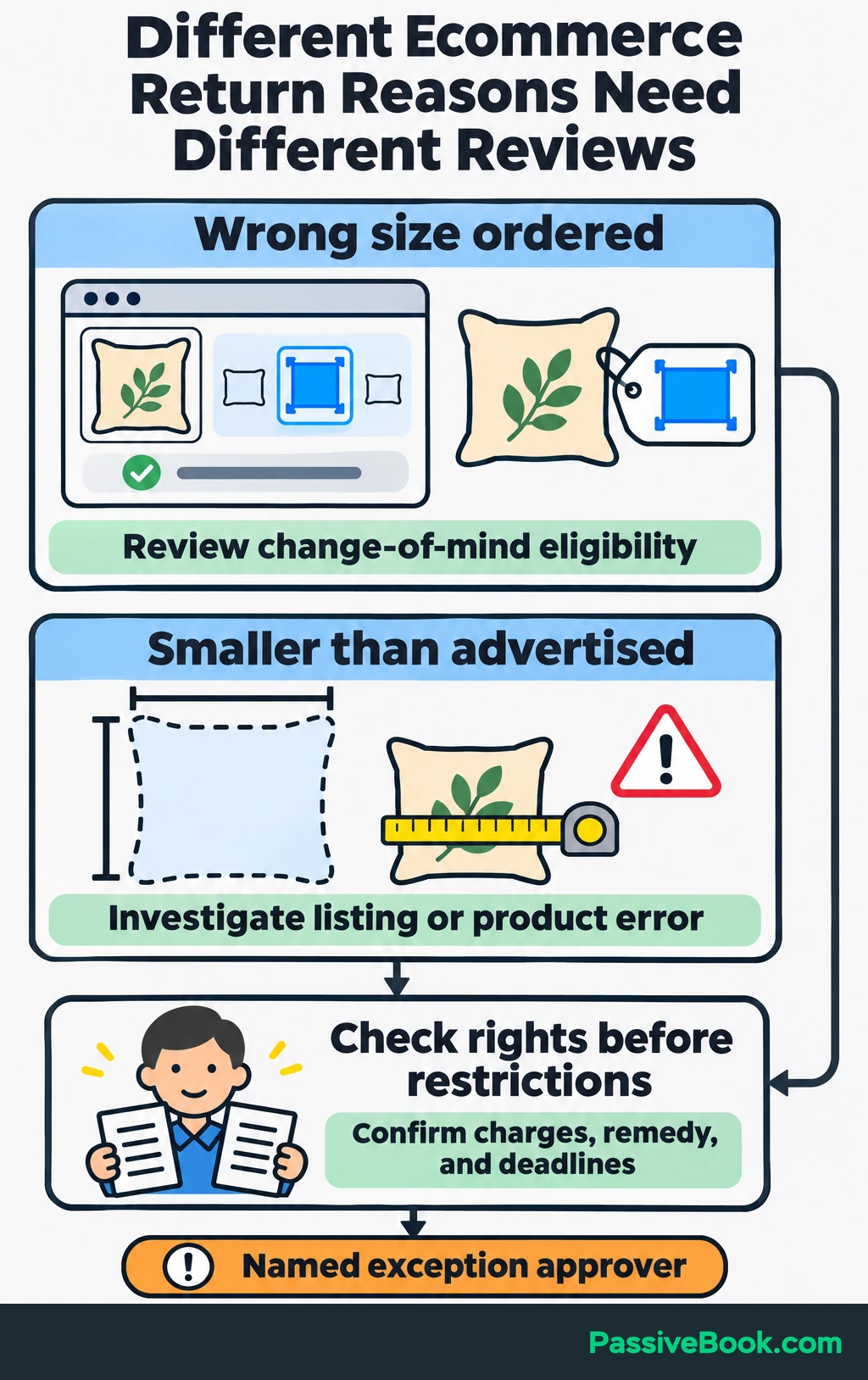
Make automated rules match the published policy. Name an exception approver and set a spending limit for refunds or replacements without a physical return.
Put the policy where customers make purchase decisions and where they start a return. A policy buried in the footer creates more questions than it answers.
2. Capture and Review Every Return Request
Give customers one clear starting point: a short form or returns portal, with help available through support. Staff-assisted requests should enter the same tracker.
Collect the order number, item, quantity, reason, and preferred resolution. Reuse information you already hold rather than asking customers to type their address again.
Each approved physical return needs a reference. This is often called a return merchandise authorization, or RMA. Its job is simple: connect the request to the parcel, inspection, payment, and stock movement.
I would group the tracker fields like this:
| Field group | Example entry |
|---|---|
| Identity | Return R-1042; order 2048; one navy 45 × 45 cm cover |
| Customer request | Wrong size ordered; refund requested |
| Work queue | Awaiting dispatch; Maya in support owns the case; tracking check due Thursday |
| Shipping and receipt | Label and tracking references not yet recorded; parcel not received |
| Inspection and stock | Inspection pending; no stock released for sale |
| Financial resolution | Refund amount still to verify; no payment submitted |
| Supporting records | Approval message saved; no photographs requested or replacement order needed |
Use a separate row for each order line and return event. Split units further if their condition or resolution differs. One clean cover and one stained cover should not share a single “restock” decision.
You do not need to build the records and follow-up views from scratch. This workbook keeps the customer resolution and stock movement separate, with worked cases to help you enter your first return.

Free Ecommerce Returns Desk




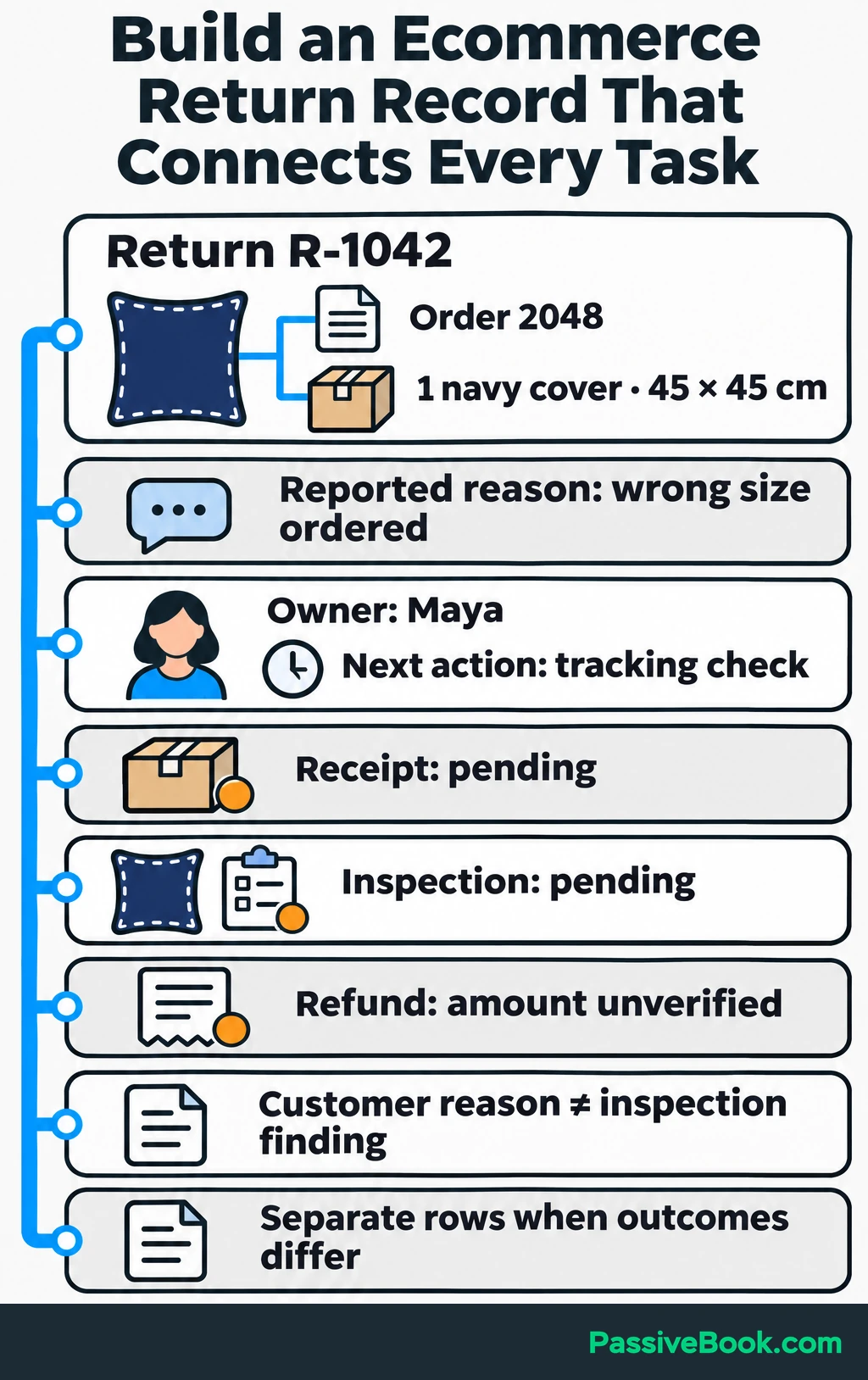
Keep the customer’s reported reason separate from your inspection findings. Otherwise, later edits can erase the evidence you need to spot recurring problems.
Before approving a request, check:
- The purchase, delivered quantity, and applicable policy.
- Previous refunds, replacements, and existing return requests.
- Any open payment dispute.
- Whether more information would change the decision.
Ask for photographs when they help establish damage, a wrong item, or a visible defect. A photograph is unlikely to prove that a customer ordered the wrong size.
For cushion covers, use distinct reasons such as “wrong size ordered,” “dimensions differ from listing,” “zipper defective,” and “wrong item delivered.”
Send duplicates, inconsistent evidence, suspected substitutions, and repeated requests for refunds without return to a named reviewer. These are reasons to investigate, not proof of fraud.
When approving R-1042, confirm the item and next step:
“Your return is approved for one navy 45 × 45 cm cover from order 2048. Please return that cover only and keep the second cover.”
Add the agreed charges, resolution conditions, and shipping instructions. If you decline a request, explain why and tell the customer how to correct missing information or ask for review.
3. Choose the Return Route
Decide Whether the Item Needs to Come Back
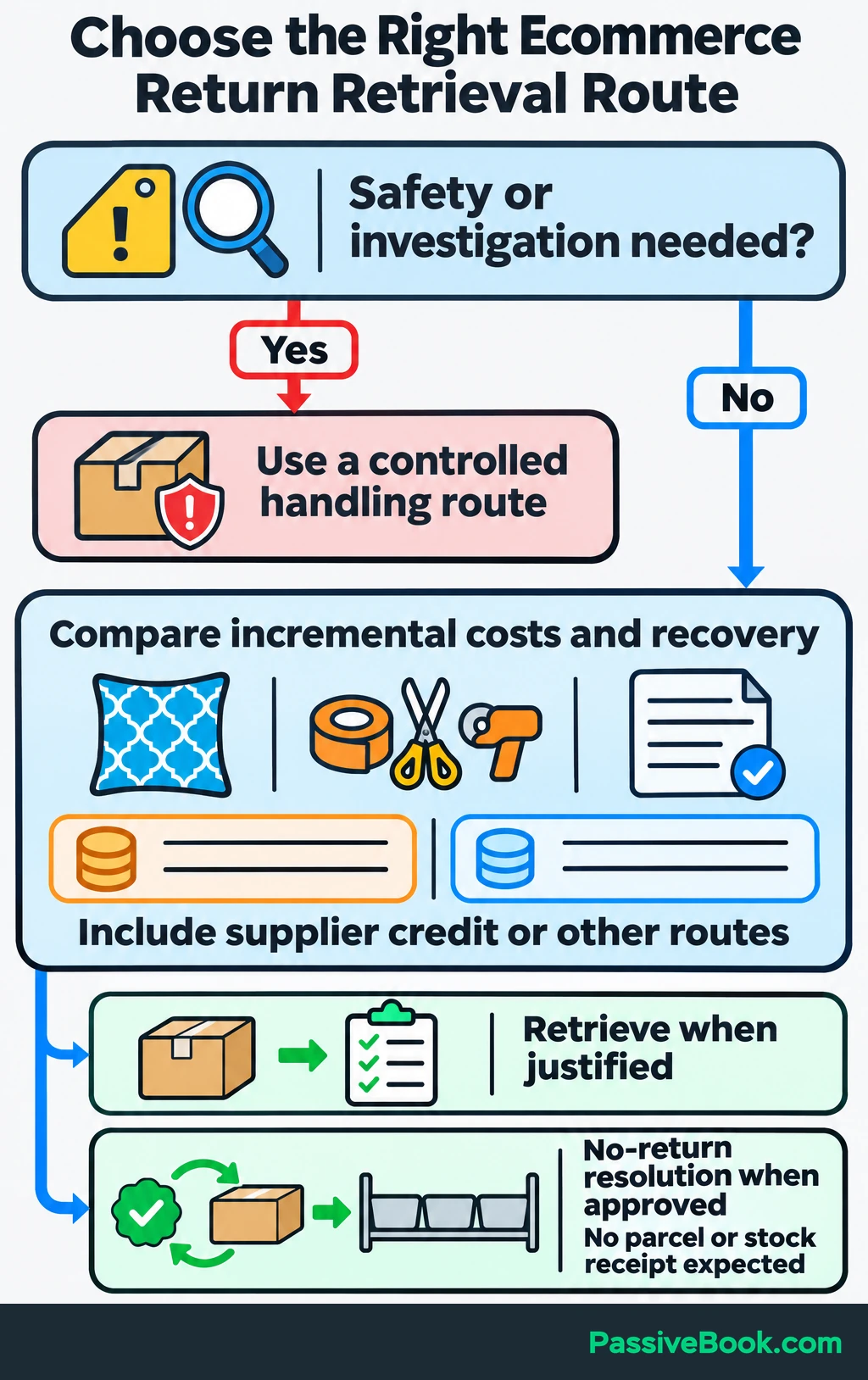
Compare the value you expect to recover with the additional cost of getting the product back and preparing it for sale.
For this decision, leave out money already spent on the original order. Include costs that change depending on whether you retrieve the item, plus any available supplier credit or other recovery route.
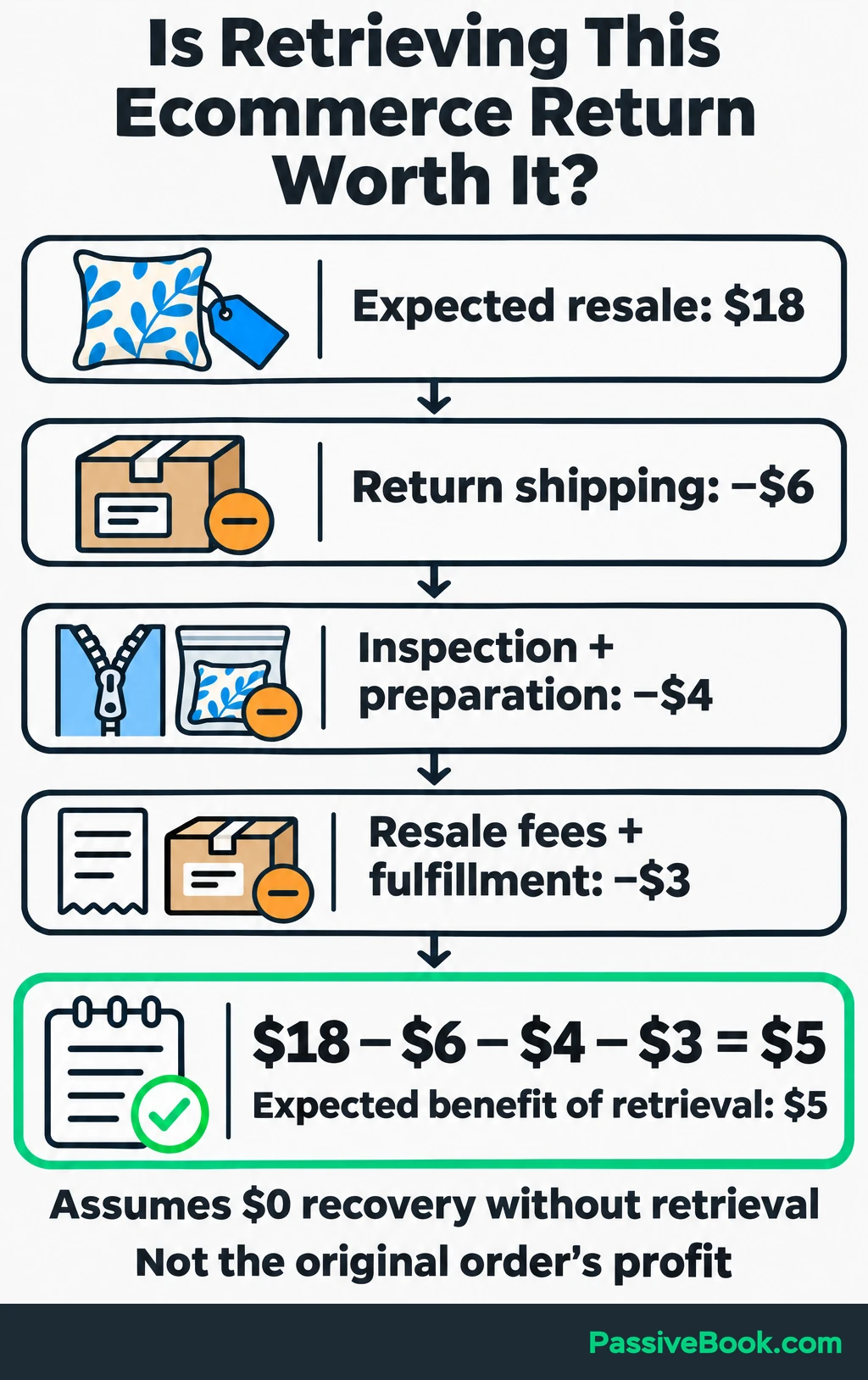
Suppose the returned cushion cover could sell for $18, and retrieving it creates these costs:
| Item | Illustrative amount |
|---|---|
| Expected resale price | $18 |
| Return shipping | −$6 |
| Inspection and preparation | −$4 |
| Resale payment fees and fulfillment | −$3 |
| Expected net recovery | $5 |
The calculation is $18 − $6 − $4 − $3 = $5, assuming you recover nothing without retrieving it.
That $5 is the expected benefit of retrieval. It is not the original order’s profit.
If retrieval costs exceed recovery and inspection serves no other purpose, I would consider an approved refund or replacement without return. Record that no parcel or inventory receipt is expected, so staff do not keep chasing it.
Keep a separate route for goods that need investigation or safety handling. A low resale value does not settle those cases.
Arrange Shipping and Customer Updates
Send returns somewhere that can receive, identify, and inspect them. Before using a warehouse or supplier address, agree who checks the goods, how findings reach you, and who handles any supplier credit.
Your store should still own the customer’s resolution. Customers should not have to coordinate your warehouse.
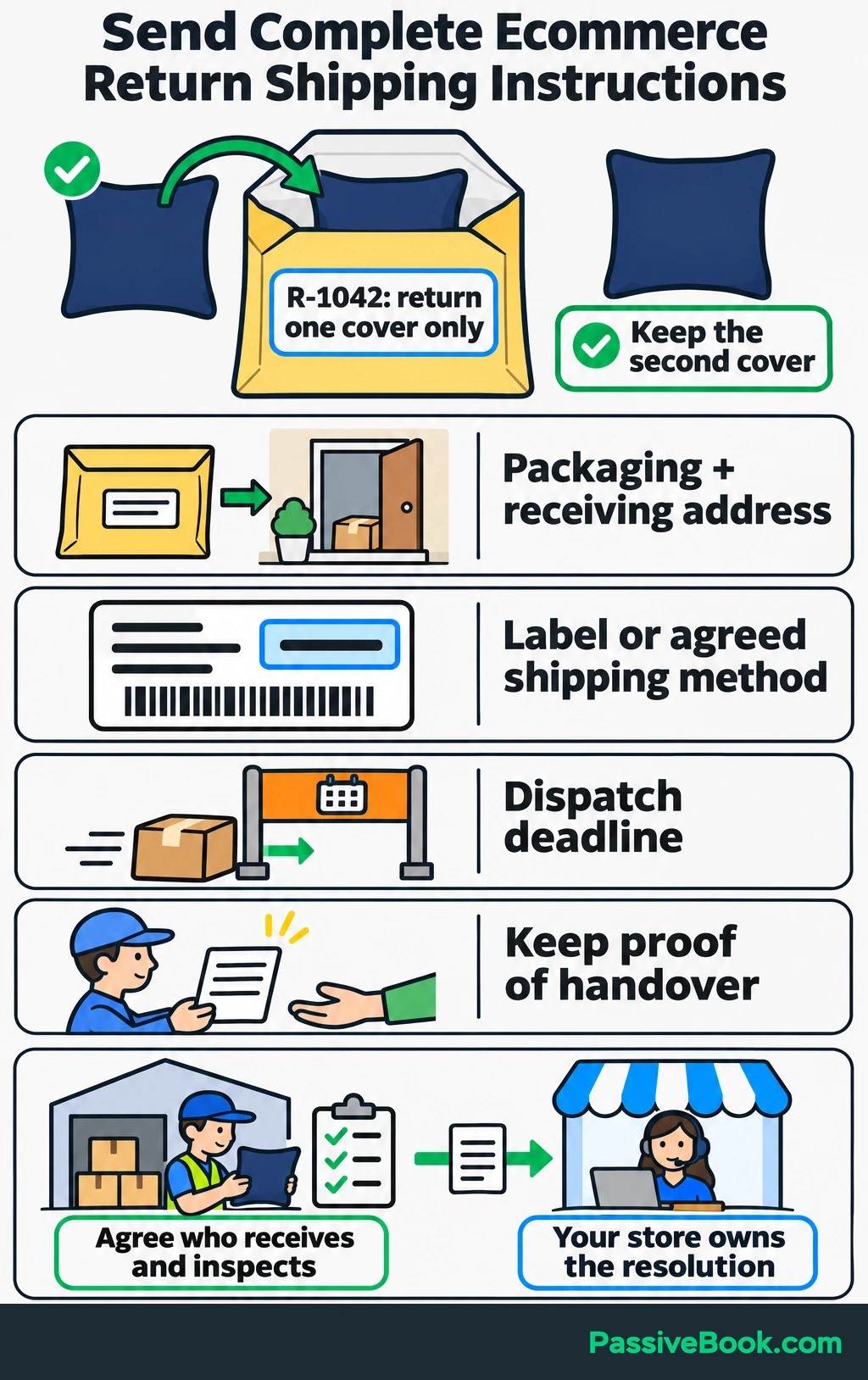
Send these details together:
- The return reference and exact approved contents.
- Packaging instructions and receiving address.
- The label or agreed shipping method.
- The dispatch deadline.
- Instructions for keeping proof of carrier handover.
For the cushion-cover store, say whether the customer should return one cover or the whole purchased set. “Return your order” is expensive wording when you only need one item.
For cross-border returns, settle the destination, customs paperwork, and responsibility for charges before issuing instructions.
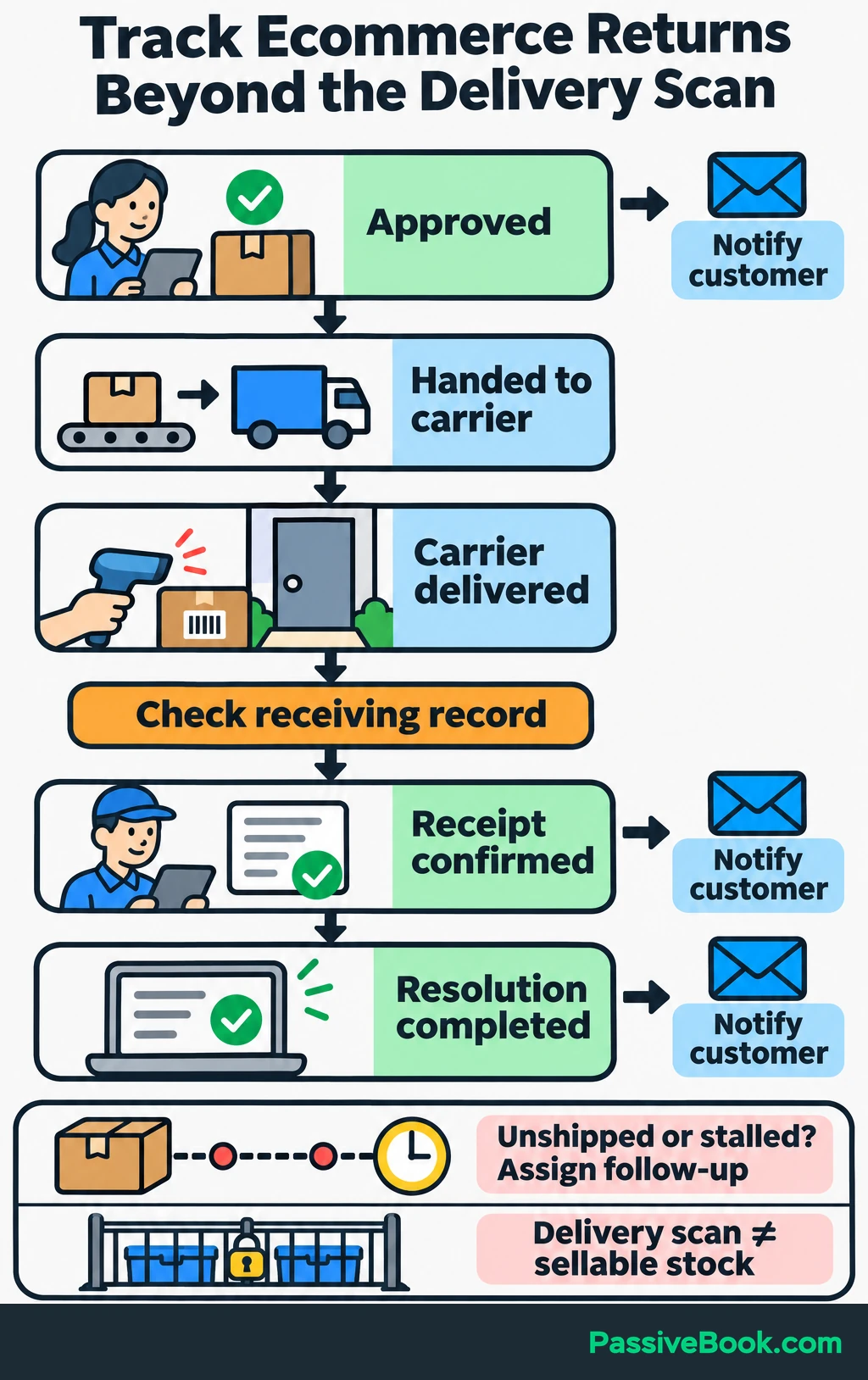
Link tracking to the case and create follow-up tasks for approvals that remain unshipped, stalled parcels, and delivery scans without a receiving record. A carrier’s “delivered” scan should trigger a receipt check rather than an automatic inventory increase.
Notify the customer at approval, receipt, and resolution. If a delay changes the expected timeline, say what happens next and when you will update them again.
“Still processing” gives the customer very little to work with.
4. Inspect Items Before Updating Sellable Inventory
Receive returned goods into a separate holding area. A labeled shelf or bin can work for a small operation, provided those units are excluded from available stock.
Match each parcel to its return reference, then verify the product, size, color, quantity, and included parts.
For cotton cushion covers, the inspection checklist should cover:
- Size and color labels against the approved return.
- Finished dimensions against the product specification.
- Seams and zipper operation.
- Stains, odors, wear, and damage.
- Packaging and any missing contents.
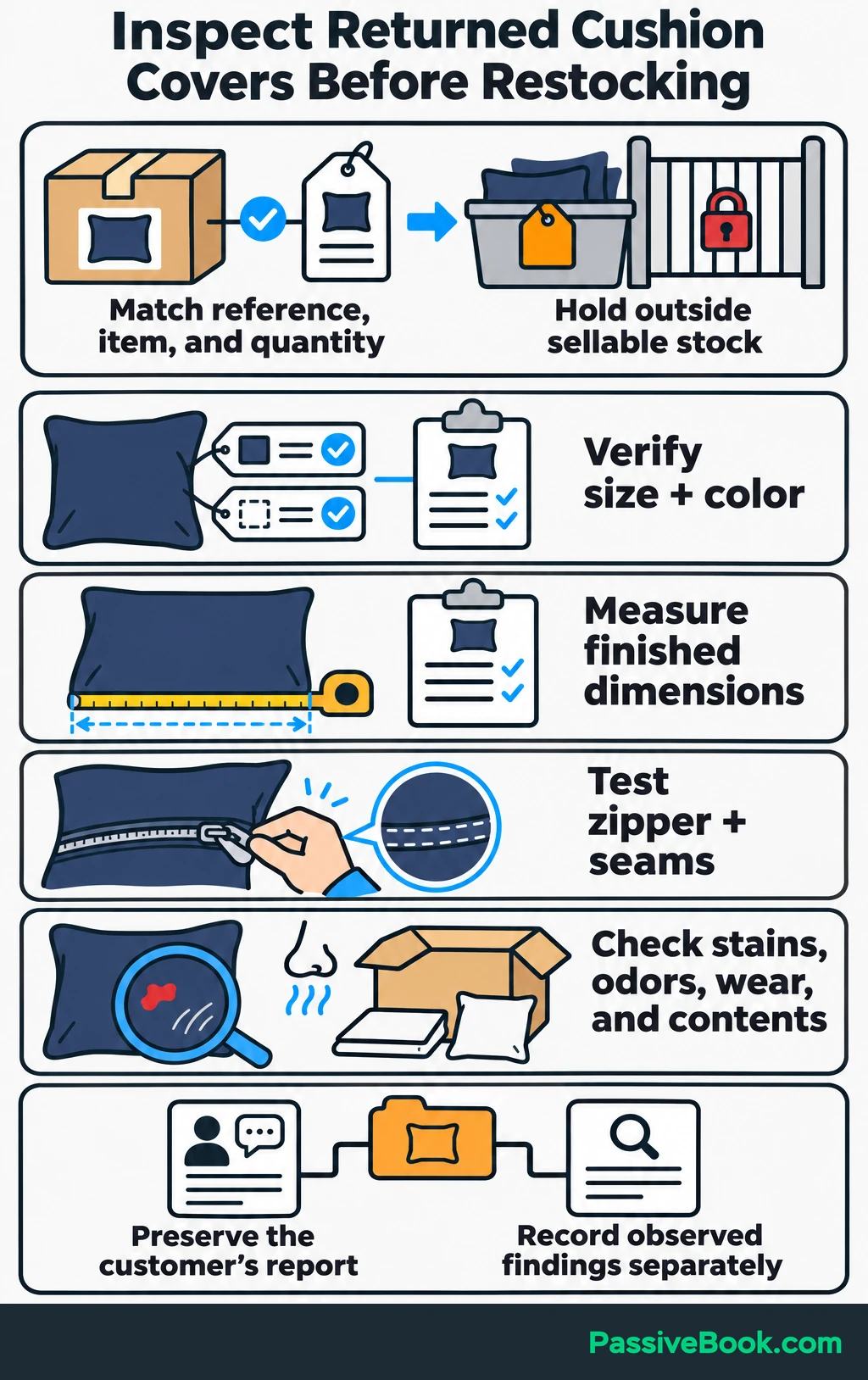
Record what you observe without replacing the customer’s explanation. If someone reports a defective zipper but it works during inspection, preserve both facts and send any disputed finding for review.
Choose the product’s destination after inspection:
| Condition | Required preparation | Inventory status | Destination | Responsible person |
|---|---|---|---|---|
| Unused and within specification | Fold, rebag, and approve | Available after approval | Original product bin | Receiving lead |
| Safe, with damaged packaging | Repack and recheck | Held until complete | Approved sales stock | Packing lead |
| Safe, with a disclosed cosmetic flaw | Grade and label accurately | Separate secondary stock | Discounted listing | Store owner |
| Defect covered by supplier agreement | Document and follow supplier instructions | Unavailable | Supplier return | Purchasing owner |
| Unsafe or otherwise unsuitable for circulation | Isolate and follow applicable handling requirements | Unavailable | Approved disposal route | Store owner |
Compare additional repair or preparation costs with what you expect to recover. A cheap repair can make sense; an hour spent rescuing a low-value cover usually needs a second look.
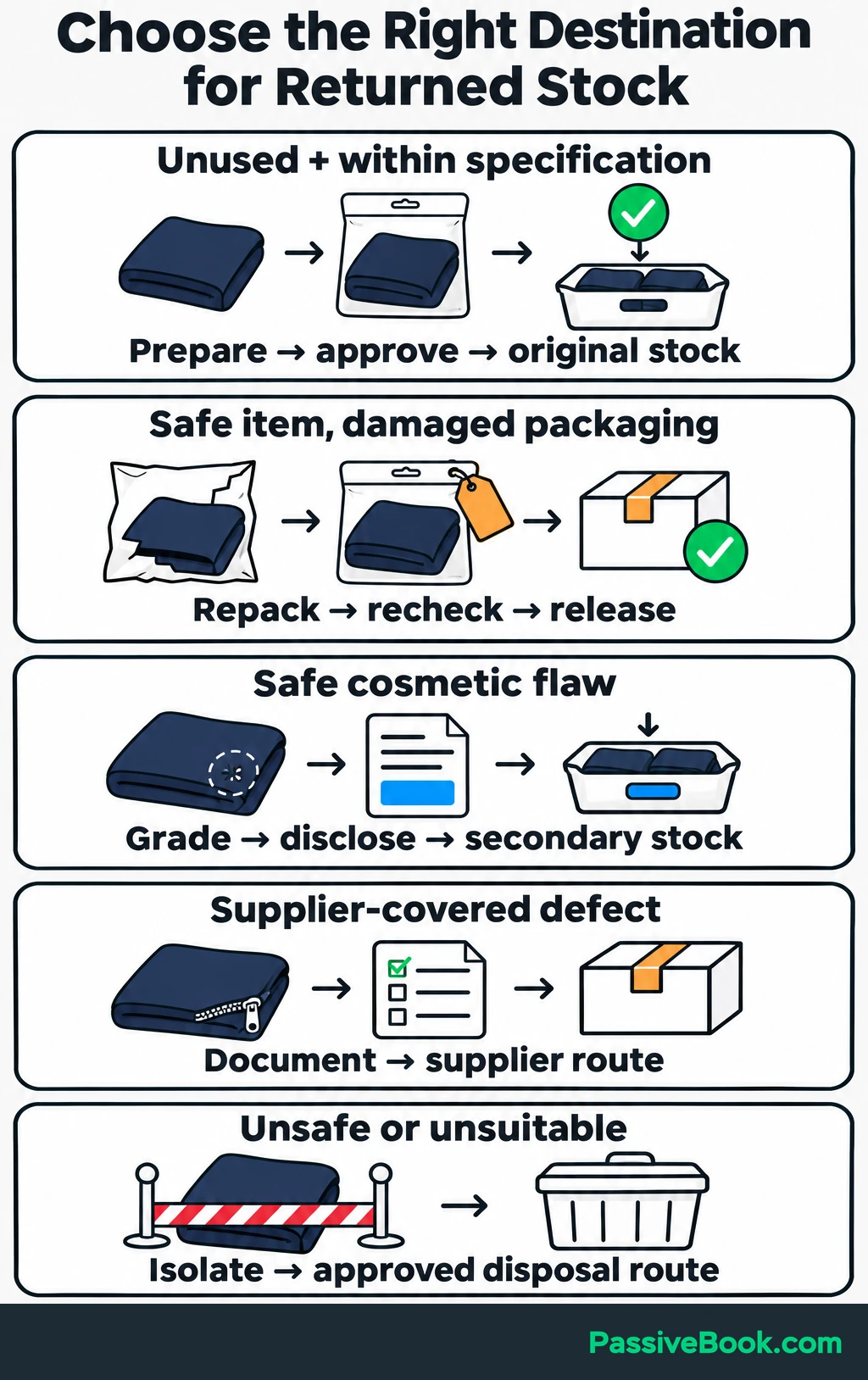
Screen goods for recalls and safety problems before resale or donation. US CPSC rules apply to sellers and distributors, including charities, and its guidance says hazardous or noncompliant goods must not be sold or given away. See the CPSC’s resale guidance.
Release an item for sale only after it meets your condition standard. Record the quantity, storage location, and any reduction in inventory value.
For R-1042, the receiving check confirms one unused navy cover. It passes inspection, is repacked, and returns to its assigned stock bin. The refund remains a separate task.
5. Complete Refunds, Exchanges, and Store Credit
Calculate and Verify the Refund
Issue the refund at the applicable policy or legal trigger. Keep inspection moving, but do not let an internal backlog push a refund beyond a mandatory deadline.
Calculate from the original transaction, including:
- Returned quantities and their actual paid prices.
- Discounts allocated to those items.
- Applicable tax and refundable delivery charges.
- Previous adjustments.
- Any deductions permitted by the applicable rules.
Check bundle and promotion terms before finalizing a partial return.
Suppose order 2048 contained two covers priced at $25 each, with a $10 discount split equally between them. Each cover therefore carried a $5 discount.
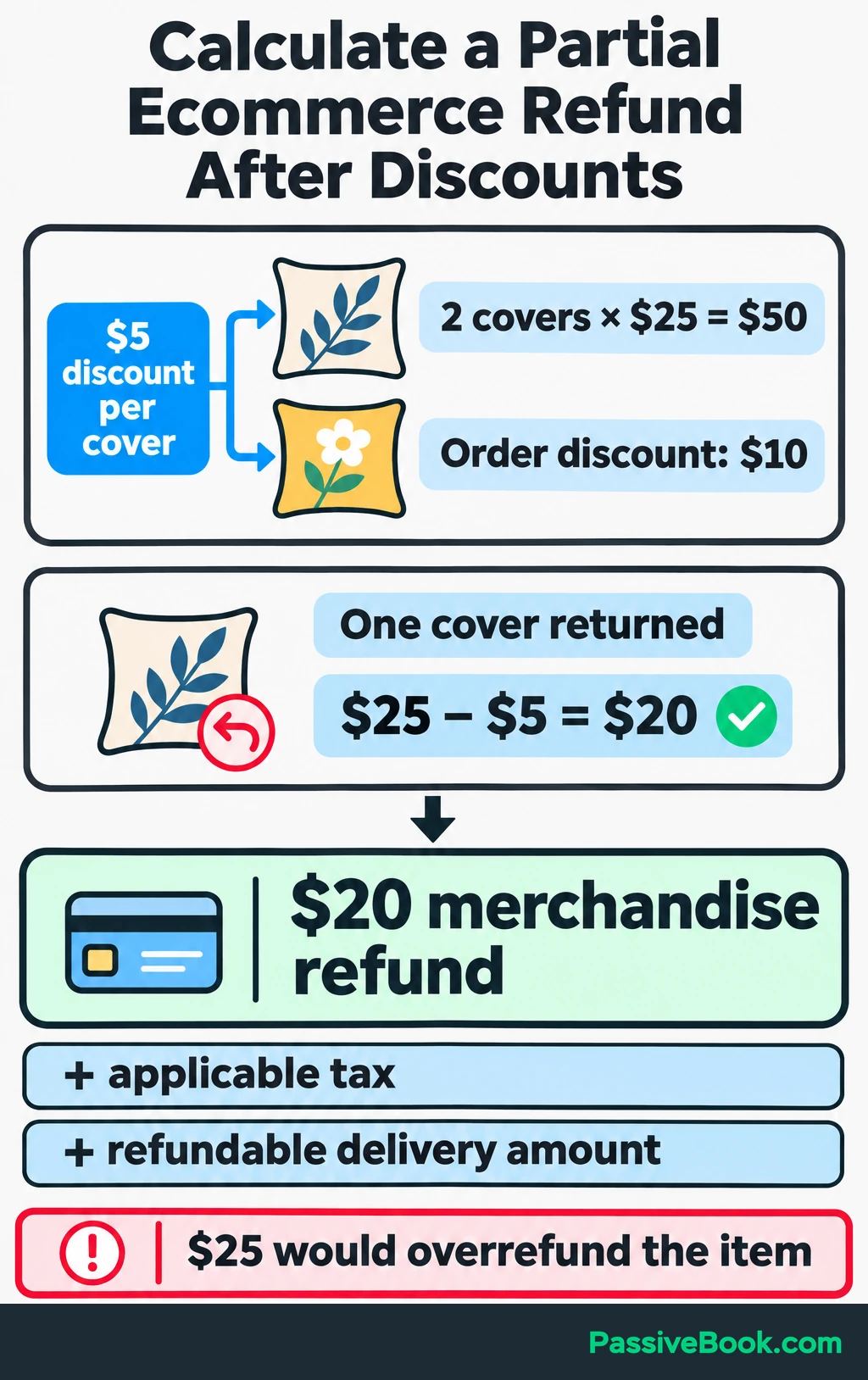
Returning one produces a $20 merchandise refund: $25 − $5. Add its applicable tax and any refundable delivery amount. Refunding the full $25 would return money the customer did not pay for that item.
Use the payment workflow that actually sends the money, then record its reference and status. In WooCommerce, the WordPress ecommerce plugin, a manual refund records the adjustment but does not send funds. Changing the order status alone also does not refund the customer. Its refund documentation explains this distinction.
Before retrying an uncertain refund, check existing and pending transactions with the payment provider. A timeout tells you that confirmation is missing; it does not prove the payment failed.
Confirm the amount, original payment destination, initiation date, and provider-supported processing estimate. Keep pending and failed refunds in a follow-up queue.
Refund initiation and customer receipt are separate milestones. Stripe provides supported tracing references for customers whose refunds have not appeared; its refund-tracing guidance explains their availability.
Fulfill the Exchange or Issue Credit
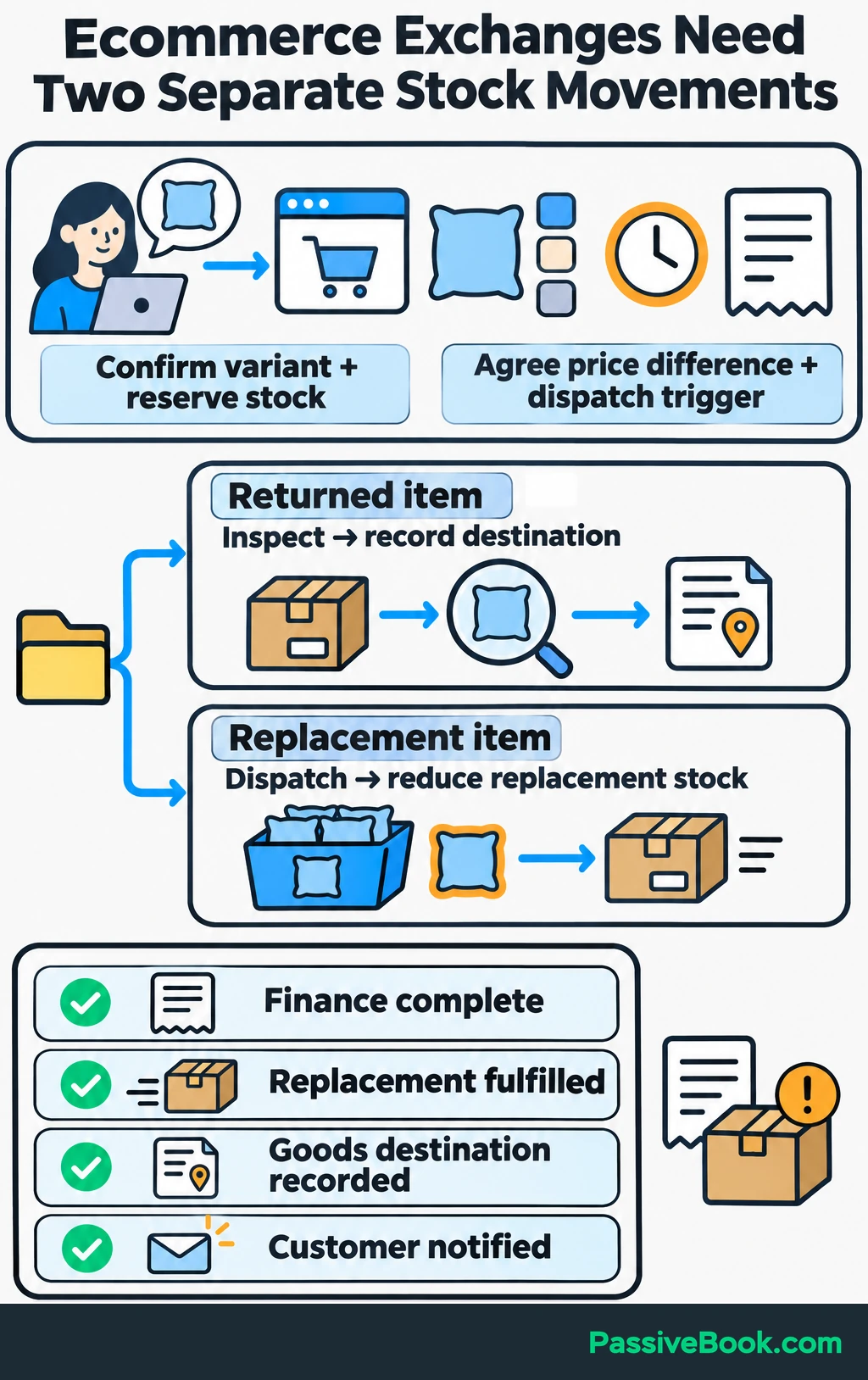
For an exchange, confirm the replacement variant, available stock, reservation expiry, and the event that releases it for dispatch.
For a size exchange, I would ask for the desired dimensions before reserving another cushion cover. “The larger one” leaves too much room for a second return.
Agree any price difference, additional payment, refund balance, tax adjustment, or shipping charge before dispatch. Link the replacement order to the original purchase and return.
Update the two stock movements separately:
- The returned item moves through inspection and its chosen destination.
- The replacement reduces available replacement stock.
Agree a fallback if the requested replacement becomes unavailable. Do not silently substitute a different color.
Offer store credit as a customer-selected option and record its value, remaining balance, and redemption conditions separately from cash refunds.
Close the case only when the financial resolution is complete, any replacement has been fulfilled, the product’s destination is recorded, and the customer has been notified.
For R-1042, that means the verified $20 merchandise refund plus applicable additions, the approved stock receipt, and the customer confirmation are all recorded. An unresolved payment or replacement-delivery issue stays open for follow-up.
6. Automate Repetitive Handoffs
Run the process manually long enough to find its gaps, then automate the repeated handoffs.
I would start with acknowledgments, record creation, owner assignment, reminders, and status messages. These remove repeated admin work while keeping difficult decisions visible.
Check what your existing store already supports before buying another subscription. Test requests, partial refunds, exchanges, labels, and stock handling against your actual workflow.
When separate tools need connecting, I would start with Make, a visual builder for workflows between apps. n8n does similar work, and I’d consider it for more involved workflows if someone can maintain the setup. Its WooCommerce integration can retrieve and update orders; check support for every action you need.
A useful first automation might be:
- A request creates a tracker record and sends an acknowledgment.
- A reviewer approves the route and resolution.
- Approval creates the shipping task and customer instructions.
- Confirmed receipt creates an inspection task.
- Approved inspection releases the appropriate stock action.
- Payment confirmation updates the financial status.
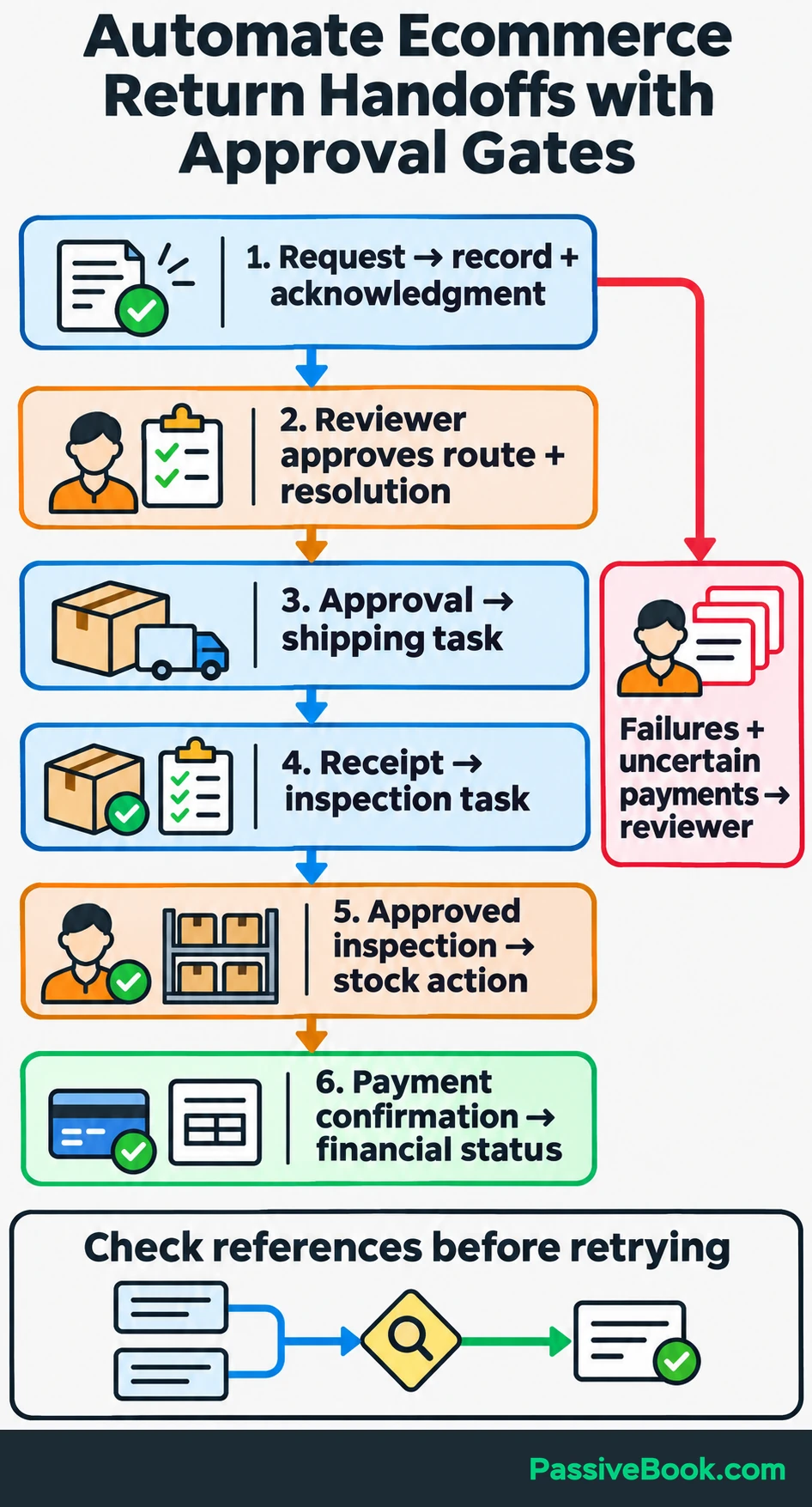
Use unique return and payment references, check whether an action already happened before retrying it, and alert someone when a step fails. Two copies of the same notification should not create two refunds.
Keep disputed eligibility, conflicting inspection findings, uncertain payments, and approvals above your limits with a human reviewer. AI can help group comments or draft replies, but I would not let a generated summary authorize a refund or declare an item sellable.
Buy dedicated returns software when you can name the bottleneck it will remove. Ask vendors to demonstrate your cases:
| Selection check | What the demonstration should establish |
|---|---|
| Bottleneck solved | Which repeated task disappears and who still owns exceptions |
| Order and inventory connection | Correct item, variant, quantity, and stock updates without duplicate entry |
| Partial returns and exchanges | One item returned from a discounted order, plus a replacement with a price difference |
| Exception controls | Approval limits, review queues, and visible failed actions |
| Reporting and export | Downloadable reasons, timestamps, payment references, and inventory outcomes |
| Total cost | Subscription, usage, label, integration, setup, and maintenance costs |
If parcels are piling up because nobody has time to inspect them, compare receiving partners instead. Agree grading standards, turnaround commitments, stock synchronization, and handling charges. Software can assign an inspection; it cannot operate a zipper.
Before expanding automation, test a partial return, exchange, damaged item, duplicate request, and failed refund. Compare measured time saved and errors removed with the full cost of running the system.
7. Use Returns Data to Reduce Costs and Repeat Problems
Measure Volume, Speed, and Recovery
Start with a weekly review of open cases. Sort by next-action deadline and age so waiting work is visible.
Then measure return volume using a consistent group of sales. To calculate a physical unit return rate, count returned units from a selected group of delivered units. Wait until that group’s return windows and normal processing time have passed.
If 200 cushion covers were delivered and 10 of those covers came back, the unit return rate is:
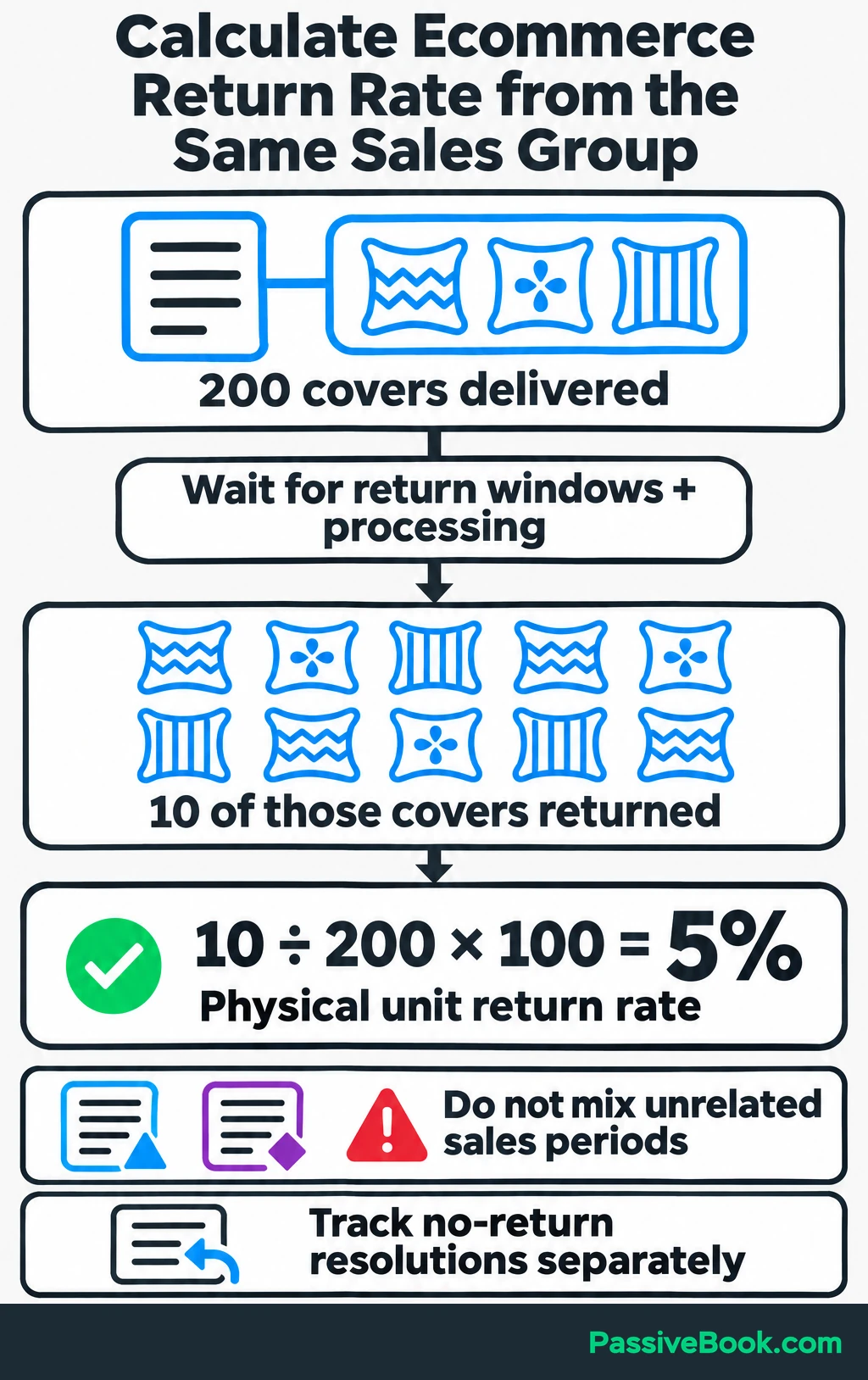
10 ÷ 200 × 100 = 5%.
Do not divide this week’s returns by this week’s deliveries. Those units may come from different orders and periods.
Track refunds and replacements without return separately, because a physical return rate will miss those product problems.
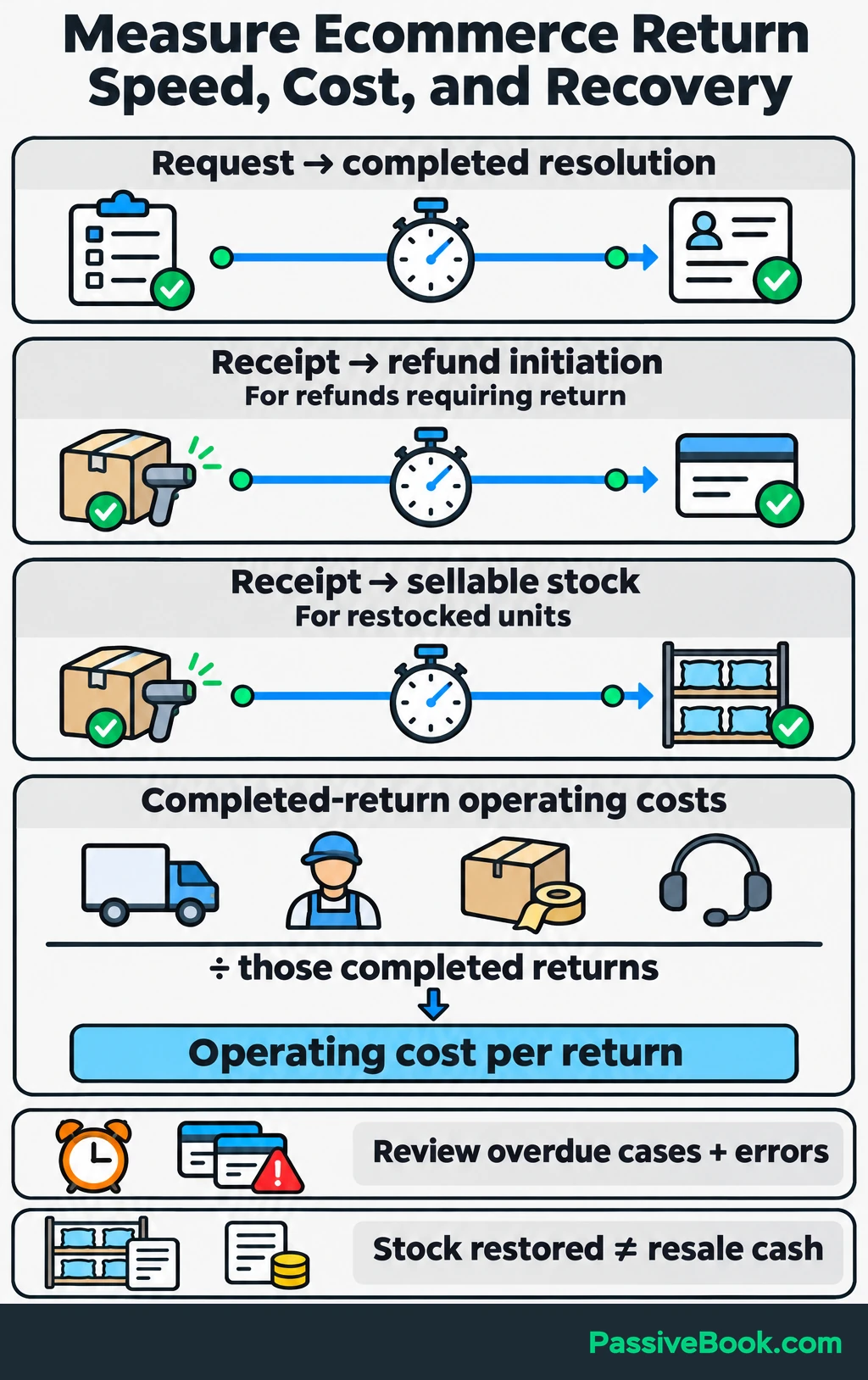
A compact dashboard can cover:
| Metric | What to count |
|---|---|
| Request-to-resolution time | Request to completed refund, exchange, or credit |
| Receipt-to-refund-initiation time | Receipt to refund submission, for refunds requiring a return |
| Receipt-to-sellable-stock time | Receipt to sale approval, for restocked units |
| Operating cost per processed return | Shipping, labor, supplies, and service costs for completed returns divided by the number of those returns |
| Errors and complaints | Refund corrections, duplicate actions, stock mismatches, and complaints |
Record a baseline, assign an owner, and review changes weekly. Investigate overdue cases and duplicate financial actions.
Use the same cost categories each time. Record losses in stock value and money recovered from resale separately from handling costs. Track stock restored for sale too; a cover back on the shelf has yet to earn revenue.
Fix the Causes Behind Avoidable Returns
Group cases by product, variant, and reason, then compare customer comments with inspection findings, fulfillment records, and supplier batches.
Prioritize recurring problems by their avoidable cost and effect on customers.
If buyers keep reporting that a cover is too small, measure the finished product before rewriting the size diagram. The diagram might be confusing, but the stock might also be wrong.
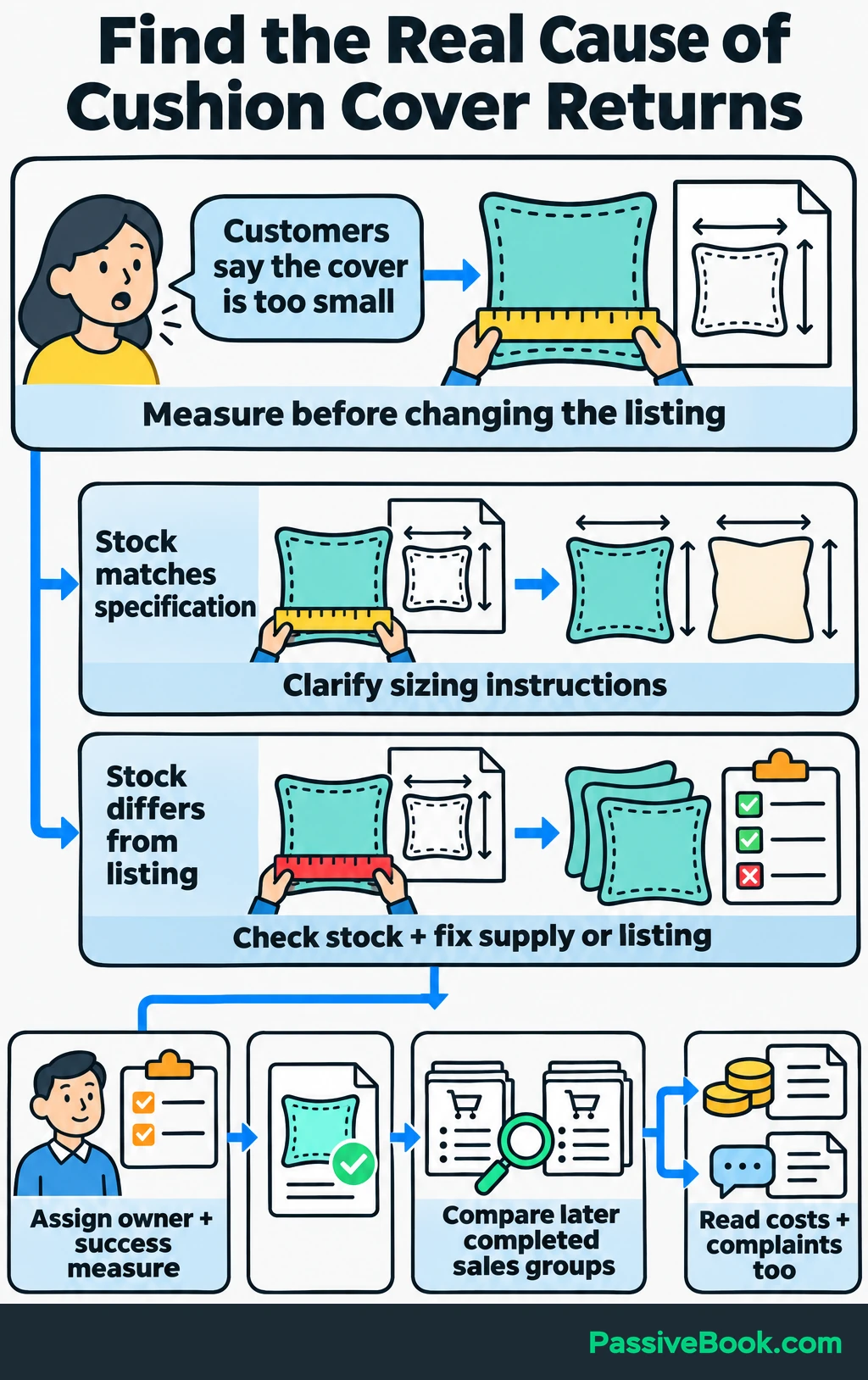
Match the change to the evidence:
| Repeated finding | Practical response |
|---|---|
| Covers match the specification, but buyers misunderstand sizing | Add a clear measuring diagram and explain whether dimensions refer to the cover or insert |
| Finished dimensions differ from the listing | Check affected stock, correct the listing, and address the supply problem |
| Wrong colors leave the warehouse | Improve variant labels and the picking check |
| Zipper faults cluster in one batch | Inspect remaining batch stock and raise the issue with the supplier |
| Covers arrive damaged | Review packaging and where damage occurs during delivery |
Assign each change an owner, implementation date, and success measure. Then compare later sales groups after their return windows have elapsed.
I would start with one repeated problem rather than rewrite every product page at once. A specific fix is easier to check and easier to reverse if you misunderstood the cause.
Read costs and complaints alongside the return rate. Fewer recorded requests mean little if customers have simply given up trying to reach you.
What Next?
Take one open return and give it a named owner, a next-action deadline, a customer resolution status, and a separate inventory status. Follow it through to closure, then use the gaps you find to improve your checklist.
Use the social buttons to share this guide when your team needs a common process for moving returns from request to resolution.
Which part of your returns process creates the most waiting or repeated work? Tell me in the comments, and bring any other questions there too.
Share this post with your friends & followers:

