A paid order is missing from the packing list, an apron has sold twice, and a customer is asking about a refund you thought was finished. Each problem is small until you have to trace it through three tools.
That detective work eats the time you meant to spend growing the store. And when every answer lives in your head, taking an evening off becomes surprisingly ambitious.
This guide shows how to give each order, stock movement, and customer issue a clear path to completion, then automate the parts that no longer need your judgment.
Map Your Workflows and Assign Ownership
Start by following one order through your store. Record what happens at checkout, payment, stock reservation, packing, carrier handoff, and delivery. Include the check that payments, refunds, fees, and bank deposits match. Then follow a return through inspection, refund, and stock adjustment.
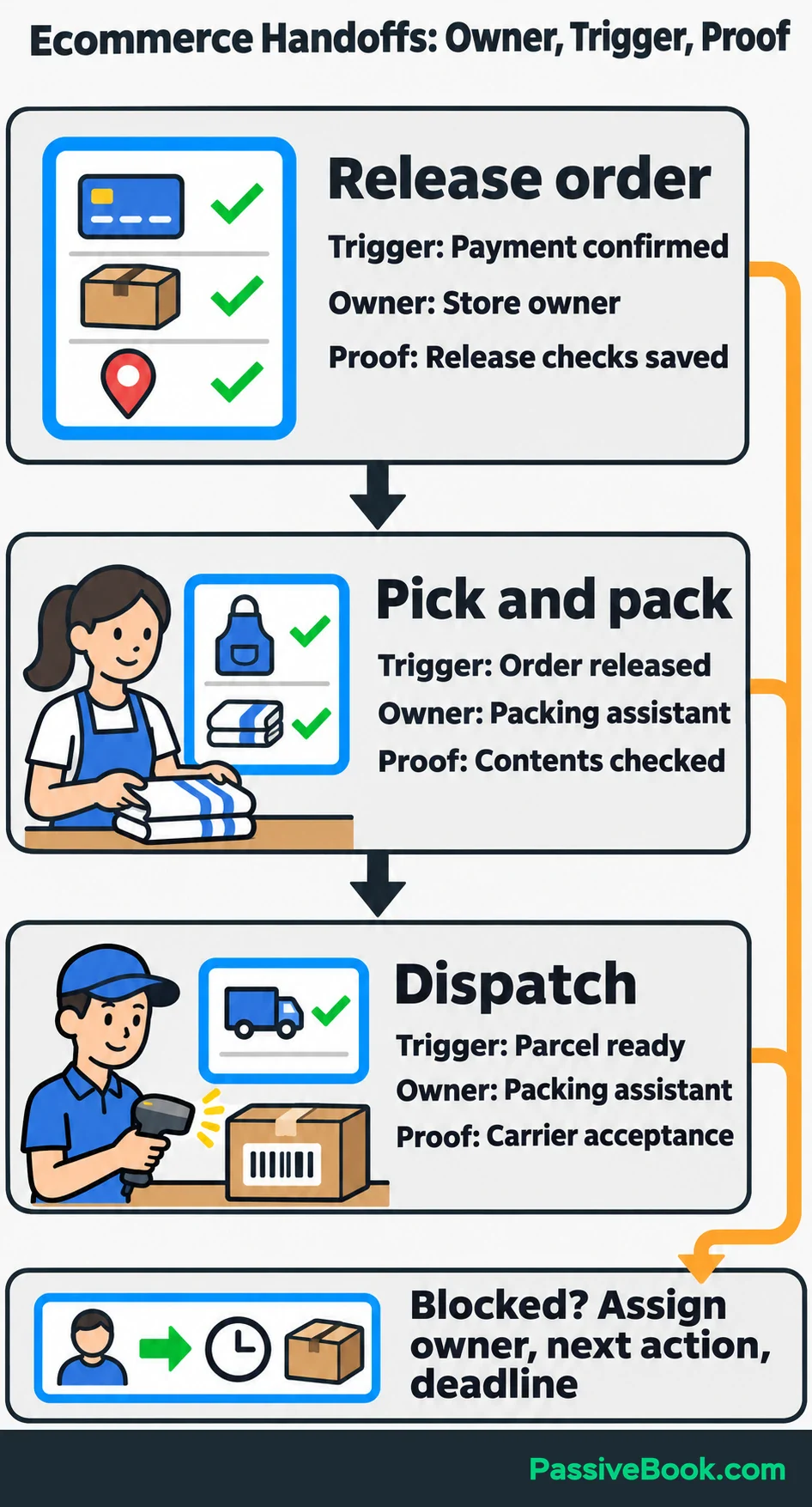
For each handoff, answer three questions: Who acts next, what tells them to act, and what proves they finished?
Throughout this guide, imagine you sell cotton tea towels and aprons. The store’s quantities and calculations are illustrative assumptions.
Build a workflow table like this, then extend it through delivery, returns, and payments:
| Stage | Trigger | Owner | Record to Check | Deadline | Completion Evidence | Exception Action |
|---|---|---|---|---|---|---|
| Release order | Payment confirmed | Store owner | Store order record | Before packing starts | Payment, stock allocation, and address checks saved on order | Hold order and assign next action |
| Pick and pack | Order released | Packing assistant | Fulfillment queue | Before collection cutoff | Saved checklist confirming SKUs and quantities match order | Separate parcel and report mismatch |
| Dispatch | Parcel ready | Packing assistant | Shipment record | Promised dispatch deadline | Carrier acceptance scan or collection receipt | Investigate missed collection |
| Complete refund | Refund approved | Store owner | Payment processor | Recorded refund deadline | Processor record showing successful refund and reference | Investigate failure and update customer |
One person can own several stages. The point is to remove guessing, not invent departments.
Choose an authoritative record—the place you trust when tools disagree—for each type of information:
- Products: The product catalog holds internal product codes, called SKUs, along with variants, weights, and descriptions.
- Inventory: One inventory record controls quantities across channels.
- Orders: The store records what the customer bought and what remains outstanding.
- Payments: The processor confirms charges and refunds; accounting records reconcile them.
- Customer Conversations: One support queue holds replies and promised follow-ups.
Specify which connected tools may update each record. Two systems independently changing stock is an argument waiting to happen.
Document the workflow with the most repeated mistakes first. A short procedure needs its starting information, actions, completion check, and escalation contact.
On one of my digital-product sites, I had written “send the download” as a procedure. When I tried following it as a handoff, it left too much unanswered: which file, which version, and what counted as successful delivery? I now write the completion check before calling a procedure finished.
If a routine still lives mostly in your head, the AI Automation Planner can turn your rough notes into a procedure draft. Start with the task you find hardest to explain to someone else.

Free AI Automation Planner




Keep one exception queue for work that cannot follow the normal path. Each entry needs an order or SKU, problem, owner, next action, and deadline. Link customer conversations to that issue so “refund failed” and “customer chasing refund” stay connected.
Keep Inventory Accurate and Replenish on Time
Control Receiving and Stock Movements
Give each sellable variant a unique SKU, your internal product code. A navy apron and a natural apron need different codes even if their prices match.
Record the supplier, purchase cost, storage location, weight, and packing requirements. For bundles, define the components: one apron plus two tea towels must consume those exact quantities.
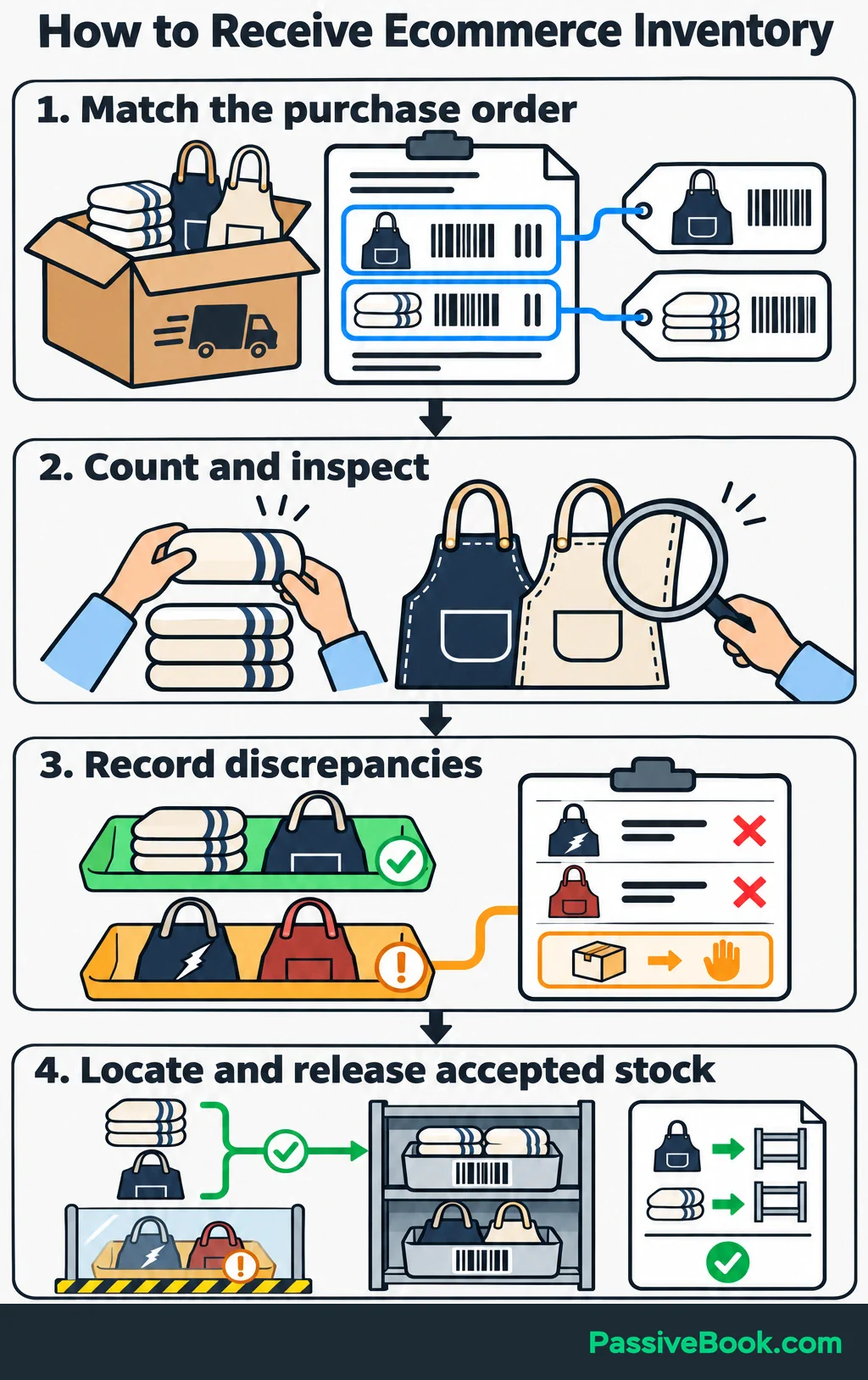
When a delivery arrives:
- Match it against the purchase order.
- Count and inspect the goods.
- Record shortages, damage, or incorrect variants.
- Assign storage locations and release accepted units for sale.
Keep stock states separate. Physical stock includes items already promised to customers and goods awaiting inspection. Available-to-sell stock excludes those units and incoming deliveries. Shopify’s inventory definitions make this distinction explicit.
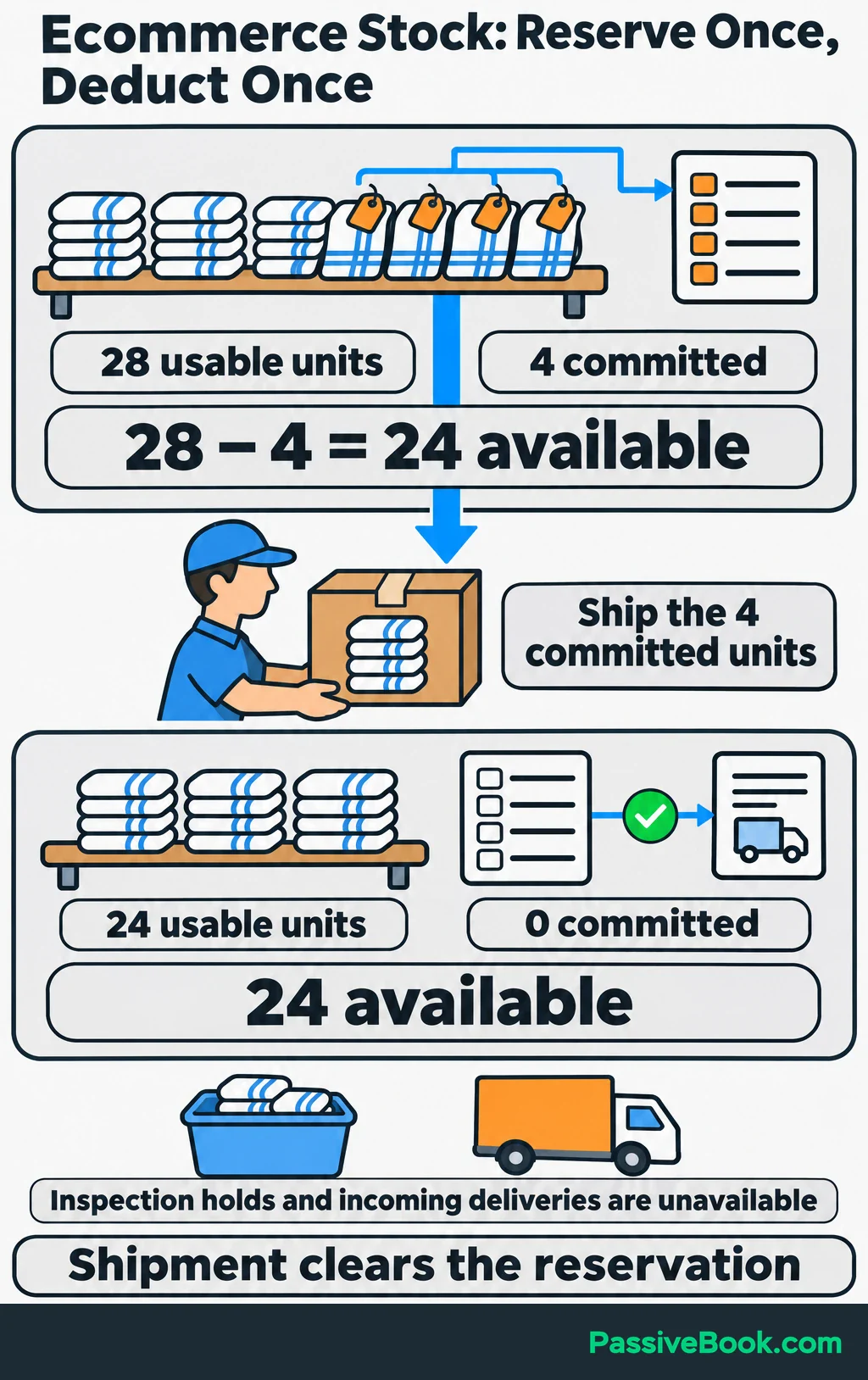
Record each receipt, reservation, shipment, cancellation, and inspected return when it happens. A shipment should reduce physical stock and clear its reservation without deducting availability twice.
If you sell across channels, make them draw from the same availability record or give each a controlled allocation. Include shared bundle components.
Count fast-moving products and items with recurring discrepancies more often. Before changing a quantity, check for an unrecorded shipment, misplaced item, or missed return. Otherwise, you fix the number and leave the cause running.
Set Reorder Points and Purchase Quantities
Estimate daily demand using periods when the product was available. A week of zero sales because an apron was out of stock tells you little about demand.
Adjust for planned promotions and seasonal changes. Measure replenishment time from placing the order until the goods have been received, inspected, and made usable.
Your reorder point covers expected demand during that wait plus a buffer for uncertainty:
Reorder point = daily demand × replenishment lead time + safety stock
This is the formula described in Shopify’s reorder-point guide. Choose the buffer based on demand swings, supplier reliability, and the cash you can afford to tie up.
Suppose a tea towel sells four units daily, replenishment takes seven days, and you choose a 12-unit buffer:
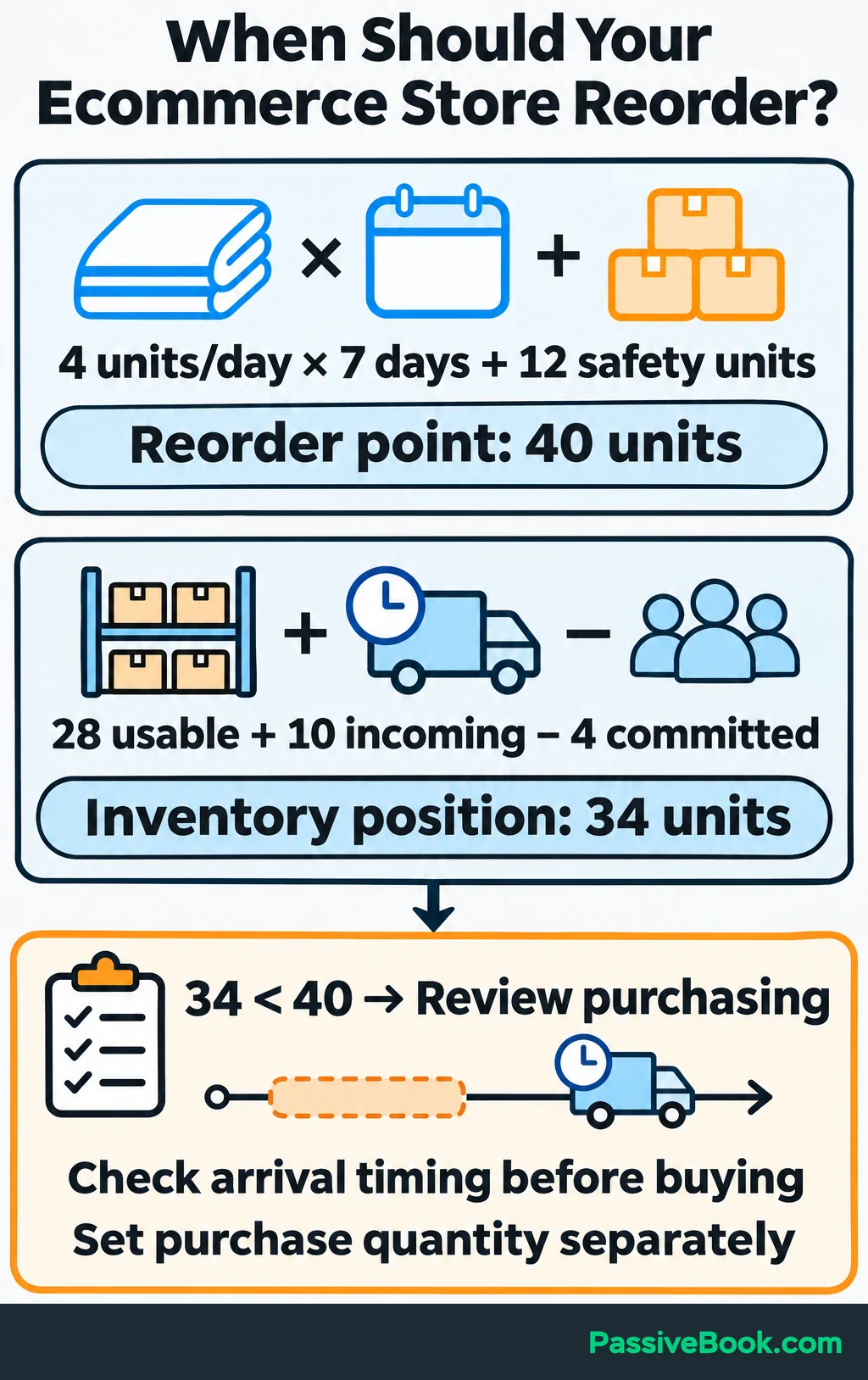
(4 × 7) + 12 = 40 units
Compare that threshold with your inventory position. This counts usable physical stock, including reserved units, adds confirmed incoming supply, and subtracts outstanding customer commitments once. Oracle’s replenishment documentation separates these quantities.
With 28 usable units, 10 incoming, and four committed:
28 + 10 − 4 = 34 units
That triggers a purchasing review because 34 is below 40. Check delivery dates too. Supply arriving after you run out cannot cover the earlier gap.
The reorder point tells you when to review purchasing. It does not tell you how many units to buy. Set that quantity separately using expected demand, existing supply, supplier minimums, pack sizes, storage, and cash. Record the supplier’s confirmation and expected receipt date.
My online jewellery store started with about $1,200 and ended with unsold inventory and most of that investment gone. I had skipped market research and bought stock before checking demand properly. That experience is why I would rather review a modest purchase twice than admire a cupboard full of products nobody ordered.
Move Orders From Payment to Carrier Handoff
Release Only Orders That Are Ready to Fulfill
Before an order enters packing, check:
- Payment: The required payment has succeeded under your payment policy.
- Stock: The correct variants and quantities are allocated.
- Shipping: The address and selected service are usable.
- Review Flags: Any payment, fraud, or customer-change checks are resolved.
Keep payment, fulfillment, and refund statuses separate. A paid order can still be held, partly shipped, or awaiting a refund.
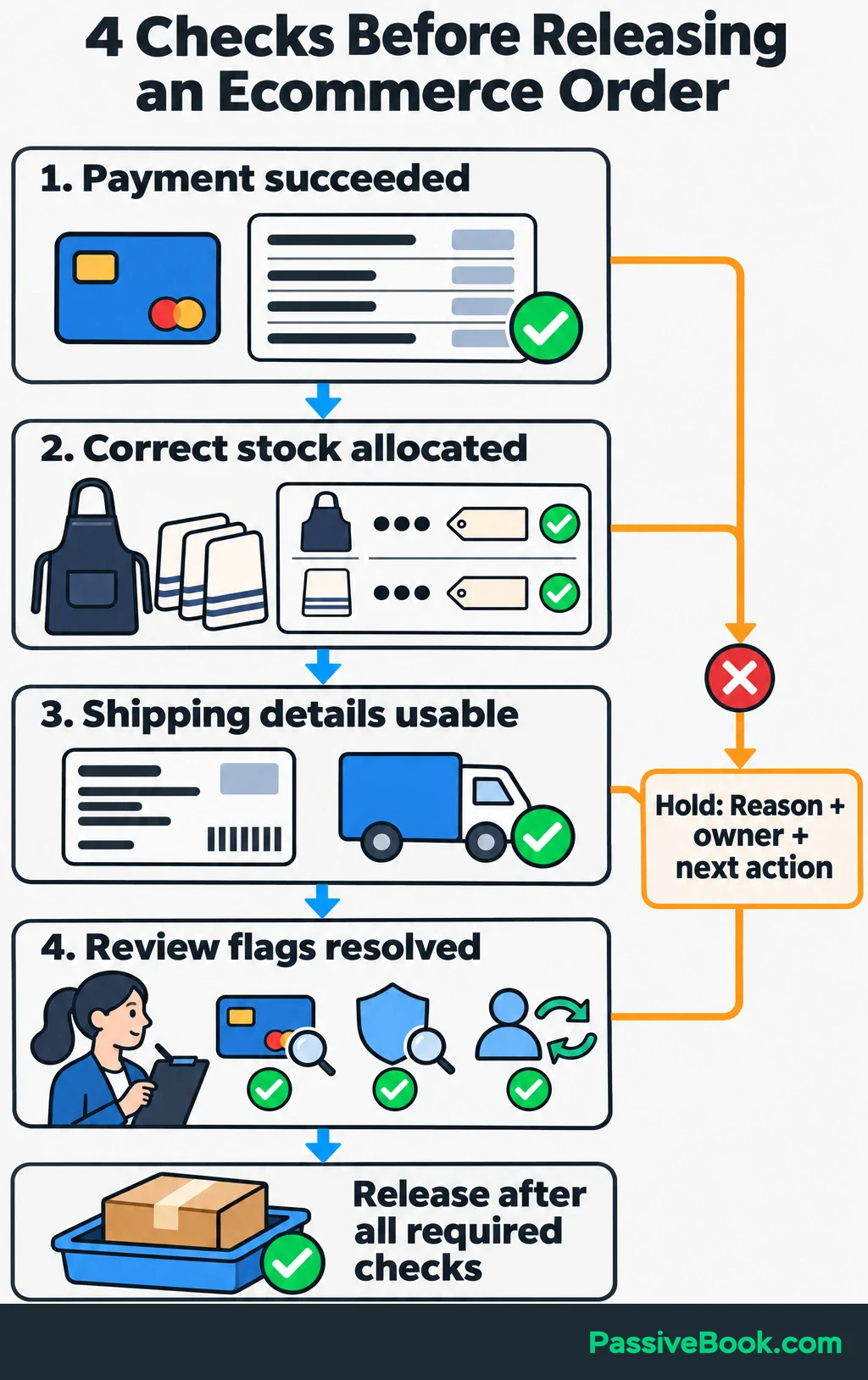
Define what moves an order between ready, held, partially fulfilled, and canceled. Every held order needs a reason, owner, and next action.
If the navy apron is unavailable, hold the affected item and contact the customer. Offer workable choices: wait, choose another color, cancel the item, or receive a partial shipment. Record their choice before release.
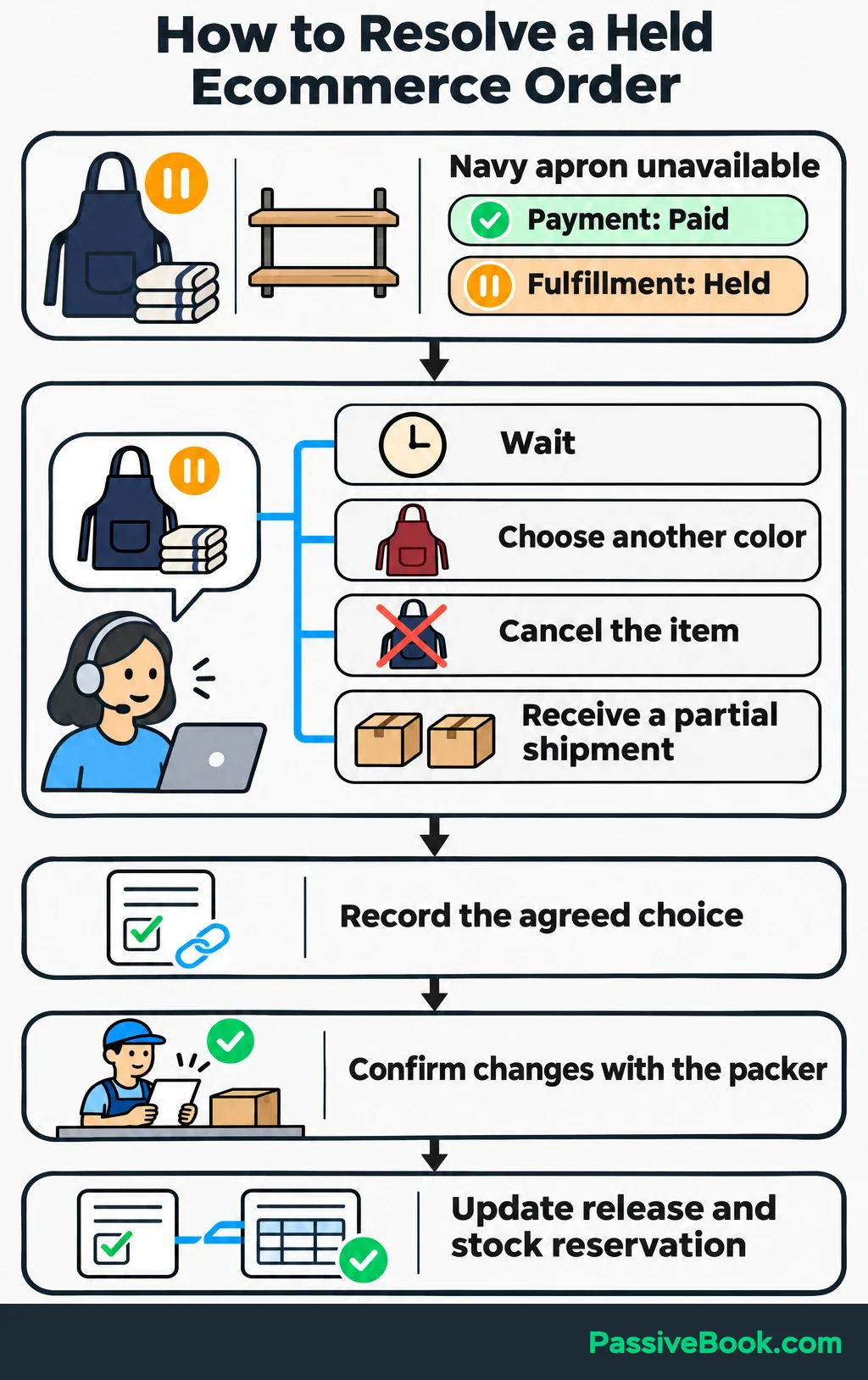
Also define when stock is reserved and when that reservation expires or is released. For cancellations and address changes, get confirmation from whoever packs the order before marking the change complete.
Compare paid orders with the fulfillment queue to catch missing handoffs. After changes to checkout, shipping, products, or integrations, place a test order and follow it through the affected steps.
Standardize Picking, Packing, and Dispatch
Whether you pack yourself, use a warehouse, or have a supplier ship directly, name who handles stock updates, dispatch confirmation, and delivery problems.
For dropshipping or print on demand, require the supplier to acknowledge each order, flag unavailable variants, and send tracking. Print on demand means the product is made after purchase.
For digital products, skip the packing steps below. Confirm delivery of the purchased file or course access, record that access was granted, and send access problems to support.
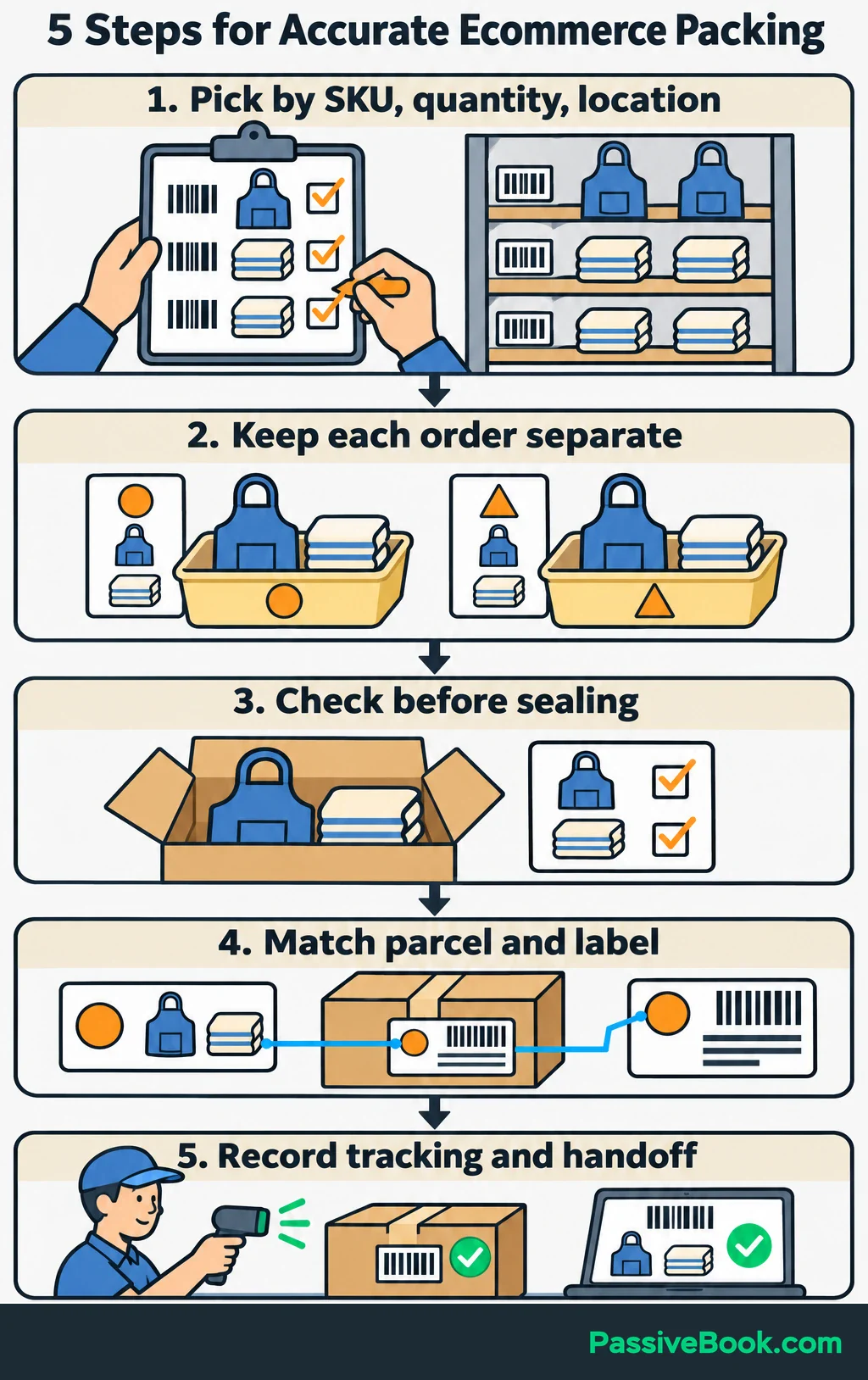
Use the same basic packing sequence for physical orders:
- Pick by SKU, quantity, and storage location.
- Keep each order physically separate.
- Check contents against the order before sealing.
- Match the parcel to its shipping label.
- Record tracking and carrier handoff.
For the running example, verify apron color and tea-towel quantity. “Looks roughly right” is a poor quality check.
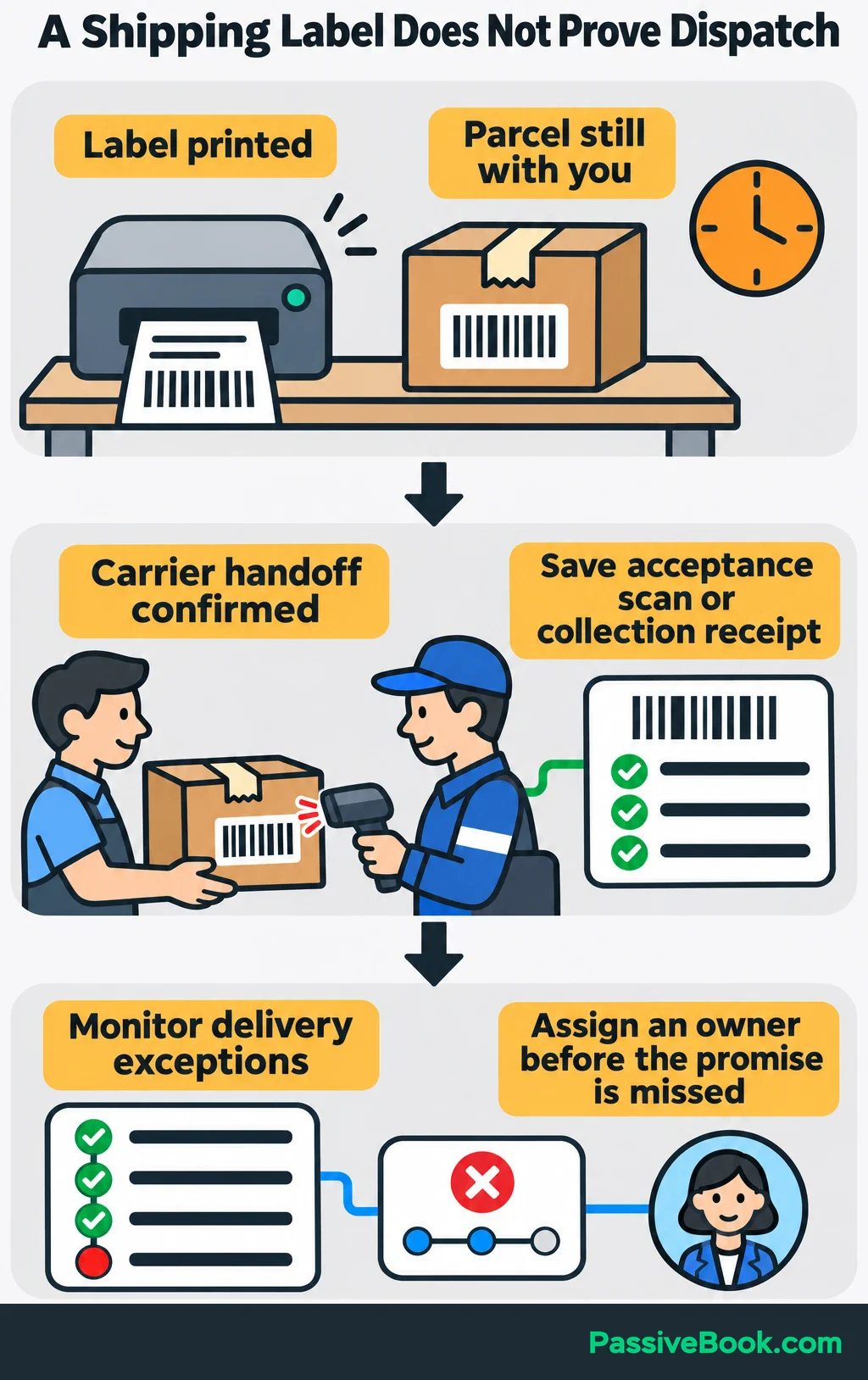
Set dispatch deadlines around real packing capacity and carrier collection times. Explain processing time separately from transit time so customers understand when delivery is expected.
A printed label does not prove dispatch. Shopify’s fulfillment-time definition ends at carrier handoff for shipped orders. Keep acceptance evidence and assign follow-up for missed collections, stalled tracking, failed deliveries, and damaged parcels.
If a shipment will miss its promised date, act before the deadline. For US merchandise orders covered by the rule, the FTC requires shipment-delay consent or cancellation and refund under its specified conditions. Build those requirements into the delay process rather than improvising after a complaint.
Resolve Customer Issues and Close Returns
Give Every Customer Request a Next Action
Put customer requests in one shared queue linked to the relevant order. An ordinary shared inbox can be enough initially if you can track ownership and follow-up reliably.
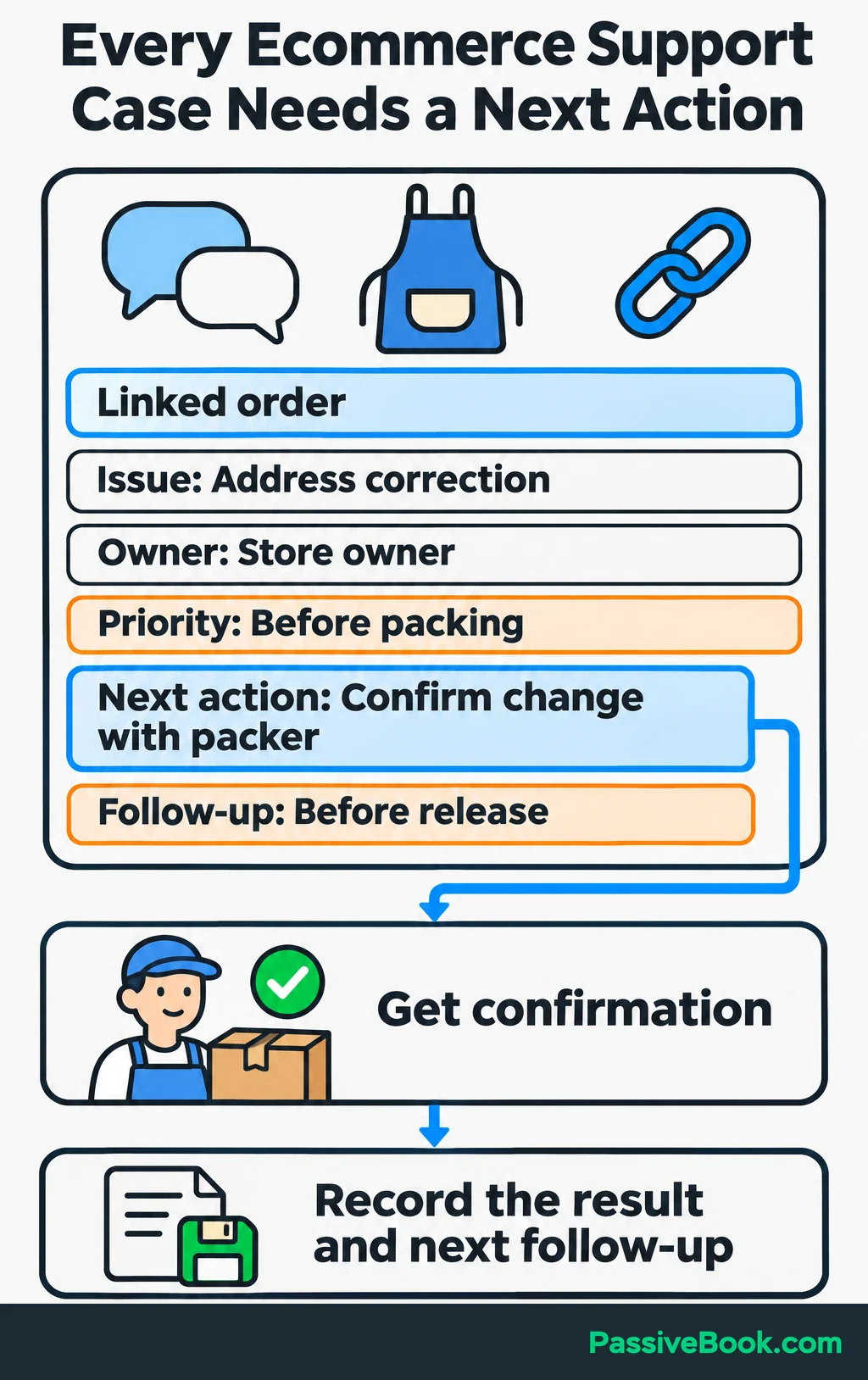
Each case needs its issue type, owner, priority, next action, and promised follow-up time. Prioritize requests whose window for action is closing, such as an address correction before packing.
Set response coverage that fits your schedule. If you work around a day job, promise a response window you can meet and arrange backup for urgent dispatch decisions.
Create reusable replies for common issues, but fill them with current facts. A useful update might say:
“The navy apron is holding up your order. We can send the natural apron instead or refund the apron. Please reply with your preference before we release the parcel.”
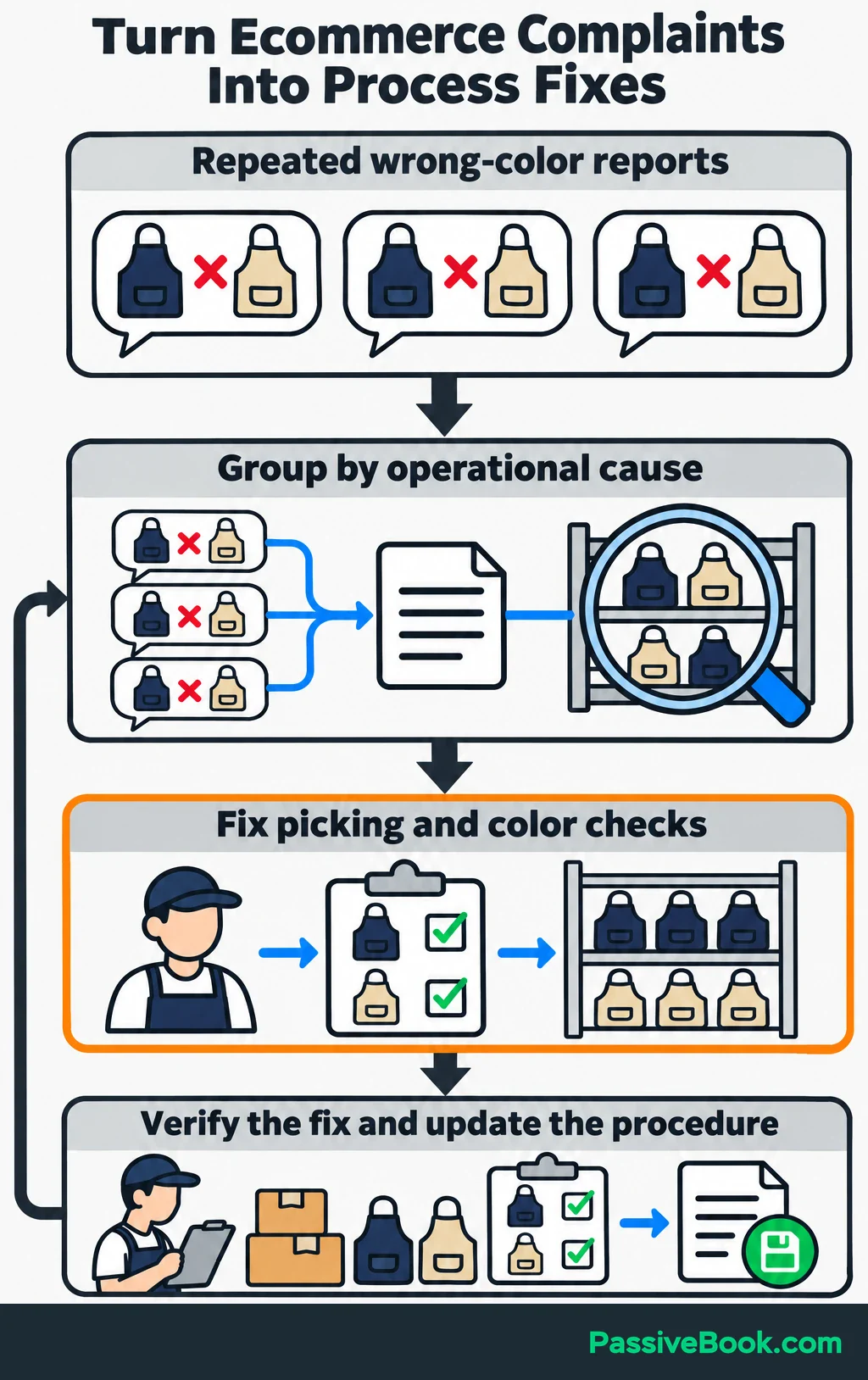
Group repeated complaints by cause. Several wrong-color reports belong with the picking procedure. Support should feed fixes back into operations, not become a permanent apology service.
Complete Returns Across Stock and Payments
Link every return to its original order, item, reason, agreed resolution, instructions, and owner.
Track the physical goods and the financial resolution separately:
- Stock: Record receipt, inspection, and whether the item is restocked, held, repaired, or written off.
- Payment: Follow an approved refund through to its successful processor record.
- Replacement: Track the new shipment and connect it to the original issue.
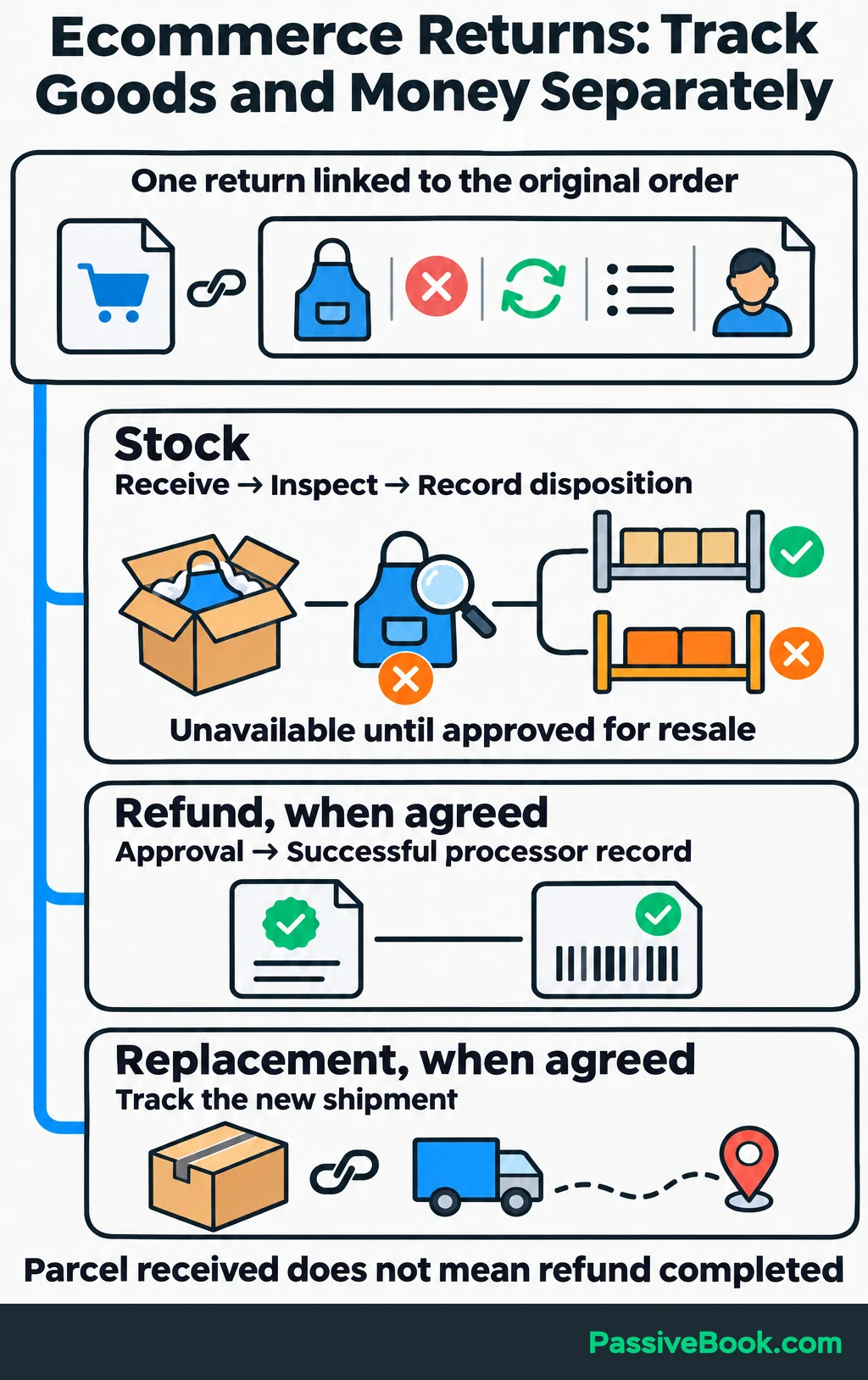
A returned apron stays unavailable until inspection confirms it can be sold again. Receiving the parcel does not automatically mean the refund has finished, and approving a refund does not make the item sellable.
Record the cause precisely. An incorrectly picked apron calls for a picking correction. Transit damage calls for a packaging or carrier review. Those problems may produce similar customer messages, but they need different fixes.
Connect Systems Around Reliable Handoffs
Use your existing store’s capabilities first. Add a tool when you can name the gap it will close and the work it will replace.
For every integration, write down the trigger, source record, destination, transferred data, update direction, expected timing, owner, and failure response.
For example, releasing an order might send its ID, line-item IDs, SKUs, quantities, and delivery details from the store to a shipping tool. The shipping tool then returns shipment details to that same order. Specify how partial shipments, cancellations, and refunds move through the connection too.
Preserve identifiers across systems. A product name can change; the SKU should still identify the correct item.
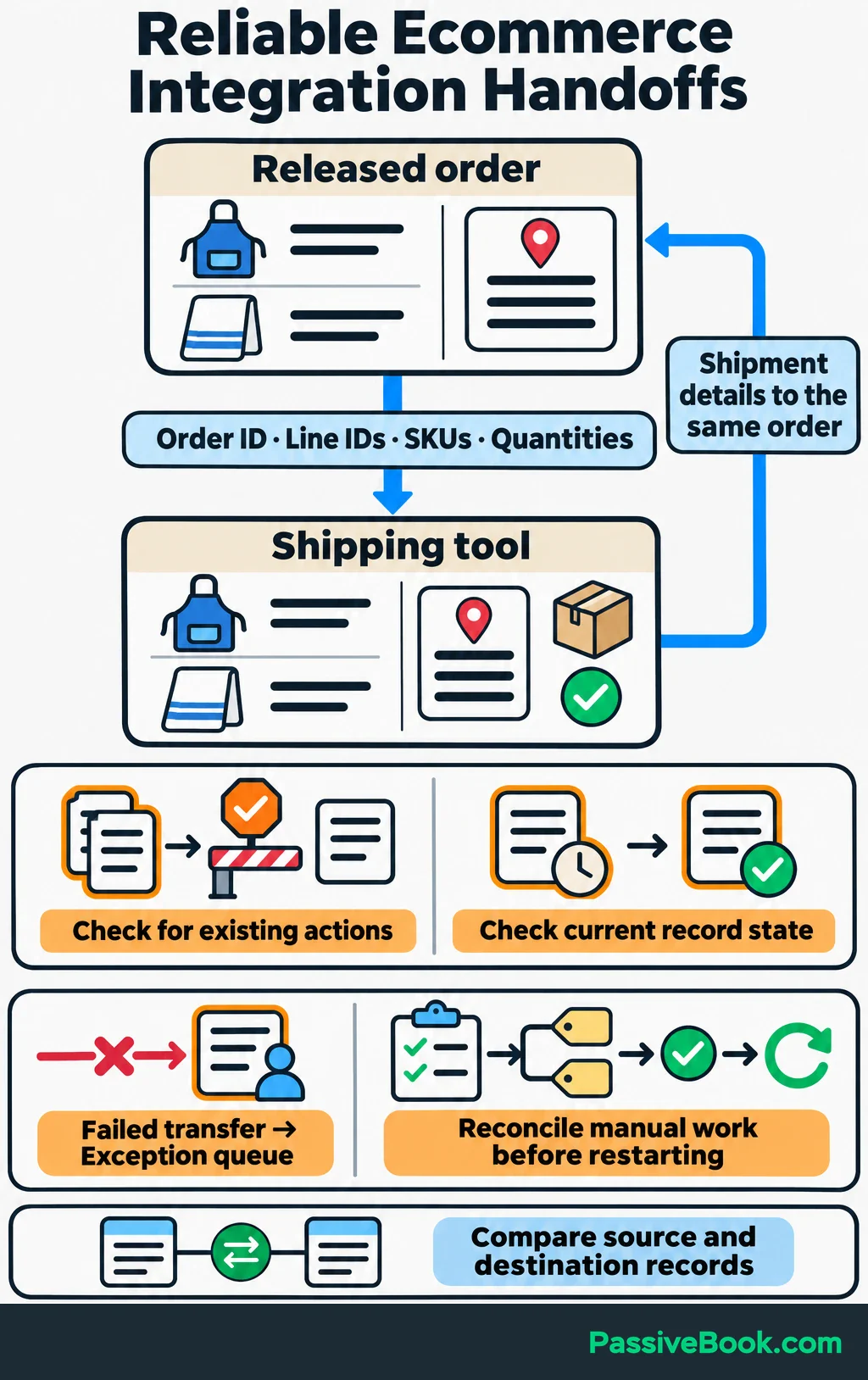
Build protection against duplicate actions and stale updates. Stripe documents that its event notifications can repeat or arrive out of order. For your workflow, that means checking whether a shipment or refund already exists and checking current record state before applying an older update.
Test a normal order, a relevant exception, and a failed transfer followed by recovery. Compare source orders with destination records because a missing transfer may produce no visible error.
During an outage, log manually completed work against the original order IDs. Reconcile it before restarting transfers so recovery does not create duplicate parcels.
If a genuine connection gap remains, I would try Make for a visual workflow between apps. I use n8n for more involved automation, but its self-hosted setup also needs ongoing maintenance. Choose based on the workflow and your ability to keep it running.
Track the Numbers That Trigger Corrective Action
Build a Compact Operational Scorecard
Use a spreadsheet to record each measure’s source, owner, review schedule, and corrective action. Set thresholds around dispatch promises, replenishment needs, and capacity. I would start with these five measures:
- Inventory Accuracy: Count SKU-and-location records whose recorded quantities match the physical count. Divide by all records counted and multiply by 100. Investigate discrepancies using count sheets and stock-movement records.
- Stock Coverage: Divide available-to-sell units by expected daily demand for days remaining. Review items that may run out before confirmed replenishment becomes usable.
- On-Time Dispatch: Of orders due for dispatch in the review period, count those handed to the carrier by their deadline. Divide by all orders due in that period and multiply by 100. Investigate overdue unshipped orders.
- Fulfillment Error Rate: Of orders shipped in the review period, count those confirmed to have wrong or missing items. Divide by all orders shipped in that period and multiply by 100. Update as reports arrive and record each cause.
- Support Backlog: Count unresolved cases past their next promised response or resolution deadline. Prioritize follow-up by age and blockers.
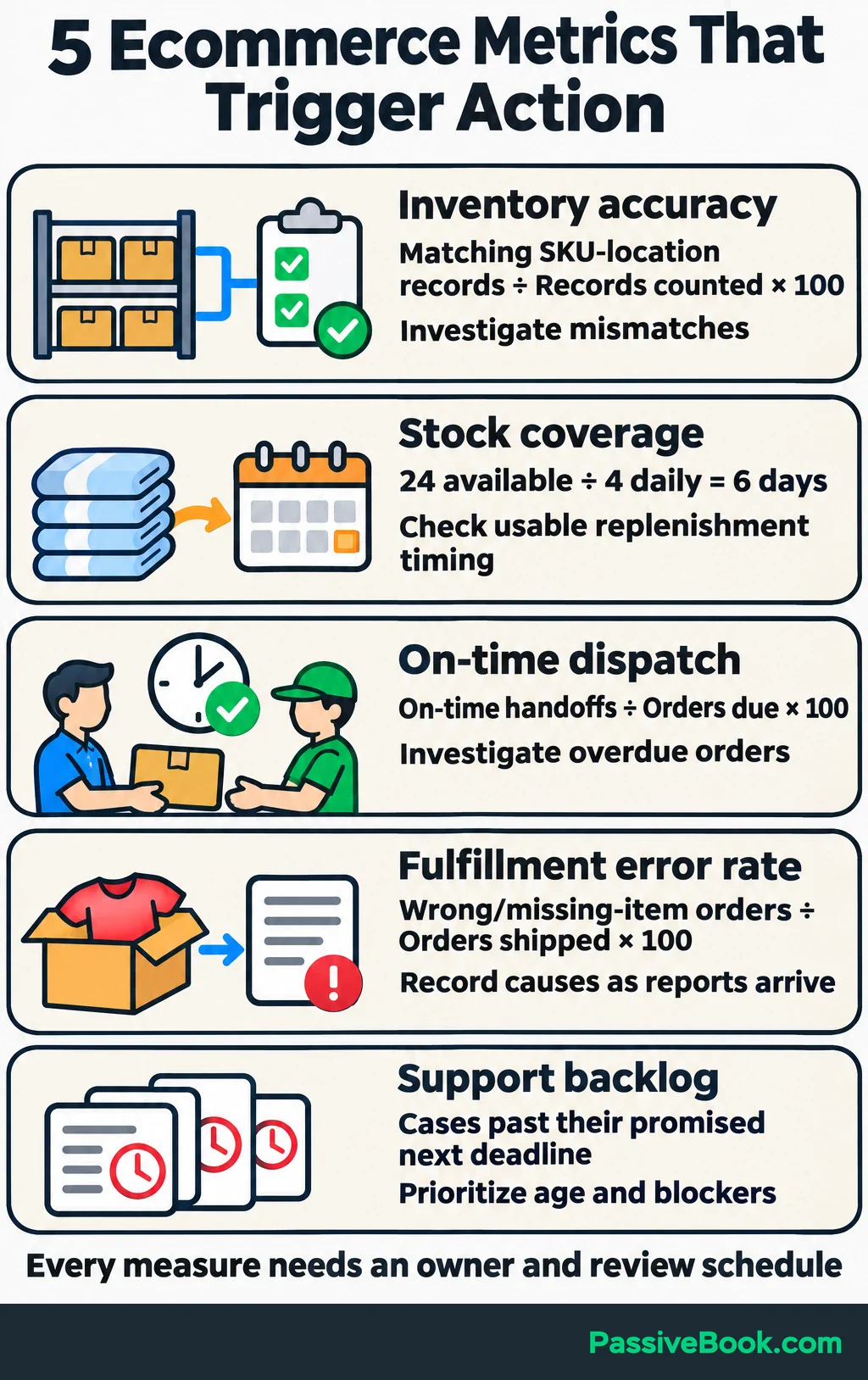
For stock coverage, the example’s 28 usable tea towels include four already committed. That leaves 24 available to sell. At four daily sales, coverage is 24 ÷ 4 = 6 days. Check whether the next confirmed receipt will become usable before those six days pass.
A number without an owner is decoration with a decimal point.
Reconcile Payments and Check Operating Contribution
Match orders to payments, refunds, disputes, fees, processor payouts, and bank deposits. A deposit is the result of several movements, so treating it as sales hides what happened.
Match automatic payouts to their transaction batches. If your processor cannot identify a batch, reconcile its balance and transaction history instead. Stripe’s reconciliation guidance covers automatic, manual, and instant payouts.
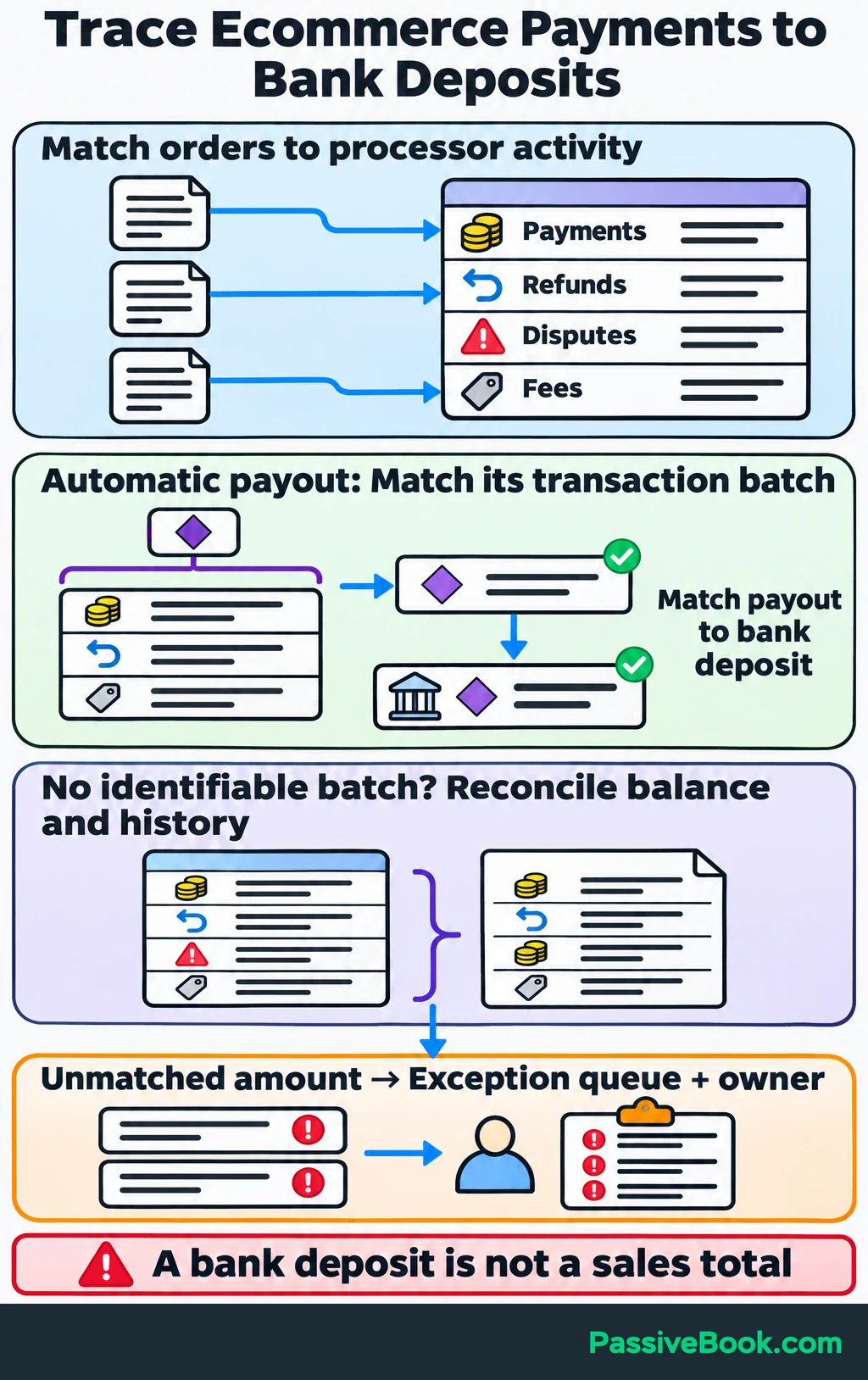
Put unmatched amounts in the exception queue and assign an owner.
Then check what an order contributes after its direct costs. Use merchandise and shipping revenue after discounts and refunds, and subtract:
- Product cost, including the cost of getting stock to you.
- Payment fees.
- Attributable picking, packing, and packaging costs.
- Outbound shipping and return costs.
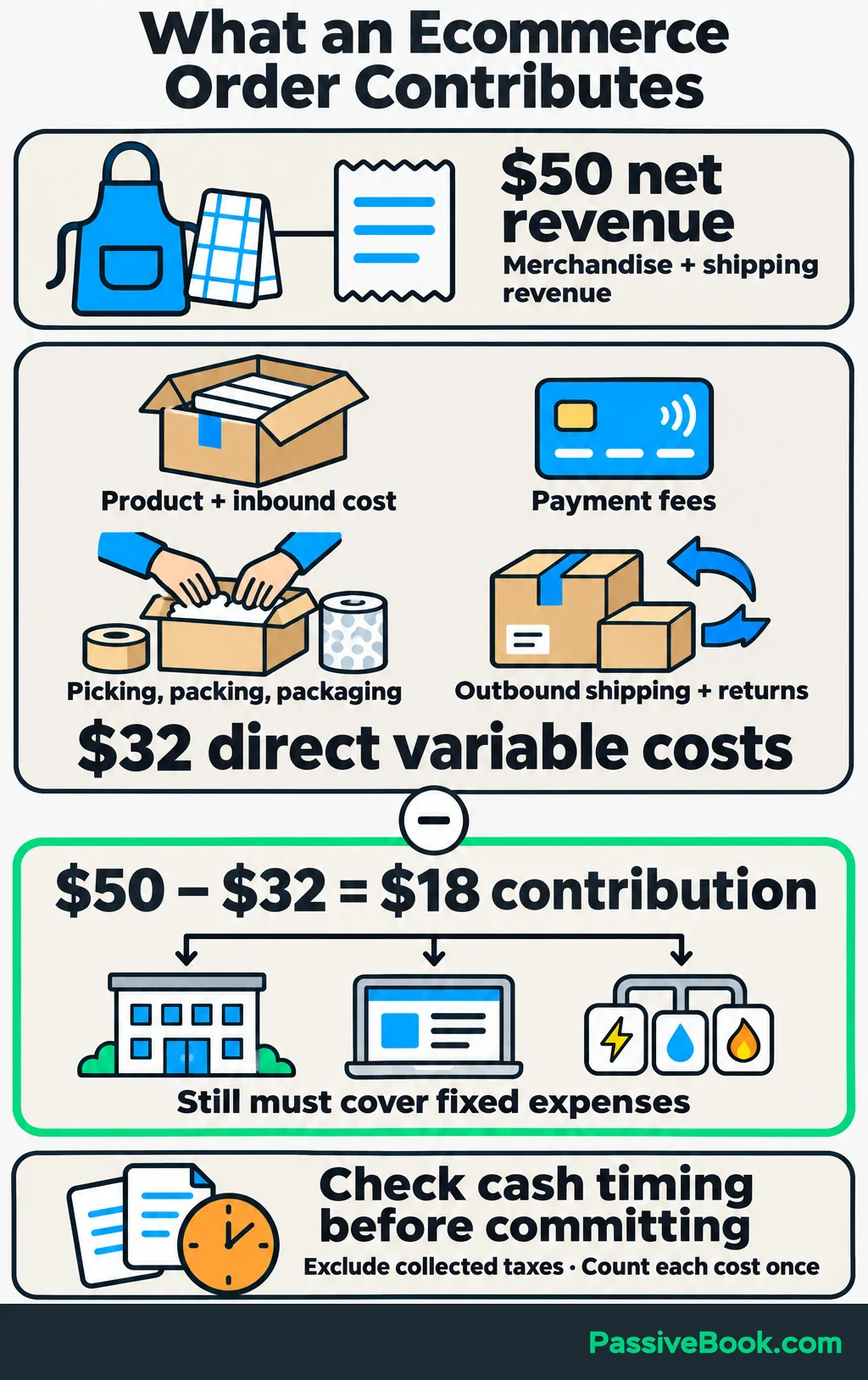
Exclude taxes collected for authorities, adjust for returned goods appropriately, and count each cost once.
For illustration, an apron-and-tea-towel order with $50 in net revenue and $32 in those variable costs contributes $18. That money still has to cover fixed expenses such as software, rent, and overhead.
Before purchasing stock or adding capacity, check upcoming supplier bills, refunds, and operating commitments. A positive contribution does not guarantee that cash is available when the next invoice falls due.
Automate Stable Workflows First
Choose the First Task by Value and Risk
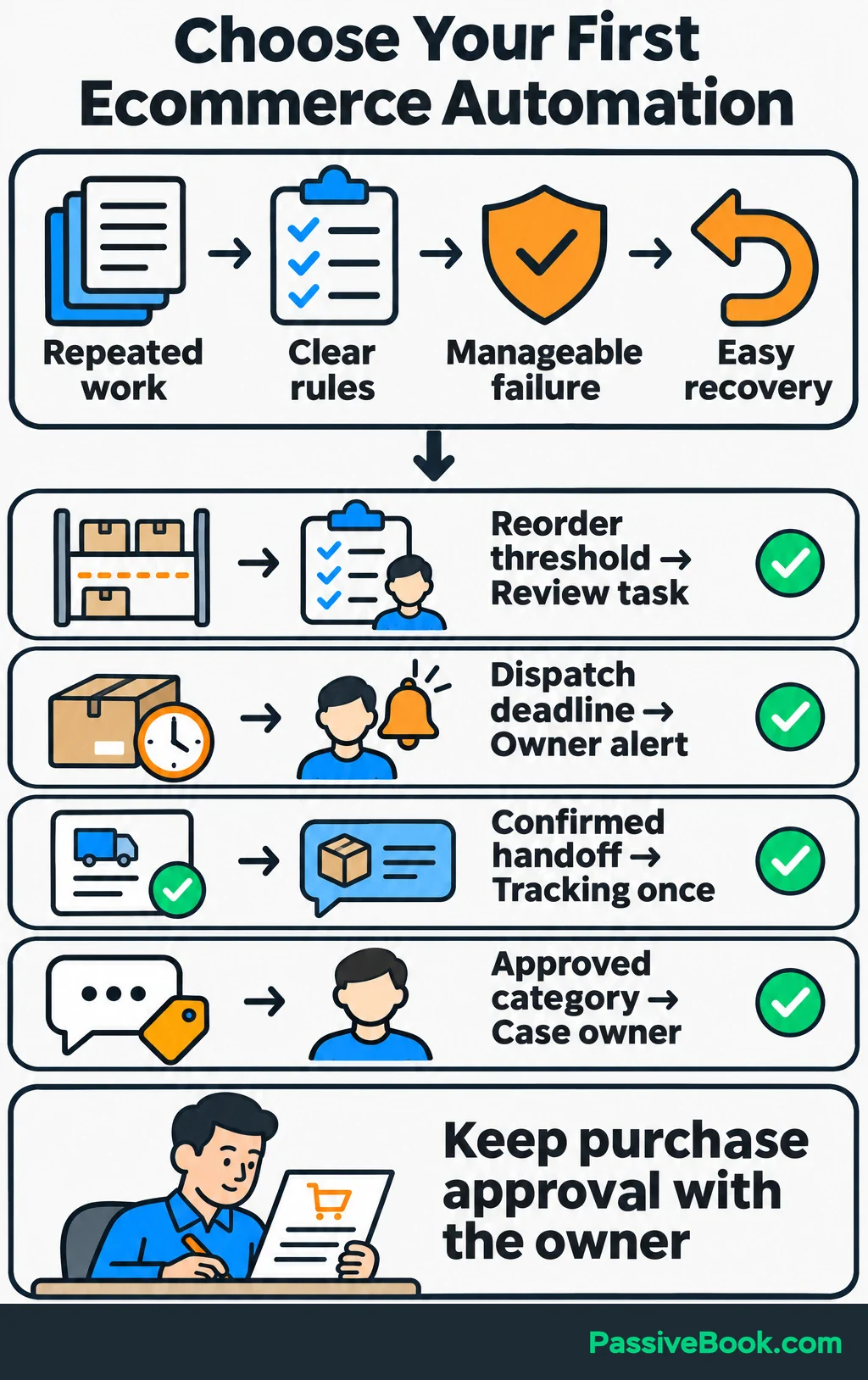
Fix failures that threaten orders or cash first. Then compare repetitive tasks by frequency, handling time, clarity of rules, consequences of failure, and ease of recovery.
Start your shortlist with low-risk actions like these:
| Task | Clear Rule | Failure Impact | First Automation |
|---|---|---|---|
| Purchasing review | Inventory position reaches reorder point | Missed alert can delay replenishment | Create an owner review task |
| Overdue dispatch | Order approaches deadline without handoff | Customer promise may be missed | Notify the responsible person |
| Shipment notification | Carrier handoff is confirmed | Incorrect message creates confusion | Send tracking once |
| Support routing | Request matches an approved category | Misrouted case may wait | Assign category and owner |
Estimate savings after monitoring and exceptions. Suppose you manually send 120 shipment notifications weekly at two minutes each. If automation removes that work but needs 40 minutes of monitoring and corrections:
(120 × 2) − 40 = 200 minutes saved per week
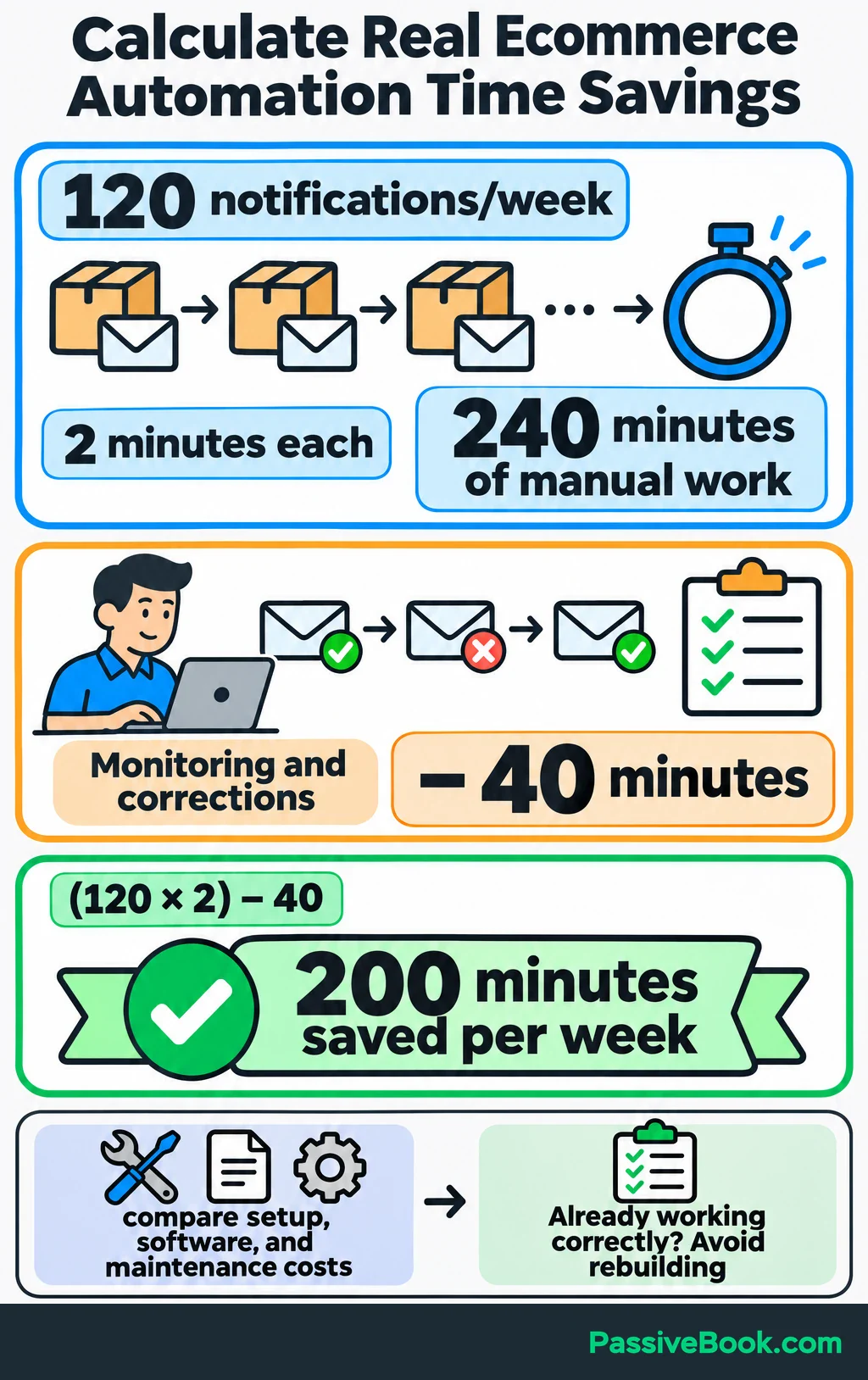
Compare that saving with setup, software, and maintenance costs. If your store already sends these messages correctly, there is nothing to gain by rebuilding them.
For the tea-towel store, I would automate the purchasing-review task first if missed reorders are the recurring problem. Include stock, incoming quantities and dates, commitments, supplier lead time, and the reorder point.
Leave purchase approval with the owner. An alert can be wrong without spending your money.
Test and Monitor Before Expanding
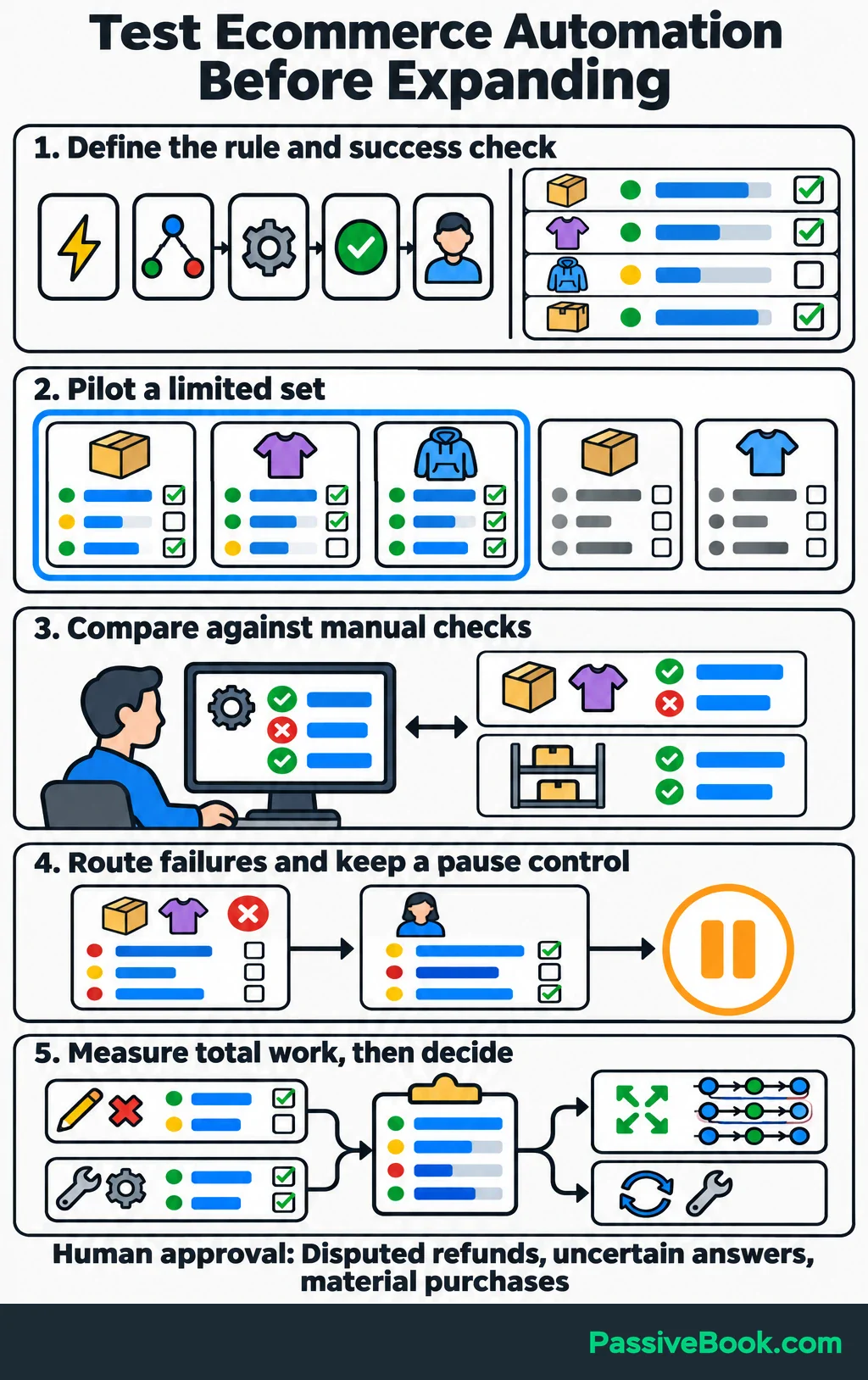
Define the trigger, conditions, action, success check, and responsible person before switching on an automation.
Pilot it on a limited set of SKUs or orders. Compare its output with manual checks, confirm that failures reach the exception queue, and keep a simple way to pause it.
Use AI where an imperfect suggestion is easy to review. It can categorize tickets, summarize repeated complaints, and draft replies from approved information.
Check order-specific facts against actual records. Keep human approval for disputed refunds, uncertain answers, and material purchases. A fluent reply cannot establish whether an apron left the warehouse.
Measure the total work afterward, including corrections and maintenance. Expand when the workflow saves effort or improves reliability. If it keeps creating cleanup work, fix the rule or stop it.
Build a Review Routine That Supports Growth
Set reviews around deadlines you still have time to meet.
A useful starting routine is:
- Daily: Review held orders, approaching dispatch deadlines, stock risks, promised customer follow-ups, and integration failures. Check before the packing or collection cutoff.
- Weekly: Confirm supplier dates, count priority stock, review scorecard trends, reconcile payments, and inspect fulfillment charges.
- Monthly: Review recurring causes, product contribution, software use, supplier performance, and capacity.
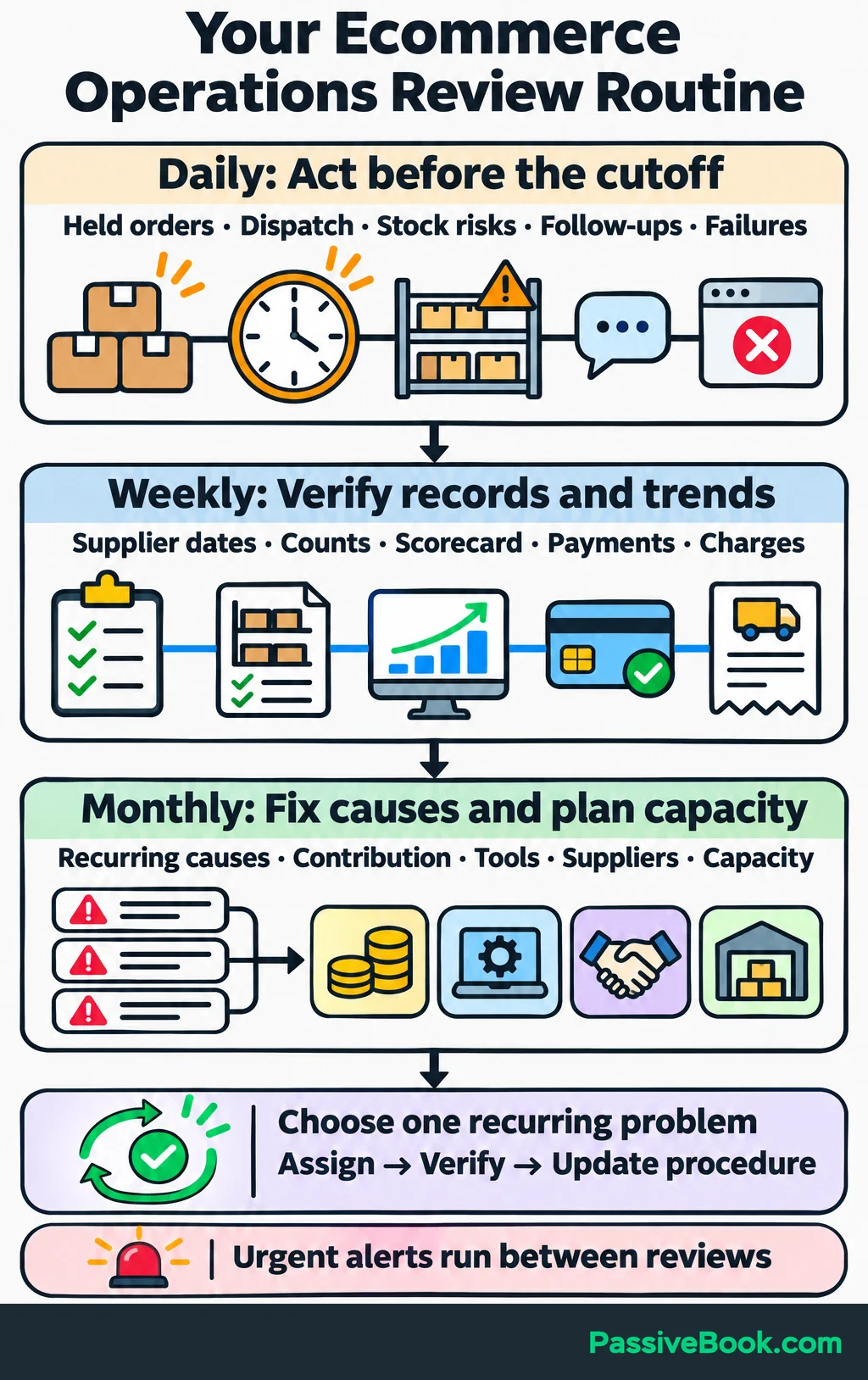
Increase the frequency when order volume or exposure makes waiting unsafe. Keep urgent alerts separate from scheduled reviews.
At each review, choose one recurring problem and assign a corrective action. If navy and natural aprons keep being confused, try clearer shelf separation and a specific color check. Confirm that the change helps, then update the procedure.
When delegating, provide the documented steps, completion check, appropriate access, backup coverage, and escalation contact. Delegate a result someone can verify.
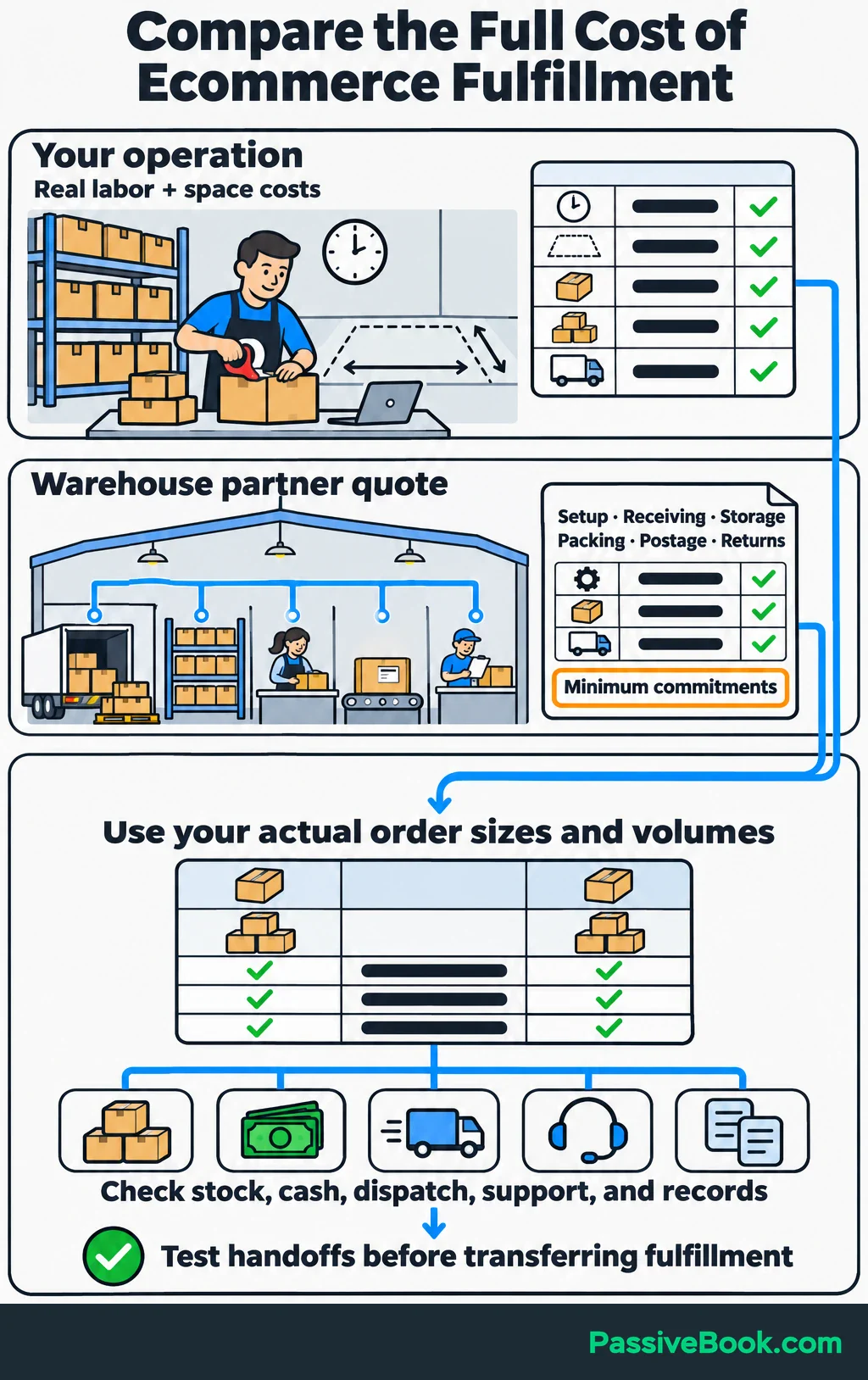
If packing becomes the constraint, compare your real labor and space costs with a warehouse partner’s full quote. Include setup, receiving, storage, packing, postage, returns, and minimum commitments. ShipBob’s pricing page illustrates several of these fee categories; use your actual order sizes and volumes when requesting quotes.
Before adding a sales channel or transferring fulfillment, check stock allocation, cash, dispatch capacity, support coverage, and connected records. Test the affected handoffs before increasing demand.
For a lean store, I would build this in phases: make current orders dependable, stabilize inventory and payments, then automate repeatable work. Each phase should remove a recurring burden before you add another tool or channel.
What Next?
Trace one recent order from payment to carrier handoff and record every point where you had to guess. Choose the most costly gap and give it an owner, a deadline, and a completion check.
Use the social buttons to share this guide if clearer handoffs would make store operations easier to discuss and improve.
Which recurring problem would you most like your store to handle reliably without your intervention? Leave it in the comments, along with any other questions.
Share this post with your friends & followers:

