An order arrives while you’re at work. Payment is confirmed, but you still need to copy the items into a packing list and check whether anything should hold it up.
Handing that job to software sounds sensible until you picture the same order going to packing twice. Saving a few minutes isn’t useful if you spend the evening fixing shipments.
You can keep control and remove repetitive work. This guide builds a paid-order handoff you can check before anything ships, then shows how to extend that approach to stock alerts, support and reporting.
1. Choose the First Workflow to Automate
To automate ecommerce operations, start with one recurring task that has clear rules and an outcome you can check.
For a week, record the work you repeat across orders, inventory, shipping, customer messages, returns and bookkeeping. Note how often each task happens, how long it takes and what goes wrong.
Then compare the strongest candidates. For a store selling ceramic mugs in different colors, each color is a product variant. Its recurring tasks might compare like this:
| Workflow | Monthly Volume | Manual Minutes per Task | Clarity of Rules | Setup Effort | Consequences of Failure |
|---|---|---|---|---|---|
| Create packing review tasks | 300 orders | 4 | Clear eligibility checks | Moderate | Missing or repeated packing work |
| Flag low-stock variants | 20 checks | 5 | Clear stock thresholds | Low | Replenishment gets delayed |
| Approve and issue refunds | 15 requests | 10 | Depends on the case | High | Money returned incorrectly |
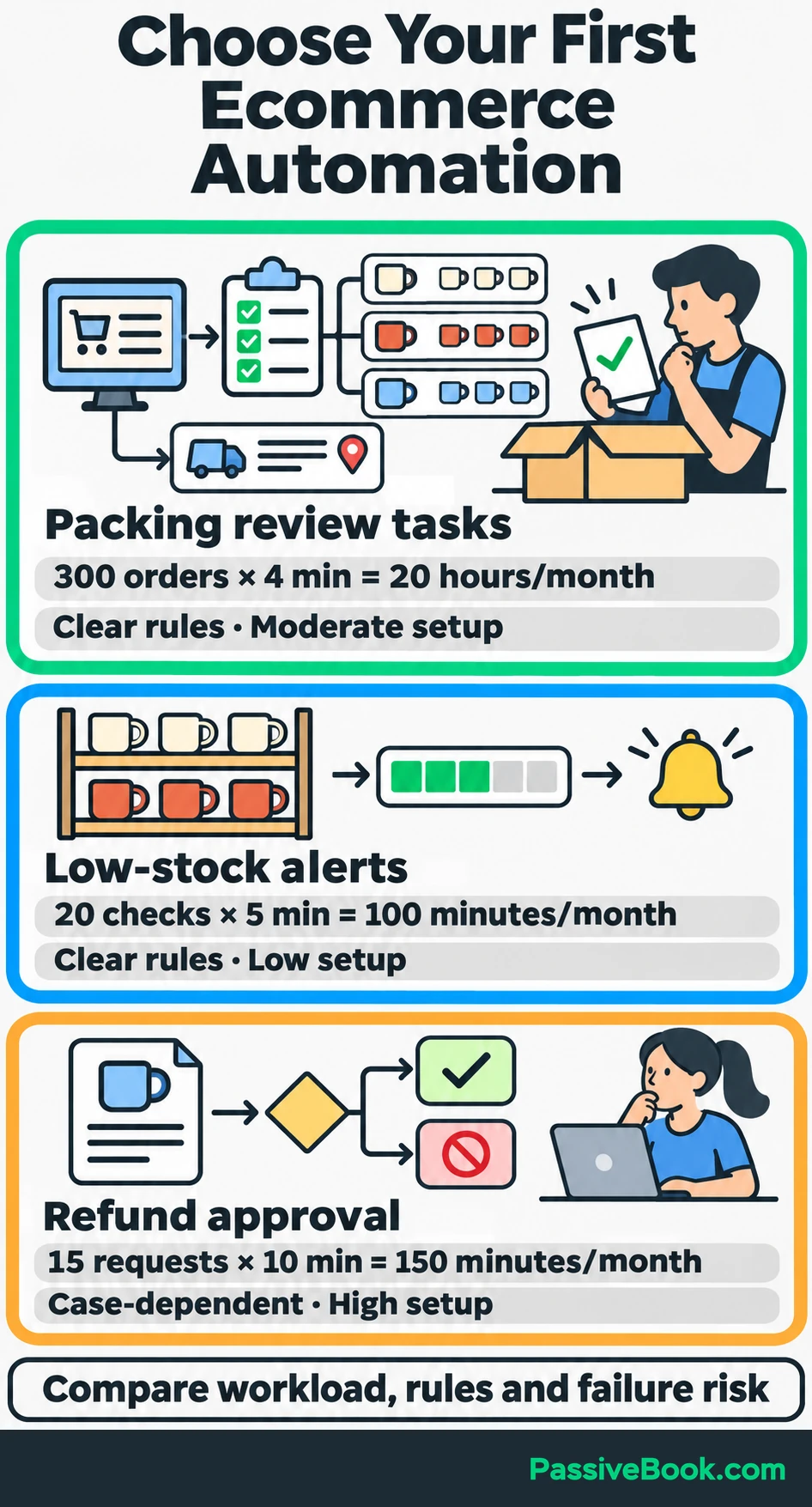
I would start with the packing review queue. It removes repeated copying, but a person still checks the order before releasing it for packing.
First, remove work that serves no purpose. If you copy every order into three spreadsheets, connecting all three is an expensive way to preserve a bad habit. Keep one queue linked to the original orders.
Check for existing automations too. A shipping app may already create a packing record, and adding another workflow could duplicate it.
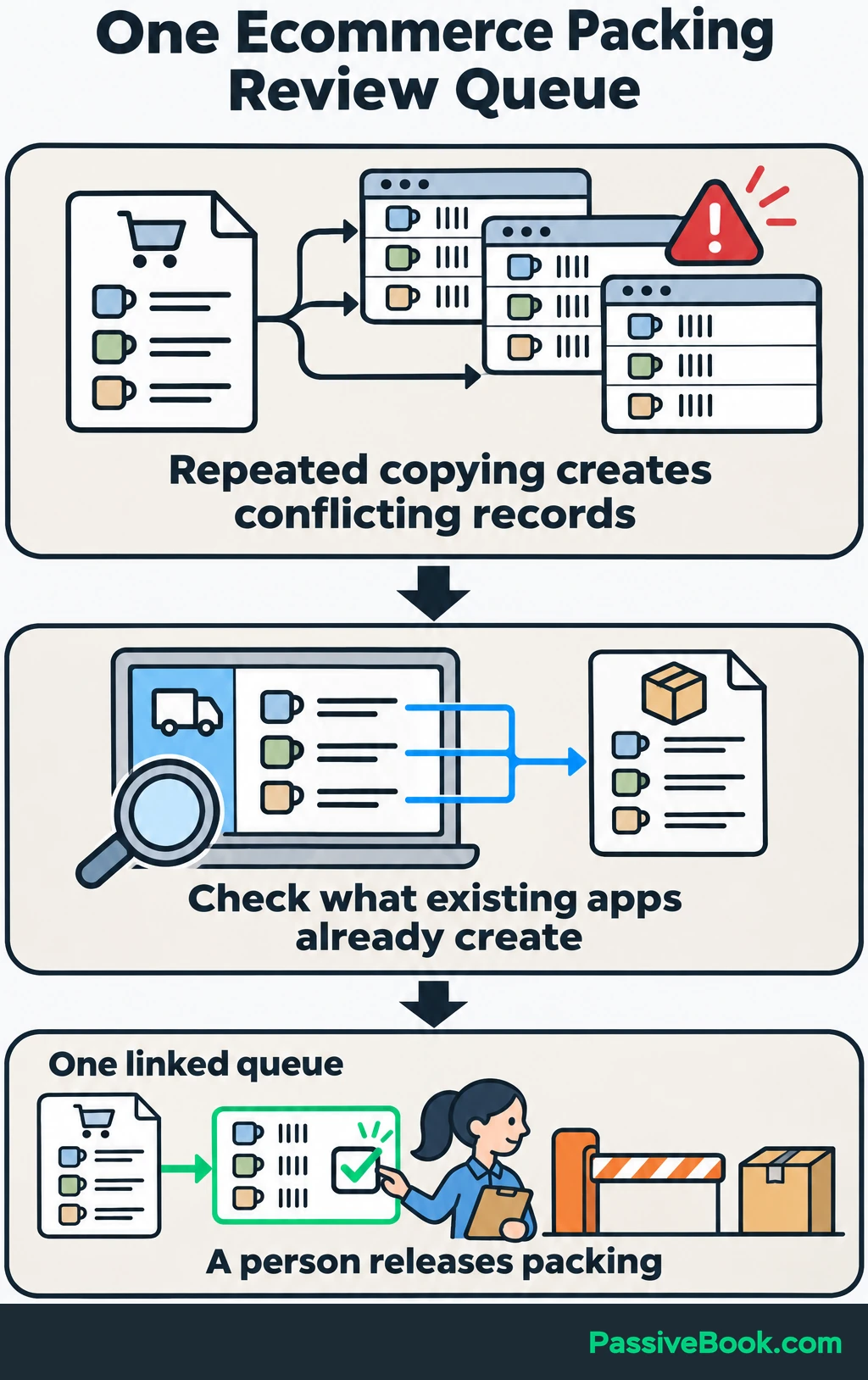
For the mug store, the first outcome is specific:
Each eligible paid order creates one packing review task with every variant, quantity and required delivery detail. Anything blocked goes to the owner for review.
That is a useful promise to automate. “Make the store run itself” gives you nothing concrete to test.
My jewellery store failed because I skipped market research and ended up with unsold inventory. Faster order handling would not have fixed that. Automate work that supports real demand; software cannot make unwanted stock more wanted.
2. Map the Workflow and Establish Reliable Data
Define the Trigger, Rules, and Exceptions
Write the process in this order:
Trigger → conditions → actions → confirmed result → exception route
The trigger starts the work. Conditions decide whether it can proceed. The confirmed result tells you what must exist afterward, and the exception route gives unfinished work an owner.
For the mug store:
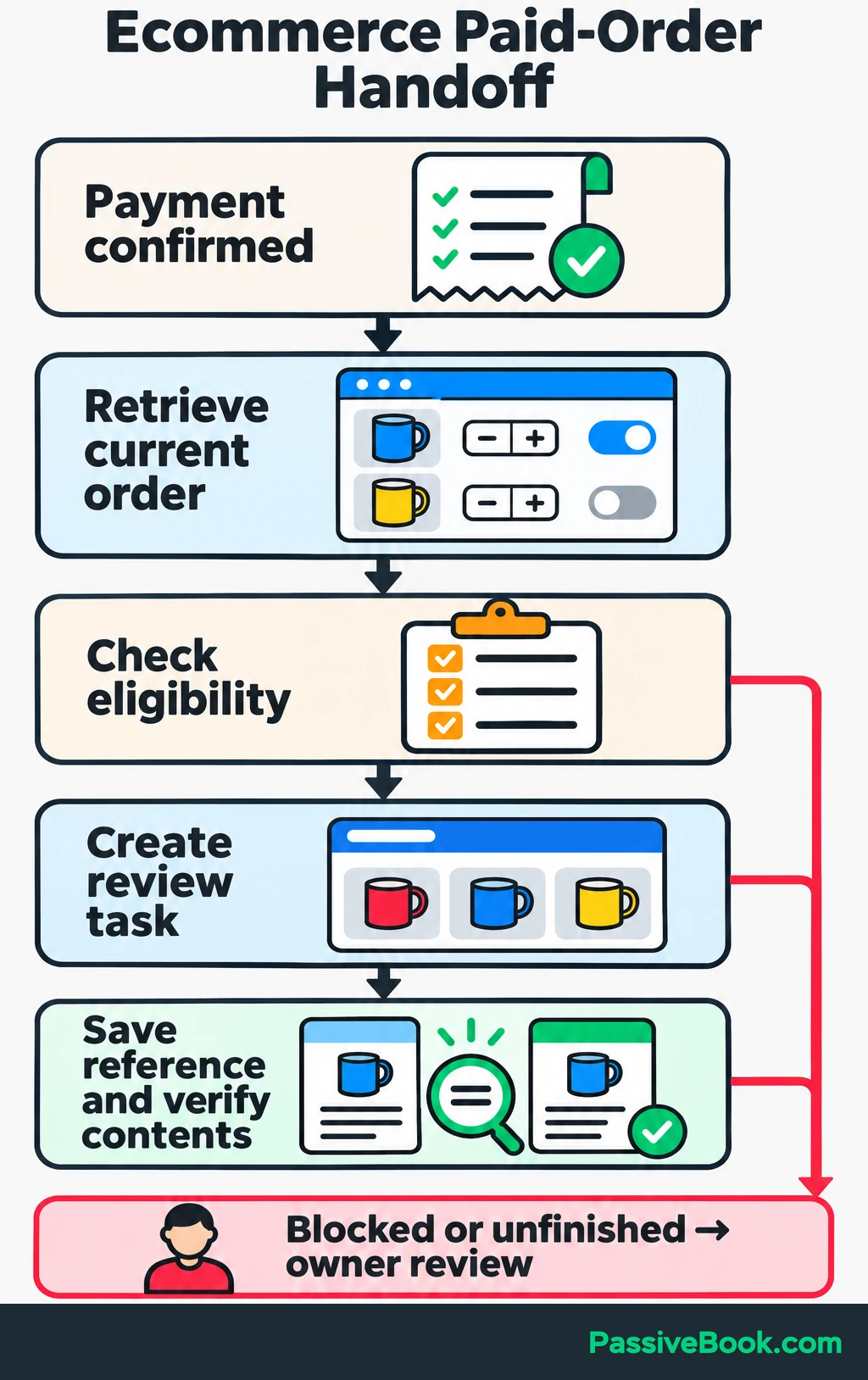
Payment confirmed → retrieve current order → check eligibility → create packing review task → save and verify its reference
Start with one supported order type, such as standard orders shipped from one location. Send split shipments, preorders and other unsupported cases to review.
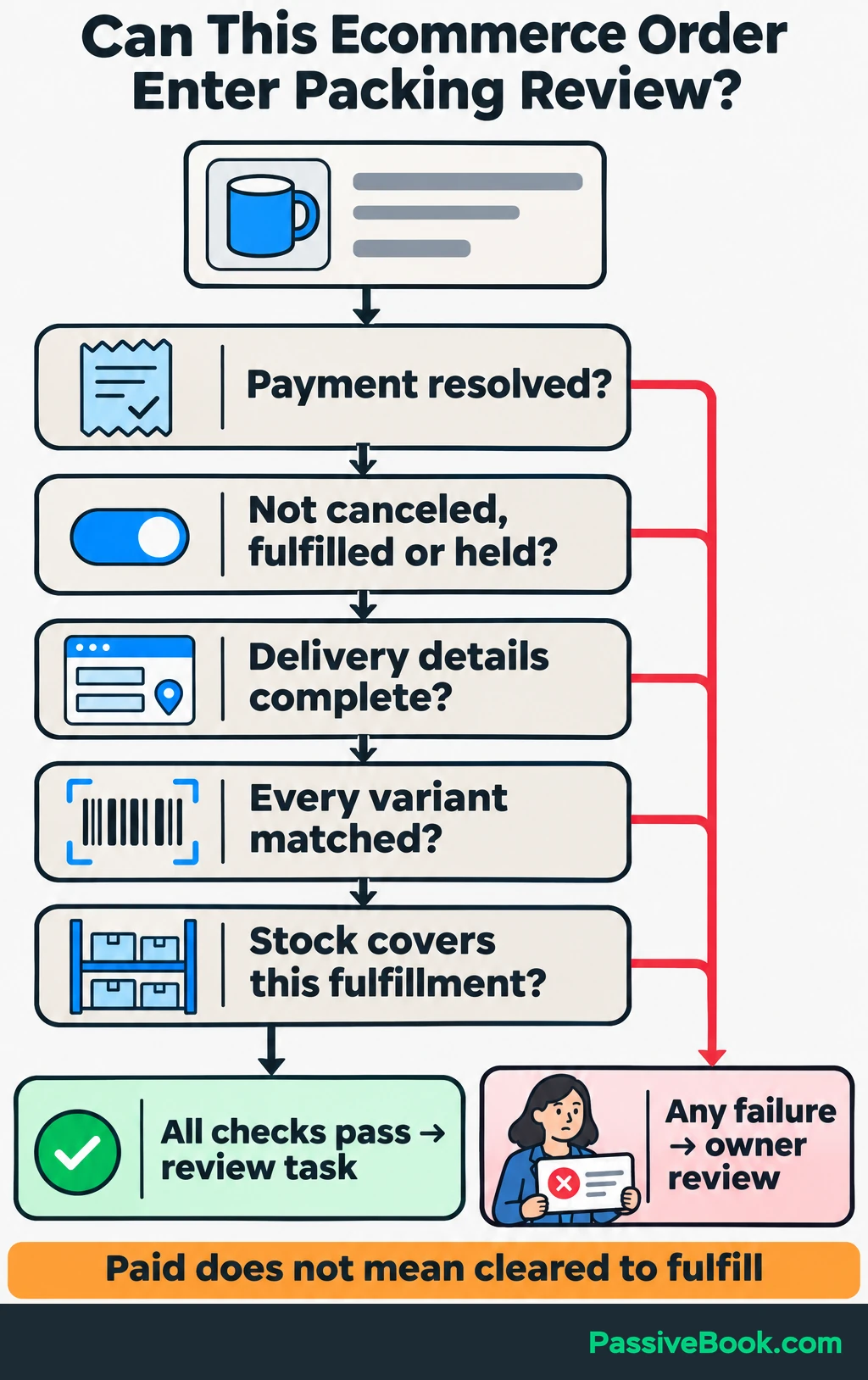
Block the handoff when:
- Payment is unresolved.
- The order is canceled, already fulfilled or on hold.
- Required delivery details are missing.
- A variant cannot be matched.
- Stock cannot cover the intended fulfillment.
Payment, stock and permission to fulfill are separate checks. A paid order can still be canceled or held.
Keep a short workflow record. For this example, it would identify:
- Trigger: Confirmed payment for an order.
- Required Data: Order ID, line-item IDs, variants, quantities, delivery details and current statuses.
- Condition: The order passes every eligibility check.
- Action: Create or update its packing review task.
- Responsible System: The connector is the tool that moves data between apps; the store supplies the order record.
- Completion Record: Saved task reference and confirmation that its contents match.
- Exception Owner: The store owner, with a next action and review deadline.
Before building anything, record your manual baseline: handling minutes per order, orders needing corrections per 100 handled, and eligible orders waiting beyond your promised processing window.
You need those numbers to judge whether the workflow helps.
If you’re unsure what belongs in that workflow record, the AI Automation Planner can draft it from your answers. You’ll get written instructions and test cases, with exceptions spelled out.

Free AI Automation Planner




Choose Which System Owns Each Record
Decide which system holds the record you trust for each kind of information.
For a small store, that might mean:
| Record | System to Trust | Update Rule |
|---|---|---|
| Order items and delivery details | Ecommerce platform | Changes start in the order record |
| Payment confirmation | Platform’s payment record, backed by the processor | Packing tools cannot mark an order paid |
| Stock and reservations | Designated inventory system | Other tools read its quantities |
| Shipment and tracking | Fulfillment or shipping system | Packing-task status cannot mark an order shipped |
| Accounting entries | Accounting software | Differences go to review before adjustments |
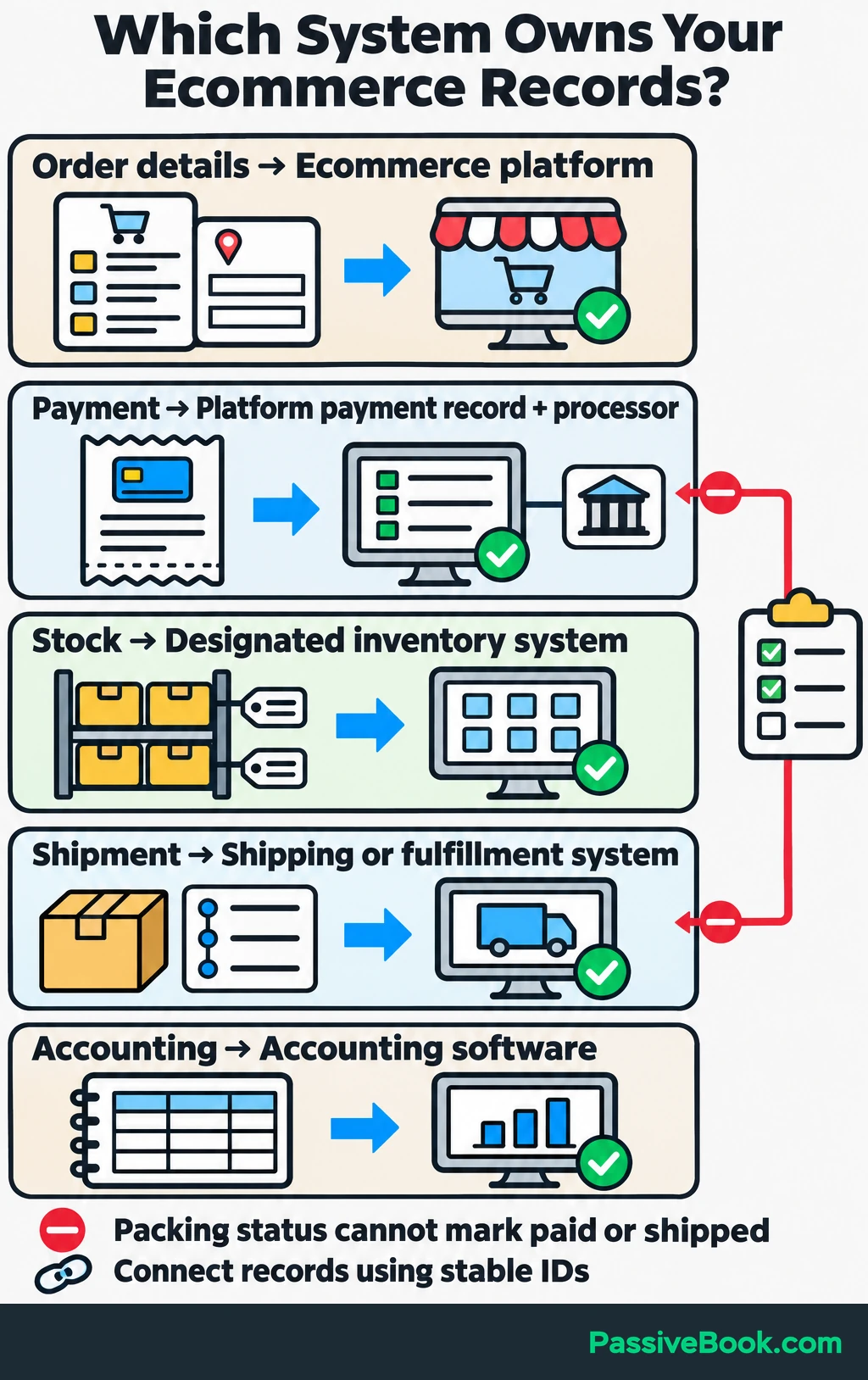
Connect records using stable IDs. Customer names and product titles can change, so they make poor matching keys.
A SKU is your code for a product or variant. Keep it consistent across systems, and preserve line-item IDs, quantities and currency when moving records.
Every order line must stay attached to its packing task. If your queue uses flat spreadsheet rows, use one row per order line and repeat the same order and task references.
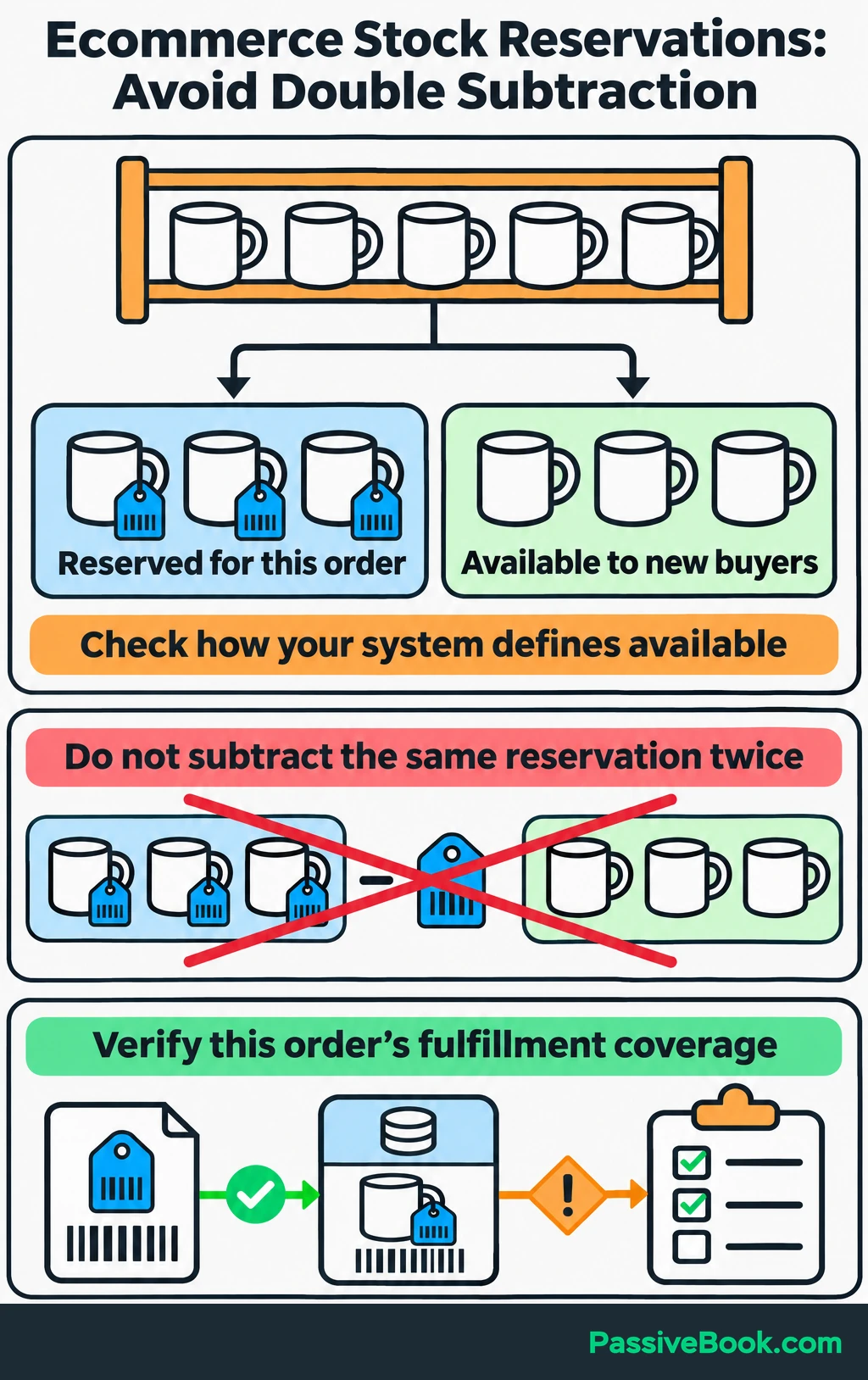
Also check what your inventory system means by “available.” Stock reserved for this order may already be excluded from the quantity available to new buyers. Your check must confirm that this order can be fulfilled without subtracting its reservation twice.
3. Choose the Smallest Tool Stack That Fits
Start With Native Features, Then Add Integrations
Check what your store can already do before buying another subscription.
Shopify Flow offers trigger, condition and action workflows and is available as a free app on supported Shopify plans. Some actions have additional plan requirements, so check the action your workflow needs. Shopify Flow availability.
WooCommerce includes quantity-based low-stock and out-of-stock notifications when stock management and the relevant notifications are enabled. A simple stock warning may need no connector at all. WooCommerce inventory features.
When the work crosses tools, compare the connection you need:
| Option | Workflow Fit | Check Before Choosing |
|---|---|---|
| Native store features | Work contained within the store | Required event, conditions and action are available on your plan |
| Make | Visual connections between apps | Supports your order trigger, full order retrieval, task creation and updates |
| n8n | Workflows needing more custom rules or connections | Has a built-in connection for each app, or someone can build and maintain one |
Make’s credit use depends on what runs. Most actions consume one credit, while some AI features consume more. Count the steps your workflow actually executes rather than treating one order as one credit. Make billing details.
n8n’s cloud plans charge mainly by workflow execution: one run of the whole workflow. Its self-hosted Community edition has no software subscription charge, but hosting and upkeep still cost time or money. n8n pricing and editions.
My n8n experience comes from content and publishing operations. I like its flexibility, but I would choose Make for a straightforward connection when quick setup matters more than custom control.
I would self-host n8n only when someone owns updates, backups, security and recovery. Otherwise, hosted software is the more sensible purchase. n8n self-hosting responsibilities.
If an essential connection needs skills you do not have, pay for implementation help and require a handover that explains how to maintain it.
Decide Where AI Belongs
Use fixed rules when the answer must be exact: payment status, quantities, stock changes and transaction calculations.
Use AI when the task involves interpreting words. It can categorize a customer message, draft a reply from your policies or summarize verified records.
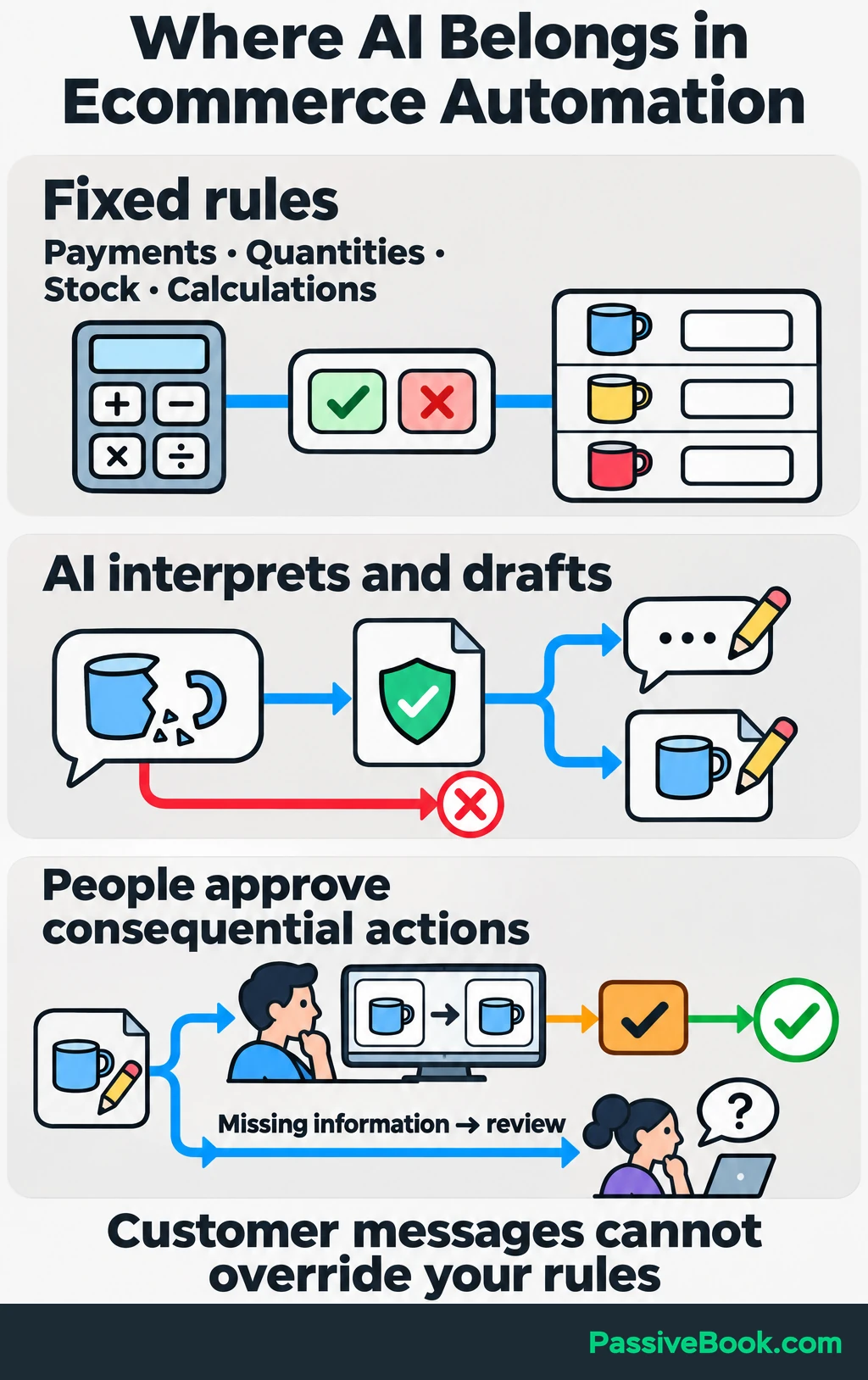
For the mug store, AI could recognize a message about a broken handle and prepare a replacement request. It should not guess whether payment cleared or decide how many mugs to deduct from stock.
Give it the approved policy and only the information needed for the task. Treat customer messages as information to assess, not instructions that can override your rules.
When information is missing, send the case to review. For consequential actions, show a person the affected order and proposed action before anything runs.
Estimate the Complete Operating Cost
Count everything that runs during a normal order, including repeated work for individual order lines.
Suppose a Make test run uses six credits for one order, including all its line items. At 300 similar orders a month, that is 1,800 credits before scheduled checks, retries or exceptions.
Include these costs:
- Subscriptions and required store-plan upgrades.
- AI usage and hosting.
- Maintenance and exception handling.
- Paid implementation help.
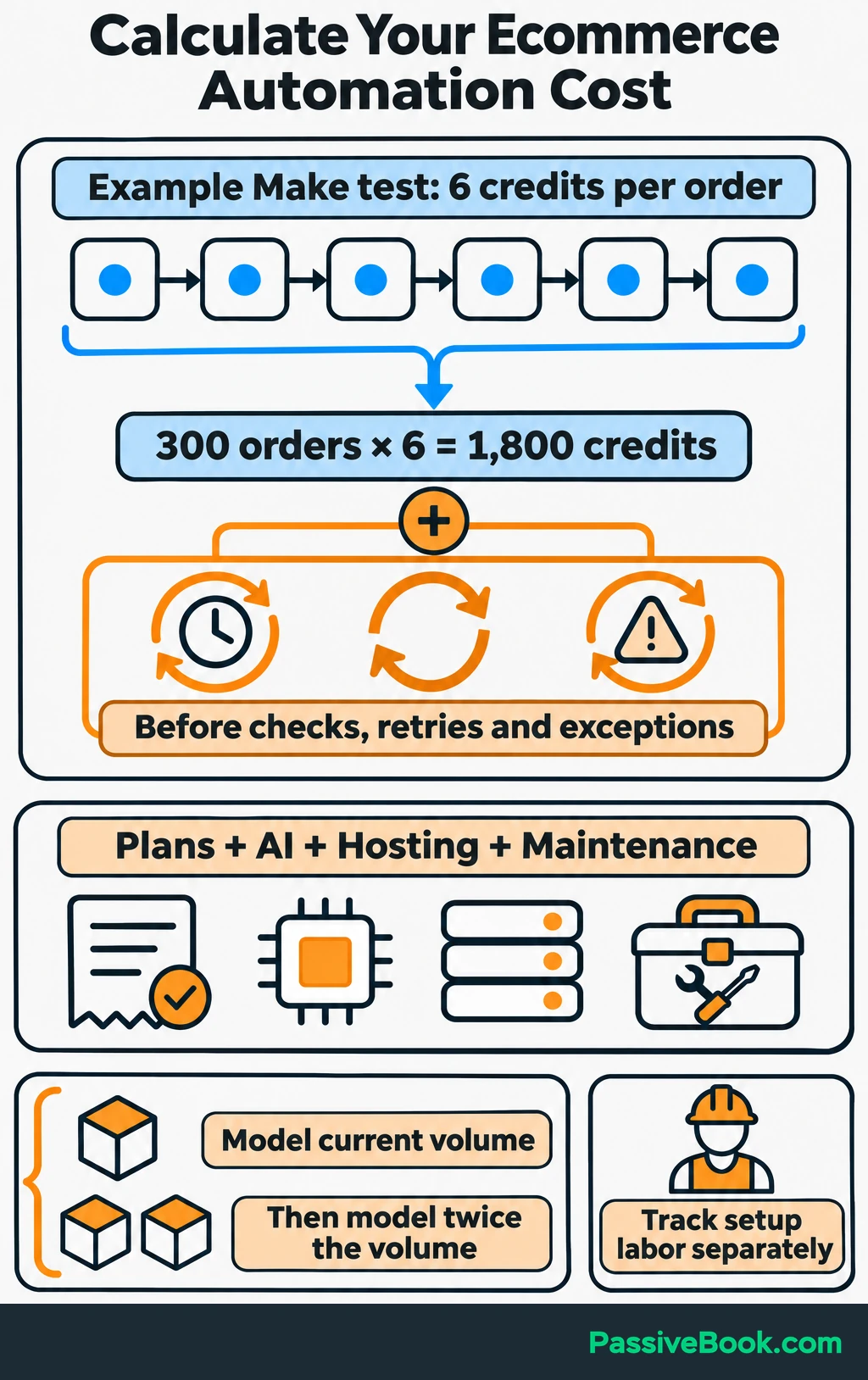
Track setup labor separately. Then estimate the ongoing cost at your current volume and at twice that volume.
I would choose the least costly option that meets the requirements and has a maintenance owner. A cheaper subscription loses its appeal when keeping it alive becomes your Saturday job.
The cheapest subscription may not be the cheapest workflow. Use the calculator to compare your options and see how much room remains for software costs once review and maintenance are counted.
Free Automation Value Calculator
4. Build a Reliable Paid-order Handoff
Connect the Trigger and Validate the Order
Build in a test environment or isolate test records so they cannot buy labels, release shipments or contact customers.
Connect the confirmed-payment event. This may arrive through a webhook, which is an event notification sent from one system to another. If the integration only supports scheduled checks, choose an interval that fits your packing schedule.
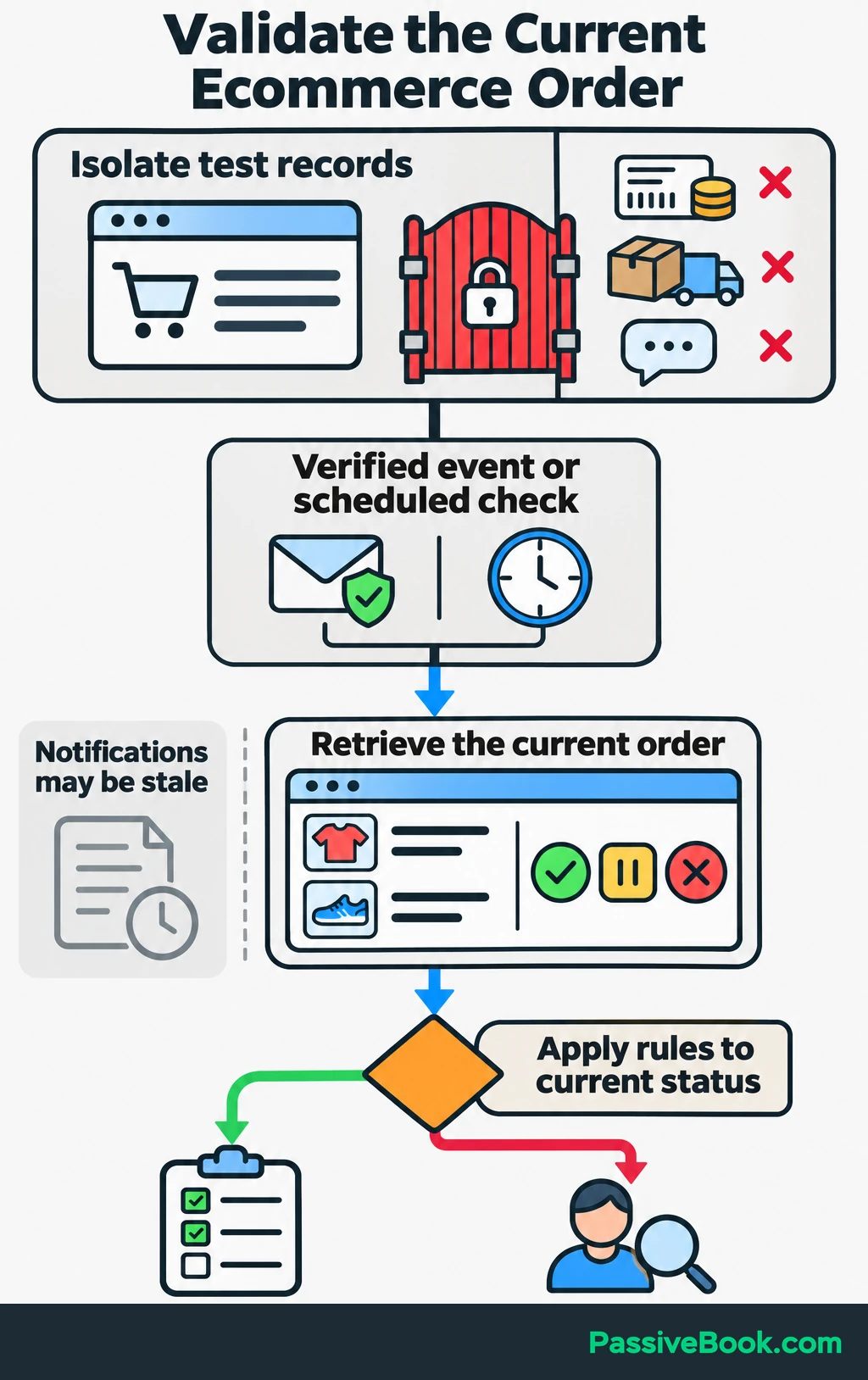
When the trigger arrives, retrieve the current order. Apply your eligibility rules to that record rather than assuming an earlier notification still reflects its status.
Map each required field explicitly:
- Store and order IDs, plus the visible order reference.
- Every line-item ID, variant SKU and quantity.
- Required recipient and delivery details.
- A link to the source order.
- A separate packing-review status.
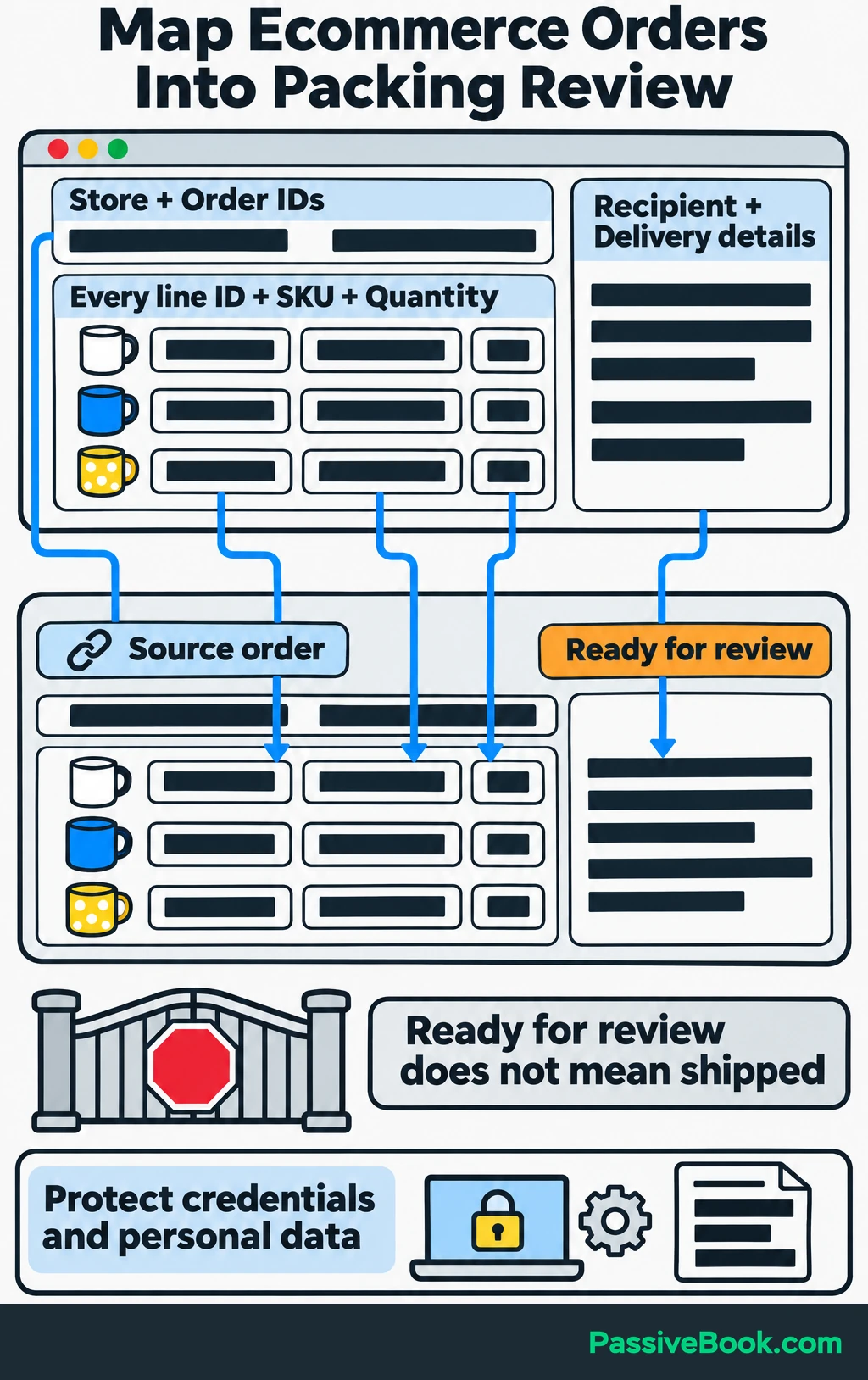
“Ready for review” must not mean “shipped.”
Store credentials in the tool’s protected connection settings. Give the connection only the permissions it needs, and keep customer addresses and other personal information out of routine logs.
For a custom event connection, follow the provider’s verification rules before trusting incoming data. Shopify, for example, uses a signature to authenticate HTTPS webhook deliveries. Shopify webhook verification.
Prevent Duplicate and Conflicting Actions
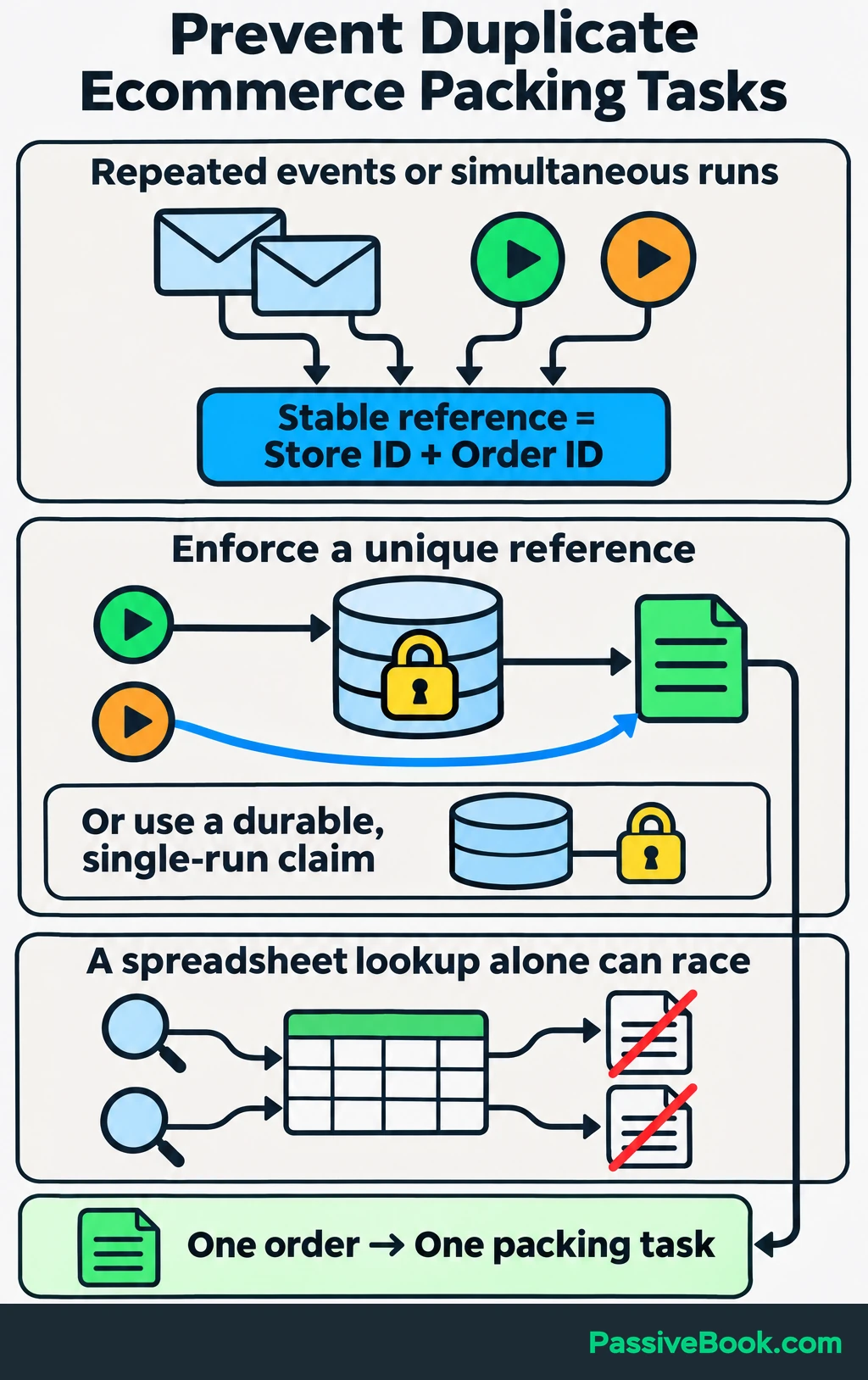
An event arriving twice must not create two packing tasks. Shopify explicitly documents that webhook deliveries can repeat. Shopify duplicate-delivery guidance.
Give each whole-order packing task a stable reference built from the store ID and order ID. Repeated attempts should find that task and either confirm it or update permitted fields.
Choose a destination that rejects a second task with the same stable reference. Otherwise, keep a processing record that survives restarts and lets only one run claim the order at a time. A spreadsheet lookup alone can fail when two runs both search before either creates a row.
Here is the mug-store example. Order M104 contains two blue mugs and one white mug. Its single packing task, P104, contains:
| Order | Task | Line Item | Variant SKU | Quantity |
|---|---|---|---|---|
| M104 | P104 | L1 | MUG-BLUE | 2 |
| M104 | P104 | L2 | MUG-WHITE | 1 |
That is one task, two item rows and three units.
If the payment event arrives again, the workflow finds P104. It does not create another task.
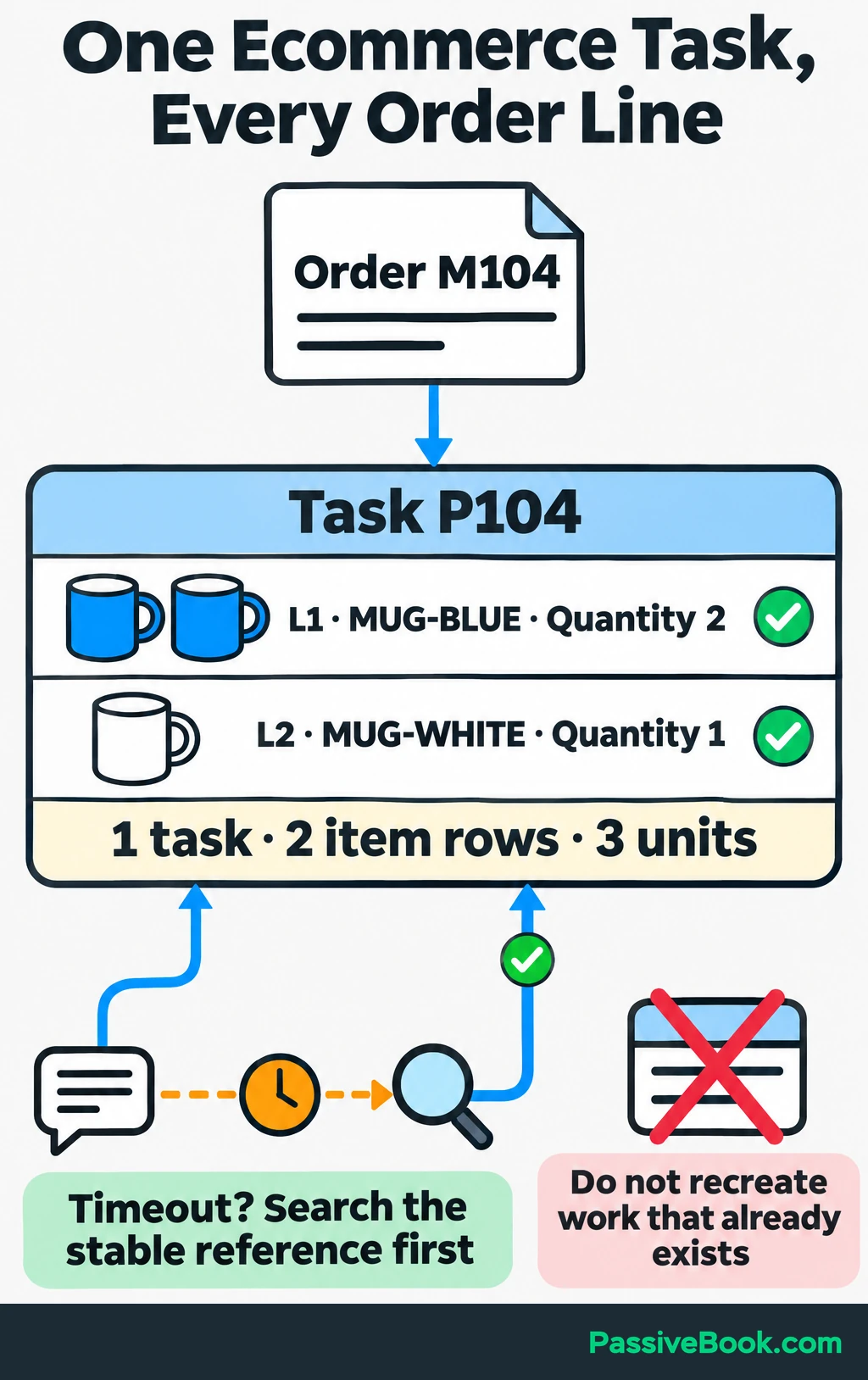
Save the destination reference after creation. If the request times out and you cannot tell whether it succeeded, search for the stable reference before trying again.
Retry temporary failures with increasing delays and a fixed attempt limit. Send unresolved failures to review rather than retrying forever.
Later order changes need a route too. A cancellation or address change should hold or update the existing task according to your rules, and the order should be checked again before packing is released.
Confirm Completion and Route Decisions to People
Check the destination before marking the handoff complete. The task must exist and contain the expected variants, quantities and delivery details.
I learned this distinction in a publishing workflow. The run showed success, but an item I expected was missing at the destination. I had checked whether the automation finished, not whether the intended work was there. That changed what I count as a successful handoff.
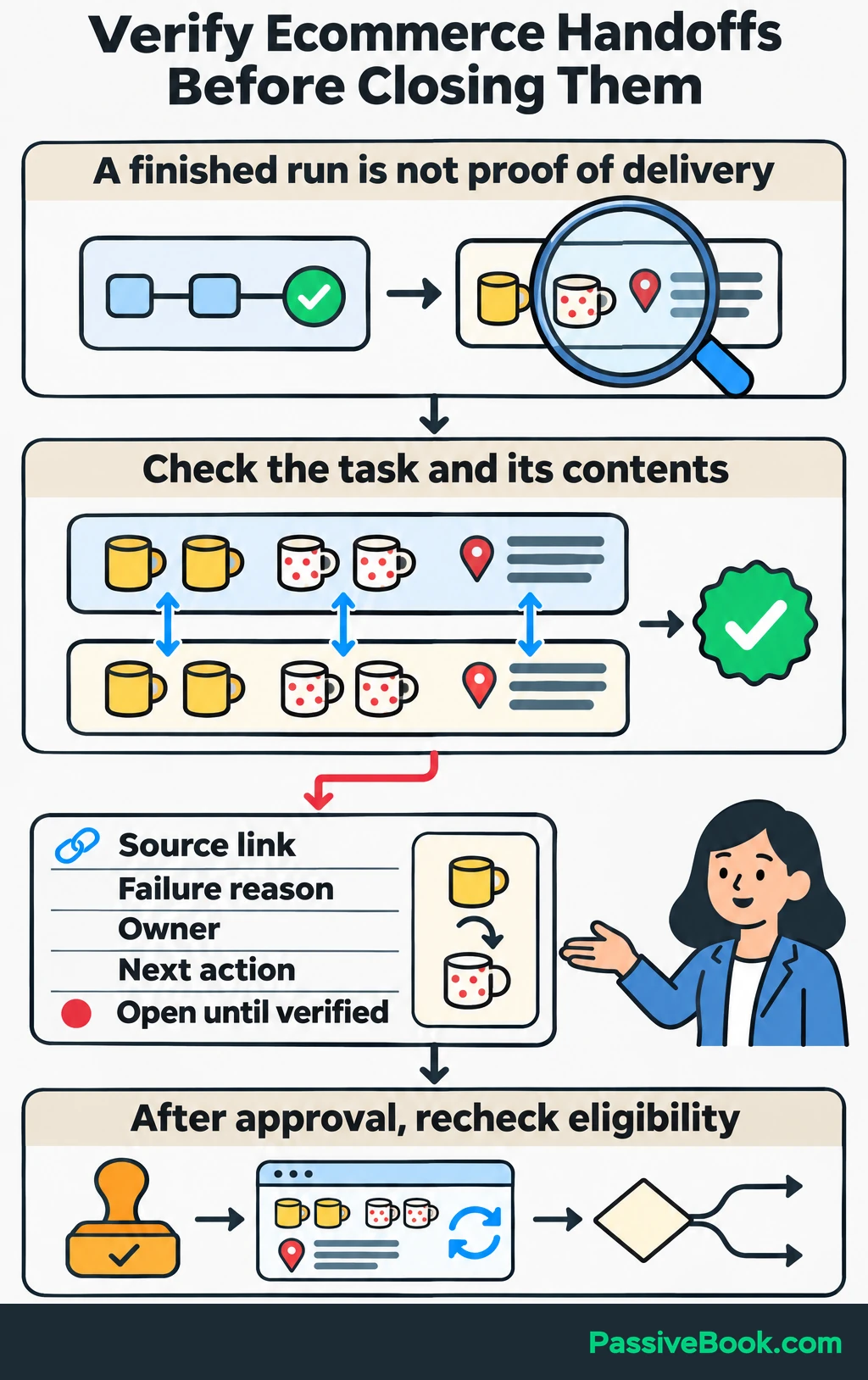
For the packing queue, keep an exception record with:
- Source: A link to the order.
- Failure: The step that stopped and its reason.
- Owner: The person responsible for resolving it.
- Next Action: What they need to check or change.
- Status: Open until resolution is confirmed.
Unusual order changes, disputed refunds and purchasing commitments should require approval. Show the proposed action alongside the record, and recheck eligibility after approval because the order may have changed while waiting.
5. Test the Workflow Before Expanding Live Use
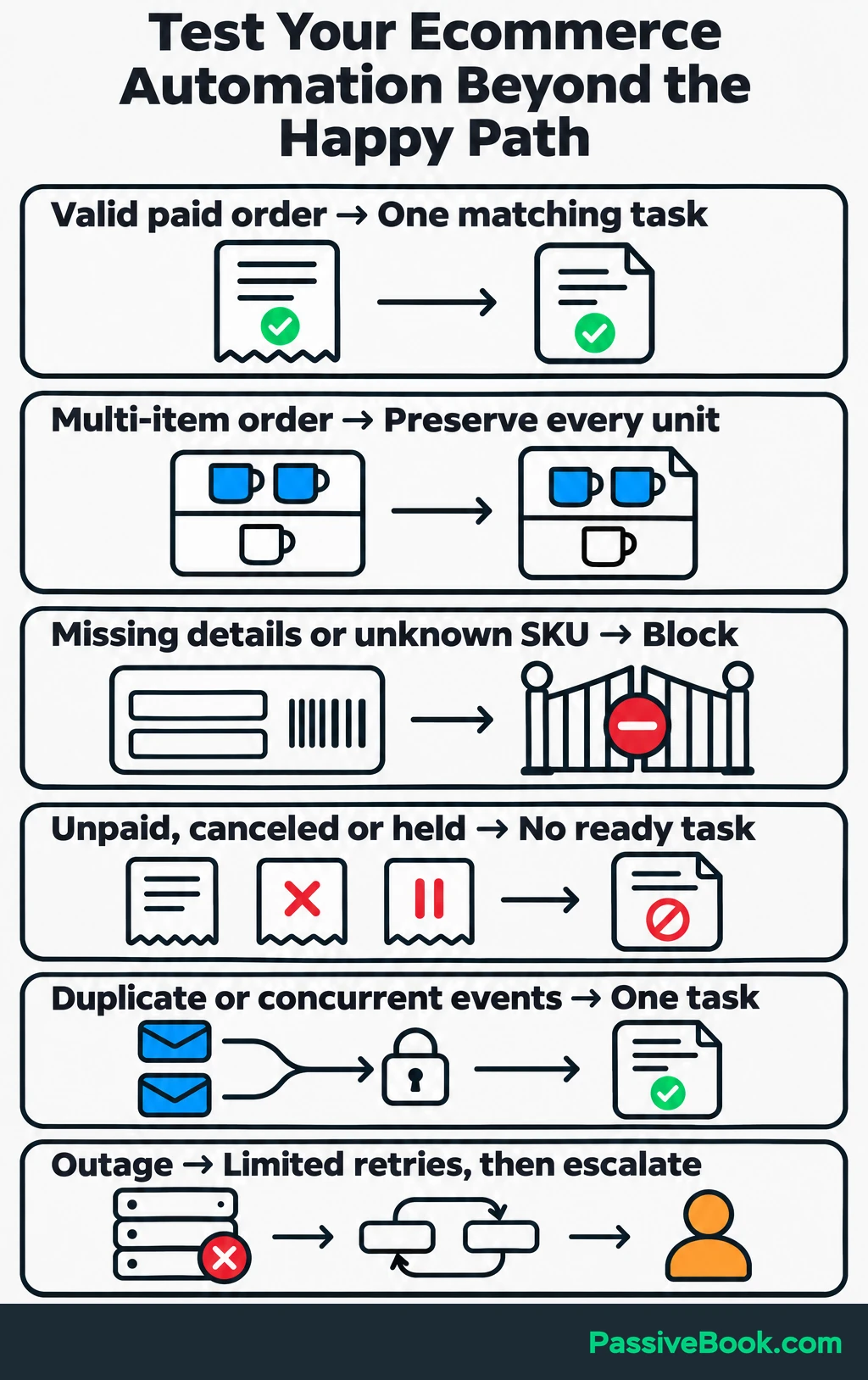
Test the awkward cases as deliberately as the valid order. A workflow that handles M104 correctly has passed one test.
Use a checklist like this:
| Test Case | Expected Action | Completion Record | Exception Owner |
|---|---|---|---|
| Valid paid order | Create one review task | Matching task reference and contents | Owner if verification fails |
| Multi-item order | Preserve every line and quantity | Two rows and three units for M104 | Owner if anything differs |
| Missing delivery details or unknown SKU | Block packing handoff | Open exception with reason | Store owner |
| Unpaid, canceled or held order | Create no ready task | Recorded block reason | Owner for unresolved cases |
| Duplicate event or simultaneous runs | Keep one task | One unique order-to-task link | Workflow maintainer if duplicated |
| Destination outage | Retry within limits, then escalate | Pending failure record | Workflow maintainer |
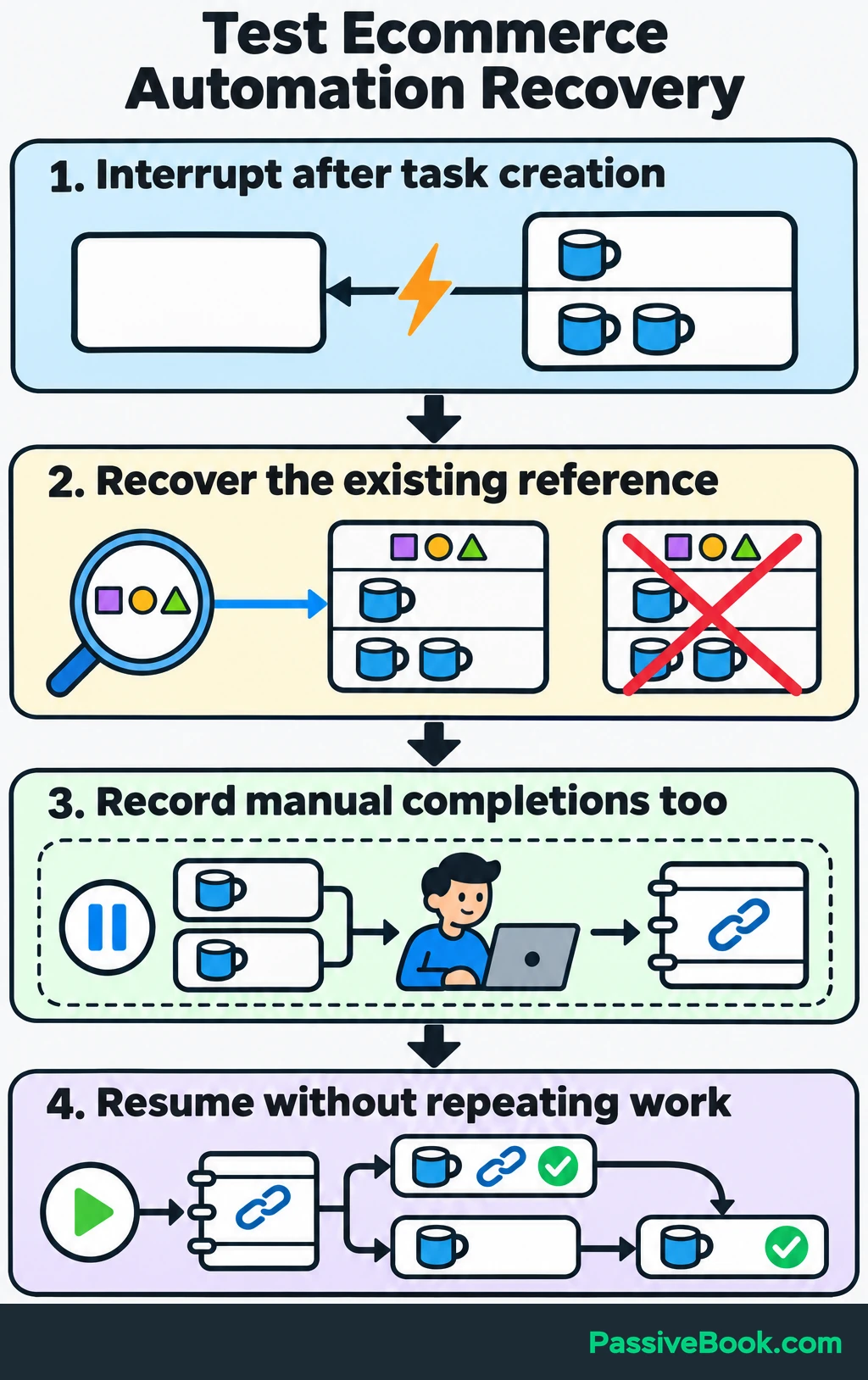
| Task created but success not saved | Find the existing task during recovery | Original reference restored | Workflow maintainer |
For the last test, deliberately interrupt processing after the destination creates the task but before your workflow records success. Recovery must find the existing task rather than create another.
Compare source and destination records, including variants and quantities. Passing means eligible orders create the correct task once, blocked orders stay blocked, and exceptions reach their owner.
Begin live use with a limited batch or review-only mode. Inspect the results before expanding.
Also document how to pause the workflow, handle queued orders manually and resume. Manual work must save its completion references too, or restarting automation may repeat it.
6. Monitor Reliability and Measure Time Recovered
Keep one view of completed handoffs, failures, pending reviews and overdue orders.
Alert the owner when processing fails, approaches its usage allowance or unexpectedly stops. An empty error list tells you little if no orders are being processed.
Periodically compare eligible store orders with completed packing tasks. This catches work that never reached the automation. Shopify recommends this kind of periodic comparison because webhook delivery alone is not guaranteed. Shopify reconciliation guidance.
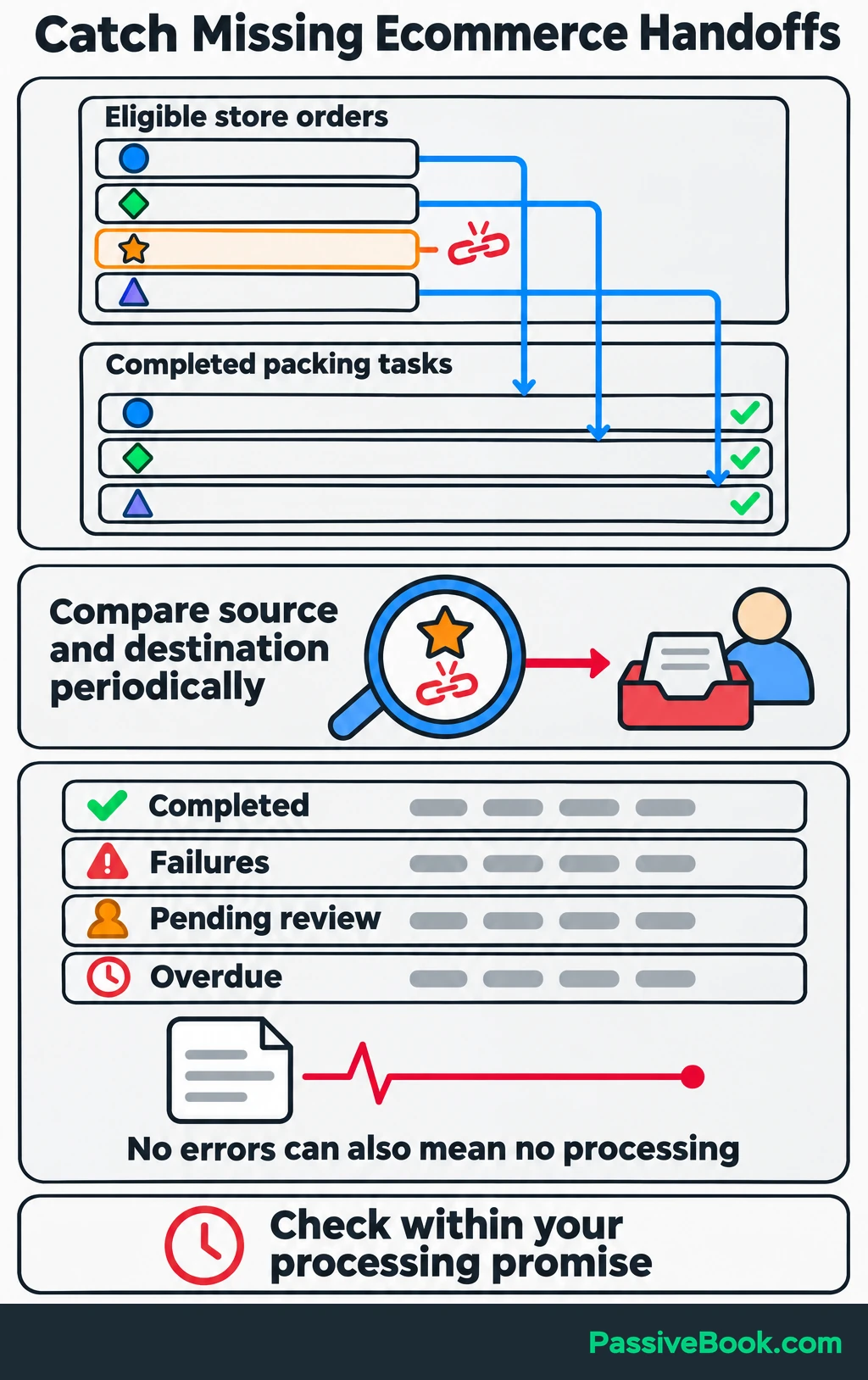
Set the comparison frequency around your processing promise. If orders must reach packing within a few hours, a weekly check is too late.
Compare results with your manual baseline:
- Handling time, including exceptions.
- Orders needing corrections per 100 handled.
- Duplicate tasks.
- Eligible orders overdue for handoff.
- Ongoing software and maintenance costs.
Count all the work that remains before claiming time savings. The calculation is:
Recovered hours = previous manual hours − remaining handling hours − maintenance hours
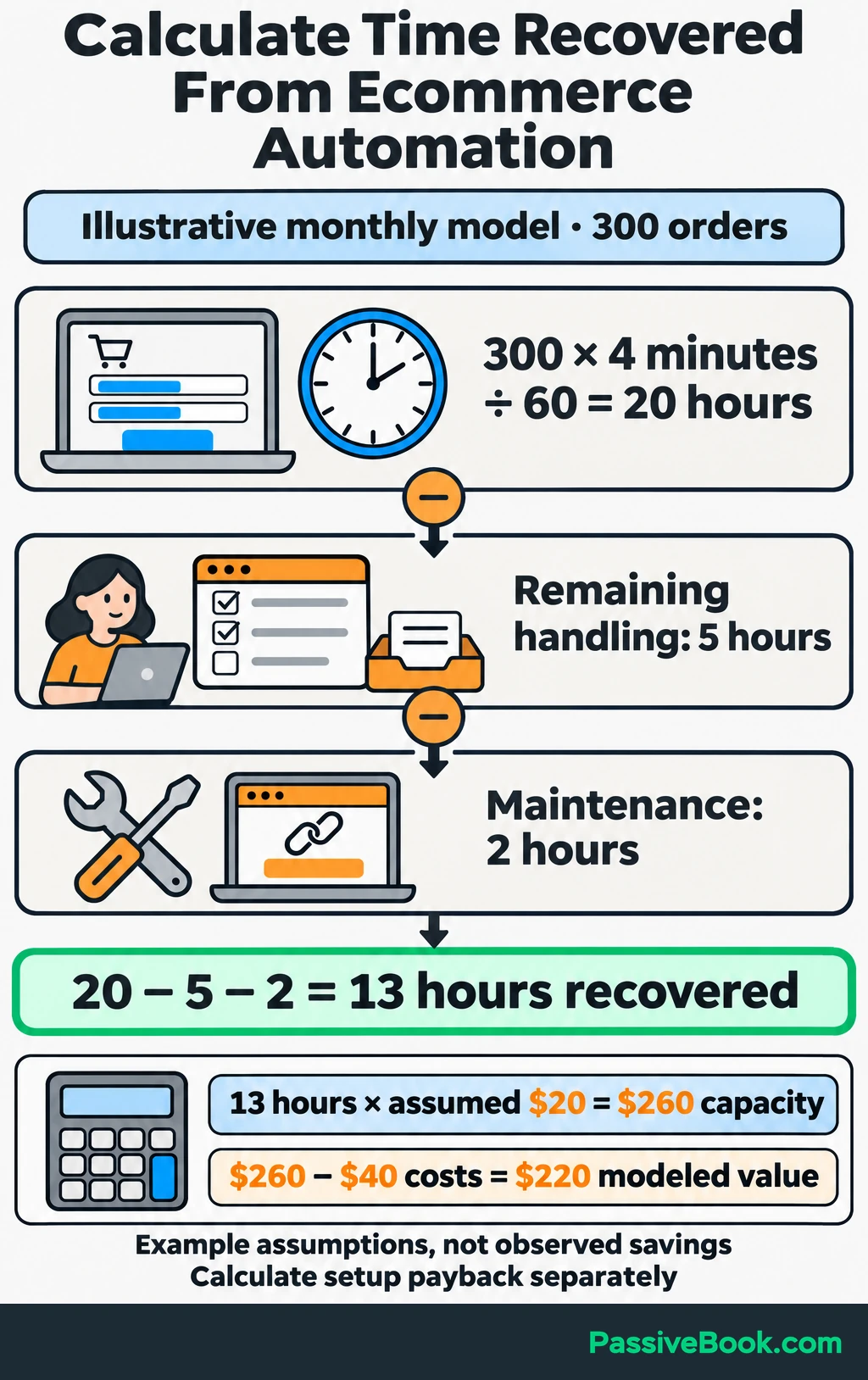
For illustration, suppose the mug store handles the same 300 eligible orders each month:
| Work | Calculation | Monthly Hours |
|---|---|---|
| Previous manual handling | 300 orders × 4 minutes ÷ 60 | 20 |
| Remaining handling, including review and exceptions | 300 orders × 1 minute ÷ 60 | 5 |
| Workflow maintenance | Allow 2 hours for checking failures and updating connections | 2 |
| Time recovered | 20 − 5 − 2 | 13 |
At an assumed hourly value of $20, those 13 hours represent $260 of capacity. Subtracting $40 in incremental monthly costs leaves $220 of modeled monthly value.
These are example assumptions, not observed savings or reduced payroll. Setup time belongs in a separate payback calculation. If the workflow takes longer to maintain than expected, update the numbers.
Keep a short operating note covering ownership, connections, rules, alerts and recovery. Recheck affected workflows when products, policies, credentials or integrations change.
7. Extend Automation to the Next Bottleneck
Expand when the first workflow reliably completes its work and recovers enough time to justify the effort.
Use the same selection process for the next task: repeated workload, clear rules, setup effort and consequences of failure. Reuse your record IDs, exception queue and monitoring where they fit.
Inventory Alerts and Replenishment Tasks
Read variant-level stock from the designated inventory system. Account for its reservations and allocations, and send conflicting quantities to review rather than letting several tools overwrite stock.
Set a reorder threshold to cover expected sales from placing a supplier order until it arrives, plus extra units for delays or demand spikes. That is the basis of the standard reorder-point calculation. Reorder-point guidance.
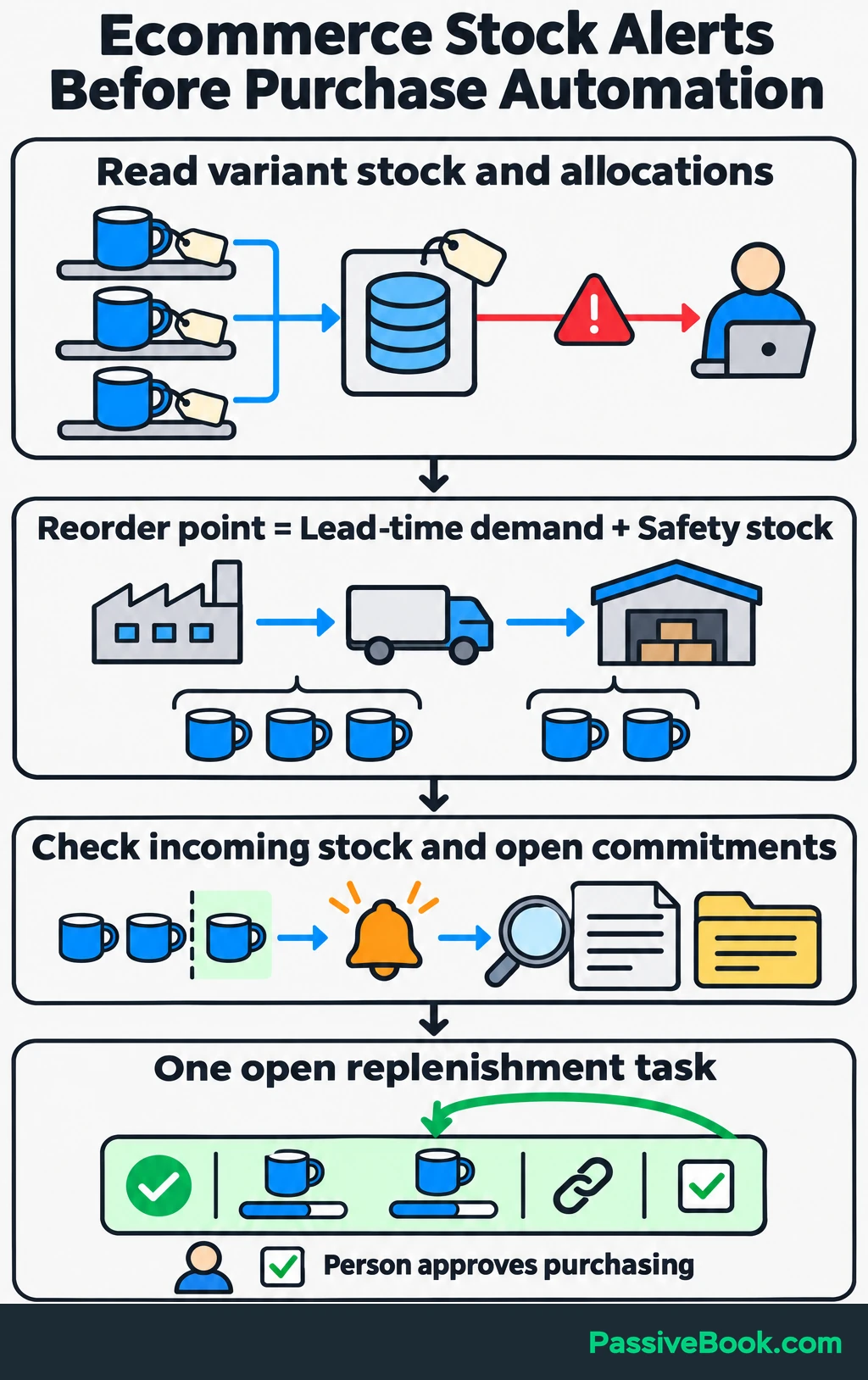
For the mug store, a blue-mug threshold crossing should create one open replenishment task. Include current stock, incoming stock, the supplier reference and the proposed next action.
Check outstanding purchase orders before opening another task. Keep purchasing approval with a person until your process can reliably account for existing commitments and changes in demand.
I would automate the reminder before automating the purchase. An unnecessary reminder is annoying; an unnecessary pallet needs somewhere to live.
Support Triage and Returns Intake
Start by sorting messages and collecting missing information. Then retrieve verified order details and prepare a reply from your approved policies.
For a broken-mug report, the workflow could:
- Request the order reference and required damage details.
- Verify the customer before exposing order-specific information.
- Retrieve the purchased variant and quantity.
- Draft the proposed replacement or refund for approval.
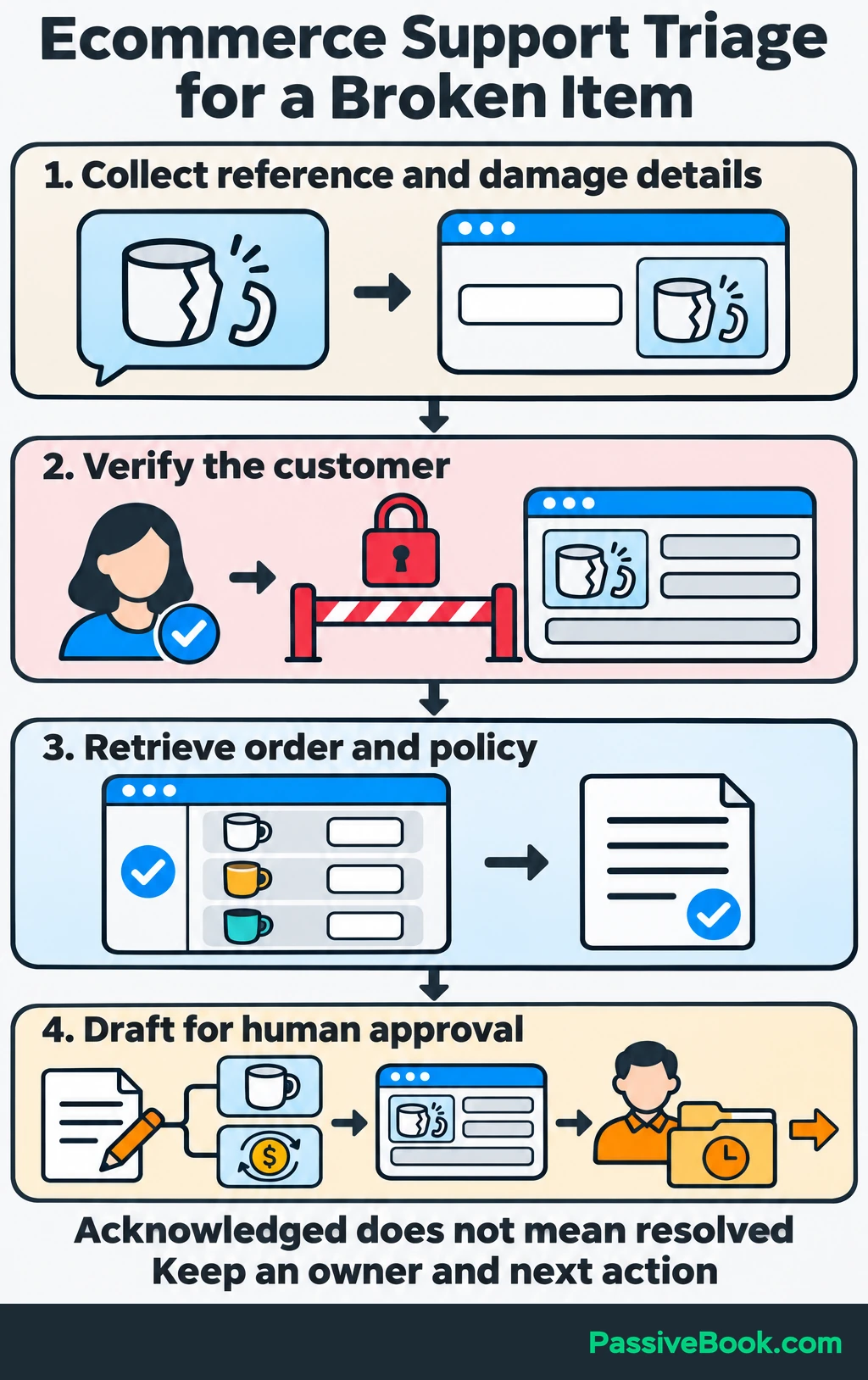
Keep the ticket open after sending an acknowledgment. “We received your message” has not resolved a broken mug.
Every unresolved case needs an owner and next action. Give customers a clear route to human support, and send uncertain AI classifications there too.
Shipment Updates and Customer Follow-ups
Trigger shipment messages from verified fulfillment or tracking events.
For the mug store, tracking becoming available can trigger a tracking message. A stalled shipment should create a review task, and follow-ups should change when cancellations, refunds or delivery exceptions make the original message irrelevant.
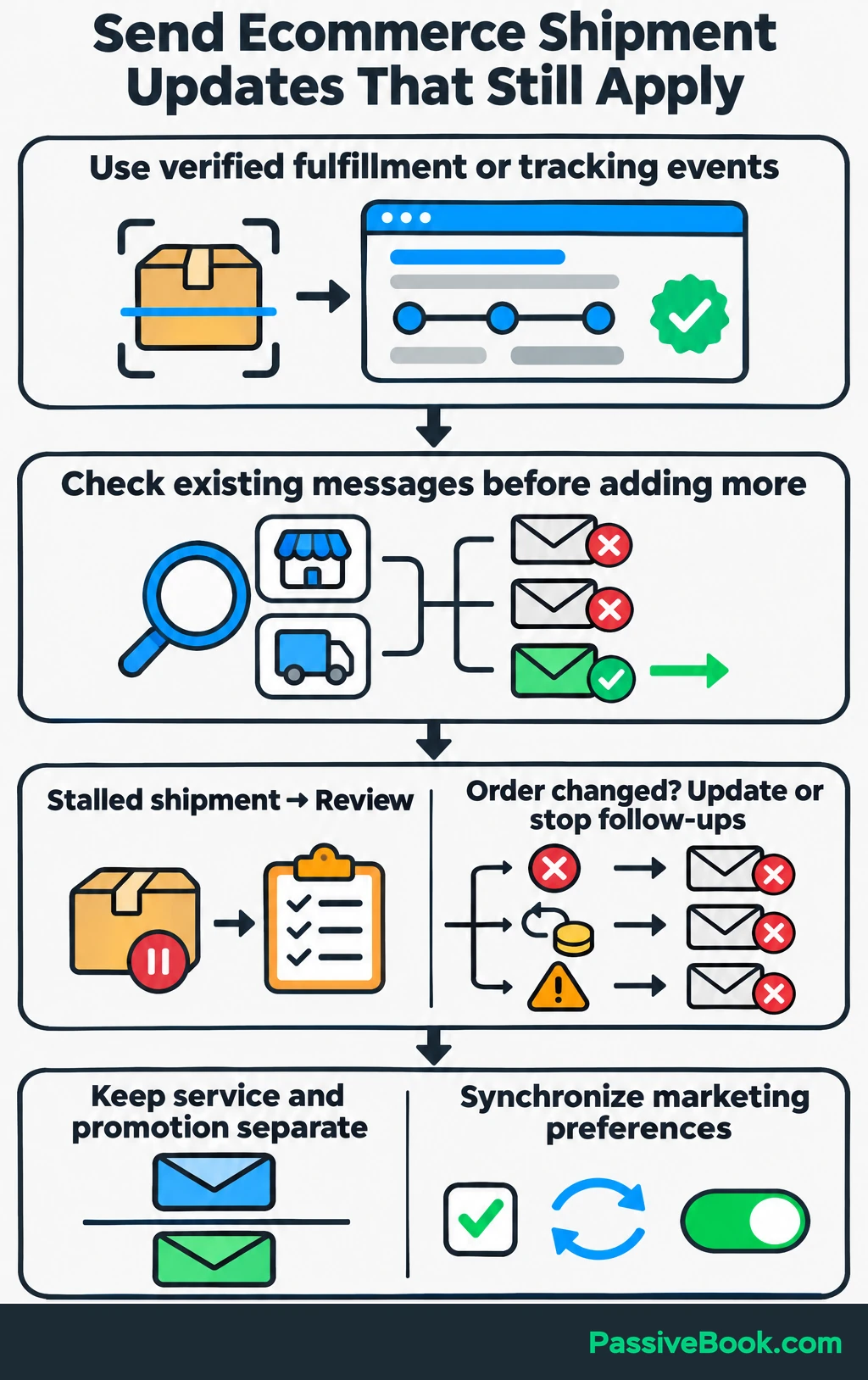
Check which messages your store and shipping tools already send before enabling more. Customers rarely need three identical tracking emails to appreciate your efficiency.
Keep promotional messages separate from order-service messages. Synchronize consent and unsubscribe status across marketing tools, and apply the requirements for the locations you serve. Shopify’s guidance, for example, calls for promotional messages to go to customers who agreed to receive marketing. Shopify marketing-consent guidance.
Financial Reconciliation and Exception Reports
Match sales, refunds, fees and payouts against accounting and bank records.
A payout is not necessarily the same amount as the orders placed that day. Use the report showing which transactions belong to each payout, then investigate unmatched amounts before changing records.
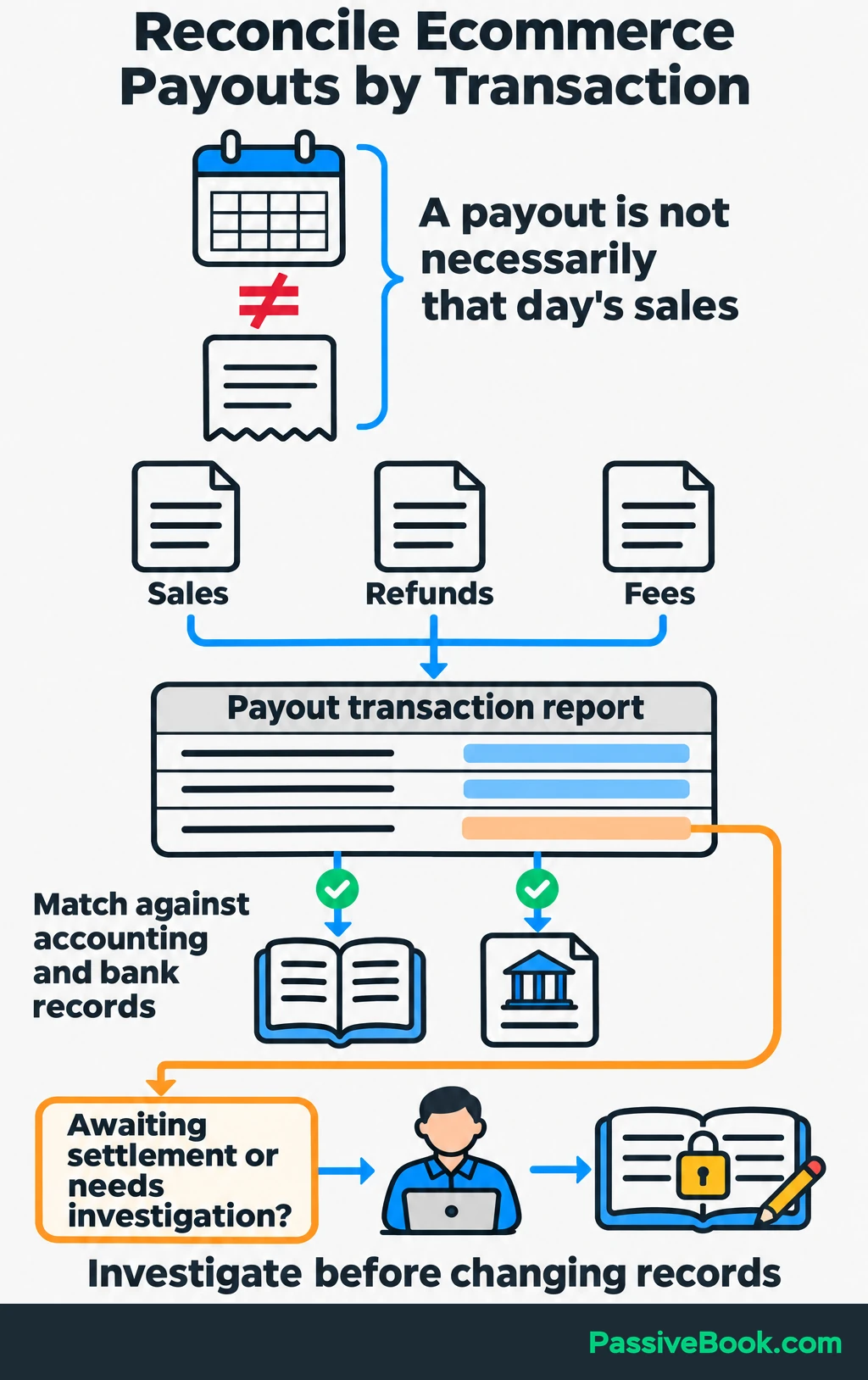
For the mug store, a useful discrepancy report includes the source transaction, expected amount, recorded amount and whether the difference needs investigation or is awaiting settlement.
Combine unresolved financial differences with overdue packing tasks, inventory discrepancies and failed runs in a short operational digest.
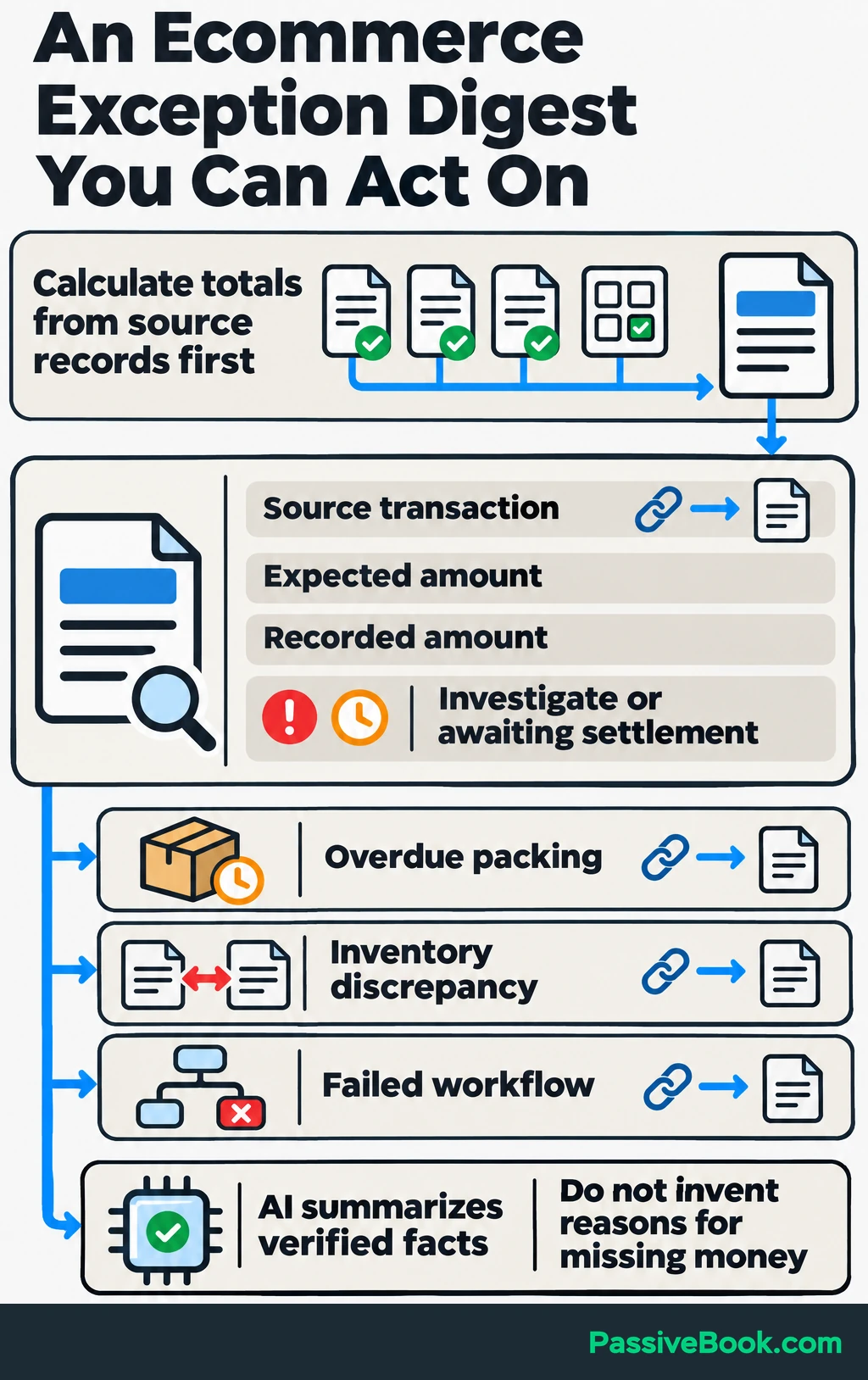
Calculate totals from source records first. AI can summarize the verified report, but it should not invent an explanation for missing money.
The digest should tell you what needs attention and link directly to it. Another dashboard to admire is not much help while an order waits.
What Next?
Time your next ten order handoffs and choose one repeated step to turn into a review queue. Write its success condition before opening an automation tool.
Use the social buttons to share this guide when a clearer handoff could save a team another round of copying orders and chasing mistakes.
Which recurring task would you hand over first, and what would you need to see before trusting it? Share your answer or any other questions in the comments.
Share this post with your friends & followers:

