You have a video ready and a few hundred dollars available to promote it. The hard part is deciding what that money should prove before you spend more.
A campaign can collect cheap views while leaving you unsure whether anyone wants your offer. And a daily budget that sounds safe can still spend faster than you expected.
Your first test needs a useful answer and an affordable downside. This guide connects those two decisions, so you can choose bids that fit your goal, estimate a sensible starting budget, and recognize when the results justify another dollar.
Understand What Your YouTube Ads Budget Buys
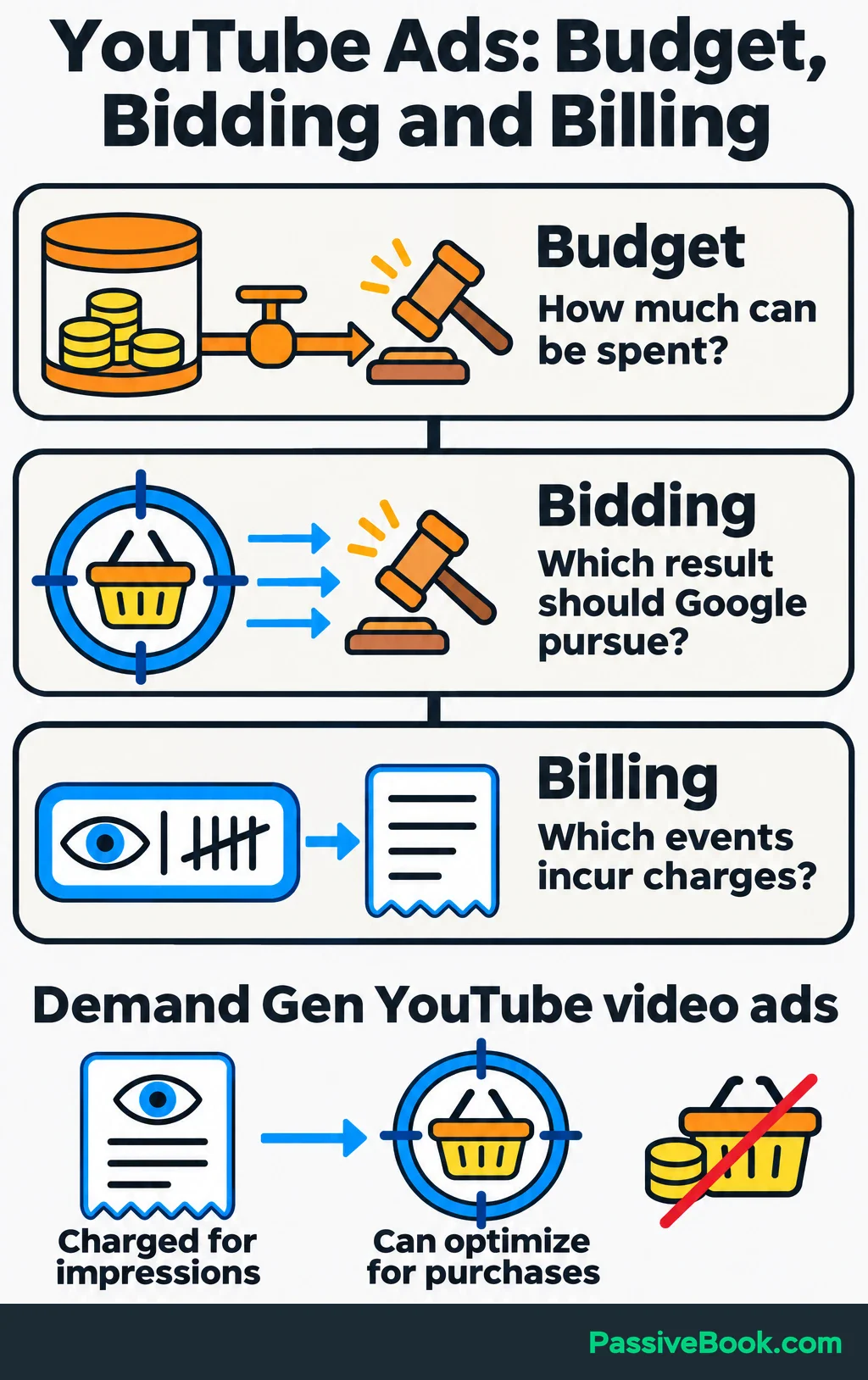
Your YouTube Ads budget and bidding strategy do different jobs:
- Budget: Sets how much money is available to spend.
- Bid Strategy: Tells Google which result to pursue.
- Billing Basis: Determines which events incur charges.
That last distinction matters. Choosing a strategy that pursues purchases does not mean Google charges you only when somebody buys. Demand Gen is a Google Ads campaign type that can show ads on YouTube and other Google channels. Its YouTube video ads are billed for ad displays (impressions), including when the campaign optimizes for conversions. Google’s Demand Gen billing guidance
The metrics below compare spending with views, impressions, clicks, and conversions—the purchases or leads you track. Use spending and results from the same campaign, reporting period, and ad formats. For CPV, include only spending on formats that count qualifying views.
| Metric | Calculation | Decision Supported |
|---|---|---|
| Cost per view, or CPV | View-eligible spend ÷ qualifying views | Whether watching your video costs an acceptable amount |
| Cost per thousand impressions, or CPM | Spend ÷ impressions × 1,000 | Whether exposure to your audience is affordable |
| Cost per click, or CPC | Spend ÷ clicks | Whether traffic costs fit your offer’s economics |
| Cost per acquisition, or CPA | Spend ÷ conversions | Whether purchases or leads cost an acceptable amount |
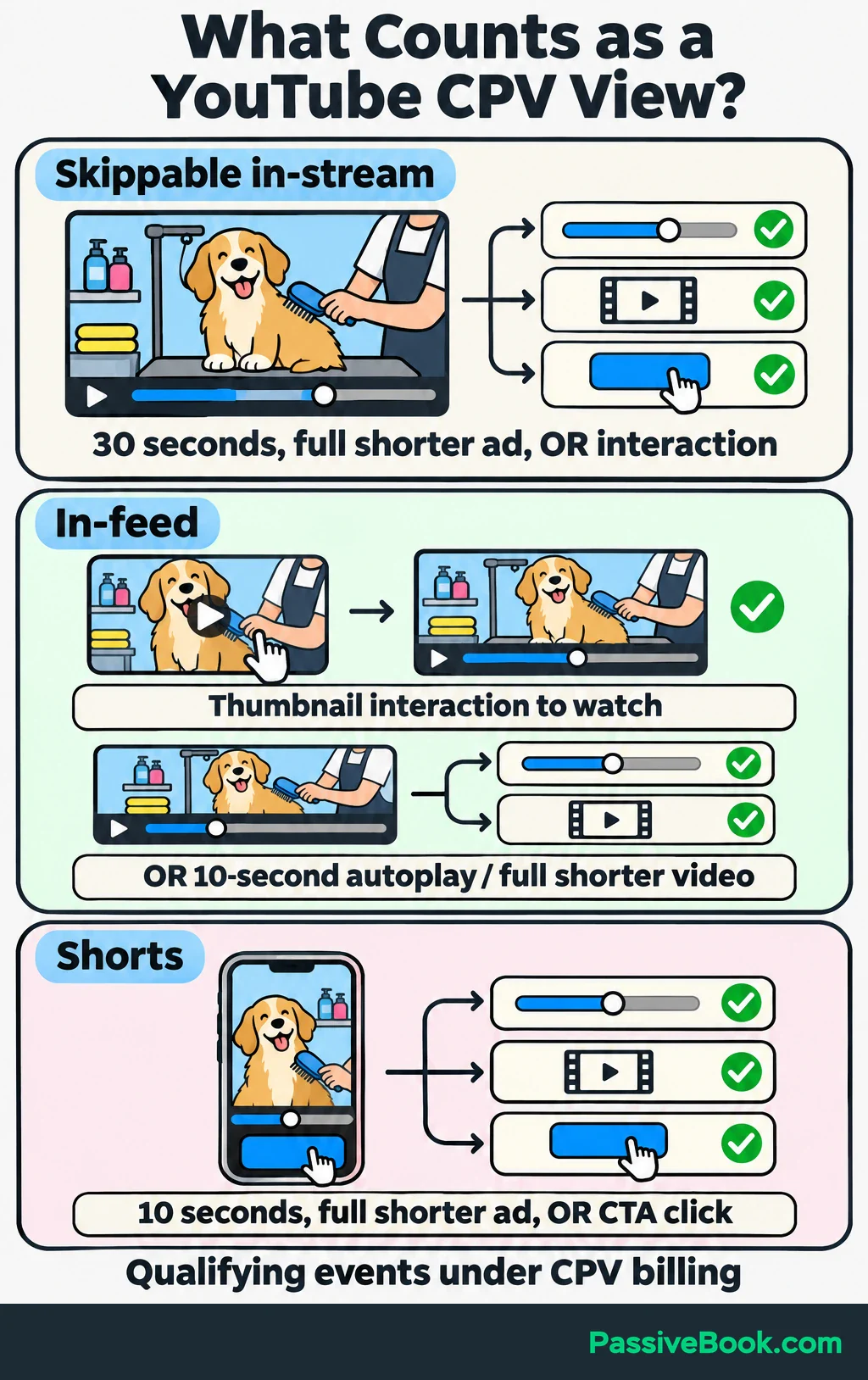
A qualifying view depends on the format. Under CPV billing:
- Skippable In-Stream: Someone watches 30 seconds, finishes a shorter ad, or interacts with it.
- In-Feed: Someone interacts with the thumbnail to watch, or watches autoplay for at least 10 seconds or the full shorter video.
- Shorts: Someone watches 10 seconds, finishes a shorter ad, or clicks the call to action.
These are Google’s format-specific CPV definitions. Don’t assume every public video view represents the same paid event.
For historical cost context, Strike Social reported these ranges from its 2023 US campaigns:
| Historical Campaign Population | Reported Cost |
|---|---|
| Skippable in-stream campaigns | $0.01–$0.03 CPV |
| Non-skippable in-stream campaigns | $5.70–$12.36 CPM |
| Video Action campaigns | $0.34–$1.42 CPC |
Those are different campaign populations, not three interchangeable prices you can choose at checkout. They provide context, not a forecast for your account. Strike Social’s benchmark figures and source populations
A 30-second ad therefore has no fixed media price. Its cost depends on how the campaign buys delivery and how it performs. Filming and editing belong in a separate production budget.
Calculate What You Can Afford to Pay for a Customer
Before choosing a daily budget, work out what one sale leaves you.
Throughout this guide, imagine you sell an $80 online course on grooming long-haired dogs at home. The business, costs, budgets, and results are hypothetical illustrations.
Set Your Allowable Acquisition Cost
Start with the selling price and subtract costs that rise when you make another sale. These can include payment fees, delivery, expected refunds, and variable customer support.
What remains is your contribution before advertising: the money available to pay for acquisition, overhead, and profit.
For the course:
| Item | Amount per Purchase |
|---|---|
| Selling price | $80 |
| Variable costs | −$20 |
| Contribution before advertising | $60 |
| Contribution you want to retain | −$20 |
| Allowable advertising CPA | $40 |
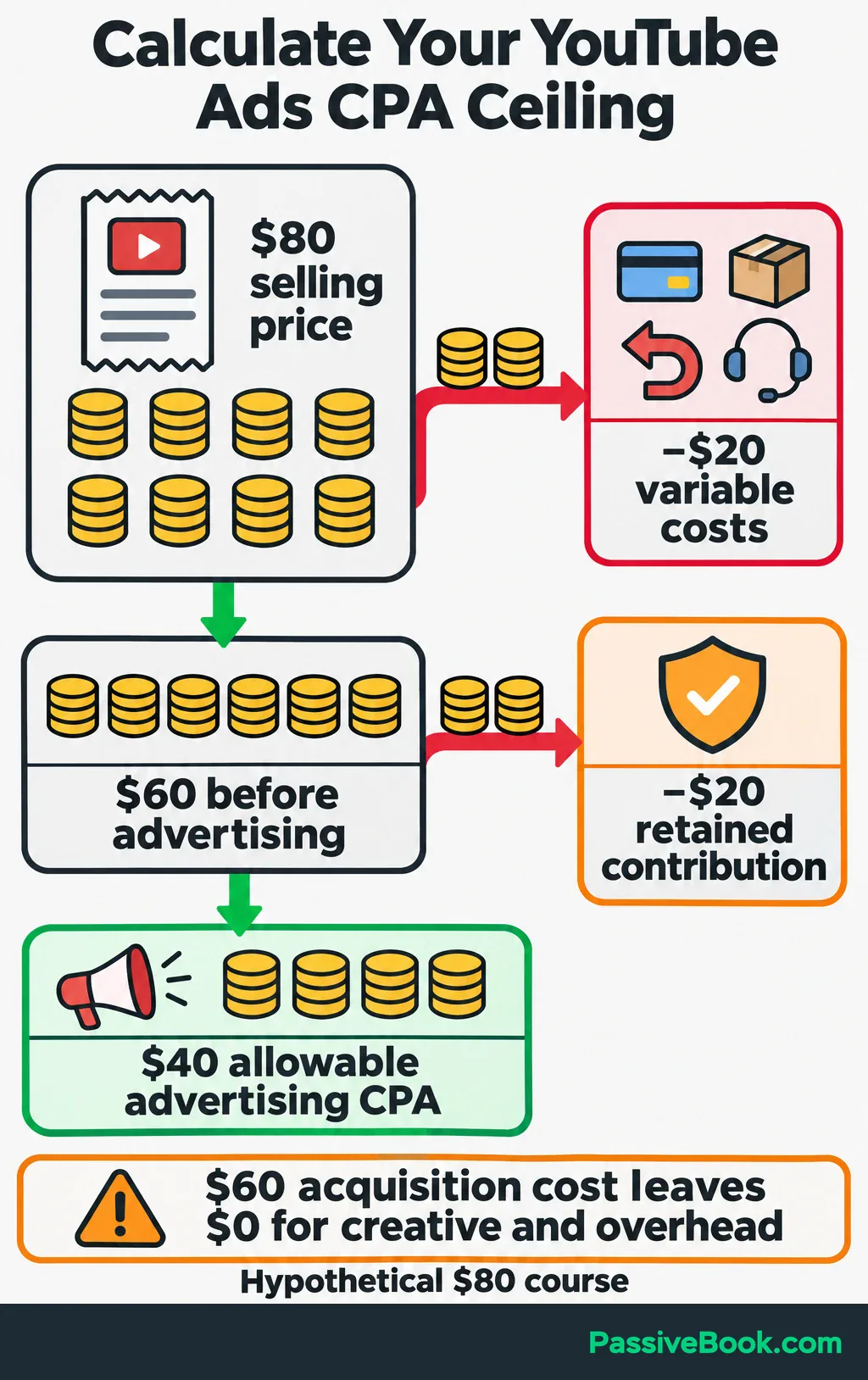
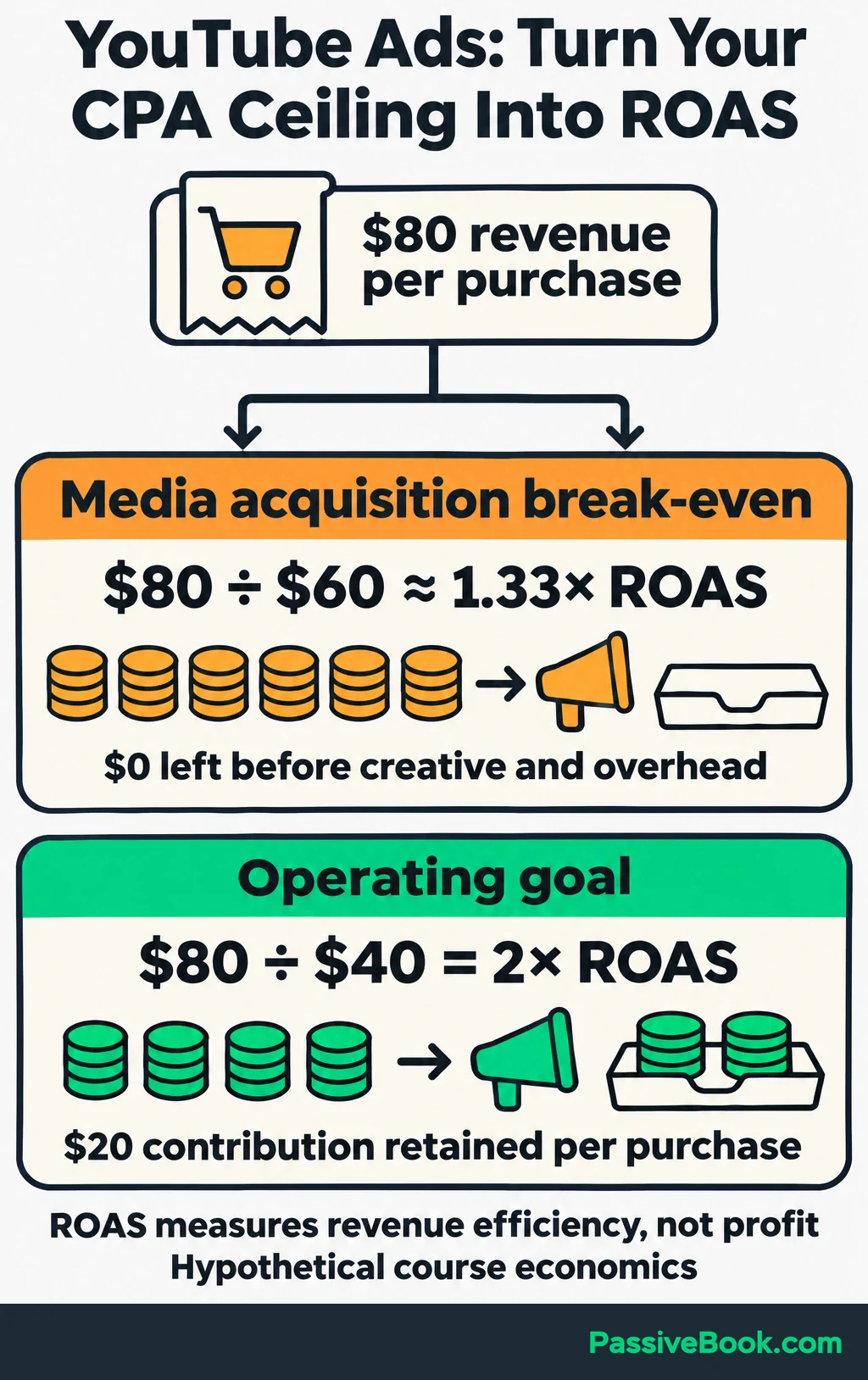
The $60 contribution is the media acquisition break-even point before creative costs and other overhead. Spending the full $60 to acquire a customer leaves nothing for those expenses.
I would use $40 as the operating ceiling in this example. That leaves $20 per purchase toward other costs and profit.
Across my digital products, I’ve tested prices from $3 to $197. In one product spreadsheet, I had sales at the top and fees and refunds on another tab. The product looked healthier until I brought those costs together. That is why I start this calculation with what a sale leaves behind.
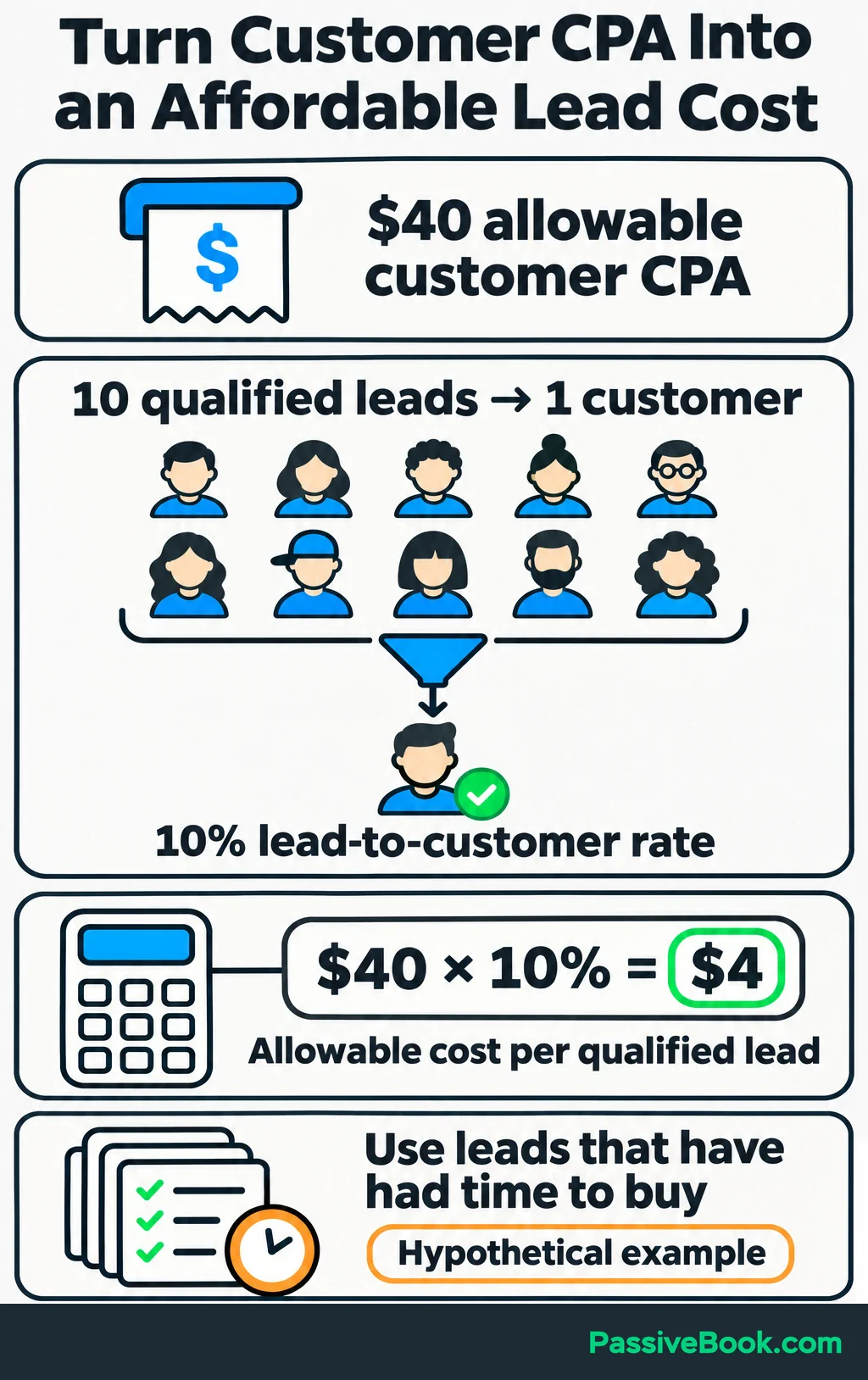
If you collect leads instead of selling immediately, use your sales records to connect leads with customers. Count leads from a group that has had enough time to buy.
Suppose 10% of qualified leads become customers and you can afford $40 to acquire each customer:
Allowable cost per lead = $40 × 10% = $4.
Use first-purchase contribution for your initial ceiling. I would only add repeat-purchase value once customer records support it. An imagined second purchase is a very convenient way to excuse an expensive first one.
Translate CPA Into ROAS and ROI
Return on ad spend, or ROAS, compares revenue credited to advertising with media spend:
ROAS = attributed revenue ÷ media spend.
“Attributed” means the reporting system gives the campaign credit under its measurement rules. It does not establish that advertising caused every credited purchase.
For the $80 course:
- Media Break-Even: $80 revenue ÷ $60 acquisition cost ≈ 1.33× ROAS.
- Operating Goal: $80 revenue ÷ $40 acquisition cost = 2× ROAS.
ROAS tells you about revenue efficiency. It does not subtract the cost of serving customers or producing the campaign.
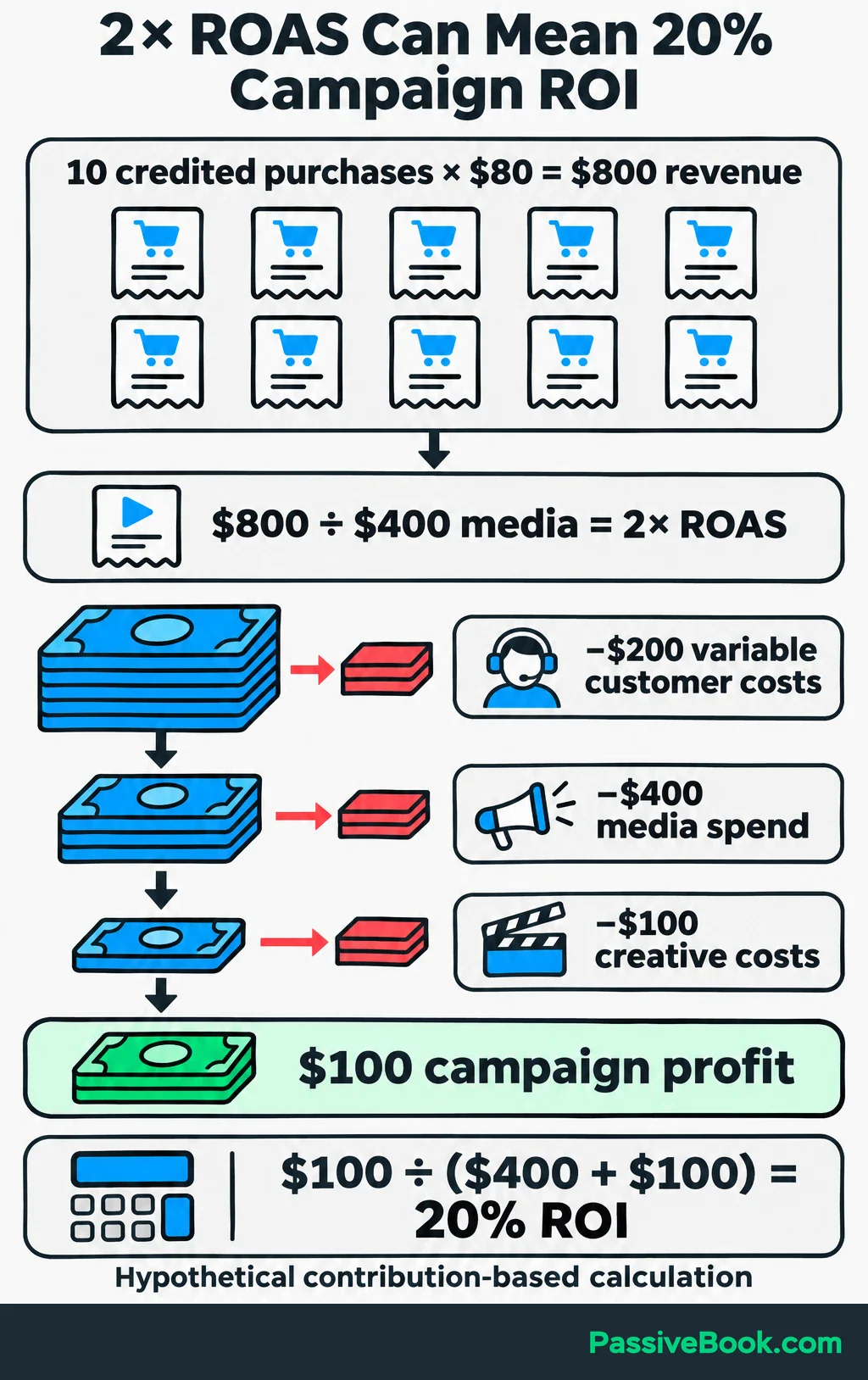
For that, calculate contribution-based campaign ROI. Count the contribution from credited purchases, subtract advertising and other incremental campaign costs, then compare the remaining profit with those campaign costs:
Campaign ROI = (contribution before advertising − media spend − other incremental campaign costs) ÷ (media spend + other incremental campaign costs).
Here is the course example with ten credited purchases:
| Item | Amount or Calculation |
|---|---|
| Revenue | 10 purchases × $80 = $800 |
| Contribution before advertising | 10 purchases × $60 = $600 |
| Media spend | $400 |
| Creative costs assigned to this test | $100 |
| Campaign profit | $600 − $400 − $100 = $100 |
| ROAS | $800 ÷ $400 = 2× |
| Campaign ROI | $100 ÷ $500 = 20% |
The campaign meets the $40 media CPA ceiling, but its profit is $100 after the stated costs. That is a more useful answer than “we made $800.”
Choose a Bidding Strategy That Matches Your Goal
Pick the outcome first. Then choose a strategy designed to pursue it.
| Goal | Campaign Type | Bidding Strategy | Required Inputs | Success Metric |
|---|---|---|---|---|
| Get people to watch | Video views | Target CPV | Relevant video and a realistic view-cost target | Qualifying views and CPV |
| Reach an audience | Video reach | Target CPM | Market, audience, and exposure goal | Reach, impressions, and frequency |
| Bring visitors to a page | Demand Gen | Maximize clicks or target CPC | Working page; for target CPC, an average click-cost target based on forecasts or account results | Useful visits and CPC |
| Acquire purchases or leads | Demand Gen | Maximize conversions or target CPA | Verified conversion tracking and an allowable acquisition cost | Purchases or qualified leads and CPA |
| Generate more sales revenue | Demand Gen | Maximize conversion value or target ROAS | Accurate purchase values and sufficient eligible conversion history | Conversion value, ROAS, and contribution |
Target CPV, CPC, CPA, and ROAS are average optimization objectives. They are not guaranteed results or maximum prices for each individual outcome.
I would use Demand Gen for the purchase workflow in this guide. It replaces the older Video Action campaign approach and can run beyond YouTube, so inventory selection matters. Google’s Video Action migration guidance
Views and Reach
Choose Video views with target CPV when watching the video is the intended result. Judge qualifying views and their cost. Google’s Video views guidance
Choose Video reach with target CPM when the job is exposure. Review how many people you reach and how often they see the ad, alongside impressions and CPM. Google’s campaign estimates can help you assess delivery, and an excessively low target can restrict it. Google’s Video reach guidance
Use forecasts and comparable account results for your intended geography, audience, and format to set an initial target.
For the grooming course, a view campaign could help assess whether people watch a lesson preview. It would not, by itself, answer whether you can acquire customers below $40.
Website Visits
Demand Gen’s Maximize clicks pursues click volume within your budget. Target CPC adds a desired average click cost, and individual clicks can cost more or less. Google’s Demand Gen click-bidding guidance
Choose these when visits are the actual outcome. Then check whether visitors reach and use the intended page.
For the course, useful traffic might include visitors who read the lesson outline or play the preview. Those actions can help explain interest, but the sales campaign still needs purchases.
I would skip click bidding as a compulsory warm-up before conversion bidding. Cheap visitors do not automatically become affordable customers.
Purchases and Leads
Before asking Google to pursue purchases, complete a test purchase yourself. Verify that:
- Event: The purchase records after successful payment.
- Value: The recorded amount matches the order.
- Currency: The currency matches your checkout.
- Order ID: Each purchase sends its own unique transaction ID.
Google uses matching transaction IDs to suppress duplicates within the same conversion action. Reusing one fixed ID across orders can cause undercounting. Google’s transaction-ID guidance
For leads, submit the form and check both the tracking event and the record you receive.
Tell Google to pursue purchases or meaningful leads. Mark that conversion action as Primary, then select the campaign goal that contains it. Keep page views and checkout starts Secondary so you can monitor them without using them for bidding. There is an exception: Google also bids toward secondary actions included in a selected custom goal, so keep those actions out of that goal. Google’s conversion-goal rules
Provide required tracking disclosures and obtain applicable consent before collecting or sharing visitor data. Google has specific consent requirements for users in the EEA, UK, and Switzerland. Google’s user consent policy
When tracking works but acquisition performance is unknown, I would start with Maximize conversions inside a firm spending limit. It pursues conversion volume without enforcing a CPA target.
Google recommends considering target CPA or target ROAS after a new Demand Gen campaign has received at least 50 conversions. That is starting-strategy guidance, not a universal eligibility rule for target CPA. Google’s Demand Gen starting guidance
Choose target CPA when acquisition results support an economically acceptable target. If the course’s observed CPA is far above $40, entering $40 does not repair the offer. An unsupported low target can reduce delivery rather than create cheaper customers.
Conversion Value
Purchase-count optimization is straightforward for a single-price course because each purchase has similar value.
Maximize conversion value becomes more useful when order values differ meaningfully. Target ROAS adds a value-efficiency objective, but your revenue target still needs to leave enough contribution after customer costs.
Pass accurate transaction values before switching. Demand Gen value bidding requires either:
- Campaign History: At least 50 positive-value conversions within 35 days, including 10 within seven days.
- Account History: At least 100 positive-value conversions across the account’s Demand Gen campaigns within 35 days.
These are eligibility conditions, unlike the general starting guidance above. Google’s value-bidding requirements
I would keep the course on purchase-count bidding unless its offers or order values become different enough to justify the extra complexity.
Calculate a Realistic Starting Test Budget
A sensible budget funds a specific decision and stays within an amount you can afford to lose.
Those two conditions matter more than finding somebody else’s favorite daily spend.
Estimate the Spend Needed to Answer One Question
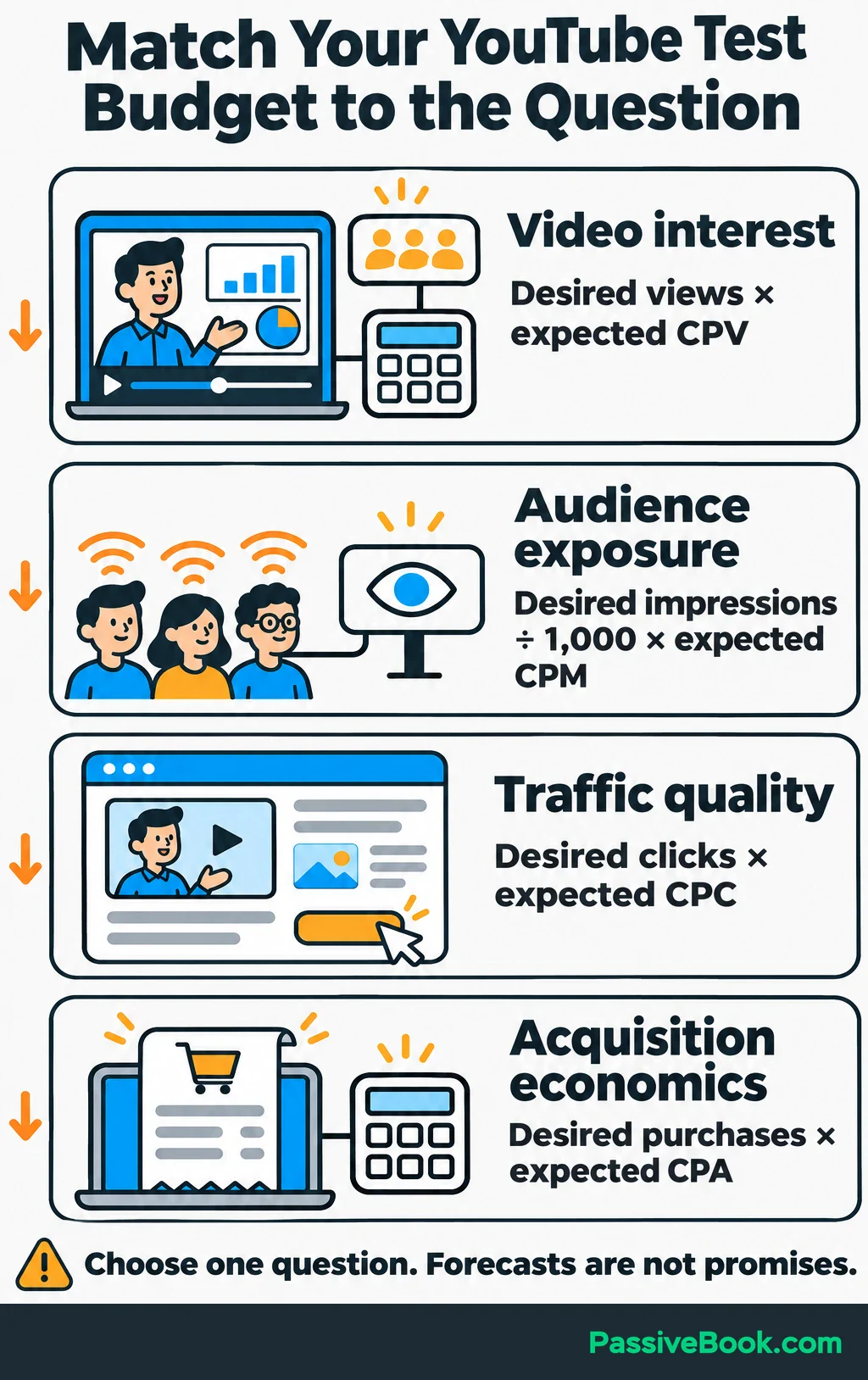
Choose the question before estimating the cost:
- Video Interest: Will the intended audience watch this message?
- Traffic Quality: Will people visit and use the offer page?
- Acquisition Economics: Can purchases approach the allowable CPA?
Then multiply the amount of evidence you want by its expected cost.
| Test Outcome | Media Budget Calculation |
|---|---|
| Views | Desired qualifying views × expected CPV |
| Impressions | Desired impressions ÷ 1,000 × expected CPM |
| Clicks | Desired clicks × expected CPC |
| Purchases | Desired purchases × expected CPA |
Use forecasts for your selected market and campaign settings, then refine the assumptions with actual results.
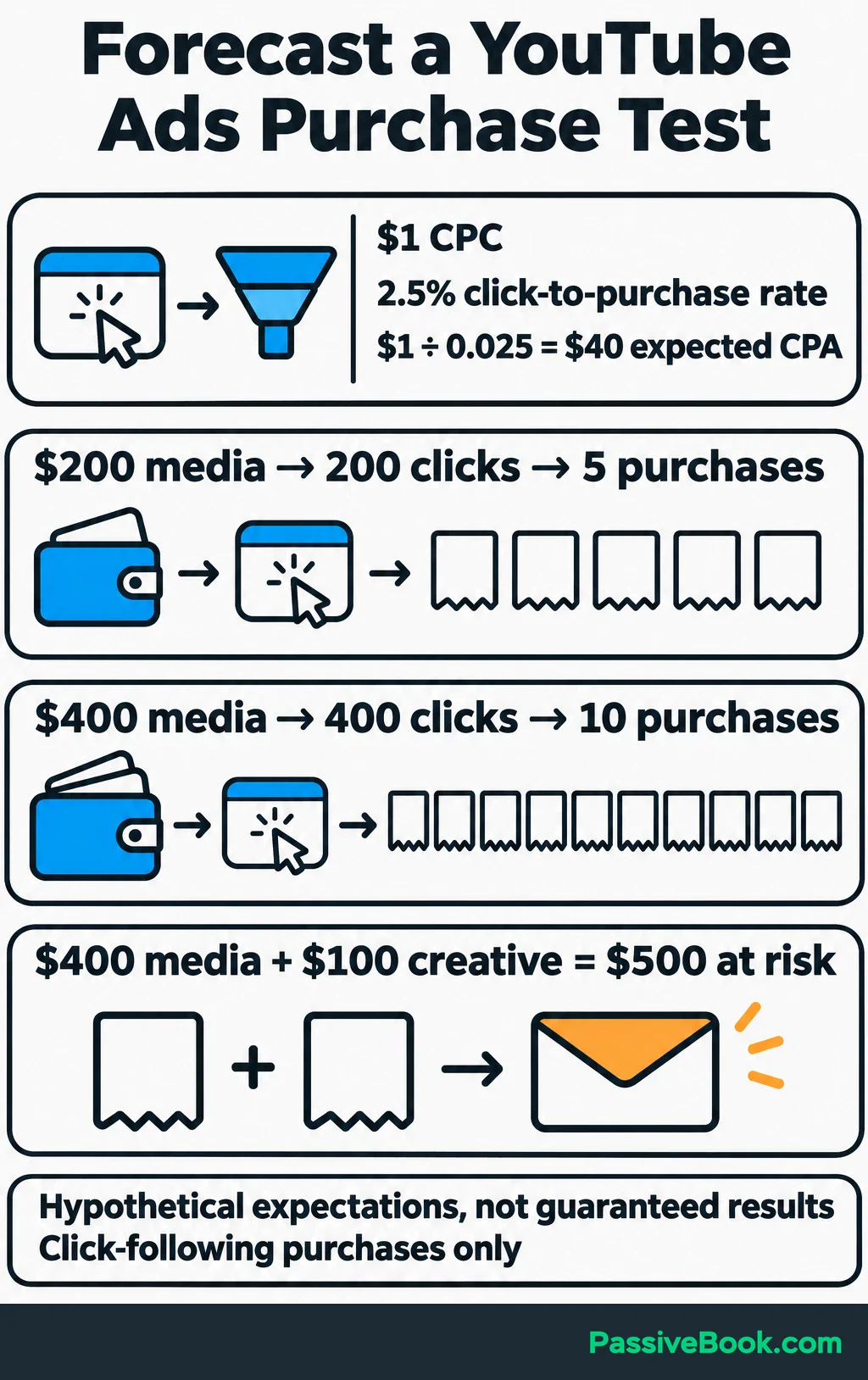
For a click-based purchase forecast, estimate what share of ad clicks leads to a purchase within your measurement window.
Suppose the course gets clicks at $1 and 2.5% of those clicks lead to purchases:
Expected CPA = $1 ÷ 0.025 = $40.
Under those assumptions:
| Media Test Budget | Expected Clicks | Purchases Implied by the Assumed Rate |
|---|---|---|
| $200 | 200 | 5 |
| $400 | 400 | 10 |
These are planning expectations, not promised results. The conversion rate here concerns purchases following clicks; it does not include sales credited after viewing without clicking.
An average of five purchases can hide a real chance of getting none. Use the calculator to compare that uncertainty with the amount you can afford to put at risk.
Free Marketing Profit Calculator




Spread over ten days, $200–$400 gives a planning average of $20–$40 per day. A $10 or $20 daily budget can also support a narrow pilot, but a handful of purchases will not establish a dependable CPA.
Choose the duration around delivery and how long customers take to decide. Ten days is an example schedule, not a rule.
Finally, add production, landing-page work, and tracking costs. A $400 media test with $100 of creative work puts $500 at risk before considering any sales.
Check the Budget Against Your Bidding Strategy
Here is where a modest pilot and a well-funded conversion campaign can diverge.
Google recommends a daily Demand Gen budget of at least ten times target CPA. At a $40 target, that recommendation works out to $400 per day. It is performance guidance, not a mandatory entry fee. Google’s campaign-specific budget guidance
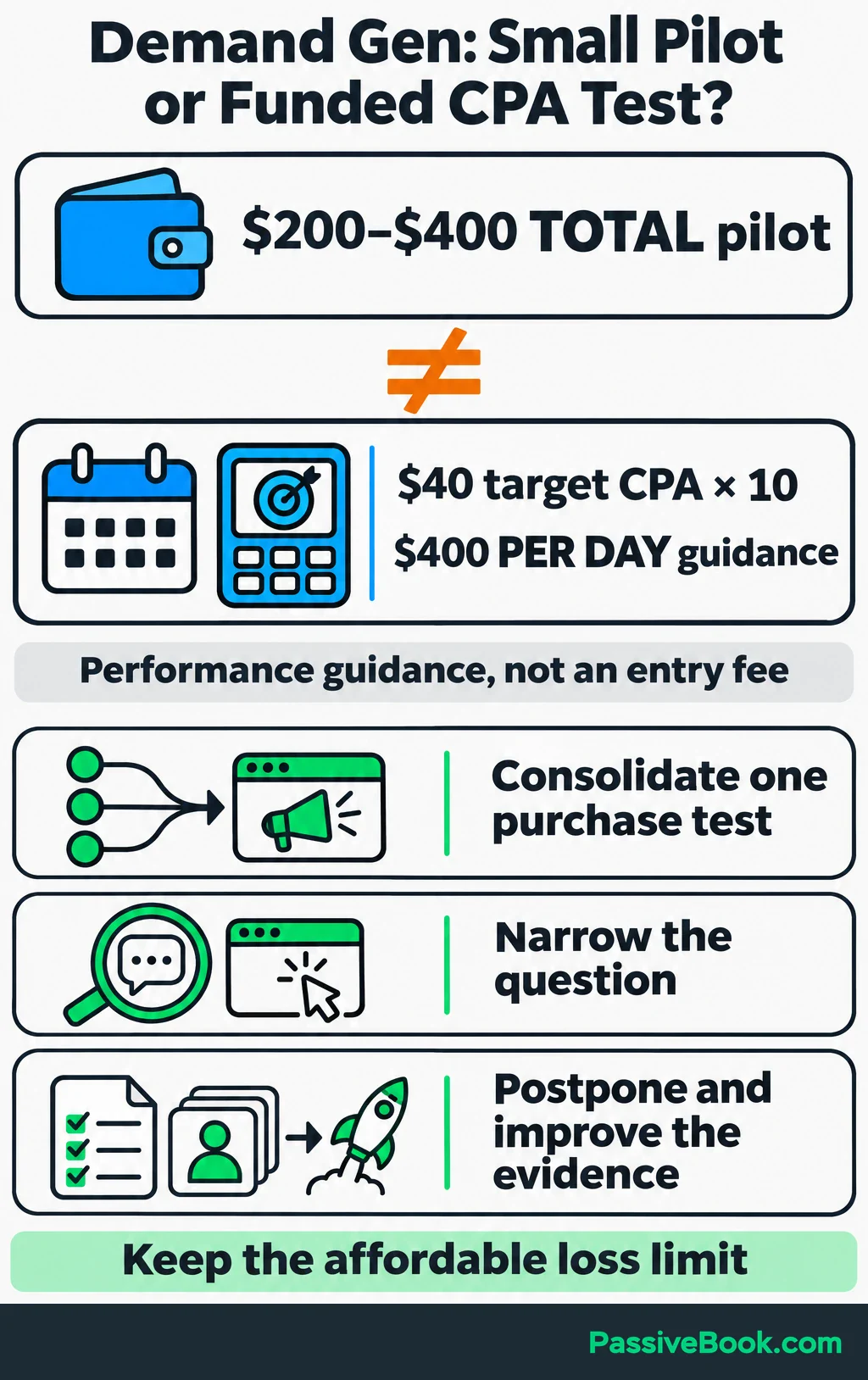
That is much larger than the $200–$400 total pilot above. Don’t treat the small test as if it satisfies the recommendation.
I would keep the affordable loss limit and choose among three options:
- Consolidate: Give one purchase test the available budget instead of splitting it among several campaigns.
- Narrow the Question: Test the message or traffic quality, and keep the conclusion limited to that outcome.
- Postpone: Improve the offer or collect more sales evidence before funding a purchase test.
Changing to click bidding may make a traffic pilot workable. It does not turn traffic evidence into proof of profitable acquisition.
Set Spending Controls Before Launch
For a fixed-spend test, select a campaign total budget during campaign creation and set start and end dates.
Google caps billed campaign spending at that total, but there is no daily spending limit under this budget type. Spending can be uneven, and you cannot change the budget type after creating the campaign. Google’s campaign total-budget rules
For an ongoing campaign, divide the monthly media allowance by 30.4 to calculate an average daily budget.
With an unchanged budget, most campaigns can bill up to twice that daily average on one day and 30.4 times it over a full month. For example:
$608 monthly allowance ÷ 30.4 = $20 average daily budget.
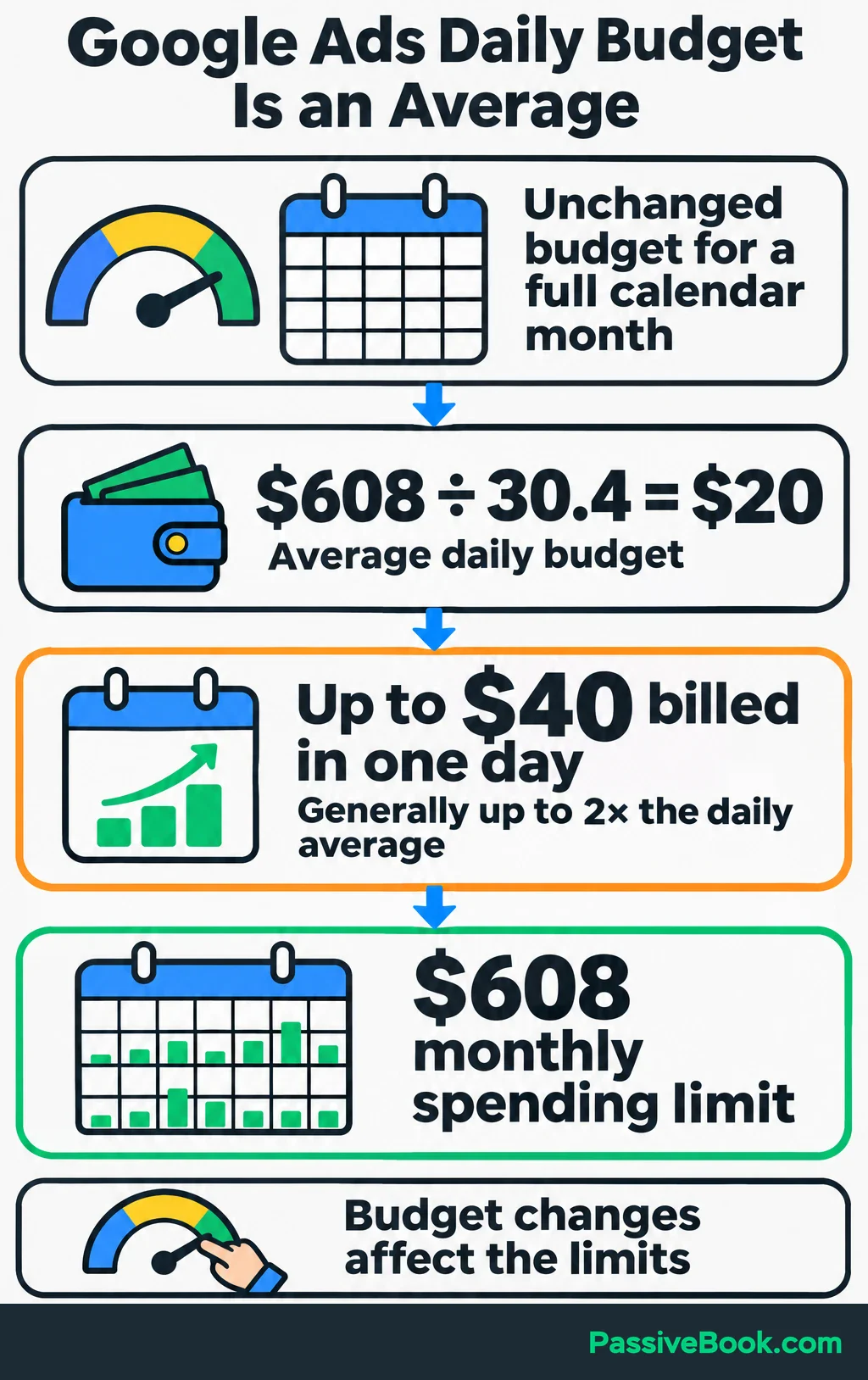
That can mean a $40 billed day. The word “average” is doing real work here. Google’s spending-limit rules
If the course test has a firm $400 media ceiling, I would use a $400 campaign total budget. Setting a $40 average daily budget for ten days does not create the same ceiling.
Before launch, record:
- Media Cap: The maximum campaign spend you have authorized.
- Other Costs: Creative, setup, and paid help included in the test.
- Review Dates: When you will inspect delivery and assess results.
- Stop Conditions: Technical faults, irrelevant delivery, and the spending limit.
Add the exposure across every active campaign. Three individually affordable tests can still make an unaffordable account.
Launch a Focused Test
Start with one offer, one primary outcome, one market you can serve, and a few ads that present the offer in different ways.
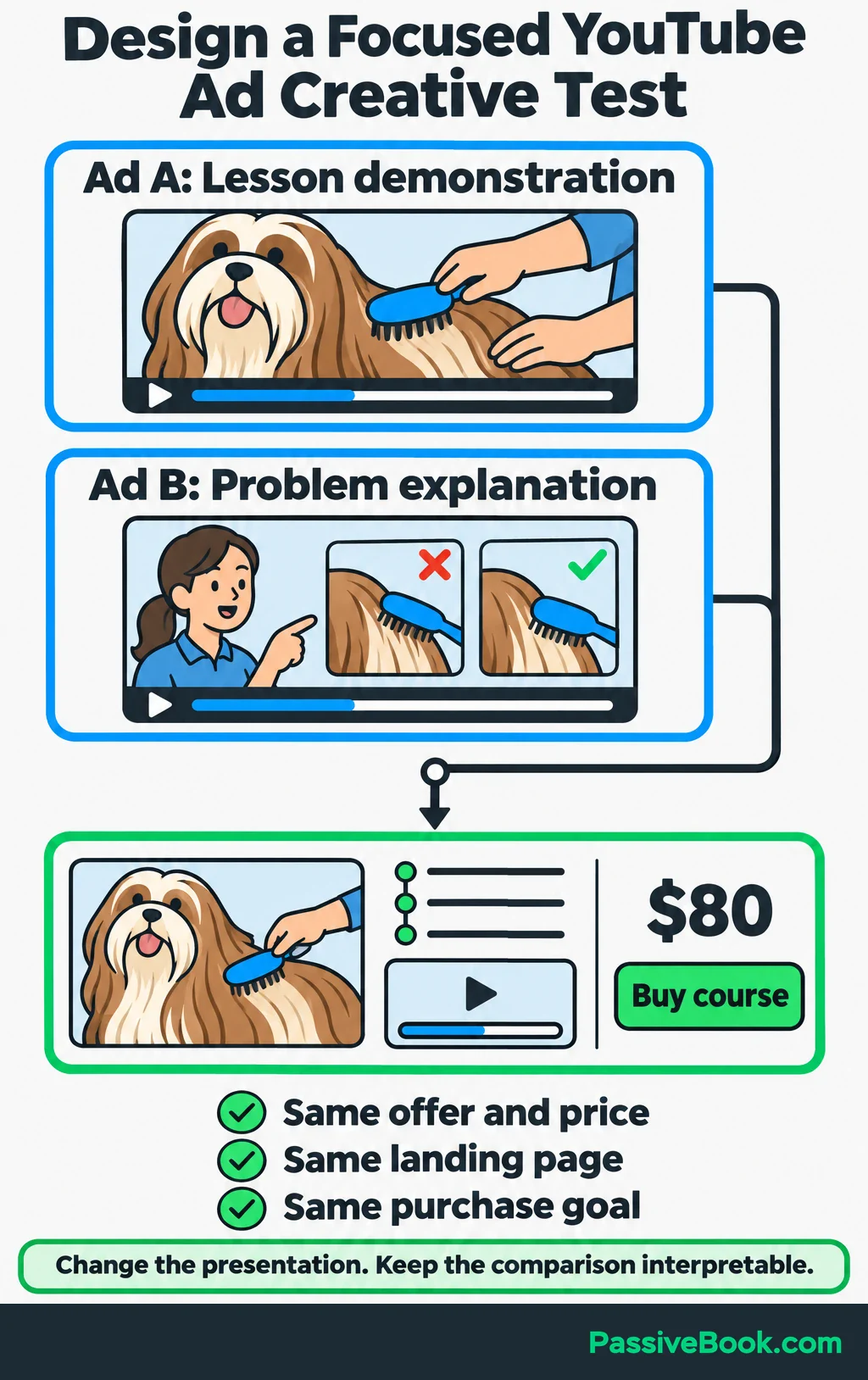
For the grooming course, I would compare two approaches:
- Demonstration: A short lesson excerpt showing the teaching style.
- Problem Explanation: An explanation of a common grooming mistake and what the course helps owners learn.
Keep the price, offer, and landing-page destination consistent. That makes the creative comparison easier to interpret.
The demonstration might introduce the offer with:
“See how the brushing lesson is taught before you choose the full course.”
The other version could lead with the problem, but both should give people a clear reason to visit the same course page.
For a YouTube-specific Demand Gen test, select YouTube inventory. Channel controls support in-stream, in-feed, and Shorts, and reporting lets you inspect delivery by format. Google’s channel-control guidance
I would review that delivery before creating separate campaigns for every format. A small budget divided into tiny pieces gives each piece very little chance to teach you anything.
Choose geography, language, and audience signals around plausible buyers. For this course, interest in long-haired dog care makes more sense than a broad attempt to reach everyone who enjoys animal videos.
Check the page and checkout on a phone. Confirm the ad is approved, the destination opens, tracking works, and spending follows the intended setup soon after launch.
Fix technical faults immediately. Save performance changes for the planned review.
Diagnose Wasted Spend Before Changing Bids
Read spend, impressions, qualifying views, clicks, purchases or qualified leads, CPA, and conversion value together.
A cheap view can be useful for a view campaign and almost irrelevant to the decision facing a purchase campaign.
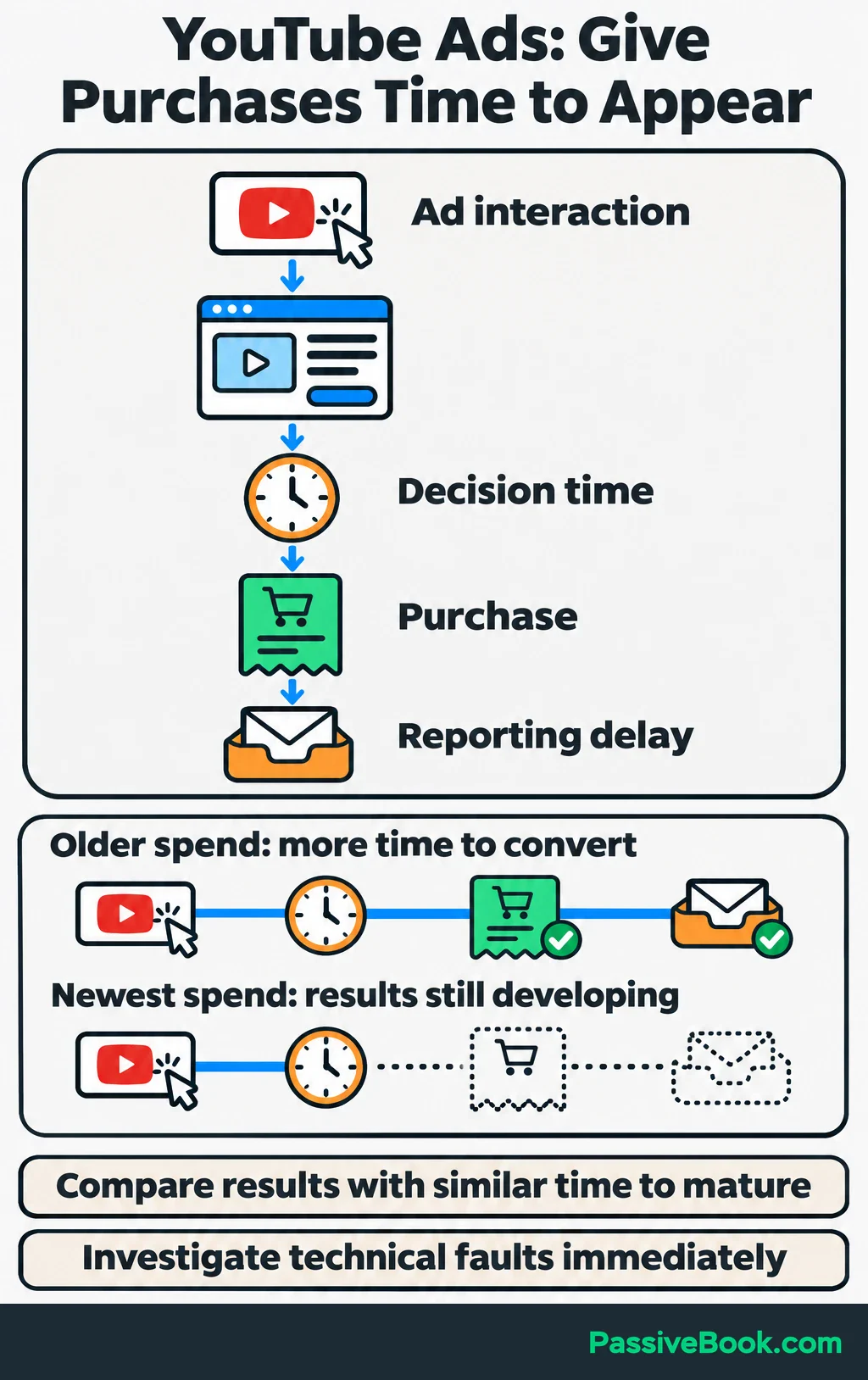
Also allow time for purchases and reporting to catch up. If buyers usually take several days to purchase, the newest spending has not had the same chance to produce results as older spending. Google recommends accounting for these conversion delays when evaluating performance. Google’s performance-review guidance
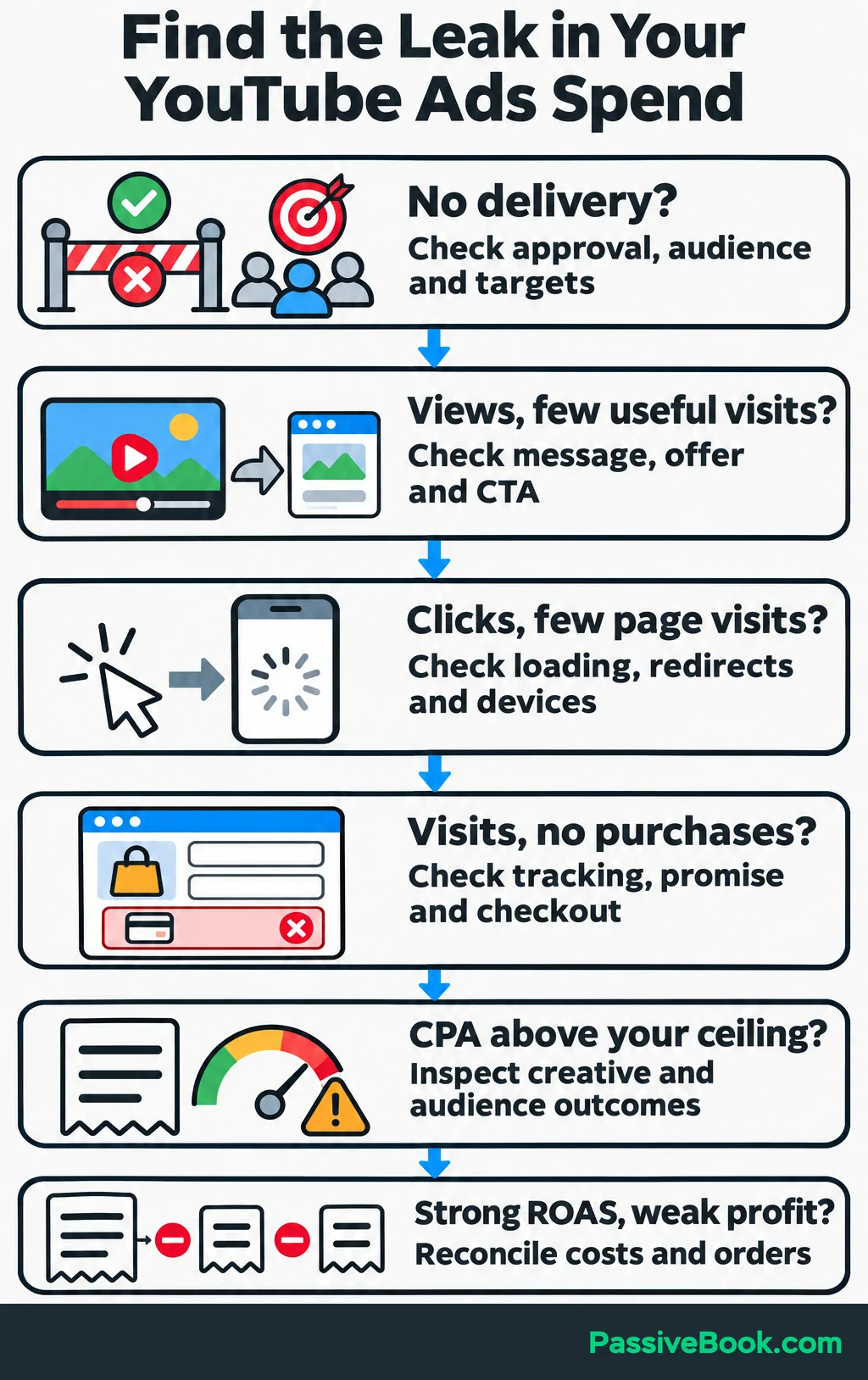
Use the report to locate the problem before changing a bid.
| Symptom | Evidence to Inspect | Next Action |
|---|---|---|
| Little or no delivery | Ad approval, audience size, channel selection, and restrictive targets | Fix eligibility or targeting problems before adding budget |
| Views but few useful visits | Opening message, offer, call to action, and destination | Make the reason to visit clearer and align it with the page |
| Clicks but few recorded page visits | Page loading, redirects, tracking, and device differences | Test the destination on the affected devices |
| Visits without purchases | Purchase tracking, page promise, checkout, and customer fit | Repair the broken step or test a clearer offer |
| CPA above the operating ceiling | Purchases by creative, audience, device, and channel | Change the factor tied to poor acquisition economics |
| Strong reported ROAS but weak profit | Fees, refunds, support costs, creative costs, and order records | Recalculate contribution and reconcile credited orders |
Suppose the course gets visitors but no purchases. Lowering target CPA is not my first move. I would check whether the page delivers the promise made in the ad, whether the price is clear, and whether payment works.
If checkout is broken, the bidding system has been given a very expensive puzzle.
Once the buying path works, compare business outcomes across creative and audience groups. Use small samples to identify questions worth investigating, not to declare permanent winners.
Decide When to Pause, Continue, or Scale
Use the spending limit, review dates, and stop conditions you recorded before launch to make this decision.
- Pause: Tracking is broken, the destination is unusable, delivery is clearly irrelevant, or the agreed spending limit has been reached.
- Continue: The campaign works, money remains within the original cap, and further spending can still answer the test question.
- Scale: Acquisition costs meet the operating ceiling, tracking reconciles with business records, and you can serve additional customers profitably.
During the initial learning period, when Google uses campaign results to adjust its bids, avoid frequent performance edits. Afterward, change one meaningful control at a time and record the date, reason, and result. A brief change log is enough to stop every review becoming a guessing exercise.
A “Limited by budget” label alone does not justify spending more. It tells you the campaign could use more budget, not that your business should provide it.
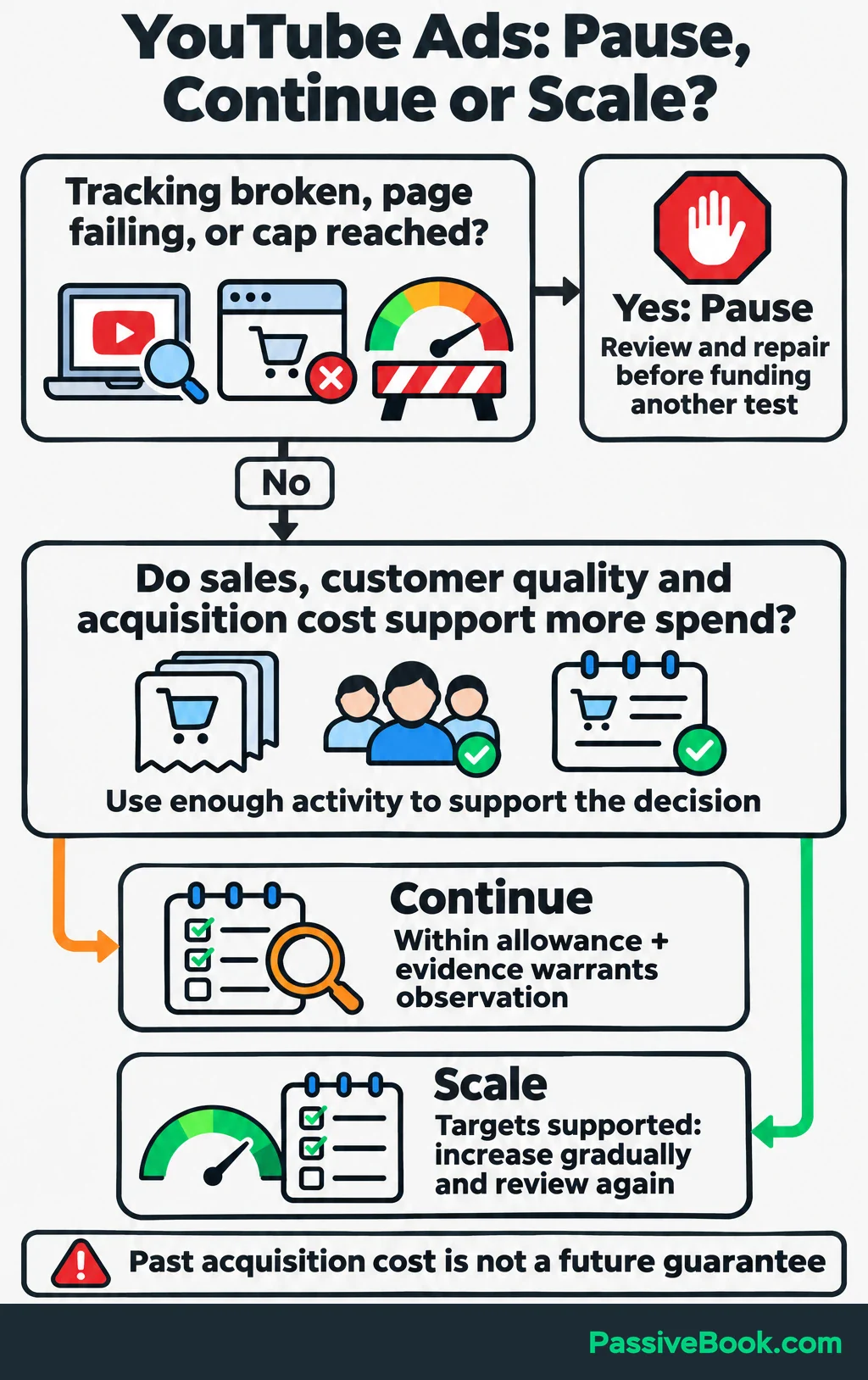
Review configured targets before expanding. Google’s budget-limited target-based campaigns optimize toward their stated targets. Historically beating a loose target is not a dependable profit safeguard. Google’s explanation of target-based bidding behavior
For the course, I would not leave an $80 target CPA configured because the campaign happened to acquire customers at $35. The operating ceiling is still $40.
Increase the budget in controlled increments, then review acquisition costs and contribution before increasing it again.
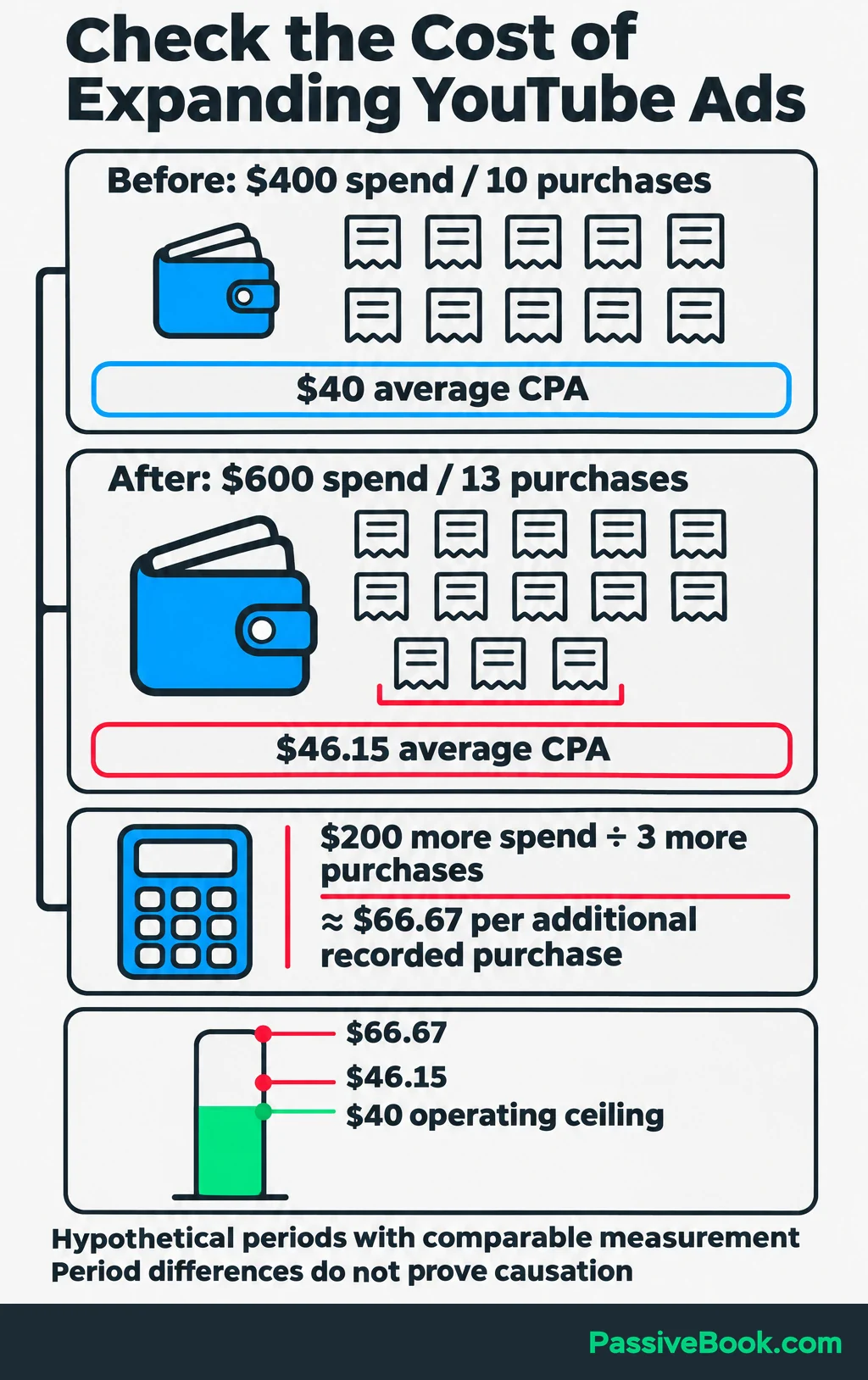
To see why, compare two hypothetical periods with the same measurement rules and enough time for purchases to be reported:
| Period | Media Spend | Credited Purchases | Average CPA |
|---|---|---|---|
| Before expansion | $400 | 10 | $40.00 |
| After expansion | $600 | 13 | $46.15 |
The later period recorded $200 more spending and three more purchases. Comparing those differences gives:
$200 ÷ 3 ≈ $66.67 per additional recorded purchase.
This is a comparison between periods, not proof that the budget increase caused those three purchases. But it is a clear warning: the expansion looks too expensive against the $40 ceiling.
I would reduce the expansion or improve the economics before adding more money. More sales are useful when enough money survives them.
What Next?
Calculate the contribution from one sale and write down your allowable CPA before opening campaign setup. Then set a total test cap you can afford even if the campaign produces no purchases.
If this guide helps you connect ad spending with actual profit, use the social buttons to share that approach.
Which part of your first test is least certain: the offer, the tracking, or the expected acquisition cost? Share your answer—and any other questions—in the comments.
Share this post with your friends & followers:

