You have a product to promote, but “people who like dogs” is a worryingly broad place to spend money. Someone saving puppy photos may have no interest in what you sell.
The harder task is finding people whose current need matches your offer, then checking whether those visits turn into something useful.
A focused campaign gives you a way to test that connection before committing more money. This guide shows how to choose Pinterest targeting, prepare tracking, and launch a test that tells you whether you’re attracting potential buyers.
Which Pinterest Targeting Method Should You Use?
Choose your targeting method by answering three questions:
- What problem does your offer solve?
- What should someone do after clicking?
- What useful audience data do you already have?
You set targeting at the ad-group level. The campaign holds the main objective and budget settings, and each ad group holds the audience choices for its ads.
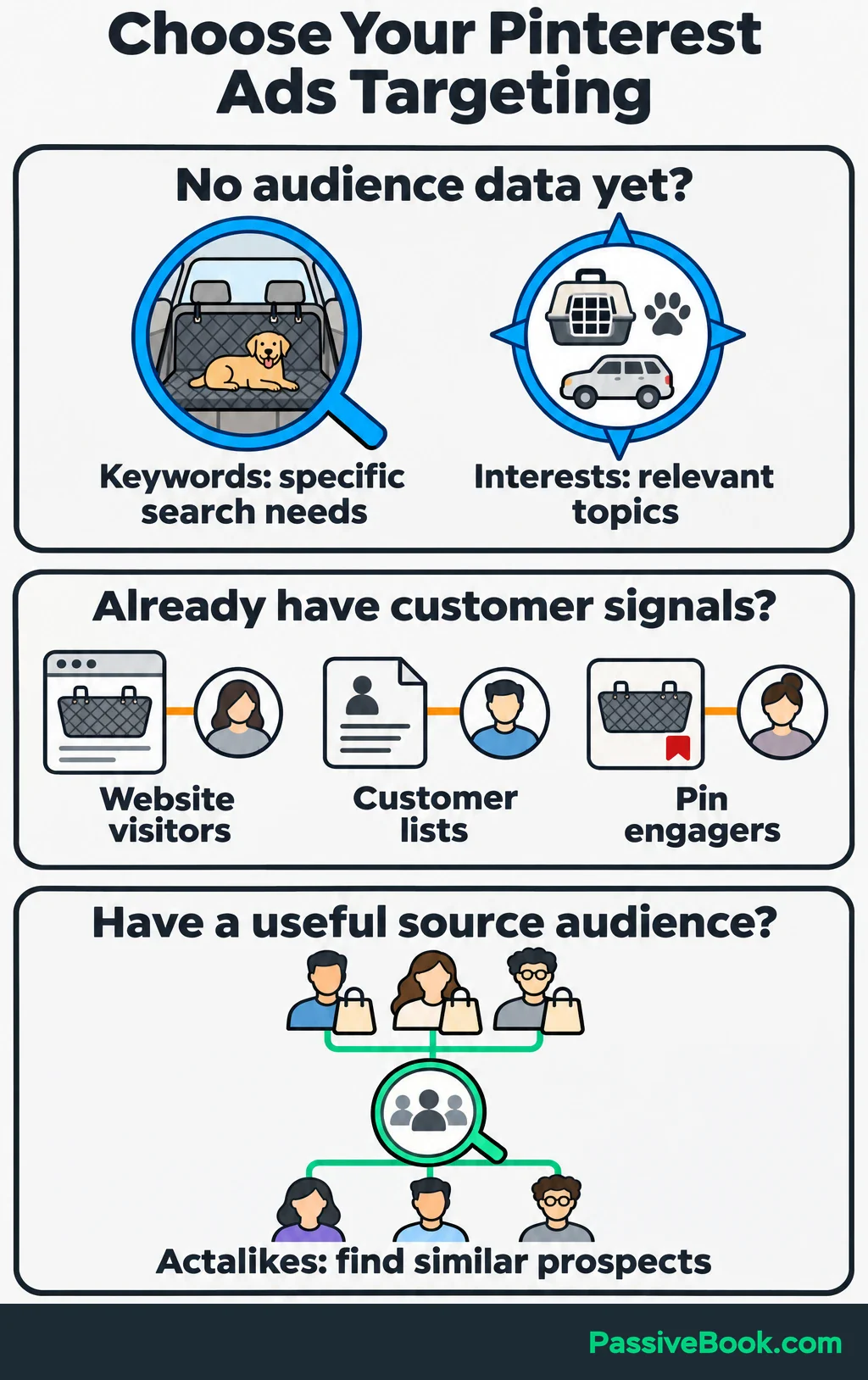
Here’s how the main methods compare. The starting uses are what I would test, based on Pinterest’s targeting options.
| Method | Audience Signal | Required Data | Suitable Starting Use |
|---|---|---|---|
| Keywords | Relevant searches | A focused keyword list | Test a clearly named problem or product need |
| Interests | Topics people explore | Relevant interest categories | Introduce an offer tied to a broader topic |
| Website visitors | Previous visits or site actions | Pinterest tag and eligible traffic | Remind interested visitors about the product |
| Customer lists | A match with your customer records | Eligible customer identifiers | Exclude existing buyers or promote a relevant follow-up |
| Engagement audiences | Previous interaction with your content | Eligible Pinterest engagement | Follow useful content with product details |
| Actalikes | Similarity to an existing audience | A suitable source audience | Find new prospects using buyer data |
For our running example, imagine your online dog-travel shop sells a washable back-seat car cover. I would begin with keywords about protecting car seats from dogs.
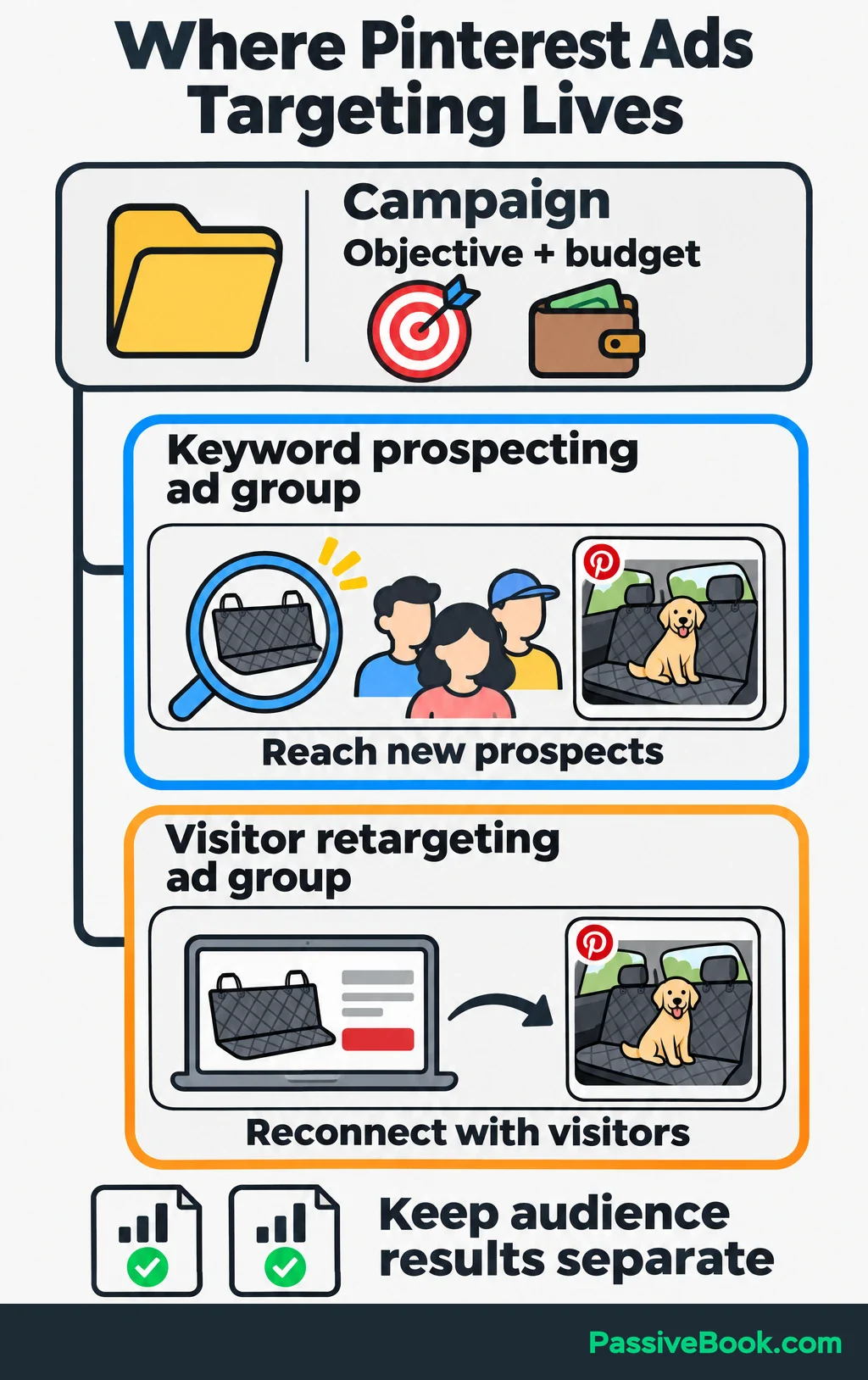
That gives the test a clear question: can ads using these keywords bring purchases at an affordable cost? You don’t need a customer list to begin answering it.
Later, a separate visitor audience could reconnect with people who viewed the cover but didn’t buy. Those groups serve different purposes, so keep their results separate.
Set Your Goal and Prepare Tracking
Choose one primary outcome before opening campaign setup. Otherwise, it’s easy to celebrate whichever number happens to rise.
For the car cover, the business outcome is completed purchases. Your destination is its product page.
For other offers, the outcome might be a confirmed email signup or a useful website visit. Match the campaign objective to that action:
- Consideration: Bring people to your website.
- Leads: Seek non-transactional actions, such as signups.
- Sales: Seek transactional actions, such as purchases.
For the car-cover test, tell Pinterest to seek completed purchases: select Sales as the objective and Checkout as the optimization event. Choose Pins as the creative source to promote individual Pins. Pinterest’s objective and event mapping explains which events belong to each objective.
Before building the campaign, prepare your business account, advertiser account, billing details, and a working product page. Check advertising availability for your business country, including whether access is direct or through an advertising partner.
Then install the Pinterest tag, the website code used to record visits and actions. Use a supported website integration if one is available, or install it manually.
Test the purchase event with a test order and check that Pinterest receives it. Checkout means a completed transaction; InitiateCheckout means someone started checkout. Those are different stages, and counting the second as a sale would make your results look much better than your bank account. See Pinterest’s conversion-event definitions.
Before collecting or sharing advertising data, disclose the tracking and obtain any legally required consent, as required by Pinterest’s Ad Data Terms.
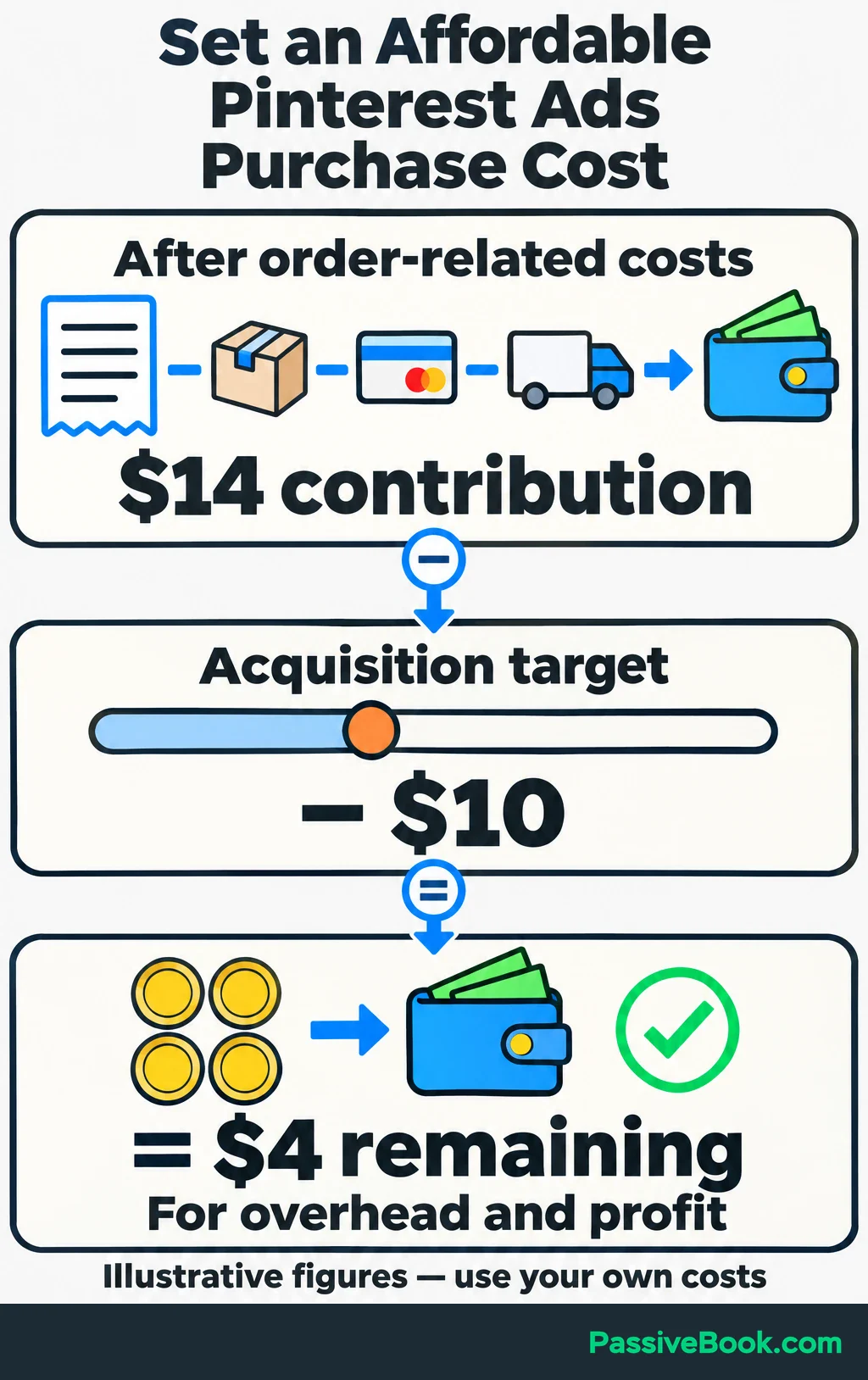
Finally, decide what you can afford to pay for a purchase. Count the money left from an order after product cost, payment fees, shipping you cover, and other costs tied to that order.
Suppose that leaves $14. Spending $14 to acquire the order uses up that contribution. A $10 acquisition target leaves $4 toward overhead and profit.
I would set that target before launching. An affordable purchase needs a number attached to it.
Create Your Campaign and Set Audience Boundaries
In Ads Manager, create a Manual campaign with your chosen objective. To control the audience selections, open the ad group’s Targeting section and select Choose your own under Targeting strategy.
Name the group clearly: “Car cover — keywords” is useful. “Test 1 final new” becomes less useful surprisingly quickly.
Set location and language around your ability to serve customers. Target places you ship to, and use the language of your ad and product page. Available geographic detail varies by country.
I would leave age, gender, and device restrictions open unless the product, platform rules, or customer evidence gives you a reason to narrow them. Guessing who buys dog accessories can remove potential customers before the test begins.
For placements, start with all placements across the home feed, search results, and related Pins. Choose Search if your specific question is how the ads perform during searches.
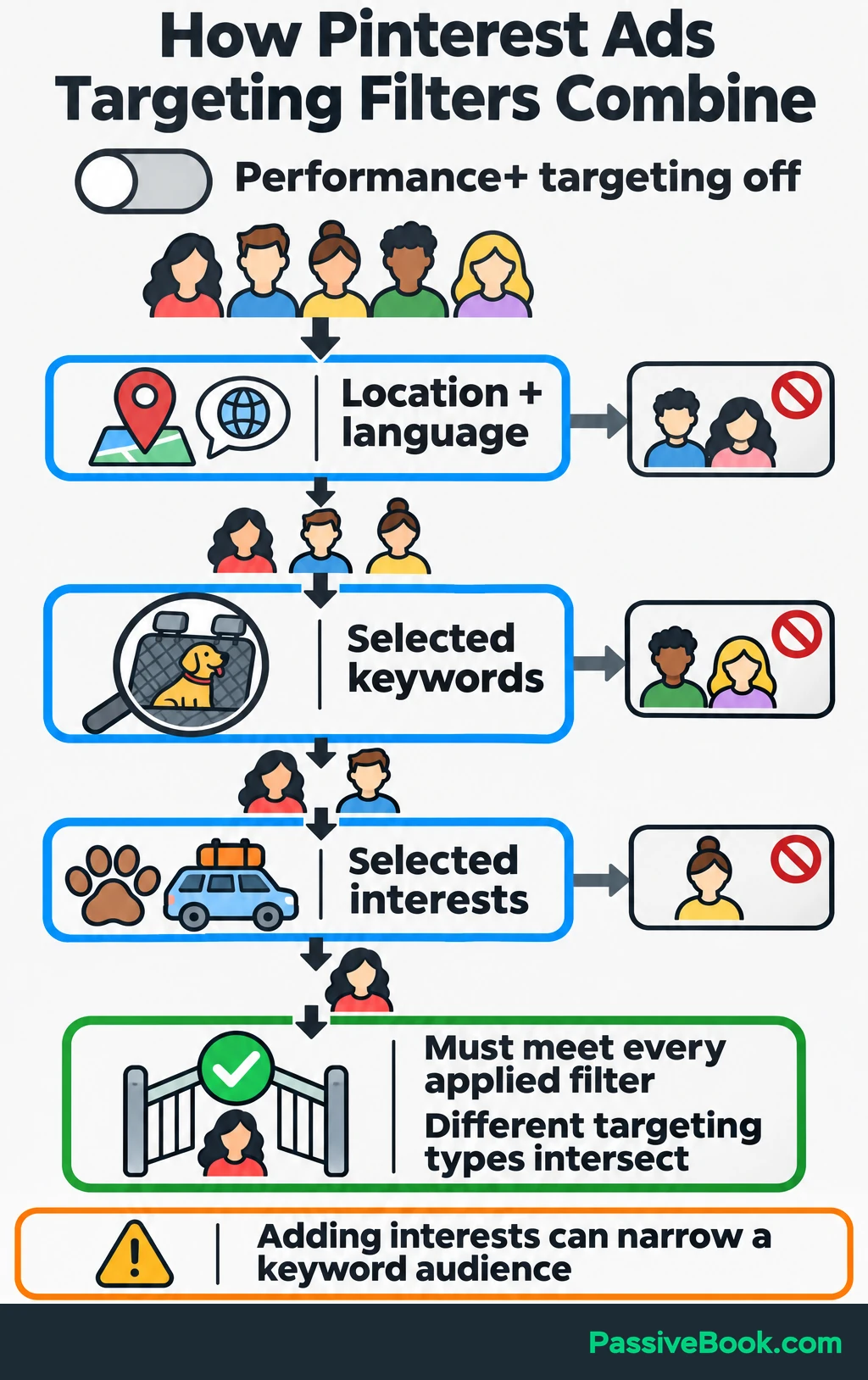
Be careful when combining targeting types. With expansion off, different types intersect: people must meet all the applied filters. Adding interests to a keyword group can therefore narrow eligibility. It doesn’t simply add another pool of people. Pinterest explains this in its targeting-combination rules.
I would test keywords and interests in separate ad groups.
Also review Performance+ targeting. It is on by default for new campaigns and can extend beyond your selected keywords and interests. For a first test of your chosen keywords, turn it off.
According to Pinterest’s Performance+ targeting rules, expansion preserves location, gender, language, placement, and age restrictions, and it doesn’t expand beyond selected audience lists.
Check the potential audience estimate after making your selections. If it shrinks sharply, look for an accidental restriction before adding unrelated keywords.
Review Performance+ targeting separately from Performance+ budgeting or bidding. They control different parts of the campaign.
Build a Prospecting Audience From Customer Intent
Prospecting means reaching people who don’t already know your business. Start with their problem, because that gives you a better targeting choice than a broad description of the person.
For the car cover, “keep muddy paws off the back seat” is useful. “Likes dogs” leaves far more guessing.
Turn Customer Needs Into Keyword Groups
Write down the problem, the desired result, and phrases someone might search while looking for a solution. Group phrases around one need.
For the cover, that could include:
dog car seat coverwashable dog seat coverback seat cover for dogs
These are starting ideas to investigate. To enter them, open Interests and keywords in the ad group, select Enable keywords, then Add keywords. Enter your phrases separated by commas and review Pinterest’s suggestions. Keep suggestions that match the actual product and page.
Skip loosely connected terms such as “car upholstery repair.” Someone fixing damaged upholstery needs a different solution.

Match types control how closely searches must relate to your keywords:
| Type | Syntax | Eligible Searches |
|---|---|---|
| Broad | dog car seat cover | The keyword and related searches |
| Phrase | "dog car seat cover" | The phrase in order, with additions or close variations |
| Exact | [dog car seat cover] | The keyword or a close variation |
| Negative phrase | -"upholstery repair" | Otherwise eligible searches without that phrase |
| Negative exact | -[car seat repair] | Otherwise eligible searches except that exact search |
Exact match still allows close variations. Negative exact excludes only the specified search, so it won’t exclude every longer search containing those words. These distinctions follow Pinterest’s keyword-match rules.
I would begin with phrase and exact matches for closely aligned terms. Use broad match later to explore related wording, and add negatives for clearly irrelevant intent.
Pinterest recommends at least 25 keywords per ad group; that isn’t an eligibility requirement. Build a useful list, but don’t pad it with unrelated phrases to reach a number.
If translating your offer into search phrases is the sticking point, the AI Skill below can draft the keywords and matching Pin copy together. It also flags ambiguous terms and exclusions worth checking before you use them.
Free AI Pinterest Studio




Choose Interests Connected to the Offer
Interest targeting gives you another way to reach people who may care about the product, even when they aren’t making a closely matched search.
Search the available categories for topics connected to dogs and travelling with pets. Select categories that actually appear in Ads Manager rather than assuming your preferred label exists.
If your budget supports another test, compare a relevant broad interest with a more precise available option. Pinterest also suggests testing both levels in its interest-targeting guidance.
Keep that test separate from your keyword group, and give the interest audience an ad that makes the connection obvious.
For the car cover, show it fitted across a back seat. Send visitors to a page with dimensions, washing instructions, price, and delivery details. A scenic dog photo may earn attention, but it leaves the product doing a lot of explaining after the click.
Use Your Existing Audience Data
Once people have visited, engaged, or bought, you can build audiences around those actions.
Create the audience in Ads Manager’s Audiences tool, then select it in the appropriate ad group. Keep retargeting separate from prospecting so you can see the cost of reconnecting with visitors alongside the cost of finding new customers.
The setup requirements below follow Pinterest’s audience-targeting guidance.
Retarget Website Visitors
With the tag installed, define visitors by relevant URLs or tracked events. Choose how many past days of visits or actions to include; this is the audience’s lookback period.
For the cover, I would start with recent product-page visitors or people who added it to their cart, and exclude completed purchasers.
Choose the period around the buying decision. A recent visit to the product page gives you a clearer reason to follow up than a much older visit to an unrelated article.
Use the reminder to answer a purchase question. Show the cover’s fit, how it attaches, or how to wash it. Repeating the same lifestyle image adds little if the visitor’s real concern is whether it fits their back seat.
Upload a Customer List
Upload eligible emails or Android advertising IDs in a single-column CSV without headers or extra fields.
You need at least 100 matched Pinterest users. Uploading 100 rows doesn’t mean you have 100 matches.
Exclude people who opted out of targeted advertising. Pinterest also prohibits lists based on app or website activity on iOS devices.
For this example, I would use previous car-cover buyers as an exclusion from ads selling the same cover. That keeps the acquisition test focused on people who haven’t already bought it.
Refresh a manually maintained list as customer status changes.
Reconnect With Pin Engagers
Build an engagement audience from your business’s Pins, ads, campaigns, or content from a claimed domain.
Choose any engagement or optimized engagement, which emphasizes actions such as saves and outbound clicks.
For people who engaged with car-cover content, I would follow with a Pin showing the fitted product and its purchase details. The first interaction suggests interest; the follow-up should help them decide.
Find Similar Prospects With Actalikes
Choose a source audience, target country, and percentage range. Pinterest excludes the source audience from the resulting actalike.
I would use car-cover purchasers as the source when that audience is available, then test the actalike in a prospecting ad group.
Purchasers are closer to this campaign’s goal than visitors to every page on the shop. If you don’t have a useful source audience yet, keep testing keywords rather than forcing an actalike into the plan.
Launch a Focused Targeting Test
Start with one audience and a small set of relevant Pins. Add comparisons when your budget can support them.
Here’s how I would bring the car-cover setup together:
| Setting | First Test |
|---|---|
| Business outcome | Completed car-cover purchases |
| Campaign | Manual, Sales objective, Pins creative source |
| Optimization event | Checkout |
| Ad group | Car cover — keywords |
| Targeting | Closely related phrase and exact keywords |
| Boundaries | Serviceable locations and matching language |
| Placements | All placements |
| Expansion | Performance+ targeting off |
| Exclusions | Existing purchasers, when an eligible audience is available |
| Destination | The car-cover product page |
| Success target | $10 per purchase in this illustration |
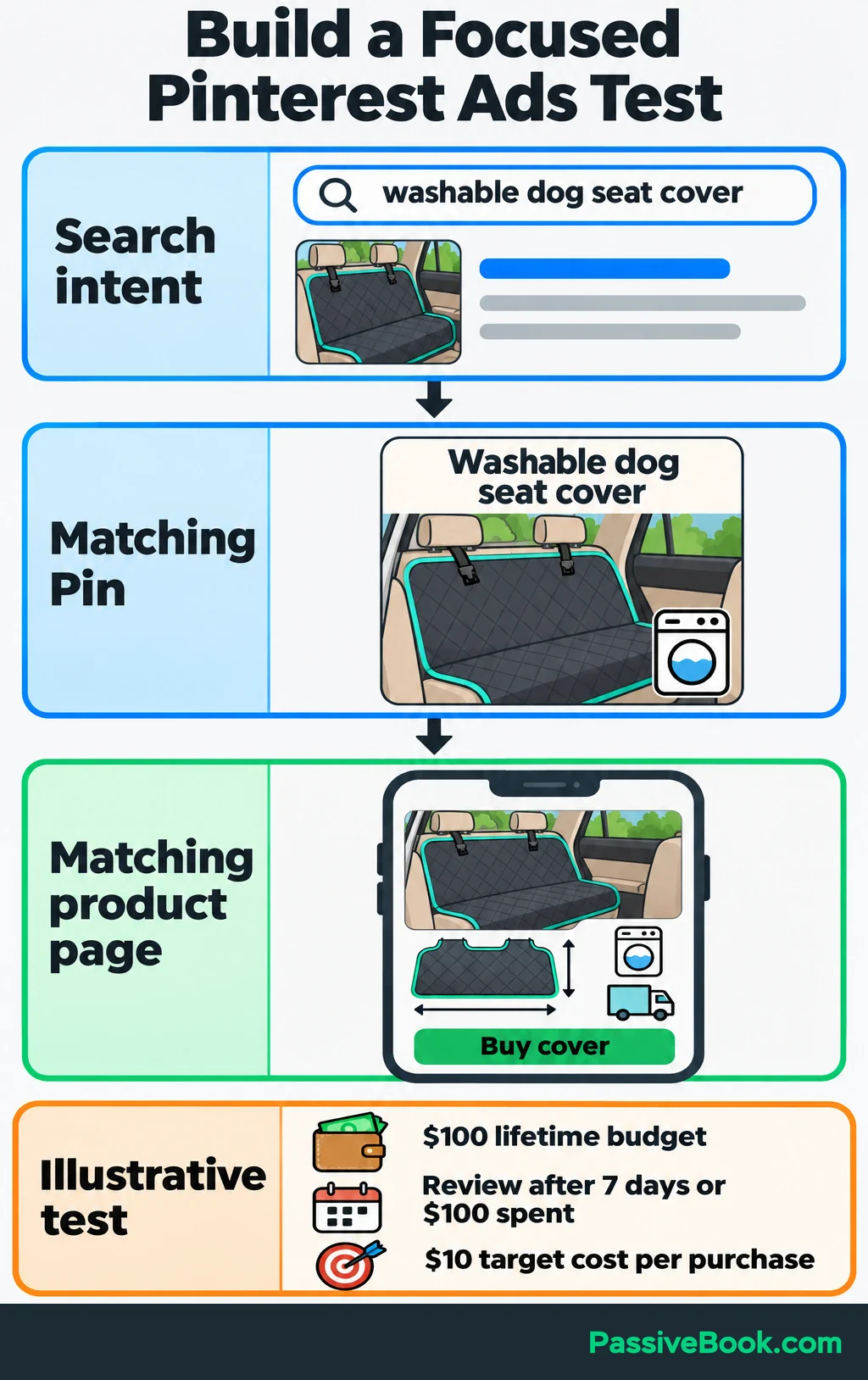
The keyword, Pin, and page should make the same promise. An ad targeting “washable dog seat cover” should show the cover and lead directly to its product page.
Set a maximum test spend and a review date before publishing. For illustration, you might allocate $100 to a seven-day test and review at the end or when that allocation is spent, whichever comes first. Choose an amount you can afford to lose; it buys evidence, not guaranteed orders.
Use a lifetime budget to set the total test allocation. A Performance+ daily budget is an average, so individual days can exceed it. Pinterest averages spend from Sunday through Saturday, or over the remaining days if you launch or change the budget midweek. Campaign budgets can also give one ad group more money than another. See Pinterest’s budget rules.
If you compare targeting methods, keep the offer, creative, destination, and measurement settings consistent. Record each group’s inclusions, exclusions, placements, and expansion setting.
Add tracking parameters to the destination URL so Google Analytics can identify the traffic. For example:
?utm_source=pinterest&utm_medium=paid_social&utm_campaign=car_cover_test&utm_content=keywords_pin_aBefore publishing, check:
- The Pin leads to the correct product page.
- The mobile page loads and displays the offer clearly.
- Checkout works and the completed-purchase event records correctly.
- Audience selections, exclusions, and expansion match your plan.
- Budget, schedule, and account time zone are correct.
Launch the campaign, then monitor its approval status and whether it starts delivering.
Improve Targeting Using Business Results
Review the campaign in order: spend, impressions, outbound clicks, then purchases.
Use outbound clicks to check traffic leaving Pinterest. Pin clicks can lead to destinations on or off Pinterest, so the two counts aren’t interchangeable.
Pinterest brings meaningful organic referral traffic to Passive Book. During one review, I followed a promising Pin back to its article and found the useful answer buried beneath an overlong introduction. I had been judging the Pin while barely looking at the visit it created.
I now review the destination alongside the traffic. With paid campaigns, I would apply that same check before blaming the audience.
Calculate cost per purchase using ad spend and the purchases Pinterest attributes to that spend under your chosen reporting settings.
For illustration, $50 spent and five attributed purchases gives:
$50 ÷ 5 purchases = $10 per purchaseThat meets the example’s $10 target. Five purchases are encouraging, but they don’t establish repeatable performance.
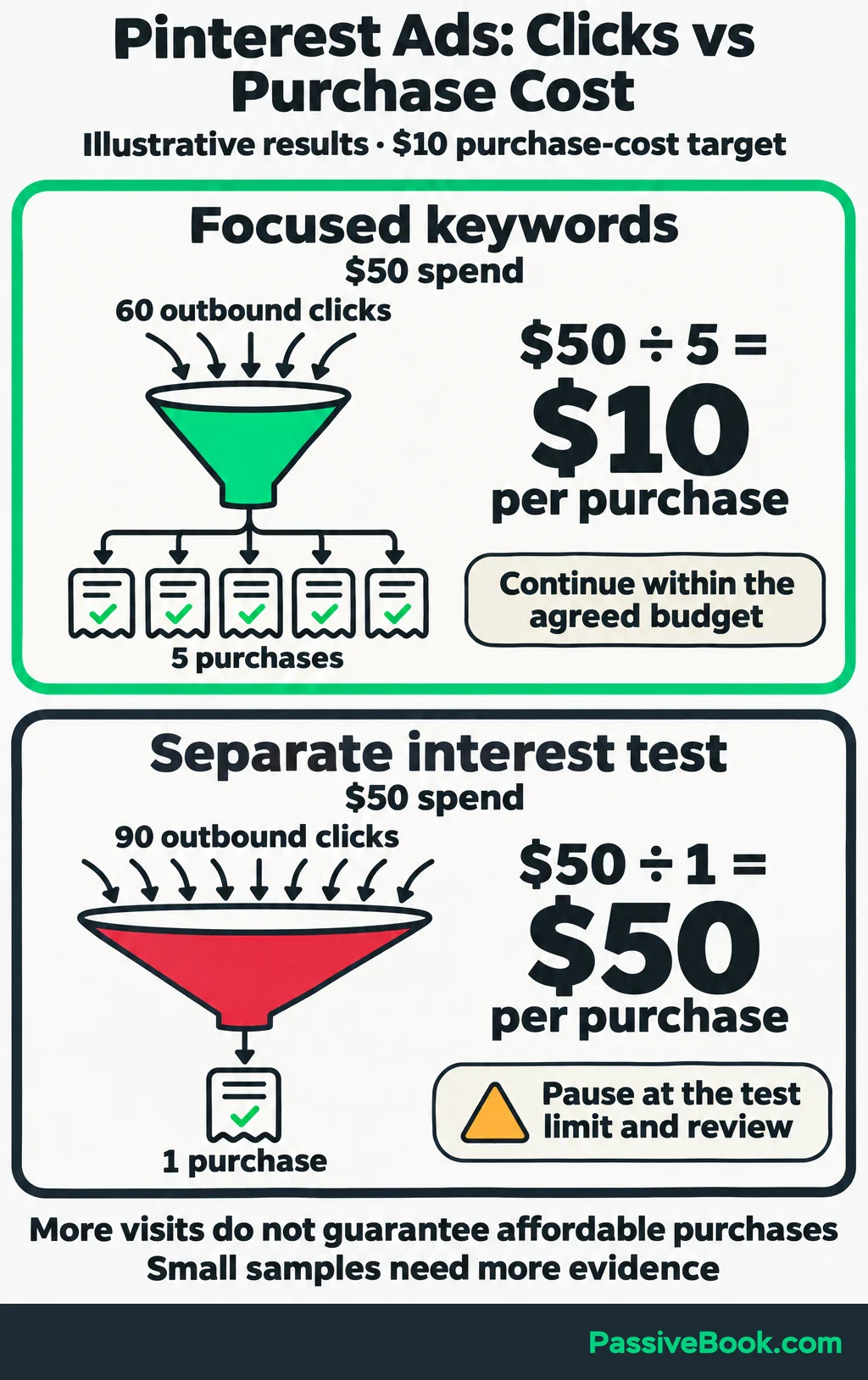
A review table makes the next decision easier. These figures illustrate how I would assess the groups if each had been tested.
| Audience | Spend | Outbound Clicks | Purchases | Cost Per Purchase | Next Action |
|---|---|---|---|---|---|
| Focused keywords | $50 | 60 | 5 | $10 | Continue within the agreed budget and check whether results hold |
| Separate interest test | $50 | 90 | 1 | $50 | Pause at the test limit and review relevance and the page |
The interest group produced more visits, but each purchase cost much more. Cheap traffic can still be expensive.
Keep the date range, attribution windows, and conversion sources consistent across comparisons. An attribution window is the period in which Pinterest can credit an ad interaction with a later purchase.
Review click-attributed purchases separately from view-attributed purchases, which can follow an ad impression without a click. Compare those reports with actual shop orders and tagged website traffic. An attributed purchase alone doesn’t establish that the ad caused an additional sale.
When results disappoint, locate the weak stage:
- Little delivery: Check approval, audience availability, restrictions, and bidding.
- Impressions without visits: Review the Pin’s relevance, product visibility, and promise.
- Visits without purchases: Check tracking, search intent, product fit, delivery costs, and checkout.
- Purchases above your target cost: Review which keywords or audiences consume spend without enough orders.
Remove clearly irrelevant keywords, add useful negatives, and change one meaningful targeting variable at a time. Otherwise, you won’t know what helped.
Check spend and broken destinations frequently, but judge performance at planned review points. During learning, Pinterest tests who is likely to convert; campaign edits can restart that process.
Still, keep your spending limit. A learning indicator doesn’t make an unaffordable test affordable. Increase spending gradually only when the audience continues to meet your acquisition target.
What Next?
Write down one customer need, one destination page, and the most you can afford to pay for the desired action. Use those decisions to build your first ad group before adding more audiences.
Use the social buttons to share this guide and make the next Pinterest test easier to plan and judge.
Which customer need would you target first, and what result would make the test worth continuing? Share your answer in the comments, along with any other questions.
Share this post with your friends & followers:

