A short link on a flyer looks harmless until you move the page it points to. Now the flyer still exists, but fixing its destination may require a paid plan—or may be impossible.
The surprises don’t stop there. A service can promise unlimited clicks while showing you little about those clicks, leaving you unable to compare the places you shared the link.
Those surprises make a quick tool choice harder than it looks. This comparison shows where 11 services’ free plans stop, what their paid upgrades add, and which fit links you need to keep working and measure over time.
The Best URL Shorteners at a Glance
My starting choices are Short.io for free branded links, TinyURL for quick shortening without an account, Dub for connecting campaigns to sales, and Shlink for control over your own hosting.
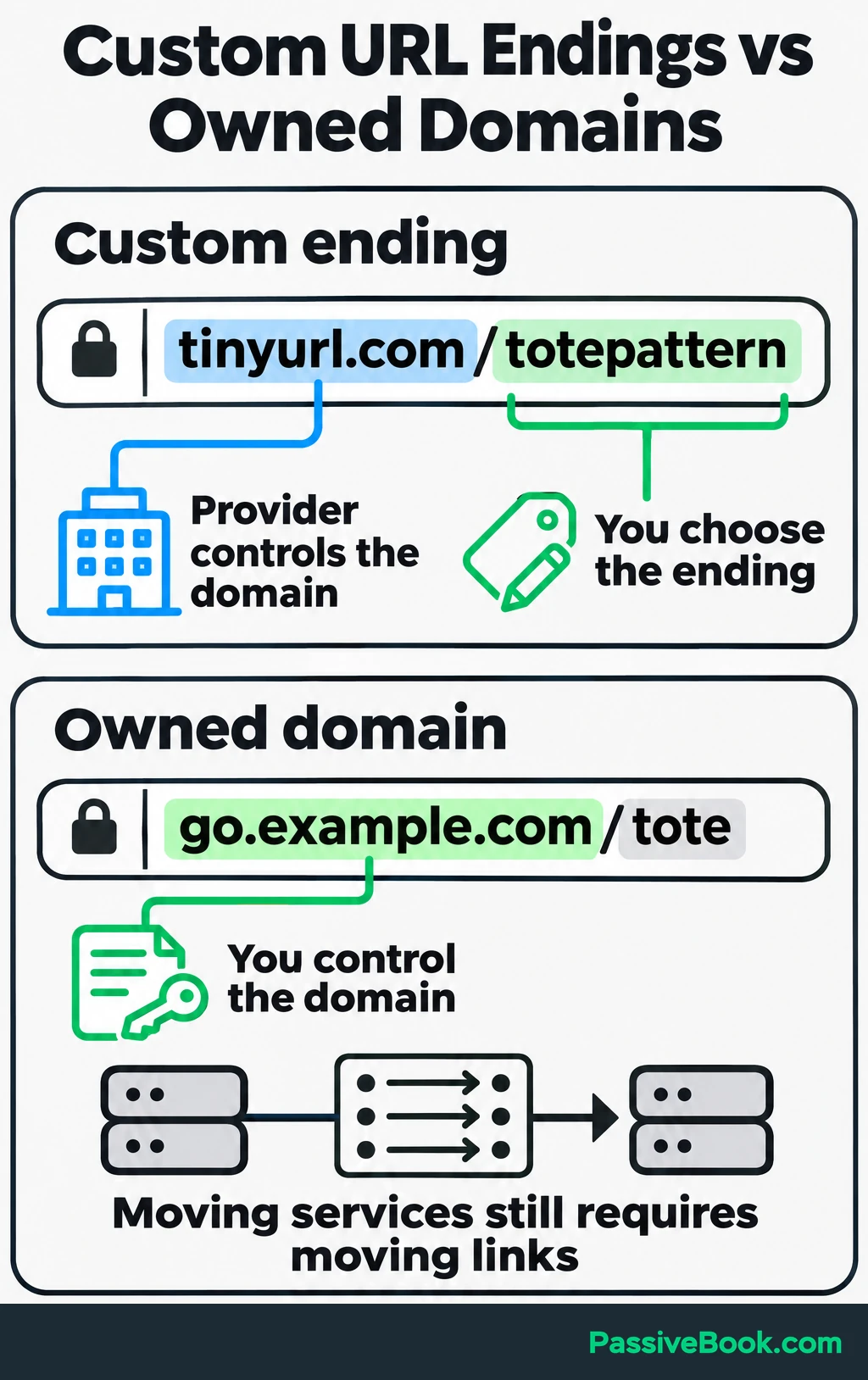
One distinction matters before you compare them:
- A custom ending changes
tinyurl.com/abc123to something liketinyurl.com/totepattern. - An owned domain gives you an address such as
go.example.com/tote. You control the domain, although moving services still requires moving the links.
Both can look tidy, but only the second gives you control over the address beyond the provider’s platform.
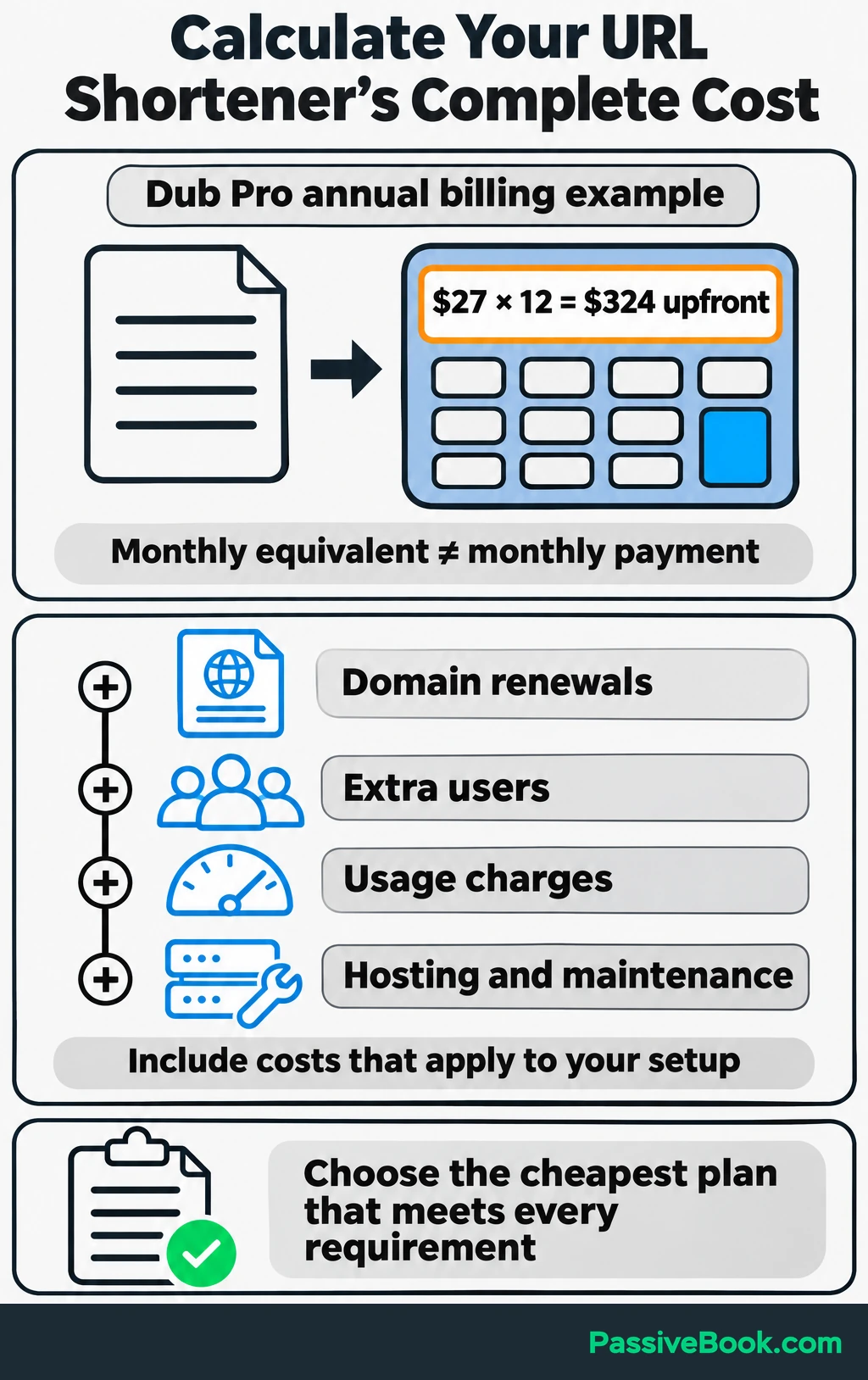
All prices below are in USD. Annual equivalents require paying for the year. Domain registration and renewal are separate unless a plan explicitly includes them. Use the linked pricing pages for current details.
| Service | Best Use | Free Allowance or Trial | Paid Entry Price and Billing Commitment | Custom-Domain Access | Reporting Allowance | Main Drawback |
|---|---|---|---|---|---|---|
| Short.io | Free branded business links | Free: 1,000 links over the account lifetime | Hobby: $5/month; Pro: $18/month | Free: five domains | Free: 50,000 tracked clicks/month | Free link allowance does not renew monthly |
| Rebrandly | Shared link management | Free: 10 new links/month | Essentials: $16 monthly or $132/year; Professional: $39 monthly | Free: one domain; Essentials: two; Professional: three | Free: total counts plus detailed data for 100 clicks/month; Essentials: 10,000 | Shared workspaces and teammates require Professional |
| Dub | Linking campaigns to sales | Free: 25 new links and 1,000 tracked events (such as clicks)/month | Pro: $324/year, equivalent to $27/month; Business: $972/year, equivalent to $81/month | Free: three domains | Free: 30-day history; annual Pro: 600,000 events/year and one-year history | Stripe sales attribution requires Business and setup |
| Bitly | Connections to existing business tools | Free: five new links/month; unlimited clicks | Core: $120/year, equivalent to $10/month; Growth: $348/year, equivalent to $29/month | Growth and above | Free: no short-link click analytics; Core: 30-day history | Free includes ads; Core excludes branded domains |
| Cuttly | Recent reporting for a small link workload | Free: 30 new links and three custom endings/month | Starter: $12 monthly or $132/year; Single: $25 monthly; Team: $99 monthly | Free: one domain | Free and Starter: 30-day history; Single: one year | Moving a destination to another domain requires Team |
| Replug | Organizing recurring campaigns | Free: 100-link allowance, one campaign | Essentials: $19 monthly or $114/year, equivalent to $9.50/month | Free: three domains; Essentials: five | Free: 1,000 clicks/month; Essentials: 10,000 | Free has one campaign and excludes custom endings |
| TinyURL | Quick shortening without an account | Guest shortening; a free account adds link history | Pro uses volume-based pricing with monthly or annual billing; select your volume for a quote | Pro | Detailed analytics require Pro | Free commercial links may receive an affiliate layer |
| is.gd | Occasional public sharing | Free service, subject to usage limits | No paid plan | No owned-domain option | Statistics must be enabled when creating the link | Existing destinations cannot be edited |
| T.LY | Shortening while browsing | Basic extension shortening is free; managed plans have a five-day trial | Hobby: $55/year; Personal: $10 monthly | Hobby: one domain; Personal: two | Hobby: 25,000 click/scan records/month; Personal: 50,000, with five-day detailed logs | Clicks beyond the tracking allowance are not recorded |
| T2M | Low initial account cost | No free Basic account; 15-day free trial on request | Basic: $5 once; Standard: $9.99 monthly or $89.91/year | Standard and above | Basic: six-month history and 5,000 redirects/month | Basic caps redirects and excludes destination editing |
| Shlink | Running redirects on your own server | Free, MIT-licensed software | No software subscription; hosting, domains and maintenance cost extra | Your own domains | Visit reporting uses your infrastructure and storage | You maintain availability, backups and updates |
For the examples below, imagine you run Pattern Trail, a shop selling downloadable tote-bag sewing patterns. You share product links through social posts, email and craft-fair flyers. The business and workload are illustrations.
What Matters When Choosing a URL Shortener?
A URL shortener gives you a compact address that sends visitors to another page. The shortening is straightforward. The important differences are what you can change, measure and keep using afterward.
I would compare these six things before opening an account:
- Link Allowances: Count new links per month separately from the total links an account can hold or create over its lifetime. A monthly allowance renews; a cumulative allowance does not.
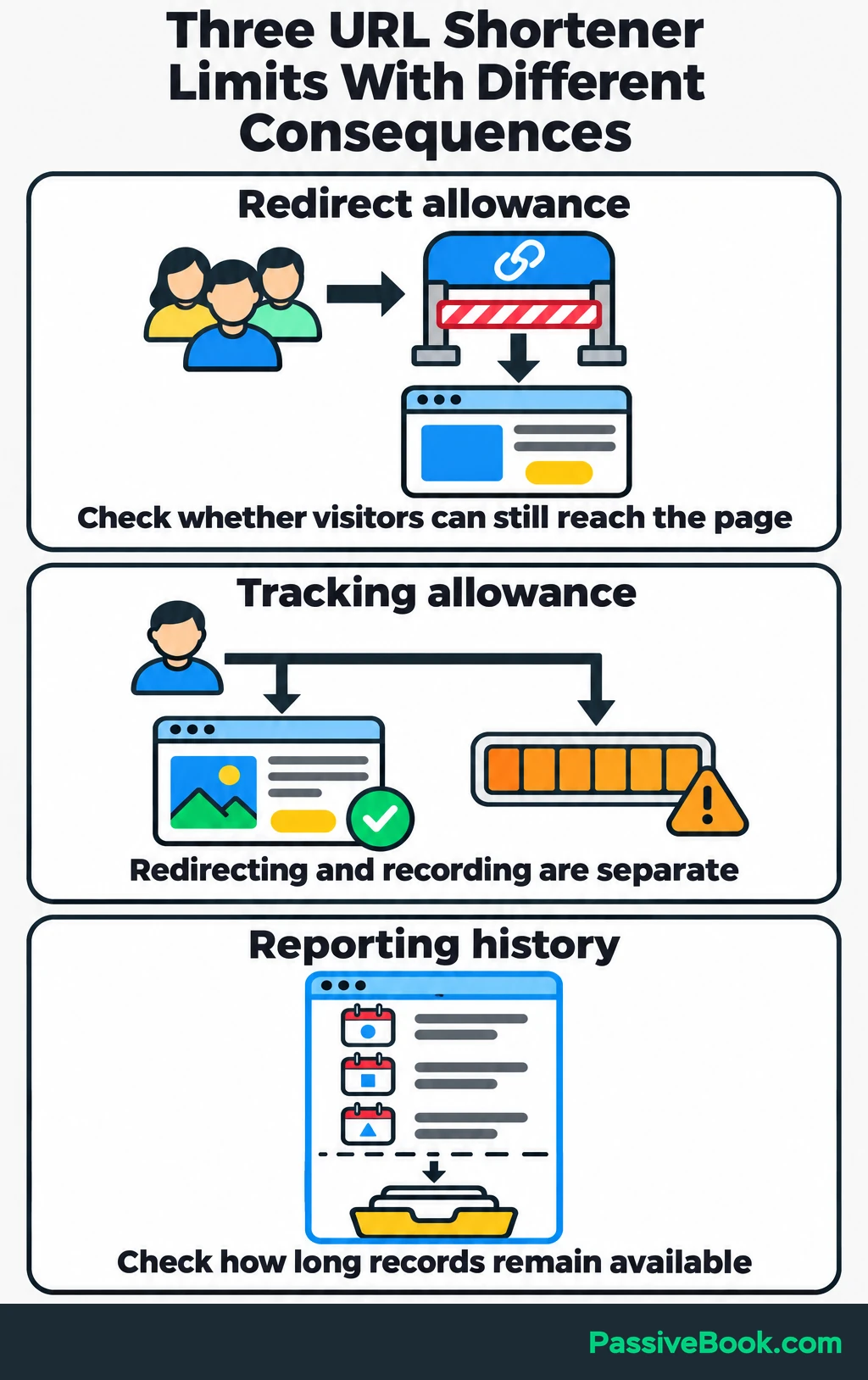
- Traffic and Reporting: Check whether a limit stops redirects, limits recorded clicks, or restricts access to reports. Those consequences are very different.
- Destination Editing: Require this for flyers, packaging and other placements you cannot easily replace. Check the number of edits allowed and whether you can change the destination domain.
- Useful Measurement: Click reports show link activity. Signups and purchases need tracking on the destination site or a configured conversion integration. Also check reporting history and exports.
- Complete Cost: Compare the cheapest plan that meets every requirement. Include domain renewals, extra users, usage charges and hosting where needed.
- Automation and Privacy: Confirm that integrations perform the task you need. API access lets software manage links, but request limits and creation quotas still apply. Review what visitor information is stored and whether you can limit it.
On one of my digital-product sites, I changed a page address and later found the old URL in a scheduled email. The page was easy to fix. Finding the places that still used it took longer. That is why I put destination editing ahead of decorative extras.
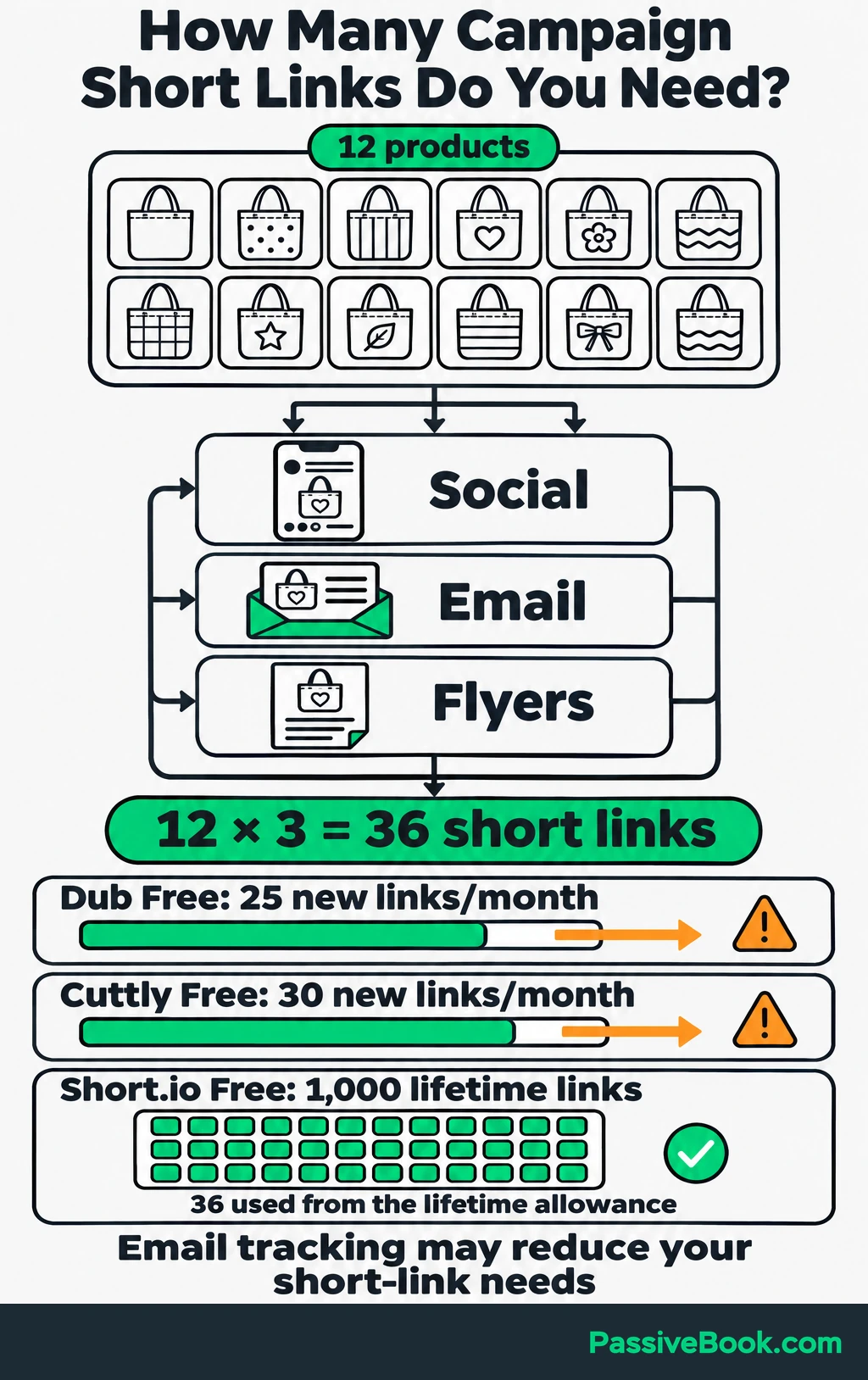
For Pattern Trail, count each product-and-placement combination you want to measure separately. Twelve product pages, each with a link for social posts, email and flyers, would require:
12 products × 3 placements = 36 short links
Creating all 36 in one month exceeds Dub’s and Cuttly’s free monthly creation allowances. On a new Short.io account, it uses 36 of the 1,000 lifetime links.
That does not mean every email needs a short URL. The calculation simply exposes the workload before you choose a plan. If your email platform already tracks full destination links, you may need fewer short links.
For reporting, start with the decision you want to make. “Which placement brought visits?” needs less setup than “Which placement brought purchases?” Paying for the second question makes sense only when you can collect the data and use the answer.
The 11 Best URL Shorteners
1. Short.Io — Best for Free Branded Business Links
Short.io is where I would start when you want an owned domain, editable destinations and click reporting without a software subscription.
Free includes five custom domains, 1,000 branded links over the account lifetime and 50,000 tracked clicks each month. You still need to supply and renew the domain.
For Pattern Trail, a new account with an existing domain, 36 manually created campaign links and fewer than 50,000 monthly clicks fits those allowances. You could use a readable ending for a flyer and change its destination later.
The main constraint is the cumulative link allowance. Hobby raises it to 2,500, while Pro removes the total branded-link cap. Automation has separate allowances, so check those before generating links in bulk.
Links keep redirecting after the reporting allowance is exceeded, although detailed statistics become restricted. That makes the limit less disruptive than a traffic cap.
2. Rebrandly — Best for Branded Links With Shared Workspaces
I would shortlist Rebrandly when more than one person needs to manage business links.
Professional includes shared workspaces and teammates, three custom domains and 1,500 new links monthly. That is the tier behind this recommendation. Essentials is cheaper, but it does not provide the same collaboration features.
Free is much narrower: 10 new links monthly, one custom-domain slot and no destination editing. It provides total click counts, with detailed engagement data limited to 100 clicks monthly.
Essentials adds 250 new links monthly, two domains and 10 destination edits each month.
For Pattern Trail, collaboration becomes useful when another person regularly creates or updates campaign links. If you manage everything yourself, I would compare Short.io first. Paying for shared workspaces makes little sense when nobody else will enter them.
3. Dub — Best for Connecting Campaign Links to Sales
Dub is the stronger choice when you need to connect a campaign link to a lead or purchase.
Its free plan includes API access, three custom domains and 30-day analytics retention. The small monthly link and event allowances make it suitable for a limited trial of your workflow.
Pro gives you larger annual allowances and longer reporting history, but Stripe sales attribution requires Business or above. You also need to connect Stripe and configure a supported checkout flow to pass along Dub’s click ID. This code lets Dub match a purchase to the click that brought the buyer. Simply shortening a product URL does not complete that setup. Dub’s Stripe integration requirements explain the supported approaches.
For Pattern Trail, the useful question would be whether social posts or craft-fair flyers lead to pattern purchases.
I would pay for attribution when that answer will change where you spend time. For basic click counts, the higher tier is unnecessary.
4. Bitly — Best for Businesses Using Its Integrations
Bitly deserves a place on your shortlist when it connects neatly with tools you already use. Its listed integrations include Canva, Shopify and HubSpot.
I would check what the integration actually does before paying. Creating a link inside another tool may save work, but it does not automatically give you every branding or reporting feature.
Free allows five new links and three custom endings monthly, with unlimited clicks. It includes an ad-supported experience and excludes short-link click analytics, destination editing and branded domains.
Core adds reporting and five destination edits per month. Branded domains begin with Growth.
For Pattern Trail, Bitly could make sense if an existing workflow saves repeated copying and pasting. Without that benefit, the upgrade needed for branding makes it harder to justify against free branded alternatives.
5. Cuttly — Best for Free Reporting on a Small Monthly Link Allowance
Cuttly’s free plan is useful when you create relatively few links and mainly need recent click reports.
It includes one branded domain, unlimited clicks and 30-day analytics history. But its 30-link monthly creation allowance and three custom endings are separate limits. You can have room for another link while running out of memorable endings.
Pattern Trail’s 36-link batch would exceed the free creation allowance.
Starter increases creation capacity and allows destination changes within the same destination domain. Single adds analytics for unique redirects and extends reporting history to one year. Changing a destination to a different domain requires Team.
That last restriction would decide it for me. Moving from one product page to another on your shop’s domain is different from moving to a new store platform with a new address.
6. Replug — Best for Organizing Links by Marketing Campaign
Replug is worth considering when you want related links grouped under named campaigns.
Free includes a 100-link allowance, one campaign, three custom domains and 1,000 clicks monthly. The link allowance is separate from the monthly click allowance; do not read it as 100 new links every month.
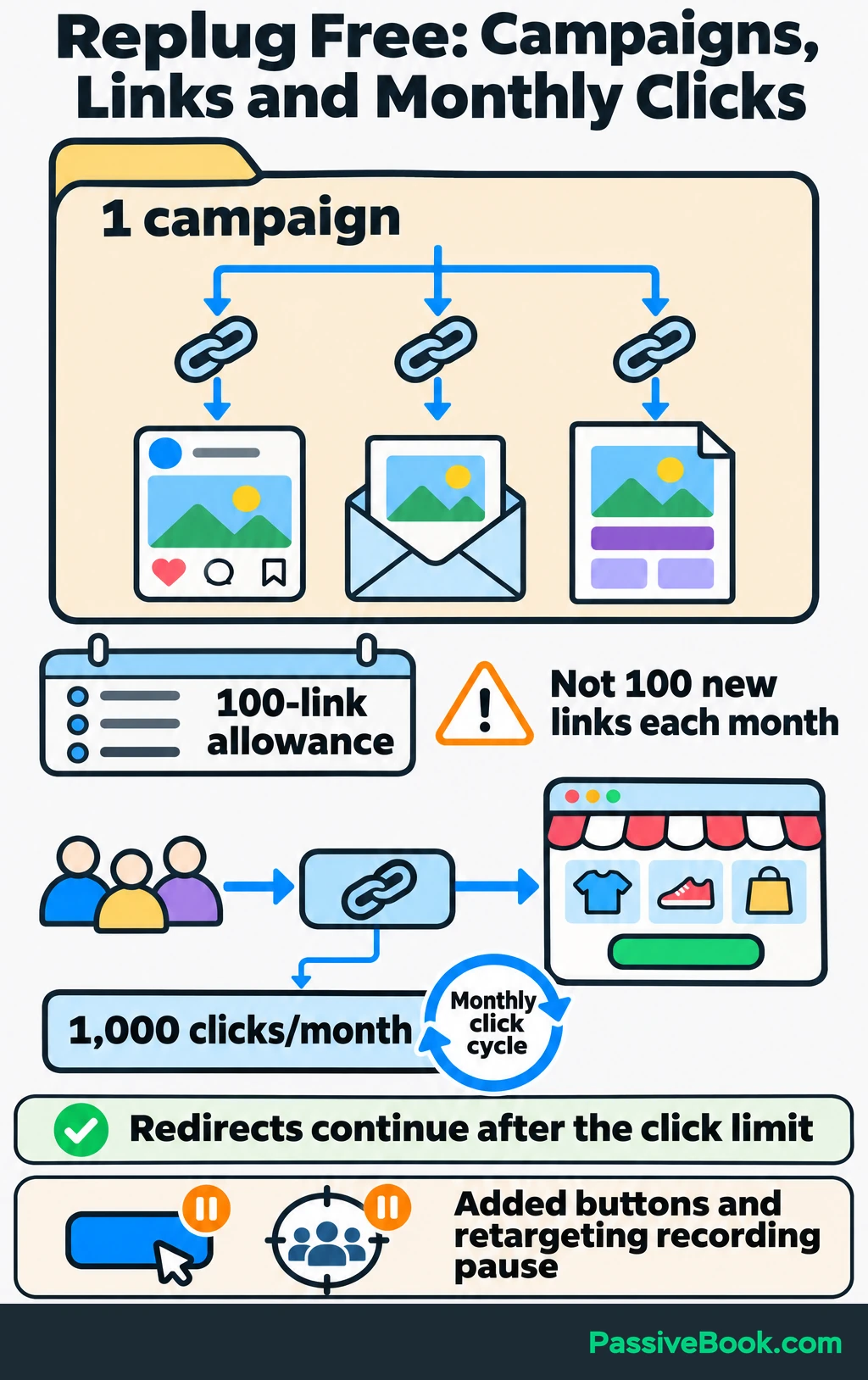
Essentials expands the account to 1,000 links and five campaigns, and it adds custom endings.
For Pattern Trail, separate campaigns could keep a tote-pattern launch apart from an ongoing beginner-pattern promotion. That is useful when it makes reporting easier to review.
After the monthly click limit, links continue redirecting, but Replug stops displaying its added promotional buttons and recording visitors for later ad targeting until the next cycle.
I would choose it for campaign organization. If you only need a few readable redirects, simpler tools cover that job.
7. TinyURL — Best for Quick Shortening Without an Account
TinyURL is convenient when you want to paste a long address, choose an available custom ending and share it immediately.
A free account adds link-history management. Pro adds detailed analytics, branded domains and destination editing. Its price varies with the number of links you need and whether you pay monthly or annually, so use the selector rather than budgeting around a single advertised starting rate.
There is an important catch for commercial links. TinyURL says guest and free-account links may receive automatic affiliate tracking, and ad blockers can interfere with that extra redirect step. Its opt-out affects future links. TinyURL’s affiliation explanation describes the behavior.
For Pattern Trail’s product links, I would create a free account and disable automatic affiliation before creating new links. Guest shortening is convenient, but an account gives you more control over that choice.
8. Is.Gd — Best for Occasional Public Links
is.gd suits occasional public sharing when you want a free short link and do not need ongoing management.
You can choose a custom ending and enable statistics when creating the link. Confirm the destination first, because you cannot later edit or delete the existing short URL. There is no paid tier that unlocks those changes.
Its terms also prohibit links used in commercial email. That rules it out for Pattern Trail’s promotional newsletter, even if the same destination could be shared through a permitted public placement. is.gd’s terms make that restriction explicit.
I would use it for a low-maintenance public reference. I would skip it for reusable sales flyers because the inability to update destinations is a poor fit.
9. T.LY — Best for Shortening Links From Your Browser
T.LY’s appeal is convenience while you browse. Its extension can shorten the current page or a selected link, so you do not have to move each URL into a separate dashboard. Basic shortening is free, while connected account features depend on your plan. The official extension listing separates those options.
For managed business links, distinguish the five-day trial from the extension’s free basic shortening.
Hobby provides 500 new links monthly and one custom domain. Personal adds more capacity and explicitly includes editable destinations.
Personal’s five-day detailed-log retention deserves attention. It is separate from the monthly tracking allowance: one controls how long individual records remain available, and the other controls how much activity gets recorded.
Links keep redirecting after the tracking allowance, but further clicks are not tracked.
10. T2M — Best for a Low One-time Entry Cost
T2M’s Basic plan has a small one-time verification payment rather than a recurring software fee.
It includes 500 new links monthly, up to 7,500 active links and six months of click history. However, its 5,000 monthly allowance applies to redirects themselves. That is more consequential than losing access to extra statistics.
Basic also excludes custom endings, branded domains and destination changes. Standard adds those capabilities and has its own usage allowances.
For Pattern Trail, Basic could cover straightforward links whose destinations will stay fixed. I would choose an editable option before printing a reusable flyer.
The entry cost is attractive, but it should not drive the decision. A cheap account that lacks the feature you need is still an extra account to manage.
11. Shlink — Best for Self-hosted Control
Shlink is the option I would consider when operating the redirect system yourself is a deliberate choice.
The software is free under the MIT license. You run it on your own hosting and use your own domains. It supports custom endings, visit reporting, an API, command-line management and a separate web client.
The bill moves from a software subscription to hosting, domain renewals, backups, monitoring and maintenance time. You also become responsible for keeping redirects available and recovering them after a failure.
I already use self-hosted tools, but I would still skip this route if a managed free plan covered the requirement. Another server is another thing that can interrupt your weekend.
Shlink also lets you disable tracking entirely or turn off IP, referrer and browser-information collection separately. Use its tracking controls to collect only what you need.
How Can You Protect Published Short Links?
Start by controlling the address you intend to keep.
Keep your short domain in an account you control, enable renewal reminders and maintain working payment details. A domain renewal is easy to ignore until it takes every printed link with it.
Before committing to a provider, check what happens after cancellation, downgrade, inactivity and usage limits. Look for answers about redirects and reporting separately.
Next, preserve a copy of your links outside the service. A simple spreadsheet should contain:
- The short domain and exact path.
- The complete destination URL, including campaign parameters.
- The placement where you published it.
- Its purpose and any intended expiration.
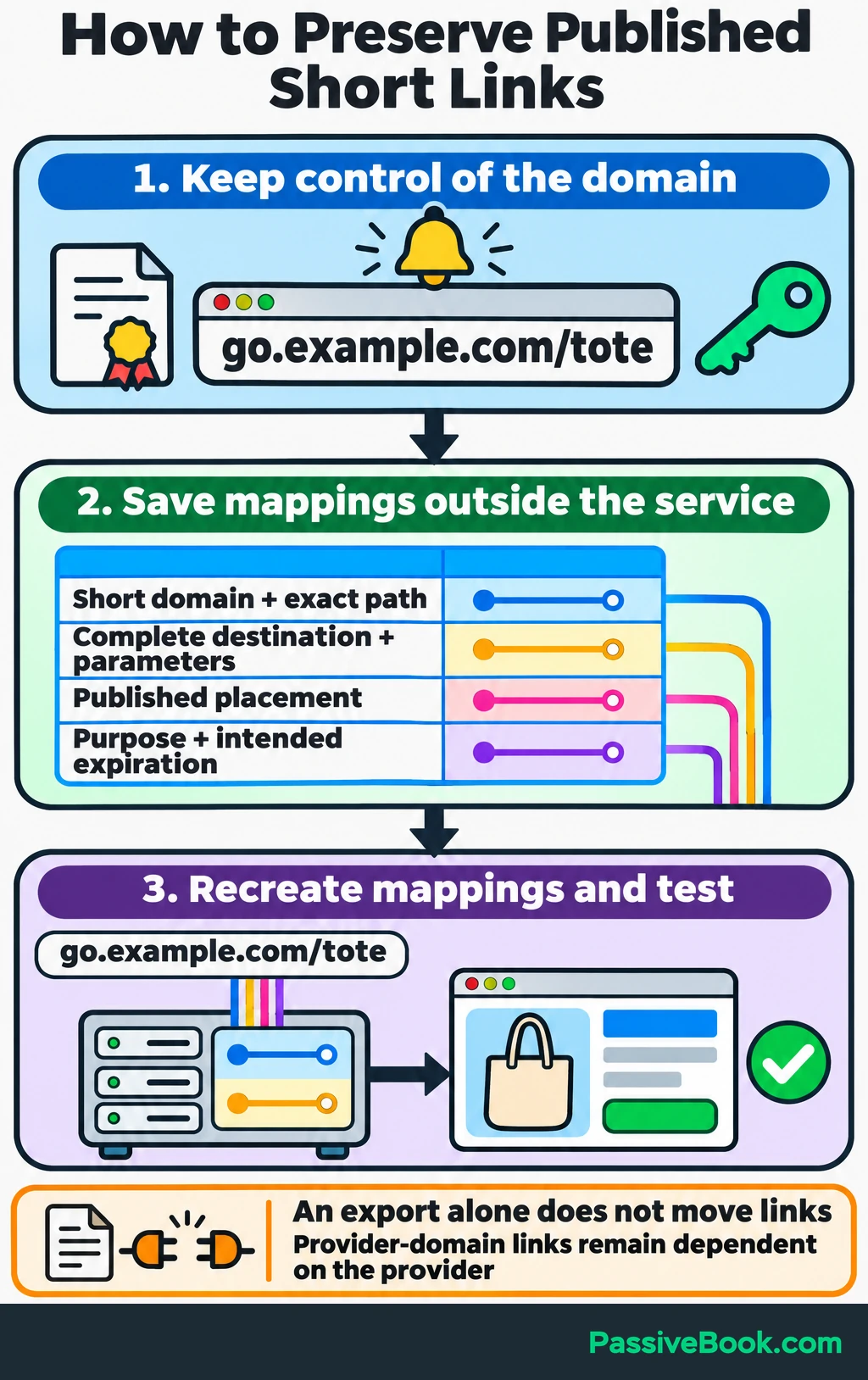
An owned domain makes migration possible, but you still have to recreate those path-to-destination mappings with the replacement service. An export alone does not move them. Links on a provider’s domain remain dependent on that provider.
For measurement, add campaign parameters to the destination before shortening it. These small labels identify the source, medium and campaign in your site analytics.
For example, Pattern Trail could use:
Short link:
https://go.example.com/tote

Destination:
https://example.com/patterns/tote?utm_source=pinterest&utm_medium=social&utm_campaign=tote_patterns
Here, pinterest identifies the source, social identifies the type of traffic, and tote_patterns names the campaign. The shortener’s report shows clicks on the short link, while configured site analytics can show visits carrying those labels.
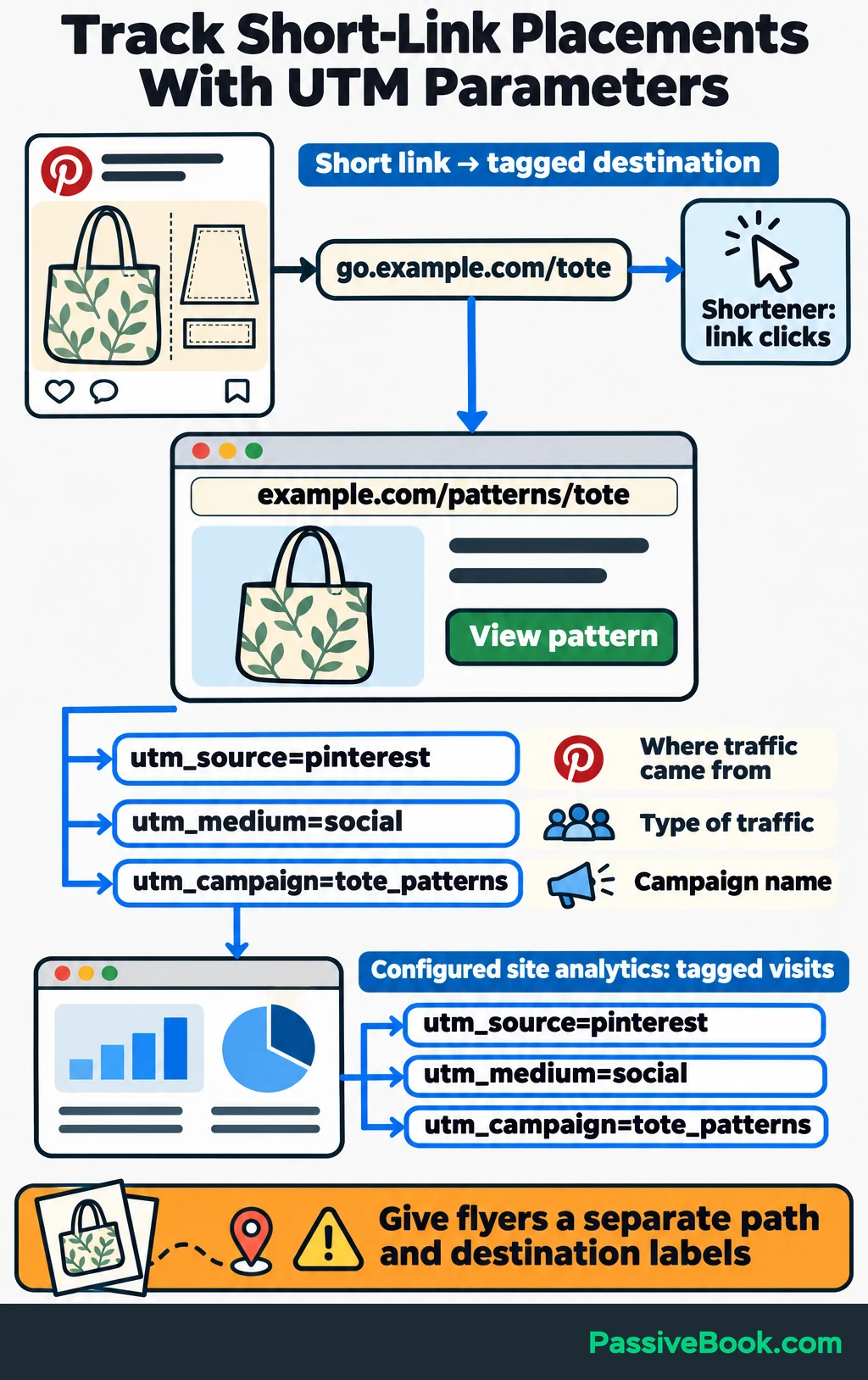
Use a separate path and appropriately labeled destination for the flyer. Reusing the Pinterest link on the flyer would mix the placements you wanted to compare.
You do not need to build every tagged URL by hand. Start with a prepared placement pack, then keep the generated destinations and campaign labels in one register.
Free Campaign Link Manager




Before publishing, open a representative link on your phone and in a signed-out browser. Confirm that:
- HTTPS works.
- The link reaches the intended page.
- Any advertisement or intermediate screen is acceptable.
- The campaign parameters reach the destination.
- The page lets visitors complete the intended action.
For email, I would usually use the full destination behind descriptive text and rely on the email platform’s tracking. Mailchimp warns that shortened links can trigger spam filters, so I’d shorten one only when a readable address or editable destination adds a practical benefit.
Pattern Trail can therefore use a memorable short link on a flyer while keeping a full product URL behind “View the tote pattern” in its newsletter.
What Should You Use Instead of Google URL Shortener?
For new business links, I would start with Short.io for free branding, TinyURL for quick basic shortening, or Dub when purchase attribution justifies the setup and cost. Shlink suits people who specifically want to run the infrastructure.
Google discontinued the goo.gl creation console and URL Shortener APIs on March 30, 2019. That retirement stopped new link management through those tools; it did not immediately stop every existing redirect. Google’s original announcement explains that distinction.
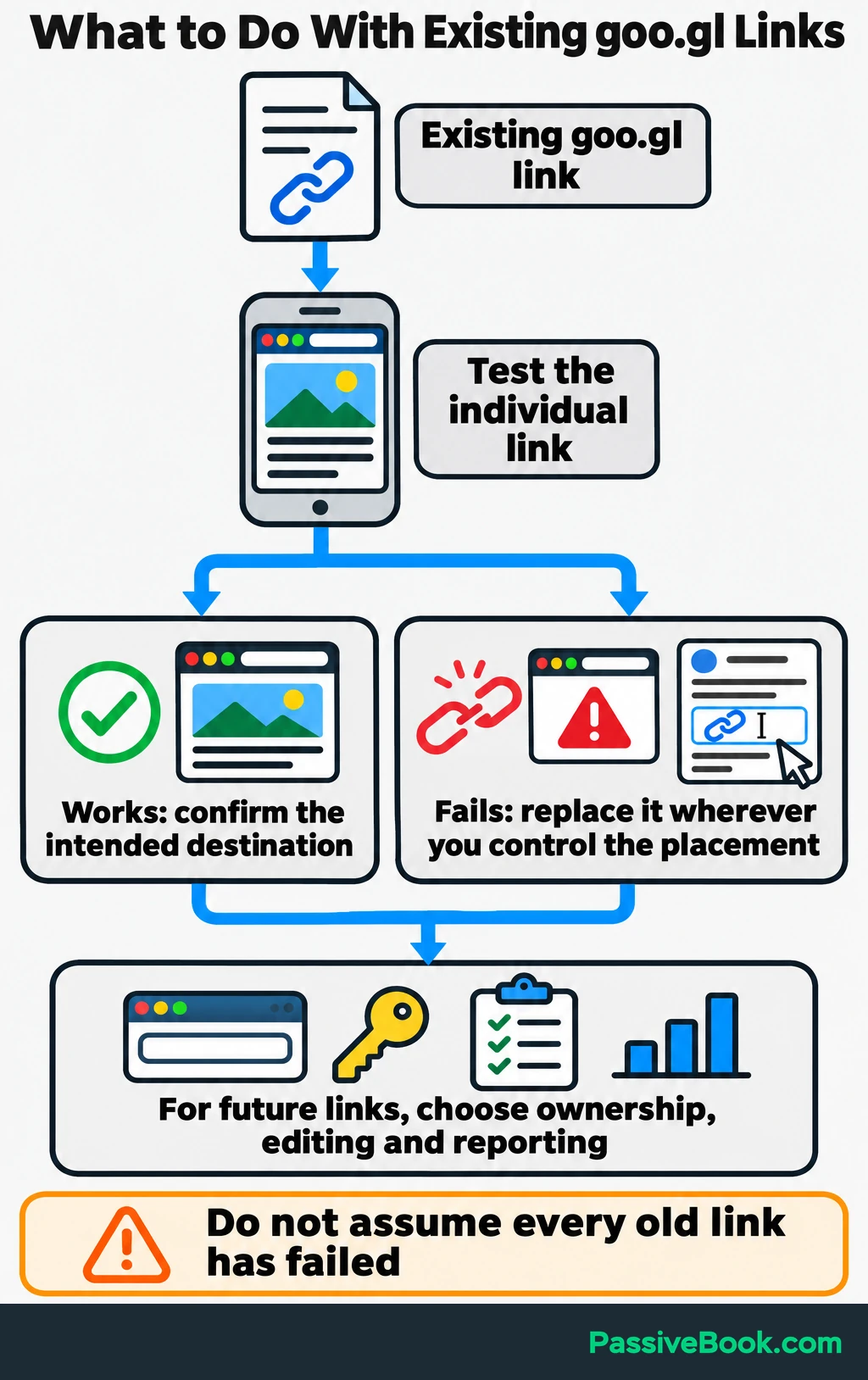
Google later revised its shutdown plans. Its August 2025 update targeted previously flagged inactive links for deactivation and said the others would remain working. So check existing goo.gl links individually instead of assuming they all failed. Google’s revised announcement gives the relevant conditions.
Replace failed links wherever you control the placement. For future links, choose around ownership, editing and reporting rather than looking for an exact copy of Google’s old service.
What Next?
Count the links you expect to create next month, then test one with the service that fits your branding and editing needs. Save its destination outside the platform before publishing it.
Use the social buttons to pass along this comparison when a discussion about free links needs the missing detail: what happens after the limit.
Which matters most for your links—an owned domain, editable destinations or purchase tracking? Share your choice in the comments, and bring any other questions too.
Share this post with your friends & followers:

