A customer buys your download, but you still have to send the file, update a spreadsheet and find the payment fee for your records. The sale worked. The system around it needs attention.
Buying another app might help, but it can also add another bill and another place to check. The hard part is choosing tools that finish the work together.
I’ve built my businesses around connected systems, and I still have to resist buying features before I need them. This guide compares the tools I would shortlist, the costs behind them and the checks that show whether they belong in your business.
The Best Online Business Software at a Glance
The best software for online businesses covers the work you need to complete: selling, getting paid, keeping records and serving customers. Everything else should earn its place.
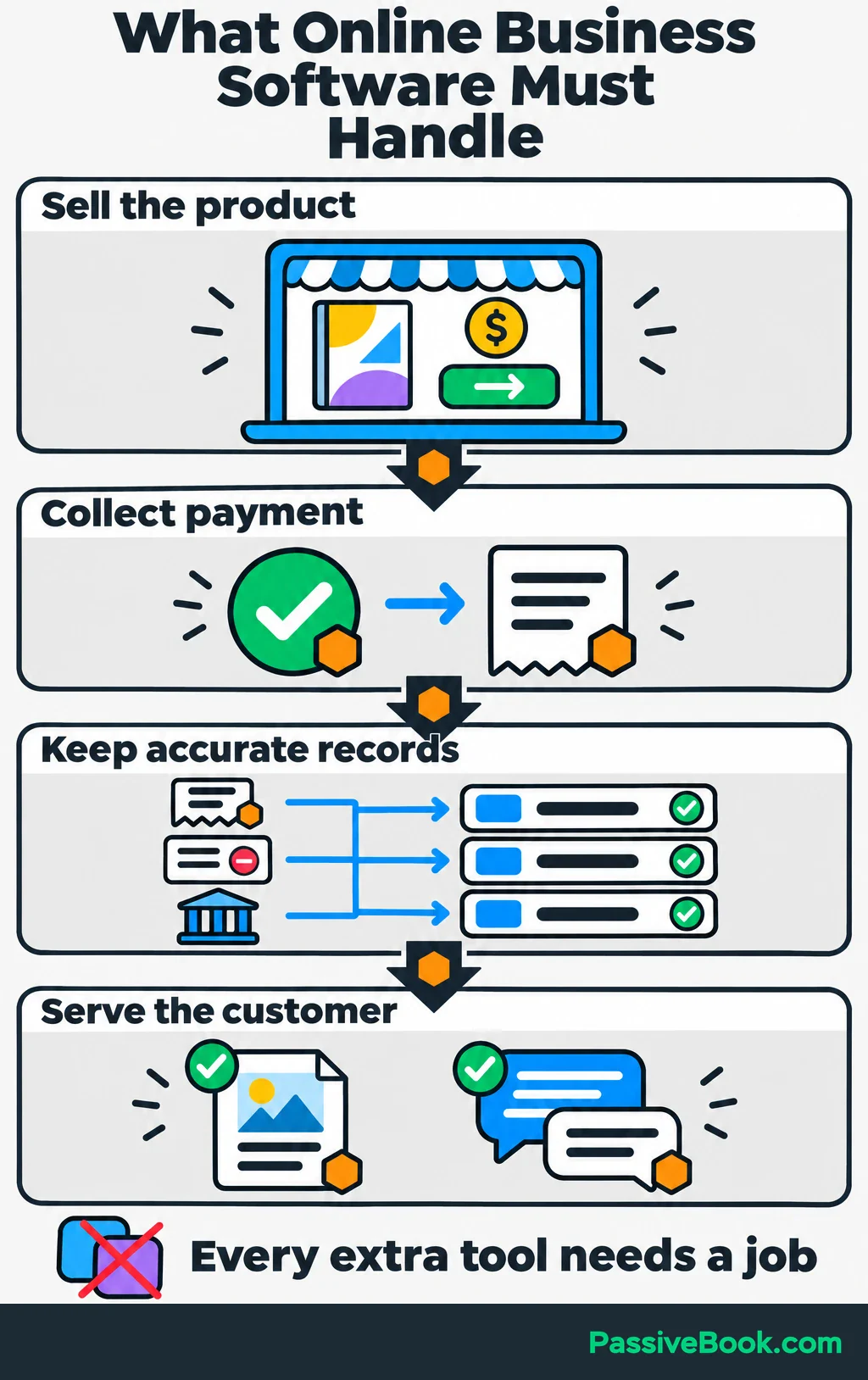
For a new digital offer, I would test Systeme.io first when pages, email and delivery need to work together. Gumroad deserves a look for straightforward download sales. WordPress with WooCommerce is my preference when publishing and control matter, while Shopify makes more sense when inventory and shipping drive the work.
The table compares alternatives within each function. You might choose one selling platform, one accounting tool and one email system. You do not need every row.
Prices use standard U.S. rates in USD unless another currency is shown. Promotional discounts are excluded. Annual equivalents show the commitment behind the monthly figure; follow the linked pricing pages for current terms.
| Tool | Function | Best Fit | Entry Price and Billing Basis | Main Tradeoff | Upgrade Trigger |
|---|---|---|---|---|---|
| Systeme.io | Pages, checkout, email and delivery | A bundled digital-selling system | Free; Startup is $17/month with monthly billing | Automation allowances can matter before contact limits | The complete signup and purchase workflow exceeds the free allowance |
| Gumroad | Hosted checkout and digital delivery | Launching downloads without a monthly subscription | No monthly fee; standard direct sales cost 10% + $0.50, plus processing; Discover sales cost 30%, including processing | Fees grow with sales | Compare another platform when recurring sales make its total cost worthwhile |
| WordPress with WooCommerce | Publishing and ecommerce | Content-led businesses needing control | Core software is free; hosting, domain, extensions and processing are extra | You manage maintenance and compatibility | Add hosting capacity or an extension for a specific need |
| Shopify | Storefront, inventory and orders | Businesses managing physical products | Basic is $39/month monthly, or $348/year, equivalent to $29/month | Apps and payment-provider charges can increase the bill | Stock, shipping or staff needs exceed the current setup |
| Stripe | Payment processing | Integrated card checkout | Standard U.S. domestic cards: 2.9% + $0.30 per successful transaction; no standard payments subscription | International cards and currency conversion add costs | Add another payment method when customers need it |
| PayPal Business | Payments and invoicing | Offering PayPal checkout | U.S. domestic PayPal Checkout: 3.49% + $0.49 for USD receipts | Different PayPal payment products have different rates | Add it when buyer preference or invoicing needs justify it |
| Zoho Books | Accounting and invoicing | A budget-conscious accounting shortlist | U.S. Free while financial-year revenue does not exceed $50,000; Standard is $20/month monthly or $180/year | Country editions, feeds and connector requirements differ | Connected bank feeds or other required features justify Standard |
| Xero | Accounting and invoicing | Shared accounting access | U.S. Early is $27/month; Growing is $59/month | Early has invoice and bill limits | Transaction volume or the connector’s accounting method requires a higher tier |
| MailerLite | Email marketing | A small list with straightforward follow-up | Free; Comfort starts at $12/month with monthly billing | Subscriber, sending and automation limits need checking together | Your full sequence or list exceeds the free allowance |
| Kit | Creator email marketing | An email-led business | Free; Creator for 1,000 subscribers is $390/year, equivalent to $32.50/month | A large free subscriber allowance does not include the paid automation feature set | Automated sequences become central to selling |
| FluentCRM | Email marketing inside WordPress | An established WordPress business | Free version available; regular single-site Pro license is $129/year, plus sending and hosting | You manage delivery setup and site capacity | Purchase-based automation or other Pro features are needed |
| HubSpot | Contacts, deals and sales tasks | Enquiries that need a tracked sales process | Free CRM supports two users and 1,000 contacts | Advanced automation can require paid products | More users, contacts or sales automation are necessary |
| Google Workspace | Business email and documents | A domain inbox and shared work files | Starter is $7/user/month with an annual commitment: $84 per seat per year | Costs rise with seats and storage needs | Collaboration or storage requirements exceed Starter |
| Notion | Planning and procedures | Checklists, content calendars and support instructions | Free individual plan available | Organizing the workspace can become work of its own | Collaboration needs justify a paid plan |
| Canva | Business graphics | Product covers and promotional layouts | Free plan available | Premium assets and tools may require payment | Repeated design work benefits from paid features |
| Google Analytics | Website measurement | Understanding visits and purchase activity | Free standard offering | Useful ecommerce reports require correct event setup | Improve measurement before considering paid analytics |
| Google Search Console | Google search performance | Search queries, clicks and indexing checks | Free | It covers Google search rather than the whole customer journey | Add complementary reporting when a decision needs it |
| Make | Connections between apps | Visual automation across hosted tools | Free includes 1,000 credits/month | One workflow can consume several credits per run | Necessary workflows exceed the usage or scheduling allowance |
| n8n | Flexible workflow automation | Businesses with technical support available | Community edition has no software subscription; Cloud Starter is €240/year, equivalent to €20/month | Self-hosting requires server care; cloud has execution limits | Execution volume or collaboration needs increase |
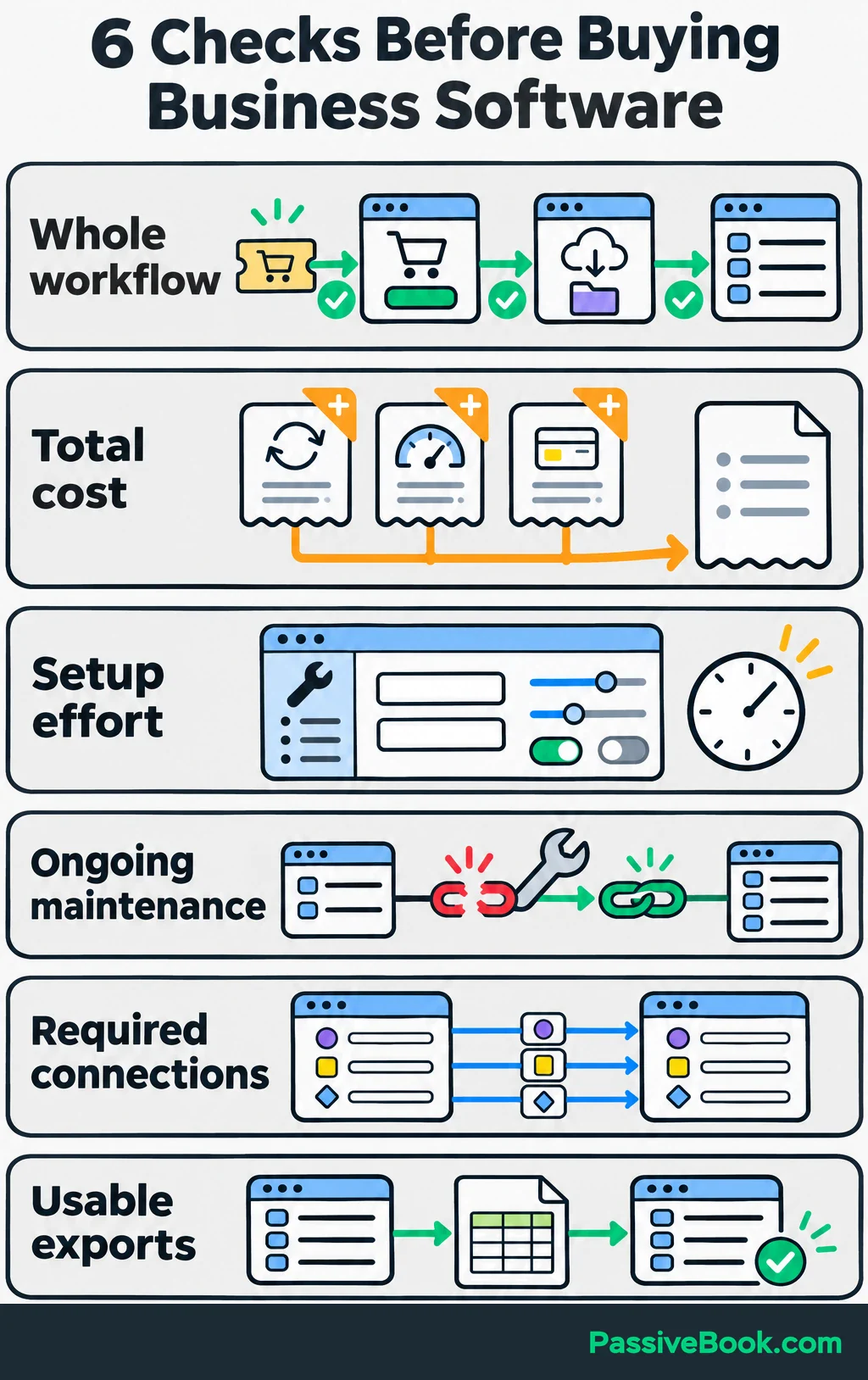
I would judge these tools on six things: the whole workflow they cover, total cost, setup effort, ongoing maintenance, required connections and usable exports. A long feature list is less useful than a clean answer to “What happens after someone pays?”
All-in-one or Separate Tools?
Choose an all-in-one platform when its pages, checkout, email and delivery can handle your offer without awkward workarounds. Payment processing and accounting may still sit elsewhere.
Choose separate tools when one part of the business needs more depth. That might mean a website built around articles, detailed stock tracking, reminders for sales enquiries or a checkout you need to customize.
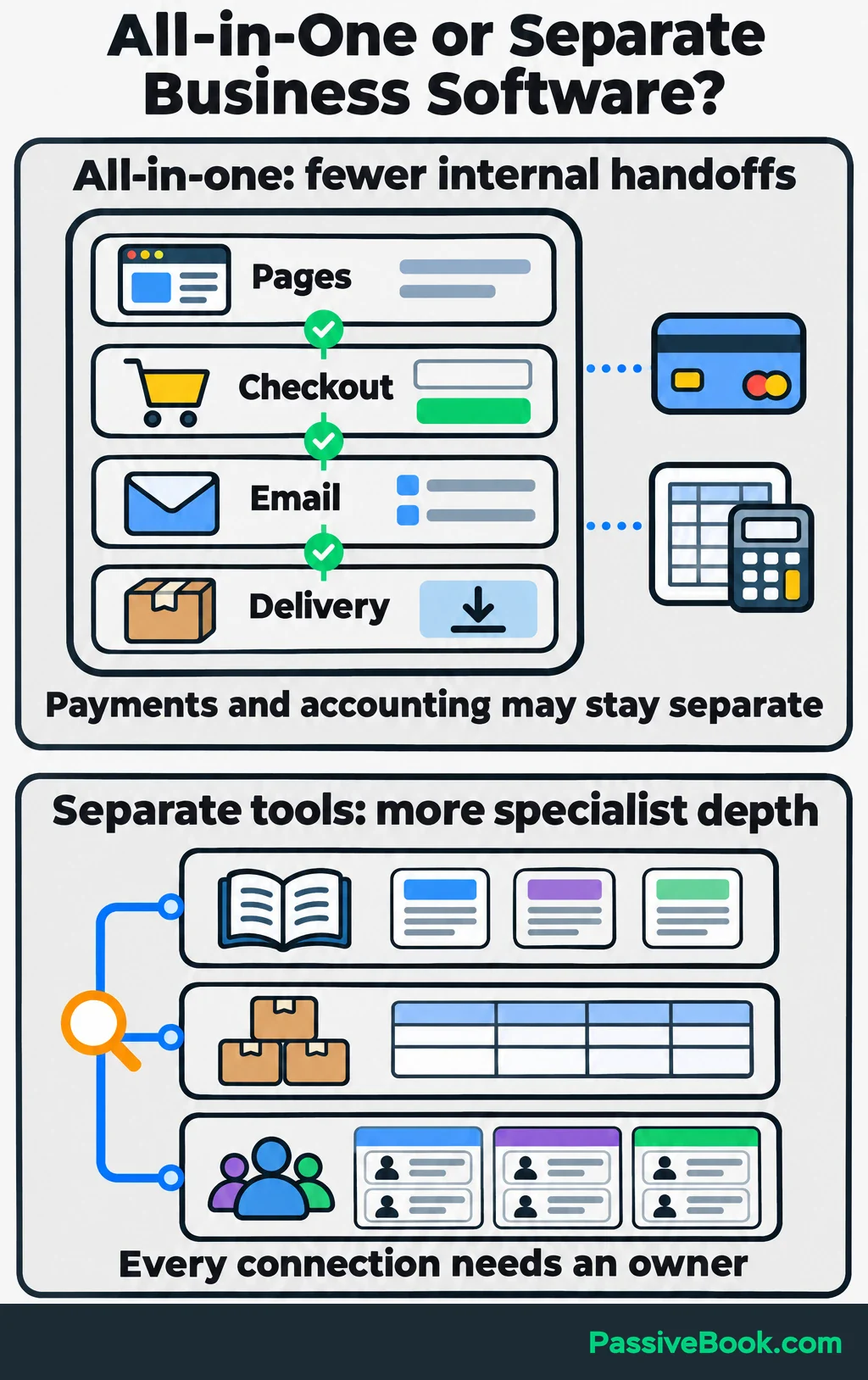
The price of that flexibility is maintenance. Each connection needs someone to notice when it stops working.
Before comparing platforms, map the customer’s journey and name the tool responsible for each step. Imagine you sell downloadable embroidery patterns. Your core journey is:
Product page → checkout → PDF access → customer support → bookkeeping.
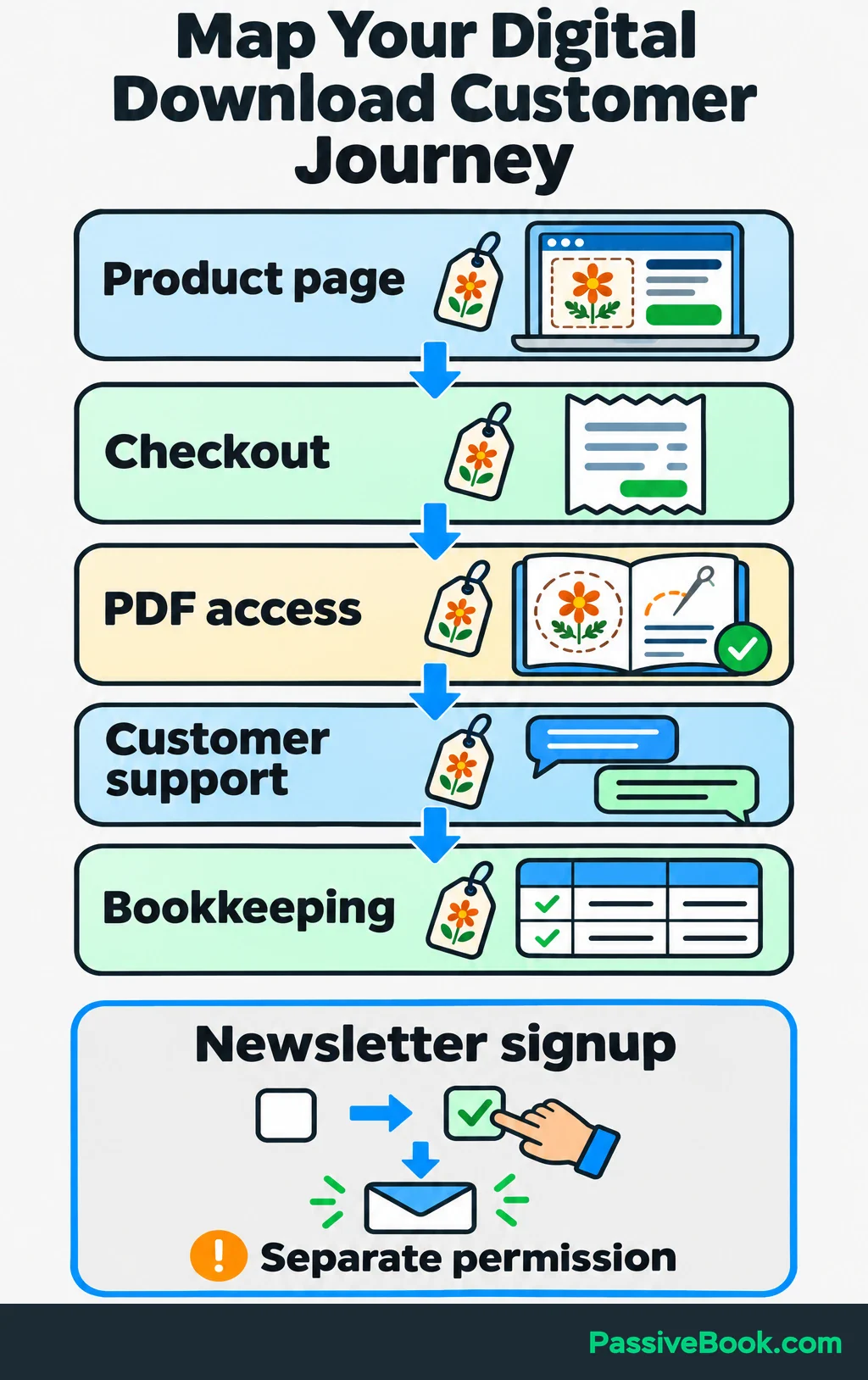
Newsletter signup is a separate path because buying a pattern and asking for marketing emails are different actions.
I once kept a launch checklist in two planning tools because each had a feature I liked. Updating both became another launch task. I removed the duplicate before trying to automate anything. That experience now shapes how I choose software: first remove unnecessary work, then connect what remains.
Keep existing tools that already complete a job reliably. A new bundle is only cheaper if replacing the old setup saves enough money or effort to justify the move.
Website and Selling Platforms
Choose the selling platform around what customers buy and how they receive it.
For a download, test the product page, checkout, receipt, file access and refund process. For physical goods, add stock, shipping and returns. Paid themes and apps can wait until that basic journey works.
Systeme.Io: Best for Bundled Digital Selling
I would shortlist Systeme.io when you want sales pages, email campaigns, automation and course delivery in one hosted account.
Its free plan includes 2,000 contacts, three funnels, one course and one automation rule. A funnel connects pages that guide visitors toward signing up or buying. An automation rule connects an event, such as signup, to actions such as starting an email campaign.
Write out the full journey before choosing a tier. A checklist signup and a completed purchase may need separate rules, while one campaign can contain several emails. Count the rules your journey needs rather than assuming “email included” covers everything.
For the embroidery patterns, test whether a buyer can pay and reach the PDF without contacting you. Systeme.io supports delivery through email attachments, download links and thank-you pages. I would start with the simplest supported method that gives buyers clear access.
Stripe and PayPal connections are included, and Systeme.io does not add a platform transaction fee. Processing charges still apply.
Gumroad: Best for Selling Downloads Without a Monthly Subscription
Gumroad is worth considering when a hosted product page and automatic delivery are enough.
I would use it to test a pattern bundle before building a larger website around the offer. You can learn whether people want the product without committing to a separate storefront subscription.
The tradeoff is the amount deducted from each sale. Use the direct-sale fee in the comparison table for sales you bring through your own links, and use the Discover rate when Gumroad’s marketplace brings the buyer. Those are different routes with different costs.
Gumroad also acts as merchant of record, meaning it handles applicable sales-tax collection and remittance on its sales. That can reduce work around selling internationally, but you still need your own business and income-tax records.
I would compare that service alongside the fees. A cheaper checkout is not automatically a cheaper selling system once you include the work it leaves with you.
WordPress With WooCommerce: Best for Control Over Content and Selling
Self-hosted WordPress.org is my preference when useful content is a major part of the business. WooCommerce adds products, checkout and order records to that website.
For the pattern shop, embroidery tutorials could lead naturally into related pattern pages. You can develop the publishing and selling parts together, with control over their structure.
I use self-hosted WordPress and WooCommerce because that control matters across my websites. But I would not describe the maintenance as free. Updates, backups, plugin conflicts and troubleshooting still need an owner.
The core software has no platform revenue share, but the working store needs hosting, a domain and payment processing. Some features also require paid extensions.
Start with a lightweight theme and the few plugins needed to sell. Add another plugin when you can name the job it will do. “It might be useful later” is how a tidy website becomes a cupboard full of cables.
Shopify: Best for an Inventory-led Online Store
Shopify becomes more compelling when stock, shipping and order management take up a meaningful part of the work.
I would not choose it solely to deliver the shop’s first PDF. I would reconsider it if the range expanded into physical embroidery kits with fabric, thread and different stock levels.
Compare the base subscription with the apps required for your actual offer. A storefront, digital-delivery app and extra reporting tool can produce a different bill from the plan shown on the pricing page.
Payment choice matters too. Shopify can charge a third-party transaction fee in addition to the provider’s processing fee. PayPal transactions are exempt when Shopify Payments is the primary provider. Shopify’s transaction-fee rules explain the conditions.
Payment Software
Check whether a provider accepts businesses in your country before comparing its headline fee. Also confirm that it connects to your chosen checkout and can settle funds in a useful currency.
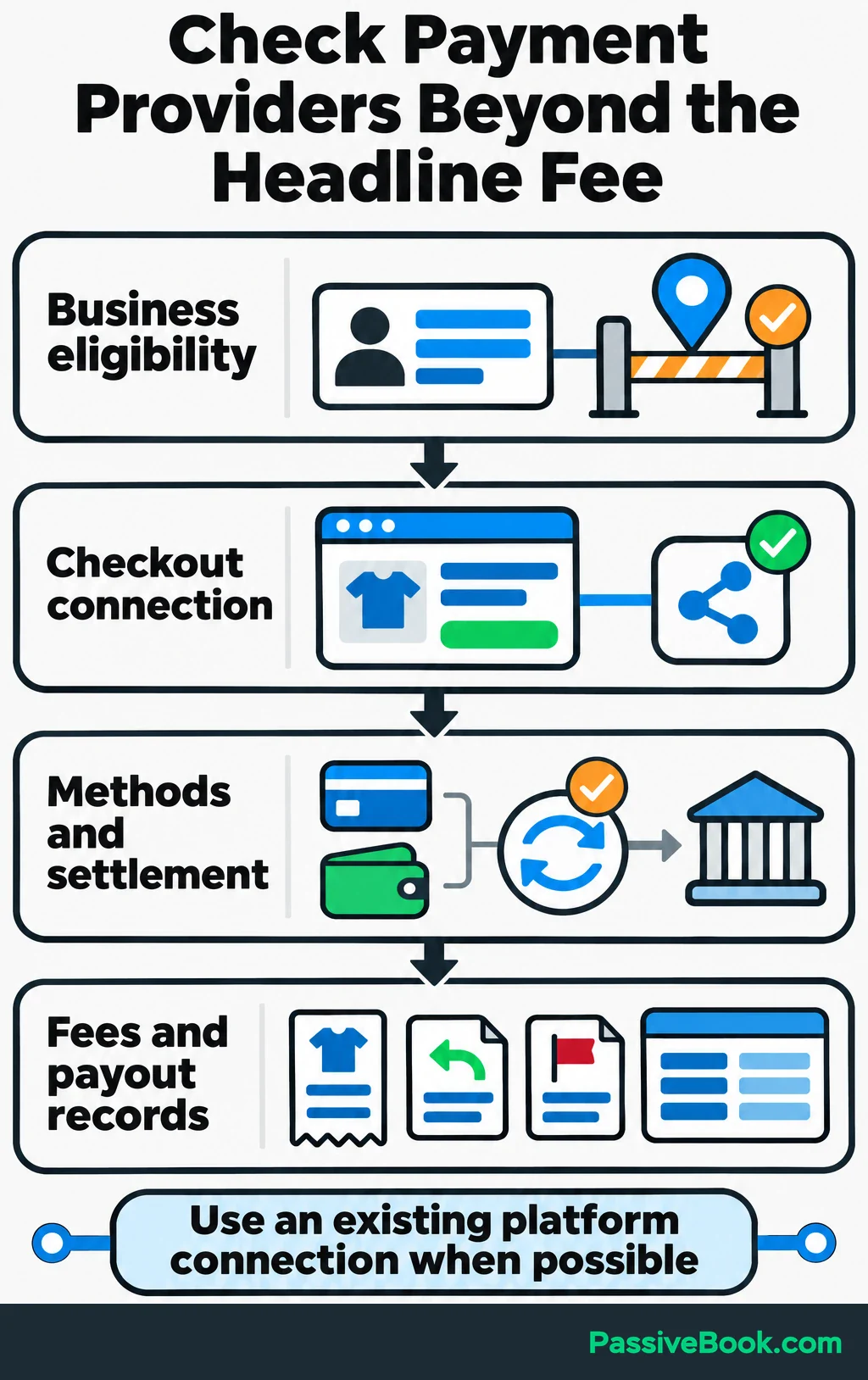
Then compare the payment methods customers will use, including charges for currency conversion, refunds and disputes. Look at the payout reports too, because someone has to match those deposits to the sales.
Use the selling platform’s existing payment connection where possible. Some platforms manage payments for you, so a separate processor account may not be necessary.
Stripe: Best for Integrated Card Payments
Stripe is my first payment-processing shortlist when the selling platform supports it.
Start with the platform’s existing connection. You should be able to confirm payment, deliver the product, issue a refund and find the related fee and payout record without commissioning custom checkout code.
The table shows standard U.S. domestic-card pricing. International cards, conversion and other payment products can change the cost.
For the pattern shop, I would test one purchase from the customer’s side and then trace it through the records. A successful charge is only part of the test. The buyer also needs the correct file, and you need a record you can reconcile.
PayPal Business: Best for an Additional Checkout Option
Add PayPal when customers want to use it or its invoicing suits the way you sell.
I would not assume every store needs both Stripe and PayPal immediately. Each payment route adds another set of transactions and payouts to check, so it should serve a real need.
Compare the exact PayPal product you plan to offer. PayPal Checkout, card payments and other payment methods do not all share the same fee.
If you enable both providers, run the same purchase and refund test through each. The customer experience and the records should both make sense.
Accounting and Invoicing Software
Choose accounting software for your country, bank connections and accountant’s needs. A familiar tool that handles those jobs is usually worth keeping.
Use its invoicing features before paying for a separate invoicing subscription.
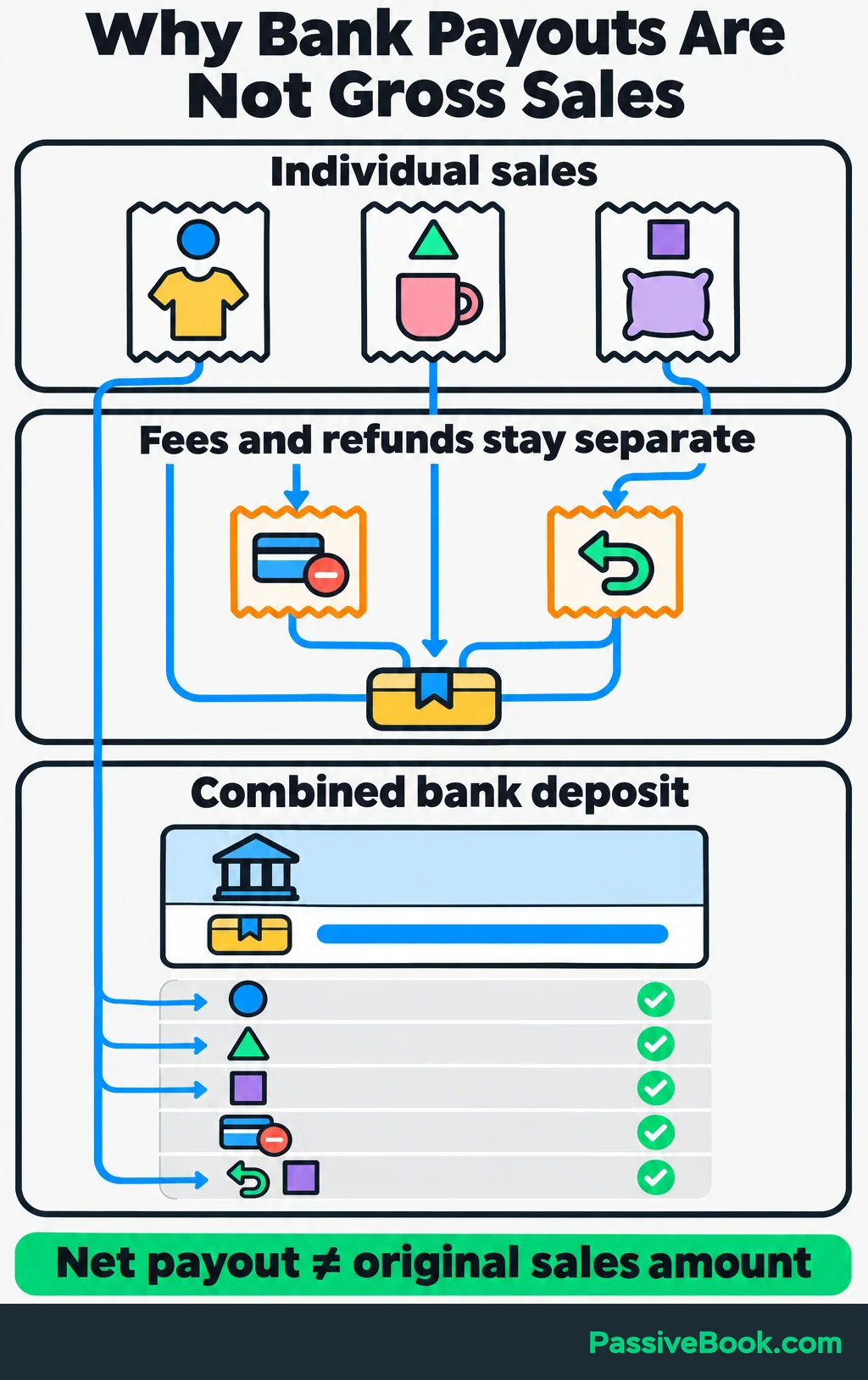
For store sales, keep gross sales, processing fees, refunds and bank deposits distinct. A net payout tells you what reached the bank after deductions; it does not tell you the original sales amount.
For example, a pattern payment and its processing fee should remain identifiable even when the processor combines several sales into one deposit. That is the connection your accounting workflow needs to preserve.
Zoho Books: Best for a Budget-conscious Shortlist
Zoho Books is where I would start a budget-focused accounting comparison.
The U.S. Free plan includes one user plus an accountant, subject to the revenue condition in the table. Standard adds connected bank feeds, which can be useful when importing bank statements becomes a recurring chore.
A bank feed and a storefront connection solve different problems. The feed brings in bank activity. It does not, by itself, establish that every product sale, fee and refund reaches the right accounting record.
For the pattern shop, compare manual imports with a connector using a small set of transactions. Include a sale, a refund and a payout containing several orders.
Pay for the connection when it removes enough necessary work. I would rather keep an accurate weekly import than subscribe to an automation that still needs weekly repair.
Xero: Best When Several People Need Accounting Access
Xero deserves a place on the shortlist when you and an accountant or bookkeeper need access. It has no per-user license fees.
The main decision is whether the plan fits your transaction workflow. Early includes 20 invoices and five bills per month, and transactions created by connected apps can contribute to the invoice limit.
That matters for a shop even if you rarely send invoices manually. A connector might create an invoice for each order.
Ask how the proposed connection records sales before choosing the tier. If it creates one invoice per pattern purchase, estimate the required plan from that volume.
I would also include migration and retraining in the comparison. Moving accurate books to save a small monthly amount can be an expensive way to feel economical.
Email Marketing Software
Choose one system to hold subscriber records and run marketing follow-up.
Compare the complete sequence you need, the purchase data it can receive, its sending allowance and the price at your next likely list size. A generous contact limit is not useful if the required automation sits on another plan.
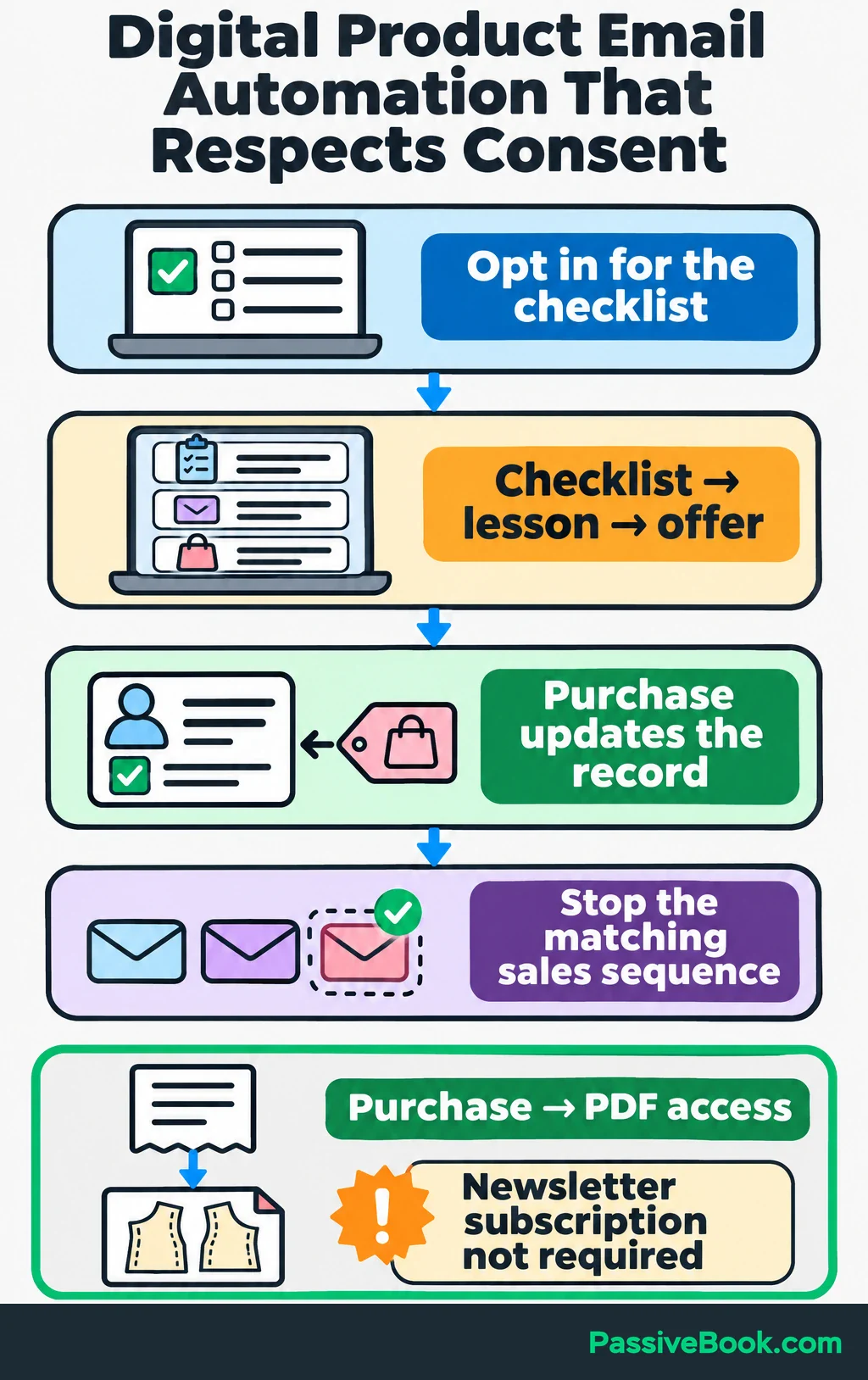
For the pattern shop, the workflow might be:
- A visitor requests a free stitch checklist and agrees to receive follow-up emails.
- The checklist arrives, followed by a short lesson and a related pattern offer.
- A purchase updates the customer’s record.
- The buyer leaves the sales sequence for the product they already bought.
Keep order delivery working independently of marketing subscription status. A buyer who declines the newsletter still needs their PDF.
If your selling platform’s included email handles this well, use it before adding another subscription.
MailerLite: Best for a Small List With Straightforward Automation
I would shortlist MailerLite for a small list that needs forms, newsletters and manageable follow-up.
Its free plan includes 250 subscribers, 2,500 monthly emails, three active automations and five steps per automation. Count delays and conditions as well as email messages when checking whether a sequence fits.
Do that check with the actual welcome sequence. A plan can support the subscriber count and still be too small for the intended follow-up.
MailerLite offers a WooCommerce integration for subscriber syncing and product imports into campaigns. Before relying on it, test the purchase event, the subscriber group it updates and the plan required for that behavior.
I would choose it when the workflow stays simple and the paid tier remains sensible as the list grows.
Kit: Best for an Email-led Creator Business
Kit is worth considering when email is central to the business rather than an occasional promotional channel.
Its free plan supports up to 10,000 subscribers, along with broadcasts, forms and segmentation. The paid Creator tier adds unlimited visual automations and email sequences.
I would compare the tier needed for the work before being impressed by the free subscriber allowance.
For the pattern shop, occasional release announcements are a different requirement from a welcome sequence that branches according to purchases. Price the second workflow if that is what you intend to build.
Choose Kit when its creator-focused email workflow makes the repeated work easier. I would skip a move based only on unused subscriber capacity.
FluentCRM: Best for an Established WordPress Business
FluentCRM is my preference for Passive Book because I already run WordPress and want email management inside that setup.
Its licensing is based on sites rather than subscriber count. That makes the cost structure worth comparing as a list grows, but it does not remove sending costs or hosting requirements.
FluentCRM manages contacts, campaigns and automation. A configured delivery provider sends the messages. My stack uses the FluentSMTP plugin to connect WordPress to Amazon SES, the service that sends the messages.
Its WooCommerce integration can start automations when an order is completed or refunded. Those automations can update customer tags and trigger follow-up inside WordPress.
For the pattern shop, that could mean marking a subscriber as a bundle buyer and ending the matching sales sequence. I would choose this route when WordPress is already established and someone can maintain it. A new seller with little technical support may prefer hosted email.
Customer Management Software
A customer relationship management tool, or CRM, earns its place when enquiries need stages, reminders and a clear next action.
Routine download sales usually do not need a separate sales pipeline. Order records, email segments and a business inbox may cover the work.
The pattern shop might need more when it starts accepting custom commissions. An enquiry could move through discussion, proposal, approval and payment. Losing track of the next reply now has a clear cost.
HubSpot’s free CRM is a reasonable place to test that process. It includes contact, deal and task management within the limits shown in the table.
Before committing, price any automation you expect to need later. I would start by tracking the next action on each enquiry. A complicated pipeline will not rescue an unanswered email.
Business Email, Planning and Design Software
These tools support the selling system, and they can work together. Keep what already handles the job well.
I would avoid replacing a familiar document or design tool just because another app appears in a recommended stack. Moving the work is still work.
Google Workspace: Best for Business Email and Shared Documents
Google Workspace is a straightforward choice when you need a full inbox at your own domain, shared documents, calendars and meetings.
Business Starter includes 30 GB of pooled storage per user. Check whether that covers the files and collaboration you actually need before adding more communication tools.
For the pattern shop, the inbox handles download questions and customer replies. Shared storage can hold working documents and product files, with access set deliberately.
Forwarding messages to another address may be enough at the beginning, but a full business inbox becomes useful when you need to send, organize and retain customer conversations from the shop’s address.
Notion: Best for Procedures and a Content Calendar
I would start with Notion’s free individual plan for checklists, release plans and reusable support instructions.
For the pattern shop, one release checklist could cover:
- Check the pattern and stitch instructions.
- Export and open the final PDF.
- Test the product link and checkout.
- Prepare the release email and promotional graphics.
Link to the actual files in your chosen storage system. Avoid maintaining several “final” copies across different apps.
Upgrade when collaboration needs demand it. I would skip a paid planning setup while the business still lacks a clear release process. A beautiful calendar can hold a surprisingly impressive amount of unfinished work.
Canva: Best for Routine Business Graphics
Canva Free is a sensible starting point for product covers, instruction-page layouts and promotional graphics.
I would create a few reusable layouts before considering a paid plan. A consistent cover, tutorial image and release graphic can handle plenty of routine work.
For the embroidery patterns, use your own pattern artwork and finished-piece photos, then build the layout around them. That keeps the product clear and gives you assets you can reuse.
Pay for premium tools when they improve repeated work, such as producing several sizes from the same design. I would not upgrade merely to gain access to more templates. Choosing between templates can become its own unpaid occupation.
Analytics Software
Google Analytics and Google Search Console answer different questions.
Analytics helps you understand website visits and purchase activity. Search Console shows how your site appears in Google search, including queries, clicks and indexing issues.
Start with a decision you need to make. For the pattern shop, that might be whether a tutorial needs better search visibility or whether its visitors need a clearer route to the related pattern.
Those problems call for different work. Search data helps with the first. Website and storefront data help investigate the second.
Do not assume installing Analytics creates complete ecommerce reports. Your site or store integration must send purchase events with the required details. These records tell Analytics what was bought and for how much.
Check a known order against the report before using it to judge sales performance. Keep the storefront’s order records as the financial reference because consent choices and blocked tracking can leave gaps in analytics.
Include consent handling in the setup. If you use Google Consent Mode, it adjusts tag behavior according to consent choices; it does not collect those choices for you. Google’s consent guidance explains the distinction.
Workflow Automation Software
Use the selling platform’s built-in features and direct integrations first. Add an external automation builder when an important handoff still needs manual work.
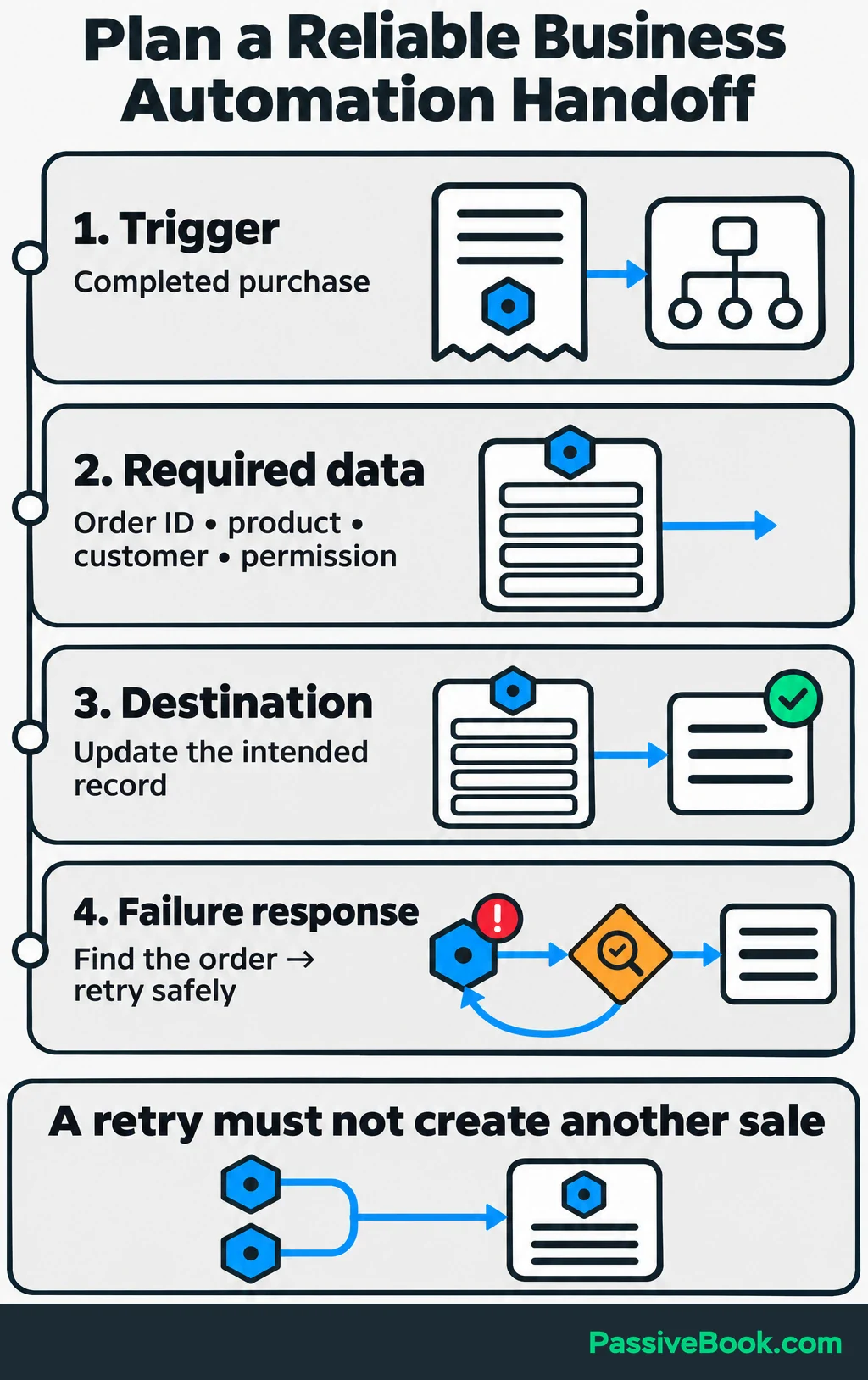
Before comparing builders, write down:
- Trigger: The event that starts the work, such as a completed purchase.
- Required Data: The order ID, product, customer and current marketing permission.
- Destination: The record or task that needs updating.
- Failure Response: Where an error appears and how you recover the missed action.
For the pattern shop, checkout and PDF delivery should stay in the selling platform if they already work. An external builder might update an existing subscriber’s purchase status or prepare a bookkeeping record.
Pass the order ID through the workflow so you can identify duplicate events. A retry should not create another sale record or restart a finished email sequence.
Make: Best for Visual Automation Across Hosted Apps
Make would be my first shortlist for a visual connection between hosted apps when I want to avoid maintaining a server.
Its free allowance is measured in credits. Most ordinary actions use one credit, so one purchase can consume several as the workflow searches, checks and updates records.
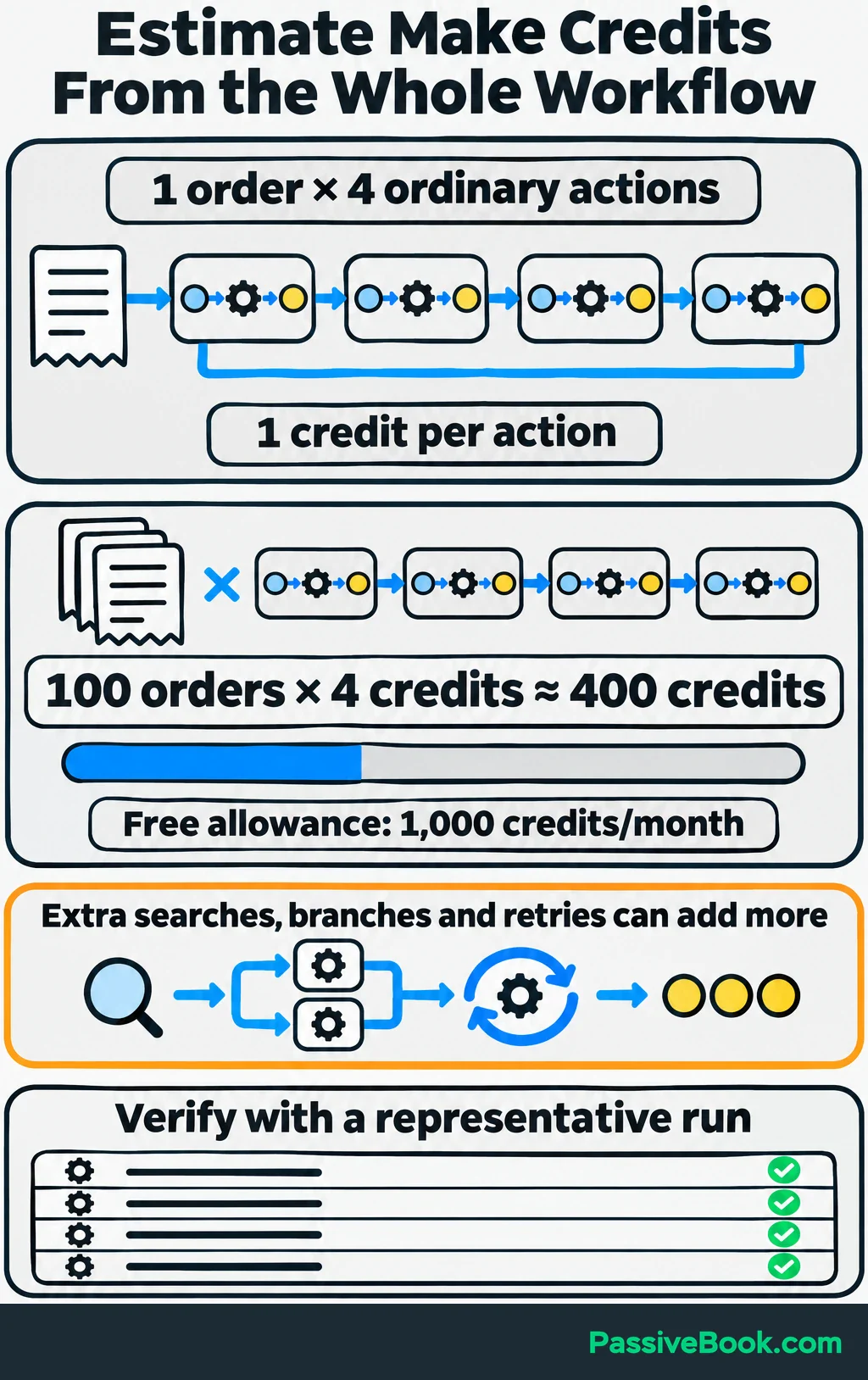
Estimate usage from the whole workflow.
For illustration, if processing one order requires four ordinary one-credit actions, 100 orders use about 400 credits. Searches, extra branches and repeated attempts can add more. Use a representative run to check the estimate.
Also confirm the exact supported actions. A tool might connect to your store but lack the refund event or customer field you need.
I would choose Make for a clear, limited handoff and expand only after it proves useful.
n8n: Best for Flexible Workflows With Technical Support Available
I use n8n to connect business tools because I value control over the workflow and the logic inside it.
Its cloud pricing counts workflow executions rather than each ordinary action. Cloud Starter includes 2,500 monthly executions with unlimited steps, so compare it with Make using the same real workflow rather than comparing the allowance numbers directly.
The self-hosted Community edition has no software subscription, but someone must handle infrastructure, updates, monitoring and recovery. n8n’s hosting guidance describes that responsibility.
I would choose hosted service when server care would consume the time the automation is meant to save.
For the pattern shop, flexibility becomes useful when orders need several checks or different actions by product. It is less compelling when all you need is a working download link.
What Will Your Software Stack Actually Cost?
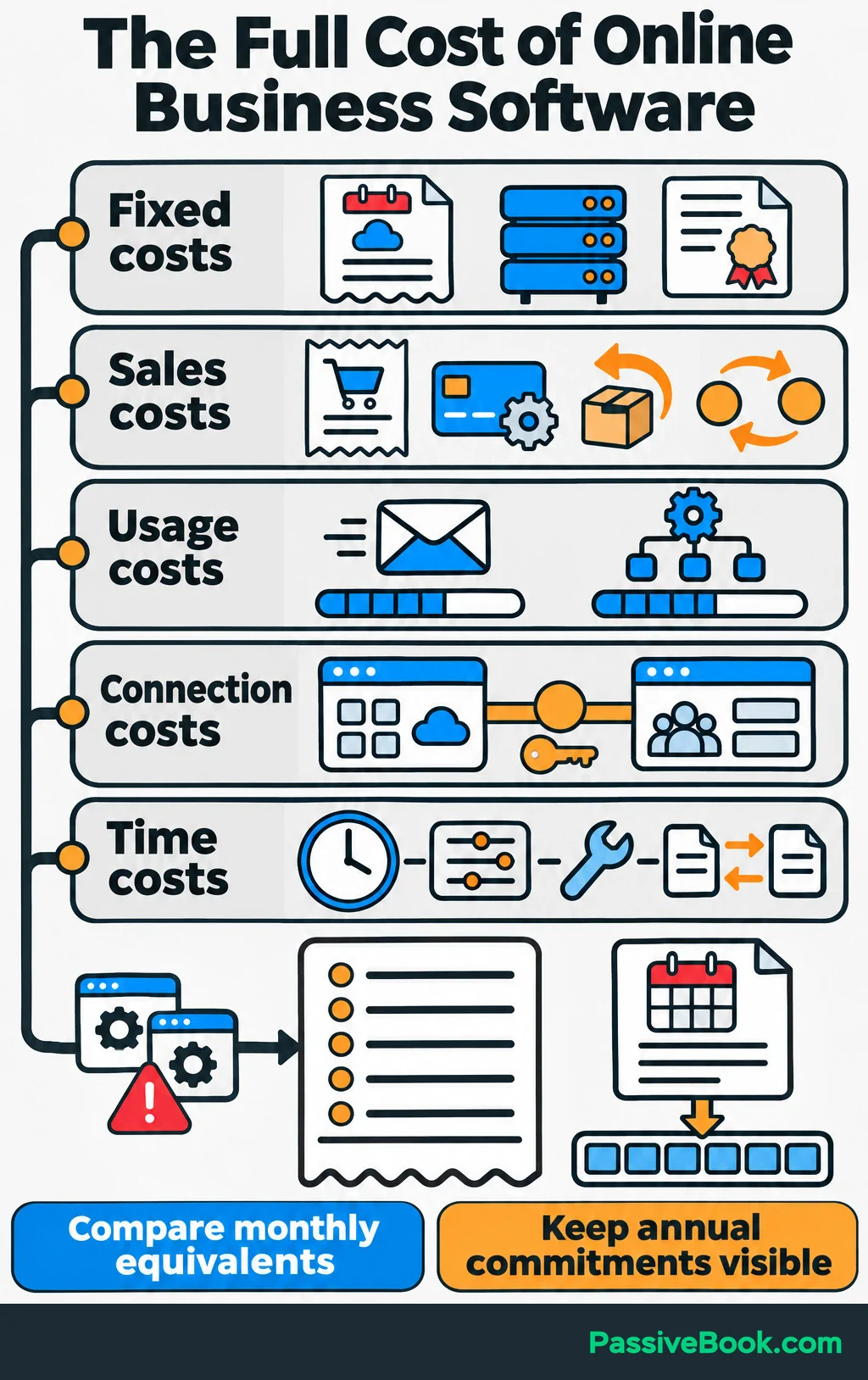
Add the full bill before choosing a stack:
- Fixed Costs: Subscriptions, domain registration, hosting and annual licenses.
- Sales Costs: Processing, platform transaction fees, refunds, disputes and conversion.
- Usage Costs: Email delivery, automation credits and other metered services.
- Connection Costs: Required apps, connectors and higher subscription tiers.
- Time Costs: Setup, maintenance, training and migration.
Convert annual charges into monthly equivalents for comparison, but retain the actual commitment beside them.
A lower monthly equivalent can still mean a larger payment today. Put two suitable options side by side before committing to a billing plan.

Free Software Cost Calculator




Check for overlapping functions before adding a subscription. If a selling platform already handles landing pages and marketing email, separate subscriptions need a specific reason to exist.
Here is one illustrative paid setup for the embroidery-pattern shop. It uses the published rates in the comparison table.
| Part of the Stack | Monthly Cost Used | What It Covers |
|---|---|---|
| Systeme.io Startup | $17 | Product pages, checkout connection, delivery and included marketing email |
| Zoho Books Standard | $20 | Accounting and connected bank feeds; storefront records are imported manually |
| One Google Workspace Starter seat | $7 | Business inbox and documents, with an $84 annual commitment |
| Canva Free and Notion Free | $0 | Routine graphics, planning and procedures |
| Fixed monthly equivalent | $44 | Before domain costs and applicable taxes |
Standard is included here for connected bank feeds. That does not turn the storefront-to-accounting workflow into an automatic integration. I would compare the eligible free accounting option if manual bank imports remained manageable.
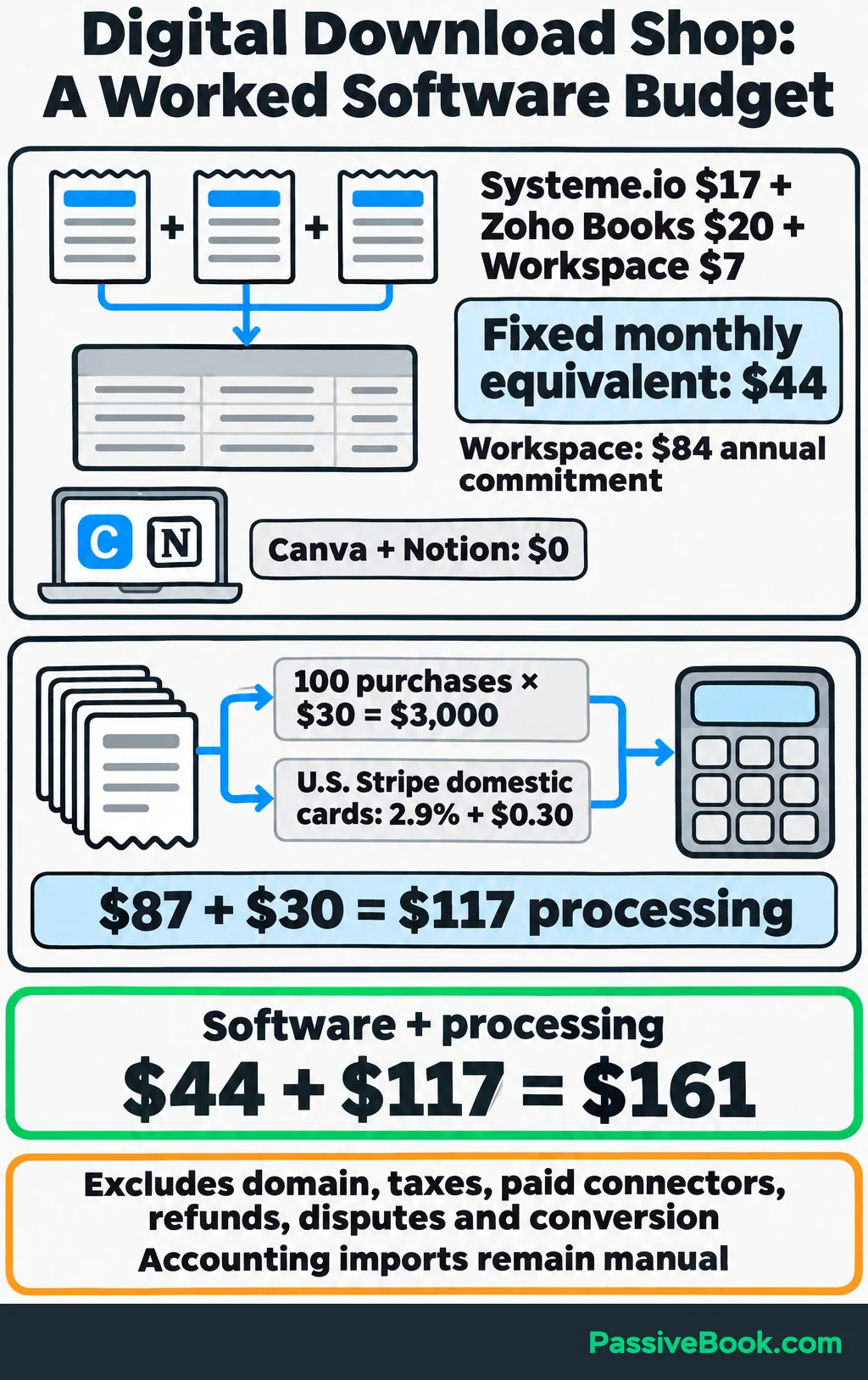
Now add payment processing. Assume the shop receives 100 successful purchases of a $30 pattern bundle in one month. Every payment uses standard U.S. Stripe domestic-card processing, so the same 100 purchases account for both the percentage charge and the per-payment charge.
- Sales collected: 100 × $30 = $3,000.
- Percentage-based processing: $3,000 × 2.9% = $87.
- Per-payment processing: 100 × $0.30 = $30.
- Total processing: $117.
- Fixed software plus processing: $44 + $117 = $161.
This excludes domain costs, applicable taxes, paid connectors, refunds, disputes and currency conversion. It also leaves the manual accounting imports described above.
Use the same approach for upgrades. If a $20 monthly tool removes two hours of necessary administration, you are paying $10 per hour released. That can be worthwhile, provided maintaining the tool does not consume those hours again.
How to Test Your Shortlist Before Committing
Run the same representative workflow in each finalist. A fair comparison needs the same product, customer actions and expected records.
For the pattern shop, test this sequence:
- Create a product page and upload the PDF.
- Request the free checklist and confirm the promised email arrives.
- Purchase the pattern and check the receipt and download.
- Confirm the order and customer records contain the right details.
- Check that an existing subscriber’s purchase status updates without changing their permission.
- Issue a refund and inspect the resulting records.
- Match the sales, fees and payout to the accounting entries.
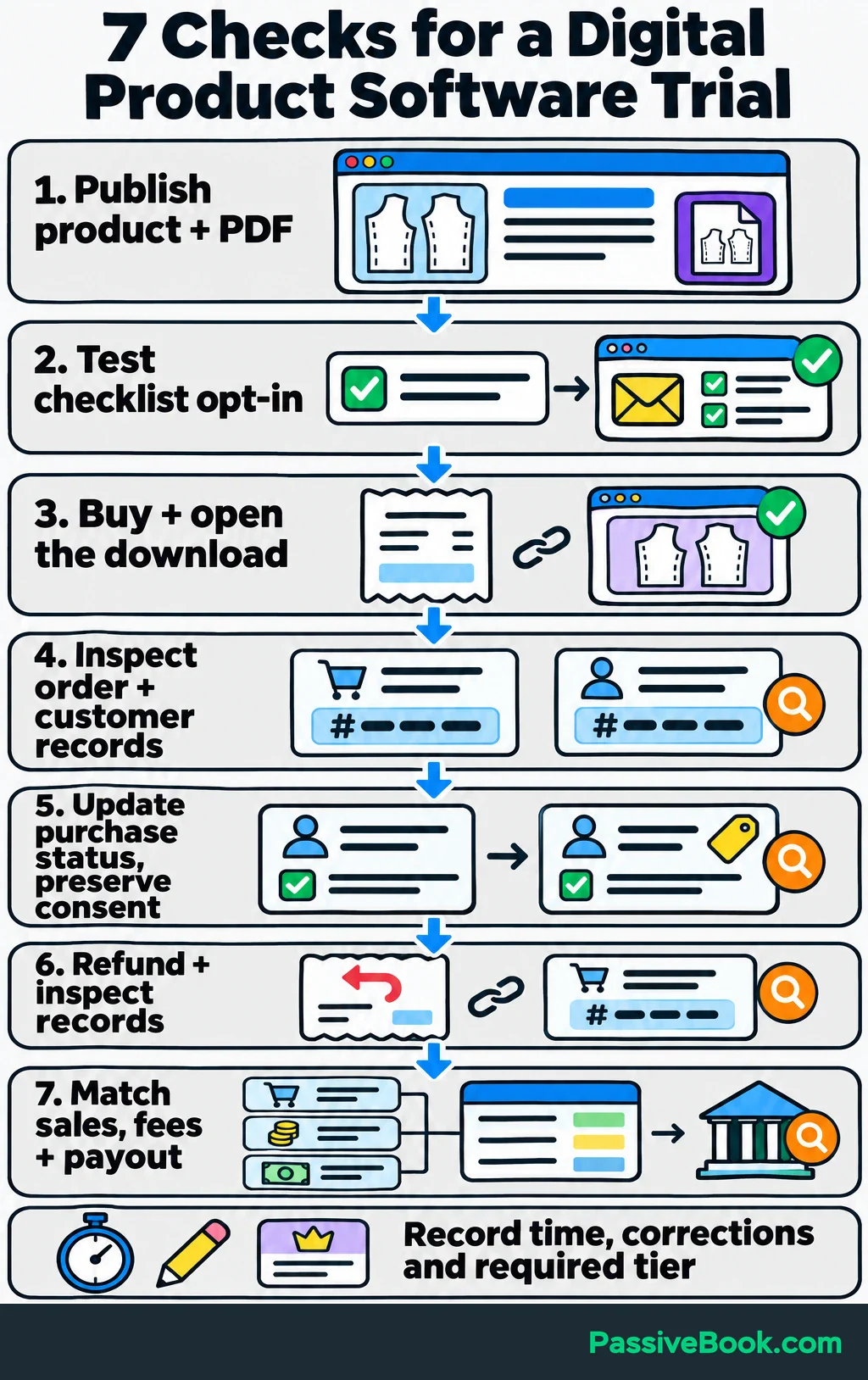
Record setup time, manual corrections and the subscription tier required. Those observations are more useful than an integration logo.
Test failure recovery too. If an action fails, you need to see it, identify the affected order and retry safely. Check that repeating an event does not duplicate records.
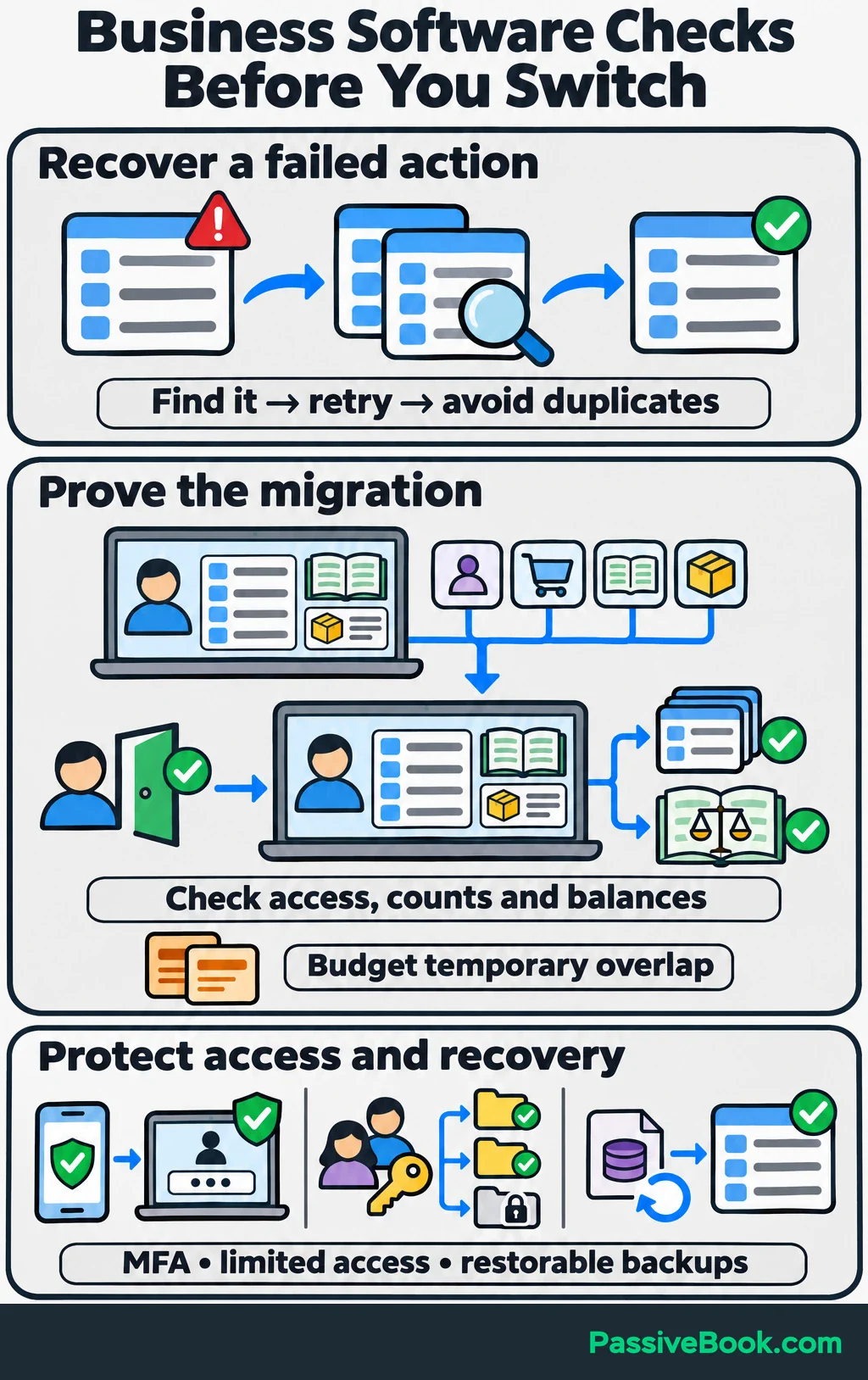
Before moving an existing business, export a small set of contacts, orders, financial records and product content. Try importing them into the proposed replacement. A downloadable file is only useful if it contains the fields you need.
Keep the existing system available until customer access, record counts and balances agree. Include temporary subscription overlap in the migration budget.
Finally, protect logins with multifactor authentication, which adds another check such as a code from an authenticator app. Give collaborators access only to what they need, and keep backups or exports you can restore. Choose the smallest stack that passes the workflow test and gives you a practical way to recover when something goes wrong.
What Next?
Write down the path from one customer payment to file access and an accurate accounting record. Mark the step you still complete by hand, then test the smallest change that could remove it.
If this guide helps you cut an unnecessary subscription or choose a better connection, use the social buttons to share that decision framework.
Which handoff currently takes the most manual work in your business? Tell me in the comments, and bring any other questions about choosing your stack.
Share this post with your friends & followers:

