You want to tell interested shoppers that a product is back in stock, but choosing the software creates another job. One provider charges by subscriber, another counts active users, and the automation you need sits behind a higher plan.
The wrong choice can leave you paying for features you barely use while still copying customer lists between tools. This comparison covers free and paid options for websites and apps, explains what each provider bills for, and helps you check whether a tool can run your campaign without those manual handoffs.
Which Type of Push Notification Software Do You Need?
First, choose the channel your customers can actually use.
- Web push: Visitors subscribe through your website and receive notifications through a supported browser. You do not need a native mobile app.
- Native app push: Notifications come from an installed iOS or Android application. Your app needs the provider’s messaging code.
- Both: Choose a platform that explicitly supports website notifications and native app notifications.
A notification arriving on an Android phone does not prove native app support. It could have come through Chrome.
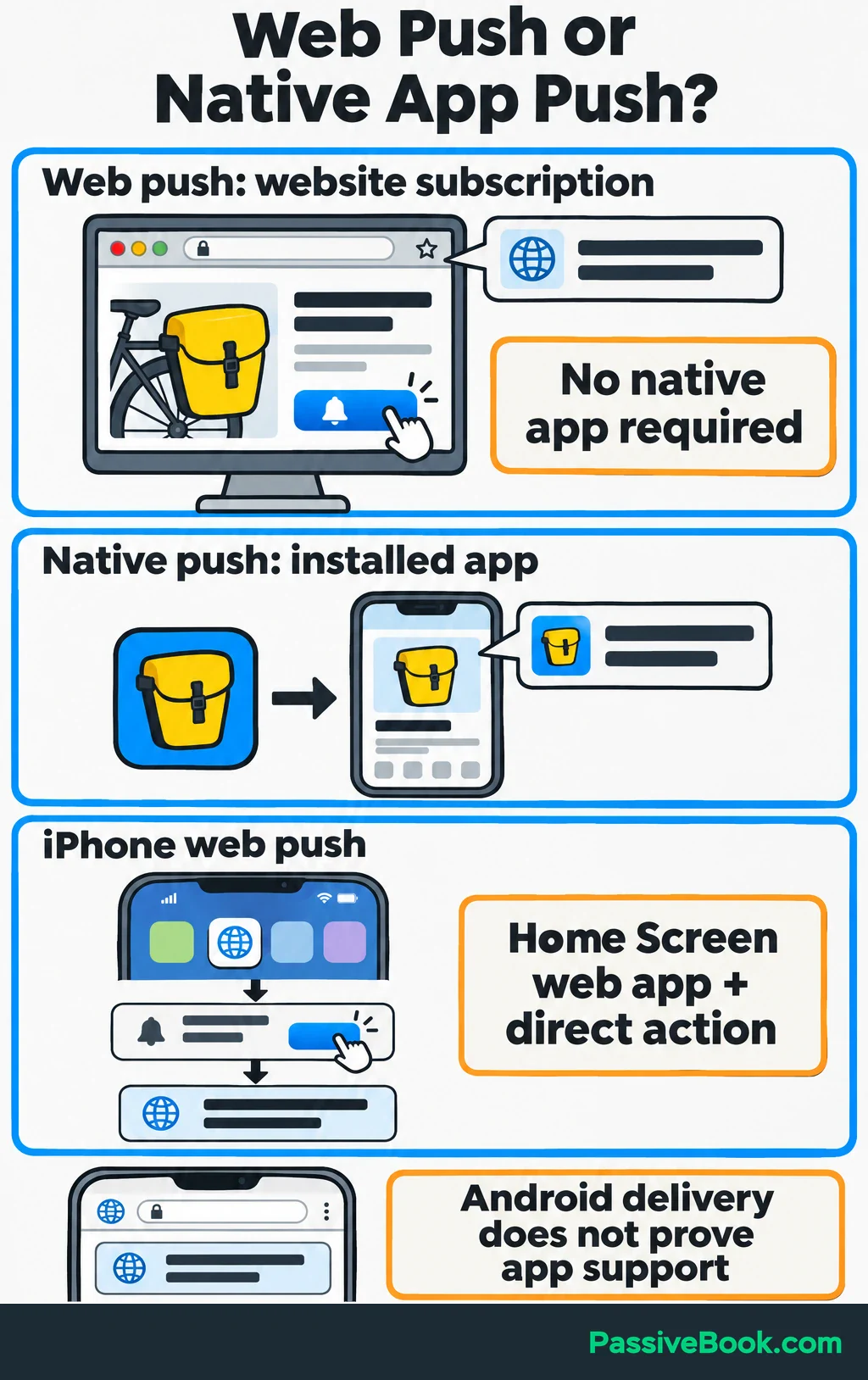
Browser coverage also varies between providers. On iOS and iPadOS 16.4 or later, web push requires a web app added to the Home Screen, and the permission request must follow a direct action such as tapping a subscribe button. An ordinary website visit is not enough. WebKit explains these requirements.
Next, decide how much of the work you want the software to manage. A campaign platform lets you group subscribers by interest or behavior (segments), build automated message sequences (journeys) and review results. Delivery infrastructure handles sending, but developers must build the rules that decide who gets each message and when.
For most small online businesses, I would choose managed campaigns. Building a notification system becomes less appealing when you also become its support department.
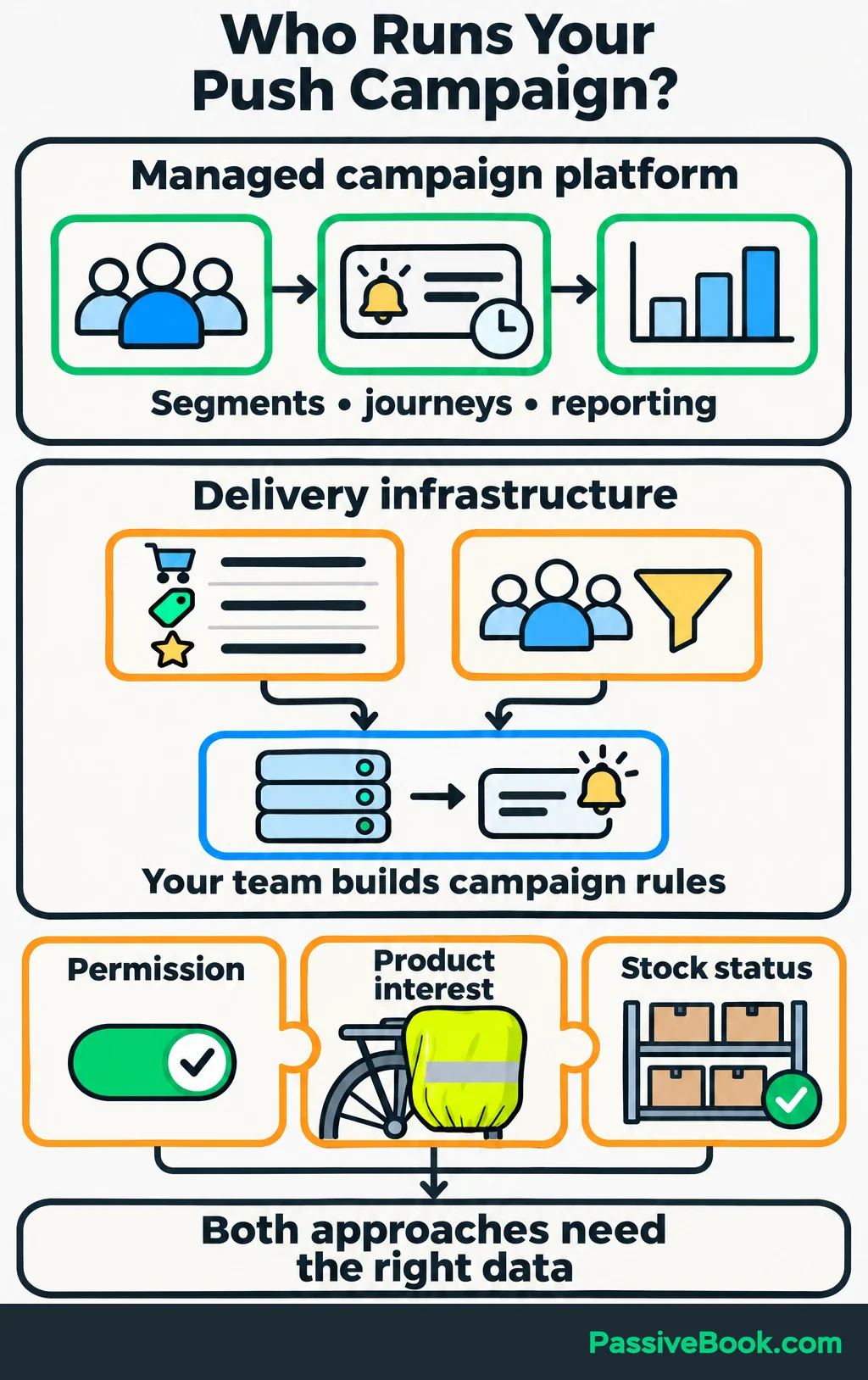
Suppose your shop sells commuter cycling accessories. A shopper wants an alert when a reflective pannier cover returns to stock. You need to connect three things: their permission to receive push, their interest in that product, and its inventory status.
That is the running example below. The shop and its campaign are illustrative.
Push can sit beside your existing email system. If your WordPress email setup already works, I would keep it and add a dedicated push tool unless combining the channels removes a clear source of work.
The 11 Best Push Notification Platforms Compared
The best push notification software depends on your channel, required automation and available technical help. The numbered selections below cover different needs.
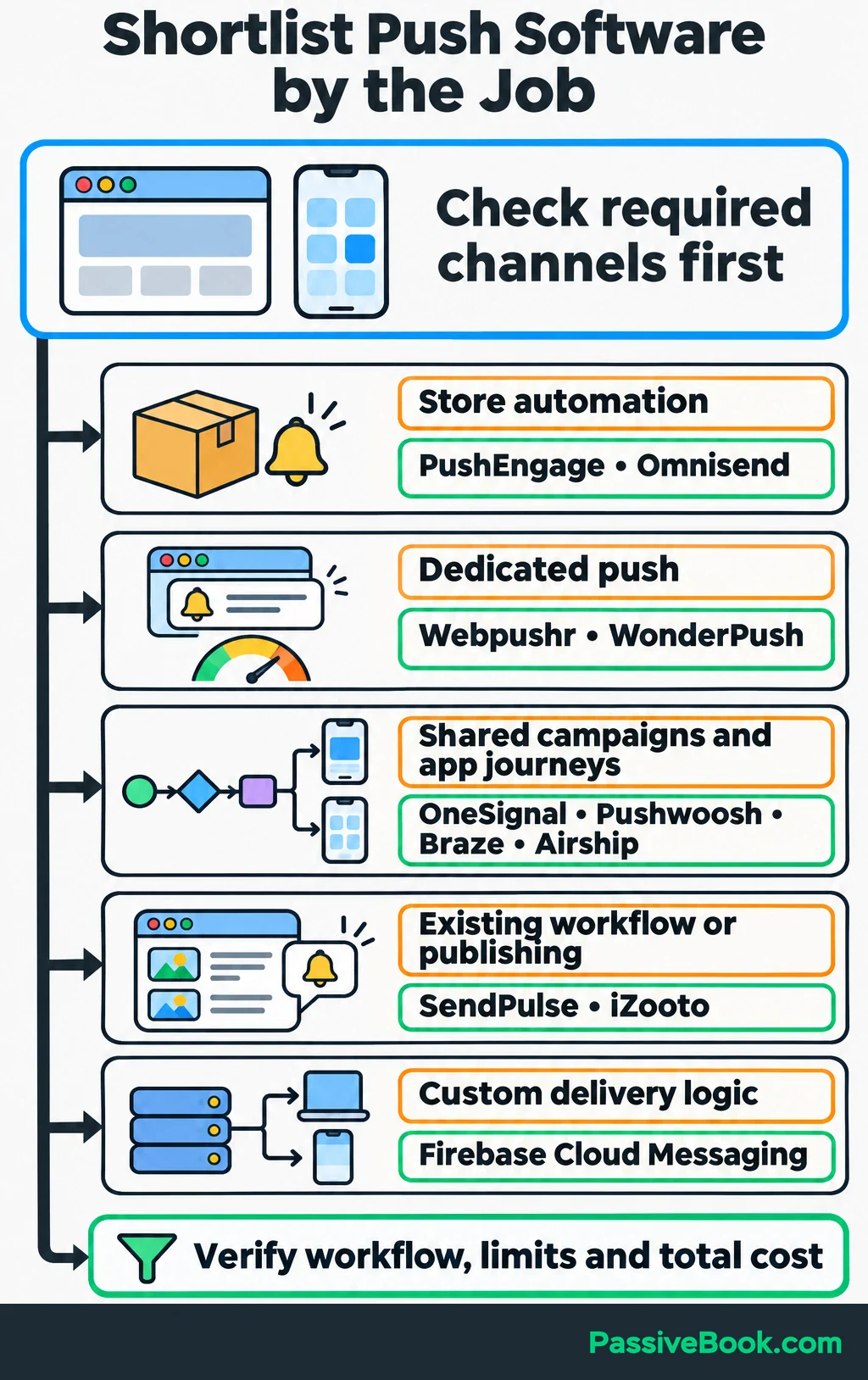
Use this table to narrow the field, then read the relevant reviews. API access lets your website or app send data and requests to the provider through code. Prices are in USD unless marked €. Check the linked provider pages for current terms.
| Platform | Best Fit | Web / Native App Support | Automation and Integration Approach | Free Allowance or Trial | Paid Pricing and Billing Unit | Main Tradeoff |
|---|---|---|---|---|---|---|
| OneSignal | Shared website and app campaigns | Both | Visual journeys, segmentation, integrations and API | Web: maximum 10,000 subscribers per send; mobile: organizations up to 1,000 monthly active users | Growth: $19/month plus $0.004 per web subscriber and $0.012 per mobile monthly active user | Platform fee plus separate audience charges |
| PushEngage | WooCommerce ecommerce automation | Both | Store connection, visual workflows and product alerts | One site or app, 200 subscribers, 30 lifetime campaigns | Growth advertised from $24/month on introductory annual terms; subscriber selections start at 2,500; renewals at full price | Required triggers need Growth; sending allowances still apply |
| Webpushr | Website push on a small budget | Web only | Journey builder, WordPress/WooCommerce connections and API | Up to 10,000 subscribers, with all features included | Individual: $29/month for up to 50,000 subscribers | No native app push |
| WonderPush | Inexpensive dedicated push | Both | Event targeting, automated sending, API and conversion reports | 14-day trial without a credit card | €1/month for 1–1,000 subscribers; another €1 for each additional 1,000-subscriber band | Store events still need connecting |
| Omnisend | Ecommerce email and push together | Web only | Shared email/push workflows and store integrations | 500 push notification credits/month | Standard starts at a regular $16/month for the 500-contact tier; unlimited web push | Contact-based billing and restricted browser coverage |
| SendPulse | Push within an existing SendPulse setup | Web only | RSS distribution and message series; Pro adds API and Automation 360 | Basic: 10,000 subscribers and unlimited notifications | Displayed Pro band: $24/month for 30,000 subscribers, or $19.20/month billed annually | API access and segmentation require Pro |
| Pushwoosh | App lifecycle journeys | Both, plus in-app messages | Visual journeys, events, segmentation, testing and analytics | First 1,000 monthly active users free | Push Only: $7 per additional 1,000 monthly active users for accounts signing up by December 31, 2026; rate locked for 24 months | Billing counts messaged recipients, rather than app opens alone |
| Firebase Cloud Messaging | Developer-controlled delivery | Both | Custom sending logic, client integration and campaign composer | FCM itself has no service charge | Development, maintenance and any chargeable supporting services are separate | Your team owns the automation around delivery |
| Braze | Complex campaigns across channels | Both | Customer data, journey orchestration, experimentation and reporting | Free trial available; no permanent free plan advertised | Quote covering platform edition, active users, profiles, services and Action Credits—a shared credit pool for selected messaging and AI features | Broader implementation and commercial scope |
| Airship | Push connected to personalized app experiences | Both | Customer data, journeys, testing and app/web experiences | Confirm trial terms; no fixed free allowance published on the pricing page | Experience Platform requires a quote; request audience and usage terms | More platform than a simple browser campaign needs |
| iZooto | Repeat readership for publishers | Both | Content distribution, recurring campaigns, welcome sequences and WordPress publishing automation | Request trial and allowance details | Request a quote for subscriber capacity, automation and support | Content distribution is its stronger fit than inventory alerts |
1. OneSignal: Best for Managing Website and App Push Together
OneSignal is my starting shortlist choice when you have both a website and a native app. Its shared campaign tools make more sense than maintaining two separate messaging systems.
You get visual journeys, audience segmentation and analytics. Growth includes five active journeys and ten audience segments, so check whether your planned campaigns fit those limits before paying.
The billing definition deserves attention. OneSignal counts a mobile monthly active user as a mobile subscription record active in the previous 30 days, whether or not it has push permission. Your billable mobile audience can therefore exceed the group you can reach through push.
I would choose it when shared campaign management saves useful work. For a browser-only shop, I would compare its total bill with Webpushr and WonderPush first.
For the pannier-cover alert, ask how product interest and inventory changes enter the journey. A visual builder still needs the right information to arrive.
2. PushEngage: Best for WooCommerce Push Automation
PushEngage is the first tool I would investigate for a WooCommerce store that needs product-based campaigns.
Its Growth plan includes back-in-stock alerts, cart-abandonment campaigns and price-drop alerts. That puts it close to the cycling shop’s actual task: notifying people who requested a particular product.
The important comparison is the plan containing those triggers. A cheaper broadcast plan does not solve the same problem, even if it lets you create plenty of campaigns.
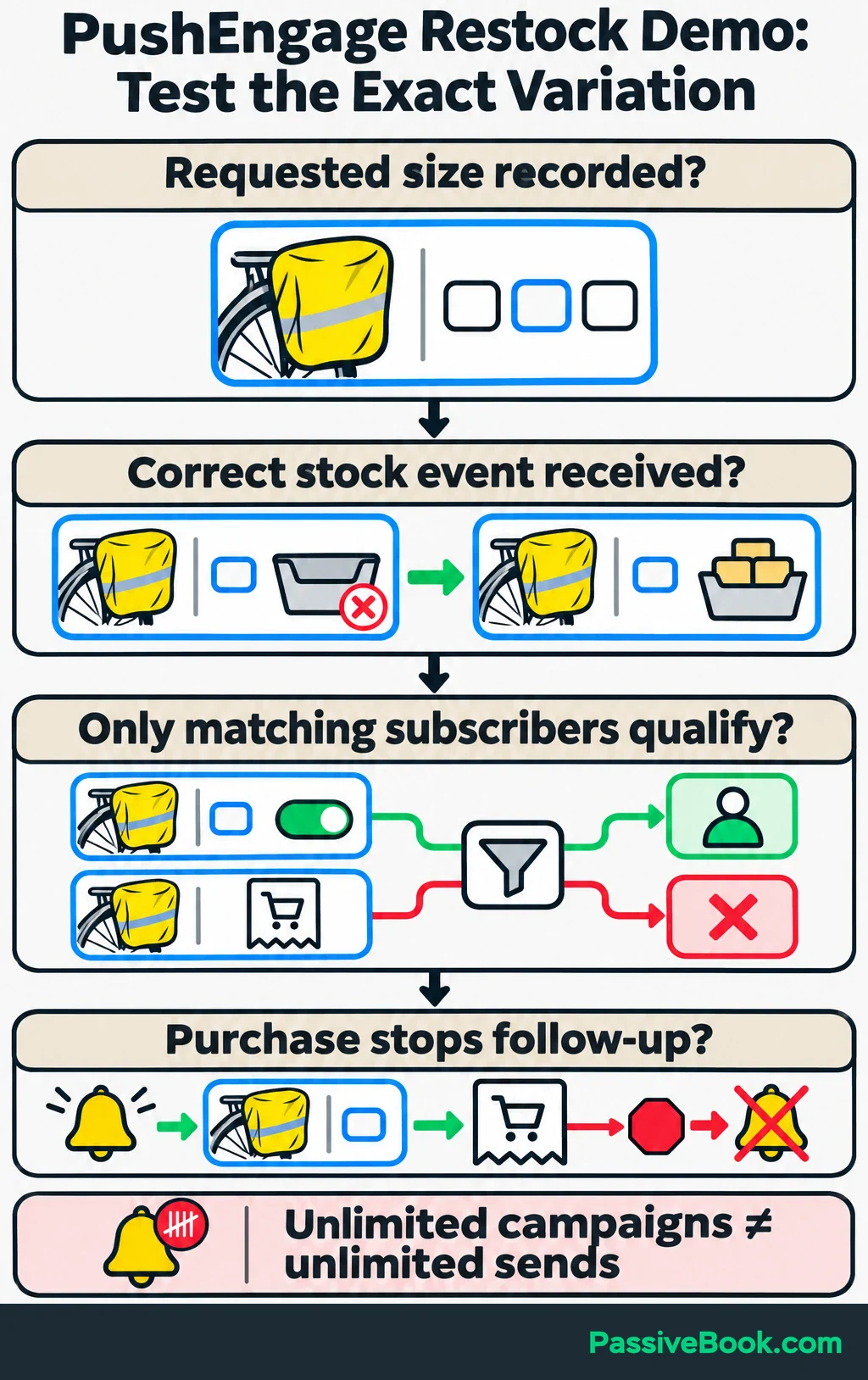
I would ask for a demonstration using a product variation, such as a particular cover size. Confirm that the integration distinguishes the requested variation and ends any follow-up after purchase.
Also check monthly sending volume. “Unlimited campaigns” describes how many campaigns you can create; it does not remove the sending allowance.
Choose PushEngage when its built-in ecommerce workflows remove enough integration work to justify the subscription. Get the renewal total for your chosen subscriber band before committing.
3. Webpushr: Best for a Generous Free Web-push Plan
Webpushr is where I would begin for website push with a limited budget. Its free plan includes the feature set rather than reserving segmentation and API access for paid accounts.
The platform offers customizable permission prompts, audience segments, a journey builder and WordPress/WooCommerce connections. That gives you room to test a useful campaign before taking on another monthly bill.
Its boundary is straightforward: this is a web-push choice. If you also need native app messaging, compare OneSignal or WonderPush.
For the cycling shop, I would verify the WooCommerce workflow before assuming it handles the complete restock alert. Ask whether it captures product-specific requests and receives the inventory change automatically.
If it completes your required workflow on the free plan, I would need a clear reason to pay for something else.
4. WonderPush: Best for Inexpensive Dedicated Web and App Push
WonderPush deserves a close look when you want dedicated push and already have email handled.
It supports websites, iOS and Android, with event-based targeting, automated sending, A/B testing and conversion reporting. Deep links let an app notification open the relevant screen instead of dropping everyone at the app’s front door.
Its subscriber definition matters when estimating cost. WonderPush counts unique device-and-app or device-and-website combinations. One device subscribed to two projects counts twice, so subscribers are not necessarily individual people. Its billing documentation explains the count.
I would choose it when the dedicated push feature set meets your needs and you can connect the required events without a large project.
For the pannier-cover campaign, include the work of linking stock changes and product interests in your estimate. A low subscription is useful, but it does not make that work disappear.
5. Omnisend: Best for Ecommerce Email and Web Push Together
Omnisend makes sense when you want email and browser push in the same ecommerce workflow. Its Shopify and WooCommerce connections make it relevant to stores that would otherwise coordinate separate campaign tools.
The reason to choose it is shared operation. You can plan the sequence around customer behavior instead of maintaining unrelated email and push campaigns.
Browser coverage is a deciding limit, though. Omnisend documents no Safari or iPhone push support. I would rule it out when reaching those devices through push is a requirement. See its compatibility table.
Also estimate the audience using billable contacts. That includes subscribers and non-subscribers who receive automated messages, so the total can exceed your marketing subscriber count. Omnisend explains its billing rules here.
I would choose Omnisend when consolidating email and push removes enough work to make a platform change worthwhile. If your email system already runs smoothly, compare dedicated push tools before moving it.
6. SendPulse: Best for Web Push Within a SendPulse Workflow
SendPulse is a practical choice when you already use its wider automation environment.
Basic includes RSS-to-push distribution, personalized messages and automated message series. RSS-to-push turns new items from a website feed into notifications, which can reduce routine publishing work.
Pro adds the features that matter for more controlled campaigns: segmentation, A/B testing, API access and integration with Automation 360, SendPulse’s workflow system.
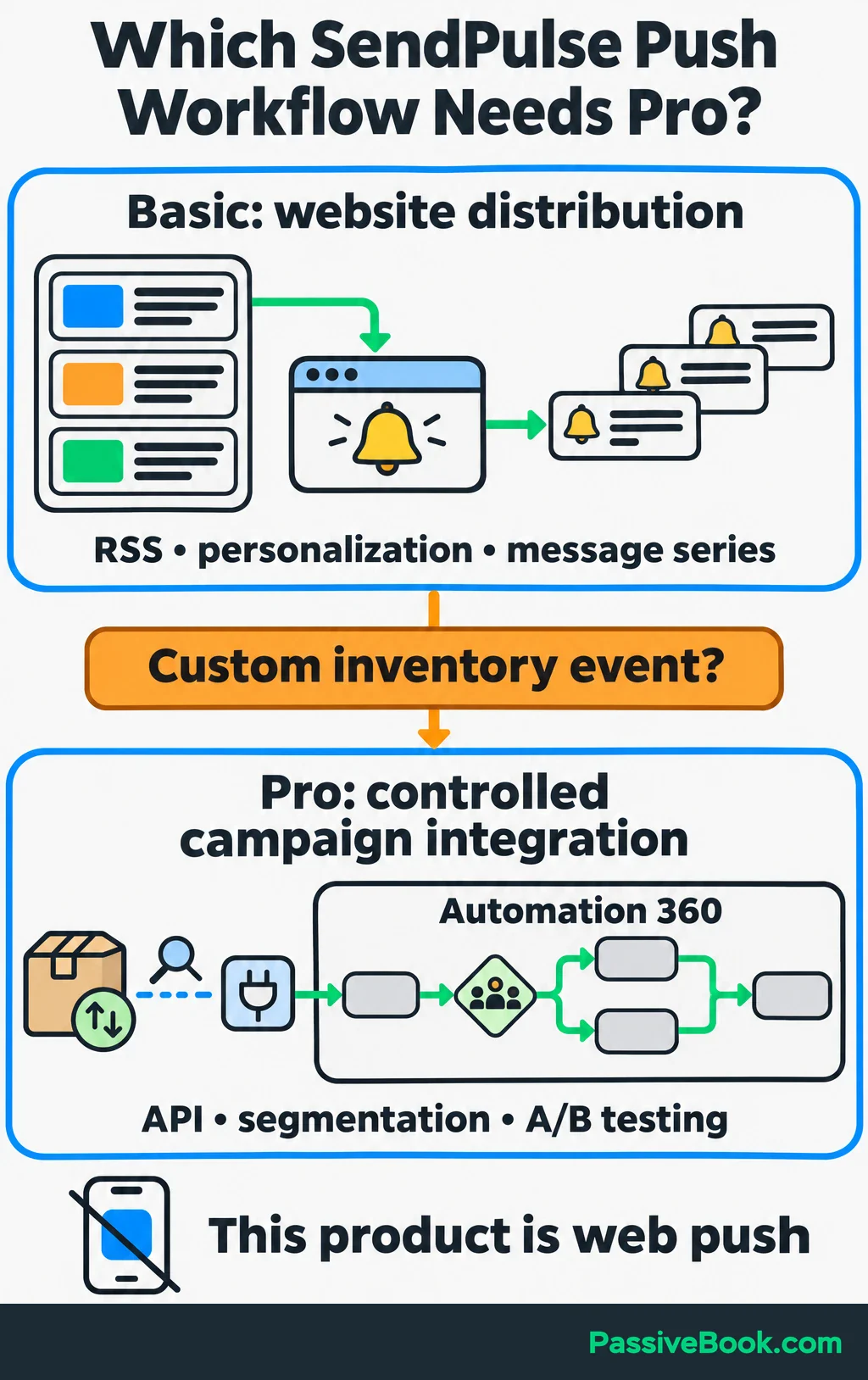
That split changes the recommendation. Basic may suit straightforward website distribution, but I would budget for Pro when a custom inventory event needs to enter through the API.
For the cycling shop, the question is whether SendPulse simplifies an existing setup. If it does, keeping the workflow together can be useful. If you would be joining solely for push, compare Webpushr and WonderPush alongside it.
This selection covers browser notifications. Do not choose it expecting native app messaging from the web-push product.
7. Pushwoosh: Best for App Lifecycle Journeys
Pushwoosh is worth shortlisting when notifications are part of an ongoing app experience.
Its Push Only package combines native app push, web push and in-app messages, which appear while someone uses your app. The journey builder, audience targeting, testing and analytics support campaigns that react to what people do over time.
For a SaaS app, that might mean reminding someone who started a report but never exported it. Stop reminders after export. If they return before then, show help inside the app.
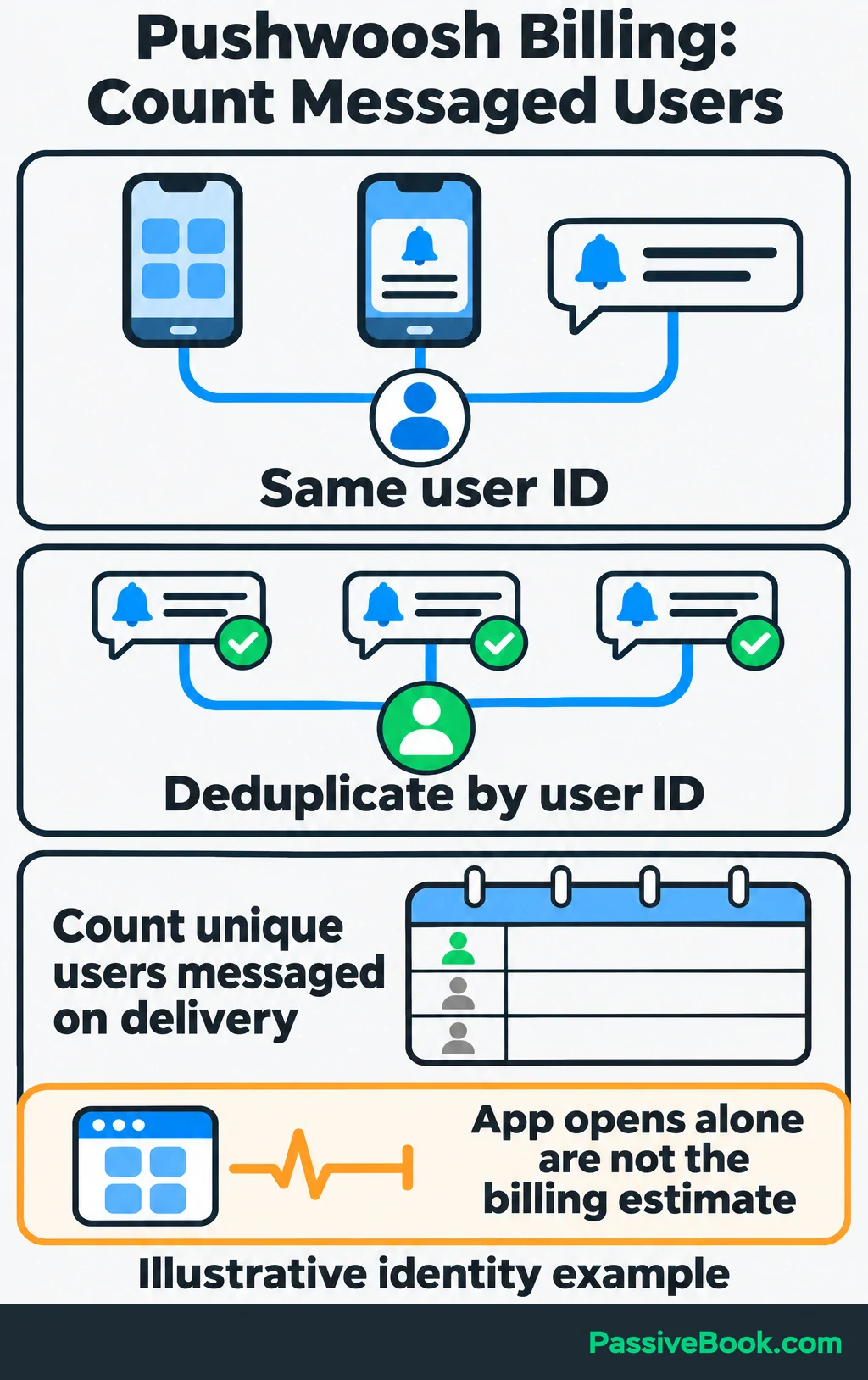
For billing, Pushwoosh’s documented Push Only model counts unique users messaged during the month, on delivery, and deduplicates them by user ID. Do not estimate its monthly active users from app opens alone.
I would choose it when app journeys and in-app messages are central requirements. For the cycling shop’s browser-only restock alert, I would first compare the simpler dedicated web tools.
The advertised rate also has eligibility conditions, shown in the table. Include those conditions in any longer-term budget.
8. Firebase Cloud Messaging: Best for Developer-controlled Delivery
Firebase Cloud Messaging, or FCM, is the choice I would give developers who want to control the sending system.
It supports Apple, Android and web clients. Google also provides a Notifications composer with campaign targeting and analytics, so FCM is not limited to sending everything through code. Google’s overview describes both approaches.
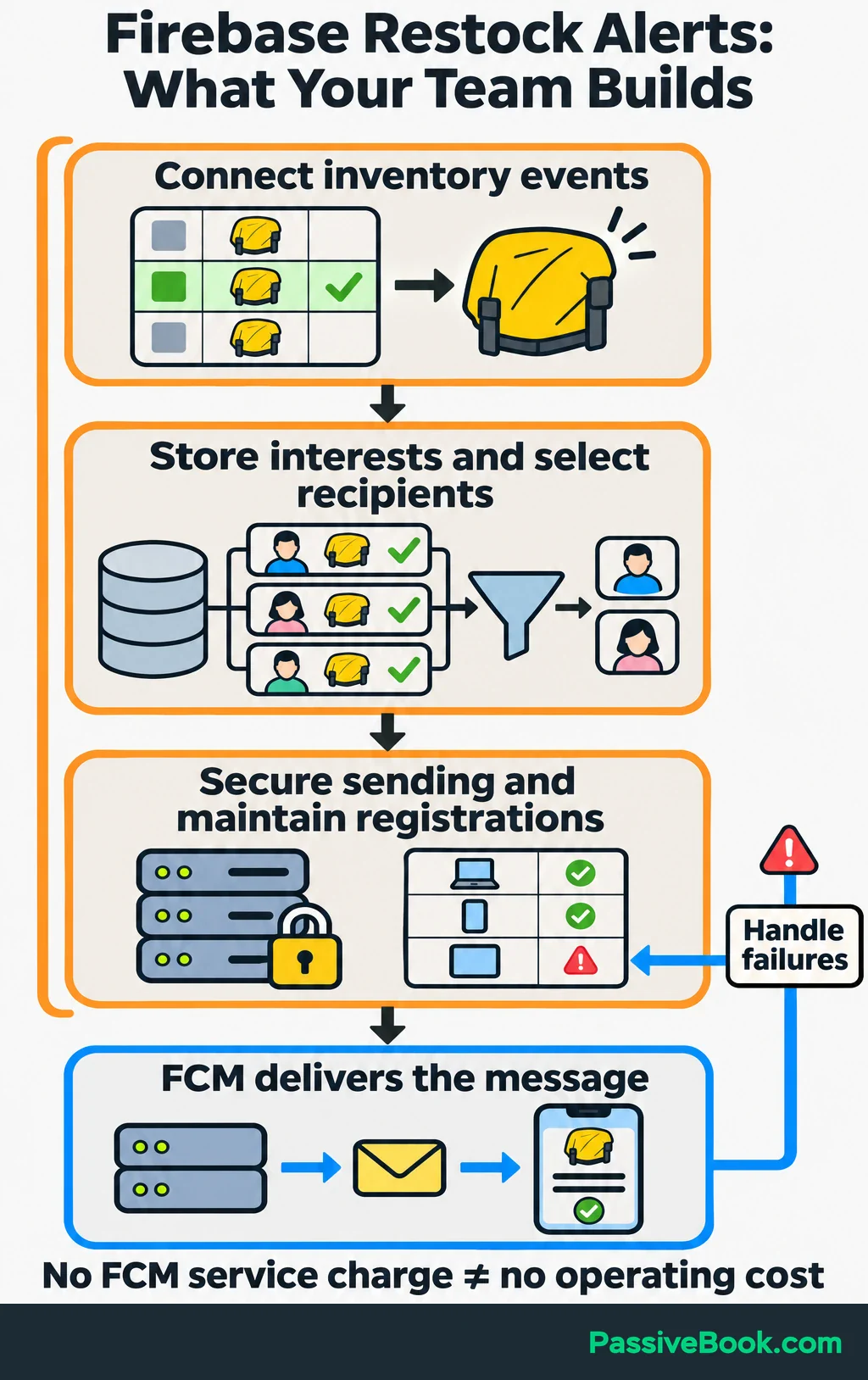
The bigger question is who builds and maintains the automation around delivery.
For the pannier-cover alert, someone must connect stock changes, store product interests, select eligible recipients and send the message securely. Your team also needs to maintain device registrations and handle failures.
FCM’s lack of a service charge makes it attractive when that development work fits an existing product team. It is less compelling when you must hire someone to build a campaign system for one store.
I would choose managed marketing software when you want to operate campaigns yourself. I would choose FCM when custom delivery logic is part of the product you are already building.
9. Braze: Best for Complex Cross-channel Customer Journeys
Braze belongs on the shortlist when push is one part of a larger customer engagement system.
It combines customer data, journey orchestration, experimentation and reporting across channels. Its value is in coordinating those parts when separate campaigns become difficult to manage.
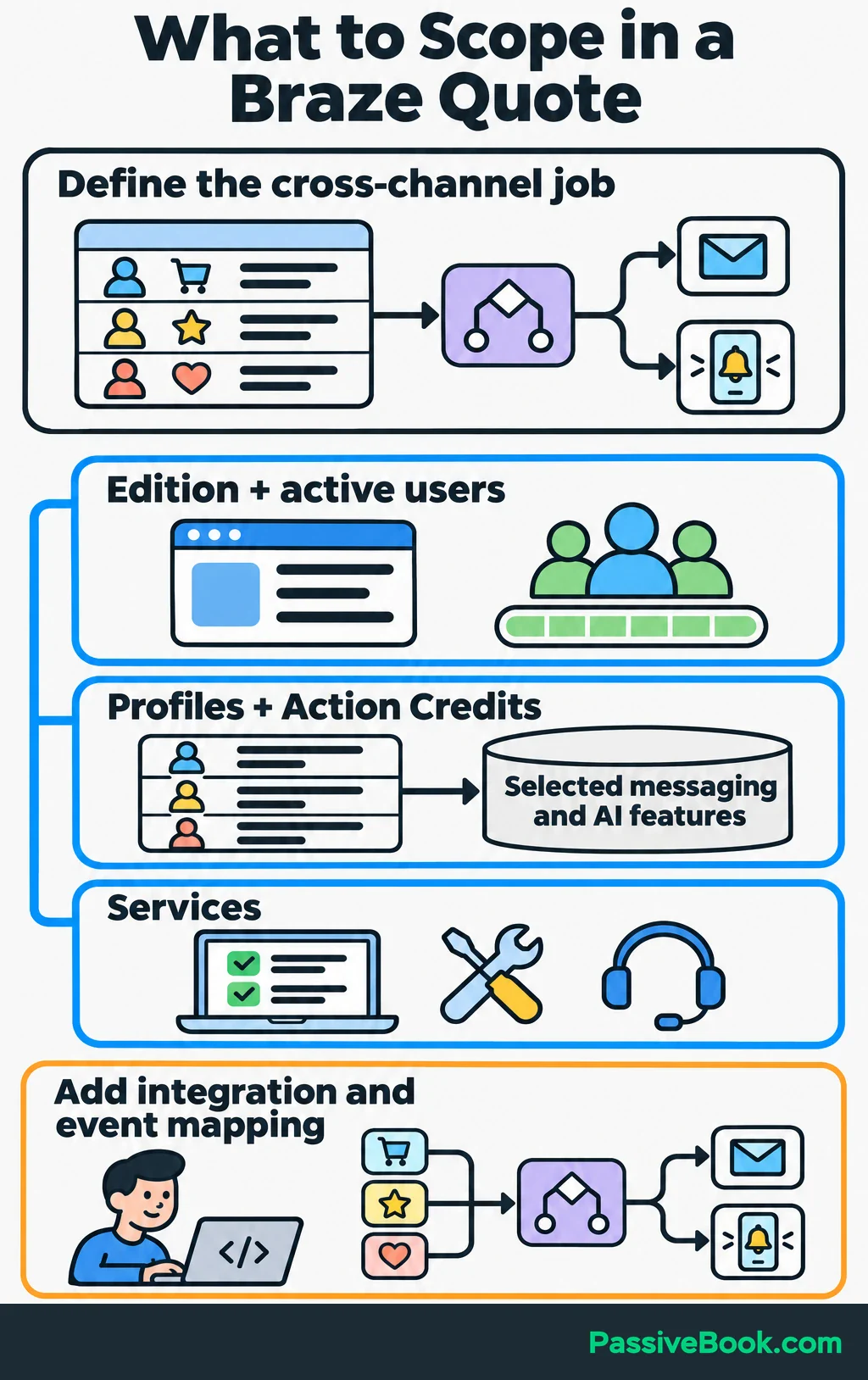
I would consider it when your requirements include several products or markets, detailed customer events, and teams that need to work from shared data. “We might need all that later” would not be enough.
Your quote needs more detail than a single platform figure. Braze’s commercial model includes a platform edition, monthly active users, profile allowances, Action Credits for specified messaging and AI features, and services.
Include developer integration and event mapping in the project estimate. A sophisticated journey still needs someone to define what each event means.
For a small shop sending a browser restock alert, I would start elsewhere. Braze becomes a stronger candidate when coordinated campaigns across channels are the actual project.
10. Airship: Best for Connecting Push With App Experiences
Airship is most interesting when the experience after the notification matters as much as the message.
Its platform connects messaging with customer data, journey orchestration, personalization, testing and app or web experiences. I would evaluate it when a notification needs to lead into a carefully designed next action inside your product.
That could justify a broader project. It does not automatically justify one for every business that wants push.
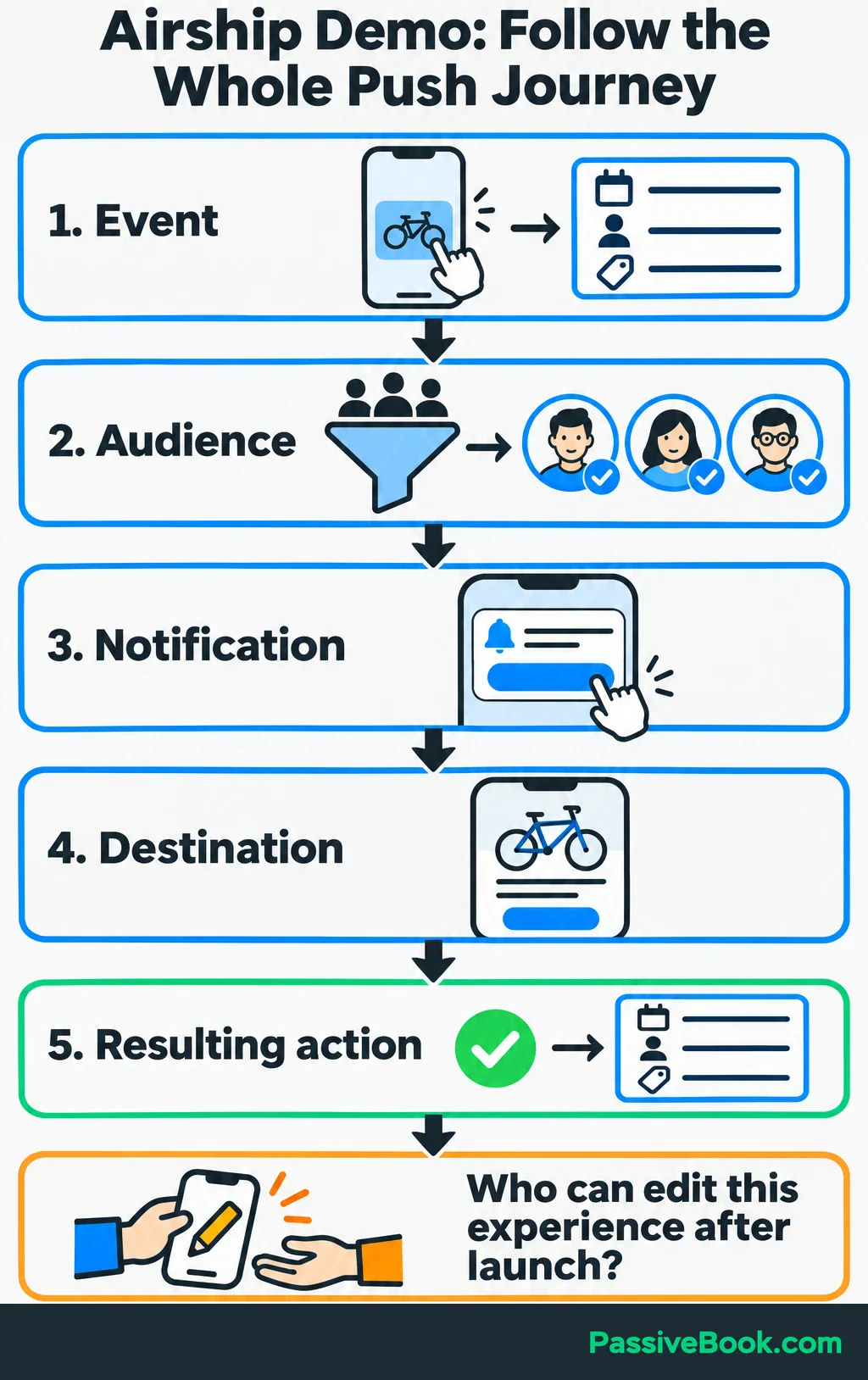
Ask the sales team to show the whole path: the event, audience choice, notification, destination and resulting action. Then request a proposal covering audience allowances, integrations, onboarding, support and contract terms.
I would give special attention to who can change the destination experience after launch. If every small campaign change creates a development request, include that operating time in the decision.
For the cycling shop’s browser restock alert, a dedicated push product is the closer starting point. Airship deserves attention when app experiences are a substantial part of the brief.
11. iZooto: Best for Publishers Building Repeat Readership
iZooto is the option I would investigate when returning readers are the main goal.
Its offering includes web and app push, audience segmentation, personalization and reporting. Relevant automations include recurring notifications, welcome sequences and WordPress notifications triggered by publishing.
That makes it a closer fit for a content business than for a store whose main need is inventory automation.
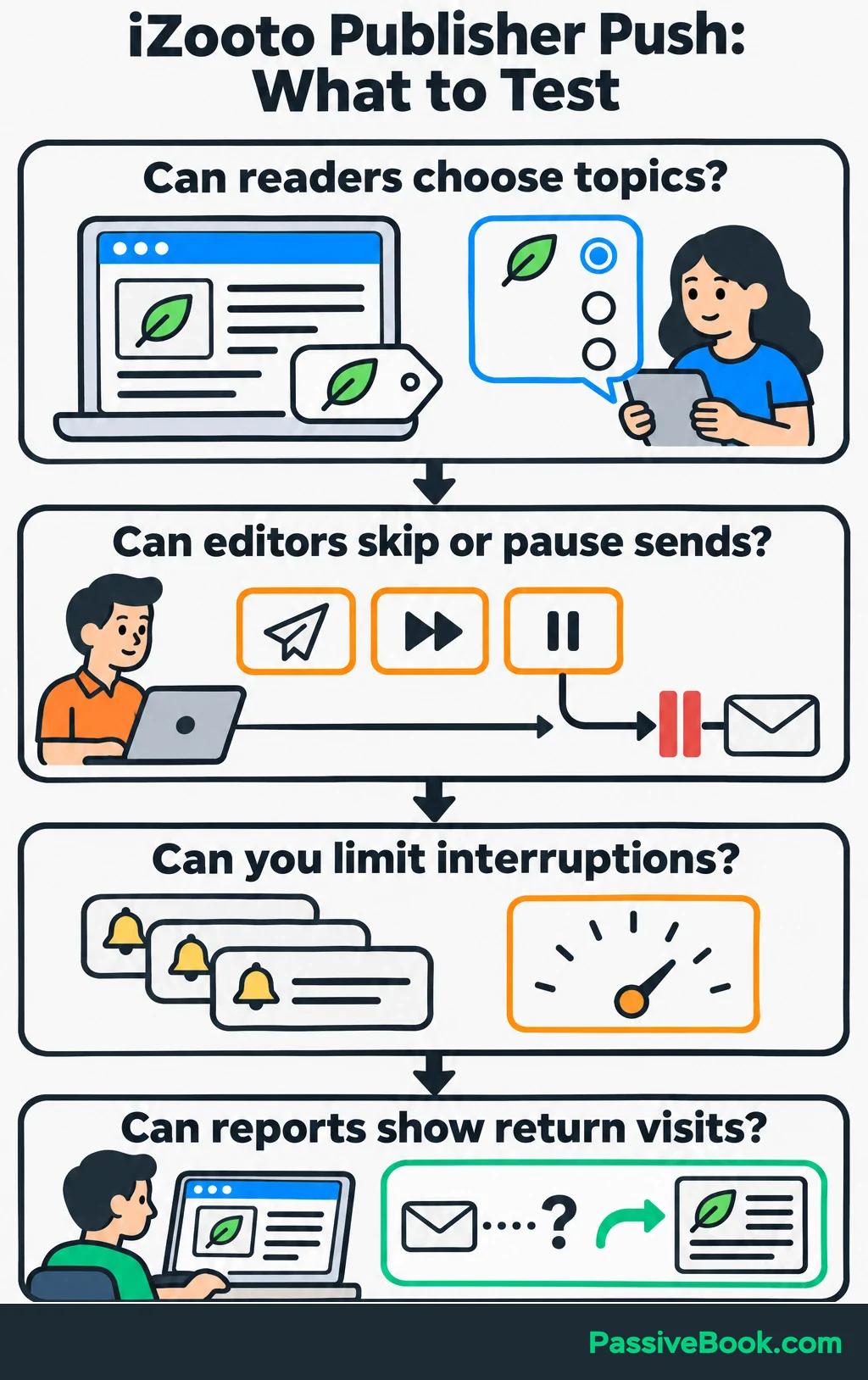
In a demo, I would ask how readers choose interests, how you limit notification frequency, and how reports connect campaigns to return visits. Publishing automatically is useful, but I would still want control over what deserves an interruption.
Request a quote covering subscriber capacity, required automations and support. Without that information, you cannot make a fair cost comparison with the self-service tools.
For a blog, I would test a new-article alert for readers interested in that topic. Check whether you can skip an article or pause automatic sends without editing code.
How to Choose Between Your Finalists
You do not need to trial all eleven tools. Shortlist two that support your audience’s devices, include the required workflow and fit your budget.
Then test the job you are buying them to do.
Test One Real Automated Campaign
Start by writing the trigger, eligible audience, destination and stopping rule in plain words. This prevents a polished demo from answering a different question.
For the cycling shop, the test would look like this:
| Part of the Test | Required Behavior |
|---|---|
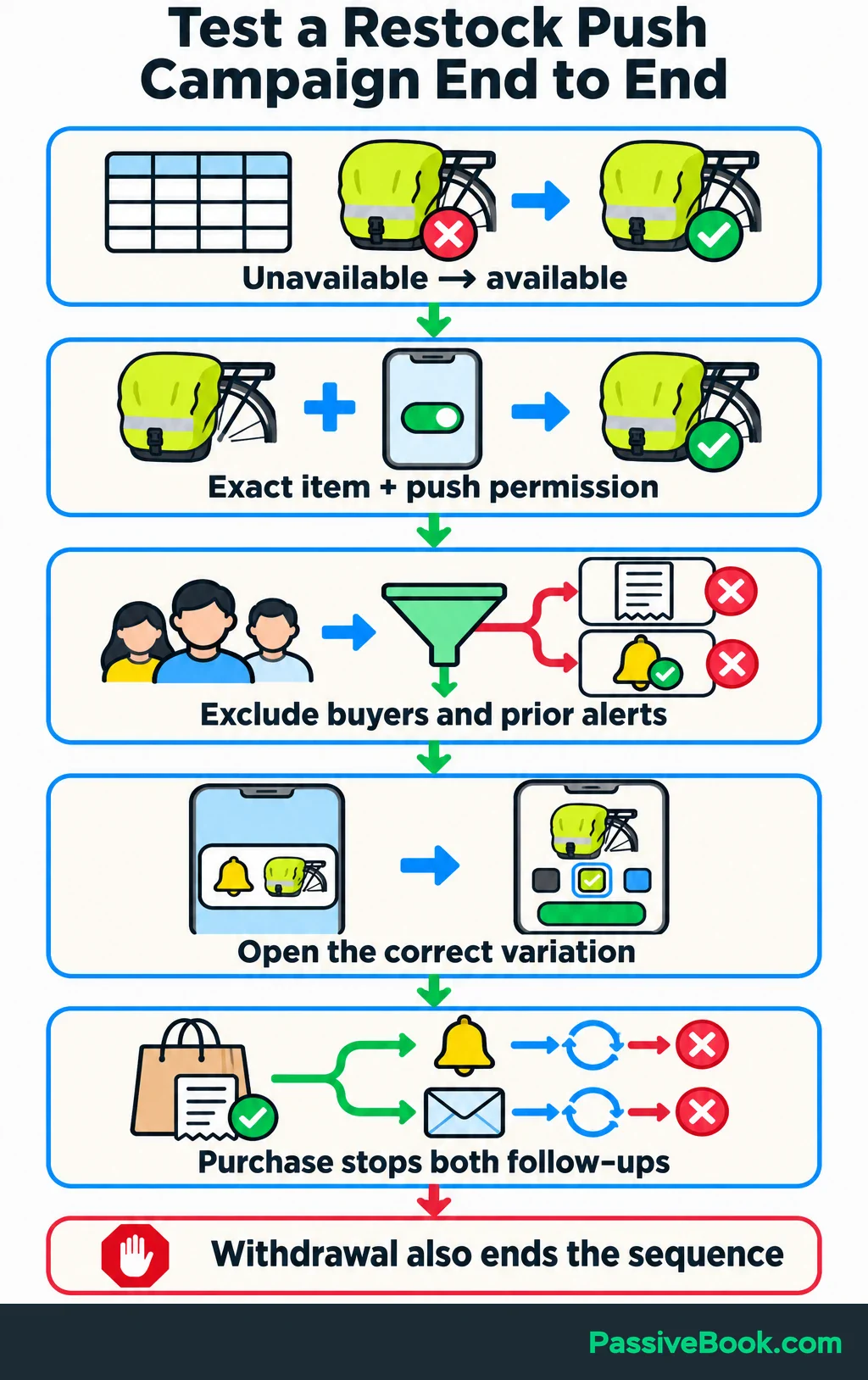
| Trigger | The reflective pannier cover changes from unavailable to available |
| Eligible audience | Push subscribers who requested that exact product or variation |
| Exclusions | People who withdrew permission, already received this restock alert, or bought the requested item before sending |
| Message | “The reflective pannier cover you requested is back in stock.” |
| Destination | The correct cover page, with the requested variation selected where possible |
| Stopping rule | End the alert sequence after purchase or withdrawal of interest |
| Repeated event | Processing the same stock update again does not send another alert |
Walk through that process yourself. Change inventory, inspect the qualifying audience, receive the notification and complete a test purchase.
Also test the awkward cases. Withdraw permission. Replay the stock update. Buy before a delayed follow-up. Check what happens if the item sells out again before the message goes out.
I caught a related problem while connecting a digital-product workflow: checkout recorded a purchase, but a follow-up still treated the buyer as a prospect. I had checked each tool separately and missed the handoff. Since then, I trace one purchase through the whole sequence before adding more branches.
For your push test, that means checking email too. Both systems should receive the purchase event and stop any follow-up that no longer makes sense.
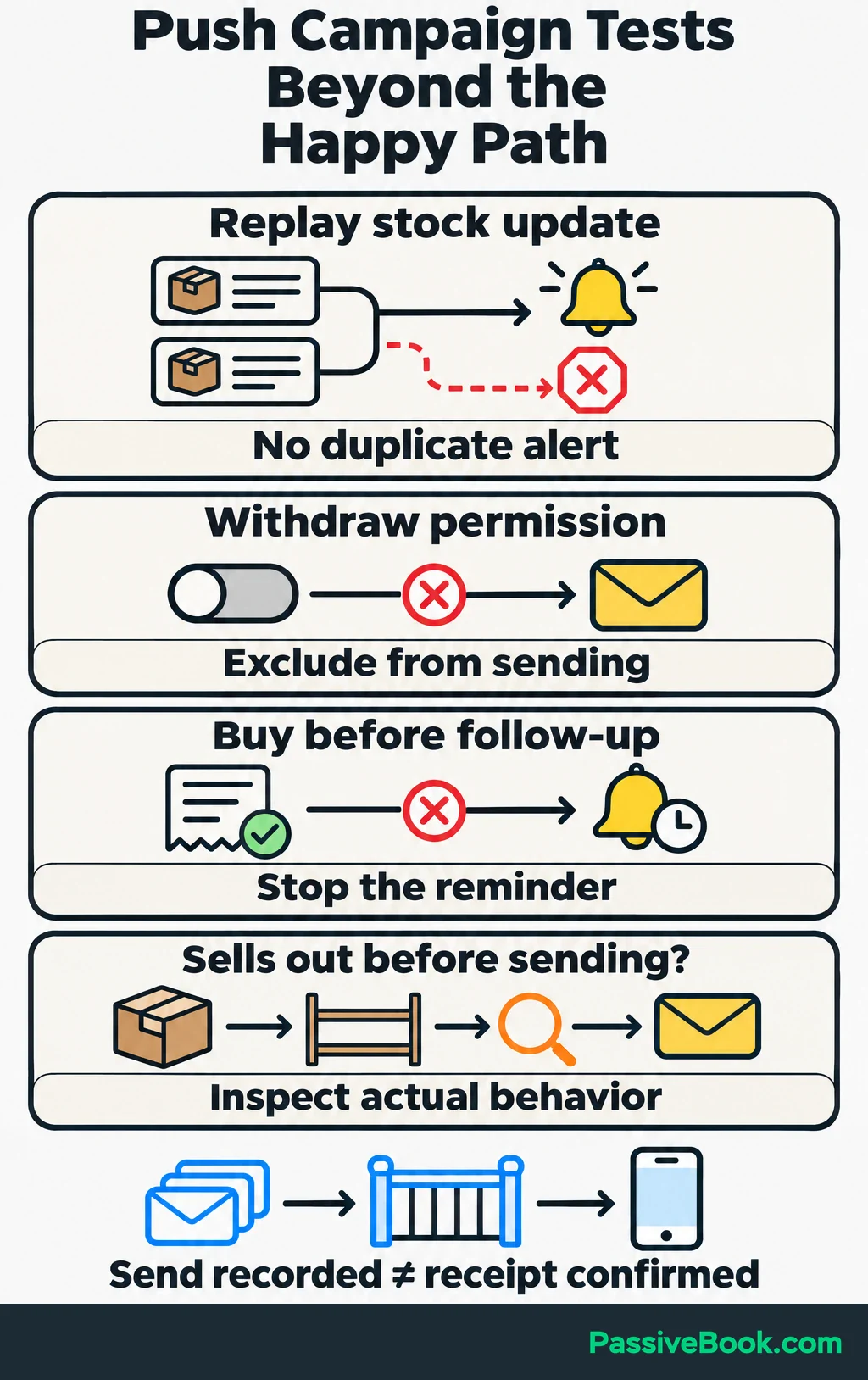
Test representative devices and inspect the wording, image and link. A successful send is not proof of receipt. For example, FCM’s “Sends” metric includes messages queued for delivery or passed to Apple Push Notification service, Apple’s delivery system. Google distinguishes these delivery metrics.
For a small live pilot, record:
- Customer response: Clicks, resulting purchases and opt-outs.
- Reporting consistency: Use matching campaign tags in both finalists and count purchases over the same period after each notification.
- Operating effort: Installation, event mapping, troubleshooting and recurring manual work.
I would not choose a winner from a tiny difference in clicks. A workflow that works reliably without weekly repairs may be the more useful result.
Calculate the Cost of the Features You Need
Calculate two separate things: your sending workload and the audience the provider bills for.
Suppose 2,000 eligible push subscriptions each receive four broadcasts in a month. That creates:
2,000 subscriptions × 4 broadcasts = 8,000 notification attempts.
Those are illustrative sends, not confirmed receipts. A subscriber-priced platform still calculates its audience charge from the billable subscriber count. Another provider may use active users, recipients or contact bands.
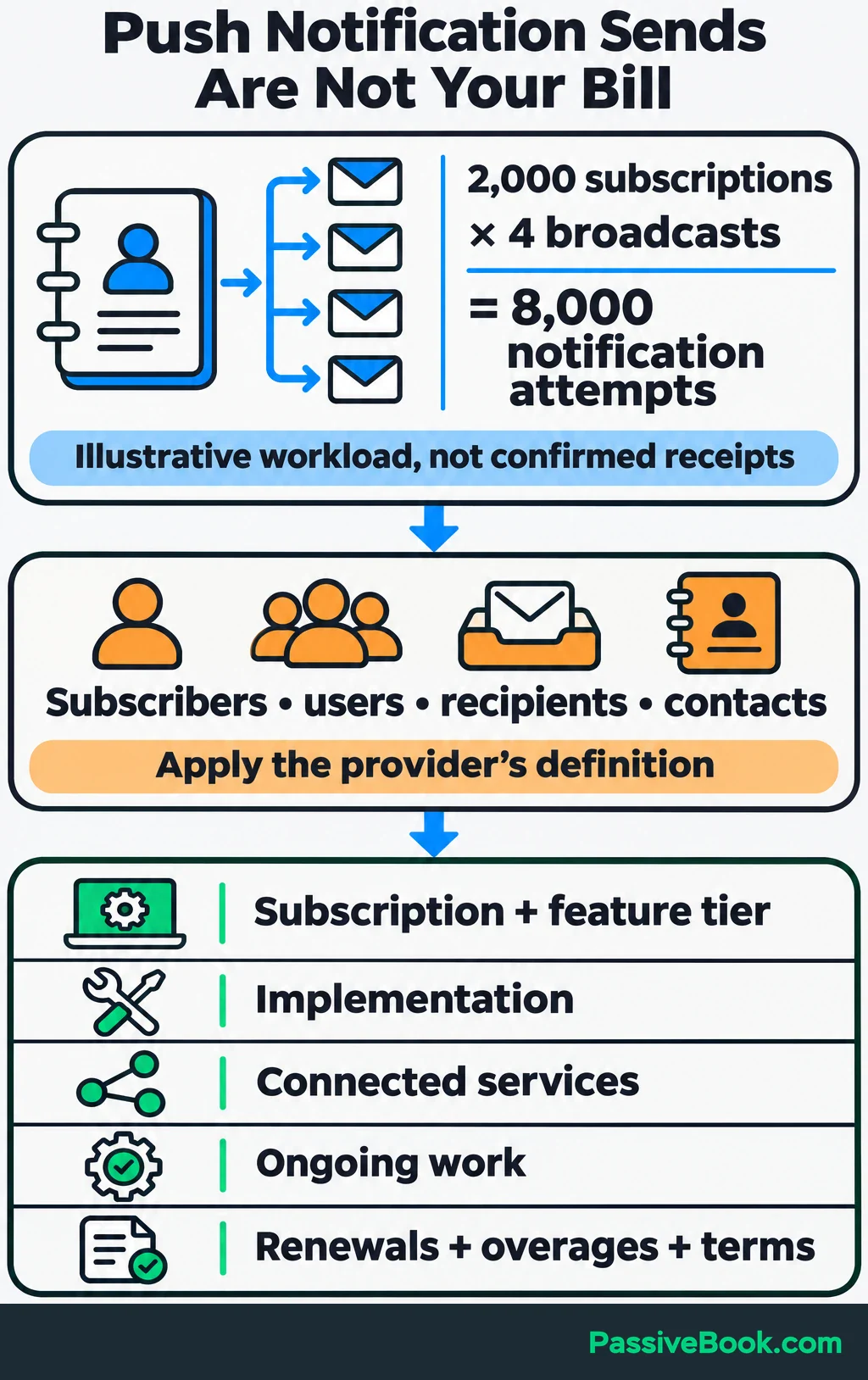
Use each provider’s definition to estimate your present bill and a realistic growth scenario. Then add the cost of the plan containing your required features.
I would include these items in the estimate:
- Subscription: Platform fee, billable audience and required automation tier.
- Implementation: Installation, customer identification and event connections.
- Connected services: Any chargeable backend, database or automation service.
- Ongoing work: Maintenance, failed-event checks and campaign changes.
- Commercial terms: Renewal pricing, overages, automatic upgrades, support and cancellation.
If a connection needs an automation tool, I would consider Make for a quick visual setup or n8n when I want more control. First confirm that the push provider exposes the required API or event connection. Another tool cannot supply data the integration never sends.
For quote-based products, send each provider the same brief. Include channels, audience size, expected sends, events, reports and support needs. Comparable inputs make comparable quotes possible.
Once you have two suitable plans and their billing terms, compare them over the same period. A lower starting price may not mean a lower total bill.

Free Software Cost Calculator




Confirm Migration and Support Before Signing
Migration deserves a specific answer before you commit.
Ask what transfers: push subscriptions or device tokens, credentials, customer identifiers, preferences, events and reports. Also ask what website or app changes are required and how much of your existing audience will be reachable immediately afterward.
Some migration routes depend on people returning. PushEngage’s documented route from OneSignal recovers existing subscriptions as people revisit the website, so reachability builds gradually. That condition matters when planning a switch around a campaign. Its migration guide explains the process.
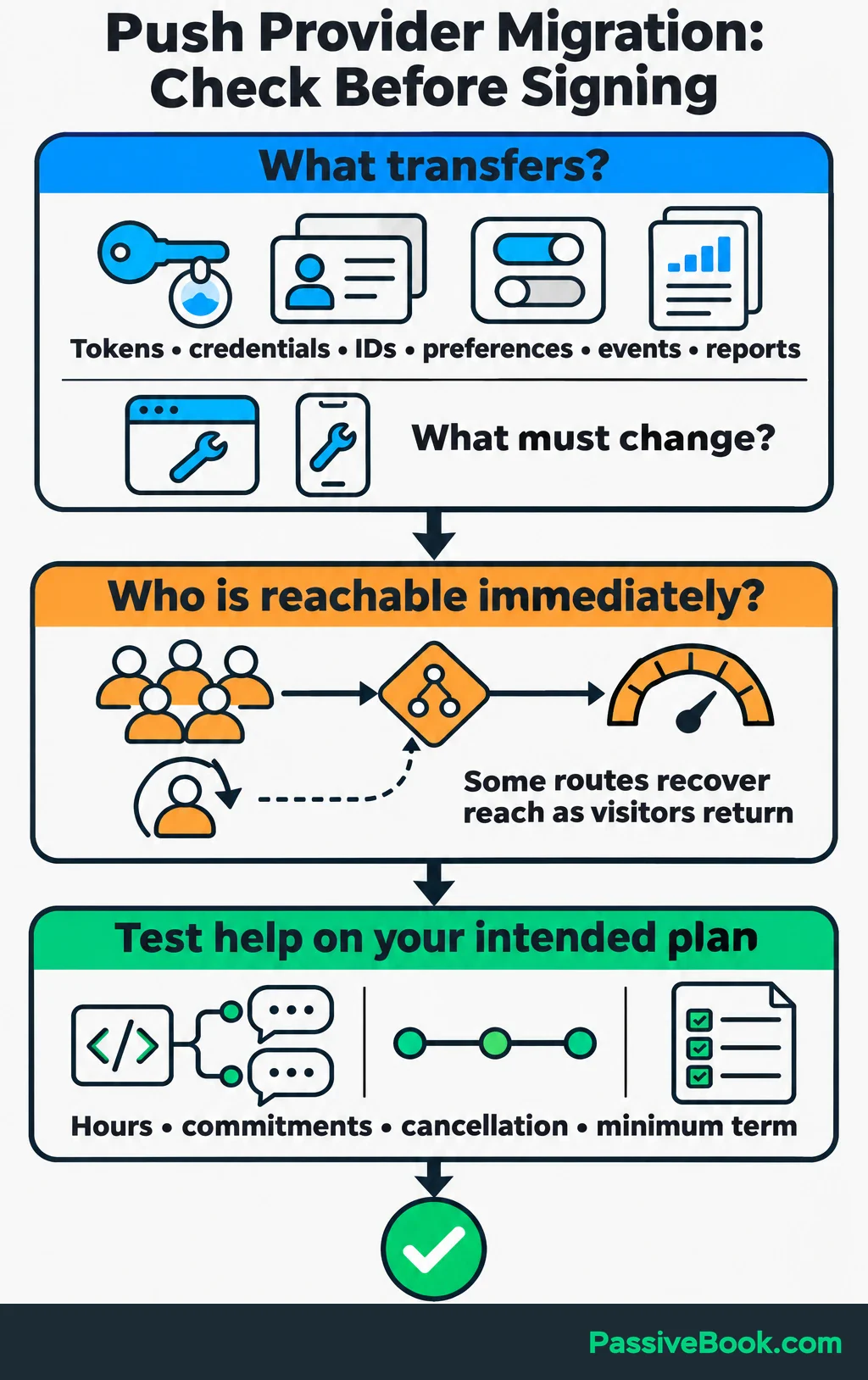
I would also review the provider’s public service-status history and ask a real integration question during the trial. The answer will not prove future support quality, but it can reveal whether useful help is available on your intended plan.
Confirm support hours, response commitments, cancellation terms and any minimum contract.
Choose the provider that completes your campaign at an acceptable ongoing cost. A feature list is easy to admire. A working system is easier to live with.
What Next?
Write down one notification you want to automate, including its trigger, audience and stopping rule. Use that brief to shortlist two providers and run the same test through both.
If this comparison helps you avoid an unnecessary subscription or a difficult integration, use the social buttons to share it with your business circle.
Which part of your first push campaign still needs manual work? Tell me in the comments, and bring any other questions about choosing or connecting a platform.
Share this post with your friends & followers:

