A project can finish on time and still earn less than you expected. Extra revisions, missing time entries and small expenses often tell their story after the invoice has gone out.
The awkward part is finding that story across your project board, staffing spreadsheet and accounting software. Buying another tool only helps if it connects those records and gives your team a workable daily routine.
This comparison looks at 13 platforms through that lens: the work they suit, the packages you actually need and the costs beyond the subscription. It also shows how to test your shortlist before moving client work into it.
What Is Professional Services Automation Software?
Professional services automation software, usually called PSA, connects the work you sell with the people, costs and billing behind it. Its core functions include project delivery, resource planning, time and expense tracking, billing and project financial reporting.
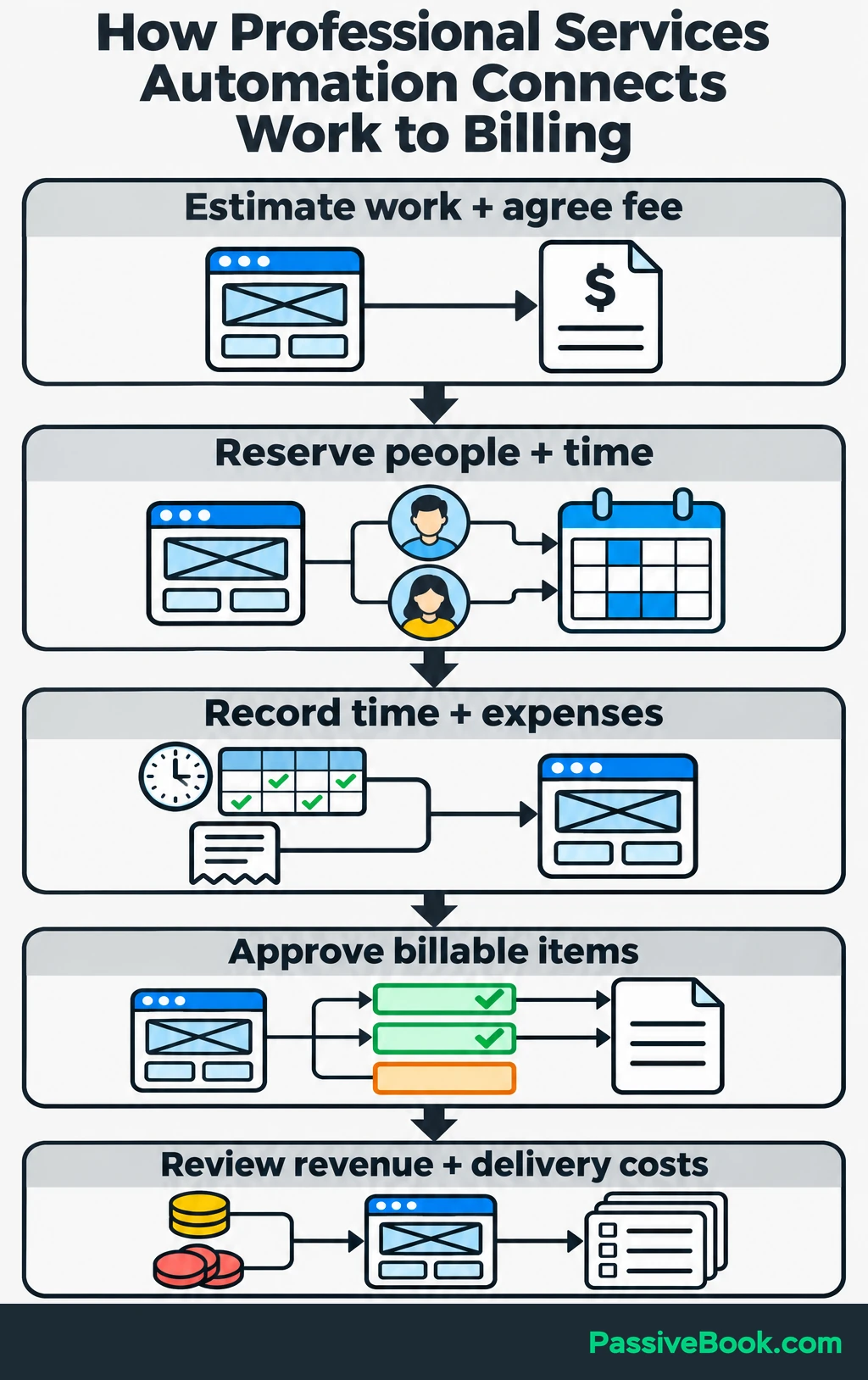
The basic process is straightforward:
- Estimate the work and agree on a fee.
- Assign people with enough time to deliver it.
- Record their time and project expenses.
- Approve the items that should reach an invoice.
- Compare the revenue with delivery costs and remaining work.
Project management software helps organize execution. Customer relationship management (CRM) software tracks sales and client relationships. PSA connects delivery with staffing and financial controls, while your accounting software can remain the official financial record.
To make the comparison concrete, imagine you run a website-design agency serving independent restaurants. You sell fixed-fee website builds and monthly maintenance retainers, and you quote additional work separately.
You need to see whether a designer has room for another launch, whether revisions are eating the build budget and whether a maintenance request belongs inside the retainer. Those are connected questions.
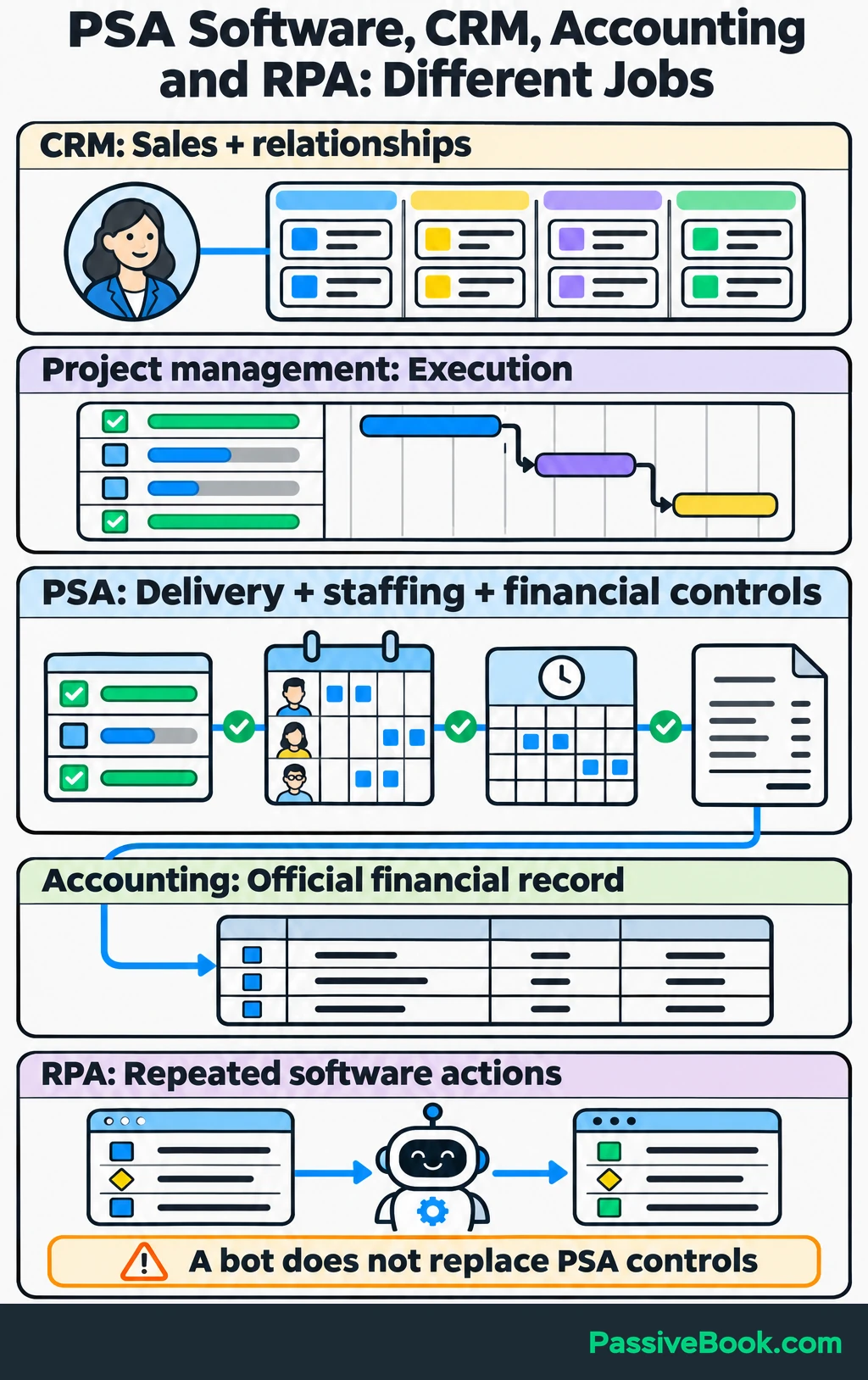
An MSP, or managed service provider, needs more support-specific controls. These can include ticket queues, recurring contracts and service-level agreements that define response commitments. Connections to remote monitoring and management (RMM) software let technicians receive alerts about problems on client devices.
PSA also differs from robotic process automation, or RPA. As IBM explains, RPA bots repeat software interactions, such as copying information between systems. PSA holds the operational records used to manage services. They can work together, but buying a bot does not give you project budgets or staffing controls.
I would consider PSA when disconnected records regularly hide capacity, project costs or unbilled work. If your current tools already answer those questions reliably, make a new platform earn its place.
The 13 Best Professional Services Automation Platforms
For a small agency, I would start with Productive. BigTime deserves a look when time capture and invoicing are the immediate problems. Projectworks suits a forecast-led consulting workflow, while Rocketlane is a stronger starting point for repeatable customer implementations.
For ticket-led support, compare HaloPSA, Autotask and ConnectWise PSA first.
These recommendations are research-based assessments of published capabilities, rather than hands-on test results. The numbering shows presentation order, not measured performance.
The table highlights where the package changes the buying decision. Prices are in US dollars where shown, and annual billing is stated where applicable. “Confirm minimum” means the purchase floor needs to appear in your proposal. Each platform link leads to its buying or pricing information.
| Platform and best-fit workflow | Resource and financial coverage | Required package or add-ons | Relevant integration | Entry price and minimum purchase | Trial or demo |
|---|---|---|---|---|---|
| Productive: agency profitability | Native resource planning, budgets, time and expenses | Professional adds recurring budgets, approvals and invoicing integrations | Accounting: Xero or QuickBooks Online through invoicing integrations | Use configured calculator total; minimum 3 paid seats | 14-day trial |
| BigTime: time and billing | Native time, expenses and invoicing; budgeting on Premier | Resource Management is an additional module | QuickBooks in Essentials | Essentials starts at $20/user/month; confirm minimum and term | Demo |
| Scoro: configurable estimate-to-invoice workflow | Projects & Resources includes capacity planning; Quote to Cash includes estimating and invoicing | Add invoicing to Projects & Resources or resource planning to Quote to Cash when both are needed | Accounting: Xero, QuickBooks or Sage Intacct | Time-billing starts at $17/user/month; minimum 5 users | 14-day trial |
| Accelo: projects plus recurring work | Connected resources, time, projects and financials | Full-platform access; implementation scope needs agreement | Accounting: QuickBooks or Xero; CRM: HubSpot or Salesforce | Custom quote; confirm minimum | Demo |
| Projectworks: staffing and revenue forecasts | Build includes resourcing, time, expenses, invoicing and forecasts | Scale for several business integrations; Unleash for an API to build custom connections and revenue recognition, which records revenue as earned | Xero and QuickBooks in Build | Calculator-based base fee for 10 users, then five-user bands | 21-day trial |
| Teamwork.com: daily delivery with PSA controls | Coverage ranges from time tracking to financial budgets and profitability | Accelerate for retainers and invoicing; Optimize for deeper financial and resource controls | HubSpot and QuickBooks on Accelerate | Basics $9.99/user/month annually; Accelerate $24.99; confirm seat minimum | 14-day trial |
| Rocketlane: customer implementations | Shared delivery plans; Premium adds resource planning and project financials | Premium to compare a team’s billable hours with its available hours and track margins, invoicing and revenue recognition | Salesforce on Premium | Standard $49/member/month annually; Premium $69; minimum 5 members | 14-day trial |
| Kantata: complex staffing across projects | Skills, availability, demand and financial forecasting | SX runs on Salesforce; OX is a separate platform. Scope the configuration for your chosen product | Salesforce through SX; assess OX connections separately | Custom quote; confirm minimum | Configured demo |
| Certinia Professional Services Cloud: Salesforce-centered services | Services estimation, resources, projects, billing and financial visibility | Confirm Certinia products and Salesforce entitlements by role | Native Salesforce platform | Tailored quote; confirm licenses and minimum | Demo |
| BQE CORE: phased project financials | Foundations includes time, expenses, project management, billing and reporting | Accounting, CRM, HR and payroll are additional modules | QuickBooks or Xero; scope connector requirements | Custom quote; confirm minimum | Demo |
| HaloPSA: configurable managed services | Tickets, contracts, projects, time and billing | Modules and integrations included; onboarding separately scoped | QuickBooks, Xero, Ninja and N-central | Regional per-agent calculator; named or concurrent licenses; confirm minimum | 30-day trial |
| Autotask PSA: Datto and Kaseya service operations | Tickets, contracts, labor, invoicing and operational reporting | Connected products and partner connectors may cost extra | Datto tools, QuickBooks and partner accounting connectors | Request quote and minimum purchase | Demo |
| ConnectWise PSA: service and business operations | Essentials covers delivery, resources and time; Pro expands commercial controls | Pro for billing, finance connections, sales and procurement | ConnectWise RMM; QuickBooks Online on Pro | Custom quote; confirm minimum | Demo |
An integration listed here connects separate products. It does not mean the accounting, CRM or monitoring subscription comes with the PSA.
Before comparing optional features, eliminate any platform that cannot handle an essential billing or delivery requirement. A beautiful dashboard cannot rescue the wrong contract model.
1. Productive: Best for Agency Profitability Tracking
Productive would be my first shortlist choice for the restaurant website agency because its core package connects project budgets, resource planning, recorded time and expenses.
That connection matters on fixed-fee work. Recording another afternoon of revisions should change your view of the project’s costs, even when the client’s agreed fee stays the same.
- Why I’d Shortlist It: Essential covers the main delivery and cost-tracking functions. You can assess staffing and budgets together rather than treating them as separate management jobs.
- What to Check: Professional adds recurring budgets, invoicing integrations, billable-time approvals and expense approvals. I would evaluate that package for maintenance retainers and the accounting handoff. Contractors count as paid users at the same rate as employees, so include regular freelancers in the configured total.
- Demo Test: Add unplanned revisions to a website build. Inspect recorded costs, the remaining budget and the work still scheduled. Then check whether the monthly maintenance budget stays separate.
I would skip choosing Essential solely for its lower price if the recurring work already requires Professional.
2. BigTime: Best for Time Tracking and Invoicing
BigTime makes sense when the immediate problem is getting completed work into accurate invoices. Essentials includes time and expense management, billing, project portfolio management and a QuickBooks integration.
Freelancing taught me to distrust a full calendar as proof of a healthy business. My earnings still depended on the hours I could sell, so capturing chargeable work deserves attention before adding another report.
- Why I’d Shortlist It: The entry package puts time, expenses and invoicing together. That is a useful starting point when billing preparation consumes too much attention.
- What to Check: Project budgeting and multilevel approvals require Premier, while resource management is an additional module. Request one proposal covering the subscription, required modules, purchase commitment and implementation.
- Demo Test: Record approved extra maintenance work and an expense, pass both through approval and inspect the resulting invoice. Follow that invoice into QuickBooks and check the amounts.
I would compare the full configuration with a bundled alternative before calling BigTime the cheaper choice.
3. Scoro: Best for Configurable Quote-to-cash Workflows
Scoro lets you assemble its service-management apps around your workflow. That flexibility is useful when you know exactly which parts of estimating, delivery, staffing and invoicing you need.
It also makes the package comparison important.
- Why I’d Shortlist It: You can connect estimates, project work, labor costs and invoices through a selected app combination. Its listed accounting connections include Xero, QuickBooks and Sage Intacct.
- What to Check: Projects & Resources includes capacity planning but leaves out the invoicing app. Quote to Cash includes estimating, delivery, time tracking and invoicing but leaves out resource planning. Both combinations have higher starting rates than Time-billing. Ask for the combined app set that completes your process, with the billing term specified.
- Demo Test: Turn the restaurant website estimate into scheduled work. Record revisions, inspect their cost and create the invoice without rebuilding the same information elsewhere.
I would choose Scoro for a deliberate configuration. I would avoid buying the lowest-priced combination and discovering the missing apps during setup.
4. Accelo: Best for Combining Projects and Recurring Client Work
Accelo is worth considering when the same clients buy fixed-fee projects, hourly work and retainers. That matches the restaurant agency’s website builds and ongoing maintenance.
Its integration directory lists connections including QuickBooks, Xero, HubSpot and Salesforce, so you can assess it alongside an existing sales or accounting system.
- Why I’d Shortlist It: Projects, resource planning, time records and financial visibility sit within one operational platform. This gives you a useful candidate for managing a client relationship beyond the first build.
- What to Check: Custom pricing includes full-platform access, implementation guidance and onboarding support. Get the actual deliverables in writing, including retainer setup, approvals, reporting, training and any separate charges.
- Demo Test: Run a website build beside its maintenance agreement. Enter a covered request and a separately quoted change, then check that the costs and billing follow the correct work.
I would give retainer rules more demo time than the sales dashboard. That is where this agency’s daily decisions happen.
5. Projectworks: Best for Consulting Resource and Revenue Forecasts
Projectworks deserves attention when staffing decisions need to inform your revenue outlook. Build includes resourcing, time and expenses, invoicing, forecasting, and Xero and QuickBooks integrations.
For the restaurant agency, the useful question is whether a delayed launch changes both the staffing plan and the forecast.
- Why I’d Shortlist It: The core package connects planned work with delivery records and forecasts. I would start here when you need to see the effect of moving people between engagements.
- What to Check: Scale adds connections to sales records in HubSpot and delivery work in Jira and Azure DevOps. Unleash adds revenue recognition and API access. The purchase starts with capacity for ten users and grows in five-user bands, so twelve required users mean paying for fifteen. Monthly billing still carries a one-year commitment. Include onboarding in the proposal.
- Demo Test: Move a website launch back two weeks. Inspect which people become available, where scheduling conflicts appear and how forecast revenue changes.
I would compare the purchased capacity total, rather than multiplying a displayed user rate by the exact headcount.
6. Teamwork.Com: Best for Connecting Daily Project Work With PSA Controls
Teamwork.com is a useful candidate when the task list and client collaboration need as much attention as financial reporting.
I would consider it when you want staff to manage delivery and record time in the same place managers review capacity and budgets.
- Why I’d Shortlist It: Its packages connect everyday project work with progressively deeper service-management controls. Accelerate includes workload planning, time budgets, retainers, invoicing, and HubSpot and QuickBooks connections.
- What to Check: Time budgets tell you how many hours remain. Financial budgets tell you what those hours and other costs mean in money. The detailed plan comparison places financial budgets, profitability reporting, resource scheduling and timesheet approvals on Optimize. Request that configuration when margin visibility is essential, and confirm the seat minimum.
- Demo Test: Have a designer log revision work, then ask a manager to find its budget impact. Run this in the package you intend to purchase.
I would judge it on that everyday handoff. A financial feature earns little value if the underlying time never gets recorded.
7. Rocketlane: Best for Customer Onboarding and Implementation Projects
Rocketlane is a strong shortlist candidate when delivery follows a repeatable plan and progress depends on client participation.
A restaurant website launch fits that pattern: content needs approval, menu details need checking and launch depends on several people completing their part.
- Why I’d Shortlist It: Shared plans, dependencies, documents, customer approvals and a client portal support that delivery process. I would look here when chasing customer inputs is a recurring part of project management.
- What to Check: Premium adds resource planning, utilization tracking, margins, invoicing, revenue recognition and Salesforce integration. That makes Premium the relevant comparison when you need both customer coordination and PSA financial controls. Implementation packages cost extra, so scope onboarding alongside the subscription.
- Demo Test: Reuse a website launch template and delay the client’s content approval. Check how the change appears in the delivery plan, staffing schedule and financial view.
I would favor Rocketlane for implementation-heavy work. For a business driven mainly by support tickets, I would start with the managed-service options below.
8. Kantata: Best for Complex Resource Planning Across Projects
Kantata becomes more interesting when assigning work means balancing skills, availability and competing project demands.
Its resource-management capabilities address those decisions and their effect on forecasts and profitability. I would explore that depth when a simple workload calendar leaves too much planning outside the system.
- Why I’d Shortlist It: You can assess people against the work’s requirements and inspect staffing trade-offs across projects. That is useful when several launches need the same specialist.
- What to Check: Kantata offers two products. SX is Salesforce-native, while OX is a separate platform. Evaluate the relevant product before comparing features, integrations or implementation proposals. Ask for an itemized configuration covering your CRM, accounting connection, migration and ongoing administration.
- Demo Test: Schedule two restaurant launches that need the same developer. Compare alternative assignments and examine the effect on delivery dates and financial forecasts.
For a small team with straightforward schedules, I would require clear evidence that the added planning depth justifies the implementation effort.
9. Certinia Professional Services Cloud: Best for Salesforce-centered Operations
Certinia Professional Services Cloud belongs on the shortlist when Salesforce is already central to how you sell and manage client work.
It connects services estimation, resource management, projects, billing and services financials on the Salesforce platform. The appeal is continuity between the commercial promise and the work required to deliver it.
- Why I’d Shortlist It: You can assess sales and service delivery within the same platform environment. That can be valuable when several teams need access to connected client and engagement records.
- What to Check: Request a role-by-role proposal covering Salesforce entitlements, required Certinia products, permissions, administration and financial-system connections. Have the vendor identify exactly which product handles each required financial function. Include implementation and ongoing support in the quote.
- Demo Test: Follow a restaurant website opportunity into an estimate, a staffed project and a billing output. Identify where every record is maintained and who can change it.
I would evaluate Certinia seriously for an established Salesforce operation. I would need a strong reason to introduce that wider environment solely to manage a small project portfolio.
10. BQE CORE: Best for Architecture and Engineering Project Financials
BQE CORE is worth evaluating for work organized into phases, fee schedules and detailed project budgets.
Foundations combines time and expenses, billing, project management and reporting. Its phased billing and cost reporting make it particularly relevant to architecture and engineering firms.
- Why I’d Shortlist It: The core package connects operational records with project financial reporting. You can assess budgets and fees at the phase level instead of relying only on the overall project total.
- What to Check: Accounting, CRM, HR and payroll are additional modules. Decide whether you are keeping your accounting system before pricing a replacement module. BQE also lists QuickBooks and Xero integrations, Zapier and an open API; include any connector subscriptions or custom work in the proposal.
- Demo Test: For an architecture project, allocate the fee and budget across design and construction-document phases. Record time against each phase, then check its costs and invoice against the agreed fee schedule.
I would reject a setup that shows a healthy project total while hiding an overrun in one phase.
11. HaloPSA: Best for Configurable Managed-service Workflows
HaloPSA is a useful starting point when support requests, contract coverage and billing rules drive the business.
Its managed-services offering connects tickets, contracts, project work and service reporting, with listed integrations including QuickBooks, Xero, Ninja and N-central.
- Why I’d Shortlist It: Modules and integrations are included in the subscription. That makes it easier to assess the platform’s functional coverage without assembling a separate paid module for every requirement.
- What to Check: Required onboarding carries a separately scoped cost, and connected third-party products still need their own budget. Compare named licenses, assigned to individuals, with concurrent licenses, which count simultaneous agent access. Use your real working pattern to choose.
- Demo Test: Follow a maintenance request through contract coverage, assignment, recorded labor and invoicing. If you provide managed monitoring, test the required monitoring connection too.
I would consider HaloPSA when maintenance has become a service operation with queues and response commitments. Routine website upkeep alone would not persuade me to buy that much system.
12. Autotask PSA: Best for MSPs Using Datto and Kaseya Integrations
Autotask is a logical candidate when Datto or Kaseya products already support your service delivery. It connects operational records with endpoint-management tools and reporting.
Its documented contract types include fixed price, time and materials, block hours, retainers and recurring services. That range deserves a practical billing test.
- Why I’d Shortlist It: Tickets, labor, contracts and invoicing can be assessed together, alongside the connected tools technicians use.
- What to Check: Separate native connections from partner connectors and separately purchased products. QuickBooks connections and partner routes to other accounting tools need their own scope. Request license costs, onboarding, connector charges, contract length and renewal terms together.
- Demo Test: Enter one maintenance request covered by the agreement and another approved as extra work. Check the time records, contract balances and invoice treatment.
I would give an existing Datto or Kaseya setup weight, but I would still require the billing process to pass. Familiar product names do not reconcile an invoice.
13. ConnectWise PSA: Best for MSPs Coordinating Service and Business Operations
ConnectWise PSA suits a shortlist where service tickets, technician time, projects and wider business operations need to work together.
The package choice matters because its entry-level service controls and expanded commercial controls sit in different tiers.
- Why I’d Shortlist It: Essentials covers ticketing, service-level management, projects, resources, and time and expenses. This gives you a service-delivery foundation to evaluate.
- What to Check: Pro adds sales workflows, procurement, billing and finance connections, including QuickBooks Online. Compare Pro when you need to complete the ticket-to-invoice workflow. Implementation, consulting, premium support and other connected products should appear as separate proposal items where applicable.
- Demo Test: Trace covered maintenance and separately chargeable work from ticket to invoice. Inspect the client agreement and test how information arrives from ConnectWise RMM when monitoring forms part of your service.
I would choose the configuration around the whole process. An attractive Essentials quote tells you little about the cost of running billing through Pro.
How Much Will Your PSA Configuration Cost?
Start by counting everything you must buy and operate during the first year. Then separate ongoing expenses from setup costs.
Your estimate should include:
- Subscription Commitment: Purchased seats or agent capacity, required modules and the full contract term.
- Setup Costs: Configuration, migration, integration work and training.
- Ongoing Costs: Connector subscriptions, support upgrades and internal administration.
- Replaced Spending: Subscriptions you will actually cancel after the move.
Use purchased capacity in the calculation. Minimum seats, paid contractors and user bands can make that different from your employee count.
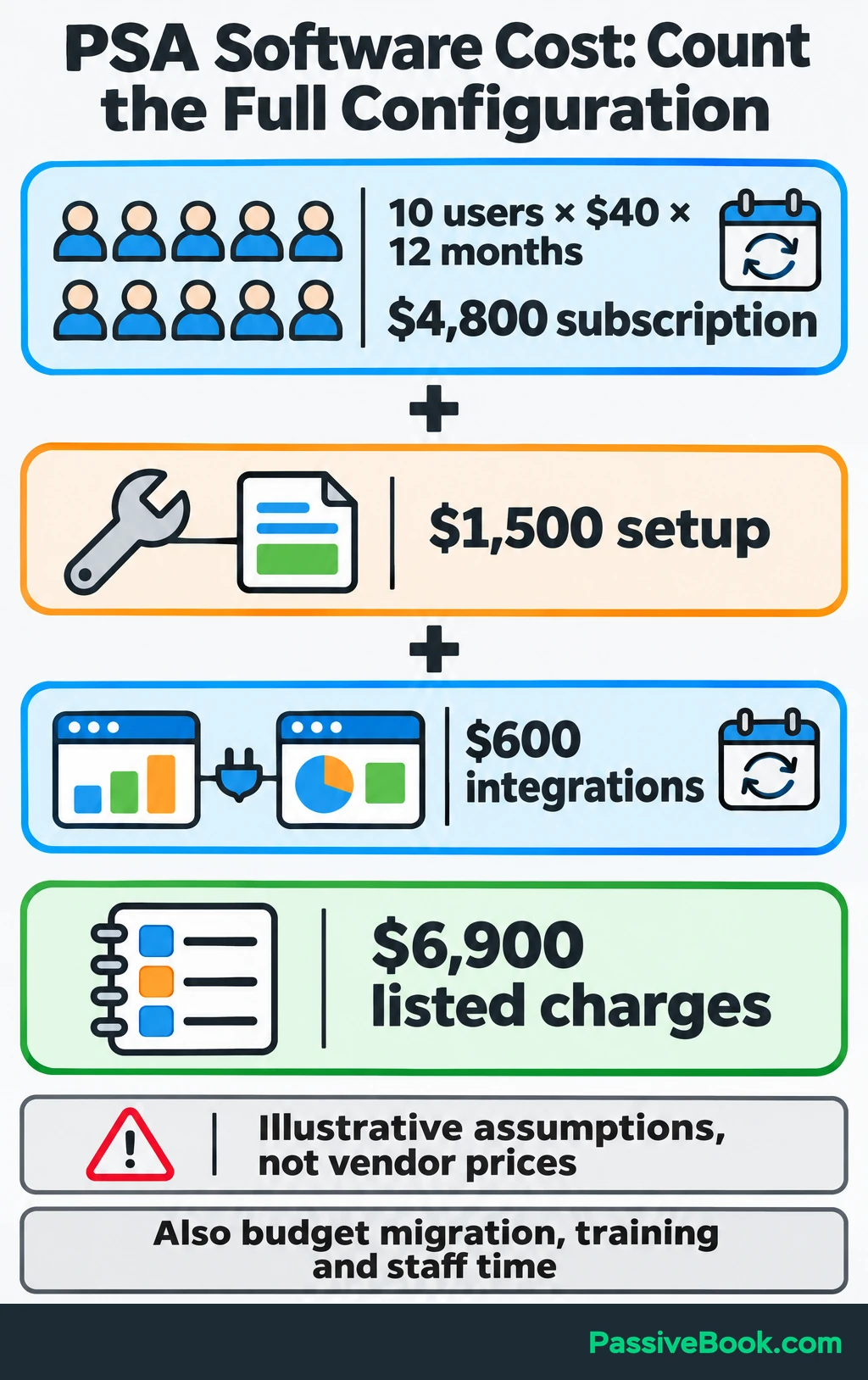
For an illustration, assume the restaurant agency has ten paid users. The following figures are assumptions, not vendor prices or typical returns.
| Cost item | Assumed amount | First-year cost |
|---|---|---|
| Subscription | 10 users at $40 each per month for 12 months | $4,800 |
| Implementation | One-time setup charge | $1,500 |
| Integration charges | $600 across the year | $600 |
| Total of these charges | Before any additional migration, training or staff costs | $6,900 |
The calculation is:
(10 × $40 × 12) + $1,500 + $600 = $6,900
Now consider what would cover that spending.
The subscription and integration charges average $450 a month. Suppose each additional hour you bill and collect contributes $75 after the costs of delivering that hour. Six additional collected hours would cover the $450 recurring cost.
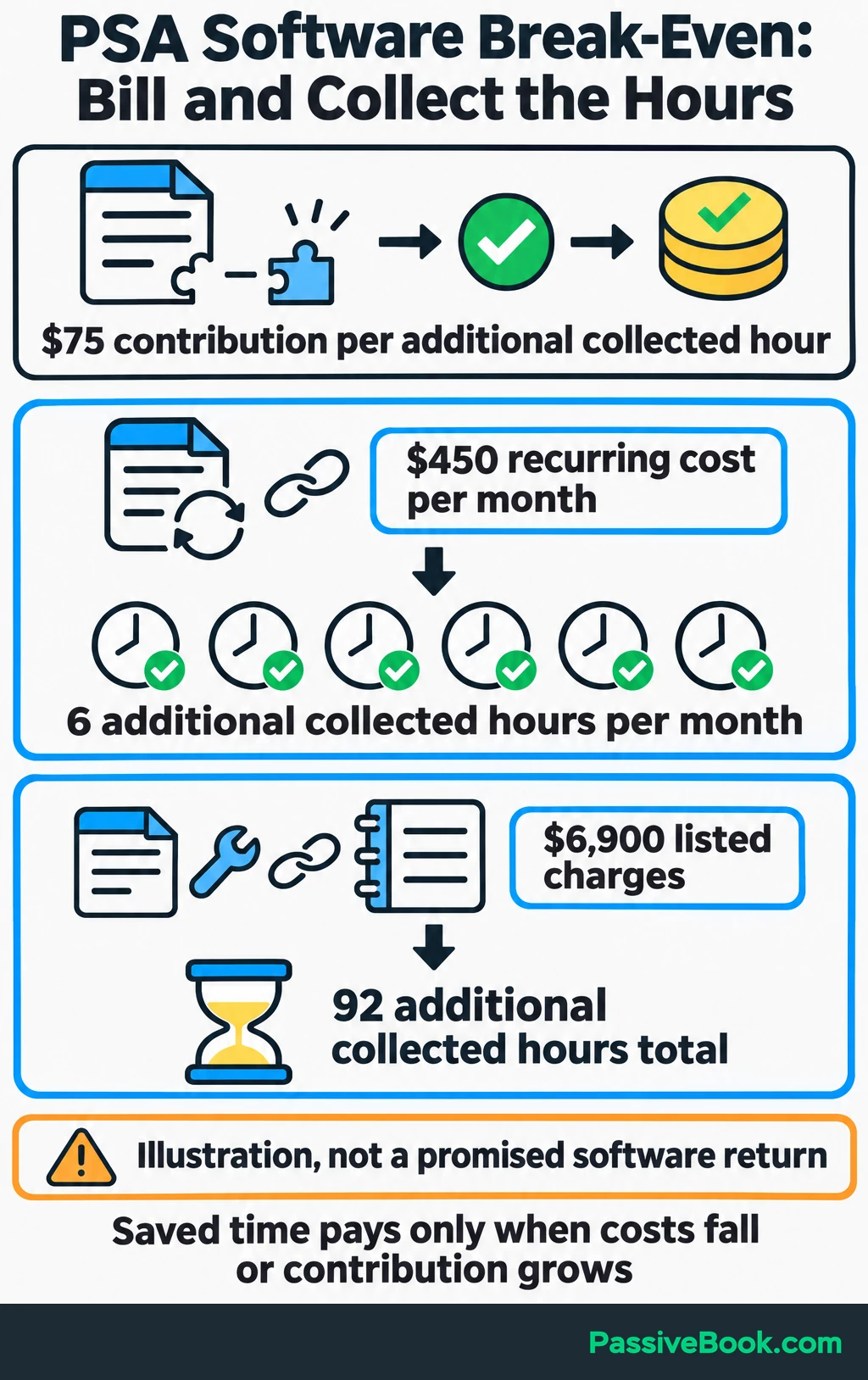
The setup charge still needs recovering. At the same contribution per hour, 92 additional collected hours across the year would cover the full $6,900 in listed charges.
That is a break-even illustration, not a prediction that software will produce those hours.
I would assess value through recovered billable work, fewer write-offs and reduced administration. Saved time becomes a cash benefit when spending falls or the released capacity produces additional contribution. An afternoon freed up is useful, but it does not automatically pay the subscription.
A cheaper user rate can still produce a more expensive purchase. Use this comparison workbook to account for seat rules, setup costs and subscriptions you will actually cancel, then see what remains to be earned back.
Free Software Cost Comparator




How to Validate Your Shortlist Before Signing
Run the Same Engagement Through Each Finalist
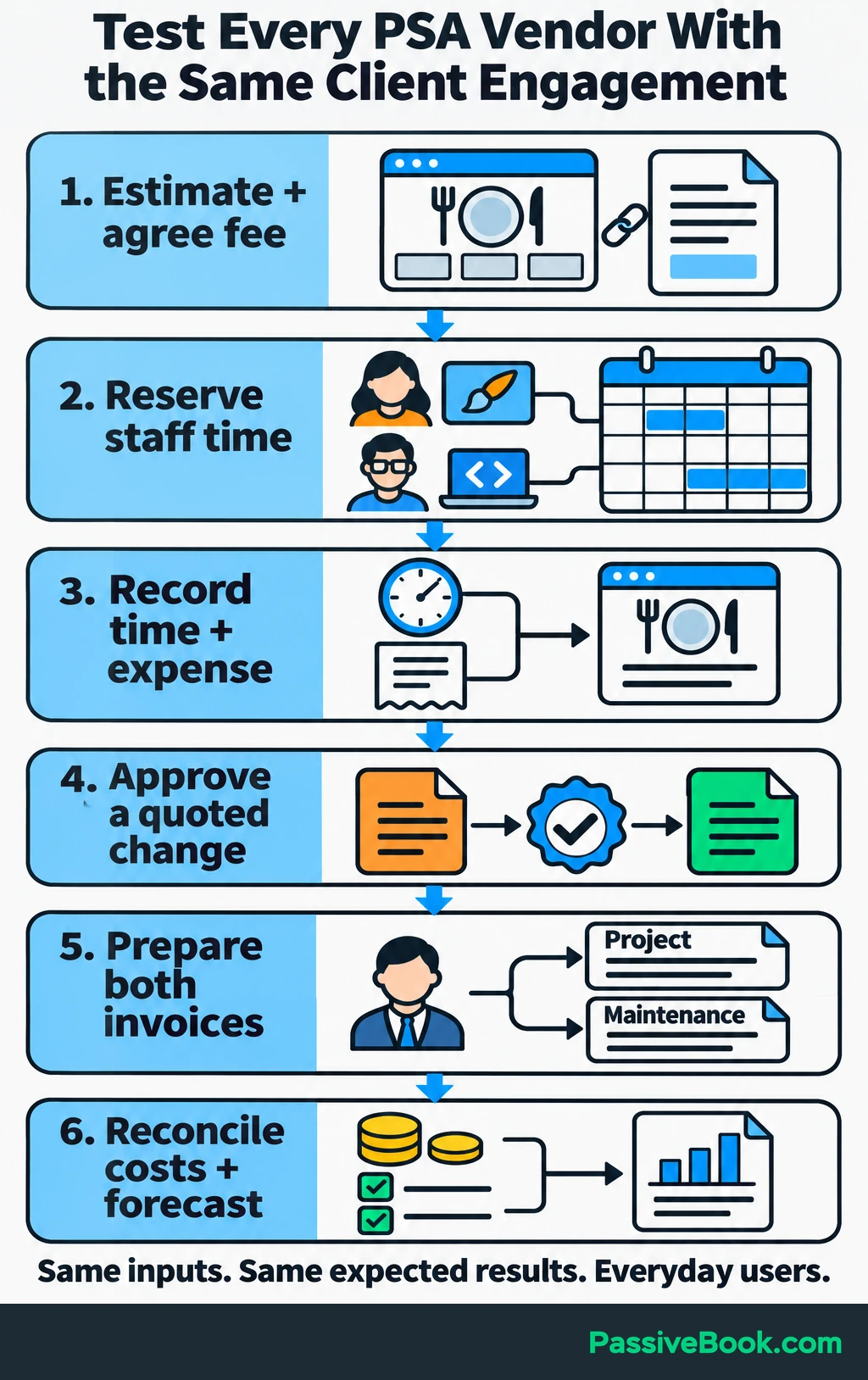
Give two or three vendors the same engagement to demonstrate. Keep the inputs and expected results consistent so you can compare the process.
Use the website build and its maintenance retainer:
- Create the estimate and agreed fee.
- Assign staff and reserve their time.
- Record delivery time and an external expense.
- Approve a separately quoted change.
- Prepare the project and maintenance invoices.
- Review costs, remaining work and the forecast result.
Mark each essential requirement as included, configurable, dependent on another product or unmet. Ask everyday users to enter time and complete approvals without vendor assistance.
Then check the numbers against known inputs.
Suppose a completed website has $12,000 in earned project revenue, 100 recorded hours at an internal cost of $60 an hour, and $1,000 in external costs. You are counting project revenue minus direct delivery costs, before overhead.
That leaves:
$12,000 − (100 × $60) − $1,000 = $5,000
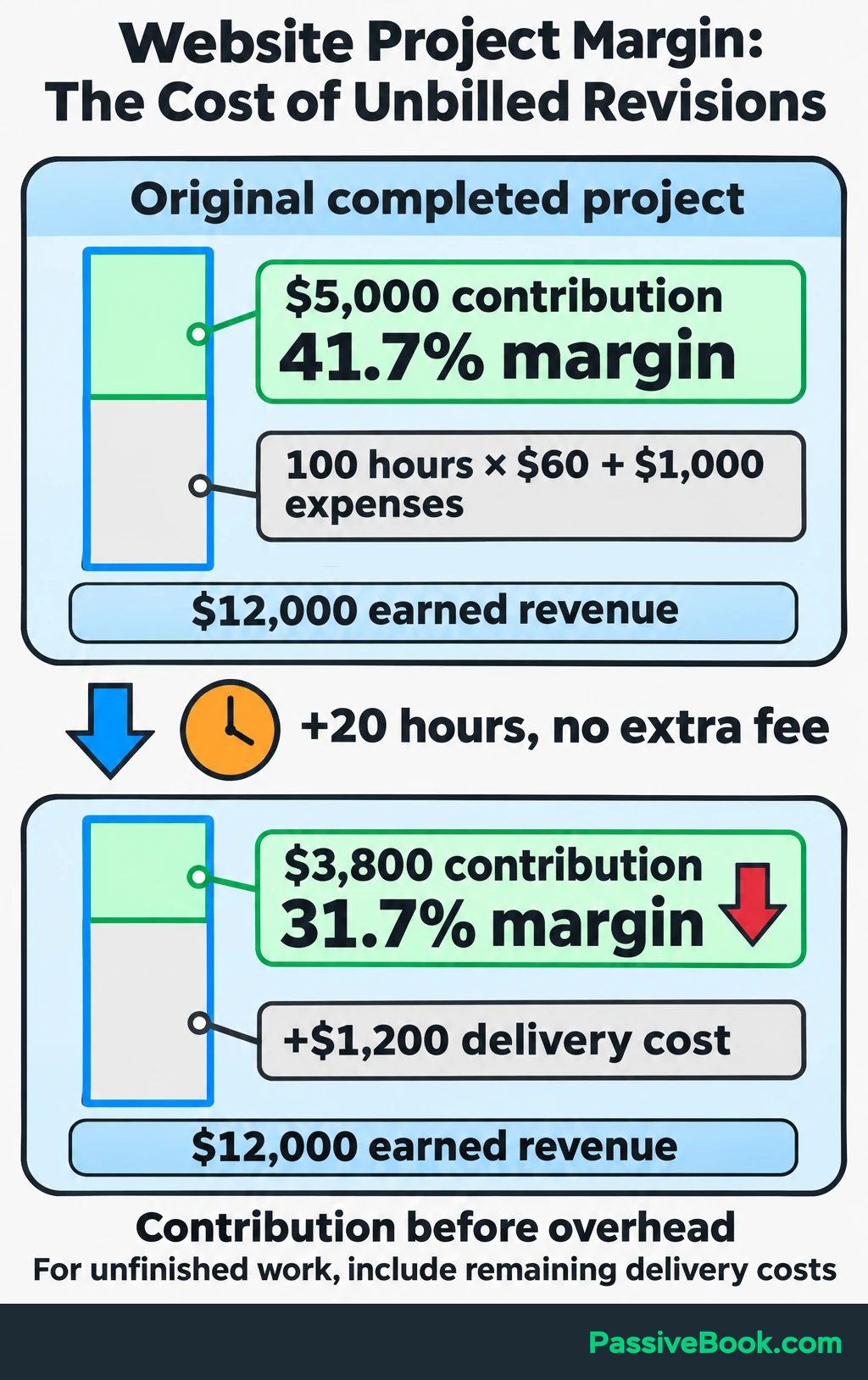
Dividing that $5,000 contribution by the same project’s $12,000 revenue gives a contribution margin of 41.7%.
Now duplicate the test and add twenty revision hours with no extra client fee. Costs rise by $1,200, leaving $3,800 contribution and a margin of 31.7%.
The platform should reconcile with those inputs. For unfinished work, also inspect the estimated cost of the hours still needed. Recorded costs alone can make a half-finished project look surprisingly healthy.
Your own engagement will expose different problems from the website example. This AI Skill turns a few details about your work into a vendor brief, so each finalist gets the same specific requests.
Free AI Provider Buying Assistant
Prove the Integrations and Data Portability
A logo in an integration directory is a starting point. The useful test is whether the records you need move correctly.
Check client, project, invoice, credit-note and payment-status transfers where required. For each one, establish:
- Record Ownership: Which system holds the authoritative version.
- Sync Behavior: What moves, in which direction and after which event.
- Error Handling: How failed transfers appear and who resolves them.
- Correction Handling: What happens when an approved invoice or client record changes.
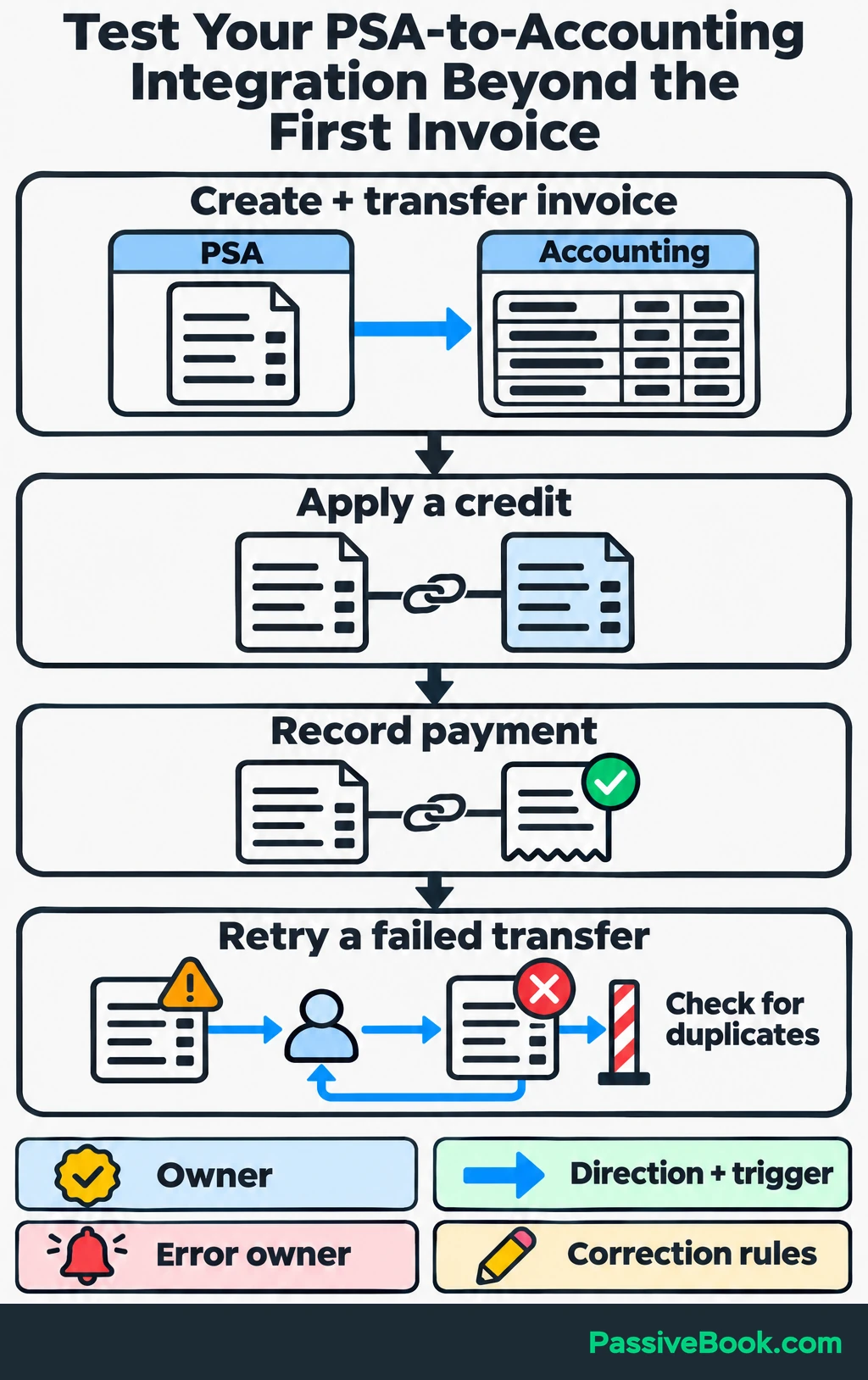
For the restaurant agency, create an invoice, transfer it to accounting, apply a credit and record a payment. Check the results at each stage, including whether a retry creates duplicates.
Import a representative set of clients, active projects, rates, opening balances and unbilled work. Reconcile the totals with the old system and complete a billing cycle in the pilot.
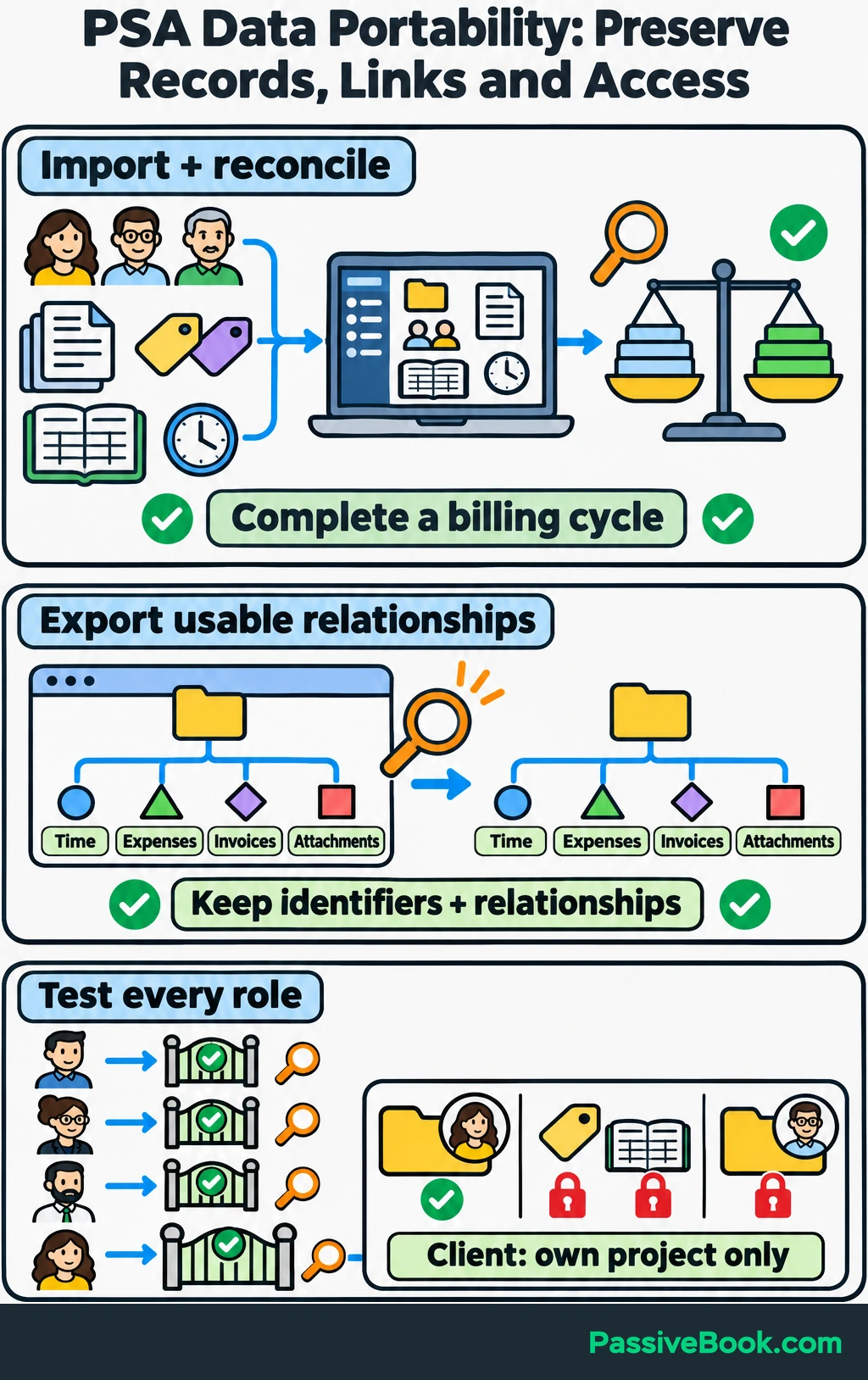
Also request an export you can use outside the platform. It should contain the required projects, time, expenses, invoices and attachments, with identifiers that preserve their relationships.
Finally, test staff, manager, finance and client access. A restaurant client should see its own project information, while internal cost rates and other clients’ records remain restricted.
Choose the Platform Your Team Can Operate
I would choose the configuration that passes the essential delivery and billing tests within the available budget and setup capacity.
That decision needs evidence from daily users. Ask a designer to find an assignment, record time and flag extra work. Ask a manager to approve it and explain the budget effect. Watch where they need help.
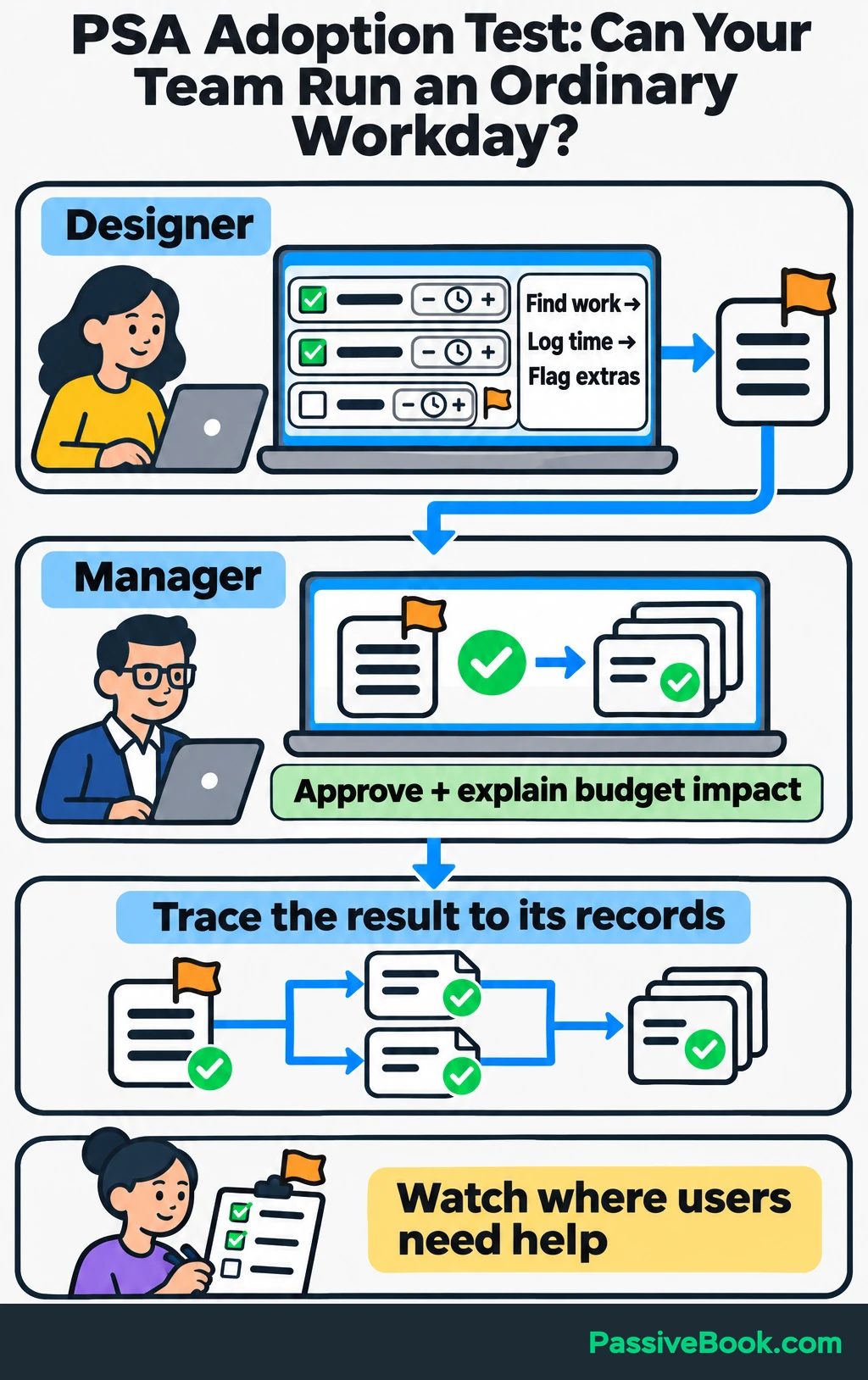
Before signing, obtain written scope for migration, configuration, training, cutover support and ongoing administration. Assign an internal owner to each responsibility.
Confirm renewal pricing, cancellation terms and export access too. These affect the cost of keeping the platform and the effort of leaving it.
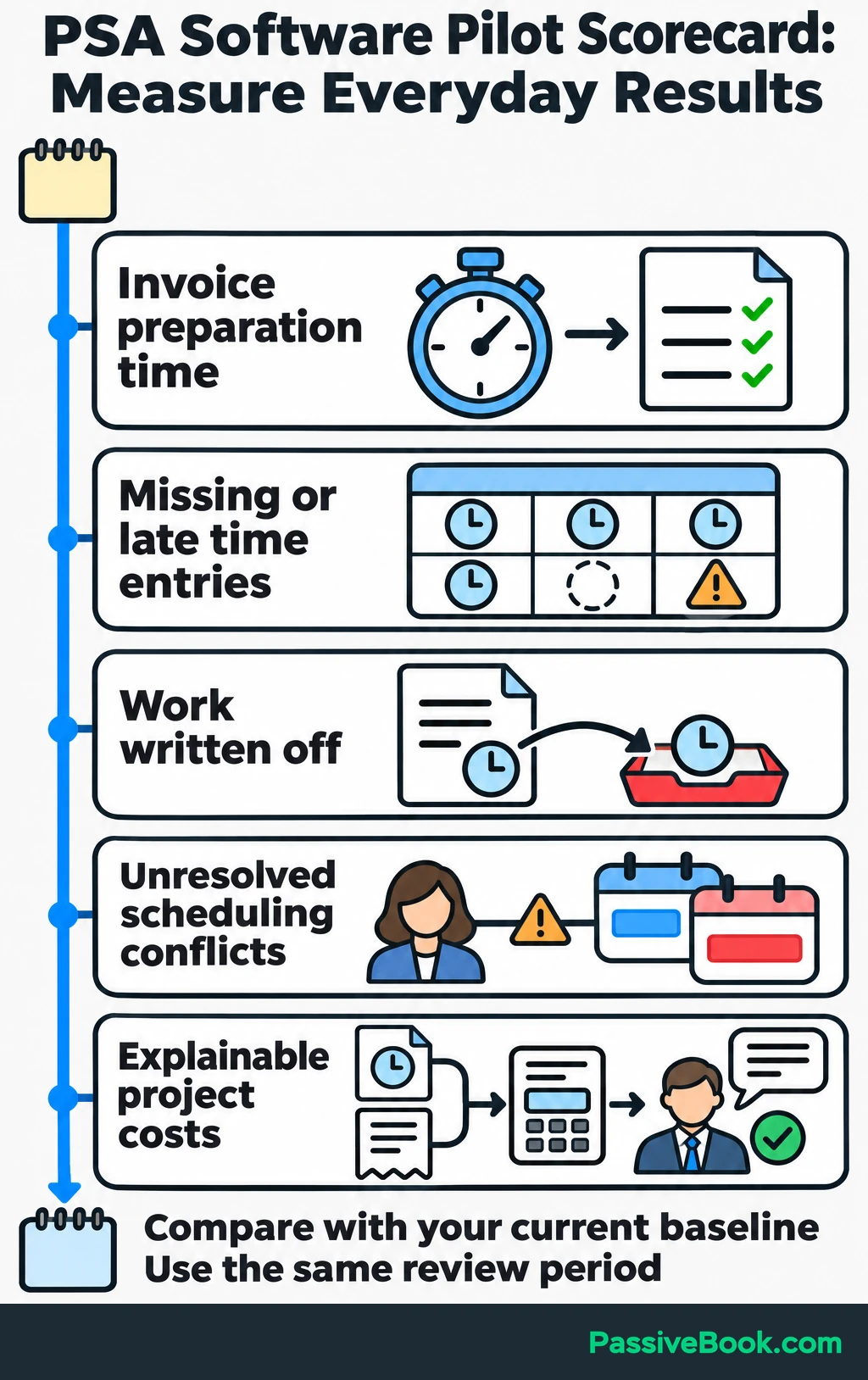
Compare the pilot with your current baseline:
- Invoice Preparation: Time needed to produce checked invoices.
- Time Capture: Missing or late entries during the same review period.
- Write-offs: Recorded work removed from billing.
- Scheduling: Conflicts that still require manual resolution.
- Cost Visibility: Whether managers can explain project results from the records.
I would skip an advanced feature if nobody has time to maintain the data it needs. The system has to survive an ordinary busy week.
What Next?
Write down one current engagement’s fee, staffing plan, billing rules and accounting handoff, then use it to brief two vendors. That gives you a comparison grounded in work you already understand.
If this guide helps you narrow the field, use the social buttons to share a more useful way to compare PSA costs and packages.
Which part of your current process is hardest to trust: staffing, recorded time, billing or project margins? Share it in the comments, and bring any other questions about your shortlist.
Share this post with your friends & followers:

