You have three invoices to send, a client asking to pay by card, and last month’s payment still missing from your records. The work is done, but the billing keeps finding ways to stay on your list.
Choosing software should help, yet a free plan can hide a client limit, and a cheap subscription can come with payment fees that cost more than the software. This comparison puts those limits and fees beside each tool’s billing features, so you can choose an affordable plan for sending invoices, collecting payments, and passing accurate records to your bookkeeper.
How to Compare Invoicing Software
My starting shortlist is straightforward:
- Free standalone invoicing: Start with Zoho Invoice.
- Invoices alongside in-person payments: Consider Square Invoices.
- Billing for tracked hours and expenses: Look at FreshBooks.
- Existing accounting software: Try the invoicing in QuickBooks Online or Xero before adding another app.
The best invoicing software for small businesses is the lowest-cost option that handles your actual billing work. A longer feature list earns nothing if you still copy payments into a spreadsheet every Friday.
Before comparing plans, write down:
- Your business country and billing currencies.
- Monthly invoice volume, including occasional extra jobs.
- The number of distinct clients you bill.
- Staff who need their own login.
- Your accounting software and who maintains the books.
- Essential features, such as deposits, recurring bills, reminders, and automatic collection.
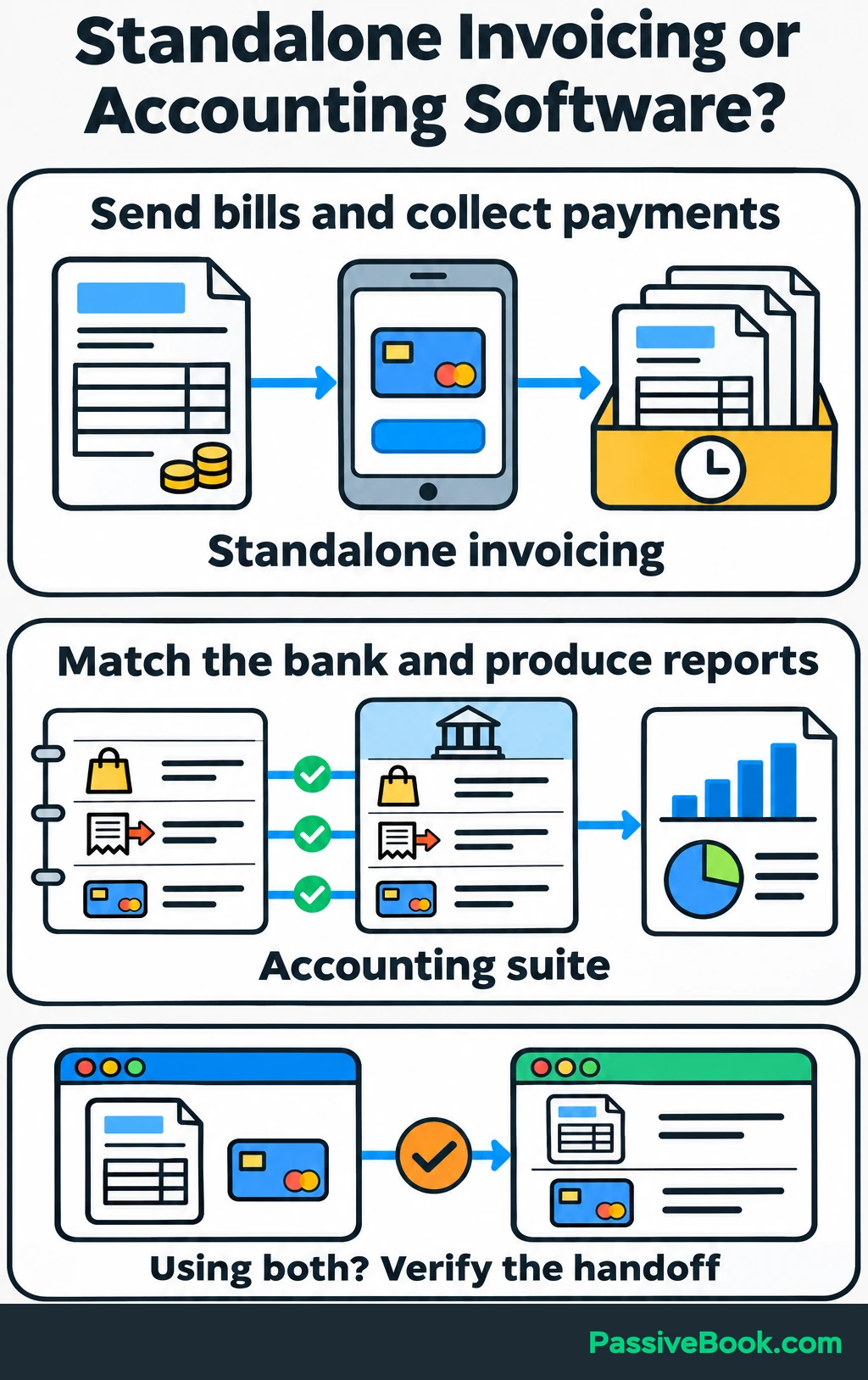
Choose standalone invoicing when you need to create bills, collect payments, and see what remains unpaid. Choose an accounting suite when you also need financial statements and bank reconciliation—matching recorded sales, expenses, and payments to bank transactions. A standalone tool can work alongside accounting software, but the handoff needs to earn its extra cost.
During my freelancing years, I kept payment notes beside my project notes. That seemed tidy until an invoice changed after I had copied its total elsewhere. I had two records and one small detective job. That experience is why I care more about the payment reaching the books correctly than about having another invoice design.
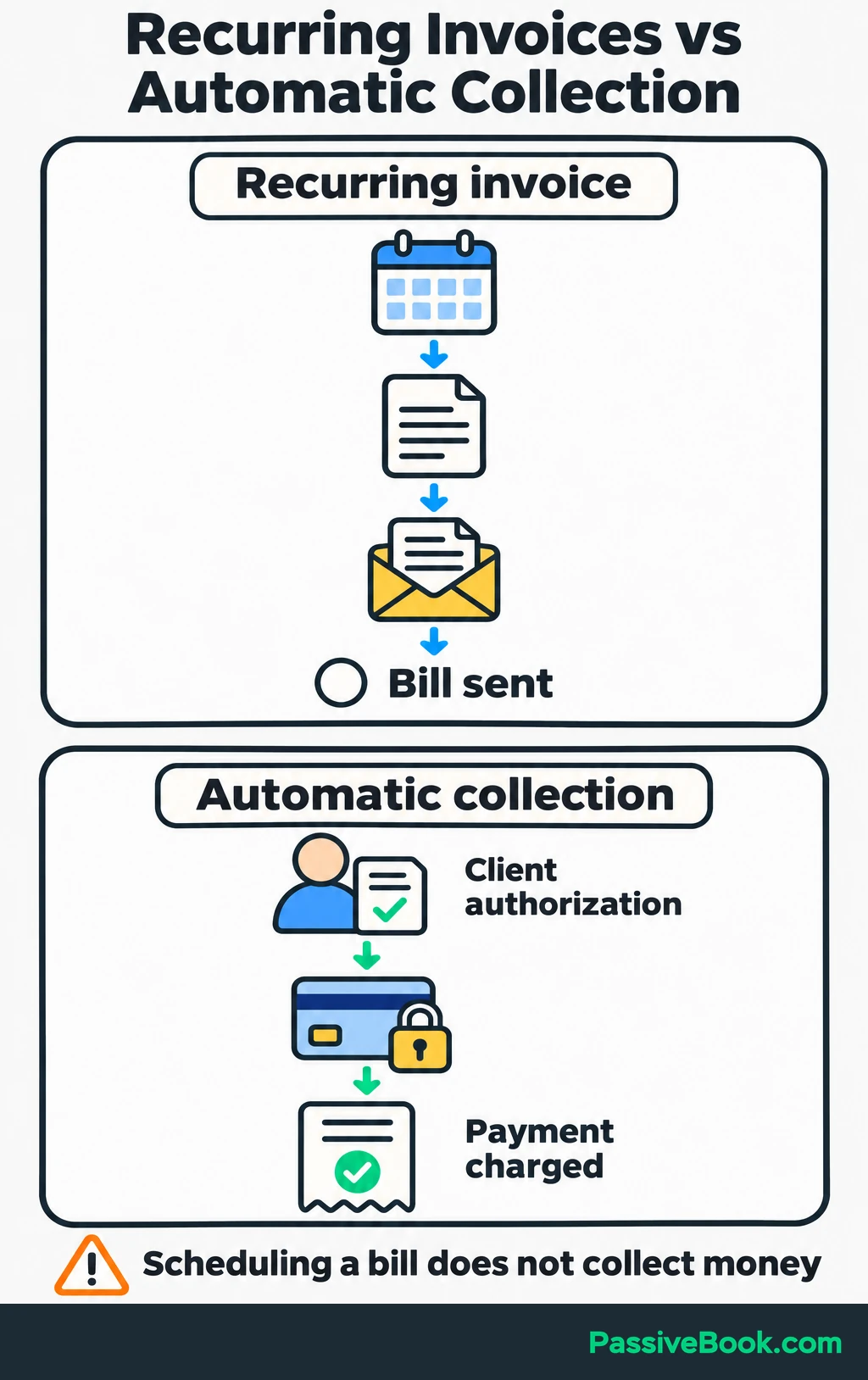
Also separate two features that sound similar. A recurring invoice creates or sends a bill on schedule. Automatic collection charges a payment method the client has authorized. Scheduling a bill does not, by itself, collect the money.
For the examples below, imagine you run a video-editing business serving independent cooking channels. You bill 20 clients each month, take occasional extra projects, and want reminders plus a clean handoff to your bookkeeper. The business and its figures are illustrative.
The Best Invoicing Software Compared
These recommendations are editorial judgments based on provider documentation. They are not claims of hands-on testing or independently measured payment speed.
The table uses regular US subscription prices in USD, billed monthly before subscription taxes. Payment rates describe the stated US payment methods. Outside the US, check the local edition, merchant eligibility, and available payment services first.
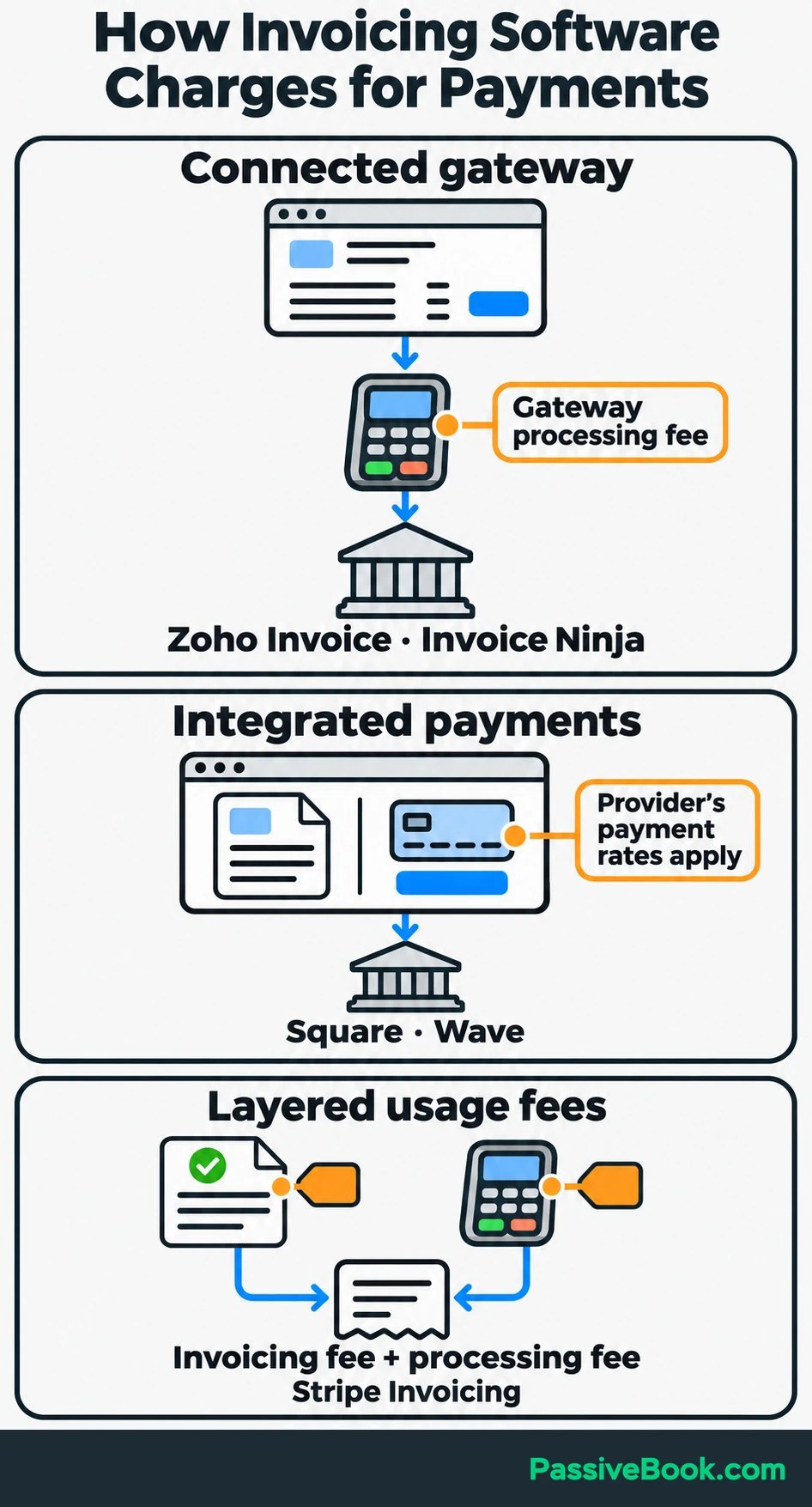
A payment gateway, such as Stripe or PayPal, handles online payments for the invoicing app and charges processing fees. ACH means a payment collected directly from a US bank account, with its own fees and settlement timing.
In the FreshBooks row, “manual” means the client initiates the card payment. “Managed” includes automatic charges and charges you initiate.
| Software | Best Fit | Regular Monthly Subscription | Free or Entry-Plan Restrictions | Online Collection Fees | Built-In Bookkeeping or Accounting Handoff |
|---|---|---|---|---|---|
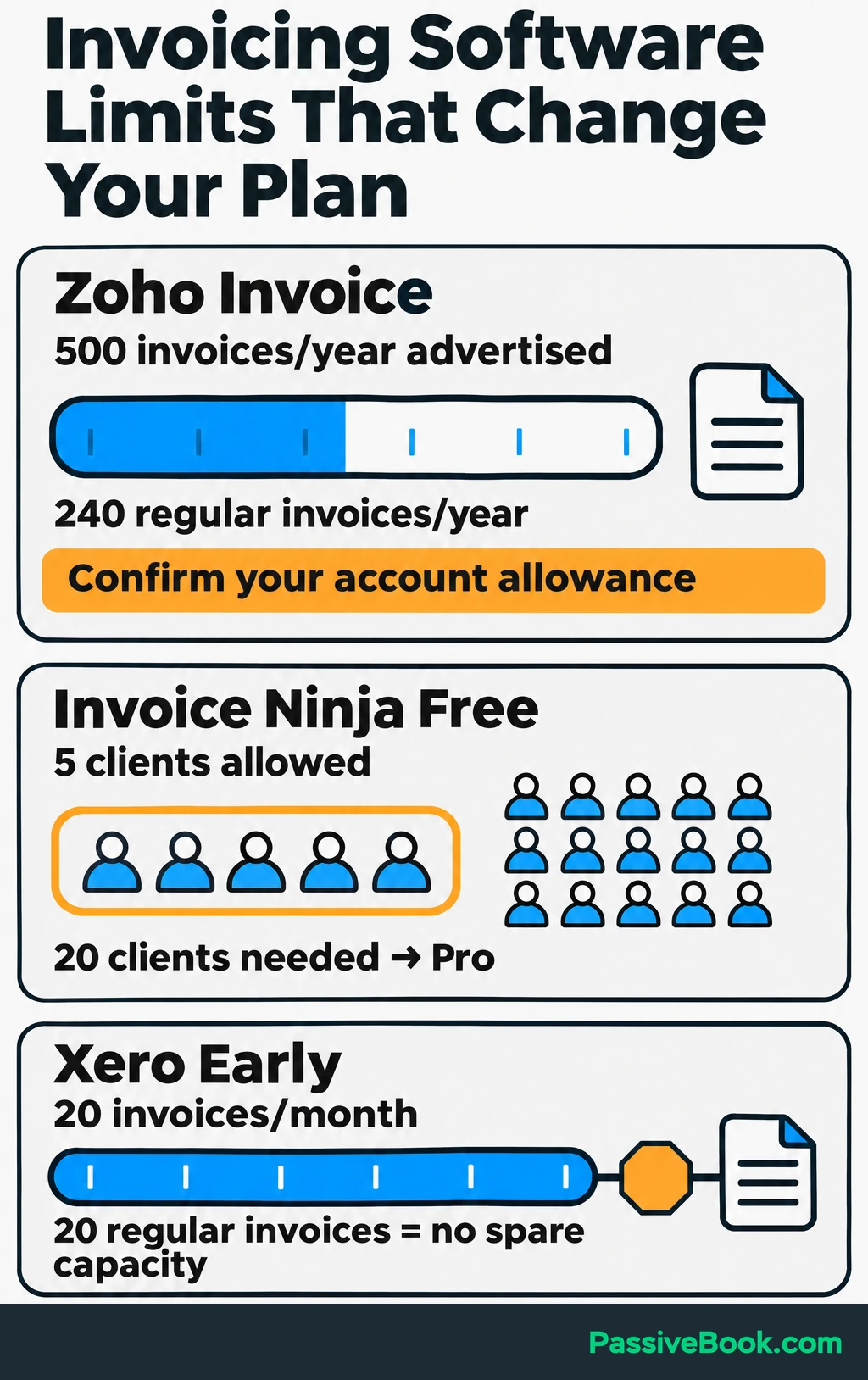
| Zoho Invoice | Free dedicated invoicing | Free: $0 | Advertises 500 invoices/year, two users, and three projects; confirm your account’s allowance | Connected gateway charges apply | Expense recording and invoice reports; verify the transfer or export your bookkeeper needs |
| Invoice Ninja | Unlimited invoices with gateway choice | Hosted Free: $0; Ninja Pro: $14 | Free: five clients; Pro adds unlimited clients and automatic late-payment reminders | Connected gateway charges apply | Invoice and expense records; check the required accounting integration |
| Square Invoices | Billing within a Square payment workflow | Square Free: $0; Square Plus: $49/location | Free includes unlimited and recurring invoices; multiple milestone payments require a qualifying paid plan | Invoice cards: Free 3.3% + $0.30; Plus 2.9% + $0.30. Invoice ACH: 1%, $1 minimum; Plus has a $10 cap | Payment and invoice reporting; connect or export to your accounting system |
| Wave | Basic invoicing with bookkeeping | Starter: $0; Pro: $19 | Starter needs online payments enabled for sending through Wave and scheduled reminders; otherwise share links/PDFs and follow up yourself | Starter cards: 2.9% + $0.60; Amex 3.4% + $0.60. Pro waives the fixed card fee on the first ten transactions/month | Bookkeeping records included; automatic bank imports require Pro |
| FreshBooks | Turning time and expenses into invoices | Lite: $23; Plus: $43; Premium: $70. Extra team members: $11 each; Advanced Payments add-on: $20 | Lite: five billable clients; Plus: 50; Premium: unlimited | Manual domestic consumer cards: 2.9% + $0.30; commercial cards, Amex, and managed card payments: 3.5% + $0.30; ACH: 1% | Time and expense billing; Plus adds accountant access and bank reconciliation |
| QuickBooks Online | Keeping invoicing in existing QuickBooks books | Free: $0; Simple Start: $38; Essentials: $85 | Free: two invoices/month, or unlimited after qualifying for and enabling QuickBooks Payments; one bank connection and no accountant access. Simple Start: one user; Essentials: three; both include separate accountant access | QuickBooks Payments: invoice cards and digital wallets 2.99%; ACH 1% | Accounting, receivables, and expenses in one system |
| Xero | Accounting access for several people | Early: $27; Growing: $59; Established: $97 | Early: 20 invoices/month and five bills; Established adds multicurrency and project time-and-cost tracking | Connected payment-service charges apply | Bank reconciliation and accounting reports; no per-user subscription charges |
| Stripe Invoicing | One-off invoices in an existing Stripe account | Starter and Plus: $0 fixed subscription | Usage fees apply when invoices are paid; Plus adds quotes | Starter: 0.4% per paid invoice; Plus: 0.5%, both additional to payment processing | Invoice and payment records; arrange an accounting integration or export |
For the remaining payment details, check the providers’ schedules: Wave bank-payment rates, FreshBooks’ USD transaction fees, and QuickBooks Payments rates. Wave bank payments carry a 1% fee with a $1 minimum.
Zoho Invoice: Best Free Standalone Invoicing Software
Zoho Invoice would be my first stop if you need proper invoicing without another subscription. It includes customizable invoices, recurring invoices, automatic reminders, time tracking, expense recording, and a customer portal. Mobile apps also let you handle invoices away from your desk.
The allowance deserves attention before you move your clients over. Zoho’s public pricing page gives the limits shown above, while its allowance guidance tells you to confirm the number available in your organization’s usage statistics. The allowance resets on the organization’s creation anniversary, and higher volume means considering the separate Zoho Billing product. Zoho’s invoice-allowance rules.
At one invoice per client each month, the editing business sends 240 regular invoices a year. Add invoices for extra projects before comparing that total with your account’s allowance.
Zoho adds no online-payment transaction fee of its own, but your gateway still charges for processing. I would choose it when the allowance fits and the bookkeeping handoff works. Recording expenses does not replace full accounting.
Invoice Ninja: Best for Unlimited Invoicing With Flexible Gateways
Invoice Ninja makes sense when you want dedicated invoicing and a choice of payment providers. Its supported gateways include Stripe, PayPal, and Square, with available methods depending on the connection.
The hosted Free plan includes recurring billing, deposits, partial payments, and a client portal. Its catch is client capacity. Unlimited invoices are less useful when the next customer forces a plan change.
Our editing business needs Ninja Pro because its client roster exceeds Free’s allowance. Pro also supplies automatic late-payment reminders, custom invoice designs, and removal of Invoice Ninja branding.
I would compare Pro directly with Zoho before paying. Choose Ninja when its client capacity, gateway options, or invoice controls solve a real problem. Include any accounting connector in that decision.
Square Invoices: Best for Invoicing Alongside in-person Payments
Square is my pick when you already take payments through Square and want invoices in the same workflow. Free includes recurring invoices, deposits, and automatic reminders.
The useful distinction is how you collect project payments. Free can handle an initial deposit followed by a final balance. Splitting the remaining balance across several milestones requires a qualifying paid plan.
For an editing project, that could mean a deposit before work starts, another payment after the first cut, and the remainder after approval. Buy the milestone feature if that is how your contracts work.
I would stay on Free for ordinary monthly invoices unless paid features or processing savings cover the subscription. The calculation below shows why a lower card rate does not automatically make Plus cheaper.
Wave: Best for Free Basic Invoicing With Bookkeeping
Wave is worth considering when you want basic invoices and bookkeeping together. First, check eligibility: it serves businesses in the US and Canada, excluding US territories. Wave’s geographic availability.
Starter lets you create unlimited invoices and bookkeeping records, but delivery and reminders have conditions. Without online payments enabled, you need to share invoice links or PDFs yourself and handle reminders manually.
That matters for the editing business because reminders are a requirement. A free account that leaves follow-up on your calendar has not completed the job you selected it for.
Pro adds automatic bank imports, logo and brand-color customization, and sending through Wave without the online-payment dependency. I would pay for those workflow features if needed. Waiving the fixed fee on ten card payments saves at most $6 a month, so the discount cannot cover Pro’s subscription on its own.
FreshBooks: Best for Invoicing Tracked Time and Expenses
FreshBooks is the strongest fit here when invoice amounts come from work records. You can track hours and reimbursable expenses, then use them in client billing. Recurring invoices, reminders, and deposits support ongoing projects.
For the editing business, this becomes useful when a monthly package includes extra revision hours or separately approved expenses. If every client pays the same flat amount, I would try a free invoicing tool first.
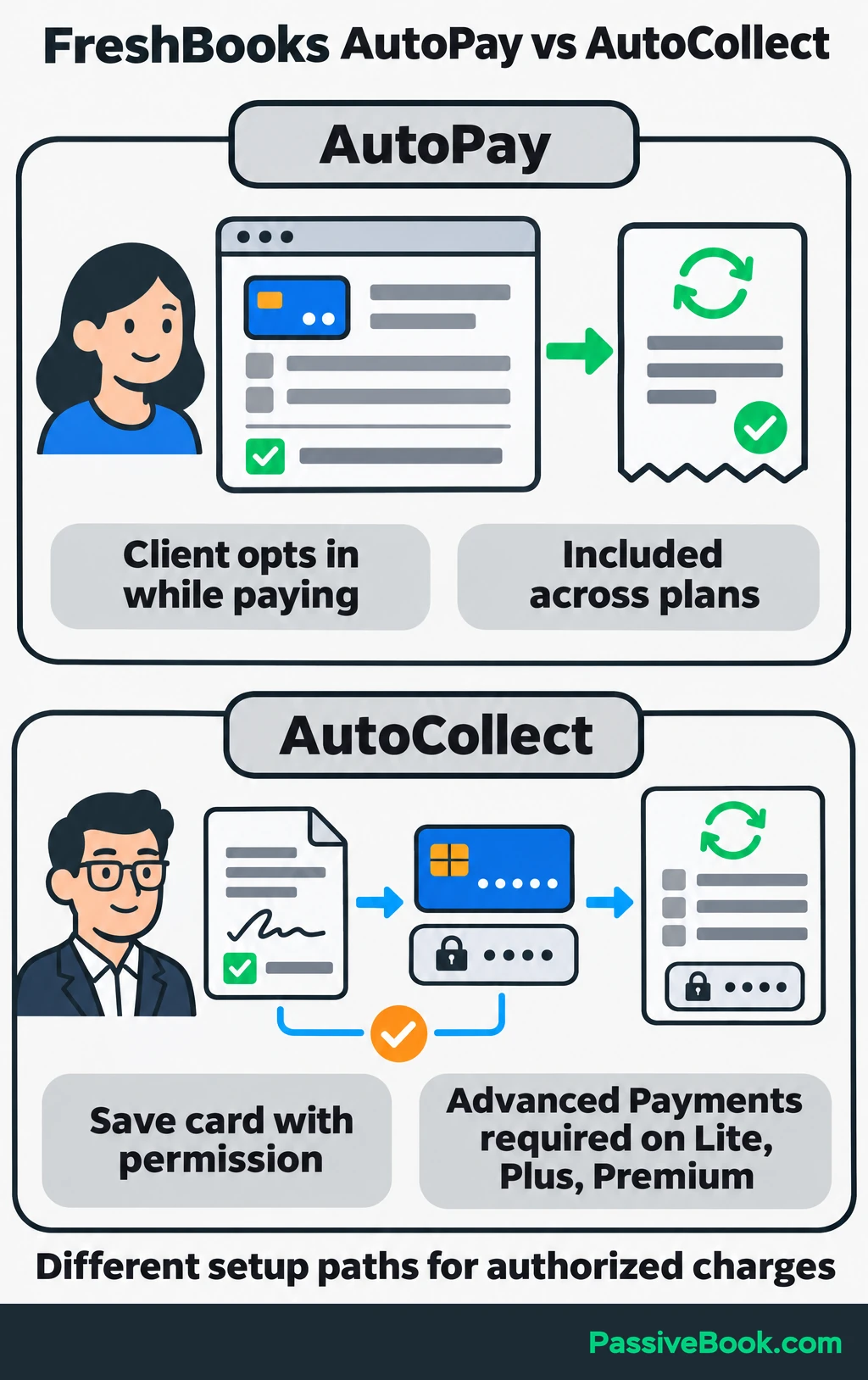
The client roster determines the starting plan, so our example needs Plus. Budget for staff access separately rather than assuming everyone can join under the base subscription.
With AutoPay, clients choose automatic future charges when they pay a recurring invoice. It is included across plans. AutoCollect lets you save a client’s card with their permission and attach it to a recurring invoice template. On Lite, Plus, and Premium, AutoCollect requires Advanced Payments.
Card AutoPay uses the managed-payment rate shown above for US FreshBooks Payments merchants who joined on or after June 29, 2026. Earlier merchants should check their account notice. FreshBooks’ AutoPay terms.
I would skip that add-on when AutoPay already handles the work.
QuickBooks Online: Best for Businesses Already Using QuickBooks
If your books already live in QuickBooks Online, start with its invoices. Paid plans combine invoice payment options, status tracking, reminders, expenses, and accountant access.
Keeping those records together can remove an entire handoff. A separate invoicing app needs to solve something specific, such as a missing project workflow, to justify another connection.
The Free plan is also worth a look, but its unlimited invoicing depends on qualifying for and enabling QuickBooks Payments. Its limited bank connections and lack of accountant access may rule it out before invoice volume does.
For our editing business, I would compare the required accounting access and staff logins first. I would not buy a broader accounting plan just to send a professional-looking bill. Those extra features should replace work you otherwise do elsewhere.
Xero: Best for Accounting Collaboration
Xero is a good fit when several people need access to billing and accounting without a subscription charge for each user. It supports recurring invoices, reminders, and bank reconciliation.
Early looks tempting for our editing business because its invoice allowance matches the regular monthly workload. But that leaves no room for extra project invoices. Growing deserves the comparison when those jobs are routine.
Established becomes relevant when you need multicurrency accounting or project time-and-cost tracking. I would skip it if those features would sit unused.
Online collection uses connected services such as Stripe or GoCardless, and their payment fees sit alongside the accounting subscription. Check the complete workflow: your client pays, the payment appears, and the bank deposit can be matched without re-entering the invoice.
Stripe Invoicing: Best for One-off Billing in an Existing Stripe Account
I use Stripe as my primary payment processor and PayPal as a secondary option. That makes Stripe Invoicing a natural candidate for my shortlist, but this recommendation comes from its documented features.
You can create invoices in the dashboard without building an API integration. Hosted payment pages, reminders, and payment tracking make it useful for occasional client bills.
The pricing catch is simple: no fixed subscription does not mean no invoicing charge. Stripe adds an invoicing percentage to payment processing. Its standard US domestic online card rate is 2.9% + $0.30, with additional charges for international cards and currency conversion. Stripe’s processing rates.
For occasional extra editing projects, that may be convenient. For billing built around timesheets and expenses, I would prefer a service-billing tool. Compare Stripe Billing separately when subscription management is the main requirement.
Calculate the Full Cost of Getting Paid
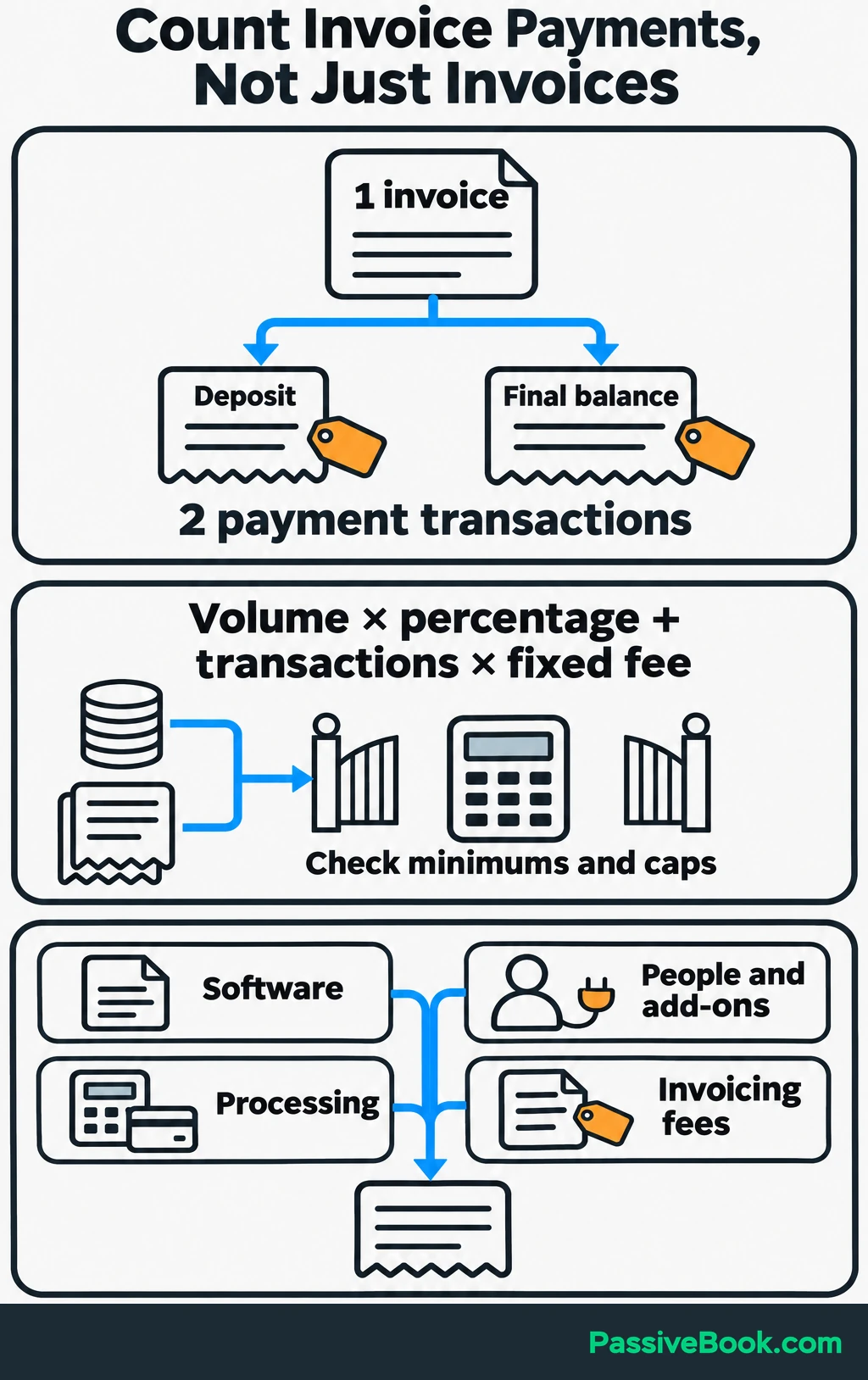
Count what you expect to collect through each payment method, and count the individual payment transactions. An invoice paid in two installments creates two transactions, so invoice count alone will not give you the full fee.
Then add:
- Software: The regular subscription after introductory discounts.
- People and add-ons: Required staff access, collection features, and accounting connectors.
- Processing: Each method’s percentage, fixed fee, minimum, and cap.
- Invoicing: Any separate charge applied when an invoice is paid.
For a worked comparison, assume the editing business collects 20 one-time invoices of $200 each. Every invoice is paid through one US domestic online card transaction, at one Square location.
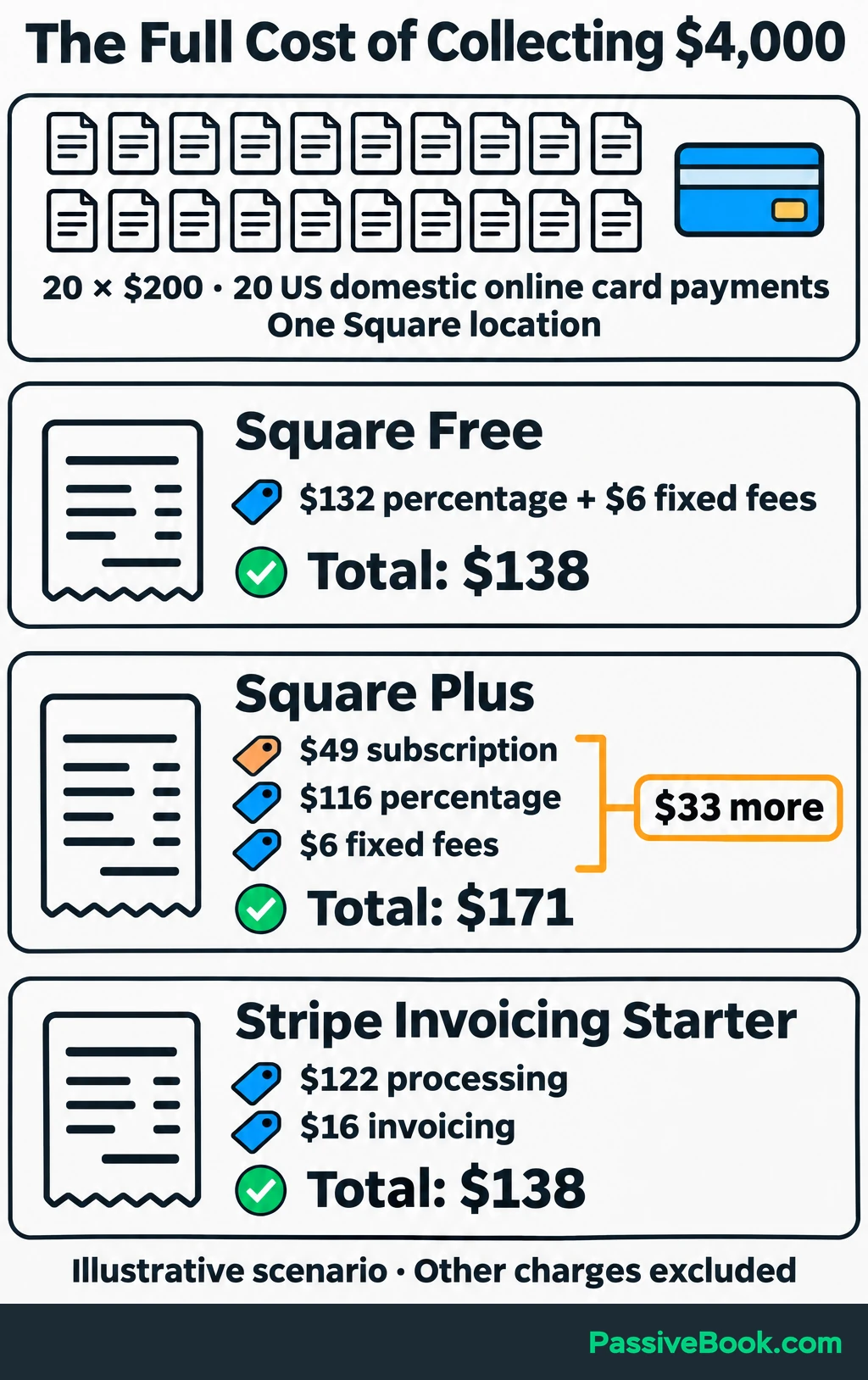
That means $4,000 collected across 20 transactions. Using the rates in the comparison table:
| Option | Calculation | Total Cost |
|---|---|---|
| Square Free | $4,000 × 3.3% + 20 × $0.30 | $138 |
| Square Plus | $49 + $4,000 × 2.9% + 20 × $0.30 | $171 |
| Stripe Invoicing Starter | Card processing: $4,000 × 2.9% + 20 × $0.30 = $122; invoicing: $4,000 × 0.4% = $16 | $138 |
Square Free saves $33 compared with Plus in this scenario, provided it supplies every required feature. Stripe Starter reaches the same total through two separate charges.
Your own payment sizes and installment schedule can change which option costs less. Use the calculator below to compare your shortlist, including minimum fees, caps, and the extra connections you would need.
Free Platform Cost Calculator




That is why I would calculate costs before choosing based on “free” or a lower processing percentage. Both can be true while the final bill tells a different story.
These figures describe this example and exclude other charges. Add international payments, currency conversion, disputes, or faster payouts when they apply to your business.
Compare equivalent setups, too. A standalone invoice tool plus a paid connector should be compared with the accounting suite that already includes invoicing. Check the renewal price and whether a quoted monthly rate requires paying for a full year.
Your time belongs in the decision even when it does not appear on the vendor’s bill. A cheaper app that creates a weekly reconciliation problem has found another way to charge you.
Test Your Shortlist Before Committing
Pick two eligible products and run the same billing job through both. Comparing eight dashboards is a fine way to spend an afternoon without making a decision.
Run a Complete Customer Billing Cycle
Create a draft with your usual service, one extra-work item, a due date, and the payment methods you intend to offer.
For the cooking-channel editing example, the line items could read:
Monthly editing package — four recipe videos
Additional revision round — approved separately
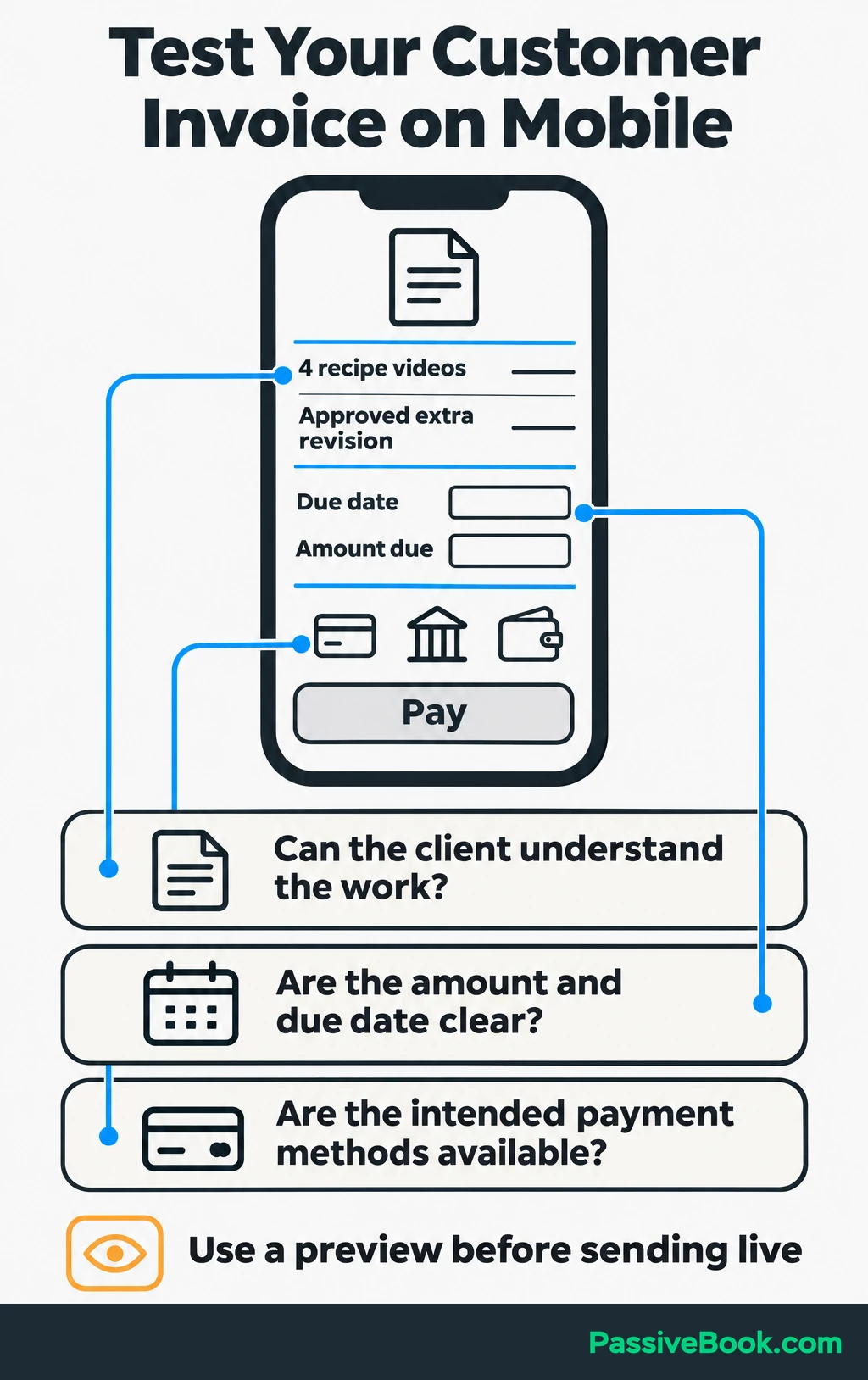
Check whether the client can understand the work and amount without emailing you for an explanation. Open the invoice on your phone as well. A handsome desktop PDF is not the whole payment experience.
Follow the job through these checks:
- Delivery: Send a preview to yourself and check the email, invoice link, and downloadable copy.
- Payment: Confirm that the intended payment methods appear and that deposits or partial payments behave as expected.
- Automation: Test recurring invoice creation, reminder timing, and whether reminders stop once payment is recorded.
- Collection: If you need authorized automatic charges, check enrollment, failed-payment notices, and how you pause future charges.
- Tracking: Find the remaining balance and overdue invoices without opening each customer record.
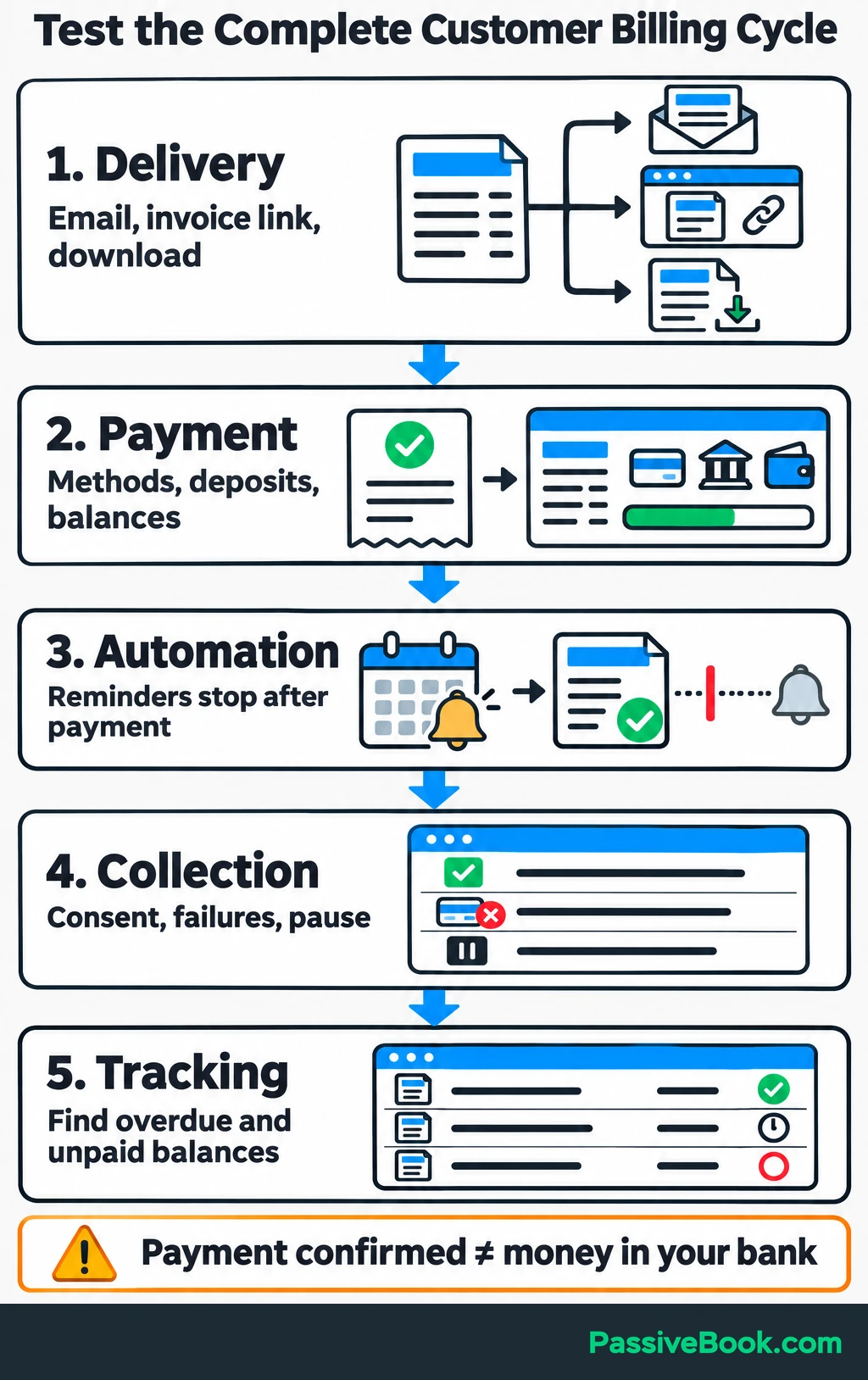
Use previews or a supported test environment before making a live payment. Drafts should not become accidental customer emails.
Also check merchant approval and payout conditions before relying on the system for upcoming expenses. A successful payment notification and money reaching your bank are separate events.
I would ask support one awkward but ordinary question: “How do I correct an invoice after the client has paid a deposit?” That answer tells you more than a cheerful welcome message. Assess the help available on the plan you intend to keep.
Check Bookkeeping and Record Ownership
Follow one invoice all the way into your books. You should be able to identify the customer’s payment, the processing fee, and the amount deposited into your bank.
If you use an integration, confirm exactly what transfers. Does it create invoices, record payments, and account for fees, or does it only send customer details? Check how failed transfers appear and who receives the warning.
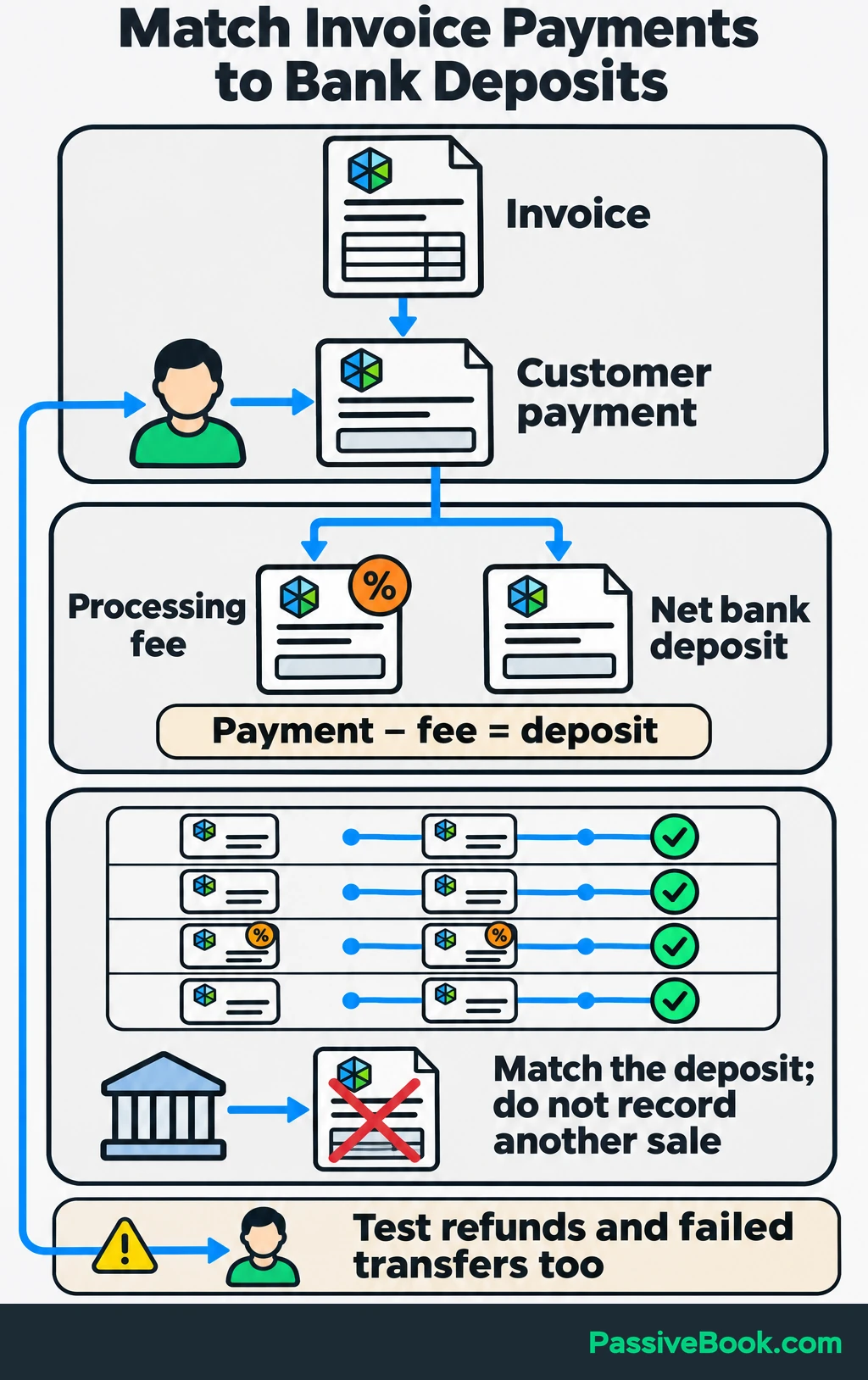
For the editing business, the bookkeeper should be able to match a payment to its invoice without recording the bank deposit as a second sale. Test a refund as well, because a successful payment is only half the story.
Before committing, check the records you will need to keep:
- Invoice details: Business and customer information, invoice numbers, currencies, tax fields, and any required references.
- Access: Separate staff logins that limit what each person can view or change, plus multifactor authentication—a second identity check beyond a password.
- Exports: Customers, invoices, payments, credits, and outstanding balances in files you can open.
- Documents: Downloadable invoice copies and uploaded attachments, which may require a separate backup.
- Continuity: A clear way to retain historical records if you cancel.
If tax treatment is unclear, show a sample invoice to your accountant before sending live bills. A tax field in an app does not establish the correct treatment for your sale.
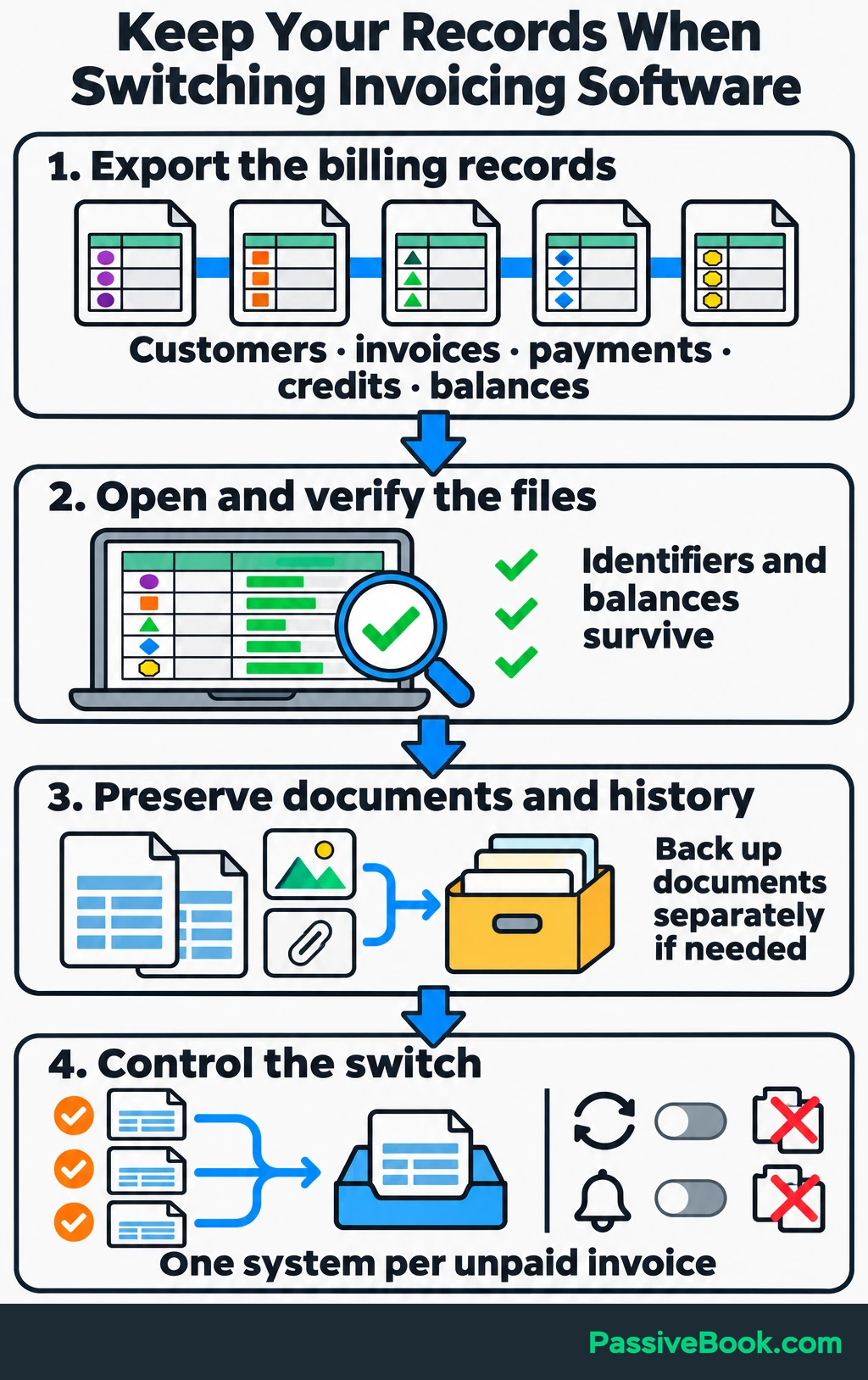
Open your sample exports rather than trusting the download button. Check that invoice identifiers and customer balances survive. A file that opens but cannot explain who owes you money is an incomplete exit plan.
When replacing an existing tool, reconcile outstanding balances and assign each unpaid invoice to one system. Preserve the old records, and disable duplicate recurring invoices and reminders before cancelling.
I would choose the lowest-cost plan that passes these checks. Once it does, there is little value in paying for features you might need in some much larger business you do not yet run.
What Next?
Take one recent invoice and recreate it in two shortlisted tools. Compare the client’s payment experience and the record your bookkeeper receives before moving your full customer list.
Use the social buttons to share this comparison when a tool discussion needs more than a monthly subscription price.
Which part of billing still takes the most effort in your business: creating invoices, chasing payments, or matching the money in your books? Tell me in the comments, and bring any other questions about choosing a tool.
Share this post with your friends & followers:

