A customer asks about an order, your supplier sends a stock update, and the answers end up in three different places. Finding each one takes longer than the task itself.
Buying another app can help, but it can also give you a fourth place to check. You could spend a weekend moving records before discovering that the affordable plan cannot connect to your shop. The comparisons below show where each tool earns its place, what pushes you beyond its free plan, and how to test a connected workflow before moving the records your business relies on.
Which Type of Data Management Software Do You Need?
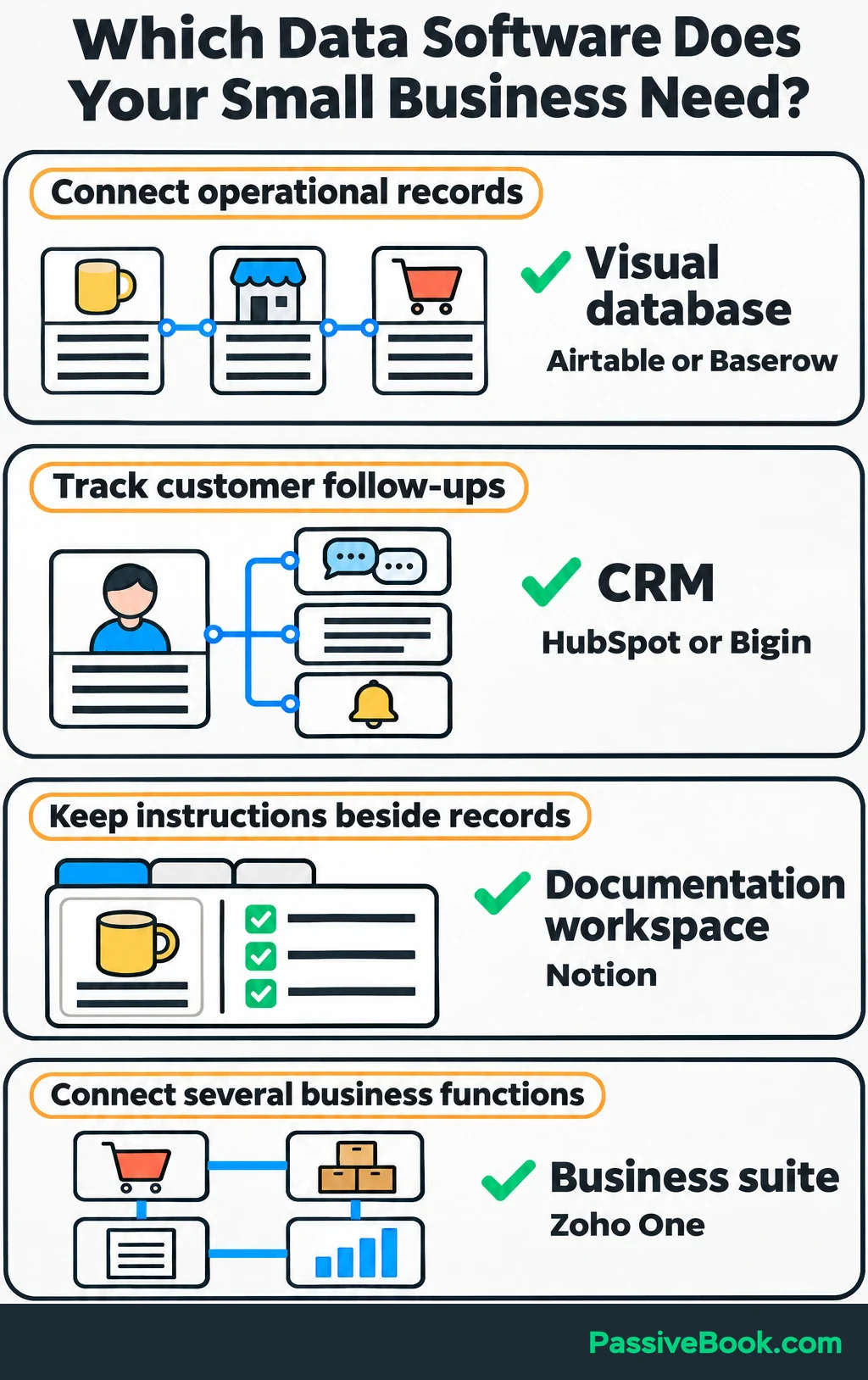
Start with the work you keep repeating. The right data management software for online business depends on whether you need to connect records, follow up with customers, organize instructions, or replace several disconnected apps.
| Your Main Problem | Type to Consider | Candidates |
|---|---|---|
| Customers, orders, products, and suppliers sit in separate lists | Visual database with linked records | Airtable or Baserow |
| Enquiries and follow-ups get lost in your inbox | Customer relationship management software, or CRM | HubSpot or Bigin |
| Records need procedures, notes, and project plans beside them | Documentation workspace | Notion |
| Sales, inventory, finance, and reporting all need attention | Connected business suite | Zoho One |
A visual database lets you connect information without pasting the same details into every row. A CRM organizes the history of a customer relationship: conversations, quotations, deals, and the next follow-up.
To make those differences concrete, imagine you run an online shop selling ceramic coffee mugs. You need to organize customers, orders, products, suppliers, and restocking tasks. We’ll use that shop throughout.
You might leave orders and stock in your shop platform, manage supplier follow-ups in a database, and keep packing instructions in a documentation workspace. Give each type of information an authoritative home so you know which version to trust.
Central access does not require moving everything into one app. Sometimes a link to the original order is more useful than another copy.
I would also keep a spreadsheet when one straightforward tracker already solves the problem. Move beyond it when maintaining relationships creates repeated work, such as updating a supplier’s details across several product sheets.
For your first system, I would choose hosted software. You can configure fields, forms, and relationships without learning to administer a database server. Professional data management does not require a technical team, but it does require clear decisions about what belongs where.
The Best Data Management Software by Use Case
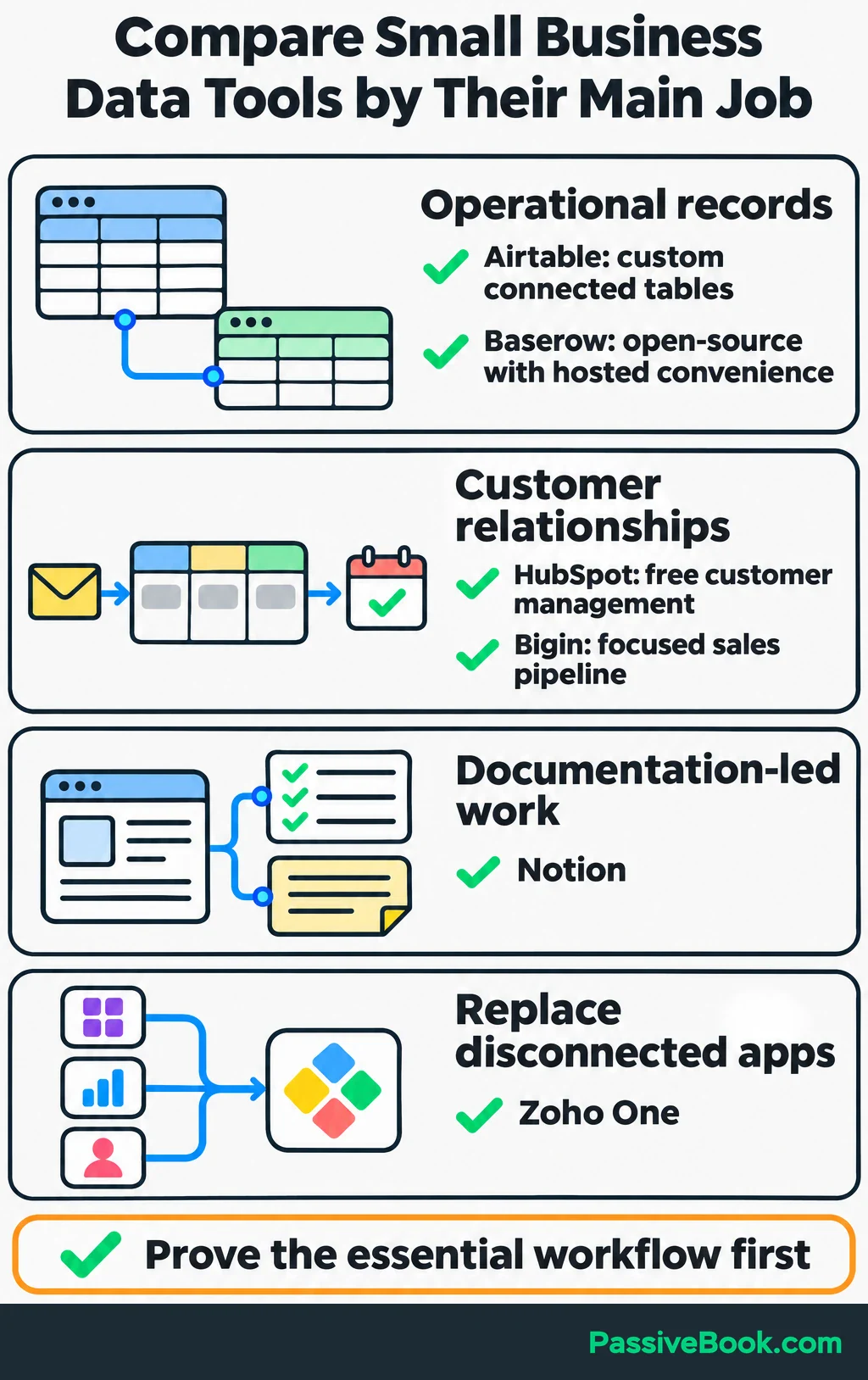
My starting shortlist is Airtable for custom operational records, Baserow for an open-source database with hosted convenience, and HubSpot for free customer management.
Bigin deserves a close look for a focused sales pipeline. I would choose Notion when documentation drives the work, and Zoho One when several existing subscriptions need replacing.
These recommendations follow documented capabilities and workflow fit. They are not hands-on reliability rankings.
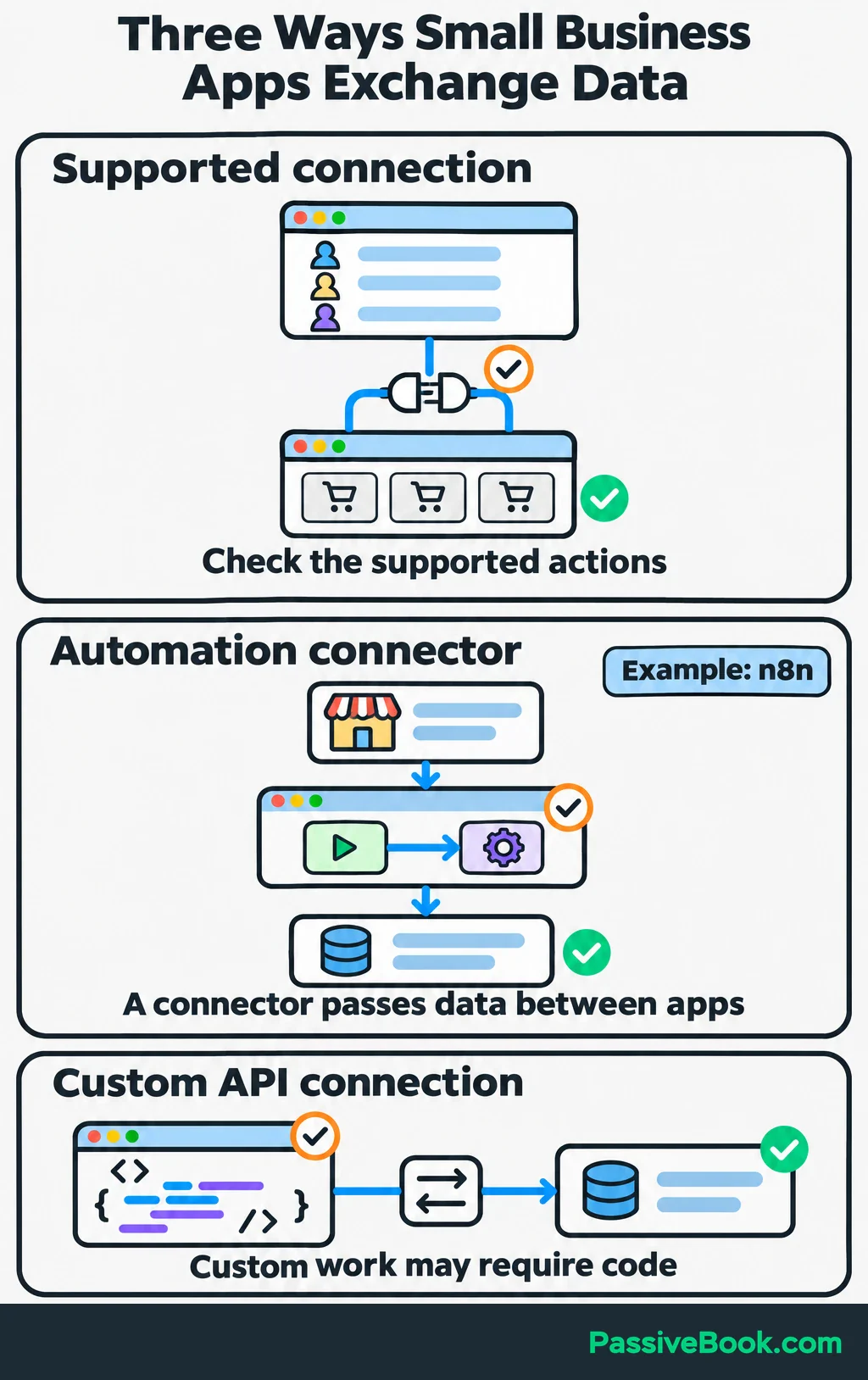
The table puts prices and key allowances in one place. Its integration column shows how each tool connects to other apps. Connectors such as n8n let you build workflows between apps. An API lets software exchange data, though building a custom connection may require code.
All prices are standard USD rates before tax, excluding introductory offers. “Annual billing” means the monthly equivalent of an annual subscription; “monthly billing” means monthly payments. The linked pages provide current terms.
| Software | Best Use | Ongoing Free Option and Its Key Limit | Relevant Paid Plan | Integration Approach | Main Upgrade Trigger |
|---|---|---|---|---|---|
| Airtable | Custom tables connecting operational records | Yes: 1,000 records per base and 100 automation runs per workspace each month | Team: $20 per billable collaborator/month with annual billing, or $24 with monthly billing; 50,000 records per base and 25,000 monthly automation runs | Supported integrations, automation connectors, or API connections | Record capacity, automation usage, or required paid features |
| Baserow | Spreadsheet-style databases with cloud or self-hosted deployment | Cloud Free: 3,000 rows and 2 GB storage per workspace | Premium: $10/user/month with annual billing, or $12 monthly; 50,000 rows per workspace. Advanced: $18 annually billed, or $22 monthly, adding role-based permissions and audit logs | Visual automations, connectors such as n8n, or API connections | Row capacity or the need for more detailed access controls |
| HubSpot CRM | Customer history, enquiries, deals, and follow-ups | Yes: two users, 1,000 contacts, and a separate combined allowance of 1,000 records across other standard object types | Standard reference: $20 per Starter Core Seat/month, excluding promotions; access depends on the products purchased, as explained in its seat catalog | Gmail and supported Outlook connections, marketplace apps, or API connections | More users or contacts, or a specific paid capability |
| Bigin by Zoho CRM | A focused pipeline for enquiries and quotations | Yes: one user, one pipeline, 500 records, and three automations | Express: $7/user/month with annual billing, or $9 monthly; three team pipelines, 50,000 records, and 30 automations | Express adds email integration and connections including Google Workspace, Outlook, and Zoho Books | Email integration, additional users, or pipeline and automation capacity |
| Notion | Records alongside instructions and project notes | Yes: unlimited blocks for individual use; blocks are limited with two or more members. A block is a piece of page content | Plus: $10/member/month with annual billing, or $12 monthly; includes custom database automations | Supported connections or API-based workflows | Team collaboration or custom database automation |
| Zoho One Standard | Replacing several sales, inventory, finance, and reporting apps | No ongoing free plan; a free trial is available | Monthly billing: All Employee at $45/employee/month, requiring licenses for every employee; Flexible User at $105/user/month for selected users. A sole proprietor can buy one license | Connections within the included applications, plus supported external integrations | Worth considering when several apps and manual transfers need replacing |
Before comparing optional features, eliminate any tool that cannot complete your essential workflow. A cheaper plan that needs daily repairs is an expensive way to save money.
Airtable: Best for Flexible, Connected Business Records
I would start with Airtable when your business needs a database shaped around its operations. It is a strong candidate when you want separate tables, useful forms, and different views of the same records.
First, separate the things you manage. Then link them.
For the mug shop, that means a product record connects to its supplier, and an order connects to its customer and purchased products. You can view products awaiting restocking without copying them into another tracker.
The important pricing detail is how records accumulate. Airtable counts records across the tables within a base, which is its container for related tables. An order and its individual product lines may occupy several records.
Collaboration also affects cost. Team charges apply to collaborators with Commenter permissions or higher, so including a helper can change the bill even if they mainly leave notes.
For external automation, Make supports connections between Airtable and Shopify. Make is a visual tool for passing information between apps, and I would consider it for a quick hosted setup. Include its subscription and usage in your budget.
Choose Airtable when custom relationships are the main requirement. Compare Baserow closely when accumulating records or collaborator charges make the required plan hard to justify.
Baserow: Best for an Open-source Database With a Hosted Option
Baserow belongs on the same shortlist as Airtable. Both address the problem of connected operational records, so you can compare them using the same task.
For the mug shop, I would test linked products, suppliers, and replenishment records. Opening a product should show who supplies it and whether a restocking task already exists.
Baserow’s code is open-source, meaning you can inspect and modify it. Its appeal here is the choice between managed cloud hosting and self-hosting. With Cloud, Baserow handles infrastructure, updates, and backups. With self-hosting, you take responsibility for those jobs. Its hosting comparison explains that division.
I would choose Cloud for a first implementation unless you already have someone maintaining servers. Open-source software can reduce dependence on one hosting arrangement, but server maintenance still needs doing.
Check permissions before choosing a plan. A larger row allowance does not help if an assistant needs restricted access and your selected plan cannot provide it.
For automation, assess the built-in visual builder first, then consider a connector for work involving other apps. I use n8n to connect tools in my own systems, but that preference is not a reason for you to take on self-hosting. Choose the setup you can maintain comfortably.
HubSpot CRM: Best for Free Customer Relationship Management
HubSpot is my first shortlist choice when the main problem is losing track of people and conversations.
For the mug shop, that might mean wholesale enquiries from cafés. Each opportunity needs a contact, conversation history, a deal stage, and a next action. A custom database can hold those fields, but a CRM gives that work a more natural home.
Its free plan is useful for trying this process with a small number of users. Connecting a supported email account helps keep correspondence beside the customer record.
I would leave stock, checkout, and fulfillment in the commerce system. Use HubSpot to answer questions such as:
- Which enquiries need a reply?
- Which quotations are still open?
- What did this customer ask for last time?
Watch the paid feature you actually need. A Core Seat provides access to purchased products; it does not unlock every HubSpot capability.
Starter sales automation also has restricted triggers and actions. If your purchase depends on creating a particular follow-up automatically, build that exact sequence during the trial. A feature called “automation” can cover a surprisingly small part of the task you had in mind.
Bigin by Zoho CRM: Best for Affordable Customer Pipelines
I would compare Bigin directly with HubSpot when you mainly need a clear pipeline and dependable follow-up habits.
Start by defining the stages a real enquiry passes through. For the mug shop, a simple wholesale pipeline could be:
New enquiry → Requirements confirmed → Quote sent → Won or lost
Each open opportunity should have a next action and a due date. Otherwise, a pipeline becomes a colorful archive of conversations you meant to continue.
Bigin’s Express plan is worth considering when its email connections and focused pipeline features cover the work. I would prefer it over a broader subscription when the broader features would sit unused.
Pay attention to record counting. Contacts are only part of the allowance: companies, pipeline entries, activities, products, and notes also count. Estimate a normal month of activity before deciding the free plan is enough.
Choose Bigin for managing customer-facing progress. If your real problem is linking products, suppliers, and restocking records in custom ways, return to the database shortlist.
Notion: Best for Business Records Alongside Documentation
Notion makes the most sense when a record needs explanation beside it.
For the mug shop, a product page could connect to photography tasks, care instructions, supplier notes, and a packing checklist. The useful result is that you can find the product information and the instructions for working with it together.
I use Notion for planning, content calendars, project management, and a knowledge base. In one planning setup, I kept the publishing checklist on a separate page from the content calendar. I could see what was due, but I still had to hunt for the instructions. Bringing those instructions into the relevant planning page made the setup more useful.
That is where I would choose Notion here: work that benefits from records and written guidance together.
Keep checkout and order processing in the shop platform. Add a connection only when it removes a specific task, such as creating a photography task when you add a product.
Portability needs attention too. You can export content, but reuploading an export does not instantly recreate a Notion workspace. If leaving would require rebuilding relationships and workflows, include that effort in your decision.
Zoho One: Best for Replacing Several Disconnected Business Apps
Zoho One is worth considering when the problem spans several business functions.
For the mug shop, that could mean wholesale sales, purchasing, inventory, finance, and reporting all needing connected applications. I would list which existing subscriptions each Zoho app would replace before starting the trial.
Compare Standard here. Essentials has different application coverage, so its lower price does not establish the cost of the setup described in this article.
The licensing choice matters as much as the app list. All Employee requires licenses for every employee, while Flexible User lets you license selected people. Calculate both against your actual team.
Connections also need checking within the applications you plan to use. For example, Zoho Inventory’s Shopify integration supports order imports and stock updates. During testing, inspect product matching, sync timing, and what happens after a failed update.
I would choose the suite when several apps earn their place and replace enough manual transfers to justify configuration. If supplier follow-ups are your only headache, start with a narrower tool. An entire business suite is quite a purchase for one overdue email.
How to Test Your Shortlist Before Paying
Test two candidates that solve the same primary job. Airtable versus Baserow is a useful comparison. HubSpot versus Bigin is another.
Trying to crown a winner between a CRM and a documentation workspace mostly tells you that they do different things.
Run One Complete Workflow
Write down the task, its starting event, and the result you expect. Then name the application that owns each field.
For the mug shop, a test could be:
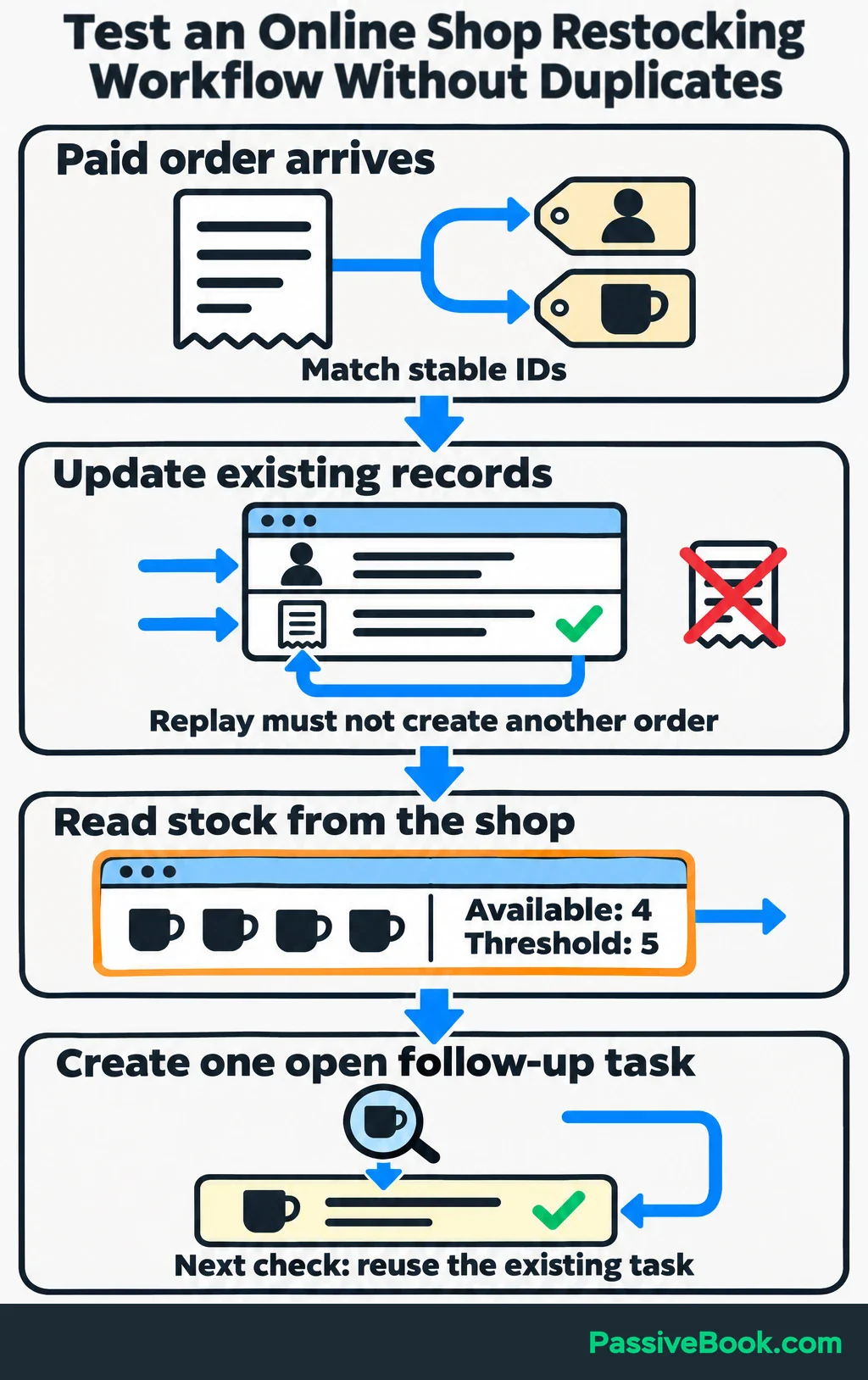
After a paid order, update the linked customer and order records. Read the shop’s stock level and create one supplier follow-up task when stock falls below the chosen threshold.
Keep the shop platform responsible for payments and stock in this test. Let the new database hold an operational copy and manage the follow-up.
Check the integration before building around it:
- Trigger: Can it detect the event you need, such as a paid order?
- Action: Can it update an existing record as well as create one?
- Matching: Does it use a stable customer, order, or product ID?
- Timing: How soon does information arrive?
- Requirements: Does the workflow need a paid plan, connector, or custom code?
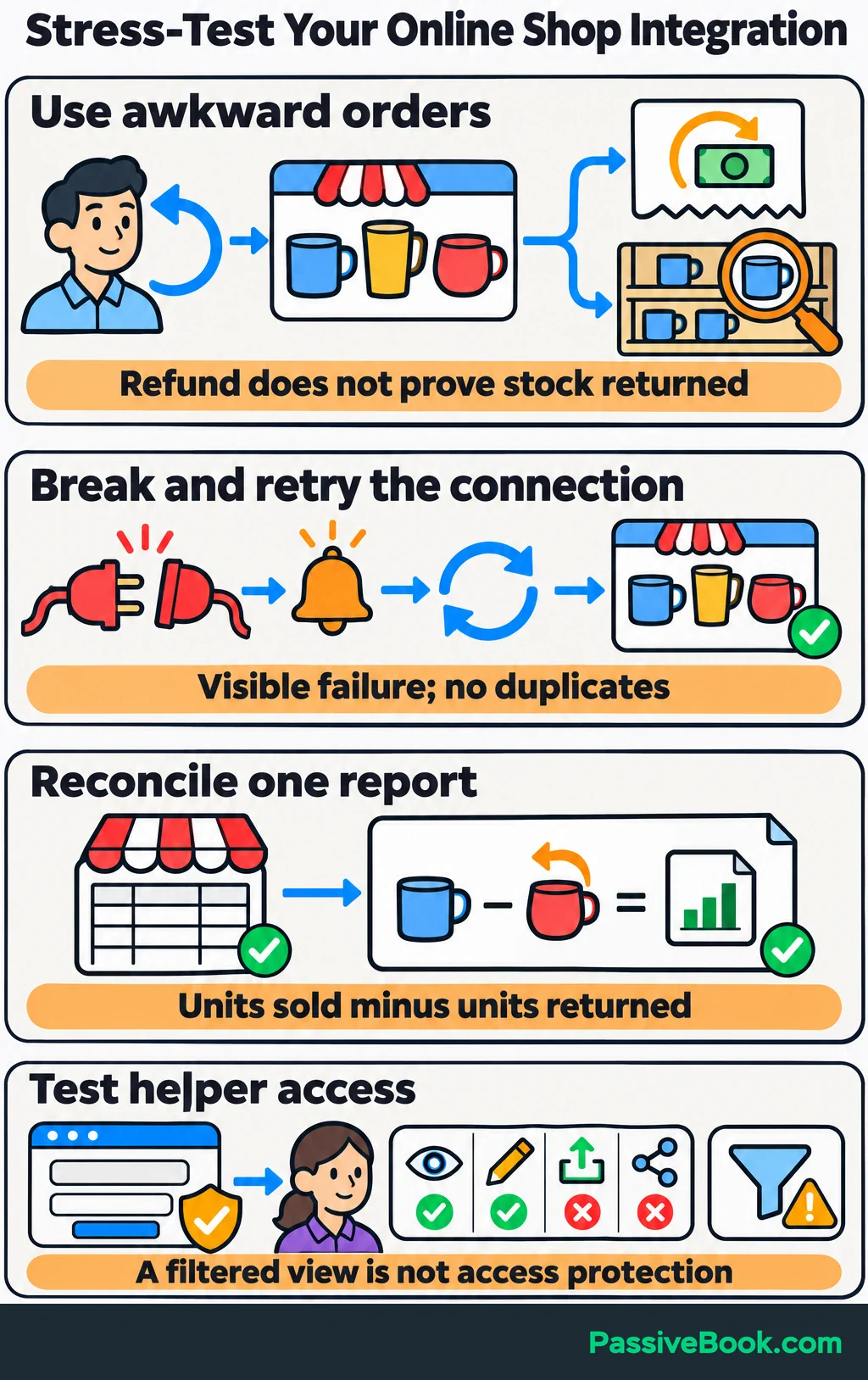
Use sample records covering a repeat customer, a multi-product order, and a refund. A new customer buying one item is the easy case.
Replay the same order event. It should update the existing records rather than create another order or subtract stock again.
Then disconnect the test integration briefly. Check whether the failure becomes visible, whether you receive an alert, and whether retrying causes duplicates. A system that fails quietly leaves you doing detective work later.
For the restocking task, use an illustrative threshold of five mugs. If the shop reports four available, the workflow should create one open task for that product. Another stock check should find that task rather than create a second one.
A refund also needs careful handling. Refunding money does not necessarily mean a mug has returned to saleable stock, so read the inventory system’s result instead of guessing from the refund event.
Build one useful report, such as units sold minus units returned during the same period, and compare it with the shop’s source records.
Before importing real customer data, enable multifactor authentication so signing in requires another check beyond your password. Then test an account with only the permissions a helper would need. Check what it can view, edit, export, and share. A filtered view should not be treated as proof that the underlying records are protected.
Calculate the Cost at Your Expected Usage
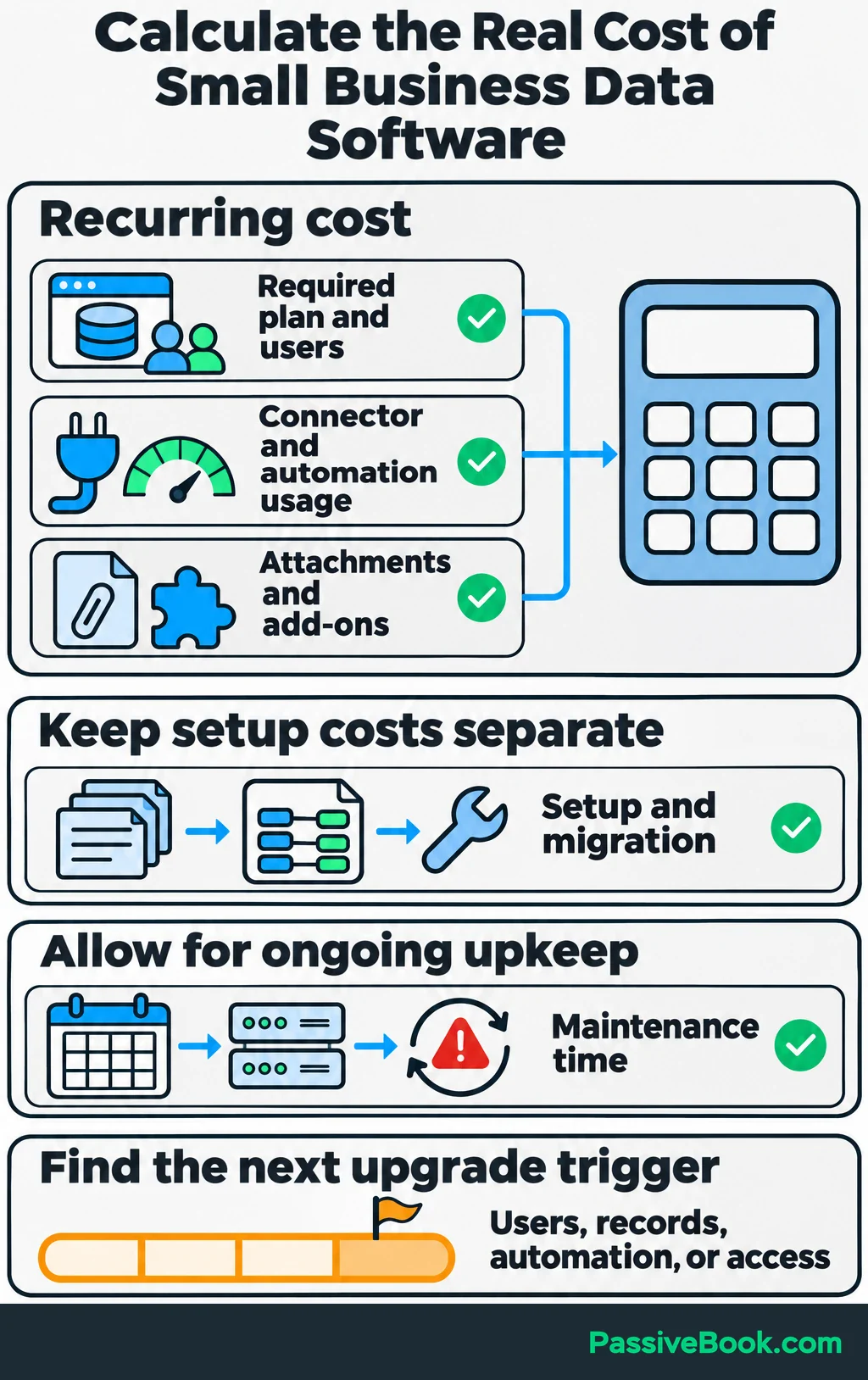
Calculate what it costs to run the workflow you tested. Include the database or CRM, required users, connector, automation usage, attachments, and add-ons.
Keep setup and migration costs separate from recurring expenses. Also allow for maintenance time, especially if you choose self-hosting or custom connections.
Count the records your design creates before comparing allowances. Suppose your sample system stores customers, products, orders, and a separate record for each product line in an order:
| Record Type | Illustrative Count |
|---|---|
| Customers | 100 |
| Products | 40 |
| Orders | 200 |
| Order items | 400 |
| Total | 740 |
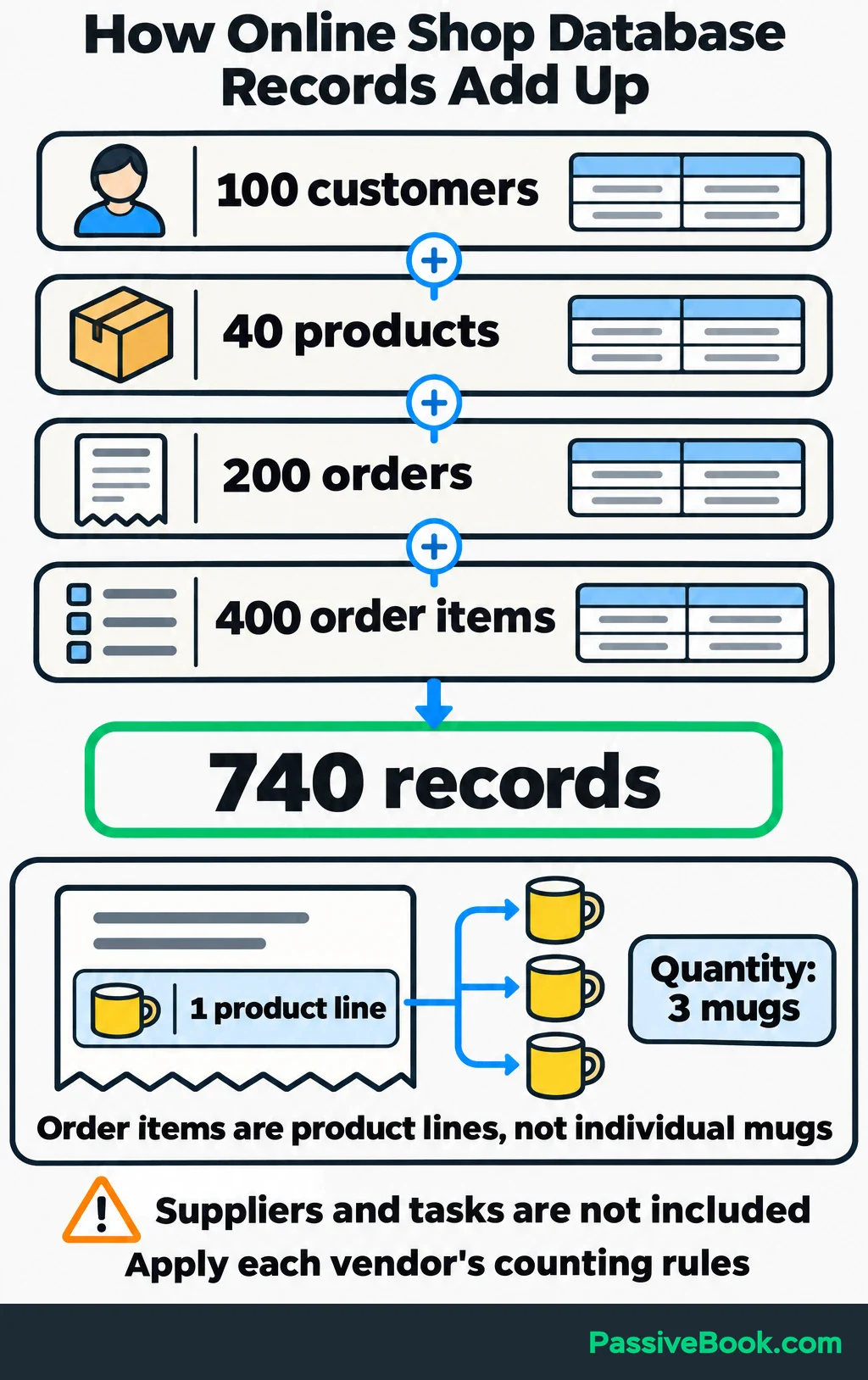
Those order items are product lines, not individual mugs. An order containing three identical mugs might have one product line with a quantity of three.
The total leaves out suppliers, tasks, and other records, so it is a starting estimate. Apply each vendor’s counting rules to the design you will actually use.
Compare billing commitments too. Using the Team rate in the table, one Airtable collaborator costs $240 for an annual subscription versus $288 over 12 monthly payments, before connectors and tax.
I would pay monthly while proving an uncertain workflow. Once it works and usage is predictable, the annual saving becomes easier to judge.
Identify the next upgrade trigger before subscribing. It might be the next user, more records, additional automation usage, or restricted access. Choose the lowest plan that completes the task and leaves room for expected growth.
The subscription price is only part of the decision, especially if some existing apps will stay. Use this tracker to compare two options against your current setup without building the calculations yourself.
Free Software Cost Comparator




Check Export and Recovery Before Committing
Export a representative sample containing linked records and attachments. Open the files and inspect what survived.
The question is whether those files can help you rebuild a working system. Check customer-to-order links, product references, dates, notes, and actual attachment files.
Baserow offers workspace exports that preserve structure and relationships for compatible Baserow instances, but member permissions and webhooks need recreating after import. Its workspace export documentation explains the coverage.
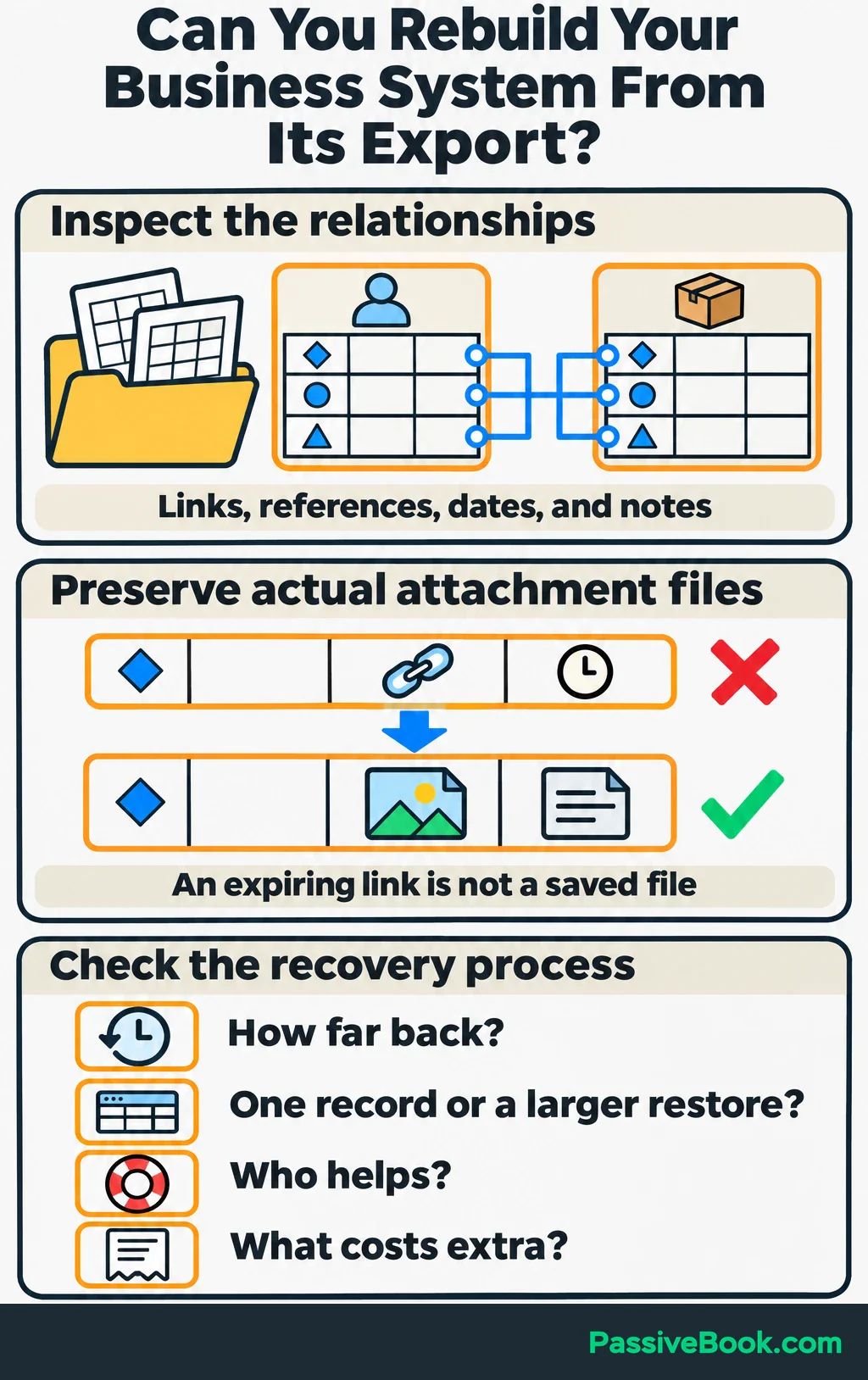
Attachments deserve a separate check. Airtable’s attachment download links expire, so keeping those links in a CSV does not preserve the files. Download the files themselves and retain a way to match them to their records.
Then check the selected plan’s recovery process:
- Recovery window: How far back can you restore deleted or changed information?
- Restoration: Can you recover one record, or must you restore a larger collection?
- Support: Who helps, and when are they available?
- Charges: Does recovery or an additional backup cost extra?
Choose the candidate that passes the workflow, reporting, access, recovery, and cost checks with an upkeep burden you can sustain. A successful import alone is not enough.
How to Make a Small, Reversible Migration
Move one workflow first. I would start with supplier follow-ups before attempting a complete operational rebuild.
Preserve an untouched copy of the original data, then prepare a working copy for import:
- Remove duplicates and standardize dates and statuses.
- Retain stable IDs so you can match imported records to their originals.
- Map each source field to its destination and document any changes.
- Import a small batch that includes ordinary records and awkward cases.
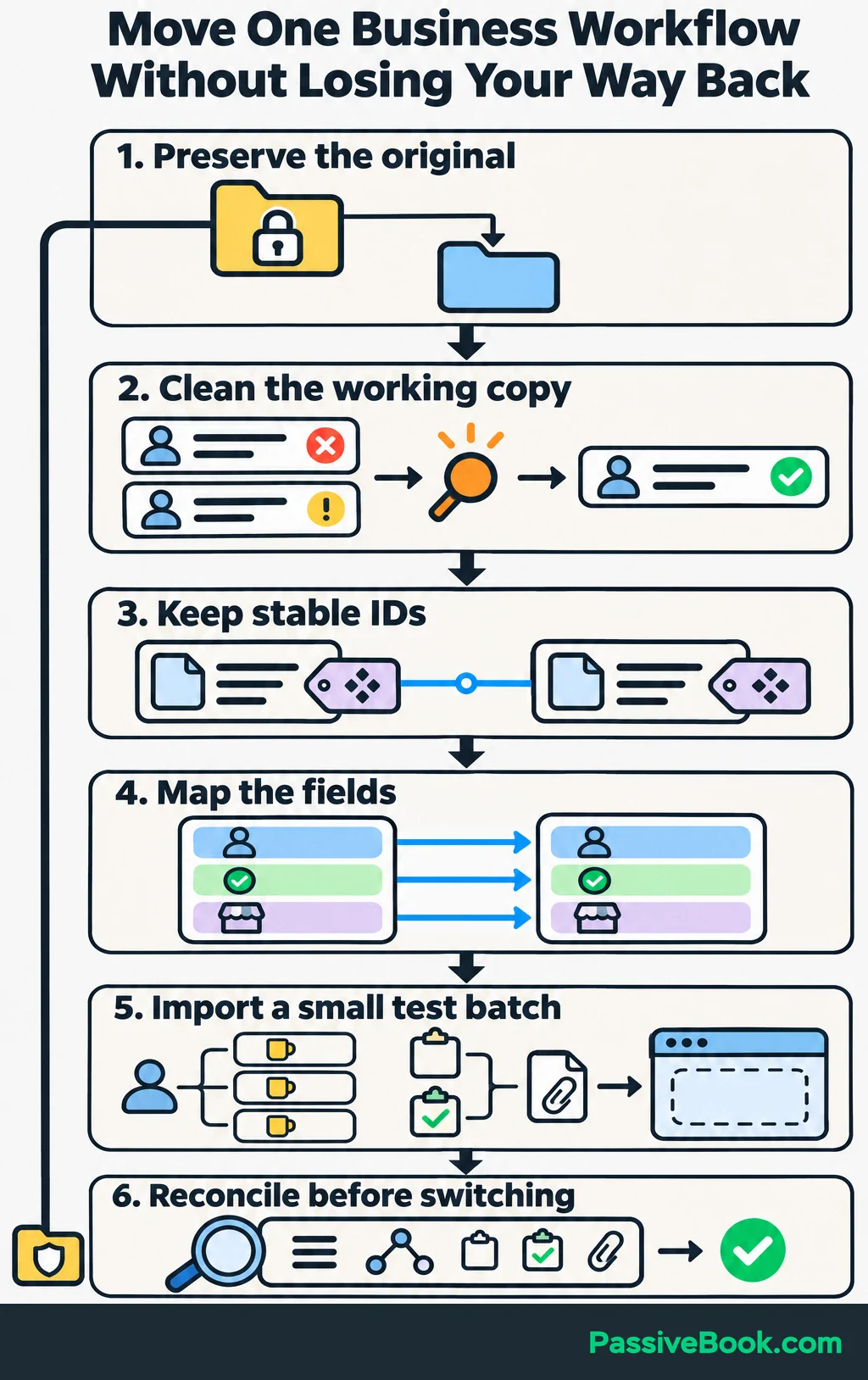
For the mug shop’s supplier follow-ups, that batch should include several products linked to one supplier, open and completed restocking tasks, and an attachment.
Compare record counts, product-to-supplier links, task statuses, and files with the originals. Then test whether a low-stock update creates one follow-up task and a repeated update avoids creating a duplicate.
When you switch, record the cutover point: when the new system becomes responsible for that workflow. Reconcile changes made during migration so an order or supplier update does not fall into the gap.
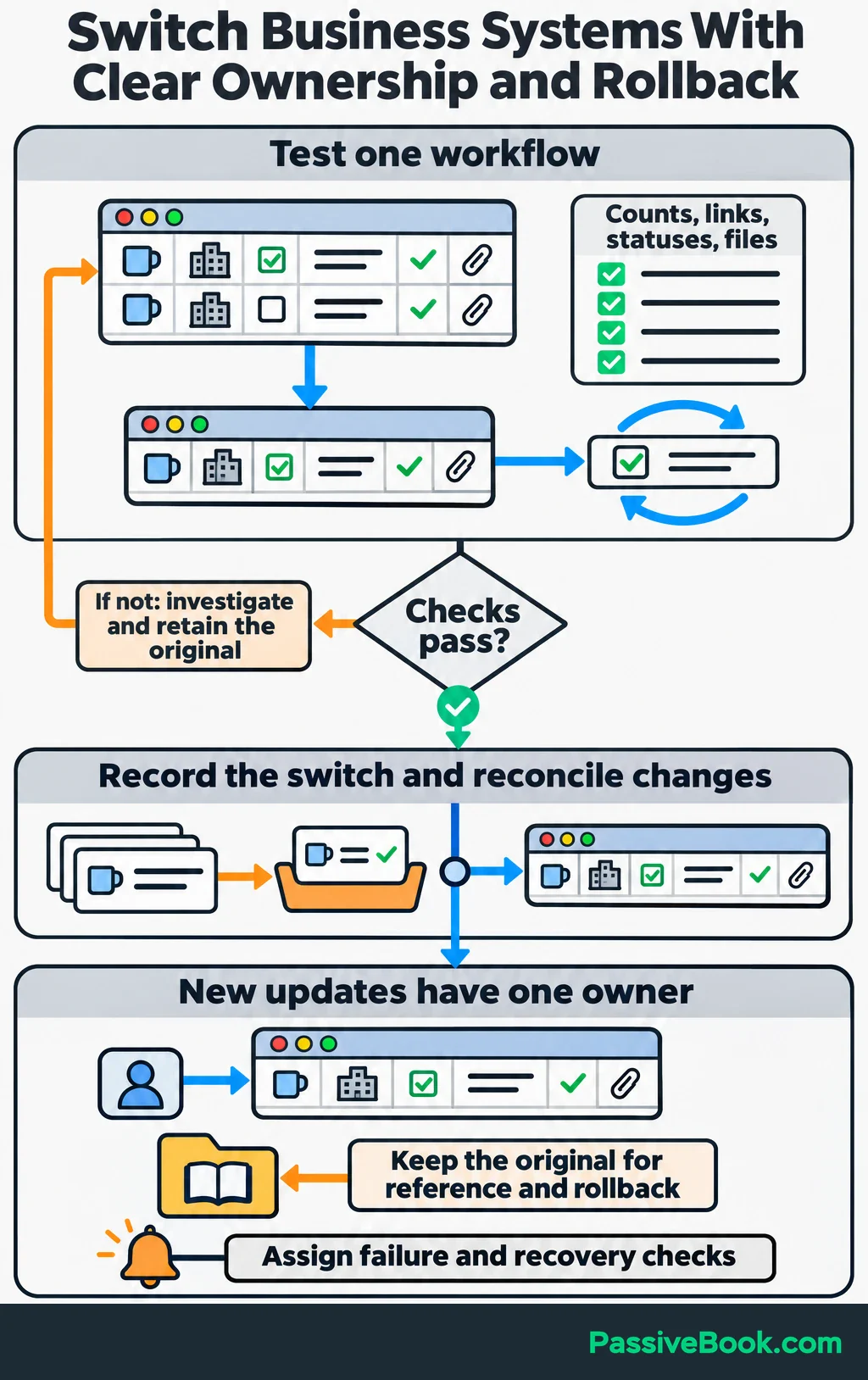
Avoid editing both systems indefinitely. Keep the original available for reference and rollback until the checks pass, and make clear which system now owns new updates.
Finally, assign responsibility for failed connections, duplicate records, and recovery checks. If you work alone, put those checks on your own calendar and route failure alerts somewhere you will notice.
Automation can remove repeated work, but someone still needs to notice when the connection breaks.
What Next?
Write down one manual task you want to stop repeating, then choose two tools that could complete it. Use sample records to test the full task before importing your live data or committing to an annual plan.
Use the social buttons to share this guide when comparing tools with a business partner or collaborator—the workflow test gives you something concrete to assess together.
Which repeated task would make the biggest difference if your data system handled it? Tell me in the comments, and bring any other questions about choosing or connecting your tools.
Share this post with your friends & followers:

