Your best episode might answer the exact question a future listener is searching for. But its webpage says “Episode 18,” offers two lines of description, and leaves the useful explanation inside the audio.
That gives visitors little reason to choose it or start listening. And recording another episode leaves the same gap on another page.
You can improve those pages without buying a stack of SEO tools. This guide shows you how to make episodes accessible to search engines, turn their advice into useful written answers, and find out which search visits lead toward listening.
Check That Search Engines Can Access Your Pages
Start with access problems. Rewriting a title can wait if the episode page is broken or hidden behind a login.
Each episode needs a permanent, public webpage with readable text and a working player. Put the title, introduction, and main explanation on the page itself. Visitors should be able to understand the subject without opening an embedded player.
Verify your website in Google Search Console, Google’s free tool for checking search visibility and indexing. Indexing means Google has added a page to its searchable collection.
Inspect your podcast homepage and one typical episode URL. Check whether Google can access them and whether they are indexed. Export any available search-performance data before editing so you have a starting point for comparison.
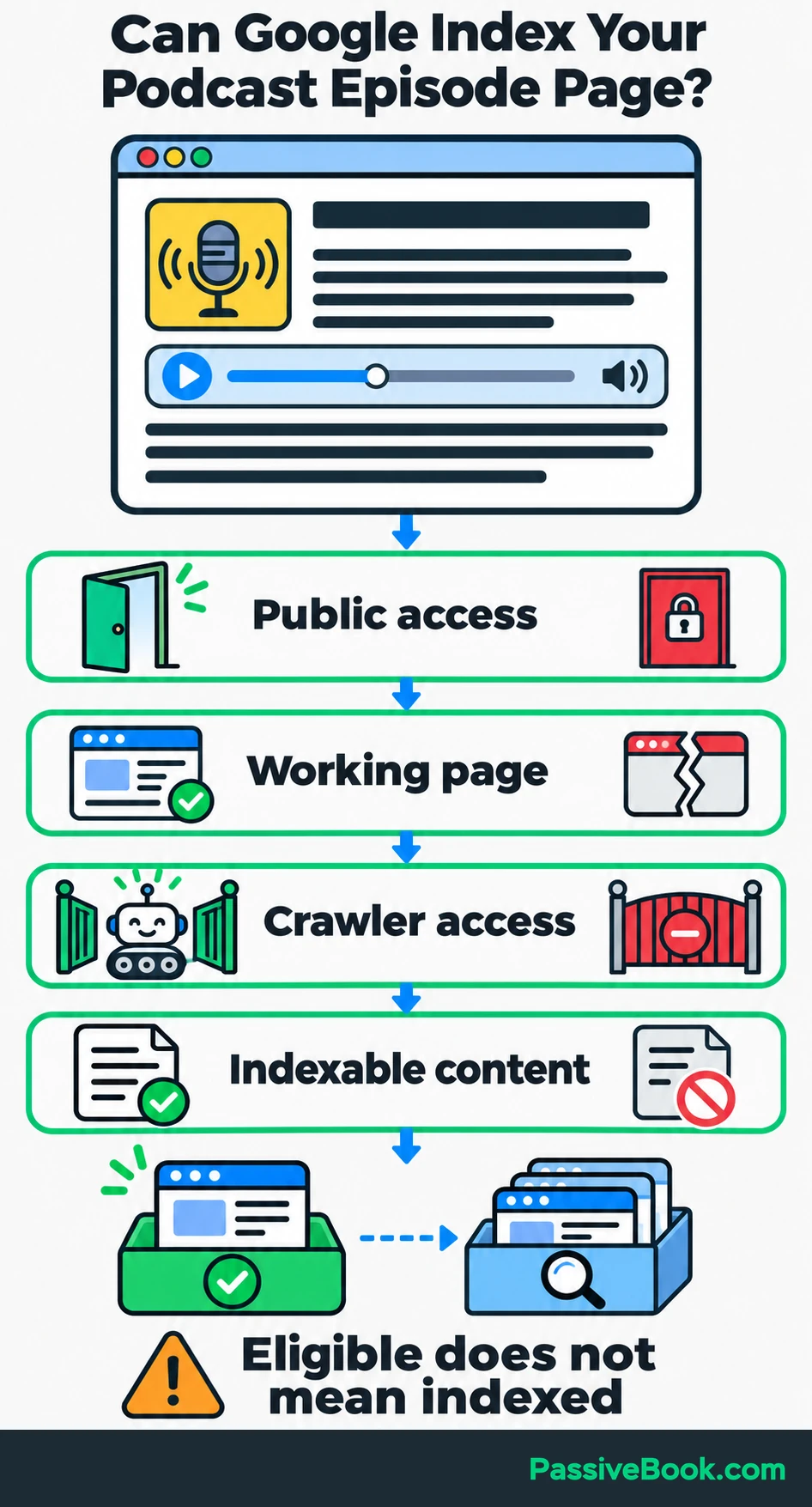
Look for these problems:
- Broken pages: Restore an episode that should still be available, or redirect a retired address to its relevant replacement.
- Login barriers: Make pages intended for search publicly accessible.
- Crawl blocks: Remove unintended rules that prevent search engines from reading those pages.
- Indexing blocks: Remove an accidental
noindexinstruction, which tells search engines to leave a page out of results.
Google’s minimum requirements include crawler access, a successful page response, and indexable content. Meeting them makes a page eligible for indexing, but does not guarantee inclusion. Google’s technical requirements
Next, submit your website’s XML sitemap in Search Console. This is a file listing website pages, rather than the podcast feed used by listening apps. Configure your website software to add new episode pages automatically.
If the same episode appears at several website addresses, choose one preferred URL. Use it in your internal links and sitemap, and check the page’s canonical setting. A canonical identifies your preferred version to search engines. Redirect duplicates you have permanently retired. Google’s canonical guidance
I would complete this pass before buying keyword software. Your existing website tools and Search Console are enough to start.
Choose a Search Question for Each Page
Give each episode page one main question to answer. Your homepage can explain the show’s broader subject, but individual episodes need a more specific purpose.
Start with the listener’s problem rather than a phrase you hope will attract traffic. Collect wording from listener messages, relevant discussions, search suggestions, and queries already appearing in Search Console.
Then search each promising phrase and read the results. Notice what people seem to need:
- Instructions: They need steps they can follow.
- A comparison: They need differences that help them choose.
- An explanation: They need a clear answer and enough context to understand it.
A recording can support any of these, but the webpage should also provide the useful answer in writing.
Throughout this guide, imagine you run Indoor Cat Play, a podcast supporting a shop selling printable cat-play planners. We’ll improve its episode about rotating cat toys. The example phrases and excerpts are illustrative, rather than researched keyword opportunities or actual episode material.
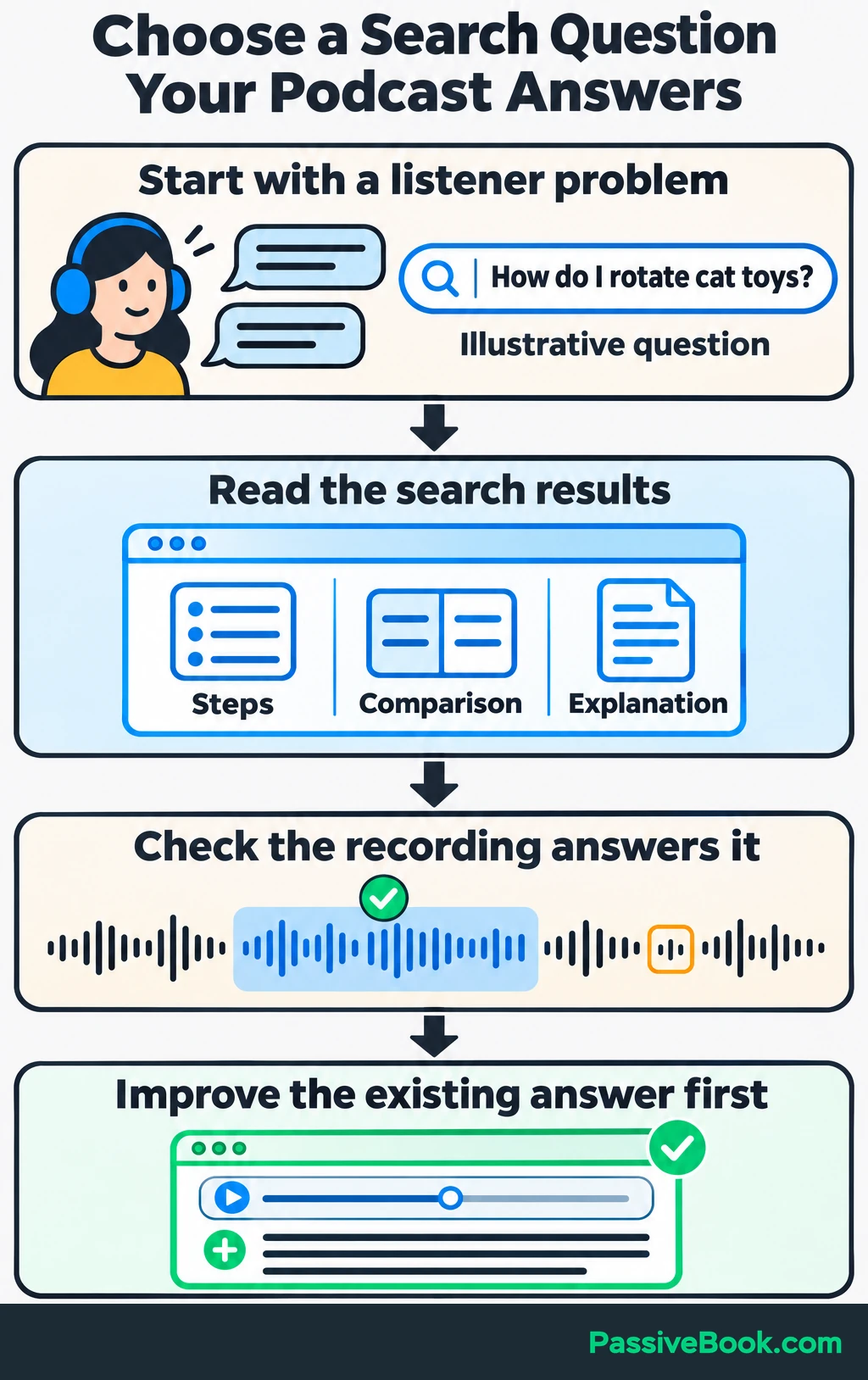
You might investigate “how to rotate cat toys.” Before choosing it, check whether the recording explains that process. A passing mention does not justify promising a full guide.
Keep your decisions in a small spreadsheet:
| Listener Question | Intended Page | Existing URL | Supporting Questions | Next Improvement |
|---|---|---|---|---|
| How do I rotate cat toys? | Toy-rotation episode | /episodes/rotate-cat-toys/ | How can I group toys? What should I record between rotations? | Add the process explained in the recording beneath the player |
Use one row per main question. If an existing page already answers it, improve that page before creating another competing version.
For future episodes, research the question before recording. It is easier to plan a useful answer than to discover afterward that the conversation never reached it.
Keyword tools can help compare ideas. If you want one, I would consider Ubersuggest for supporting estimates, but I would start with your own queries and the search results. An attractive volume estimate cannot make an unrelated episode relevant.
Build Episode Pages That Answer the Question
Once you have chosen the question, make the page deliver on it. The title sets the promise, the written answer fulfills it, and the player lets visitors hear the discussion.
Write Descriptive Titles and Search Descriptions
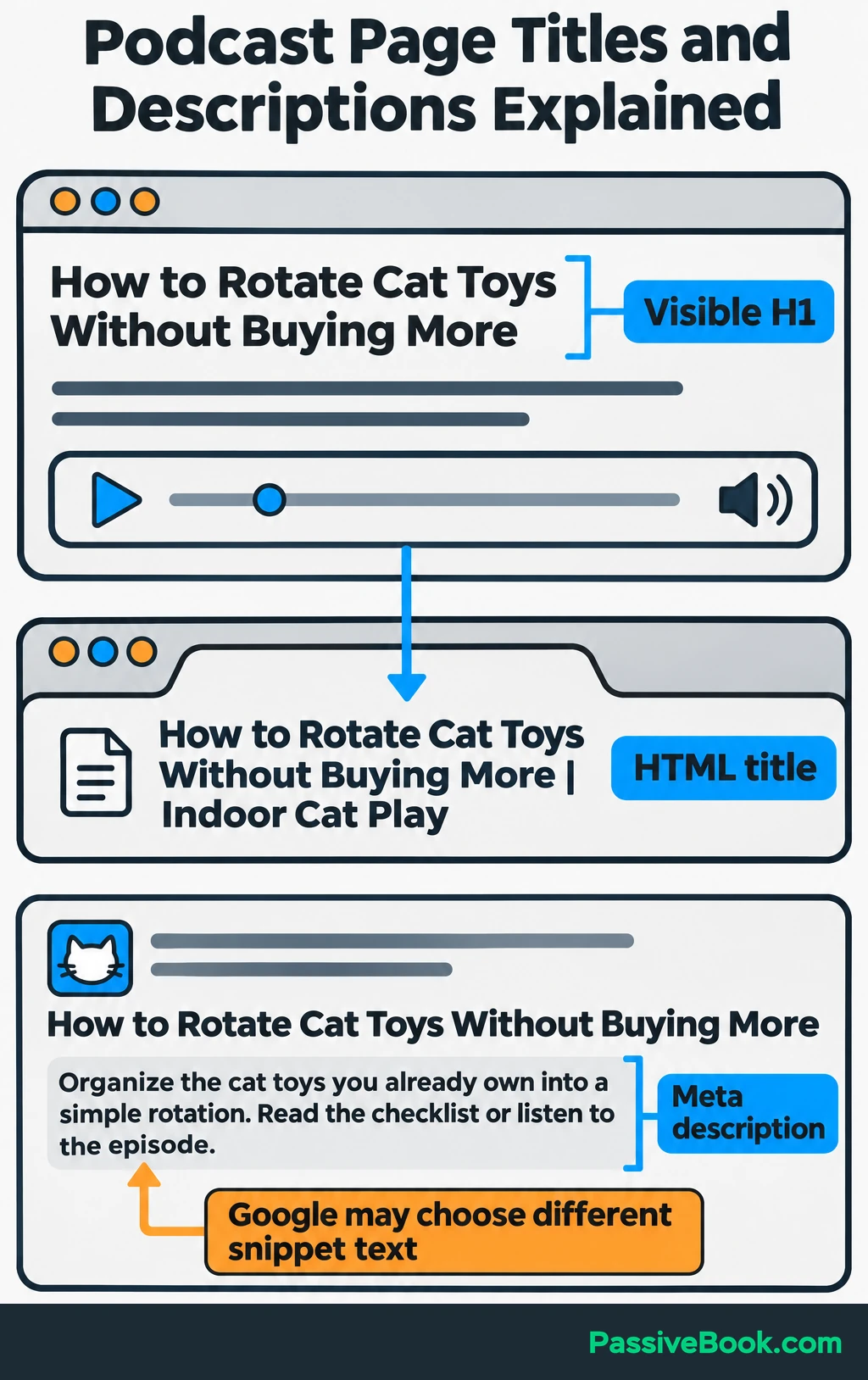
Write a clear main heading, usually called the H1, and a concise HTML title. The HTML title is the page title you set through your website’s SEO controls. Add a meta description, a short page summary that may appear beneath the title in search results.
They can be similar. Put the subject first, then add the show name, guest, or episode number when it helps.
For the toy-rotation episode:
| Page Element | Example |
|---|---|
| Visible H1 | How to Rotate Cat Toys Without Buying More |
| HTML title | How to Rotate Cat Toys Without Buying More | Indoor Cat Play |
| Meta description | Organize the cat toys you already own into a simple rotation. Read the checklist or listen to the episode. |
| New-page URL | /episodes/rotate-cat-toys/ |
“Episode 18: Playtime” gives an existing subscriber some context, but tells a new visitor very little. The revised title explains what the page helps them do.
Keep the website title and audio title consistent in meaning. They do not need identical punctuation, but they should promise the same discussion.
Write a unique meta description for each episode. Treat it as a short invitation grounded in what the page actually contains. The summary beneath a search-result title is called a snippet. Google may use your description or select other text from the page for it. Google’s snippet guidance
On WordPress, I prefer Rank Math for editing these fields. If your current platform already provides title and description controls, use those.
Choose short, descriptive URLs for new pages, but preserve established addresses during routine title updates. If a URL must change, redirect the old address and update links pointing to it.
Turn Show Notes Into a Useful Written Answer
Answer the main question near the beginning. Then organize the episode’s advice under subheadings that explain what each part covers.
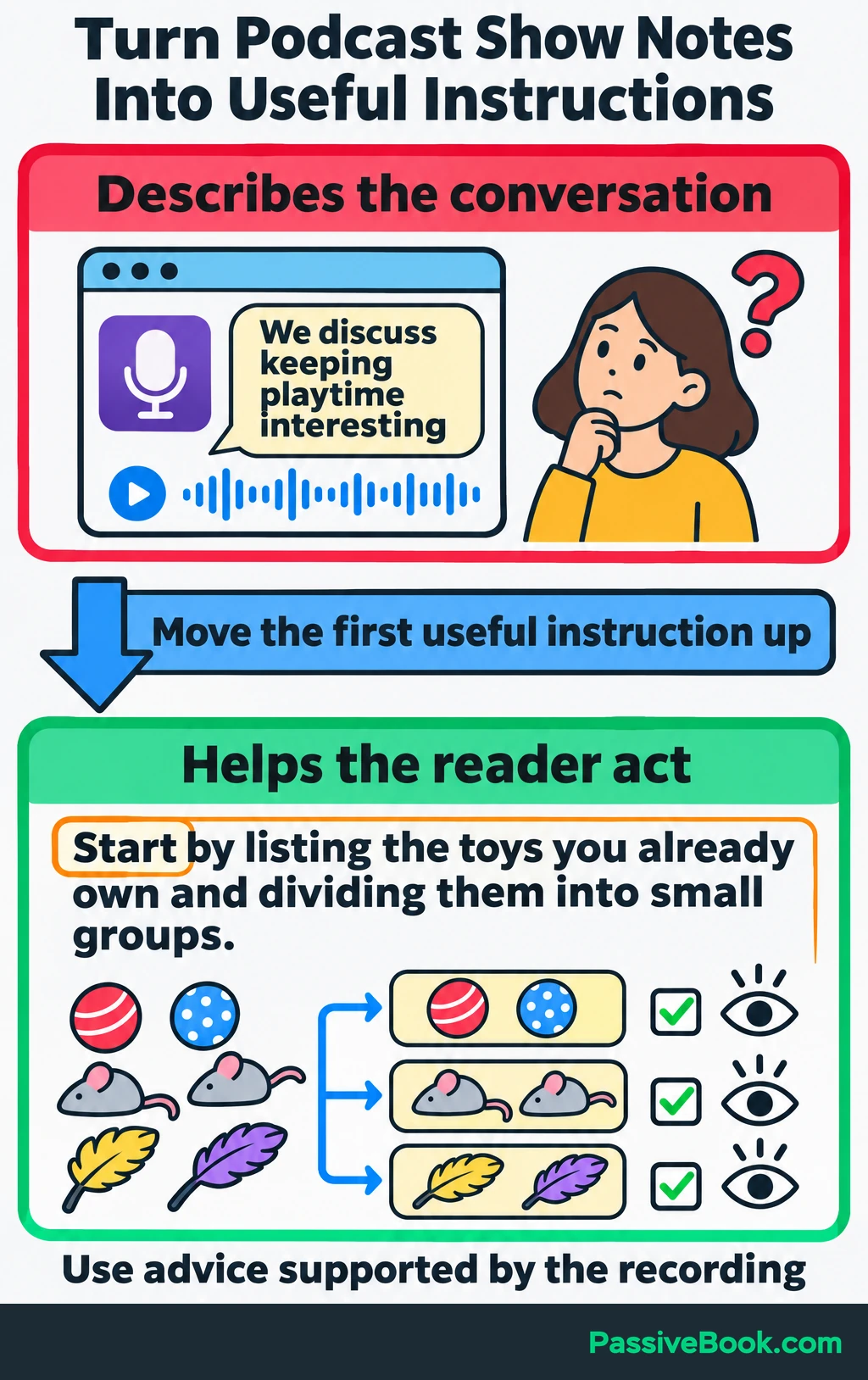
“We discuss keeping playtime interesting” describes a conversation. It does not give the visitor much help.
A stronger opening for the illustrative episode would be:
Start by listing the toys you already own and dividing them into small groups. Record which group you put out and what receives attention, then use those notes when choosing the next group.
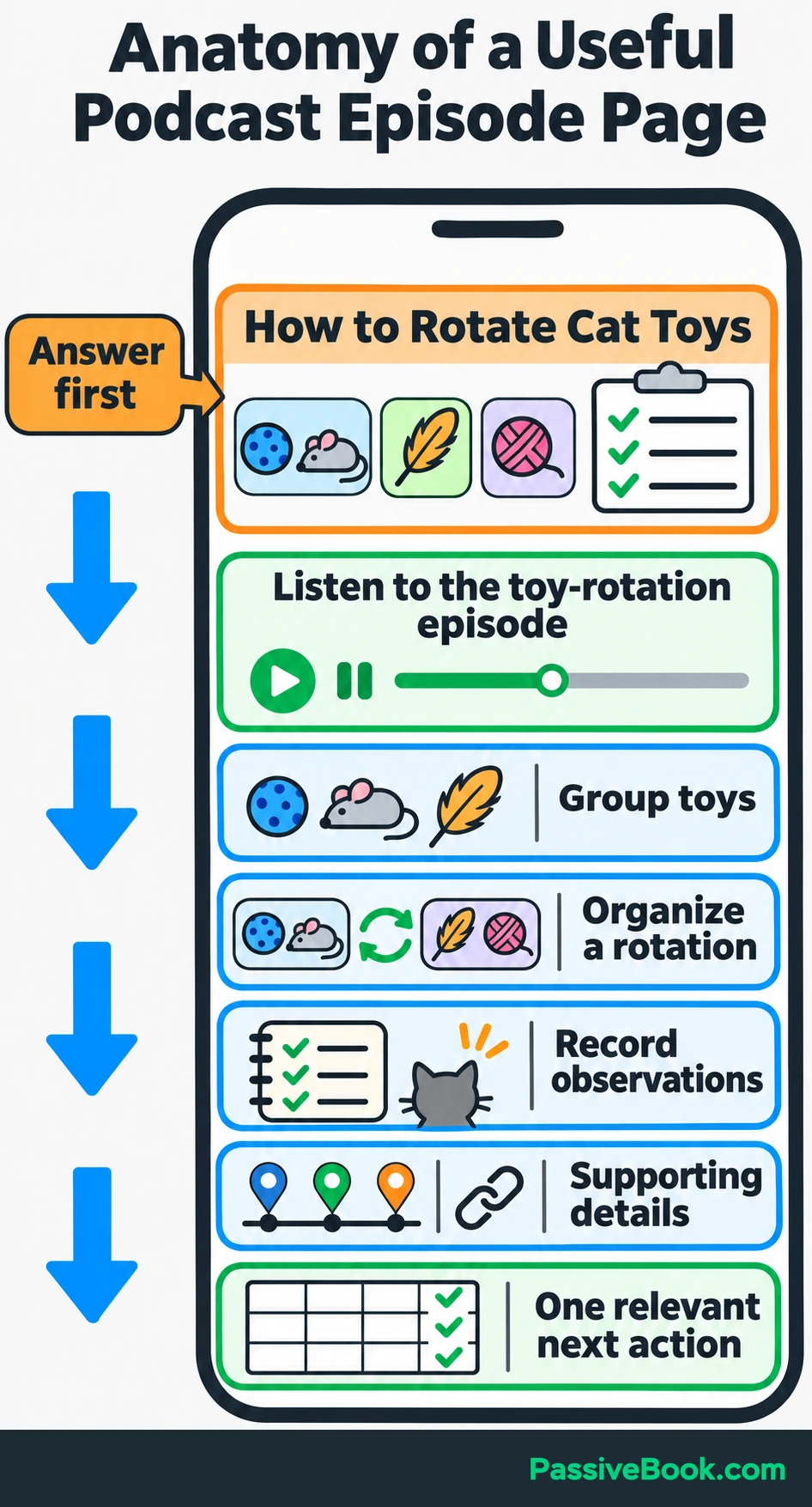
The sections below could explain how the episode groups toys, organizes a rotation, and records observations. Draw those details from the actual recording when preparing a real page.
If your notes still read like a list of discussion topics, AI Podcast Studio can turn them into an answer-led page draft. It uses the material you supply and flags gaps for you to check against the recording.
Free AI Podcast Studio




Give readers enough explanation to use the answer without pressing play. Someone who finds the written guidance helpful has a clear reason to explore the conversation.
I caught myself making a similar mistake while editing a blog article: my introduction listed everything the article covered, but the first useful instruction was several paragraphs below it. I moved that instruction up and kept the extra explanation underneath. That is the editorial check I would apply here: where does the page first help the visitor do something?
Place the player near the introduction with a clear label, such as “Listen to the toy-rotation episode.” Keep it easy to find without letting oversized artwork push all the useful text down the page.
Add supporting details where they help:
- Timestamps: Point to substantial topics and check them against the published audio.
- Guest context: Explain the guest’s relevant experience using verified details.
- Resources: Link to the tools, references, or downloads actually discussed.
Let the answer determine the length. A straightforward process may need little explanation, while a detailed comparison needs more.
After the useful content, offer one relevant next action. For Indoor Cat Play, that could be viewing the printable planner used to organize a rotation. Explain what it helps with rather than dropping a sales button into the page without context.
Add an Accurate, Readable Transcript
A transcript gives visitors access to the spoken detail without requiring audio playback. Publishing it as webpage text also makes that detail available for search engines to read.
Keep it alongside the concise written answer. The two formats serve different needs: show notes organize the lessons, while the transcript preserves the conversation.
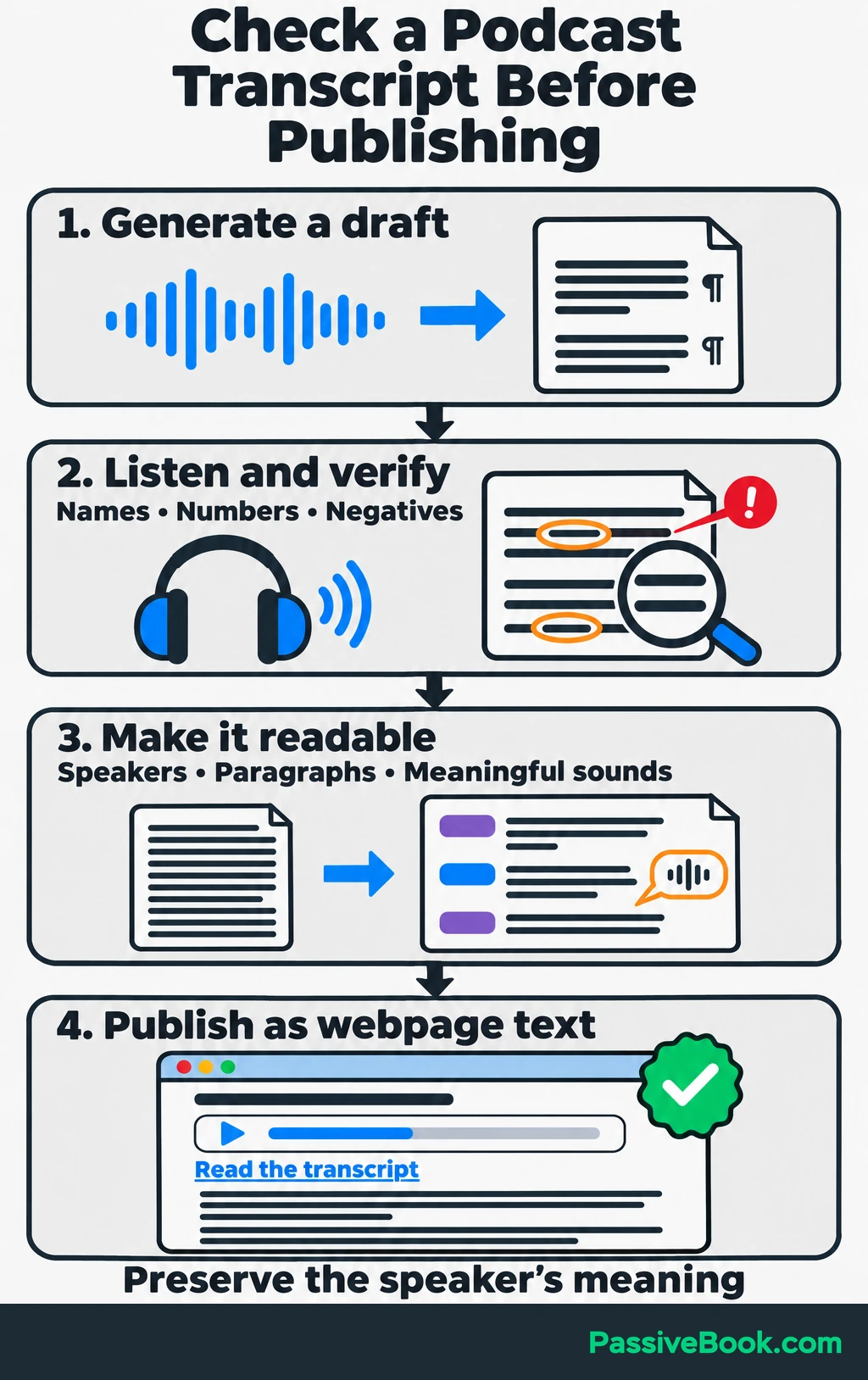
Generate a draft from the recording, then listen back while checking:
- Names and terms: Correct people’s names, product names, and specialist wording.
- Numbers and meaning: Pay close attention to quantities, negatives, and sentences where a small error changes the advice.
- Speaker changes: Make clear who said what.
- Meaningful sounds: Include non-speech information needed to understand the recording.
Break long blocks into paragraphs and use speaker labels when needed. Give the transcript a clear heading, and add a “Read the transcript” jump link near the player.
For prerecorded audio-only episodes, the Web Content Accessibility Guidelines (WCAG) call for a transcript with equivalent information at their baseline level, Level A. A short promotional summary does not provide that equivalent. W3C’s transcript guidance
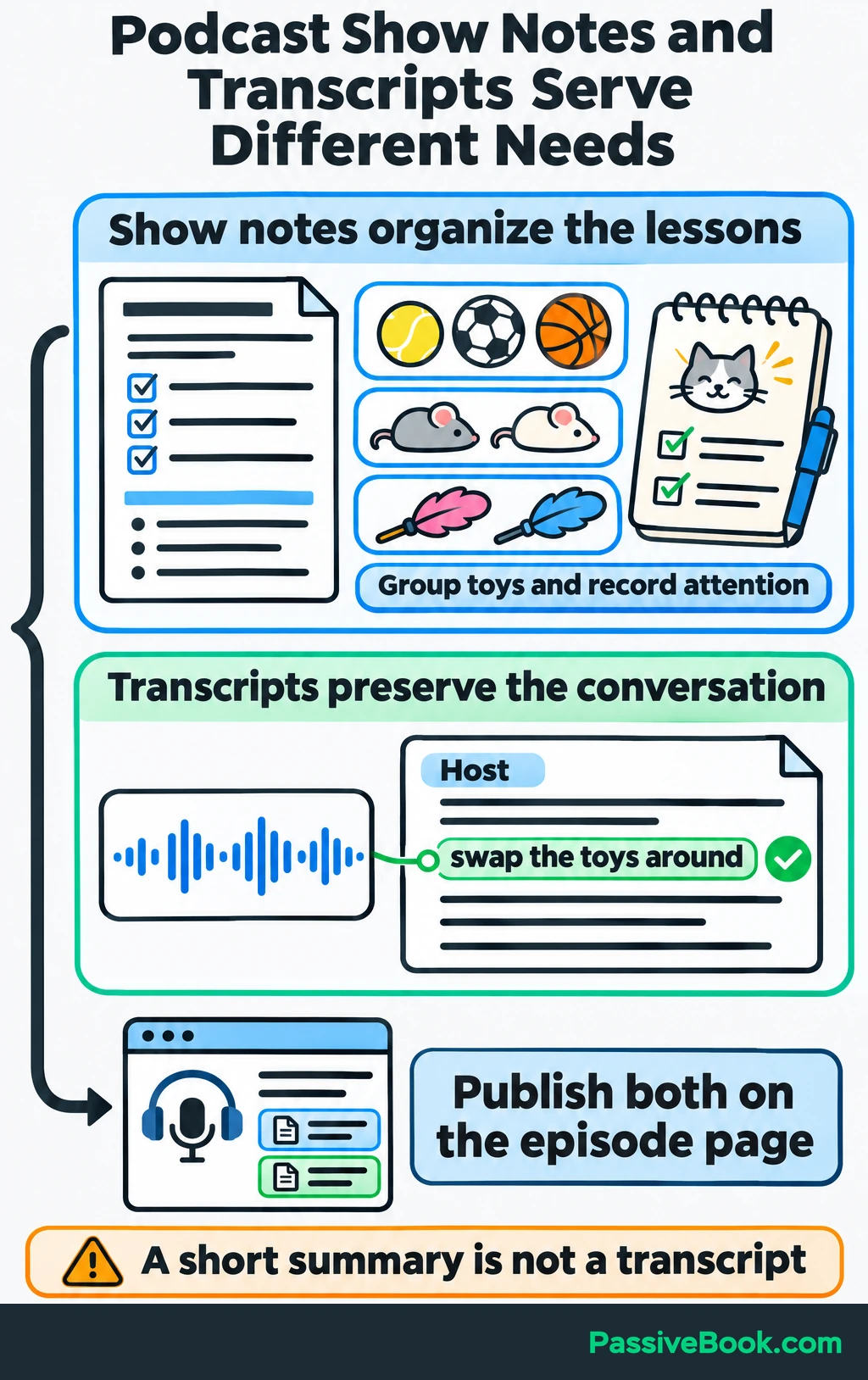
I would publish the transcript directly on the episode page so readers can move between the summary, player, and full conversation.
Keep the speakers’ wording faithful. If the host says “swap the toys around,” do not quietly replace it with “how to rotate cat toys” to add another keyword. You can explain the topic clearly in the heading and show notes without rewriting what someone said.
AI can produce the first draft, but checking it remains part of publishing. A transcript that reverses a speaker’s advice creates a much larger problem than a missing keyword.
Connect Your Podcast Homepage and Related Episodes
Your homepage should help a new visitor understand the show and choose where to start.
Put the show name and a plain description in visible text. Introduce the hosts briefly, provide a route to the episode archive, and make listening-platform links easy to find.
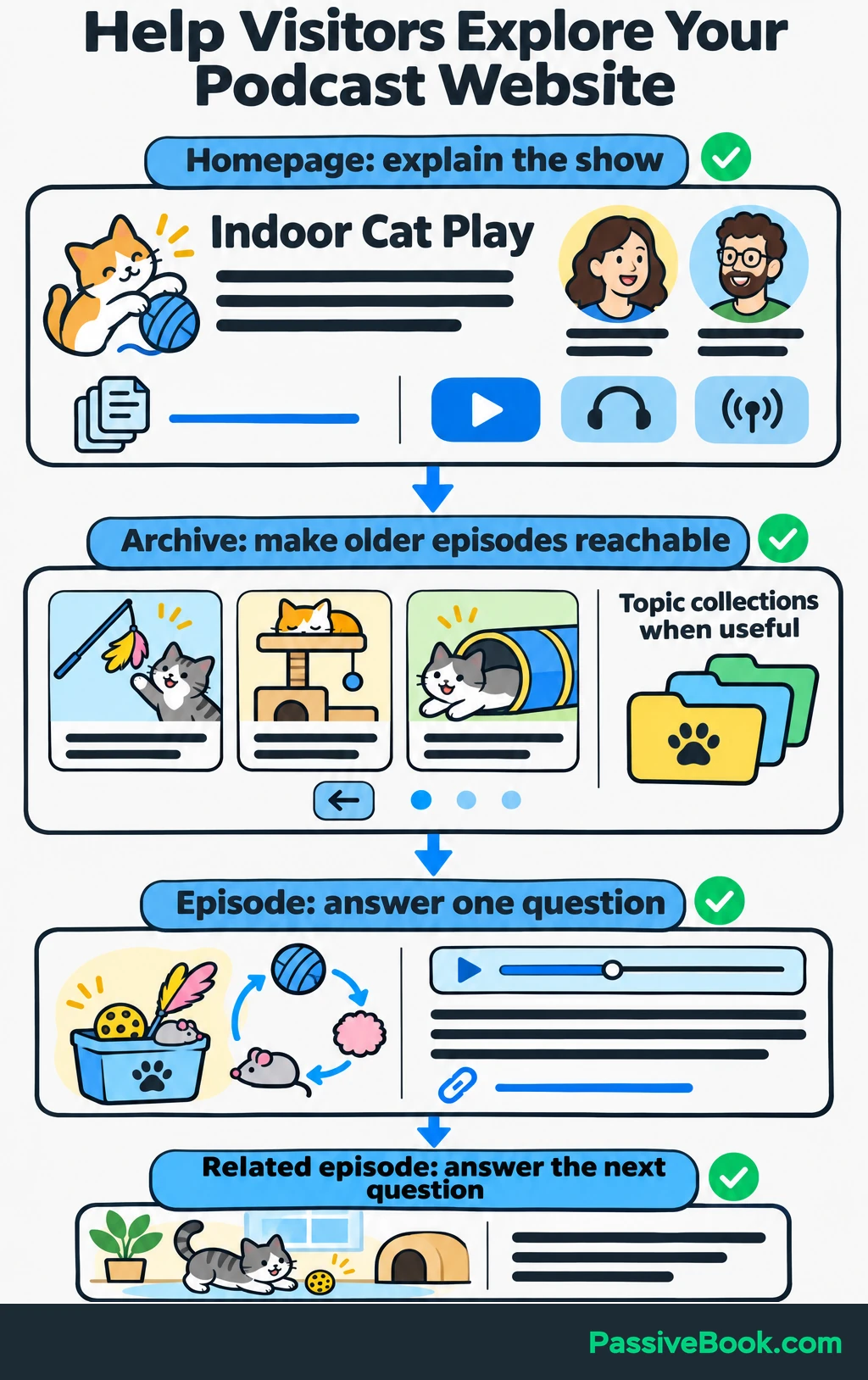
For Indoor Cat Play, a short description could read:
Practical conversations about organizing play for indoor cats, with episode guides you can read or listen to.
Build an archive with ordinary links to individual episode pages. Make older episodes reachable beyond the latest releases. If your catalog becomes difficult to browse, add useful topic collections rather than leaving every choice to a long date-based list.
Within episodes, link to a related page when it answers the next question. Google uses crawlable links to discover pages and understand their relevance. Descriptive link text helps explain the destination. Google’s link guidance
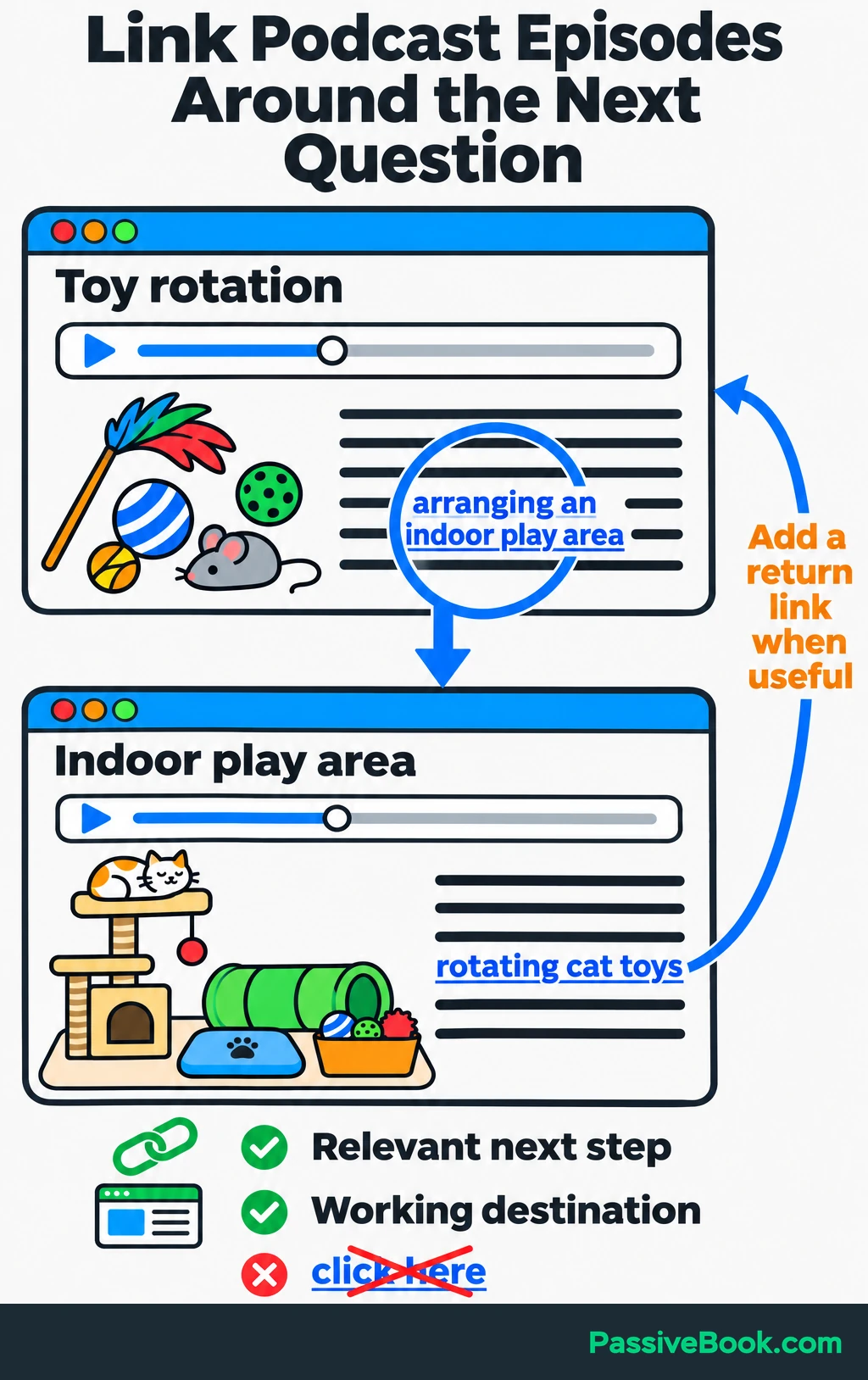
For example, the toy-rotation page could point readers toward an existing episode with the words “arranging an indoor play area.” That is more useful than “click here.”
Read the older page too. If toy rotation fits naturally into its explanation, add a link back. Repair broken links during the same pass.
I would choose a few useful connections over a footer stuffed with every episode title. Each link should give the visitor a sensible next step.
Make Episode Pages Fast and Usable on Phones
Test one typical episode page on your phone before changing the whole catalog.
Read the introduction, start and pause the audio, open the transcript, and follow a listening-platform link. Notice anything that blocks those actions: tiny controls, overlapping pop-ups, shifting artwork, or a player that never becomes usable.
Then run the page through PageSpeed Insights. Its performance checks can help identify loading problems. Core Web Vitals measure loading, responsiveness, and visual stability, so use them to investigate the experience behind the scores. Google’s Core Web Vitals guidance
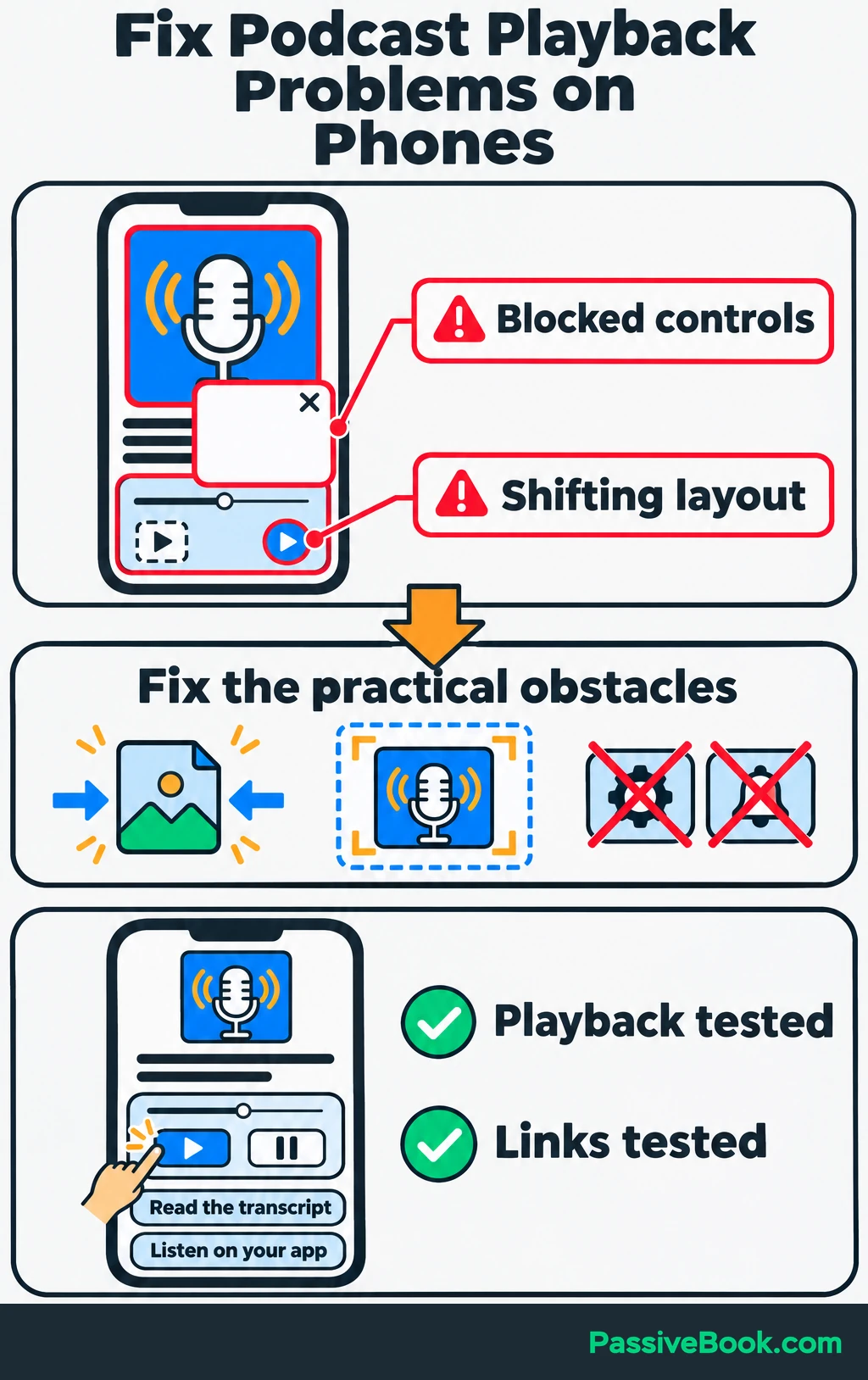
Start with the largest practical problems:
- Oversized artwork: Resize images for their display size and compress them.
- Moving content: Reserve space for artwork and players so controls do not jump while loading.
- Extra scripts: Remove widgets and embeds that do not help visitors.
- Early audio downloads: Where your player allows it, avoid fetching the full recording before someone chooses to listen.
- Lower-page embeds: Delay loading them until needed, then check that they still work.
Fix shared template problems once so future episodes benefit too.
I would not spend an afternoon chasing a perfect score while the play button fails on a phone. Make the page work, address the reported obstacles, and retest playback after each meaningful change.
Earn Relevant Links to Useful Episode Pages
Give other websites a useful reason to reference an episode.
A clear explanation, original worksheet, or well-organized resource list can make the page valuable beyond its audio. Choose an addition that supports the discussion instead of creating a download purely to ask for links.
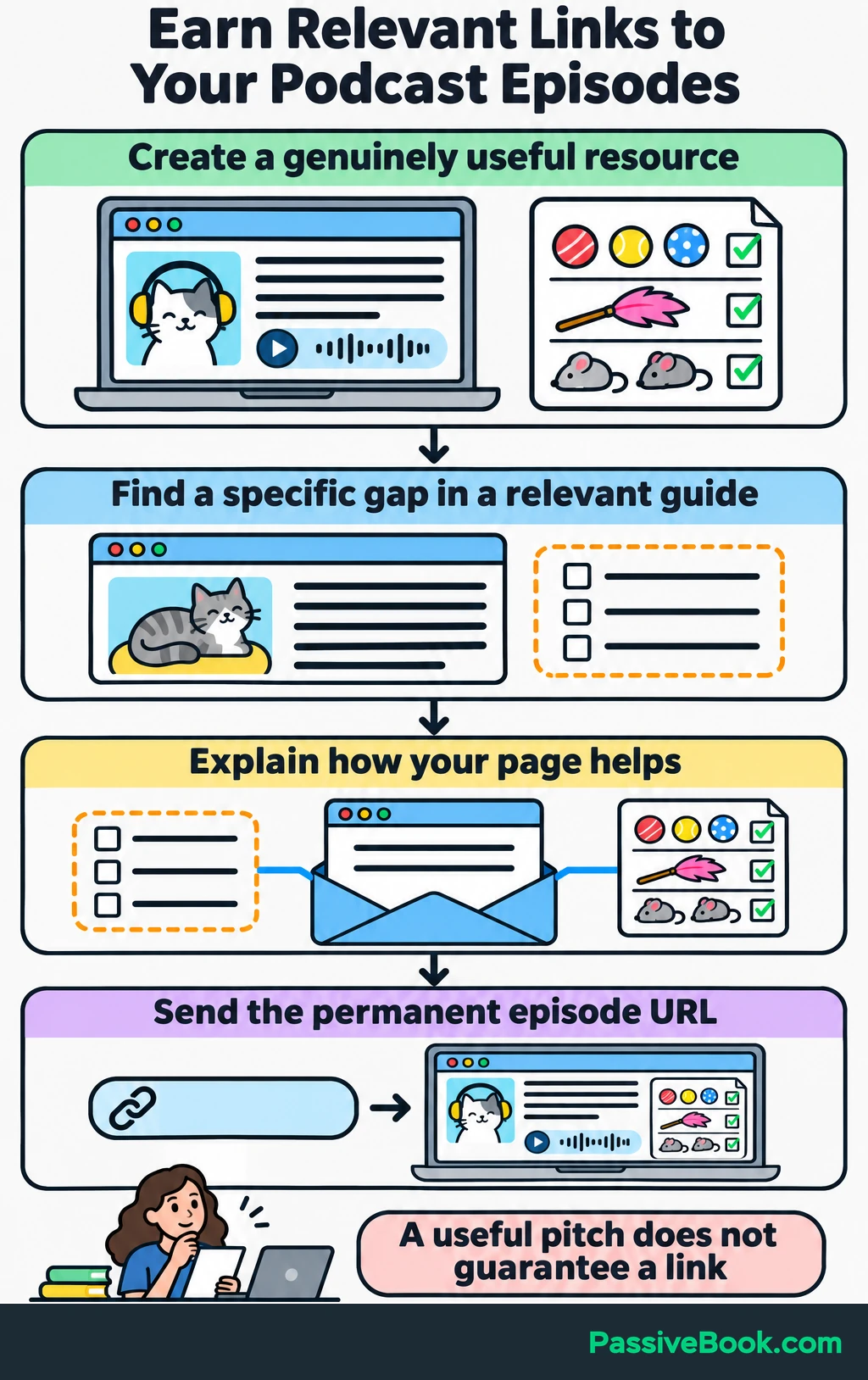
For the toy-rotation episode, a simple worksheet could let readers list toy groups and record their observations. A publisher maintaining an indoor-cat enrichment guide might find that useful if the guide leaves that planning question unanswered.
When approaching a relevant publisher, identify the specific gap and explain how the episode page fills it. Send the permanent page URL so readers can reach the written answer and recording together.
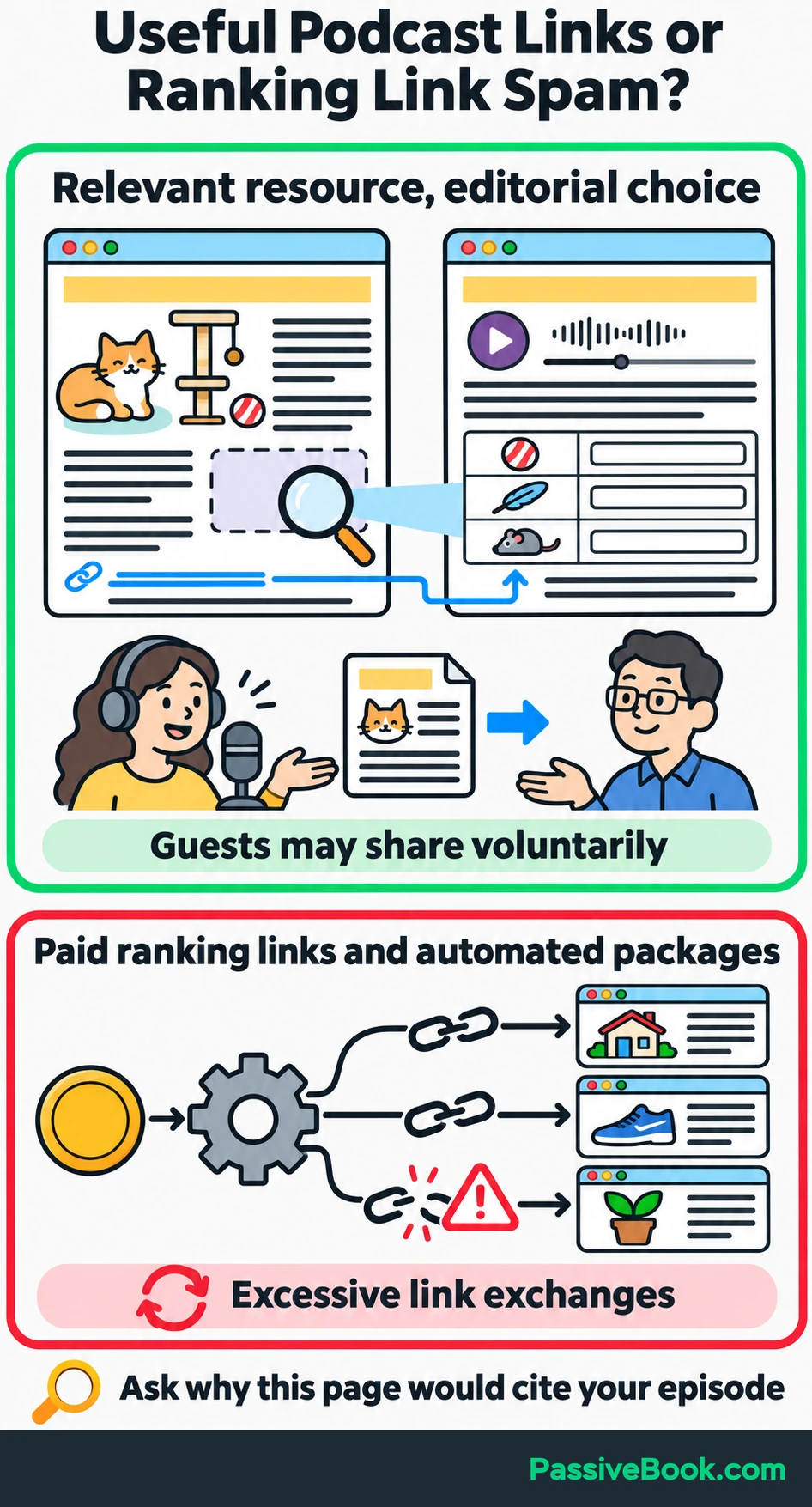
For guest episodes, send guests the published page and a concise description they can use when sharing. Make it easy without making a link a condition of appearing.
I would skip automated backlink packages and offers to buy ranking links. Google identifies paid links intended to manipulate rankings, automated link creation, and excessive link exchanges as link spam. Google’s link-spam policy
A relevant page that helps someone finish their guide is a better starting point than a spreadsheet of unrelated websites.
Use Search and Listening Data to Choose the Next Improvement
Once pages are accessible and useful, use their results to decide where your next hour goes. Keep a small review routine instead of rewriting the entire archive whenever traffic dips.
Find the Next Page to Update
In Search Console, review individual pages and the queries associated with them.
Start with three signals:
- Impressions: How often your pages appeared in search results.
- Clicks: How often people clicked through from those results.
- Click-through rate: The share of those impressions that produced clicks.
These are search-performance measures, not counts of listeners. Search Console’s metric definitions
Separate searches containing your show name from searches about episode topics. Someone searching for Indoor Cat Play already knows the name. Someone finding the toy-rotation episode through a topic question may be discovering it for the first time.
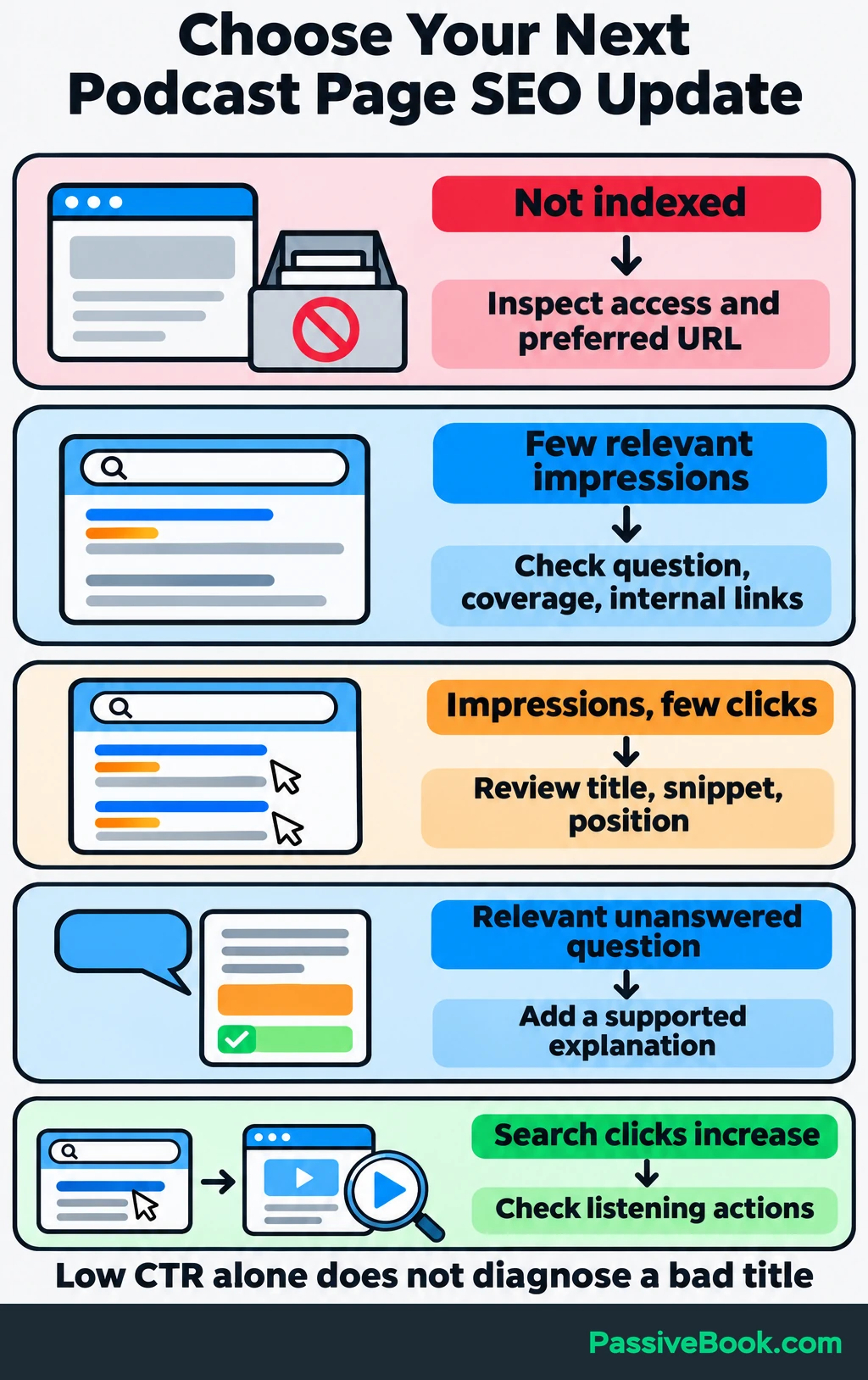
Match the next action to the evidence:
| What You See | What to Check Next |
|---|---|
| An episode is not indexed | Inspect its access, indexing instructions, and preferred URL |
| An indexed page has few relevant appearances | Recheck the chosen question, the answer’s coverage, and links from related pages |
| Relevant impressions produce few clicks | Review the title and visible snippet alongside competing results, and consider position |
| Queries expose a relevant unanswered question | Add an accurate explanation if the recording or verified supporting material supports it |
| Search clicks increase | Check whether those visits lead to listening actions |
A low click-through rate does not automatically mean the title is bad. Position and the other results people see also affect the choice.
Compare equivalent periods with the same filters, and allow more time when numbers are small. Record substantive update dates so later comparisons have context.
Add indexing status, impressions, clicks, last update, and next action to your keyword spreadsheet. I would begin with a monthly review and prioritize existing episodes already attracting relevant impressions.
Track Whether Search Visitors Take a Listening Action
Search traffic matters, but you also need to know what visitors do after arriving.
Google Analytics, which tracks website visits and actions, can record clicks to listening services. To record those clicks, turn on Outbound clicks under Enhanced measurement, then test your listening links. Filter the recorded clicks by the listening services’ destination URLs so resource and shop links do not count as listening actions. Google Analytics outbound-click measurement
For Indoor Cat Play, filter to visits that began on the toy-rotation page from unpaid search, then review listening-link clicks within those visits. Use the traffic source recorded for each visit, rather than the source of the visitor’s first-ever visit.
Keep the signals distinct:
| Signal | What It Shows |
|---|---|
| Organic landing session | A visit began on the page through unpaid search |
| Listening-platform click | The visitor followed a link toward a listening service |
| Verified player-start event | The embedded player reported playback starting |
| Podcast-host download | The host recorded a download under its own measurement rules |
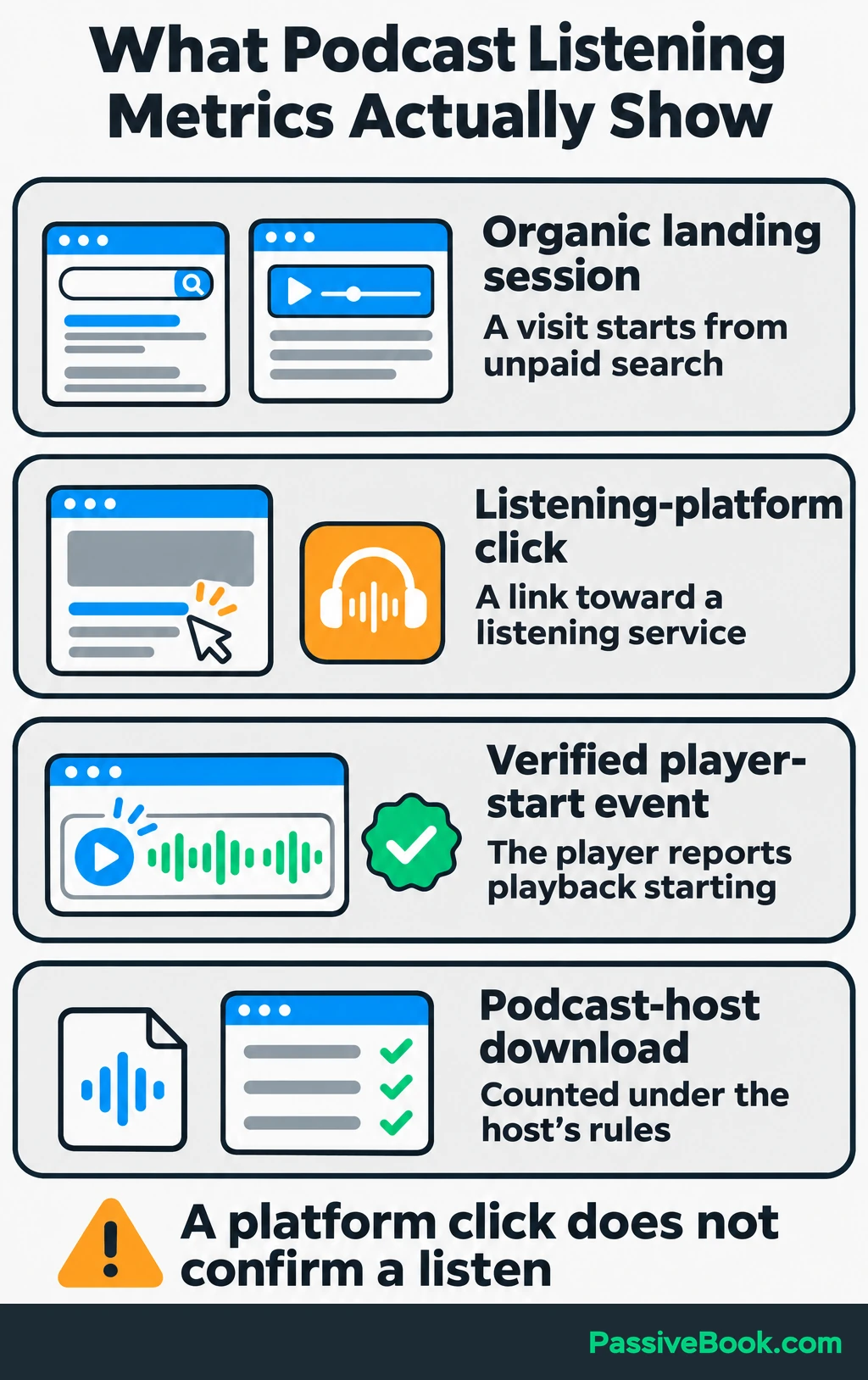
A platform-link click does not confirm a listen or subscription. Test embedded-player tracking separately because a working player does not mean Analytics receives its events.
If the website also supports a shop, track a relevant business action alongside listening. For this example, that might be a planner signup or purchase. Keep it separate so you can see whether the page supports discovery, listening, and the business.
Finally, put the work into a reusable publishing checklist:
- Choose a question the recording answers.
- Prepare the title, description, and useful written explanation.
- Check and publish the transcript.
- Add relevant internal links and one next action.
- Test mobile playback and listening links.
- Confirm the public page is discoverable and measurement works.
Apply it to new episodes, then work through the most promising older pages. Automate repeated setup where it helps, but keep the accuracy checks.
What Next?
Choose one existing episode and inspect its URL in Search Console. If it is accessible, rewrite its opening so a visitor can understand the main answer before pressing play.
Use the social buttons to share this guide and make that first episode-page cleanup easier to follow.
Which part of your website most needs attention: discovery, the written answer, or the path to listening? Tell me in the comments, and bring any other questions too.
Share this post with your friends & followers:

