I spent three months building an online course nobody wanted. Late nights after my corporate job, weekends sacrificed, all for a product that earned exactly $127 in its first year. That failure taught me what most entrepreneurs learn the hard way: validation must happen before you build, not after. The breakthrough came when I discovered social media ads could answer the only question that matters in under two weeks and for less than $300.
Testing your idea with ads isn’t about marketing. It’s about buying certainty before you invest your scarcest resource: time. This guide shows you exactly how to set up validation campaigns that reveal whether strangers will open their wallets for your business idea, allowing you to make a confident proceed-or-pivot decision in just 10 days.

- •What Business Idea Validation With Social Media Ads Means
- •Why Most Startups Fail Without Proper Validation
- •How Long Validation Testing Actually Takes
- •How Successful Founders Validate Before Building
- Choosing the Right Platform for Your Budget
- •Building Your Validation Landing Page
- •Create Professional Ads Without a Designer
- •Setting Up Your First Test Campaign
- •Creating Ad Copy That Tests Real Demand
- Tracking What Actually Matters
- Reading Your Results: Proceed or Pivot?
- What to Do With Your Validation Subscribers
- •Frequently Asked Questions
- •What Next?
What Business Idea Validation With Social Media Ads Means
Validation through social media ads means testing whether strangers will take meaningful action on your offer before you build the product. You’re not asking friends for opinions or counting likes on social posts. You’re measuring genuine interest through concrete actions like email signups or pre-orders from people who’ve never heard of you.
Buffer, now a major social media management tool, validated demand with nothing but landing pages before writing a single line of code. They ran ads pointing to a waitlist page that described the product as if it already existed. The signups proved strangers cared enough to register, giving Buffer the confidence to build.
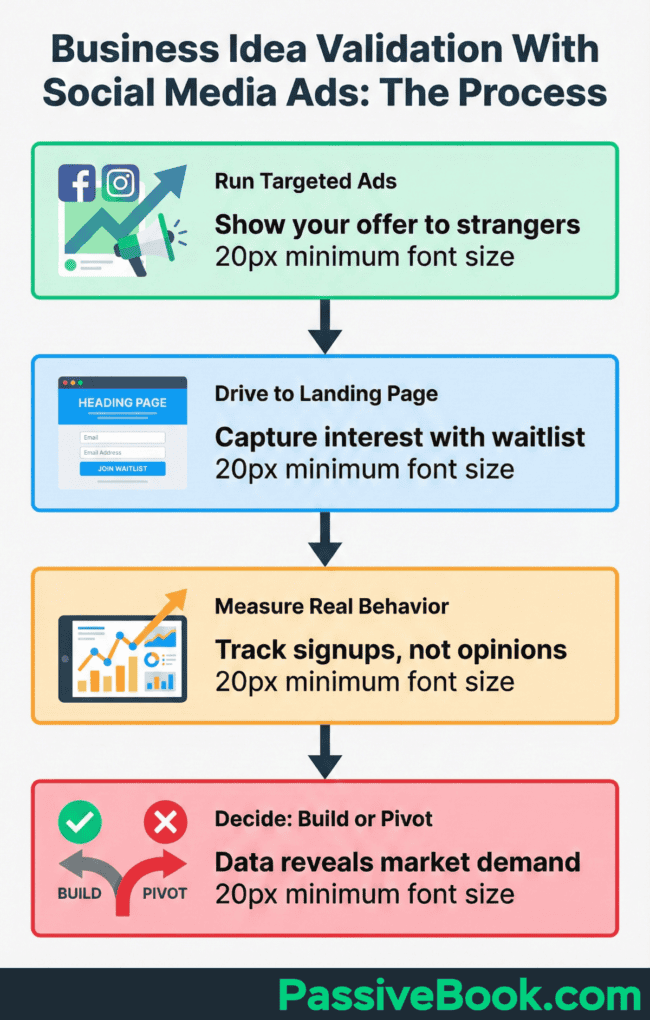
This validation method tests whether your idea aligns with actual market needs by exposing it to your target audience in the wild. Real potential customers see your ad, evaluate your promise, and decide whether to act. Their behavior tells you everything their words cannot.
And yes, this can feel uncomfortable. You’re essentially asking strangers to validate your baby before you’ve even given birth to it. But that discomfort protects you from heartbreak later.
The key distinction separates this from traditional market research. Surveys and focus groups reveal what people say they’ll do. Ad validation shows what they actually do when faced with a buying decision.
Why Most Startups Fail Without Proper Validation
Here’s the reality that keeps me up at night. Lack of market need causes 35% of startup failures, making it the most common preventable mistake. These aren’t ideas that failed because of poor execution. Most startup ideas sound compelling in theory but crumble when exposed to real market conditions.
I’ve made this mistake twice. The course I mentioned earlier consumed over 200 hours of my free time across three months. Add the $800 I spent on a course platform, recording equipment, and a designer for the sales page.
That’s over $3,800 in opportunity cost when you value your time at $15/hour (200 hours × $15 + $800 in direct costs). I could’ve validated the concept in a week with $200 in ad spend.
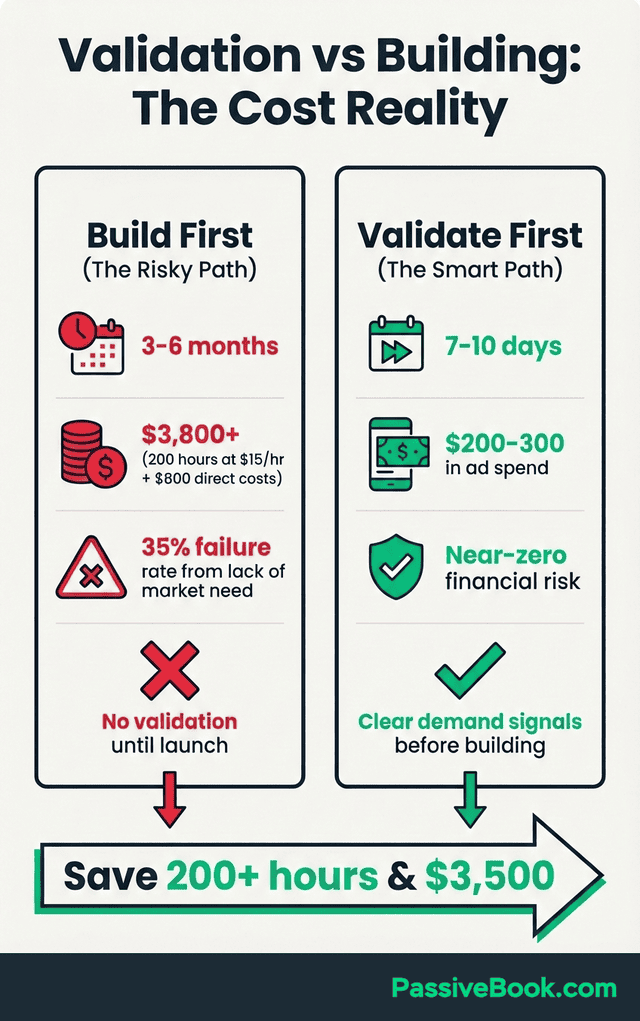
The economics of validation versus building make this a no-brainer for time-starved solopreneurs. Validation testing costs $100-300 and reveals demand signals in 5-7 days. Building a product you hope people want takes months and thousands of dollars, only to discover the market doesn’t care.
Ad testing forces you to articulate your value proposition clearly enough that strangers will act on it. If you can’t get 100 people to give you their email address for $200 in ad spend, you won’t get them to give you $50 or $500 for the actual product. The ad validation acts as a forcing function for market clarity before you’ve invested serious time and money.
The validation timeline I’m about to show you proves you don’t need months to get answers.
How Long Validation Testing Actually Takes
The timeline for ad validation fits perfectly into a solopreneur’s schedule. You’re not committing to months of work. You’re committing to 6-8 hours of focused effort spread across 10 days, with most of that time happening in the first three days.
Days 1-2 focus on building your landing page and writing ad variations. Using templates from Carrd, you’ll spend 2-4 hours creating a simple one-page site that captures email signups. Write three different ad variations during this phase, each testing a different angle or pain point. This upfront work happens on a weekend or across two evenings.
Day 3 is setup day, requiring 1-2 hours to configure your Facebook campaign, install the tracking pixel on your landing page, and launch your ads. Once the ads go live, your active involvement drops dramatically. You’ll spend just 15 minutes daily checking your results.
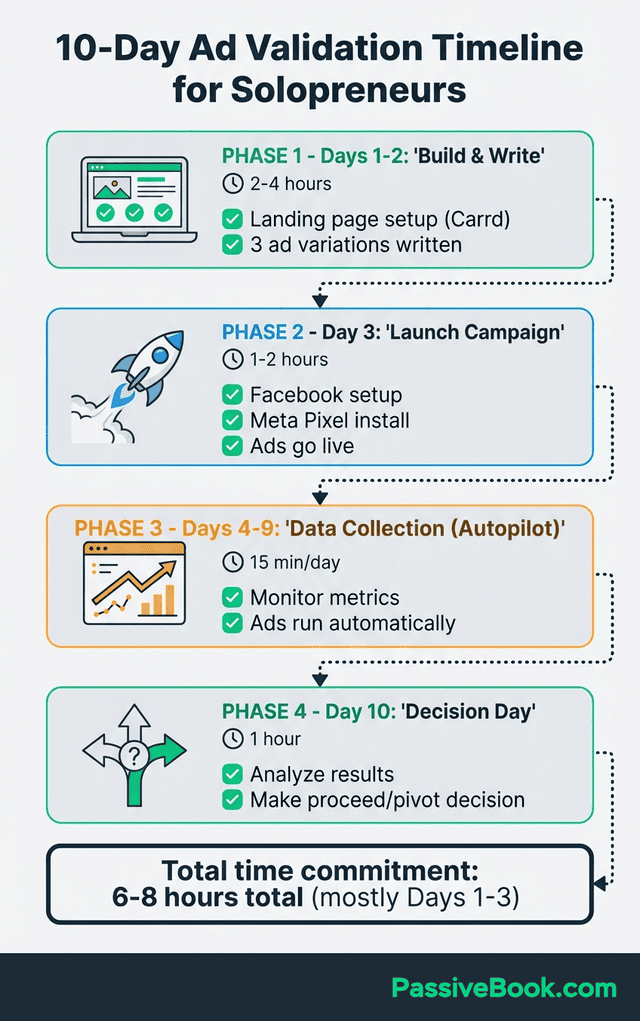
Days 4-9 represent the waiting period. Your campaign runs automatically, gathering data as the Facebook algorithm optimizes delivery. Monitor daily to catch any technical issues, but there’s no work required. The ads run while you’re at your day job, accumulating the 100-300 visitors you need for meaningful results.
Day 10 is decision day. Spend one hour analyzing your metrics to determine whether you proceed with building the product, pivot to a different approach, or abandon the idea entirely. This concentrated analysis happens after you’ve gathered sufficient data to make an informed choice.
The beauty of this timeline is how little it interferes with your existing commitments. Total hands-on time is under 8 hours, mostly front-loaded into the first weekend. It’s time-efficient validation that respects your constraints as someone juggling a business idea alongside a day job.
Full transparency: I’ve never stuck to exactly 10 days. I usually cave and check results on day 6 because impatience is my default setting. The point is having a timeline, even if you bend it.
How Successful Founders Validate Before Building
Before running paid ads, spend 30 minutes on social listening in Facebook groups or Reddit communities where your target audience gathers. Search for posts about the problem you’re solving. This free reconnaissance reveals the exact language people use to describe their pain, which you’ll use in your ad copy.
Dropbox validated demand with a simple explainer video before building their full product. They created a three-minute demo showing how file syncing would work, then drove traffic to a waitlist. Their video demonstrated a minimum viable version of the concept without engineering the complex synchronization technology that would come later. Overnight, their waitlist grew from 5,000 to 75,000 people. That surge gave them the confidence to invest years into development.
The core principle these successful founders follow is presenting your idea as a nearly-finished product without actually building it. Your landing page and ads describe the transformation your product delivers as if it already exists. Visitors who want access click a “reserve your spot” or “join the waitlist” button.
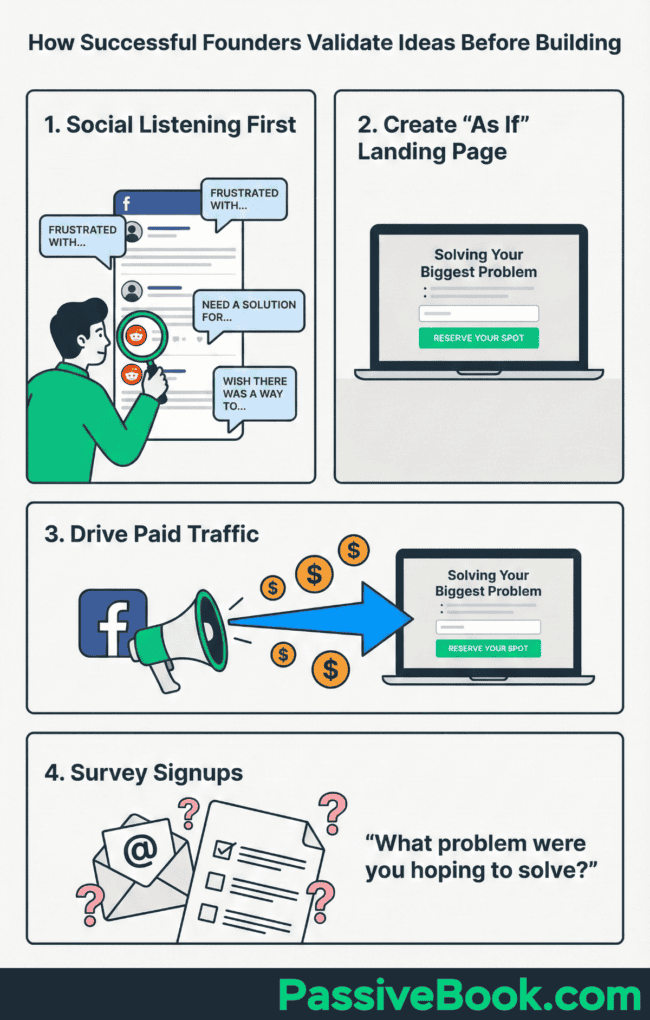
Waitlist landing pages for pre-launch digital products achieve 10-25% conversion rates when offering founding member benefits. These benefits might include lifetime discounts, early access, or bonus features. The key is making the waitlist feel exclusive and valuable, not like they’re signing up for vaporware.
A common pitfall trips up first-time validators. They validate their specific solution without first confirming the underlying pain point exists. If your ads promise a “project management tool for solopreneurs” but get zero traction, you don’t know whether solopreneurs don’t struggle with project management or whether they just don’t like your approach.
Send follow-up surveys to anyone who signs up asking “What problem were you hoping this would solve?” Their answers reveal you’re solving the right problem with the wrong solution, allowing you to pivot your approach before building anything. This two-layer validation (problem first, solution second) prevents the most expensive mistakes.
Choosing the Right Platform for Your Budget
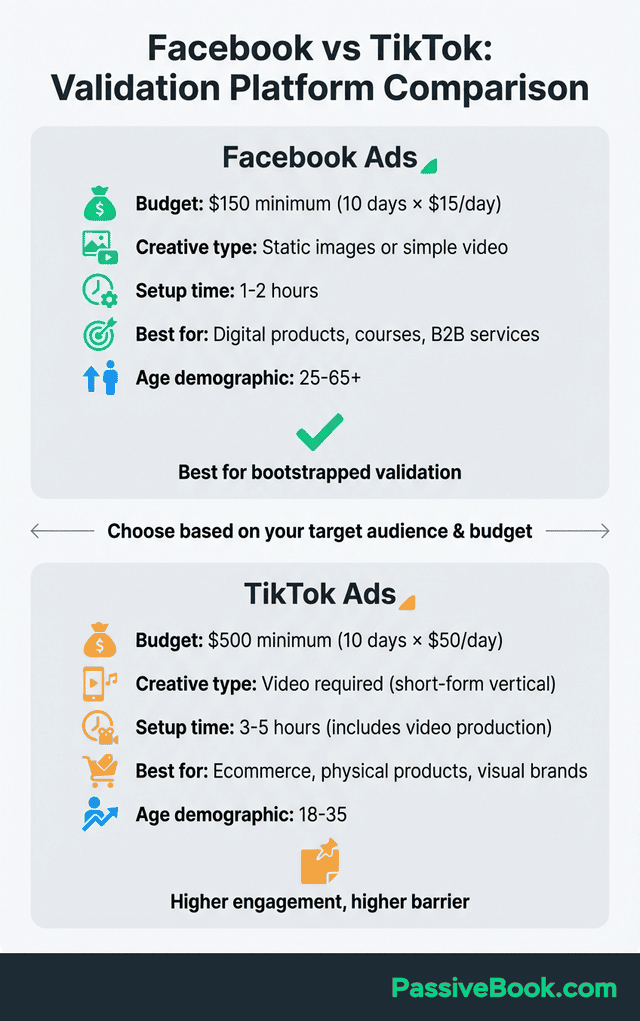
Platform choice determines how far your validation budget stretches. Your decision should balance audience demographics, minimum spend requirements, and the type of product you’re testing. For most solopreneurs with limited budgets, one platform makes more sense for bootstrapped solopreneurs than the alternatives.
Look, I’m not a Facebook fan. The platform has plenty of issues. But for validation testing? It’s still the best bang for your buck in 2026.
Average Facebook cost per click is $0.70-$1.20 for small business advertisers in 2026. This pricing structure allows you to gather meaningful data within a $200-300 validation budget. Facebook’s strength lies in its targeting precision and its suitability for nearly every business model from digital products to ecommerce.
The alternative platforms come with tradeoffs that disqualify them for bootstrapped validation. TikTok requires higher upfront investment. LinkedIn targets business professionals but charges premium rates. Instagram works well for visual products but shares Facebook’s ad platform, making it redundant for most tests.
Facebook Ads for Broad Targeting
Average Facebook cost per lead across industries is $1.92, making it feasible to gather 100-150 leads within a $200-300 validation budget. This volume provides statistically significant results for your proceed-or-pivot decision. You’re not guessing based on five signups. You’re analyzing patterns across dozens of potential customers.
Facebook excels at validating digital products, online courses, and business-to-business services. The platform’s strength is its detailed targeting options. You can target by specific interests, behaviors, job titles, and demographics. Testing a productivity course for remote workers? Target people interested in time management, remote work, and productivity tools.
The platform’s massive user base means you can reach virtually any target market. Whether you’re targeting stay-at-home parents interested in freelancing or small business owners who need bookkeeping help, Facebook’s 2.9 billion monthly active users ensure your target market is present.
Budget flexibility is another advantage for time-starved solopreneurs. You can start testing with as little as $5 per day, though $10-15 daily produces faster results. This low barrier to entry means you can validate an idea without taking financial risks that jeopardize your personal finances.
TikTok Ads for Visual Products
TikTok ad campaigns require a $50 daily minimum budget, totaling at least $500 for a 10-day validation test. This higher threshold prices out many bootstrapping solopreneurs who have $200-300 to spend, not $500-700 when accounting for landing page tools and creative costs.
The platform shines for ecommerce products targeting younger demographics under 35. If you’re validating a physical product, print-on-demand designs, or anything visually engaging that appeals to Gen Z or younger millennials, TikTok’s engagement rates justify the higher spend.
The major constraint is creative requirements. TikTok ads demand video content upfront, adding production time to your validation timeline. You’ll need to script, film, and edit short-form video ads before you can even launch your campaign. Facebook allows simple static image ads, reducing your upfront time investment by hours or days.
Higher engagement rates on TikTok can offset the budget requirement if your product fits the platform’s strengths. Users expect authentic, less-polished content, which actually works in a solopreneur’s favor. You don’t need professional production. Phone-shot videos perform as well as slick ads on TikTok.
Building Your Validation Landing Page
Your landing page is where validation happens or dies. Ads bring visitors, but the page must convert them into leads. The goal isn’t to create a beautiful website. It’s to test whether your value proposition compels strangers to share their email address.
Carrd offers a free plan for up to three sites, making it the ideal tool for bootstrapped validation. The platform’s templates are specifically designed for landing pages with email capture. If you want a custom domain instead of a Carrd subdomain, the pro plan costs $19 per year. For a 10-day test, the free plan works perfectly fine.
Three elements make up an effective validation landing page, nothing more. First, a single clear headline that matches your ad copy. If your ad promises “Build your first online course in 30 days,” your headline must echo that exact promise. Second, 3-5 benefit bullets addressing specific pain points your target audience feels daily. Third, one conversion action: a prominent email signup form.
The elements you exclude matter more than what you include. Avoid product details, feature lists, pricing information, or lengthy explanations. You’re testing whether the core promise resonates, not whether people like your feature set. Every element beyond the three essentials dilutes your test by introducing additional variables.
Here’s the exact structure I use for validation landing pages. Headline formula: “[Achieve desired outcome] in [specific timeframe] without [common obstacle].” Example: “Launch your first online course in 30 days without technical overwhelm.”
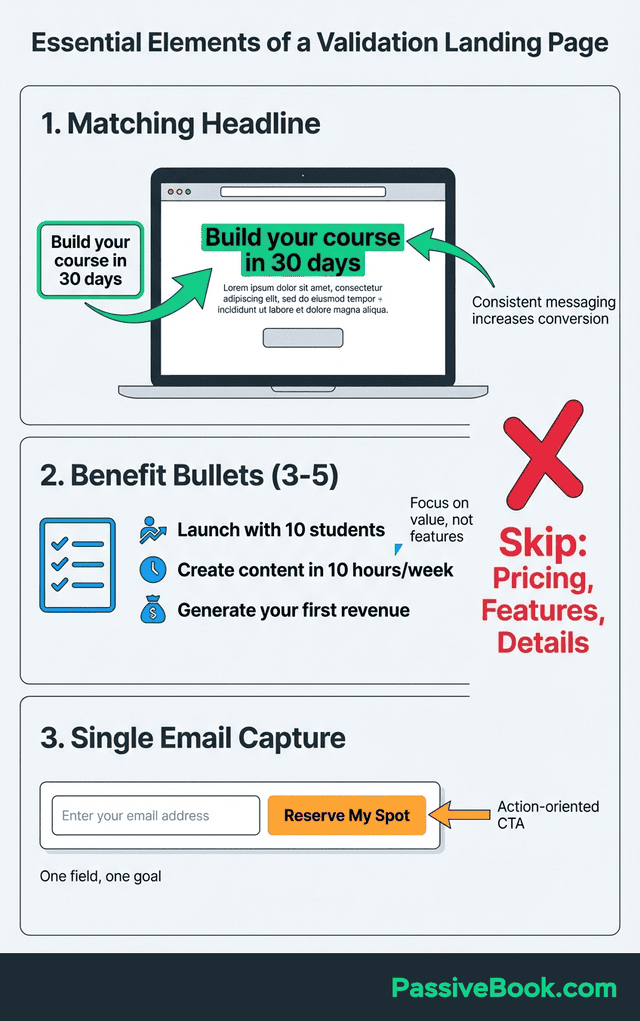
Benefit bullets follow this structure: Each starts with the outcome, not the feature. Bad bullet: “Step-by-step video tutorials.” Good bullet: “Create your first lesson in under 2 hours using your phone and free editing software.” See the difference? One describes what you get, the other describes what you can do with it.
Your call-to-action should create urgency around exclusivity: “Join 200 Founding Members (37 Spots Left)” converts better than “Get Early Access” because it implies scarcity. Even if you don’t have real numbers yet, phrases like “Reserve Your Founding Member Spot” work well.
Successful waitlist landing pages for course creators achieve 15-25% conversion rates by pairing a transformation promise with outcome bullets. A course validation page might read: “Build your first online course in 30 days” as the headline, followed by bullets like “Launch with 10 students in month one,” “Create content in 10 hours per week,” and “Earn your first $500 in revenue.” Notice each bullet focuses on outcomes, not features.
Place the email capture form above the fold, visible without scrolling. Use action-oriented button text like “Reserve My Spot” or “Get Early Access” instead of generic “Submit” buttons. These small copy choices can improve conversion by 2-3 percentage points.
With your landing page live, the next bottleneck is creating ads that don’t look like amateur hour.
Create Professional Ads Without a Designer
Ad creative intimidates solopreneurs more than any other validation step, but artificial intelligence has eliminated the design barrier entirely. You don’t need Photoshop skills or a designer. You need clear messaging and the right tools.
Canva Pro provides AI-powered ad templates for social platforms starting at $15 per month subscription. The AI image generator creates custom visuals from text prompts in seconds. Type “woman working on laptop looking frustrated with project management” and the tool generates multiple variations. The free version of Canva works for basic needs, but Pro unlocks the AI features that accelerate creation. Tools like Canva and its AI features put professional design capability in your hands without learning complex software.
Generate multiple ad variations testing different headlines and visual approaches. You might create three ads: one featuring a frustrated person struggling with the problem, one showing someone experiencing the solution’s outcome, and one with a bold text-only design highlighting your promise. This variety helps identify which messaging angle resonates with your target market.
Test 3-5 AI-generated variations to identify the highest-performing messaging and visuals. Facebook’s algorithm optimizes toward the best performers automatically, but having multiple options in your initial campaign provides data on what hooks work. One ad might emphasize time savings while another focuses on income potential. Let the market tell you which matters more.
Export ads in platform-specific dimensions for Facebook and Instagram feeds. Facebook recommends 1080×1080 pixels for square images or 1200×628 for landscape. Canva‘s templates automatically size for each platform, eliminating guesswork. Download all variations as PNG files, then upload them when creating your campaign.
The entire creative process takes 30-60 minutes once you’ve settled on your core message. That’s faster than scheduling a call with a designer, let alone waiting for revisions. Speed matters when you’re validating. The goal is data, not perfection.
Setting Up Your First Test Campaign
Campaign setup determines whether you gather clean data or waste your budget on the wrong metrics. Your objective, audience size, budget, and ad variations all need deliberate configuration before you launch.
If this feels overwhelming, breathe. Facebook’s interface is designed by people who apparently hate clarity, but you only need to touch about 20% of the options they show you.
Start with Facebook’s Traffic or Conversions objective. Traffic sends people to your landing page and costs less per click. Conversions optimizes for people who actually complete your signup form but requires more budget to exit the learning phase. For validation budgets under $300, the Traffic objective delivers more data points in my experience.
Set a $10-15 daily budget minimum. Going lower handicaps Facebook’s algorithm, extending the learning phase and reducing delivery. A $15 daily budget over 10 days totals $150, well within bootstrapped constraints while providing enough volume for optimization. You can always pause the campaign early if results are clearly positive or negative.
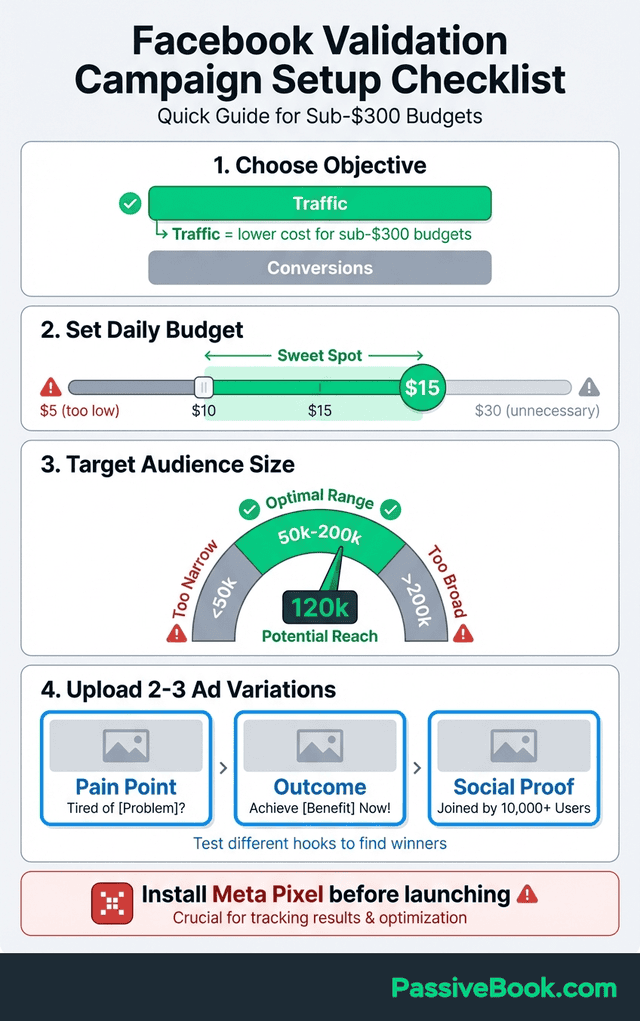
Target a 50,000-200,000 audience size using specific interests related to your product idea. Too narrow, and you’ll exhaust your audience quickly while driving up costs. Too broad, and your ads reach people with no interest in your solution. For a productivity course aimed at remote workers, you might target interests like “remote work,” “time management,” and “Asana” or “Trello” (project management tools).
Run 2-3 ad variations with different hooks to identify resonant messaging. One ad might lead with a pain point: “Drowning in client projects with no system?” Another might emphasize an outcome: “Turn client chaos into organized profit.” The third could use social proof: “Join 500+ freelancers who simplified their workflow.” Let the data reveal which angle converts.
A course creator validating a productivity course used Facebook’s Conversions objective with $15 per day targeting 120,000 productivity interest users. Within six days, they achieved an 8% conversion rate on their landing page with a cost per lead under $4. This data gave them confidence to build the course, which launched to 127 founding members three months later.
The setup process takes 1-2 hours if you’ve already created your ads and landing page. Facebook’s guided campaign creation walks you through each step. Install the Meta Pixel on your landing page during this phase. It’s a single line of code Carrd makes easy to add.
Campaign settings matter, but they’re worthless if your ad copy fails to stop the scroll.
Creating Ad Copy That Tests Real Demand
Your ad copy determines whether people click and whether those clicks convert into signups. Generic marketing language fails validation tests. You need copy that speaks directly to the pain point your target audience feels right now.
Tim Ferriss tested multiple book titles using Google Ads, spending under $300 to identify “The 4-Hour Workweek” as the winning title. He ran ads for different title variations, measuring which generated the most clicks and engagement. This $300 test validated the positioning for a book that sold millions of copies. The principle applies perfectly to product validation.
I love this example because Ferriss didn’t trust his gut. He trusted $300 and data. That’s the whole game.
Lead with the specific problem your audience feels right now, not your solution. “Spending 10 hours weekly on admin tasks that don’t make money?” hits harder than “Try our productivity system.” The problem-focused hook self-selects your ideal customer. People without that pain point scroll past, while those struggling stop and read.
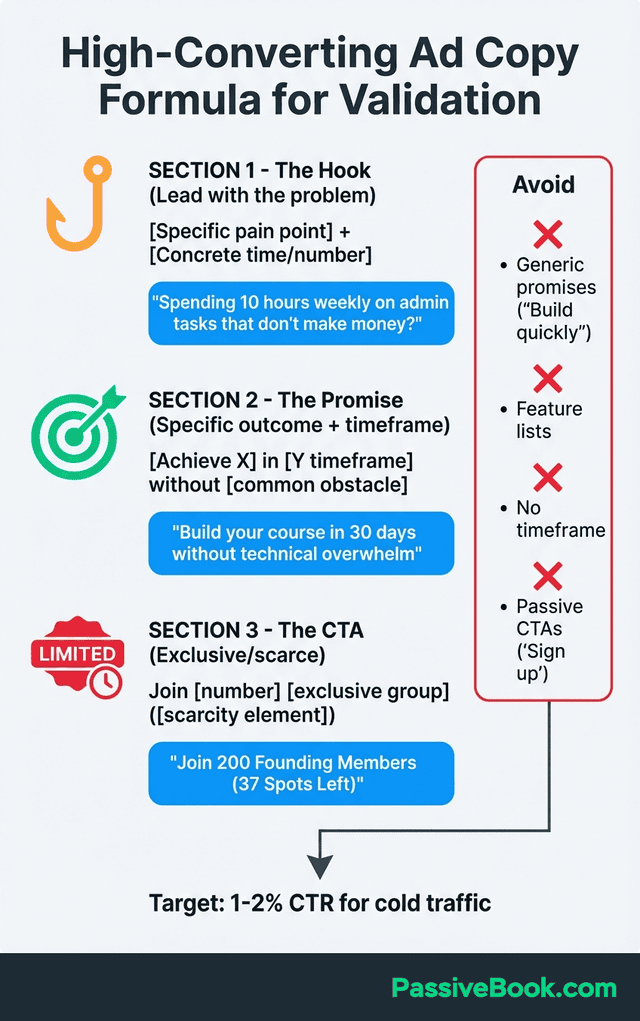
Include a concrete outcome or timeframe in your headline. “Build your course in 30 days” outperforms “Build your course quickly” because specific promises feel more believable and testable. Concrete numbers also attract action-takers who want measurable progress, filtering out browsers who won’t convert anyway.
Avoid vanity metrics when analyzing results. Likes and shares have no causal link to sales. Only track email signups, pre-orders, or payment information. When validating my email course on content repurposing, one ad got 500 likes but generated just three signups. A different ad with only 30 likes generated 50 signups because it spoke directly to the time-saving outcome.
Frame your call-to-action around exclusivity or early access. “Join 200 founders testing this early” converts better than “Sign up for updates” because it implies selectivity. People want what others want and what they might miss out on. Your CTA should reinforce that joining the waitlist is a privileged opportunity, not a passive newsletter signup.
Tracking What Actually Matters
Validation fails without proper tracking. You need specific metrics to determine whether your idea has market demand, and those metrics must be captured from day one.
Average landing page conversion is 6.6% across all industries in 2026. This benchmark helps you contextualize your results. If you’re hitting 8-10% conversion, you’re outperforming the average. Conversion below 2-3% signals either a messaging problem or lack of genuine demand for your solution.
Aim for 100-300 landing page visitors minimum for statistically meaningful results. Testing with 30 visitors is guesswork. Random variance could show 20% conversion or 0% conversion without reflecting true market interest. More data points smooth out anomalies and reveal genuine patterns.
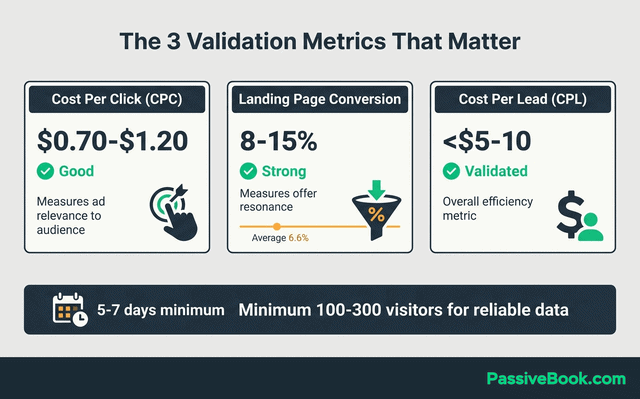
Three primary metrics deserve your attention throughout the test. Cost per click shows how compelling your ad is. Lower CPC means your target audience finds the message relevant. Landing page conversion rate measures whether people are willing to pay attention (through email signup) to your solution and how well your offer resonates once people arrive. Total cost per lead combines both metrics, revealing your overall efficiency at turning ad spend into interested prospects.
Run a minimum of 5-7 days for algorithm optimization before making decisions. Facebook’s algorithm needs time to learn who converts and who doesn’t. Early results swing wildly as the system tests different audience segments. By day five, delivery stabilizes and your metrics become reliable for decision-making.
Conversion Tracking Setup
Install Meta Pixel through Facebook Events Manager to track page views and conversions. The pixel is a snippet of code you place in your landing page’s header. Carrd makes this simple with a dedicated field for tracking codes. Once installed, the pixel fires whenever someone views your page or completes your signup form.
Use UTM parameters in ad links to track which ads drive conversions. UTM parameters are tags added to your URL like `?utm_source=facebook&utm_campaign=validation&utm_content=ad1`. These tags flow into Google Analytics, showing exactly which ad variation generated each signup. Build UTM parameters using free tools like Google’s Campaign URL Builder.
Set up Google Analytics 4 conversion events to measure signup completion and form abandonment. GA4 tracks the full user journey from ad click to signup, revealing where people drop off.
If 200 people land on your page but only 10 reach the signup form, you have a page design problem. If 100 people start the form but only 20 complete it, your form is too complex. Form abandonment data reveals unexpected friction. I once discovered a validation test was failing because the email field was auto-filling with old addresses, and people weren’t noticing. Fixing this technical issue doubled conversion overnight. Without tracking, I would’ve concluded the idea lacked demand.
Key Metrics That Signal Demand
For ecommerce and digital product validation, target cost per lead under $5-15 depending on product price point. Courses priced at $200 or more can sustain higher cost per lead because lifetime value justifies the acquisition cost. A $50 product needs sub-$5 CPL to maintain healthy margins after accounting for refunds and customer service.
Click-through rate benchmarks sit around 1-2% for cold traffic validation campaigns. Anything above 2% suggests strong message-to-market fit. Below 0.5% indicates your audience doesn’t care about the problem you’re solving, or your hook fails to grab attention. Don’t optimize CTR endlessly. It’s a secondary metric compared to landing page conversion.
Landing page conversion benchmarks vary by offer type. Waitlist signups for digital products should convert at 8-15% if the promise resonates. Free PDF downloads or lead magnets convert higher, at 15-30%, but attract lower-quality leads. Pre-orders requiring payment information convert at 1-5%, but these leads are gold. They’ve shown buying intent.
Watch for patterns in who converts versus who doesn’t. Facebook Ads Manager shows demographic breakdowns revealing whether men or women respond better, which age ranges engage most, and whether mobile or desktop traffic converts. A course validation targeting “entrepreneurs” might discover only the 35-45 age segment converts, refining your target market before launch.
If you’re validating a product in an established category, read customer reviews of competing products on Amazon or software review sites. One-star and two-star reviews reveal unmet needs and frustrations your solution could address.
Reading Your Results: Proceed or Pivot?
Decision day defines your business strategy for the next 3-6 months. After your campaign has run for at least a week, you analyze the data to determine whether you’ve validated market demand or discovered your idea needs reworking. This moment separates founders who waste months building unwanted products from those who invest time wisely.
I’ve made both good and bad calls at this stage. My most successful digital product started with a validation test that generated 340 email signups from $280 in ad spend: a $0.82 cost per lead with 12% landing page conversion. Those numbers screamed “build this immediately.” I launched to 127 paying customers two months later.
My biggest validation failure showed opposite signals. After $220 in spend, I had 15 signups from 520 landing page visitors, yielding a 2.8% conversion rate and $14.67 cost per lead. The ad click-through rate was decent at 1.8%, suggesting the problem resonated. But once people read the landing page, they didn’t convert. That mismatch told me the solution didn’t match the pain point.
Strong validation hits specific thresholds across multiple metrics. You want 5% or higher landing page conversion combined with cost per lead under $5-10 for most digital products. Waitlist-to-customer conversion averages 50% if users wait under one month, so 100 waitlist signups should translate to 50 customers at launch.
Pivot signals appear when you see under 1% click-through rate after $200 spend across multiple ad variations. This suggests your target audience doesn’t care about the problem you’re solving, or your messaging completely misses the mark. Low CTR but high landing page conversion means your ads are the problem. High CTR but low conversion means your landing page or offer needs reworking.
The zero-conversion response requires a different approach entirely. If you achieve under 0.5% CTR after $200 across 3-5 ad variations, pause the campaign and conduct 10 target customer interviews. Ask them directly whether the underlying problem actually exists in their world. You might discover you’re solving a problem people don’t have, or the language you’re using doesn’t match how they describe their pain.
Grey-zone results demand additional testing before deciding. If you hit 3-4% conversion with moderate cost per lead, consider running a second test with refined messaging based on what you learned. Look at which ad variation performed best, rewrite your landing page headline to match that angle, and run another $150 test. Marginal results don’t clearly say “build” or “pivot.” They say “learn more.”
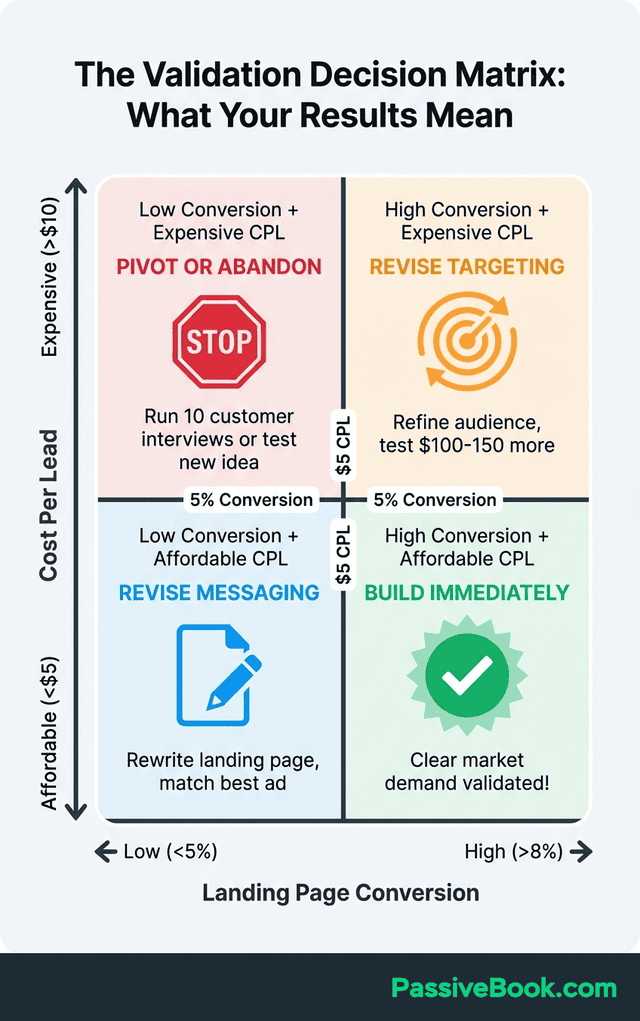
The Validation Decision Matrix
I use a simple 2×2 matrix to translate validation data into clear decisions. This framework has guided every product decision I’ve made since 2019.
Axis 1: Landing Page Conversion Rate (horizontal)
- Low: Under 5%
- High: Above 8%
Axis 2: Cost Per Lead (vertical)
- Expensive: Above $10
- Affordable: Under $5
Four Quadrants:
- High Conversion + Affordable CPL = Build Immediately: This is clear market demand with efficient acquisition. You’ve validated both that people want it and you can reach them profitably. My course validation that generated 340 signups at $0.82 CPL fell here.
- High Conversion + Expensive CPL = Revise Targeting: People want your solution, but you’re reaching the wrong audience segment. Refine your targeting parameters and test again with $100-150. Switching from broad interests to specific job titles fixes this in many cases.
- Low Conversion + Affordable CPL = Revise Messaging: Your targeting is efficient (ad relevance is good) but your offer doesn’t resonate. Rewrite your landing page headline to match your best-performing ad variation. Test again.
- Low Conversion + Expensive CPL = Pivot or Abandon: Neither your audience targeting nor your offer is resonating. Before abandoning completely, run 10 customer interviews to understand whether you’re solving a real problem. If interviews confirm the problem exists but your solution doesn’t match, pivot your approach. If the problem doesn’t exist, abandon and test a different idea.
I keep this matrix printed at my desk. When validation results come in, I plot them on the matrix in under 60 seconds and know exactly what action to take.
What to Do With Your Validation Subscribers
Your waitlist subscribers are more valuable than the validation data itself. These people raised their hands to express interest in your solution. How you nurture them determines whether they become paying customers or forgotten email addresses.
Send a survey within 24 hours asking “What’s your biggest challenge related to [problem area]?” This open-ended question accomplishes two goals. First, it confirms you understand their pain point correctly. Second, their language gives you copy for your sales page when you launch. Copy-paste their exact words into your marketing. Nothing converts better than reflecting your customer’s own descriptions back to them.
If you’re proceeding with product development, offer founding member discounts of 50-70% off the future retail price. This reward acknowledges they believed in you before the product existed. It also generates early revenue that funds development, and founding members become vocal advocates who refer others.
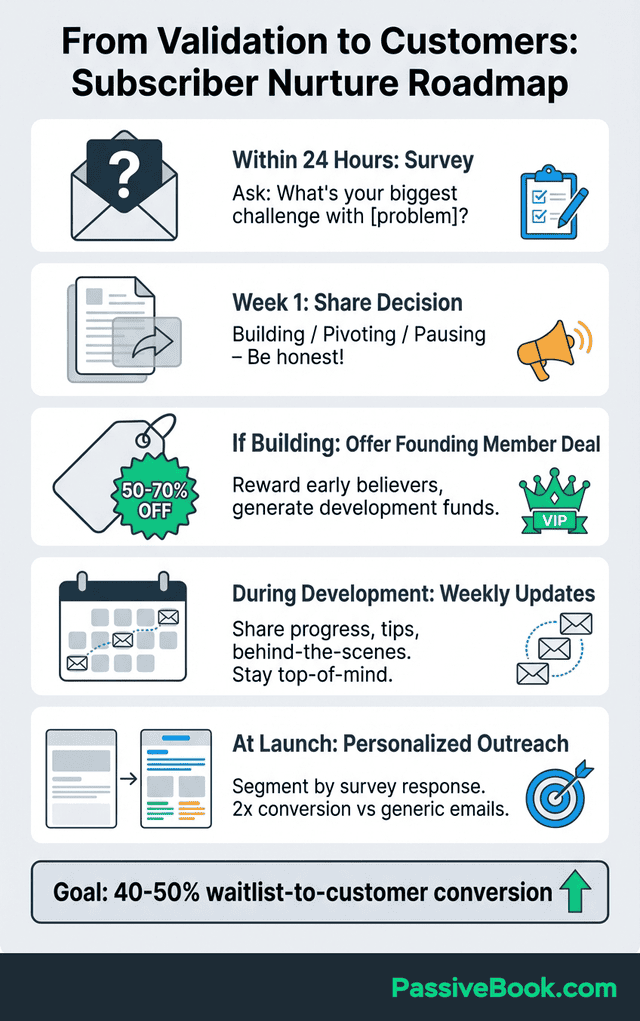
Share your decision transparently whether you’re building, pivoting, or pausing based on results. Honesty builds trust even when the news is disappointing. In 2022, I told a waitlist of 80 people interested in my AI automation toolkit that I was pausing development. The 2.8% landing page conversion suggested weak demand. Fifteen of them replied asking what would change their minds, giving me insights that led to a successful pivot three months later.
Email nurture sequences that provide value before launch increase your waitlist-to-customer conversion rates. In my own launches, consistent weekly emails to waitlist subscribers converted 40% to paying customers versus just 18% when I went silent during development. Don’t go silent for three months while you build. Send weekly emails sharing your progress, behind-the-scenes decisions, or helpful tips related to the problem you’re solving. This consistent communication keeps you top-of-mind and builds anticipation for launch day.
Segment your subscribers based on their survey responses. Someone who says “I struggle with client onboarding” has different needs than someone who says “I can’t track my time effectively.” When you launch, personalized emails addressing their specific challenge convert at roughly double the rate of generic “we launched” announcements.
Consider offering a beta program to your most engaged waitlist members. Twenty users testing your minimum viable version provide feedback that prevents launching with major flaws. Beta testers become case studies you can feature in launch marketing, providing social proof for later customers.
Maintaining Momentum After Strong Validation
Strong validation data creates a new problem: the pressure to start building immediately while juggling your day job. Here’s the realistic timeline that works for solopreneurs.
Give yourself permission to take two weeks between validation and starting development. Use this time to create a minimal product roadmap breaking the build into 2-hour work sessions. A course might break down into “record module 1” (2 hours), “edit module 1” (2 hours), “create workbook” (2 hours). These small chunks prevent overwhelm.
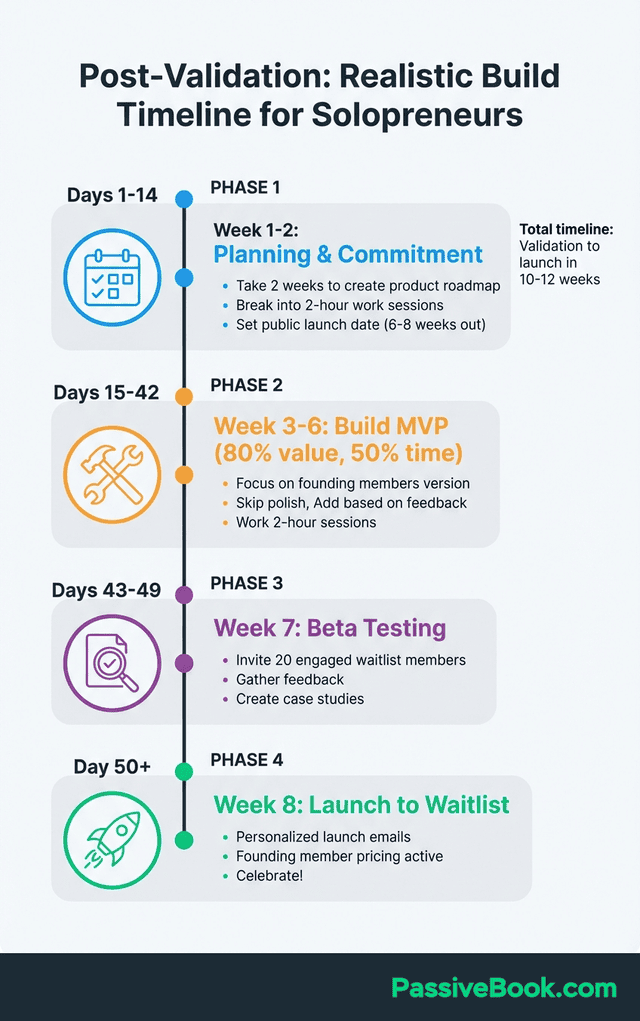
Set a public launch date 6-8 weeks after validation. Share this date with your waitlist subscribers in your first nurture email. Public commitment creates accountability that pushes you through the inevitable evenings when you’d rather watch Netflix than record content.
Build your minimum viable version for your founding members first, not a polished public launch. This means 80% of the value in 50% of the time. You can add polish later based on their feedback. My most successful product launched with rough video editing and placeholder graphics. Founding members cared about the solution, not the production quality.
Frequently Asked Questions
How Much Money Do I Need to Validate With Social Media Ads?
You need $200-300 for a basic validation test. This covers $150-200 in ad spend, $19 for a Carrd custom domain if desired, and $15-30 for one month of u003ca href=’https://passivebook.com/go/canva/’u003eCanvau003c/au003e Pro to create ads. Running ads for seven days at $15 per day costs $105, leaving room for a second test if results are unclear.
Can I Validate Without Spending Money on Ads?
You can attempt organic validation through social media posts, u003ca href=’https://www.reddit.com/’u003eRedditu003c/au003e threads, or online communities, but it takes longer and produces weaker signals. For small business owners with existing email lists or social followings, organic validation provides a starting signal. However, paid ads test whether strangers will act on your offer when it appears in their feed unexpectedly, mimicking real buying conditions. Organic validation attracts people already following you or seeking solutions, creating selection bias.
What If I Get Signups but Low Post-Signup Engagement?
Low engagement after signup suggests your initial promise attracted the wrong audience or set unrealistic expectations. Send a survey asking what they expected when they signed up versus what they need now. Use their answers to refine your messaging before launch, ensuring your final product matches the promise that captured their email.
Should I Test on Multiple Platforms Simultaneously?
No, test one platform first to avoid splitting your budget too thin. Start with Facebook unless you have strong evidence your target market spends more time elsewhere. If Facebook results are promising but you want additional data points, run a second test on another platform using insights from the first campaign to improve targeting and creative.
How Many Email Subscribers Prove My Idea Is Validated?
The number matters less than the conversion rate and cost per lead. Fifty subscribers at 10% landing page conversion and $3 cost per lead is stronger validation than 200 subscribers at 2% conversion and $15 cost per lead. Aim for 100-200 subscribers with healthy metrics rather than chasing subscriber count alone.
What Conversion Rate Means I Should Definitely Build the Product?
Based on my validation tests across six product launches, landing page conversion above 8% with cost per lead under $10 indicates strong market demand for digital products priced above $100. If you’re testing a lower-priced product, you need sub-$5 cost per lead to maintain profitability. Combine conversion data with subscriber survey responses. High conversion plus enthusiastic survey feedback is the clearest green light to build.
What Next?
You now have everything you need to validate your business idea with social media ads in 10 days. This process transforms your idea from hopeful assumption into market-tested reality. The small investment of time and money protects you from the expensive mistake of building something nobody wants.
Validation testing feels uncomfortable because it forces you to face the possibility your idea might not work. That discomfort is precisely why it’s valuable. Better to discover weak demand now with $250 at risk than six months from now with thousands of dollars and hundreds of hours already invested.
If you found this guide helpful, hit the share buttons below and send it to another solopreneur who’s sitting on an idea they’re afraid to test. What’s the biggest thing holding you back from running your first validation campaign? Drop your answer in the comments. I read and respond to every one.
Share this post with your friends & followers: