I spent three months building a “perfect” course before launching. Beautiful design. Detailed modules. Zero customers. Why? I never asked if anyone actually wanted what I was building. That failure taught me the most valuable lesson in online business: validation beats perfection every single time.
If you’re a solopreneur juggling a day job and building on nights and weekends, you can’t afford to waste months on unvalidated ideas. This 12-minute guide shows you how to build a minimum viable product in 30-60 days using tools you can afford, test your core assumptions fast, and launch something imperfect that actually makes money.

- •What Is a Minimum Viable Product (MVP)?
- •Why 90% of Startups Fail Without Proper MVP Validation
- How to Measure If Your MVP Is Succeeding (The Only 3 Metrics)
- The Three Fatal MVP Mistakes That Kill Side Projects
- The Fatal Mistake: Building Before Validating Demand
- Choosing Your MVP Platform Based on Business Model
- Building Your MVP in 30-60 Days Using No-Code Tools
- •Your 30-Day MVP Launch Timeline
- •When to Pivot, Persevere, or Kill Your MVP
- •Frequently Asked Questions
- •What Next?
What Is a Minimum Viable Product (MVP)?
A minimum viable product is the simplest version of your idea that solves one specific problem for one target user group. It’s built to test your core assumptions fast, not to impress anyone with features or polish.
The best product examples? Dropbox. Before building complex file-syncing technology, founder Drew Houston created a simple 3-minute demo video showing how the product would work. That video grew their waitlist from 5,000 to 75,000 overnight. No code written yet.
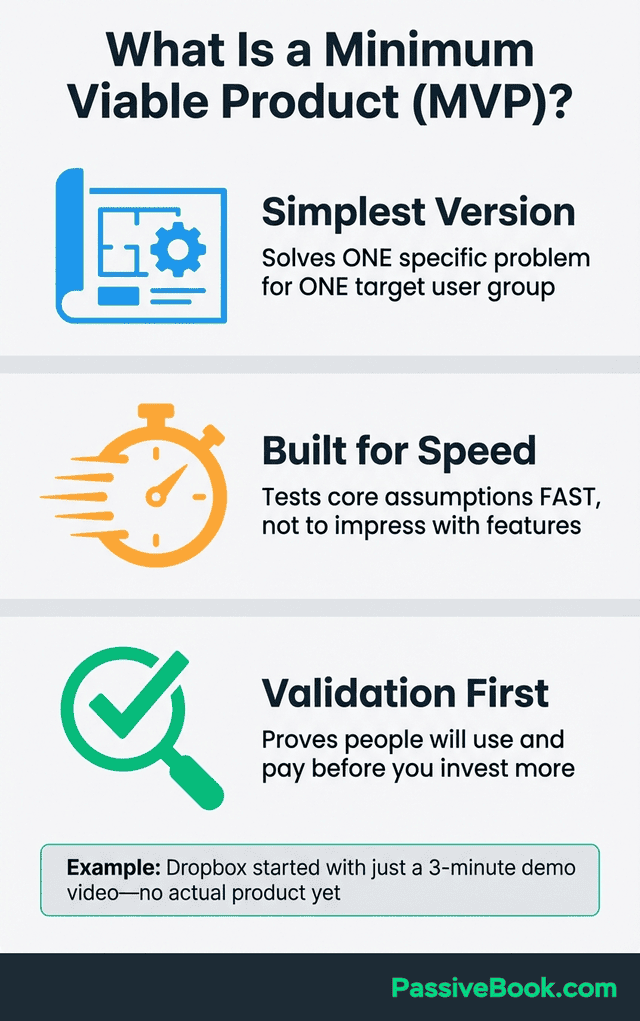
Your MVP isn’t a beta product with most features done. It’s not a prototype to show investors. It’s the absolute minimum you need to validate whether people will actually use and pay for your solution.
You’re not building a house. You’re checking if anyone wants to live in this neighborhood before buying land.
Why 90% of Startups Fail Without Proper MVP Validation
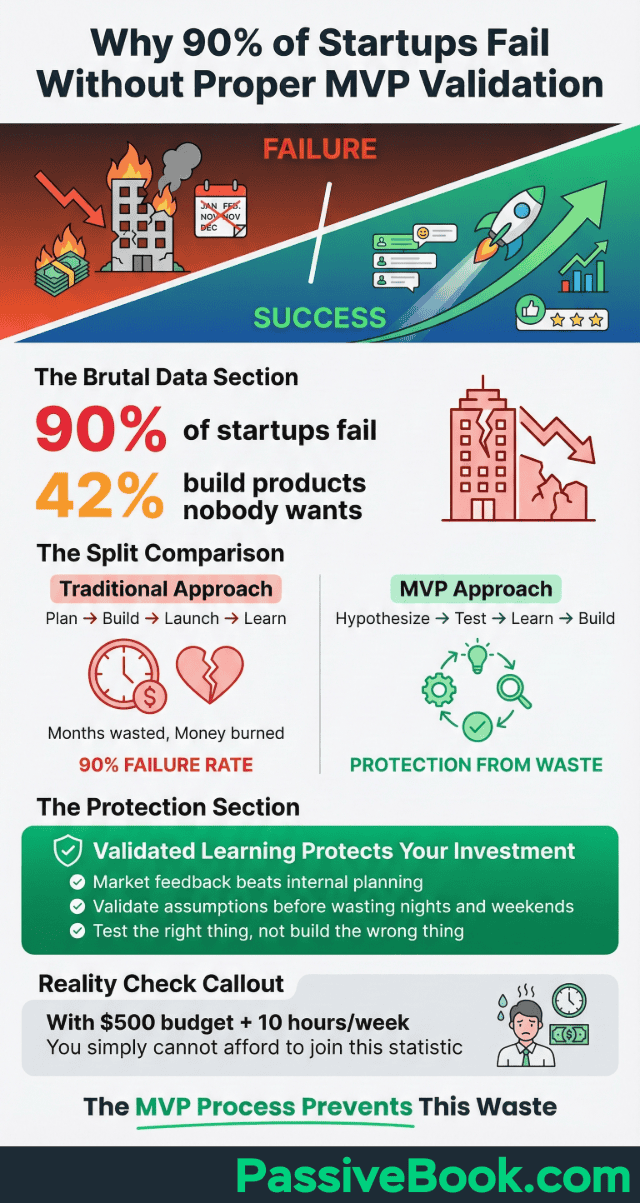
The data is brutal: 90% of startups fail, and 42% of those failures happen because founders build products nobody wants. When you’re a solopreneur with a $500 budget and 10 hours per week, you simply cannot afford to join that statistic.
This is why validated learning through systematic market research protects your investment. Market feedback beats internal planning every single time. You might spend six months perfecting a feature your target users don’t care about.
An MVP forces you to validate your core assumption before wasting nights and weekends building the wrong thing. The successful MVP approach flips traditional product development on its head. Instead of: plan → build → launch → learn, you do: hypothesize → test → learn → build.
Look, I know these stats are depressing. But they exist because founders like us keep making the same mistakes. I’ve made four of them myself.
Solopreneurs who skip validation burn through their initial budget, lose motivation after months of low traction, and abandon projects that might have worked with different positioning. The MVP process prevents this waste.
How to Measure If Your MVP Is Succeeding (The Only 3 Metrics)
Collecting user feedback drives every successful mvp through iterative product development. You’re probably tracking the wrong metrics. Page views, social media followers, and email subscribers are vanity metrics that make you feel good without indicating business health. Best-in-class MVPs achieve 30%+ activation rates within 7 days of signup.
Activation rate measures how many users complete your core action. For a meal planning app, activation is “generated first meal plan.” For a membership site, it’s “consumed first piece of premium content.” Calculate it by dividing active users by total signups.
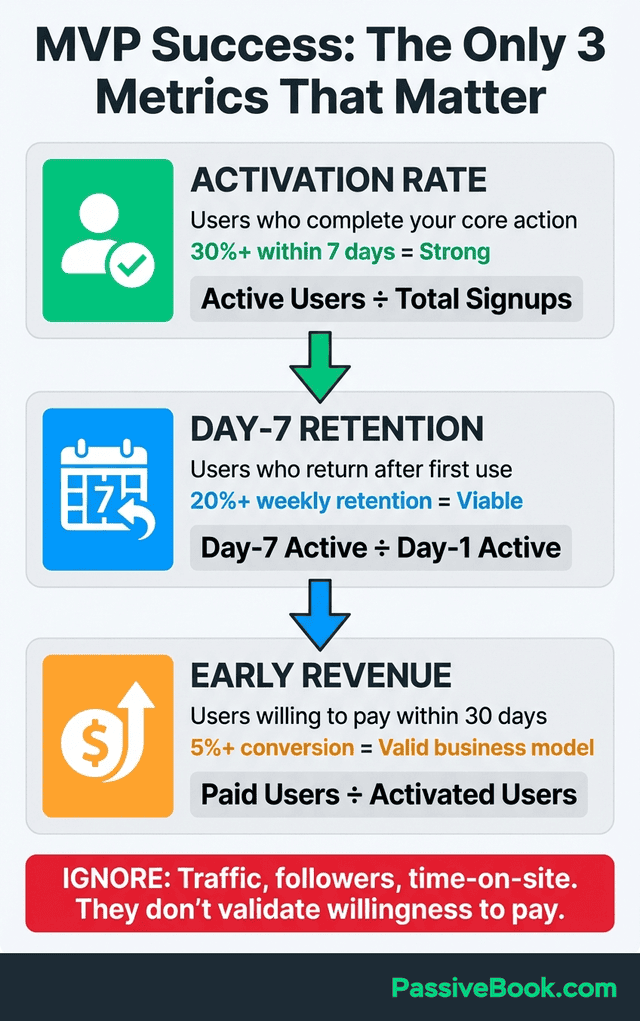
Day-7 retention tells you if people find lasting value. Track how many users who activated on day 1 come back on day 7. Aim for 20%+ weekly retention. Lower numbers suggest your product doesn’t solve a recurring problem.
Early revenue signals validate willingness to pay. Don’t wait for perfection. If 5% of your activated users convert to paid within 30 days, you have a viable business model. Below 2% suggests pricing problems or weak value proposition.
Ignore traffic, followers, and time-on-site until you’ve validated these three core metrics. You need proof people will pay for your solution, not proof people will visit your website.
Success Thresholds for Each Validation Stage
Validation isn’t vague. You need concrete benchmarks to decide whether to proceed or pivot. These thresholds come from analyzing hundreds of successful MVP launches by bootstrapped founders.
Your landing page needs 100+ email signups from 500-1,000 visitors. That’s a 10-20% conversion rate, indicating genuine interest.
Anything below 5% suggests weak product-market fit or poor messaging.
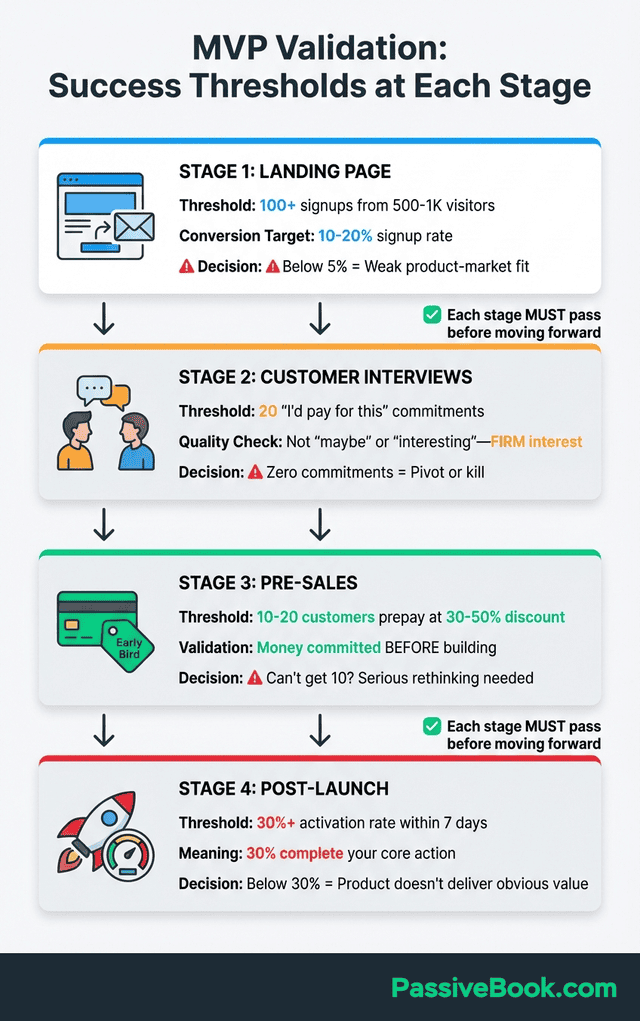
Don’t build until you have 20 “I’d pay for this” commitments from customer interviews. Not “interesting idea” or “maybe someday.” You need people who say they’d pay money if it existed today.
Pre-sale validation requires 10-20 early bird customers willing to commit at a 30-50% discount.
If you can’t get 10 people to prepay even at half price, your idea needs serious rethinking.
Post-launch, aim for a 30%+ activation rate. That means 30% of people who sign up complete your core action within 7 days. Lower activation suggests your product doesn’t deliver obvious value fast enough.
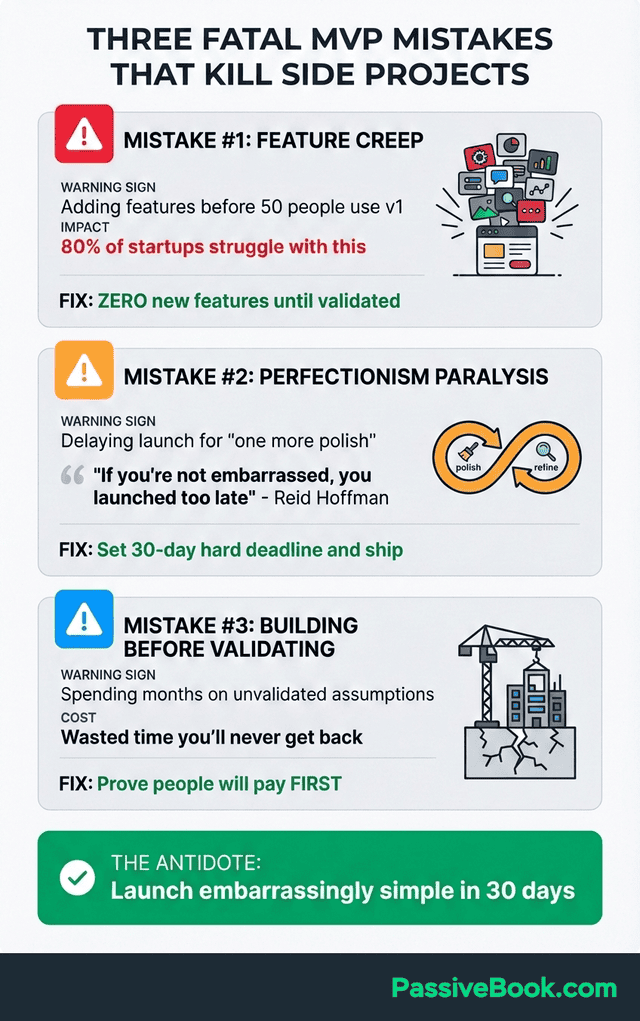
The Three Fatal MVP Mistakes That Kill Side Projects
Most side projects die from three preventable mistakes when building mvp products for the first time. Understanding these traps before you start saves months of wasted effort and helps you ship faster.
Feature Creep: The Silent Killer
Research shows 80% of startups struggle with feature creep because they overbuild before validating their core value proposition. Every new feature you add delays your launch date and dilutes what makes your product valuable.
Set a hard rule before you start: zero new features until 50 people actually use your existing version.
When you get user feedback requesting features, write them down in a “later” list. Resist the urge to build them now.
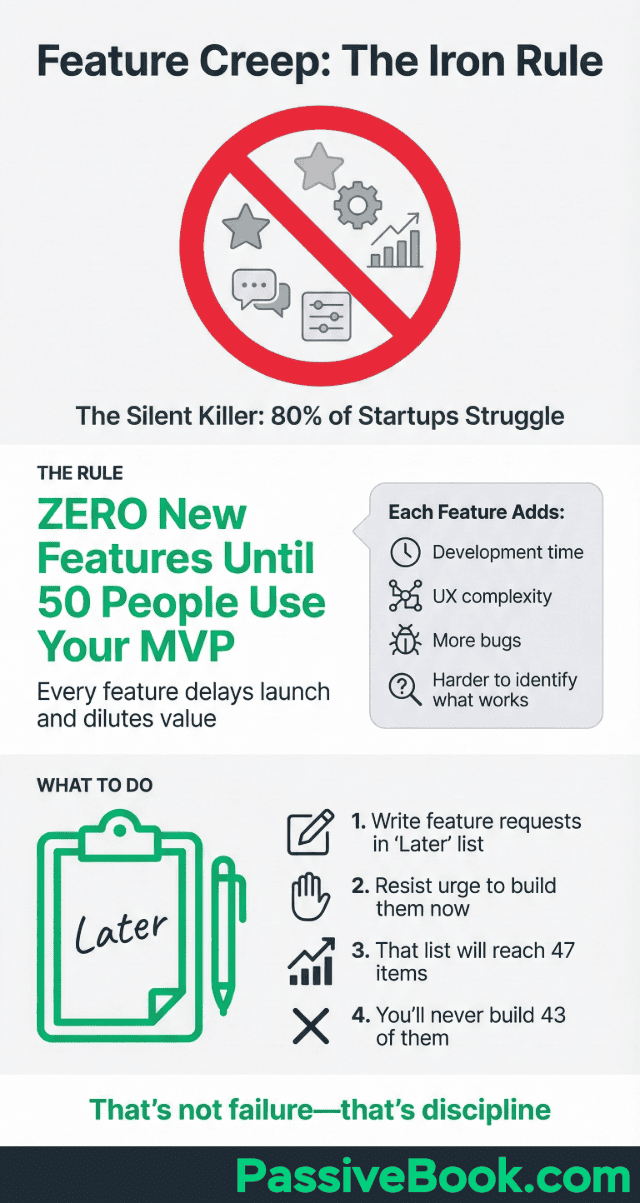
And yes, that ‘later’ list will eventually have 47 items on it and you’ll never build 43 of them. That’s not failure – that’s product discipline.
Each added feature doesn’t just take development time. It adds complexity to your user experience, creates more things that can break, and makes it harder to identify what’s actually working.
Start with one core feature that delivers clear value.
Perfectionism Paralysis
Reid Hoffman, LinkedIn’s co-founder, famously said: “If you’re not embarrassed by the first version of your product, you’ve launched too late.” This quote should be tattooed on every solopreneur’s arm.
Set a 30-day hard deadline and ship regardless of your polish level. Your first version will have rough edges. The design won’t be Instagram-worthy.
Some workflows will feel clunky. Launch anyway.
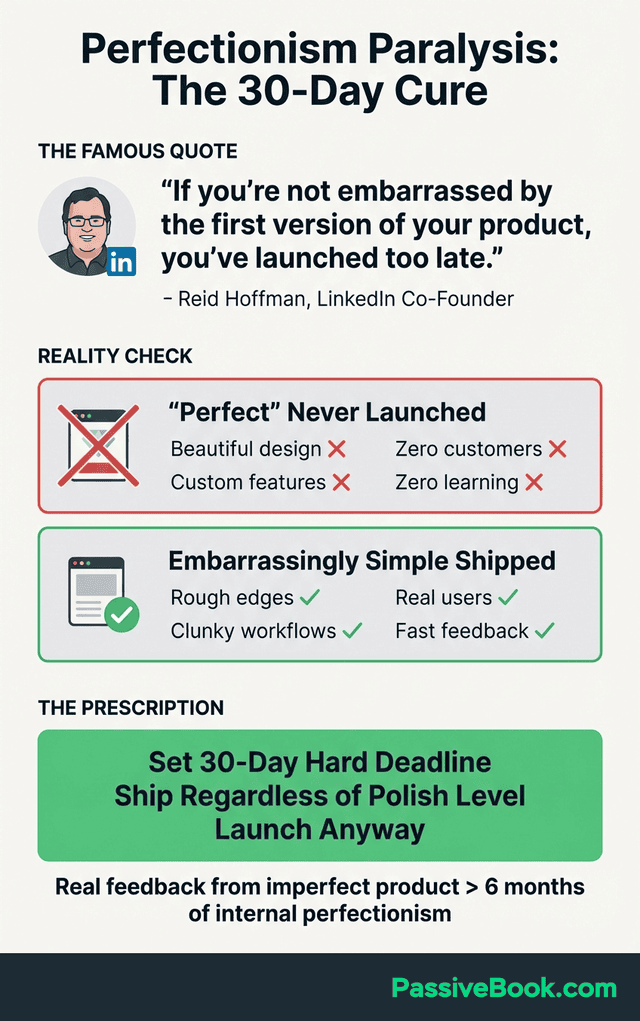
“Embarrassingly simple” shipped beats “perfect” never launched every single time.
Real user feedback from an imperfect product teaches you more in one week than six months of internal perfectionism. You’ll discover what actually matters to users versus what you assumed mattered.
The sooner you launch, the sooner you learn. The sooner you learn, the sooner you can build something people actually want to pay for.
The Fatal Mistake: Building Before Validating Demand
Here’s my most expensive mistake: A student of mine once spent $800 and two months building a productivity app for freelancers. Beautiful interface. Smart features. He launched to crickets. Five signups in the first month. Zero paid conversions.
Why? He never validated that freelancers actually wanted another productivity tool. He assumed the problem existed because he felt it.
That assumption cost him two months of nights and weekends he’ll never get back.
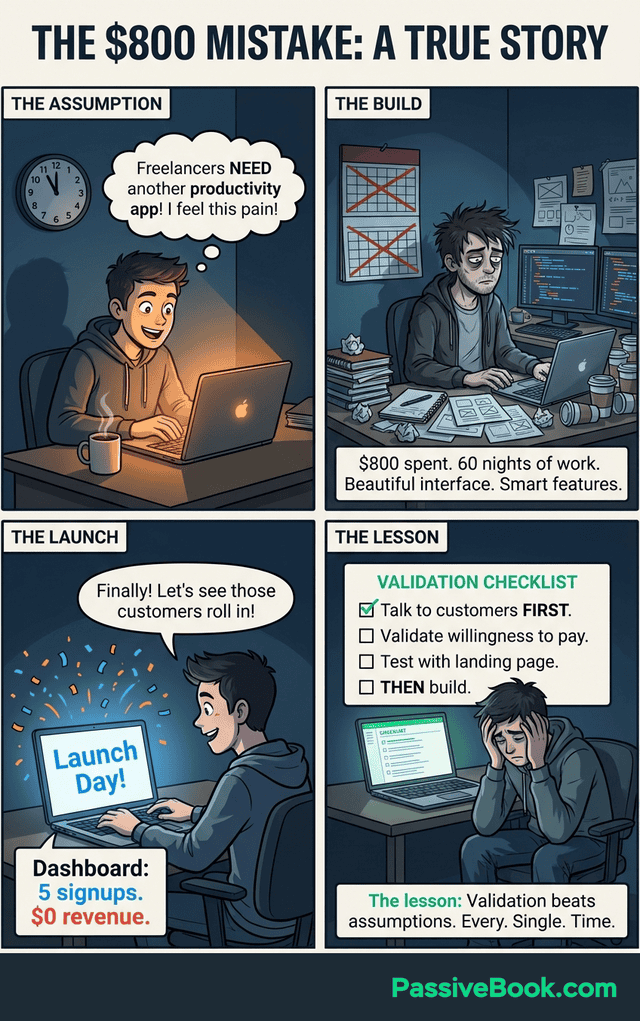
You must prove people will pay before investing time or money. This isn’t optional for solopreneurs with limited resources.
Buffer co-founder Joel Gascoigne validated his “schedule tweets” idea with landing pages before writing a single line of code.
He drove traffic to a page describing the product, measured signup interest, and only built when demand was proven.
The validation process protects you from building solutions looking for problems. It forces you to talk to real potential customers and hear what they actually struggle with, not what you assume they need.
Step 1: The “Remove Everything Else” Test to Prevent Feature Creep
Airbnb started by renting three air mattresses in the founders’ San Francisco apartment. Not a hotel booking platform. Not a vacation rental marketplace. Three air mattresses.
That simplicity proved strangers would pay to sleep in someone else’s home.
List every feature idea you have for your product. Be exhaustive. Write down everything you think would be valuable. Then ruthlessly delete 80% that aren’t essential to solving your core problem.
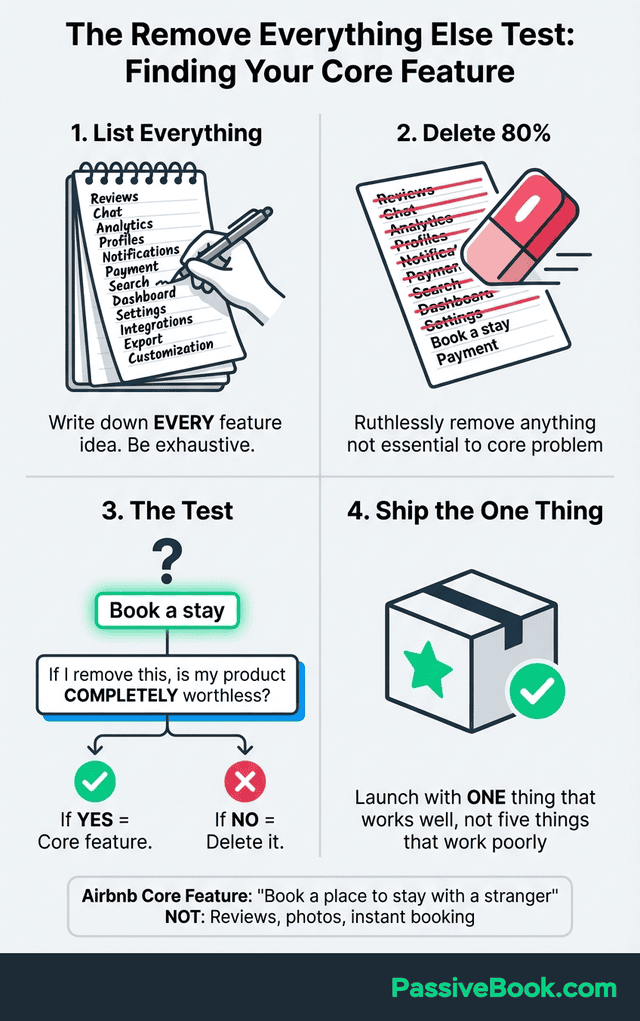
The test: if removing a feature makes your product completely worthless, that’s your core feature. Everything else is optional. For Airbnb, the core was “book a place to stay with a stranger.” Not reviews, not professional photography, not instant booking.
Your first version should feel uncomfortably simple. If you’re not slightly embarrassed by how basic it is, you’re probably overbuilding. Launch with one thing that works well instead of five things that work poorly.
Step 2: Testing Demand With Zero-Budget Smoke Tests
A smoke test validates interest before you build anything. You create a single landing page describing your solution as if it already exists, drive traffic to it, and measure how many people express interest.
Use Mailchimp’s free landing page builder or Google Sites (completely free) to launch in under 2 hours. Your page needs five elements: a clear headline stating the problem, three bullets explaining your solution, social proof if you have any, an email signup form, and a call-to-action button.
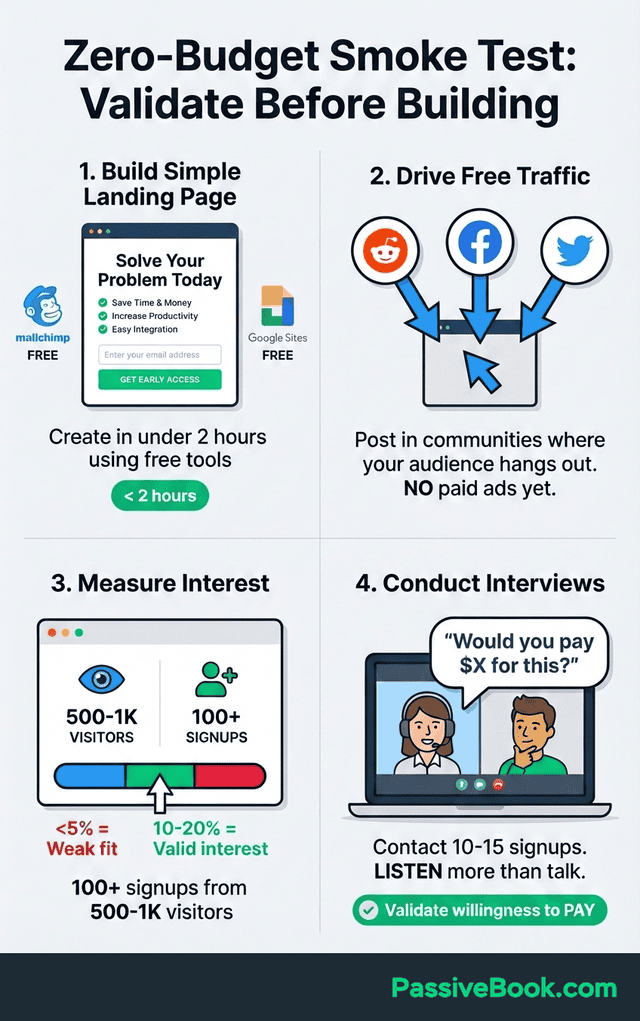
Get 100+ email signups from your first 500-1,000 visitors as your validation threshold. Drive traffic through Reddit communities, Facebook groups, and Twitter conversations where your target audience hangs out. Don’t buy ads yet.
These best practices for building mvp validation help early adopters discover products worth championing. Follow up your landing page test with 10-15 customer interviews. Contact people who signed up and ask: “Would you pay $X for this?” Listen more than you talk. You’re validating willingness to pay, not pitching your idea.
Step 3: Pre-Selling to Validate Willingness to Pay
Signups prove interest. Pre-sales prove willingness to pay. Offer a 30-50% “early bird” discount for the first 10-20 customers who commit now, before your product is fully built.
Nathan Barry pre-sold ConvertKit licenses before building the full SaaS product. He accepted pre-orders for 3-month subscriptions, collected payment upfront, and used that revenue to fund development. This approach validated demand and provided runway simultaneously.
Side note: If someone says ‘interesting idea, let me think about it,’ that’s a no. You want ‘take my money now’ energy, not polite interest.
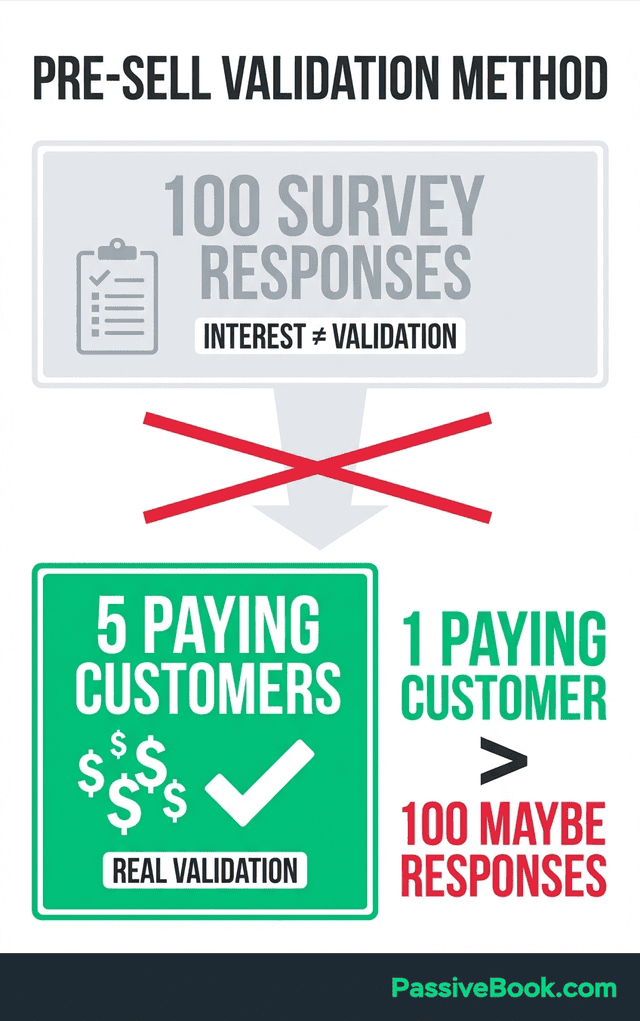
Set a clear deadline: “I need 10 pre-orders in 25 conversations, or I’m killing this idea.”
Zero pre-orders after 25 conversations means your idea isn’t solving a painful enough problem. Pivot immediately or move on.
Pre-selling also creates accountability. When 15 people have paid you money, you’ll ship the product. When zero people have paid, it’s easy to let your side project drift into the graveyard of abandoned ideas.
Choosing Your MVP Platform Based on Business Model
Your platform choice and business model determine launch speed, ongoing costs, and technical limitations down the road. Choose the wrong platform and you’ll regret it six months from now when you’re migrating 500 customers.
The wrong platform creates expensive problems later. Moving from Gumroad to a custom Shopify store after getting 500 customers means migrating data, setting up new payment processing, and losing sales during the transition.
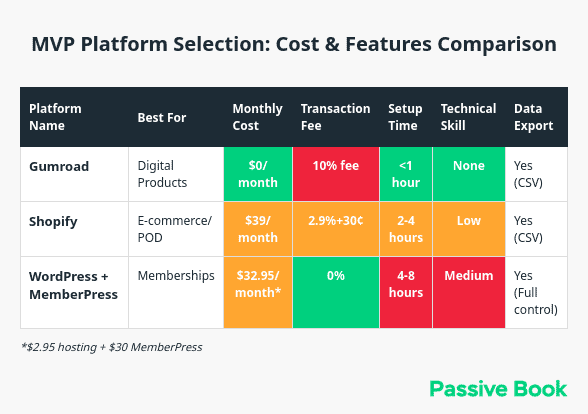
Verify data export capabilities before committing to any platform. Gumroad and Shopify both allow full customer and order exports via CSV files. Some platforms lock your data in proprietary formats.
Start with platforms offering month-to-month pricing while you’re validating. Annual plans save money once you’ve proven your business model, but monthly flexibility lets you pivot or shut down without losing prepaid fees.
For Digital Products: Gumroad
Justin Welsh built a multi-million dollar one-person business selling digital products and courses, starting with simple PDF guides and templates. His approach proves you don’t need complex platforms to generate serious revenue with digital goods.
Gumroad charges zero monthly fees and takes a 10% transaction fee. You can go live in under one hour. Upload your PDF, ebook, template, or video course, set your price, and start selling immediately.
I’ve launched six digital products on Gumroad. The first one made $200 in three days. The 10% fee hurt less than I thought when I realized I’d spent zero time setting up payment processing or email delivery.
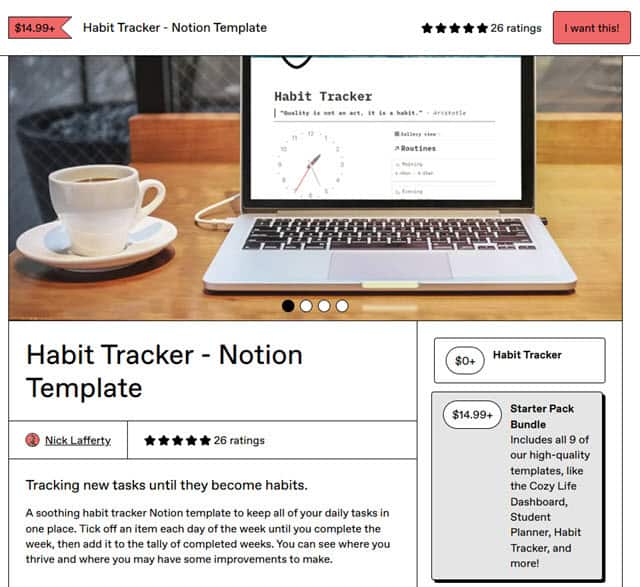
The platform includes built-in email delivery, payment processing through Stripe, and a simple checkout experience that converts well. You get access to Gumroad Discover, their marketplace where customers browse products, potentially driving your first sales without paid traffic.
That 10% stings when you’re making real money, but when you’re validating? Zero monthly fees beats a $29/month Shopify plan you’re not using yet. Gumroad works best for weekend builders selling templates, guides, courses, or any digital download.
For Ecommerce Stores and Print-on-Demand: Shopify
Emily built a $500k print-on-demand business using Shopify and Printify while working full-time and raising kids. She started with t-shirt designs, reinvested early profits, and scaled to multiple product lines without ever holding inventory.
Shopify’s Basic plan starts at $39/month and includes payment processing, inventory management, and integrations with fulfillment partners. For print-on-demand, connect Printify or Printful to automatically produce and ship products when customers order.
I tried print-on-demand for four months in 2019. Made $1,200 total revenue, about $300 profit. Learned that design skills matter more than the platform. If your designs are weak, no platform will save you.
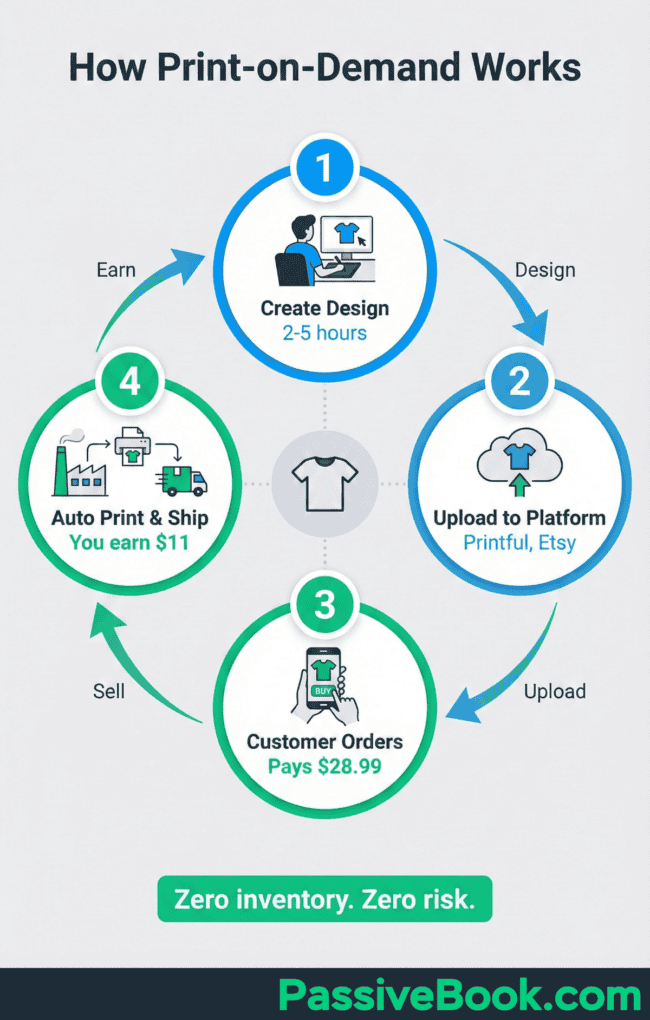
Zero inventory costs mean zero upfront risk. You design products, list them in your store, and only pay production costs when someone buys. Your main investment is time creating designs and writing product descriptions.
Use SEO-optimized product descriptions targeting long-tail keywords like “funny cat mom t-shirt” or “minimalist geometric wall art.” Drive early traffic through Pinterest, a free visual discovery platform where users actively search for products to buy.
For Content and Membership Sites: WordPress + MemberPress
40 Aprons food blogger turned her side project into a thriving membership business using WordPress and MemberPress. She published free recipes to build an audience, then launched a paid membership offering exclusive meal plans and cooking tutorials.
Bluehost hosting starts at $2.95/month with a free domain for the first year. Install WordPress for free, then add the MemberPress plugin to create members-only content, sell digital products, and manage subscriptions.
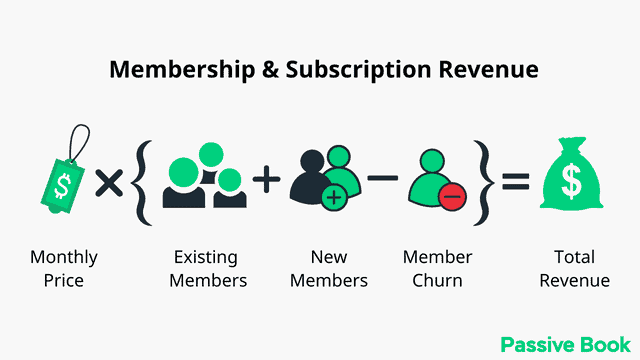
I’ve run membership sites on both WordPress and Substack. WordPress gives you control but costs you time. Every plugin update is a potential site-breaker. Only go this route if you enjoy (or tolerate) technical maintenance.
This combination gives you complete control over your content and customer relationships. You own the platform, unlike building on Medium or Substack where the platform owns the audience.
Publish free blog content targeting long-tail keywords for 60-90 days before launching paid memberships. This builds organic traffic and establishes your expertise, making your paid offering an easier sell to readers who already trust your free content.
Building Your MVP in 30-60 Days Using No-Code Tools
No-code platforms let weekend builders ship functional MVPs without writing code. No-code MVPs launch in 4-8 weeks compared to 16-24 weeks with traditional development. This speed advantage is critical for time-constrained solopreneurs.
Working 10-15 hours per week, you can build and launch a validated MVP in 30-60 days. Focus on workflow validation, not visual polish. Your first version needs to prove people will use your core feature, nothing more.

No-code tools handle the technical complexity while you focus on solving your customer’s problem. You’re not learning to code. You’re learning to build products that people want to pay for.
Best No-Code Platforms for Weekend Builders in 2026
Bubble lets you build fully functional web apps and mobile app prototypes with a visual editor. Plans start at $29/month, and you can create anything from booking systems to marketplaces. The learning curve takes a weekend to understand basics, then you’re shipping features.
Softr turns Airtable databases into client portals, membership sites, or internal tools in hours. Starting at $29/month, it’s perfect for service businesses needing client dashboards or community platforms without custom code.
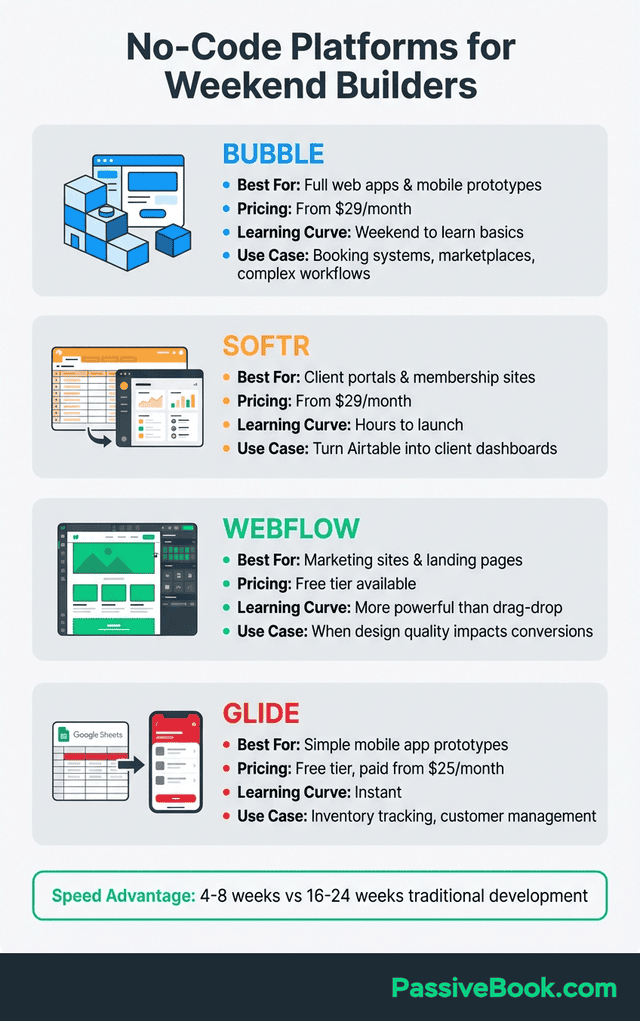
Webflow handles marketing sites and landing pages with professional design capabilities. It’s more powerful than drag-and-drop builders but easier than coding. Use it when design quality directly impacts conversions.
Glide converts Google Sheets into mobile app prototypes instantly. Perfect for simple workflows like inventory tracking, customer management, or content libraries. Free tier available, paid plans start at $25/month.
AI Tools That Speed Up Development
AI-powered development delivers 30% faster product launches based on analysis of 300+ projects, with founders reporting 3.4x return on investment from generative AI tools. These tools accelerate the development process and mvp development timeline.
Use Zapier to connect 7,000+ apps and automate workflows without code. Free tier includes 100 tasks per month. Example: when someone buys your Gumroad product, Zapier automatically adds them to your Mailchimp email list and sends a welcome message.
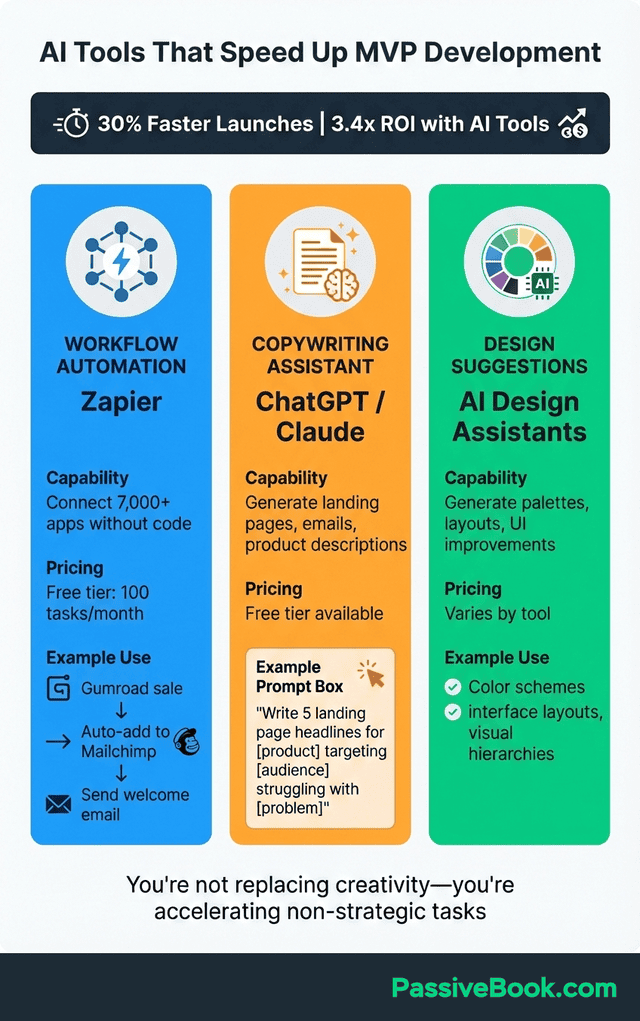
AI handles copywriting for product descriptions, landing pages, and email sequences in minutes. Prompt ChatGPT with: “Write 5 variations of a landing page headline for [your product] targeting [your audience] who struggle with [specific problem].” Pick the best one and ship.
For design suggestions, ask AI tools to generate color palettes, layout ideas, or user interface improvements. You’re not replacing human creativity. You’re accelerating the parts of product development that don’t require strategic thinking.
Your 30-Day MVP Launch Timeline
Pieter Levels, founder of Nomad List and RemoteOK, ships products in 24-72 hours and improves them based on live user feedback. His approach: launch fast, iterate publicly, and let paying customers guide development priorities.
Week 1 focuses entirely on validation. Build a landing page, drive 50+ visits from Reddit and Twitter, and aim for a 15%+ signup rate. Conduct 10 customer interviews and get at least 7 people saying “I’d pay for this.”
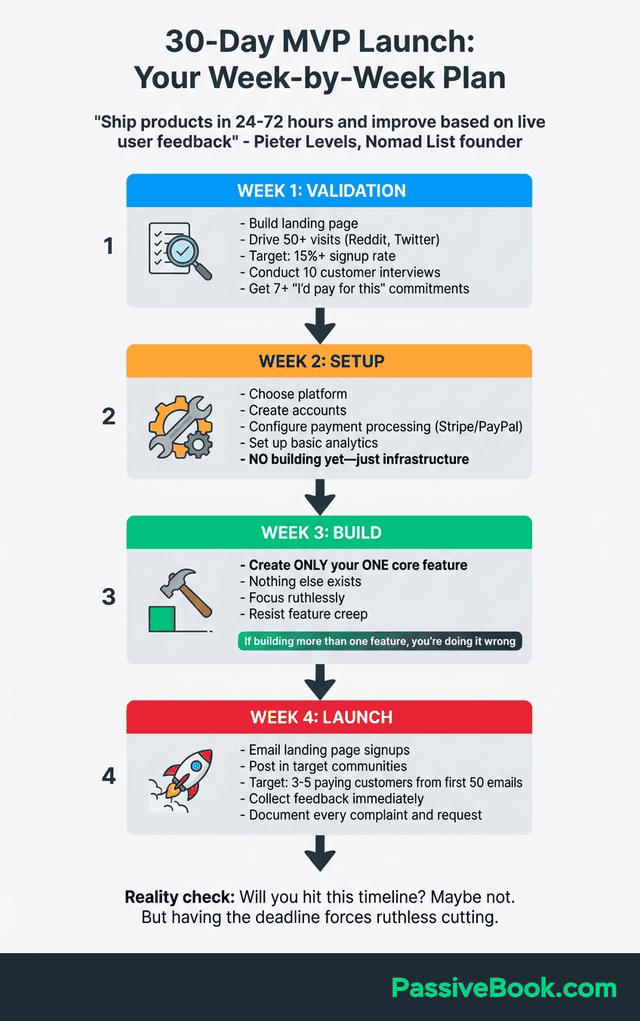
Setup week. Choose your platform, create accounts, configure payment processing through Stripe or PayPal, and set up basic analytics. No building yet. Just infrastructure.
Now you build. Create only the one core feature you identified during validation. Nothing else. If you’re building a meal planning app, you’re building “generate weekly meal plan.” Not grocery lists, not recipe scaling, not nutrition tracking.
Launch week. Email your landing page signups, post in communities where your target audience hangs out, and aim for 3-5 paying customers from your first 50 emails. Collect feedback immediately and document every complaint and feature request.
Will you hit this timeline? Maybe. I’ve never hit a 30-day deadline in my life. But having the deadline forces you to cut ruthlessly.
When to Pivot, Persevere, or Kill Your MVP
Knowing when to quit versus when to push through separates successful solopreneurs from those who waste years on dying projects. The data tells you which path to take if you’re honest about what it means.
Airbnb pivoted from renting air mattresses to entire homes after seeing stronger demand for full apartments. The core insight – strangers will pay to stay in other people’s spaces – remained valid. The execution shifted based on market feedback.
Pivot signals appear when 10%+ of users activate but consistently request a different core feature. Or when users engage heavily with an unexpected use case. If meal planning users keep asking for grocery delivery integration, that’s a pivot signal.
Example: I launched a productivity course for developers. Five percent signed up, but 60% of those who did asked if I had content for non-developers. That’s a pivot signal. I repositioned the course for ‘anyone who codes’ and doubled signups in two weeks.
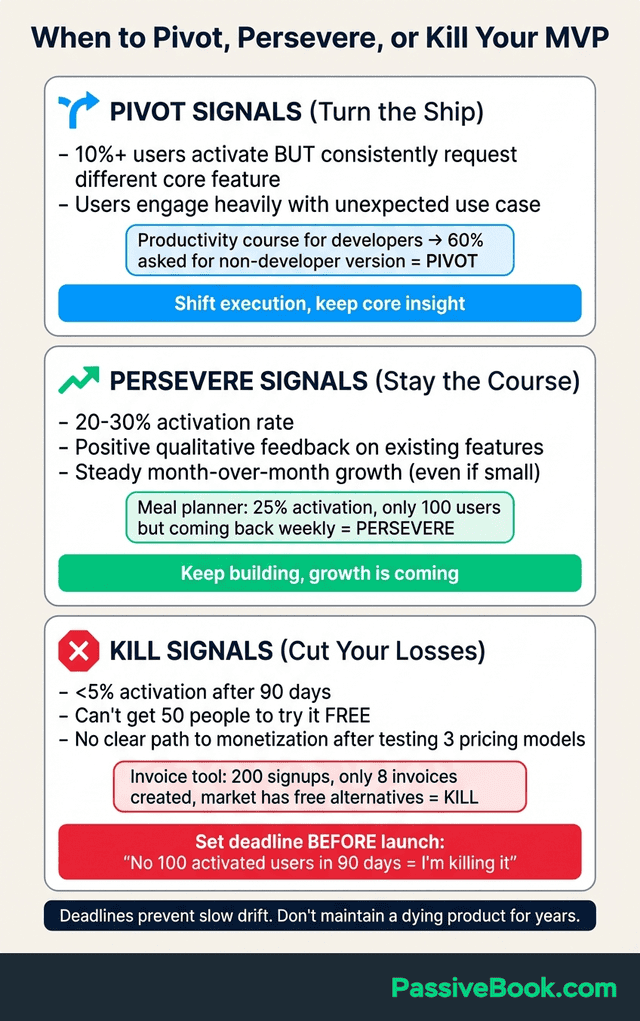
Persevere signals include 20-30% activation rates where users complete your core action regularly, positive qualitative feedback requesting improvements to existing features, and steady month-over-month growth even if absolute numbers are small.
Example: My friend built a meal planning tool that got 25% activation but only 100 total users in 90 days. Growth was slow, but the 25 active users kept coming back weekly and asking for more features. She persevered. A year later, she’s at 2,000 users and $4K MRR.
Kill signals are brutal but clear: less than 5% activation after 90 days despite active outreach to your target market, inability to get 50 people to try your product even when it’s free, or no clear path to monetization after testing three pricing models.
Example: I spent four months building a freelance invoice tool. Got 200 signups, but only 8 people ever created an invoice. After testing three pricing models, I accepted that the market already had Freshbooks and Wave (both free). I killed it and moved on.
Set decision deadlines before launching. “If I don’t hit 100 activated users in 90 days, I’m killing this project.” Deadlines prevent the slow drift where you maintain a dying product for years while it drains your time and motivation.
Frequently Asked Questions
What Is an Example of a Minimum Viable Product (MVP)?
Dropbox’s 3-minute demo video is the classic MVP example. Drew Houston created a simple screen recording showing how file syncing would work across devices, posted it to Hacker News, and grew the waitlist from 5,000 to 75,000 overnight. No actual product existed yet, just proof that people wanted the solution enough to sign up.
How Much Should I Budget for My First MVP?
Budget $0-500 for your first MVP validation and launch. Use free tiers of Mailchimp or Google Sites for landing pages, Gumroad charges nothing upfront for digital products, and WordPress hosting starts at $2.95/month. Your main investment is time, not money. Spend money on paid traffic only after validating organic interest first.
What’s the Difference Between an MVP and MMP?
An MVP (Minimum Viable Product) tests whether your core assumption is valid with the absolute minimum features. An MMP (Minimum Marketable Product) is what you build after validation succeeds, adding enough features to compete in the market. Most solopreneurs confuse these and overbuild their MVP, which delays learning and wastes resources on unvalidated features.
How Do I Know Which Features Are Truly Minimum?
Use the remove everything else test: list all potential features, then delete each one individually. If removing a feature makes your product completely worthless, it’s minimum. Everything else is optional. Ask 20 target users: What’s the one thing this product must do? The answer that appears most often is your minimum feature.
How Do I Know If My Idea Is Too Simple?
Simple ideas that solve painful problems make money. Dropbox solved my files aren’t on this computer. Superhuman solved my inbox is overwhelming. Both are simple ideas with massive revenue. If you can explain your MVP in one sentence and someone says I’d pay for that, your idea isn’t too simple – it’s clear. The real test: Can you charge money for it? If yes, it’s not too simple. If people expect it for free, you need more value.
Can I Validate a Business Idea Without Building Anything?
Yes, through landing page smoke tests and pre-selling. Create a simple landing page describing your solution as if it exists, drive 500-1,000 visitors to it, and measure signup conversion. Then offer 10-20 people a 50% discount to prepay before you build. If you can’t get 10 prepaid customers at half price, your idea needs revision before building.
What If I Launch and Nobody Buys?
First, check your activation rate. If people sign up but don’t complete your core action, your product doesn’t deliver obvious value. Fix that before expecting revenue. Second, revisit your pricing. Maybe you’re charging $49 when your audience would pay $19. Test three price points with 10 people each before deciding your pricing is wrong. Third, verify you’re reaching the right audience. I once built a course for bloggers and got zero sales. Repositioned it for food bloggers and sold 30 copies. Specificity sells. If none of these fixes work after 90 days, kill it and move on.
Should I Use No-Code Tools or Hire Developers?
Use no-code tools for your MVP validation phase. Platforms like Bubble, Webflow, and Glide let you build and ship in 4-8 weeks working nights and weekends. Only hire developers after you’ve validated demand with paying customers and hit the technical limits of no-code platforms. Most solopreneurs never need custom code for their first $10,000-50,000 in revenue.
What Next?
You now have the complete framework for building and validating an MVP in 30-60 days without quitting your day job. The most important step is starting, even if your idea feels too simple or you’re worried about launching something imperfect.
Your homework for the next 48 hours: Write down your MVP idea in one sentence. Then list every feature you think it needs. Now delete 80% of those features. What’s left is your MVP.
Once you’ve done that exercise, pick your validation method: landing page smoke test (if you need 100+ people to validate), or pre-sales (if you can find 20 target customers to talk to). Start there tomorrow.
Building online businesses is challenging, especially while juggling a day job and family commitments. But the alternative – spending months building something nobody wants – is far more painful than shipping something embarrassingly simple and learning fast from real users.
Take a moment to hit the share buttons below this article if you found it valuable. Your solopreneur friends grinding away on nights and weekends need this framework to avoid the costly mistakes we’ve all made. Share it on Twitter, LinkedIn, or send it directly to someone who’s overthinking their first launch.
I’d love to hear where you are in your MVP journey. Are you still validating your idea, or have you already launched and started collecting feedback? Drop a comment below and share your biggest challenge right now – I read and respond to every one.
Share this post with your friends & followers: