I spent three months building my first digital course while working my corporate job. Nights, weekends, every spare hour went into creating modules and slide decks. When I finally launched it, seven people bought it. Seven. That failure taught me the most valuable lesson of my entrepreneurial journey: validate before you build.
Creating a simple landing page for validation for your online business is the smartest move you’ll make. It takes hours instead of months, costs almost nothing, and shows you whether real people will pay for your idea before you invest your limited time building it.

- •What Landing Page Validation Is
- •Why Solopreneurs Must Validate Before Building
- •The Real Cost of Building Without Validation
- What Success Actually Looks Like: Metrics That Matter
- •What to Do When Your Numbers Fall Short
- •When Landing Page Validation Fails: Common Traps
- •Core Elements Your Validation Landing Page Needs
- •Free Tools to Build Your Landing Page in Under 2 Hours
- Driving Your First 100-300 Targeted Visitors
- Setting up Conversion Tracking That Matters
- •Following up With Signups to Deepen Validation
- •Real Validation Timelines and What to Expect
- •What Next?
What Landing Page Validation Is
A validation landing page is a simple, single-page website describing your planned product and asking visitors to take one action to gauge real interest. It’s important to understand that this differs from a full website – it’s one focused page collecting signups or pre-orders to prove interest from strangers, not just supportive friends and family. That action is usually an email signup or pre-order commitment.
I learned this the hard way when my sister-in-law signed up for three of my early ideas and bought exactly zero of them.
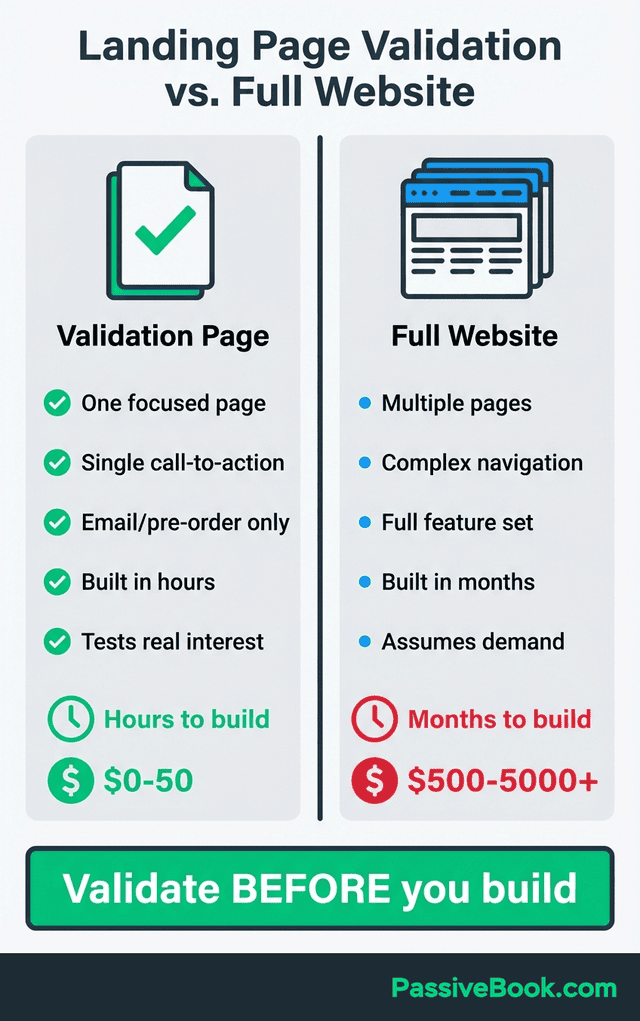
Foti Panagiotakopoulos validated GrowthMentor, a mentorship platform, using a pre-launch landing page and less than $500 in Google Ads before building any product. He proved people would sign up for his concept before writing a single line of code.
Tiago Forte sold over 700 seats to his Building a Second Brain online course by first validating demand through blog content and a waitlist landing page. The waitlist proved people would pay before he recorded a single video lesson.
This approach separates real market demand from your personal enthusiasm about an idea. Landing pages force strangers to vote with their email address or credit card, which is far more reliable than asking your network “Would you buy this?”
Why Solopreneurs Must Validate Before Building
35-42% of startups fail due to lack of market need for their product, according to CB Insights’ 2024 post-mortem analysis. That’s the number one killer of new ventures, ahead of cash flow problems or competition.
Validation takes hours versus months building features nobody wants. When you’re working nights and weekends around a day job, you don’t have time for trial and error on untested ideas. You can test whether your product idea resonates before writing code, recording videos, or ordering inventory.
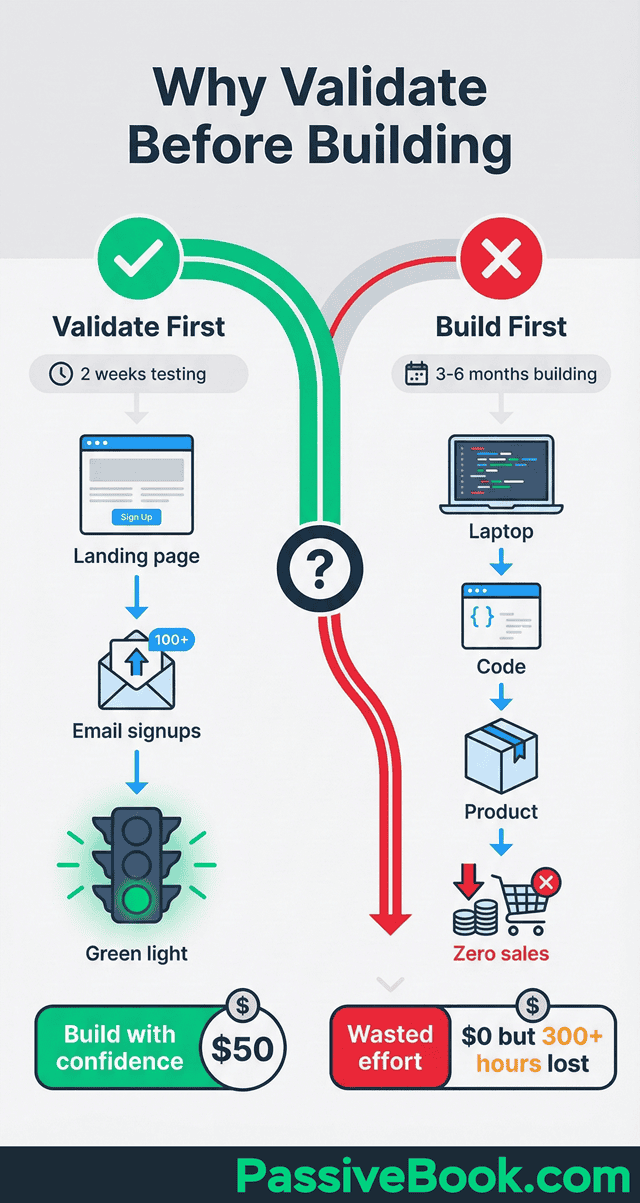
Your limited time is your most precious resource. Spending it building the wrong thing is the costliest mistake you can make as a time-strapped solopreneur.
Market research through landing pages gives you real data instead of guesswork. You learn whether your target audience will take action on your offer before you commit your evenings and weekends to development.
The Real Cost of Building Without Validation
I wasted three months of nights and weekends on that first course I mentioned. If I had validated the idea first with a simple landing page, I would have discovered in two weeks that the topic didn’t resonate strongly enough to justify building it.
Those three months could have gone toward an idea with proven demand.
Most entrepreneurs spend 3-6 months building an MVP before getting first customer feedback. When you’re carving out 10-15 hours per week from an already packed schedule, that’s 120-360 hours of your life you’ll never get back.
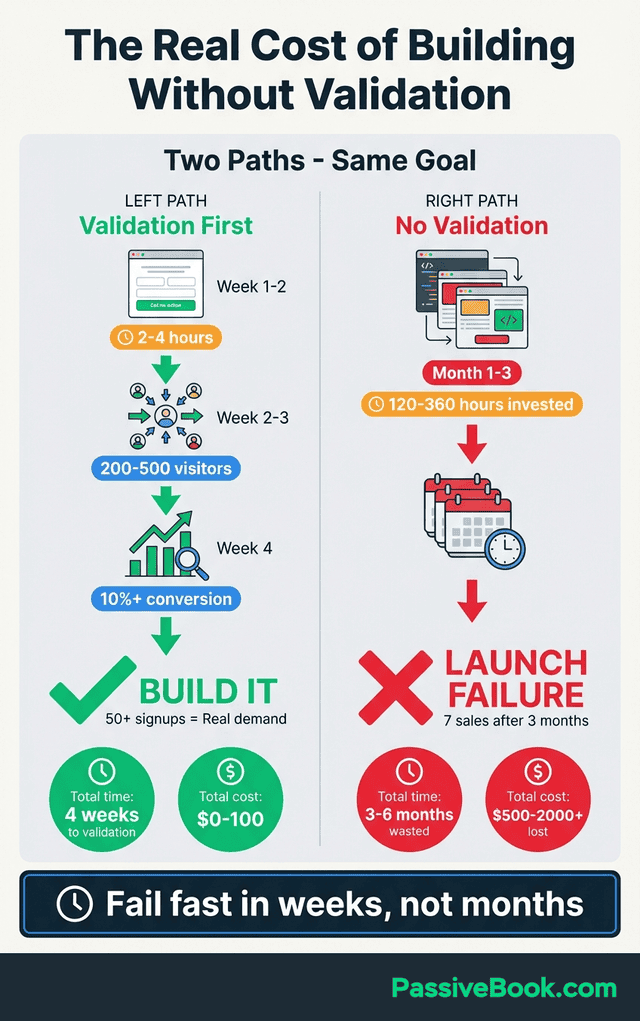
Budget evaporates on features that seemed essential but customers ignore. You pay for design tools, hosting, email services, and domain names for a product that generates zero revenue because nobody wanted it.
The opportunity cost hurts most. During those months building something nobody wants, you could have been pursuing a validated idea that was already collecting paying customers. Time moves in one direction, and you can’t recover those months.
Failed validation after a week of work stings far less than a failed launch after six months of building. The landing page approach lets you fail fast and cheap, then redirect your energy toward ideas that show real traction.
What Success Actually Looks Like: Metrics That Matter
Conversion rate and traffic quality matter. Page views don’t. A thousand visitors from random social media shares means nothing if none of them sign up.
Make sure you’re targeting people experiencing the problem you solve before making go/no-go decisions on your idea. Fifty visitors isn’t enough data to determine whether your concept has legs.
Collect qualitative feedback understanding why visitors signed up or didn’t. The numbers tell you what’s happening, but the words tell you why it’s happening and how to improve.
Email Signup Rate Benchmarks
You’re going to want to target a 5-15% conversion rate for email opt-in landing pages from targeted traffic. This means if you send 100 people from a niche community discussing your exact problem, 5-15 of them should give you their email address.
Above 10% suggests strong validation worth moving forward with development. When double-digit percentages of your target audience willingly hand over their email to learn more, you’ve struck a nerve.
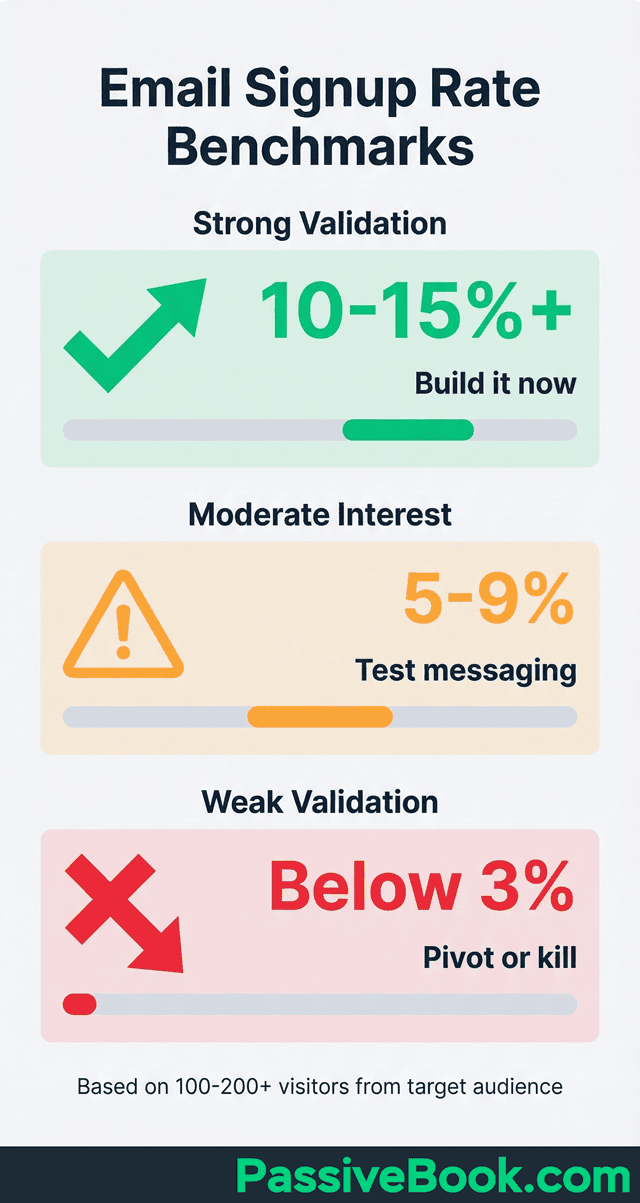
Below 3% after 200+ visitors from your target communities signals messaging mismatch or weak product-market fit. Either you’re speaking to the wrong people, or the problem you’re solving isn’t painful enough for them to care.
Best waitlist landing pages convert 15-40% of visitors into signups, compared to 2-5% for typical product pages. This higher benchmark applies when you’ve built anticipation and scarcity into your offer.
The difference between 3% and 10% conversion rates is massive. With 200 visitors, 3% gives you 6 signups while 10% gives you 20 signups. That’s the difference between “maybe there’s something here” and “this is definitely worth building.”
Minimum Traffic for Reliable Decisions
You need at least 100-200 visitors from your exact target audience before making pivot decisions. Anything less and you’re guessing based on noise rather than signal.
Aim for 50+ email signups as meaningful validation threshold indicating real interest. Fifty people raising their hand and saying “tell me when this is ready” represents genuine market pull.
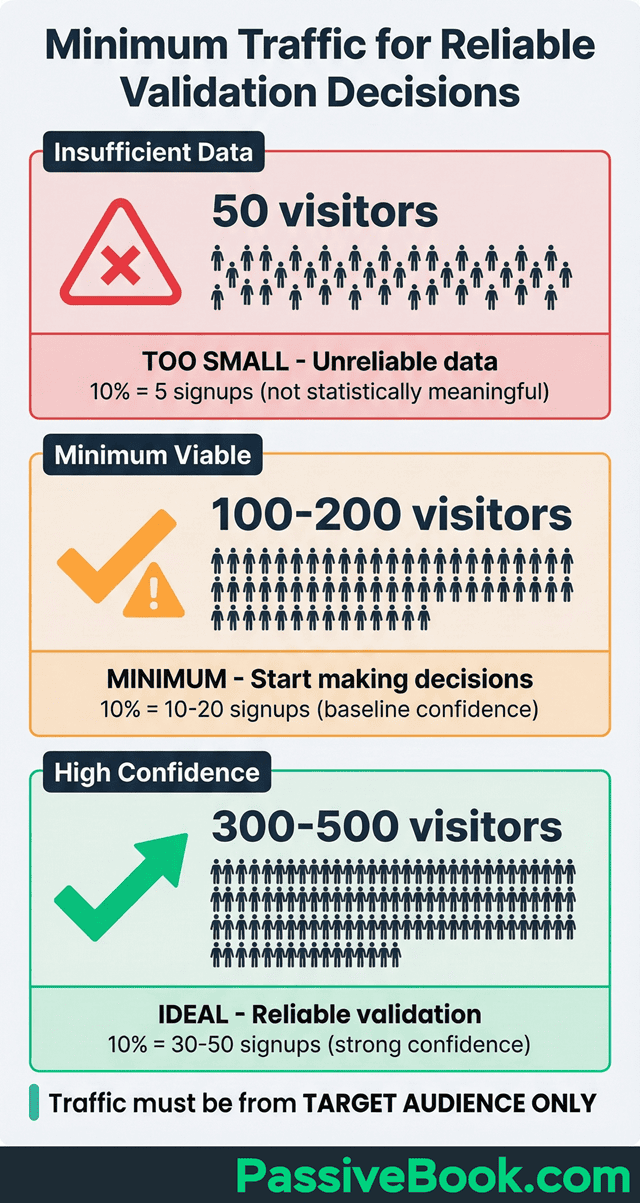
Traffic source matters more than volume. One hundred visitors from niche Reddit communities beats 1,000 from generic social media shares. You’re looking for potential customers experiencing the problem you solve, not casual browsers killing time.
If your first 100 visitors come from a Facebook post your mom shared with her book club, and your product is developer tools for coding bootcamp graduates, those numbers are worthless. Your traffic needs to match your customer profile.
Collecting Qualitative Feedback
Include one optional question on your signup form: “What appeals most about this offer?” Most landing page builders let you add a text field below the email input box.
Email first 10 signups personally asking what problem they’re hoping to solve. This isn’t scalable, but you’re not trying to scale yet. You’re trying to understand whether you’re solving a real problem in a way that resonates.
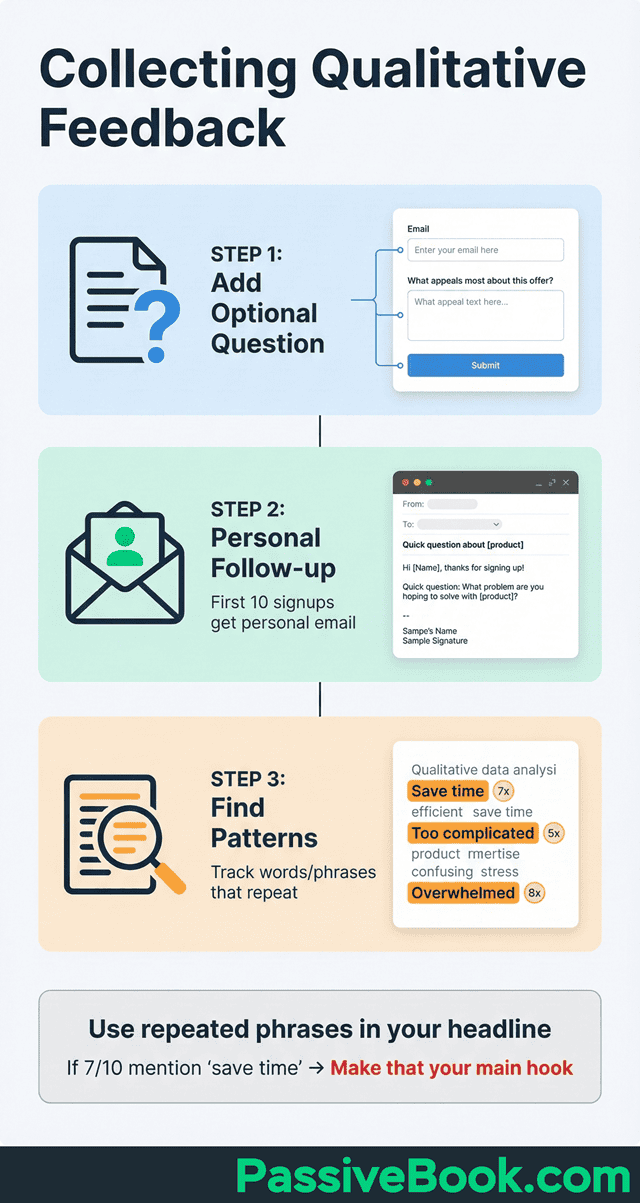
Track common words and phrases in responses to refine messaging. If seven out of ten people mention “overwhelmed by too many tools,” that phrase belongs in your headline.
Unsolicited replies asking “when does this launch?” signal exceptionally strong interest. When people reach out unprompted wanting to know your timeline, you’ve validated real demand that extends beyond polite curiosity.
The Payment Test: Moving Beyond Email Signups
Pre-sales prove demand better than email lists ever will. Money talks louder than interest. Anyone can type an email address into a form, but pulling out a credit card demonstrates real commitment.
Display approximate pricing even pre-launch to gauge price sensitivity and filter tire-kickers. You don’t need final pricing locked in, but showing “Expected price: $47-67” helps you attract serious buyers while scaring away freebie seekers.
GrowthMentor’s founder tested pricing models through his validation landing page before building the platform. He learned what price points resonated before committing to development work.
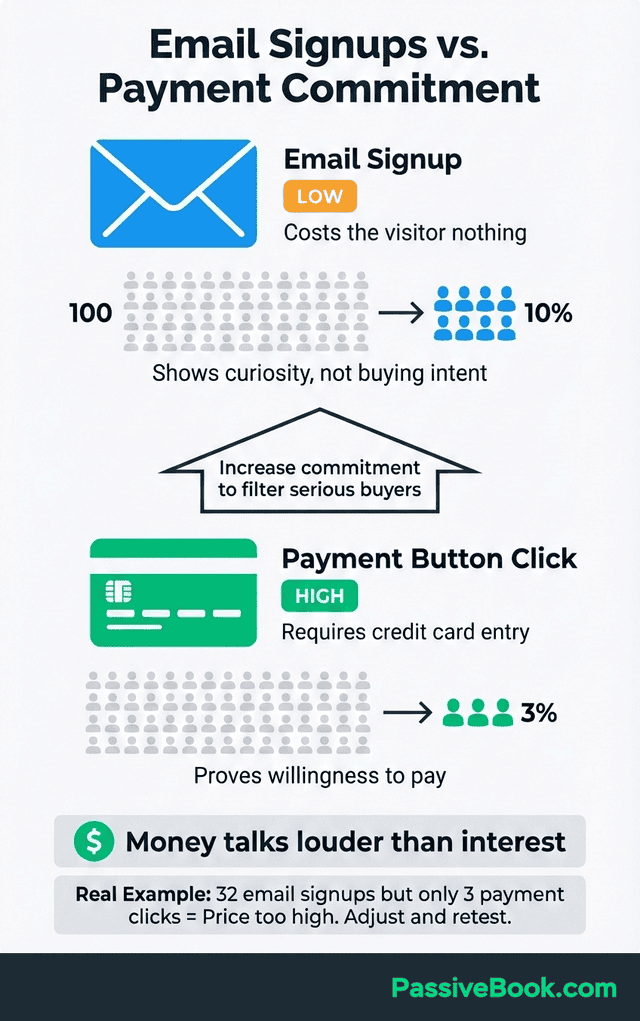
Mock checkout pages reveal who clicks “buy now” versus just browsing. Set up a simple button that says “Pre-order Now” leading to a Stripe payment link or a message saying “We’ll contact you with payment details.” Track how many people click that button compared to email signups.
A YouTuber I know validated a paid membership community this way. His validation page said “Join 50 creators learning to monetize YouTube – $29/month.” He drove 200 subscribers from his channel to the page. Thirty-two signed up for the waitlist, but only three clicked the payment button. That 9% click-through on payment told him the price was too high for his audience. He retested at $15/month and got 18% payment button clicks. Same offer, better price validation.
If 100 people sign up for your email list but only two click “Pre-order at $97,” you’ve learned something critical about willingness to pay. That’s valuable information before you spend months building.
Your Validation Dashboard: Go, Pivot, or Kill?
Track these three metrics in a simple spreadsheet:
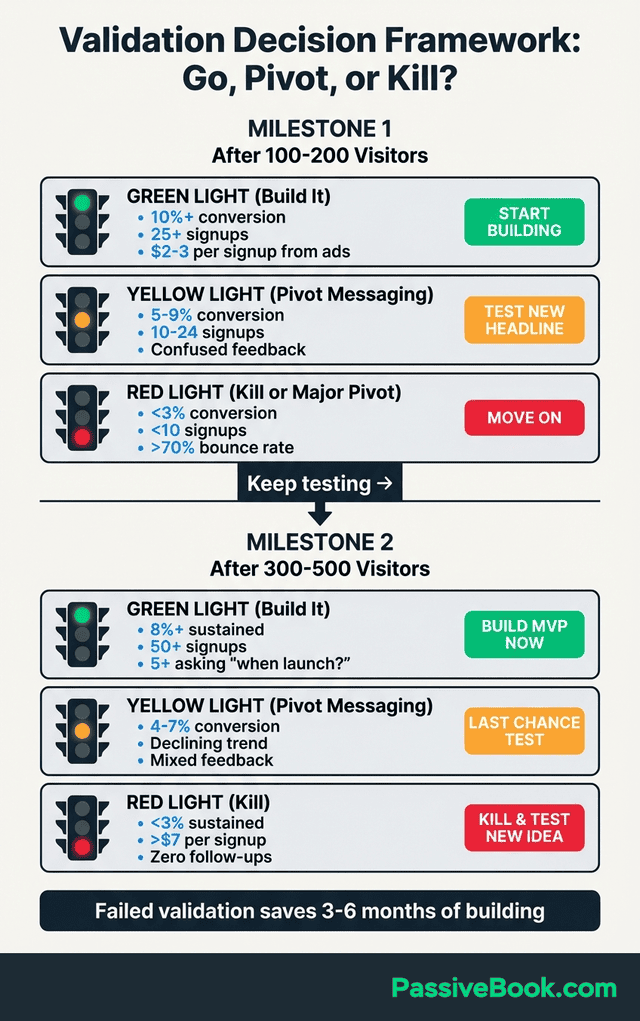
After 100-200 visitors from your target audience:
- Green Light (Build It): 10%+ conversion rate + 25+ signups + average $2-3 per signup from paid ads
- Yellow Light (Pivot Messaging): 5-9% conversion rate + 10-24 signups + qualitative feedback mentions confusion about offer
- Red Light (Kill or Major Pivot): <3% conversion rate + <10 signups + high bounce rate (>70%)
After 300-500 visitors:
- Green Light: 8%+ sustained conversion + 50+ signups + 5+ people asking “when does this launch?”
- Yellow Light: 4-7% conversion + declining trend + mixed qualitative feedback
- Red Light: <3% sustained rate + cost per signup >$7 + zero unsolicited follow-up questions
If you’re in the yellow zone, test 2-3 different headlines and value propositions before abandoning the idea. If you’re in the red zone after two headline tests, move on.
What to Do When Your Numbers Fall Short
Below 3% conversion after 200+ targeted visitors from niche communities suggests weak product-market fit, not just bad copywriting. You can tweak headlines all day, but if the core offer doesn’t solve a painful problem, no amount of polish will fix it.
Before abandoning your idea, test 2-3 different value propositions with fresh traffic. Your solution might work but your messaging doesn’t resonate yet. Try positioning the same product around different pain points to see what clicks.
Email the few people who did sign up and ask “What convinced you to join?” Their answers reveal what’s working and should become your main message. If three out of five mention time savings, make that your primary hook.
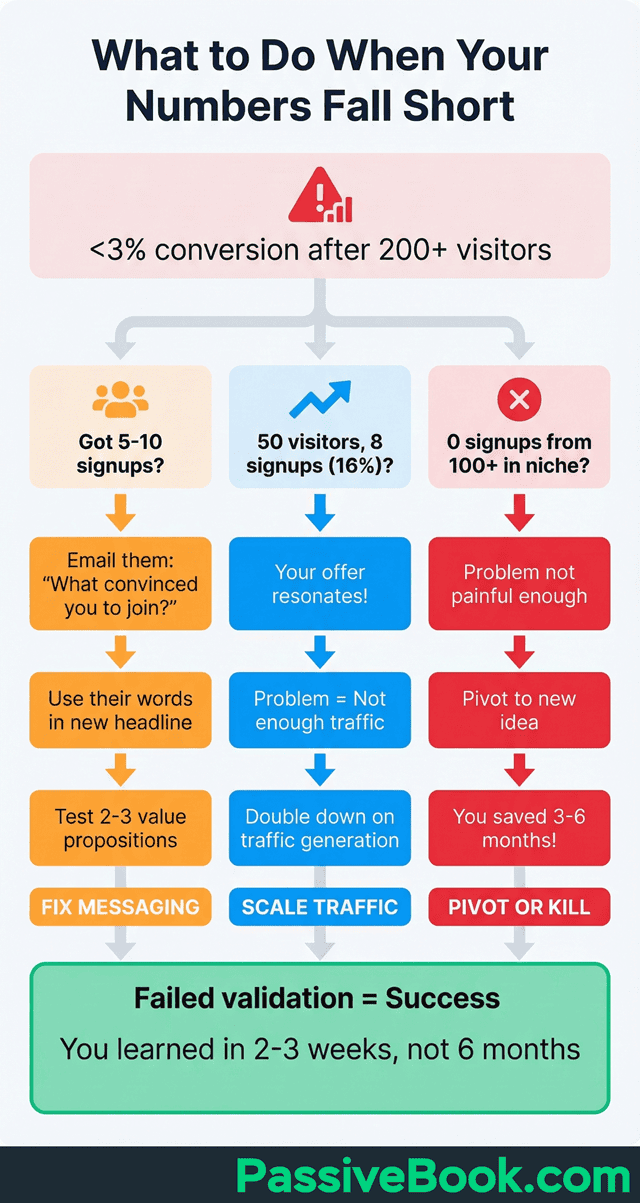
Low traffic with high conversion means your offer resonates. If you only got 50 visitors but 8 of them signed up (16% conversion), you don’t have a messaging problem. You have a traffic generation problem. Double down on getting more of the right eyeballs to your page.
Zero signups from 100+ visitors in your exact niche is a clear pivot signal. The problem you’re solving isn’t painful enough for people to take action. This is good news because you learned this in 2-3 weeks instead of six months.
Failed validation is success. You just saved yourself 3-6 months of building something nobody wants. That’s a win, not a loss. Treat failed validation as cheap market research that protected your most valuable resource: your time.
When Landing Page Validation Fails: Common Traps
Landing pages validate marketing copy quality, not always product demand. A 15% conversion rate tells you your messaging resonates, but it doesn’t guarantee people will use the product once you build it or pay renewal fees after month one.
Wrong traffic sources skew results completely. Viral social media shares from random audiences give you inflated signup numbers from people who won’t become customers. You need targeted traffic from people experiencing the problem you solve.
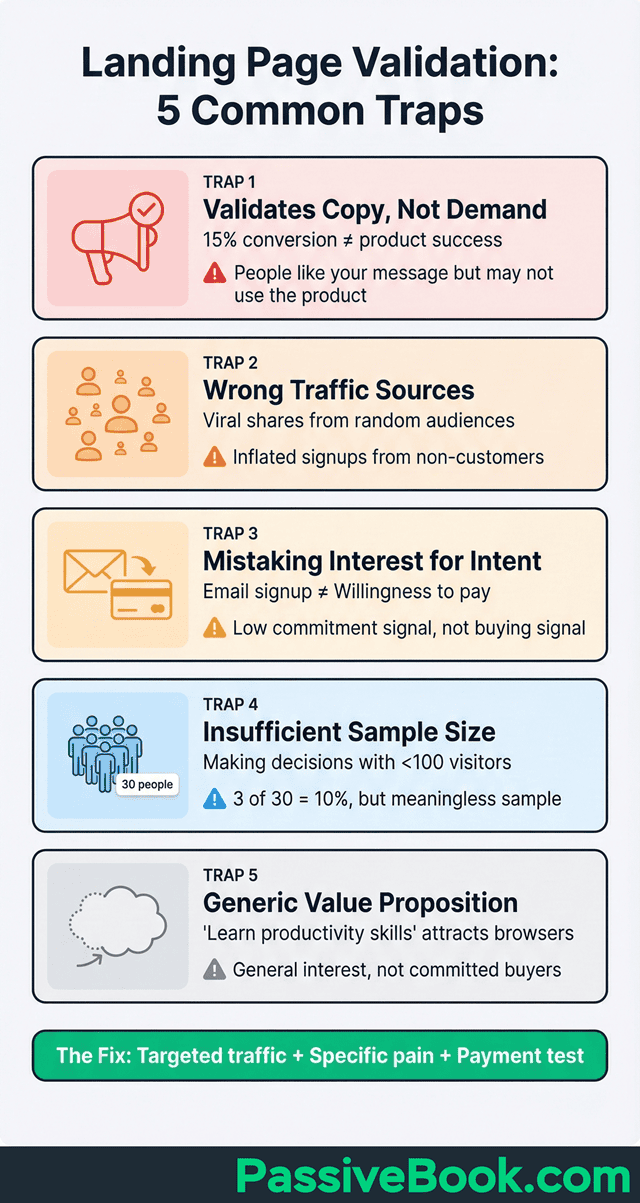
Email signups show curiosity while payment attempts prove buying intent. Someone giving you their email costs them nothing, so it’s a low-commitment signal. Someone entering credit card details is a high-commitment signal showing they’ll spend money.
Insufficient sample size below 100 visitors makes conversion rates meaningless and unreliable. If three out of 30 visitors sign up, that’s 10% conversion. But with such a small sample, your next 30 visitors might give you zero signups, and your rate drops to 5%.
Generic value propositions attract general interest but not committed buyers ready to pay. Saying “learn productivity skills” might get signups from people vaguely interested in self-improvement. “Help overwhelmed freelancers reclaim 10+ hours per week” attracts people with a real painful problem who will buy.
Core Elements Your Validation Landing Page Needs
Your validation page design should prioritize clarity and conversion over visual complexity. Every element should guide visitors toward one action: signing up or pre-ordering.
Start with a clear value proposition leading with the exact problem your audience experiences. State it as “Help [audience] achieve [outcome].” Instead of “Learn productivity skills,” write “Help overwhelmed freelancers reclaim 10+ hours per week using a simple organization system.”
Include a single call-to-action button with benefit-driven text like “Get Early Access” or “Join the Waitlist.” Never use generic “Submit” or “Sign Up” text. I once tested “Submit” versus “Get Early Access” on identical pages. “Submit” converted at 2.1%. “Get Early Access” hit 8.7%. Same traffic, same offer, different button copy. The two-word change tripled signups. Personalized CTAs convert 202% better than generic button text, according to HubSpot’s 2023 marketing statistics.
Place your CTA above the fold, immediately after your value proposition so visitors don’t scroll to take action. Many people won’t scroll, especially on mobile devices, so your most important element needs to be visible immediately.
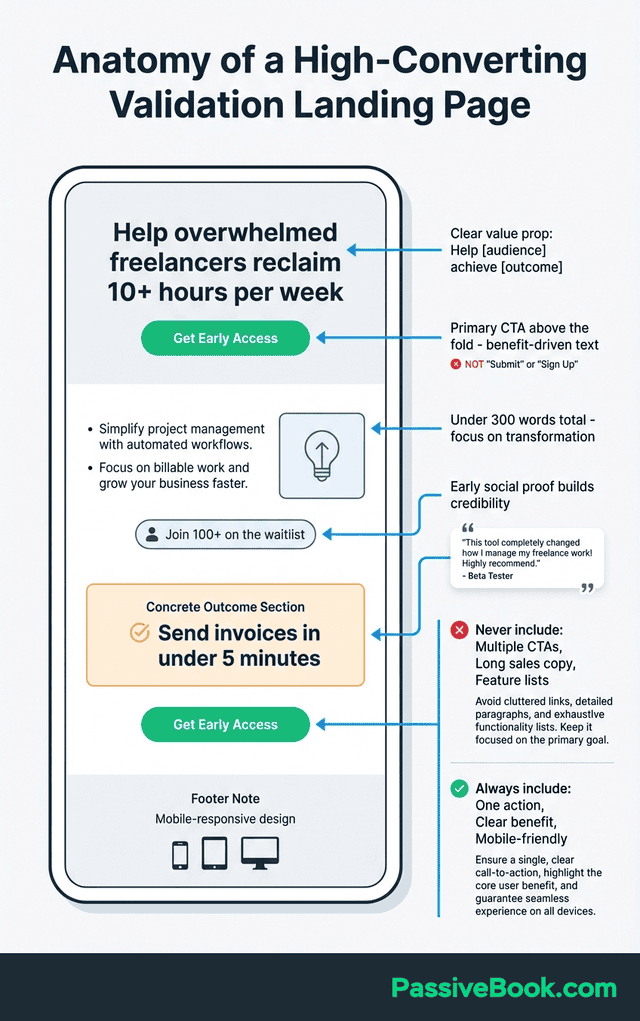
When writing your landing page copy, keep total text under 300 words and focus on the transformation you’ll deliver, not feature lists. Industry benchmarks show 5-10% median conversion for well-designed lead generation pages. Nobody reads long sales letters on validation pages because the product doesn’t exist yet.
Add early social proof like “Join 100+ people on the waitlist” or brief authentic quotes. Use real quotes from beta testers if possible: “This would save me hours every week on invoicing” (Sarah M., Freelance Designer, Beta Tester). If you don’t have quotes yet, use the waitlist counter. State the concrete outcome clearly. What exact result will they achieve? Not vague promises of improvement, but tangible outcomes like “Send professional invoices in under 5 minutes” or “Cut content planning time by half.”
Stick to one conversion goal only: email signup or pre-order. Never offer both options competing on the same page. Multiple CTAs split attention and reduce conversion rates because visitors face decision paralysis.
Ensure mobile-responsive design since most free traffic from Reddit and Facebook groups comes from mobile users. Most free landing page builders handle this automatically, but always preview your page on your phone before launching.
Free Tools to Build Your Landing Page in Under 2 Hours
You don’t need expensive software to build an effective validation page. Free landing page builder options give you everything you need to test your idea without spending money.
Wix offers free landing page templates with drag-and-drop builder. Their free tier includes hosting and mobile responsiveness. You’ll see Wix branding on your page, but that’s fine for validation purposes.
Kit (ConvertKit) offers free landing pages with built-in email automation. Their templates are designed specifically for creators and coaches. The free plan includes unlimited landing pages and up to 10,000 subscribers, making it more generous than Mailchimp for list building.
WordPress.com free tier allows simple one-page sites with customization options. If you’re already familiar with WordPress, this might feel most comfortable. You can use a basic theme and create a single page with a signup form plugin.
All of these page builders handle the technical setup so you can focus on your messaging. I’ve used all of them for different validation projects. Here’s my honest take: Kit wins if you want generous free limits and creator-focused templates. Wix wins if you like control (100+ templates but you’ll spend 2 hours tweaking fonts). WordPress wins if you plan to turn this page into a full site later.
If you’re reading this and feeling paralyzed by choice, use Mailchimp. It takes 45 minutes, connects your email list automatically, and you can’t break it by over-customizing.
Driving Your First 100-300 Targeted Visitors
Quality beats quantity here. Fifty visits from people searching for your solution beats 500 random Instagram followers. You’re looking for people experiencing the problem you solve, not random internet users.
Start with audiences already discussing your exact problem online before testing paid channels. Free traffic from engaged communities gives you initial data to determine whether paid traffic is worth testing.
Allocate time to free channels first, then test small paid budget if conversion rate justifies it. If you can’t get signups from free traffic where people are already discussing your problem, paid traffic won’t fix your messaging issues.
Free Traffic From Niche Communities
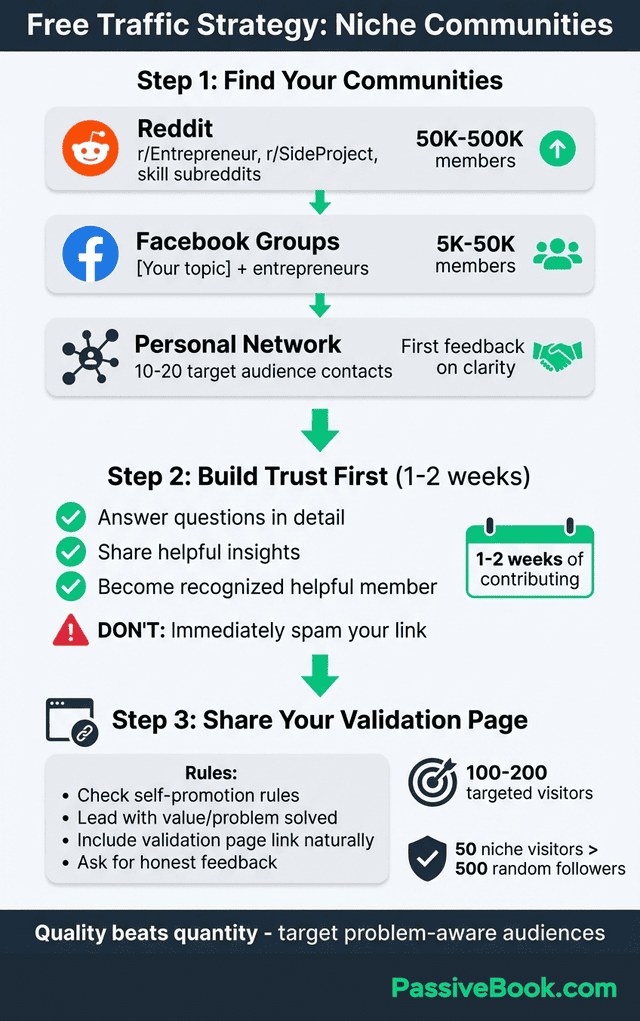
Share in relevant communities where your target audience already gathers. The key is matching your product idea type to the right platform.
For online courses, try r/Entrepreneur, r/SideProject, and skill-related subreddits. If you’re teaching web development, r/webdev has over 1.8 million members discussing coding challenges daily. Find the subreddit where your students hang out.
For digital products, test r/DigitalProducts, r/SideHustle, and r/Etsy. These communities attract people building and selling digital offerings who might be your ideal customers.
For e-commerce or print-on-demand, post in r/ecommerce, r/printondemand, and r/Shopify. Read self-promotion rules first. Many subreddits allow promotional posts on certain days or require contributing helpful content before sharing your link.
This works for physical products too. A friend validated a print-on-demand t-shirt line by creating a landing page with mockup images and a “Reserve Yours” button. She collected 80 emails in two weeks from Reddit‘s r/running community. When 23 people clicked the reserve button, she knew runners would buy funny marathon shirts. She printed the first batch three weeks later.
Facebook groups for your niche work exceptionally well. Search “[your topic] + entrepreneurs” to find active groups of 5,000-50,000 members discussing their challenges. Groups with 50,000+ members often have too much noise, while groups under 1,000 don’t give you enough traffic.
Post helpful content first – answer questions in detail, share blog posts if you have them, and contribute value – before sharing your validation page. Answer questions, share insights, and become a recognized helpful member. Then when you share your validation page, people are more receptive because you’ve already proven you understand their problems.
Your personal network provides honest first feedback on concept clarity and messaging resonance. Send your landing page to 10-20 people in your target audience who will give you brutal honesty about whether your value proposition makes sense.
Low-budget Paid Testing
Allocate $50-100 to test headline variations and audience targeting through paid ads. This budget is optional. Only spend money on ads after you’ve validated that your free traffic converts at 5%+ rates.
Google Ads captures high-intent buyers searching for solutions to their problems. Someone typing “how to create online course” into Google is further along the buying journey than someone scrolling Facebook.
Track cost per signup aiming for under $2-5 per email collected from targeted traffic. If you spend $50 and collect 15 emails, that’s $3.33 per signup, which is reasonable. If you spend $50 and collect 3 emails, that’s $16.67 per signup, which signals a problem.
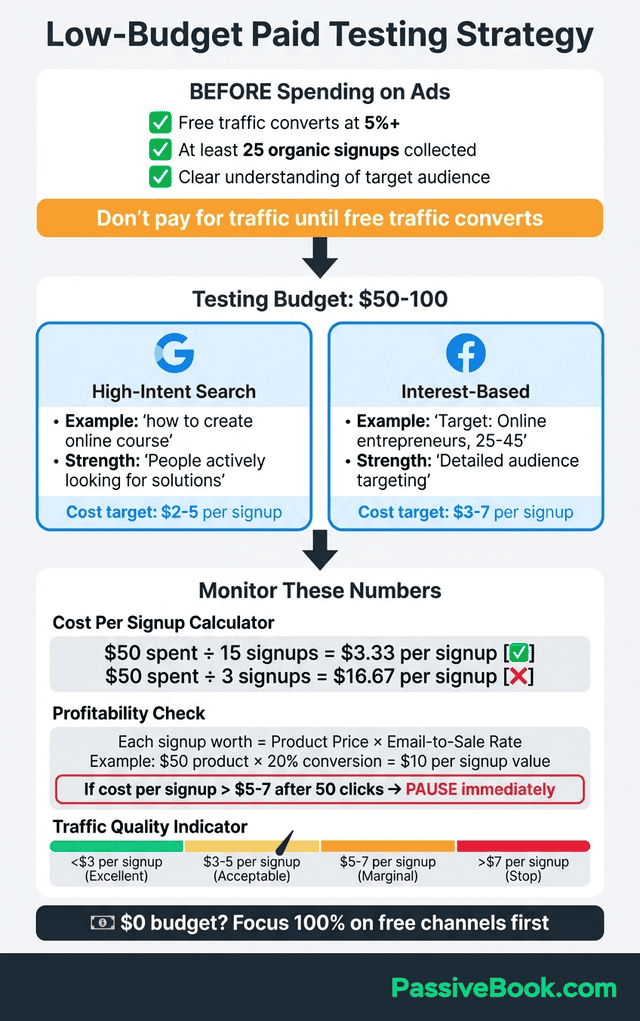
This math matters because you need to eventually make back your ad spend. If your product will sell for $50 and 20% of email signups convert to buyers, each signup is worth $10 to you ($50 × 0.20 = $10). Spending $5 to collect a $10 signup gives you a 2:1 return. Spending $8 per signup means you lose money.
If cost per signup exceeds $5-7 after 50 clicks, pause immediately. At $7 per signup, you need at least a $35-50 product with 20% email-to-sale conversion just to break even on ads. Most validation-stage products don’t hit those numbers. Expensive signups suggest poor message-market fit or wrong audience. Don’t throw good money after bad trying to make expensive traffic work.
If you have $0 for ads, focus entirely on free channels. Reddit, forums, Facebook groups, and your personal network can deliver your first 100-200 visitors. Only consider paid ads after collecting 25-50 free signups proving the message resonates with your target audience.
Setting up Conversion Tracking That Matters
Google Analytics 4 (free) tracks everything you need: page views, signup conversions, and traffic sources. The free version gives you everything you need. Connect it to your landing page by copying a tracking code snippet into your page builder’s settings.
Configure email signup as conversion event to measure interest rate. In Google Analytics, you’ll set up an event that fires when someone successfully submits your signup form. This lets you calculate your conversion rate automatically.
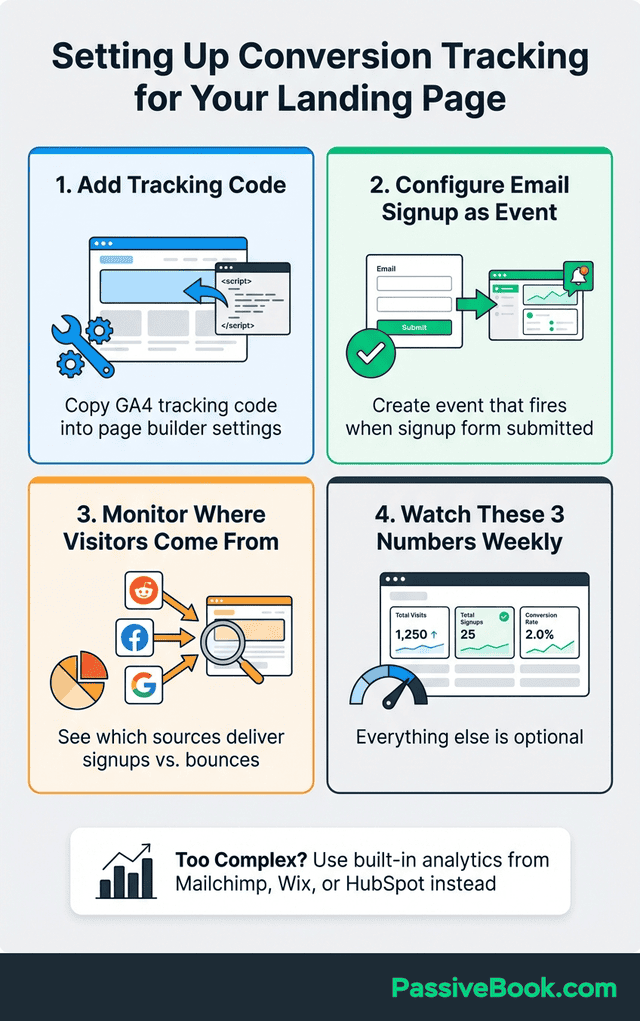
Track which traffic sources deliver engaged visitors who sign up versus just browse. You’ll see whether Reddit, Facebook groups, or Google Ads delivers the highest quality traffic. Source quality matters more than volume.
Use built-in analytics from whatever page builder you’re using as a simpler alternative if Google Analytics feels overwhelming. Kit and Wix all provide basic analytics showing visits, signups, and conversion rates without requiring separate setup.
You’ll need at a minimum: total visits, total signups, and conversion rate. Everything else is nice to have but not essential for validation decisions.
Your Weekly Check-In: What to Watch
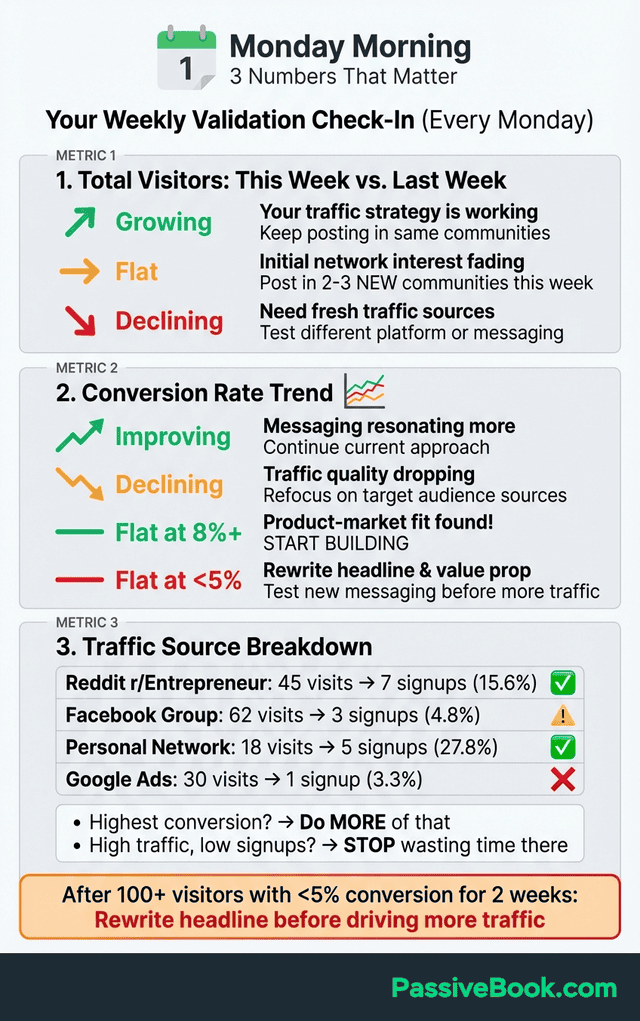
Check these three numbers every Monday morning:
1. Total Visitors This Week vs. Last Week
- Growing? Your traffic strategy is working.
- Flat? You need to post in more communities or adjust your sharing approach.
- Declining? Your initial network interest is fading. You need fresh traffic sources.
2. Conversion Rate Trend
- Improving week-over-week? Your messaging is resonating more as you refine it.
- Declining? Either your traffic quality is dropping or your early enthusiastic visitors have already signed up.
- Flat at 8%+? You’ve found product-market fit. Start building.
3. Source Breakdown
- Which traffic source delivers the highest conversion rate? Do more of that.
- Which source sends lots of traffic but low signups? Stop wasting time there.
Following up With Signups to Deepen Validation
Your first email should arrive within minutes: a simple confirmation thanking them for joining. Use your email tool’s automated welcome email feature to deliver this instantly. It builds trust and confirms their signup worked.
Ask follow-up questions via email to understand buyer motivation. Send a personal email from your real address asking: “What problem are you hoping this solves?” Real replies give you insight you can’t get from analytics.
GrowthMentor’s founder personally emailed every early waitlist member asking about their pain points to refine the product concept. He used those conversations to shape his MVP features and messaging.
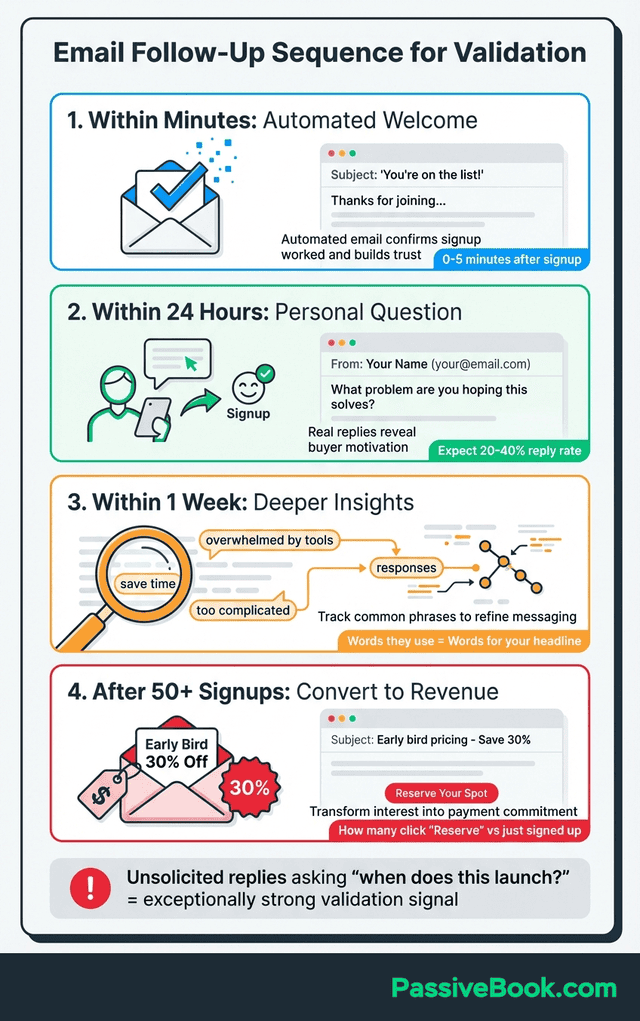
Offer early-bird pricing to waitlist members converting free interest into revenue and payment commitment. Once you have 50+ signups, email them with: “As a thank you for joining early, get 30% off when we launch next month.” Track how many take you up on it.
This follow-up process transforms email addresses into real relationships and deeper market understanding. The people who signed up are your market research focus group. Use them.
Real Validation Timelines and What to Expect
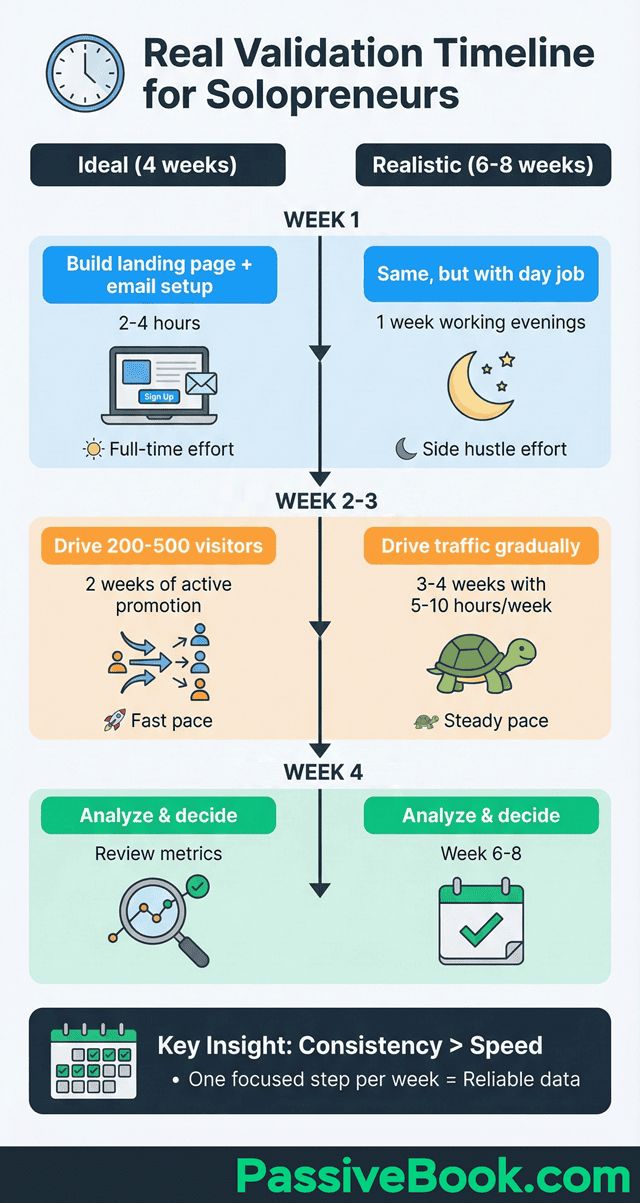
Week 1: Build your landing page and set up email collection. Use one of the free page builders mentioned earlier. Spend 2-4 hours writing your copy, picking a template, and connecting your email tool.
Week 2-3: Drive 200-500 visitors through free and paid traffic. Post in relevant communities, share with your network, and if you have budget, run small test ads. Track conversion rates daily to spot problems early.
Week 4: Analyze your data, email signups for feedback, and decide whether to build or pivot. Review your conversion rate, read through qualitative responses, and make an informed decision about next steps.
Foti Panagiotakopoulos validated GrowthMentor by running a 2-week Google Ads test with less than $500 budget. He collected enough waitlist signups to confirm demand before committing to development.
Here’s the truth: If you’re working evenings and weekends around a day job, expect this validation process to take 6-8 weeks total, not 4. You might only have 5-10 hours per week to dedicate to this. That’s completely fine.
Consistency matters more than speed. Completing one focused step per week is realistic and sustainable. Rushing through validation defeats the purpose because you won’t get reliable data from hasty execution.
What Next?
This framework will help you validate your business idea through a simple landing page before investing months building it. This approach protects your most valuable resource as a solopreneur: your limited time outside your day job.
I know the validation process feels like a delay when you’re excited about your idea. But spending 6-8 weeks testing demand beats spending 6 months building something that doesn’t sell. Every successful solopreneur I know wishes they had validated earlier and built less.
If you found this guide valuable, hit the share buttons below this article. Share it with another aspiring solopreneur who’s about to waste months building unvalidated business ideas. Sometimes the best help we can give someone is showing them the shortcut we wish we’d taken.
What business idea are you planning to validate first? Drop a comment below sharing what you’re testing. I read every comment and often reply with feedback based on my decade of validation experiments. Your question might help someone else who’s stuck in the same spot.
Share this post with your friends & followers: