Your side business got zero minutes today. Again. You swear you’ll work on it tomorrow, but tomorrow looks exactly like today – packed calendar, endless scroll, then suddenly it’s midnight. The dream of building something that replaces your 9-to-5 feels further away every week because you can’t find the hours everyone says you need.
Most productivity advice won’t tell you this: you already have the time. It’s just hiding in places you haven’t looked. A proper time audit doesn’t create new hours – it reveals the 10 to 20 hours per week you’re already spending on tasks that produce nothing. Being busy doesn’t mean you’re making progress. This guide walks you through the exact 5-step framework to uncover those hidden hours and immediately redirect them to revenue-generating work.
I’ve been there. Back in 2021, I was spending 18 hours weekly creating membership content for a site earning $340 per month. My time audit showed me the math didn’t work – and I shut it down within 6 months.

- •What Is a Time Audit?
- Why Solopreneurs Have More Hidden Hours Than They Think
- •Why Most Time Audits Fail (and How to Not Be a Statistic)
- Step 1: Choose Your Tracking Window and Method
- •Step 2: Capture Every Hour in Real Time (Not From Memory)
- •Step 3: Sort Your Time Into Four Buckets
- •Step 4: Analyze for Time Leaks, Dead Zones, and False Urgency
- Step 5: Redesign Your Week Around Recovered Time
- •How Often to Repeat Your Time Audit
- •Frequently Asked Questions
- •What Next?
What Is a Time Audit?
A time audit is a structured process of recording every hour you spend over 5–7 days to reveal reality versus assumption. Most solopreneurs operate on memory and guesswork about where their time goes. They assume email takes 30 minutes daily when it actually consumes 90. They believe social media is a quick 15-minute check when the phone’s screen-time report says 2 hours.
The audit has two core components. First is capture – logging what you actually do in real time, not what you planned to do or think you did. Second is analysis – categorizing every logged block as high-value work, necessary overhead, or pure time drain. This combination makes it a diagnostic tool, not a journaling exercise or corporate HR requirement.
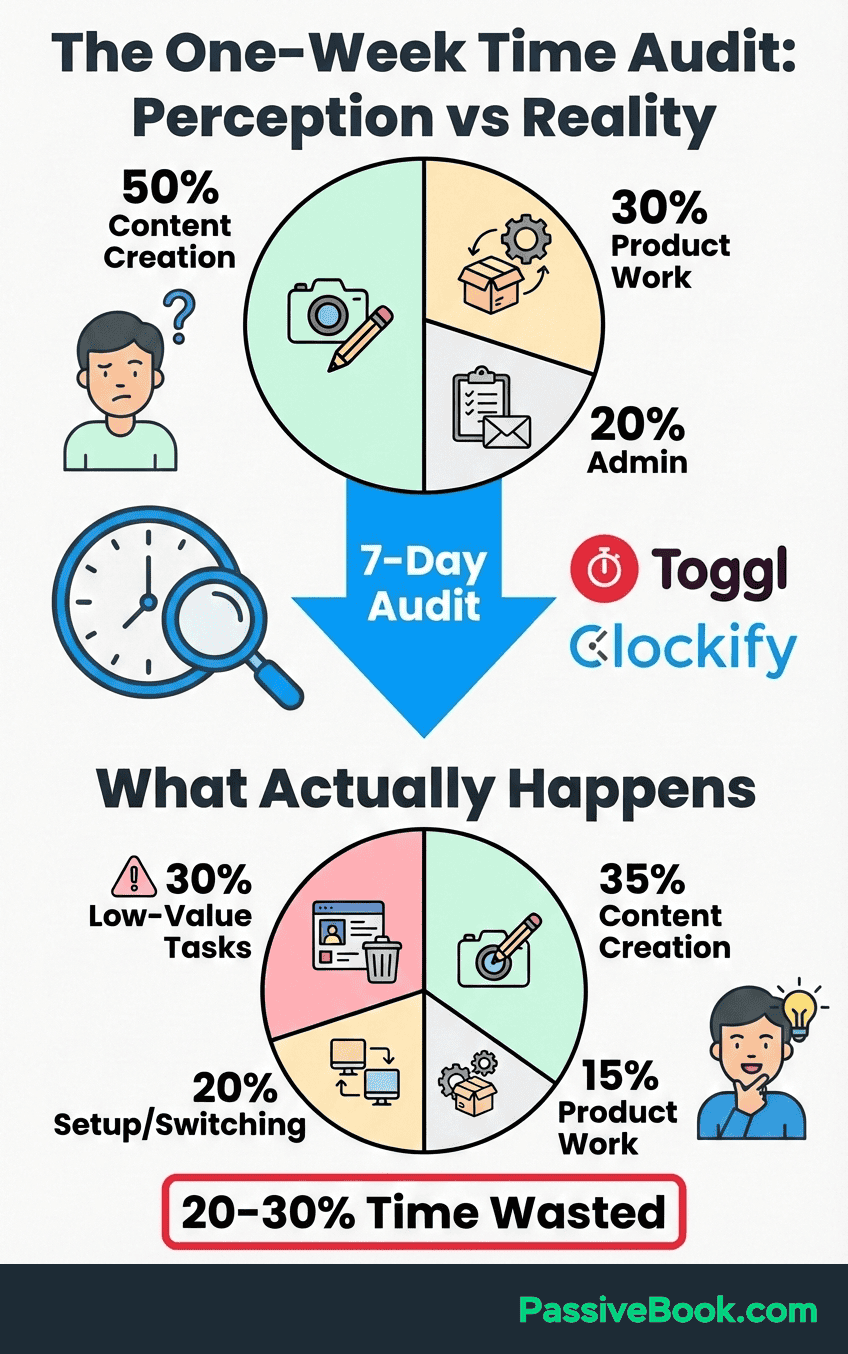
Research shows the method works because it forces confrontation with data you can’t rationalize away. When you see “scrolled Instagram: 45 min” written eight times in one week, your brain can’t reframe it as “quick research.” The numbers don’t lie.
Why Solopreneurs Have More Hidden Hours Than They Think
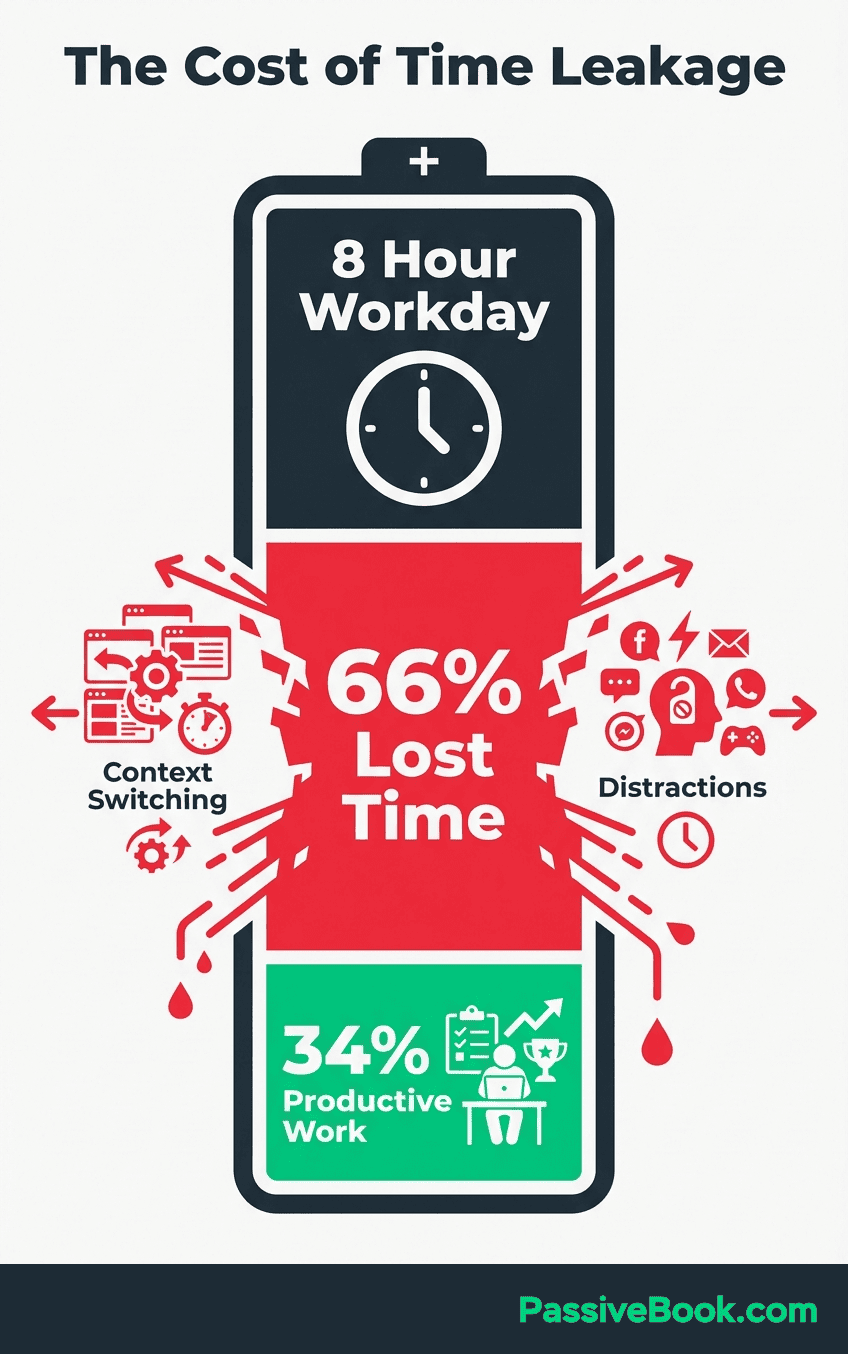
According to Zippia, employees waste over 2 hours daily at work. The gap between feeling busy and being productive is exactly where your side-business hours are buried. You’re not imagining the time crunch – but you are probably wrong about where time goes each week.
The global average person spends 2 hours and 21 minutes daily on social media, per DataReportal’s 2026 report. Nearly 16.5 hours per week of potentially redirectable time. Even cutting that in half frees up a full workday’s worth of focused hours for your online business.
A Reddit solopreneur tracked two weeks and discovered 15 hours weekly consumed by a single overlooked task category. The pattern repeats in audit after audit: people underestimate low value tasks and overestimate productive work.
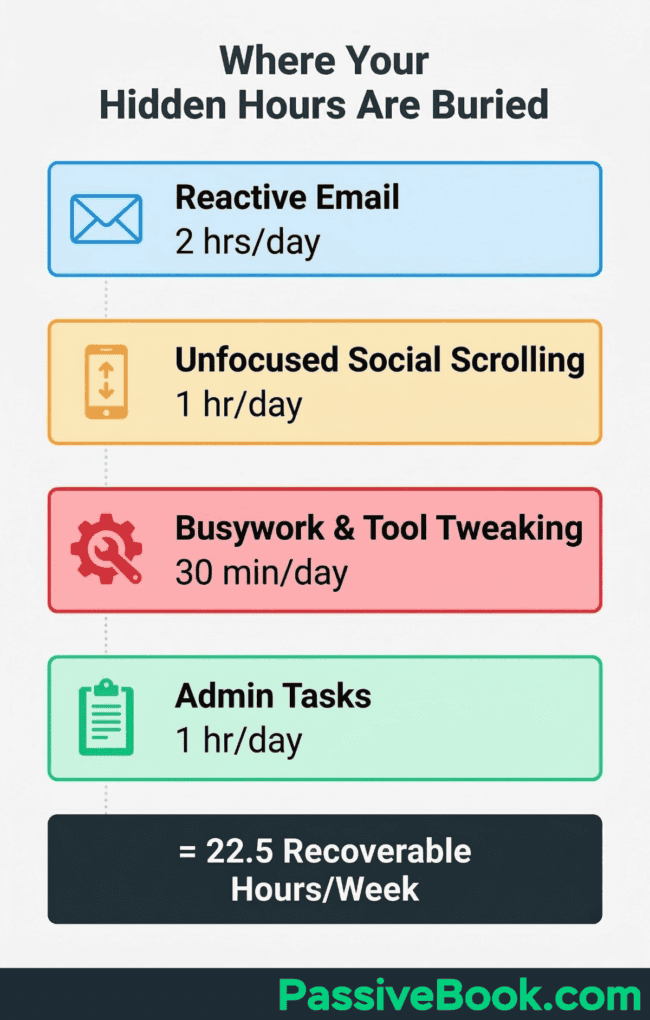
Here’s the 10-hour math before you even audit your weekends. Take 2 hours wasted at work from the Zippia data. Add 1 hour of unfocused social scrolling. Include 1 hour of reactive email. Toss in 30 minutes of busywork tool-tweaking. That’s 4.5 recoverable hours on workdays alone.
Multiply by 5 days and you’ve identified 22.5 hours per week before touching evenings or weekends.
The Three Hidden Time Drains Solopreneurs Underestimate
Reactive email, admin busywork, and social scrolling masquerading as research devour the hours solopreneurs assume are free. A Forbes survey found the average founder spends 36% of their entire work week on small administrative tasks alone. Nearly 15 hours weekly if you’re working 40 hours.
Email is the first culprit. You check it “real quick” between meetings and 20 minutes vanish. Do that six times daily and you’ve lost 2 hours to inbox management that could’ve been batched into one 30-minute block. The constant context-switching costs you deep work on the work that actually builds your business.
Admin tasks are the second drain. Updating spreadsheets, renaming files, tweaking your project management tool, reorganizing your content calendar for the third time this month. None of it generates revenue.
All of it feels productive because you’re “working on the business.” A time audit exposes how much of this is procrastination wearing a productivity mask.
Social media is the third trap. You tell yourself you’re researching competitors or studying successful creators. Two hours later you’ve learned nothing actionable and your business hasn’t moved forward. The algorithm is designed to keep you scrolling, not to make you money.
Why Most Time Audits Fail (and How to Not Be a Statistic)
The failure pattern is predictable. People start strong on Day 1, forget to log by Day 3, and quit entirely by Day 5. Or they track diligently but never analyze the data, so the spreadsheet sits unused. The audit only works if you commit to the full capture phase and force yourself through the uncomfortable analysis phase where you confront how you’re actually spending time.
Most time audit frameworks are designed for structured 9-to-5 workers, not solopreneurs stealing hours between a day job and bedtime. Corporate time management assumes you control your full workday and can block out 3-hour deep work sessions. That’s fantasy when you’re building a side business in 90-minute pockets after your kids sleep.
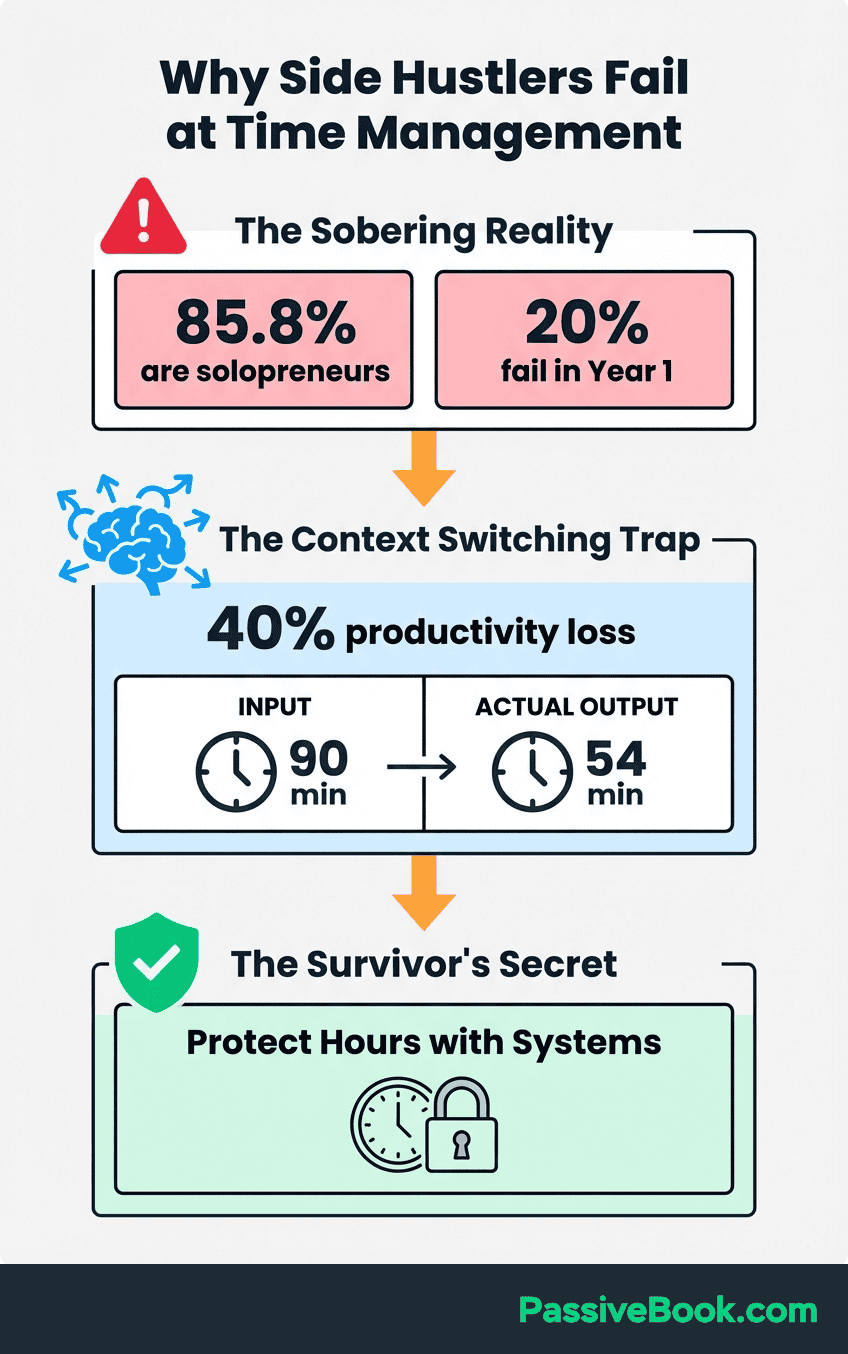
Productivity researcher Cal Newport, in Deep Work, documents that most knowledge workers have no systematic way to measure the ratio of deep work to shallow work. This makes audit failure structural, not personal. If you don’t know what high-value work looks like in your specific business model, you’ll log hours without gaining insight.
A founder on Reddit tracked working 50-plus hours weekly for six months and earning just $400 total. The brutal truth: only about 4 of those weekly hours actually generated revenue. The rest was content tweaking, profile optimization, and inbox management. Busy work that felt important but paid nothing.
Step 1: Choose Your Tracking Window and Method
Commit to 5 consecutive weekdays for meaningful patterns to emerge. Include weekends only if your side-hustle time genuinely lives there. Most solopreneurs discover their recoverable hours hide in weekday margins like the commute, lunch break, or evening scroll – not Saturday mornings they already protect.
Five days is the minimum window to separate patterns from outliers. One weird day where you had a dentist appointment won’t skew the data.
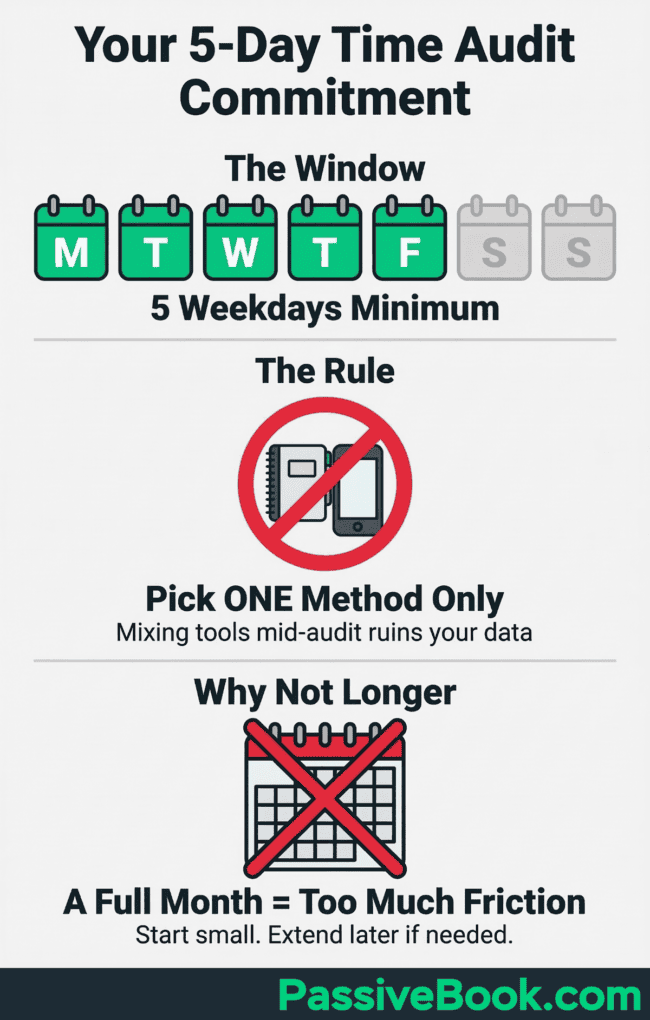
Tracking for a full month creates so much friction that most people quit before they finish. Start with 5 weekdays. You can always extend if the data feels incomplete.
Pick one method only. Mixing tools mid-audit produces inconsistent, unusable data. Whether you choose tools like Clockify or go analog, consistency matters more than the tool itself. If you start with a notebook and switch to an app on Day 3, your categories won’t match and your analysis becomes guesswork.
The Three Tracking Methods for Solo Operators
Analog: Log activities in a notebook using 30-minute blocks. All you need is pen paper and a simple two-column table: time block and task. Every 30 minutes, jot down what you just did. This works best if you’re already carrying a notebook or if digital tools feel like one more thing to manage.
Manual Digital: Clockify is completely free with unlimited projects and detailed weekly reports. No credit card required. Ever. One-click timer makes it ideal for tracking your day job and side business separately. You hit “start” when you begin a task and “stop” when you switch. The tool auto-generates charts showing where every hour went.
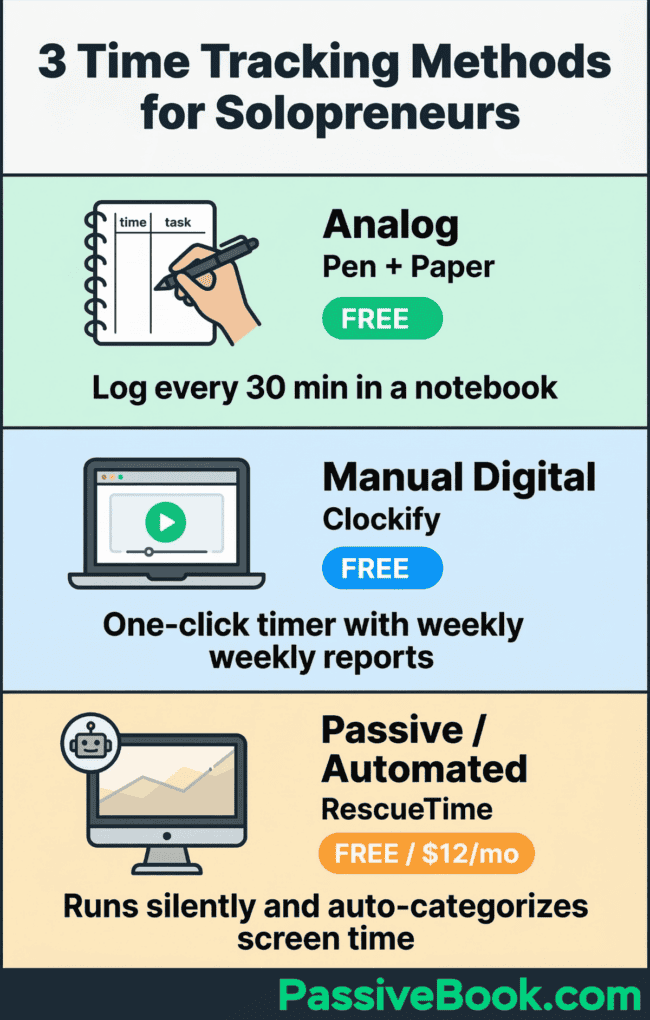
Passive/Automated: RescueTime runs silently in the background and auto-categorizes screen time. The free version gives you enough data to spot patterns. Paid tier is $12/month if you want real-time alerts. Best for catching unconscious digital leaks like the 12 minutes you spent reading random articles between tasks.
Choose based on your actual behavior, not your aspirational habits. If you know you’ll forget to start a timer, RescueTime’s passive tracking is the honest choice. If you work offline a lot, the notebook won’t fail you.
Step 2: Capture Every Hour in Real Time (Not From Memory)
Here’s the hard truth: your memory lies. Reconstructing your day at bedtime underestimates low-value tasks and inflates time spent on work that felt hard. If you wait until bedtime to fill in your day, you’ll remember the 2-hour deep work session but forget the 45 minutes you spent organizing your desktop.
Log tasks as they happen, not reconstructed at day’s end.
Use five simple labels only: Day Job, Side Business, Life Admin, Family/Personal, and Passive/Leisure. Don’t create 20 micro-categories on Day 1. Granularity feels useful but kills consistency. You can always break “Side Business” into subcategories during analysis. Right now you just need to capture the raw data.
Do not change your behavior during the tracking phase. The value is in exposing reality, not performing productivity for yourself. If you normally scroll Instagram for 30 minutes after lunch, do that and log it.
If you spend 90 minutes tweaking your website’s footer font, write it down. The audit only works if you’re honest about what you’re doing.
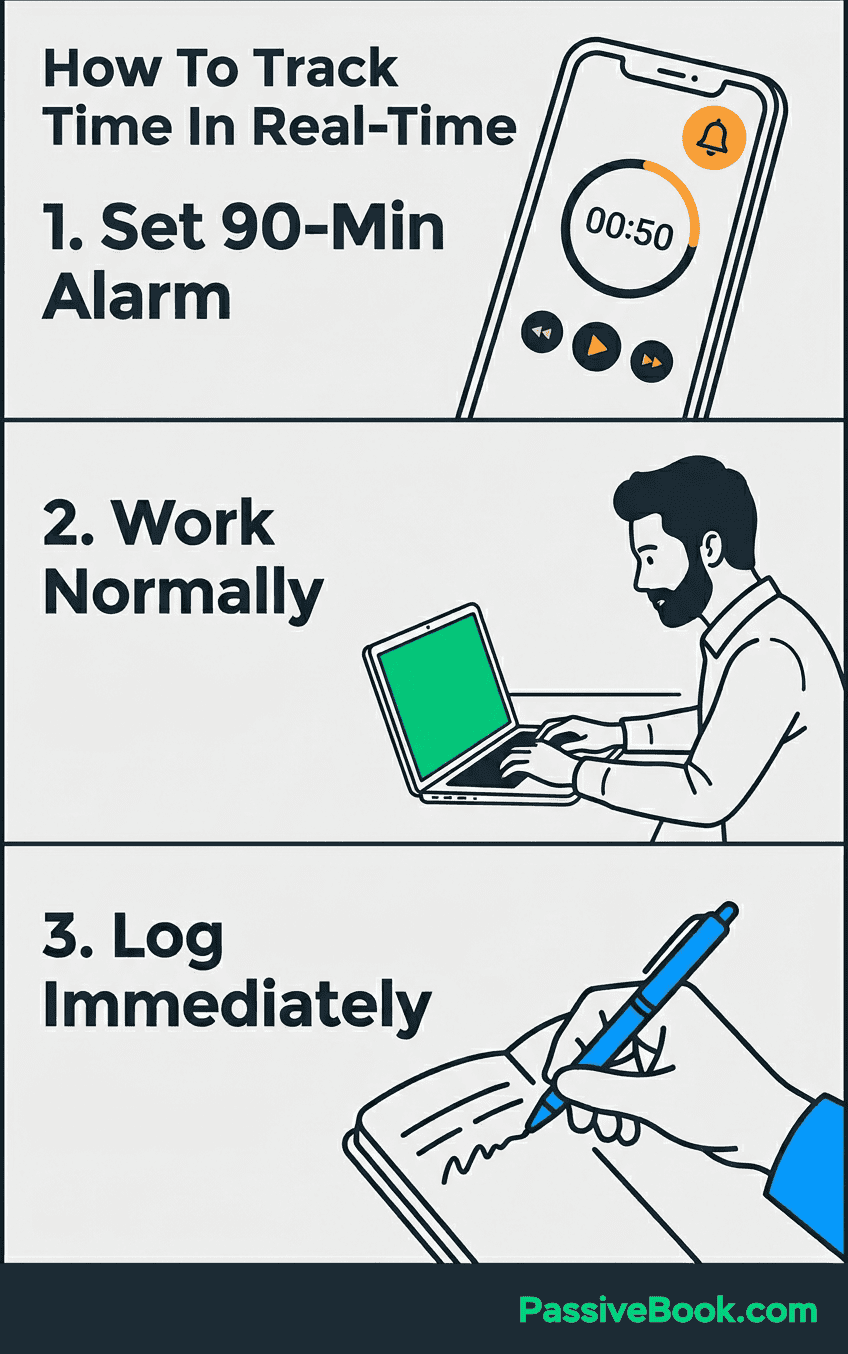
Set a recurring alarm every 90 minutes to make sure you log consistently. Your phone buzzes, you glance at what you’ve been doing, you write it down. Takes 15 seconds.
If 90 minutes feels too frequent, try every 2 hours. But don’t go longer than that or you’ll forget entire blocks of time.
For digital work, let RescueTime or Clockify do the heavy lifting. You focus on logging the offline stuff – commute time, meetings, household tasks, time spent thinking without a screen. The combination of passive tracking and manual logging gives you complete coverage.
Expect to feel uncomfortable by Day 3. You might see ‘8 hours logged on Day Job’ but only 12 minutes logged on Side Business – on a day you told yourself you worked on your business. Or you’ll count seven instances of ‘scrolled phone: 20 min’ and realize that’s 2.3 hours of a day you swore you had no spare time.
Seeing your actual time allocation in black and white is confronting. Most people discover they’re working far less on their side business than they believed and far more on distractions than they want to admit. That discomfort is the entire point.
Step 3: Sort Your Time Into Four Buckets
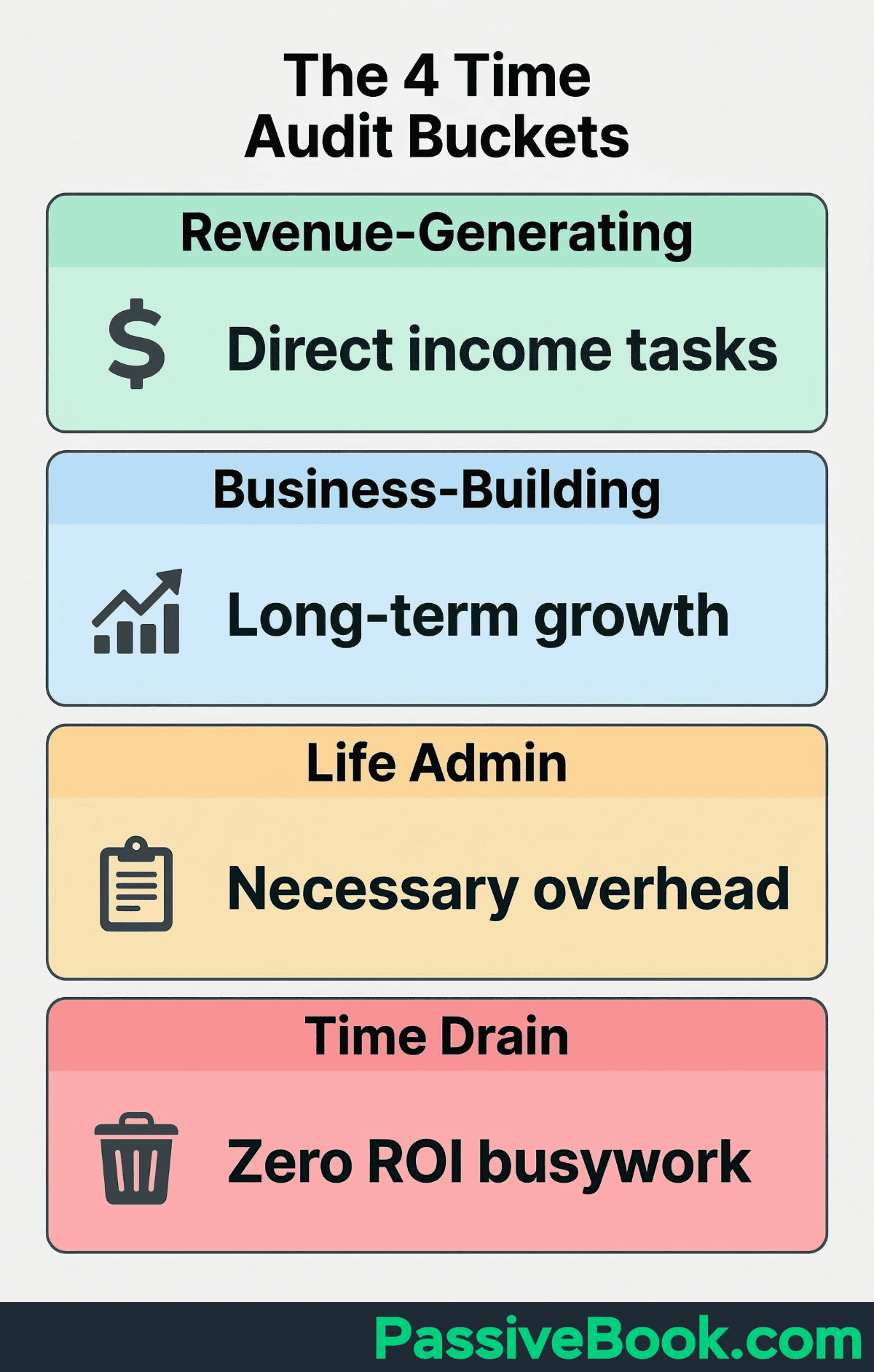
This is where it gets uncomfortable. Assign every logged block to one of four categories: Revenue-Generating, Business-Building, Life Admin, or Time Drain. That last category is the audit’s most valuable discovery. It surfaces activities that felt like work but produced nothing measurable.
Revenue-Generating includes any task directly tied to making money. Writing a sales page. Recording a course module. Pitching a client. Publishing an affiliate review.
If you can draw a straight line from this task to dollars in your bank account, it’s revenue work.
Business-Building covers necessary tasks that don’t immediately generate income but grow your asset. Writing SEO blog posts. Building your email list. Creating a content calendar. Researching your next product idea. This work compounds over time even though it doesn’t pay today.
Life Admin is the unavoidable overhead of being a functioning adult. Grocery shopping, paying bills, scheduling doctor appointments, answering personal emails.
You can optimize this category but you can’t eliminate it. The goal is to keep it contained so it doesn’t colonize your side-business hours.
Time Drain captures all low value activities that feel productive but produce nothing. Scrolling social media with no clear purpose. Tweaking your website’s color scheme for the third time. Watching YouTube videos about productivity instead of being productive. Reading articles about business instead of building your business. Reorganizing your project management tool when the current system works fine.
The Pareto Principle predicts that 20% of your weekly tasks generate 80% of your business results. Sorting into buckets reveals which 20% that is.
Most solopreneurs discover they spend 5 hours weekly on revenue work and 15 hours on tasks that feel important but produce nothing.
Use a simple spreadsheet. Column A is the time block, Column B is the task description, Column C is the category. Sort by category and sum the hours in each bucket. The numbers will probably make you angry. That’s normal.
Step 4: Analyze for Time Leaks, Dead Zones, and False Urgency
Your spreadsheet is now full of data. It’s time to find the patterns that hurt. Time leaks are tasks taking longer than they should. You think email is a 20-minute morning routine but your log shows it’s actually 90 minutes spread across six check-ins.
You believe creating a social media post takes 15 minutes but you’re spending 45 minutes per post when you count the scrolling before and after.
Dead zones are the recurring gaps in your daily schedule with zero side-business use. Your commute is 40 minutes each way but you’re just listening to music. Your lunch break is an hour but you’re mindlessly browsing your phone.
The 30 minutes before bed when you’re too tired for deep work but not tired enough to sleep. These pockets won’t support focus work, but they’re perfect for low-cognition tasks like scheduling posts or listening to industry podcasts.
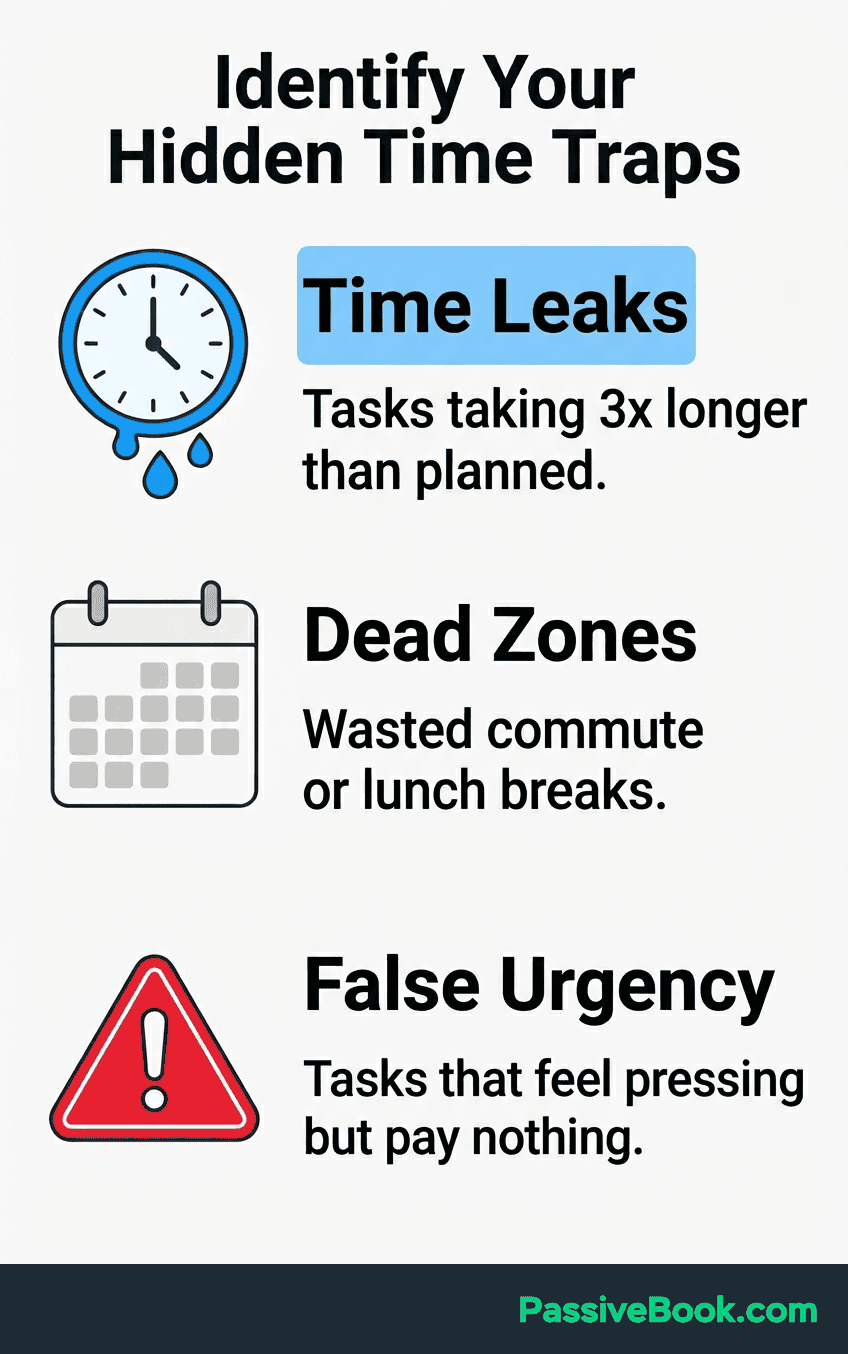
False urgency is the most insidious pattern. These are tasks that feel pressing but link to no revenue outcome. Responding to every email within 10 minutes. Posting daily on social media because some guru said consistency matters.
Updating your website’s about page for the fourth time. Tweaking your logo. None of this is urgent. Most of it isn’t even important.
I found my own false urgency trap when I was running a membership site. I convinced myself that creating new premium content every single week was non-negotiable. Members expected it, right?
Wrong. When I audited my time, I was spending 18 hours weekly on content production for a site earning $340 monthly. The math didn’t work.
I was prioritizing a content treadmill over building an actual business. I shut it down within 6 months because the time cost was unsustainable.
Your audit will reveal which specific tasks to stop doing immediately and which to optimize. Be ruthless when labeling tasks. If it doesn’t directly build your business or generate revenue, it’s either Life Admin or a Time Drain. There’s no middle category for “feels productive but accomplishes nothing.”
Not all Time Drains deserve the same response. Some you eliminate completely – like scrolling social media with no purpose. Some you optimize – like batching email into one 30-minute block instead of six scattered check-ins.
And some you accept as the cost of being human – like the 10 minutes you spend making coffee and staring out the window. Your audit shows you which is which based on frequency and hour cost.
Step 5: Redesign Your Week Around Recovered Time
You’ve identified the leaks. Now plug them. Use your audit data to make changes immediately. Start by scheduling protected time blocks in your daily schedule. At minimum, carve out two 90-minute deep work sessions per week dedicated to revenue-generating tasks only. Not email. Not admin. Not “business building” that’s actually procrastination. Just the work that directly creates income.
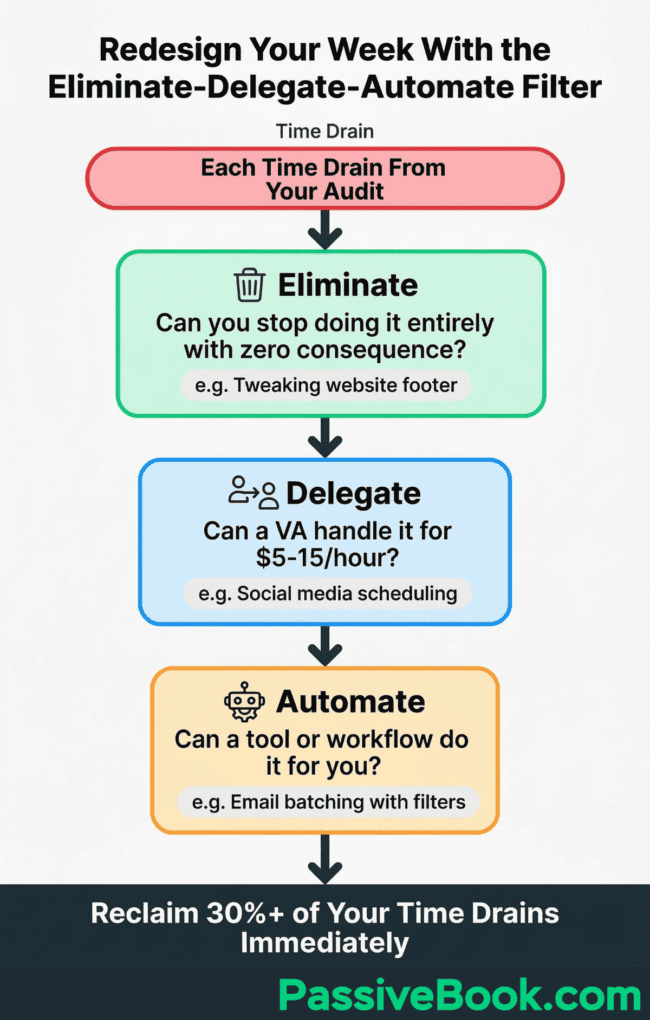
Apply the Eliminate → Delegate → Automate filter from Tim Ferriss’ The 4-Hour Workweek framework. For each Time Drain identified in your audit, ask which of these three applies before accepting it back into your week.
Can you eliminate it entirely? Can you delegate it to a virtual assistant for $5-15/hour or automate it with a tool? Can you automate it with a simple workflow?
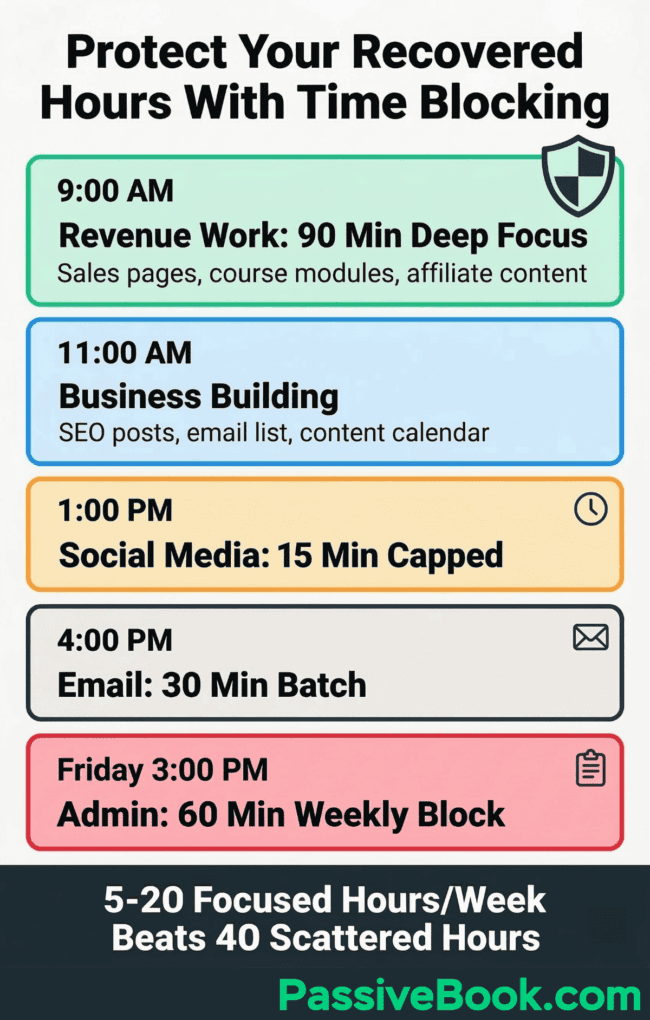
Batch all low-value overhead into one capped slot to stop it from colonizing your productive hours. Email gets 30 minutes at 4pm, not six scattered check-ins. Social media replies get 15 minutes after lunch, not constant notifications.
Admin tasks get one 60-minute block on Friday afternoon. Everything else gets ignored until its assigned time.
Most solopreneurs discover they can eliminate 30% of their Time Drains immediately with zero consequence. Nobody notices when you stop tweaking your website’s footer.
Your business doesn’t collapse when you ignore non-urgent emails for 6 hours. The busywork only felt essential because you never questioned it.
Protect Your Recovered Hours With Time Blocking
Schedule recovered blocks in Reclaim.ai with specific task labels to protect them from displacement. Reclaim starts at $8/month after a free trial, but the investment pays for itself if you’re losing even one billable hour weekly to calendar chaos. The tool syncs with your calendar and defends your focus time against meeting invites and random interruptions.
If someone tries to book your Tuesday 9am slot and you’ve labeled it “Revenue Work: Write Sales Page,” Reclaim auto-declines and offers alternative times.
Don’t confuse time blocking with maintaining an endless to do list – your calendar should protect focus time, not catalog every task.
Justin Welsh, who scaled his one-person business past $10 million in revenue with zero employees, attributes focused time-blocking as his core productivity system. Not longer hours. Not hustling harder. Just protecting specific blocks for high-value work and ruthlessly guarding them from interruption.
Side Hustle Nation data confirms that 37% of successful side hustlers work just 5 to 20 hours weekly. The difference isn’t the volume of work hours. It’s what they do during those hours. Two focused 90-minute blocks per week on revenue work will outperform 20 scattered hours of busywork every single time.
The calendar block isn’t a suggestion. It’s a commitment. Treat it like a meeting with your most important client – because it is. That client is your future self who’s trying to escape the 9-to-5.
Use AI to Automate Your Biggest Discovered Time Drains
Once your audit surfaces your top three time drains, AI tools like ChatGPT and RescueTime target those specific drains. Not tasks chosen at random. The recurring time sinks your data revealed.
Let’s say your audit shows you’re spending 90 minutes weekly drafting email newsletters. You can feed ChatGPT your outline and say: “Turn this into a 300-word email for solopreneurs. Conversational tone, second person, one clear call-to-action at the end.” First draft done in 45 seconds. You edit for 15 minutes. You just saved an hour.
If your log shows 2 hours weekly consumed by social media research that produces nothing actionable, RescueTime adds a passive audit layer. It auto-categorizes your digital time and sends you a weekly report showing how much time vanished into scrolling.
Seeing “4.2 hours on Twitter this week” in an automated email is harder to rationalize than a vague feeling of wasted time.
OpenAI’s “State of Enterprise AI 2026” report draws on over 1 million business customers and finds that daily AI users save 40 to 60 minutes per active workday. Rising to 4-plus hours per week. Seventy-five percent report improvement in the speed or quality of their output.
Your audit data shows you which tasks to direct these gains at first. Don’t automate everything at once. Pick the single biggest time drain from your analysis and eliminate it with AI this week. Next week, tackle the second one. Within a month you’ve reclaimed hours that compound into real business progress.
How Often to Repeat Your Time Audit
Run your first full audit for 5 to 7 days. Within 30 days, complete a shorter 3-day check-in to verify your redesigned schedule is holding. The follow-up audit catches the drift that happens when good intentions meet reality. You’ll see whether your protected time blocks stayed protected or got colonized by email and meetings again.
Time management author Laura Vanderkam recommends re-auditing whenever your schedule feels unmanageable for three weeks straight. That’s your trigger. If you hit three consecutive weeks where you feel time-starved despite implementing changes, run another 3-day audit. You’re either facing new time drains or old patterns crept back in.
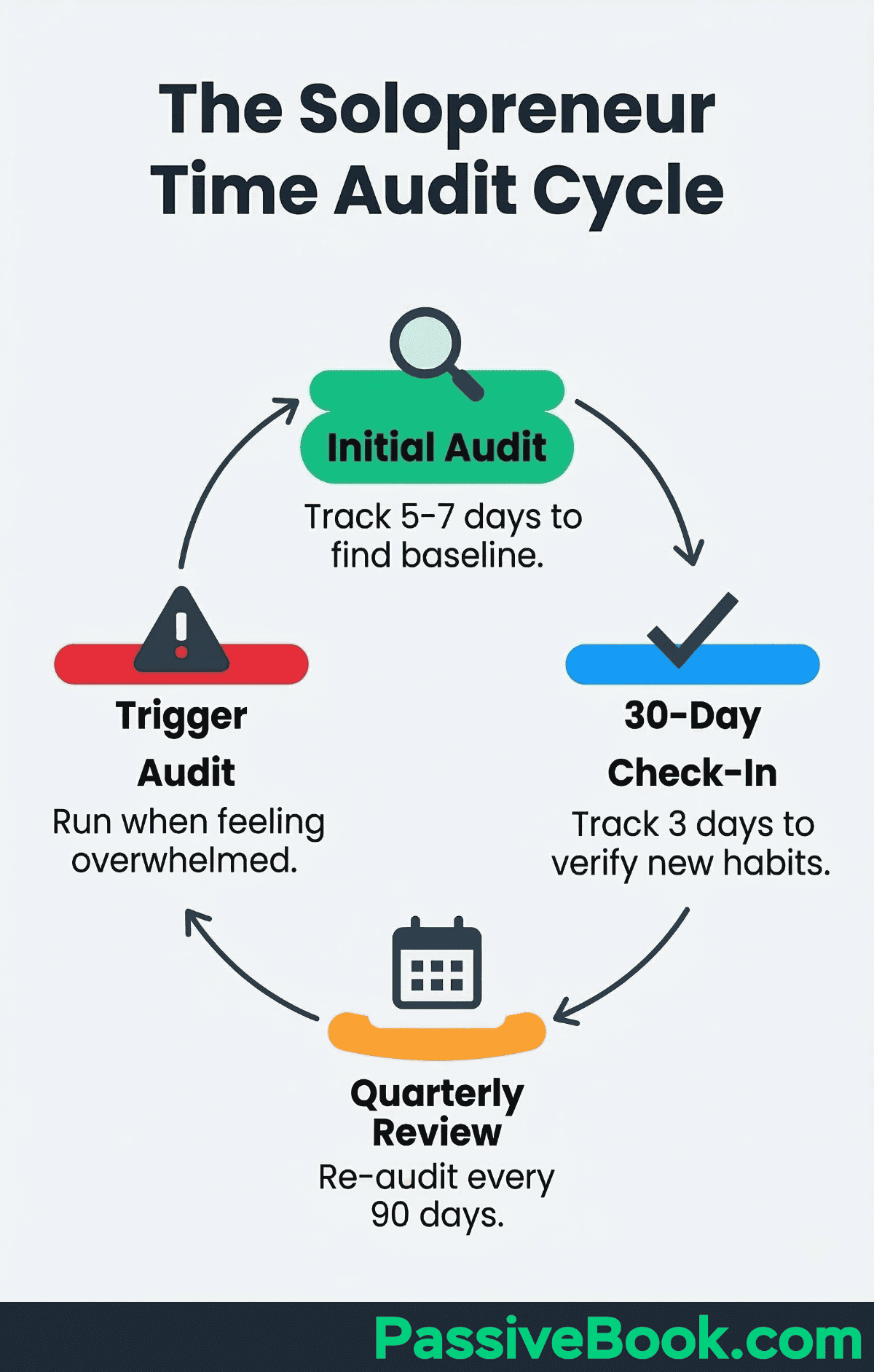
Most solopreneurs find value in a quarterly audit cycle. Every 90 days, track for one full week and compare against your baseline. This creates accountability and reveals whether the systems you built are still working or need adjustment. Business evolves, commitments shift, and time allocation should adapt with it.
The first audit is diagnostic. It shows you the problem. Follow-up audits are maintenance. They keep you honest and catch backsliding before it becomes a crisis. Think of it like checking your bank balance – you wouldn’t go a year without looking at your finances, so don’t go a year without auditing your time.
Frequently Asked Questions
Do I Need to Track My Entire Day or Just My Side-Hustle Hours?
Track your full day, including day job hours. The hidden side-hustle time often lives inside your existing commitments, not outside them. Your commute is 40 minutes each way – that’s potential podcast learning time. Your lunch break is an hour of scrolling – that could be 30 minutes of focused outline writing. Partial-day tracking creates blind spots that make the audit’s data misleading and its conclusions unreliable.
What If My Audit Reveals I Genuinely Have No Spare Time Left?
This means you have a delegation or elimination problem, not a time problem. Return to the Eliminate → Delegate → Automate filter on your highest time-cost tasks before adding any new commitments. Even 30 to 45 protected minutes per day, applied to one revenue-generating task, compounds into meaningful business progress within 90 days.
How Do I Stay Consistent With Logging Every Hour Without Giving Up Mid-Week?
Set a recurring alarm every 90 minutes as a logging prompt. Pre-fill your five categories on Day 1 so logging is a checkbox, not a decision. Commit to just 5 days, not a month, and remind yourself that inconsistent data from 5 days is still vastly more useful than no data at all.
Does a Time Audit Work If My Schedule Changes Wildly Week to Week?
Yes. Run two separate 3-day captures in two contrasting weeks. Patterns that appear in both are your real recurring time drains, and outliers are noise. The trigger-based framework – re-audit with every major new commitment – is specifically designed for irregular schedules where a single tracking window would be unrepresentative.
What Next?
You now have a complete framework to find the 10-plus hidden hours every solopreneur has buried in their week. The five steps work because they force you to confront data instead of assumptions. Most people discover they already have enough time to build a real business – they were just spending it on tasks that felt productive but produced nothing.
It’s time to stop operating on assumptions and start operating on data. This process can feel uncomfortable. Seeing your actual time allocation in black and white often reveals patterns you’d rather not admit. But that discomfort is what creates change. You can’t control time, but you can control allocation. You can’t fix a problem you refuse to acknowledge.
If this guide helped you see where your hours are actually going, share it with another time-starved entrepreneur using the social buttons below. And drop a comment: what’s the biggest time drain your audit revealed? I’d genuinely love to know what pattern you uncovered.
Share this post with your friends & followers: