You have two hours tonight to move your side business forward. You open your laptop with good intentions, check one email, glance at analytics, scroll Twitter for a minute, and suddenly 47 minutes are gone. The rest of the session feels like pushing through fog. You close the laptop feeling busy but knowing you built nothing.
I’ve lost entire weeks to this pattern. The Pomodoro Technique for focus for online entrepreneurs isn’t a productivity hack in the Instagram sense. It’s a forcing function. No app subscriptions, no complex system. Just a timer and a non-negotiable rule: when it runs, nothing else exists.

- •What Is the Pomodoro Technique?
- •Why Your Side-Hustle Hours Are Bleeding Out
- •How to Plan Your Pomodoros Before You Touch a Single Task
- •How to Run Your First Pomodoro Session in 5 Steps
- Mapping the Pomodoro Technique to Your Online Business Tasks
- Why the Pomodoro Technique Fails (And the Mistakes That Cause It)
- •How to Adapt the Pomodoro Technique When 25 Minutes Doesn't Fit
- •The Best Free Pomodoro Tools for Bootstrapped Solopreneurs
- •How AI Is Now Changing the Pomodoro Workflow for Solopreneurs
- •Frequently Asked Questions
- •What Next?
What Is the Pomodoro Technique?
The Pomodoro Technique is a time management method that structures work into short, focused intervals separated by brief rest periods. You work on one task for 25 minutes, then rest for 5. After four cycles, you take a longer break of 15 to 30 minutes.
Francesco Cirillo created the method in the late 1980s using a tomato shaped kitchen timer. “Pomodoro” is Italian for tomato. That original tomato shaped kitchen timer is now iconic, but any timer works. The 25 minute interval isn’t arbitrary. Research shows this duration aligns with the brain’s natural attention span before fatigue sets in, while the 5 minute break prevents burnout without losing momentum.
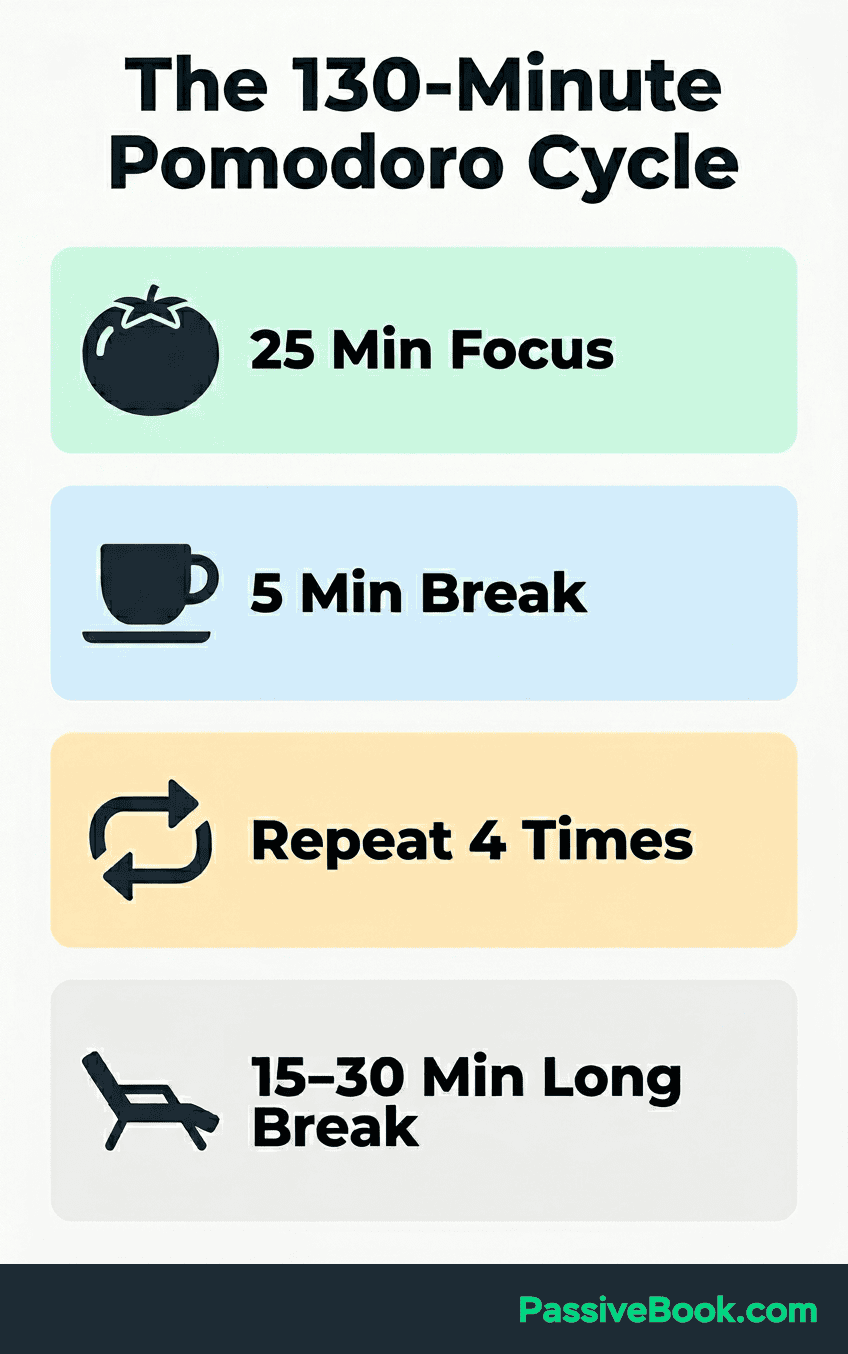
The timer acts as a psychological contract. When it runs, the task is non-negotiable and nothing else competes for your attention. This isn’t a general scheduling system for small business owners. It governs how you work within time you’ve already carved out.
It works because it removes the question of “should I keep going?” Your commitment lasts exactly 25 minutes. Then it’s over. You step away whether you feel productive or not.
Most productivity hacks require discipline to start and discipline to stop. This method only requires discipline to start. The timer handles the rest.
Why Your Side-Hustle Hours Are Bleeding Out
I used to think the problem was not having enough time. I’d block out 90 minutes on a Tuesday night, sit down ready to draft a blog post, then check one Slack notification. When I looked up, 30 minutes had evaporated and I hadn’t written a single sentence.
I wasn’t lazy. I was working without a boundary that enforced single-task commitment.
Dr. Gloria Mark at UC Irvine found it takes 23 minutes and 15 seconds to fully regain focus after one interruption. For a solopreneur with 60 to 90 minutes per evening, a single unguarded phone check can cancel the entire work session’s output.
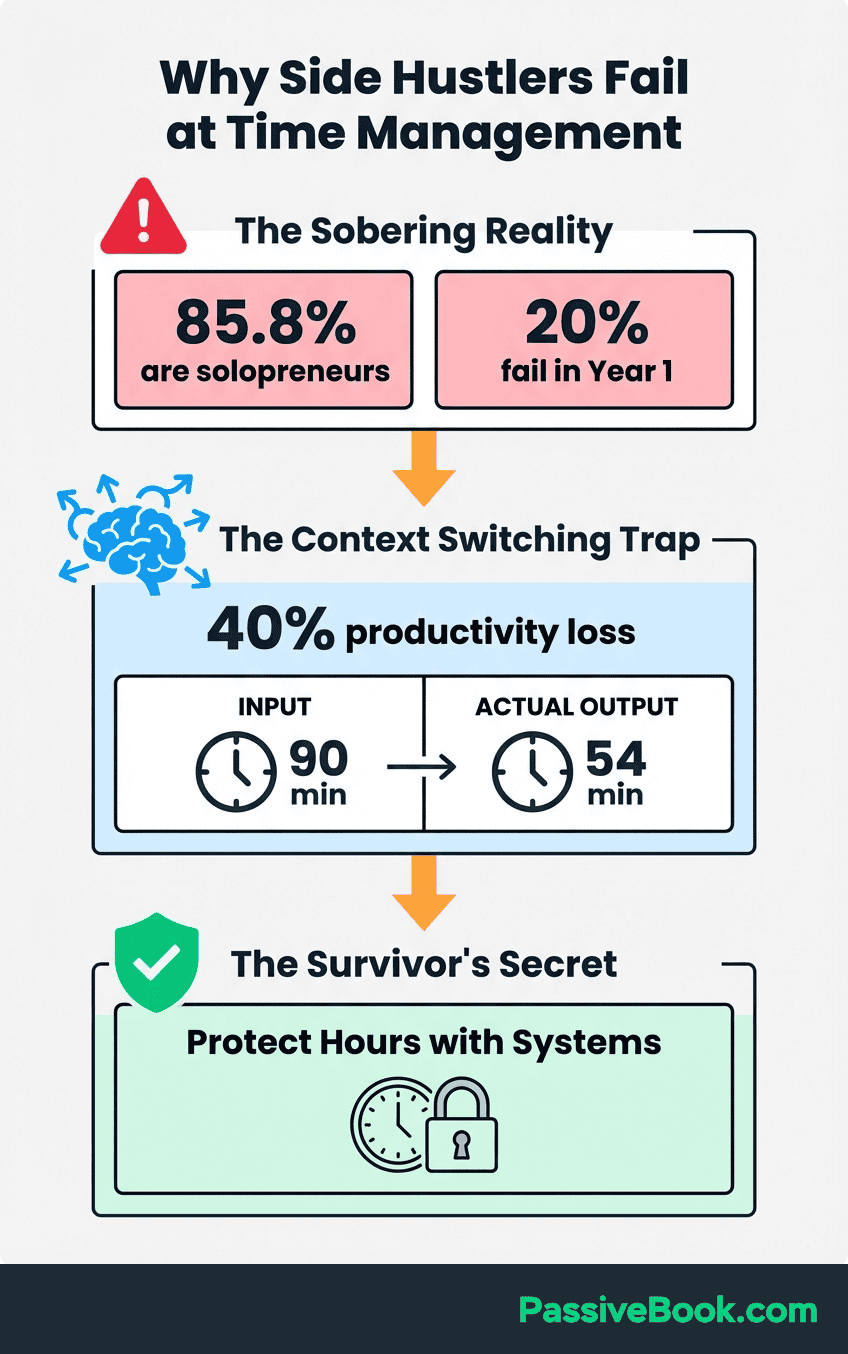
The data confirms what every side-hustler feels. According to a survey of 1,200 employees by workforce analytics firm Insightful, 79% of U.S. workers can’t go a full hour without getting distracted. That number climbs higher for solopreneurs working at home after a full day job, surrounded by personal distractions that don’t exist in an office.
Unfocused long sessions create the illusion of effort. You worked for two hours, so you should feel accomplished. Instead, you feel scattered and guilty because you know most of that time leaked into browser tabs and mental drift. The enemy isn’t laziness. It’s convincing yourself that sitting near your laptop counts as progress.
How to Plan Your Pomodoros Before You Touch a Single Task
Don’t start a Pomodoro session without knowing exactly what you’re building. You set the timer, stare at your to do list, then waste the first 10 minutes deciding what to work on. The session ends before you’ve built momentum.
Spend your very first session of the day listing and prioritizing tasks, not executing them. This planning Pomodoro protects your execution sessions from decision fatigue. Write down every task, then assign each one a Pomodoro estimate.
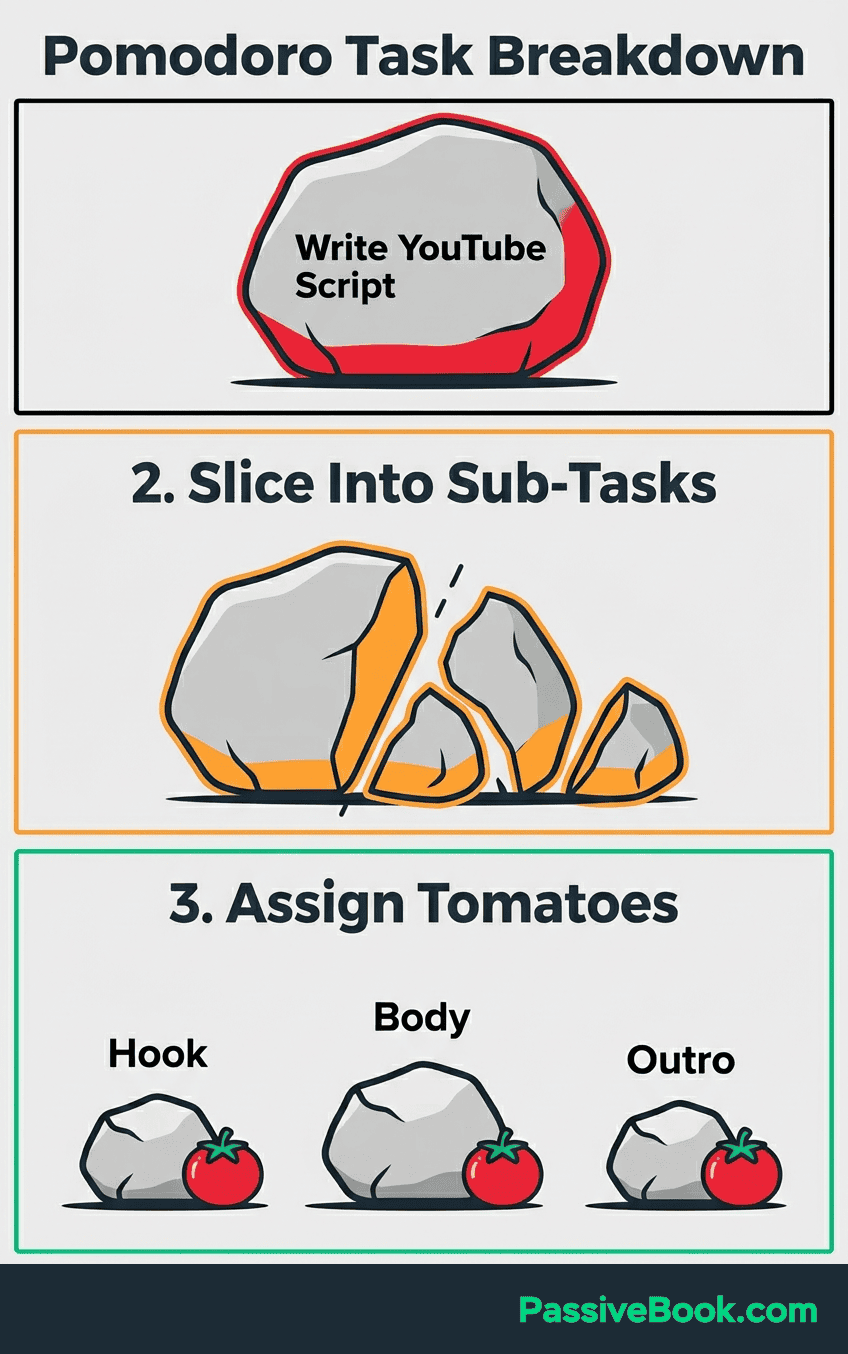
Todoist’s Pomodoro productivity guide recommends breaking any task exceeding 4 Pomodoros into smaller, defined sub-tasks before the timer starts. A vague task like “work on YouTube script” becomes “outline intro hook,” “draft problem section,” and “write three main points.” Each piece fits inside one focused interval.
If a task has no clear finish line, define one before starting. “Write 300 words” beats “work on article.” The former gives you a concrete target to hit within 25 minutes. The latter guarantees you’ll drift because you never know when you’re done.
I use a simple text file. Morning planning session: list tasks, estimate Pomodoros, pick the top three. Everything else waits. When the execution session starts, there’s zero mental overhead. Just start the timer and go.
How to Run Your First Pomodoro Session in 5 Steps
You don’t need a perfect system. You need to start the timer once and see how it feels. Here’s the exact process.
Step 1: Choose one concrete task from your planning session. Not “work on blog.” Something like “draft intro for blog post” or “upload three product listings.” The timer starts only when the task is already defined.
Step 2: Set a timer for exactly 25 minutes. Silence your phone and close all unrelated browser tabs before starting. If a tab isn’t required for the task, it doesn’t stay open. This isn’t optional. Open tabs are invitations to drift.
Step 3: Work on that single task only until the timer rings. When a stray thought appears, write it on a notepad. Do not act on it. The note acknowledges the thought without breaking your session.
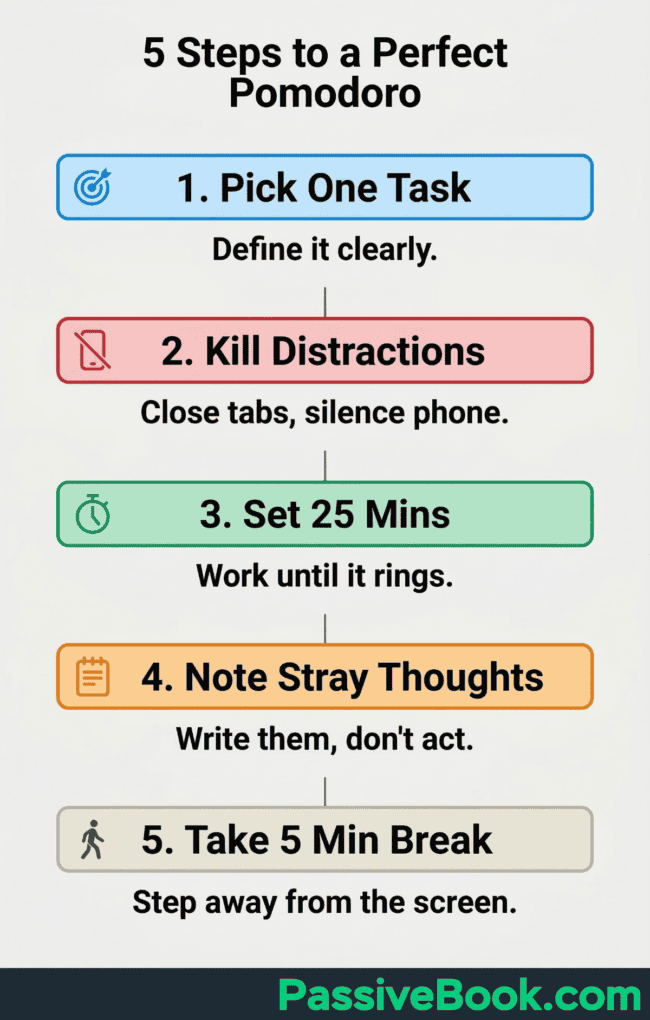
Step 4: Take a true 5 minute break away from your screen. Stand, stretch, make a drink. No email. No social media. No quick checks. If you stay at your desk scrolling, you didn’t take a break. You switched tasks.
Step 5: After four sessions, take a 15 to 30 minute break before beginning the next round. This longer break lets your brain fully recover. If you’re working evenings around a day job, you won’t complete four full rounds in one night. That’s fine. Two or three focused Pomodoros beat five scattered hours.
The mechanics are simple. The discipline is doing nothing else when the timer runs.
Mapping the Pomodoro Technique to Your Online Business Tasks
You need to know which tasks in your business fit the method and how to structure sessions around the messy reality of content creation, ecommerce admin, and marketing work.
Blogging and Long-Form Content Writing
Nelio Software’s blogger Pomodoro guide recommends using one session for outlines and separate sessions for drafting. Never mix the two. Outlining requires a different mental mode than writing. Switching between them in one session kills momentum.
Write freely during draft sessions. Don’t edit mid-sentence. Don’t rewrite the intro three times before moving to the next paragraph. The timer is building momentum. Editing destroys it. Save all revisions for a dedicated editing Pomodoro after the draft is complete.
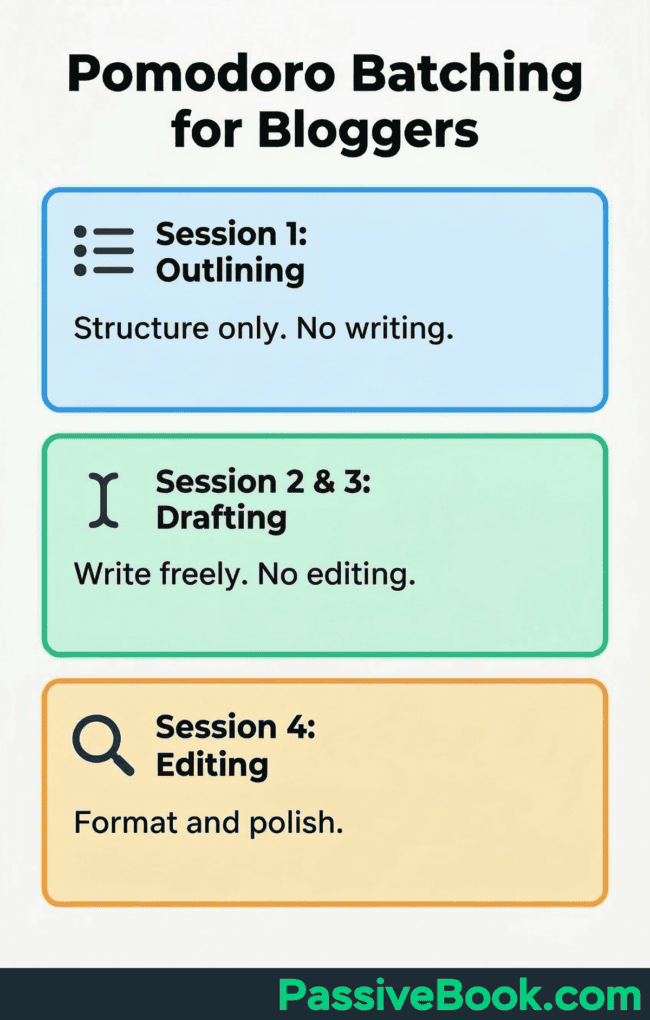
Batch all social captions or email newsletters into one dedicated session to avoid creative context-switching. Writing a Twitter thread requires a different tone than drafting a blog intro. Switching between them every 10 minutes fractures your voice.
I write article outlines in the first session of the morning when my brain is fresh. Drafting happens in back-to-back afternoon Pomodoros. Editing and formatting get their own sessions the next day. Mixing them never works.
Youtube, Podcasting, and Online Course Creation
Todoist’s deep work guide for content creators advocates batching creation tasks into focused blocks completely separate from real-time engagement. Checking comments or responding to DMs during a scripting session prevents the creative context-switching that kills momentum.
Separate scripting, recording setup, and editing into distinct Pomodoros. Mixing them wastes the session’s momentum. One session to write the script. Another to set up lighting and test audio. A third to record. Trying to do all three in one sitting guarantees at least two will be rushed.
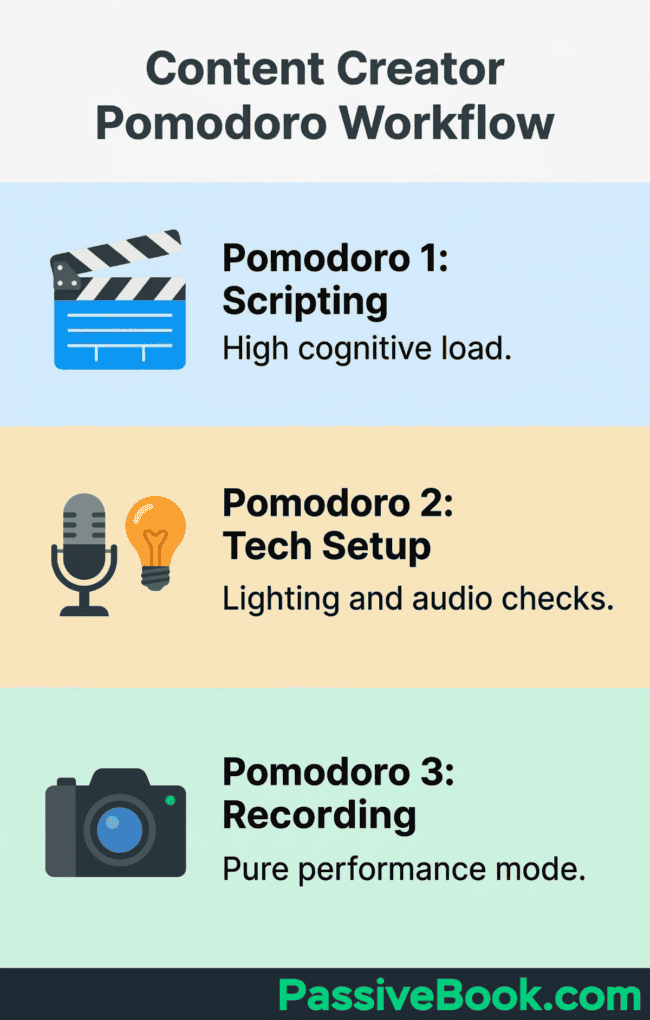
Reserve back-to-back Pomodoros for deep work on complex projects like scripting a course module when your energy is highest. Creative tasks demand more cognitive load than administrative ones. Don’t waste your sharpest hour uploading thumbnails.
When I recorded podcast episodes for a side project in 2022, I’d batch three interview recordings in one evening with 15-minute breaks between each. Each recording was essentially two Pomodoros back-to-back. Editing happened in separate sessions days later when I had patience for repetitive work.
E-Commerce, Dropshipping, and Print-On-Demand
Asana’s Pomodoro technique guide notes that time-boxing recurring tasks prevents them from expanding to fill all available time. Without a hard stop, checking supplier emails or tracking orders becomes an hour-long rabbit hole.
Cap recurring tasks like supplier emails, order tracking, and listing uploads to one 25-minute session. They expand without a hard stop. Set the timer, handle what fits, then move on. Anything left over waits for the next session or wasn’t urgent.
Dedicate a separate session to marketing copy or product descriptions to protect creative work from operational tasks. Writing persuasive copy requires a different headspace than updating tracking numbers. Context-switching between them drains both.
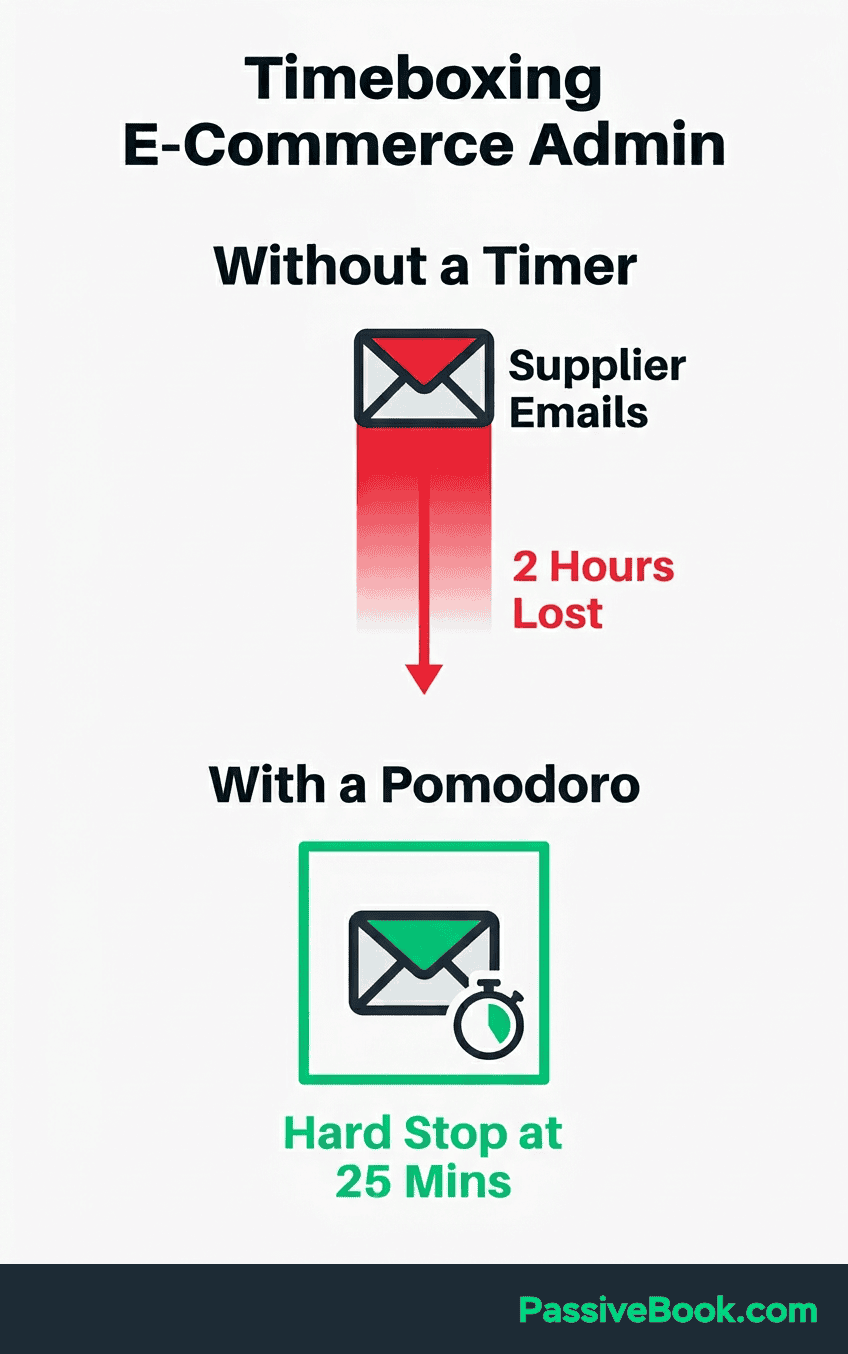
Use one short session for product research with a strict timer. Without it, competitor-browsing becomes a time sink. You start analyzing one niche, fall into a Reddit thread, check three competitor stores, and an hour vanishes with zero actionable data.
During my dropshipping phase in 2017, I’d waste entire evenings browsing AliExpress with no filter. One Pomodoro for product research forced me to take notes on my criteria. Price, shipping time, supplier rating. Then stop. That constraint saved me from analysis paralysis.
Why the Pomodoro Technique Fails (And the Mistakes That Cause It)
It works for most tasks. But not all. Knowing when it breaks down prevents you from blaming yourself when the timer becomes a hindrance instead of a tool.
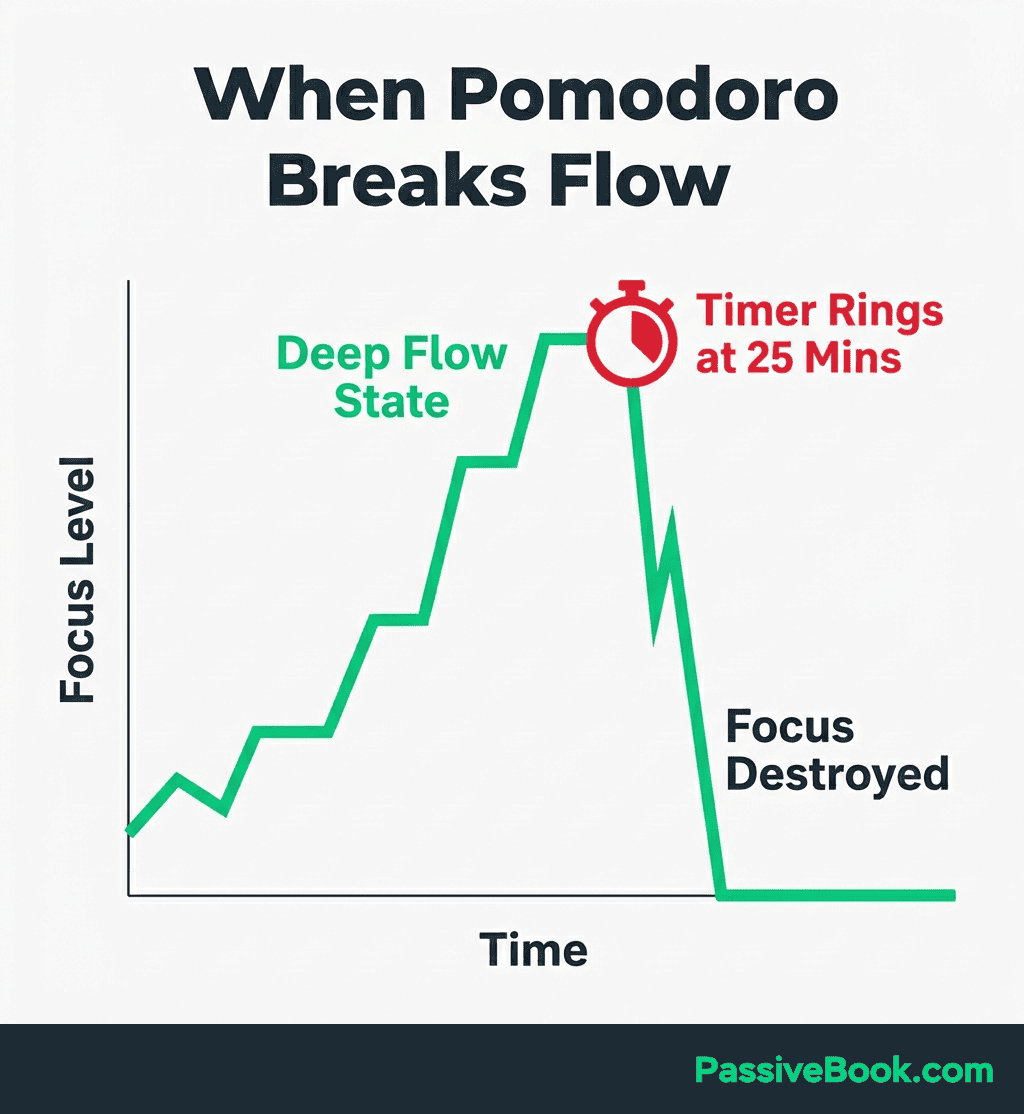
Productivity coach Megan Sumrell notes that for deep creative work, a ringing timer can break a hard-earned flow state and cost more time than it saves.
I learned this while drafting a course module in 2023. I hit flow 18 minutes into a session, then the timer rang. It took another 15 minutes to rebuild that mental state in the next Pomodoro.
Multitasking within a session or powering through breaks compounds fatigue. Both reset your cognitive state and reduce output quality in later sessions. Skipping the 5 minute rest to stay productive guarantees the fourth Pomodoro will be half as effective as the first.
Using it for the wrong tasks guarantees frustration. Phone calls, live customer chats, and meetings cannot be Pomodoro-ised. Reserve it for solo, focused work only. A timer doesn’t help when you’re responding to someone else’s schedule.
The method assumes you control your attention. If your environment doesn’t allow that, forcing Pomodoros creates stress instead of focus. Young kids at home, shared workspace with constant interruptions. Fix the environment first, then apply the technique.
What to Do When a Real Interruption Breaks Your Session
If interrupted externally, note it on your scratch pad, handle it, then restart the Pomodoro from zero. Child needs help, urgent call, building fire alarm. A partial session does not count. The method’s power comes from completing the full interval. Half-sessions train your brain that the timer is negotiable.
Zapier’s Pomodoro guide distinguishes internal interruptions and external ones. Impulses you control versus events you don’t. Only external events justify cancelling and restarting. Internal impulses should be written down and ignored until the break. If you track interruptions over a week, you’ll spot patterns. Certain times of day, triggers. You can adjust your environment to protect future sessions.
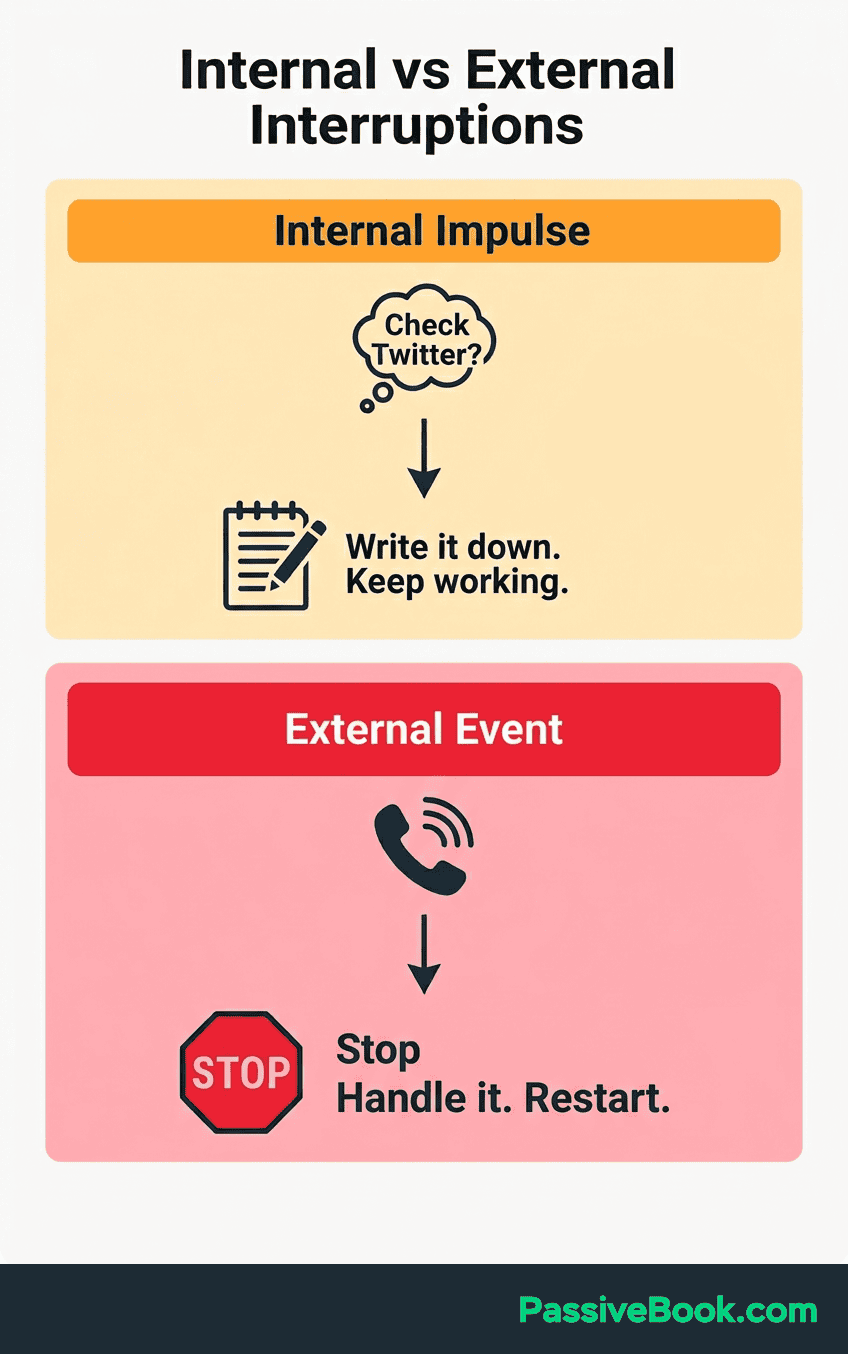
I keep a small notebook next to my laptop. Every quick thought goes there. Most of them are irrelevant by the time the break arrives. The ones that matter get a dedicated Pomodoro later.
How to Adapt the Pomodoro Technique When 25 Minutes Doesn’t Fit
The 25 minute interval is a starting point, not a law. Francesco Cirillo himself endorsed flexibility over rigid adherence. The goal is focused work separated by rest. The exact numbers matter less than the pattern.
Beginners overwhelmed by 25 minutes can start with 15 minute sessions and build up gradually over one to two weeks. Shorter intervals still enforce the single-task rule while feeling less daunting. Once 15 minutes feels easy, extend to 20, then 25. Getting started is harder than the method itself.
When in flow, extend the session. Let the work dictate the rhythm. If you’re 20 minutes into drafting a course script and ideas are pouring out, don’t stop just because the timer says so. Finish your current thought, then take the break.
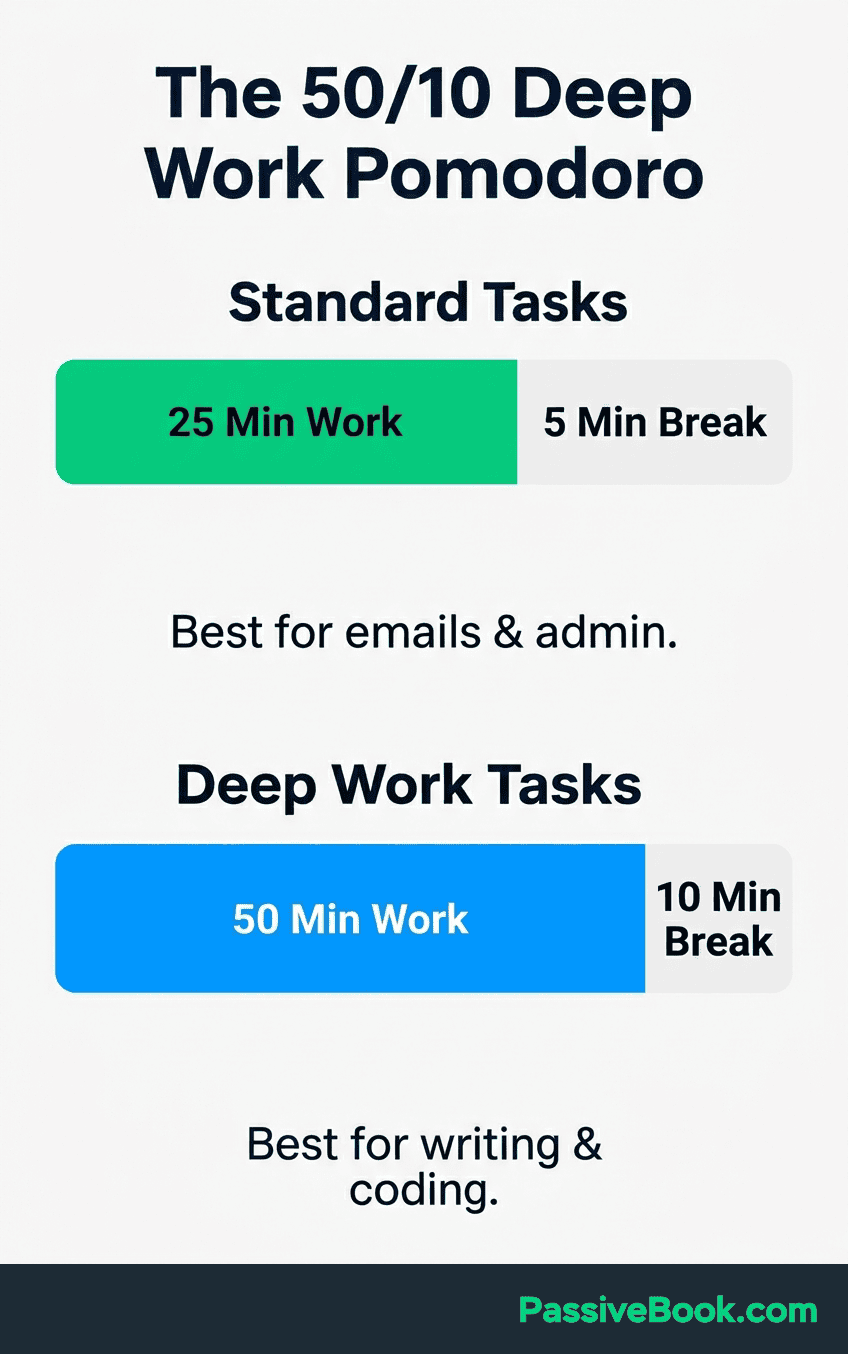
For sustained deep work on complex projects like course writing or video editing, shift to a 50/10 split. FocusKeeper’s deep work analysis confirms the 50 minute interval suits tasks requiring a longer ramp-up before flow begins. These tasks need time to load your working memory. A 25 minute session ends right when you hit your stride.
I use 25 minute sessions for emails, product uploads, or social media scheduling. Anything repetitive or administrative. For article drafting or course scripting, I default to 50 minutes. The task dictates the interval, not the other way around. I’ve met people who swear by 17-minute intervals because it feels right. Whatever. Use what works.
The Best Free Pomodoro Tools for Bootstrapped Solopreneurs
You don’t need a paid app. The method works with any timer. But the right tool removes friction. These are the ones that don’t waste your time or money.
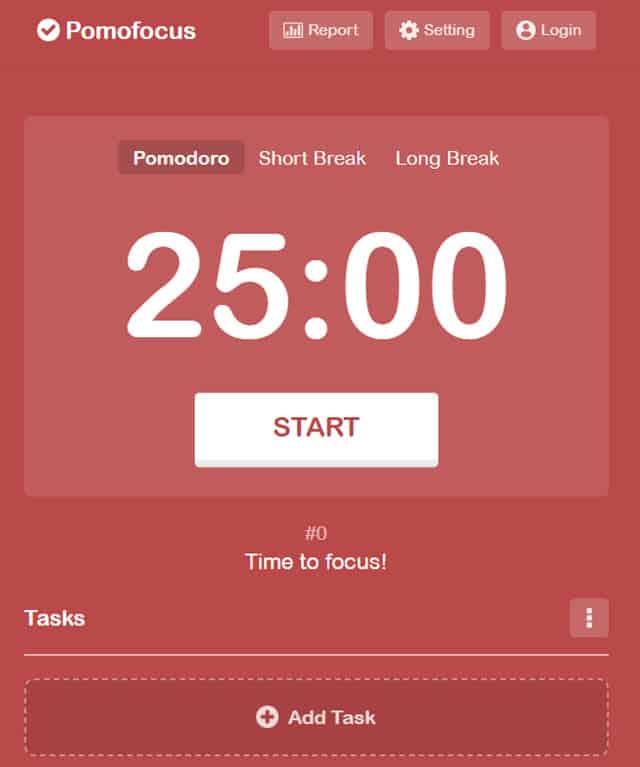
Pomofocus is a free, customizable Pomodoro timer that works on desktop and mobile browsers with no sign-up required. It lets you add tasks, set estimated Pomodoros for each, and track your focus time with visual reports showing daily, weekly, and monthly breakdowns. If you want a clean, distraction-free timer that doubles as a lightweight task planner, Pomofocus delivers without the overhead of a full time-tracking suite.
Marinara Timer is a free, browser-based Pomodoro timer with no sign-up, no download, and fully customizable intervals. You load the page, set your times, and start. It lives in a browser tab and nothing else. Perfect for anyone who doesn’t want another app installed.
Todoist pairs a built-in Pomodoro workflow with your task list so planning and timing live in the same tool. You estimate tasks in Pomodoros during planning, then start the timer directly from the task. The integration removes the mental gap between what you should work on and starting the session.
Your phone’s native clock app is a fully valid starting tool. The technique requires discipline, not an app. Set a 25 minute timer, work, then set a 5 minute timer for the break. If adding a new tool creates resistance to starting, skip it.
I’ve used all of these. Right now I use Toggl Track because I like seeing weekly reports of where my Pomodoros went. But I started with my phone’s timer for the first month. Use whatever removes the most friction from actually starting the session.
How AI Is Now Changing the Pomodoro Workflow for Solopreneurs
AI tools don’t replace the Pomodoro Technique. They make the sessions more productive by eliminating blank-page friction and low-value research work. Use them strategically in planning sessions, never during execution.
Use ChatGPT or Claude in a prep Pomodoro to generate outlines or research summaries so the next session is pure execution with no blank-page resistance.
I use Claude in a morning planning Pomodoro with a prompt like this: “I need to write a 1,500-word guide on email marketing for solopreneurs. Generate a detailed outline with five main sections and three sub-points per section.”
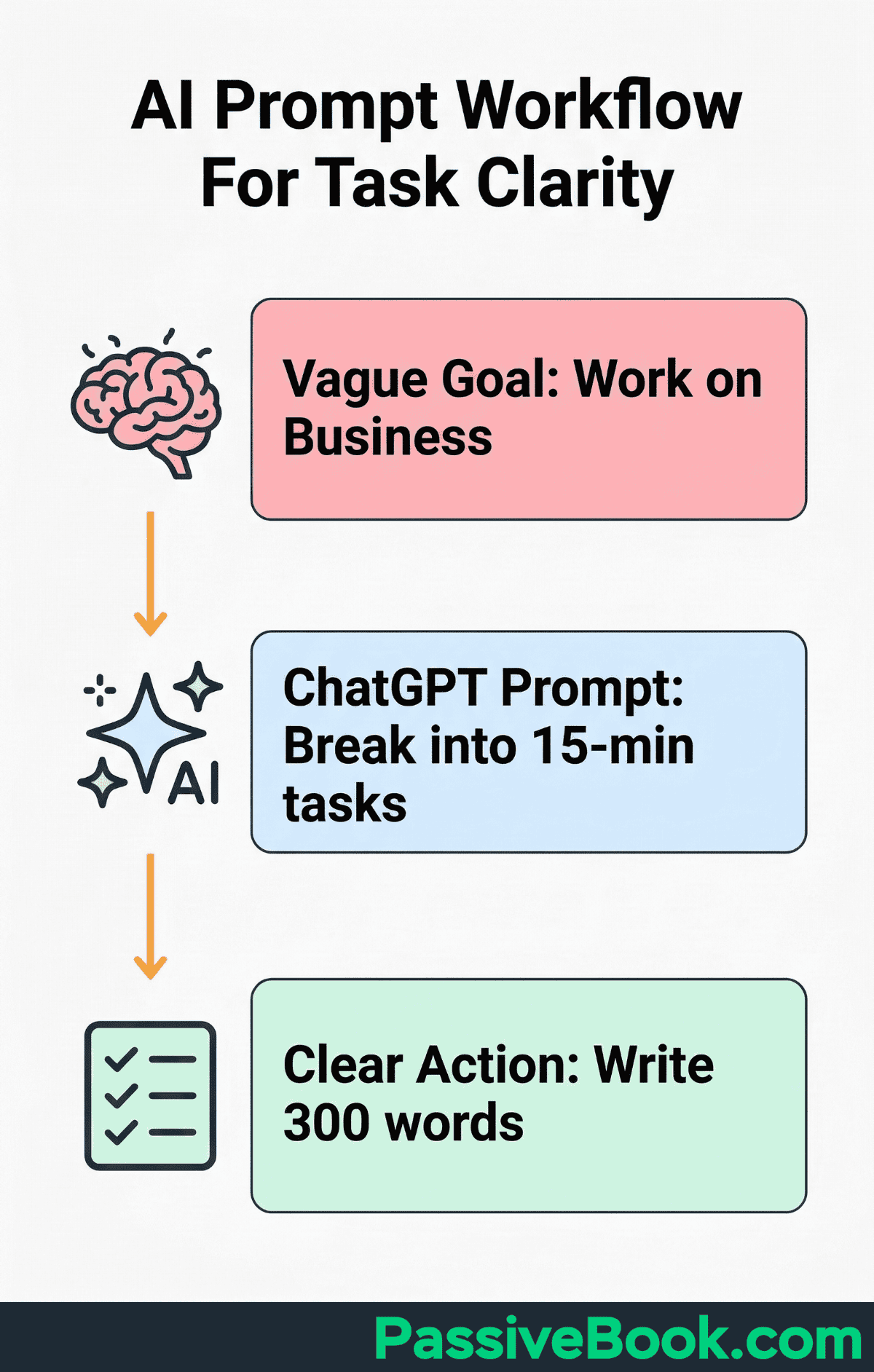
The output gives me a structure to execute in the next session. I’m not staring at a blank page wondering where to start.
Clockwise’s free tier auto-schedules focus blocks on your calendar around existing commitments, creating Pomodoro-ready windows without manual planning each evening. It analyzes your calendar, finds gaps, and labels them as focus time. You show up, the time is already carved out, and you just start the timer.
Use AI tools in planning sessions only, never during execution. If you’re mid-Pomodoro and start prompting ChatGPT for ideas, you’re not focused anymore. You’re outsourcing thinking in real-time, which fractures attention. Prep work happens before the timer starts. Execution happens during.
Frequently Asked Questions
Is 25 Minutes Really Enough Time to Make Real Progress on a Side Business?
Yes, if the task is defined before the timer starts. One focused 25 minute work session drafting product descriptions for your small business will produce more usable output than 90 scattered minutes working on the store. The constraint forces prioritization. You can’t waste time deciding what to do because the clock is already running.
What Should I Do During the 5 Minute Break to Actually Recharge, Not Just Pause?
Step away from your screen completely. Stand up, stretch, walk to another room, or make a drink. Your brain needs a physical and mental break from the task. Scrolling social media or checking email isn’t a break. It’s just different work that prevents recovery.
How Many Pomodoros Per Day Is Realistic for a Solopreneur Working Evenings and Weekends?
Three to five Pomodoros per evening session is realistic for business owners working around a day job. That’s 75 to 125 minutes of actual focused work, or roughly 1.5 to 2 hours. Pushing for more degrades quality and builds resentment. Consistency beats intensity. Three solid sessions every evening will build more than sporadic five-hour marathons.
Should I Use Separate Pomodoro Sessions for My Day Job and My Side Business?
Yes. Track them separately so you can see where your time actually goes. If you’re using a tool like Toggl Track, tag side-business Pomodoros differently from day-job ones. The data shows whether you’re truly spending the time you think you are on your business, or if it’s leaking into other tasks.
Can I Use the Pomodoro Technique If I Work Irregular Hours or Have an Unpredictable Schedule?
The method fits irregular schedules better than rigid time-blocking systems. You don’t need to work at the same time every day. Whenever you carve out 30 minutes, run one or two Pomodoros. The technique governs how you work within the time you have. It doesn’t require consistent hours. This is effective time management for people who don’t have time to waste on elaborate systems.
What Next?
You now know how the Pomodoro Technique works, why your current approach isn’t, and exactly how to map it to your online business tasks. It isn’t magic. It’s a forcing function that turns vague work time into accountable output.
Solopreneurs fail not because they lack hours, but because the hours they have leak into distraction.
Starting is harder than it sounds. Your brain will invent reasons to delay. The task isn’t clearly defined. You need to check one thing first. You’re not in the right headspace. Set the timer anyway. The clarity comes after you start, not before.
If this guide helped you see how to reclaim your scattered hours, share it using the buttons below. Someone in your network is fighting the same battle with focus and distraction. Send them a resource that actually maps to their reality.
What’s the single task you’ve been avoiding that would move your business forward if you gave it one uninterrupted Pomodoro tonight? Drop it in the comments. Writing it down makes it real.
Share this post with your friends & followers: