I know the feeling. You’re writing a blog post at 6am before work. Then you switch to record a YouTube video at lunch. By 10pm you’re trying to update your online store. Each project feels like it’s moving in slow motion. Nothing reaches momentum. You’re busy all the time but making progress nowhere.
This is the solopreneur’s paradox. You started multiple projects to diversify income and hedge your bets. But now the projects themselves are competing for the same fragmented attention. The good news: you don’t need to work more hours or abandon half your projects. You need a system that treats your attention as the most expensive asset you own.

- •What Is Managing Multiple Projects as a Solopreneur?
- •Why Most Solopreneurs Feel Overwhelmed Managing Multiple Projects
- The Portfolio Mindset: How to Think About Your Projects
- Your Lean Command Center: One Hub for All Projects
- Time Blocking and Batching: Your Core Scheduling System
- •The 30-Minute Weekly Review That Replaces a Project Manager
- •How AI and Automation Are Multiplying Solopreneur Capacity
- The Hard Truth: When Running Multiple Projects Backfires
- •Frequently Asked Questions
- •What Next?
What Is Managing Multiple Projects as a Solopreneur?
Managing multiple projects as a solopreneur means running several online income streams at once as a one-person operation. You might be building a blog, creating an online course, and running a print-on-demand store. Each project has its own tasks, deadlines, and revenue potential. You own every decision alone.
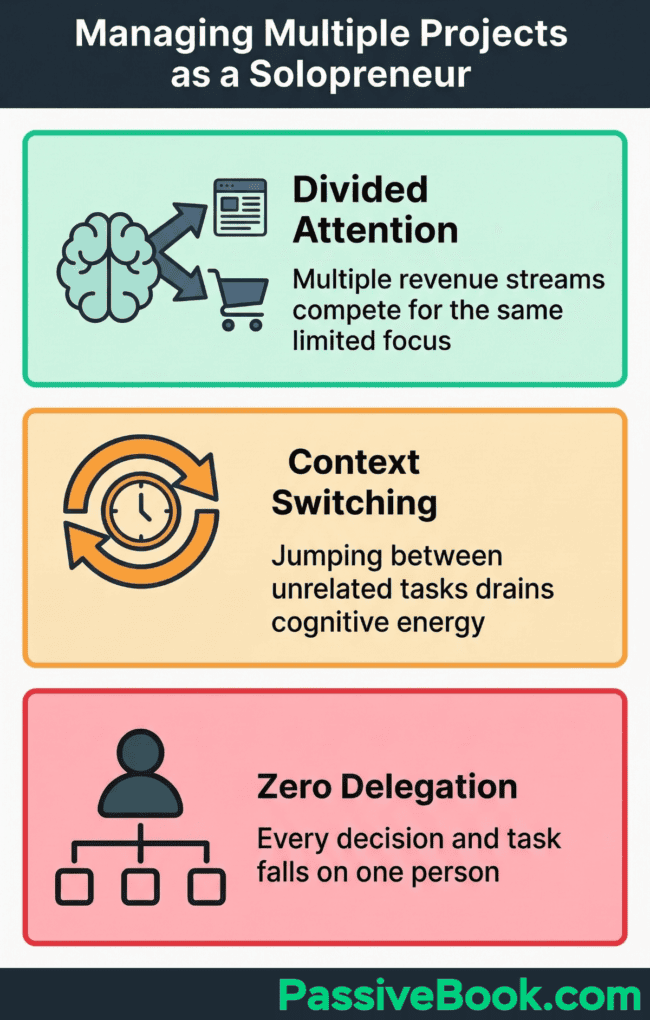
This differs from what a traditional project manager does. A corporate project manager has a team to coordinate. A solopreneur coordinates competing demands on their own limited time. According to QuickBooks, solopreneurs face three core challenges that employees never encounter: divided attention across multiple revenue streams, constant context switching between unrelated tasks, and zero delegation options.
The typical scenario looks like this. You run a blog that needs two articles per week. You’re building a course that requires module outlines, video scripts, and sales page copy. You operate a Shopify store that demands product research, supplier communication, and customer service emails.
All three need attention. All three compete for your evenings and weekends. None gets the focused time it needs to grow.
Most productivity advice fails here because it assumes you have one primary project with clear priorities. Solopreneurs don’t have that luxury. You’re not managing tasks within a single project. You’re managing multiple projects that each contain dozens of tasks. The challenge is not time management. The challenge is attention allocation across competing priorities that all feel urgent.
The solution requires deliberately designed systems. Not heroic effort. Not longer hours. Systems that make progress visible, prevent context switching costs, and protect deep work time for revenue-generating activities.
Why Most Solopreneurs Feel Overwhelmed Managing Multiple Projects
I spent six months in 2022 trying to run a blog, build a membership site, and maintain an affiliate income stream at the same time. I’d write a blog post in the morning, then switch to recording a member-only tutorial, then pivot to updating affiliate links. By the end of each day I’d worked eight hours but couldn’t point to meaningful progress on anything.
The blog grew slowly. The membership site launch kept getting delayed. Affiliate income stayed flat.
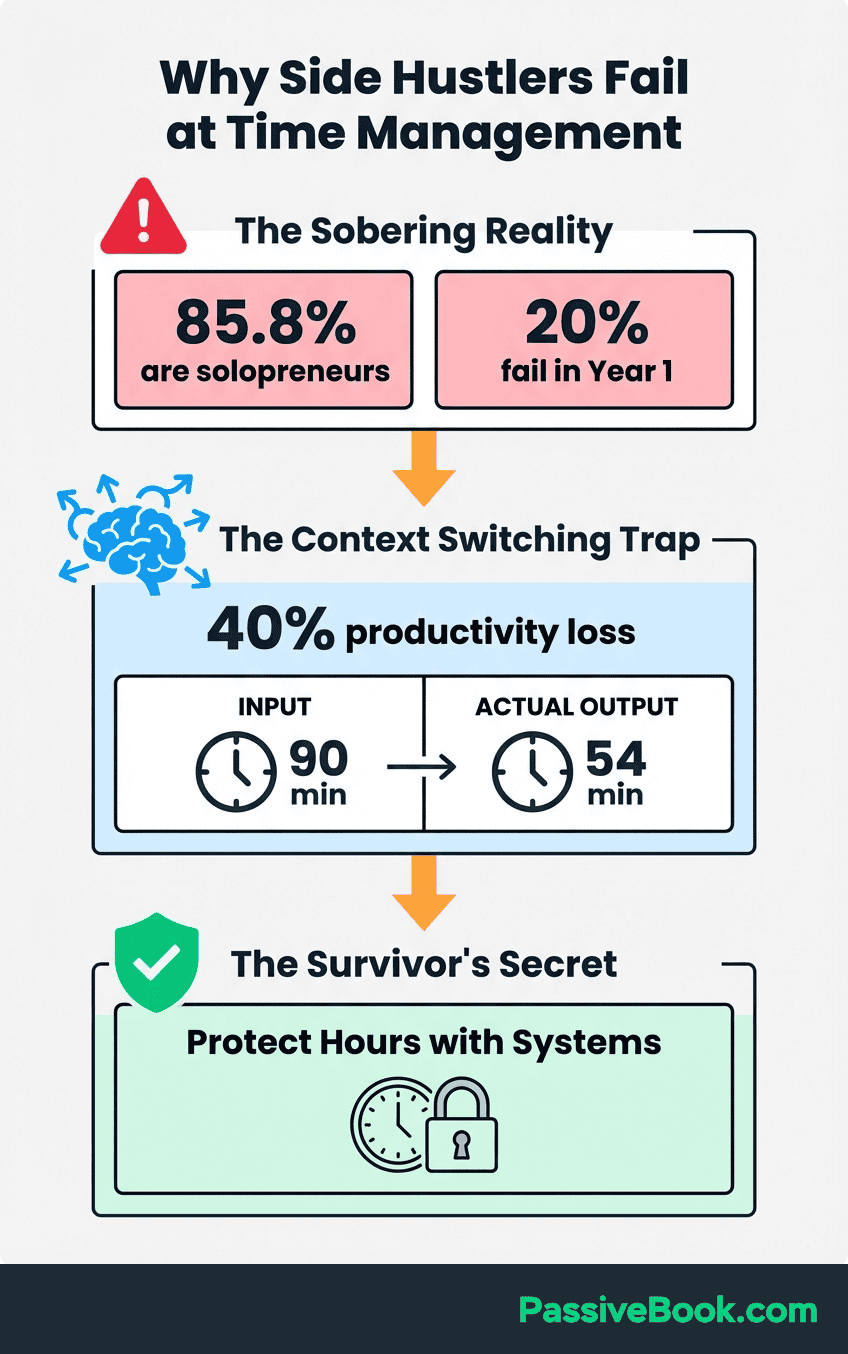
Effort wasn’t the problem. Context switching was. Research from Gloria Mark, UC Irvine Chancellor’s Professor of Informatics, found that each task switch costs up to 23 minutes of recovery time. When you shift from writing to design to customer service, your brain doesn’t flip instantly. It carries residue from the previous task. You lose focus before you fully enter the new context.
Here’s the brutal reality. If you switch contexts six times in a four-hour work session, you lose up to 138 minutes of productive capacity. That’s more than half your available time spent just recovering from switches. Mark’s peer-reviewed research shows context switching erodes 20 to 40 percent of daily productive capacity. This isn’t a productivity tip. This is measurable cognitive cost.
Without a system, every project competes for the same fragmented attention. Your blog needs research time. Your course needs scripting time. Your store needs product sourcing time. Each task pulls you in a different direction. None gets enough sustained focus to build momentum.
You end each week feeling busy but seeing minimal visible progress.
Most productivity frameworks fail solopreneurs because they’re built for salaried employees with predictable hours and dedicated staff. Time blocking works when you have one job with clear priorities. Getting Things Done works when you have a support team. These methods assume someone else handles the tasks you delegate. Solopreneurs have no one to delegate to.
You need a different approach built for the reality of managing multiple revenue streams alone.
The Portfolio Mindset: How to Think About Your Projects
Stop thinking like a multitasker. Start thinking like an investor managing a portfolio of assets. Each project is an asset that requires capital allocation. Your capital is time and attention. The question is not “How do I work on everything today?” The question is “Which assets get scheduled attention this week?”
Pat Flynn built a multi-stream one-person business by designing transparent, documented systems rather than working more hours. He runs a podcast, a blog, multiple online courses, and several affiliate income streams. His documentation reveals the key insight: he doesn’t juggle every project every day. He assigns each project a status and schedules attention accordingly.
The portfolio mindset requires three status categories. Active projects get primary focus and the majority of deep work hours. Maintenance projects get scheduled attention only, enough to keep them running but not growing. Maintenance projects might include basic client management for retainer work or routine customer service for existing products. Paused projects are frozen with a documented reactivation trigger.
You’re working on sequential focus within a structured schedule, not juggling every project at once.
Your blog is Active because you’re building organic traffic. Your online course is Maintenance because it already generates consistent monthly sales and only needs occasional content updates. Your print-on-demand store is Paused because you’re waiting for holiday season demand.
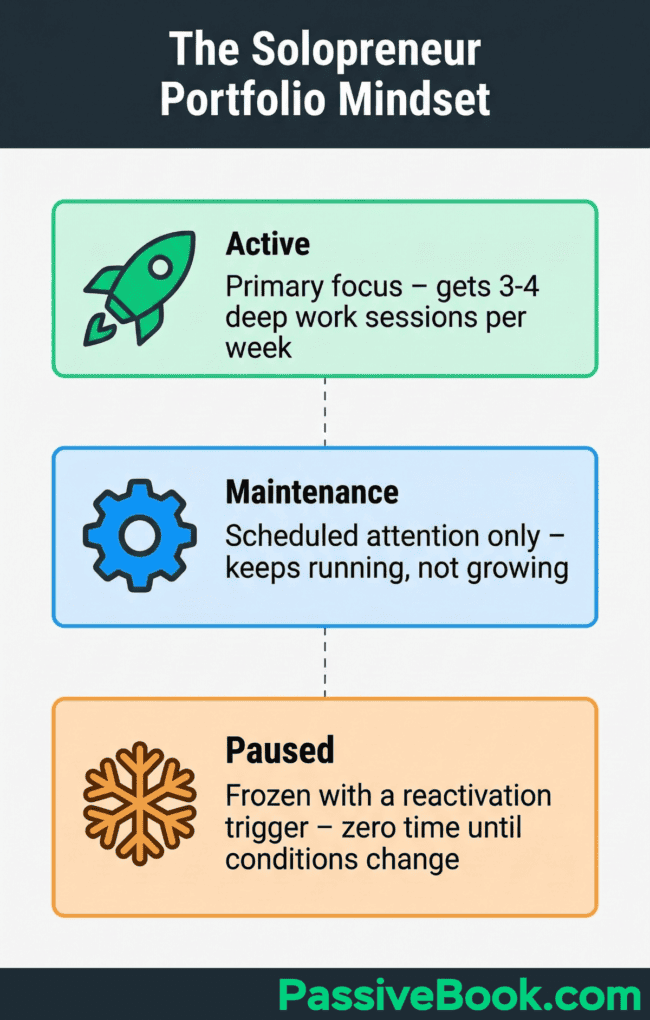
Each status gets a different time allocation. Active projects get three to four focused sessions per week. Maintenance projects get one scheduled session. Paused projects get zero time until their trigger condition activates.
This mental model eliminates guilt. You’re not neglecting paused projects. You’re intentionally sequencing them. You’re not abandoning maintenance projects. You’re protecting them from scope creep. You’re not obsessing over active projects. You’re giving them the sustained attention they need to reach the next milestone.
The portfolio mindset also forces honest resource allocation. If you have 15 hours per week and three active projects, each project gets five hours maximum. If a project needs 10 hours per week to make meaningful progress, the math doesn’t work. You must either reduce active projects or increase available hours. There is no third option.
Your system makes this constraint visible before you burn out trying to defy mathematics.
Auditing and Ranking Your Active Projects
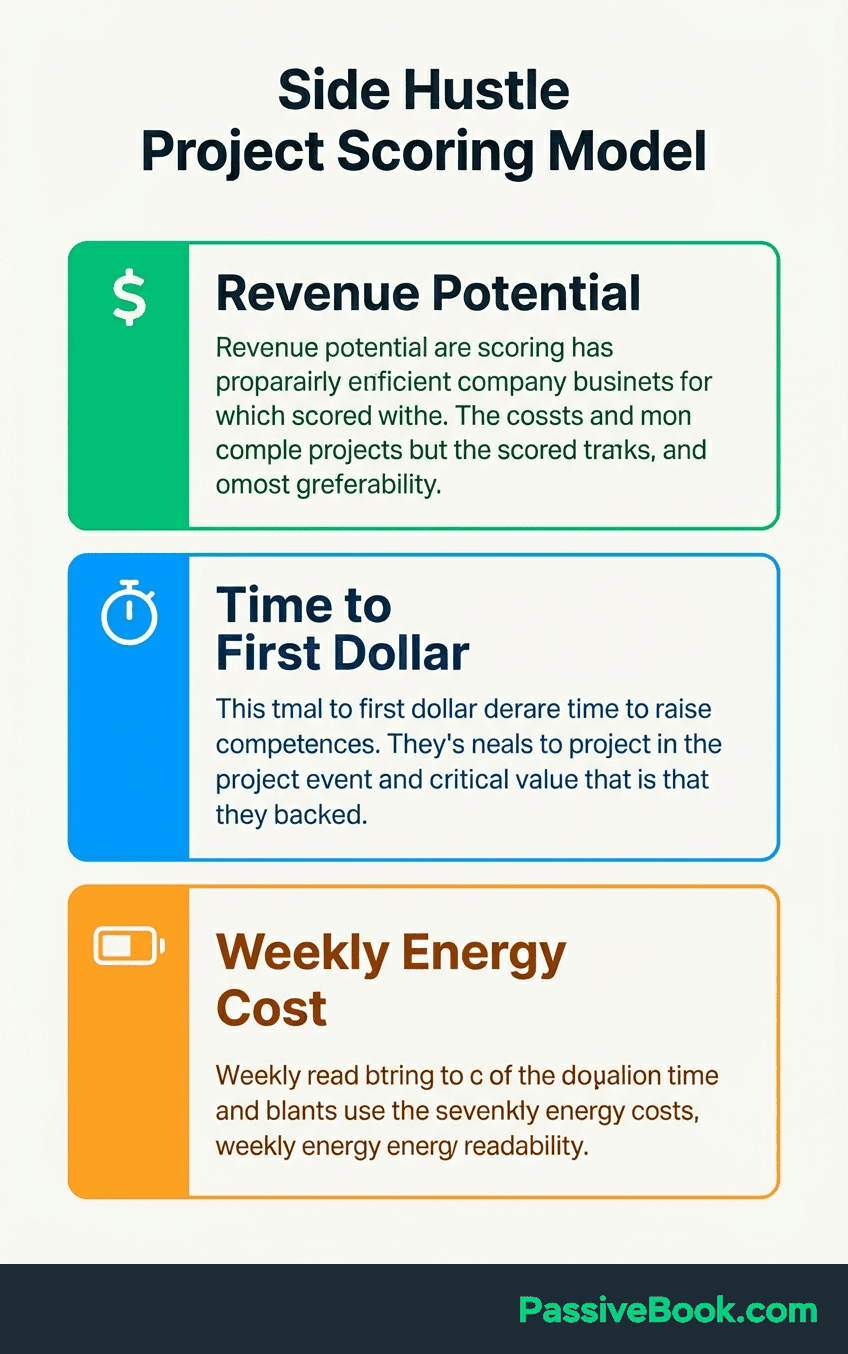
Every project in your portfolio must earn its active status. This requires a scoring model that reflects solopreneur constraints. Traditional project management uses frameworks like RICE (Reach, Impact, Confidence, Effort) for feature prioritization. Solopreneurs need a simpler adaptation focused on three criteria: revenue potential, time to first revenue, and weekly energy cost.
Score each project on a scale of one to five for each criterion. Revenue potential measures how much monthly income the project could generate within 12 months if fully executed. A blog with strong affiliate potential scores four or five. A print-on-demand store with narrow niche appeal scores two or three.
Time to first revenue measures how quickly the project could generate its first dollar. A course with a landing page and email list scores five. A YouTube channel starting from zero subscribers scores two.
Weekly energy cost measures how many hours per week the project requires just to maintain its current level without improvement. A blog that needs two articles weekly to hold traffic scores three or four. A course that generates passive sales with no weekly input scores one. Add the three scores together. The highest combined score earns the most deep work hours. The lowest score becomes a candidate for maintenance or paused status.
Apply this framework to a real scenario. You’re running a blog, a YouTube channel, and an online store. Your blog scores 15 total (revenue potential 5, time to first revenue 4, energy cost 6 inverted). Your YouTube channel scores 9 (revenue potential 3, time to first revenue 2, energy cost 4 inverted). Your store scores 11 (revenue potential 4, time to first revenue 3, energy cost 4 inverted).
The blog earns active status. The store becomes maintenance. The YouTube channel gets paused until the blog reaches a self-sustaining traffic baseline.
Cut or freeze projects scoring lowest on all three criteria. If a project requires more than three hours per week just to hold its current level with no improvement trajectory visible within 90 days, schedule it as Paused. Write down the reactivation condition. This prevents vague pauses from becoming permanent abandonment.
A paused YouTube channel might have the condition “reactivate when blog reaches 5,000 monthly visitors and I have repeatable content systems.”
This audit is not a one-time exercise. Run it quarterly. Projects change. A course that scored low in month one might score high in month six after you’ve built an email list. A store that scored high initially might drop to maintenance after you’ve automated fulfillment. The portfolio evolves. Your scoring should track that evolution.
Setting a Hard Cap on Active Projects
The working consensus among solo operators in communities like Indie Hackers and productivity researchers points to a clear ceiling: cap active projects at two to three maximum when total available working hours fall below 20 per week. Beyond this threshold, progress per project approaches zero. You’re spreading attention too thin to achieve momentum anywhere.
The math is unforgiving. If you have 15 hours per week and three active projects, each project gets five hours. Many online projects need at least eight to ten focused hours weekly to move forward meaningfully. Writing two quality blog posts takes six to eight hours. Recording and editing one YouTube video takes four to six hours. Developing one course module takes eight to ten hours.
The numbers don’t lie. Three projects cannot all progress on 15 total hours.
Create a named Backlog list for ideas you want to pursue later. This is not a someday-maybe wishlist. This is a curated queue of validated ideas waiting for capacity. When a new project idea appears, capture it immediately in the backlog with a one-sentence description and a preliminary RICE score.
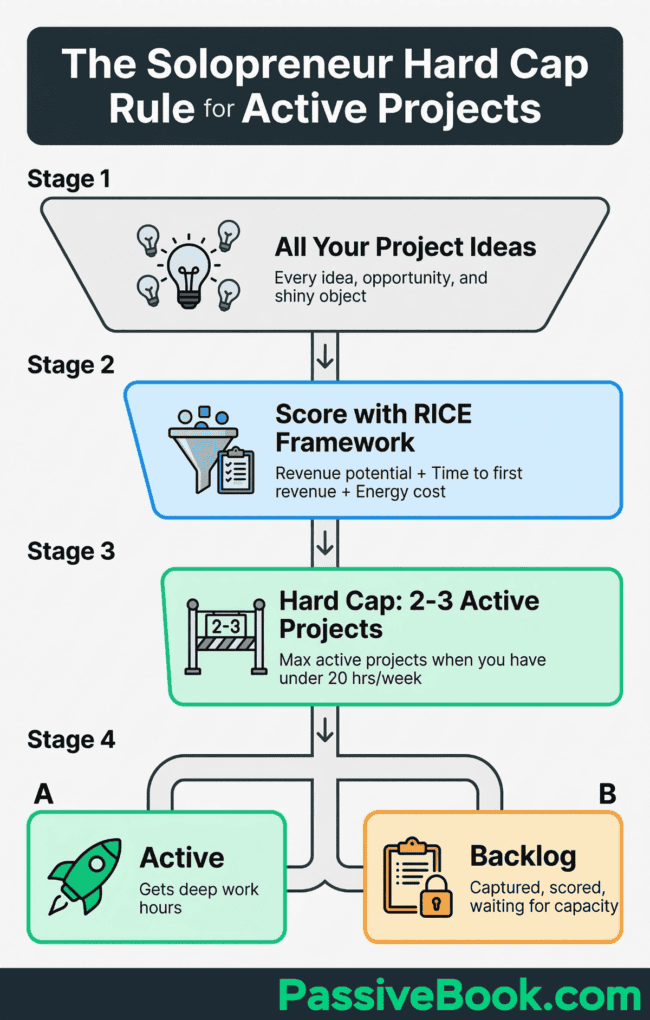
This stops new ideas from hijacking current work. You’ve acknowledged the idea. You’ve documented it. You can return to current work without the cognitive burden of trying to hold the idea in memory.
Promote a backlog project to Active status only when a current active project reaches a self-sustaining baseline. For a blog, this might be 3,000 monthly organic visitors on a publishing schedule the blog maintains without new posts every week because older content continues to attract search traffic.
For a course, this might be consistent monthly sales that cover hosting costs with automated email sequences handling nurture and upsells. For a store, this might be a catalog of 50 products with reliable suppliers and fulfillment that requires less than two hours weekly.
The hard cap forces strategic discipline. You cannot have four active projects. You cannot work on everything at once. You must choose. This feels restrictive initially. It becomes liberating quickly. You stop feeling guilty about projects you’re not working on. You stop context-switching six times per day. You start seeing real progress on the projects that matter most right now.
Your Lean Command Center: One Hub for All Projects
Your command center is one single place where every project’s status, next action, and deadline are visible at a glance. Not five apps. Not scattered notes. One hub. Marie Poulin, solopreneur and Notion educator, runs her entire business from a single workspace. She manages client work, course creation, and content production without switching tools. Her system proves one hub beats scattered tools every time.
Your command center needs three and only three components. A project list with statuses shows which projects are active, maintenance, or paused. A weekly task queue holds the tasks you’re committing to this week per project. A capture inbox collects new ideas, tasks, and notes instantly so they don’t interrupt current work. Everything else is optional.
Most solopreneurs over-engineer their systems by adding components they never use.
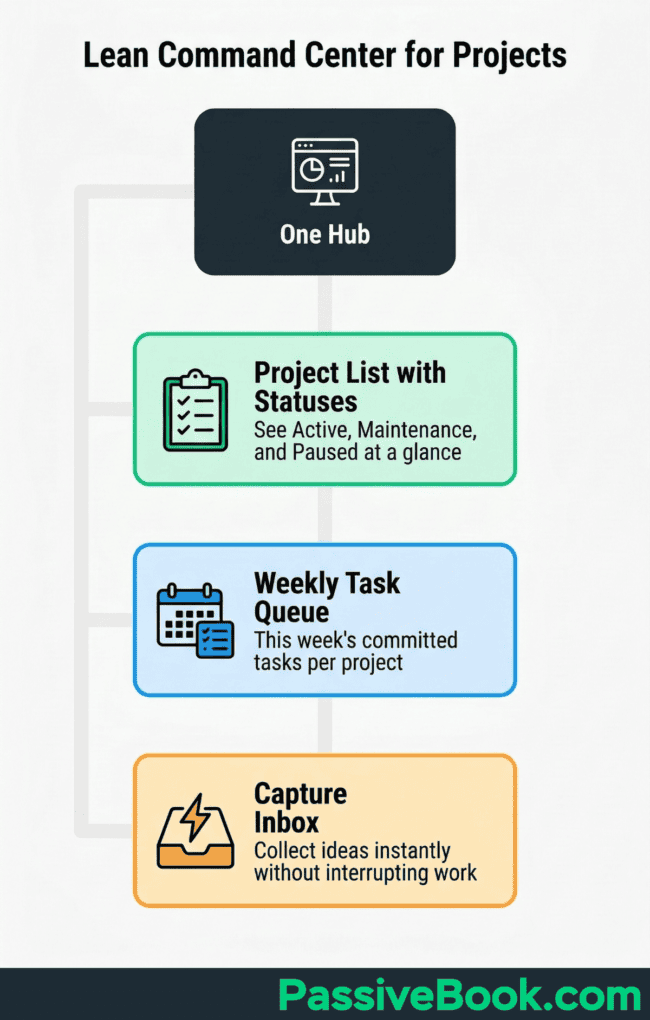
Build your command center in a tool you already use or can access for free. The tool matters less than the structure. All three recommendations below start free and stay free indefinitely for solopreneur use. Paid tiers exist but are unnecessary until you’re hiring team members or need advanced automation. Start with the free tier. Upgrade only when you have revenue justifying the cost.
All three tools offer free plans with standard privacy policy protections suitable for solopreneur use. Choose one. Stick with it for at least 90 days before evaluating alternatives. Tool-switching is procrastination disguised as productivity optimization.
| Feature | Notion | ClickUp | Trello |
|---|---|---|---|
| Best For | All-in-one workspace | Maximum views & features | Visual thinkers |
| Learning Curve | Medium | Steep | Gentle |
| Unlimited Tasks | ✓ | ✓ | ✓ (as cards) |
| Calendar View | ✓ | ✓ | ✗ |
| Multiple Project Views | ✓ | ✓ | ✗ (separate boards) |
| Built-in AI | $8+/mo | Business plan | ✗ |
| Collaboration | Limited free | Full free | Limited free |
Notion: the All-In-One Free Workspace
Notion’s free plan offers unlimited pages and blocks for individual users. This is enough to build a complete command center at zero cost. You get a project status board, a weekly task queue, and an idea backlog in one workspace. No switching apps. No integration headaches. This makes Notion the simplest possible starting point for most solopreneurs.
Notion works best for solopreneurs who want a flexible all-in-one workspace handling notes, databases, and project tracking without switching apps. The Marie Poulin use case runs on this foundation. You can write blog drafts, track course module progress, and manage store product launches in the same tool.
Flexibility becomes the selling point once you learn the basic database structure.
Set up one database per project. Use a Status property with three options: Active, Maintenance, Paused. Create a board view grouped by status to see your full portfolio at a glance. Add a Next Action text property to capture the immediate next step for each project. Add a Weekly Hours number property to track time allocation. This basic structure covers 90 percent of solopreneur needs.
One important note: Notion AI features require a paid plan starting at $8 per month for individuals on annual billing (Plus plan includes AI). The free plan’s manual features are sufficient for everything described in this guide. You don’t need AI to build a functioning command center. If you later want AI to draft project briefs or summarize backlogs, the paid plan becomes worth evaluating. Start free.
ClickUp: the Most Feature-Rich Free Option
ClickUp’s free Forever plan offers unlimited tasks, Kanban boards, calendar view, and collaborative docs. Forbes Advisor rates it as a strong free choice for solopreneurs who need maximum views without paying. The feature set rivals paid tools. The learning curve is steeper than Notion but the versatility justifies the investment.
ClickUp works best for solopreneurs who want maximum views without paying. You can see your tasks as a list, a Kanban board, a calendar, or a timeline. You can switch views depending on the context. Planning mode uses calendar view. Execution mode uses list view. Review mode uses board view.
This flexibility helps different cognitive modes access the same information differently.
Create one workspace with one Space per project. Use status labels to track Active, Maintenance, or Paused. ClickUp’s free plan allows custom statuses so you can adapt the system as your needs evolve. Add custom fields for Weekly Hours, Revenue Potential, and Next Action. The board view grouped by status gives you the portfolio overview. The list view filtered by due date gives you the weekly task queue.
The downside is complexity. ClickUp offers so many features that new users often feel overwhelmed. Ignore 90 percent of the features initially. Focus only on creating spaces, adding tasks, setting statuses, and viewing your board. Once that foundation works, explore other features gradually. Most solopreneurs never need the advanced automation or time-tracking features.
The core task and board system handles everything.
Trello: the Visual Kanban Option
Trello’s free plan allows up to 10 personal boards with unlimited cards. This makes it best for solopreneurs who think visually and want the gentlest possible learning curve. Trello‘s interface is intuitive. You see cards moving through columns. You understand the system in under 10 minutes. No tutorial needed.
Create one board per project. Each board has three columns: To Do, In Progress, Done. Drag cards through the columns as work progresses. Add a fourth column labeled Backlog for future tasks. Use labels to mark task type: content, design, admin, technical. Use due dates to schedule tasks within your weekly rhythm.
Visual movement provides instant progress feedback.
Trello‘s limitation is simplicity. You cannot create database-style views or advanced automations on the free plan. You cannot see all projects in one aggregated view. You must switch between boards to see different projects. For solopreneurs managing two to three projects, this is manageable. For solopreneurs juggling more, Notion or ClickUp becomes necessary.
The best choice depends on your cognitive preference. Visual thinkers prefer Trello. Structured thinkers prefer Notion. Power users prefer ClickUp. All three free plans work. Pick one based on how you naturally think about tasks, not which tool has the most features. The system you use beats the system with the most capabilities.
Time Blocking and Batching: Your Core Scheduling System
Cal Newport, who manages academic research, books, and a high-traffic blog as a solo operator, built the time-blocking methodology on one principle: every minute of the work day must be assigned a job in advance. This converts vague weekly intention into concrete, protected schedule. Vague intent sounds like “I’ll work on my course this week.” Protected schedule looks like “Tuesday 7 to 9pm: course module outline.”
This is not traditional time management for employees. This is attention architecture for solopreneurs.
Time blocking works because it eliminates decision fatigue. When 7pm Tuesday arrives, you don’t debate what to work on. The decision was made Sunday during your weekly planning session. You open your course outline document and start writing. No friction. No context-switching to check what else might be urgent. The calendar already decided. Your job is execution only.
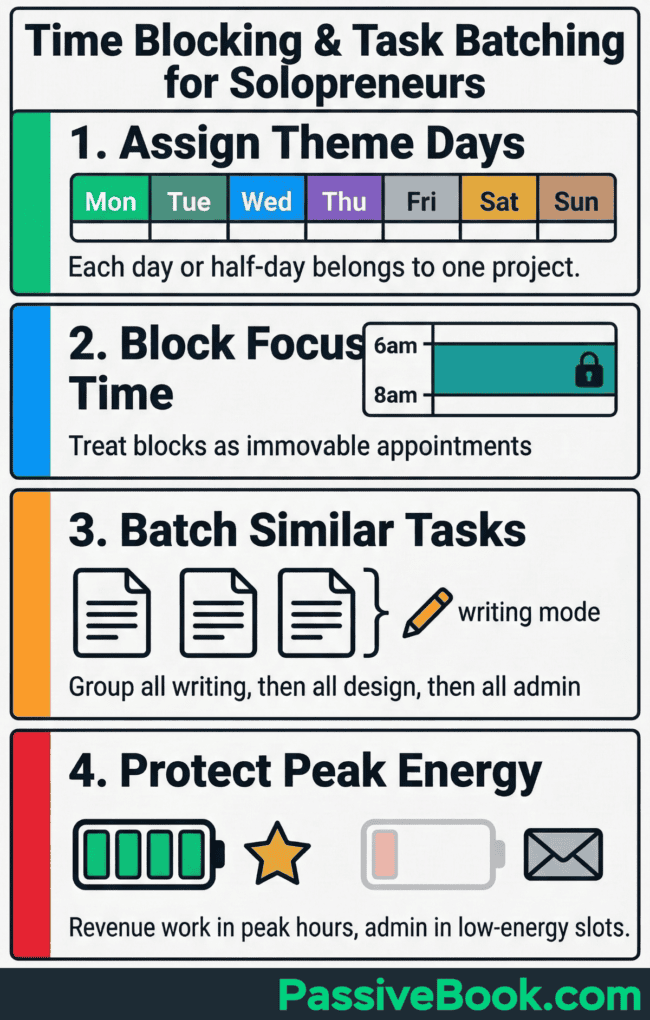
Use Google Calendar to create recurring color-coded blocks per project. Treat them as immovable commitments the same way you’d treat a doctor’s appointment or a client meeting. If your blog gets Mondays 6 to 8am, that block is sacred. Email does not invade it. Social media does not invade it.
Emergency tasks get handled in admin blocks, not creative blocks.
Color coding provides instant visual feedback. Open your calendar. Green blocks are blog work. Blue blocks are course work. Yellow blocks are store work. Red blocks are admin and email. You see immediately whether your week is balanced or whether one project is starving. This visibility prevents the silent drift where one project consumes all available time because it feels urgent.
Theme Days: Mapping Projects to Calendar Slots
Time blocking prevents internal context switching within a work session. Theme days prevent external context switching across your week. Assign entire days or half-days to a single project. Monday becomes blog day. Wednesday becomes course development day. Saturday becomes print-on-demand upload day.
You work on one project per session, eliminating the cognitive cost of switching between unrelated tasks.
Anne-Laure Le Cunff, neuroscientist and solopreneur behind the Ness Labs community, credits themed work days for managing content creation, community management, and academic research as a one-person operation. She assigns creation days, admin days, and learning days separately rather than mixing them. Creation days are for writing, recording, and designing. Admin days are for email, finances, and scheduling. Learning days are for research, courses, and skill development.
Protect your peak energy hours for revenue-generating deep work. Most people have three to four hours of peak cognitive capacity per day. For many, this is morning. For some, it’s late evening. Identify your peak window. Assign your highest-leverage project to that window.
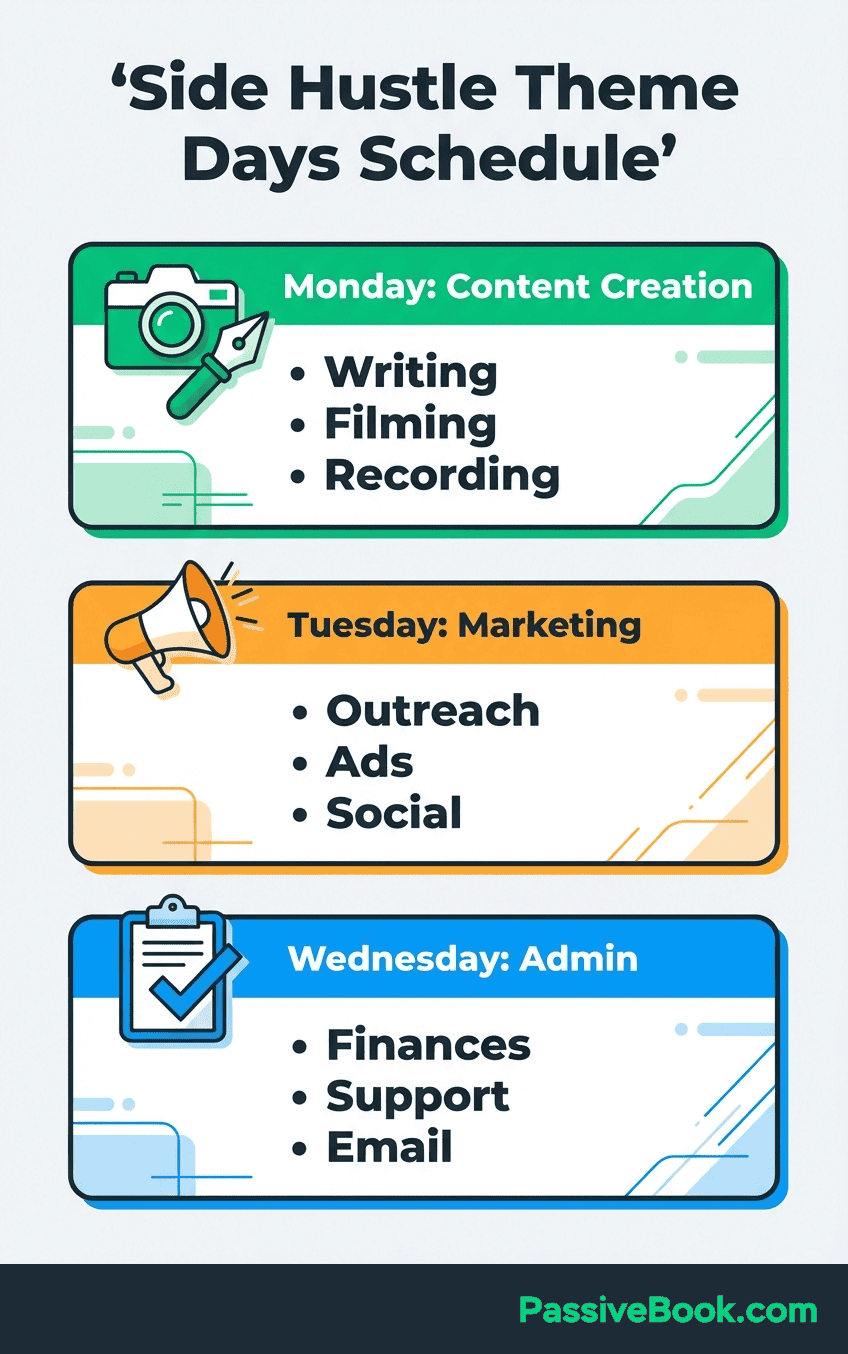
Administrative tasks and email belong in low-energy slots only. Never waste peak hours on low-value tasks just because they feel urgent.
A practical weekly rhythm for a solopreneur with 15 hours might look like this. Monday 6 to 8am: blog writing. Wednesday 7 to 9pm: course module development. Friday 6 to 8am: blog writing. Saturday 9am to 1pm: store product research and uploads. Sunday 8 to 9pm: weekly review and next week planning.
Every other slot is either day job, family time, or protected rest. No vague “I’ll find time this week” blocks.
Theme days also enable better batching within a project. If Monday is blog day, you can batch research, outlining, and writing for two articles in one session. You don’t research Monday, outline Wednesday, and write Friday. You complete the full workflow for multiple articles in one focused block. This reduces setup cost and maintains creative momentum.
Task Batching: Grouping Similar Work Across Projects
Task batching groups cognitively similar tasks across all projects into one session. Instead of writing Monday’s blog post, then designing Tuesday’s course graphic, then drafting Wednesday’s store product description, you batch all writing tasks into one session. You batch all design tasks into another session. You batch all administrative tasks into a third session.
Creator and blogger Tiago Forte documents processing all writing-mode tasks from course content to newsletter drafts in a single session. His reasoning: cognitive setup cost is the most expensive part of any task. Your brain needs 10 to 15 minutes to enter writing mode. Once you’re in that mode, stay there. Write everything that needs writing. Don’t switch to design mode until you’ve exhausted the writing queue.
Core batching categories for online solopreneurs include content creation, graphic design, scheduling and publishing, email and admin, and financial tracking. Content creation covers writing blog posts, scripting videos, outlining course modules, and drafting product descriptions. Graphic design covers creating blog featured images, designing course thumbnails, editing store product photos, and formatting social media graphics.
Scheduling covers queuing blog posts, uploading videos, scheduling emails, and posting social content.
A batching session for content creation might look like this. Open all project files at once. Write the introduction for your blog post. Immediately write the introduction for your course module. Immediately draft the product description for your store. You’re in writing mode. Your brain is primed for generating text. Batch all text generation while the cognitive engine is warm.
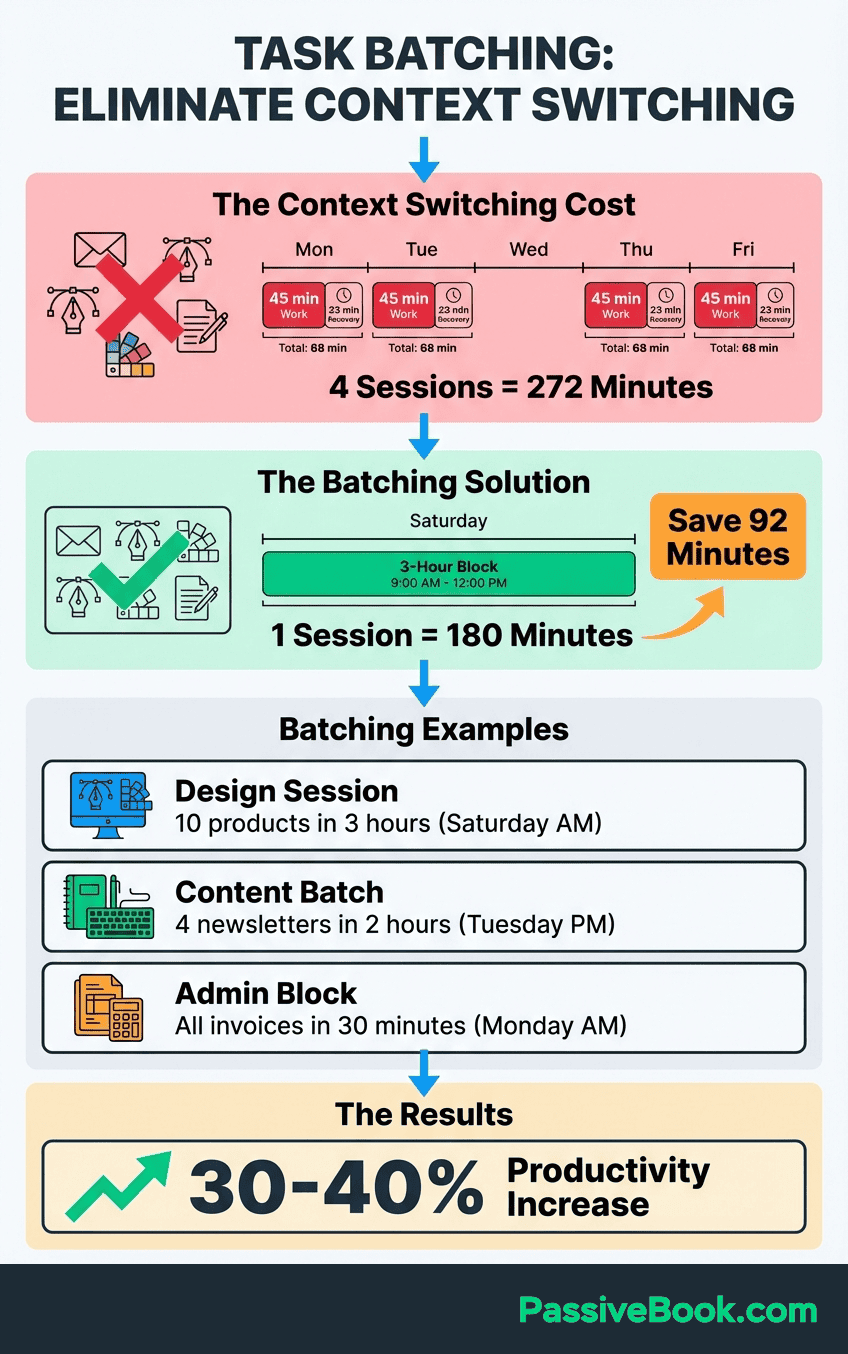
Switch to design mode only when the writing queue is empty.
You get compound benefits when you apply batching within theme days. Monday is blog day with a theme of content creation. You batch-write two blog posts in one session. Wednesday is course day with a theme of content creation. You batch-script three course videos in one session. Saturday is store day with a theme of product research. You batch-research and draft descriptions for ten products in one session.
Theme days set the project context. Batching sets the task mode within that context.
One warning: over-batching creates its own problems. If you try to write 10 blog posts in one sitting, quality degrades after the third or fourth post. Batch similar tasks within reasonable energy limits. Two to three hours of focused batching per session is the sweet spot for most solopreneurs. Beyond that, diminishing returns set in and you’re better off switching to a different task mode or taking a break.
The 30-Minute Weekly Review That Replaces a Project Manager
A 30-minute weekly review every Friday or Sunday prevents projects from silently drifting. This is the single habit that eliminates the need for a project manager. Corporate teams need a PM to coordinate work, track progress, and identify blockers. Solopreneurs need a weekly ritual that performs the same function. The review serves as your external brain, catching what slips through daily execution.
The review covers three fixed questions. What got done this week? What is blocked and needs attention? What are the top three tasks per active project next week? These questions force honest assessment. You cannot fake progress during a review. Either you shipped two blog posts or you didn’t. Either your course module outline is complete or it isn’t.
The review makes reality visible.
Todoist’s GTD guide, based on David Allen’s Getting Things Done method, gives solopreneurs a ready-made tool-agnostic ritual. Open your command center. Review each active project. Check off completed tasks. Move incomplete tasks to next week or the backlog. Identify the next action for each project and schedule it in your calendar. Capture any new ideas in the inbox for later processing.
Close the review session knowing exactly what next week holds.
Start the review by celebrating wins. What shipped? What moved forward? Solopreneurs often skip this step and jump straight to problems. Acknowledging progress builds momentum and prevents the perception that nothing ever gets done. I completed two blog posts. I recorded one course video. I added five products to my store.
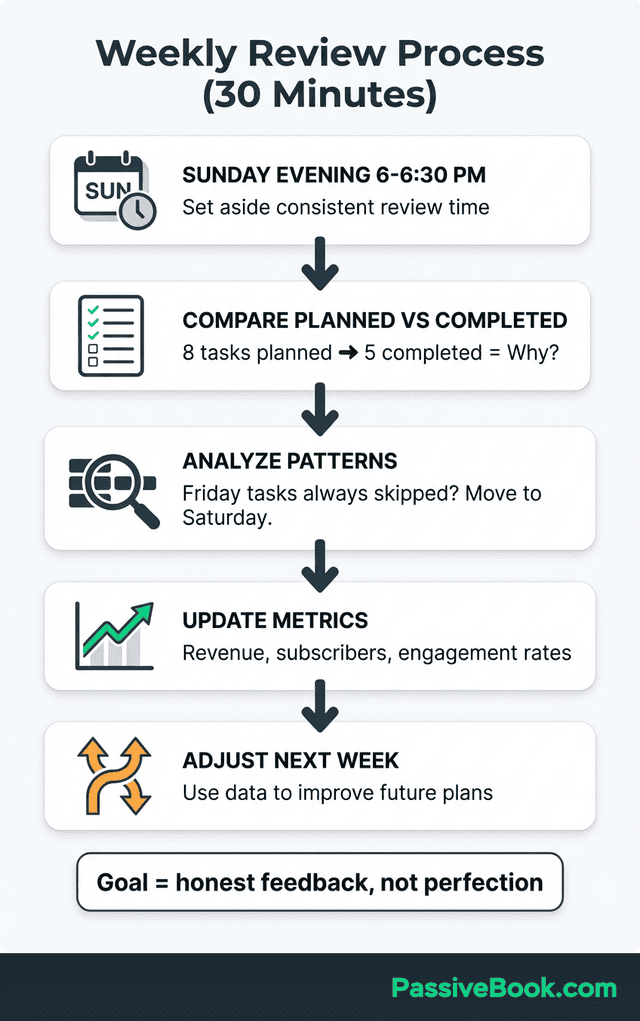
These are real outputs. They deserve recognition before moving to the problem list.
Next, identify blockers. What prevented progress? What needs troubleshooting? Blocked tasks kill momentum silently if you don’t surface them. Your blog post is stuck because you need a statistic and haven’t found a source. Your course video is delayed because your microphone broke and you need to order a replacement. Your store is paused because a supplier changed their pricing and you need to recalculate margins.
Write down the blocker and the action needed to unblock it.
Finally, queue next week’s work. Pull the top three tasks per active project into your weekly task queue. Schedule each task in your calendar during the appropriate theme day and time block. This is not a wishlist. This is a commitment. If you schedule six hours of work but only have five available hours, cut a task now during planning.
Do not over-commit and then feel guilty when Thursday arrives and the task list is still half-complete.
The weekly review also serves as the gate for new projects. If a backlog project keeps surfacing during reviews as something you want to work on, run the RICE scoring framework. Does it score higher than your current active projects? If yes, consider promoting it and demoting something else. If no, acknowledge the desire and return it to the backlog.
The review prevents impulsive project launches driven by shiny object syndrome.
How AI and Automation Are Multiplying Solopreneur Capacity
AI tools now handle email drafting, content outlining, social scheduling, and task follow-ups. These capabilities cover non-revenue admin time that previously displaced project work. Documented creator workflows show solopreneurs using AI to eliminate tasks that previously required a virtual assistant. The technology has reached the point where basic automation is accessible to anyone willing to spend an afternoon learning the setup.
n8n, a self-hosted workflow automation tool, connects over 8,000 apps and allows solopreneurs to automate repetitive cross-project tasks at zero cost. Social cross-posting, form capture, and email triggers run automatically once configured. You write a blog post. n8n creates a Pinterest pin, schedules a social media update, and adds the post to your newsletter queue. One action triggers three downstream tasks.
This is multiplication, not addition.
Set up automation only after your project hierarchy and weekly rhythm are already functioning. Automation amplifies existing systems. It does not fix broken systems. If you don’t have clarity on which projects are active versus maintenance, automation will just execute confusion faster. If you don’t have a weekly review habit, automation will pile up tasks you never process.
Build the manual system first. Automate second.
Start with the highest-volume repetitive tasks. For most solopreneurs, this is content distribution. You create one piece of content and need to share it across multiple platforms. n8n can post new blog articles to Twitter, LinkedIn, and Facebook. It can create Pinterest pins from blog featured images. It can add new articles to a Google Sheet for tracking.
These are five-minute setups that save two hours per week once running.
Use built-in AI in Notion or ClickUp to draft project briefs, summarize backlogs, and generate next-action lists from rough notes. Notion‘s AI can read your messy brainstorm and output a structured project outline. ClickUp’s AI can scan your completed tasks and write a progress summary. These features work best for reducing friction in planning phases, not for generating final published content.
AI assists your thinking. It does not replace your thinking.
One caution: over-automation creates fragility. If you automate everything and then one integration breaks, your entire workflow stops. Keep manual fallback options for critical tasks. Know how to manually publish a blog post if WordPress-to-social automation fails. Know how to manually send a newsletter if your email automation breaks.
Automation should make your system more resilient, not more brittle.
I use n8n to connect my blog publishing system to Pinterest, my email list, and my analytics dashboard. When a new post goes live, n8n creates a pin, sends a notification to subscribers, and logs the publish event in a Google Sheet. This saves around 45 minutes per article. Over 50 articles per year, that’s 37 hours reclaimed.
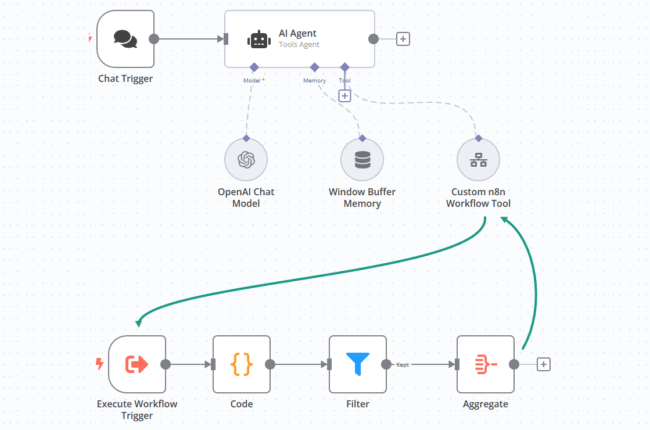
That time goes into writing more content or developing digital products, not repetitive admin work.
The real leverage comes from combining AI and automation. Use AI to draft social media captions for a new blog post. Use automation to schedule those captions across platforms. Use AI to outline a course module based on your notes. Use automation to notify your email list when the module goes live.
The tools handle mechanical execution. You focus on creative decisions and strategic direction. This is how one person runs multiple revenue streams without working 80-hour weeks.
The Hard Truth: When Running Multiple Projects Backfires
I tried running three active projects in parallel during 2022. A blog, a membership site, and an affiliate marketing funnel. Each needed at least 10 hours per week to make real progress. I had 15 hours total. The math didn’t work.
Six months later, the blog had grown to around 1,200 monthly visitors instead of the 5,000 I’d projected. The membership site launch kept getting delayed because I never had time to finish the content. Affiliate income stayed flat because I wasn’t publishing enough reviews to build traffic.
Effort wasn’t the problem. Mathematics was. Running three projects that each need 15 hours per week to grow, when you only have 15 hours total, means all three stagnate. This is not a time management failure. This is a math problem. No productivity system fixes insufficient capacity.
The only solution is reducing active projects or increasing available hours.
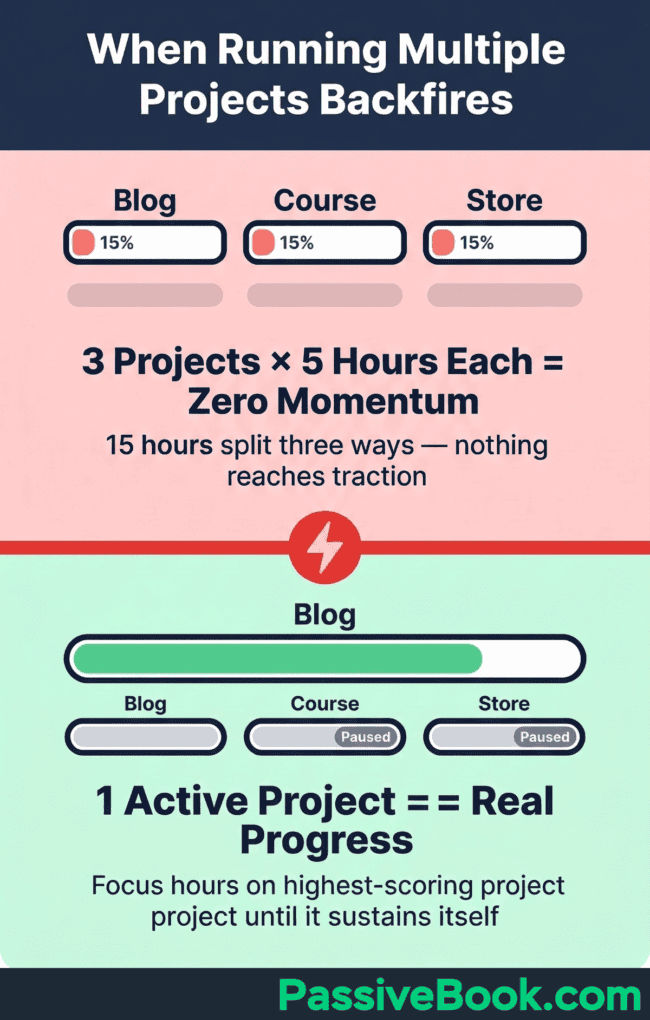
Sequential focus produces faster real-world results than parallel management. Run projects in parallel only when at least one already generates consistent, recurring revenue. Otherwise, focus on one project until it reaches sustainability, then add the next. This contradicts the diversification instinct most solopreneurs follow.
If your calendar shows 20 hours of project work but zero hours of protected rest, burnout is not a risk, it’s a schedule.
The warning signs are clear. You finish every week feeling busy but cannot point to concrete progress. You haven’t shipped anything complete in the last 30 days. You’re working evenings and weekends regularly but revenue isn’t growing. You feel guilty constantly because every project on your list is behind schedule.
These are not character flaws. These are symptoms of running too many active projects for your available capacity.
The solution requires honest triage. Run the RICE scoring framework on all active projects. The lowest-scoring project gets paused with a documented reactivation trigger or abandoned. Redirect those hours to your highest-scoring project. Work that project to sustainability before reconsidering the paused project.
This feels like giving up. It’s strategic resource allocation.
One alternative exists: increase available hours by eliminating non-project commitments. But this path leads to burnout if taken too far. You cannot sustain 30-hour work weeks on top of a full-time job indefinitely. You cannot sacrifice sleep or family time permanently. Temporary sprints are acceptable for hitting milestones. Permanent sprints are unsustainable.
If your only path to multiple active projects requires unsustainable hours, the answer is fewer projects, not more hours.
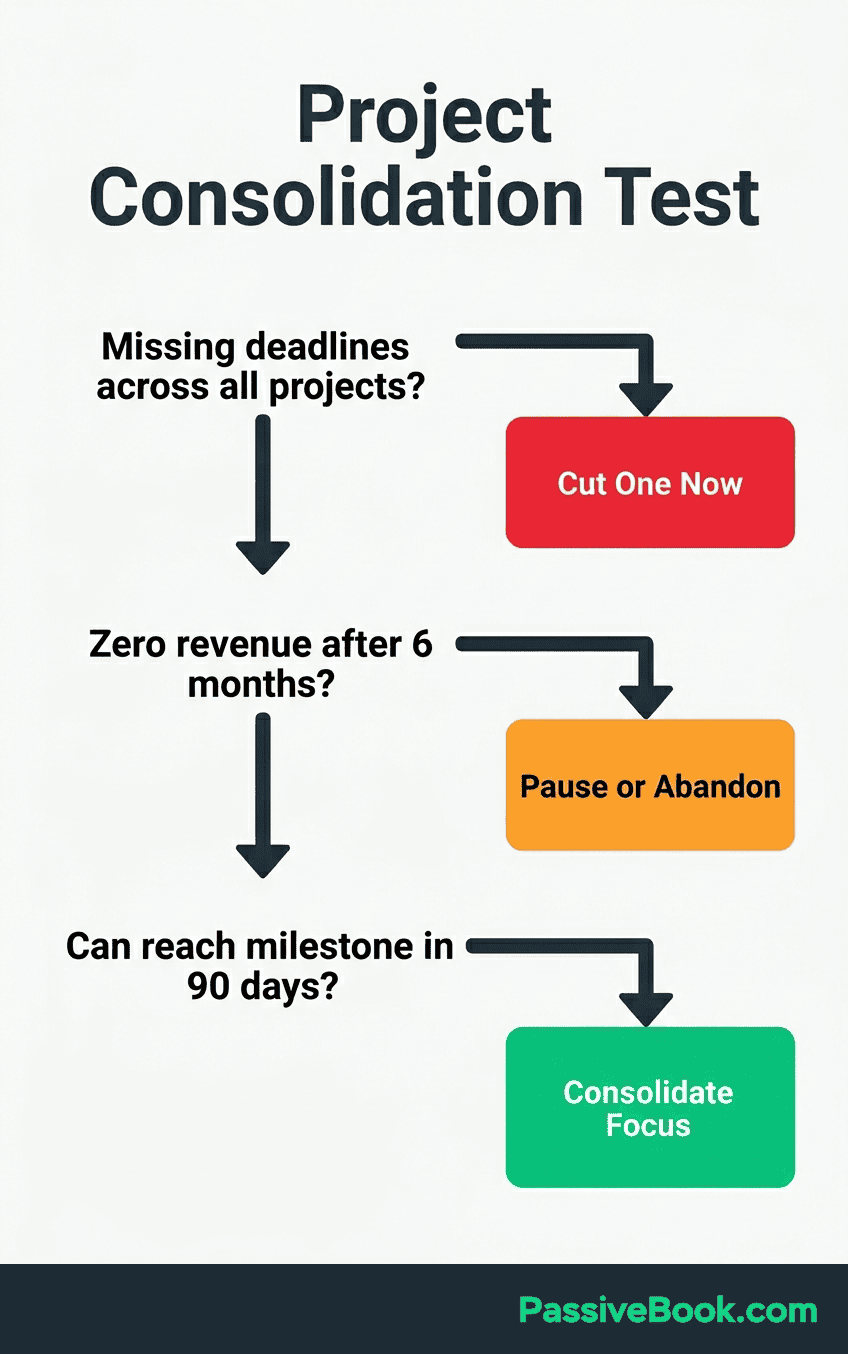
The Consolidation Decision Framework
Use this three-question test to decide whether to consolidate. First, can each active project reach its next milestone in under 90 days with your current hours? If no, consolidate. Second, is any project generating zero revenue and showing zero traction after six months? If yes, pause or abandon it.
Third, are you missing deadlines across all projects? If yes, you’re over-capacity. Cut one project immediately.
The decision is mathematical, not emotional. Your available hours either support your portfolio or they don’t. Forcing three projects into two projects’ worth of time guarantees all three fail slowly instead of one succeeding quickly.
The escape route is accepting the constraint and designing within it. Two active projects maximum for under 20 hours per week. One project to sustainability before adding another. Ruthless prioritization using a scoring framework. Weekly reviews to catch drift early. Time blocking to protect focus.
This system doesn’t let you do everything. It lets you make real progress on what matters most. That’s the trade-off. Most solopreneurs accept it after burning out trying to defy the mathematics.
Frequently Asked Questions
How Many Online Projects Can a Solopreneur Realistically Manage at Once?
The practical limit is two active projects maximum when available time falls under 20 hours per week. Three active projects only work when one project is already in maintenance mode and generating income without weekly growth effort. This ceiling comes from documented community experience in forums like Indie Hackers and aligns with the cognitive research on context switching costs. Each active project needs enough focused hours per week to build real momentum. Split 15 hours across three projects and each gets five hours, which is typically insufficient for meaningful progress on content-based businesses.
Should I Use One Project Management Tool for All Projects or a Separate Tool Per Project?
Use one tool with multiple spaces or boards within it. Switching between separate apps compounds the context-switching costs that already erode 20 to 40 percent of productive capacity. Cognitive overhead from app-switching adds friction to every task transition. Notion offers unlimited pages in its free plan, ClickUp offers unlimited tasks, and Trello offers 10 boards. All three support multi-project management in one workspace. Set up one database or space per project within your chosen tool, then use status properties and filters to see your full portfolio without switching apps.
How Do I Stop a New Project Idea From Derailing My Current Work?
Capture every new idea immediately in a named Idea Backlog within your command center, then return to current work without evaluating it. This capture-and-defer protocol prevents ideas from hijacking focus. The backlog acknowledges the idea exists without requiring immediate action. Set a monthly idea review slot to score backlog items against active projects using the RICE-adapted framework. Compare the new idea’s revenue potential, time to first revenue, and weekly energy cost against your current portfolio. Promote the idea to active status only when it scores higher than an existing active project and you have capacity to support it.
What Is the Difference Between a Project Being on Hold and a Project Being Abandoned?
A project on hold has a documented reactivation trigger and a scheduled check-in date. For example, “resume YouTube channel when blog hits 5,000 monthly visitors, check status every six weeks.” A project abandoned has no reactivation trigger defined and its resources are reclaimed for other uses. If a project passes three consecutive check-ins without reactivating, reclassify it as abandoned. This distinction prevents ambiguous project states where you’re neither working on something nor officially stopping it. Clear status enables clean decision-making about resource allocation.
How Do I Stay Motivated on a Long-Term Project When Progress Feels Invisible?
Introduce a progress log that records weekly completed items per project, reviewed during every weekly review session. Compound evidence of small wins prevents the perception that nothing is moving. Track one leading-indicator metric per project that shows progress before revenue appears, such as weekly word count for a blog, videos published for a channel, or products listed for a store. Leading indicators provide feedback when lagging indicators like revenue or traffic are still building. Visible progress sustains motivation through the long middle period before external validation arrives.
Can I Manage Multiple Solopreneur Projects Without Working Evenings and Weekends?
Yes, but only when at least one project operates in maintenance mode. The constraint is not total clock hours but the minimum focused hours each active project needs per week to move forward. If two active projects each need eight focused hours weekly and you have 10 daytime hours available, the math works. If three active projects each need 10 hours and you have 15 daytime hours, it doesn’t. Define a minimum viable weekly hour count per project and verify your total available hours support the full portfolio before adding anything new. Boundaries are not optional, they are mathematical requirements.
How Do I Handle a Project That Keeps Getting Deprioritized Week After Week?
Apply the portfolio audit immediately by rescoring the project using the RICE-adapted framework on revenue potential, time to first revenue, and weekly energy cost. Chronic deprioritization signals the project is a portfolio liability. Either automate it to reduce maintenance cost below three hours per week, or formally pause it with a reactivation trigger. If a project cannot generate consistent progress on under three hours weekly, it fails the portfolio’s basic sustainability test and should be removed from active status until conditions change.
What Next?
You now have a complete system for managing multiple projects without burning out. The portfolio mindset, the command center, time blocking, weekly reviews, and strategic automation form a framework that works within real solopreneur constraints. This isn’t theory. These are tested systems from people running actual multi-project businesses alone.
Implementation is the hard part. Systems only work when you use them. Start with one component. Set up your command center this weekend. Run your first weekly review next Sunday. Add time blocking the following week. Build the system incrementally rather than trying to implement everything at once.
Small, consistent progress beats ambitious plans that never launch.
Managing multiple projects as a solopreneur is difficult work. You’re doing work that corporations assign to entire teams. Give yourself credit for attempting something hard. The struggle is not a personal failing. It’s the natural difficulty of coordinating complex work alone. The system in this guide reduces that difficulty. It doesn’t eliminate it.
If you found this guide valuable, use the share buttons below to send it to another solopreneur who’s drowning in their project list. Everyone in this situation thinks they’re the only one struggling. Sharing helps someone else realize the problem is structural, not personal. What’s the one project that’s been silently draining your energy for months? Share your answer in the comments and let’s talk about whether it deserves active status or needs to be paused.
Share this post with your friends & followers: