I spent six months drowning in my side business while working a corporate job. Every evening felt like a race against time, answering customer emails at 11 PM and tweaking website fonts instead of building products.
Then I discovered the Eisenhower Matrix, and it gave me something I needed: permission to ignore half my to-do list. This prioritization framework changed how I invested my 10 weekly hours. It became the task management foundation that helped me prioritize tasks without drowning in my to do list.
Instead of reacting to notifications, I learned to categorize tasks by what actually grew revenue. If you’re juggling a day job and a side hustle with limited time, this guide will show you exactly how to use the Eisenhower Matrix to focus on high-impact work without guilt.
This isn’t about adding more hours or hustling harder. It’s about spending your existing 5-15 hours on work that actually compounds.

- •What the Eisenhower Matrix Is (and Why It Exists)
- •Why Time-starved Solopreneurs Are Drowning in Urgent-but-wrong Tasks
- The Four Quadrants: Where Your Online Business Tasks Actually Belong
- •What to Do When You're Genuinely Drowning in Quadrant 1
- •How to Categorize Your Tasks Using the Matrix (Step-by-Step)
- •The Biggest Mistakes Solopreneurs Make With the Eisenhower Matrix
- •How AI and Automation Transform Your Matrix in [year]
- •Practical Time-blocking for 5-15 Hours Weekly
- •When to Say No Without Guilt (The Permission Framework)
- •Weekly Review System to Keep Your Priorities Aligned
- •Frequently Asked Questions
- •What Next?
What the Eisenhower Matrix Is (and Why It Exists)
The Eisenhower Matrix is a four-quadrant framework that sorts tasks by urgency and importance, not just deadlines. It forces you to distinguish between what feels pressing and what actually matters for your business growth.
President Dwight Eisenhower, 34th President of the United States, used this urgent important distinction to prioritize D-Day invasion decision making during World War II. He famously said, “What is important is seldom urgent, and what is urgent is seldom important.” This philosophy helped him separate truly critical choices from reactive distractions.
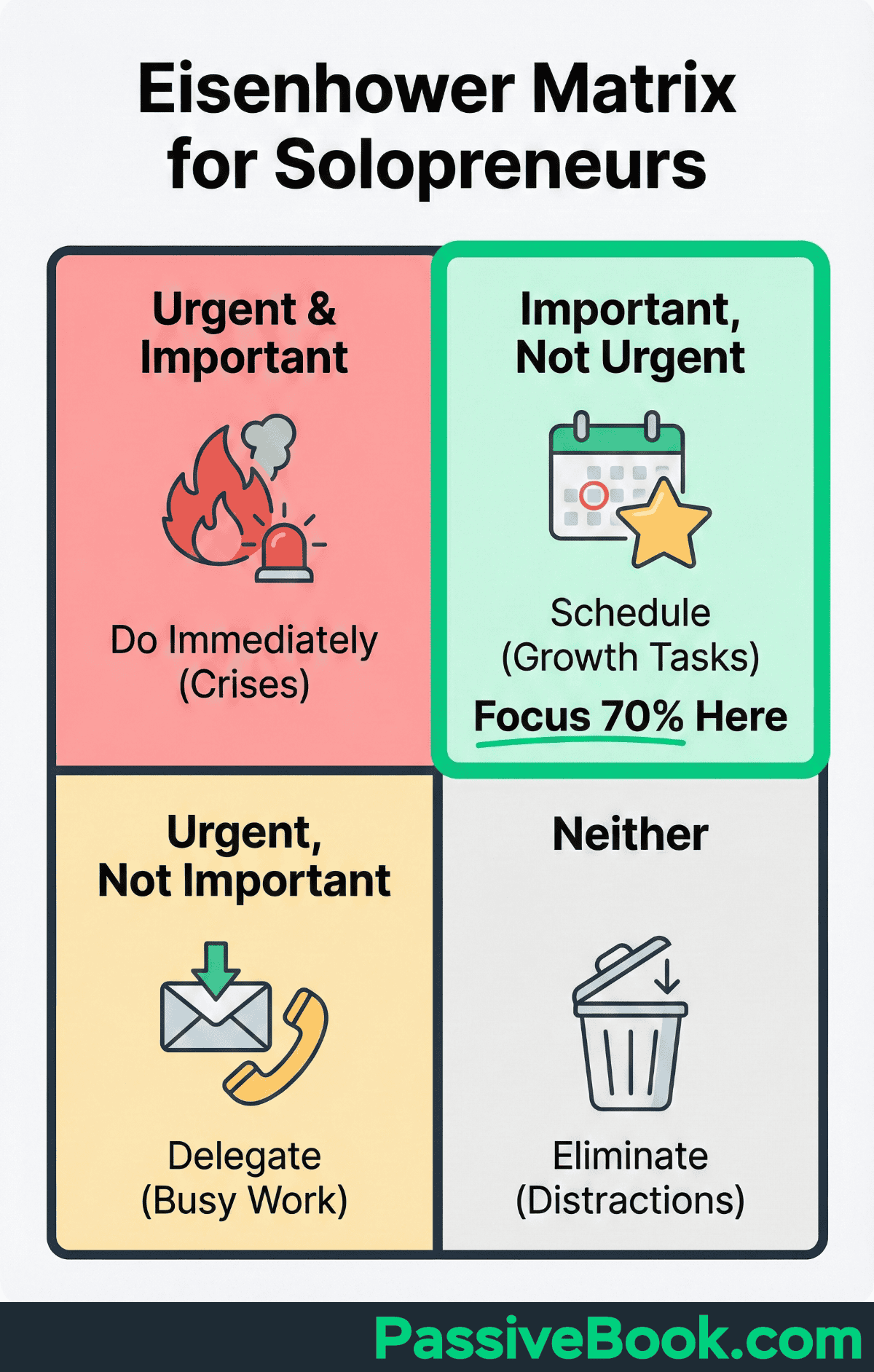
The matrix exists to break you out of firefighting mode. Most solopreneurs spend their days responding to whatever screams loudest: social media notifications, customer messages, last minute requests from clients.
The Eisenhower Matrix isn’t another to-do list. It’s a decision filter that asks, “Does this task deserve my extremely limited time?”
By categorizing every task into one of four quadrants based on urgency and importance, you create a prioritization system that protects your most valuable asset: focused hours for strategic work. This matters because you can’t do everything, and choosing wrong means months of effort with nothing to show for it.
Why Time-starved Solopreneurs Are Drowning in Urgent-but-wrong Tasks
The data reveals a brutal reality for side hustlers. 45% of working Americans now run side hustles, averaging 11-16 hours weekly on their business. That’s barely enough time to make meaningful progress, yet most of those hours disappear into reactive work.
Over 60% of freelancers maintain multiple income streams rather than relying on a single client or revenue source. This diversification strategy creates competing priorities across different projects, each demanding immediate attention.
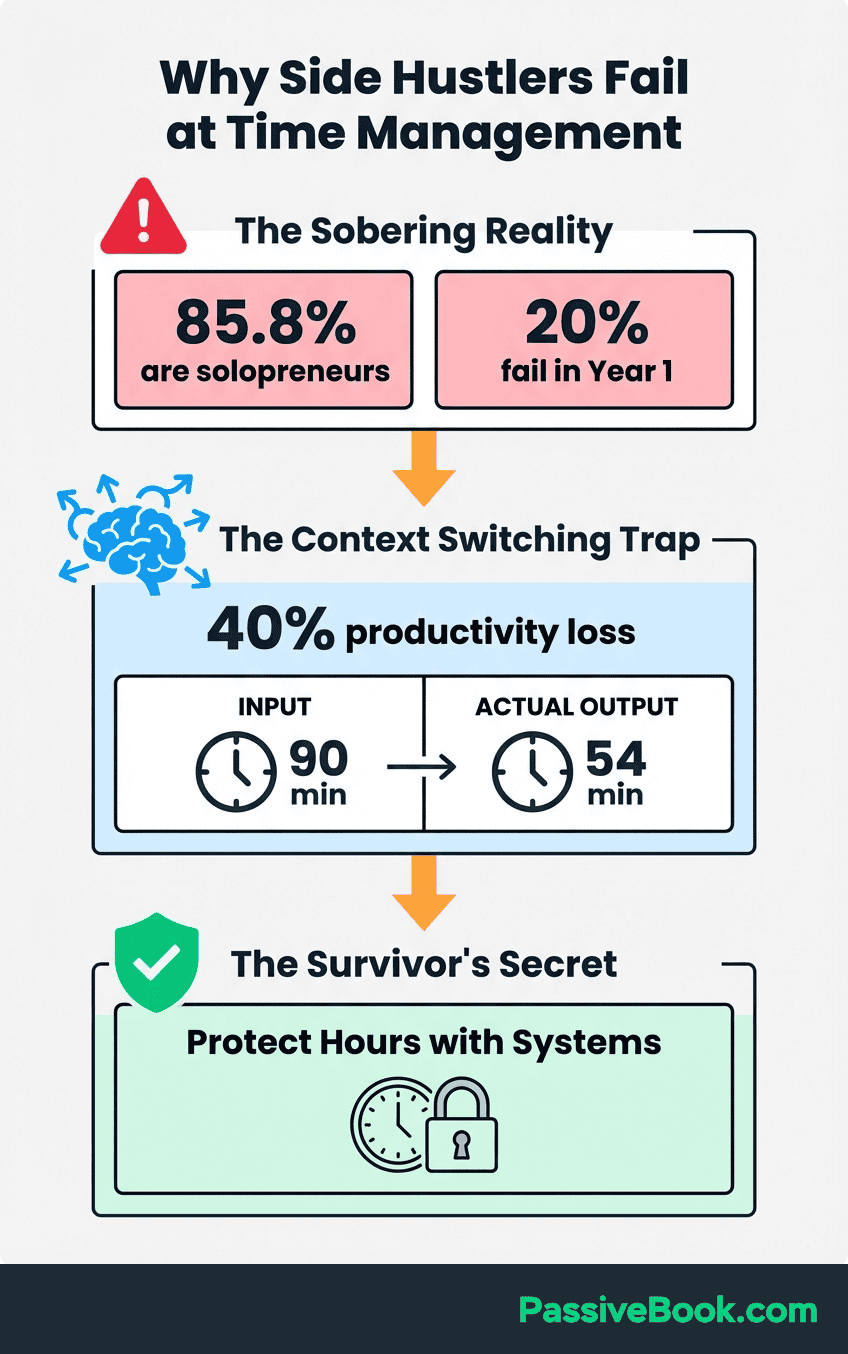
The consequences show up in burnout rates. Small business owners are twice as likely to experience burnout compared to traditional employees due to constant decision-making demands. When you have only 5-15 hours weekly, every wrong choice amplifies the cost.
Most productivity advice and project management frameworks assume full-time availability. Time management strategies designed for 40-hour work weeks don’t work for side hustles.
You can’t “batch tasks on Tuesdays” when Tuesday is your only evening free this week. You can’t “delegate to your team” when you are the team.
The real problem isn’t lack of hustle. It’s spending precious hours on urgent tasks that don’t move your business forward. Responding to every social media comment feels productive, but it doesn’t generate revenue. Tweaking your website design feels important, but it doesn’t build your email list. The Eisenhower Matrix helps you see this distinction clearly.
The Four Quadrants: Where Your Online Business Tasks Actually Belong
Understanding the four quadrants transforms how you approach your entire task list. Each quadrant represents a different relationship between urgency and importance, and each demands a specific action strategy.
The easiest way to remember the system is through the 4 D’s framework. Each quadrant maps to a decision action: Do for Quadrant 1 urgent-important tasks immediately, Decide/Schedule for Quadrant 2 important work that needs focused blocks, Delegate for Quadrant 3 urgent busywork to tools or virtual assistants, and Delete for Quadrant 4 time wasters entirely.
This memory device clarifies your next move. When a task lands on your plate, you immediately know whether to handle it now, schedule it for later, automate it, or ignore it completely. The framework removes the mental burden of constant re-evaluation.
Fair warning: you’ll probably hate the Delegate and Delete quadrants at first. I did. Admitting that half your to-do list shouldn’t exist feels like admitting failure. It’s not – it’s strategy.
Let’s break down exactly what belongs in each quadrant for online entrepreneurs working 5-15 hours weekly.
Quadrant 1: Urgent and Important (Crisis Mode)
Quadrant 1 contains genuine emergencies that threaten immediate revenue or customer relationships. These tasks demand your attention right now because delaying them causes measurable harm within hours or days.
Customer emergencies preventing immediate revenue belong here. Checkout errors during a product launch, payment failures blocking transactions, site crashes when visitors are actively browsing, email hosting issues preventing newsletter delivery – these all qualify as urgent and important.
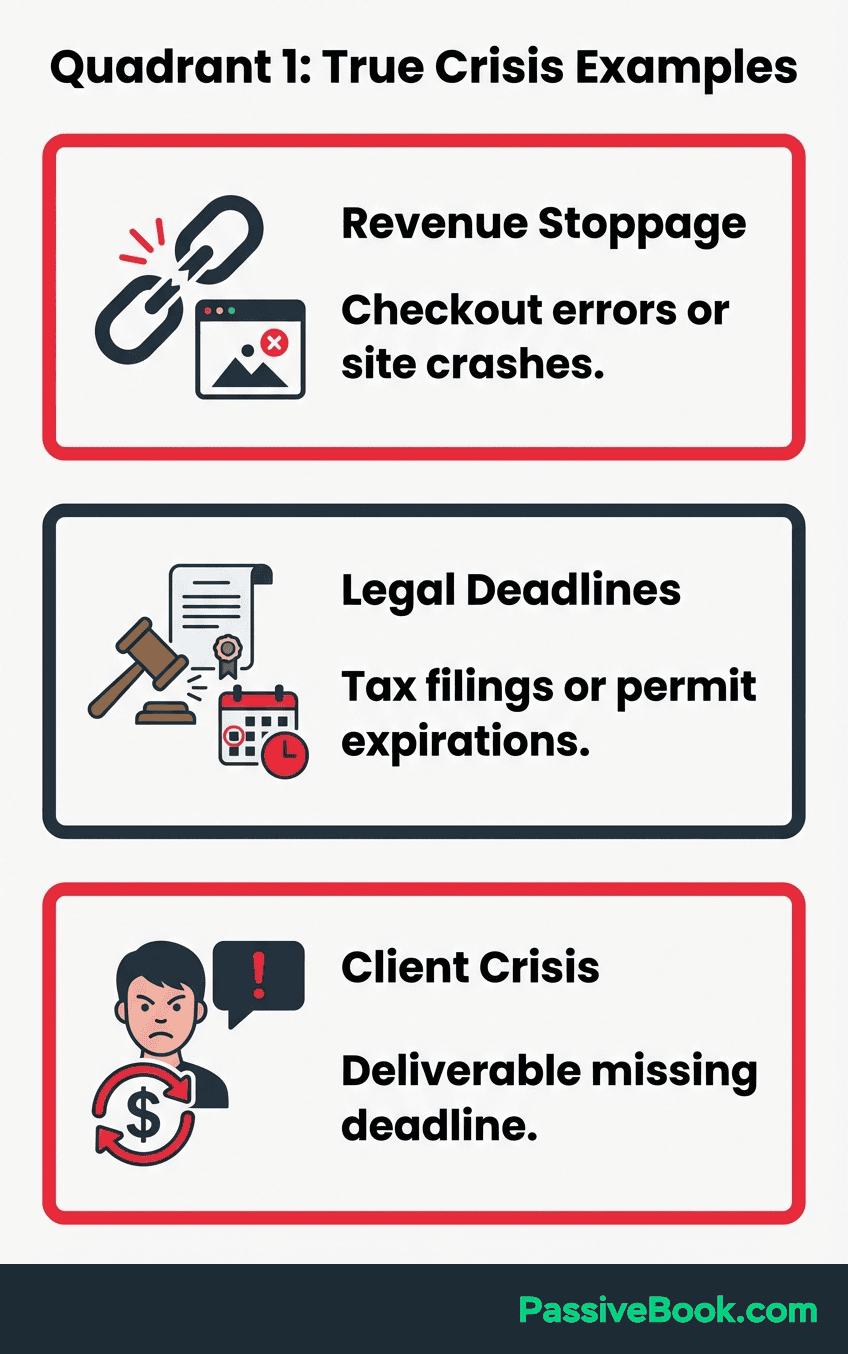
If you don’t fix them right away, you lose money. Client deliverables with hard deadlines you’ve publicly committed to also live in this quadrant. When you’ve promised a course module by Friday and students are waiting, that’s a legitimate Quadrant 1 task requiring immediate technical resolution.
For small business owners running operations solo, Quadrant 1 also includes regulatory deadlines with legal consequences – tax filings, permit renewals, or license expirations. These aren’t negotiable.
The key distinction is “preventing revenue loss or breaking customer trust.” A customer asking when their order ships is Quadrant 1 if they’re threatening a chargeback. A prospective customer asking about your pricing is Quadrant 3 – it feels urgent but can wait 24 hours.
Most solopreneurs overestimate how many tasks truly belong in Quadrant 1. If you’re spending more than 30-40% of your weekly hours here, you’re either in genuine crisis mode or misclassifying Quadrant 3 tasks as emergencies.
Quadrant 2: Not Urgent but Important (The Growth Zone)
Quadrant 2 is where profitable businesses are built. These tasks aren’t screaming for attention, but they’re the only activities that actually grow your revenue over time.
This is why productivity experts like Stephen Covey – who popularized Eisenhower’s framework in The 7 Habits of Highly Effective People – emphasized that urgent important tasks should consume minimal time if you’re building proper systems.
Justin Welsh built a $7M content business by focusing here. His strategic content creation and audience building didn’t have daily deadlines, but consistent execution over months created massive leverage.
He protected specific hours for writing, course creation, and long term relationship building.
Michelle Schroeder-Gardner built Making Sense of Cents to $50K monthly revenue while working a full-time financial analyst job. She protected early mornings and weekends exclusively for Quadrant 2 work: blog posts, email list nurturing, and strategic partnerships. None of this work was urgent, but all of it was important.
For solopreneurs, Quadrant 2 includes product development that creates future income streams.
Building an online course, writing a digital guide, developing a new service offering – these projects don’t have deadlines, but they determine whether you’re still earning next year.
Email list nurturing falls here too. Building relationships with subscribers through strategic planning rather than reactive social media responses is classic Quadrant 2 work. Sending weekly value to your subscribers doesn’t feel urgent when your inbox is full, but it’s the difference between having buyers ready when you launch versus shouting into the void.
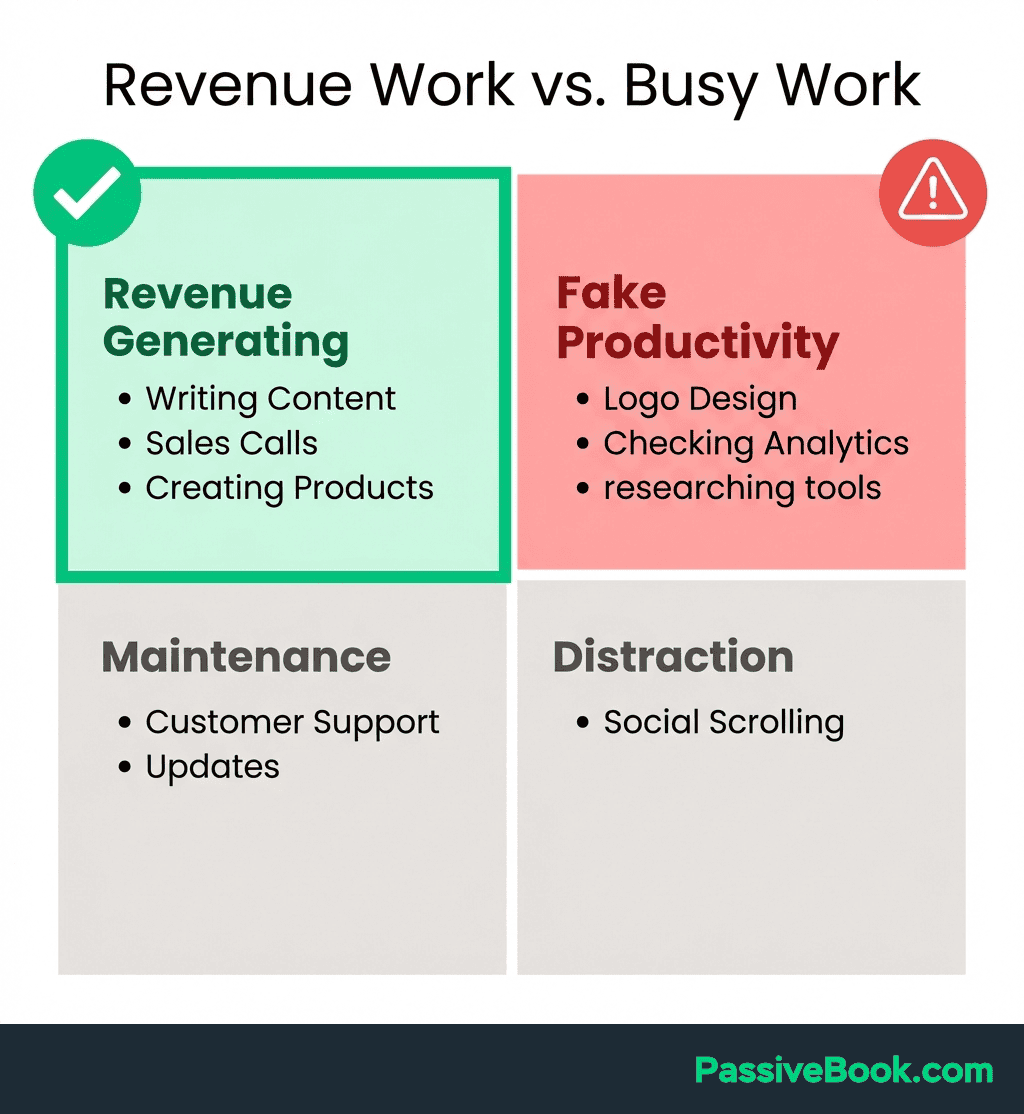
Building automation systems that prevent future Quadrant 1 crises is classic Quadrant 2 work. Setting up email sequences, creating FAQ pages, documenting standard operating procedures – none of this is urgent today, but it saves hours next month.
The brutal truth is that Quadrant 2 work determines your business success, yet it’s the easiest to postpone. Without external deadlines, these tasks slide week after week until you realize six months passed without meaningful progress.
This 8-minute breakdown shows exactly how to identify your Quadrant 2 tasks when everything feels urgent:
Quadrant 3: Urgent but Not Important (The Delegation Zone)
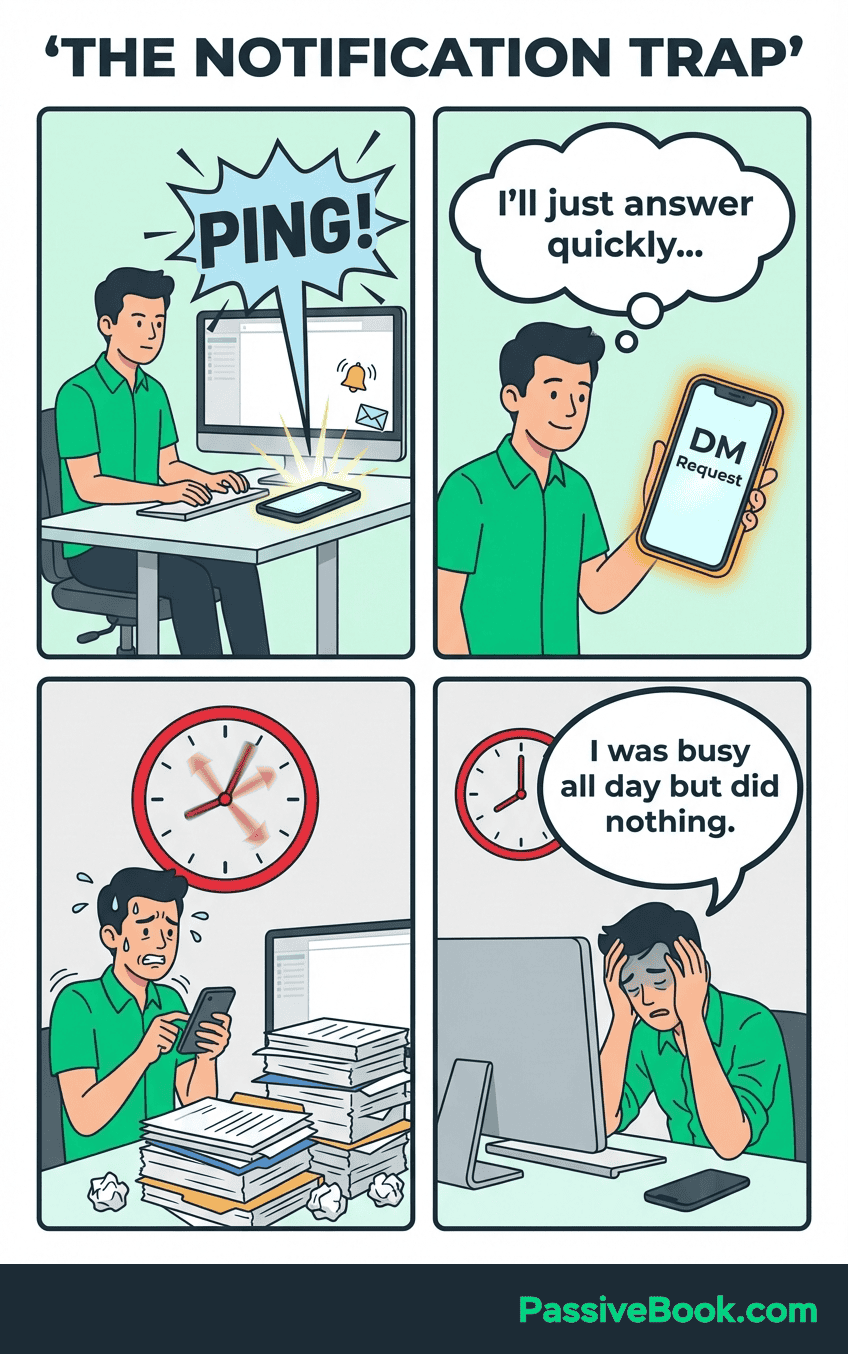
Quadrant 3 is the most dangerous quadrant because these tasks feel important. They’re screaming for attention through notifications, messages, and other people’s expectations. But they don’t actually move your business forward.
Social media notifications and non-essential email demanding immediate responses live here. Someone commenting on your Instagram post feels urgent, but responding within 10 minutes versus 24 hours makes zero difference to your revenue. A newsletter subscriber asking a question already answered in your FAQ feels pressing, but it’s not important to your strategic goals.
Routine graphic design adjustments, basic video editing, and thumbnail creation all belong in Quadrant 3. These tasks need to get done, but you don’t need to do them personally – that’s when you delegate tasks to affordable tools or freelancers.
E-commerce solopreneurs using Gorgias report automating significant portions of repetitive customer support – handling “Where’s my order?” and “Do you ship to Canada?” inquiries through AI chatbots and help center knowledge bases. This reclaims 10-15 hours weekly previously spent on repetitive questions.
Administrative tasks like invoice formatting or calendar scheduling scream urgency but deliver zero strategic value.
Every hour you spend formatting invoices is an hour not spent creating products people want to buy.
The trap is that Quadrant 3 tasks feel productive. You’re responding to real people, completing visible work, checking items off lists. But at the end of the month, you’ve made no progress toward replacing your day job income.
Quadrant 4: Neither Urgent nor Important (The Delete Zone)
Quadrant 4 contains activities masquerading as work. They’re not urgent, they’re not important, yet they consume hours if you don’t actively eliminate them.
Endless course consumption without an implementation plan falls here. Buying another course on email marketing when you haven’t finished the first two is Quadrant 4 behavior. Learning feels productive, but learning without doing is just expensive procrastination.
Perfectionist website tweaking beyond functional necessity lives in this quadrant. Iterating between fonts, adjusting color schemes, refining your logo for the fifth time – none of this matters if you don’t have traffic or products to sell. Your website needs to work, not win design awards.
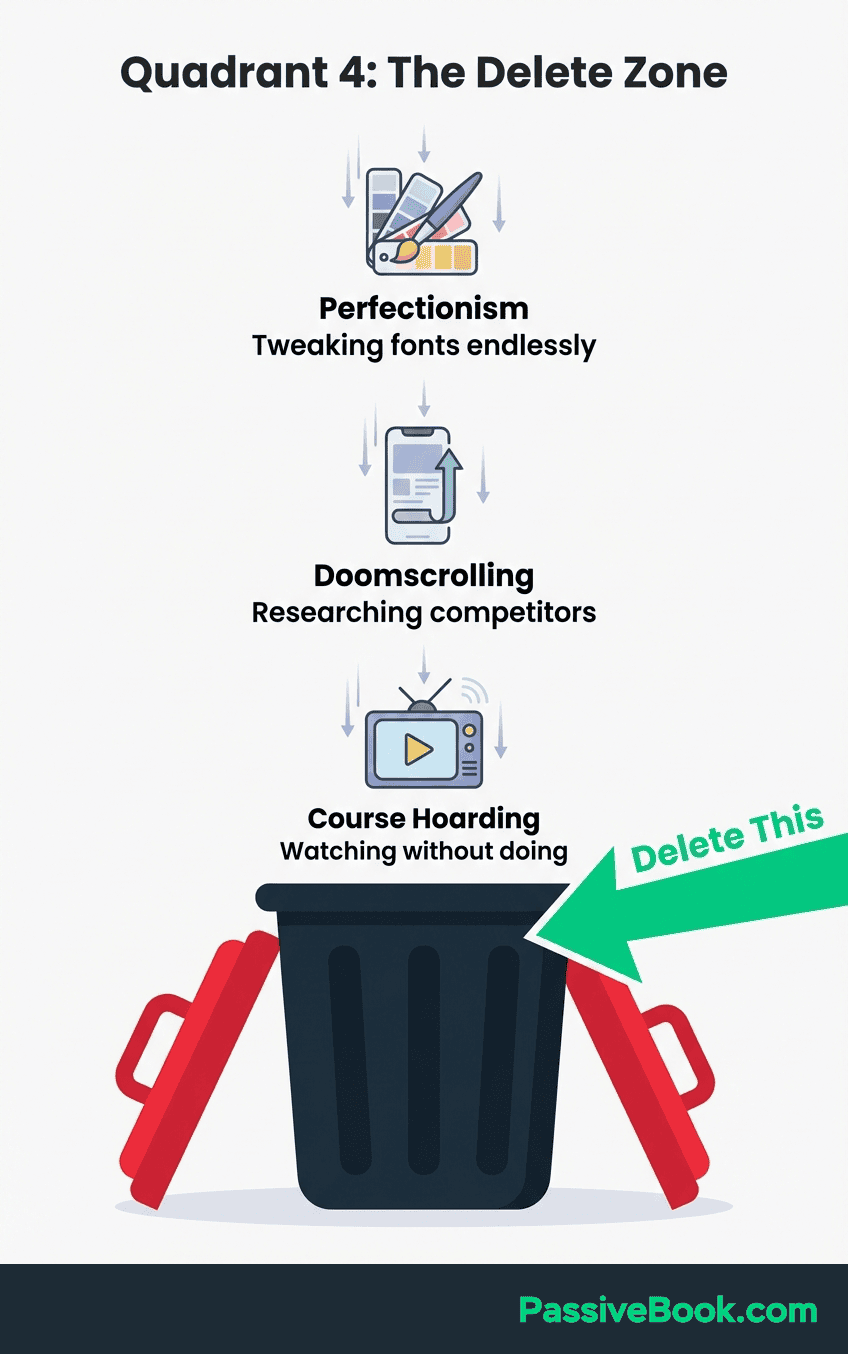
Scrolling competitor content or business forums without strategic engagement is classic Quadrant 4. Reading other people’s success stories doesn’t build your business. Analyzing what they’re doing without implementing anything yourself is just research theater.
Solopreneurs in the Bloom Hustle Grow community who eliminated perfectionist website tweaking and time wasters like unstructured course consumption redirected 3-5 hours weekly toward revenue-generating Quadrant 2 activities. They reported faster progress by simply deleting tasks that felt productive but delivered no results.
The Delete Zone is your friend when time is scarce. Every Quadrant 4 task you eliminate creates space for Quadrant 2 work that actually grows your income.
What to Do When You’re Genuinely Drowning in Quadrant 1
I’ve lived through this phase twice. When I launched my first digital product, I spent three weeks in pure crisis mode fixing technical issues, handling payment problems, and responding to confused customers. Nearly 80% of my time went to Quadrant 1 firefighting. It felt unsustainable, but here’s what I learned: sometimes that’s exactly the right response.
If you’re in genuine crisis mode, you’ll appropriately spend 60-80% of your time in Quadrant 1 temporarily. A product launch with technical failures, a service outage affecting paying customers, a viral post driving unexpected traffic to a broken site – these situations demand immediate attention. Trying to maintain “perfect balance” during a real emergency is delusional.
The triage rule helps you separate real emergencies from manufactured urgency. Handle only Quadrant 1 tasks causing revenue loss greater than $100 or creating legal or customer harm within 48 hours.
Most tasks labeled “urgent” can actually wait 24 hours without consequences. A customer question about sizing options feels pressing but won’t cost you the sale if you respond tomorrow morning.
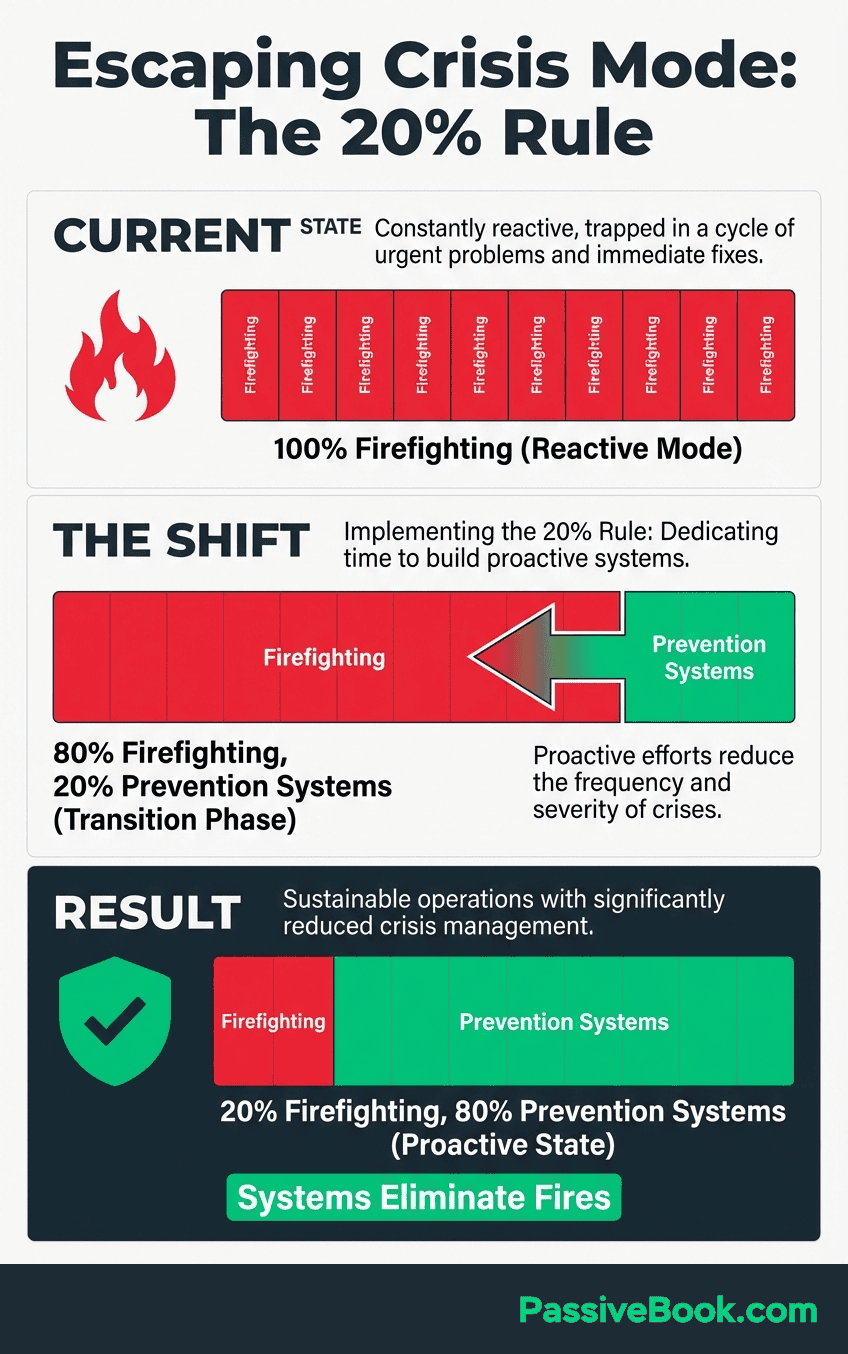
In my experience and from tracking my own metrics, committing just 20% of weekly hours – 1 to 3 hours – to building Quadrant 2 prevention systems reduced my monthly firefighting time by roughly half within 8 weeks. Your mileage will vary, but the pattern holds: prevention work compounds.
The emergency exit strategy is simple. Block one 90-minute session weekly for Quadrant 2 system-building even during crises. If you’re working 10 hours weekly and spending 8 hours firefighting, protect the remaining 2 hours for prevention work. It feels counterintuitive to “waste time” on systems when emergencies are piling up, but it’s the only way to escape the pattern.
I applied this during my second product launch. Instead of spending 100% of my time on customer issues, I protected Sunday mornings to build an onboarding email sequence and a help center with common questions. Within three weeks, my Quadrant 1 customer support time dropped from 12 hours weekly to 4 hours. The prevention systems paid for themselves almost immediately.
How to Categorize Your Tasks Using the Matrix (Step-by-Step)
The categorization process removes guesswork from prioritization. Instead of staring at your to-do list feeling overwhelmed, you methodically sort every task into its proper quadrant using objective criteria.
Start by dumping all current tasks into a master list without filtering. Don’t organize or prioritize yet – just capture everything demanding your attention.
Include customer requests, project ideas, administrative tasks, learning goals, and maintenance work. The goal is to get every obligation out of your head and onto paper.
Next, apply the revenue test to each task. Ask: “Does this directly generate income or prevent revenue loss?” A task that creates a new product generates income. A task that fixes a broken checkout process prevents revenue loss. Both pass the revenue test and qualify as potentially important.
Tasks that fail the revenue test might still be urgent, but they can’t be important for a solopreneur with 5-15 hours weekly. Responding to every social media comment doesn’t generate income. Tweaking your logo doesn’t prevent revenue loss. These tasks drop to Quadrant 3 or 4 regardless of how urgent they feel.
Evaluate urgency by real deadline consequences and time sensitive obligations, not notification pressure or others’ expectations. A deadline is only urgent if missing it causes measurable harm within 24-48 hours.
A last minute client request isn’t automatically urgent just because it arrived today. “My client expects a response today” is different from “My client needs this deliverable today to avoid canceling their contract.”
Look at a practical example categorization: Using eisenhower matrix principles: Email marketing to your list goes in Quadrant 2. Writing a blog post that drives traffic for years is important work without daily deadlines. It directly generates income when you send valuable content and occasional offers, but there’s no daily deadline. You can send your newsletter Tuesday or Wednesday without consequences.
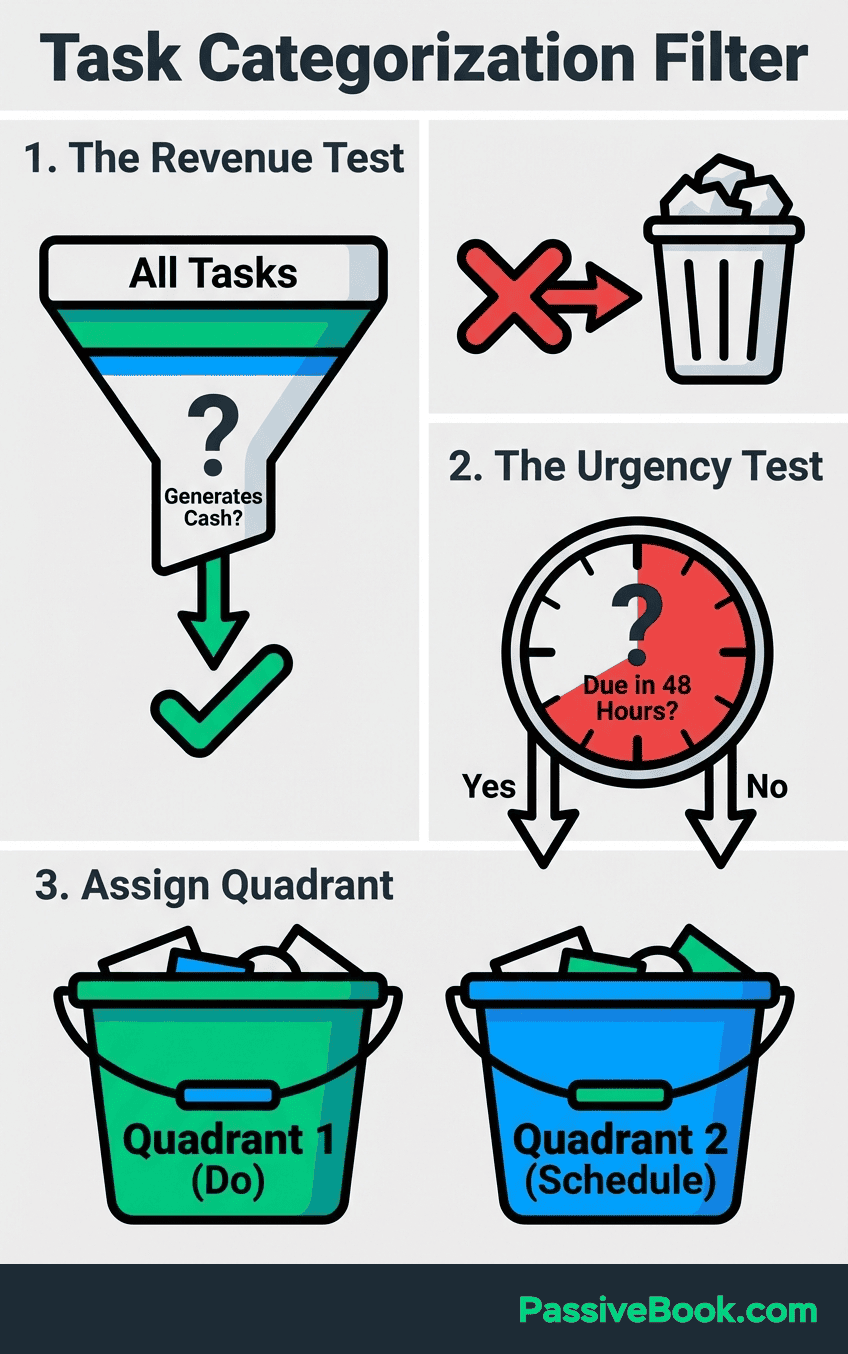
Responding to every social media comment goes in Quadrant 3. It feels urgent because notifications ping constantly and people expect quick responses. But it doesn’t generate income, and waiting 24 hours to respond causes zero harm. This is perfect work to batch into a 30-minute sprint or delegate to a virtual assistant.
Re-categorize weekly as business priorities evolve and launch cycles change. A task that’s Quadrant 2 during normal operations might become Quadrant 1 during a product launch. An email sequence that’s Quadrant 1 before launch becomes Quadrant 2 maintenance after launch. The matrix isn’t static – it reflects your current business reality.
The categorization becomes natural after a few weeks. You’ll recognize Quadrant 3 tasks disguised as emergencies and protect your Quadrant 2 time more aggressively.
The Biggest Mistakes Solopreneurs Make With the Eisenhower Matrix
The most common error is misclassifying Quadrant 3 tasks as important because they feel urgent or others demand responses. When your phone buzzes with a notification, your brain interprets it as requiring immediate action. But urgency created by someone else’s timeline doesn’t make a task important to your business goals.
A solopreneur managing social media initially treated every comment and direct message as Quadrant 1 urgent-important, spending 14 hours weekly on engagement. After recognizing this as Quadrant 3 work, they batched content creation sessions and automated posting. Their time investment dropped to 5 hours weekly while engagement actually improved through consistency.
Another mistake is letting Quadrant 2 tasks become Quadrant 1 through procrastination. You know creating an email sequence is important, but it has no external deadline. Weeks pass. Suddenly you’re launching a product without an onboarding system, and now you’re manually emailing every customer. Your Quadrant 2 strategic work just became a Quadrant 1 emergency through neglect.
Over-functioning in Quadrant 3 happens because it feels easier than strategic Quadrant 2 work. Responding to emails, adjusting graphics, and handling administrative tasks provide immediate completion. You can check them off your list and feel productive. Quadrant 2 work like course creation or content strategy requires deep focus without immediate rewards. It’s tempting to avoid the hard work by staying busy with urgent trivia.
I once spent six weeks building a course feature no one asked for while ignoring basic email list growth. Those six weeks could have added 500 subscribers. Instead I added a feature three people used. The opportunity cost was roughly $3,000 in lost sales over the next six months. That’s the real price of wrong prioritization.
The final pattern to watch is perpetual Quadrant 1 crisis mode. If you’re spending 60-80% of your time firefighting beyond the first month, you don’t have an emergency problem – you have a systems problem.
Perpetual crisis mode means you’re not investing in prevention. You’re neglecting Quadrant 2 systems that would eliminate future fires.
The solution is committing 20% of available hours to prevention work even during emergencies. If you have 10 hours weekly and spend 8 hours in crisis mode, protect the remaining 2 hours for building automation, documentation, or processes that prevent future fires. It feels like you can’t afford the time, but you can’t afford not to invest it.
How AI and Automation Transform Your Matrix in 2026
Here’s what changed in the past 18 months: AI tools moved entire categories of work from “tasks I must do” to “tasks that run while I sleep.”
AI tools now automate 10-40% of daily solopreneur work for $75-150 monthly, reclaiming 20+ hours weekly. This isn’t future speculation – it’s current reality for entrepreneurs using automation strategically.
Zapier handles the technical connections between your business tools. When someone joins your email list, Zapier adds them to your CRM, sends a welcome email sequence, and tags them based on their interests. You set it up once, and it runs forever. This eliminates hours of manual data entry that used to live in Quadrant 3.
AI particularly excels at handling Quadrant 3 tasks that need to get done but don’t need your personal touch. Customer support drafts, social media scheduling, basic content editing – these all become automated workflows instead of daily obligations.
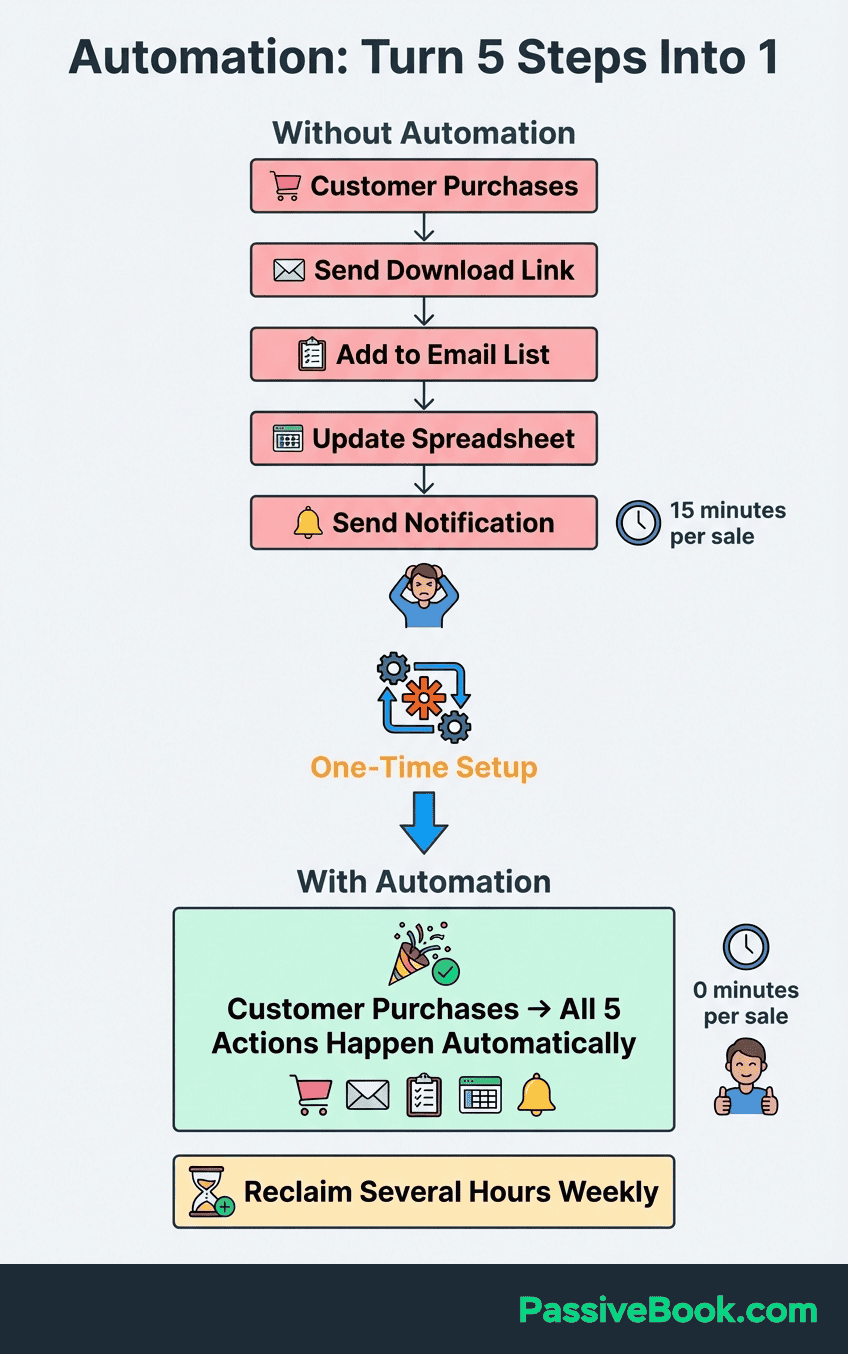
Tools like ChatGPT and Claude draft email responses and meeting notes in seconds. You can paste a customer question and prompt: “Write a friendly, professional response explaining our refund policy.” The AI generates a draft you review and send. What took 10 minutes now takes 2 minutes.
The economics are striking. When I researched VAs in late 2026, part-time support ranged from $600-1,000 monthly depending on skill level and hours. AI delivers similar output at around $100-150 monthly across multiple tools. For solopreneurs bootstrapping on tight budgets, this difference determines whether delegation is possible.
The strategic insight is recognizing that AI doesn’t replace you in Quadrant 1 or Quadrant 2. You still need to handle genuine emergencies requiring human judgment. You still need to create strategic content and build products. But AI can eliminate 60-80% of your Quadrant 3 work, freeing those hours for high-impact activities.
I use ChatGPT to draft social media posts, Claude to outline blog content, and Zapier to connect my email platform to my course delivery system. These tools reclaimed roughly 6 hours weekly that I now spend on Quadrant 2 product development instead of Quadrant 3 administration.
Practical Time-blocking for 5-15 Hours Weekly
Time-blocking transforms the Eisenhower Matrix from theory into daily practice. The matrix tells you what to work on, but time-blocking tells you when and for how long.
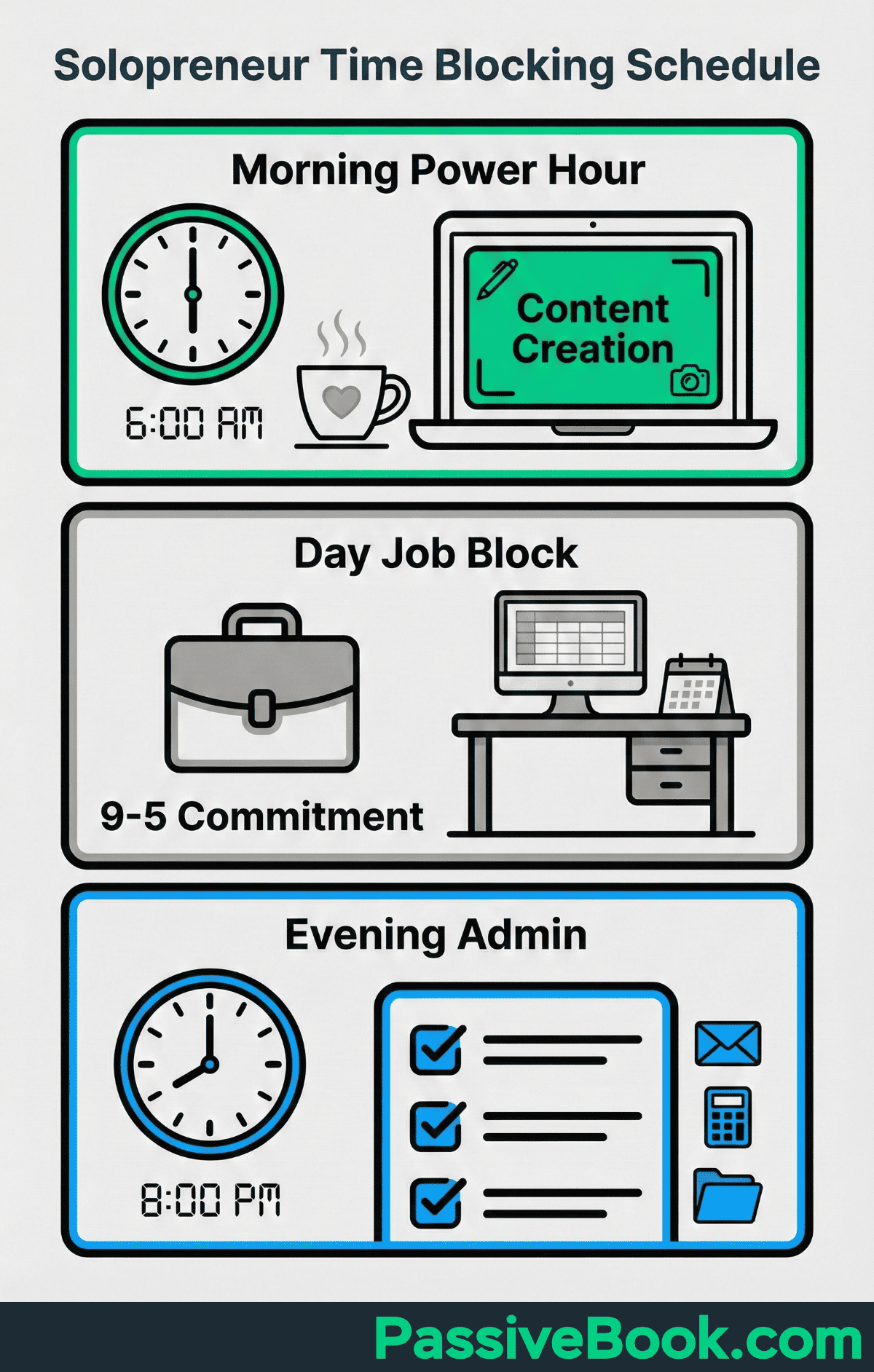
The foundation is protecting one 2-3 hour deep work block weekly for high-impact Quadrant 2 product development. This is protected time for your most important work: creating courses, writing content, building systems. No email, no social media, no interruptions. Just focused execution on tasks that build long term revenue.
Batch similar Quadrant 2 tasks into 90-minute blocks matching your peak energy times. If you’re sharpest in early mornings, schedule content creation from 6-7:30 AM before your day job.
If you’re an evening person, block 8-9:30 PM for strategic planning after your family is settled. Match your task intensity to your energy reality.
Solopreneurs in the Bloom Hustle Grow model use a practical weekly structure. They protect early morning slots for deep Quadrant 2 work when energy is highest. They batch Quadrant 3 admin tasks into short afternoon sessions when focus naturally dips. They reserve evening windows for Quadrant 1 client responses that need attention but not peak mental capacity.
The energy-matching principle prevents burnout. Schedule Quadrant 2 deep work during your highest-energy windows when creative thinking comes easily. Reserve low-energy periods for Quadrant 3 admin tasks that require less mental effort. Protect mid-energy times for Quadrant 1 quick responses that need attention but not deep focus.
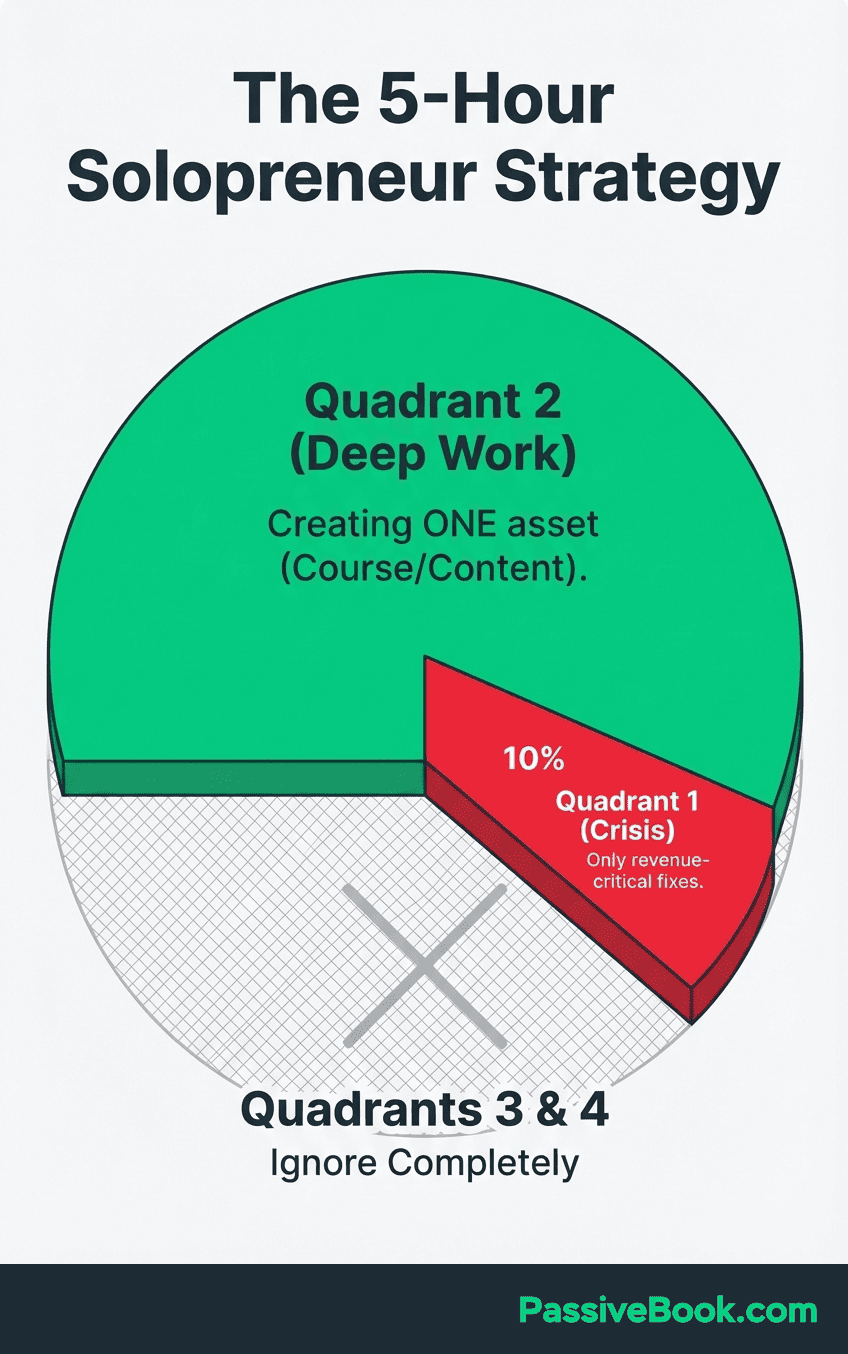
With the extreme time constraints typical of side hustles and small business ownership (5-10 hours weekly), your allocation shifts completely. Schedule quadrant 2 work for 70% of available time – this ensure you’re protecting long term business growth over immediate attention demands.
Spend 20% on Quadrant 1 responses, and 10% on Quadrant 3 automation setup. This seems backwards – shouldn’t you handle urgent tasks first? But urgent tasks will always expand to fill available time. If you don’t protect most of your hours for important work, you’ll never escape the reactive cycle.
Schedule Quadrant 3 tasks in 30-minute admin sprints rather than allowing constant interruption. Tuesday at 9 PM, handle all emails and messages in one focused session. Friday at 3 PM, update invoices and admin tasks in a single batch. This prevents Quadrant 3 work from fragmenting your entire week with notifications and context switching.
The time-blocking system creates rhythm. You know Tuesday morning is for deep work, so you protect it fiercely. You know Friday afternoon handles admin, so you don’t worry about those tasks earlier in the week. The structure removes decision fatigue and guilt.
When to Say No Without Guilt (The Permission Framework)
The hardest part isn’t categorizing tasks. It’s what comes next: telling people no.
Saying no feels impossible when you’re building a business. Every opportunity could be the breakthrough. Every request might become a valuable relationship. But trying to do everything guarantees you’ll accomplish nothing meaningful.
Recognize that protecting Quadrant 2 time ensures business viability, not just personal comfort. When you decline a Quadrant 3 task to work on your product, you’re making a strategic choice to build sustainable income. You’re not being selfish – you’re being responsible to your long term goals.
Use “not now, maybe later” language to decline without burning professional bridges. Instead of “I can’t help with that,” try “I’m focused on my core product launch this month, but I’d love to revisit this in six weeks.” This acknowledges the request while protecting your priorities.
Founders who protect their time and focus by declining low-value opportunities reported better business results and reduced burnout. They focused on core goals instead of diluting effort across scattered activities. Saying no to good opportunities created space for great ones.
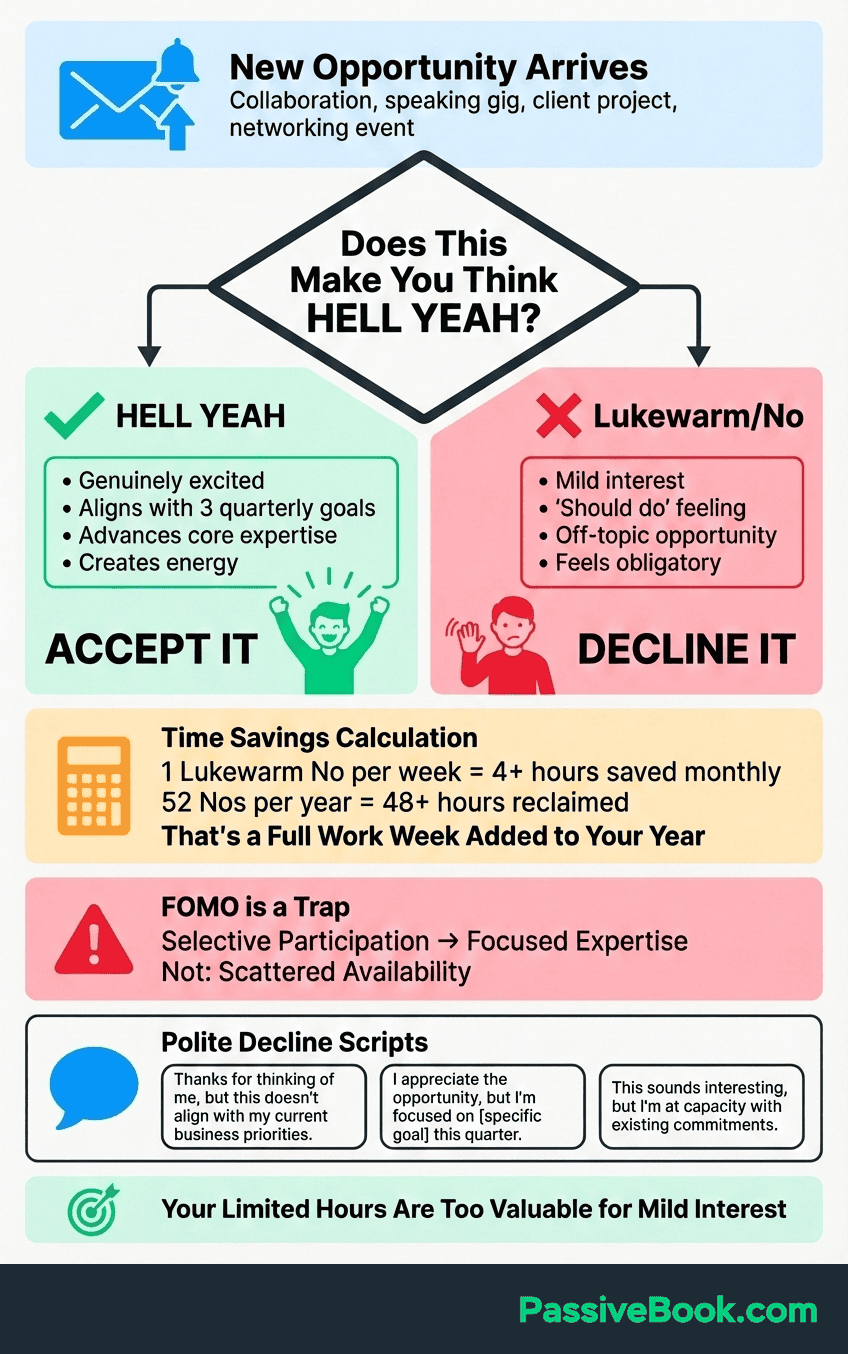
The mental shift is understanding opportunity cost. Every yes to a Quadrant 3 or 4 task is a no to revenue-generating Quadrant 2 work. When someone asks you to join their podcast and you have 10 hours weekly, you’re choosing between that interview and building your email sequence. Which one generates income next month?
I struggled with this early on. Someone asked me to co-host a weekly Twitter Space discussing online business. It sounded exciting and felt like networking. But it required 2 hours weekly – 20% of my available time. I realized those 8 hours monthly could create two complete blog posts that would drive traffic forever. I declined politely and redirected that time to Quadrant 2 content creation.
The permission framework is simple: If it’s not Quadrant 1 or 2, you have permission to say no. You don’t need elaborate excuses or lengthy explanations. A simple “I don’t have capacity for that right now” is a complete sentence.
Weekly Review System to Keep Your Priorities Aligned
The weekly review prevents strategic drift. Without regular evaluation, your carefully categorized tasks slowly creep back into reactive firefighting mode.
Dedicate 30-60 minutes each Sunday to audit last week’s time allocation across quadrants. This isn’t optional overhead – it’s the maintenance that keeps your prioritization system functional.
Use a Sunday planning template with specific review categories. First, ask which Quadrant 2 tasks you completed versus postponed. If you planned to work on your course but spent the week answering emails instead, you’ve identified a pattern.
Second, calculate how many hours you spent in Quadrant 1 firefighting. If it’s above 40% for three consecutive weeks and you’re not in launch mode, you have a systems problem requiring Quadrant 2 prevention work.
Third, identify what Quadrant 3 tasks can be automated this week. Maybe you spent 90 minutes scheduling social media posts manually.
That’s your automation target for next week – set up a scheduling tool or create templates.
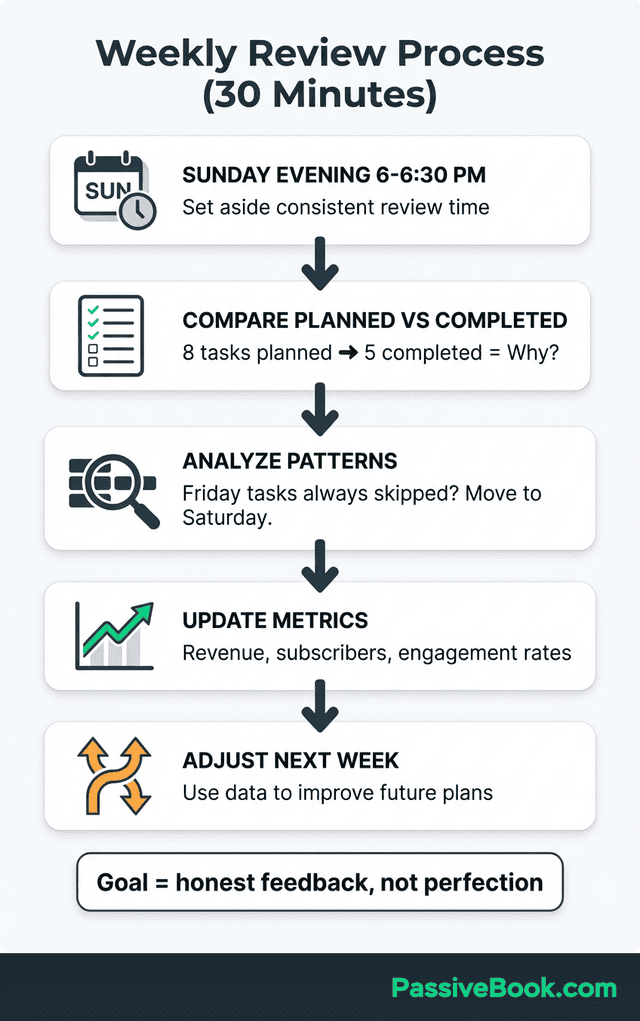
Fourth, review which Quadrant 4 activities consumed time without business impact. Did you spend an hour tweaking your website font? Two hours scrolling business forums? Name the time wasters explicitly so you can eliminate them.
Identify which Quadrant 2 tasks slipped into Quadrant 1 because you postponed them too long. If you’re now rushing to finish a blog post that could have been written calmly two weeks ago, you’ve learned to schedule Q2 work earlier.
Adjust your matrix as your business evolves through launch cycles and seasonal demand. A task that’s Quadrant 2 in January might become Quadrant 1 in March when you’re launching. Your weekly review catches these shifts before they derail your priorities.
Finally, celebrate Quadrant 2 wins to maintain motivation despite slower visible progress. You finished recording three course modules this week. You built an email automation that runs forever. You wrote two blog posts that will drive traffic for years. These victories aren’t as satisfying as checking off 50 small tasks, but they’re what builds wealth.
The weekly review closes the loop. You plan using the matrix, execute during the week, then review to improve. This cycle prevents the drift that kills most solopreneur businesses.
Frequently Asked Questions
How Do I Know If a Task Is Truly Important Versus Just Feels Urgent?
Ask yourself: “If I skip this for 48 hours, does revenue drop or customer experience break?” This question separates genuine emergencies from manufactured pressure. A broken checkout process costs you sales – that’s important. A social media comment demanding response feels urgent but causes zero financial harm if you wait.Distinguish between notification urgency and deadline urgency. Notifications ping constantly, training your brain to interpret every alert as critical. Real deadlines have measurable consequences with specific dates. Your email inbox showing 47 unread messages isn’t a deadline – it’s notification urgency designed to manipulate your attention.Important tasks align with your 3-month business goals while urgent tasks respond to others’ timelines. If your goal is launching a course, writing course content is important. Responding to every networking invitation is urgent on someone else’s schedule. The Eisenhower Matrix exists precisely to help you prioritize your goals over other people’s interruptions.
Can I Use the Eisenhower Matrix If I Have Less Than 5 Hours Weekly?
Yes, but your approach changes. With under 5 hours weekly, you operate in “strategic sprint” mode. Spend 80-90% of your time exclusively on Quadrant 2 work – the single most important task that builds income. Ignore Quadrant 3 entirely (don’t check email more than once weekly). Handle only Quadrant 1 tasks that would cost you money within 48 hours.At 3-4 hours weekly, you’re not running a business yet – you’re building the foundation of one. Your only job is creating one asset (a course, a content system, a product) that will generate income once complete. Everything else is a distraction you can’t afford.The matrix still applies, but your tolerance for anything outside Quadrant 2 drops to nearly zero. You’re not saying no to good opportunities – you’re saying yes to the one opportunity that matters most.
What If My Day Job Has Actual Emergencies That Conflict With My Business Time?
This is real, and it’s why “protecting your time blocks” advice often fails for side hustlers. When your day job demands weekend work or evening crisis responses, your business schedule explodes.The solution isn’t better time management – it’s better business model selection. If your day job is unpredictable, choose business models with delayed publishing (blog posts, YouTube videos, courses) rather than real-time obligations (client services, live coaching). Build content and products during available time, then publish them later. Your business runs on your schedule, not customer demands.I learned this the hard way running client services while working corporate. Client emergencies collided with work emergencies constantly. Switching to content creation and digital products eliminated the conflict – my content works whether I’m available or not.
What Next?
You now have a complete framework for prioritizing tasks when time is your scarcest resource. The Eisenhower Matrix doesn’t require more hours – it requires ruthlessly protecting the hours you have for work that actually builds income.
I know the guilt doesn’t disappear right away. You’ll still feel pressure to respond faster, do more, and say yes to everything. But every week you protect your Quadrant 2 time is a week you move closer to replacing your day job income. That’s worth the temporary discomfort of disappointing people who want your time.
If you found this guide valuable, hit the share buttons below and help another overwhelmed solopreneur discover this framework. Drop a comment telling me: What’s the one Quadrant 3 or 4 task you’re going to delete this week? I’d love to hear what you’re finally giving yourself permission to ignore.
Share this post with your friends & followers: