I used to believe the lie that successful entrepreneurs just needed better willpower. After burning through 14 different productivity apps in my first year building a side business, I learned the hard truth: no app will save you from unclear priorities or the exhaustion of working two full-time jobs. But the right three tools, used correctly, can turn your scattered 5-15 weekly hours into focused progress that compounds.
Three of those 14 apps were different Pomodoro timers that I convinced myself would fix my focus problems. They didn’t. The real issue was trying to write blog posts during my lowest-energy hour at 9pm after a full day of corporate work. No timer fixed bad scheduling.
This guide won’t sell you on 47 must-have apps that create more work than they solve. Instead, you’ll learn how to choose the right minimal viable stack that helps time-starved solopreneurs and small business owners like us stop bleeding hours and start building sustainable businesses around day job constraints.
- •What Time Management Apps Are (And What They Can't Fix)
- •Why Time Management Apps Fail
- •The Pre-app Requirement: Your One-week Time Audit
- Best Free Time Tracking Apps for Side Hustlers
- Task Management Apps That Won't Overwhelm You
- Calendar Blocking: Protecting Your 5-15 Weekly Hours
- Focus Timer Apps to Stop Distraction Spirals
- •AI Time Management Tools: Motion and Reclaim AI
- •How to Choose and Set Up Your First Apps (30-minute Guide)
- •When to Upgrade From Free Apps (Honest Assessment)
- •Frequently Asked Questions
- •What Next?
What Time Management Apps Are (And What They Can’t Fix)
Time management apps are digital tools designed to track your hours, organize your tasks, and defend calendar blocks from the constant interruptions that plague side hustlers. They create visibility into where your limited energy goes each week.
These apps amplify clarity. They don’t create it. If you don’t know which three tasks will move your business forward this week, no software on earth will figure that out for you.
The data backs this up. Studies show 50% of entrepreneurs experience burnout within their first five years. The primary culprit isn’t lack of apps. It’s lack of sustainable systems and clear priorities that apps are meant to support, not replace.
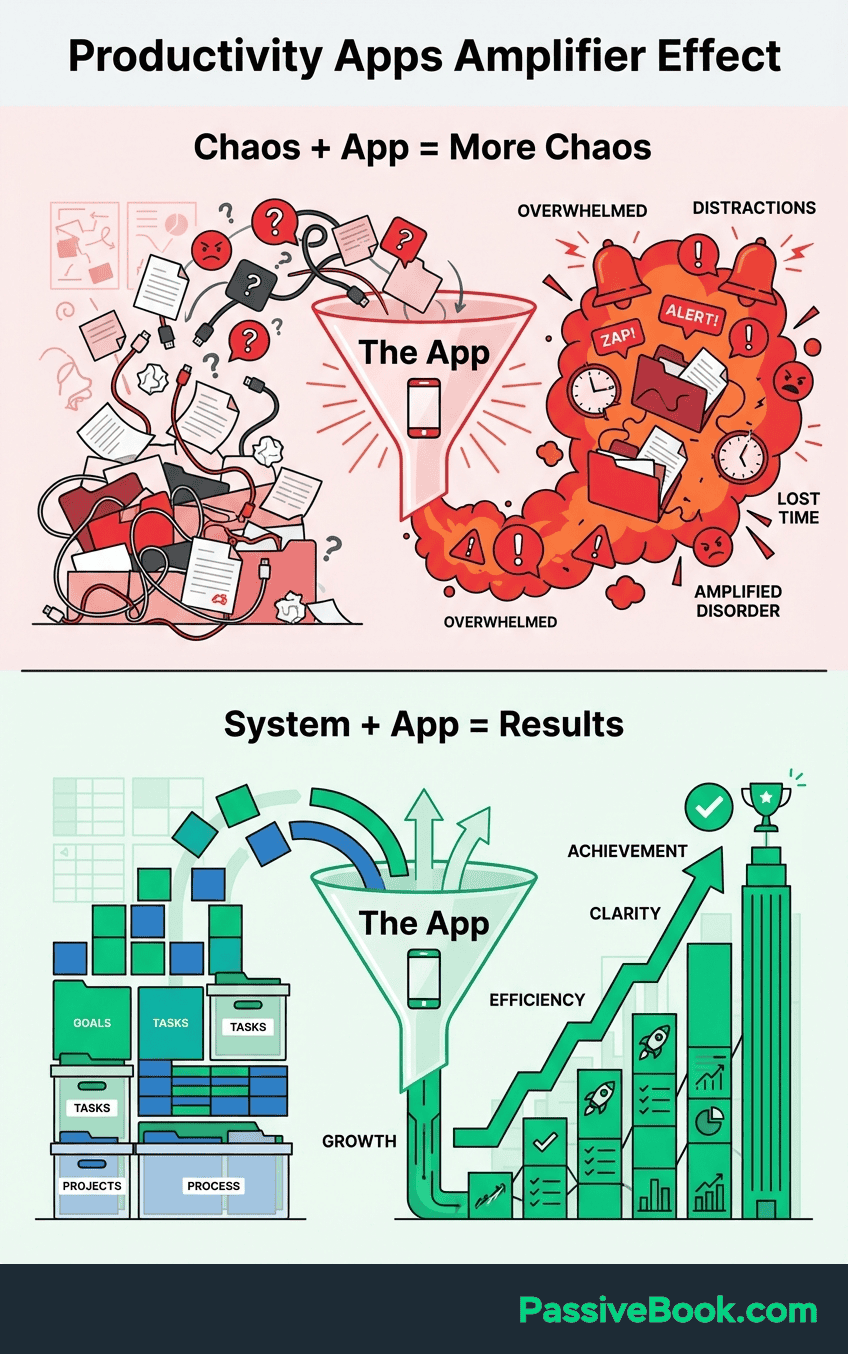
Think of time management tools like a fitness tracker. The device shows you ran three miles, but it doesn’t give you the motivation to lace up your shoes tomorrow morning. Similarly, Toggl will reveal you spent 11 hours last week on low-impact busywork, but you still have to make the hard choice to cut those tasks.
I wasted two weeks once obsessing over whether Toggl or Clockify had better reporting features. Neither mattered because I hadn’t decided what metrics I needed to see. The app clarity came after my priority clarity, not before.
Why Time Management Apps Fail
Research shows productivity tools fail when users lack clear systems and don’t align tools with workflows. This isn’t a user problem, it’s a design problem.
Here’s the fundamental mismatch: apps built for corporate employees working structured 40-hour weeks don’t serve side hustlers squeezing work into fragmented blocks. They assume you have uninterrupted mornings, predictable meeting schedules, and coworkers who respect blocked calendar time.
None of that applies when you’re squeezing side hustle work into fragmented 45-minute blocks between your day job and family obligations.
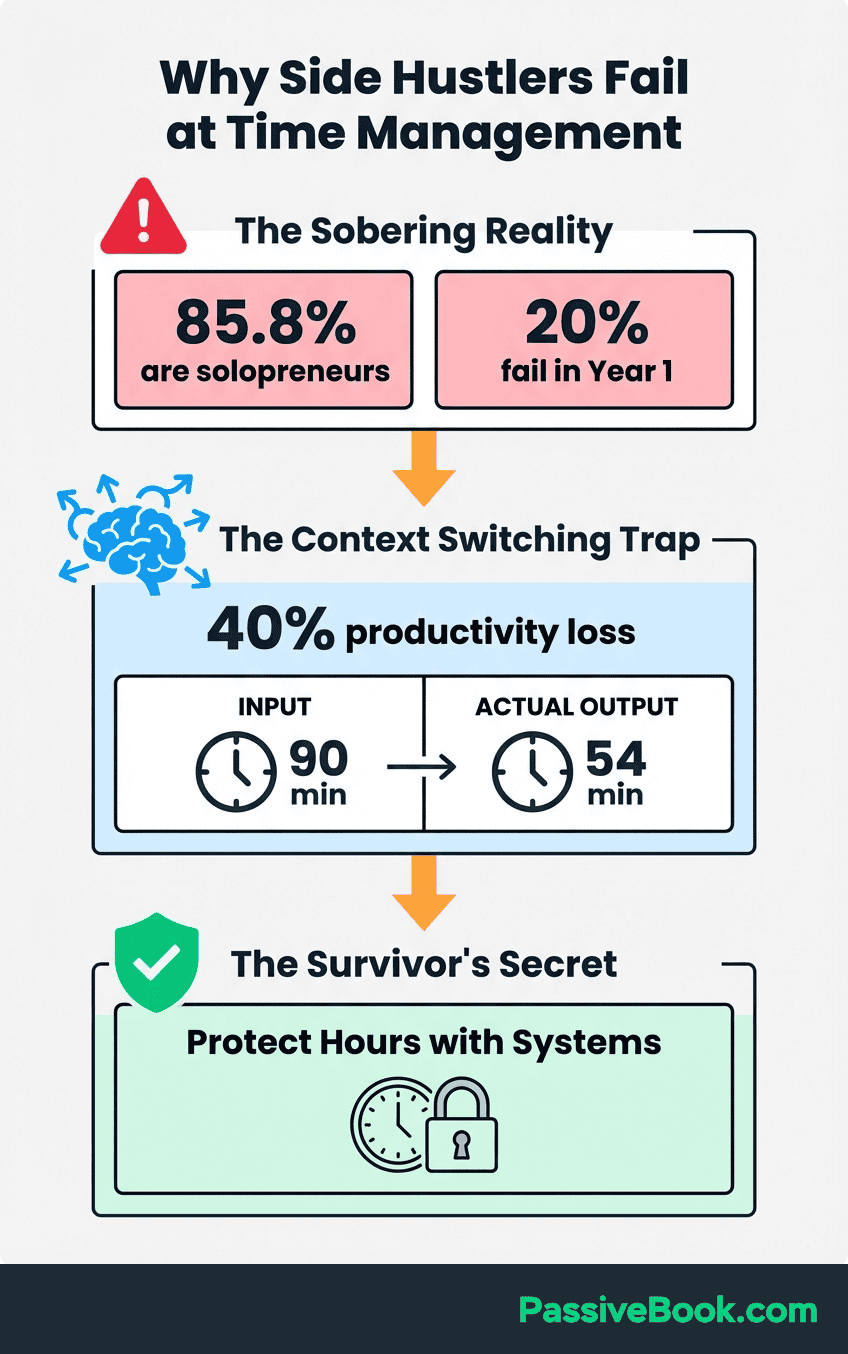
I hit peak tool bloat at seven productivity apps running simultaneously. My morning routine involved updating Todoist, checking Notion, logging yesterday’s time in Toggl, reviewing my habit tracker, and planning my day in Google Calendar. I was “productive” about productivity for 45 minutes before doing any real work.
To prevent tool bloat, stick with a maximum three-app system. One time tracker like Clockify or Toggl Track, one task manager like Todoist or Microsoft To Do, and your existing calendar tool like Google Calendar. That’s it. These three categories don’t overlap in function, which means less friction and more work getting done.
The financial reality matters here too. Financial instability affects 60% of entrepreneurs in their early stages. Paying $47 monthly across multiple premium productivity subscriptions before you’re earning consistent revenue isn’t strategic, it’s self-sabotage. Start with free tools that complement sustainable work practices, not replace them.
The Pre-app Requirement: Your One-week Time Audit
Before downloading a single app, you need raw data about where your time disappears. I learned this the expensive way after buying three premium tools that solved problems I didn’t have.
Grab a simple spreadsheet or even pen and paper. For the next seven days, track every 30-minute block of your waking hours. No judgment, just honest recording. The goal isn’t perfection, it’s pattern recognition.
Create four categories for everything you do. Revenue-generating work includes writing sales pages or filming content. Necessary admin covers answering customer emails or bookkeeping. Time-wasting distractions include refreshing social media or rearranging your Notion workspace for the third time. Your day job hours are off-limits for now.
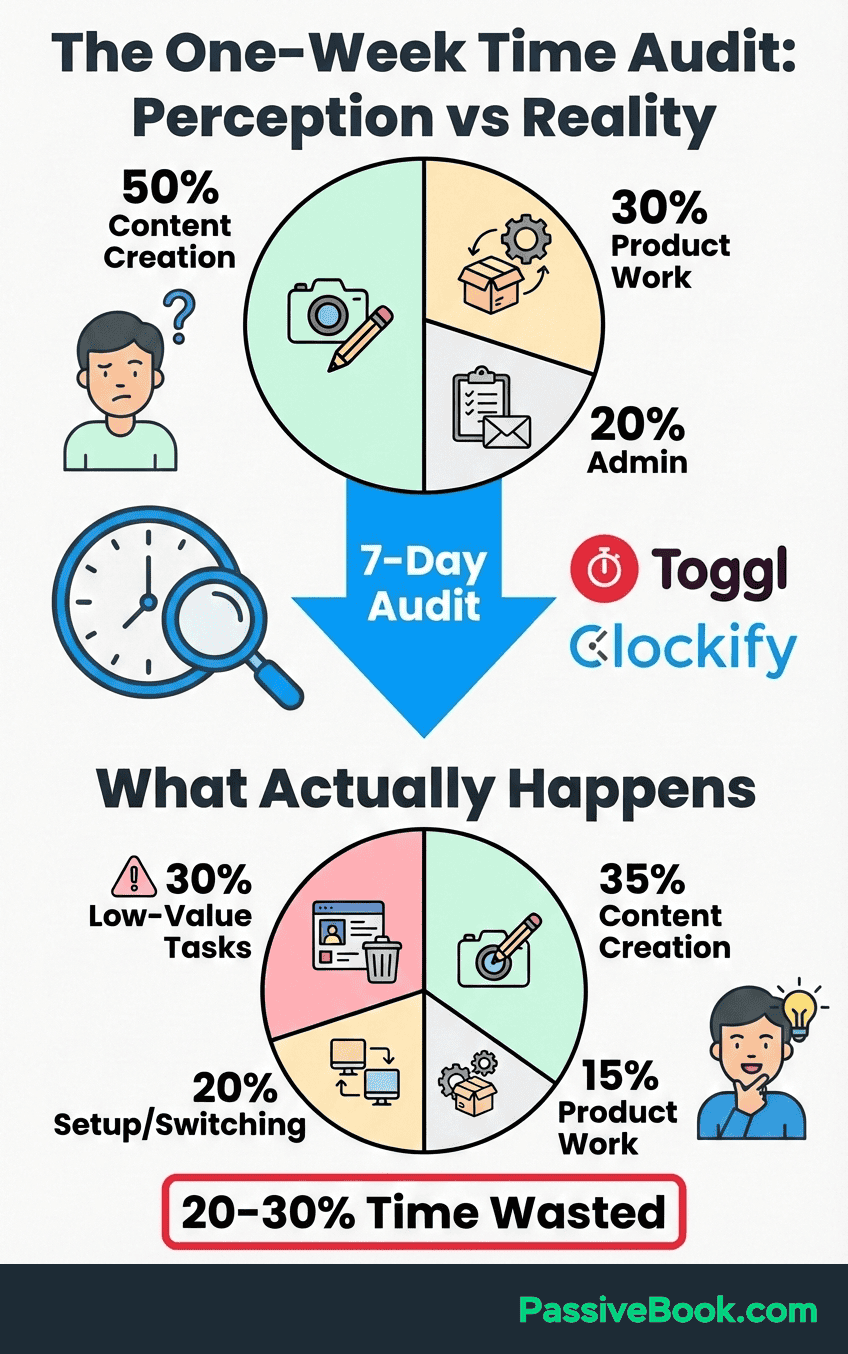
Creating four categories is a great way to see patterns in how you spend time. The 80/20 rule applies to business productivity where 80% of results come from 20% of efforts. But you can’t identify your high-impact 20% without seeing the full picture of your current 100%.
Your audit will reveal which type of tool you need first. If you’re losing track of how long tasks take, start with time tracking. If you’re drowning in scattered to-dos across seven browser tabs, begin with task management. If you keep getting derailed mid-focus session, grab a focus timer.
Most people guess wrong about their biggest leak and waste weeks learning the wrong tool.
The week-long timeframe is critical. A single day might show you pulled a heroic 4-hour side hustle session, but miss that you only manage that once weekly. Seven days reveals your realistic average capacity, which is the only number that matters for sustainable progress.
Best Free Time Tracking Apps for Side Hustlers
Time tracking apps transform your vague sense of “I’m working hard” into concrete data about where your hours land. This matters because most solopreneurs drastically overestimate time spent on revenue work and underestimate hours lost to pseudo-productive busywork.
Both tools below are solid. I use Clockify because I need to track five different business areas, but I recommend Toggl Track to most people starting out because it’s simpler and that matters more than feature count.
The two tools below represent the sweet spot for side hustlers. They’re completely free for solo use, require minimal learning curve, and integrate with tools you probably already use. Choose based on whether you prioritize unlimited projects or one-click simplicity.
Clockify – Best Unlimited Free Tracker
Clockify offers completely free, user friendly time tracking forever with unlimited users, projects, and time entries. This makes it rare among freemium tools that typically cap free plans at 5 projects or 3 team members.
PCMag rates Clockify as excellent free time tracking with robust features that match what many paid competitors offer. The interface lets you manually enter time blocks or use a running timer, depending on whether you’re logging work after the fact or tracking in real time.
The unlimited project feature matters. You can create separate projects for content creation, client work, product development, and admin tasks. Over time, this reveals which business areas consume disproportionate hours relative to their revenue contribution.
My time audit revealed an uncomfortable truth: I was spending 4 hours weekly “researching tools” and only 6 hours building my business. I use Clockify now because the unlimited project tracking showed me exactly which activities generated revenue versus which ones felt productive but earned nothing.
Best For: Solopreneurs who want room to grow without hitting artificial free tier limits, or those who occasionally collaborate with a virtual assistant or freelancer.
Setup Time: 15 minutes to create your first 3-5 projects and install the browser extension.
Key Limitation: Reporting features are basic on the free plan. You get simple summaries but not advanced analytics or billable rate calculations.
Choose Clockify if you need unlimited projects and team members without hitting free tier restrictions that force upgrades. The tool lets you track time across multiple projects without artificial caps that other free plans impose.
Toggl Track – Best for Billable Hours
Toggl Track captures the fragmented 15-30 minute work sessions that define side hustle reality. The one-click timer starts tracking instantly, which matters when you only have 45 minutes before your next meeting and can’t waste 5 minutes configuring settings.
Browser extensions track time inside the tools you already use daily. Working in WordPress? The extension adds a timer button right there. Responding to emails in Gmail? Same thing. This eliminates the friction of switching between apps that kills momentum during short work windows.
The free tier caps at 5 projects, which initially seems limiting but forces healthy constraint. If you’re juggling more than 5 distinct project categories as a solopreneur, you’re probably scattered across too many initiatives to make real progress on any of them.
Best For: Side hustlers who prioritize one-click simplicity and extensive integrations over unlimited project creation. Also ideal if you bill clients hourly and need clean time reports.
Setup Time: 10 minutes to install extensions and create your first project.
Key Limitation: The 5-project cap on free tier becomes restrictive if you run multiple business models simultaneously or want granular task categorization.
Choose Toggl Track if you value seamless integration with your existing workflow over unlimited project capacity. The one-click timer and browser extensions make it the path of least resistance for using time tracking consistently, which beats having unlimited features you never touch.
Task Management Apps That Won’t Overwhelm You
Task management tools serve one purpose: capture everything competing for your mental bandwidth so your brain can focus on execution instead of remembering. Without this system, you waste cognitive energy on “what should I work on next” instead of working.
The trap most solopreneurs fall into is choosing enterprise-level project management software when they need a simple to-do list. Notion, Asana, and ClickUp offer incredible depth, but that depth creates friction when you only have 90 minutes to work and spend 15 minutes navigating the interface.
The irony of task management apps is that choosing between them becomes its own time-wasting task. I’ve watched people spend 6 hours migrating between systems to save 10 minutes weekly. Not worth it.
Todoist – Best for Natural Language Input
Todoist interprets plain English commands and converts them into properly formatted tasks. Type “email newsletter subscribers every Friday at 9am” and the system automatically creates a recurring scheduled task with the right date, time, and repeat pattern.
This quick capture feature prevents the common failure mode where inspiration strikes during your day job commute, but by the time you get home three hours later, you’ve forgotten the brilliant content idea. Voice-to-text entry on mobile makes capture nearly frictionless.
Todoist research shows users complete 50% more tasks when using structured organization systems consistently compared to scattered notes across multiple apps. The key driver is reduced decision fatigue when the system surfaces exactly what needs attention today.
The label and filter system is where the real power lives. You build custom views once, then your daily workflow becomes opening the relevant filter and executing.
One filter shows all tasks tagged “high-impact” and “under 30 minutes” for when you have a short window. Another surfaces all content creation tasks due this week. You build the views once, then your daily workflow becomes opening the relevant filter and executing.
Best For: Solopreneurs who think faster than they type and want minimal friction between thought and captured task. Also ideal if you manage recurring weekly tasks like content publishing schedules.
Setup Time: 20 minutes to input your first 20 tasks and create 2-3 essential filters.
Key Limitation: Free tier caps at 5 active projects and doesn’t include reminders, which matters if you need notification nudges to stay on track.
Microsoft To Do – Best Simple Free Option
Microsoft To Do strips away 90% of the complexity that makes other task managers feel like learning a new job. The “My Day” feature is the entire app’s philosophy: show me only what matters today, hide everything else.
Each morning, you review your master task list and manually pull 3-5 items into “My Day.” This forced prioritization prevents the overwhelm of staring at 47 undifferentiated tasks and choosing based on easiest instead of most important. You’ve already decided what matters, now you just execute.
I switched to this after abandoning Asana because I was spending more time organizing my tasks than completing them.
The app syncs across Windows, Mac, iOS, and Android without requiring any Microsoft 365 subscription. If you’re already in the Microsoft ecosystem for your day job, the integration is seamless. Tasks from Outlook emails can flow directly into To Do with one click.
TechRadar calls Microsoft To Do ideal for users seeking simple, free task management without the complexity of project management features they’ll never use. The review emphasizes how the stripped-down interface increases usage consistency compared to feature-bloated alternatives.
Best For: Solopreneurs who want the simplest possible system and don’t need advanced features like natural language input or complex filtering. Perfect if you’re already using Microsoft tools for email.
Setup Time: 10 minutes to create your first list and pull today’s tasks into My Day.
Key Limitation: Lacks the advanced automation and filtering power of Todoist. You can’t create complex saved views or use natural language parsing.
Choose Microsoft To Do if you’ve failed with complex task managers before and need something you’ll use daily because it requires near-zero cognitive load to maintain.
Calendar Blocking: Protecting Your 5-15 Weekly Hours
Calendar blocking transforms abstract intentions like “work on my business this week” into concrete appointments that happen. Without physical blocks on your calendar, those hours evaporate into last-minute meeting requests, household emergencies, and the exhaustion of choosing what to work on in real time.
The core principle is simple: treat your side business hours with the same respect as day job meetings. You wouldn’t skip a client call because you didn’t feel like it. Apply that same non-negotiable status to your two weekly 90-minute deep work blocks.
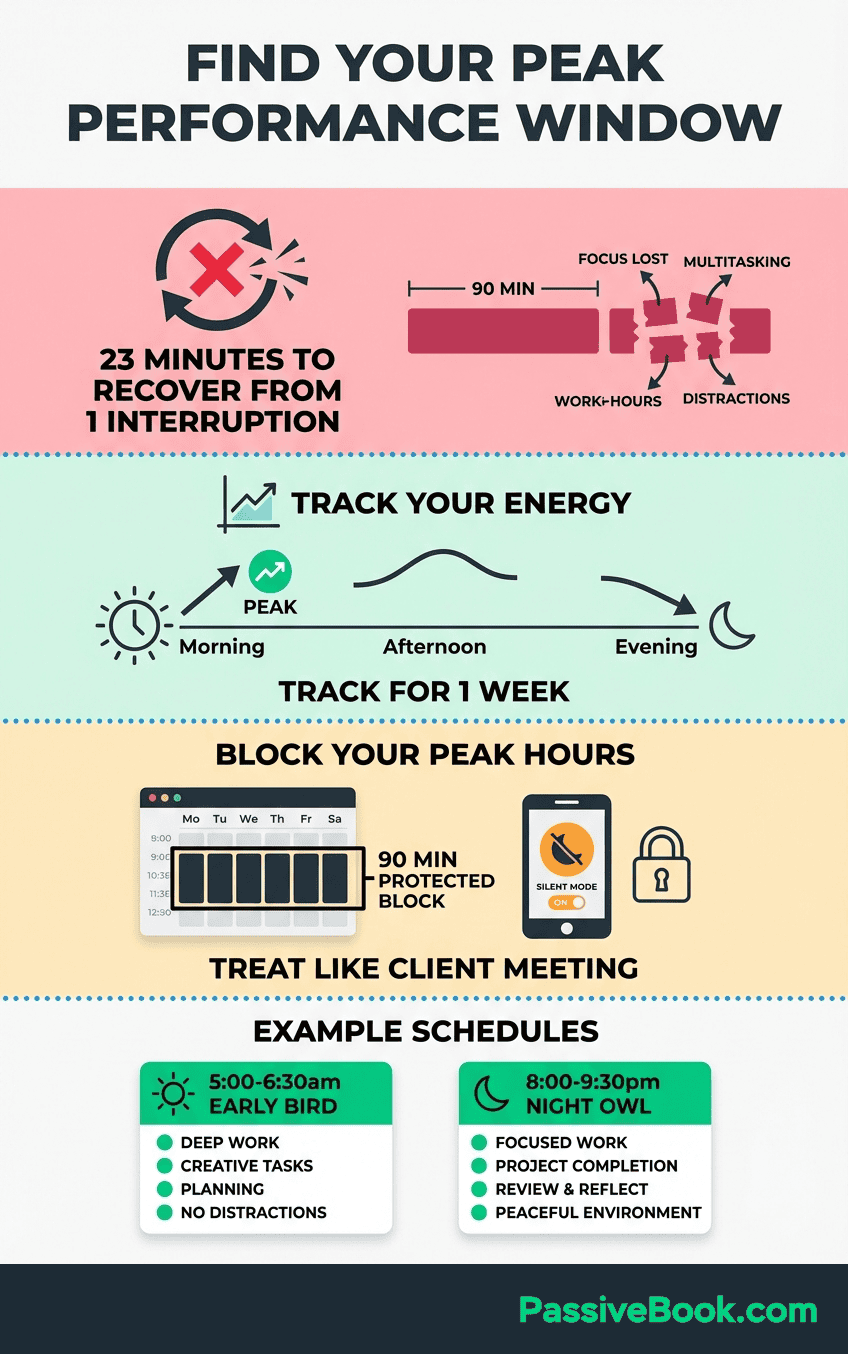
My calendar blocking failed for three months because I kept scheduling deep work during my historically worst focus time (right after lunch when I’m half-asleep). The blocking system worked fine. My self-awareness about my energy patterns didn’t.
Google Calendar – Best Free Time Blocking Tool
Google Calendar‘s color-coded calendar system creates instant visual distinction between day job commitments and protected side business time. Most solopreneurs already use Google Calendar for personal scheduling, which eliminates the friction of learning new software or maintaining yet another system.
Create separate calendars for different life domains. One for day job meetings in blue, another for side business deep work in green, a third for family commitments in yellow. At a glance, you see exactly where your time goes and can spot patterns like accidentally scheduling business work during your historically low-energy afternoons.
Recurring event templates are where the real power lives. Create a recurring “Business: Content Creation” block every Tuesday and Thursday from 6-7:30pm. Now those 3 hours weekly are defended by default.
You have to actively delete them to lose the time, which creates healthy friction against letting other priorities encroach.
Time blocking increases productivity by 80% according to research on focused work periods, primarily because it eliminates decision fatigue about what to work on and when. The decision was made once during your weekly planning, not 14 times throughout the week when your willpower is depleted.
The mobile app integration means you can block time on-the-go. Inspiration strikes during lunch break about a new product idea? Immediately block 2 hours this Saturday morning to develop it before the momentum dies. That same-day capture prevents the common failure mode of losing ideas to the void of “I’ll schedule that later.”
Best For: Every solopreneur running an online business. The ubiquity and zero learning curve make it the default choice unless you have specific needs Google Calendar can’t address.
Setup Time: 15 minutes to create color-coded calendars and input your first month of recurring business blocks.
Key Limitation: Doesn’t integrate natively with task management apps. You’ll manually need to decide which specific tasks fill each calendar block rather than having the system suggest them.
Notion Calendar – Best All-in-One Workspace
Notion Calendar serves as an all in one workspace, integrating directly with Notion databases. Your calendar blocks can link to the specific project notes, meeting agendas, or content briefs you’ll work on during that time.
This eliminates the common failure point where you block time for “work on email course” but then waste 10 minutes finding where you stored your outline, pricing research, and draft content. The calendar event contains direct links to all those Notion pages, so you click into the block and immediately have everything you need open.
The tool is completely free if you already have a Notion account, requiring no separate subscription beyond what you might already pay for Notion itself. For solopreneurs using Notion as their primary workspace, this native integration removes the friction of jumping between disconnected tools.
Notion’s official case studies showcase how solo entrepreneurs manage clients, projects, note taking, and schedules in one workspace rather than maintaining 5 separate systems that require constant syncing. The unified approach reduces context-switching overhead that kills momentum during short work sessions.
Best For: Solopreneurs already deeply invested in Notion for project management, documentation, and note taking who want their calendar natively integrated with that workspace.
Setup Time: 20 minutes to link your Google Calendar and connect relevant Notion databases.
Key Limitation: Only valuable if you’re committed to Notion as your primary workspace. For casual Notion users who just dabble, Google Calendar alone is simpler.
Choose Notion Calendar if you live inside Notion daily and want your time blocks directly connected to the actual work artifacts you’ll manipulate during those blocks.
Focus Timer Apps to Stop Distraction Spirals
Focus timer apps create external accountability when your internal discipline fails. They transform vague commitments like “I’ll focus for the next hour” into concrete 25-minute sprints with built-in breaks that prevent burnout during your limited side hustle hours.
Here’s the specific problem these timers solve: you sit down for your precious 90-minute work block, get distracted checking email 12 minutes in, fall into a social media rabbit hole, and surface 40 minutes later having accomplished nothing. A focus timer makes that spiral harder to execute.
Forest – Best Gamified Focus App
Forest uses a simple psychological trick: a virtual tree grows on your screen during focus sessions and dies if you exit the app to check distractions. That small visual consequence creates just enough friction to make you pause before sabotaging your own work session.
The gamification element accumulates over time. Successful focus sessions grow your virtual forest, creating a visual progress tracker of your consistency. After two weeks, you see 14 trees representing 14 completed sessions, which builds momentum through small visible wins that side hustlers rarely get while their revenue is still ramping.
Pomodoro Technique research confirms that timed focus intervals significantly improve concentration and task completion rates compared to unstructured work sessions. The 25-minute default sprint length matches the attention span ceiling for most people before mental fatigue degrades quality.
The offline functionality matters more than it initially sounds. If you work from coffee shops with unreliable WiFi or have spotty internet at home, Forest continues tracking your focus sessions regardless of connection status. Many competitors require constant internet connectivity, which creates frustrating failures when your network drops mid-session.
Best For: Solopreneurs who struggle with phone-based distractions and respond well to visual progress tracking. Especially effective for those working in 25-30 minute bursts between other commitments.
Setup Time: 5 minutes to download the app and complete your first 25-minute focus session.
Key Limitation: The basic version is free, but the full gamification features and cross-device syncing require a small one-time purchase around $2-4 depending on platform.
Choose Forest if distraction prevention is your primary need and you respond better to positive visual feedback than abstract willpower. The app works best when you commit to using it for every work session rather than sporadically when motivation is already high.
Honestly, gamification doesn’t work for everyone. If watching a virtual tree die doesn’t bother you, Forest won’t help. I’m slightly embarrassed by how much that tree guilt motivates me, but here we are.
AI Time Management Tools: Motion and Reclaim AI
AI scheduling tools represent the next evolution beyond manual calendar blocking. They automatically optimize your calendar based on task priorities, deadlines, and available time windows. But that sophistication comes with premium pricing that only makes sense after you’ve mastered the fundamentals.
Motion analyzes your task list and automatically schedules each item across your calendar using AI to optimize for deadlines and priorities.
Reclaim AI takes a different approach by automatically defending time for habits, tasks, and focus blocks on your calendar.
Both tools typically cost between $12-20 monthly per user, though pricing changes frequently. Check their current rates at Motion pricing and Reclaim AI pricing before committing. That pricing makes strategic sense only after you’ve maxed out free tools and proven your business model generates at least $2,000-3,000 monthly revenue.
I fell into this trap in year two, paying for Motion for three months before admitting I wasn’t using 90% of its features. These tools optimize existing systems. They don’t create discipline from scratch. If you’re not consistently using manual time blocking and task management, Motion’s AI won’t magically fix that. You’ll just pay $19 monthly to ignore a fancier calendar.
Best For: Established solopreneurs managing 20+ weekly hours on their business with enough revenue to justify premium tools. Also valuable for those juggling multiple clients or projects where manual scheduling becomes genuinely overwhelming.
When to Adopt: After you’ve used manual time blocking successfully for at least 3 months and consistently hit your weekly goals. The AI optimizes an existing system, it doesn’t create one from scratch.
The honest assessment: most side hustlers earning under $2,000 monthly will get better ROI from investing those subscription dollars into business growth rather than automation of a scheduling system that takes 15 minutes weekly to maintain manually.
How to Choose and Set Up Your First Apps (30-minute Guide)
Most solopreneurs fail at implementing productivity tools because they download five apps simultaneously and spend weeks learning complex features they’ll never use. This 30-minute protocol prevents that trap by focusing ruthlessly on immediate implementation over theoretical capability.
Start by revisiting your time audit data from week one. Identify your single biggest pain point that’s costing you hours, not a hypothetical future problem. Are you genuinely losing track of how long tasks take? Then start with Clockify or Toggl Track.
Drowning in scattered tasks across browser tabs and sticky notes? Begin with Todoist or Microsoft To Do. Getting derailed mid-focus session by phone distractions? Grab Forest.
Download one time tracker and one task manager maximum to avoid app-switching overhead that creates more friction than it solves. You don’t need a focus timer until you’ve proven you can consistently sit down for scheduled work blocks. One problem, one tool. The third app in your stack should be your existing calendar, which you’re already using for day job scheduling.
Input your 5 most important weekly recurring tasks first with realistic time estimates based on your audit data, not aspirational guesses. If content creation takes you 3 hours, not the 90 minutes you wish it took, use the real number. Inaccurate estimates create planning that fails within two days, destroying trust in the system.
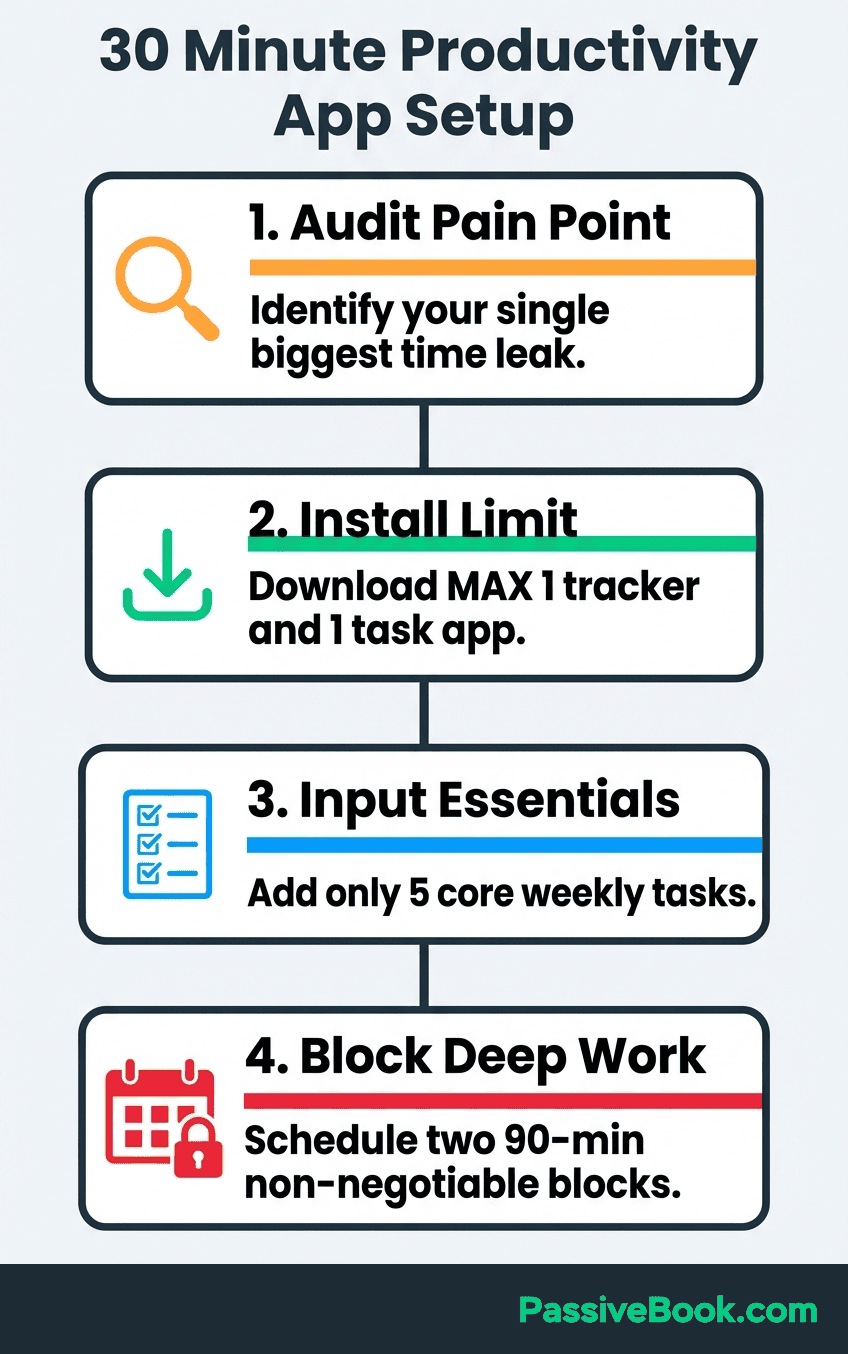
Make sure to block two 90-minute deep work sessions in your calendar before scheduling anything else this week. Treat these blocks as non-negotiable appointments with yourself.
Most side hustlers fail by filling their calendar with optional activities first, then hoping to squeeze business work into whatever gaps remain. That approach guarantees your highest-value work gets the worst time slots when your energy is depleted.
Set one daily notification instead of enabling every alert option that creates interruption overload. A single morning reminder to review today’s tasks is sufficient. Multiple pings throughout the day don’t increase productivity, they fragment the limited focus windows you carved out. The apps should fade into the background of your workflow, not demand constant attention.
Before connecting any tool to your calendar or task systems, review their privacy policy to understand how your business data is handled and stored.
Test your chosen free versions for two full weeks while tracking completion rates before considering any paid upgrades. This trial period reveals whether the tool matches your workflow or just looked good in the tutorial video. Most solopreneurs discover free tiers handle 90% of their needs, making premium features unnecessary expense.
To speed up your initial task capture, paste your brain dump into ChatGPT with this prompt: “Convert this list into specific, actionable tasks with realistic time estimates for a solopreneur working 10 hours weekly on a content business. Format as: Task name | Estimated time | Priority level.” This cuts your setup time from 45 minutes to 15 minutes while forcing you to be specific about what you’ll do.
The 30-minute time limit is deliberate. If setup takes longer than one episode of a TV show, you’re overcomplicating it. The best productivity system is the simplest one you’ll use consistently.
When to Upgrade From Free Apps (Honest Assessment)
The default answer for most side hustlers should be “not yet.” Premium productivity subscriptions represent one of the easiest places to waste money in the early stages of building an online business when every dollar should flow toward revenue-generating activities.
Upgrade when you’re hitting project limits or user restrictions that block work, not when a feature sounds nice. Most paid plans unlock unlimited projects, advanced reporting, and team collaboration features that free tiers restrict.
If Toggl’s 5-project cap forces you to combine unrelated business areas into generic buckets that obscure your data, that’s a legitimate reason to upgrade. If you just want unlimited projects because it feels cleaner, stick with free.
Harvard Business Review suggests evaluating software ROI by calculating time saved multiplied by your effective hourly rate versus the subscription cost. If a premium feature saves you 2 hours monthly and your time is worth $50 per hour, that’s $100 in value. A $10 subscription makes sense. A $34 subscription doesn’t.
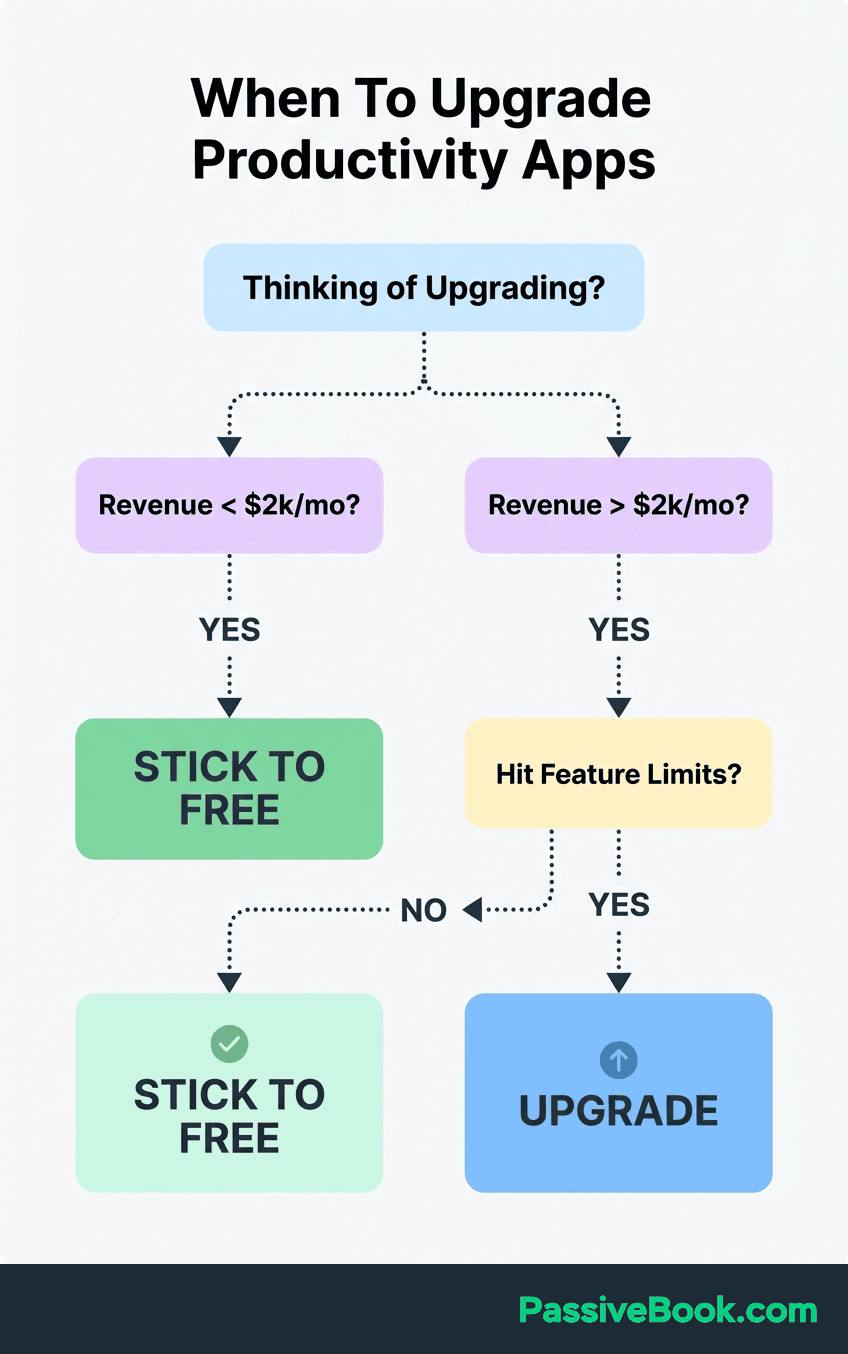
Most solopreneurs and small business owners earning under $2,000-3,000 monthly find free versions entirely sufficient. Your constraints at that stage are clarity and consistency, not feature limitations. Upgrading to premium won’t solve the underlying problem that you’re unclear which 3 tasks matter this week or that you keep skipping your scheduled work blocks.
The premium features that justify their cost earliest are team collaboration tools if you hire a virtual assistant, and advanced reporting if you bill clients hourly. Individual solopreneurs working solo rarely hit genuine limitations in free tiers before their business outgrows the solopreneur stage entirely.
Watch for the upgrade trap where you convince yourself that AI scheduling or advanced automation will finally make you productive. If you don’t want complexity, stick with the free tools you’ve already mastered.
The honest upgrade timeline for most side hustlers: stay free for your entire first year, upgrade time tracking around month 12-18 when you hit project limits, consider premium task management only if you’re managing multiple team members, and evaluate AI tools after you’re earning $3,000+ monthly consistently for at least 3 months.
Frequently Asked Questions
Can I Really Manage My Side Business With Only Free Apps?
Yes, and most solopreneurs should stick with free tools for their entire first year. The free versions of Clockify, Microsoft To Do, and Google Calendar handle everything a side hustler needs before crossing $2,000 monthly revenue. For context, I managed a content business generating $1,800 monthly using only Clockify (free), Microsoft To Do (free), and Google Calendar (free) for 18 months before upgrading anything. Your constraints at this stage are clarity about priorities and consistency in execution, not feature limitations in software. Premium apps won’t solve unclear goals or skipped work sessions.
How Many Time Management Apps Should I Use Simultaneously?
Three maximum: one time tracker, one task manager, and your existing calendar. Using more creates app-switching overhead that wastes the time you’re trying to save. Each additional tool requires maintenance, syncing, and decision-making about which system holds the truth. The three-app limit forces healthy constraint where each tool has one clear job without overlap or competition.
How Much Time Will It Take to Learn and Set Up These Apps?
Budget 30 minutes for initial setup and 2 weeks for habit formation. The first session involves downloading your chosen apps, creating 3-5 projects or task categories, and blocking your first week of deep work sessions. The real learning happens over 10-14 days as you discover which features match your workflow and which create unnecessary friction. Most solopreneurs reach comfortable fluency within 3 weeks of consistent daily use.
Will AI Scheduling Apps Like Motion Replace My Need for Manual Time Blocking?
Not until you master manual time blocking first. AI tools optimize existing systems by rearranging tasks based on deadlines and priorities, but they can’t create clarity about which work matters. If you’re unclear whether this week should focus on content creation or email list building, Motion will just schedule whichever tasks you input without strategic judgment. For perspective, Motion costs around $19/month. That’s $228 annually. For a side hustler earning $400-800 monthly, that subscription represents 24-48% of one month’s revenue, which is money better spent on business growth until you’re consistently earning $3,000+ monthly. Learn to manually prioritize effectively, then consider AI to handle the tedious rearrangement work.
What If Time Tracking Reveals I’m Not Working Enough Hours on My Business?
That data is the point, not a failure. Most side hustlers overestimate their productive hours and underestimate time lost to pseudo-work like rearranging task lists or researching tools. If your audit shows 3 hours weekly instead of your assumed 10, you now have accurate information to make real decisions about whether your goals match your capacity. One of my readers discovered she was counting “thinking about my business while commuting” as work time, which felt productive but generated zero output. The data forced honest conversation with herself about realistic capacity. You can adjust your timeline, cut low-priority projects, or deliberately carve out more hours from other commitments.
Should I Use the Same Apps My Successful Business Idols Recommend?
Only if your constraints and business model match theirs. Someone running a $500K annual business with a team of 5 has completely different needs than you working 8 hours weekly on a $400 monthly side hustle. Their recommendations for Notion, Asana, or premium tools reflect their reality, not yours. Start with the simplest free tools that address your specific pain points, then upgrade only when you hit limitations they solve.
What Next?
You now have the complete framework for choosing time management apps that serve side hustlers instead of creating more work. The pre-app audit, the three-tool limit, and the honest upgrade timeline protect you from the productivity porn trap that wastes hours you don’t have.
Building a business around day job constraints is genuinely hard. These tools won’t eliminate the exhaustion of working two jobs or the guilt when progress feels slow. But they will transform scattered effort into visible forward momentum, which is what keeps most of us going during the months before revenue validates the sacrifice.
If this guide helped you avoid downloading 12 unnecessary apps or gave you permission to stick with free tools longer, share it with another time-starved entrepreneur who needs the same reality check. Use the share buttons below to send it to someone drowning in productivity advice designed for people with unlimited time and budget.
What’s the single biggest way you’re losing hours in your side business? Drop a comment below with your specific pain point. I read every response and often discover patterns that turn into future guides for this exact audience.
Share this post with your friends & followers: