Running your online side business shouldn’t feel like managing a control panel at NASA. Most solopreneurs waste hundreds of dollars monthly on tools that sit unused while their actual work gets buried in chaos. The real systems for online solopreneurs aren’t about collecting software subscriptions. They’re about connecting a few essential tools that handle repetitive tasks while you sleep.
After burning through $2,400+ on unused subscriptions across multiple failed business models, I learned this the hard way. You don’t need 40 tools to build a profitable side business. You need three working together by Friday, generating revenue by next month.
- •What Are Systems for Online Solopreneurs?
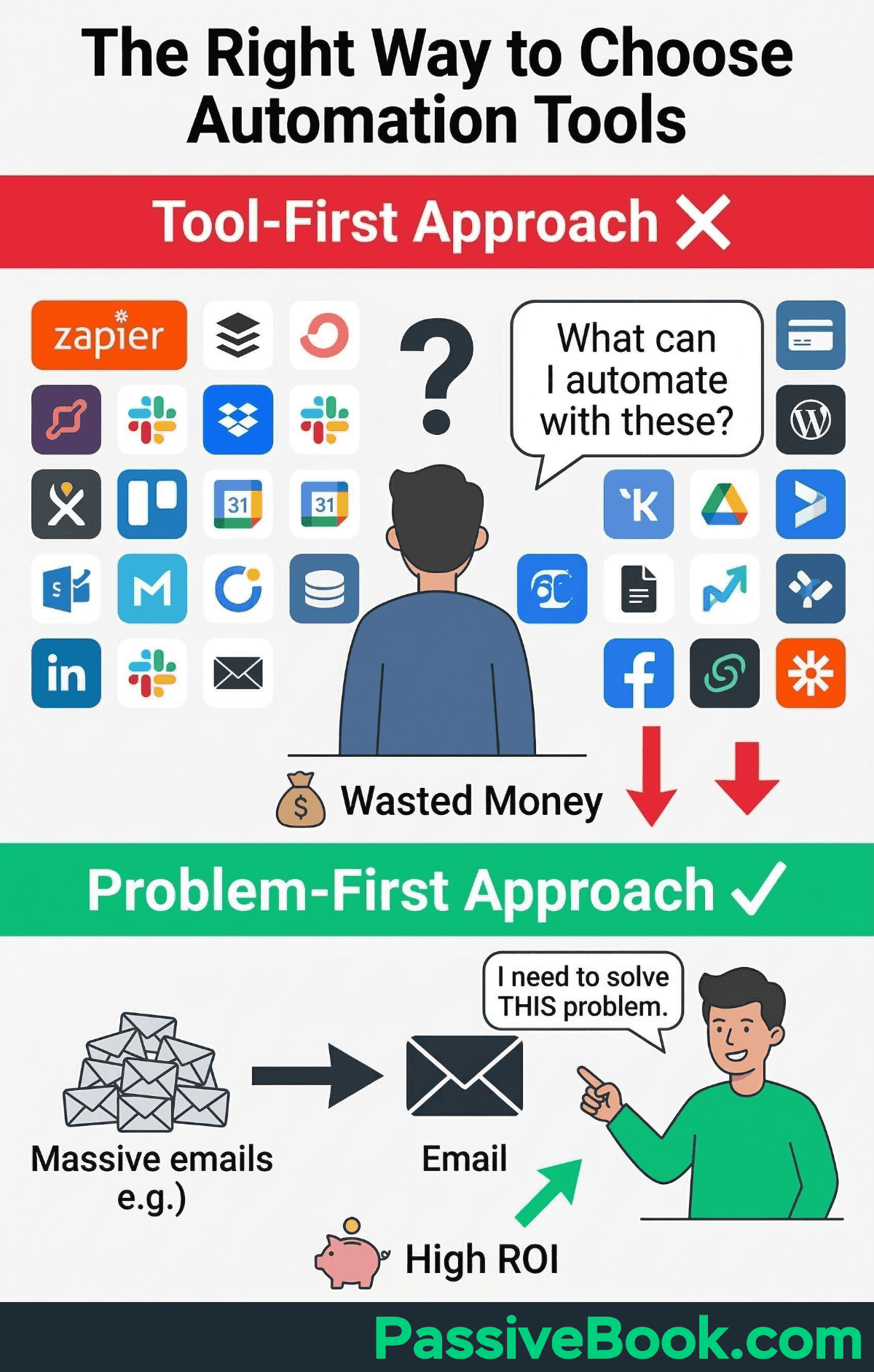
- •Why Most Solopreneurs Waste Money on the Wrong Systems
- •The Three-Category System Framework Every Solopreneur Needs
- •The Only 3 Systems You Need to Start (Ignore Everything Else)
- •How to Actually Set Up Your First System (Even If You're Not Technical)
- •The Exact 7-Day Setup Sequence (What to Build First)
- Launch-Ready Infrastructure
- Email Marketing Systems (Your Foundation)
- •Payment Processing Systems That Don't Eat Your Margins
- •Landing Pages & Lead Capture Systems
- •Content Creation & Project Management Systems
- •Simple CRM Systems (When You Actually Need One)
- Automation Systems That Actually Save Time
- •How AI Changed Solopreneur Systems in [year]
- •Building Your First Stack Under $30/Month
- •What You'll Actually Spend: Real Monthly Costs by Business Stage
- •The Systems You Don't Need Yet (And Are Wasting Money On)
- •When to Upgrade From Free to Paid Plans
- •How to Avoid System Lock-In and Protect Your Business
- •Frequently Asked Questions
- •What Next?
What Are Systems for Online Solopreneurs?
A system is 2-5 tools working together to handle a specific business function automatically. This happens without touching a button after initial setup.
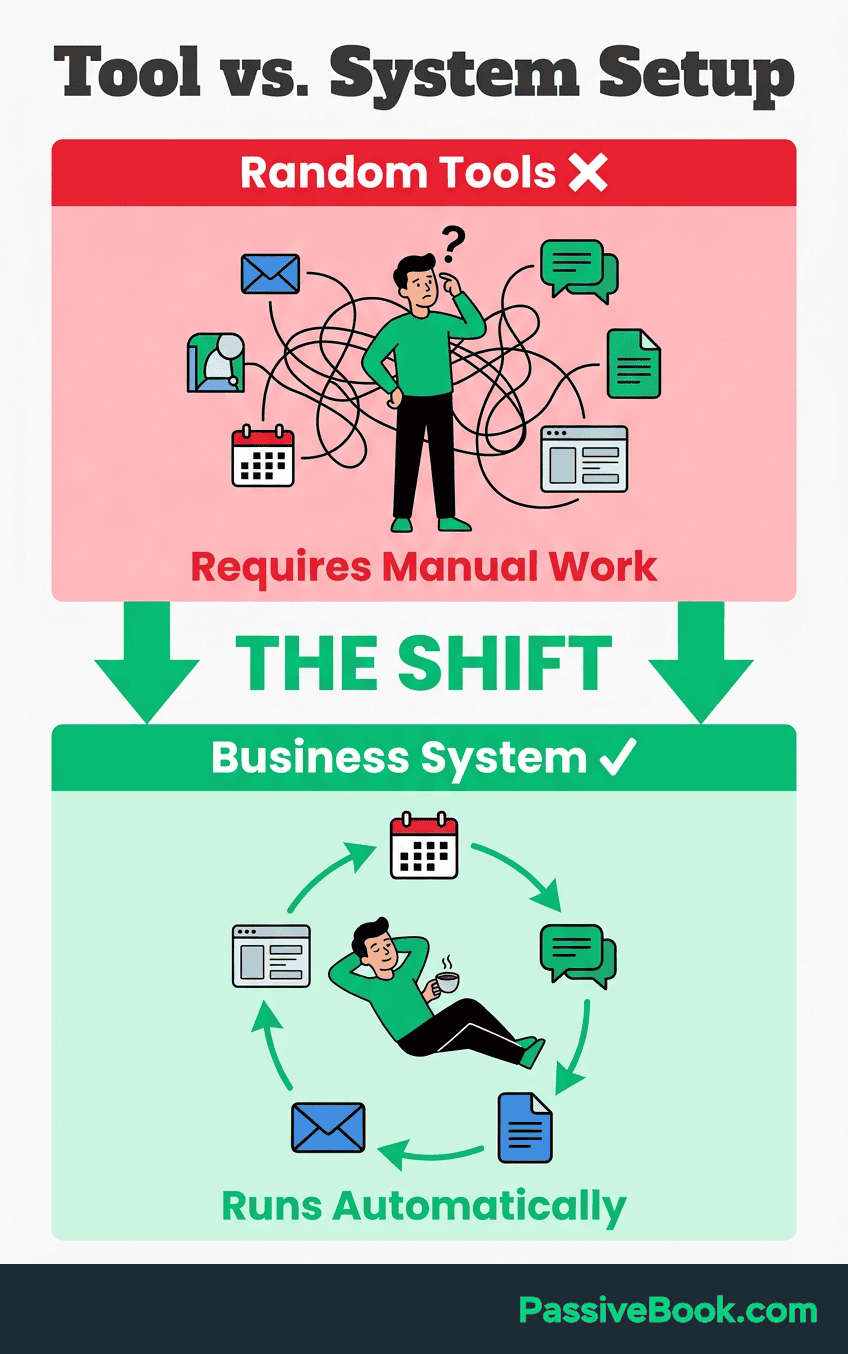
The difference between tools and systems is simple. Gmail sends emails manually. A system automatically sends follow-ups when someone purchases, tags them in your customer relationship management platform, and schedules feedback requests 30 days later.
Morning Brew started as a college newsletter in 2015, growing to 4+ million subscribers by turning readers into champions who spread the word. Their path took venture funding and a team, which differs from a bootstrapped solopreneur. The lesson: systems can scale, but you don’t need their complexity to start.
Systems are NOT about owning 20 tools. They’re about 5-7 well-chosen tools that talk to each other. A business owner running an online course needs an email marketing platform connected to a payment processor that triggers automated delivery. That’s a system. Buying project management software you’ll never open? That’s wasted money.
Why Most Solopreneurs Waste Money on the Wrong Systems
The average company uses 130 SaaS apps according to 2026 research from Spendesk, with individual departments averaging 87 tools. Many of these subscriptions sit unused monthly. This represents thousands in wasted annual spending for business owners with limited budgets.
Most solopreneurs earn under $100,000 annually according to Leapmesh research, though income varies widely by niche and experience. Every $200 monthly in wasted subscriptions directly reduces take-home income by 3-6%. That’s not abstract waste. That’s your grocery budget disappearing into forgotten logins.
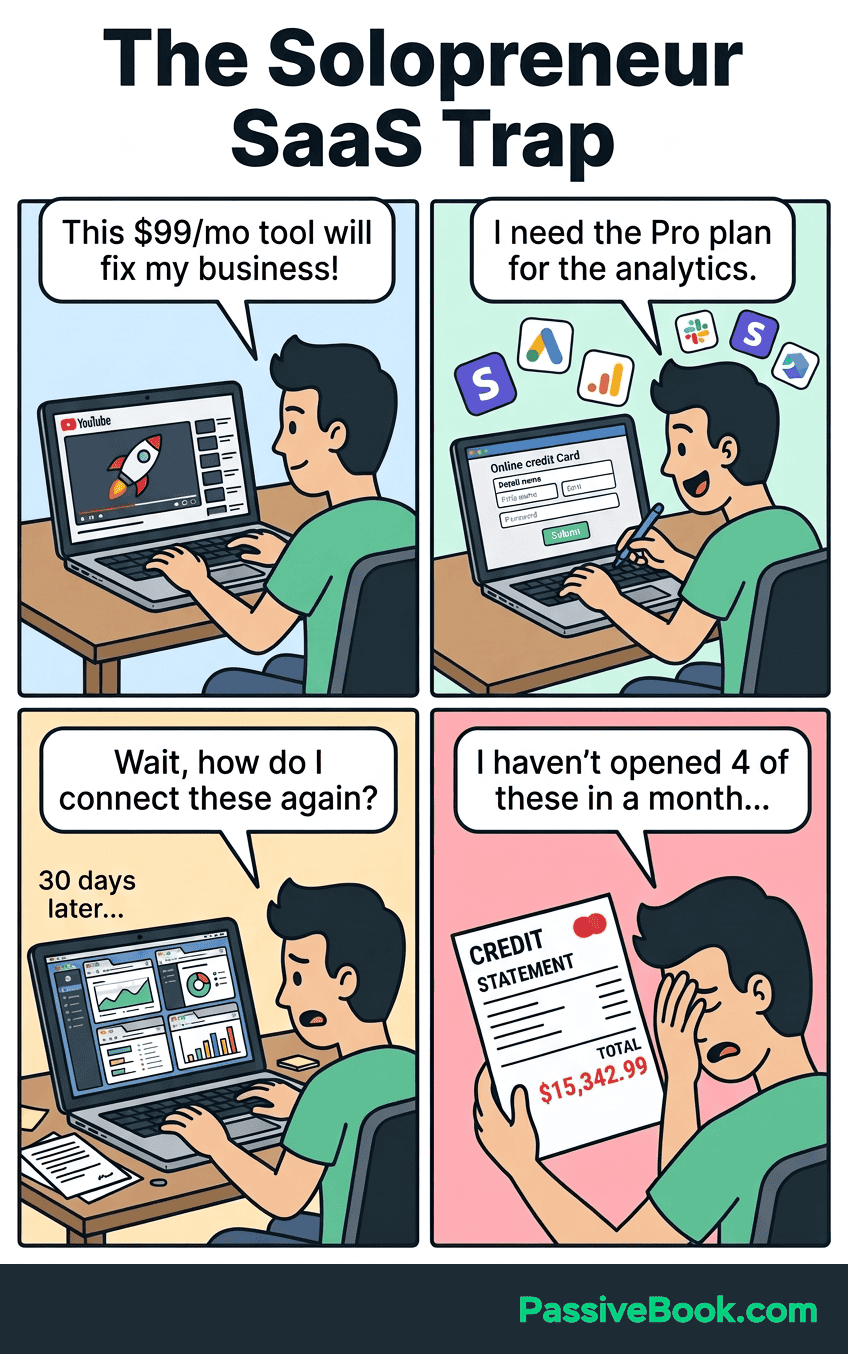
Shiny object syndrome hits hard when you follow a guru’s stack. You buy tools without understanding if you actually need them. I spent $89 monthly on an advanced CRM when I had 12 total leads. The spreadsheet I abandoned would have worked better.
The hidden cost runs deeper than money. Tool sprawl creates decision fatigue burning your limited after-work hours. You spend Tuesday night comparing features instead of creating content that generates revenue. Small businesses drown in software while their bank accounts stay empty.
The Three-Category System Framework Every Solopreneur Needs
Marketing systems attract and nurture your audience through email marketing, content, and social media. Sales systems convert interest into revenue through payment processing and product delivery. Operations systems automate repetitive work through scheduling, customer relationship management, and workflow automation.
Top-earning solopreneurs consistently run on 8-12 core tools, spending less than 1% of revenue on their entire stack. The pattern: email marketing, payment processing, landing pages, content creation, and basic analytics. Everything else is optional until you hit $10K/month.
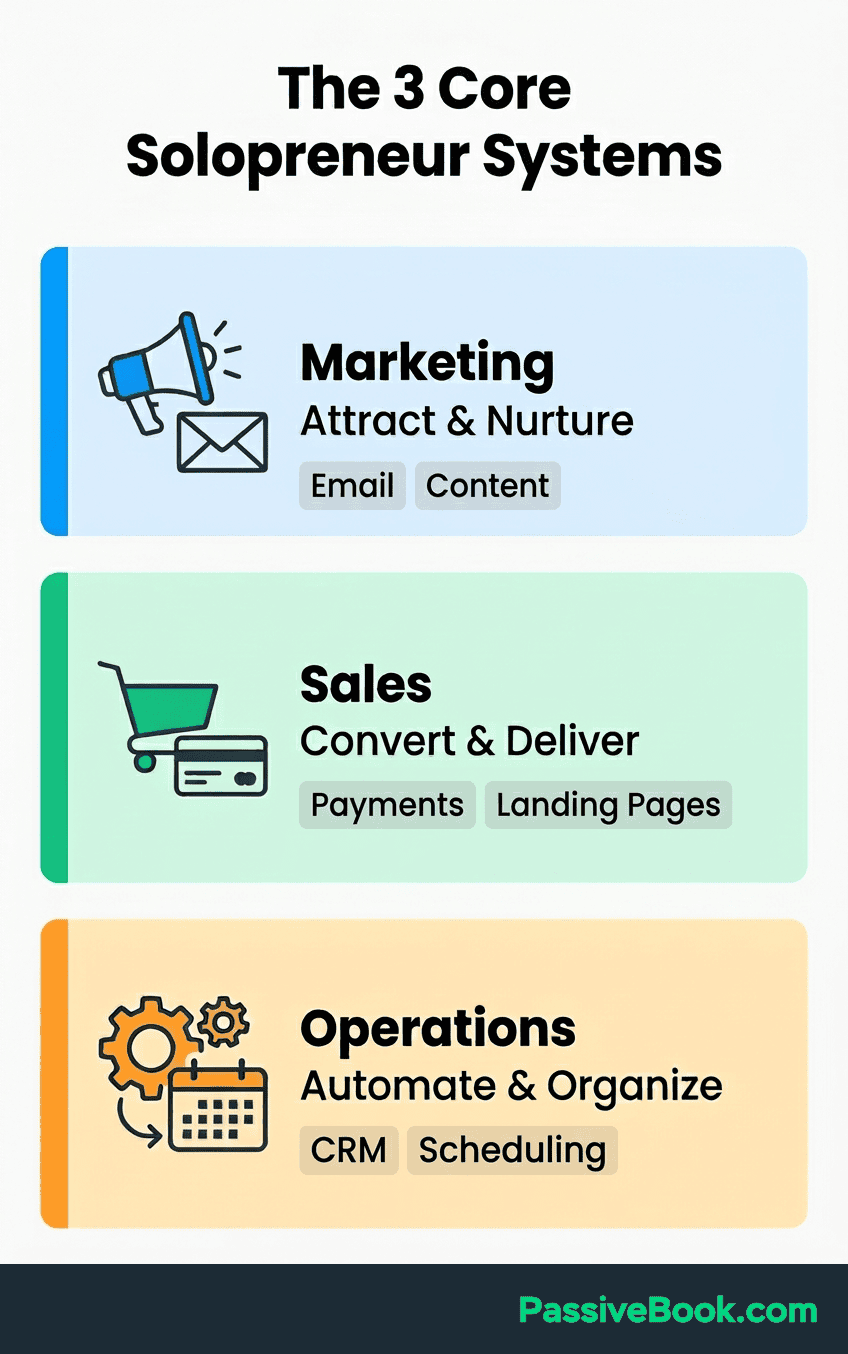
This three-category framework keeps you from drowning in subscriptions. Every tool must fit one category and serve a specific function. Email marketing handles audience nurturing. Payment processing handles transactions. Project management handles task organization. If a tool doesn’t clearly solve a problem in one category, you don’t need it yet.
The Only 3 Systems You Need to Start (Ignore Everything Else)
Email marketing platform using Kit or MailerLite free tier gives you the only owned audience that can’t be taken away by algorithm changes. Payment processor through a free Stripe account lets you collect money. You can’t make money without a way to process it, and Stripe integrates with everything you’ll add later.
Landing page tool using Carrd at $19 yearly or WordPress with GenerateBlocks provides one page to collect emails or pre-sell your offer. Build this before your full site. One page tests demand faster than a complete website.
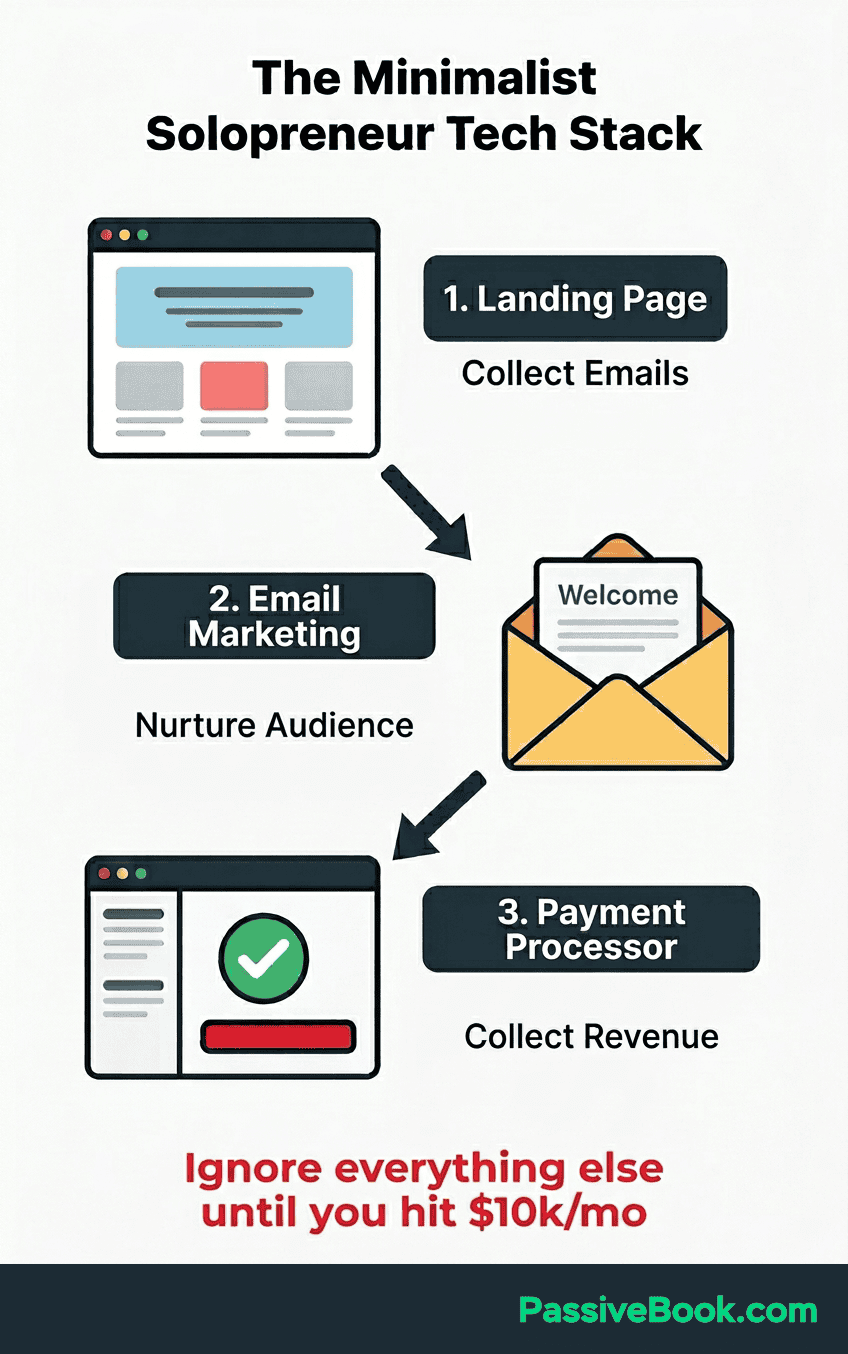
Don’t touch anything else yet. CRM, automation, project management software, social schedulers should sit on the shelf until you have 10+ paying customers and proven demand. Tools are useless without a product people want. Resist all in one platforms like Kajabi at this stage. They’re overkill and lock you into expensive ecosystems.
The mistake is building a complete tech stack before validating your offer actually sells. I spent three weeks configuring an elaborate project management system for a course that never launched. Zero students signed up because I never validated the idea. The best way to waste time is perfecting systems for products nobody wants.
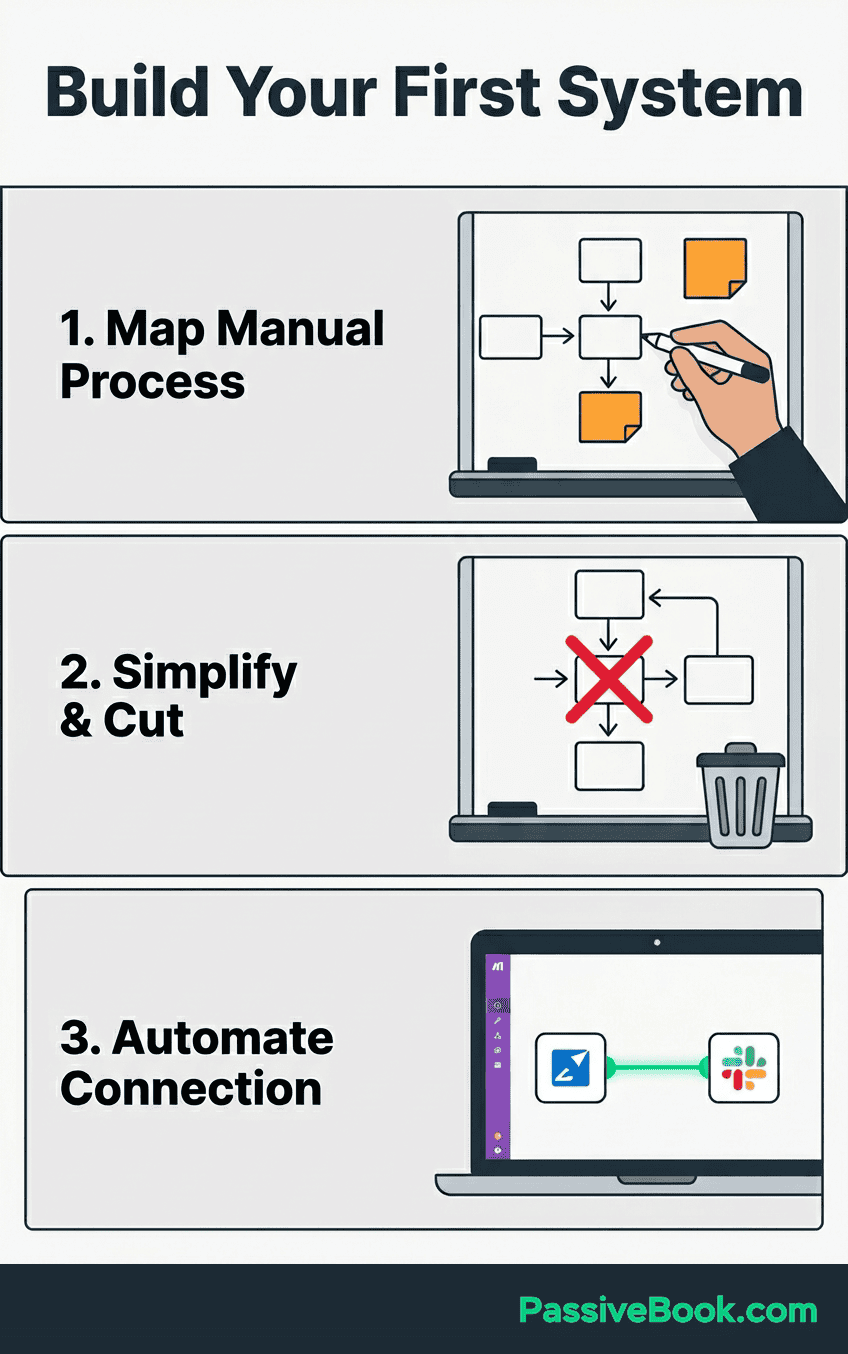
How to Actually Set Up Your First System (Even If You’re Not Technical)
Start with one system solving your biggest time-drain. If you manually email every new customer, automate that first before building complex funnels. Identify the task you do most often that follows the same pattern every time.
Most tools offer pre-built templates eliminating setup complexity. Kit has welcome sequence templates. Stripe has checkout page templates. Notion has content calendar templates. You’re not starting from scratch.
Use native integrations before paying for Zapier. Stripe connects directly to most email platforms with one-click authorization. No coding required. The platforms want to work together because it keeps you as a customer.
Watch YouTube setup tutorials before buying. If you can’t find a clear 10-minute tutorial for your specific use case, the tool is probably too complex. Small business owners don’t have time for 40-minute configuration videos.
Test with free tiers for 30 days before committing. Build your first automation, send 10 test emails, process one test payment to verify it works for YOUR workflow. What works for someone else might not fit your business model.
The ‘good enough’ automation running today beats the perfect system you’ll build someday. Ship version 1, then improve based on real usage. Your first email sequence doesn’t need to be flawless. It needs to exist and run automatically.
The Exact 7-Day Setup Sequence (What to Build First)
Day 1: Set up free Stripe account and verify your bank account. This takes 2-3 days to approve, so start early even if you’re not ready to sell yet. Don’t wait until you need it urgently.
Day 2: Choose email platform between Kit or MailerLite free tier, create account, design one simple welcome email with your offer or value proposition. One email is enough to start.
Day 3: Build landing page in Carrd at $19 yearly with headline, 3 bullet benefits, and email opt-in form connected to your email platform. Keep it simple.
Day 4: Create your first lead magnet or minimum viable offer. A simple PDF checklist, template, or mini-course you can deliver immediately after signup works perfectly.
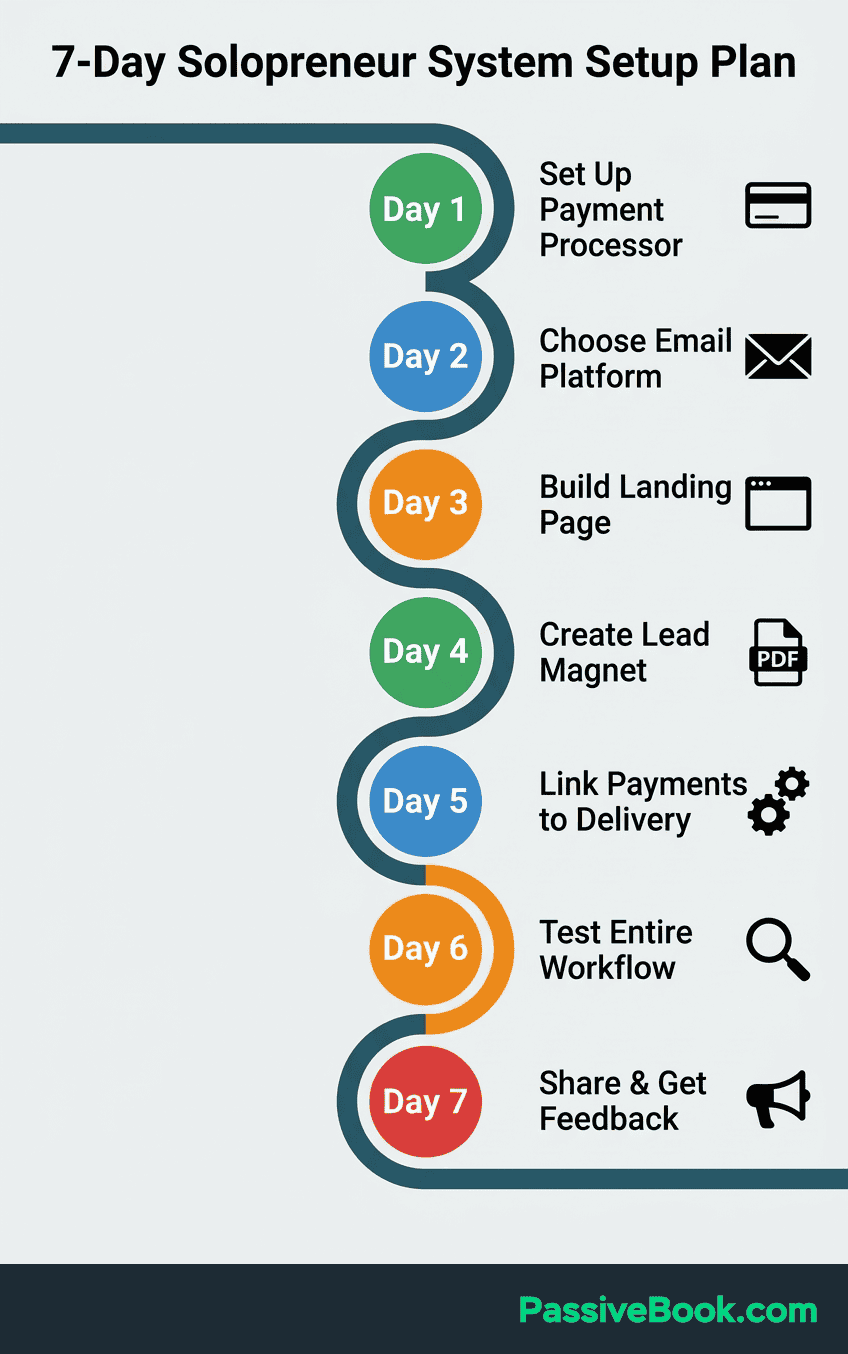
Day 5: Set up payment link in Stripe for your offer, connect it to your email platform to trigger delivery automation after purchase. Test this connection twice.
Day 6: Test the entire flow yourself. Sign up on your landing page, verify welcome email arrives, make a test purchase, confirm delivery automation works. Find the broken links now, not when a paying customer complains.
Day 7: Share your landing page with 10 people in your network to get initial feedback before spending money on traffic. Real humans will find problems you missed.
Everything else including CRM, advanced automation, social scheduling waits until this foundation is working and generating revenue. You can’t optimize what doesn’t exist yet.
Launch-Ready Infrastructure
Before adding more tools, set up four simple safeguards for your business: a professional contact address, one place for working files, a basic financial record, and protected account access. These foundations make the rest of the stack easier to operate and recover.
Branded Email
Use an address on your domain for customer-facing messages and route it to an inbox you already monitor. verify both sending and receiving before you publish the address. Keep business mail separate from personal mail so customer messages, receipts, and account notices stay easy to find.
Central File Storage
Keep business documents, product files, exports, and working assets in one searchable folder structure. Use clear names and version dates, and export important data before changing platforms. Review storage usage periodically and upgrade only when the files you actually need exceed the available space.
Simple Bookkeeping
Track income, expenses, fees, and refunds in a spreadsheet from the first transaction. Reconcile it weekly, keep business and personal transactions separate where possible, and save receipts with a matching date or transaction reference. Start with the record you will maintain consistently; move to accounting software when the spreadsheet no longer gives you a clear view.
Password Manager and Two-Factor Authentication
Store unique passwords in a password manager, turn on two-factor authentication wherever it is available, and keep recovery codes in a separate secure location. Audit access when you add a collaborator or stop using a tool, and never put credentials in a public document or SOP.
Email Marketing Systems (Your Foundation)
Email list ownership protects your business from algorithm changes that destroy social media reach overnight. Platforms can delete your account tomorrow. Your email list belongs to you forever as long as you have the CSV file backed up.
Many creators build five-figure monthly newsletter revenue starting with free email tiers, upgrading only after proving consistent growth. The platform doesn’t determine success. Your content quality and consistency do.
Start with free tiers. Most solopreneurs stay under 1,000 subscribers for 6-12 months. You’ll know when you need to upgrade because you’ll hit the limit three months in a row. Most side hustlers need 2-3 marketing tools maximum until hitting 1,000 subscribers.
FluentCRM: Best for WordPress Users
FluentCRM self-hosts on WordPress with zero per-subscriber fees. One-time cost under $200 vs $50-150 monthly for platforms like Mailchimp at scale. The math becomes obvious at 2,000+ subscribers.
Ideal when you already run WordPress and want full control without platform lock-in. Your data stays on your server. No company can raise prices or shut down your account arbitrarily.
Kit (Convertkit): Best for Newsletter-First Creators
Creator-friendly automation and visual builders make Kit the default choice for course creators and bloggers. Free plans up to 10,000 subscribers with tagging systems designed specifically for our workflows.
Upgrade only when you exceed subscriber limits or need advanced segmentation. The free tier handles basic email sequences that generate revenue for most side businesses.
MailerLite: Best Budget Alternative After 500 Subscribers
If budget matters more than brand recognition, MailerLite delivers comparable features to Kit at 30-40% lower cost. Free for 1,000 subscribers, then $15 monthly vs Kit’s higher pricing for growing lists.
Your subscribers don’t care which platform sends the email. They care about the content inside.
Payment Processing Systems That Don’t Eat Your Margins
Stripe charges 2.9% + $0.30 per transaction without monthly fees for clean checkout experiences. This beats platforms charging platform fees plus transaction fees. On a $97 course sale, you pay $3.11 to Stripe. That’s it.
Gumroad takes 10% but handles taxes, EU VAT, and payment processing with zero setup complexity. For solopreneurs selling digital products internationally, this eliminates accounting nightmares worth far more than the 7% premium over Stripe.
PayPal as secondary option increases conversion by 15-20% for buyers who prefer it. Some customers only trust PayPal. Adding it as an alternative payment method captures sales you’d otherwise lose.
WooCommerce on WordPress eliminates platform fees entirely if you already have hosting. You pay only Stripe’s transaction fees. For small businesses processing $2,000+ monthly, this saves $200+ annually compared to hosted platforms.
Landing Pages & Lead Capture Systems
Carrd costs just $19 yearly for multiple single-page sites with built-in forms. This handles validation landing pages, pre-launch waitlists, and lead capture without monthly subscriptions draining your budget.
Validate product ideas with pre-launch waitlist pages before building full infrastructure. Collect 50 email addresses proving demand before spending weeks building a complete course or product. If nobody signs up for the free waitlist, they definitely won’t buy the paid version.
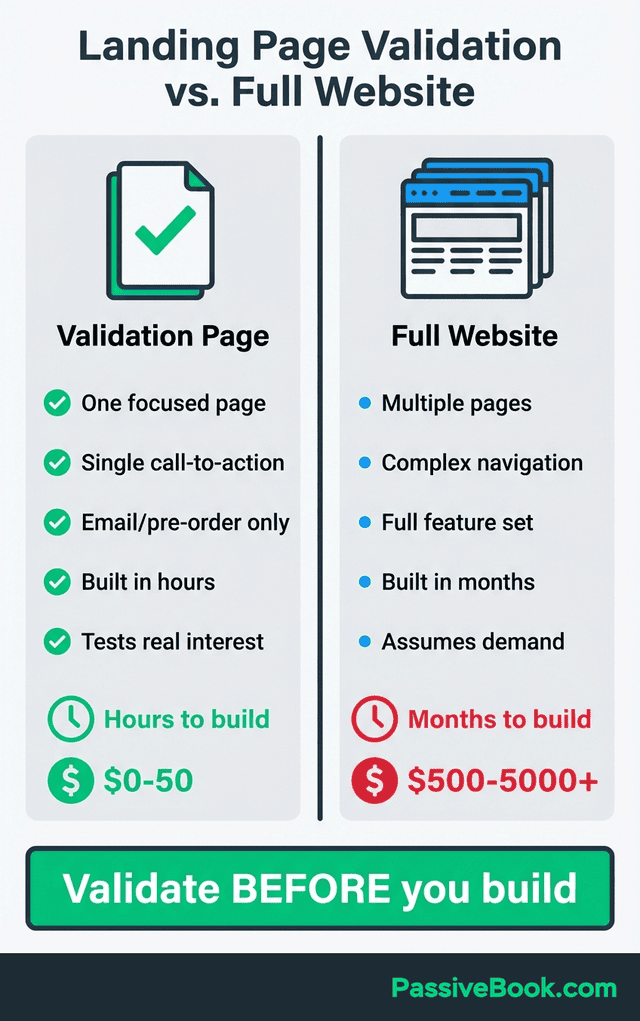
WordPress with GenerateBlocks creates landing pages without additional platform costs or monthly fees. You already pay for hosting. Adding landing pages inside your existing site costs nothing extra and keeps everything centralized.
Content Creation & Project Management Systems
Notion centralizes planning, content calendars, and knowledge bases in one searchable workspace. Track your to dos, plan content 30 days ahead, and store research notes without switching between five different apps. The free tier helps you stay organized without paying for dedicated project management tools.
I resisted Notion for two years because I thought I didn’t need ‘another tool.’ Then I spent 20 minutes looking for a blog post idea I’d scribbled in three different Google Docs. Notion solved that stupidity in one afternoon.
Canva free tier handles 90% of design needs for Pinterest pins, social graphics, and lead magnets. You don’t need Adobe Creative Cloud subscriptions when Canva templates exist for every format you’ll actually use.
Ali Abdaal, a physician-turned-YouTuber running a multi-million dollar content business, uses Notion as his core content planning system. He batch-plans videos, manages his team, and organizes his entire business there. If it works for his scale, it works for your side hustle.
Batch creation prevents daily content scrambles that waste your precious evening hours. Spend three hours Sunday creating 20 social posts for the week. Schedule them all at once. Reclaim your weeknight hours for revenue-generating activities instead of scrambling for tomorrow’s Instagram post.
Simple CRM Systems (When You Actually Need One)
Wait until managing 50+ active leads becomes unwieldy in spreadsheets before paying for customer relationship management platforms. Most side hustlers don’t have 50 active leads in month one. A Google Sheets file with columns for Name, Email, Status, and Next Action works fine for the first six months.
My jewellery store ‘CRM’ in 2013 was a paper notebook. When I spilled coffee on it, I lost three months of customer notes. Learn from my idiot move: digital backup, always.
Google Sheets serves as free starting point for tracking client status and next steps. Sort by status, filter by date, search by name. This handles basic relationship management without learning a new platform.
FluentCRM inside WordPress eliminates per-contact pricing for WordPress-based businesses. If you already run WordPress for your blog or course site, adding FluentCRM costs less than paying monthly per-contact fees on external platforms.
HubSpot CRM offers a free plan with unlimited contacts and essential features. No credit card required. No artificial limits forcing you to upgrade. Course creators use it to segment leads by interest, track email opens, and trigger follow-up sequences automatically when prospects hit specific behaviors. All without spreadsheet chaos.
Automation Systems That Actually Save Time
Microsoft and LinkedIn’s Work Trend Index found that 75% of knowledge workers now use AI tools. Solopreneurs reclaim 20+ hours weekly through automation. This is no longer optional for competitive advantage.
Automation recovers 5-15 hours weekly when applied to truly repetitive multi-step tasks. Don’t automate until you’ve done a task manually 3+ times and understand the process. Automating broken processes just creates broken automation.
n8n: Best for Complex Workflows (Technical)
n8n self-hosted is completely free for unlimited workflows with branching logic. Connects 400+ apps without per-task pricing that destroys ROI on platforms like Zapier.
Requires comfort with basic server setup on DigitalOcean or similar hosting. If you can follow a YouTube tutorial to deploy a Docker container, you can run n8n. The learning curve saves thousands annually at scale.
Make: Best for Visual Automation Builders
Make offers 1,000 free operations monthly with visual builder for mid-complexity automations. Comparison studies show 60-90% cost savings migrating from Zapier to Make for similar workflows.
Ideal middle ground between Zapier‘s ease and n8n’s technical requirements. You get visual workflow building without paying Zapier‘s premium pricing.
Native Platform Integrations: The Free Option Everyone Ignores
Stripe connects directly to Gumroad, Woocommerce, and most course platforms without Zapier. Email platforms like Kit trigger automations natively when integrated with payment processors. Check for native integrations before paying for automation middleware.
Most platforms want to work together because it keeps you as a customer. They build these integrations into their core product. You’re paying for Zapier to do what the platforms already do for free.
How AI Changed Solopreneur Systems in 2026
AI tools now automate 10-40% of daily solopreneur workload, reclaiming 20+ hours weekly. You don’t need virtual assistants anymore for tasks AI handles in seconds.
AI email tools recover 5-8 hours weekly previously spent on inbox management for side hustlers. Instead of drafting customer support responses manually, paste the customer email into ChatGPT with this prompt: “Draft a helpful, friendly response addressing their question about [topic]. Keep it under 100 words.”
The barrier shifted from “what tools exist” to “which prompts actually save time.” Bad prompts waste more time than they save. Good prompts multiply your output without sacrificing quality.
Claude at free tier plus $20 monthly Pro excels at long-form content creation, strategic planning, and complex research. Ideal for solopreneurs writing blog posts, course outlines, or business plans. I use it to expand article outlines into full drafts, cutting my writing time from 6 hours to 2 hours per piece.
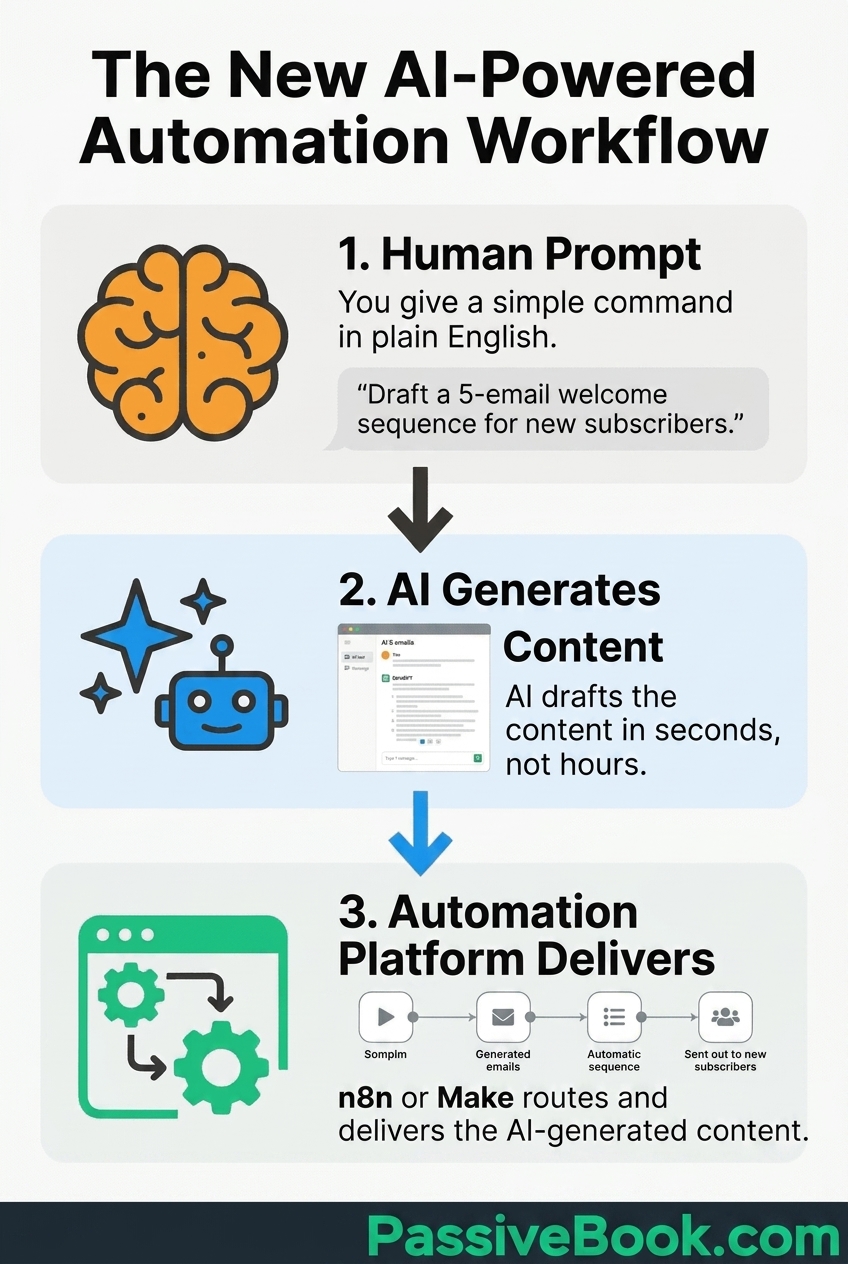
ChatGPT at free tier plus $20 monthly Plus handles general-purpose tasks like email drafts, social media captions, brainstorming, and customer service responses. The largest knowledge base makes it best for quick, varied tasks.
Gemini free with Google account integrates seamlessly with Google Workspace for research, fact-checking, and pulling data from your existing Google Docs and Sheets. Ask it: “Analyze my last 20 blog post titles in this Google Doc and suggest 10 new titles following the same pattern.”
Start with free tiers of all three, identify which interface you prefer, then upgrade just one to paid when you hit usage limits. No need to pay for multiple AI subscriptions when 80% of tasks work with free tiers.
Building Your First Stack Under $30/Month
Total baseline cost for side hustlers under 1,000 subscribers runs $0-30 monthly using mostly free tiers. WordPress hosting at $4-6 monthly plus Stripe free account plus Kit free tier plus Canva free covers essential functions.
Bluehost starts at $3.99 monthly promotional pricing for WordPress beginners needing simple hosting. Renewal rates typically run $11.99-14.79 monthly. Factor renewal pricing into your budget from day one to avoid surprises.
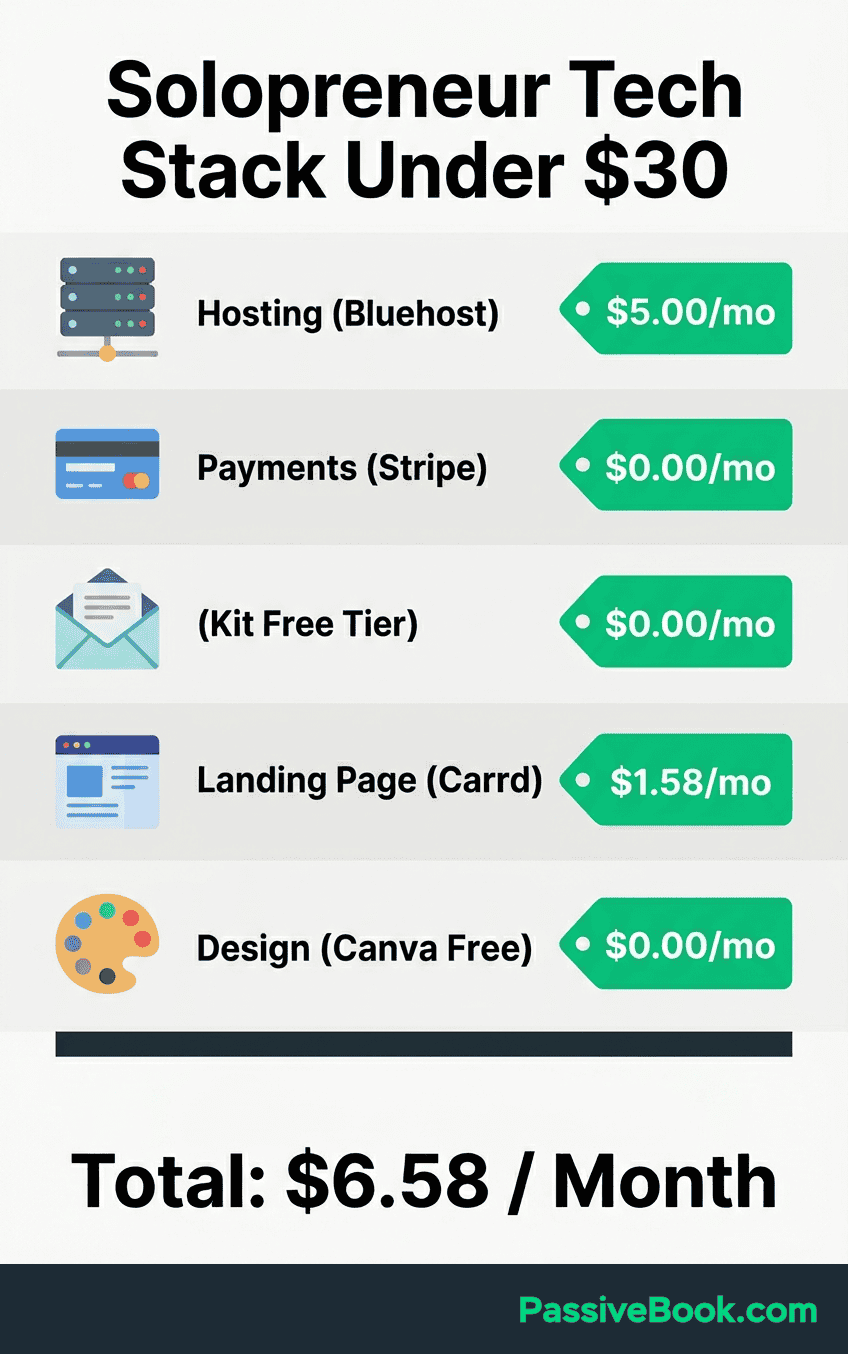
The entire foundation costs less than two coffee shop visits weekly. You’re not building enterprise infrastructure. You’re building a profitable side business that runs while you sleep. This is the best way to start without overcommitting your budget before you’ve validated demand.
What You’ll Actually Spend: Real Monthly Costs by Business Stage
Here’s exactly what small business owners running lean operations spend at each growth milestone:
Month 1-6 (0-100 subscribers):
- WordPress hosting (Bluehost): $3.99-6/month
- Stripe: $0 (only pay per transaction)
- Kit email: $0 (free tier)
- Carrd landing page: $1.58/month ($19 annual)
- Canva: $0 (free tier)
- Total: $5.57-7.58/month
Month 7-12 (100-500 subscribers):
- Same as above, still on free tiers
- Optional: Paid AI tool (Claude or ChatGPT Pro): +$20/month
- Total: $25.57-27.58/month
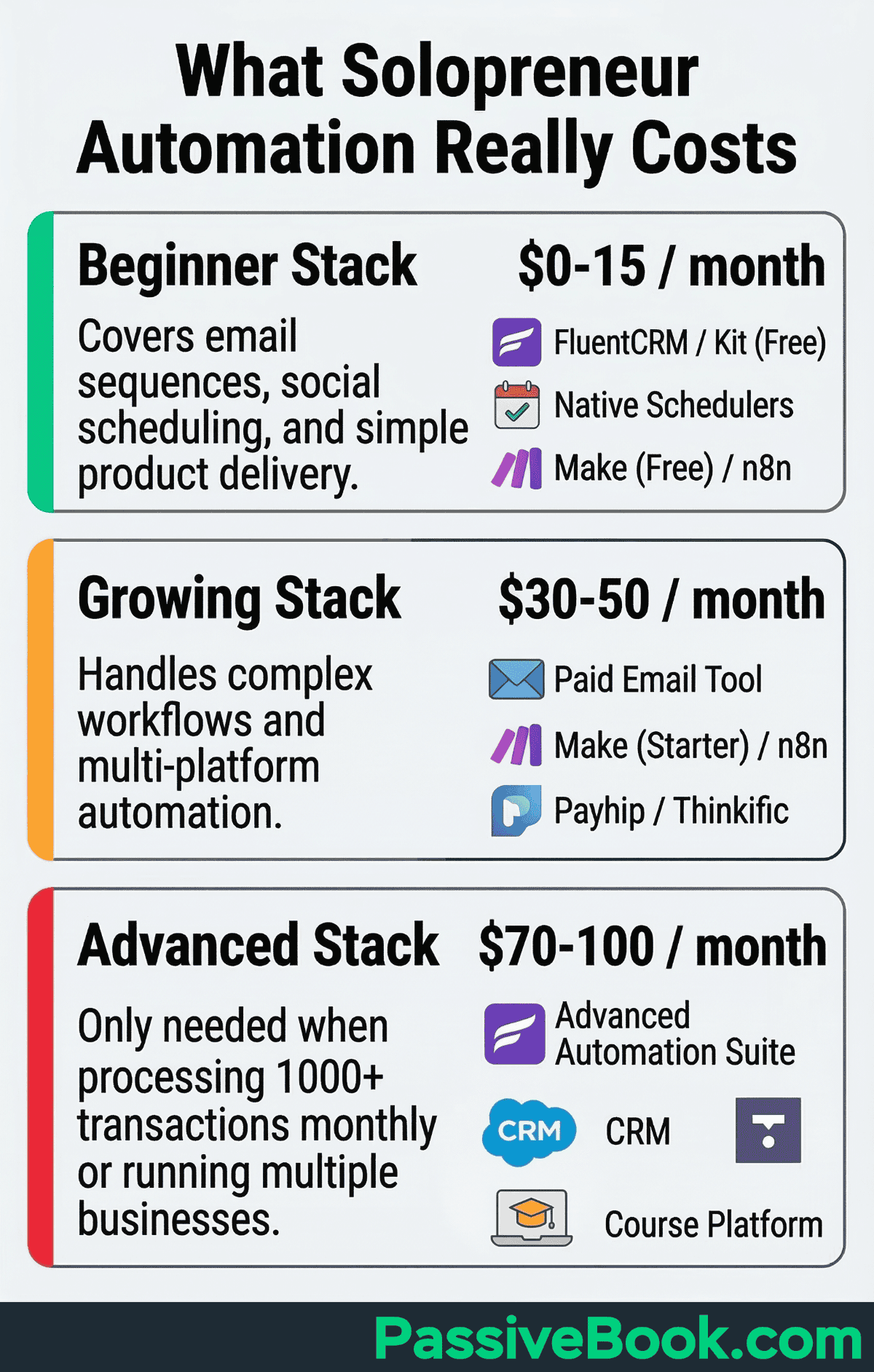
Month 13-24 (500-1,000 subscribers):
- Upgrade Kit to paid ($15-25/month when you hit limits)
- WordPress hosting: $6-11.99/month (renewal pricing)
- AI tool: $20/month (if you added it earlier)
- Everything else: Still free
- Total: $41-56.99/month
After 1,000 subscribers (profitable stage):
- Email platform scales with list size
- Consider automation tool (Make free tier or n8n self-hosted free)
- Total: $50-100/month depending on list size
Most business owners waste money by jumping straight to the “After 1,000” stack when they have 50 subscribers. Start at the top tier and upgrade only when you consistently hit limits for 2+ months. As your business grows, reinvest a small percentage of profit into better tools.
The Systems You Don’t Need Yet (And Are Wasting Money On)
Advanced CRM or complex project management software before you have 100+ leads creates empty dashboards you’ll never check. You’re not managing a team. You’re tracking your own to dos. You spend $49 monthly to track three contacts. A spreadsheet does this for free.
I paid $49/month for a CRM to track three jewellery store leads in 2013. Three. Leads. A napkin would have been more cost-effective.
Complex funnel builders before proving your offer converts through simple email sequences waste time and money. Build the three-email welcome sequence first. If nobody buys from that, a fancy funnel won’t fix it.
Multiple email marketing platforms “for different audiences” instead of using tags and segmentation doubles your costs for zero benefit. One platform with proper tagging handles multiple audience segments perfectly.
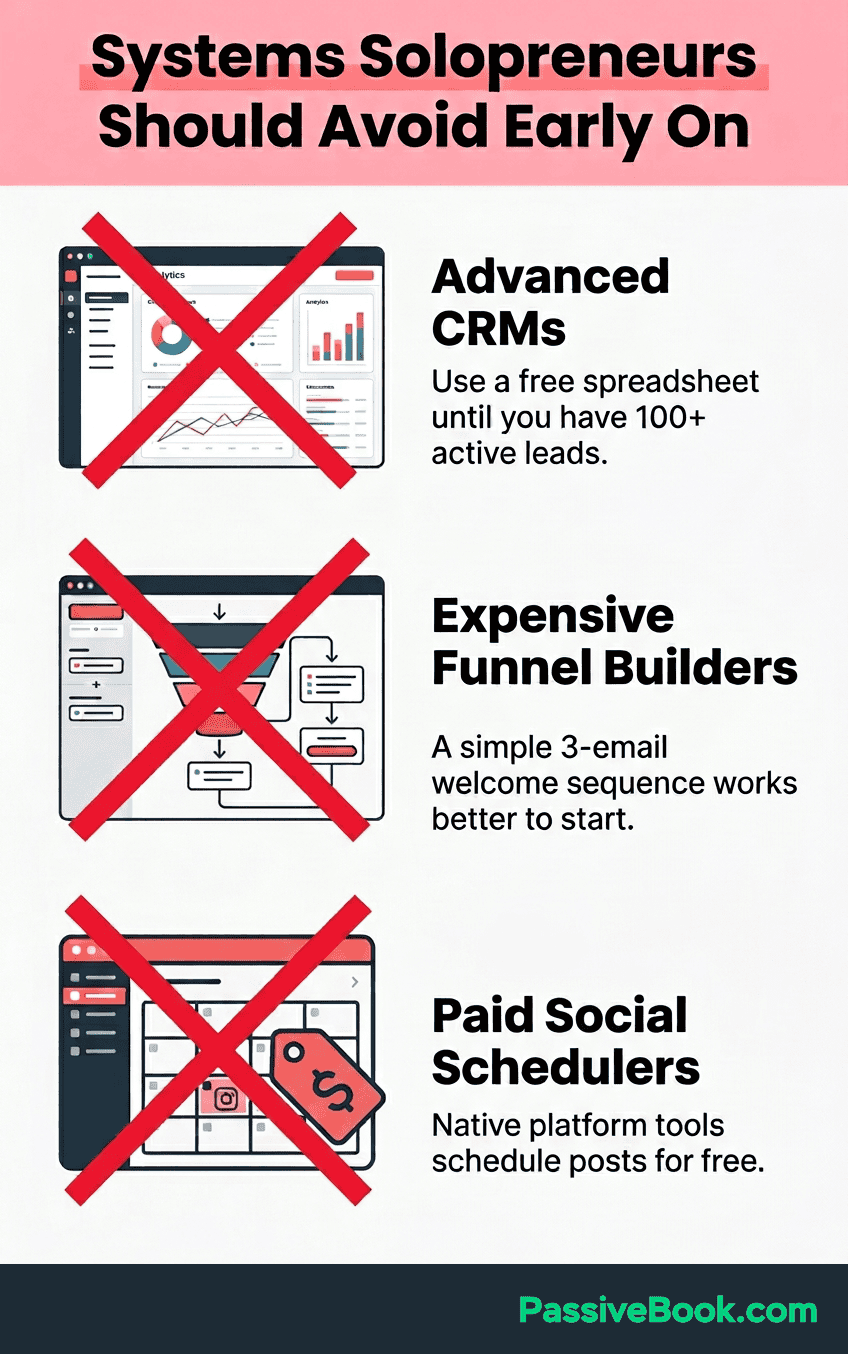
Paid social media schedulers when native platform tools handle 95% of scheduling needs drain budgets unnecessarily. Meta Business Suite schedules Facebook and Instagram posts for free. Pinterest native scheduler is built-in. TweetDeck for X/Twitter works. YouTube Studio offers free scheduling.
Tailwind‘s Pro plan costs $19.99 monthly for Pinterest scheduling. Pinterest’s native scheduler offers the same core scheduling functionality for free. This saves you $240 annually for your side hustle budget.
Example workflow without paid tools: Batch-create 30 Pinterest pins in Canva on Sunday afternoon. Upload all 30 to Pinterest’s native scheduler. Distribute them throughout the month. Zero monthly fees, same result.
When to Upgrade From Free to Paid Plans
You consistently hit limits for subscriber caps, storage, or automation runs for 2+ months straight. One month hitting limits might be a fluke. Three months means you’ve outgrown the free tier.
That manual workaround? It’s now eating 3+ hours monthly. If the paid plan costs $20 to eliminate that friction, and your time is worth more than $6.67/hour, upgrade.
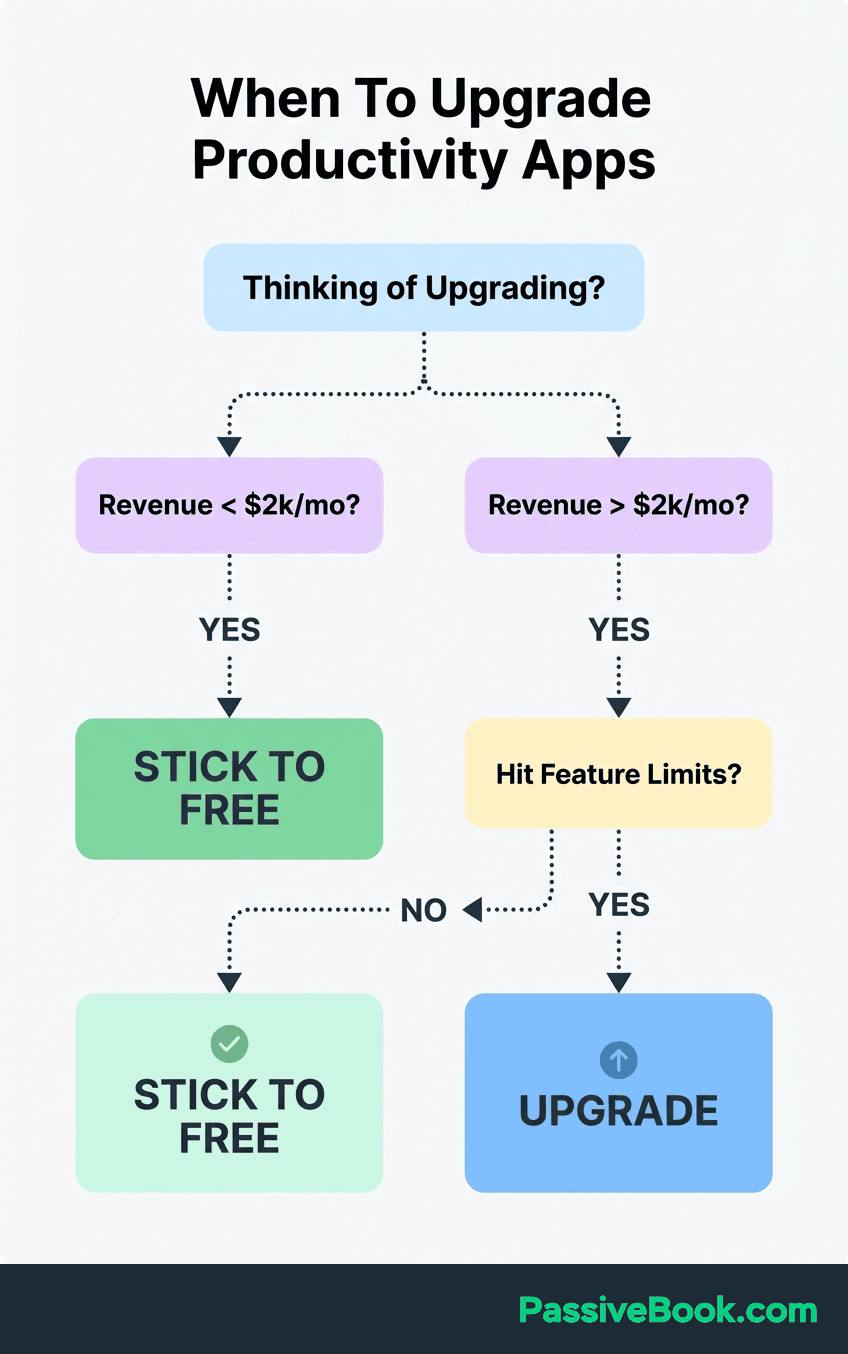
Your revenue justifies it. Never upgrade on hope or “future scaling” alone. If you’re making $500 monthly, spending $100 on tools leaves you with $400. That math doesn’t work.
One critical feature is blocking a proven revenue activity. “I want” doesn’t count. “I can’t ship without” does.
How to Avoid System Lock-In and Protect Your Business
Own your email list by exporting subscriber data monthly from any platform. Kit, MailerLite, FluentCRM all allow CSV exports. If pricing changes or the platform shuts down, you can migrate without losing your audience.
Avoid proprietary formats and use standard tools like WordPress, Stripe, and Gmail instead of all in one platforms. Easier to switch components without rebuilding everything. All-in-one platforms create dependency you’ll regret later.
Specific platforms that create the most lock-in risk: Kajabi (custom course format, expensive exports), Clickfunnels (entire funnel structure tied to their builder), Kartra (all-in-one means all-or-nothing migration). I’m not saying never use them. Just know that switching away later will hurt. WordPress + Stripe + FluentCRM gives you 90% of the functionality with 10% of the lock-in risk.
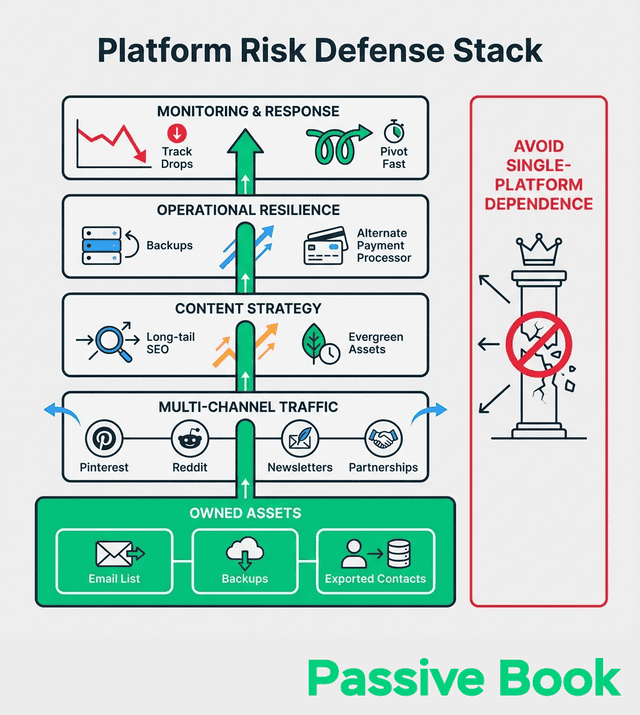
Store customer data in Google Sheets as a backup. Free, always accessible, and can be imported into any future CRM if you need to switch. Add a row every time someone purchases. This backup has saved my business twice when platforms had outages.
Test automations weekly by setting up a test email address. Run through your entire signup-to-purchase flow monthly to catch broken integrations before real customers hit them. I learned this after a payment integration broke for two weeks without me noticing. Lost sales hurt.
Document your systems in Notion. Screenshot each automation workflow, note which tools connect to what, and store login credentials in a password manager like Bitwarden free version. Future you will thank past you when something breaks at midnight before a launch.
Frequently Asked Questions
What’s the Absolute Minimum System Stack to Start?
Email platform plus payment processor plus one landing page covers everything you need to make your first sale. Kit free tier, Stripe free account, and Carrd at $19 yearly totals under $25 for the first year. Everything else is optional until you’re consistently generating revenue and have validated customer demand.
Should I Use WordPress or a Platform Like Teachable?
WordPress gives you full control and lower long-term costs but requires more initial setup time. Teachable handles everything but takes platform fees and locks you into their ecosystem. Start with Teachable if you need to launch in one week and have zero technical skills, then migrate to WordPress once you’re making $1,000+ monthly and the platform fees hurt.
Can I Really Run a Six-Figure Business on Free Tools?
I’ve watched creators build six-figure newsletters on Convertkit’s free tier. Hell, I ran on free email tiers for 8 months before hitting 1,000 subscribers. The tools don’t determine your revenue ceiling. Your offer quality and marketing effectiveness do. Free tools just mean you keep more profit when you succeed.
How Do I Know If Free Tiers Are Enough or If I Need Paid Plans?
Track when you hit usage limits for three consecutive months. That’s your signal to upgrade. If you’re constantly deleting old contacts to stay under the free tier limit, or manually doing tasks the paid version automates, run the math on your hourly rate versus the upgrade cost.
What’s the Biggest System Mistake New Solopreneurs Make?
Building complex automation before validating your offer actually sells wastes weeks you could spend finding customers. I spent a month perfecting an elaborate email funnel for a course that got two signups total because I never tested if people wanted it.
When Should I Invest in Paid Automation Tools?
Only after you’ve done the manual process at least 10 times and documented exactly what needs to happen at each step. Automating broken processes just creates broken automation faster, and you’ll spend more time fixing it than you would doing the task manually.
How Many Tools Is Too Many for a Solopreneur?
If you can’t remember what half your subscriptions do without logging in to check, you have too many. I learned this when I found a $29/month charge for a tool I forgot I signed up for during a launch in 2019. Three years of payments for zero usage. Don’t be me.Most profitable solopreneurs run on 5-8 core tools maximum, with each one serving a clear, irreplaceable function in their daily workflow.
Should I Build Systems Before or After Getting Customers?
Build the absolute minimum to process your first sale. Payment processor, delivery method, basic email confirmation. Everything else waits until you have 10+ paying customers proving demand exists, then systematize based on what’s actually taking up your time.
What Next?
You now have a complete roadmap for building systems for online solopreneurs without wasting money on tools you don’t need. Start with the 7-day setup sequence this week. Set up Stripe on Day 1, choose your email platform on Day 2, and build your first landing page by Day 3.
Running a side business while working full-time is challenging. The right systems multiply your limited hours instead of creating more busywork. Don’t feel pressured to implement everything at once. Focus on the three essential systems first, then expand only when revenue justifies it.
If this guide helped you avoid wasting hundreds on unnecessary subscriptions, share it using the buttons below. Other solopreneurs need to see this before they make the same expensive mistakes. Drop a comment telling me which system you’re setting up first this week. I read every single one and often reply with specific suggestions for your situation.
Share this post with your friends & followers: