I spent two years running a membership site while working a full-time corporate job. Every Sunday, I’d wake at 5 AM to batch-create content. By month four, I was creating decent material, but the manual work crushed me. Uploading videos, scheduling emails, posting social updates, answering the same questions over and over. I shut it down after six months because the content treadmill was unsustainable. The problem wasn’t the business model. It was that I never automated the repetitive tasks surrounding my creative work.
You don’t need a tech background or a $500/month software budget to automate. The tools in this guide start at $0 and require zero coding skills. If you can follow a recipe, you can build these workflows. This is not complicated. It’s just new.
Using automation to save time for online entrepreneurs is not about replacing your voice or outsourcing strategy. It’s about removing the mechanical steps that drain your limited hours. The bloggers, course creators, and store owners who succeed as solopreneurs don’t work more hours. They automate smarter. This guide will show you exactly which tasks to automate first, which free and low-cost tools to use, and how to reclaim 10+ hours every week without a tech background or big budget.
What Is Business Automation for Online Entrepreneurs?
Automation means software completes your repetitive tasks automatically, without manual effort each time. You set up the process once, and the system executes it on your behalf from that point forward. A new subscriber joins your email list. A welcome sequence fires immediately. You publish a blog post. It auto-shares to three social platforms. Someone buys your digital product. The download link arrives in their inbox within seconds.
It runs on a trigger-action model. A defined event happens, and a pre-configured response executes automatically. The trigger might be a form submission, a purchase, a calendar date, or a new row added to a spreadsheet. The action might be sending an email, creating a task, posting to social media, or updating a database. You’re not coding logic from scratch. Modern automation tools like n8n provide visual interfaces where you select apps and define the steps.
Automation is not a replacement for your creativity or voice. It removes the mechanical steps surrounding your creative work. You still write the email copy, design the social graphics, and plan the content calendar. Automation reduces the distribution burden, handles follow-ups automatically, and eliminates data entry. This distinction matters because many solopreneurs resist automation, fearing it will make their business feel robotic.
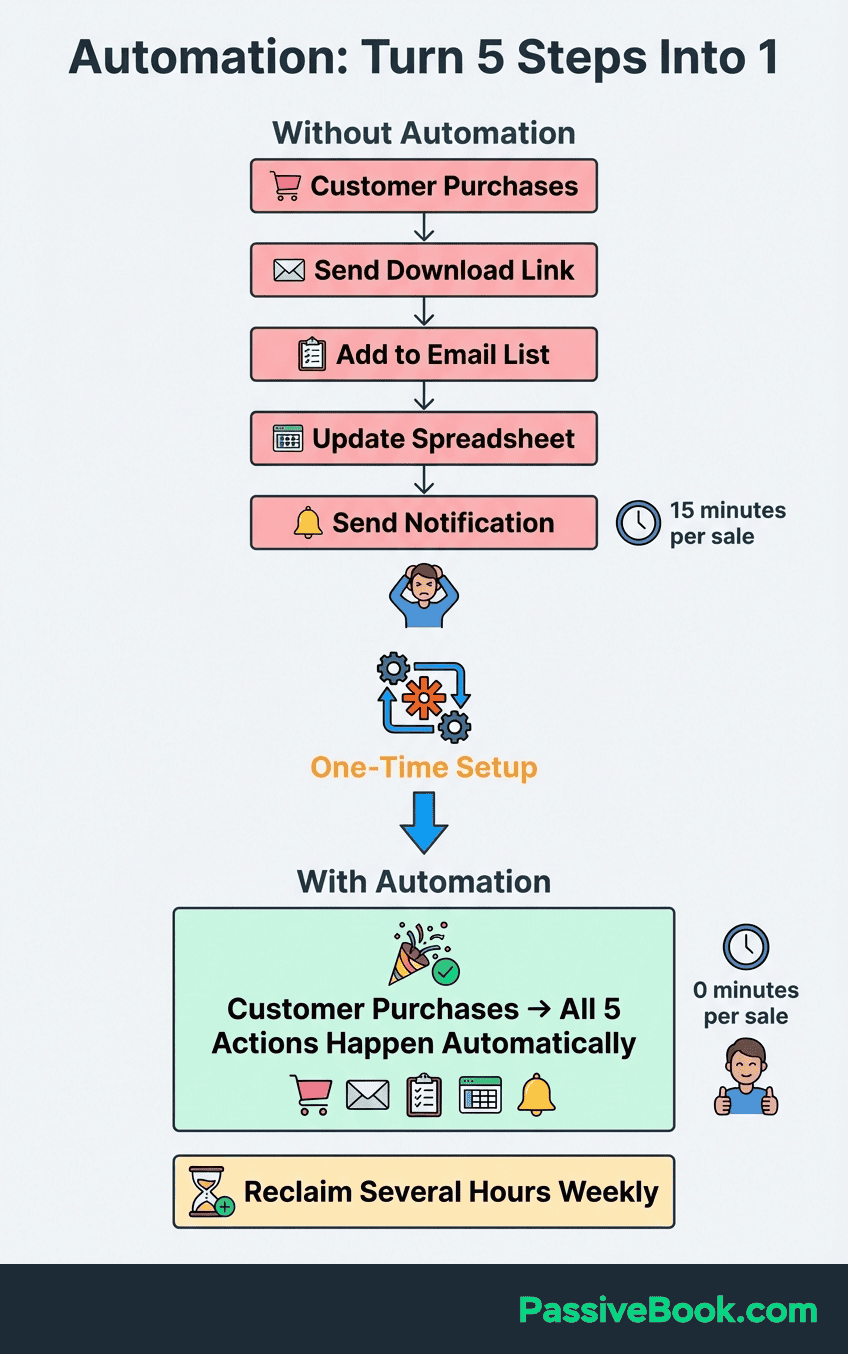
The opposite is true. When you’re not buried in manual tasks, you have more energy for the creative work that builds real connection with your audience. Though I’ll admit, my first automated email sequence had a typo in the subject line that went out to 200 people. Automation doesn’t fix careless copy.
The barrier for most online entrepreneurs is not technical complexity. It’s knowing where to start. Which tasks are worth automating first? Which tools are reliable without breaking your budget? The answer depends on your business model, but the underlying principles apply universally. Automate high-frequency, low-thinking tasks before anything else. Start with free tiers to prove the value before paying for premium features. Build simple workflows first, then layer complexity as your confidence grows.
A realistic starting point for most solopreneurs is three core automations. First, connect your email opt-in form to your email marketing tool so new subscribers enter a welcome sequence automatically. Second, schedule social media posts in advance so you’re not logging in daily to share content. Third, link your sales platform to your email tool so buyers receive onboarding sequences and are removed from promotional lists. These three workflows alone can save 8 to 12 hours per week once they’re running smoothly.
The Real Cost of Running Your Online Business Manually
I used to draft blog posts in Google Docs, copy them into WordPress, format the headings manually, upload images one by one, write the meta description, schedule social shares in three separate platforms, then paste the URL into my email newsletter template. Every single post. The writing took two hours. The distribution took another 90 minutes. I was spending more time on mechanical tasks than creating content. That’s not a sustainable business. That’s a second job you’re paying yourself nothing to do. And you can’t even put it on your LinkedIn.
According to Zapier’s automation report, solopreneurs and content creators save an average of 25 hours per week using automation tools, based on research with marketing professionals. Even HR teams save 8 hours weekly. This confirms that 10+ hours is a realistic, conservative target for solopreneurs running content-based or ecommerce businesses. The time cost is only the surface problem. The hidden cost is compounding. Drained creative energy leads to inconsistent output. Inconsistent output leads to missed follow ups , erratic posting schedules, and eroding reader trust.
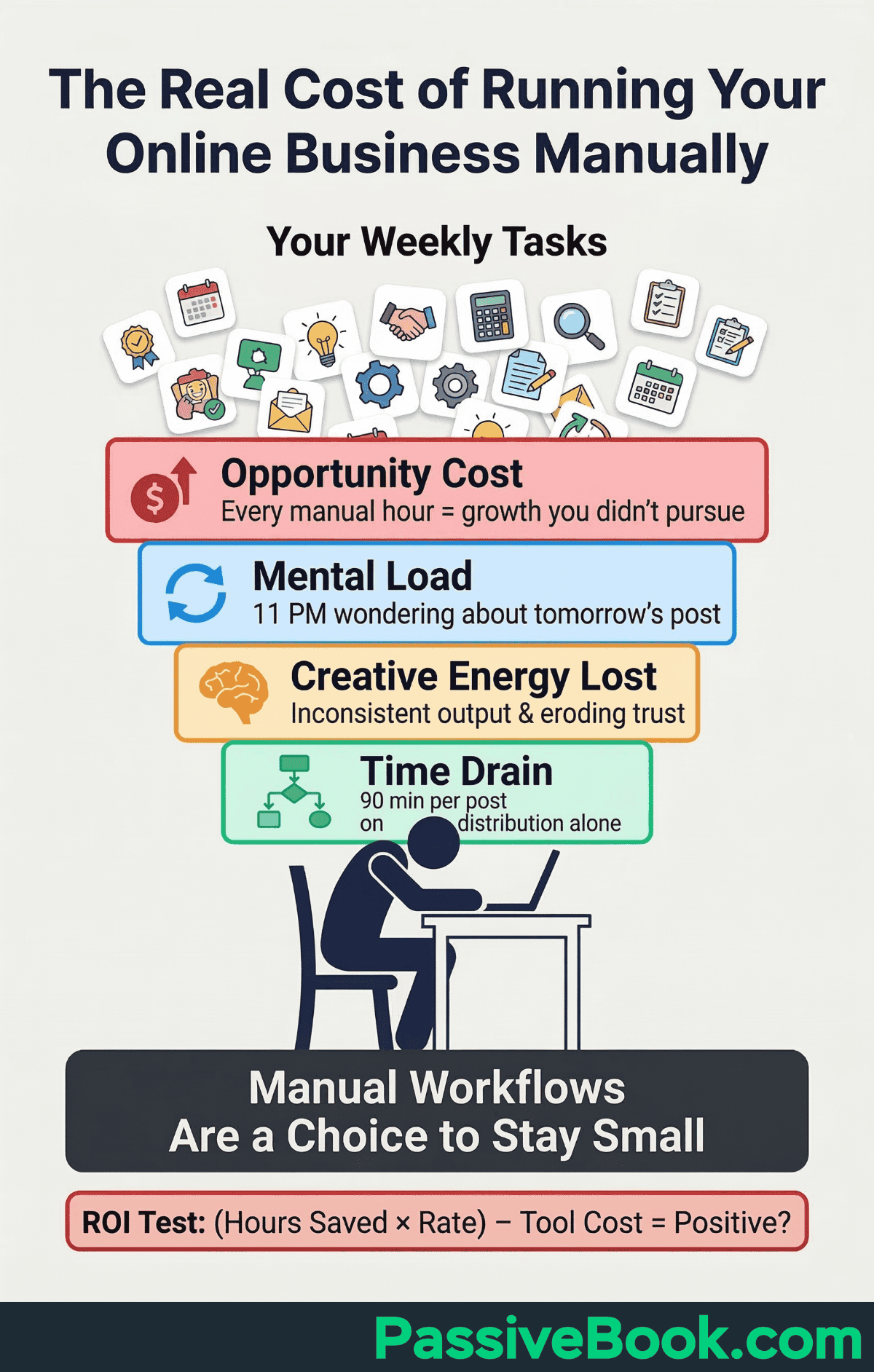
Chaotic manual processes don’t just slow you down. They create messy, inconsistent data that breaks automated workflows when you finally try to implement them.
The most expensive cost is opportunity cost. Every hour spent on manual grunt work is an hour you didn’t spend creating content that attracts new readers, testing a new product idea, or building relationships with your audience. You can’t buy more time. You can only choose how to allocate the limited hours you have. Manual workflows are a choice to stay small.
The Automation Audit: Identifying the Right Tasks to Automate First
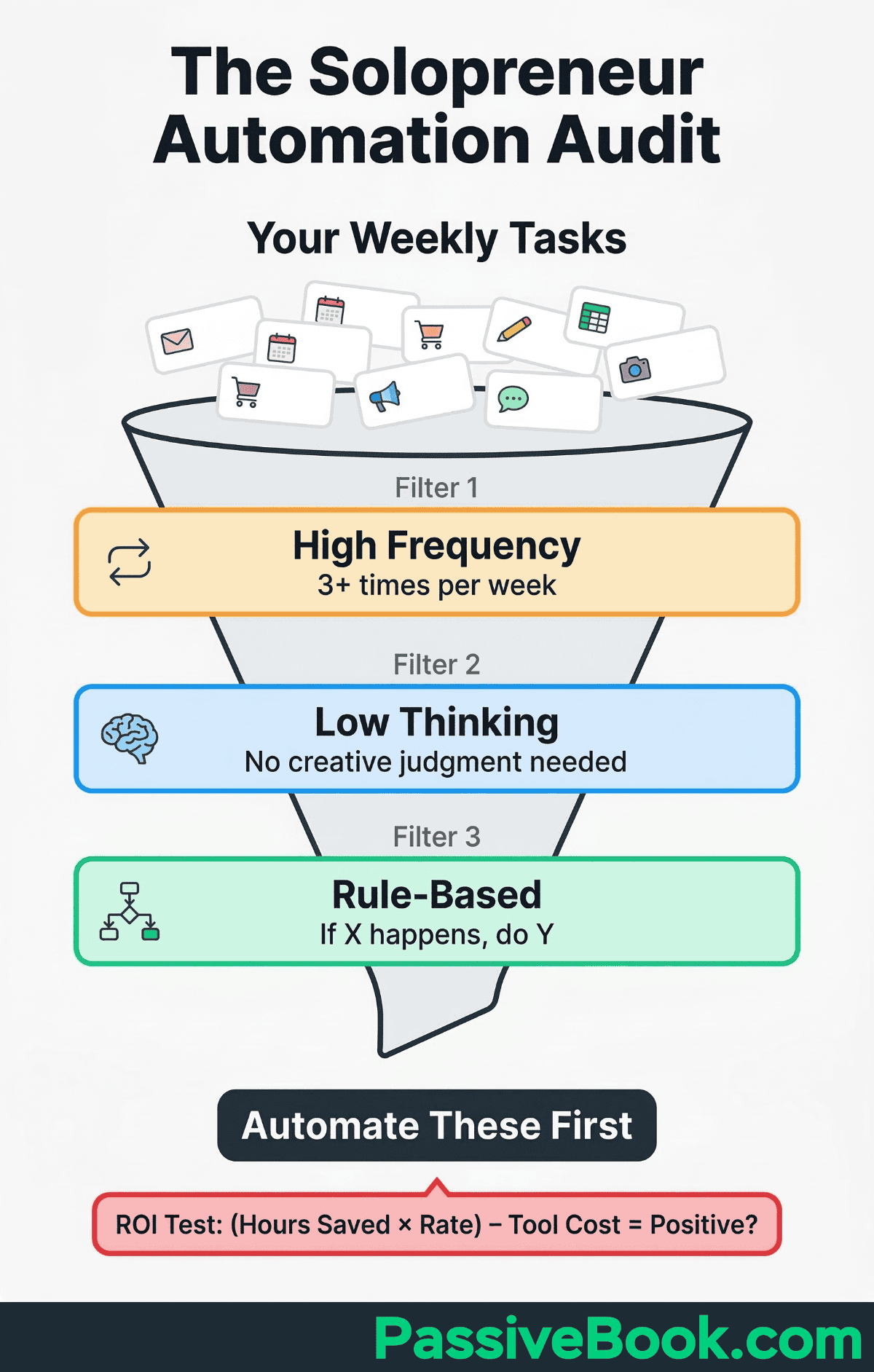
Before buying any tool, list every task you repeat more than three times per week. Open a simple Google Doc or Notion page and brain-dump your weekly workflow. Publishing a blog post. Sending a newsletter. Responding to common customer questions. Posting to Instagram. Updating your inventory spreadsheet. Sending invoice reminders. The goal is not to automate everything on this list. The goal is to see the full picture so you can prioritize ruthlessly. Mine was a mess. 47 recurring tasks, and half of them were things I could have deleted entirely.
Filter ruthlessly: focus on tasks that are high-frequency, low-thinking, and rule-based. These deliver the fastest return on your setup time. High-frequency means you do it at least three times per week. Low-thinking means the task requires no creative judgment once the decision tree is defined. Rule-based means the logic can be articulated as “if X happens, do Y.” Scheduling social posts fits this filter perfectly. Writing the social post copy does not. Tagging email subscribers based on which lead magnet they downloaded fits this filter. Deciding your content strategy does not.
Many solopreneurs mistakenly automate tasks that are one-time projects, not recurring work. Setting up your privacy policy page feels repetitive because you keep procrastinating on it, but it’s a single task. Automation tools won’t help. Similarly, don’t automate a process you haven’t validated manually first. If you’re still experimenting with your email welcome sequence and changing the copy every week, automating it will just lock in a mediocre version.
Run the manual workflow at least 10 times before building the automation. Automating follow ups too early – before you’ve validated your messaging – often backfires. Test manually first.
Use a three-column worksheet: Trigger | Action | Outcome. Fill one row per handoff. Example: New subscriber joins | Email tool sends welcome message | Subscriber receives the message and is tagged. Add the tool, expected success signal, and data passed forward to each row so gaps are visible before you configure anything.
Run a complete test journey with a test address or record: trigger it, inspect each message and field, verify final delivery, and record the expected timing. Then perform one safe failure test, such as a missing file or invalid address, to confirm the error is logged, the alert reaches you, and a manual fallback is documented for critical work.
Before building any workflow, apply the Automation ROI Test. The formula is simple: multiply the hours saved per month by your effective hourly rate, then subtract the monthly tool cost plus your setup time amortized over six months. If the result is negative, skip it.
Example: an n8n workflow saving 30 minutes per week equals 2 hours per month. At a $25 notional hourly rate, that’s $50 per month in recovered time. Even on n8n‘s cloud plan at $20 per month, the ROI is positive. A workflow saving 5 minutes per week is not worth a 4-hour setup unless you’re building infrastructure for future growth.
The best first automation for most online entrepreneurs is the one causing the most weekly frustration. Start where the pain is sharpest. The momentum from solving your most annoying problem will carry you through setting up the rest.
Your Free & Low-Cost Automation Toolkit
Most solopreneurs believe automation requires expensive enterprise software. That misconception keeps many running manual workflows far longer than necessary. A fully functional paid stack costs approximately $15 to $20 per month total. n8n self-hosted on a $5 to $10 per month server and MailerLite Growing Business at $10 per month. Social media scheduling is free using each platform’s native tools.
You can start with $0 per month by using free tiers strategically. The free plans have real limitations, but they’re sufficient to prove value before upgrading. You’ll know within two weeks whether an automation is saving you meaningful time.
At that point, paying $9 per month feels like a bargain, not an expense. The psychology shifts from “Can I afford this tool?” to “Can I afford to keep doing this manually?”
The tools in this section are chosen specifically for budget-conscious creators running small online businesses. They integrate with platforms like WordPress, Shopify, Etsy, Gumroad, and Teachable. They don’t require coding skills or technical support contracts. If you can follow a recipe, you can build these workflows.
n8n: Your Open-Source Automation Engine
n8n is an open-source workflow automation tool with a powerful visual canvas builder. You drag and drop nodes onto a canvas, connect them, and configure each step. The interface shows your workflow as a flowchart, making multi-step logic easy to visualize. Adding conditional branches, loops, or multiple actions triggered by the same event is straightforward. You’ll build your first working workflow in under 30 minutes.
n8n offers two deployment options. The cloud-hosted plan starts at $20 per month and includes managed hosting, automatic updates, and support. The self-hosted option is completely free — you run it on your own server, typically a $5 to $10 per month DigitalOcean droplet or similar VPS. I use n8n self-hosted for Passive Book’s content workflows because I value full control and avoid per-execution pricing. The self-hosted route requires basic server management skills, but the community documentation is excellent.
The key advantage over proprietary alternatives is pricing transparency. There are no per-task or per-operation fees that scale unpredictably as your business grows. Whether your workflows run 100 times or 10,000 times per month, your cost stays the same. For solopreneurs managing multiple content platforms, this predictability matters.
n8n’s community library includes hundreds of pre-built workflow templates for common tasks like social media scheduling, email automation, and data syncing. You can import a template, customize it for your specific apps, and have a production-ready workflow running in under an hour. The learning curve is slightly steeper than simpler tools, but the payoff is significantly more powerful and flexible automations without recurring per-task costs.
Email Automation with MailerLite or Kit
MailerLite’s free plan supports up to 500 subscribers with full automation sequences and landing pages. This is enough to launch a complete welcome series for a new blog or digital product. The automation builder uses a visual flowchart where you drag and drop triggers, delays, conditions, and email blocks. You can segment subscribers based on actions they take, like clicking a specific link or opening an email within 24 hours.
Set up a 3 to 5 email welcome sequence once, and it automatically nurtures every new subscriber without any further effort from you. The first email delivers the lead magnet they requested. The second email arrives 24 hours later with a personal story and a call to read your most popular content. The third email offers a low-cost product or asks for a reply to build engagement. Once the automation is live, you can add 100 subscribers or 1,000 subscribers, and each person receives the same high-quality onboarding experience.
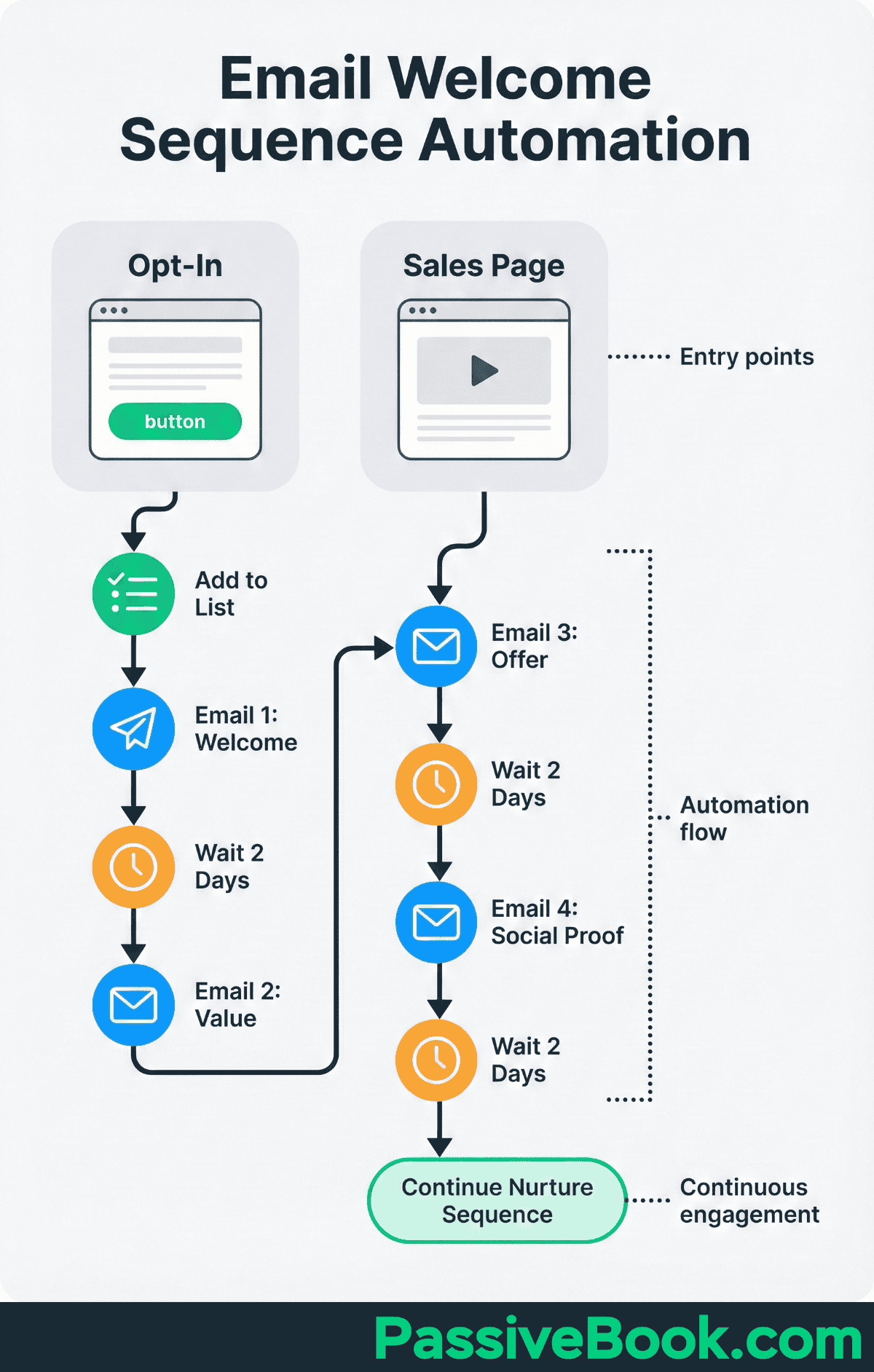
For solopreneurs who need advanced tagging, Kit, formerly Convertkit, is the preferred alternative for bloggers and course creators needing paid newsletter features. Kit’s free plan supports up to 10,000 subscribers but limits some automation features. The paid Creator plan starts at $9 per month for up to 300 subscribers and unlocks automated funnels, advanced reporting, and the ability to sell paid subscriptions directly through the platform. Kit’s strength is its creator-first design. The interface assumes you’re building an audience through content, not running ecommerce promotions.
I use FluentCRM on Passive Book because it’s self-hosted on WordPress and has no per-subscriber pricing. Once you pay for the plugin license, you can have 500 subscribers or 50,000 subscribers at the same cost. For solopreneurs just starting, MailerLite‘s free tier is the smarter choice. You can always migrate later if you outgrow the limits. Switching email platforms is tedious but not technically complex. Most tools provide CSV export and import features.
The single most valuable email marketing automation is the post-purchase sequence for digital product buyers. When someone buys your course or ebook, they should automatically receive a series of emails over the next 7 to 14 days. The first email confirms the purchase and provides access. The second email checks in after 48 hours to answer common questions. The third email shares a case study or testimonial.
This sequence builds buyer confidence, reduces refund requests, and improves overall customer experience without you lifting a finger after the initial setup. It leads to repeat purchases automatically.
Social Media Scheduling with Free Native Tools
Every major social platform offers free built-in scheduling. You don’t need to pay for a third-party tool just to queue posts.
Meta Business Suite handles Facebook and Instagram scheduling for free. You create posts, reels, and stories directly in the dashboard, pick your publishing time, and the platform handles distribution. No third-party app needed. The interface also includes basic performance analytics, so you can see what’s working without paying for a reporting tool.
Pinterest’s native scheduler lets you create and schedule pins directly on the platform for free. You upload your image, write the description, choose a board, and set the publish date. There’s no reason to pay for Tailwind just to schedule pins. Pinterest’s built-in analytics show impressions, saves, and click-throughs. For bloggers driving traffic through Pinterest SEO, the native tools are more than sufficient.
TweetDeck, now X Pro, provides free scheduling and management for Twitter/X. You can compose tweets, schedule them for specific times, and monitor multiple columns of activity simultaneously. It’s built directly into the X ecosystem, so there’s no integration to configure.
YouTube Studio includes free video scheduling. Upload your video, set the title, description, tags, and thumbnail, then choose a publish date and time. The video goes live automatically. Every YouTuber already has access to this. No additional tool required.
For complex multi-platform scheduling workflows, use n8n. When you need conditional logic, cross-posting rules, or automated repurposing across channels — like automatically generating social snippets from a new blog post and distributing them to multiple platforms with different formatting — n8n connects directly to platform APIs. This is the power-user option for solopreneurs who’ve outgrown manual scheduling and want full control over their distribution pipeline.
The principle is simple: use the free tools each platform already gives you for basic scheduling. Graduate to n8n when your workflows require automation logic that native schedulers can’t handle.
Automation Workflows for Bloggers and Content Creators
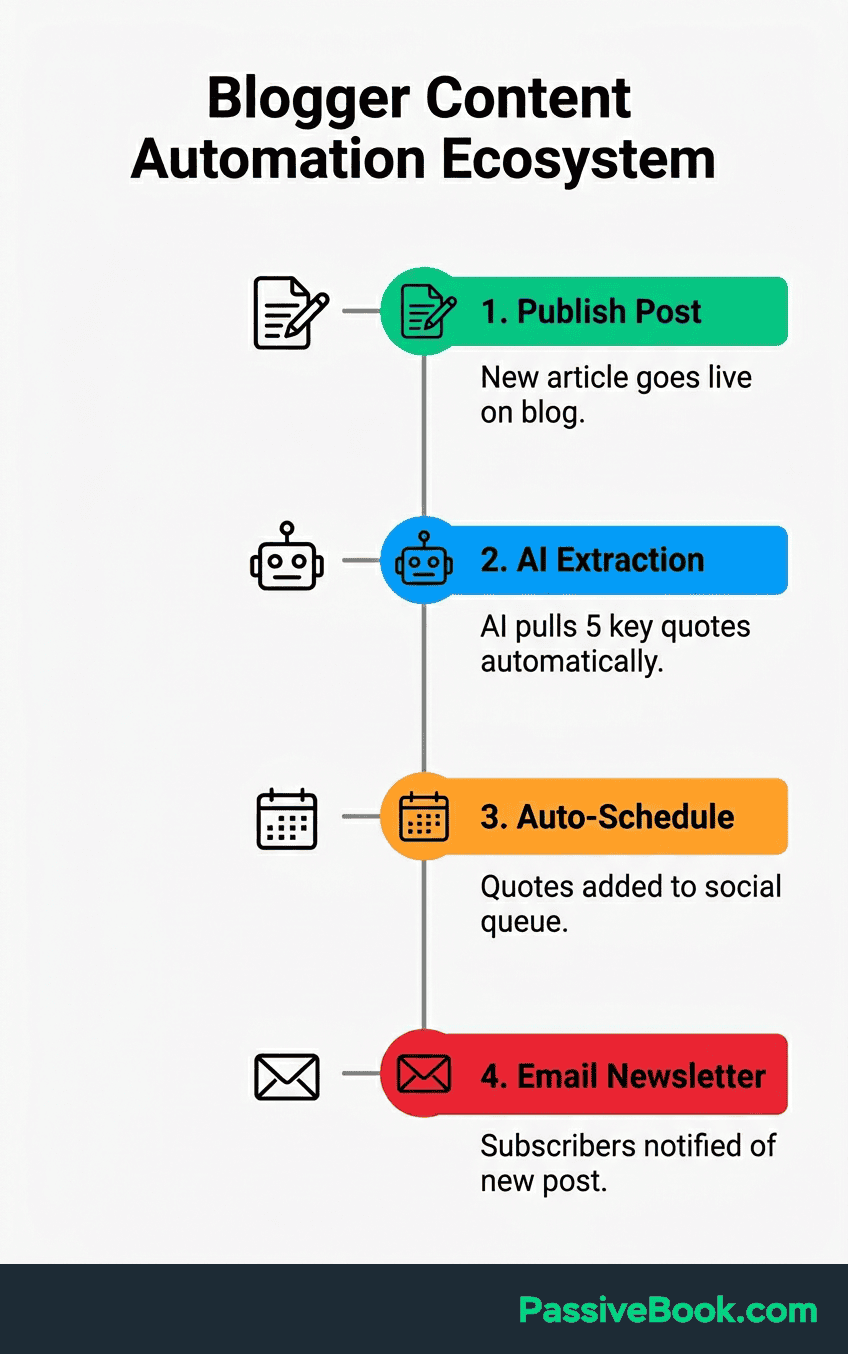
The most immediate time-saver for bloggers is auto-sharing new posts to social media the moment they publish. Use n8n to connect your WordPress site directly to Twitter, LinkedIn, Facebook, and Pinterest. The trigger is “New Post Published in WordPress.” The action is “Post Tweet” or “Create Facebook Post.” You write the social caption template once, using placeholders like post title and post url. Every time you hit publish, the workflow fires and your content distributes automatically. This two-step workflow saves 15+ minutes per post and ensures you never forget to promote new content. Which, over 52 posts a year, is 13 hours I’d rather spend writing than scheduling.
Content repurposing multiplies your effort automatically. When you publish a long-form blog post, you can automatically extract key quotes or sections and format them as social media snippets. n8n can trigger on new WordPress posts, send the content to an AI tool like ChatGPT via API, and generate 5 tweet-sized takeaways.
Those generated snippets can then populate a Google Sheet or feed directly into your scheduling queue via each platform’s native tools or n8n. This workflow turns one piece of content into a week of social posts with zero manual effort after the initial setup.
Udemy course creator Mary J. Schiller documented how Descript cut her audio and video editing time by 80%. This is a directly applicable result for any solopreneur producing video or podcast content. Descript transcribes your recording automatically, allows you to edit the video by editing the text transcript, and removes filler words with one click. For a YouTuber producing weekly videos, this can reclaim 4 to 6 hours per week. The tool costs $12 per month for the Creator plan, making the ROI calculation straightforward: if it saves you even 3 hours monthly, you’re recovering time worth far more than the subscription fee.
Bloggers often overlook Pinterest as an automation opportunity. Pinterest functions more like a search engine than a social platform, making it ideal for automated distribution. Pinterest’s native scheduler lets you create and queue pins linked to your blog posts for free, and the platform publishes them at your chosen times. You batch-design 20 to 30 pins in Canva during one session, upload them directly to Pinterest, and schedule them across the coming weeks. This is particularly effective for evergreen content in niches like recipes, home decor, personal finance, or DIY tutorials.
Automation Workflows for Ecommerce, Dropshipping, and Print-On-Demand
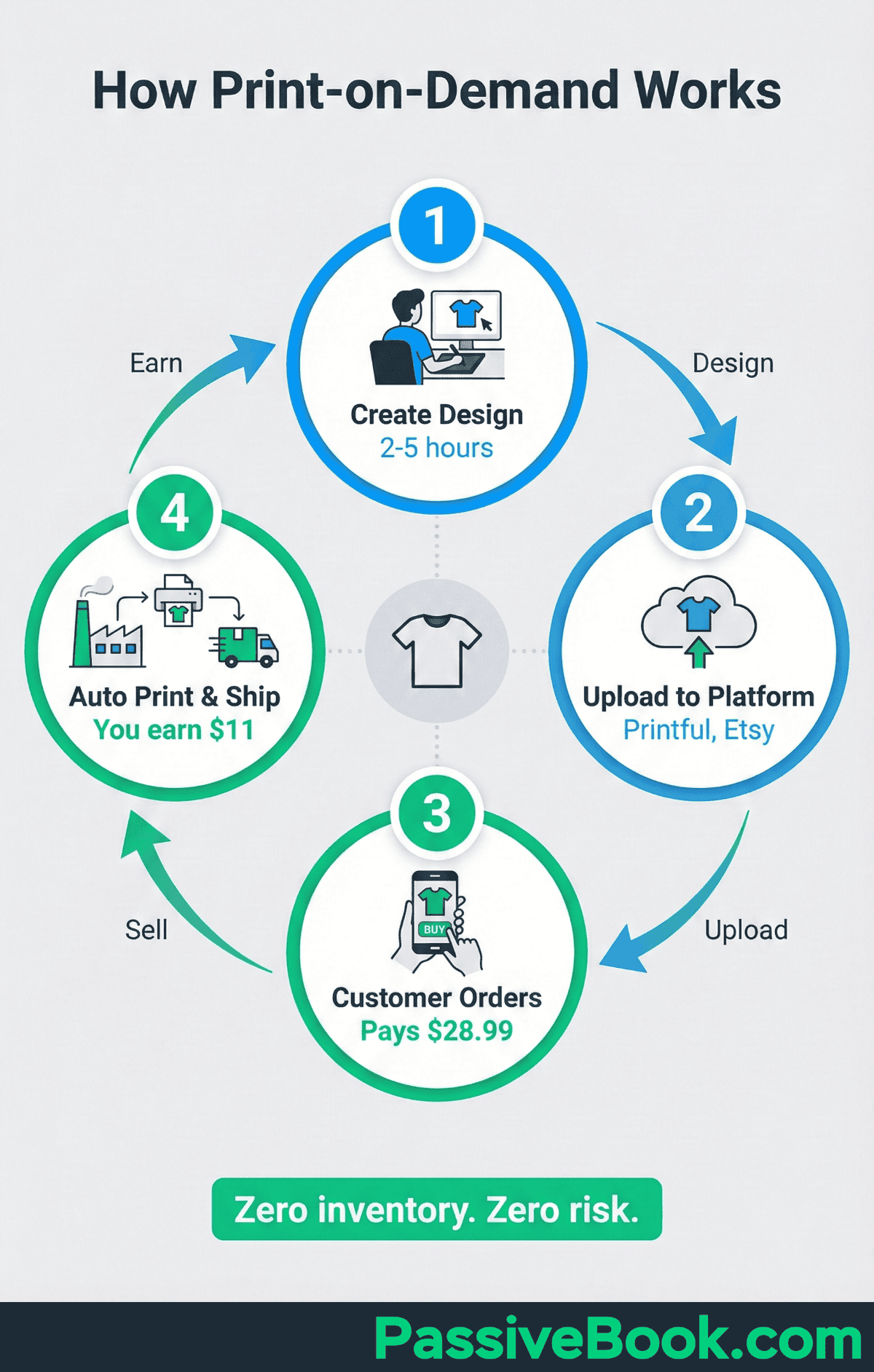
Got Funny, a solo-founded print-on-demand brand, scaled to over $1M in sales using Printful integrated with Shopify. The founder handles zero shipping logistics. A customer places an order on the Shopify store, and Printful‘s integration automatically receives the order details, produces the custom apparel, and ships directly to the buyer. The store owner’s role is designing products and driving traffic. Fulfillment runs on autopilot. Assuming your designs don’t suck, obviously. Automation can’t fix bad taste.
Shopify Flow is free on all Shopify plans starting at $39 per month. It automates order tagging, low-stock alerts, customer segmentation, and abandoned cart recovery directly from your store dashboard. You don’t need n8n for basic ecommerce workflows if you’re already on Shopify. A common Flow automation: tag high-value customers automatically when their lifetime order total exceeds $500, then move them into a VIP email segment. Another: send yourself a Slack notification when inventory for a best-selling product drops below 10 units.
Printful integrated with Shopify or Etsy automatically receives, produces, and ships every order. The integration syncs product details, pricing, and mockups. When an order is placed, Printful generates the production file, prints or embroiders the item, packs it, and sends tracking information back to your store. The customer experience is seamless. They receive branded packaging and tracking updates as if you fulfilled the order yourself. Your involvement is zero after the initial product setup.
Customer service questions? Automate those too. Many ecommerce platforms now offer AI-powered chatbots that handle order status questions, return policy explanations, and size guide requests automatically. Automated customer service handles 40 to 60% of routine inquiries without human intervention, freeing you for complex issues. Shopify‘s Inbox app includes basic automated responses. Tools like Tidio or Gorgias provide more advanced chatbot workflows. A well-configured chatbot dramatically improves customer experience while automation reduces your manual support workload.
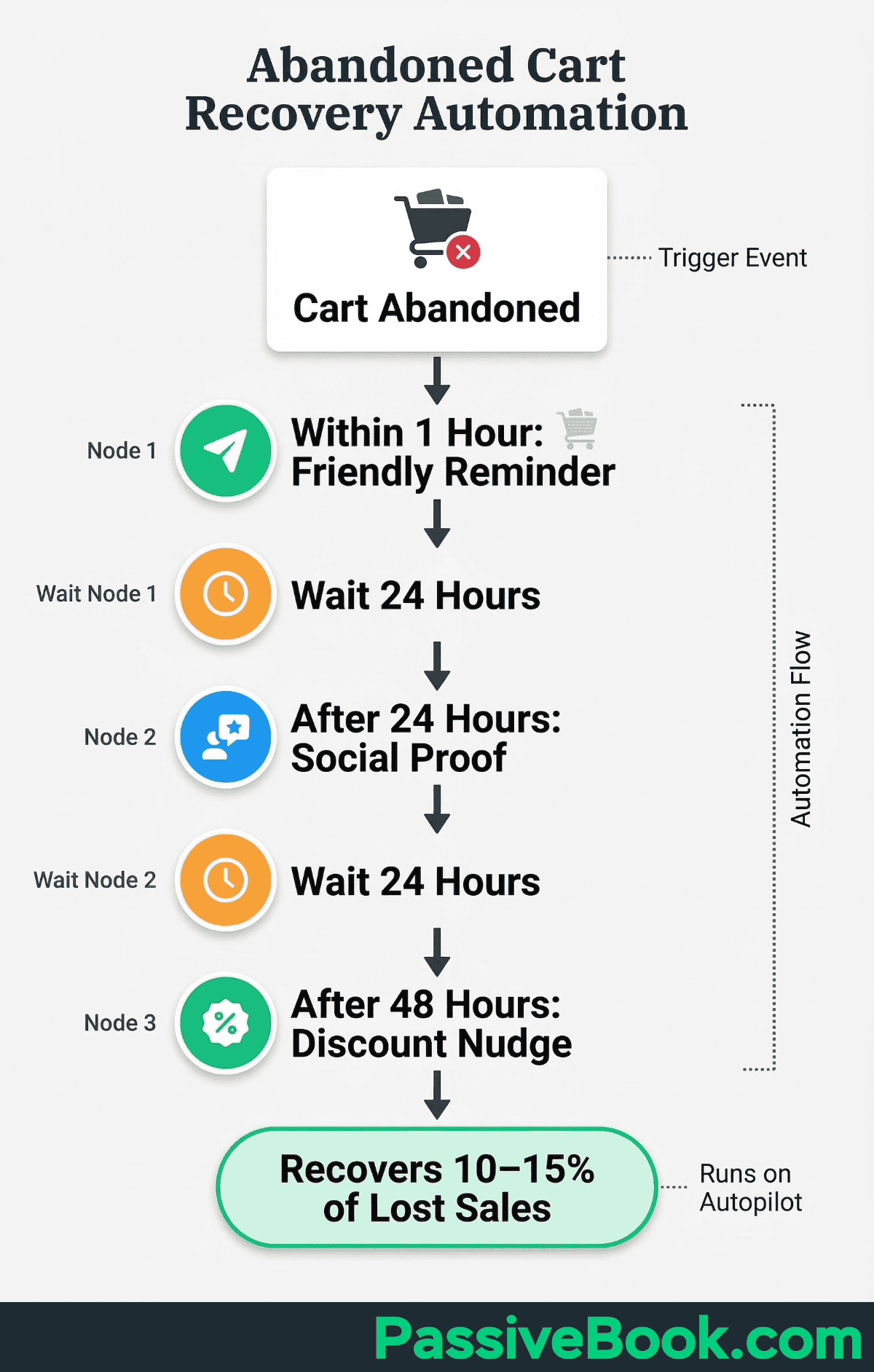
Abandoned cart recovery is one of the highest-ROI automations for any online store. When someone adds items to their cart but doesn’t complete checkout, an automated email sequence can recover 10% to 15% of those lost sales. The first follow up sends within 1 hour: a friendly reminder with a direct link back to their cart. The second follow up sends after 24 hours: social proof or a customer testimonial. The third email sends after 48 hours: a small discount code as a final nudge. These automated follow ups run entirely on autopilot through Shopify‘s built-in email tool or your connected email marketing platform.
Automation Workflows for Online Course and Digital Product Sellers
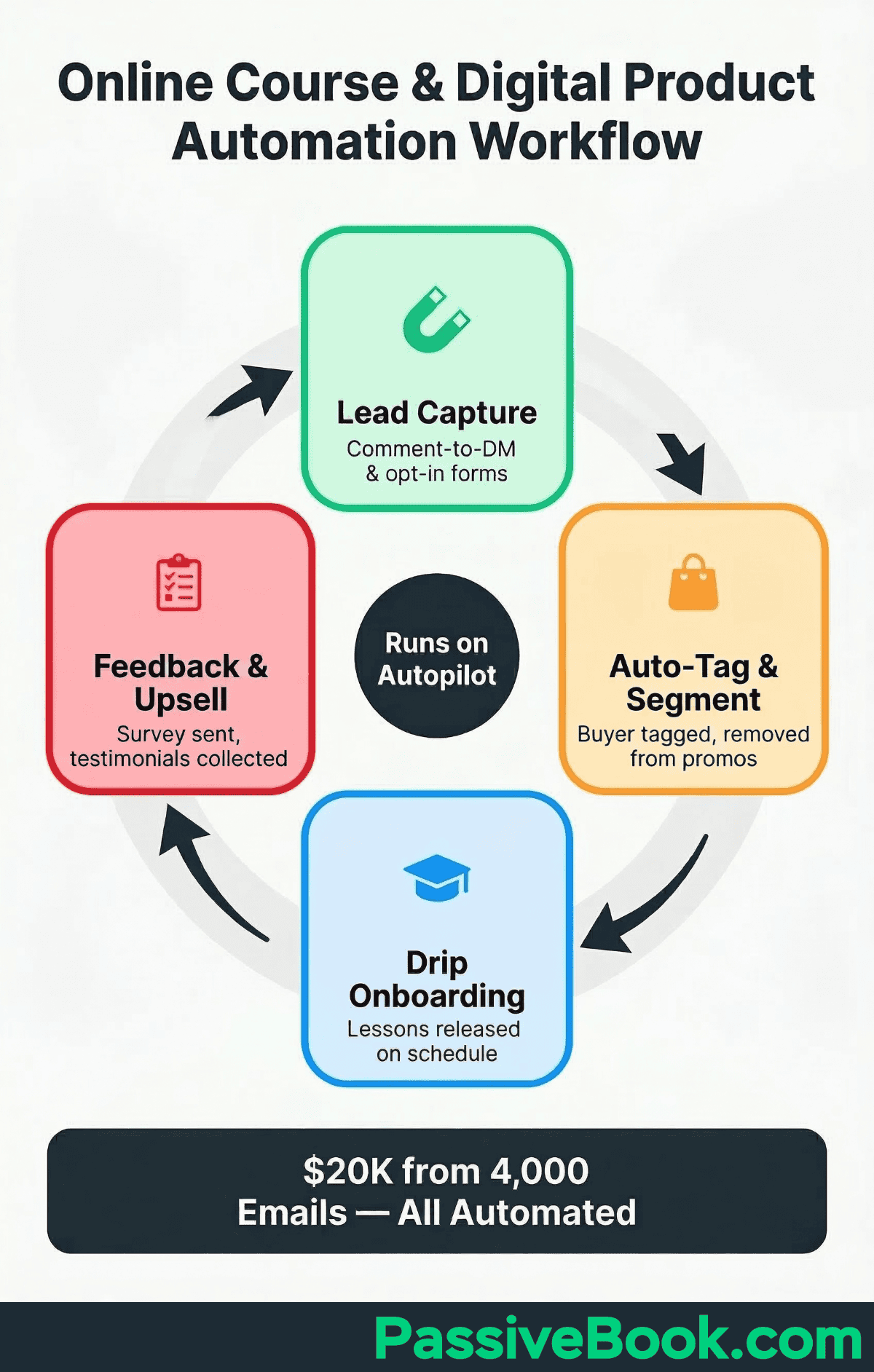
A course creator documented on CreatorFlow generated $20,000 in sales from 4,000 emails collected via automation. The workflow used Instagram comment-to-DM automation: when someone commented a specific keyword on a post, they automatically received a direct message with a link to the lead magnet opt-in page. This illustrates how a connected, automated delivery system converts buyers at scale. The same principle applies across platforms. A simple automation capturing leads and delivering value immediately will always outperform manual follow ups that happen inconsistently.
Connect your course platform to MailerLite via n8n to auto-tag buyers, move them into a dedicated onboarding sequence, and remove them from sales emails. The trigger is “New Purchase” or “New Enrollment” from your course platform such as Teachable, Thinkific, or Podia. The first action adds a “Buyer” tag. The second action subscribes them to your onboarding automation. The third action unsubscribes them from your general promotional list. This entire workflow sets up in under two hours and prevents the common mistake of continuing to pitch a product to someone who already bought it.
Digital product sellers using Gumroad can automate affiliate payouts and product updates. When you release a new version of your ebook or template, Gumroad can automatically notify all previous buyers and provide them with the updated download link. This maintains customer goodwill without manually tracking who bought what and when. If you run an affiliate program through Gumroad, the platform calculates commissions and processes payouts automatically based on your defined percentage. You focus on creating and improving your products. The platform handles the operational details.
An underutilized automation for course creators is the post-completion survey. When a student finishes your course, automatically send them a feedback form via email. Ask what they loved, what confused them, and what additional topics they want covered. This data becomes the roadmap for your next course or product. It also generates testimonials you can use in marketing. The workflow is simple: trigger on “Course Completed” or “Last Lesson Viewed,” wait 24 hours, send email with survey link. The insights you gain compound over time as more students complete the material.
The Automation Traps That Waste Solopreneurs’ Time Instead of Saving It
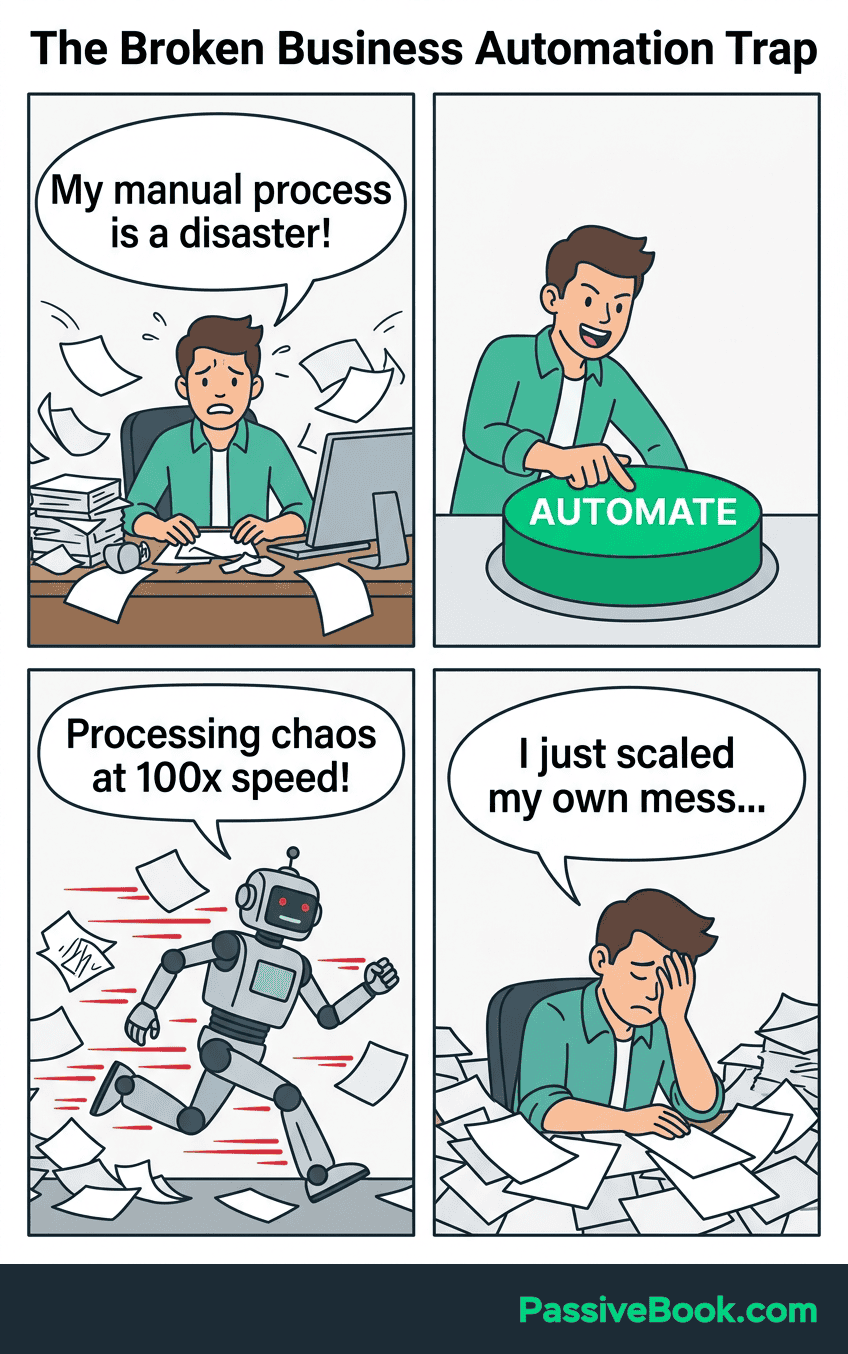
The most common mistake: automating a broken or unclear process doesn’t fix it. It just speeds up the mess at scale. I made this mistake with my membership site in 2021. I automated the onboarding email sequence before I’d validated what new members actually needed to hear. The emails fired perfectly on schedule, but the content was generic and unhelpful. Churn stayed high. I spent four hours building the automation and another six hours rewriting it once I finally surveyed members. I should have sent 20 manual onboarding emails first, tracked which ones got replies and engagement, then automated the winning version.
This is a direct warning: automating messy manual processes only scales the problem. The automation will create more chaos, not less. Fix your manual workflow first. Document the ideal process. Run it manually 10 times until it’s smooth. Only then build the automation.
A common negative-ROI trap: spending 40 hours building automations that only save 10 hours per month. Always apply the ROI Test before building. If a workflow saves you 20 minutes per week, that’s roughly 1.4 hours per month or 90 minutes. Even at a generous $50 per hour value, you’re recovering $70 monthly. If setup takes 10 hours, you need over 7 months just to break even on your time investment.
Over-automating audience touchpoints erodes authentic connection. Mailchimp’s platform benchmarks confirm that engagement suffers when automation replaces voice. Automate the delivery, never the relationship. Your welcome email sequence can be automated, but the copy should feel personal and conversational. Your social media scheduling can be automated, but you still need to reply to comments and messages manually. Your course delivery can be automated, but you should check in with students personally when they’re stuck. Automation handles the repetitive mechanics. You handle the human connection that builds loyalty.
Automate too early, and you’ll regret it. If you’re still validating your business model or finding product-market fit, manual processes give you valuable qualitative feedback. When you manually onboard every new customer, you hear their questions, frustrations, and feature requests directly. That information shapes your product roadmap. Once you automate, you lose that direct feedback loop unless you intentionally build it back in through surveys and scheduled check-ins. A good rule: don’t automate a customer-facing workflow until you’ve completed it manually at least 20 times and the process feels predictable.
AI-Powered Automation: The New Layer Changing the Game for Solopreneurs
A Forbes/SAP study found that more than half of workers, specifically 58%, now save time using AI tools. Adoption is no longer optional for competitive solo businesses. The AI layer transforms automation from rigid if-then logic into intelligent decision-making. Traditional automations handle predictable, rule-based tasks. AI automations handle tasks that require reading context, making judgment calls, and adapting to variable inputs.
AI agents, available natively in n8n, go beyond simple if-then rules. They read emails, summarize context, draft replies, and route tasks intelligently. An example: you receive a customer service email. A traditional automation can only tag it and add it to a queue.
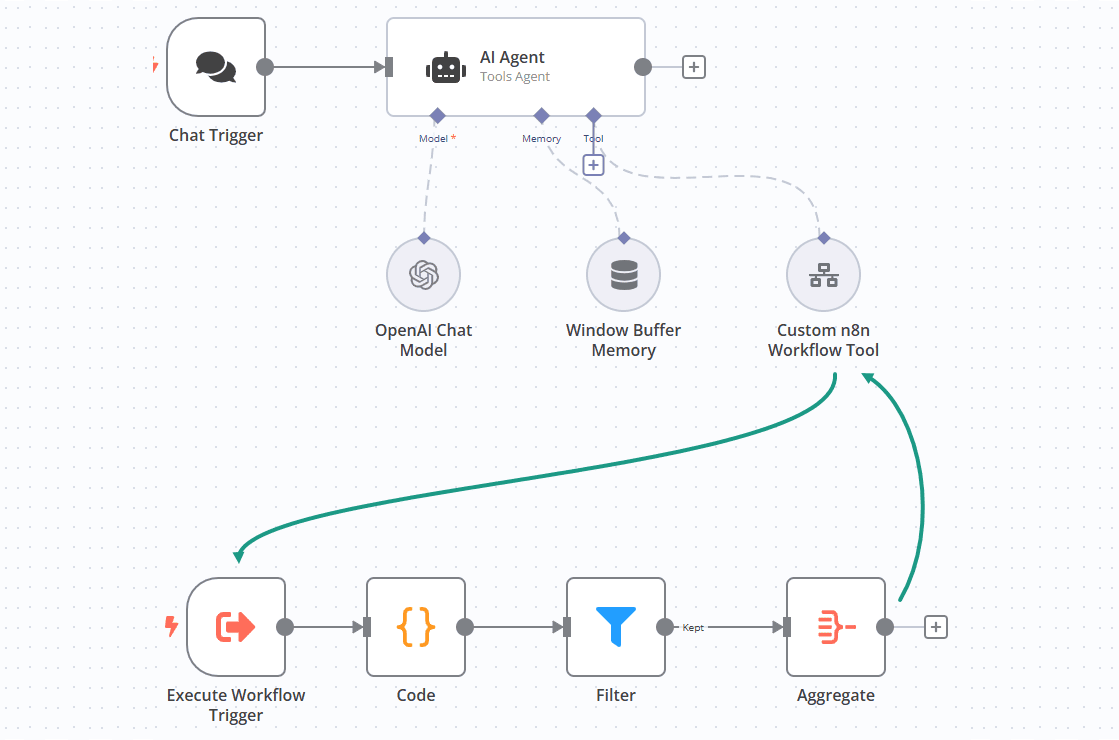
An AI agent reads the email content, determines if it’s a refund request, shipping question, or product inquiry, drafts a personalized response based on your knowledge base, and either sends it automatically or flags it for your review depending on confidence level. I tried building this manually once. Gave up after branch 17. This workflow would require dozens of conditional branches in traditional automation. With AI, it’s a single node.
Solopreneurs using AI tools in their content workflow report reclaiming the equivalent of a part-time employee’s hours. A realistic application: you draft blog post outlines manually, but use Claude or ChatGPT to expand each section into full paragraphs. You edit for voice and accuracy, but the first draft takes 30 minutes instead of 3 hours. You batch-create social media captions by feeding your blog content into an AI prompt template. You generate email subject line variations and test them with your audience. Each task individually saves 20 to 40 minutes. Compounded weekly, you’re recovering half a workday.
Shopify’s AI tool Sidekick can now build entire ecommerce automation workflows from a plain-English sentence. You type: “Send me a Slack message when inventory for my best-selling product drops below 5 units.” Sidekick generates the Flow automation for you. No dragging blocks or configuring triggers manually. This is where all automation tools are heading in the near term. The barrier to entry is collapsing. Non-technical solopreneurs will be able to describe what they need in natural language, and the AI will build the workflow.
Frequently Asked Questions
Is Automation Worth Setting Up If I Only Have a Few Spare Hours a Week?
Yes, especially if time is limited. Automation is most valuable when you have the least time to spare. A single welcome email sequence takes two hours to build but runs forever. You’re trading two hours once for dozens of hours saved over the coming months. Start with one high-impact automation, like social media scheduling or email delivery, and build from there as you see results.The solopreneurs who benefit most from automation are those running businesses alongside full-time jobs or family commitments. When you only have 10 hours per week for your side hustle, wasting 3 of those hours on manual posting and data entry means you’re losing 30% of your available time. Reclaim those hours through automation, and your effective working time nearly doubles without working longer.
Do I Need Any Coding or Technical Skills to Use n8n?
No coding skills are required. n8n uses a visual interface where you drag, drop, and connect nodes to build workflows. If you can use a smartphone app or follow a recipe, you can build basic automations. The tool guides you through each step with dropdown menus and labeled fields.The learning curve exists, but it’s measured in hours, not weeks. You’ll build your first working n8n workflow in under 30 minutes following a tutorial. The visual flowchart interface requires no programming knowledge. Think of it like learning to use a new app: unfamiliar at first, intuitive after a few attempts.
Can I Automate My Online Business Without Spending Any Money?
Yes, you can build a functional automation stack entirely on free tiers. Use MailerLite free for up to 500 subscribers, each platform’s free native scheduling tools for social media, and n8n self-hosted for unlimited workflows. This combination handles email nurture, social scheduling, and basic data connections at zero cost.Free plans have limits, but they’re sufficient to prove value before upgrading. You’ll outgrow them as your business scales, and that’s a good problem. When you’re earning enough to justify paid tools, the ROI becomes obvious. Many solopreneurs run profitably for 6 to 12 months on free automation tools before hitting tier limits.
What Is the Single Most Impactful Automation a Blogger or Content Creator Can Set Up First?
Automate your email welcome sequence. This single workflow nurtures every new subscriber without manual effort, builds trust automatically, and often generates your first sales on autopilot. It delivers value 24 hours a day, even while you sleep.The welcome sequence is also the easiest automation to validate. You’ll see open rates, click rates, and replies within days of launching it. If the sequence performs well, you know the messaging works. If it doesn’t, you can tweak the copy and improve results immediately.
How Do I Make Sure My Automated Emails and Social Posts Don’t Sound Robotic or Impersonal?
Write the copy yourself using your natural voice, just as you would for manual outreach. Automation handles the delivery timing and logistics, not the content creation. Your personality comes through in the words you choose, the stories you tell, and the examples you share.Use personalization tokens to include the subscriber’s name or specific details about their signup. Break conventional grammar rules when it feels natural. Ask questions and invite replies. The goal is for your automated message to feel like a one-on-one email you’d send to a friend, just distributed at scale.
What Happens to My Automations If a Free Tool Changes Its Pricing or Limits?
You’ll need to migrate to a paid plan or switch to an alternative tool. Most platforms give advance notice before major pricing changes, giving you time to evaluate options. Maintain documentation of how your workflows are structured so rebuilding them on a new platform takes hours, not days.This risk is why diversification matters. Don’t build your entire business on a single automation platform. Use native features when possible, like Shopify Flow for ecommerce or Podia’s drip courses for education. Export your subscriber data and automation logic regularly. Treat your automation stack like infrastructure that needs backup plans.
How Do I Know If an Automation I Built Is Actually Working Correctly?
Test it manually immediately after setup. Trigger the automation yourself by submitting the form, making a test purchase, or publishing a draft post. Confirm every action fires as expected and data appears correctly in connected apps.Set up monitoring notifications for critical workflows. Most automation platforms allow you to receive emails or Slack messages when a workflow fails or encounters an error. Check your automations monthly, especially after app updates or platform changes. Review logs and error reports to catch issues before they affect customers.
What Next?
You now have the roadmap, the tools, and the implementation plan to reclaim 10+ hours every week through automation. The difference between solopreneurs who scale and those who burn out often comes down to this: whether they automate the repetitive mechanics or keep doing everything manually. You’ve learned which tasks to automate first, which free and low-cost tools to use, and how to avoid the common traps that waste time instead of saving it.
I won’t pretend automation solves every challenge of running a solo business. Building systems takes upfront effort. Workflows break when apps update. You’ll spend time troubleshooting and refining. But the alternative is worse: staying trapped in a cycle of manual tasks that consume every spare hour you have. The solopreneurs who succeed long-term are the ones who build leverage into their workflows early, before burnout makes the decision for them.
If you found this guide valuable, share it using the buttons below. Other time-strapped entrepreneurs in your network are fighting the same battle you were before reading this. Sharing this resource helps them reclaim their time too.
Drop a comment below and tell me: Which of the three starter automations – email welcome sequence, social scheduling, or form-to-spreadsheet – are you building first? I’ll reply with specific tips for your business model within 24 hours.
Share this post with your friends & followers: