I used to wake up at 5 AM to schedule social media posts before my day job started. Then I’d spend lunch breaks responding to customer emails and evenings fulfilling digital product orders manually. My “side business” became a second full-time job.
The breaking point came when I realized I was paying over $200 monthly for automation tools I barely understood, while still doing most tasks manually because I was too exhausted to set them up properly. I was trapped in the exact opposite of what I wanted – a business that demanded more hours than my day job instead of giving me freedom.
That’s when I discovered the truth: you don’t need expensive tools or technical skills to build a business that works while you sleep. You need a simple system focused on the right tasks. Now my business runs while I sleep. New subscribers get welcomed, products get delivered, and content gets published without me touching a keyboard. This guide shows you how to build the same freedom without the expensive mistakes I made, updated for 2026 with the latest platform features and AI-powered automation tools that didn’t exist two years ago.
- •What "Autopilot" Actually Means for Your Online Business
- Why Most Automation Projects Fail Before They Start
- Which Parts of Your Business Can Run on Autopilot
- •What You Should Never Fully Automate
- •How to Choose Your First Process to Automate
- The Free and Budget-Friendly Tools You Actually Need
- How to Build Your First Automated System This Week
- •How AI Changed Automation Recently
- •What Next?
What “Autopilot” Actually Means for Your Online Business
Autopilot doesn’t mean you disappear forever and money appears in your bank account. It means you build systems once, then maintain them occasionally instead of performing the same tasks daily.
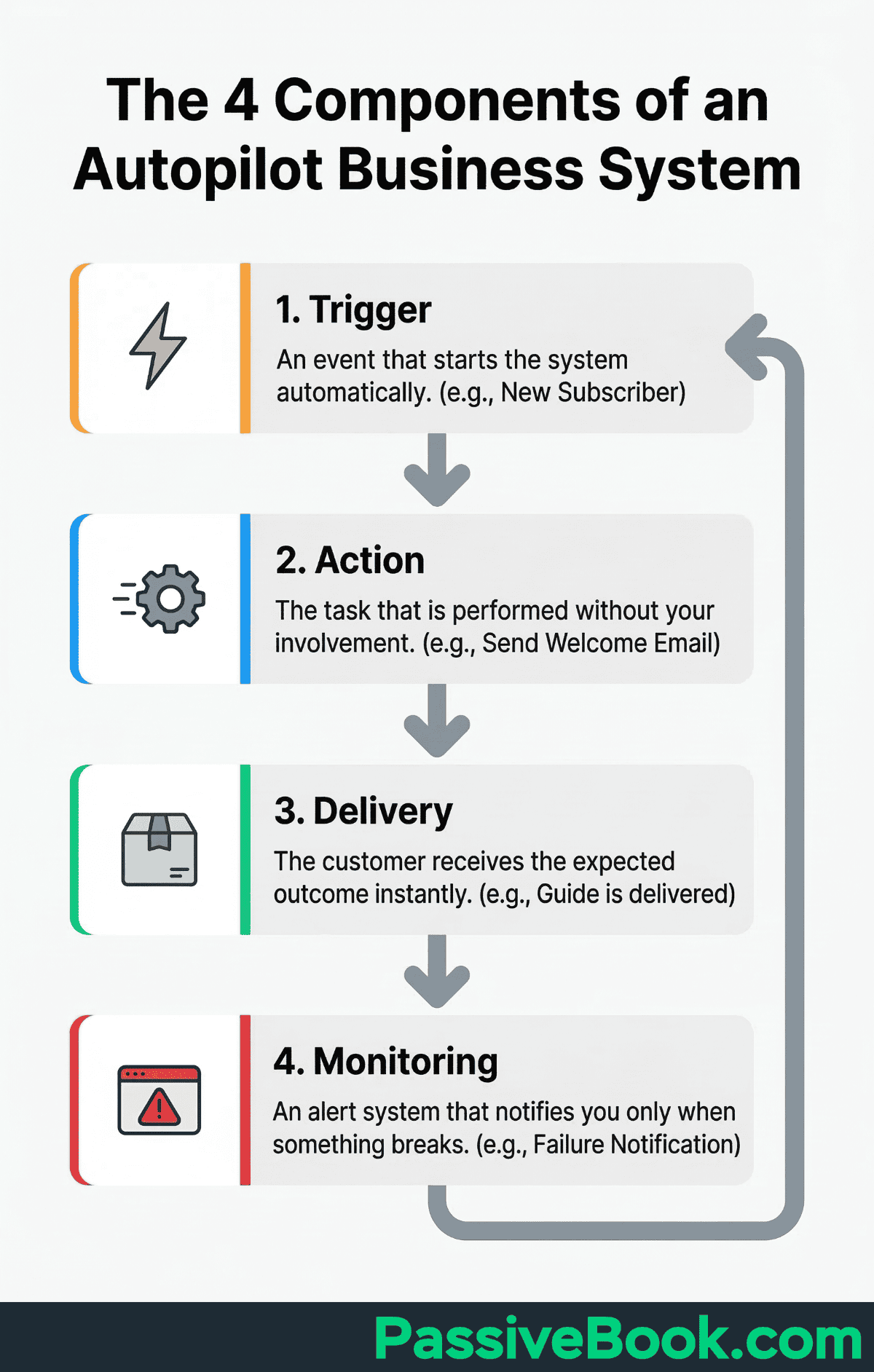
Every successful automation has four components working together. The Trigger is what starts the process automatically – a new subscriber joining your list or someone buying your product. The Action is what happens next without your involvement – sending a welcome email or granting course access.
Delivery is the outcome your customer sees – they receive exactly what they expected, when they expected it. Monitoring is your safety net – alerts that notify you within an hour when something breaks, not a week later when customers complain.
Sarah Dudgeon runs Art of Your Success, a global e-commerce business, completely solo. She uses Make automation to handle order processing, customer communications, and inventory management – operations that would otherwise require hiring help.
Research from Vena Solutions shows businesses save 240-360 hours yearly through task automation. Employees estimate 240 hours saved while business leaders estimate 360 hours. Even the conservative estimate equals six full work weeks returned to you annually.
The difference between businesses that succeed with automation and those that waste money on unused subscriptions comes down to understanding this framework. You’re not building a robot to replace yourself. You’re identifying specific triggers in your business that should kick off predictable actions.
Why Most Automation Projects Fail Before They Start
McKinsey research confirms that most large-scale automation initiatives fail to meet their original goals. The reasons are predictable and preventable.
A broken manual process becomes a broken automated process, just faster and harder to fix. If your current workflow involves forgetting steps, losing customer information, or delivering inconsistent results, automating it multiplies those problems at scale.
This backwards approach guarantees expensive monthly fees for underutilized software. I proved this by spending $200 monthly on overlapping tools to escape constant manual posting, emailing, and product delivery – Zapier connecting apps I rarely used, Buffer scheduling posts I could batch natively, Convertkit when FluentCRM on WordPress cost nothing.
Each subscription solved a problem I could have eliminated by simplifying my workflow first. Now I use n8n combined with platform-native features to run this entire business for a fraction of that cost.
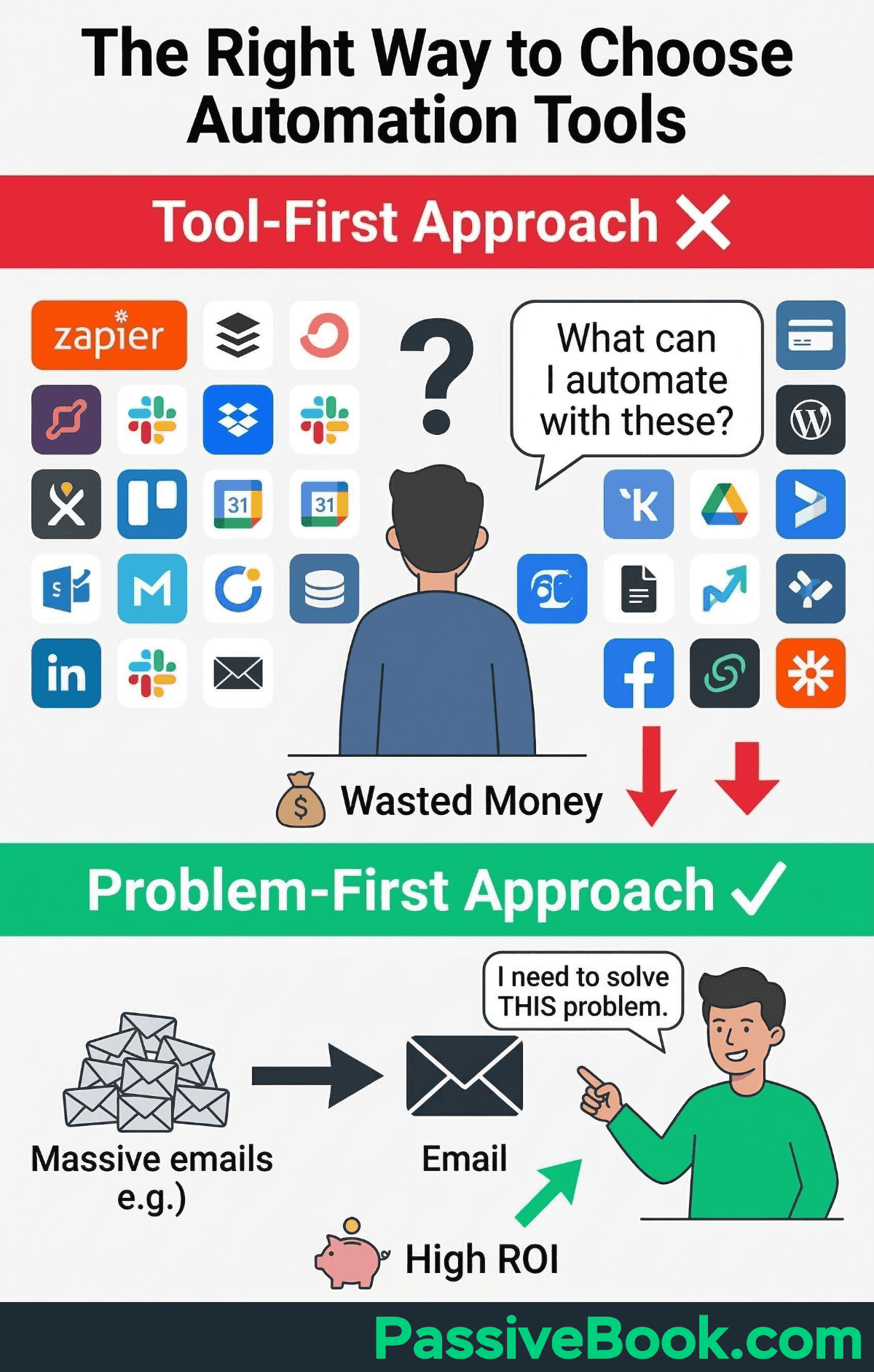
Most solopreneurs waste money on tools before identifying which specific problem needs solving. They subscribe to automation platforms, then try to figure out what to automate later. This backwards approach guarantees expensive monthly fees for underutilized software.
Automating Before You Fix the Broken Process
Companies that optimize workflows first, then automate, succeed. Reversing this order guarantees failure.
Document what you currently do in painful detail. Identify bottlenecks where tasks stall or require constant manual intervention. Simplify steps by removing unnecessary complexity. Only then should you build automation.
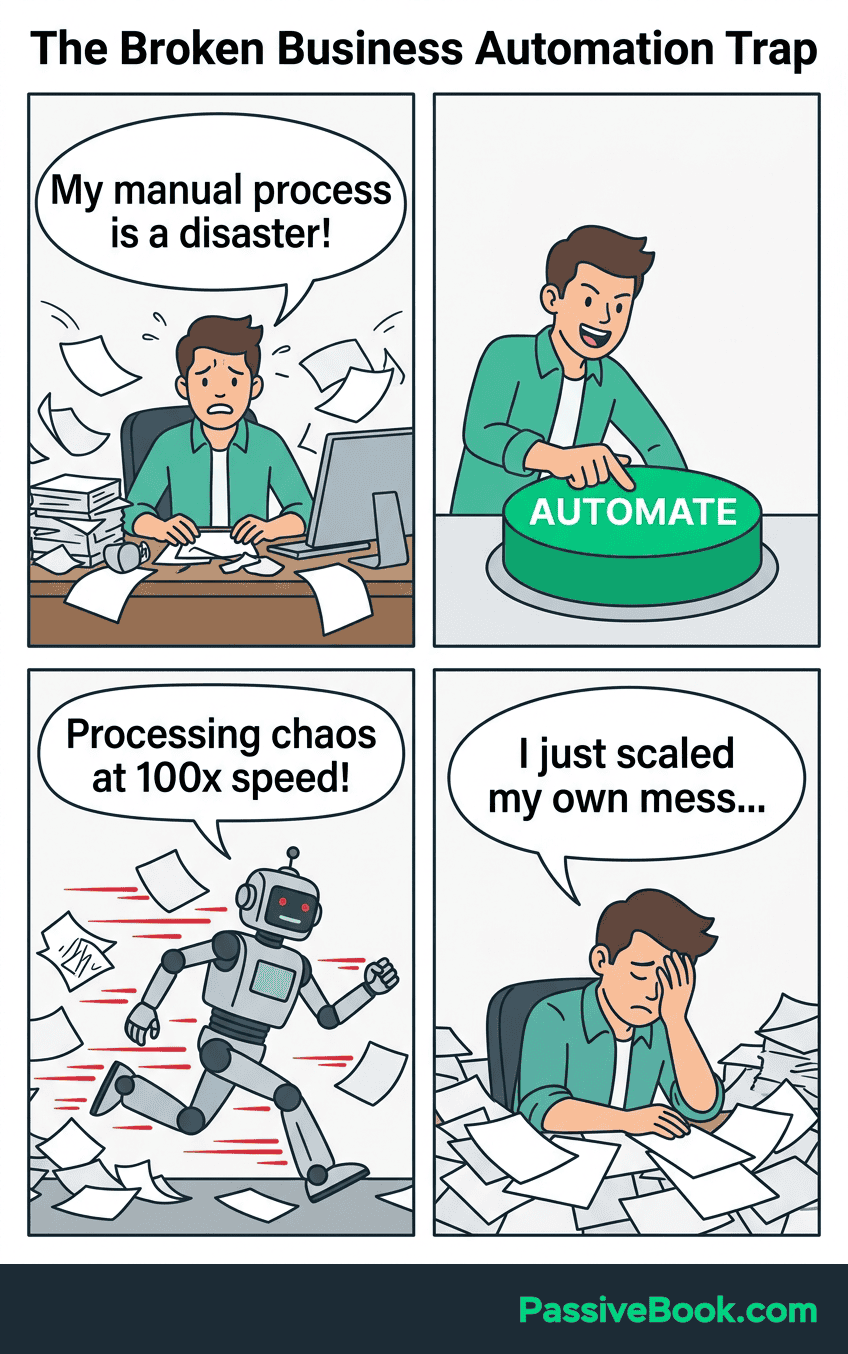
Test the simplified process manually three times before automating. This prevents expensive mistakes where you build complex workflows around inefficient processes. If the manual version still feels clunky after simplification, the automated version will break constantly.
Trying to Automate Everything at Once
Start with one task eating five or more hours weekly. Perfect it completely. Then move to the next.
Complex multi-step workflows built by beginners break constantly. They create more work than the original manual processes because you spend hours troubleshooting connection failures, debugging logic errors, and fixing edge cases you didn’t anticipate.
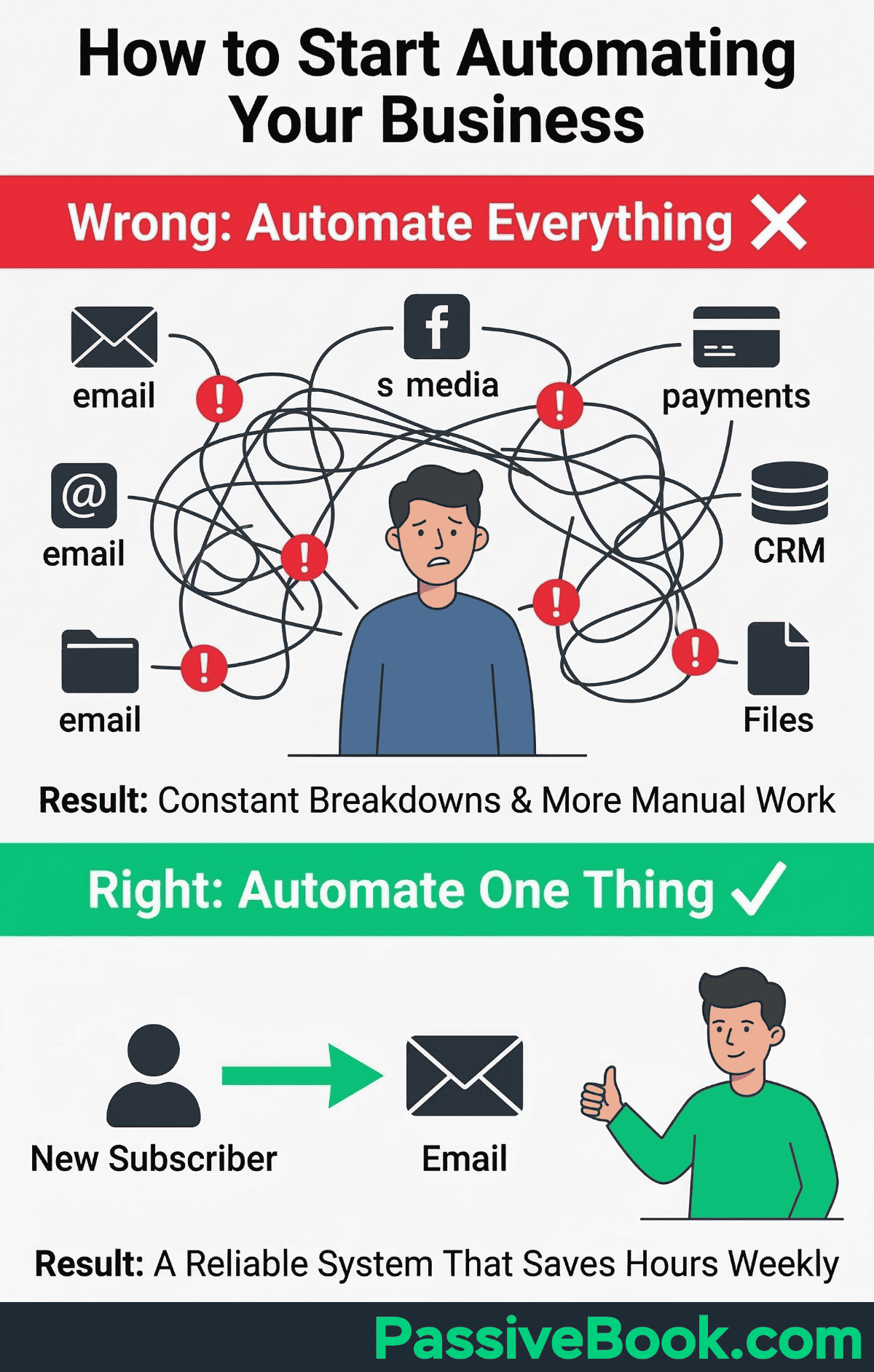
Perfectionism kills automation progress. A working 80% solution beats a perfect plan you never implement. Your first automated email sequence doesn’t need dynamic personalization and behavioral triggers. It needs to reliably deliver the right message to new subscribers without you manually hitting send.
Buying Tools Without Identifying the Problem First
The subscription trap looks like this: You pay for Zapier at $20 monthly, Buffer at $10, Convertkit at $29, and Calendly at $12. That’s $71 monthly in fees when free alternatives accomplish the same goals.
n8n replaces Zapier for free if you self-host. Native platform schedulers on Facebook, Instagram, Pinterest, and YouTube eliminate Buffer’s cost. FluentCRM handles email marketing without per-subscriber pricing. Google Calendar with booking links does what Calendly does for most solopreneurs.
Start with the painful task consuming your time. Then find the cheapest tool solving that specific problem. Not the other way around. This approach prevents paying for features you’ll never use while missing the simple solutions hiding in plain sight.
Which Parts of Your Business Can Run on Autopilot
The best automation candidates share three traits: high volume, identical steps, and zero creative judgment required. If you can teach someone the process in 10 minutes without saying “it depends,” it’s automatable.
Automate anything you do more than twice in exactly the same fashion. This simple rule prevents wasting time on one-off tasks while ensuring you capture genuine efficiency gains.
Lead Capture and Email Nurturing
A lead generation landing page with opt-in forms (include links to your privacy policy and cookie policy for compliance) and automated email sequences runs around the clock. Someone downloads your free guide at 2 AM, immediately receives the download link, and enters a welcome sequence introducing your paid offers over the next two weeks.
Research from DMA and industry benchmarks consistently show email marketing delivers $38 for every $1 spent in 2026 (a 3800% return). This exceptional return happens because automated sequences generate significantly more revenue than manual one-off campaigns.
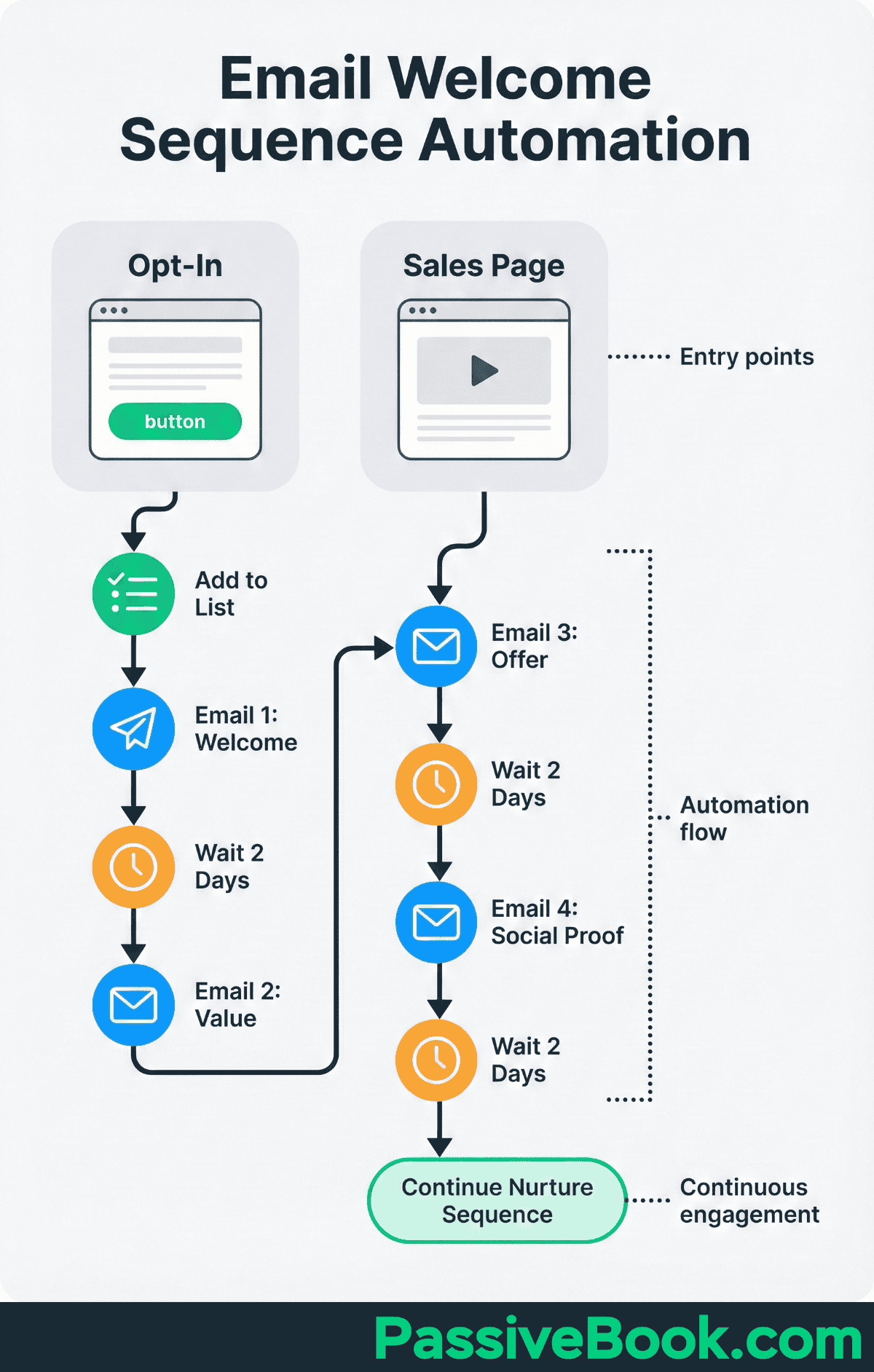
New subscribers receive welcome content, educational emails building trust, and strategic offers while you sleep. The entire relationship-building process runs automatically from the moment they opt in until they either buy or unsubscribe.
Content Distribution and Scheduling
Batch-create one month of content in a single focused session. Schedule it across platforms using free tools built into each platform.
Pinterest native scheduler queues pins 30 days ahead completely free. No third-party subscriptions needed.
This exact workflow powers Passive Book. I batch-create four blog posts monthly. WordPress RSS automatically generates Pinterest pins through a simple plugin. Pinterest’s native scheduler distributes 30 pins across the month. Zero daily content work required once the initial batch is scheduled.
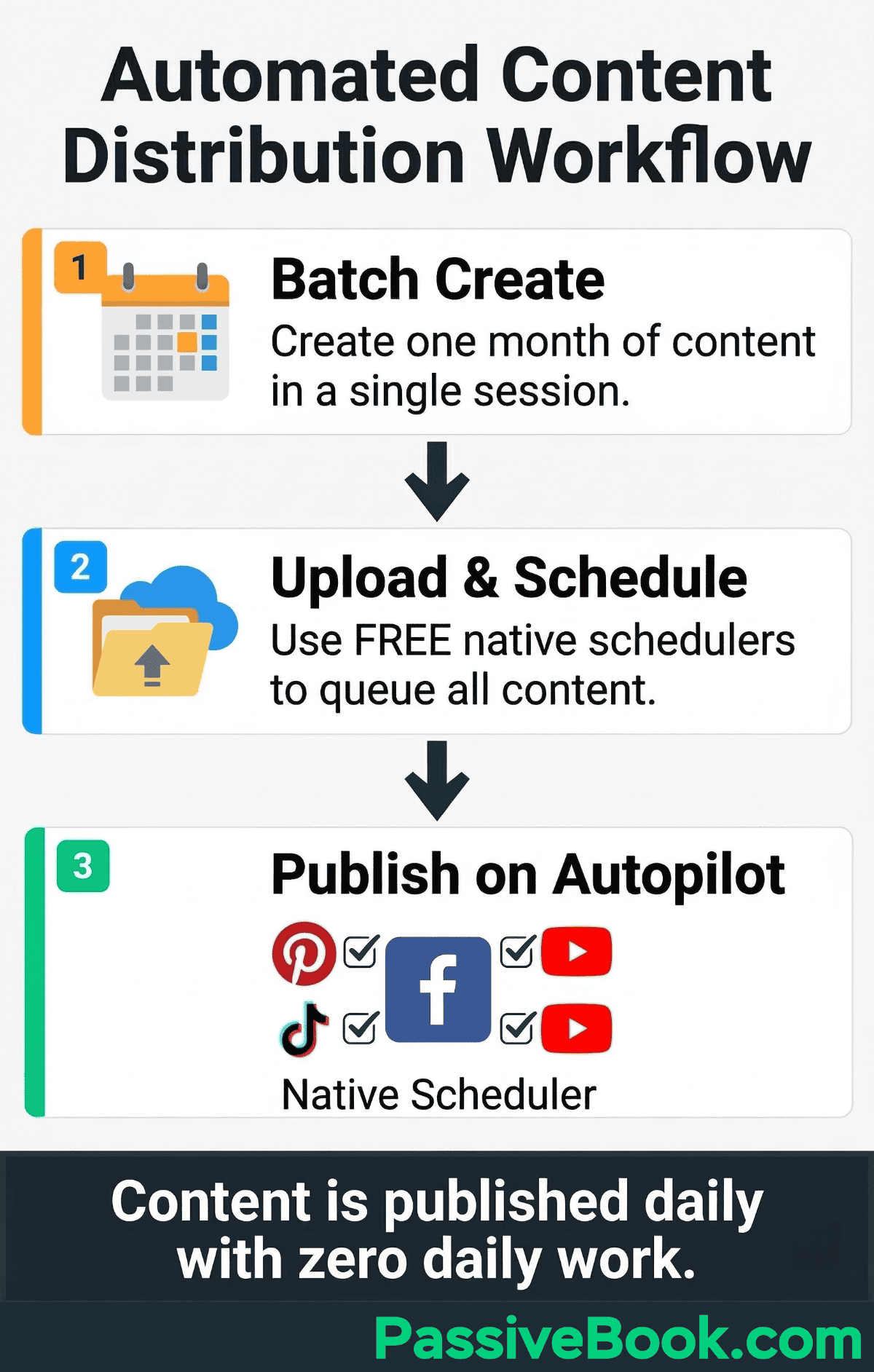
Meta Business Suite schedules Facebook and Instagram posts weeks in advance. YouTube Studio queues videos for future publication. TweetDeck handles Twitter/X scheduling natively.
Digital Product Delivery and Customer Onboarding
Payhip handles instant download delivery, payment processing, and receipt emails automatically. The free plan charges a 5% transaction fee but requires no monthly subscription. This makes it ideal for testing digital products before committing to paid plans.
Thinkific manages course enrollment, content access, and progress tracking seamlessly. The free plan supports unlimited students and courses with essential features. Paid plans starting at $49 monthly add advanced customization and integrations.
Your customer receives login credentials, their first lesson, and clear next steps without your involvement. The entire onboarding experience happens automatically from purchase to completion.
Payment Processing and Recurring Billing
PayPal automates subscription billing, invoice generation, and payment collection on schedule. Automated retry logic attempts failed payments multiple times before canceling subscriptions.
Recover failed recurring payments automatically by retrying charges when cards are declined due to temporary issues. This recovers revenue you’d otherwise lose without manual follow-up.
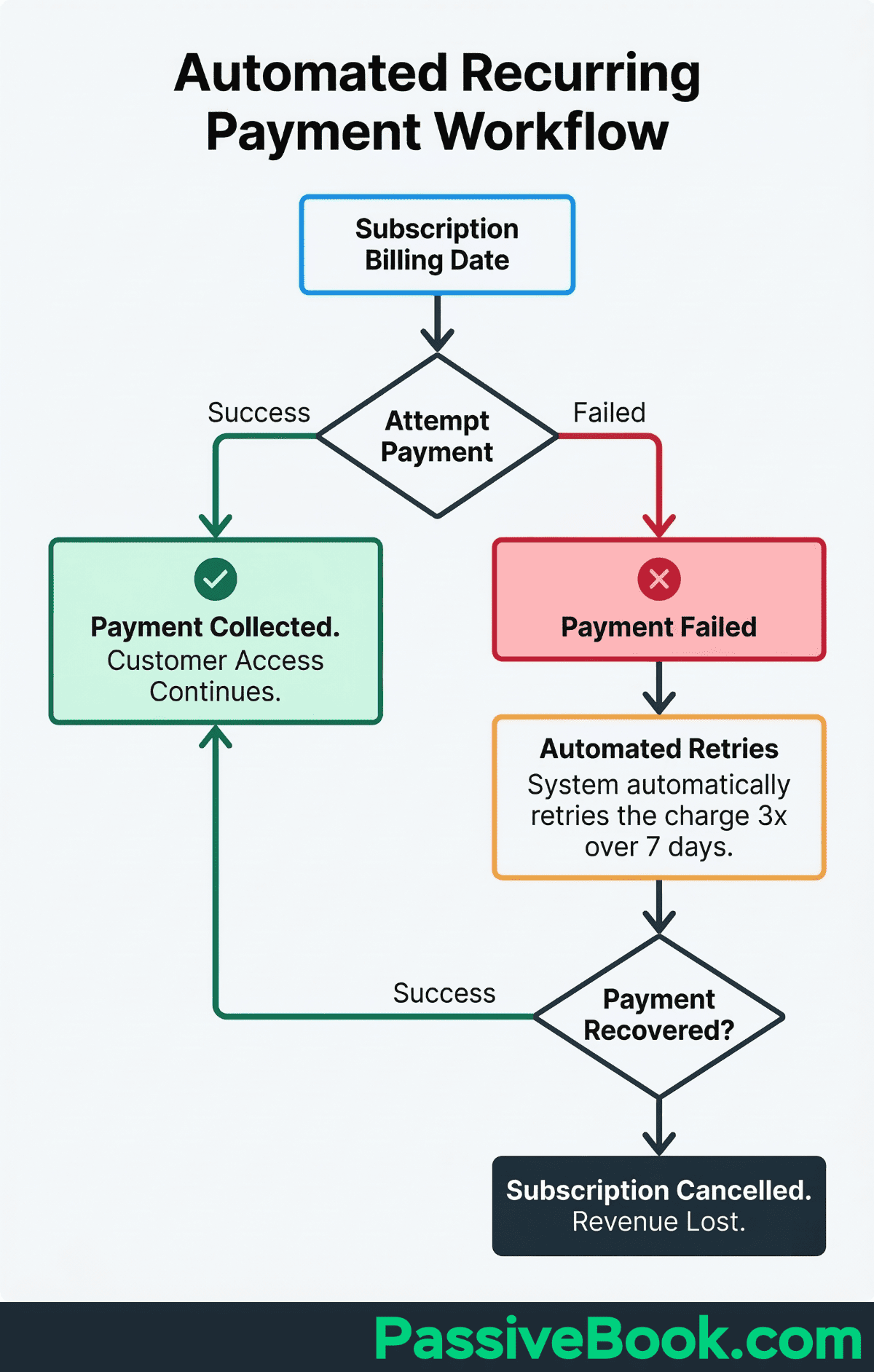
Integration with product delivery platforms means customers get instant access after successful payment. The entire transaction from checkout to product delivery requires zero manual intervention when properly configured.
What You Should Never Fully Automate
Customer conversations requiring empathy, judgment calls, or personalized advice need a human touch. People smell canned responses immediately when dealing with sensitive issues.
Refund requests, quality complaints, or situations affecting trust and reputation stay manual. I’ve seen solopreneurs automate refund request responses with canned replies. Every single one ended up manually handling angry follow-ups anyway. Plus they damaged customer trust by appearing robotic when empathy was needed most.
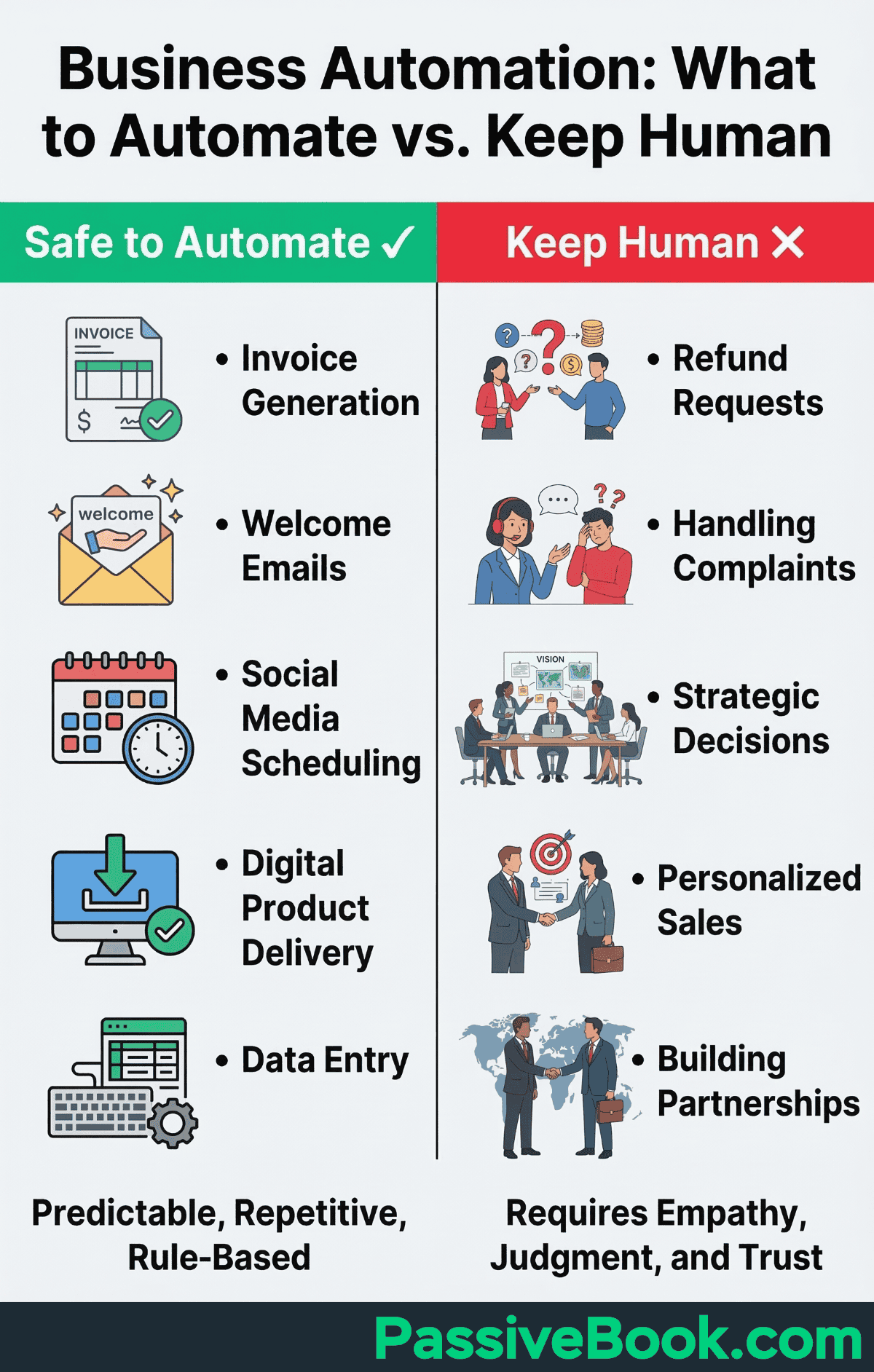
Similarly, lead generation campaigns need human review before launch to ensure messaging resonates and targeting makes sense.
Strategic decisions about content direction, product ideas, and brand partnerships require your unique expertise. AI can assist with drafts and research. Your judgment and voice must stay human.
Automation works brilliantly for predictable processes with clear rules. It fails spectacularly when human connection determines the outcome. Know the difference before you automate yourself into a reputation crisis.
How to Choose Your First Process to Automate
Track your time for one full week. Identify tasks you repeat three or more times in exactly the same way each time.
I developed a simple framework I call the Automation Priority Matrix: Tasks you do five or more times weekly AND take 10 or more minutes each time AND require zero creative decisions are your best first targets. Email welcome sequences and lead generation landing pages usually win this calculation for most solopreneurs.
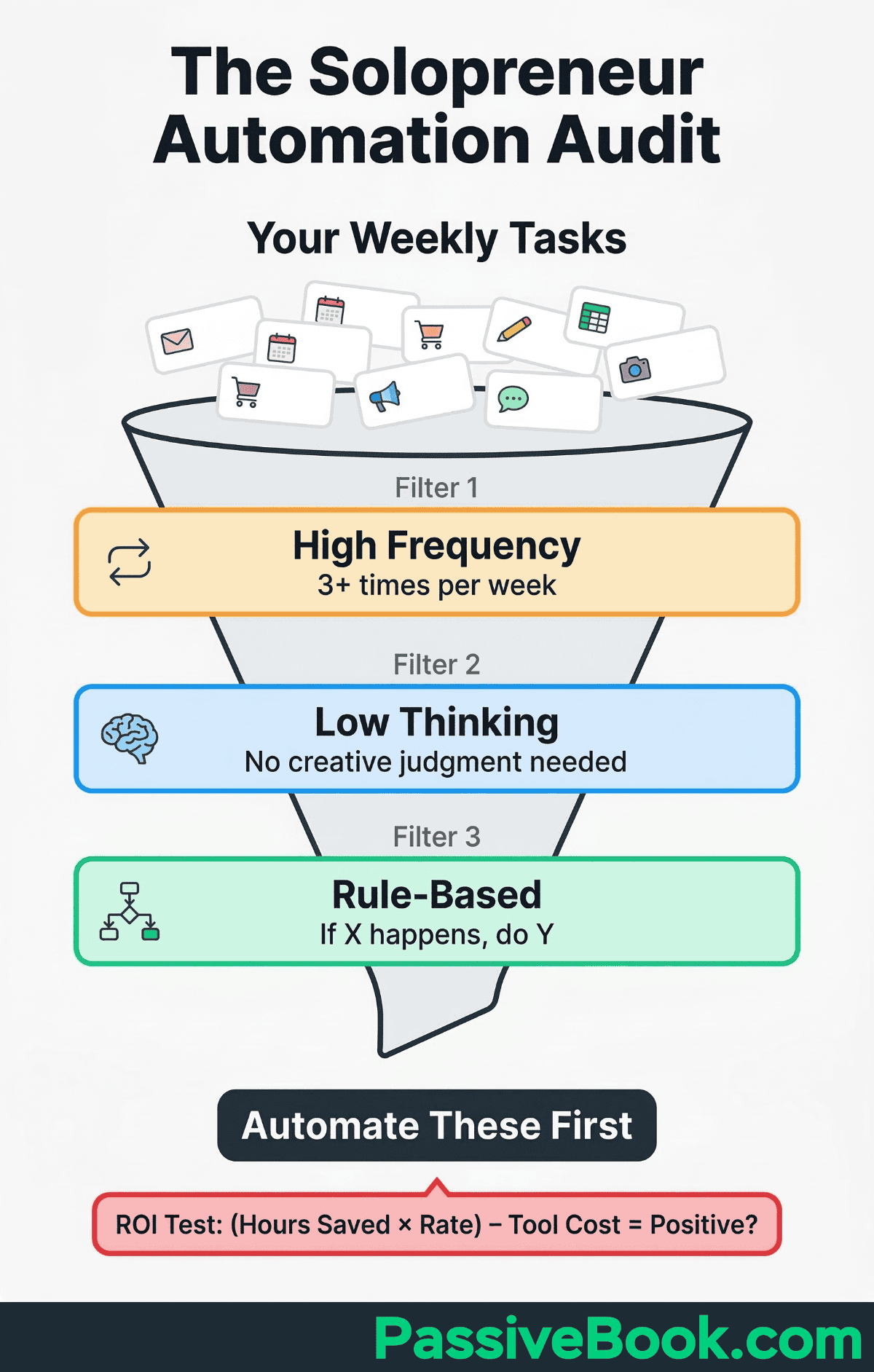
Choose high-frequency, high-annoyance tasks that don’t require creative judgment. The task that makes you groan every time you do it but follows the same steps is your ideal automation candidate.
Avoid automating customer conversations, refund decisions, or anything affecting trust until you’ve successfully automated three to five simpler workflows. Start with boring operational tasks like scheduling, delivery, and invoicing before touching relationship-building activities.
The Free and Budget-Friendly Tools You Actually Need
Most solopreneurs automate their first 3-5 workflows for $0-50 monthly. This happens by combining free tiers of specialized tools with one paid connector platform.
Most automation starts free. Upgrade only when you outgrow the limits. Research from Salesforce shows small businesses using automation report significant time savings and revenue growth compared to those relying on manual processes.
Email Marketing Without per-Subscriber Fees
Two standout options cover most solopreneur needs without per-subscriber fees.
ConvertKit (now branded as Kit) offers a free plan for up to 10,000 subscribers with unlimited landing pages, forms, and email broadcasts — making it the most generous free tier for list building. It’s built specifically for creators selling newsletters, digital products, and courses, so the interface and automation logic match how solopreneurs actually work.
FluentCRM is a self-hosted WordPress plugin that handles email marketing, automation sequences, and CRM with zero per-subscriber fees — you pay a flat annual license and send unlimited emails through your own server or SMTP provider. As your list grows from hundreds to tens of thousands, your cost stays the same. That’s the opposite of most email platforms that charge more as you add subscribers.
The decision framework is straightforward. Choose ConvertKit if you want the most generous free subscriber limit and a creator-focused platform you can start using in minutes without any technical setup. Choose FluentCRM if you already run WordPress and want to eliminate per-subscriber pricing entirely — it’s the cheapest long-term option for growing lists and gives you full control over your data.
Social Media Scheduling That Costs Nothing
All major platforms offer free native scheduling built directly into their interfaces. No third-party subscriptions needed.
Meta Business Suite handles Facebook and Instagram post scheduling weeks in advance. YouTube Studio queues videos for future publication with full control over premiere timing. TweetDeck manages Twitter/X scheduling and multi-account posting completely free.
The native schedulers work reliably because they’re built by the platforms themselves. Third-party tools add complexity and monthly fees without meaningful advantages for most solopreneurs.
Workflow Automation for Non-Technical Solopreneurs
Make provides a visual automation builder perfect for complex multi-step processes. The free plan includes 1,000 operations monthly. Paid plans begin at around $11 monthly for 10,000 operations, much cheaper than Zapier for the same workflows. The drag-and-drop interface makes it easy to visualize exactly how your data flows between apps, which helps non-technical users debug issues without guessing.
n8n is a self-hostable workflow automation platform that gives you unlimited workflows with zero per-task fees. If you already run a VPS or cloud server, n8n costs nothing beyond your existing hosting. The visual workflow editor rivals Make in usability, and the self-hosted model means your data never passes through third-party servers. For solopreneurs comfortable with basic server setup, n8n eliminates automation costs entirely.
Choose Make if you want the fastest setup with zero technical overhead and a generous free tier to start. Choose n8n if you already have hosting infrastructure and want unlimited automations without any monthly fees.
What Budget-Level Automation Actually Costs
Here’s what you’ll pay at three different automation stages:
Beginner Stack ($0-15/month): FluentCRM or Kit free plan + native platform schedulers + Make free tier or self-hosted n8n. Covers email sequences, social scheduling, and simple product delivery.
Growing Stack ($30-50/month): Paid email tool for larger list + Make starter plan or self-hosted n8n + Payhip/Thinkific. Handles complex workflows and multi-platform automation.
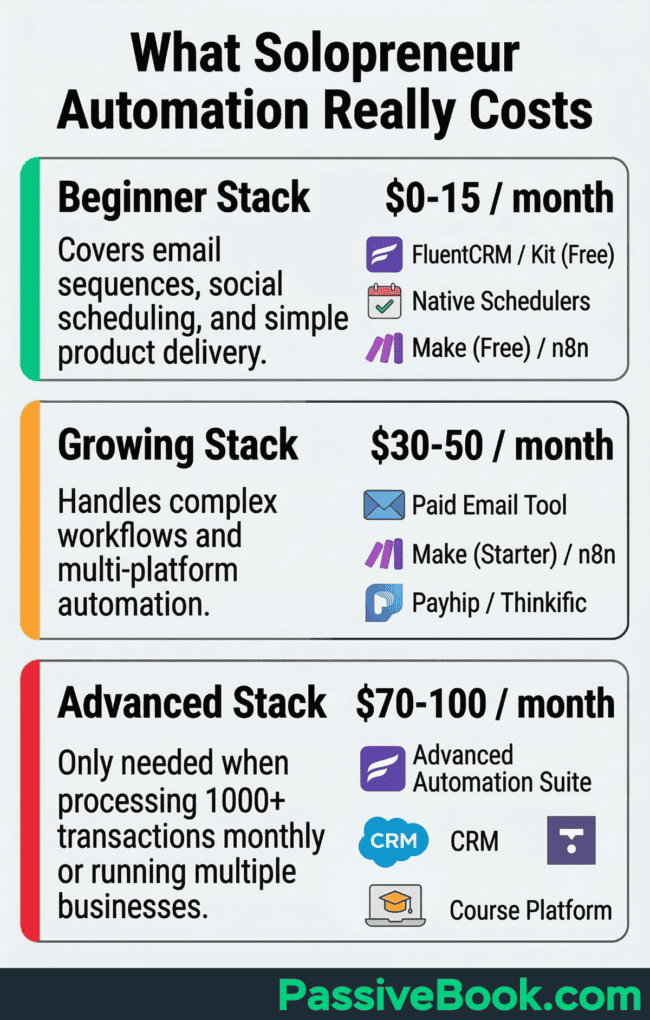
Advanced Stack ($70-100/month): Full automation suite with advanced features. Only needed when processing 1000+ transactions monthly or running multiple businesses.
Start with the Beginner Stack. Upgrade only when you’ve maxed out free tier limits or proven your workflows generate revenue.
How to Build Your First Automated System This Week
You don’t need coding skills or technical expertise to automate your first workflow. Every tool listed here uses point-and-click interfaces designed for non-technical users. If you can create a Facebook post or send an email, you can set up these automations.
Start with the task that makes you groan every time you do it – as long as the steps never change. Avoid anything requiring creative decisions or unique responses per instance. Budget three to five hours total across several focused 30-minute sessions this week.
Build one working automation completely before adding complexity or additional workflows. Trying to automate everything simultaneously guarantees nothing works properly.
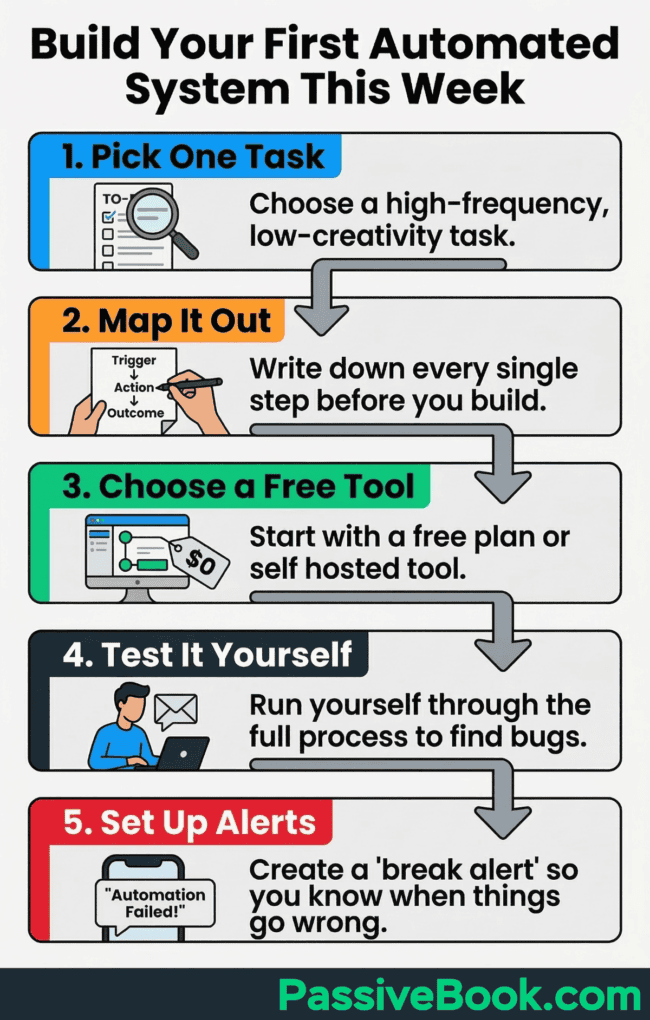
Step 1: Pick One High-Impact Repetitive Task
Email follow-ups to new subscribers, social post scheduling, or invoice generation make excellent starting points for beginners.
Choose something taking 30 or more minutes weekly that you could teach someone in 10 minutes. Must have a clear trigger, predictable steps, and measurable outcome.
Avoid customer service responses or creative content generation for your first automation. Start with boring operational tasks where the exact same thing happens every single time.
Step 2: Map Every Step on Paper First
Write the complete flow on paper using this format: trigger, action, outcome. For example: “when subscriber joins” leads to “send welcome email” which results in “tag as onboarded.”
Identify which tool handles each individual step in your process. Gaps in coverage show you exactly where automation needs to fill in.
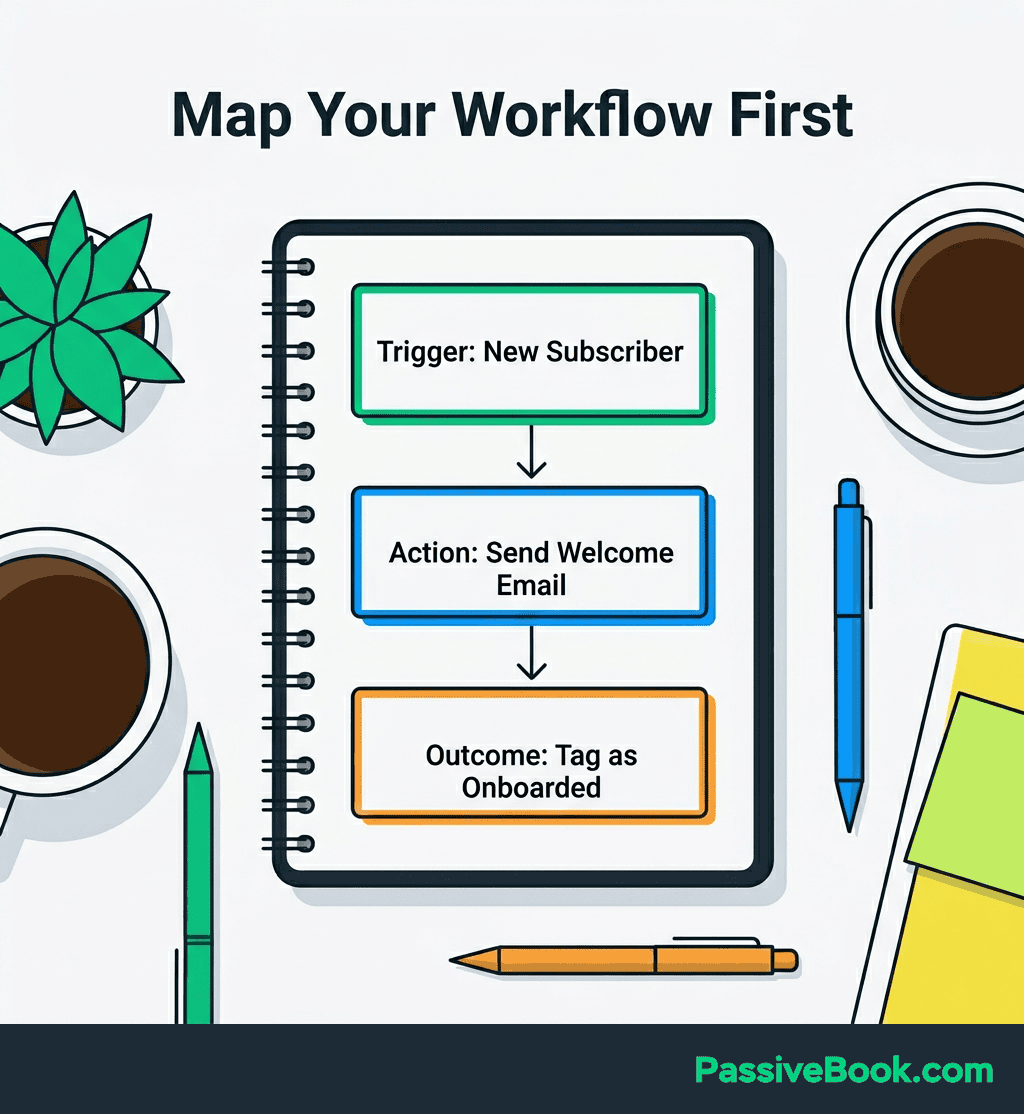
This document becomes your troubleshooting reference when something breaks. You’ll thank yourself later when debugging at midnight because you can’t remember what you built three months ago.
Step 3: Choose One Free Tool and Test It
FluentCRM works perfectly if you already have WordPress. Kit works better if you don’t. Both offer generous free tiers for getting started.
Master one tool fully before adding another to your stack. The temptation to subscribe to five different services simultaneously wastes money and creates confusion.
Use built-in platform features before paying for third-party integrations. Most platforms offer native functionality that eliminates third-party connection tools.
Step 4: Run Yourself Through the Complete Journey
Test with yourself as the first user before exposing real customers to your automation. This catches embarrassing mistakes in a safe environment.
Use a test email address to trigger sequences and verify every single step works correctly. Check that emails arrive with proper formatting, links work, and timing makes sense.
Broken automation creates more work than manual processes ever did. Thorough testing prevents live failures that damage customer trust and require urgent fixes.
Step 5: Set up “Break Alerts” Before You Walk Away
Use email notifications for critical failures. If a product doesn’t deliver, payment doesn’t process, or sequence doesn’t send, you need to know within one hour, not one week later when customers complain.
Test your automation’s failure mode intentionally. Try to break it with wrong email formats, expired credit cards, and missing files. See what error message appears and where it gets logged.
Check your automation weekly for the first month, then monthly after that. A 10-minute review of delivery rates, error logs, and customer complaints catches small issues before they become expensive problems requiring urgent fixes.
How AI Changed Automation Recently
I built a custom AI content pipeline using Claude that cut my article production from days to hours. The same system now handles content repurposing across Pinterest, email, and social channels without manual intervention for each platform.
In 2026, AI tools like ChatGPT, Claude, and Gemini draft email sequences, product descriptions, and social captions with simple prompts. Instead of writing 20 welcome emails manually, you tell the AI: “Write a 5-email welcome sequence for new subscribers interested in starting an online business. Keep emails under 200 words. Include one actionable tip per email.” You get a complete draft in seconds.

AI increasingly handles complete business processes end-to-end using natural language prompts instead of requiring technical automation skills. You can now say “analyze my customer support emails and categorize common complaints” rather than building complex filtering rules manually.
Start with simple automation using traditional tools for email sequences and social scheduling first. Layer in AI for content generation once your basic workflows are proven and stable. Trying to use AI before you understand basic automation usually creates expensive, complex systems that break in unpredictable ways.
The winning combination pairs traditional automation platforms with AI assistance. Make or n8n handles the workflow routing while ChatGPT generates the actual content flowing through those workflows.
What Next?
You now have a complete roadmap for building systems that work while you sleep. Start with one annoying task this week. Map it on paper, pick a free tool, and test it thoroughly before going live.
Automation isn’t about eliminating yourself from your business. It’s about eliminating yourself from the repetitive tasks that drain your time and energy without adding real value. The goal is freedom to focus on work that actually requires your unique skills and judgment.
Hit those share buttons below if this guide helped clarify which parts of your business to automate first. Your fellow solopreneurs struggling with the same time constraints will appreciate the roadmap. Drop a comment telling me which workflow you’re automating first – I read every single one and often share additional tips based on your specific situation.
Share this post with your friends & followers: