Your next product launch needs a useful guide, a few graphics, and an email campaign. You have one free evening, but the software shortlist already contains six tools that promise to write the same copy.
Buying all six adds another job: moving work between them, checking their output, and remembering which subscription does what. A fast draft is little help if fixing it takes the rest of your evening.
The comparisons below show where each tool earns its place, which subscriptions overlap, and how to test a complete campaign before paying to repeat it.
The Best AI Marketing Software at a Glance
For most small online businesses, I would start with these choices:
- Writing: Claude for long-form drafts and content strategy, or ChatGPT for a wider mix of marketing tasks.
- Design: Canva for graphics you can edit and reuse.
- Publishing: Buffer when managing several social queues becomes regular work.
- Email: MailerLite for newsletters and simple promotions, or Omnisend when store activity should determine the next message.
- Website Review: Microsoft Clarity to investigate where visitors struggle.
- Automation: Make for a visual builder, n8n for more control, or Zapier when its connectors make the job easier.
The best AI marketing software is the combination that finishes your recurring work with acceptable quality and less effort. Start with the task taking the most time, then add tools as the workflow needs them.
These are editorial recommendations based on use cases and published product details. The numbers count the 33 tools; they do not rank their performance.
For the examples, imagine you run an online shop selling reflective cycling straps and handlebar pouches. Product guides, Pinterest content, and email campaigns support the shop. Its copy, workflows, and figures below are illustrations.
The table compares costs, connections, and the limits most likely to affect your choice. Prices are in USD unless marked otherwise. Monthly prices use monthly billing unless marked “billed annually,” which requires an annual commitment. Introductory offers are excluded. Check the linked plan pages for current prices and allowances.
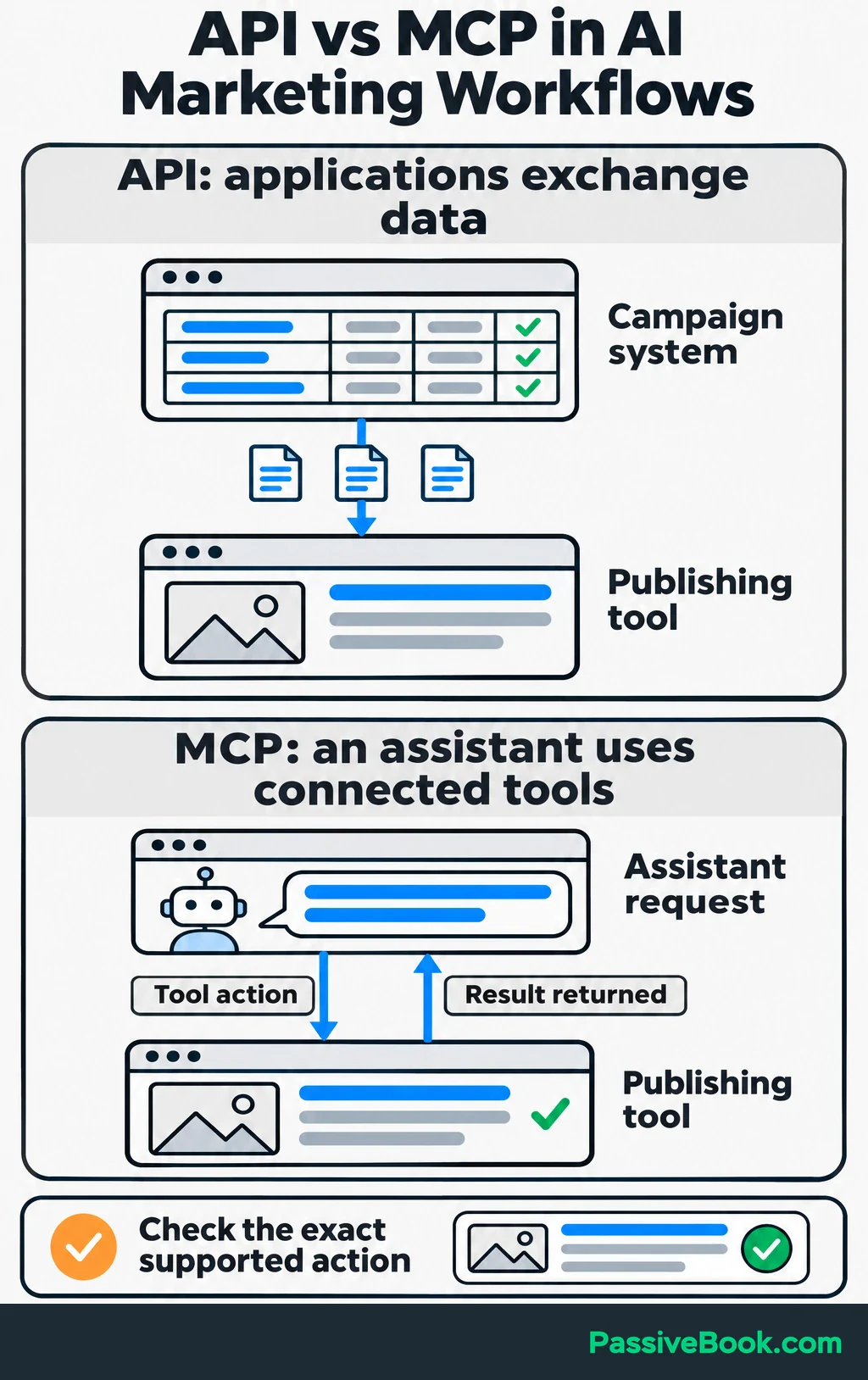
For automated handoffs, an API lets applications exchange data, while MCP lets compatible AI assistants use another tool’s information or actions.
| Tool | Best-Fit Task | Free Access | Relevant Paid Price | Connections and Key Limits |
|---|---|---|---|---|
| 1. Claude | Long-form drafts and strategy | Limited use | Pro: $20/month or $200/year | Files and app connections; usage limits vary with the work |
| 2. ChatGPT | Copy, brainstorming, and file analysis | Limited use | Plus: $20/month | File uploads and connected tools; API usage billed separately |
| 3. Gemini | Work across Google applications | Free app access | Google AI Pro: $19.99/month | Google applications and uploads; Pro also expands Gemini Notebook access |
| 4. Perplexity | Finding research sources | Core search | Pro: $20/month or $200/year | Web sources and uploads; compare with your existing assistant’s research |
| 5. Gemini Notebook | Summarizing a source library | 100 notebooks; 50 sources/notebook | Higher access through qualifying Google AI, Workspace, or Cloud plans | Imported documents and links; answers depend on supplied sources |
| 6. Jasper | Repeated branded campaigns | Seven-day trial | Pro: $69/seat/month, or $59/seat/month billed annually | Shared campaign workspace; API requires Business |
| 7. Grammarly | Editing across applications | 100 AI prompts/month | Pro: $30/member/month or $144/member/year | Browser and desktop assistance; Pro includes 2,000 AI prompts/member/month |
| 8. Semrush | SEO research and AI search monitoring | Limited access | SEO + AI Search Starter: $199/month, or $165.17/month billed annually | Exports and MCP; AI tracking covers 50 prompts and one domain |
| 9. Surfer | Revising search-focused content | Trial | Discovery: €49/month billed annually | 120 documents/year, 10 tracked pages; Google Docs guidelines transfer, text does not |
| 10. Frase | Search briefs and publishing | Seven-day trial | Starter: $49/month, or $39/month billed annually | WordPress, Webflow, Sanity, Wix, and MCP; one site, 10 articles and 50 audit pages/month |
| 11. Canva | Reusable campaign graphics | Limited AI access | Pro: $144/year for one person | Editable exports, apps, and social scheduling; AI allowances vary by feature |
| 12. Adobe Firefly | Generative image editing | Limited generations | Standard: $9.99/month | Downloads and Adobe applications; unlimited standard image/vector generations, 2,000 monthly premium credits |
| 13. Photoroom | Batch product-image preparation | Trial | Pro: $7.50/month; Max: $20.99/month, both billed annually | Pro: 8,000 AI credits and 1,000 exports/month; Shopify integration requires Max |
| 14. Descript | Editing recorded demonstrations | Free plan | Hobbyist: $24/person/month, or $16/person/month billed annually | Import/export workflow; 10 media hours, 400 AI credits/month, watermark-free 1080p exports |
| 15. Synthesia | Avatar-led explainers | Watermarked sharing by link | Starter: $19/month | Script to downloadable video; 1,250 credits/month and logo removal |
| 16. OpusClip | Extracting short clips | 60 credits/month; restricted, watermarked exports | Starter: $15/month | Upload footage, download or publish clips; 150 credits/month |
| 17. ElevenLabs | Narration and voiceovers | 10,000 credits/month for evaluation | Starter: $6/month | Import generated audio into your editor; 30,000 credits/month and commercial license |
| 18. Buffer | Social publishing queues | Three channels; 10 queued posts/channel; AI Assistant | Essentials: from $5/channel/month billed annually | Canva, WordPress, Make, n8n, Zapier, and API; unlimited scheduled posts per paid channel |
| 19. Predis.Ai | Social creative variations | Three-day trial; card required | Core: $230/year | One brand, 1,300 credits/month; publishing connections do not include Auto Posting on Core |
| 20. Blotato | Publishing from AI workflows | Seven-day web-app trial; API/MCP excluded | Starter: $29/month | API, MCP, Make, n8n; 20 accounts, 1,250 image/video credits/month; creating an API key starts payment |
| 21. MailerLite | Newsletters and promotions | 250 subscribers; 2,500 emails/month | Comfort: from $12/month; annual billing saves 10% | Website/store integrations; starts at 500 subscribers and 5,000 emails/month; API/MCP sending requires paid access |
| 22. Omnisend | Store-driven email journeys | 250 contacts; 500 emails/month | Standard: from $16/month; Pro: from $59/month | Store events; Standard starts at 500 contacts/6,000 emails; Pro starts at 2,500 contacts and adds product recommendations; SMS extra |
| 23. ActiveCampaign | Behavior-based follow-up | Trial | At 1,000 contacts, billed annually: Starter $15/month; Plus $49; Pro $79 | App integrations and customer activity; content generation requires Plus, predictive sending requires Pro |
| 24. Klaviyo | Ecommerce targeting | 250 active profiles; 500 emails/month; $5 Composer usage/month | Email priced by profiles and sends; Composer budget separate | Store events and API; Composer is its AI marketing agent |
| 25. Unbounce | Campaign landing pages | Trial | Starter $29/month; Build $99/month; Experiment $149/month | Starter: five pages, 500 monthly unique visitors, 4,000 AI credits; broader integrations on Build, A/B testing on Experiment |
| 26. HubSpot | Marketing tied to customer records | Free tools and Breeze Assistant | Marketing Hub Starter: from $20/month/Core Seat; Professional: from $890/month | Shared customer records and app integrations; contacts, seats, credits, and onboarding affect cost |
| 27. Tidio Lyro | Recurring purchase questions | 50 AI conversations once | From $39/month, or $32.50/month billed annually | Website widget and supplied knowledge; starts at 50 conversations/month, including unresolved replies |
| 28. Microsoft Clarity | Investigating website friction | Free; no traffic limit | No paid subscription required | Website tracking, heatmaps, recordings, and Copilot summaries; inspect underlying sessions |
| 29. Julius | Analyzing campaign exports | Daily credits | Plus: $20/month, or $16/month billed annually | Uploaded files; 2,000 monthly credits plus daily refresh credits; validate matched records and totals |
| 30. Triple Whale | Connected ecommerce reporting | Introductory Moby AI assistant access | Quote depends on annual sales and features | Shopify, WooCommerce, Klaviyo, Omnisend; paid packages require 12-month commitments even with monthly billing |
| 31. Make | Visual workflows between applications | 1,000 credits/month | Select credit bundle and billing term for price | App connectors and AI connections; most standard actions use one credit; some AI actions use more |
| 32. n8n | Custom workflows and hosting control | Self-hosted Community edition; Cloud trial | Cloud Starter: €20/month billed annually | App connections and custom code; 2,500 executions with unlimited steps; self-hosting requires maintenance |
| 33. Zapier | Connecting existing applications | 100 tasks/month; two-step workflows | Professional: from $19.99/month billed annually | App triggers/actions and AI fields; repeated actions increase task usage |
Start with free access where it lets you complete a fair trial. Upgrade when a named feature or allowance blocks useful work.
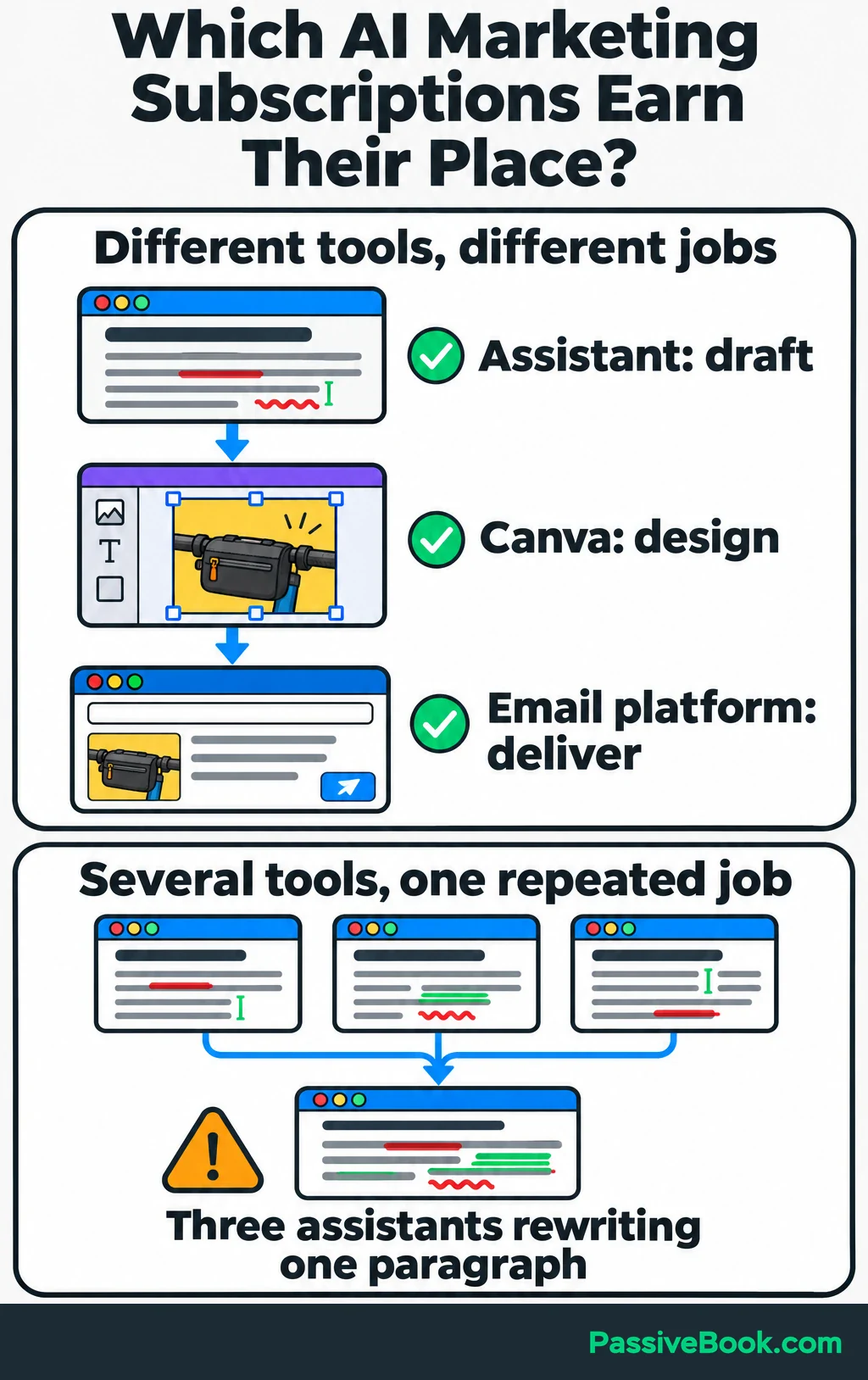
An assistant, Canva, and an email platform can serve different jobs in the same campaign. Three assistants rewriting the same paragraph are competing for one job. That distinction will save you more money than collecting discount codes.
AI Assistants for Planning and Research
Choose one primary assistant before buying specialist writing software. Give competing assistants the same product facts, audience, reference material, and deliverable, then compare the work needed to approve the result.
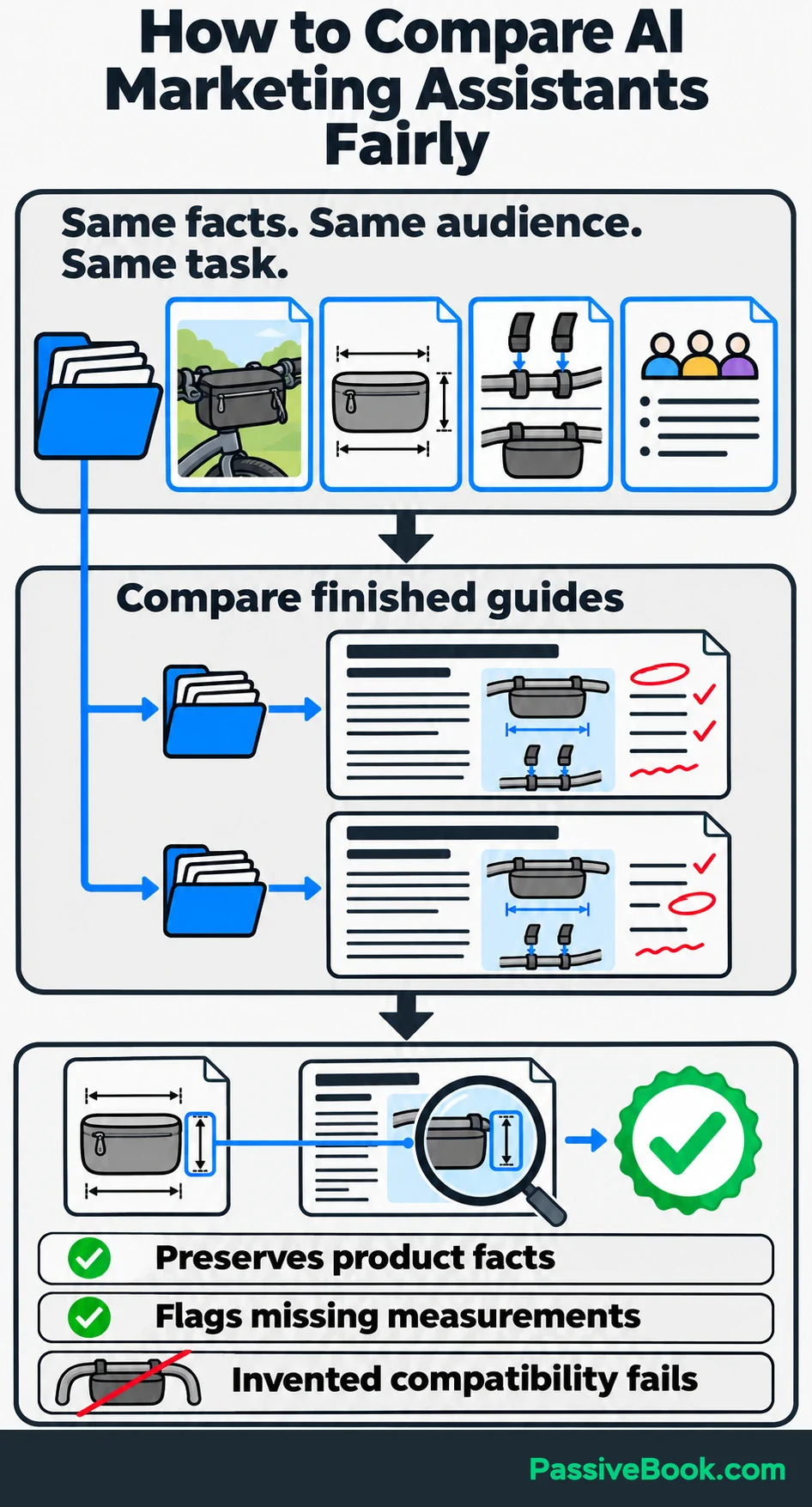
For the cycling shop, a useful test is a guide explaining how to check whether a handlebar pouch will fit. Supply the actual dimensions, mounting instructions, and photographs. An assistant that quietly invents compatibility details has failed the test, however pleasant its introduction sounds.
For research, open the original sources. A citation gives you somewhere to check; it does not establish that the answer represents the source correctly.
1. Claude — Long-form Drafts and Content Strategy
Claude is my primary assistant for long-form writing and content strategy. I would choose it when the hard part is organizing a substantial piece, keeping a consistent voice, and revising several sections together.
Give it reusable instructions and approved reference files rather than rebuilding the brief in every conversation. For the pouch guide, ask it to explain the fit checks first and flag missing measurements before drafting.
I find the useful decision comes during revision: can I change the argument without spending the next hour repairing the structure? Test that with your own material.
Keep the approved version in your normal document or publishing system. A helpful conversation should produce an asset you can use elsewhere.
2. ChatGPT — Mixed Marketing Tasks
I would shortlist ChatGPT when your week contains several different jobs: offer ideas, product-page revisions, spreadsheet questions, and image concepts.
That range makes it a sensible first assistant for a business still discovering where AI helps most. Try a copy task and a data task rather than judging it from a handful of headlines.
For the shop, ask it to rewrite a pouch description using supplied facts, then explain a campaign spreadsheet. Check the description against the product and the analysis against the original totals.
If Claude already handles your recurring work well, I would need a separate, repeated use before paying for both. Occasional curiosity is a free-plan job.
3. Gemini — Marketing Work Across Google Applications
Gemini deserves a closer look when your campaign notes, documents, and spreadsheets already live in Google applications.
Its appeal is the fit with that working environment. Test whether it reduces copying and searching across files while still producing work you can approve.
I use Gemini for research and fact-checking as part of my workflow, but I still inspect the underlying evidence. Asking another assistant to agree with a claim does not verify it.
For the cycling shop, try building a campaign brief from the approved product documents. Compare the finished brief with the same assignment in Claude or ChatGPT, including the time spent locating and supplying the material.
4. Perplexity — Discovering Research Sources
I would choose Perplexity when finding useful evidence takes longer than writing the brief.
Use it to locate manufacturer documents, original research, and other sources you can inspect. Save the useful links beside the relevant claim so they remain available during editing.
For the shop, the distinction matters when researching reflective materials. General information about a material does not establish how your particular strap performs. Product claims still need evidence for that product.
Before adding Pro, compare its research with the assistant you already use. The purchase makes sense when it repeatedly finds better source material or cuts the work of finding it.
5. Gemini Notebook — Synthesizing a Defined Source Library
Gemini Notebook fits a different research problem: you have collected the material, but need help making sense of it.
Feed it approved product documents, existing guides, and anonymized customer questions. Then ask for recurring concerns, contradictions, and gaps that need an answer.
The cycling shop might discover that its source material explains pouch capacity well but says little about cable clearance. That gives you a useful brief for the next guide.
I would use it to organize evidence before asking a general assistant to draft. Keep the source library current, because a clear summary of an outdated document can still lead you in the wrong direction.
AI Software for Marketing Copy and Search Visibility
These tools solve different writing problems. Jasper helps with repeated branded campaigns, Grammarly edits where you write, and the search tools help with research or revision.
Choose the job first. A better sentence, a useful search brief, and a campaign built from shared product knowledge have different acceptance tests.
6. Jasper — Repeatable Branded Campaigns
Jasper is worth considering when you repeatedly turn the same brand and product knowledge into several campaign assets.
For the shop, that could mean a product page, launch email, and social captions built from one approved pouch brief. Judge whether the assets stay consistent without requiring the same corrections in every draft.
I would pay the premium only when its shared campaign structure removes recurring work that a general assistant leaves behind.
Include the handoff in that decision. If you still spend a long time moving and formatting copy inside your website and email platform, faster generation may solve only a small part of the job.
7. Grammarly — Editing Across Applications
Grammarly is my shortlist choice when writing happens across many applications and small editing tasks keep interrupting the day.
Its value is convenient sentence-level help. You can review a customer reply or campaign description where you are already working.
I would compare the suggestions you accept with the changes you can get from your primary assistant. Count the time saved, including any work needed to restore your voice after a rewrite.
For the cycling shop, product terms and measurements should survive every edit. A smoother sentence that changes a mounting instruction is a worse sentence. Keep the correction that improves clarity and reject the one that changes meaning.
8. Semrush — Combined SEO and AI Search Research
Semrush makes sense when keyword research, competitor analysis, site auditing, and search monitoring are all regular jobs.
For a small shop, I would first ask what decisions those reports will change. They might help you choose between writing a fit guide, improving an existing product page, or fixing a technical problem.
Separate conventional SEO value from AI visibility monitoring. Wanting keyword data does not automatically justify paying for every newer measurement feature.
Test its MCP connection by asking your assistant to retrieve the Semrush data you need. Keep it in the workflow if it saves repeated searches or exports.
9. Surfer — Revising Search-focused Content
I would consider Surfer when you already publish useful guides but spend too much time deciding what needs improvement.
Use its guidance to look for missing explanations. In the pouch guide, a section on mounting clearance may help the reader far more than another paragraph repeating the target phrase.
Treat the score as a prompt for review. Raising it does not guarantee a ranking improvement.
Include the editing handoff in your trial. Surfer’s Google Docs extension transfers guidelines, but article text needs copying between Docs and Content Editor. That matters if your expected saving depends on seamless editing across both. Surfer’s integration explanation.
10. Frase — Search Briefs and CMS Publishing
Frase is worth comparing with Surfer when you want search research, briefing, drafting, and publishing closer together.
Run both through one real assignment. Ask whether the brief helps answer the reader’s question, how much the draft needs changing, and how much work remains before publication.
For the shop, a useful brief would identify the fit questions the guide must answer. A long list of loosely related headings would create more editing.
I would favor Frase when its publishing connections remove a repeated handoff. I would favor Surfer when revision guidance is the main need. Paying for both requires two distinct jobs that happen often enough to justify them.
AI Tools for Images and Marketing Design
Before comparing image tools, define the finished asset: dimensions, text, visual style, and product details that must remain accurate.
Then measure the effort needed to approve an export. A beautiful preview is unfinished work if you cannot read the text on a phone or the generated pouch has acquired an extra zipper.
11. Canva — Reusable Campaign Graphics
Canva would be my first design tool for the shop because reusable layouts matter more than generating a fresh visual style for every campaign.
Build a small set of editable layouts for Pinterest pins, email banners, and guide illustrations. Then change the photograph and message while keeping spacing and type consistent.
For example, one pin might say “Check Your Handlebar Space Before You Buy.” Its job is to make the guide’s benefit clear and send the right visitor to it.
Inspect the exported design at mobile size. I would also test Canva’s included scheduling before paying for a separate scheduler, provided it supports the channels and workflow you need.
12. Adobe Firefly — Generative Image Editing
Firefly belongs on the shortlist when you need controlled changes to an image, such as extending a background or removing a distracting object.
I would start with a real product photograph and a specific edit. That gives you a clear result to check against the original.
For the cycling shop, inspect strap material, pouch proportions, attachment points, and hardware after every change. A generated setting should not suggest that the product has features it lacks.
Choose it when these targeted revisions are regular work. If your main task is placing accurate photographs into repeatable graphics, I would start with Canva and add Firefly only when its editing solves a recurring problem.
13. Photoroom — Batch Product-image Preparation
Photoroom is the stronger candidate when you regularly prepare groups of product photographs.
Test a complete batch: different pouch angles, strap colors, and close-ups. Look for consistent backgrounds and intact product edges, then count how many images you can approve.
I would use a manual export workflow first if the catalog is small. Direct store synchronization becomes useful when repeated uploading and replacing images consumes enough time to justify the higher plan.
Keep that distinction clear during the trial. Paying for better image preparation and paying to remove a store-upload task are separate decisions, even when the same product offers both.
AI Tools for Video and Voiceovers
Choose the production task before choosing the software. Editing a recording, creating an avatar presenter, finding short clips, and generating narration require different tools.
The cycling shop can make useful demonstrations without the owner appearing on camera. A close view of the pouch mounting process may answer the buying question more clearly than a presenter reading its description.
14. Descript — Editing Recorded Demonstrations
I would start with Descript when you already have useful footage and editing it is the slow part.
Its transcript-based workflow suits demonstrations with spoken explanations. Try trimming a pouch installation recording, cleaning the audio, and adding captions.
Then watch the finished video from beginning to end. Check whether a cut removed an important pause or made the instructions appear out of order.
Descript also has clipping features, so test those before adding a separate clipper. The question is whether you can produce a clear, accurate export with less effort. The number of AI editing options matters less than the amount of correction left afterward.
15. Synthesia — Presenter-led Product Explainers
Synthesia is worth considering when an approved script benefits from a presenter format.
I would use it for an explanation that needs a clear speaking presence, then support the explanation with accurate product visuals where needed.
For the shop, an avatar could introduce the fit checklist. It would be less useful as a substitute for footage showing where the pouch straps attach.
Compare the finished explanation with a simple recording before committing to regular production. If a close-up demonstration answers the question faster and more clearly, I would use that. An avatar should earn its place through the explanation, rather than through the novelty of having one.
16. OpusClip — Repurposing Long Videos
OpusClip makes sense when you have longer recordings and repeatedly spend time finding usable excerpts.
Try it on a complete pouch demonstration. Review the proposed clips for a clear beginning, a complete point, and enough context to make sense alone.
A clip showing the final attachment check may be useful. One that starts with “and that is why this matters” probably needs work.
Count approved clips rather than generated candidates. I would also compare it with the clipping available in your existing editor. Subscribe when finding, reframing, and captioning excerpts becomes a separate recurring job that the specialist handles with less effort.
17. ElevenLabs — Narration and Voiceovers
ElevenLabs is a sensible option when you produce videos from approved scripts and narration is a repeated task.
Generate a short section first. Check product names, measurements, emphasis, and the pauses between instructions before producing the full recording.
For the shop, “check the clearance around the cables” needs to sound like an instruction the viewer can follow, rather than a line being hurried toward the next sentence.
Estimate usage from everything generated, including pronunciation fixes and revised takes. Finished runtime alone will understate the work. I would finalize the script before generating a batch, because rewriting approved copy afterward creates another round of audio production.
AI Tools for Social Media Publishing
Separate three jobs: writing the caption, making the asset, and publishing it.
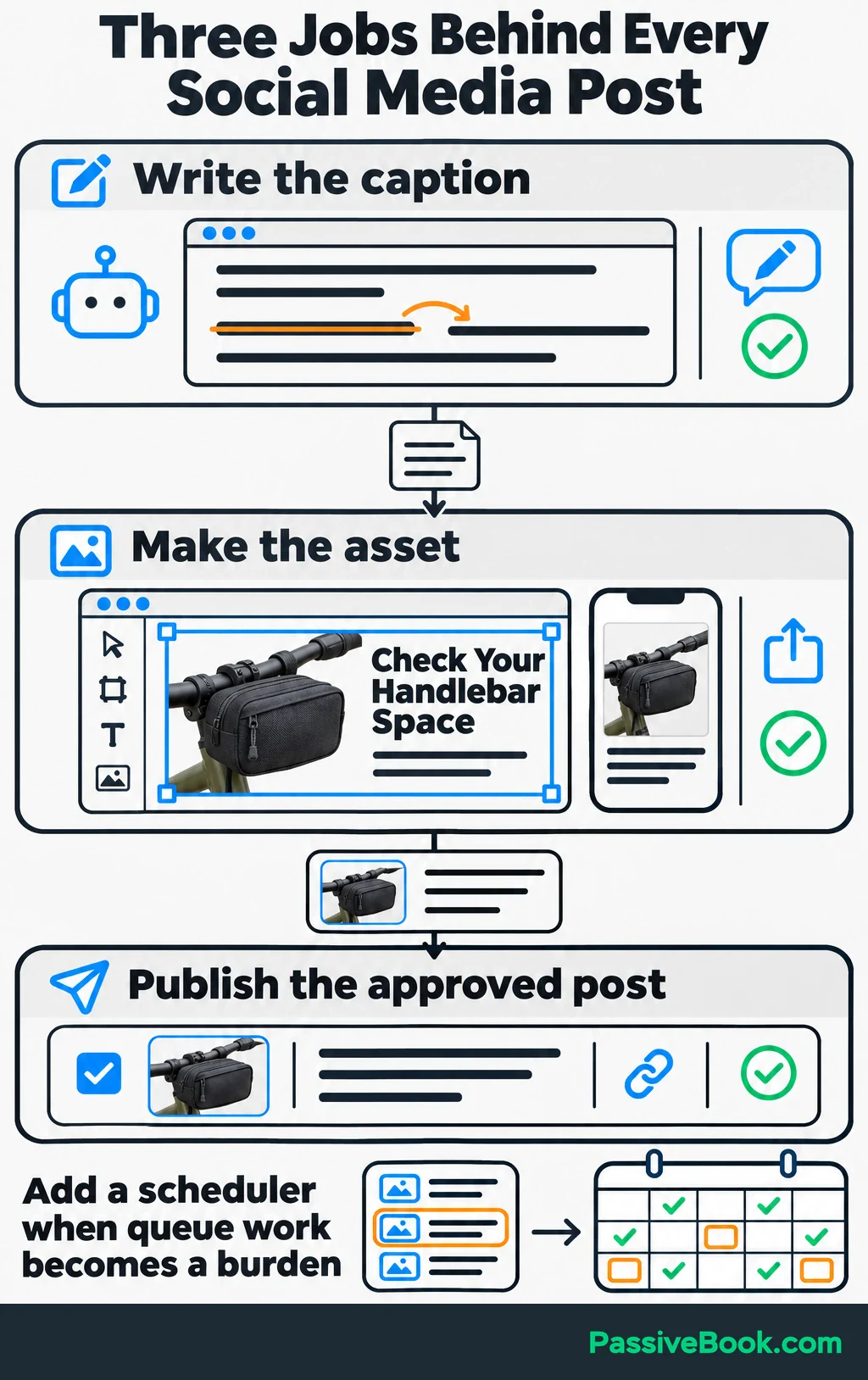
You may already cover the first two with an assistant and Canva. Add a publishing tool when maintaining the queue becomes work in its own right.
For a single Pinterest account, I would try the native scheduler first. A paid queue should remove a problem you can name.
18. Buffer — Straightforward Scheduling
Buffer is my shortlist choice for a simple, reviewed publishing queue.
Its appeal is having captions and scheduled assets together, with connections to tools that may already be in your workflow.
For the cycling shop, prepare the approved pin image, description, destination link, and publishing time. Review those together before adding the post to the queue.
Count every required channel when comparing the paid plan. If native scheduling already handles a small queue comfortably, I would keep using it.
Buffer earns the subscription when one calendar and its connections save enough repeated switching, uploading, or checking to make publishing easier to maintain.
19. Predis.Ai — Generating Social Creative Variations
Predis.Ai is worth testing when making variations consumes more effort than scheduling them.
Supply the actual product photographs and a clear brief, then compare its complete image posts, carousels, or short videos with your assistant-plus-Canva process.
For the shop, test several ways to introduce the pouch fit guide. Count assets that communicate a distinct useful point and preserve the product accurately.
I would reject a batch full of near-identical slogans even if generation was fast. Variation should give you different messages to test.
Also distinguish publishing connections from Auto Posting when choosing a plan. Having an account connected does not mean every automatic publishing feature is included.
20. Blotato — Publishing From Connected AI Workflows
Blotato fits when publishing is already part of a connected workflow.
An assistant or automation builder can hand approved content to its publishing actions through an API or MCP connection. That makes it a candidate for repeated transfers from a content system to social platforms.
I would compare that complete handoff with Buffer before paying for both.
Plan the integration trial carefully: Blotato’s free trial excludes API and MCP access, and creating the required API key starts the paid subscription. The table links to those terms.
For the shop, I would first prepare one approved asset and destination. Connecting an unfinished content process will only help unfinished work travel faster.
AI Software for Email and Personalization
Email platforms charge around the list and sending workload, so compare them at your expected contact count and campaign volume.
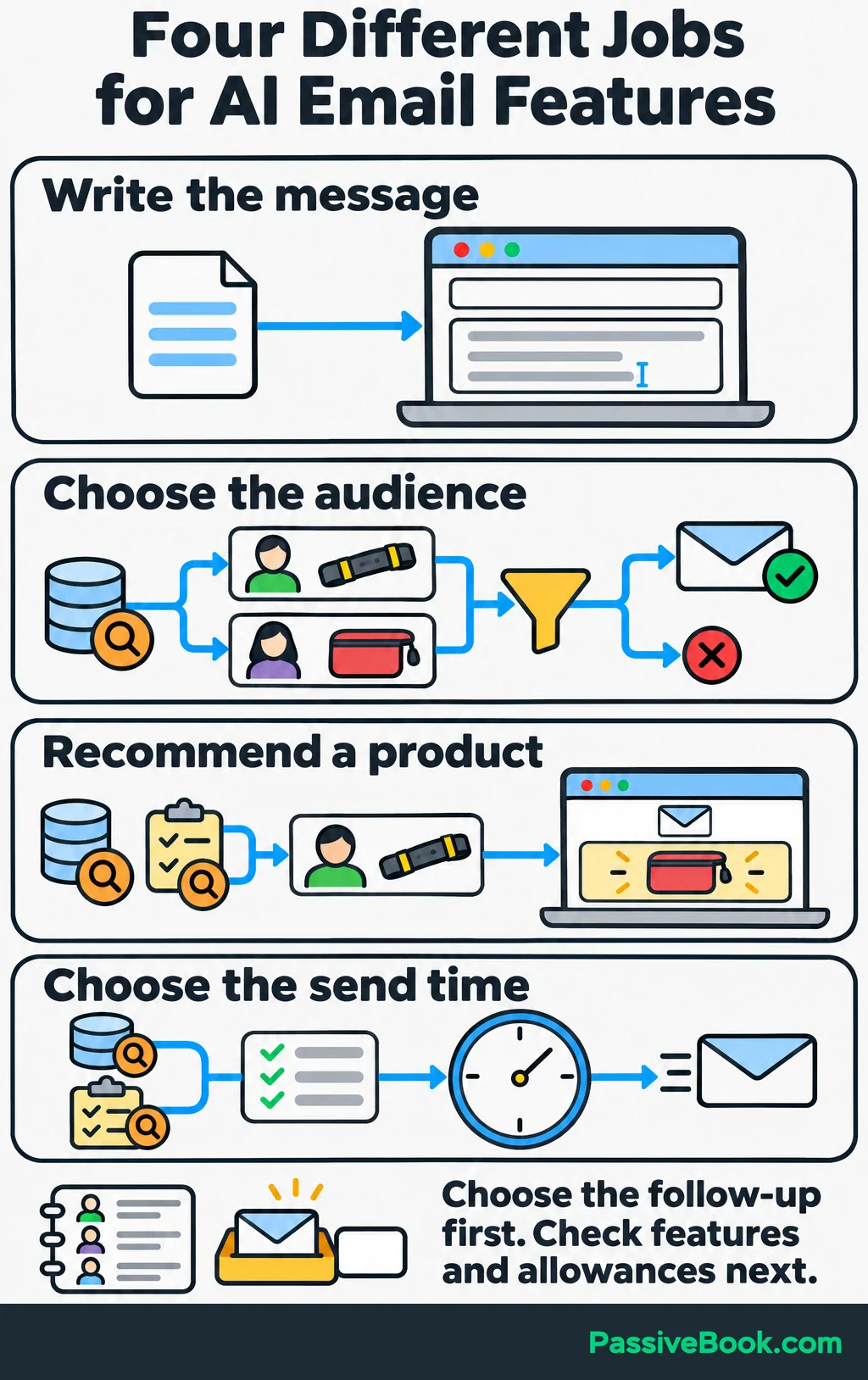
Also separate the AI features. Writing a subject line, building a segment, recommending products, and predicting send time are different capabilities.
I would choose the platform that supports the follow-up you need, then decide whether its AI features improve that work.
21. MailerLite — Newsletters and Simple Promotions
MailerLite is a budget option I recommend for a straightforward signup, welcome email, and newsletter workflow.
It suits the shop if the immediate need is delivering a fit checklist and sending useful product guides. Drafting in an existing assistant may be enough while the free sending allowance fits.
I would upgrade for a specific capacity or feature need. Paying solely to rewrite a subject line is harder to justify when another subscription already handles drafting.
Check the connection action as well as the integration name. Managing subscribers and sending a campaign are different actions, and API or MCP sending requires paid access.
22. Omnisend — Store-driven Email Journeys
Omnisend would be my first comparison for the cycling shop when purchases and carts should determine follow-up.
Start with one useful journey, such as a welcome sequence or a post-purchase message. Connect the store data and verify that the right event triggers it.
A segment request might be: “Find cycling-strap buyers who have not purchased a pouch.” Inspect the resulting rules and sample members before sending.
Its Agent can help build segments and campaign material, but some features need store data or a paid plan. I would choose it for the store workflow first, then assess the AI help within that workflow. Omnisend Agent requirements.
23. ActiveCampaign — Behavior-based Follow-up
ActiveCampaign becomes interesting when the next message depends on several actions and stopping rules.
For example, the shop may need different follow-up for a subscriber who downloaded the checklist, clicked through to a pouch, and later purchased. Sketch those decisions before building them.
I would keep a simple welcome sequence on a simpler platform. More branching creates more conditions to maintain and test.
Choose the tier by the feature you need. AI-assisted automation building, content generation, and predictive sending sit at different levels.
The buying test is whether those capabilities support a useful journey you can explain clearly. If you cannot describe the rules, software will not make them clearer.
24. Klaviyo — Customer-data-driven Ecommerce Marketing
Klaviyo deserves a closer look when customer profiles and store events can materially change your targeting.
Compare it with Omnisend using the same campaign and data. Check whether each platform can identify the intended audience, exclude unsuitable contacts, and stop a message after purchase.
For the shop, a small catalog and simple follow-up may not need richer targeting yet. I would add complexity when there is a clear customer distinction worth acting on.
Budget for email capacity and Composer separately. Composer’s AI work uses capacity based on the request, so a flat estimate per campaign can be misleading. Klaviyo’s Composer billing explanation.
AI Tools for Landing Pages and Customer Conversations
Define the conversion task first. Capturing a signup, coordinating a lead handoff, and answering a purchase question require different software.
I would keep pages and forms inside the existing website or email platform until a repeated need justifies something else. Moving a working page is work too, and the replacement needs to earn that effort.
25. Unbounce — Dedicated Campaign Landing Pages
Unbounce makes sense when building and testing dedicated campaign pages is regular work.
For the cycling shop, a focused checklist signup page could support the pouch guide. But I would first compare it with a page built in the existing website.
Choose the plan around the required capabilities. The entry plan, broader integrations, and A/B testing sit at different levels, so the lowest advertised price may not cover the job.
Test the whole signup path: mobile page, form submission, contact creation, and promised email. A polished landing page has not completed its task until the subscriber reaches the right follow-up.
26. HubSpot — Marketing Connected to CRM Records
HubSpot is strongest when marketing and sales need shared customer records and clear handoffs.
Breeze Assistant can use that customer context for work such as research, content, and follow-up. I would consider the platform when scattered records are causing missed or confused follow-up.
For a small direct-to-consumer shop, I would need a clear reason to replace a working email platform and store setup.
Price the edition you actually need, including contacts, seats, credits, and onboarding. Then test essential integrations and exports before moving records.
The decision should rest on the coordinated customer workflow. Convenient AI drafting alone would not persuade me to migrate a business into a broader platform.
27. Tidio Lyro — Answering Purchase Questions
Lyro is worth testing when the same purchase questions repeatedly interrupt your work.
Give it approved product and policy information, then test questions about fit, capacity, delivery, and returns. Include questions the source material cannot answer.
For the shop, ask whether the pouch fits a setup that is absent from the compatibility information. A useful answer should acknowledge the gap and direct the customer to a person.
Measure correctly completed customer tasks. Lyro’s billing unit counts conversations in which it replies, so an answer is not automatically a resolution.
I would improve unclear product information first when that is the reason the same question keeps arriving.
AI Tools for Marketing Analytics
Choose the question before the reporting tool.
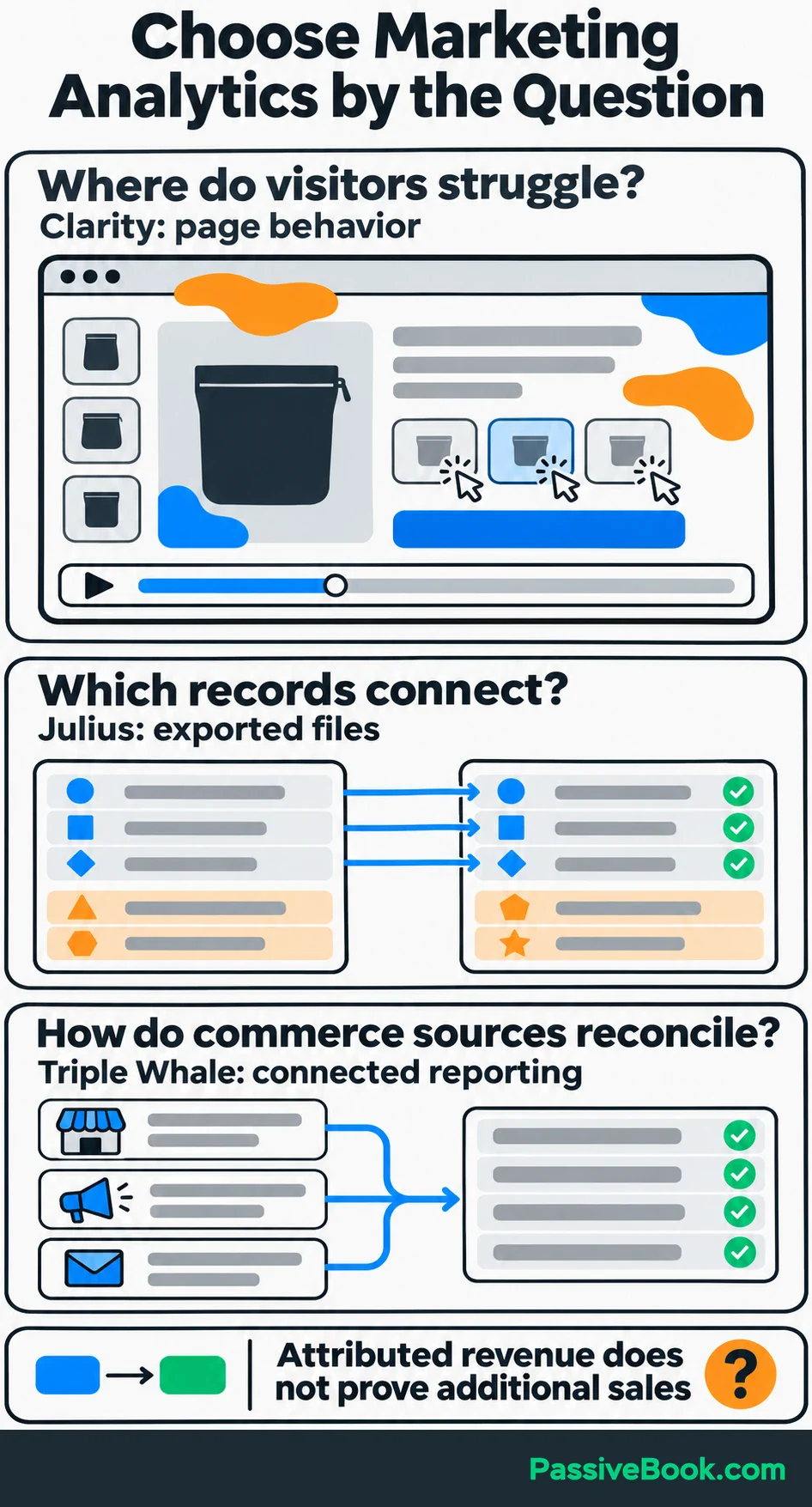
Clarity helps investigate behavior on a page. Julius helps analyze exported files. Triple Whale connects several commerce sources for broader reporting.
Keep attributed revenue separate from proven additional sales. Attribution assigns credit under a model; it does not establish that the sale would have disappeared without that channel.
28. Microsoft Clarity — Free Website Behavior Analysis
Clarity would be an early addition to my shortlist because it helps investigate page problems without another software subscription.
Use heatmaps, recordings, and Copilot summaries to find behavior worth inspecting. Then look at the underlying sessions before choosing a change.
For the pouch page, repeated clicks on a non-clickable size illustration might suggest that visitors expect a larger image. That is a reason to investigate, rather than proof that one change will increase sales.
Set consent controls and sensitive-data masking before collecting behavior. I would use Clarity alongside normal traffic and order reports so page observations stay connected to the business question.
29. Julius — Analyzing Exported Marketing Data
Julius is a candidate when spreadsheet analysis is a recurring bottleneck.
Start with one precise question and the files needed to answer it. For the shop: which product guides brought subscribers who later purchased, within a defined period?
The files need a shared identifier, such as a subscriber ID, to connect signups with purchases. Ask the tool to show which records it matched and which it left out, then check the totals and date filters.
I would compare that report with ChatGPT or Claude before adding another subscription. The specialist earns its place when it makes repeated analysis easier to inspect and rerun.
A tidy chart is useful only after you know what the rows and numbers represent.
30. Triple Whale — Connected Ecommerce Reporting
Triple Whale is worth considering when reconciling store, advertising, and email reports has become substantial work.
Its connected data and Moby assistant can support questions across those sources. For the shop, the useful question might involve a guide visit, email interaction, and later purchase.
I would begin with existing store reports and exported-file analysis. A broader reporting platform becomes more persuasive when repeated reconciliation is preventing useful decisions.
Check the commitment as carefully as the monthly payment. Its paid packages carry annual commitments even when billed monthly.
Before adopting it, choose a few questions the platform must answer and verify those answers against the original systems.
AI Tools for Workflow Automation
Make, n8n, and Zapier connect the work between tools. Compare them using the same trigger, inputs, AI task, approval point, and destination.
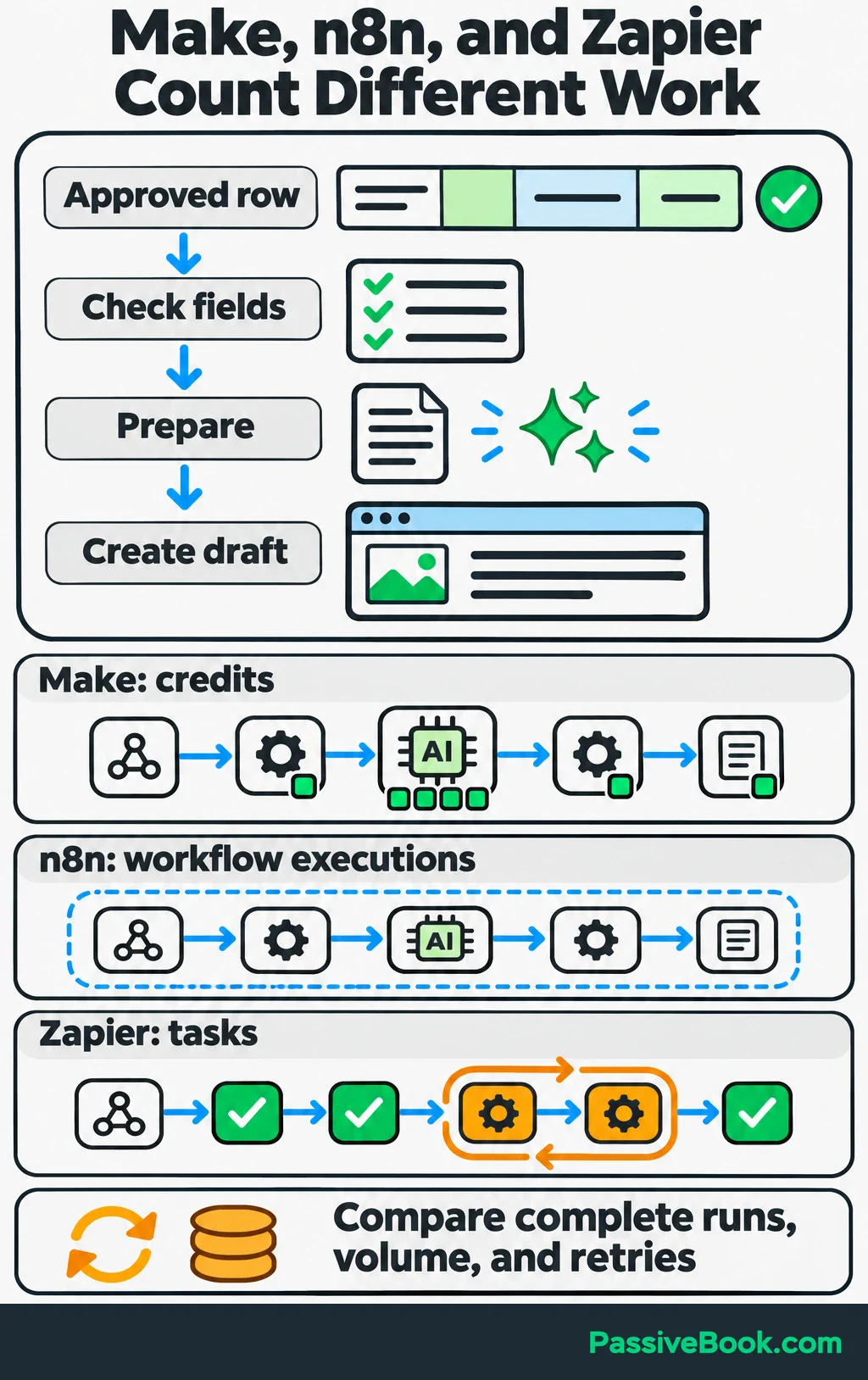
For example: a row marked approved triggers a workflow, which checks required fields and creates a publishing draft.
Their billing units differ. Make credits, n8n workflow executions, and Zapier tasks cannot be compared as if they count the same thing.
31. Make — Visual Workflows Across Applications
Make is the visual automation builder I recommend when you want to see the steps, filters, and branches together.
I would use it for a workflow such as reading approved campaign rows, preparing the required fields, and passing assets to a destination.
Estimate the cost of complete runs. Repeated records, polling, and retries can add work beyond the simple path shown on the canvas.
If you supply your own AI provider connection, budget that usage separately. Custom-provider connections within Make AI Toolkit and AI Agents require a paid plan. That can change the cost of an otherwise small workflow. Make’s provider connection requirements.
32. n8n — Custom Workflows and Hosting Control
I use n8n to connect tools, and I would choose it when a workflow needs more control over data, branching, or custom processing.
In an early content workflow, I let formatting begin before I had finished approving the draft. Every substantive revision created another formatting pass. I moved the approval point earlier because that was the decision creating the repeated work.
For the shop, the same rule applies: approve product facts and copy before triggering repeated distribution.
Choose Cloud when reducing operating work matters most. Self-hosted Community avoids a software subscription for permitted internal use, but hosting, updates, and backups remain part of the job. n8n’s license guidance.
33. Zapier — Connecting an Existing Collection of Applications
Zapier would be my choice when its connectors perform the required actions reliably with less setup and maintenance.
Check the exact trigger and destination action. “Connects to your email platform” is too broad if the connector cannot create the campaign draft or update the field you need.
For the shop, build the same small workflow you would test in Make or n8n. Include the approval condition and check how repeated actions affect task usage.
I would accept a higher software bill if it removes enough maintenance work. I would skip it when the workflow runs comfortably in a tool already paid for. Convenience has value, but it should be visible.
How to Choose a Stack Worth Paying for
Shortlist One Tool per Recurring Job
List the work behind a normal week’s marketing: gather facts, draft, review, format, make graphics, distribute, send follow-up, and review results. Mark the jobs your existing tools cover before adding subscriptions.
For the cycling shop, I would begin with:
- Assistant: Claude for guides and campaign planning.
- Design: Canva for editable pins, banners, and illustrations.
- Email: Omnisend when purchase activity drives follow-up, or MailerLite when the immediate need is a simple newsletter.
- Website Review: Clarity for investigating page friction.
- Distribution: Native scheduling until maintaining the queue becomes a repeated burden.
- Automation: One builder once a stable handoff is taking enough time to automate.
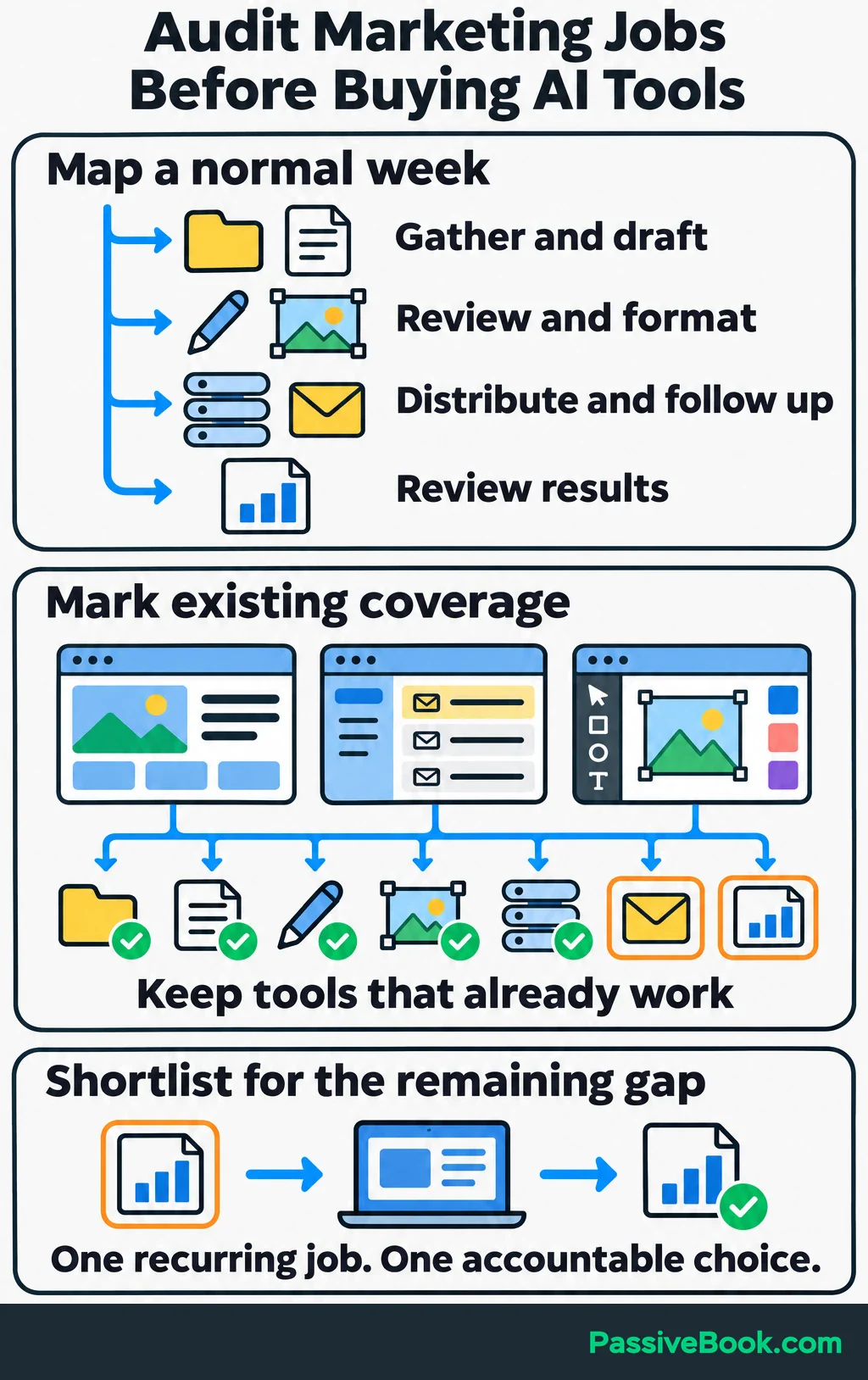
That is a starting point, and free access may cover the first trials. It is not a reason to replace software that already works.
If your business already runs on WordPress, I would also include your current forms, pages, WooCommerce setup, and email tools in the comparison. I use FluentCRM within my WordPress stack, so a hosted platform would need to solve a real problem before I moved.
Count shared bundles once. Gemini and higher Gemini Notebook access may come from the same subscription. Claude Pro includes Claude Code, its coding assistant, so put them on one budget line.
A cheaper subscription can still make the whole stack more expensive. Use our tracker to compare combinations against the jobs you actually need covered, including tools you already pay for.
Free Software Cost Comparator




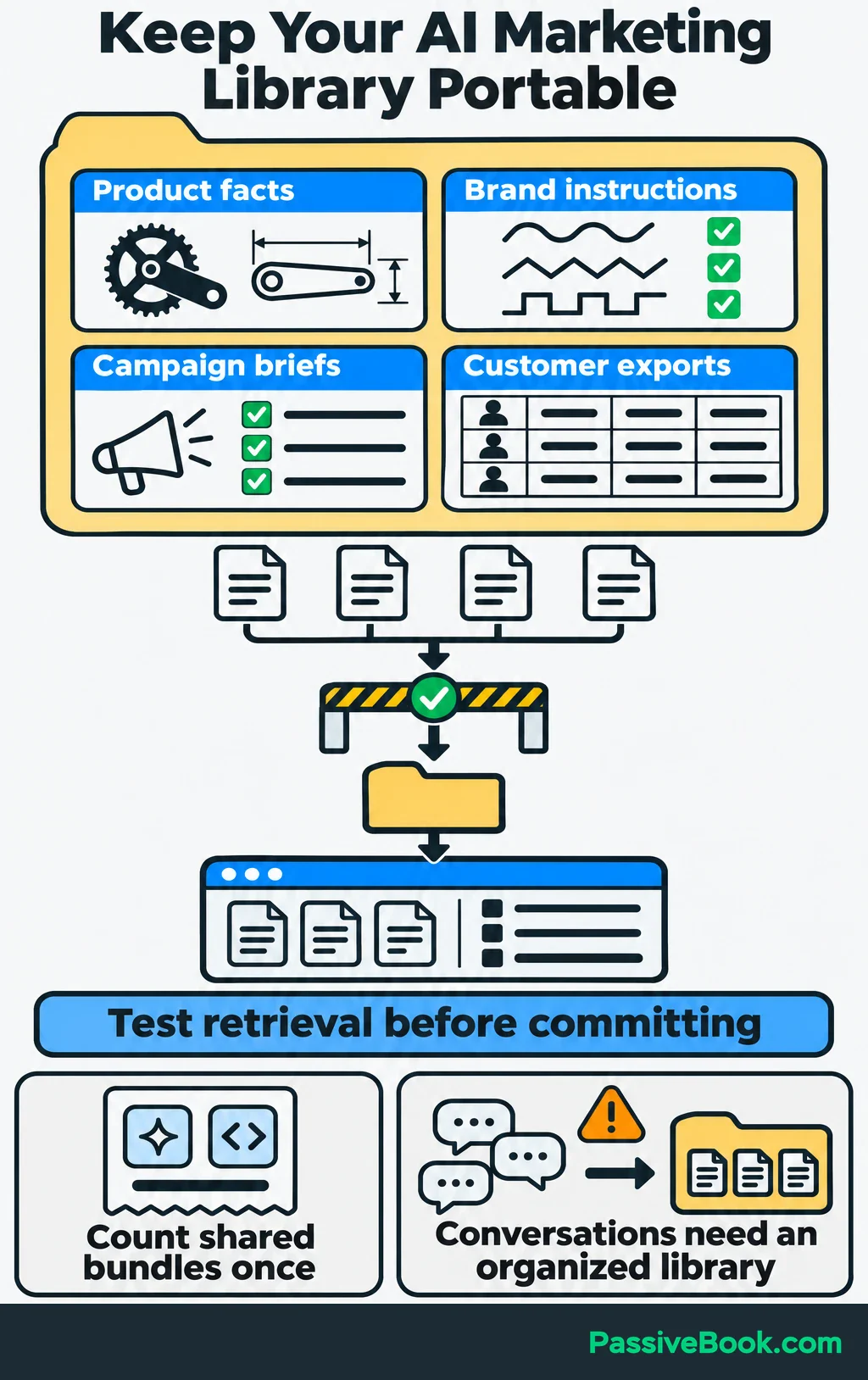
Keep product facts, brand instructions, briefs, and customer exports in portable formats. Test whether you can retrieve useful records before committing to a platform. A collection of conversations is a poor substitute for an organized business library.
Test Finished Work and Connected Handoffs
Give competing tools the same inputs and use the checks below to decide whether the finished campaign is ready to publish.
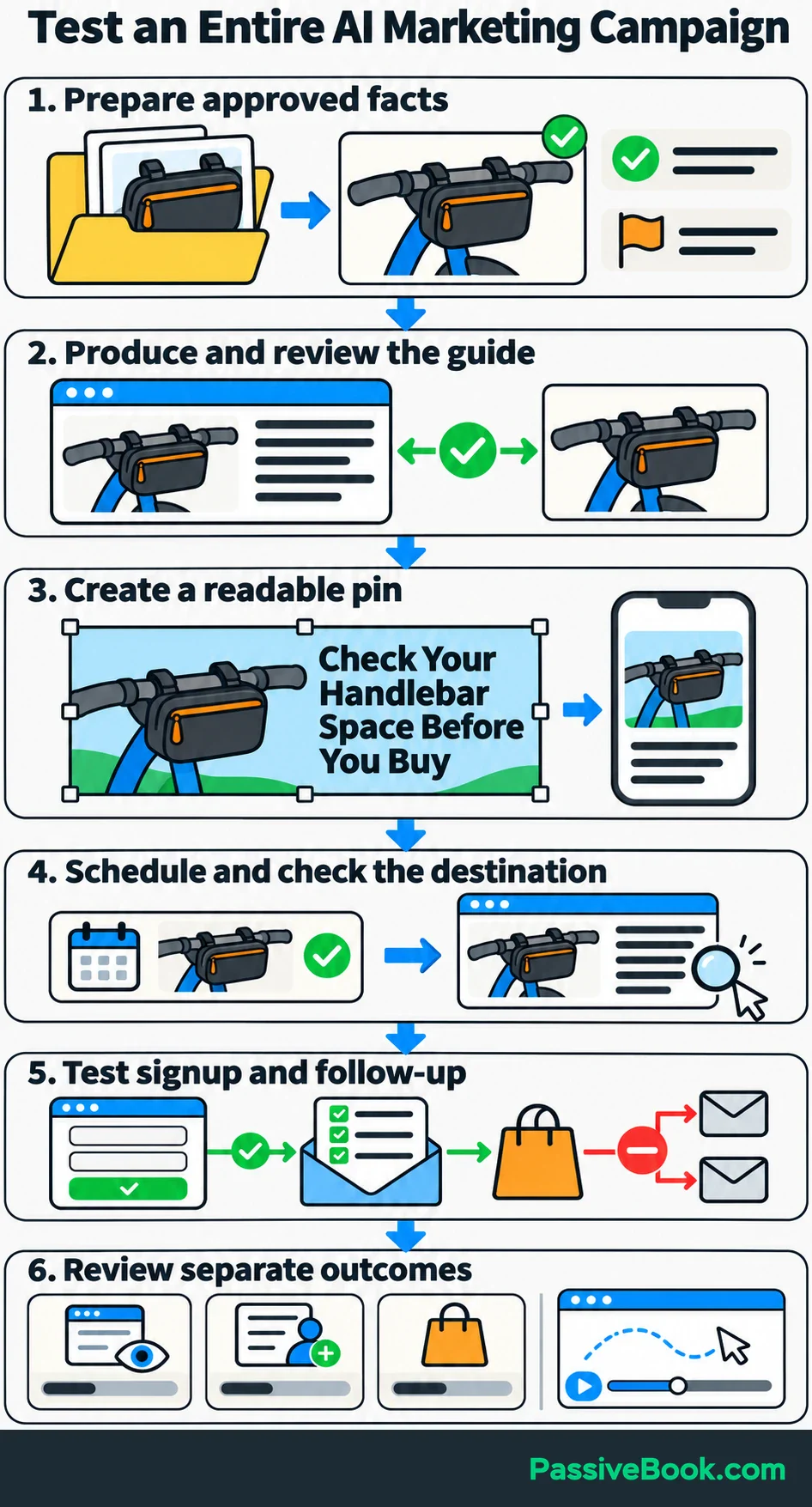
Use one complete campaign to test the path:
- Prepare The Facts: Collect approved pouch dimensions, mounting instructions, photographs, and relevant policies in one brief. Mark missing information so the assistant cannot quietly fill it in.
- Produce The Guide: Draft a guide on checking handlebar-pouch fit. Review it against the source material and product before publishing.
- Create The Pin: Build a readable Canva graphic with the message “Check Your Handlebar Space Before You Buy.” Confirm that the image represents the actual pouch.
- Schedule The Post: Add the approved asset, description, and guide link to the queue. Open the destination from the preview and check the published result.
- Deliver The Follow-up: Offer a fit checklist through a signup form. Test the delivery email and a short follow-up that links to the pouch’s mounting details. Confirm that purchase-based stopping rules work where used.
- Review The Results: Record guide visits, confirmed signups, and orders separately. Inspect page friction in Clarity and compare order totals with the store’s records.
This path can begin with manual handoffs. Automate a handoff once you know its inputs, approval rule, and destination.
For a digital product, use a sample lesson or template preview as the signup offer and test the checkout and buyer exclusions. For an affiliate blog, link the guide to a disclosed recommendation and check referral reports for sales where available.
Judge tools by finished work:
| What to Check | What Passing Looks Like |
|---|---|
| Accuracy | The guide preserves the supplied measurements and flags missing compatibility information |
| Brand fit | The copy sounds like the shop and avoids unsupported promises |
| Completeness | The reader can carry out the fit check without guessing a missing step |
| Editability | You can revise the text, layout, and images without rebuilding the asset |
| Connection | An approved item reaches the correct draft or queue once |
| Recovery | A failed transfer produces an alert and can be resumed without duplicate publication |
Test incomplete inputs and a failed connection as well as a successful run. Remove a destination link, disconnect an account, or submit the same record twice in a safe test. Check what stops, what gets logged, and what needs manual recovery.
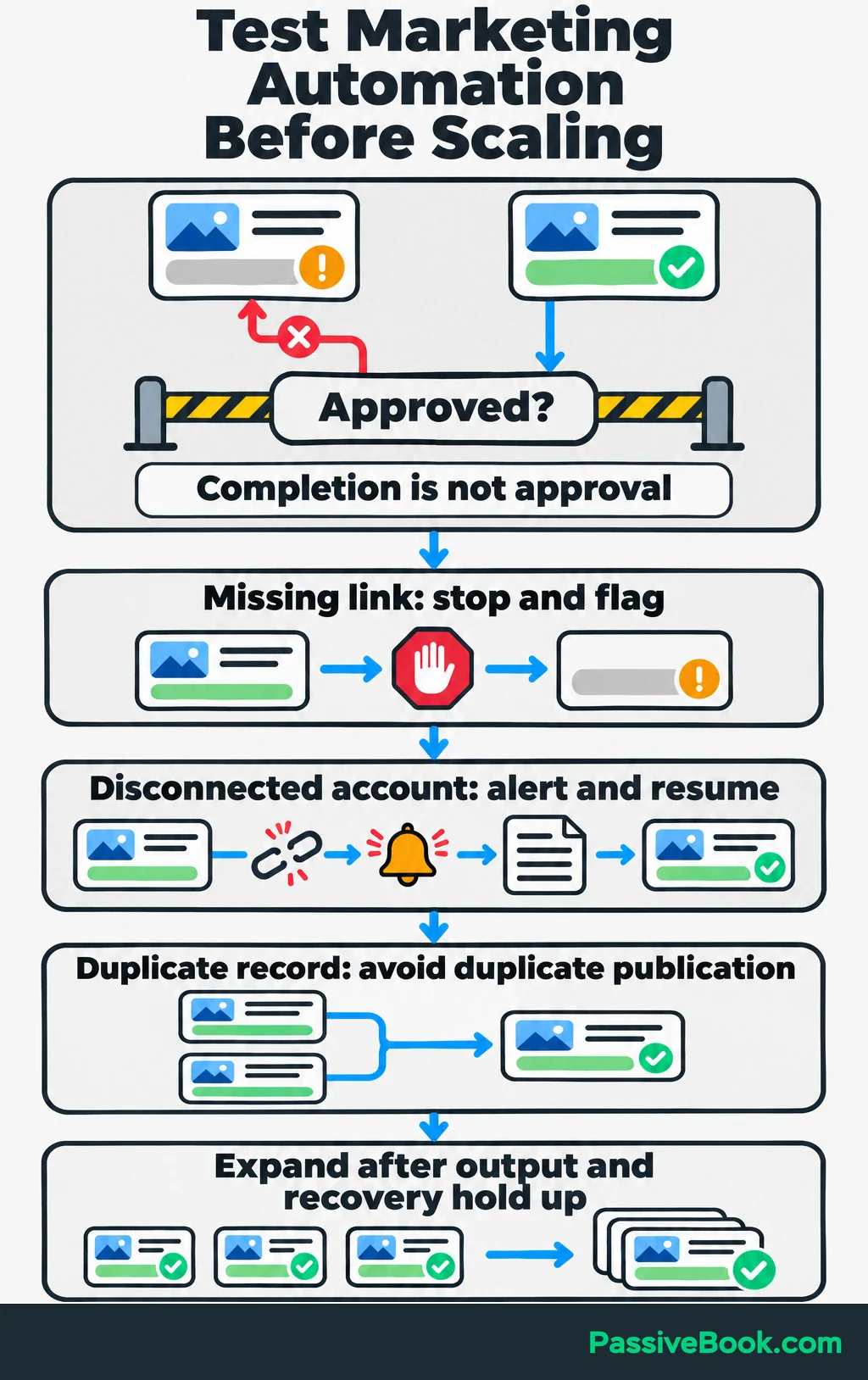
One practical rule I use is to make approval a visible status. A draft should not become publishable simply because the previous step completed.
Before connecting live customer records, send only the fields the task needs. Check the selected plan’s training, retention, deletion, and export controls. For an initial report trial, anonymized exports may be enough.
Once the workflow works, run a small reviewed batch. Expand repeated runs after the output and recovery process hold up.
Calculate Net Time Saved
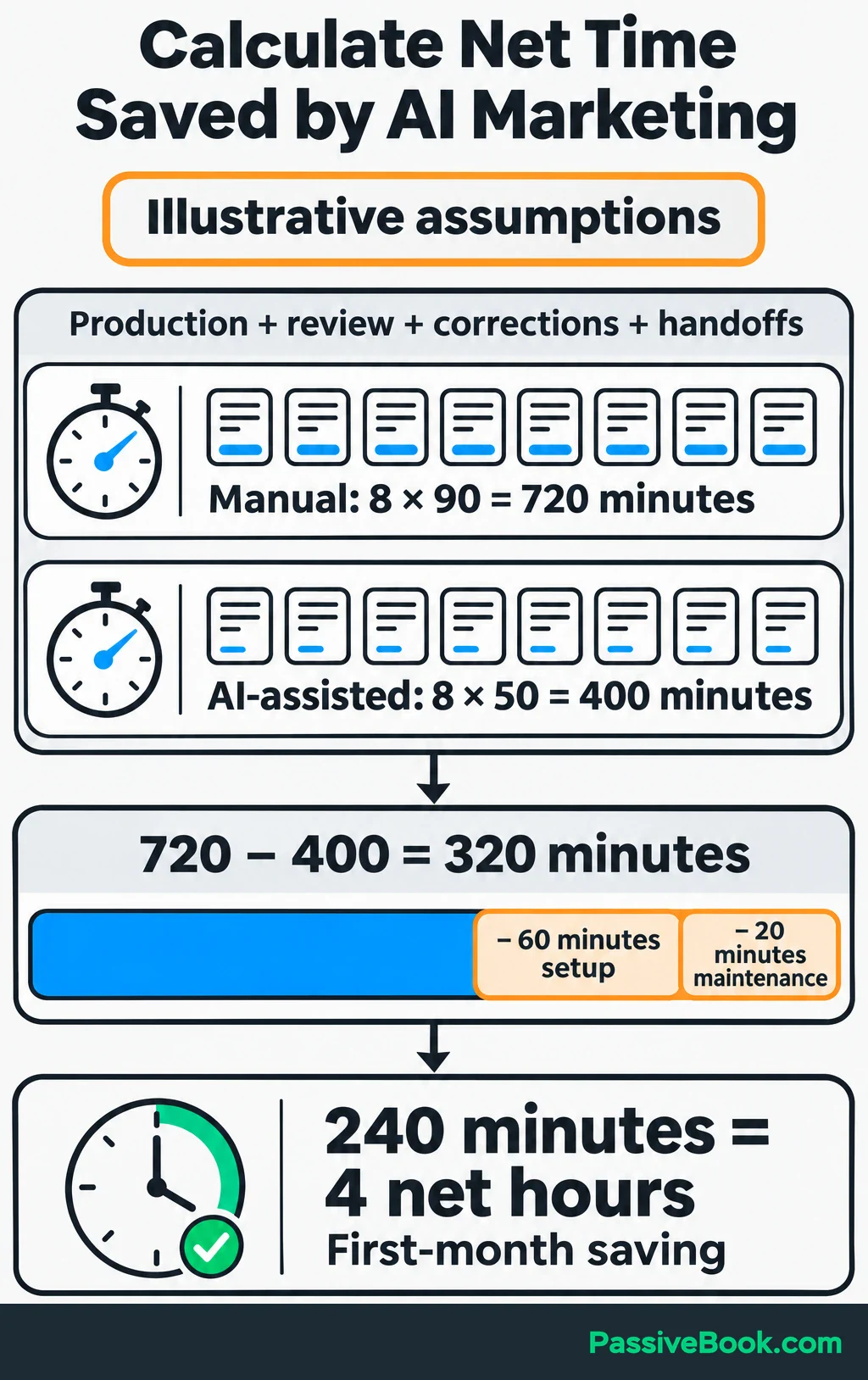
Time the same acceptable deliverable with and without AI, including production, review, corrections, and handoffs. Record setup, maintenance, and troubleshooting separately so you count each minute once, then subtract that overhead from the saving.
Here is an illustration for the cycling shop. It produces eight comparable campaign batches each month, each containing one guide, one pin, a signup email, and a follow-up:
| Work Counted | Manual Process | AI-Assisted Process |
|---|---|---|
| Production, review, corrections, and handoffs per batch | 90 minutes | 50 minutes |
| Eight monthly batches | 720 minutes | 400 minutes |
| First-month setup | — | 60 minutes |
| Monthly maintenance and troubleshooting | — | 20 minutes |
| Total first-month time | 720 minutes | 480 minutes |
The eight batches save 320 minutes before overhead. After subtracting 60 minutes of setup and 20 minutes of maintenance, the first-month saving is 240 minutes, or four hours.
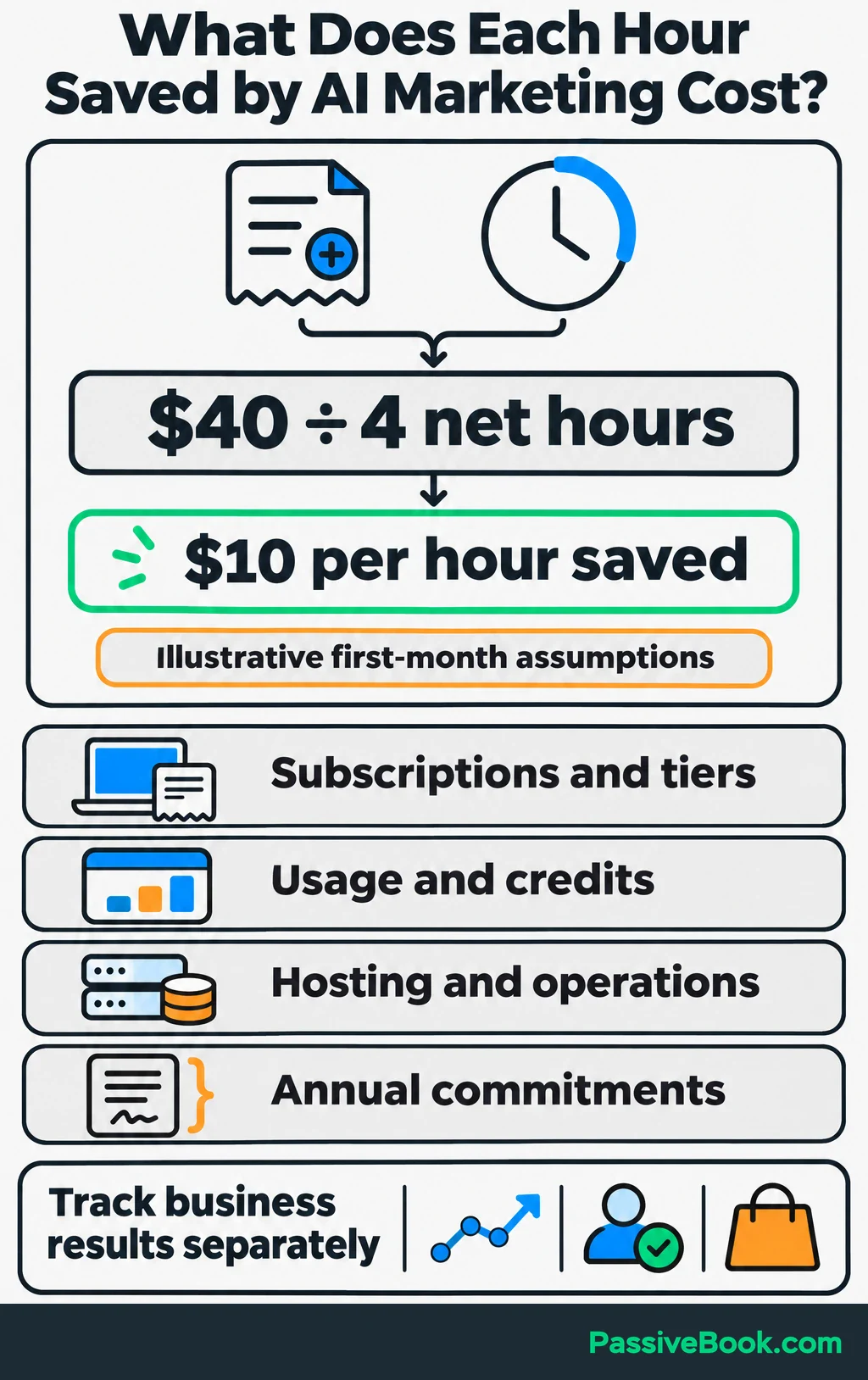
Suppose the added software and usage cost is $40. Divide that by four net hours saved and the first-month cost is $10 per hour saved.
Those figures are assumptions, not results from the tools in this list. Replace them with your own recorded times and bills.
Include every cost needed for the workflow:
- Subscriptions: Required plans, seats, social channels, and contact tiers.
- Usage: Model API calls, AI credits, sends, and automation volume.
- Operations: Hosting, backups, and maintenance where you manage them.
- Commitments: Annual payments and contracts, even when the page emphasizes a monthly amount.
My custom Python content pipeline, built with Claude Code, reduced article production from days to hours. That is my experience with a system built around my work. It does not establish how much time any one tool here will save you.
The lesson I took from it was to measure the whole path. Drafting was one part of production, and a faster draft still needed reliable review and publishing.
Track business results separately from production savings. For the shop, that means useful guide traffic, confirmed subscribers, purchases, and repeat orders. Producing twice as many assets does not establish that the business grew.
I would keep a subscription when it consistently delivers acceptable work, dependable connections, and savings worth paying for. If its main contribution is another dashboard to check, I would cancel it.
What Next?
Choose one recurring marketing task and time yourself completing it. Then use the same brief to test your first tool, including review and corrections before calling the work finished.
Use the social buttons to share this comparison when the conversation turns to which AI subscriptions actually earn their place.
Which handoff in your marketing work would you most like to stop doing manually? Tell me in the comments, and leave any other questions there too.
Share this post with your friends & followers:

