You’re comparing tools that all promise to save time, but one writes emails, another sends them, and a third connects your shop to your mailing list. Which one actually removes the job you keep putting off?
Pay for the wrong one and that job is still yours, now with a subscription attached.
The feature lists don’t always show whether a tool can complete that job with the apps you already use. This comparison weighs 11 tools by their marketing uses, costs and limits, then walks through a sample-delivery and follow-up workflow so you can judge what’s worth paying for.
Which AI Marketing Automation Tool Should You Choose?
For a straightforward welcome sequence, I would start with MailerLite. Brevo deserves a look when its sending allowances suit your budget, and Klaviyo makes more sense when purchases and checkout activity determine the next message.
Keep your existing platform if it already handles the job. I use FluentCRM on WordPress, so I wouldn’t move a working sequence just to gain an AI writing button.
For a small business, AI marketing automation usually involves two kinds of work. AI drafts or interprets information, and fixed rules decide when something happens and who receives it.
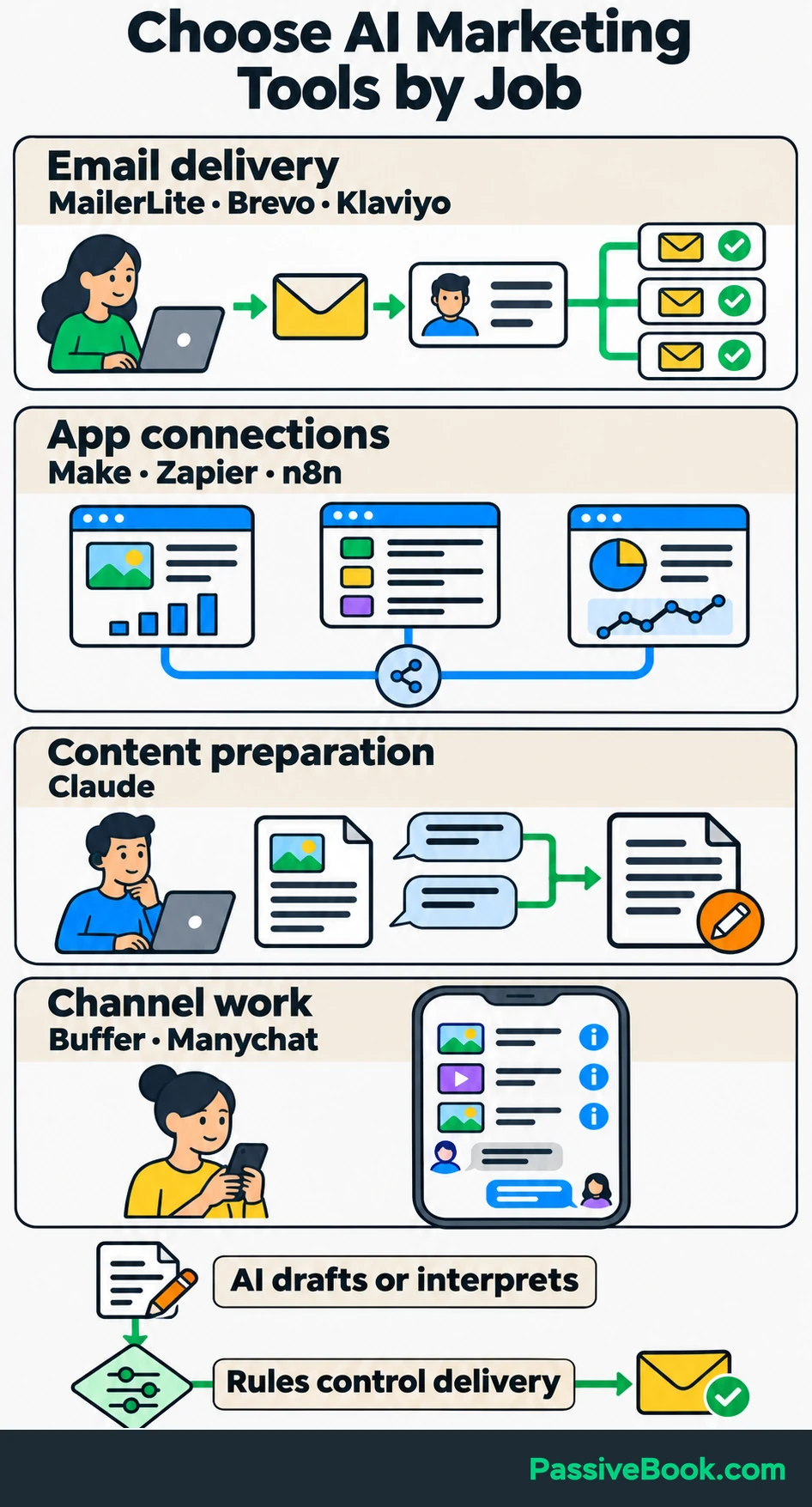
You can combine those jobs without buying an entire collection of tools:
- Email delivery: Choose one platform to manage subscribers and send your sequences.
- App connections: Add Make, Zapier, or n8n when information must move between separate systems.
- Content preparation: Use Claude when recurring drafting or analysis needs more attention.
- Channel work: Consider Buffer for social publishing or Manychat for inbound conversations you already receive.
The “best for” labels below reflect the job I would choose each tool to do. Setup effort includes connecting data and testing the workflow, not just opening an account.
Prices and allowances belong together, so I’ve kept them in this table. Annual rates require an annual commitment, and listed prices exclude temporary introductory offers. Follow the linked vendor pages for current details.
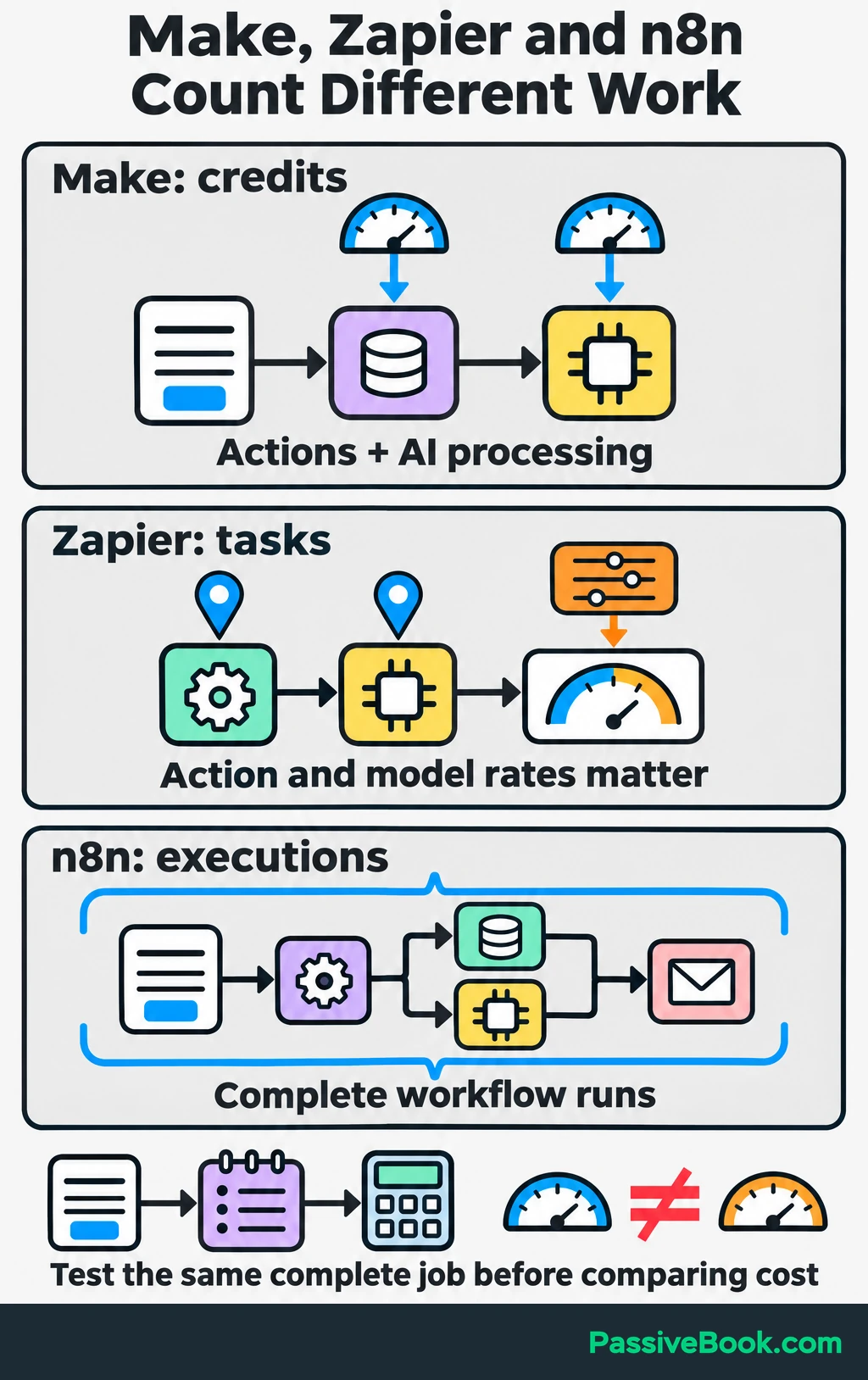
Connector allowances count different amounts of work. Make uses credits for actions and AI processing, Zapier uses tasks based on its action and model rates, and n8n counts complete workflow runs.
| Tool | Work It Handles | Relevant Starting Plan and Billing Basis | Setup Effort | Main Tradeoff |
|---|---|---|---|---|
| MailerLite | Captures subscribers and sends welcome and sales emails; Comfort adds AI writing | Free: 250 subscribers, 2,500 emails/month, 3 active automations, 5 steps per workflow. Comfort: $12/month, billed monthly, for 500 subscribers, 5,000 emails and 50 active automations | Low for basic email; moderate with purchase data | Free’s step allowance can restrict the complete sequence |
| Brevo | Sends campaigns and automated follow-up; Aura helps draft messages, and Standard adds AI send-time optimization | Free: 300 emails/day and automation for up to 2,000 contacts. Starter from $9/month for 5,000 emails and storage for 500 contacts; Standard from $18/month at that tier | Low to moderate | Daily sends, contact storage and automation enrollment are separate limits |
| ActiveCampaign | Changes follow-up using interests and customer activity; AI drafts workflows, and Plus adds generated content and images | Published starting rates: Starter $15/month; Plus $49/month, billed annually, for 1,000 contacts. Starter permits 5 actions per automation; Plus removes that restriction | Moderate | Useful branching takes configuration and testing |
| Klaviyo | Sends follow-up based on checkouts and orders; AI generates subject lines, and Composer helps build campaigns and automated sequences | Free: 250 active profiles (contacts eligible for marketing emails), 500 emails/month and $5 monthly Composer usage. Paid email starts at $20/month for 500 active profiles, before promotions | Moderate | Event setup, profile growth and additional AI usage affect the cost |
| HubSpot | Connects marketing and individual follow-up through shared customer records; Campaign Agent, in beta, helps plan campaigns on Professional and Enterprise | Marketing Hub Starter list price: $20/month per Core Seat (one user), including 1,000 marketing contacts. Professional: $890/month with an annual commitment paid monthly, 3 Core Seats, 2,000 marketing contacts, plus $3,000 required onboarding | Moderate to high | Broader workflows require a substantial budget increase |
| Make | Connects apps and routes actions on a visual canvas; AI Toolkit classifies, extracts and summarizes text | Free: 1,000 credits/month. Core is advertised from $12/month for 10,000 credits; confirm the billing term on the linked page | Moderate | Repeated records and AI processing can consume credits quickly |
| Zapier | Moves information between apps; AI by Zapier turns text into fields such as a question’s topic and summary | Free: 100 tasks/month. Professional: $19.99/month, billed annually, with 750 tasks, multistep workflows and premium apps | Low to moderate when the connector fits | Task usage depends on the actions and AI model selected |
| n8n | Builds custom workflows combining data, branching, AI processing and approvals | Cloud Starter: €20/month, billed annually, for 2,500 workflow executions with unlimited steps. Self-hosted Community edition is also available | Moderate on Cloud; higher when self-hosted | Self-hosting requires updates, backups, security and monitoring |
| Claude | Drafts content and prepares recurring briefs and summaries for review | Free offers limited use. Pro: $20/month, billed monthly, including scheduled tasks; automated calls from other apps are billed separately | Low for drafting; moderate with connected data | Output needs accurate inputs and editorial review |
| Buffer | Adapts posts with AI Assistant, then queues and schedules approved content | Free: 3 channels and 10 queued posts per channel, with AI Assistant. Essentials: $5/month per channel (one connected social account), billed annually, with unlimited scheduled posts | Low | Per-channel charges add up, and supported formats vary |
| Manychat | Uses AI to answer recurring inbound social questions and direct interested people toward an offer | Pro under the newer pricing model: $39/month billed monthly or $29/month billed annually, including 2,500 monthly active contacts; additional contacts cost extra | Moderate | Regional and legacy plans vary, and messaging windows constrain follow-up |
Before comparing subscriptions, write down the complete job: what starts it, what information it needs, what action finishes it, and what should stop it.
That last part matters. Delivering a sales email is easy. Preventing it from reaching someone who has already bought the product takes a working connection to purchase data.
The 11 Best AI Marketing Automation Tools for Small Businesses
To make the choices concrete, imagine you sell downloadable watercolor practice packs. A free brushwork sheet attracts subscribers, and your paid collections cover floral and landscape painting.
The shop is our running example. Its workflow details illustrate possible setups rather than reported business results.
1. MailerLite: Best for Straightforward Email Automation
MailerLite would be my first comparison point for delivering a download and following it with a short email sequence.
Its AI writing assistant helps prepare the message, while automation rules control delivery. You still decide what belongs in the sequence and when it should stop.
For the watercolor shop, I would deliver the brushwork sheet, follow with a useful practice tip, and then introduce the relevant paid collection. Connect the shop through a supported integration, such as WooCommerce, Shopify, or Stripe, and test whether purchase information reaches the workflow.
The Free plan’s step allowance is the catch. Emails, delays and buyer checks all need room, so sketch the whole sequence before choosing a plan. If several different actions need to start the same workflow, compare the Power plan, which supports multiple triggers.
I would choose MailerLite for a manageable email system and skip an extra connector until a specific missing connection requires one.
2. Brevo: Best for a Low-cost Email Starting Point
Brevo is worth considering when its sending pattern fits yours. Aura helps prepare campaign messages, and the automation builder handles delivery and follow-up.
The distinction to understand is between contacts stored, contacts enrolled in automation, and emails sent. Those allowances describe different things.
For the watercolor shop, a small stream of sample requests could fit a daily sending allowance comfortably. A launch email to the whole list creates a different demand, so calculate that before choosing Free.
Standard removes the automation enrollment cap and adds AI send-time optimization, but the selected tier still limits contact storage.
I would start with email and leave SMS or WhatsApp alone until customers give me a reason to add them. A new channel creates another set of messages to maintain, and extra sending charges are less charming than the sales page suggests.
3. ActiveCampaign: Best for Branching Customer Journeys
ActiveCampaign becomes useful when different customer actions should lead to different messages.
Its AI automation builder can turn a written description into a draft workflow. That gives you a starting point, but you still need to inspect the conditions and exits.
For the watercolor shop, someone who chooses floral painting could receive a floral lesson, while someone interested in landscapes gets a different introduction. A purchase should remove the buyer from that collection’s sales sequence.
I would consider Plus when the workflow outgrows Starter’s action allowance. Predictive sending requires Pro, so don’t assume every AI feature comes with the entry plan.
The deciding question is whether each branch changes something useful. If everyone receives the same three emails anyway, I would choose a simpler platform and keep the extra configuration off my calendar.
4. Klaviyo: Best for Marketing Driven by Ecommerce Activity
Klaviyo makes sense when store activity provides the reason to send a message. Its subject-line tools and Composer help prepare marketing, while event-based flows handle follow-up.
An event is simply a recorded action, such as a checkout starting or an order completing.
Before activating a flow, verify that the shop sends the correct customer, product and order information. For a watercolor checkout reminder, the workflow needs to recognize the practice pack involved and stop when that purchase arrives.
I would test that stop condition before polishing the reminder’s subject line. The customer who just paid has little interest in your abandoned-checkout strategy.
Choose Klaviyo when these events drive enough useful follow-up to justify the setup. For a basic newsletter and one download, I would compare simpler email tools first.
5. HubSpot: Best for Marketing Connected to a Shared CRM
HubSpot earns consideration when marketing and individual follow-up need the same customer record.
A CRM stores customer details and activity so you can see what happened, who owns the next action, and whether anyone followed through.
The watercolor shop probably doesn’t need this for ordinary download sales. It becomes more relevant if the shop also receives inquiries about licensing a collection or supplying teaching materials, and those conversations need an assigned owner.
The pricing jump matters. Starter offers limited email automation, while Professional adds broader workflows and access to Campaign Agent, which is in beta. Credit-consuming AI features can also increase spending.
I would choose HubSpot for coordination that earns its cost. I would skip it for sample delivery and a short welcome sequence. Buying a larger system doesn’t make a simple job more valuable.
6. Make: Best for Visual Workflows Across Existing Apps
Make is the connector I would try first when I want to see several apps working together on one canvas.
Add AI only where information needs interpretation. Moving an email address between systems usually needs a fixed rule. Sorting a written customer question by topic may benefit from AI.
For the watercolor shop, Make could receive a question, classify it as printing help or painting guidance, and save a proposed response for review.
Its AI Toolkit can use Make’s own provider. Custom provider connections require a paid plan and bring separate provider charges. Make’s AI connection and billing rules explain that distinction.
Run a small batch before estimating cost. Check the credits used across all actions, because one customer request can pass through several steps and AI processing can add usage. I would price the tested workflow rather than guess from the number of boxes on the canvas.
7. Zapier: Best for Readily Available App Connections
Zapier is a strong option when it already supports the exact connection you need.
AI by Zapier can turn a prompt into structured fields, such as a question topic and a short summary, which later steps can use.
The important word is “exact.” Creating a subscriber, updating an existing subscriber, and enrolling that person in a sequence are separate requirements.
For the watercolor shop, test a fresh sample request and a repeat request using the same address. Confirm that the repeat updates the correct record without restarting unwanted messages.
I would pay more for a connection that removes recurring troubleshooting. But I would estimate usage first: AI model tiers consume different task amounts, and AI tool calls can add usage. Zapier’s task rates show how those charges work.
8. n8n: Best for Customizable Workflows With Technical Ownership
I use self-hosted n8n to connect tools and automate recurring work across my websites. I value the control, particularly when a workflow needs several conditions or a review step.
That is my practice, not proof that self-hosting will be cheaper or easier for you.
For the watercolor shop, I would use n8n to collect recurring customer questions, group them by topic, and prepare a proposed content brief. I would review the brief before it becomes an email or article.
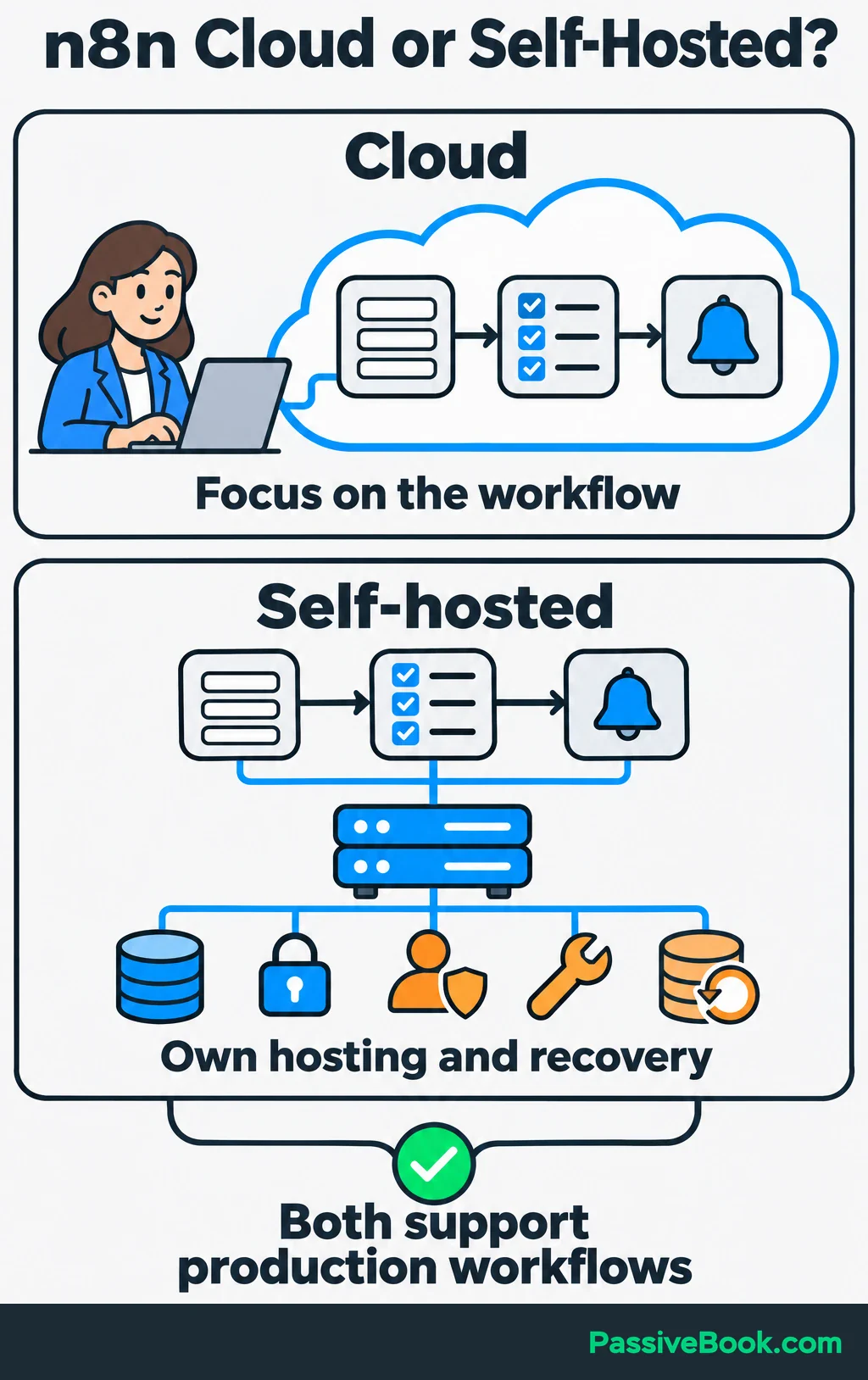
Cloud reduces infrastructure work. With self-hosting, you take responsibility for updates, backups, security and monitoring, so include that work in the decision.
Compare a complete workflow across n8n, Make and Zapier. Executions, credits and tasks measure different things, so their headline allowances aren’t directly comparable.
I would choose n8n when the need for custom logic justifies the learning and upkeep.
9. Claude: Best for Recurring Marketing Briefs and Content Preparation
Claude is my primary choice for long-form writing and content strategy. I would also use it to prepare recurring briefs from approved product information, customer questions and campaign data.
For the watercolor shop, that could mean turning a brushwork tutorial into an email draft or summarizing the questions subscribers keep asking.
Scheduled work still needs current source material. A weekly report based on an old uploaded spreadsheet will keep reporting old information with excellent manners. Use a maintained file or a suitable connection to the source.
My reduction in article production from days to hours came from a custom Python content pipeline built using Claude Code. That result belongs to the whole pipeline, including its inputs and review process.
I would use Claude to prepare material, then pass approved output to the email or publishing platform. If another app calls Claude through its API, the connection that lets software request its output, budget those usage charges separately from Pro.
10. Buffer: Best for AI-assisted Social Publishing
Buffer is useful when adapting and scheduling approved material across several channels becomes repetitive.
Its AI Assistant helps reshape content, and its queue handles publication. For the watercolor shop, I would turn one approved brushwork tutorial into a short tip, a demonstration caption, and a post pointing to the free sheet.
Each post still needs to make sense where it appears. An image-led post may need different wording from a text post, and supported formats can affect whether publication is fully automatic.
I use Pinterest’s native scheduler for straightforward scheduling. I would compare Buffer when coordinating several active channels creates enough work to justify another tool.
I would also skip channels that exist only because an AI tool can fill them. More scheduled posts don’t help if nobody has a useful reason to follow the link.
11. Manychat: Best for Turning Inbound Social Conversations Into Leads
Manychat is worth considering when inbound social questions already take time to answer.
Give its AI approved product information and a route to human help. For the watercolor shop, it could answer whether a pack is downloadable and direct an interested person to the sample page.
Set a clear boundary around uncertain answers. Questions about refunds, access problems, or information missing from the product brief should reach you.
Instagram follow-up has a practical restriction: a comment-triggered private reply alone does not open the permitted 24-hour messaging window. The recipient must reply or use a qualifying interaction, such as a quick reply. Manychat explains the comment-trigger requirements.
I would connect interested leads to the existing email system through a clear signup process. A social conversation should not silently become permission for an email sales sequence.
Build Your First Marketing Automation
Choose One Workflow and the Smallest Stack That Completes It
Start with a recurring task that has a clear beginning and finish. “Automate marketing” is too broad to build or measure. “Deliver the requested sample and send the approved follow-up” is workable.
For the watercolor shop, I would build this path:
- A visitor requests the brushwork sheet through a form that explains the emails they are signing up for.
- The email platform creates or updates the subscriber without overriding an existing unsubscribe.
- The delivery email provides the sheet.
- An approved welcome sequence teaches one useful brushwork exercise.
- The sequence introduces a relevant paid collection.
- A recorded purchase stops further sales messages for that collection.
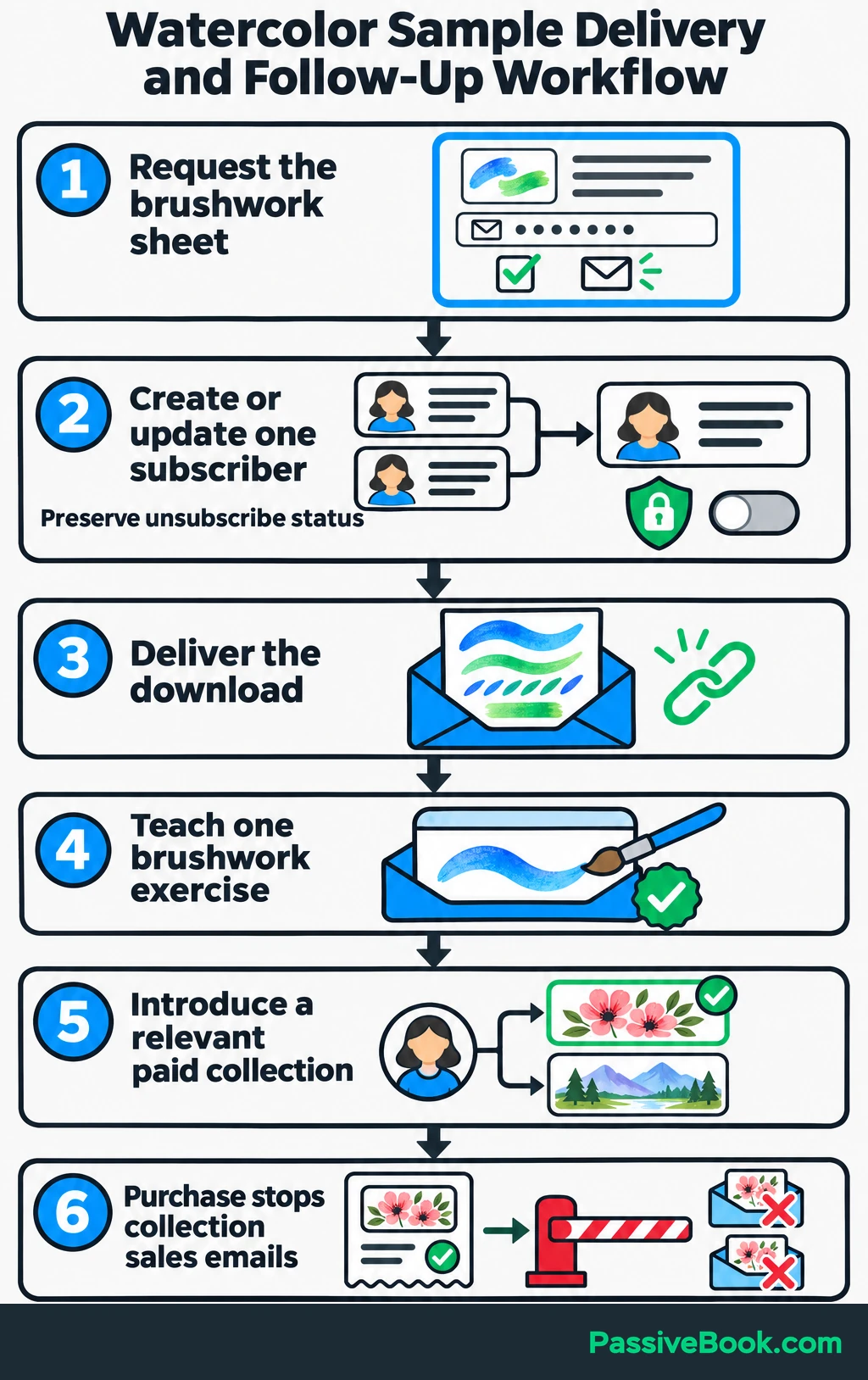
The first version needs an email platform and a working connection to purchase information. AI can help draft the messages before activation; it doesn’t need to generate a new email for every subscriber.
That choice keeps the live workflow easier to inspect. You know which message people will receive, and you can improve it without reviewing hundreds of separate drafts.
Use the email platform’s built-in workflow first. Add a connector only when required information must cross systems.
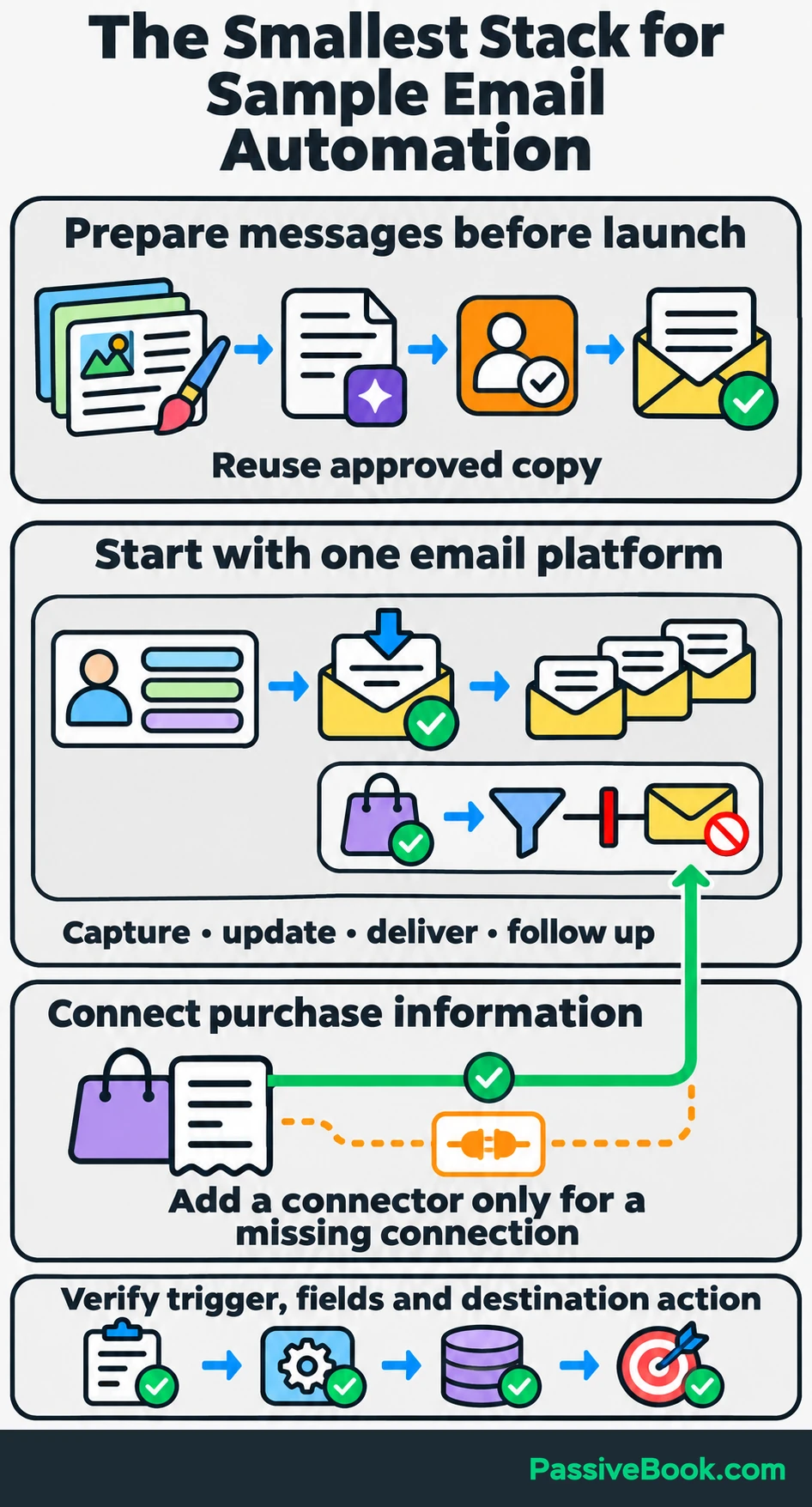
Before paying, test whether the chosen plan can receive the trigger, update the required fields, and perform the destination action. An integration logo confirms a relationship between tools, but your test confirms whether it completes your job.
Compare costs at your expected volume, including contacts, sends, connector usage and model charges. Check that you can export your contacts and understand the cancellation terms before making an annual commitment.
If your first priority is content preparation, use a smaller finish: customer questions become an approved brief. For social publishing, finish with approved posts successfully scheduled. Keep each experiment small enough to pause without disrupting the rest of the business.
Prepare the Inputs and Approval Rules
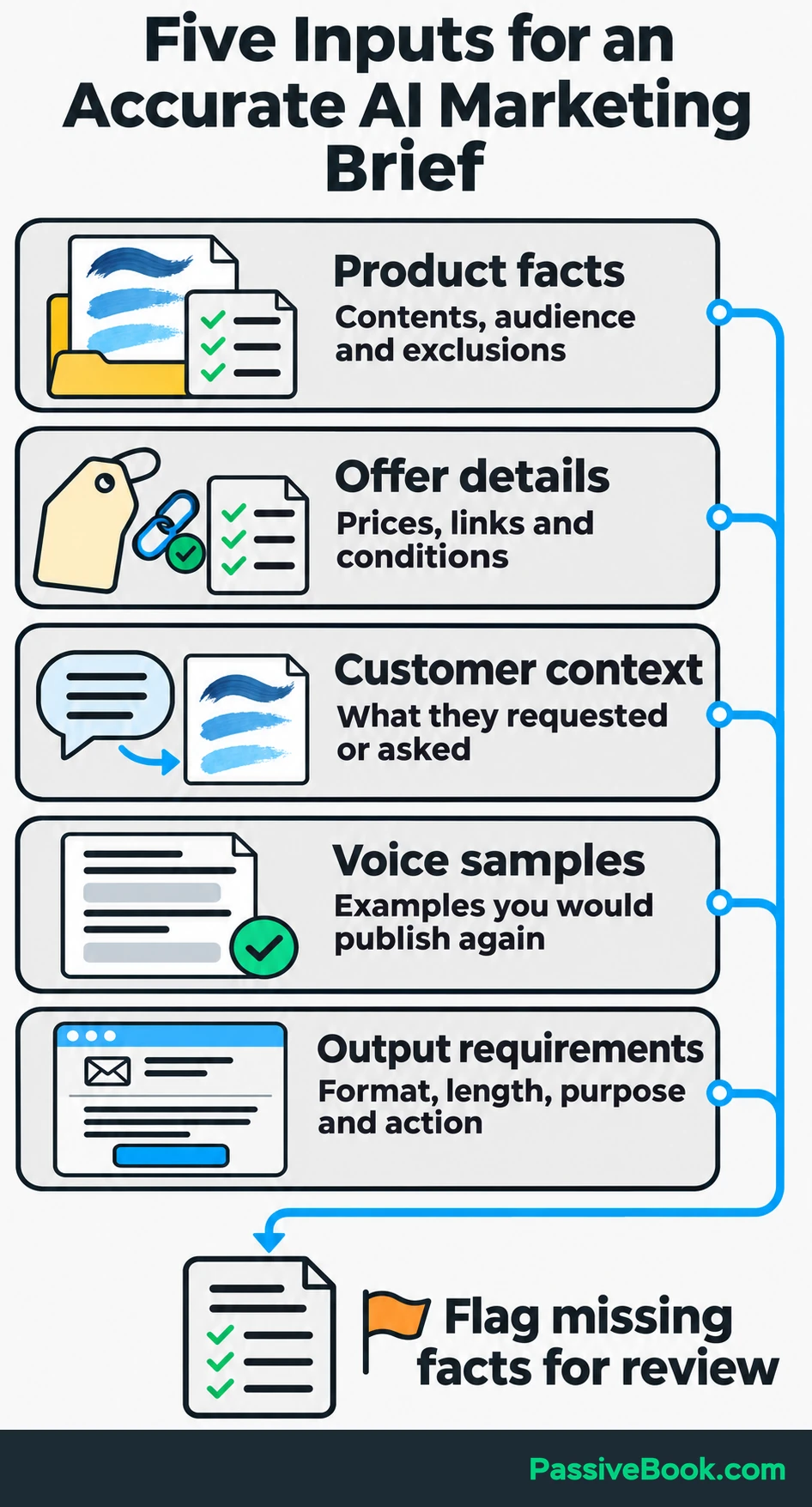
Give AI a short, reusable brief before asking it to write. Include:
- Product facts: What the product contains, who it serves, and what it does not include.
- Offer details: Current prices, approved links and relevant purchase conditions.
- Customer context: What the person requested or asked.
- Voice samples: A few passages you would happily publish again.
- Output requirements: The format, length, purpose and action the reader should take.
I once approved a digital-product draft because it sounded like me, then caught a reference to a worksheet that wasn’t in the product. I had supplied the sales description but left out the actual file list.
Adding the file list to the brief gave me something concrete to check against. That is the distinction I now care about: a convincing voice and an accurate offer need separate review.
For the watercolor shop, a focused instruction could be:
Draft a short welcome email for someone who requested the brushwork sheet. Use only the supplied product facts and match the writing sample. Explain one way to begin using the sheet and end with its approved download link. If a required fact is missing, flag it for review.
Review the facts, recipient context, links and voice before activating delivery. Then reuse the approved version in the sequence.
You can prepare the whole sequence before connecting another app. AI Copywriting Studio uses your product facts and writing sample to draft the messages, with missing details kept visible for review.

Free AI Copywriting Studio




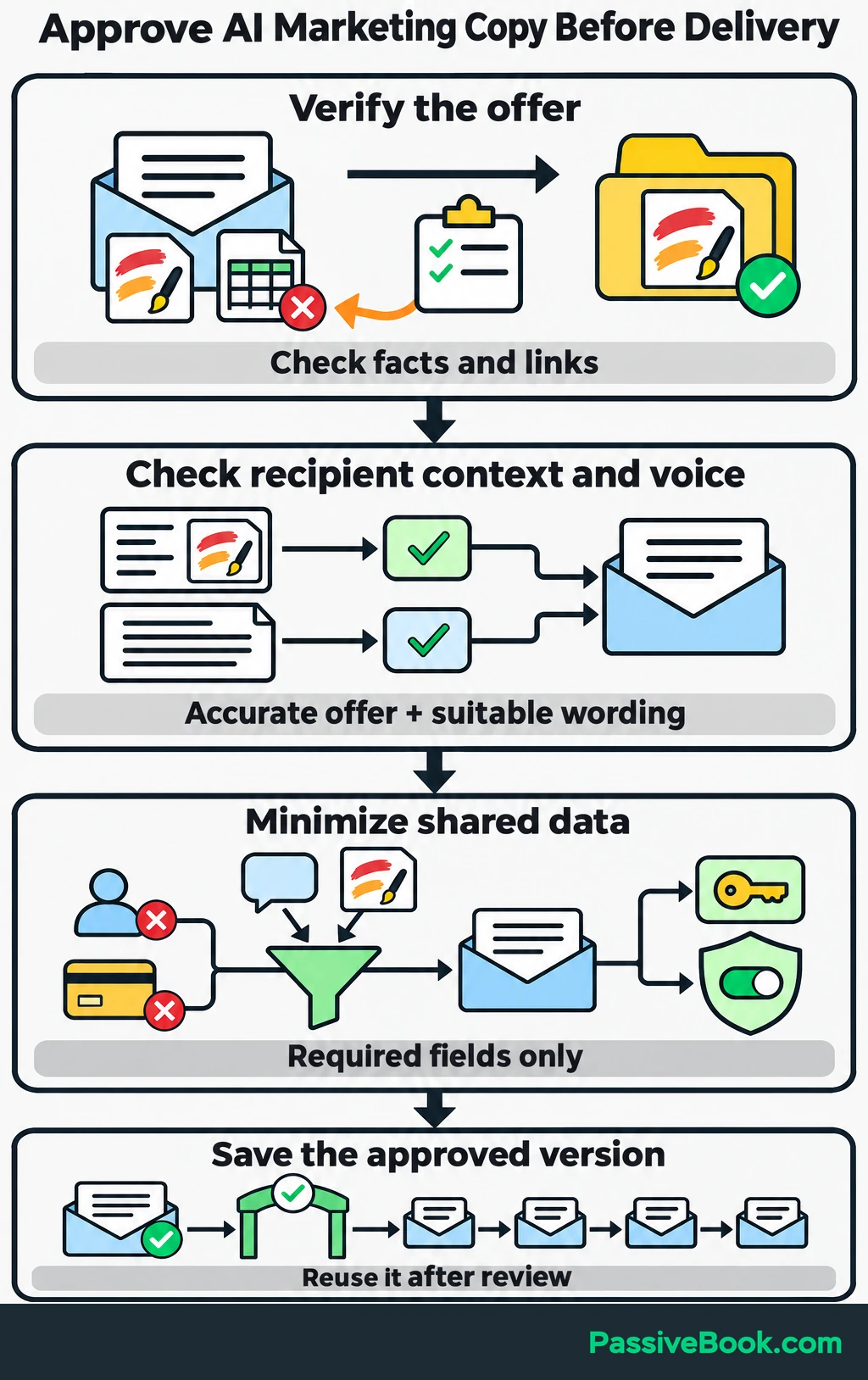
Privacy needs the same deliberate setup. A drafting task may need an anonymous question and product facts, but no name, address, order history, or payment details.
Send only the fields required for the task, restrict connected-account permissions, and inspect the chosen service’s retention and training controls. Anthropic, for example, distinguishes its consumer products from its commercial services, so a paid personal subscription should not be treated as interchangeable with an API or work account. Anthropic’s data-use explanation sets out that distinction.
Keep permission and unsubscribe status intact across every connection. Confirm the email-marketing rules that apply to your recipients before switching on promotional messages.
Test the Complete Path Before Expanding
Use fixed rules for subscription eligibility, timing and purchase exclusions. Give AI a defined drafting or interpretation task.
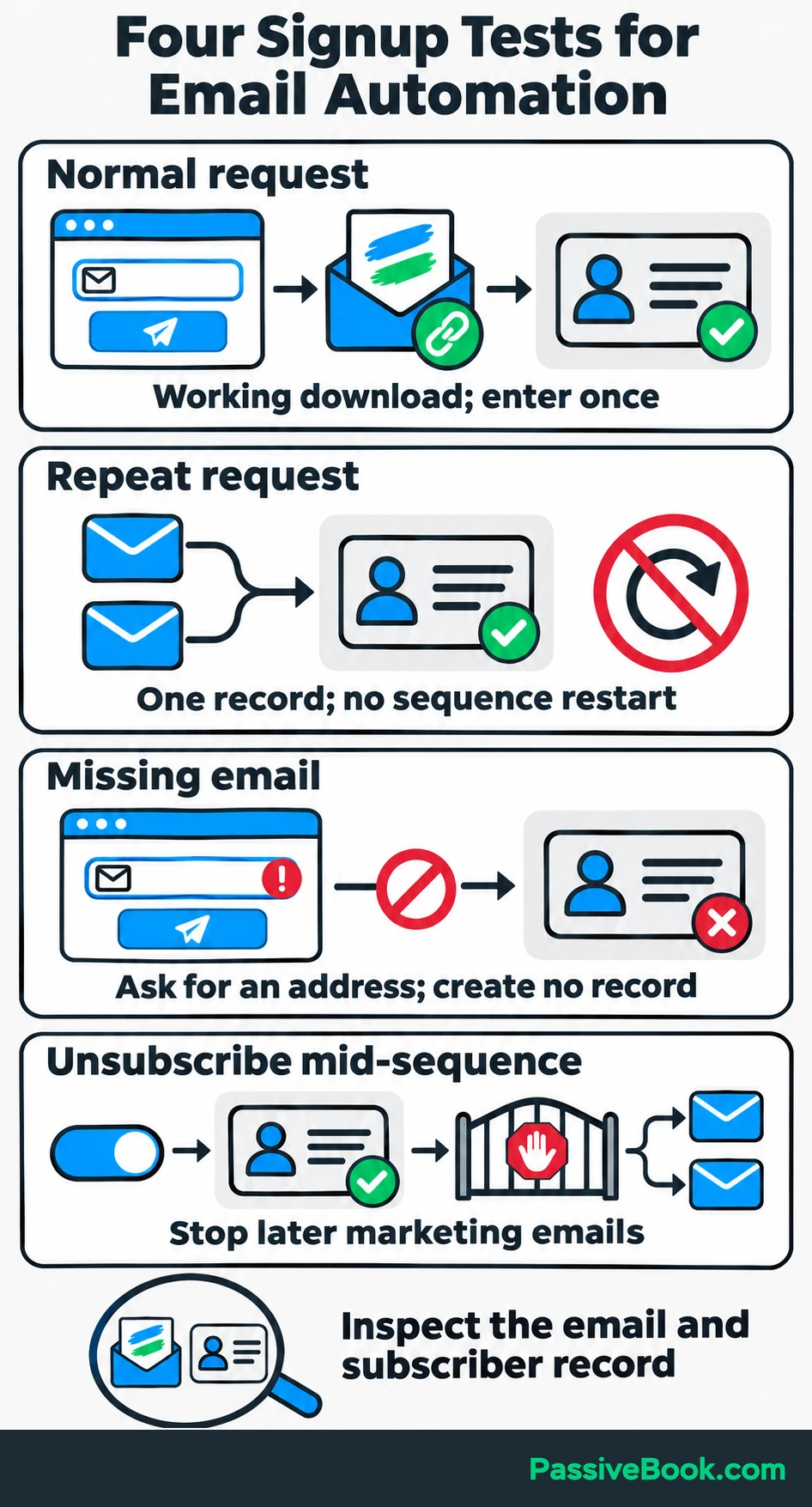
Then test the path with records you control. A successful first signup is only the beginning.
| Test | What Should Happen |
|---|---|
| A normal brushwork-sheet request | The test address receives a working link to the brushwork sheet and enters the welcome sequence once |
| The same form submitted twice | Both requests use one subscriber record, without restarting the welcome sequence |
| A request has no email address | The form asks for an address before submitting; no subscriber is created |
| A test subscriber unsubscribes during the sequence | The record shows the unsubscribe, and later marketing emails are not sent |
| A test subscriber buys the promoted floral collection | The purchase appears on that subscriber’s record, and remaining floral sales emails are not sent |
| The purchase-data connection fails | You receive an alert identifying the failed purchase update and can pause affected sales messages |
| The failed purchase update is retried | The purchase reaches the existing subscriber record without duplicating the order or restarting emails |
Check the actual received email and the customer record. A green success marker in a workflow builder doesn’t tell you whether the download link works.
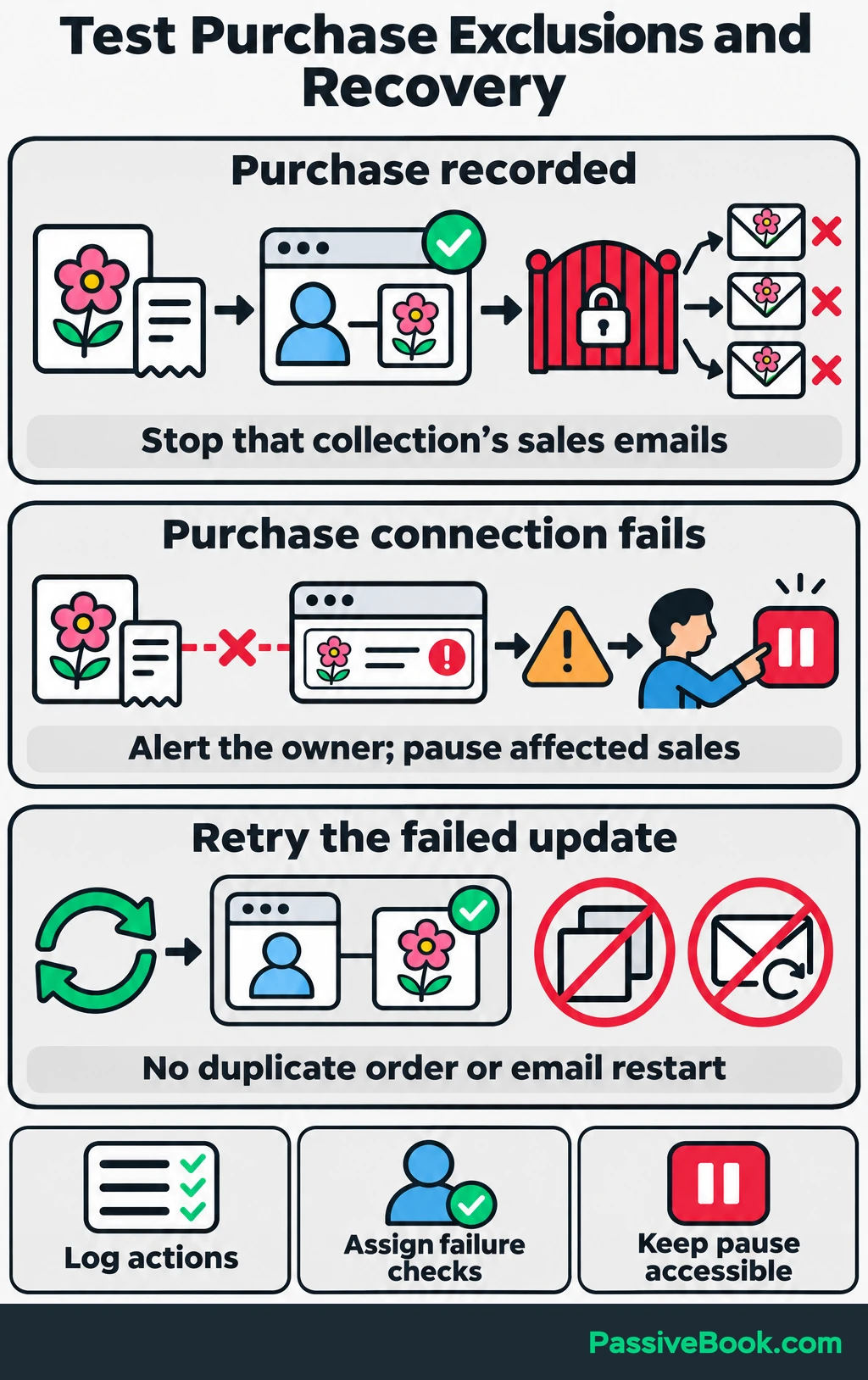
Keep a record of completed actions, choose who checks failures, and make the pause control easy to find. If that person is you, put a short review on the calendar.
Expand when the workflow runs reliably and you understand its upkeep. Another branch should solve an observed need, because every extra condition becomes something else you may need to troubleshoot.
How to Tell Whether the Tool Earns Its Cost
Record the manual version before replacing it. Note how often you perform the task, how many hands-on minutes it takes, what you already spend, and which marketing outcome it supports.
Then measure the automated version with review, corrections and troubleshooting included. Quietly excluding maintenance is how an expensive hobby becomes a “time-saving system.”
Compare the same number of tasks over a month. Count the hours those tasks took manually, then subtract the hours you now spend reviewing, correcting and maintaining the automated version:
Net hours saved = previous hands-on hours − remaining hands-on hours
To estimate the monthly value of that time, multiply the saved hours by an hourly value you choose, then subtract the added recurring costs:
Monthly time-value estimate = net hours saved × hourly value − added recurring costs
Here is a hypothetical example for the watercolor shop. Suppose four monthly campaign-preparation tasks each fall from 90 hands-on minutes to 30 minutes, including review and corrections.
| Item | Hypothetical Amount |
|---|---|
| Previous monthly hands-on time | Four tasks × 90 minutes = 6 hours |
| Remaining monthly hands-on time | Four tasks × 30 minutes = 2 hours |
| Net time saved | 4 hours |
| Assumed value of that time | 4 hours × $25 = $100 |
| Added monthly tool costs | $40 |
| Estimated monthly time value | $60 |
That $60 is a time-value estimate, not cash profit or an observed result. Record setup time separately so you can judge how long the recurring benefit takes to repay the initial effort.
Track useful outcomes alongside time:
- Reliability: Completed workflows, failed actions, duplicate sends and missed exits.
- Customer response: Useful clicks, replies, purchases and unsubscribes.
- Operating burden: Review time, corrections, troubleshooting and recurring costs.
Sales attributed to an automated email show a connection, but they don’t establish how much additional profit the automation caused. Use that information alongside costs and customer behavior.
I would keep a workflow that removes recurring work and delivers the intended result reliably. Simplify one that needs constant repair, and stop one that creates more supervision than useful output.
What Next?
Write down one recurring marketing task, its trigger, and the result that should finish it. Then test that path in your existing platform or one suitable free plan before adding another subscription.
Use the social buttons to share this guide when comparing stacks—the table can help keep the conversation focused on the work each tool needs to complete.
Which task would give you the most time back if it ran reliably? Tell me in the comments, and bring any questions about your proposed setup.
Share this post with your friends & followers:

