A funnel builder can look affordable until you discover that email follow-up needs another subscription and the checkout connection needs a higher plan. Now you have several bills and a sales process you still need to connect.
The harder part is telling whether a plan covers the journey you need. A polished demo may show pages and payments while leaving email follow-up or file delivery out of view. This comparison separates complete platforms from tools that handle only part of a funnel, so you can compare the full bill and test the path from signup to purchase before committing.
What to Look for in Sales Funnel Builder Software
Start by writing down the journey you need. Then mark which parts your current tools already handle.
For the running example, imagine you sell a downloadable beginner watercolor workbook. Someone finds your free supplies checklist through a blog post or Pinterest, signs up, receives a short email sequence, and buys the workbook.
That gives you five jobs to cover:
- Landing Page: Explain the checklist and collect an email address.
- Lead Capture: Save the subscriber and record their permission to receive marketing emails.
- Follow-up: Deliver the checklist and introduce the workbook through useful lessons.
- Checkout: Accept payment and record the purchase.
- Delivery: Send access to the workbook and stop emails asking the buyer to purchase it.
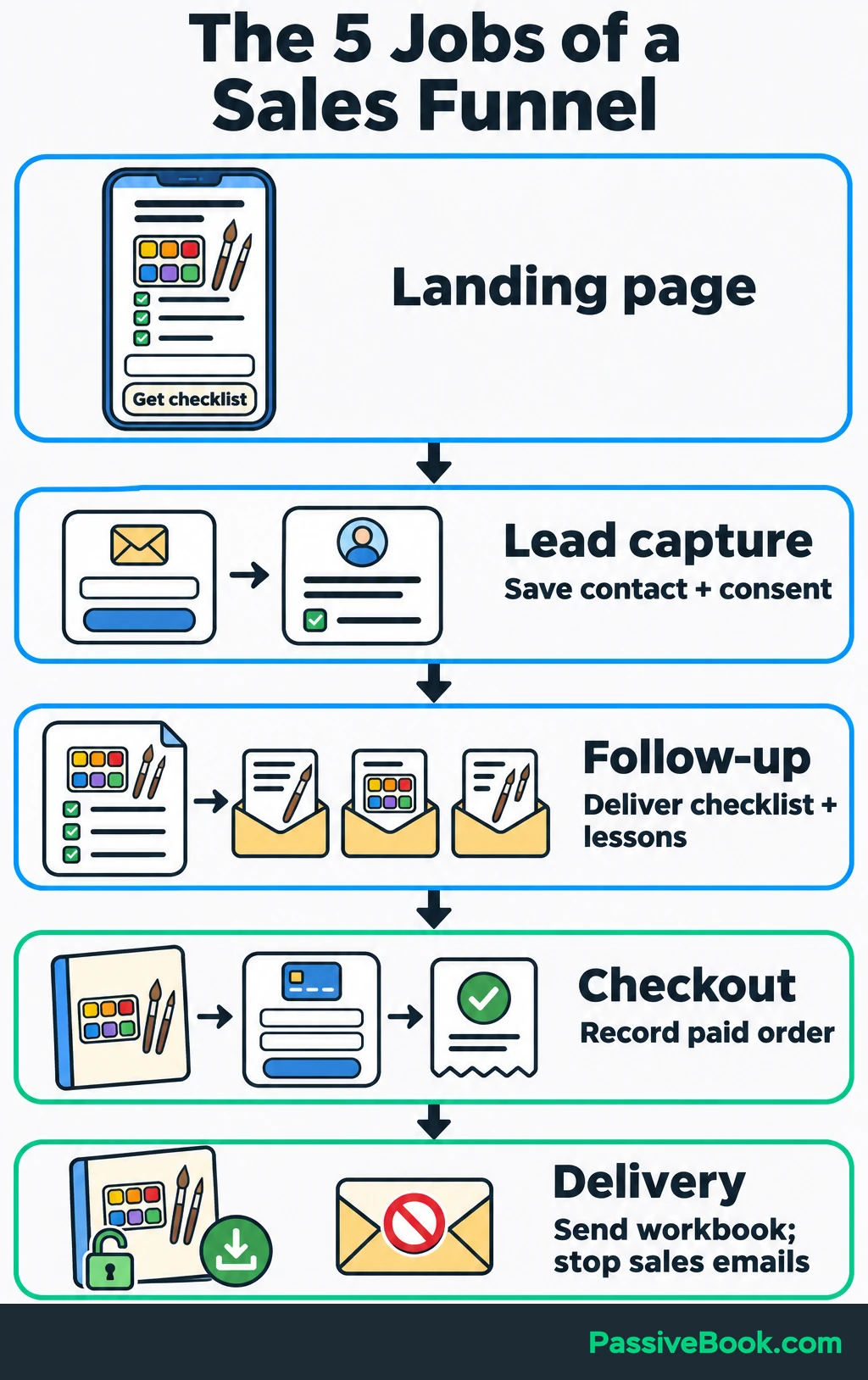
Sales funnel builder software may cover all five jobs, but some tools cover only one or two. That distinction matters more than the number of templates.
If you need nearly everything, I would begin with an integrated platform. If your existing store already takes payments and delivers files, a better landing page or checkout plugin may be enough.
Compare the details that affect your actual workflow:
- Templates and Editing: Can you adapt a suitable layout without rebuilding it? Check the form, text size, images, and payment buttons on a phone.
- Automation: Can a purchase start buyer instructions and end the sales sequence? A timed series alone does not answer that question.
- Integrations: Does the connection transfer the fields and events you need? Adding an email address and reporting a paid order are different jobs.
- Reporting: Can you distinguish page visits, signups, paid orders, and refunds?
- Testing: A/B testing compares different versions with comparable groups of people. Check email, landing-page, and checkout testing separately. Support for one does not mean support for all three.
- Support: Find out who helps when a payment succeeds but the contact record fails to update.
I would prioritize a working purchase journey before paying extra for A/B testing, especially when traffic is still low.
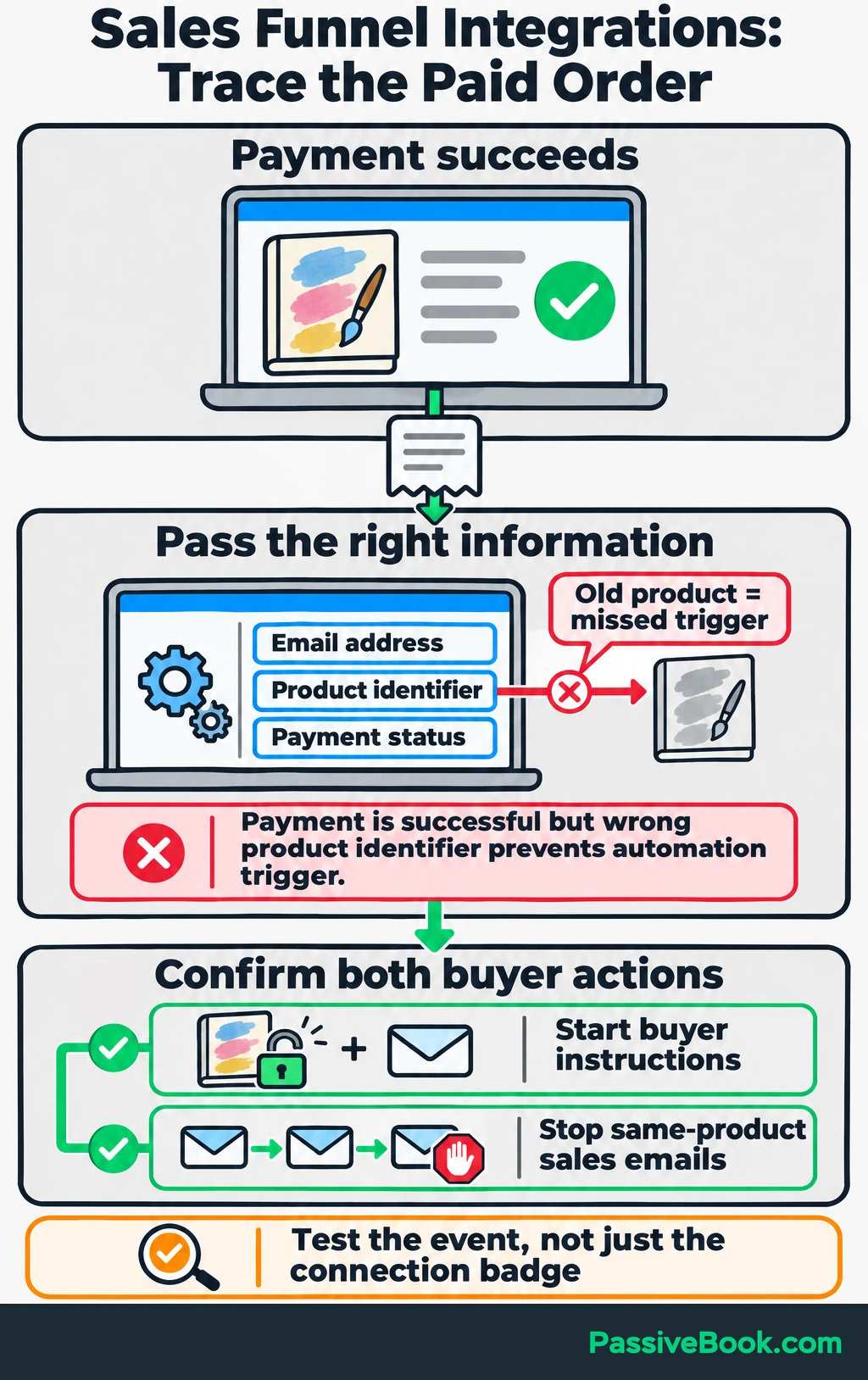
On one of my digital-product sites, I changed a checkout link during a product update and left the follow-up automation watching the old product. My test payment succeeded, but the buyer instructions never started. The page looked finished because the mistake lived elsewhere.
That experience is why I check purchase events before polishing page layouts. A connection needs to pass the right information, not merely display a green “connected” badge.
Also check whether a required integration is included, needs a paid connector, or depends on API access. An API lets software exchange data directly, but some platforms reserve access for higher plans.
Before choosing a checkout, confirm that its payment providers support your business’s country. Being able to buy through Stripe does not necessarily mean you can open a Stripe merchant account there. Stripe’s availability list shows supported countries and regions.
How Much Does Sales Funnel Software Cost?
Compare the lowest plan that supports your complete workflow. The cheapest advertised plan may lack automation, testing, or the connection your checkout needs.
Systeme.io offers a permanent free plan with several funnel stages included. Carrd offers inexpensive page building, but you still need somewhere to send follow-up emails and process purchases. The comparison table below keeps the relevant prices together.
Your operating budget should include:
- Software: The subscription or annual plugin license.
- Supporting Services: Email marketing, checkout, file delivery, and hosting where needed.
- Connections: Any paid automation service or integration add-on.
- Usage: Additional contacts, visits, email sends, SMS messages, or AI credits.
- Platform Fees: Any percentage the software company takes from sales.
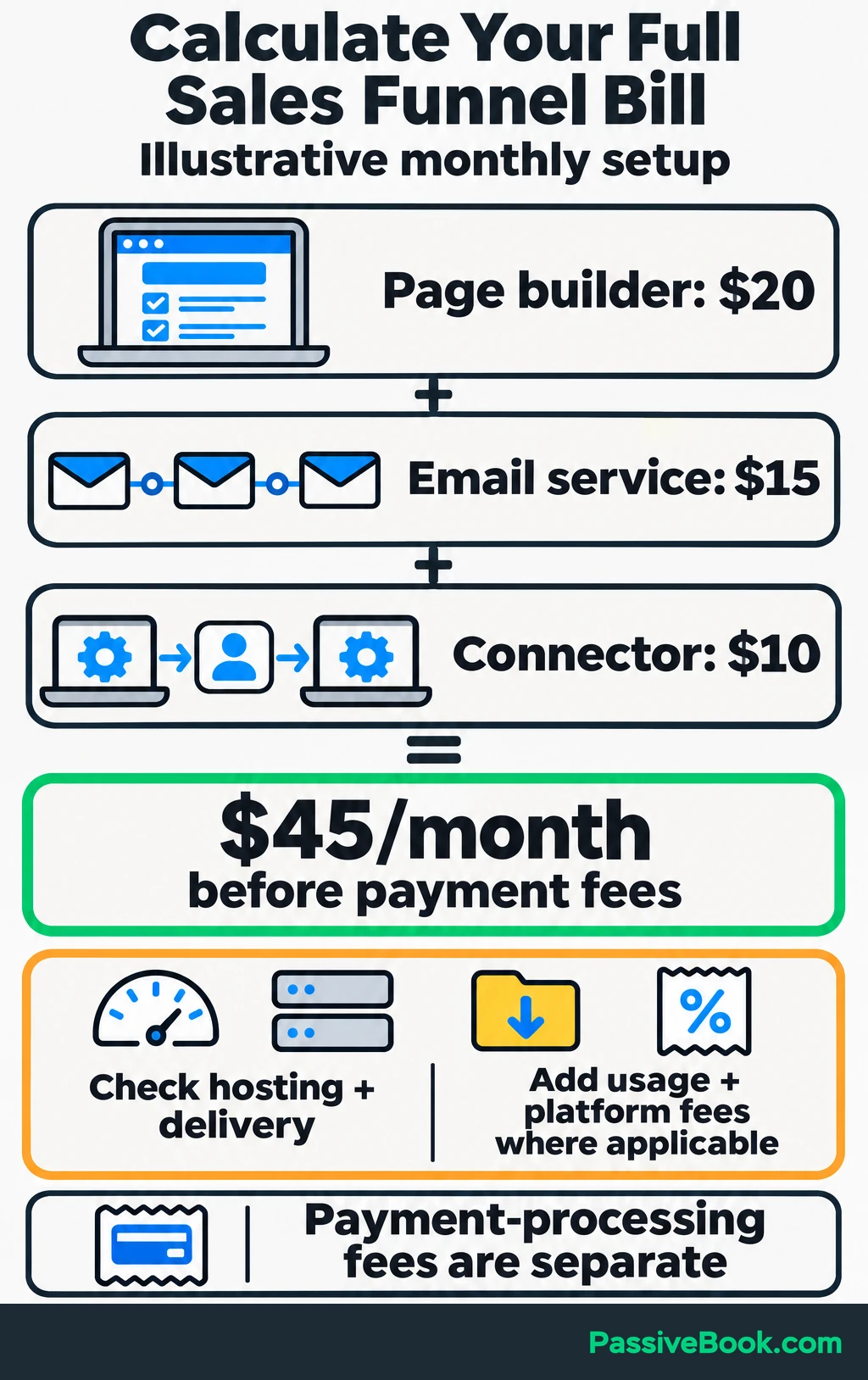
Keep payment-processing fees separate. Removing a platform’s sales fee does not remove the processor’s charge.
For illustration, a setup with a $20 monthly page builder, $15 email service, and $10 connector costs $45 per month before payment fees. It belongs beside other complete setups at that cost.
Annual billing also changes the decision. A lower monthly equivalent still means paying for the year upfront. Compare introductory offers with renewal charges, and check the next contact or traffic tier you are likely to reach.
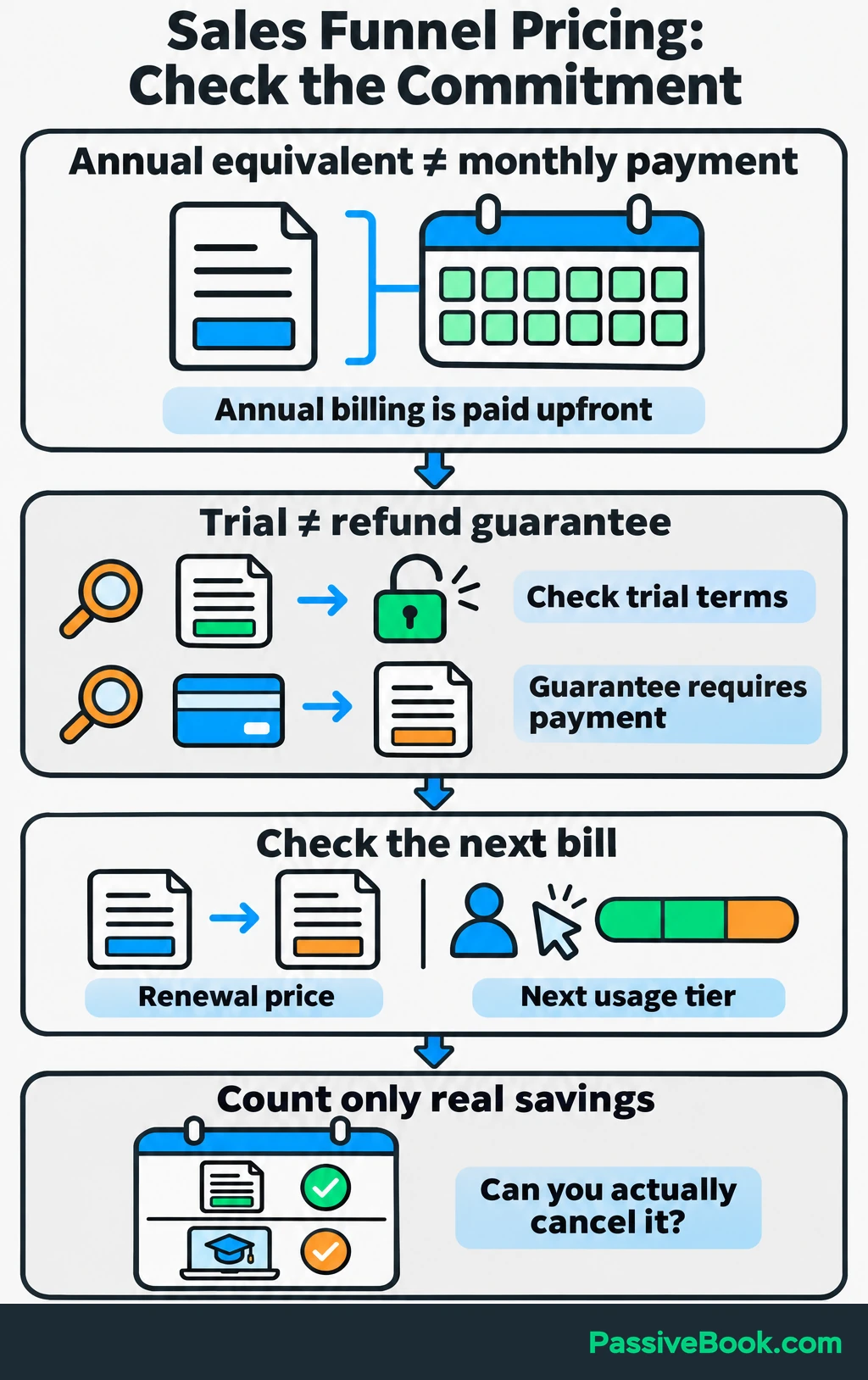
When a platform promises to replace several subscriptions, count only the ones you can actually cancel. A course feature saves nothing if your course must stay elsewhere.
The Software Cost Comparator includes a quick software comparison, so you can price two complete setups without building a spreadsheet. It separates subscriptions you can cancel from costs you still need to carry.
Free Software Cost Comparator




I would pay monthly while proving the workflow unless an annual commitment offers savings I am comfortable risking. A money-back guarantee requires payment and a refund request; it is not a free trial.
19 Best Sales Funnel Builders Compared
These recommendations reflect documented features and costs. “Best” means suitable for a particular job; it does not mean I tested all 19 platforms or measured conversion gains.
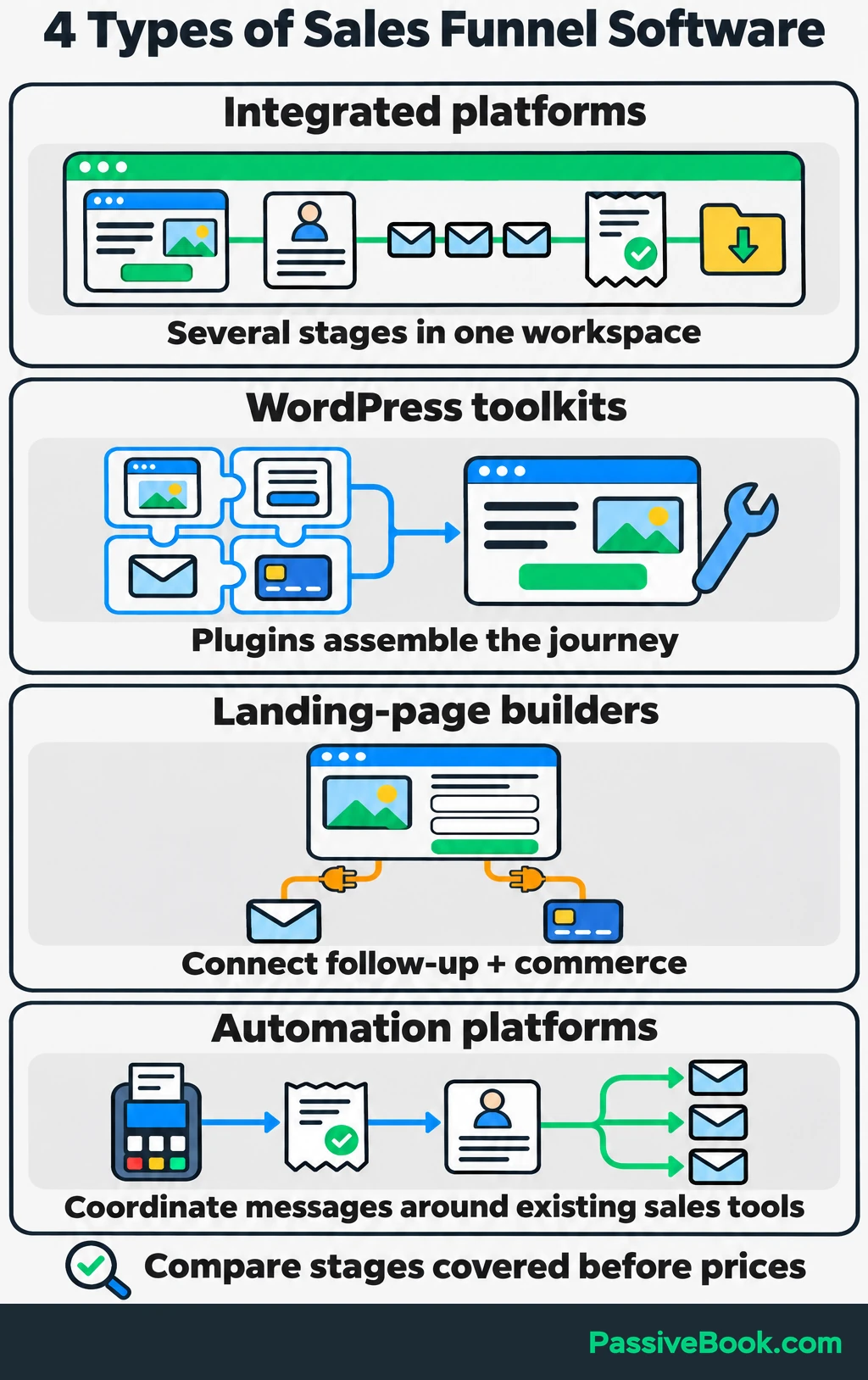
The table includes integrated platforms, WordPress toolkits, page builders, and automation tools. Read the stages covered before comparing prices. A CRM stores contact details and interactions. WooCommerce is the WordPress store plugin used by several tools below.
All prices are in USD. “Billed annually” means the displayed monthly figure is an annual equivalent paid upfront. Promotional prices and renewal terms are identified where relevant; each software link leads to its current pricing details.
| Software | Best-fit Task | Platform Type and Stages Covered | Relevant Starting Price and Billing Term | Free Plan or Trial | Main Upgrade or Additional Service Required |
|---|---|---|---|---|---|
| Systeme.io | Launching a first integrated funnel | Hosted platform: pages, signup, email, checkout, product delivery | Free; Startup $17/month, billed monthly | Permanent free plan | Upgrade when contact, funnel, or automation allowances become too small |
| GetResponse | Selling through email follow-up | Email platform: pages, signup, automation; sales funnels on Marketer | At 1,000 subscribers: Starter $19/month; Marketer $59/month, billed monthly | 14-day premium trial | Marketer for packaged sales funnels; connect required checkout and delivery |
| ClickFunnels | Connecting sales pages and checkout | Hosted platform: pages, checkout, email, automation, courses | Launch $97/month, billed monthly | Free trial | Scale $197/month, billed monthly, for full API access and webhooks |
| Kartra | Combining marketing and product delivery | Hosted platform: pages, email, checkout, courses and memberships | Essentials $59/month; Starter $119/month, billed monthly | 30-day refund guarantee; payment required | Starter removes Essentials’ platform transaction fee and raises capacity |
| Simvoly | Running a website and funnels together | Website platform: pages, funnels, checkout, email automation | Business $36/month monthly, or $29/month billed annually | 14-day trial | Additional email subscriber capacity |
| Kajabi | Selling hosted learning products | Hosted platform: courses, pages, email, funnels, checkout | Basic $179/month monthly, or $143/month billed annually | Trial available | Higher contact/product capacity; payment-provider charges depend on setup |
| Podia | Selling downloads and courses from one storefront | Hosted platform: website, email, checkout, delivery | Mover $504/year, equivalent to $42/month, plus 5% platform fee | 14-day trial | Shaker $1,008/year, equivalent to $84/month, removes platform fee; extra email capacity may cost more |
| HighLevel | Managing funnels for clients | Hosted CRM: pages, follow-up, booking, pipelines, payments | Starter $97/month, billed monthly | 14-day trial | Unlimited $297/month for unlimited subaccounts; email, phone, and applicable AI usage extra |
| FunnelKit | Building WooCommerce sales funnels | WordPress plugins: checkout, upsells, testing; follow-up through Automations | Plus advertised at $149.50/year, normally $299; Professional $199.50/year, normally $399 | 14-day refund guarantee on paid purchase | Professional includes Automations; hosting and email delivery extra; confirm renewal terms |
| CartFlows | Improving WooCommerce checkout | WordPress plugin: sales pages, checkout, upsells, testing | Starter $99 first year, renews at $149/year; Pro $199 first year, renews at $299/year | Free version; paid plans have 14-day refund guarantee | Pro for upsells and testing; retain email and delivery services |
| Thrive Suite | Building WordPress pages and opt-in tools | WordPress toolkit: pages, forms, quizzes, page testing | Introductory $299/year; annual renewal $599; quarterly option $149 | 30-day refund guarantee; payment required | Hosting, email marketing, and checkout |
| WordPress + GenerateBlocks | Building landing pages on an existing site | Connected WordPress stack: page building; other stages use plugins | Core GenerateBlocks plugin is free; total depends on supporting tools | Free core software | Hosting, forms, email delivery, checkout, and relevant automation licenses |
| Carrd | Publishing an inexpensive signup page | Hosted page builder: landing page and lead capture | Pro Standard $19/year | Free basic sites; 7-day Pro trial | Domain, email follow-up, checkout, and delivery |
| Leadpages | Capturing leads for an existing sales system | Hosted page builder: pages, forms, connected follow-up | Pro $29/month; Grow $99/month, billed monthly | 7-day trial | Grow for A/B testing; retain email and checkout tools |
| Landingi | Reusing layouts across campaigns | Hosted page platform: pages, forms, connected marketing tools | Build $24/month; Optimize $119/month, both billed annually | 14-day trial | Optimize for reusable Smart Sections and A/B testing; email and checkout extra |
| Unbounce | Running landing-page experiments | Hosted page platform: pages, forms, reporting, testing on higher tiers | Starter $29/month; Build $99/month; Experiment $149/month, billed monthly | 14-day trial | Build for integrations/custom scripts; Experiment for A/B testing; email and checkout extra |
| Instapage | Producing pages with team review | Hosted platform: pages, forms, collaboration, contacts, branded email | Create $99/month monthly, or $79/month billed annually | 14-day trial with traffic limits | Optimize $199/month monthly, or $159/month annually, for A/B testing; checkout and delivery extra |
| involve.me | Qualifying leads through quizzes | Hosted platform: interactive funnels, scoring, CRM, email automation | Start $49/month monthly, or $29/month billed annually | Free account; 14-day paid-plan trial | Grow for custom domains; Scale for funnel A/B testing |
| ActiveCampaign | Automating follow-up around an existing store | Marketing platform: email, segmentation, automation; landing pages on Plus | Contact-based pricing; Plus required for landing pages | 14-day trial | Existing checkout and delivery; Pro adds attribution and conversion tracking |
1. Systeme.Io — Best Free Integrated Funnel Builder
Systeme.io is where I would start if you need pages, email follow-up, checkout, and product delivery without taking on a paid subscription immediately.
Its permanent free plan supports 2,000 contacts, three funnels, one course, one custom domain, and unlimited email sends. The platform also includes funnel-page A/B testing and statistics for individual steps.
For the watercolor workbook, you could keep the checklist signup, follow-up emails, sales page, and purchase journey together.
The limit I would inspect first is automation. The free allowance includes one automation rule, one workflow, and one email campaign. Map checklist delivery and the change from prospect to buyer before assuming everything fits.
I would choose it for a simple first funnel and upgrade when a required action exceeds those allowances. Paying more because another platform has a more impressive dashboard would be a weak reason.
2. GetResponse — Best for Email-led Sales Funnels
GetResponse makes sense when the emails between signup and purchase do much of the selling.
Starter includes landing pages, forms, and one custom automation workflow. Marketer adds packaged sales funnels, unlimited workflows, advanced segmentation, and revenue reports. Use Marketer when comparing its full sales-funnel features with integrated competitors.
For the workbook, that could mean sending a supplies lesson first, showing a sample exercise next, and introducing the paid download after the subscriber has something useful to try.
I would choose GetResponse when email follow-up needs more attention than the checkout design. Keep the checkout and delivery arrangement that suits your product, and verify that purchases reach the email system.
The budget also needs room for list growth. Compare the next subscriber tier before moving an established list.
3. ClickFunnels — Best for Connected Sales Pages and Checkout
ClickFunnels puts sales pages, checkout, email, automation, and course delivery in a funnel-focused workspace. It also documents A/B testing for funnels and email campaigns.
Launch includes native email, so it does not automatically require another email subscription. Its allowances include 10,000 contacts, 50,000 monthly emails, and three courses.
I would consider it when you expect to build several connected selling journeys and want their pages and checkout managed together.
The important plan check is integration access. Scale lists full API access and webhooks. A webhook sends another system a message when an event happens, such as a successful purchase.
If your required connection depends on those features, use Scale’s cost in the comparison. Launch’s price would not describe your working setup.
4. Kartra — Best for Consolidating Marketing and Product Delivery
Kartra suits a business that wants pages, email sequences, checkout, and membership or course delivery in one place.
Essentials includes 500 contacts, five pages, one product, and a 5% platform transaction fee. Starter raises capacity and removes that platform fee.
The fee changes which plan is cheaper. To compare them, count sales subject to the platform fee and the difference between monthly subscriptions.
Starter’s subscription costs $60 more per month. Five percent of $1,200 in monthly sales is $60, so the two charges balance at that sales volume. Above it, Starter costs less on subscription plus platform fees alone, assuming Essentials otherwise meets your needs.
I would consider Kartra when consolidation removes several real expenses. For one workbook, I would first check whether a smaller setup covers the same journey.
5. Simvoly — Best for a Website With Integrated Sales Funnels
Simvoly is worth considering when your main website and sales funnels should share one platform.
Its funnel tools include checkout, upsells, A/B testing, and funnel analytics. Business is the relevant starting plan because Starter excludes funnels.
That gives the watercolor business room for regular content pages alongside a focused checklist-to-workbook journey. You would not need to treat the funnel as a separate website project.
Watch the email allowance. Business includes 100 marketing subscribers and 1,200 monthly emails, so a growing list can require additional capacity before you outgrow the page-building features.
I would choose Simvoly when the website and funnel both need replacing. If your existing site already works well, moving everything deserves a stronger reason than wanting fewer browser tabs.
6. Kajabi — Best for Businesses That Also Need Course Delivery
Kajabi makes more sense when the product includes hosted lessons, a learning area, or a community.
Basic includes five products, 2,500 contacts, and unlimited funnels, landing pages, and marketing emails. Those features can bring delivery and marketing into the same system.
For a downloadable watercolor workbook alone, I would skip it. If that workbook becomes part of a structured course with lessons and student access, its broader delivery tools become more relevant.
Payment setup also affects cost. Basic lists an additional 2% fee for using a third-party payment provider where Kajabi Payments is available. PayPal is excluded, and regions without Kajabi Payments do not incur that additional fee.
Compare those charges alongside the subscriptions you could actually remove. Course hosting you still need elsewhere does not count as a saving.
7. Podia — Best for a Connected Digital-product Storefront
Podia is a sensible shortlist option when your main job is selling and delivering downloads or courses through a connected website, checkout, and email system.
I would look at it when the product storefront matters more than building a complicated sequence of sales pages.
For the workbook, the useful test is straightforward: can someone request the checklist, receive follow-up, buy, and access the file without manual help?
Mover includes 100 email subscribers, while Shaker includes 500. Larger email lists require additional capacity. Shaker also adds upsells, affiliate marketing, PayPal, and Zapier, so a required payment option or connection may determine your plan before sales volume does.
Compare Podia’s full bill with an integrated funnel platform. Its appeal should come from the selling and delivery setup you need, rather than an assumption that every marketing feature is included at entry level.
8. HighLevel — Best for Managing Client Funnels
HighLevel is built around more than funnel pages. It combines a CRM, sales pipelines, booking calendars, automated follow-up, and payments.
A pipeline helps you track where each lead stands, such as awaiting a reply or ready to book.
Its separate subaccounts are useful when managing client businesses. Starter includes three, while Unlimited removes that account limit.
For a single watercolor workbook funnel, I would usually choose something narrower. There is little benefit in managing a broader sales system if you only need a signup page, emails, and a download.
HighLevel becomes more compelling when client accounts, appointments, and ongoing lead handling are part of the work. Include usage-based email, telephone, and applicable AI charges in the budget.
9. FunnelKit — Best for WooCommerce Funnels With Optional Automation
FunnelKit is my first shortlist choice here when the store already runs on WooCommerce and needs a more connected sales journey.
Funnel Builder covers checkout funnels, order bumps, one-click upsells, and reporting. An order bump is an optional addition offered at checkout. A one-click upsell offers another purchase after the initial payment.
Plus includes A/B testing and funnel analytics. Professional adds marketing automation through the separate FunnelKit Automations plugin.
That distinction matters. Buying the funnel builder does not automatically give every plan the same follow-up tools.
For the workbook, I would test checkout, download access, and the buyer’s removal from promotional emails. Add hosting and email delivery to the license cost, and confirm renewal terms before treating an advertised discount as your ongoing annual expense.
10. CartFlows — Best for Improving an Existing WooCommerce Checkout
CartFlows fits when WooCommerce already handles your products and the purchase journey is the main part you want to improve.
Pro includes order bumps, one-click upsells, A/B testing, and advanced funnel analytics. Use Pro’s price when those are required features.
Starter may suit a simpler checkout project, but a lower entry price is irrelevant if it leaves out the reason you are buying the plugin.
I would compare CartFlows and FunnelKit by building the same checkout in each. Check how the order appears in WooCommerce, how payment methods behave, and what happens after purchase.
Keep your existing email and file-delivery costs in the comparison. A checkout improvement does not necessarily replace them.
The first-year discount also deserves attention because renewal is a larger annual bill.
11. Thrive Suite — Best for WordPress Page Building and Conversion Tools
Thrive Suite combines several WordPress tools, including landing-page building, opt-in forms, quizzes, and page A/B testing through Thrive Optimize.
Its value depends on how many of those tools you will use. I would consider the suite if you need to rebuild pages, improve lead capture, and test offers within the same WordPress site.
For one checklist page, the wider toolkit may be unnecessary. For a site with several products and different signup offers, the extra components have a clearer job.
The license covers up to five websites, but hosting, email marketing, and checkout still need to be included in your budget.
Pay particular attention to renewal cost. A suite that looks attractive during its introductory year needs to remain useful when the normal annual charge arrives.
12. WordPress + GenerateBlocks — Best for a Custom Funnel on an Existing Site
WordPress + GenerateBlocks is the route I prefer when you already have a WordPress website and want landing pages inside it. FluentCRM is my primary email tool for Passive Book.
GenerateBlocks handles page layouts. It does not supply the entire funnel by itself.
One possible setup uses GenerateBlocks for the page, Fluent Forms for signup, FluentCRM for follow-up, and WooCommerce for checkout and downloads. Email delivery needs its own service, and A/B testing requires another component.
There is also a specific paid requirement: WooCommerce purchase triggers require FluentCRM Pro. The free page builder does not make the complete stack free.
I would choose this route for control and an existing WordPress setup. Include backups, updates, email delivery, and your maintenance time when comparing it with hosted software.
13. Carrd — Best for Inexpensive Lead Capture
Carrd is the option I would choose to validate an offer with a simple page connected to existing tools.
Pro Standard includes custom domains, forms, embeds, and analytics connections. Its signup forms support services including GetResponse, Kit, and MailerLite.
For the watercolor checklist, Carrd could handle the page and send subscribers into the email service you already use. Your selling platform would handle the workbook purchase and delivery.
That keeps the page-building expense small, but the whole funnel still has several parts.
I would use MailerLite for a budget-conscious hosted email setup or Kit when creator-focused simplicity matters more. Test the buyer connection before relying on either combination.
Carrd is a good choice when the missing piece is a page. It is less compelling if you still need to choose every other part.
14. Leadpages — Best for Lead Capture Alongside Existing Sales Tools
Leadpages suits a business that wants focused landing pages while keeping its existing email and sales tools.
The plan distinction matters: Pro and Business are publishing plans. Grow adds A/B testing, personalization, and lead enrichment.
I would choose Pro when the job is publishing a checklist page and passing submissions into a working follow-up system. I would compare Grow only when its testing and optimization features have a clear use.
Also check the selected plan’s integration allowance. The service you need may be supported, but your plan still needs enough active connections.
For the workbook funnel, test both the signup transfer and purchase update. A well-built landing page cannot remove buyers from an email sequence unless the rest of the system receives that event.
15. Landingi — Best for Reusable Landing-page Campaigns
Landingi becomes useful when you build several landing pages and want to reuse common parts.
Optimize adds Smart Sections, which let you reuse and update sections across pages. It also includes A/B testing and EventTracker, which records visitor actions such as clicks and form submissions.
For the watercolor business, that could help once you have several offers sharing the same introduction, product explanation, or signup layout. For a single checklist page, I would start with the simpler requirement.
Build includes 10 active pages, 2,000 monthly visits, and one custom domain. Optimize increases those allowances substantially, so compare expected traffic as well as feature access.
You will still need email follow-up, checkout, and delivery. I would choose Landingi when repeated page production is the problem you need to solve.
16. Unbounce — Best for Landing-page Experimentation
Unbounce is a strong shortlist option when creating and comparing landing-page versions is the main job.
Experiment includes controlled A/B testing. Optimize adds automated traffic routing, which sends visitors toward versions the system selects for them.
Those approaches answer different questions. A controlled test compares variants under a chosen traffic allocation. Automated routing aims to select a suitable variant for each visitor.
I would start with controlled testing when I want to understand whether a specific change helps, such as replacing a vague checklist headline with a clear promise.
Starter has a small traffic allowance, and Build adds integrations and custom scripts. Use the tier that supports your actual setup.
Retain email and commerce tools in the budget. Unbounce is most useful here when page experimentation deserves its own software expense.
17. Instapage — Best for Collaborative Landing-page Production
Instapage earns its place when several people need to build, review, and approve pages.
Create includes reusable page blocks and real-time visual feedback. Plans also include contact management and branded email, so it is broader than a page editor alone.
Optimize adds A/B testing. Its starting visitor allowance is also higher than Create’s.
I would consider it when page production involves a designer, a writer, and someone approving the final offer. For a solo workbook funnel, those collaboration tools may not justify the cost.
During the trial, check whether purchase events can start or stop the follow-up you need. Checkout and delivery still require attention.
Instapage’s trial terms require a credit card and say billing starts when you reach the trial’s traffic limit, even before the trial period ends. Keep test traffic separate from a public campaign, and cancel before either limit if you do not want to subscribe.
18. Involve.Me — Best for Quiz-based Lead Qualification
involve.me is useful when a visitor’s answers should change what you recommend or send next.
It includes scoring, a built-in CRM, and email automation. Start supports three live funnels. Grow adds custom-domain publishing, while Scale adds funnel A/B testing.
For the watercolor business, a short quiz could ask about painting experience and available supplies. Someone with no materials could receive a starter-supplies lesson, while someone ready to paint could receive a relevant workbook preview.
I would only add the quiz if those answers change the next step. Otherwise, a checklist signup asks less of the visitor and takes less work to maintain.
Its free account offers a way to explore basic features, while a paid-plan trial lets you test premium functions. Check which publishing and integration features your intended setup requires.
19. ActiveCampaign — Best for Advanced Follow-up Around an Existing Checkout
ActiveCampaign fits when your checkout already works and the bigger challenge is deciding which messages each contact should receive.
It combines segmentation, behavior-based automation, and ecommerce integrations, including WooCommerce, Shopify, and Square. Landing pages require Plus or higher.
At 1,000 contacts, Plus includes 10,000 monthly email sends. Pro adds attribution and conversion tracking, which help connect marketing activity with outcomes.
I would choose it when different purchases or actions need meaningfully different follow-up. For a single workbook and one short sequence, I would compare a simpler option first.
Before importing your list, test the purchase event from your actual checkout. Confirm that it identifies the product and payment status you need, rather than merely adding the customer’s email address.
How to Test Your Shortlist Before Committing
Pick two options that cover your required stages within the full operating budget. Use free plans or trials where available; a refund guarantee requires an upfront purchase. Build the same small journey in each.
Use a suitable template, replace its content, and record how much time and help you need. That gives you evidence of ease of use for your own workflow.
For the watercolor workbook, I would run this complete test:
- Publish the Signup Page: Offer the free supplies checklist with a clear promise, such as “Get the supplies checklist for your first watercolor session.” Check it on a phone, and use the keyboard to reach and submit clearly labeled form fields.
- Submit a New Lead: Use a test email address and confirm that the contact appears in the right list. Check checklist delivery, consent status, tags, and the start of the email sequence.
- Follow the Sales Sequence: Include a supplies lesson, a short practice exercise, and an invitation to buy the workbook. Check delays and links rather than assuming a template’s default settings fit your offer.
- Complete a Test Purchase: Use the payment provider’s test mode where available. Confirm that the order records once, the file is accessible, and buyer instructions arrive. The remaining emails asking for the same purchase should stop.
- Check Failure Handling: Find where failed transfers appear and how to retry them. Confirm that a retry will not create another order or send duplicate buyer instructions.
- Check Reporting and Export: Compare the test visits, signups, and orders with what actually happened. Export the test contacts and orders, and note which pages, sequences, or delivery arrangements would need rebuilding elsewhere.
Trace the test purchase through each connected tool. Confirm the email address, product identifier, payment status, and any fields your automation uses. If a connector fails, you should be able to find the affected record without searching three dashboards and guessing.
When A/B testing is a selection requirement, create a second page version during the trial. Check how you choose the traffic split and define the conversion being counted. Avoid treating a handful of early conversions as proof that one version wins.
Also ask support one real setup question. For example: “How can a paid workbook order remove an existing subscriber from this sales sequence?” Their answer is more useful than a general promise of excellent support.
I would choose the least costly plan that passes the complete journey, supports expected usage, and leaves you comfortable handling routine problems. Software should reduce the work between interest and purchase. It should not become a second business.
What Next?
Write your funnel’s five required jobs on one page and mark what your current tools already cover. Then choose two platforms from this list and run the same signup-to-purchase test in both.
Use the social buttons to share this comparison when a tool discussion needs a clearer view of the full setup and bill.
Which part of your funnel currently needs the most manual work? Share it in the comments, and bring any other questions about choosing or connecting these tools.
Share this post with your friends & followers:

