Your next campaign is ready, but the subscriber list has been sitting untouched for months. Some addresses may still work, some may bounce, and you cannot tell which by staring at a spreadsheet.
Choosing a tool brings another problem: free allowances, minimum purchases, and integrations can be hard to compare. A cheap check may still leave you paying for unused credits or manually matching results to contacts.
That extra cost and work can delay the campaign. The comparison below shows which tools suit occasional cleanups, daily signup checks, or automatic maintenance, with the purchase terms and verification limits you need to weigh before paying.
What Email Verification Can and Cannot Do
Email verification checks whether an address is correctly written, whether its domain can receive mail, and what the receiving server reveals about the mailbox. List cleaning adds your own rules, including removing duplicates and keeping unsubscribed contacts out of campaigns.
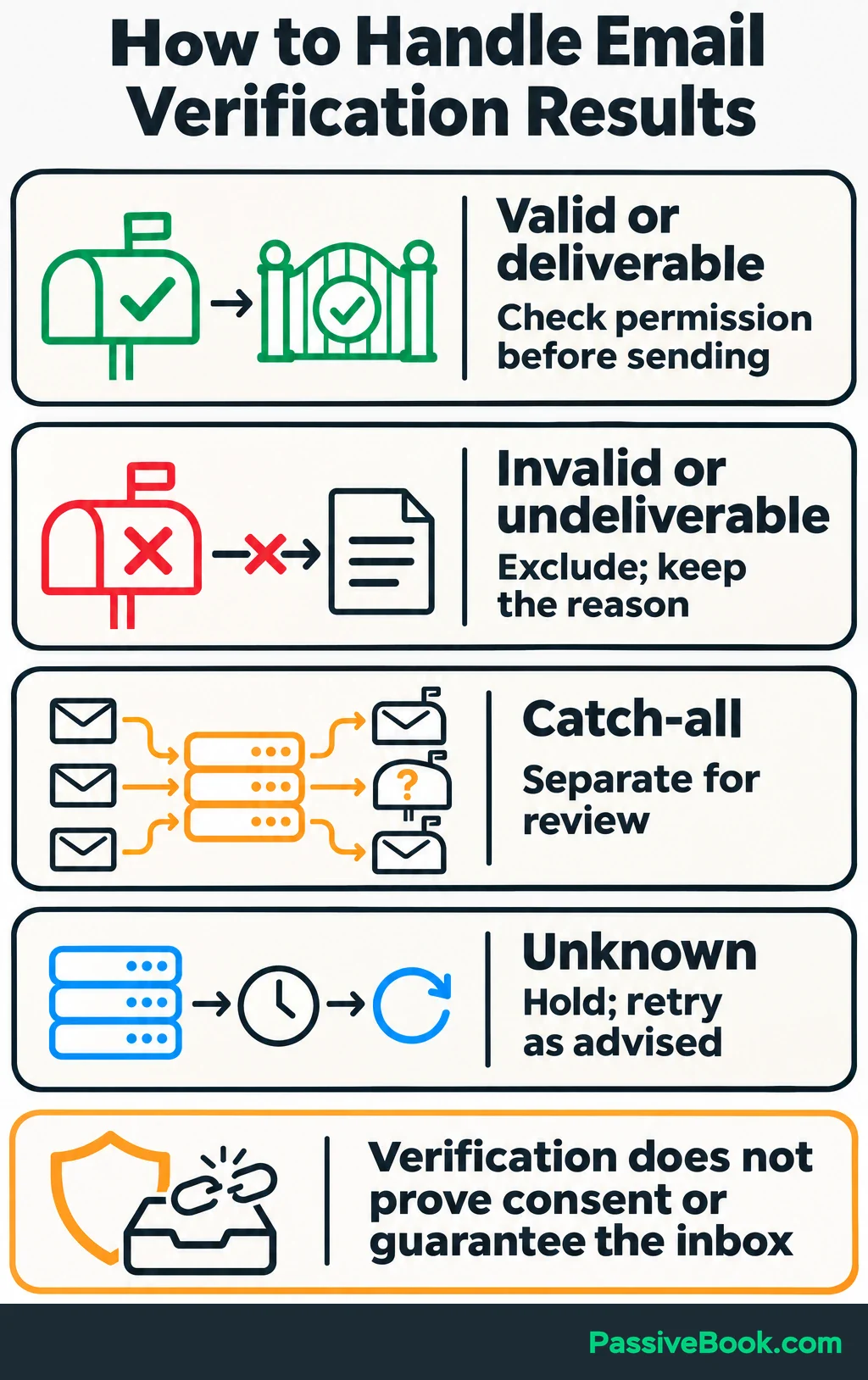
The result is an assessment, so you need to understand what each label means before acting on it.
| Result | What It Tells You | How I Would Handle It |
|---|---|---|
| Valid or deliverable | The service assessed the address as reachable. | Keep it eligible only if the contact also has permission to receive your emails. |
| Invalid or undeliverable | The address failed verification. | Exclude it from sending and retain the reason. |
| Catch-all | The server accepts checks for arbitrary recipients without confirming that particular mailbox. | Keep it separate for review rather than treating it as confirmed valid. |
| Unknown | The check did not produce a firm answer. | Hold it aside and retry according to the provider’s guidance. |
Providers may add their own categories and reasons. For example, ZeroBounce’s result definitions distinguish mailbox failures from other risks. Suspected spam traps may be addresses used to detect unwanted mail. Abuse flags identify addresses associated with spam complaints. Those distinctions matter because “not invalid” does not automatically mean “send.”
Removing invalid addresses reduces exposure to address-related bounces. It does not establish permission, prove subscriber interest, or guarantee the inbox. Authentication, spam complaints, and sending practices still matter, as Google’s sender guidelines explain.
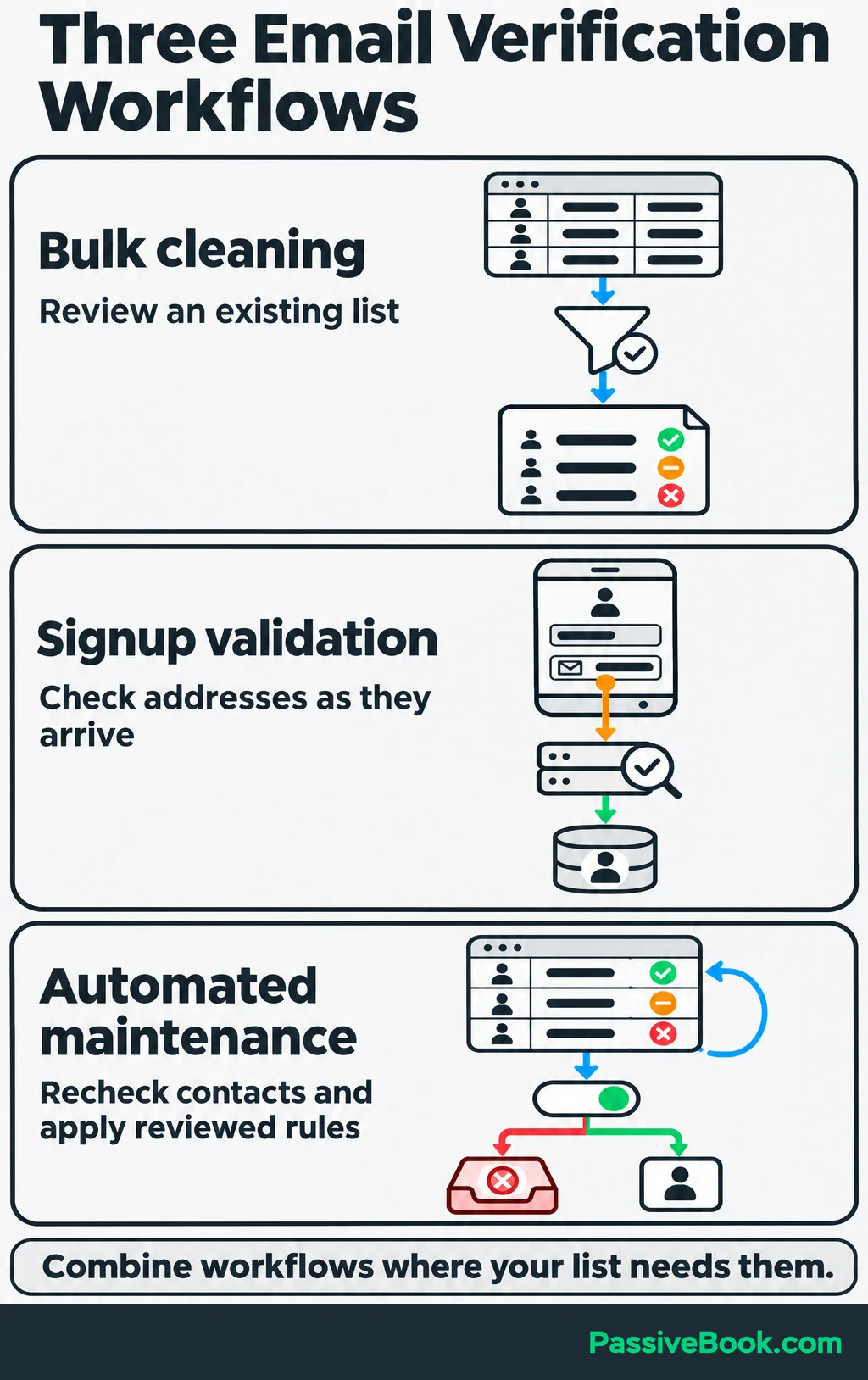
Choose the workflow that matches where the problem happens:
- Bulk cleaning: Check an existing list through a file upload or connected import.
- Signup validation: Check incoming addresses through a form connection or API, which lets software request checks automatically.
- Automated maintenance: Recheck contacts inside a supported email platform and apply rules to the results.
You can combine these. For a running example, imagine you sell printable beginner quilt patterns and send subscribers quilting lessons and product offers. A bulk check helps review your stored list, while signup validation checks addresses submitted for your free first-quilt lesson. The shop and its example list sizes are illustrative.
The 13 Best Email Verification and List Cleaning Tools Compared
The best email verification and list cleaning tools fit the work you need done and explain what remains uncertain.
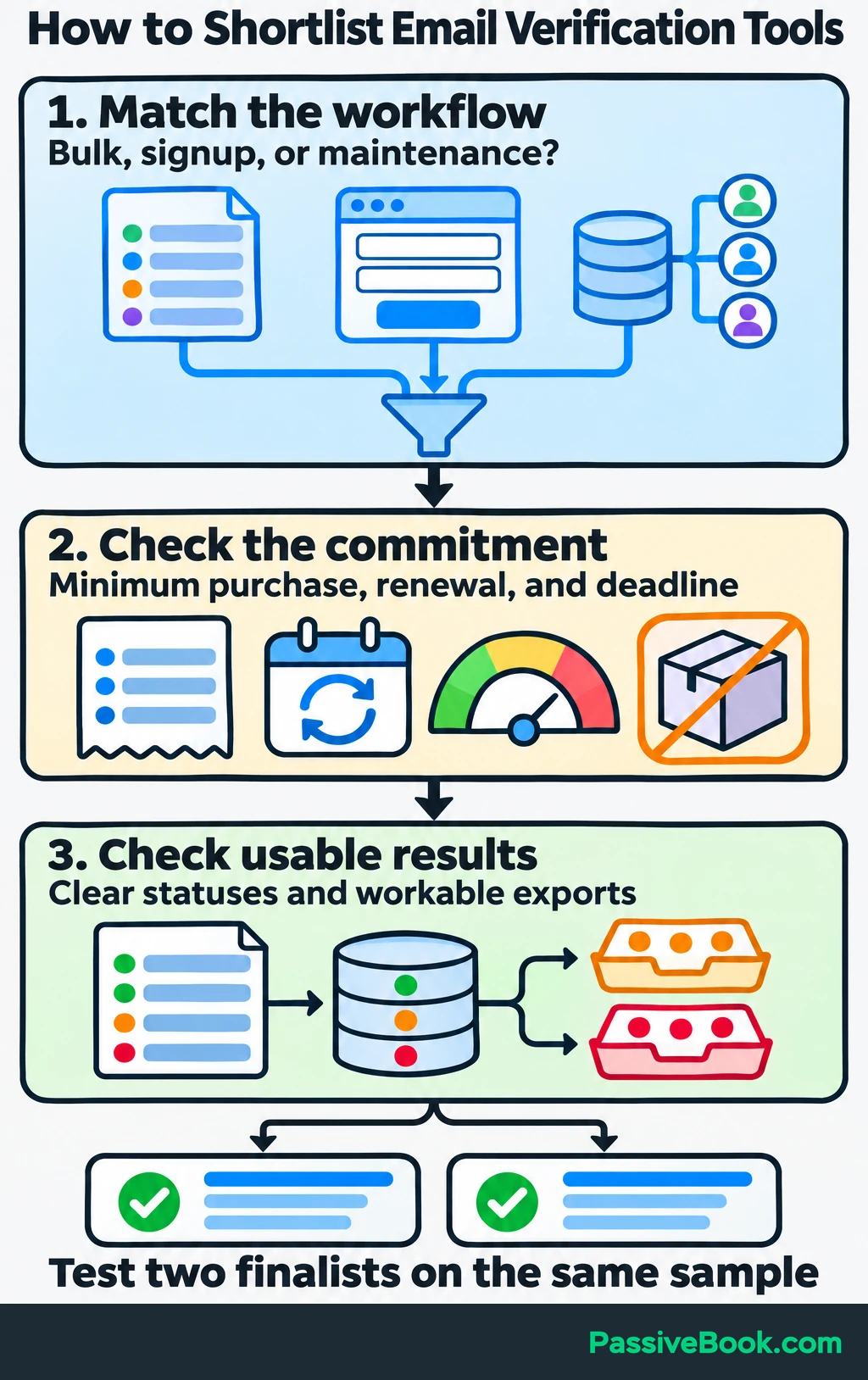
My recommendations below reflect documented features and purchasing terms. I have not tested these providers against one another, and the numbering is for navigation rather than an accuracy ranking.
The table puts exact package examples in one place. Dollar amounts are USD, and EmailListVerify’s prices remain in EUR. Follow the linked pricing pages for current totals and account-specific options.
| Tool | Recommended Use Case | Supported Verification Workflows | Free Allowance and Renewal Period | Paid Package or Pricing Calculator | Main Purchasing or Workflow Constraint |
|---|---|---|---|---|---|
| Bouncer | Occasional bulk cleanup | Bulk upload, API, platform connections | 100 signup credits; one time | 1,000 credits: $8; 5,000: $35; 10,000: $60, pay as you go | Minimum purchase of 1,000 credits |
| Emailable | Stored lists plus signup checks | Bulk, API, form widget, integrations | 250 signup credits; one time | 5,000 credits: $38 once or $32.30 monthly | Minimum purchase of 5,000 credits |
| ZeroBounce | Detailed risk classifications | Bulk verification, API | 100 credits monthly | 2,000 credits: $39; 10,000: $129, pay as you go | Minimum purchase of 2,000; expiry depends on account creation date |
| Mailfloss | Automatic daily maintenance | Connected daily cleaning; prepaid manual uploads; API | 500 verifications monthly; separate seven-day subscription trial | Lite: $29 monthly for 10,000 verifications; prepaid options also available | Lite connects one supported platform; trial requires a card |
| MillionVerifier | Large verification batches | Bulk upload, platform imports, API | Homepage offers 100 signup credits; one time | 50,000 credits: $89; one million: $449, one-time purchases | Standard paid packages start at 10,000 credits |
| EmailListVerify | Economical one-time bulk purchases | Bulk upload, API, integrations | 100 signup verifications; one time | 10,000 credits: €27 once or €25 monthly | Minimum purchase of 1,000; choose the billing option deliberately |
| NeverBounce | Separate bulk and signup processes | Bulk jobs and individual API checks | Current allowance not confirmed | Obtain the current dollar total for your job | Stored lists belong in the bulk workflow |
| Kickbox | Small pay-as-you-go jobs | Bulk and real-time API listed in its packages | G2 lists 100 signup verifications; one time | G2 lists 500: $5; 5,000: $40; 10,000: $70 | Package examples are from G2; confirm purchase terms with Kickbox |
| Clearout | Forms and Google Sheets | Bulk, API, forms, Sheets | 100 signup credits; one time | Published pricing options; confirm the plan available to your account | Billing guide excludes new users from standalone pay-as-you-go |
| MailerCheck | MailerLite group and segment cleaning | Bulk, API, direct MailerLite import and export | 10 signup credits; one time | 1,000 credits at $0.01 each: $10, pay as you go | Minimum purchase of 1,000; limited free evaluation |
| DeBounce | Credit-based list monitoring | Bulk, API, signup widget, connected monitoring | 100 signup credits; one time | Calculator for the required credit quantity | Monitoring and dedicated catch-all checks consume extra credits |
| Verifalia | Adjustable verification depth | Bulk files, API, signup widget | 25 credits daily; unused daily credits expire | Credit-pack calculator and subscription plans | Higher verification levels use more credits and processing time |
| QuickEmailVerification | Recurring free checks | Bulk, API, integrations | 100 verifications daily; resets daily | 500 persistent credits: $4 once | Daily capacity cannot clear a large upload immediately |
1. Bouncer — Best for Straightforward Bulk Cleaning
Bouncer would be my first shortlist entry for an occasional cleanup. You can upload a list, review the classifications, and export the results without committing to another monthly bill.
Purchased verification credits do not expire. It also does not charge for duplicates within the uploaded list or unknown results, which helps when part of your list cannot be resolved.
For the quilt-pattern shop, this suits a cleanup before resuming lessons to an older subscriber segment. You would still need to apply the results to your existing contacts and preserve their preferences.
I would choose it for a clear, manageable bulk process. I would compare automation options separately if repeated exports and imports were becoming the main cost. Cheap verification stops feeling cheap when every cleanup consumes your Saturday.
2. Emailable — Best for Bulk Cleaning and Signup Validation Together
Emailable makes sense when you want one provider for both existing contacts and incoming signups. Bulk verification handles stored lists, while its API or widget can check addresses as people register.
Ordinary verification uses one credit. Credits spent on duplicate and unknown results are returned when the list finishes processing, and unused credits do not expire.
The purchase minimum is the main budget check. A small job may need far fewer verifications than the smallest package, so compare the amount leaving your account rather than the advertised cost per address.
For the quilt-pattern shop, I would consider Emailable if both the older lesson list and the free-lesson signup form needed attention. I would skip the monthly option until recurring usage justified it. A subscription discount is only useful when you need the subscription.
3. ZeroBounce — Best for Detailed Risk Classifications
ZeroBounce is worth comparing when you need more explanation than a broad valid-or-invalid result.
Its classifications include catch-all, suspected spam-trap, abuse, do-not-mail, and unknown results, with reasons that can guide your review. That gives you more information, but you still need rules for what each result means in your business.
I would shortlist it when those distinctions change a decision. If your process simply excludes invalid addresses and holds uncertain ones, you may not need to pay more for classifications you never use.
Check the expiry policy before buying a large balance. For pay-as-you-go accounts created after June 1, 2026, purchased credits expire two years after the most recent credit purchase. Accounts created on or before that date retain non-expiring credits under ZeroBounce’s account-based policy.
4. Mailfloss — Best for Automated Daily Maintenance
Mailfloss is my first shortlist choice when the recurring task is the problem.
You connect a supported email platform, choose how result categories should be handled, and let daily cleaning follow those rules. Lite supports one connected platform, so compatibility comes before price.
For the quilt-pattern shop, this could remove the repeated work of exporting contacts, running checks, and matching the results back to the sending list. I would first review the classifications manually, then enable automatic actions once the rules were clear.
Its recurring free allowance is separate from the seven-day subscription trial. The trial requires a card and begins paid billing on day eight unless canceled.
Prepaid credits are available for manual uploads and do not expire. I would use those for a one-off job rather than start a subscription just to cancel it.
5. MillionVerifier — Best for Large Verification Batches
MillionVerifier deserves a place on your shortlist when a large batch makes the purchase price a major part of the decision.
It supports bulk uploads, imports from email platforms, and API checks. Purchased credits do not expire, so you can use the balance across later jobs.
The standard package minimum is substantial compared with some smaller-purchase options. That matters if you have a modest list, even when the unit price looks attractive.
For a large stored list, I would compare MillionVerifier with Bouncer and EmailListVerify using the same sample and the actual purchase required. I would look closely at unresolved results and whether the exported file makes those addresses easy to separate.
A low price earns a test. It does not earn permission to skip reviewing the results.
6. EmailListVerify — Best for Economical One-time Bulk Purchases
EmailListVerify is a useful comparison for occasional bulk work when you want a low purchase cost without an ongoing commitment.
Its documented checks cover address format, domains, mail-routing records, and duplicates, and it provides API access. Pay-as-you-go credits do not expire.
Keep the currency in view when comparing quotes. Its displayed packages use EUR, so a numerical comparison with a USD package would be misleading.
I would start with the one-time option if the quilt-pattern shop needed a single cleanup. The monthly option becomes relevant when roughly that amount of work returns each month.
There is no prize for paying slightly less per credit and then buying credits every month that you do not use. Compare the full commitment with your likely workload.
7. NeverBounce — Best for Distinct Bulk and Signup Workflows
NeverBounce draws a firm line between checking stored lists and checking individual addresses after an action such as a form submission.
That is a useful distinction if you are building automation. Its usage guidance says to submit existing databases through bulk verification rather than loop through them with individual checks.
For the quilt-pattern shop, I would submit the stored subscriber list as a bulk job and treat new free-lesson signups as a separate flow.
I would obtain the current dollar total for both before making a cost decision. A quote for a bulk cleanup does not tell you the ongoing cost of signup validation.
This would be a workflow-led choice for me. Without a confirmed purchase total, I would not call it the cheapest option for either task.
8. Kickbox — Best for Small Pay-as-you-go Purchases
Kickbox is worth considering when your job is small enough that the minimum purchase matters more than a volume discount.
G2’s pricing listing includes a small paid package and free signup verifications. Those are useful package examples, but I would confirm the final total and credit terms directly with Kickbox before paying.
The appeal is simple: you may be able to buy close to what you need rather than purchase several thousand credits for a few hundred checks.
I would compare it with QuickEmailVerification for a small urgent cleanup. If the free daily allowance covers your workload and timing, there may be no reason to pay. If you need the whole batch processed promptly, a small paid pack can make more sense than spreading the job across days.
9. Clearout — Best for Forms and Spreadsheet Workflows
Clearout is worth shortlisting when verification needs to happen where you already work, particularly forms or Google Sheets.
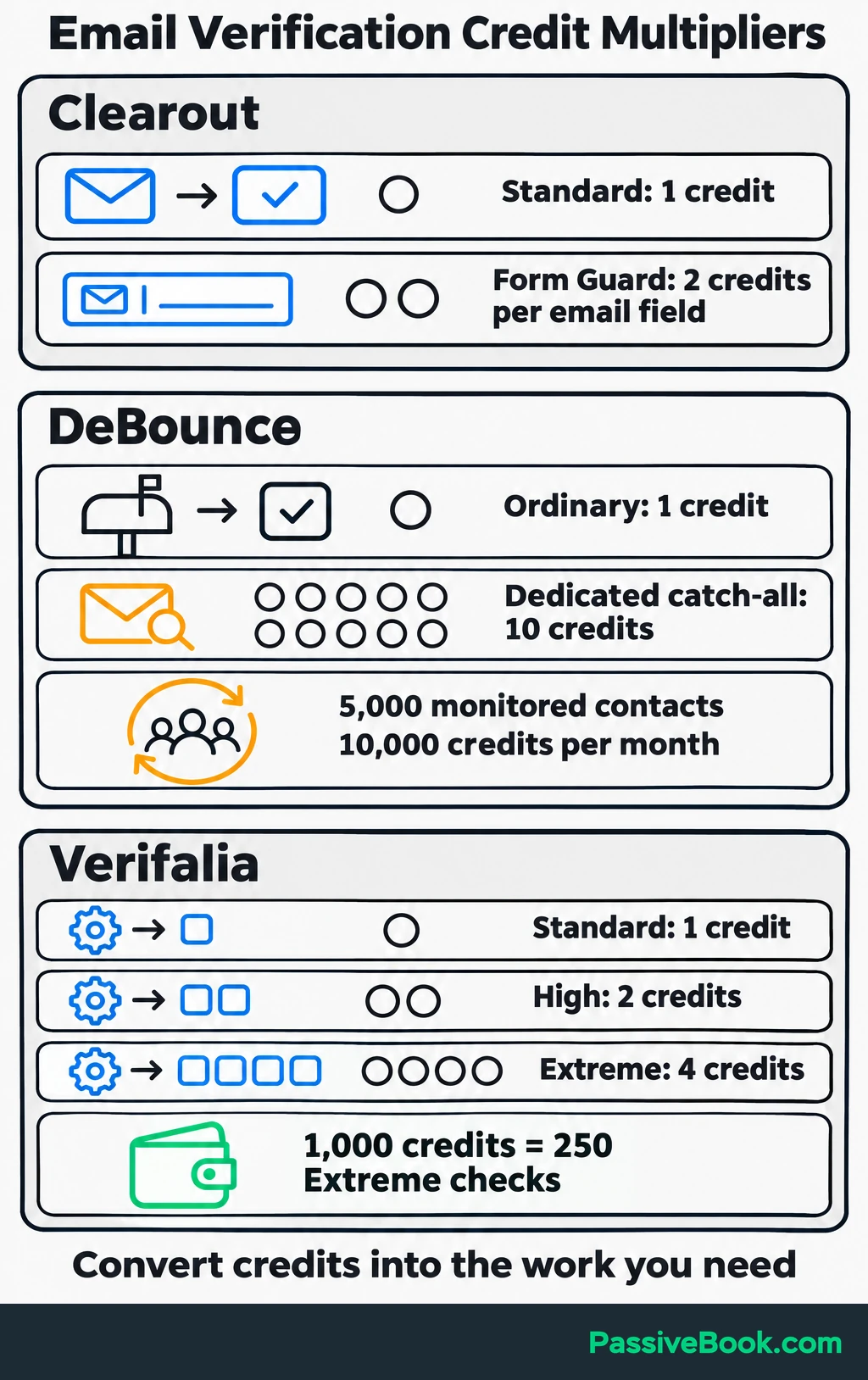
It supports bulk checks and can flag temporary inboxes (disposable addresses) and addresses tied to a function, such as orders@ (role-based addresses). Standard verification uses one credit for a valid, invalid, or catch-all result. Its form-validation tool, Form Guard, uses two credits per email field validated. Unknown results and duplicates within the same uploaded list are not charged.
That difference matters when budgeting. A form workflow and a bulk cleanup may use the same credit balance at different rates.
The purchasing terms need clarification before an occasional cleanup. Its public pricing page lists one-time purchases, but the billing guide excludes new users from standalone pay-as-you-go. I would confirm the available plan and payable total before choosing it on price.
10. MailerCheck — Best for MailerLite Group and Segment Cleaning
MailerCheck is most appealing when you already use MailerLite and want to verify selected groups or segments.
The connected workflow lets you import those contacts for checking and return selected results. The export creates a results group and adds a “MailerCheck result” field to subscriber profiles.
Use that field to exclude invalid and unresolved addresses from your campaign segment. Returning results to MailerLite does not automatically apply those exclusions.
I would choose MailerCheck for that connection rather than its free allowance, which is small. Purchased credits do not expire.
For the quilt-pattern shop, it could make sense if quilting-lesson subscribers already sit in a MailerLite group. I would keep the existing email platform unless another provider offered a meaningful improvement in cost or work saved.
11. DeBounce — Best for Credit-based List Monitoring
DeBounce offers bulk checks, API access, and ongoing monitoring through supported platform connections.
Its credit rules deserve a careful look. Ordinary validation uses one credit per address, dedicated catch-all validation uses ten, and monthly list monitoring consumes twice the monitored list size.
For example, monitoring 5,000 addresses requires 10,000 credits per month. That is the monitoring charge for that list, not simply one verification credit per contact.
Purchased credits do not expire, and bulk duplicate removal is free. Use the calculator to price the services you will actually use.
I would shortlist DeBounce if monitoring fitted the existing platform and reduced repeated manual work. I would avoid comparing its ordinary verification rate with another provider’s monitoring plan. Those prices cover different jobs.
12. Verifalia — Best for Configurable Verification Depth
Verifalia lets you choose how much retry effort goes into verification.
Standard uses one credit per address, High uses two, and Extreme uses four. The higher levels add attempts and waiting time for servers that respond slowly or have temporary problems.
I would begin with Standard and consider extra depth where unresolved responses justified the cost. I would not choose the most expensive setting just because its name sounds reassuring.
Its free plan supplies daily credits that expire rather than accumulate. Purchased packs do not expire.
When comparing its calculator with another provider, convert credits into the number of addresses you can check at your chosen level. A balance of 1,000 credits covers 1,000 Standard checks but only 250 Extreme checks. The credit count alone hides that difference.
13. QuickEmailVerification — Best for Recurring Free Checks
QuickEmailVerification is my first option to investigate when you need a modest number of checks each day and want to avoid a paid commitment.
Its recurring free allowance can support sample bulk jobs and API evaluation. It may also cover a small ongoing signup flow if the daily volume stays within the allowance and the integration fits.
The constraint is timing. Daily credits reset, so unused capacity does not build into a large future balance.
I would not divide an urgent stored-list cleanup into weeks of manual uploads just to avoid a small purchase. Persistent paid credits are available and do not expire.
For the quilt-pattern shop, the free tier could suit a quiet signup flow. A larger cleanup before restarting lessons would call for a separate decision based on the whole batch.
How to Choose Between Your Finalists
Compare Results on the Same Sample
Choose two providers that support your required workflow. There is little value in finding a slightly cheaper verifier if applying its results creates another regular job.
Before uploading subscriber data, review the provider’s processing terms, retention period, and deletion controls. Transfer only the fields needed to verify addresses and match the results back to your contacts.
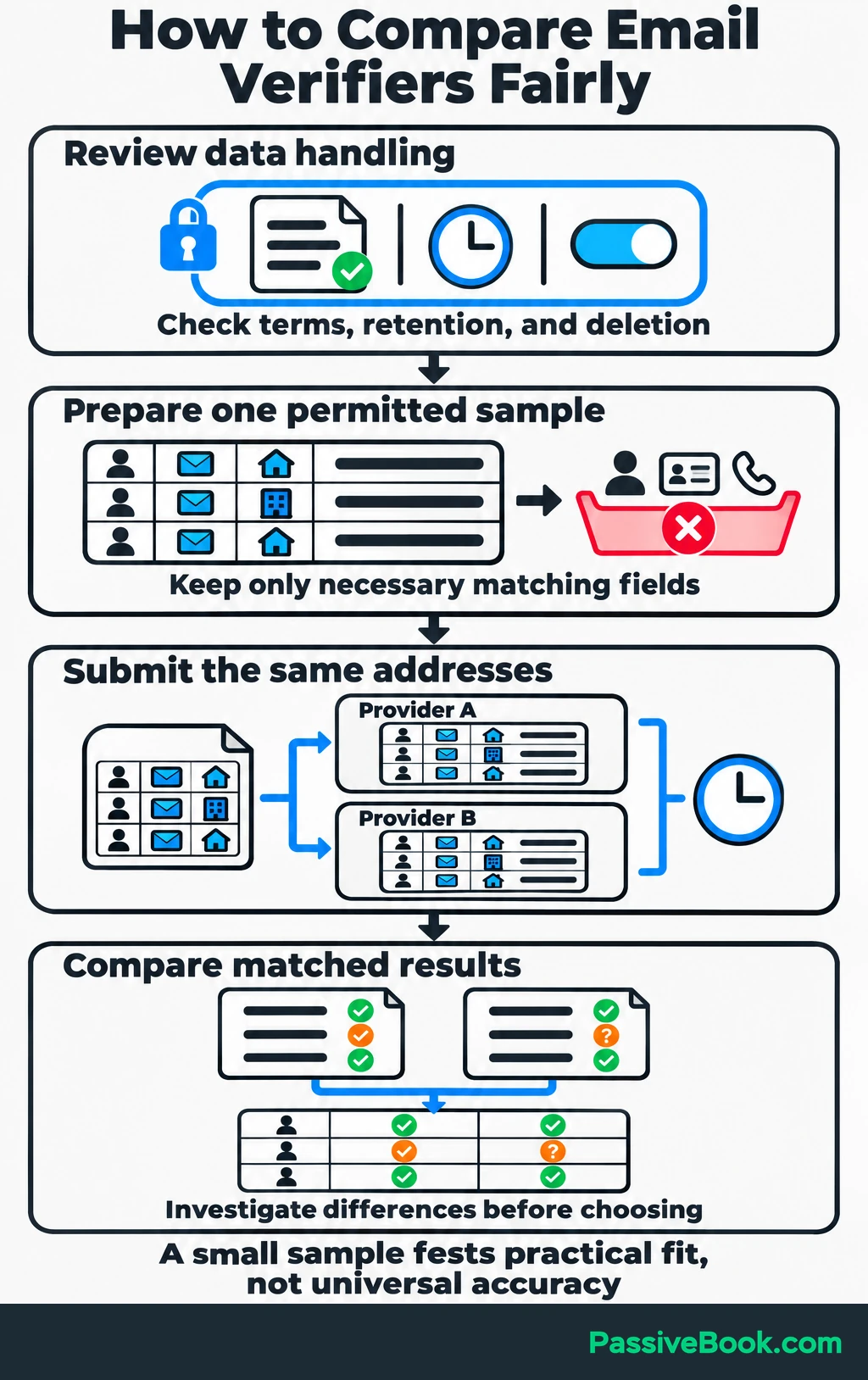
Then run the same permission-based sample through both services within a comparable period. Include the personal and business domains that actually appear on your list.
Compare the practical differences:
- Result explanations: Can you tell why an address failed or remained uncertain?
- Unresolved addresses: Are catch-all and unknown results clearly separated from confirmed valid results?
- Processing time: Does the job finish within the time your workflow allows?
- Credits charged: Do the charges match the published rules?
- Export usefulness: Can you match every result to the correct contact?
- Integration actions: Does the connection import contacts, return statuses, add tags, or change sending eligibility?
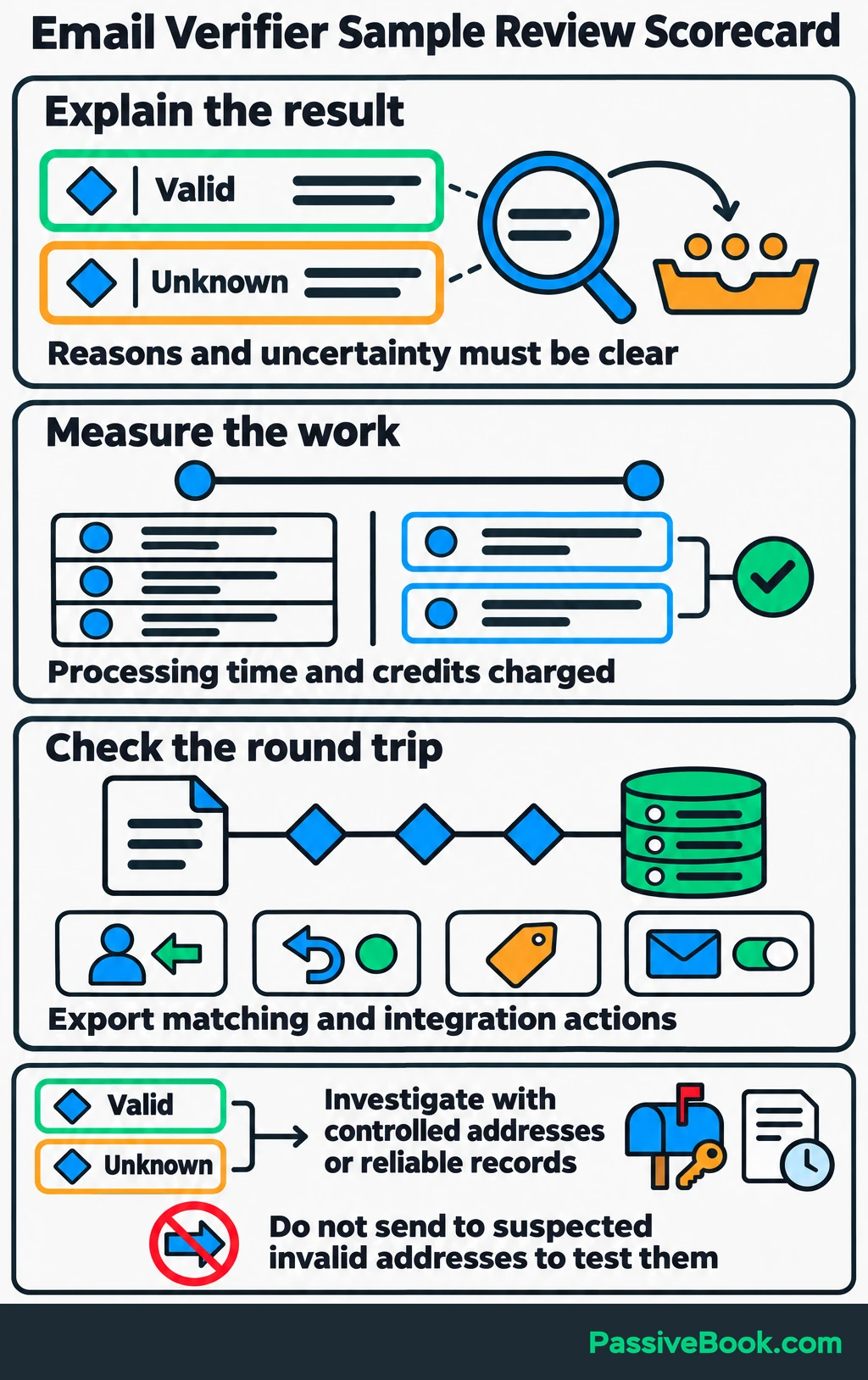
For the quilt-pattern shop, I would take the same sample from the existing lesson list and review disagreements side by side. An address marked valid by one provider and unknown by another needs investigation, not an automatic vote for the more cheerful result.
Use addresses you control or reliable existing delivery records to investigate. Do not send to suspected invalid addresses to manufacture test results.
A small sample tells you about practical fit and classification differences. It does not establish which service is universally most accurate.
Calculate the Total Cost of Your Workflow
Count the addresses you actually need checked before comparing packages.
Remove duplicates and exclude contacts already barred from receiving campaigns. Keep the records of those exclusions—your suppression records—so an import cannot make those contacts eligible again. Then add expected signup checks, retries, monitoring, and any services that use extra credits.
The useful cost comparison includes:
- Immediate purchase: The smallest suitable package you can buy.
- Recurring commitment: Every subscription payment needed for the period.
- Extra consumption: Repeat checks, monitoring charges, or deeper verification.
- Unused balance: Credits you pay for but do not use on this job.
- Manual work: Time spent exporting, matching, and applying results.
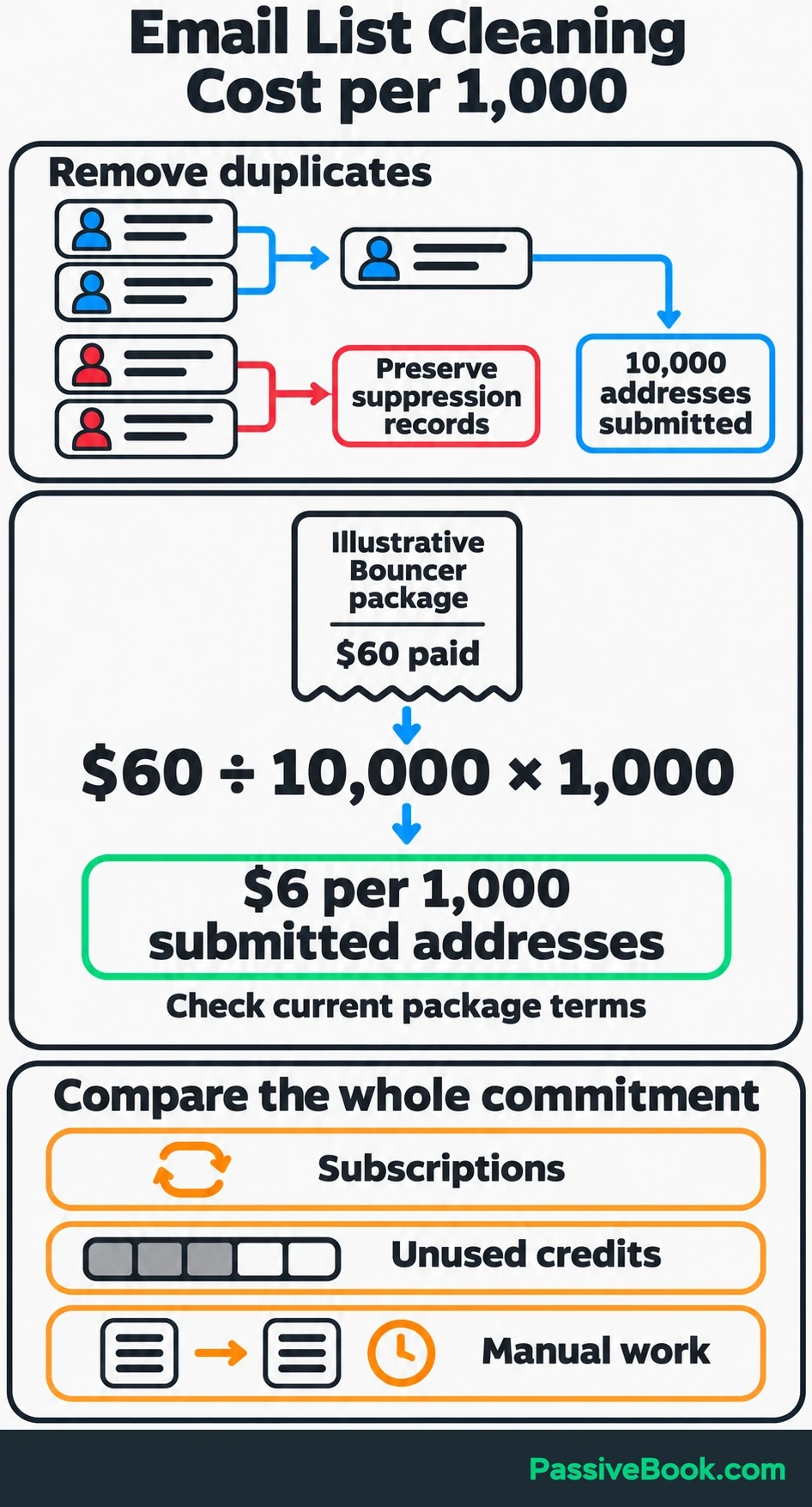
To compare a particular cleanup, divide the amount paid by the number of addresses submitted, then multiply by 1,000.
Suppose the quilt-pattern shop submits 10,000 addresses after removing duplicates and excluding suppressed contacts. Using Bouncer’s package in the comparison table, the illustrative calculation is:
$60 ÷ 10,000 × 1,000 = $6 per 1,000 submitted addresses.
I would use free capacity when it covers both the volume and the deadline. I would pay when the extra capacity or automation saves enough work to justify it.
Put your two finalists on the same timeline before buying. Include the payment due now, any recurring charges, and how quickly you expect to use the credits.

Free Software Cost Calculator




Also check whether cleaning changes your email-platform bill. Removing contacts only creates that saving if it moves you to a lower charge or reduces billed sending volume. FluentCRM, a WordPress email marketing plugin, charges by site rather than subscriber count. Cleaning will not lower that license fee, though it may reduce a separate bill for email delivery.
How to Apply Verification Results Safely
Back up the list before applying results, and preserve the identifiers needed to match each result to the existing contact.
I learned the value of this during newsletter work in another niche. I had exported addresses for a spreadsheet review, but the file did not carry the unsubscribe status I needed for the return trip. I caught the missing field while rebuilding the sending segment. The address column looked complete; the record was not.
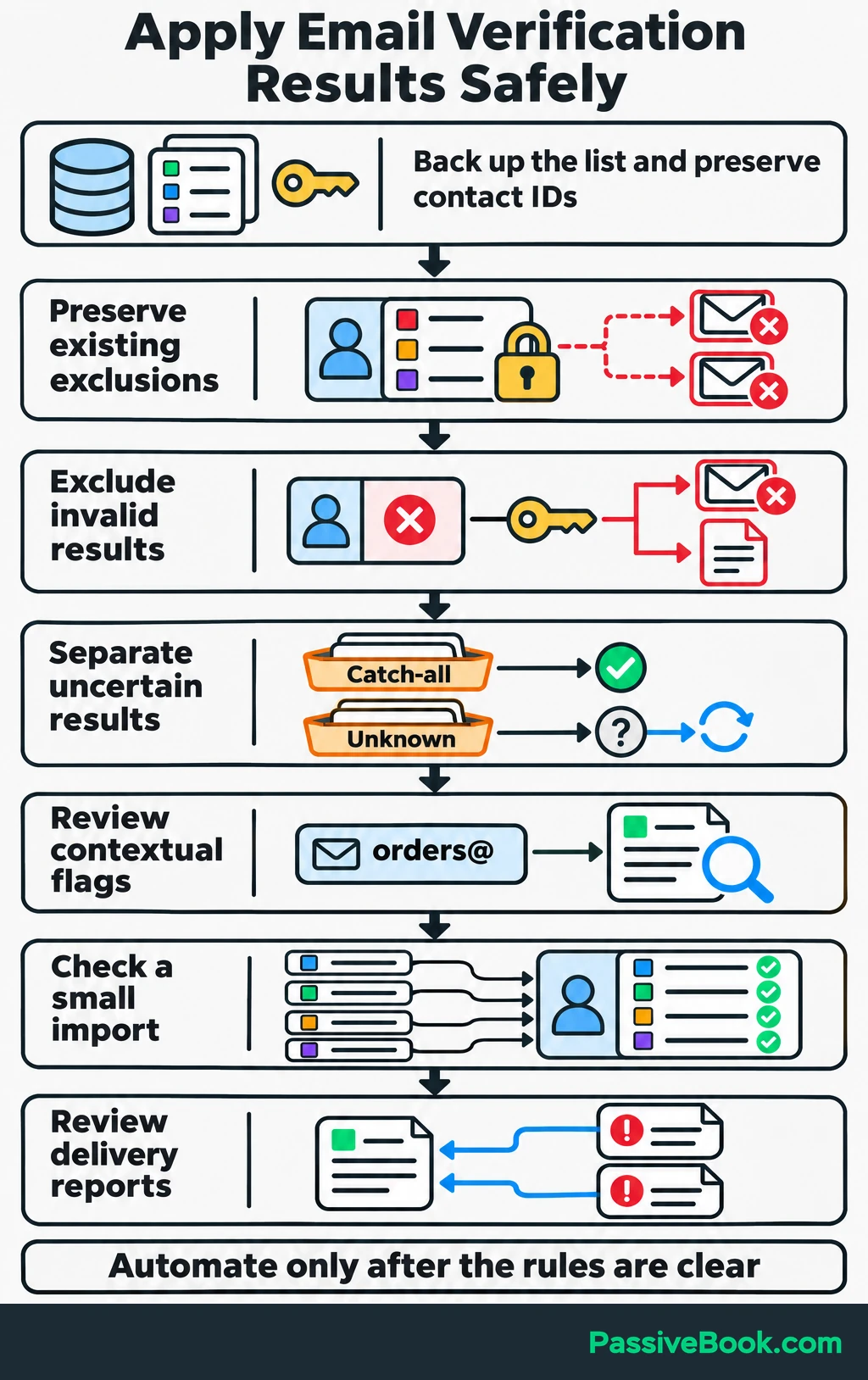
That is why I would check the whole round trip before enabling automatic updates.
Use this sequence:
- Preserve existing exclusions: Keep unsubscribe, complaint, and suppression history attached to the contact. A valid verification result must never reactivate someone who was excluded.
- Exclude invalid results: Remove invalid or undeliverable addresses from campaign eligibility and retain the reason for the decision.
- Separate uncertain results: Keep catch-all and unknown addresses outside the confirmed-valid group. Retry inconclusive checks according to the provider’s guidance.
- Review contextual flags: A role-based address such as
orders@needs its signup context considered. A flag alone does not explain who subscribed or what they requested. - Check a small import: Confirm that statuses, preferences, contact identifiers, and segments map correctly before applying changes across the list.
- Review later delivery reports: Look at hard-bounce reasons and where affected contacts entered the list.
For the quilt-pattern shop, a simple sending rule might be:
Send quilting lessons only when the contact is subscribed, has permission for those lessons, has an accepted verification result, and has no existing suppression.
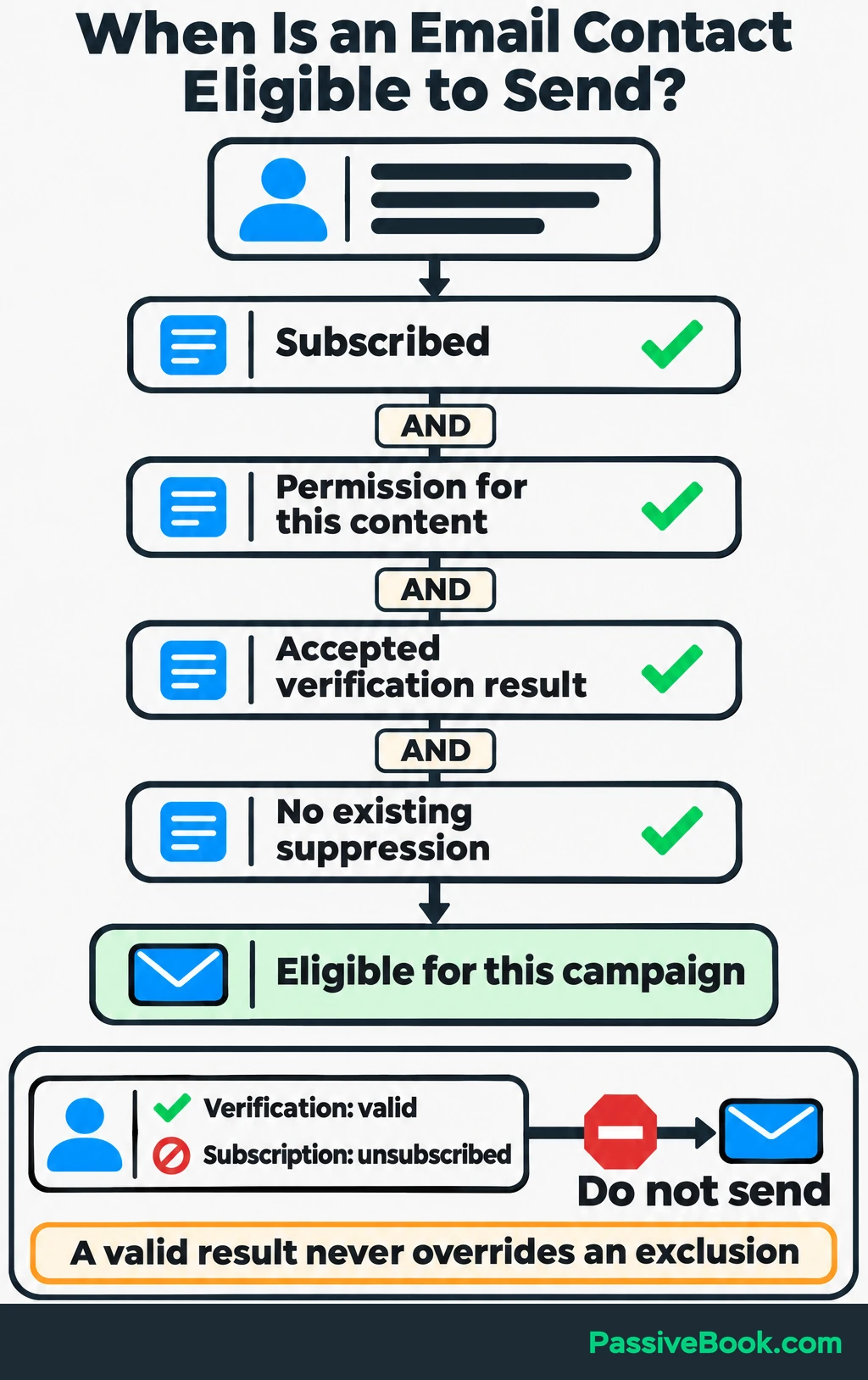
The order matters less than keeping every condition. “Valid” is one condition, not a replacement for the others.
Set the cleaning schedule around actual activity. Recheck an older segment before resuming campaigns, and consider signup checks if recurring entry errors keep creating cleanup work.
I would automate stable rules after reviewing them on a small segment. Automating an unclear rule just applies the confusion faster.
What Next?
Write down your next cleanup’s list size, deadline, and email platform, then choose two providers that fit those three facts. Run the same sample through both before buying enough credits for the full job.
Use the social buttons to share this comparison when your next tool discussion needs a clearer view of free allowances, purchase minimums, and automation costs.
Which part of your current process needs the most attention: checking new signups, cleaning older contacts, or applying the results? Share your answer in the comments, and bring any other questions too.
Share this post with your friends & followers:

