Your email platform says “delivered,” but a subscriber says your launch email never arrived. Before you rewrite the subject line or move your whole list, you need to know where the message went.
The awkward part is that different tools answer different questions. A clean subscriber list won’t explain every spam placement, and a perfect spam score won’t prove your campaign reached the inbox.
The comparisons below help you choose the check that fits your problem, understand what its report means, and decide whether a free tool is enough or paid monitoring earns its place.
Which Email Deliverability Tool Should You Choose?
I would start with the problem you can observe and buy the smallest amount of coverage that helps explain it.
These are my first options to investigate:
- Placement Testing: GlockApps when you need to see where test messages land and investigate technical findings alongside them.
- Occasional Free Checks: Unspam.email when you want a few placement tests without adding a subscription.
- Gmail Monitoring: Google Postmaster Tools when you need feedback from Google about your sending domain.
- Quick Message Diagnostics: Mail-tester when you want to check a campaign’s authentication, sending setup, and spam-filter findings.
- Occasional Paid Testing: MailerCheck when you want validation and placement checks from a credit balance.
These recommendations compare documented features, pricing, and use cases. They aren’t an independent accuracy ranking or a hands-on test of all 21 products; the numbers identify entries, not rank them.
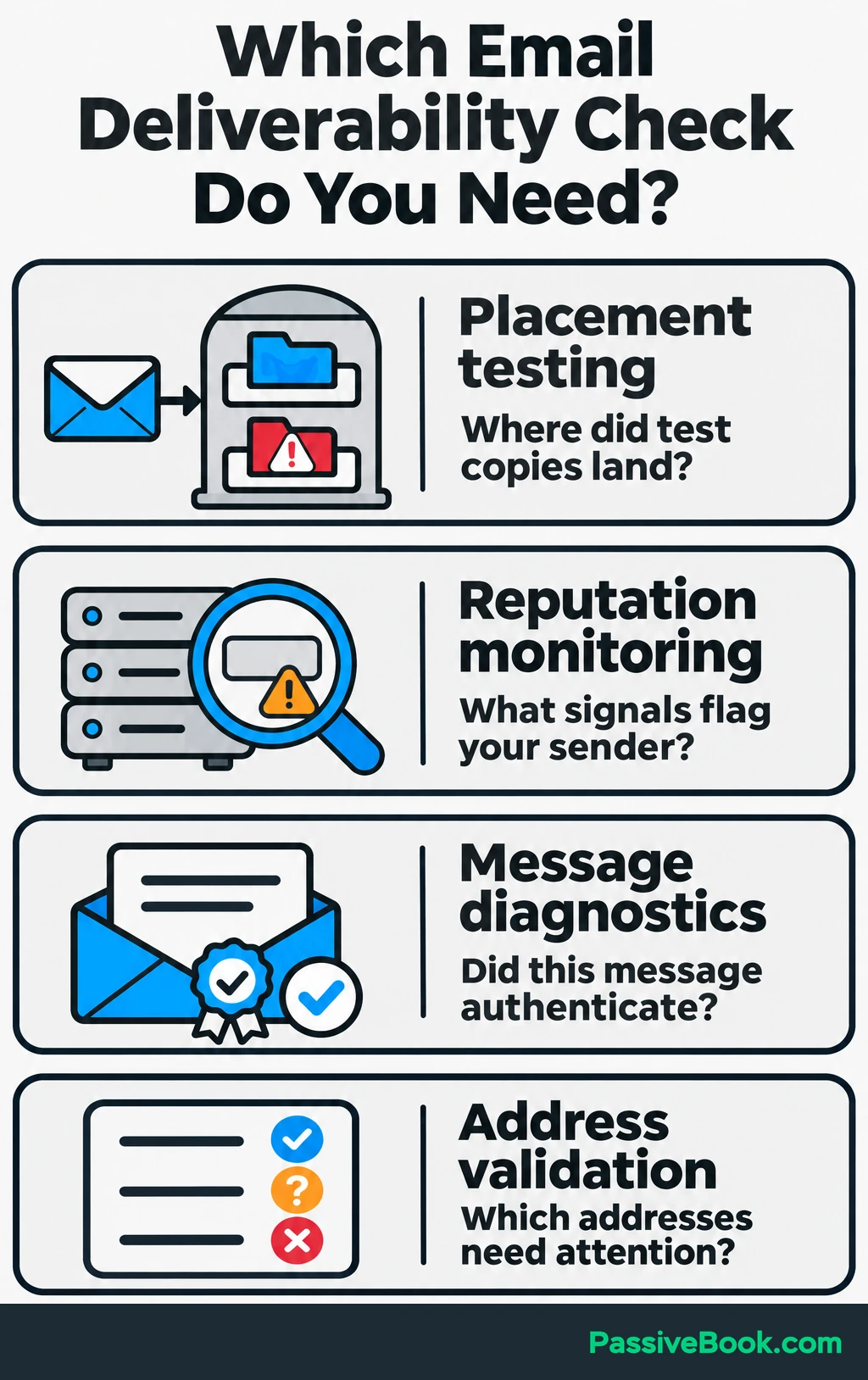
First, separate four jobs that often get bundled under “deliverability”:
| Tool Type | Question It Helps Answer | What It Doesn’t Establish |
|---|---|---|
| Inbox placement testing | Where did copies of this message land in test mailboxes? | The exact percentage of your subscribers who received it in their inbox |
| Reputation and blocklist monitoring | Is your sending IP or domain on a list of suspected spam sources, or has a mailbox provider reported reputation trouble? | The destination folder of every campaign |
| Authentication and message diagnostics | Did this message authenticate correctly, and what technical problems appeared? | Guaranteed inbox placement |
| Address validation | Which subscriber addresses appear invalid, uncertain, or risky? | Subscriber permission or inbox placement |
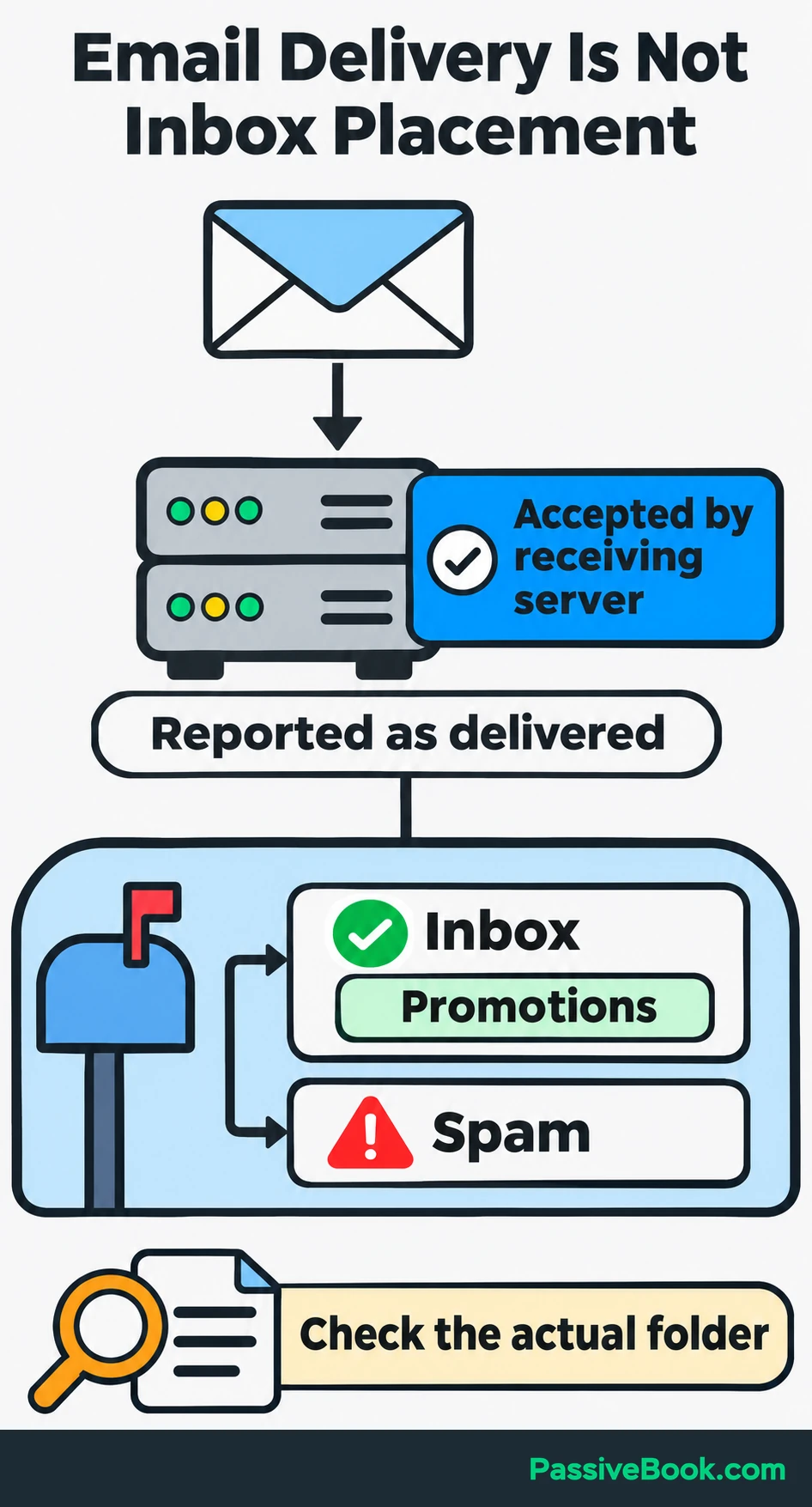
Delivery and inbox placement are different. “Delivered” usually means the receiving server accepted the message. It doesn’t identify the folder where it landed.
Gmail’s Promotions tab is also an inbox category. Keep it separate from spam when reading placement results. Otherwise, you can end up treating an accepted promotional email as a delivery failure.
A seed list is a set of test mailboxes. Placement software checks what happened in those mailboxes, so treat its results as a diagnostic sample. A spam score, an IP reputation score, and a placement percentage measure different things.
In a newsletter I ran in another niche, I started rewriting an email after a reader said it hadn’t arrived. I hadn’t even asked which folder they’d checked. That was a useful reminder to establish the problem before fixing the copy.
For the examples below, imagine you sell beginner tote-bag sewing patterns through an opt-in newsletter. You’re preparing a pattern launch, and you want to check the email before sending it to subscribers.
The comparison is grouped by primary job. Prices are in USD unless shown otherwise, and the linked vendor pages provide current terms. Allowances belong to the named plan or purchase.
Inbox placement testing
| Tool | Strongest Use Case | Price and Included Allowance | Free Access or Trial |
|---|---|---|---|
| 1. GlockApps | Placement with technical diagnostics | Essential: $85/month; 30 test credits/month | Two test credits |
| 2. Mailgun Optimize | Placement and validation | Pilot: $49/month; 25 placement tests and 2,500 validations/month. Starter: $99/month adds monitoring. Overages cost extra. | First month free |
| 3. Bouncer Deliverability Kit | Placement and blocklist monitoring | Starter: $25/month; 250 individual seed deliveries/month and 10 monitored IPs/domains | Free trial |
| 4. Unspam.email | Occasional free placement checks | Custom: usage-based monthly or annual plan | Free account: five spam tests and three placement tests/month; 14-day retention |
| 5. SendForensics | Frequent checks across a few domains | Brand: $49/month, or $39/month billed annually; two domains and two users. Fair use per domain/month: 1,000 analyses and 50 seed placement tests. | No free plan listed |
| 6. Folderly Inbox Insights | Checks before sending | $79/month; 100 tests/month | Two tests/month |
| 7. Inbox Monster | Broad provider coverage with onboarding | Deliverability Suite: from $15,000/year; usage and coverage quoted | Demo; trial allowance not published |
| 8. Validity Engage | Enterprise oversight | Custom quote; features, allowances, and credits specified in the order form | Sales-led evaluation; confirm trial terms |
Sender reputation and blocklist monitoring
| Tool | Strongest Use Case | Price and Included Allowance | Access Requirements or Free Option |
|---|---|---|---|
| 9. Google Postmaster Tools | Personal-Gmail monitoring | Free provider dashboards; low-volume data may be absent | Verify the domain or receive access from its owner |
| 10. Microsoft SNDS | Outlook.com sending-IP monitoring | Free data for authorized sending IPs | Microsoft account and IP authorization |
| 11. MXToolbox | Infrastructure checks and blocklist alerts | Delivery Center: $129/month; five domains, 500,000-message allowance, and 30 placement analyses/month | Free lookups and one weekly domain monitor |
| 12. Sender Score | Sending-IP reputation spot check | Free proprietary score from 0–100 | Look up the affected campaign’s sending IP |
Authentication and message diagnostics
| Tool | Strongest Use Case | Price and Included Allowance | Free Access or Trial |
|---|---|---|---|
| 13. Mail-tester | Quick message diagnostics | $10/month for 50 tests, or a one-time $5 pack for 10 tests, excluding VAT | Three tests in a rolling 24 hours |
| 14. MailGenius | Diagnostics with explanations | Free basic checker; paid upgrades separate | Message report hosted on a public link |
| 15. EasyDMARC | Authentication with an upgrade path | DMARC Plus: €35.99/month billed annually; two domains and 100,000 emails/month | Trial without a card |
| 16. PowerDMARC | Multi-domain authentication | Displayed Basic configuration: $15/month, or $12/month billed annually; five active domains and 100,000 DMARC-compliant emails/month | 15-day trial; free account for personal domains only |
| 17. Dmarcian | Identifying sending services | Basic: $24/month, or $239.88/year; up to two active domains and 100,000 DMARC-capable messages/month | 30-day business trial without a card; free Personal plan excludes business use |
| 18. Postmark DMARC Monitoring | Weekly authentication summaries | DMARC Digests: $14/month/domain; dashboard and 60-day history | Free weekly summary: top 10 sources, up to five IPs each; 14-day paid trial |
Email list validation
| Tool | Strongest Use Case | Price and Included Allowance | Free Access or Trial |
|---|---|---|---|
| 19. ZeroBounce | Validation with optional deliverability products | $39 minimum for 2,000 validations; ONE from $99/month. One credit/validation; unknowns and duplicate removal aren’t charged. | Eligible business/premium-domain signups: 100 verifications/month |
| 20. MailerCheck | Occasional validation and placement | $10 minimum for 1,000 non-expiring credits. Validation: one credit/address; Email Insights and placement: 200 credits each/test. | 10 verification credits; placement requires a purchase |
| 21. Emailable | Bulk and signup validation | $38 minimum for 5,000 credits; pay as you go or subscribe. Verification: one credit; inbox report: 100; blocklist check: five. | 250 credits |
Before choosing, check the providers each placement tool covers, whether its reports make sense to you, and how easily it works with your existing email service provider. I would pay more for a report that leads to a clear correction before paying for a longer feature list.
Inbox Placement Testing Tools
These tools help you investigate where copies of your campaign land. Use them when the unresolved question is about inbox, spam, or missing messages.
1. GlockApps: Best for Placement Testing With Technical Diagnostics
GlockApps is my first shortlist option when you want placement results and technical clues in the same investigation.
Its Inbox Insight reports combine provider-level placement with authentication, sending-IP, spam-filter, and content findings. That makes it useful when “Outlook put it in spam” is only the beginning of the question.
For the sewing-pattern launch, send the campaign through your usual email service and inspect the results by provider. If the Outlook.com copies land in spam while the Gmail copies reach the inbox, focus the investigation there before changing the whole campaign.
I would use the free credits to judge report clarity. Can you identify the affected provider, see the relevant findings, and decide what to check next?
Budget for the original test and the retest. A plan that covers your campaign count but leaves no room to check a correction is smaller than it looks.
2. Mailgun Optimize: Best for Combining Placement Tests and Validation
Mailgun Optimize makes sense when you regularly need both placement testing and address validation.
You can use Optimize while keeping your existing sending service. Mailgun describes it as compatible with other email service providers, so evaluating it doesn’t require moving your campaigns to Mailgun Send.
I would compare Pilot against your actual testing and validation workload. Starter becomes more relevant when you need monitoring for blocklists or spam traps, addresses used to detect unwanted mail. It also integrates with Google Postmaster Tools and Microsoft SNDS.
For the sewing-pattern shop, the appeal is handling two separate jobs in one account: checking questionable subscriber addresses and testing the launch message. Keep those results separate in your decisions. An address passing validation doesn’t show where your campaign will land.
I would skip the larger package until its monitoring features answer a recurring need.
3. Bouncer Deliverability Kit: Best for Inexpensive Testing and Blocklist Monitoring
Bouncer’s Deliverability Kit combines placement testing, authentication checks, SpamAssassin analysis, and IP or domain blocklist monitoring.
SpamAssassin is a spam-filter system. Its findings can help identify message problems, but they don’t reproduce every mailbox provider’s filtering decisions.
The Kit’s billing unit deserves attention. Its allowance counts test emails, so sending one campaign to several seed addresses consumes several test emails. Estimate capacity from the seed list you expect to use and include retests.
I would consider it when you want modest ongoing monitoring alongside campaign checks. That is a different need from buying a placement test once before an occasional launch.
Also keep Bouncer’s address-verification purchases separate in your budget. Buying verification credits and subscribing to the Deliverability Kit are separate decisions.
4. Unspam.Email: Best for Occasional Free Placement Checks
Unspam.email is a sensible starting point when you want occasional placement checks without committing to a paid plan.
It reports Inbox, Promotions, Spam, and Missing results, and its message diagnostics inspect issues such as authentication and content. The separate categories help you avoid treating Promotions as spam.
For the sewing-pattern shop, I would use a free placement test on the launch email and preserve enough allowance to check a meaningful change. There is little value in testing several cosmetic variations before investigating a failed authentication check.
Save the findings you need before the free report history expires. You’ll want the original report when comparing a retest.
The paid Custom option adds scheduled tests, longer report history, and an API that lets other software run checks automatically. I wouldn’t subscribe just to avoid making an occasional manual check.
5. SendForensics: Best for Frequent Testing Across a Few Domains
SendForensics deserves a look when you test often but manage a small number of sending domains.
It combines message analysis, seed placement testing, and DMARC analytics, which summarize authentication results for messages using your domain. That can suit a business that sends regular newsletters and launch campaigns from a limited set of domains.
Its advertised unlimited testing has a fair-use allowance, shown in the comparison above. Compare that allowance with your expected message analyses and placement tests separately.
I would favor this model over occasional credit purchases when testing is already part of a repeatable sending routine. If your sewing-pattern shop checks each newsletter and retests changes, a subscription may be easier to manage.
For an agency, domain and user allowances become just as important as test frequency. Count client domains before deciding that a plan offers enough capacity.
6. Folderly Inbox Insights: Best for Standalone Pre-send Testing
Folderly Inbox Insights is the product to evaluate when your immediate need is a placement check before a campaign goes out.
It checks placement, sending IPs, and DNS records—the public domain settings used for email routing and authentication.
I would try the free allowance with a campaign you actually intend to send. Check whether the report helps you distinguish a placement problem from a configuration problem and whether the paid allowance fits your normal workload.
Folderly has several products, and access varies between them. Inbox Insights, its mailbox-maintenance product, and Pulse monitoring serve different jobs.
Keep the product name attached to your comparison and quote. Buying a brand name is easy; buying the feature you meant to buy takes slightly more attention.
7. Inbox Monster: Best for Broad Provider Coverage and Managed Onboarding
Inbox Monster is more relevant when your email program needs broad provider coverage, shared reporting, and help getting the monitoring in place.
Its deliverability offering brings together placement testing, reputation analysis, spam-trap monitoring, blocklists, and DMARC monitoring. The annual starting commitment makes this a different purchase from an occasional campaign checker.
I would ask for a demonstration using the providers that matter to your subscriber list. Broad coverage is useful when it covers your audience, and the quote should identify the tests, integrations, alerts, and support you’ll receive.
For a small sewing-pattern shop, I would usually begin with the lower-cost options. An agency managing larger programs may have a stronger reason to pay for onboarding and consolidated reports.
Watch the suite name. Inbox Monster’s Creative Suite focuses on rendering and pre-send review, so its lower price isn’t the price of the Deliverability Suite.
8. Validity Engage: Best for Consolidated Enterprise Deliverability Oversight
Validity Engage suits teams that need deliverability information across providers, sending IPs, domains, and related email operations.
Its placement and reputation capabilities help teams investigate several parts of a large sending program together. That matters when different people manage campaign creation, infrastructure, analytics, and list quality.
Everest’s deliverability and analytics capabilities sit within Engage, but Validity’s product terms distinguish access from full feature entitlement. Some capabilities also consume credits.
I would request a written quote tied to your workflow: the domains you monitor, tests you run, people who need access, and features that use credits.
For a small operation, this is likely more software than the immediate problem requires. For an enterprise team, the decision is whether the agreed coverage replaces enough separate work and purchases to justify the contract.
Sender Reputation and Blocklist Monitoring Tools
These tools help you investigate signals associated with your sending domain or IP address. They are useful alongside campaign reports and placement tests, especially when a problem continues across several messages.
9. Google Postmaster Tools: Best for Free Gmail Performance Monitoring
Google Postmaster Tools is the first monitoring option I would set up when personal Gmail accounts matter to your list.
Its dashboards can show recipient-reported spam, authentication, reputation, compliance, and delivery errors. You’ll need to verify the sending domain or receive access from its owner.
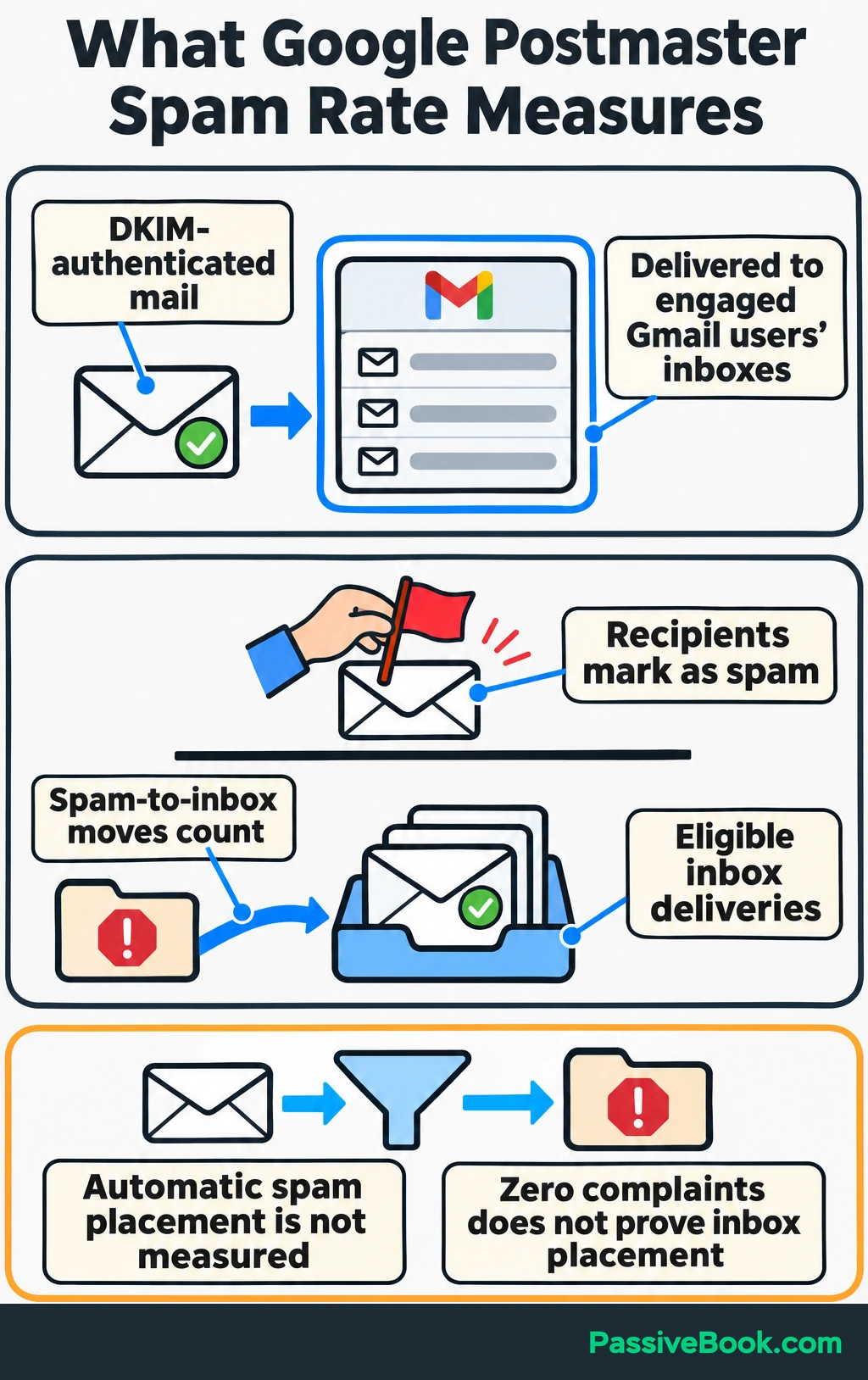
The spam rate covers DKIM-authenticated messages, which carry a verified domain signature. Among messages delivered to engaged Gmail users’ inboxes, it shows the share recipients mark as spam. Google also counts messages recipients move from spam to the inbox as inbox deliveries. It doesn’t measure how much mail Gmail automatically sends to spam.
Reports can also be delayed or absent when sending volume is low. A blank dashboard doesn’t establish healthy placement, and neither does a zero complaint rate by itself.
For the sewing-pattern newsletter, use it to investigate Gmail-specific changes alongside your email platform’s reports. If Gmail performance looks different after a sending change, Postmaster Tools can add provider feedback to the investigation.
I would keep it even if I later bought a placement tool. The two answer different questions.
10. Microsoft SNDS: Best for Outlook.Com Sending-IP Visibility
Microsoft’s Smart Network Data Services, or SNDS, provides IP-level information about sending to Outlook.com. It also includes access to the Junk Email Reporting Program, which provides feedback when recipients report messages as junk.
It is most useful when you’re responsible for the sending infrastructure. Access requires a Microsoft account and authorization for the IPs you want to inspect.
If your email platform uses shared IPs, you may need its support team to investigate instead. Send the affected campaign details, error messages, and sending IP rather than asking vaguely why Outlook dislikes your emails.
I would use SNDS for ongoing infrastructure visibility where access is available. For checking where a specific campaign lands across several providers, pair it with a placement tool.
An Outlook.com signal shouldn’t become a conclusion about Gmail or every business mailbox on your list.
11. MXToolbox: Best for Infrastructure Checks and Blocklist Alerts
MXToolbox is useful when you need to inspect DNS, authentication records, or a possible blocklist listing.
Its free lookups make it a practical starting point for a specific investigation, and the free monitor adds limited recurring coverage. Delivery Center expands that into a paid package with monitoring, authentication reporting, and placement analyses.
I would begin with the domain and sending IP found in the campaign’s actual message headers. Those headers contain technical details about how that message was sent. Checking your website’s hosting IP may lead you toward the wrong system.
Once you find a problem, identify who controls it. You may manage the domain’s DNS, while your email provider controls the sending server.
The paid package makes more sense when you’ll use several of its ongoing functions. I wouldn’t buy it solely to run a lookup that is already available free.
12. Sender Score: Best for a Free Sending-IP Reputation Spot Check
Sender Score provides a proprietary reputation score for a sending IP.
It can be useful as a quick extra signal when investigating sending problems. Identify the IP used by the affected campaign before looking it up, especially if you send through shared infrastructure.
A high Sender Score isn’t an inbox-placement percentage. It also isn’t a substitute for a mailbox provider’s own feedback or the error returned for a rejected message.
For the sewing-pattern launch, I would bring a concerning result to the email provider with the campaign details and affected destination. That gives support something concrete to investigate.
Choose it for a spot check. If the real need is automatic alerts, retained history, and a recurring review process, compare the monitoring tools that provide those functions.
Authentication and Message Diagnostic Tools
Authentication reports become easier to read once you know three terms:
- SPF: Checks whether a domain authorizes the sending server. That domain can differ from the one in the visible From address.
- DKIM: Adds a signature that the receiving system can verify.
- DMARC: Requires a passing SPF or DKIM result aligned with the visible From domain, and publishes a policy for messages that fail.
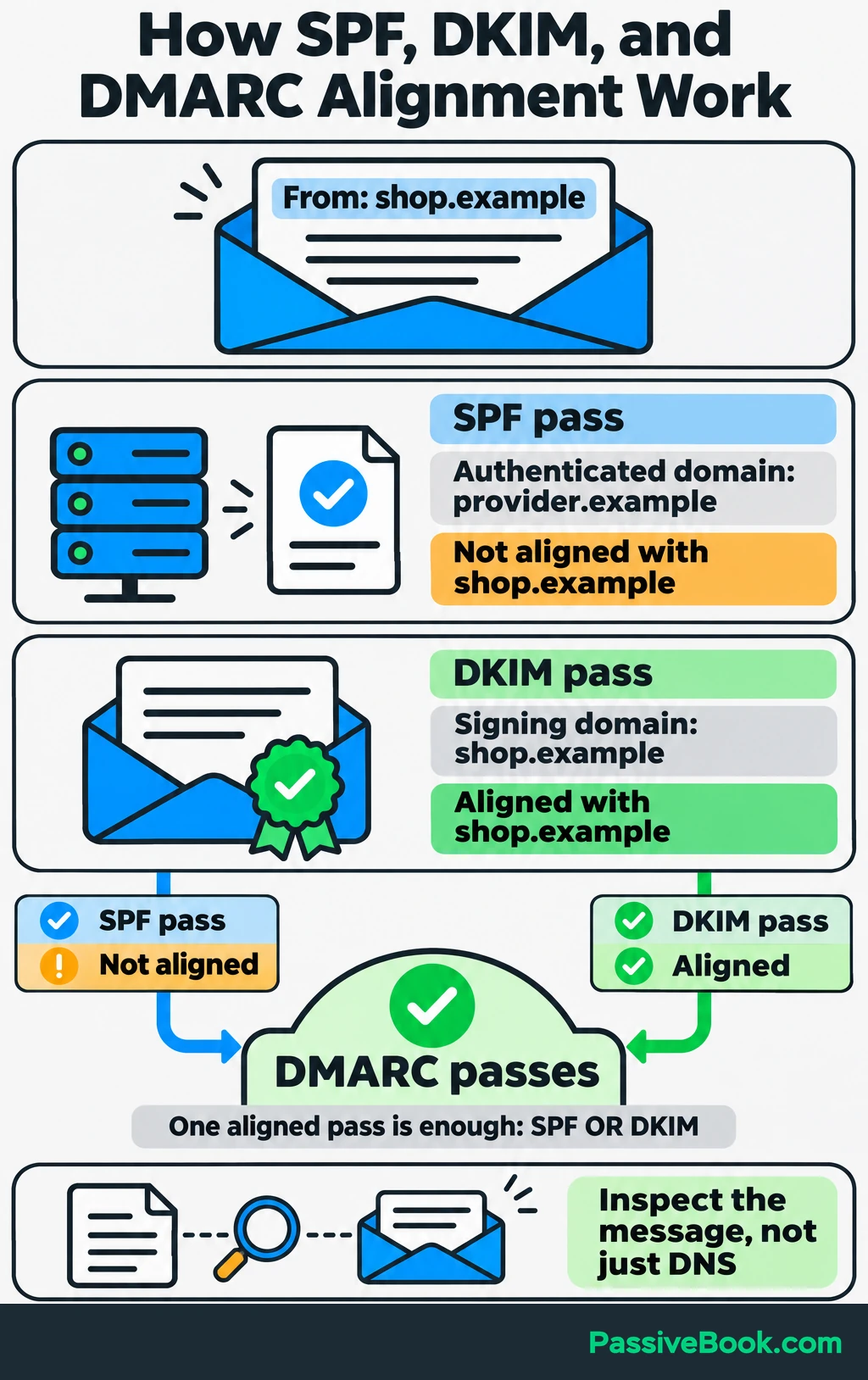
Alignment means the authenticated domain matches the From domain under DMARC’s alignment rules. A message can pass SPF using a service provider’s domain and still lack SPF alignment with your own From address. An aligned DKIM pass can satisfy DMARC instead. Google’s authentication guidance explains these relationships and its sender requirements.
Inspect a live message as well as the DNS records. A record existing in DNS doesn’t establish that the campaign you just sent used it correctly.
13. Mail-tester: Best for a Quick Free Message Diagnostic
Mail-tester gives you a test address. Send your campaign to that address through your usual email service, then read the report.
It analyzes the message, mail server, sending IP, authentication, and SpamAssassin findings. That makes it a useful first check before buying a larger diagnostic package.
I would work through specific failures before trying to improve the overall score. A failed signature or configuration issue gives you something concrete to investigate. Rewriting several sentences to chase a point can distract you from it.
Mail-tester’s FAQ explicitly explains that a perfect score can still accompany spam placement, because filters and recipient preferences differ.
For the sewing-pattern email, the question is whether the report identifies a real issue you can correct. Treat the score as a way into the findings rather than the final result.
14. MailGenius: Best for Free Diagnostics With Explanatory Recommendations
MailGenius offers a free basic checker with findings covering authentication, reverse DNS, blocklists, broken links, and unsubscribe headers.
Reverse DNS connects a sending IP address to a hostname. If that finding points to infrastructure controlled by your email provider, send it to the provider rather than trying to fix it in your campaign editor.
I would compare MailGenius and mail-tester using the same message and sending route. Choose the report that helps you understand the actual correction.
You don’t need to obey every suggestion simply because it appears beside a score. Give clear technical failures priority and assess copy recommendations in the context of your email.
MailGenius hosts test results on public links. Use a test copy without private customer information, such as individual order details or personalized account links.
15. EasyDMARC: Best for Authentication Management With a Deliverability Upgrade Path
EasyDMARC is worth evaluating when authentication management is the immediate job and broader deliverability monitoring may become useful later.
Its entry DMARC package provides aggregate reporting and domain management. Aggregate reports summarize authentication activity, helping you see which sending sources pass or fail.
For the sewing-pattern shop, this becomes useful when newsletters, purchase receipts, and support messages use the same domain through different services. You need to identify those legitimate sources before tightening the domain’s DMARC policy.
EasyDMARC’s broader Deliverability package adds placement testing and reputation monitoring. Those capabilities require the appropriate plan.
I would choose the package that handles the current problem and compare upgrades separately. An upgrade path is useful, but it shouldn’t become a reason to buy features before you have work for them.
16. PowerDMARC: Best for Authentication Management Across Several Domains
PowerDMARC is a candidate when you want centralized authentication management across several domains.
Its hosted DMARC and report-processing features help bring those domains into one place. Pricing depends on the selected volume of DMARC-compliant messages, so compare the configuration that fits your sending activity.
The displayed Basic configuration in the table is one configuration rather than a universal price for every sender. Hosted SPF is also a separate Basic-plan add-on.
I would use the trial to identify legitimate sending services, inspect failures, and see whether the reports are understandable without repeated support requests.
Its free account is restricted to personal domains, so it doesn’t fit the sewing-pattern business. Placement analysis also requires the relevant higher-tier package. Keep authentication management and placement coverage separate when comparing the quote.
17. Dmarcian: Best for Identifying Sending Services in DMARC Reports
Dmarcian’s appeal is making aggregate reports easier to interpret by identifying recognizable sending services.
A list of IP addresses is difficult to act on when you don’t know which service each one belongs to. Recognizing a newsletter provider or a business email service helps you distinguish legitimate traffic from unexplained sources.
For the sewing-pattern shop, I would use the trial to map known services to the report. Then investigate unexplained traffic and legitimate sources that aren’t passing correctly.
Don’t assume every failure is an attacker. A service you added and forgot to authenticate is also worth finding.
The free Personal plan excludes business use, so compare a commercial plan for the shop. Look at active domains, monitored message volume, and retained history before choosing a package.
18. Postmark DMARC Monitoring: Best for Free Weekly Authentication Summaries
Postmark’s free DMARC monitoring service suits people who want a readable weekly summary without another dashboard to maintain.
It helps you see sending sources and authentication results. You don’t need to move your email sending to Postmark to use the reporting service.
The free summary has limited source visibility, while paid DMARC Digests adds a dashboard, broader source detail, and retained history. The comparison table shows the main boundaries.
I would start with the weekly summary when the sending setup is small and you mainly want lightweight oversight.
A dashboard becomes more useful when you need to investigate individual sources, compare changes, or share a longer record with another person. Choose that upgrade because the weekly email leaves a question unanswered, rather than because a dashboard feels more official.
Email List Validation Tools
Validation is useful when invalid-address bounces or poor signup quality are the problem.
Keep these results separate:
- Invalid: The service has identified the address as invalid.
- Catch-All: The receiving domain accepts mail broadly, so the individual mailbox may remain uncertain.
- Unknown: The service couldn’t reach a firm result.
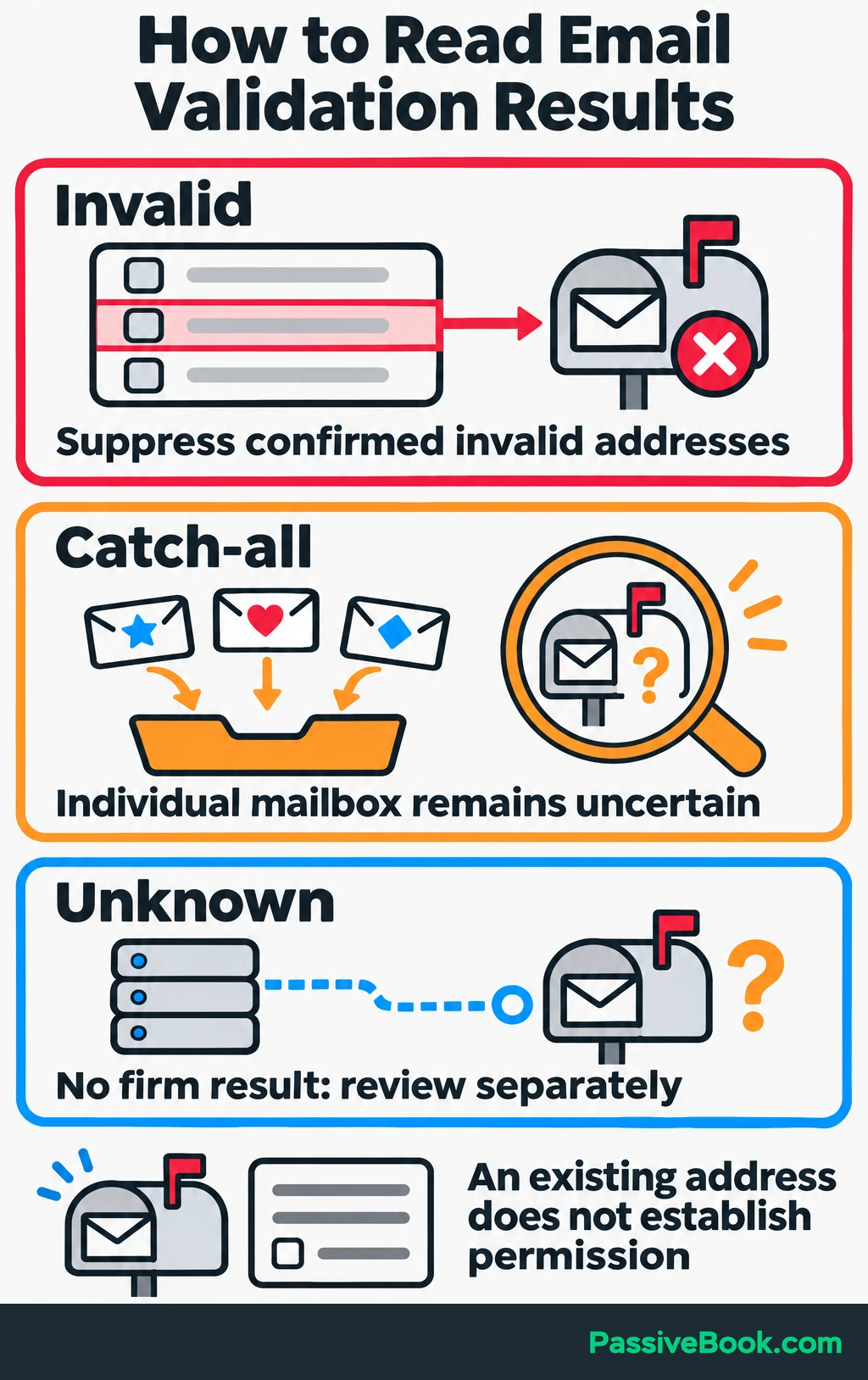
An unknown result doesn’t mean the address is confirmed invalid. Review uncertain groups separately instead of treating every status as the same reason to delete a subscriber.
Validation also doesn’t establish permission. An address can exist and still belong to a person who never requested your newsletter.
Before uploading a subscriber file, review the provider’s data-processing and retention terms. Upload the fields needed for the check rather than exporting unrelated customer information.
19. ZeroBounce: Best for Validation With Additional Deliverability Products Available
ZeroBounce is a candidate when list validation is your immediate need and you may want other deliverability products later.
Alongside validation, it offers products for placement testing, server checks, DMARC monitoring, and related work. Compare the allowances for each rather than assuming a validation purchase includes everything.
For the sewing-pattern shop, I would begin with the addresses connected to a clear list-quality question. That might be a batch from an older signup form that is producing permanent invalid-address bounces.
Check how the service classifies the results and how you’ll apply them in your email platform. A useful validation report should help you suppress confirmed invalid addresses while keeping uncertain results available for review.
Also distinguish verification from optional scoring. They are different actions, and using both can change credit consumption.
20. MailerCheck: Best for Occasional Validation and Placement Testing Without a Subscription
MailerCheck is my first paid option to compare when you need occasional checks and want to avoid another monthly bill.
It offers bulk validation, real-time verification through an API, Email Insights, and placement testing from the same credit balance. An API lets your signup system request a check automatically as an address is entered.
The credit rules make it possible to budget a small investigation before buying. Purchased credits don’t expire, so unused capacity can wait until the next campaign.
For the sewing-pattern shop, that could mean validating a selected batch and checking a launch email without maintaining a subscription between launches.
Use the free credits to see how verification results are classified. To assess placement reporting, you’ll need to purchase a test; the free verification sample won’t show you that report.
21. Emailable: Best for Signup Validation and Bulk Cleaning in One Account
Emailable combines bulk verification with an API and signup widget.
That makes it worth comparing when you want to inspect an existing list and improve address quality at collection. A widget can add verification to a form without requiring you to build the whole checking process yourself.
For the sewing-pattern shop, I would first investigate the form or import source producing questionable addresses. Then decide whether validation at signup is the appropriate correction.
Emailable also uses its credit balance for inbox reports and blocklist monitoring. Include those recurring checks when estimating how long a purchase will last.
Credits used for duplicate and unknown validation results are returned to the balance. Keep the result categories intact when reviewing the output; a refunded check still needs an appropriate decision about the address.
How to Evaluate a Deliverability Tool Before Paying
A useful trial should leave you with a clearer problem, a practical next action, and a known cost for repeating the check.
I wouldn’t judge a tool by the number of warnings it produces. Judge whether it helps you decide what deserves attention and who can correct it.
Test Through Your Normal Sending Route
Start with one question. “Improve deliverability” is too broad to evaluate during a trial.
A better question is: “Why does this launch email appear in spam at Outlook.com?”
Check your existing email platform’s reports first. It may already show permanent failures, temporary deferrals, authentication warnings, or provider-specific error messages that narrow the investigation.
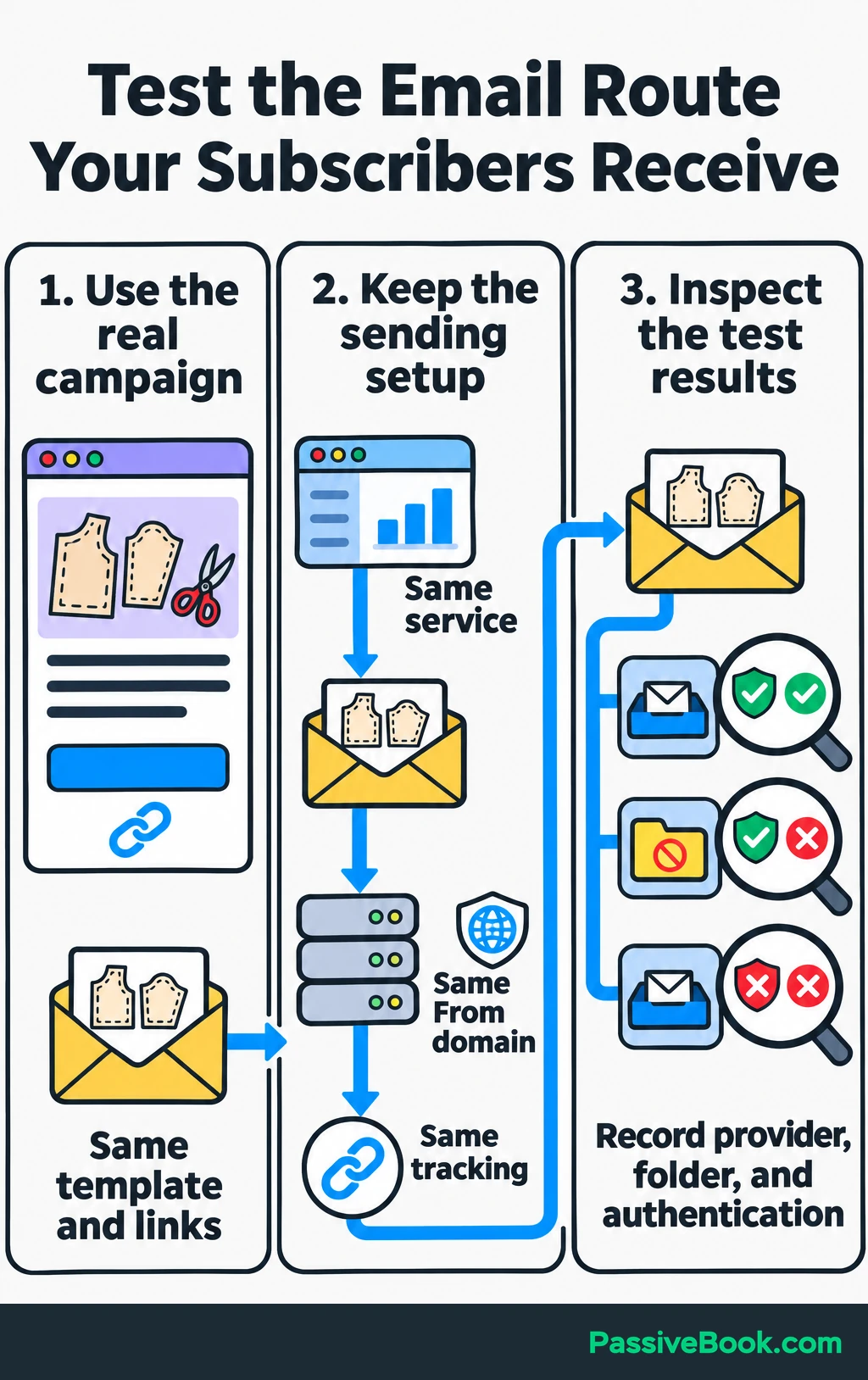
Then send the real template through the route you use for campaigns. Keep the same sending service, From domain, tracking setup, and relevant links. Sending a simplified copy from your personal mailbox checks a different system.
Whether you use FluentCRM with a separate sending service or a hosted platform such as Kit or MailerLite, the principle is the same: test the route subscribers receive.
Record enough detail to compare the result later:
- The campaign and report reference.
- The mailbox provider and observed folder.
- The SPF, DKIM, and DMARC results.
- The sending IP and any delivery errors.
- The change you plan to investigate.
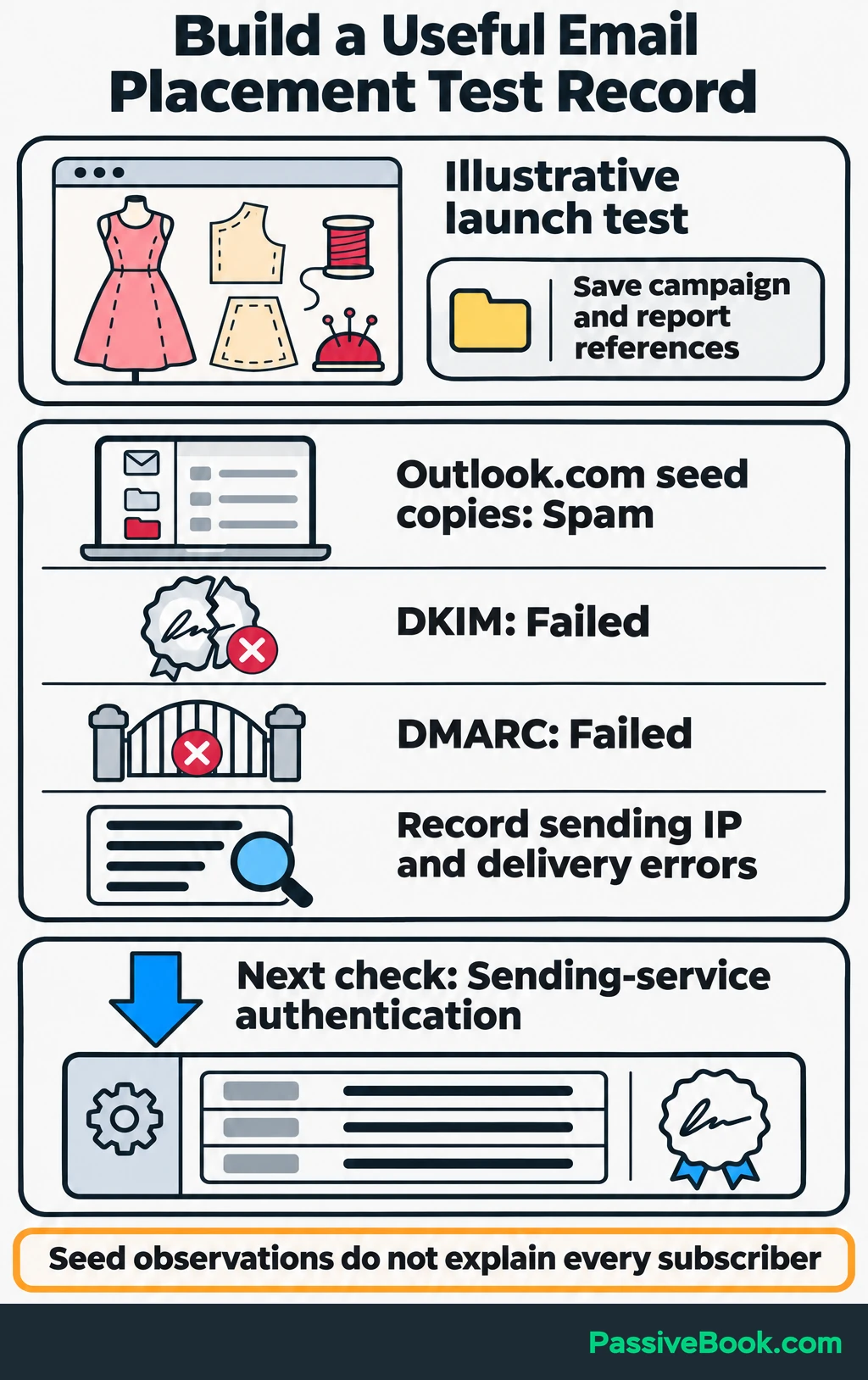
For an illustrative sewing-pattern launch test, the record might read:
“Launch email reached spam in the Outlook.com seed mailboxes. DKIM and DMARC failed. Check the launch email’s sending service before changing the template.”
That observation narrows the next check without claiming to explain every subscriber’s experience.
I would also assess the report’s practical value during the trial. Can you save it, share it with support, and understand it again next week? A report that needs a fresh investigation every time you open it creates its own small hobby.
Match the Finding to a Fix
Use the finding to choose the next action. Changing authentication, copy, links, and audience selection together makes it harder to learn which change mattered.
| Finding | Next Action | What to Check Afterward |
|---|---|---|
| A legitimate service fails authentication | Identify that service and correct its sending configuration or required DNS records | Authentication results on a newly sent message |
| Test messages reach spam at one provider | Inspect that provider’s feedback, relevant reputation signals, and recent sending changes | Placement at that provider under comparable conditions |
| A sending IP or domain appears on a blocklist | Establish what is listed, address the underlying cause, and follow the operator’s removal process | Listing status and the original delivery problem |
| Confirmed invalid addresses produce permanent bounces | Suppress those addresses and investigate their signup or import source | Whether the same source keeps adding invalid addresses |
| Results are mostly catch-all or unknown | Review the uncertain group separately and consider rechecking | Whether firmer evidence becomes available |
For authentication failures, check the service that actually sent the message. A correct record for one provider won’t authenticate a different service automatically.
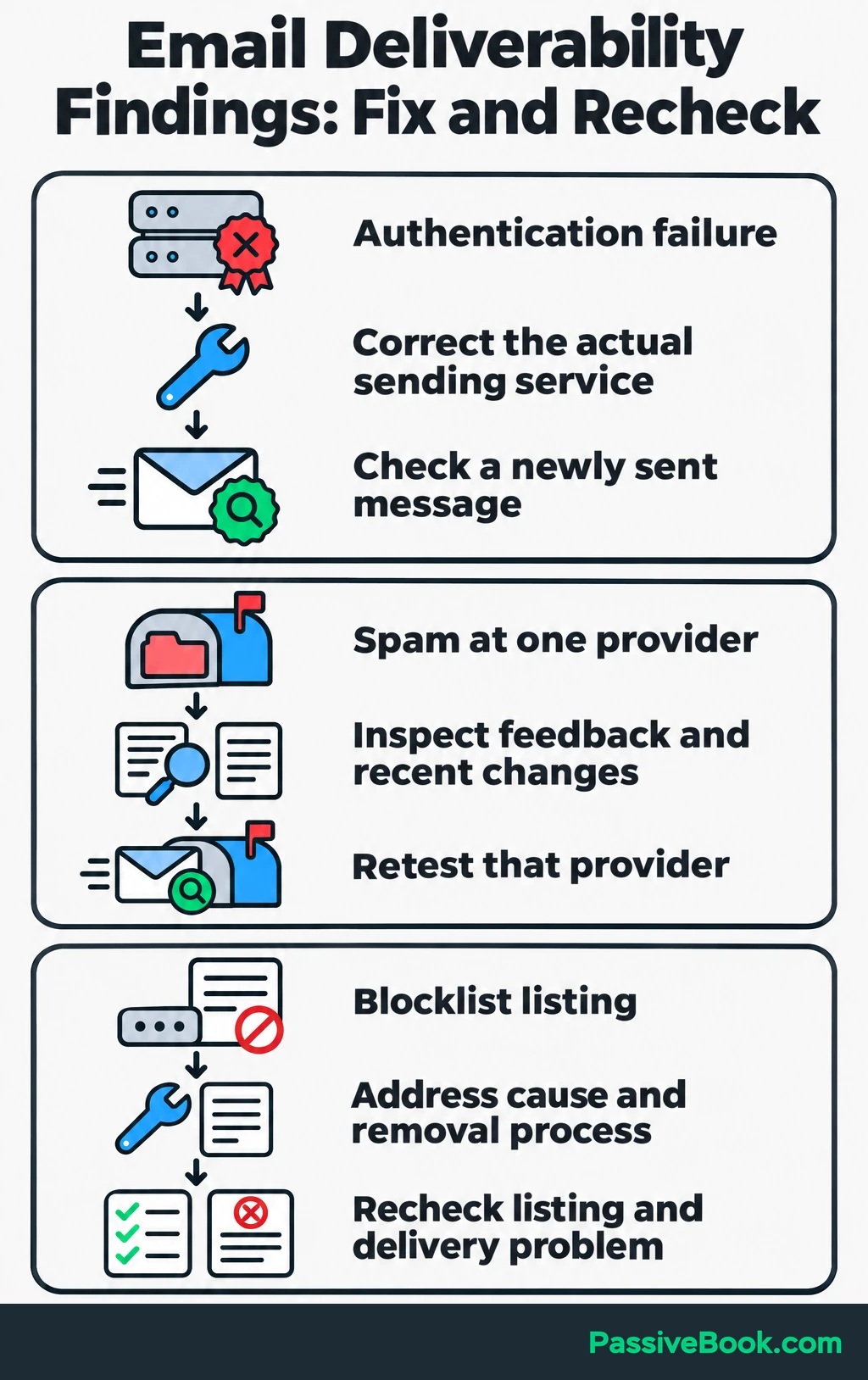
Review legitimate sending sources before tightening DMARC enforcement. The newsletter may be configured correctly while purchase receipts or support messages still need work.
For a blocklist issue on shared infrastructure, involve your email provider. Give it the listed IP or domain, the affected campaign, and any rejection details. It controls systems you may not be able to change yourself.
Also check the receiving provider’s applicable requirements. Gmail applies additional authentication and unsubscribe requirements to bulk senders, as explained in its sender guidance linked above. A passing content score doesn’t establish that all those requirements are met.
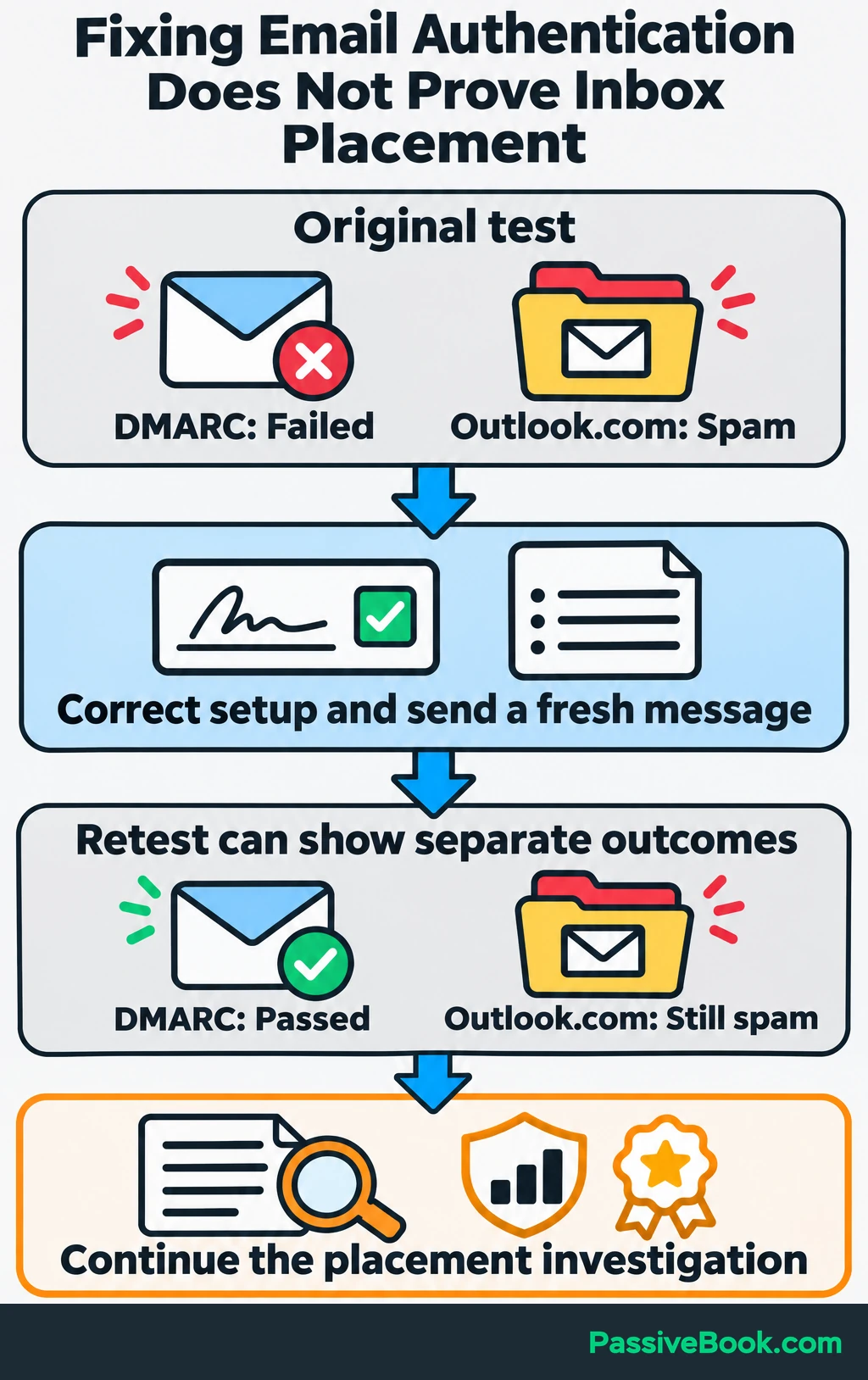
For the sewing-pattern launch, correct the sending service’s authentication setup, send a fresh message, and confirm that DMARC passes before retesting placement.
Record both outcomes. “DMARC now passes” and “Outlook.com test copies still reach spam” are useful separate findings. The configuration fix may be complete while the placement investigation continues.
Calculate the Cost of the Coverage You Will Use
Count the work you expect to perform before comparing prices.
Include subscription charges, placement runs, individual test emails where applicable, validation credits, monitored domains or IPs, and required add-ons. Keep your email platform’s sending bill separate from the diagnostic bill.
For an occasional purchase, the sewing-pattern shop might want to validate 600 addresses, run one placement test, and repeat that placement test after a correction.
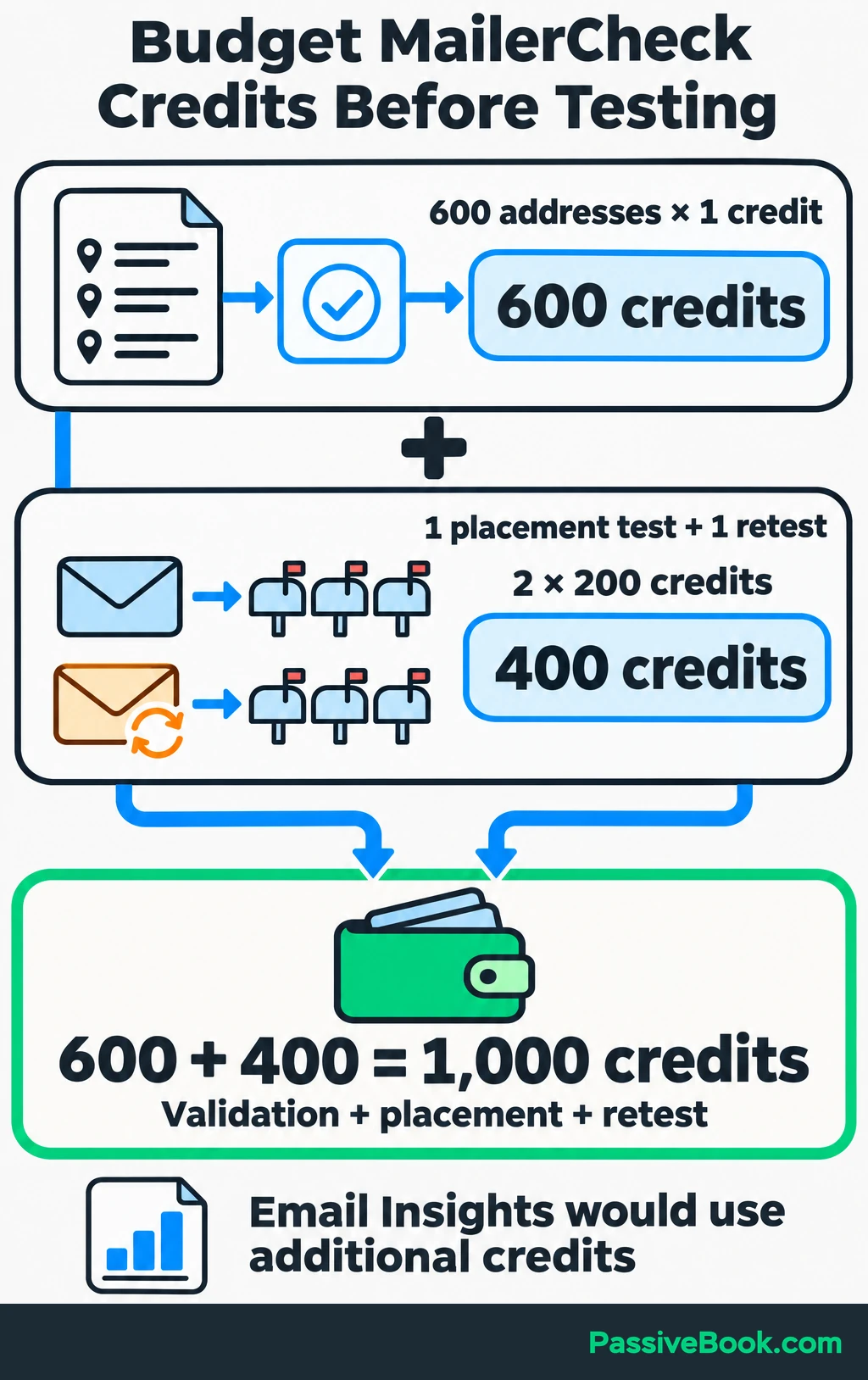
Using MailerCheck’s credit rules from the comparison, validation consumes 600 credits and the two placement tests consume 400:
600 + (2 × 200) = 1,000 credits
That uses the entry credit pack. Adding an Email Insights test would consume more credits, so it needs to be included before buying.
For a subscription measured in individual test emails, estimate how many seed addresses each campaign check uses. Then allow for variants and retests. Don’t compare that allowance directly with another product’s count of complete placement runs.
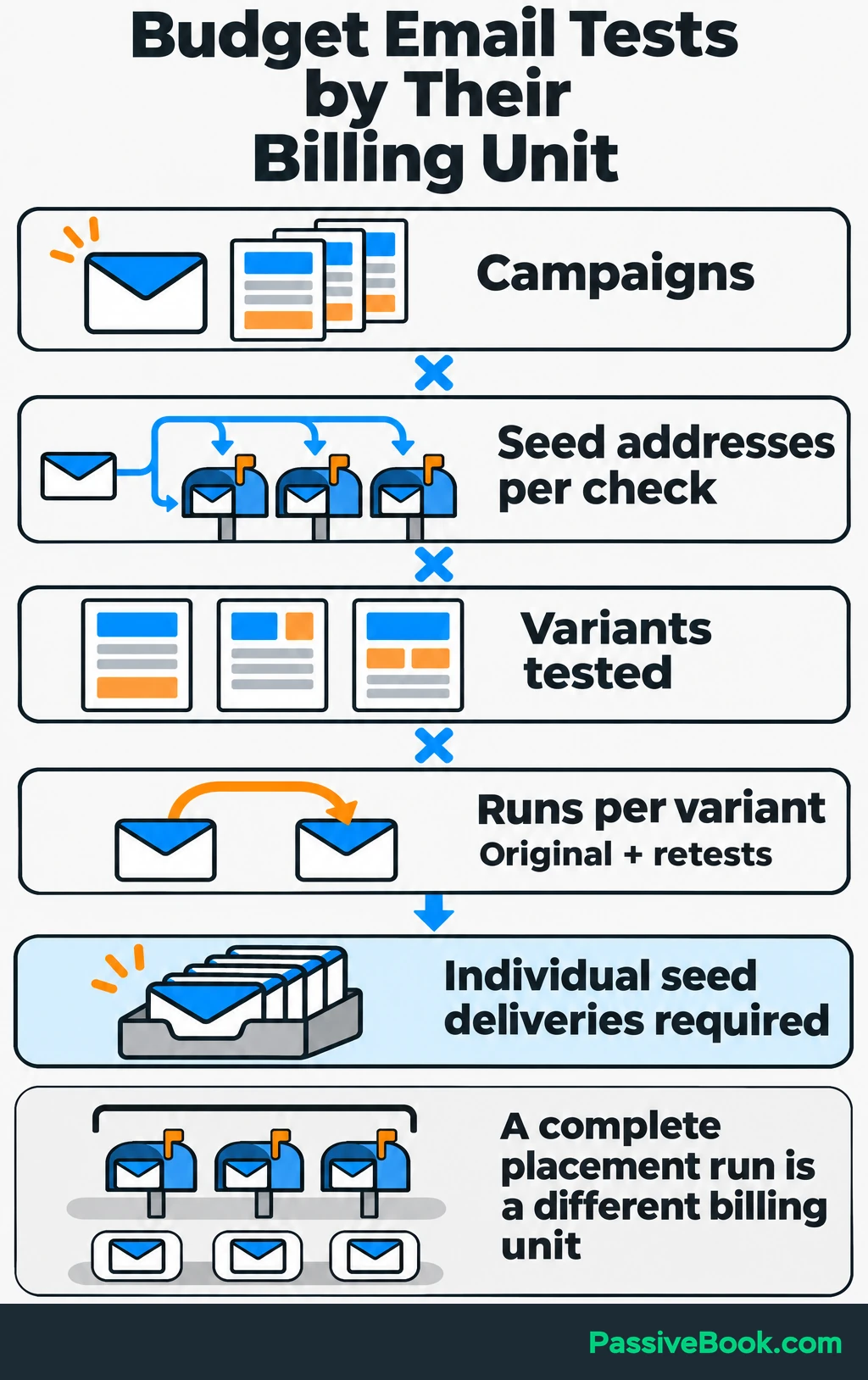
Once you’ve counted tests and retests, compare two suitable options over the same period. Include the prices and usage terms from each offer rather than relying on the advertised monthly price.

Free Software Cost Calculator




I would begin with free diagnostics and buy enough additional coverage to answer the question they leave open. Keep ongoing monitoring when its alerts, history, or automation replace work you otherwise repeat.
Complementary tools can make sense together. Google Postmaster Tools plus an occasional placement check answers more than either alone. Two subscriptions that both provide the same occasional check need a stronger reason.
The purchase should leave you with findings you understand and a correction you can carry out or hand to the person responsible.
What Next?
Send one upcoming campaign through a free diagnostic tool and write down the specific question its report leaves unanswered. Use that question to choose a placement test, authentication monitor, or validation purchase.
Use the social buttons to share this comparison when a software shortlist needs a clearer link between the problem and the tool.
Which unanswered question about your emails would you want a trial to resolve first? Share it in the comments, and bring any other questions too.
Share this post with your friends & followers:

