You have a useful library of lessons, but a question phrased differently from a lesson title sends people back to your inbox. The answer exists. Finding it is the problem.
Adding AI search sounds promising, until you face embedding models, indexes, and database plans before a single useful result appears. You can spend plenty of time building the wrong part.
This guide connects those pieces, shows when a separate database earns its place, and walks through a local lesson-search example so you can judge the results before paying for more infrastructure.
How Do Vector Databases Work With AI Embeddings?
An embedding model turns content into a list of numbers called a vector. Those numbers represent patterns the model learned during training.
A vector database stores these vectors and finds records close to a query vector. Your application then uses the matching text, images, or other source content.
For text search, the connected workflows look like this:
Ingestion:
Source documents → passages → embeddings → stored records and index

Retrieval:
Question → compatible query embedding → similarity search → matching passages
The document and question must enter a shared embedding space so their vectors can be compared meaningfully. Sentence Transformers explains this retrieval process.
A vector’s dimensions are the number of values it contains. A 384-dimensional embedding has 384 numbers. Individual coordinates generally do not have dependable labels such as “beginner difficulty” or “painting technique.”
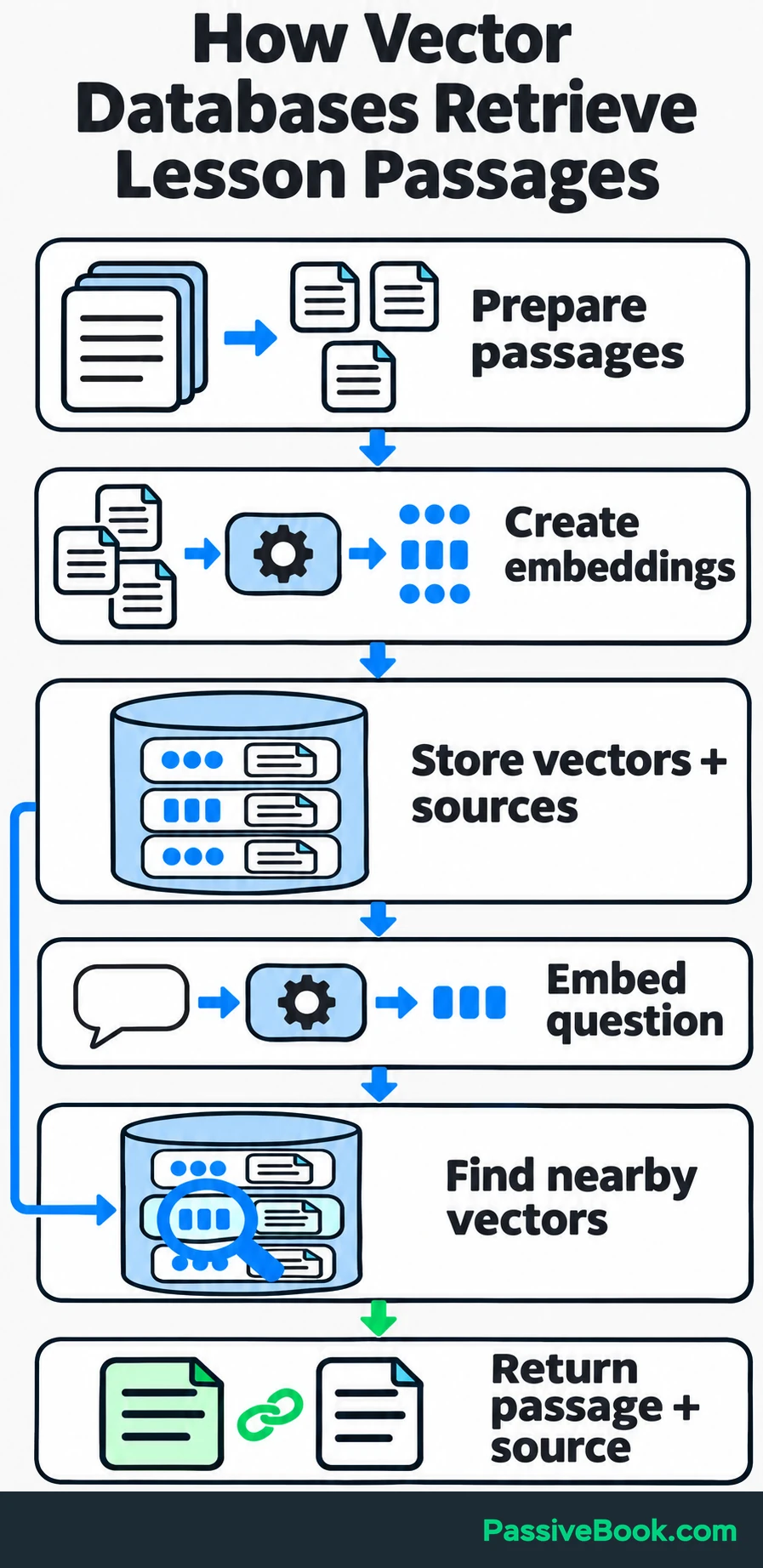
Long documents are usually split into chunks: passages that get their own embeddings. This lets search retrieve one useful explanation instead of representing an entire course manual with one vector.
Imagine you sell beginner watercolor courses and PDF guides. Students ask questions in everyday language, while your lessons use terms such as “wet-on-wet” and “hard edges.” You want search to connect those questions with useful lesson passages.
One stored record could contain:
| Field | Example value |
|---|---|
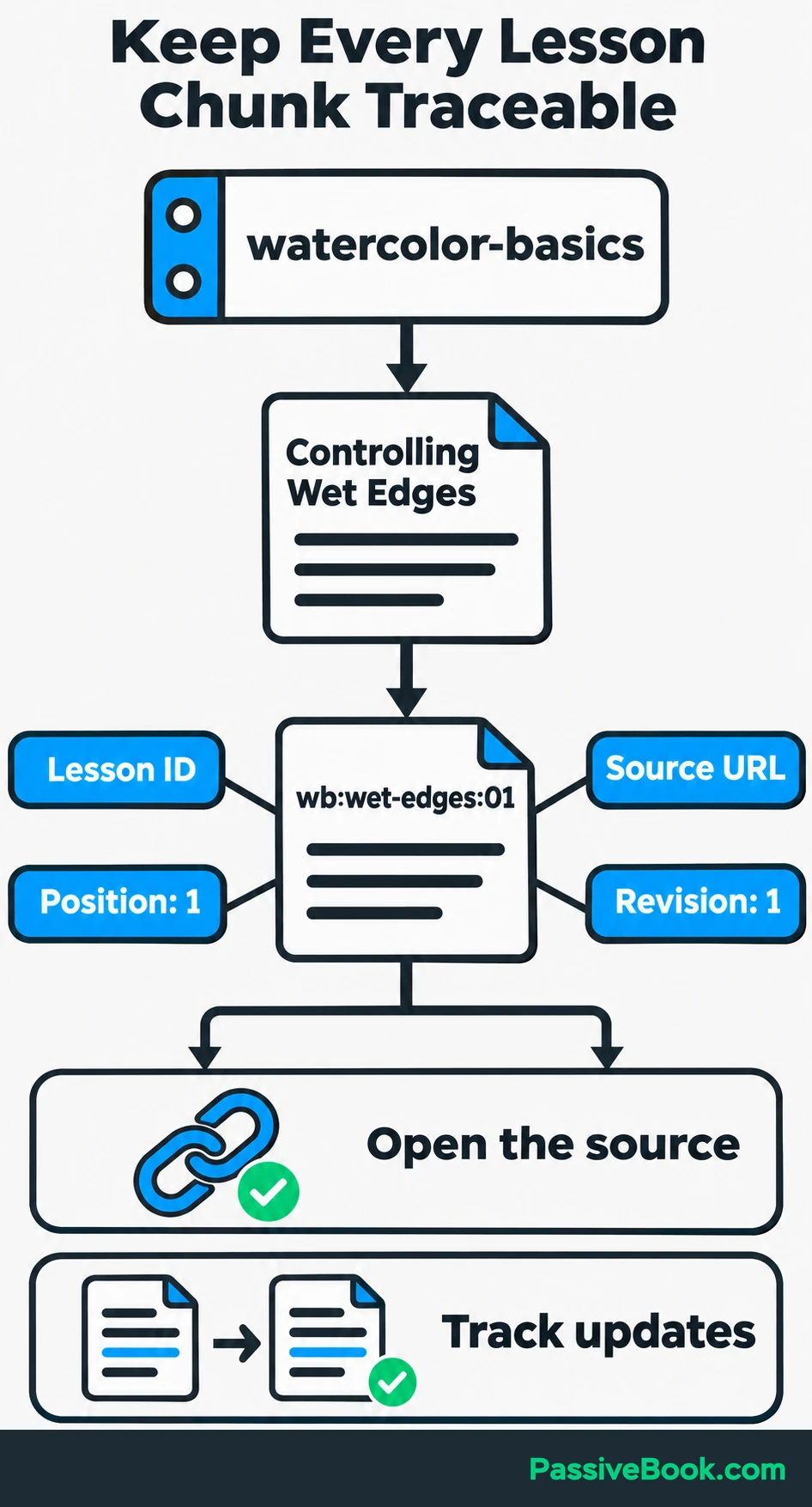
| Chunk ID | wb:wet-edges:01 |
| Embedding | Not supplied in this illustration; generate it from the passage with your chosen model |
| Passage text | “For a defined edge, let the neighboring shape dry before adding another color.” |
| Course ID | watercolor-basics |
| Lesson title | Controlling Wet Edges |
| Source URL | https://example.com/courses/watercolor-basics/wet-edges |
| Revision | 1 |
Keep the original content. Embeddings help you find a passage, but they do not replace the passage you need to display or quote.
Also separate the database from its vector index. The index speeds up neighbor lookup. The database manages stored records, updates, deletion, and filtering. An existing database can provide vector search too, so this does not automatically require another service.
How Does Similarity Search Find Relevant Passages?
Embedding Compatibility Determines What Can Be Compared
Use a compatible embedding model for your documents and questions, and follow its required input formats. Some models expect different prefixes or encoding methods for queries and documents.
Matching dimensions are not enough. Two models can both produce 384 numbers while placing content in unrelated spaces. Comparing those outputs would give you numbers, but little reason to trust them.
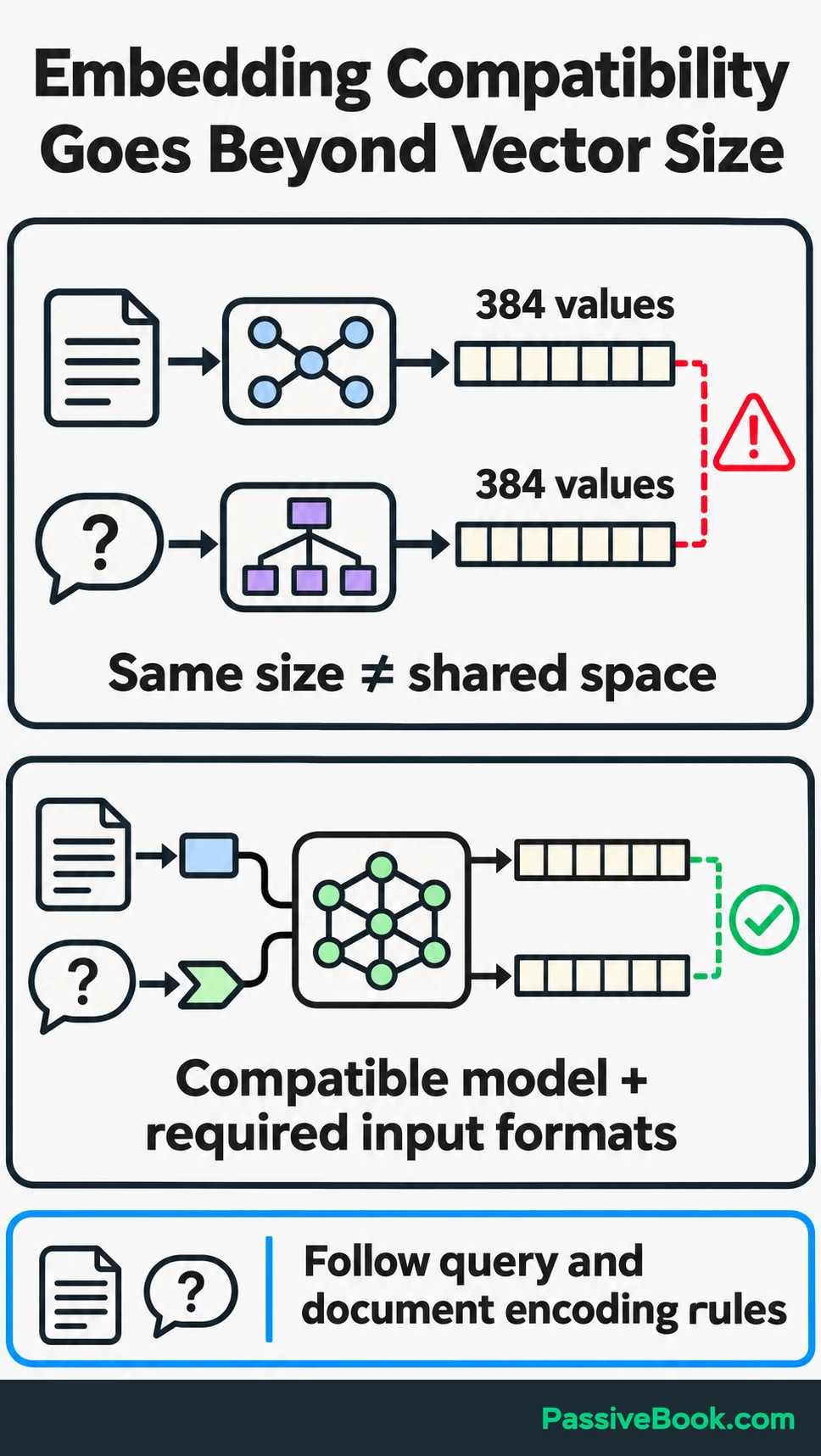
Choose a model suited to your language, content, and retrieval task. The model determines how your material is represented. The database searches that representation.
Three common comparison methods are:
| Method | What it compares |
|---|---|
| Cosine similarity | How closely the vectors point in the same direction, ignoring their length |
| Dot product | Directional alignment influenced by vector length |
| Euclidean distance | Straight-line separation between vectors |
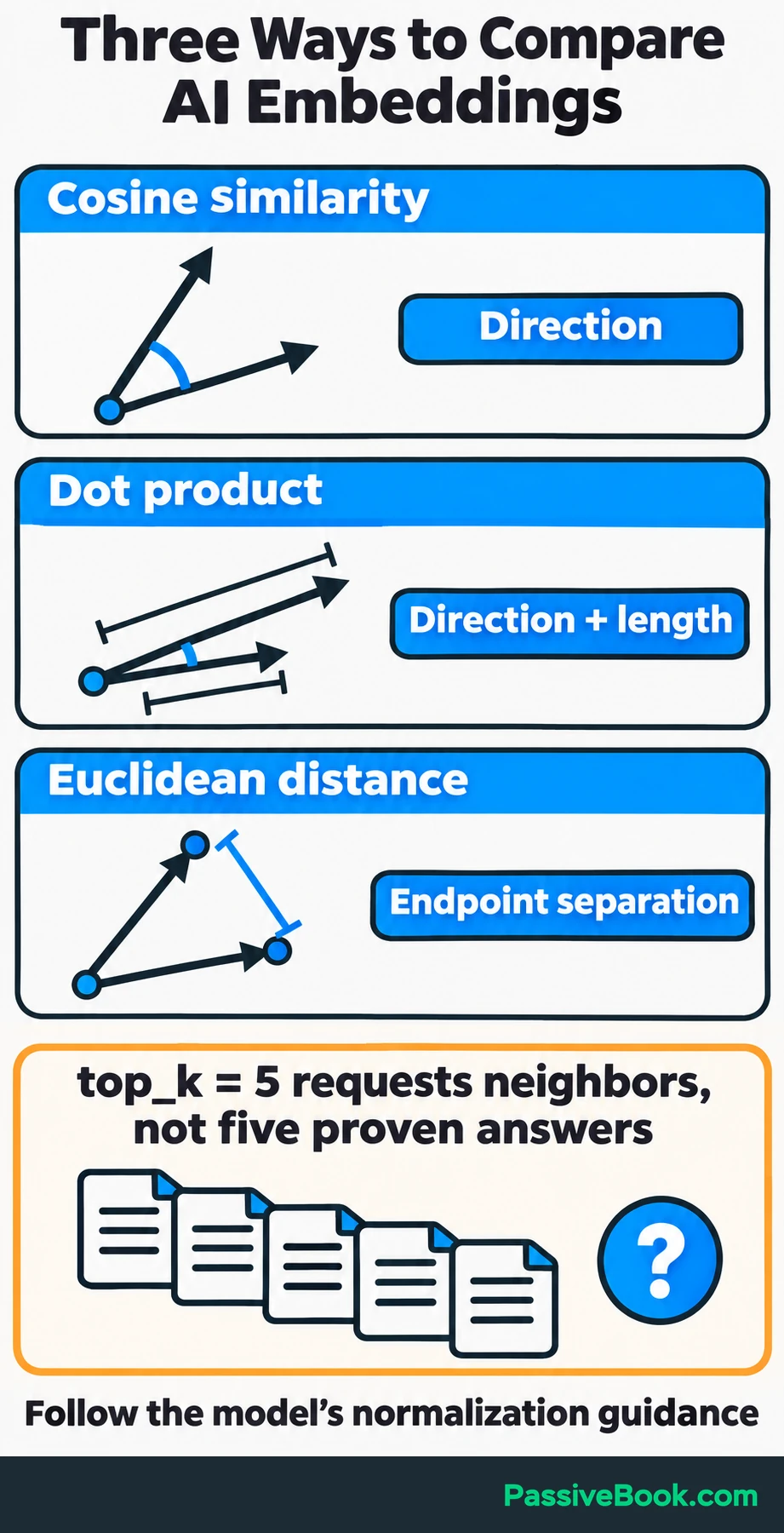
Follow the model’s guidance on comparison and normalization. Normalization rescales vectors to a common length, which changes how these methods relate. Sentence Transformers documents these similarity functions.
You will also encounter top_k, the requested number of nearest matches. Asking for five neighbors means “return the five closest eligible records,” not “find five passages that definitely answer this.”
Similarity scores rank candidates. They are not probabilities that an answer is correct.
Indexes Reduce Search Work
Exact search compares the query with every eligible vector and selects the nearest matches. It gives you a useful baseline because there is no approximate index to blame when results disappoint.
Approximate nearest-neighbor search, usually shortened to ANN, reduces the search work but can miss some neighbors that exact search would return.
HNSW, or Hierarchical Navigable Small World, organizes vectors into a layered graph. Search starts in sparse upper layers, moves toward promising areas, and descends through lower layers to refine the matches. The original HNSW paper describes this structure.
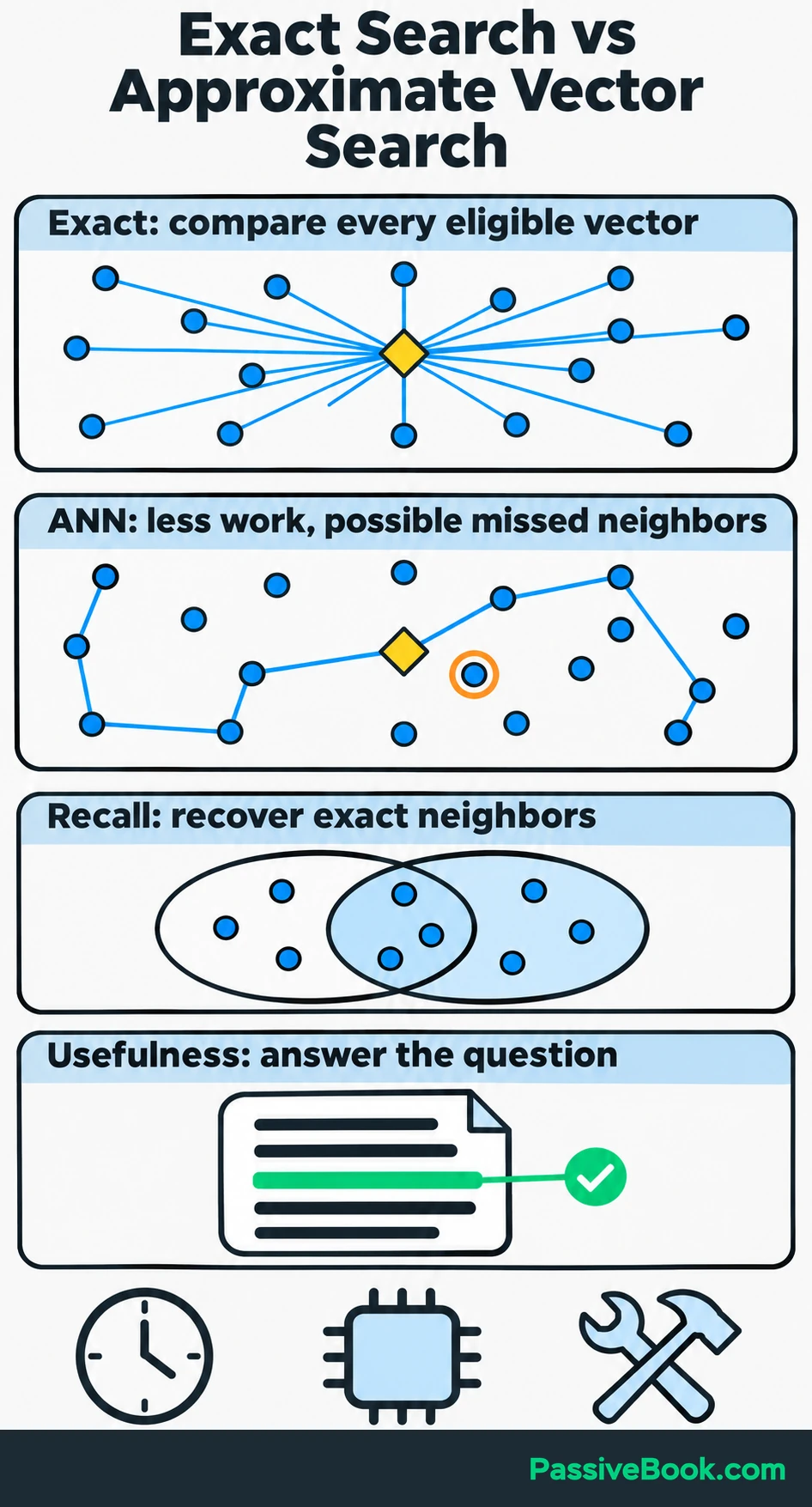
Another index, IVFFlat, groups vectors into lists and searches selected lists. Searching more lists generally trades more work for a better chance of recovering the nearest matches.
Compare index settings using:
- Nearest-neighbor recall: how many of the neighbors returned by exact search the approximate search recovers.
- Query latency under realistic traffic.
- Memory and storage use.
- Index-building time and the work needed to handle updates.
Recall and usefulness answer different questions. An index can recover the exact nearest vectors perfectly while those vectors point to passages that do not answer the question.
A faster route to the wrong paragraph is still the wrong paragraph.
Metadata Filters Restrict Eligible Results
Metadata is information stored alongside a vector, such as course ID, language, and publication status. Filters can limit the watercolor search to published English passages from a course the student has purchased. Vector similarity then orders those eligible matches.
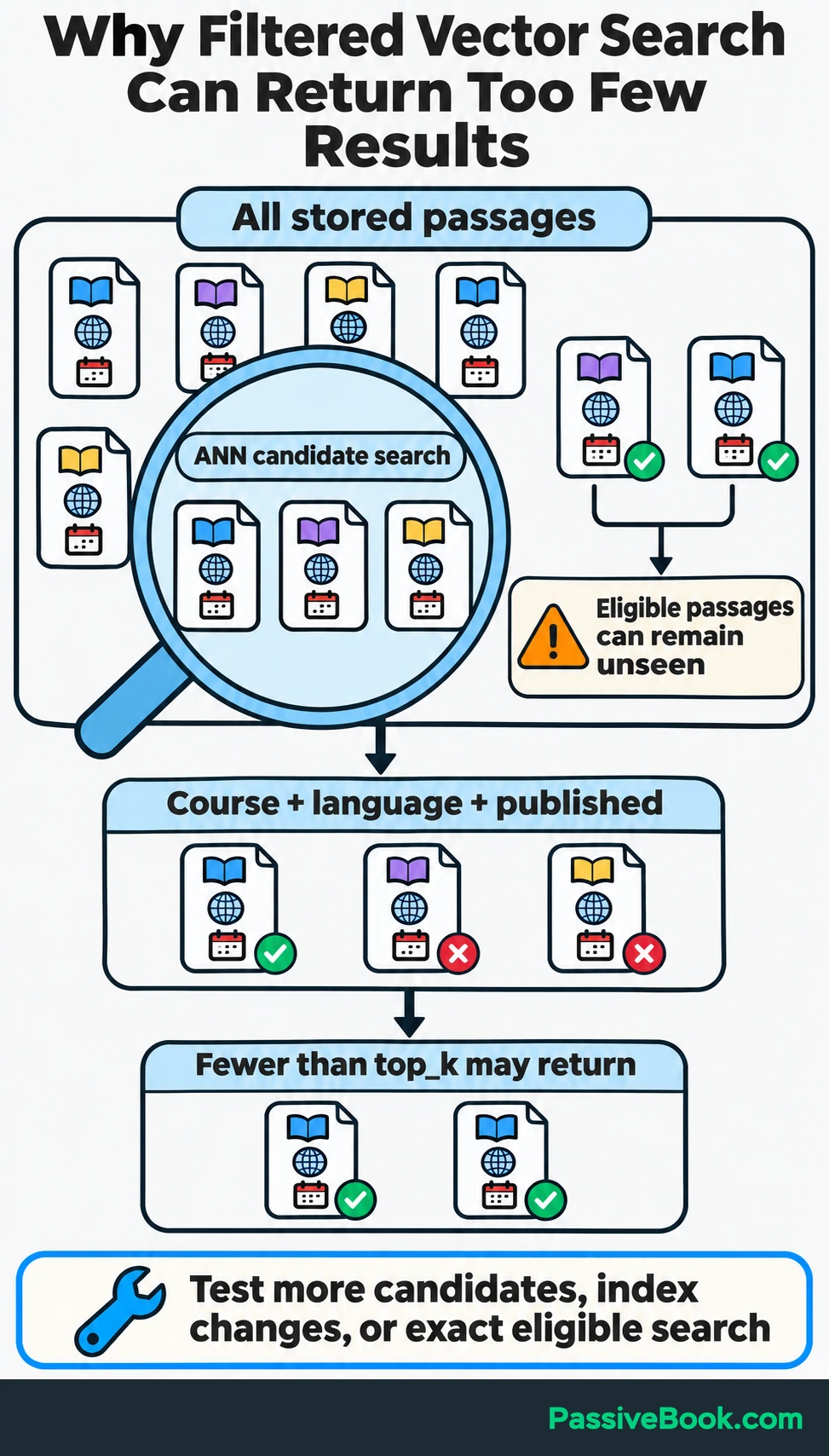
There is an important interaction with ANN: if filtering happens after a limited candidate search, too few candidates may qualify. You can receive fewer than top_k results even when more eligible records exist.
Test restrictive filters with realistic data. The right fix depends on the system and may involve searching more candidates, changing the index layout, or using exact search over the eligible subset. pgvector documents this filtering behavior and its available remedies.
Where Do Semantic Search, RAG, and Agent Memory Fit?
These features can share the same retrieval layer. What changes is how the application uses the retrieved material.
| Feature | What happens after retrieval | Watercolor example |
|---|---|---|
| Semantic search | Show passages and source links | A student searches “How do I stop colors running together?” and opens a lesson about controlling wet edges |
| Retrieval-augmented generation, or RAG | Give retrieved passages to a language model so it can compose an answer | The application explains the relevant technique and links to the supporting lesson |
| Agent memory | Let an agent retrieve selected notes or previous interactions through a search tool | An assistant retrieves a saved note that the student is practicing layered washes |
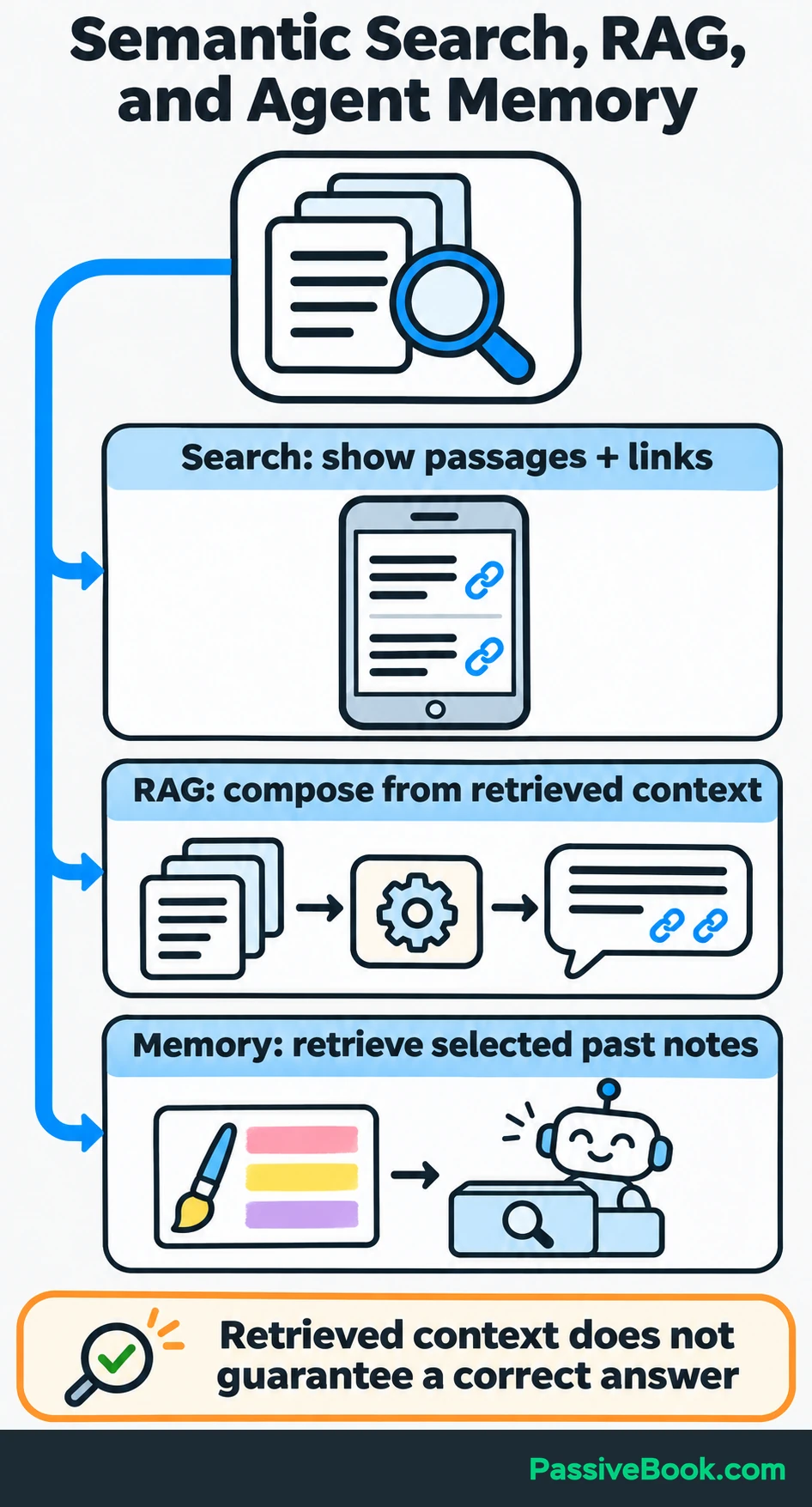
Semantic search is the simplest place to begin because you can inspect the retrieved passages directly.
RAG adds a generation step. The language model receives useful source text alongside the question and writes an answer from that context. Retrieval does not train the language model on your course or guarantee a correct response. Check whether its claims are supported by the passages it cites.
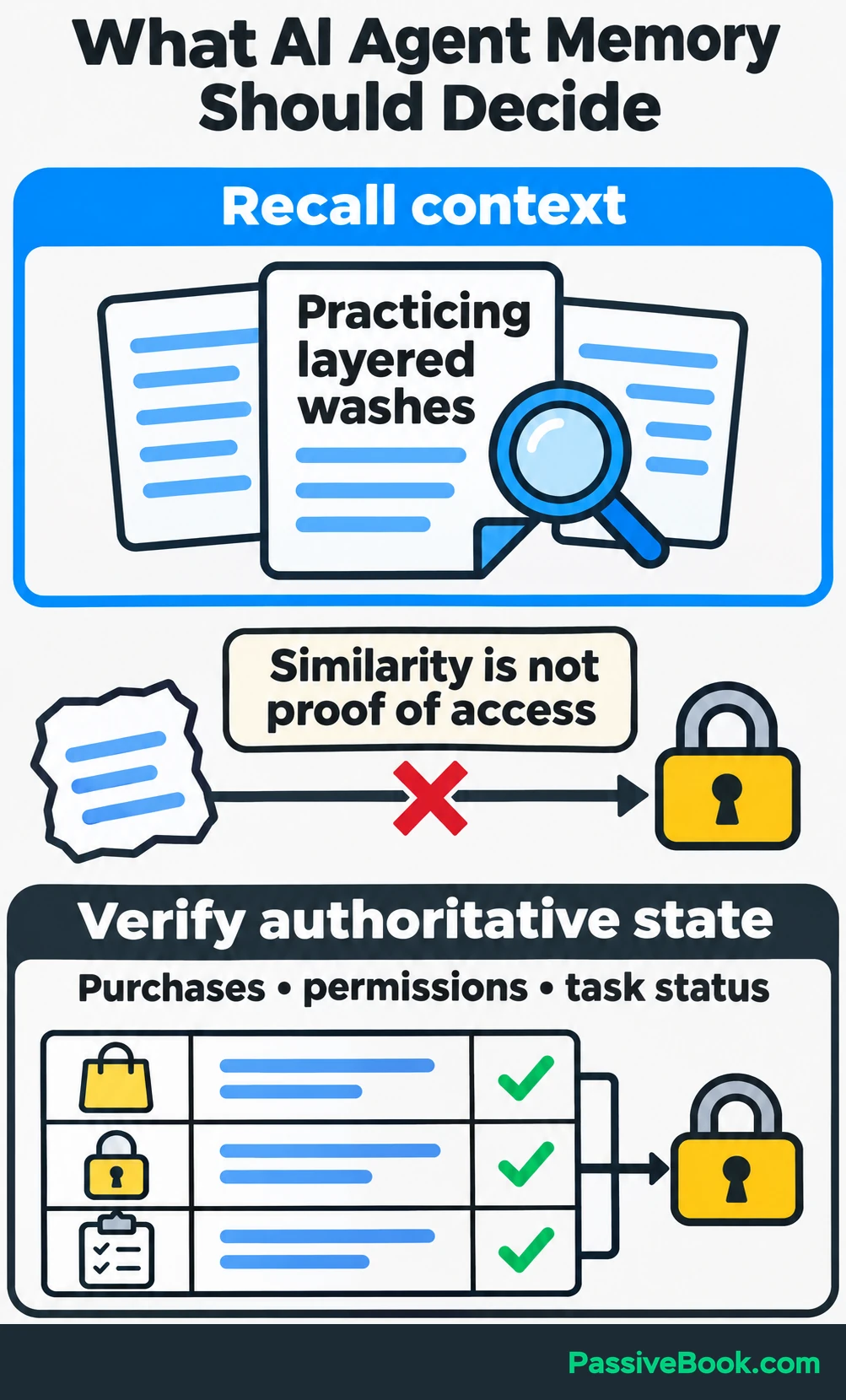
Agent memory needs another distinction. Searchable notes can help an agent recall a previous discussion, but purchases, permissions, and task status belong in authoritative structured records. A vaguely similar memory is a poor basis for deciding whether someone owns a course.
I would build search first, add generated answers when retrieval works, and give an agent access only when there is a clear task for it.
Do You Need a Dedicated Vector Database?
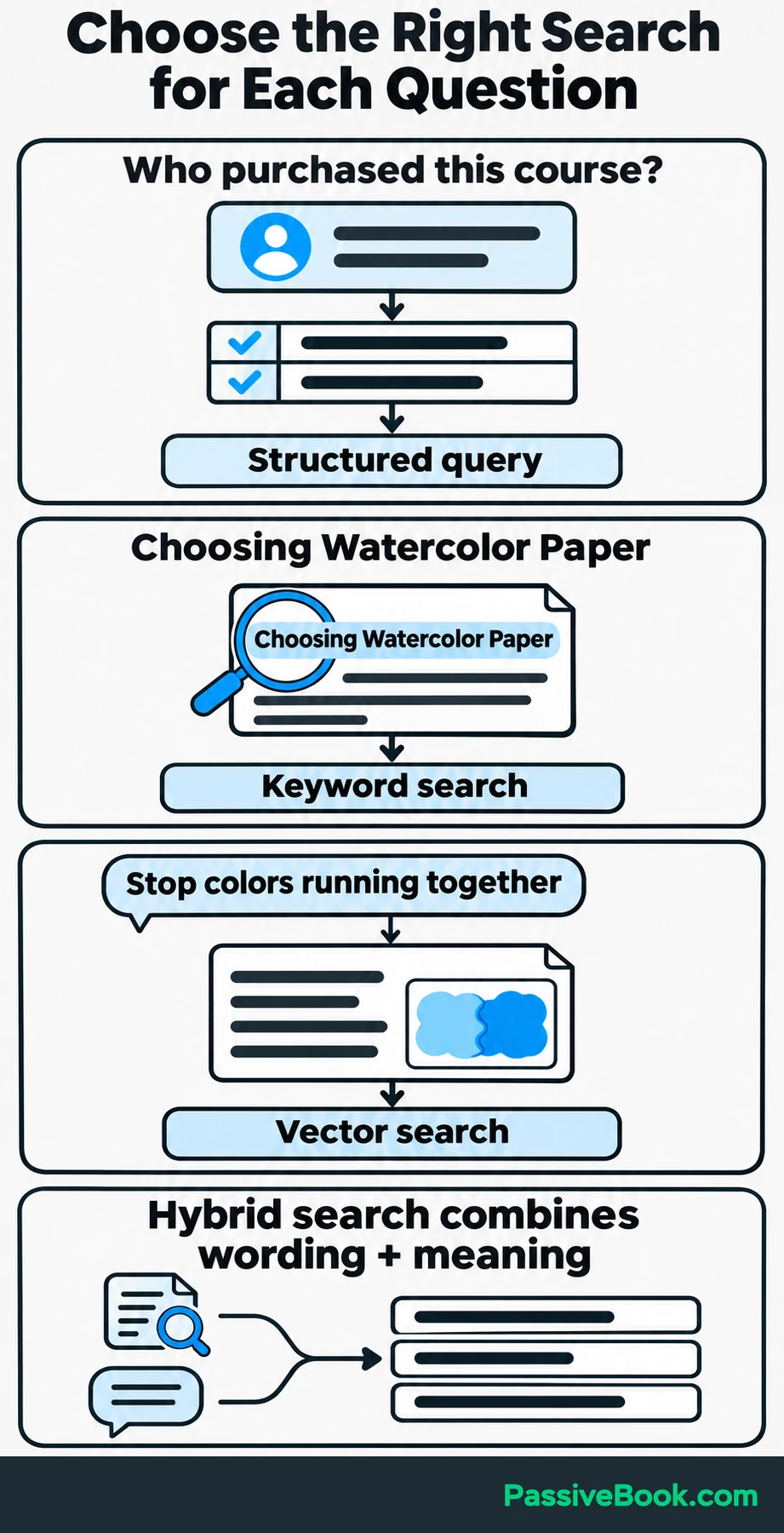
Start with the kind of question your application must answer.
- Exact fields need structured queries. “Which courses has this account purchased?” belongs in your application database.
- Literal words need keyword search. An exact lesson title or product code should be easy to find.
- Questions phrased differently from the source may benefit from vector search.
These methods can work together. Hybrid search combines keyword and vector results into one ranking. It is useful when students mix conceptual questions with exact lesson names or specialist terms. Weaviate explains this combination of keyword and vector retrieval.
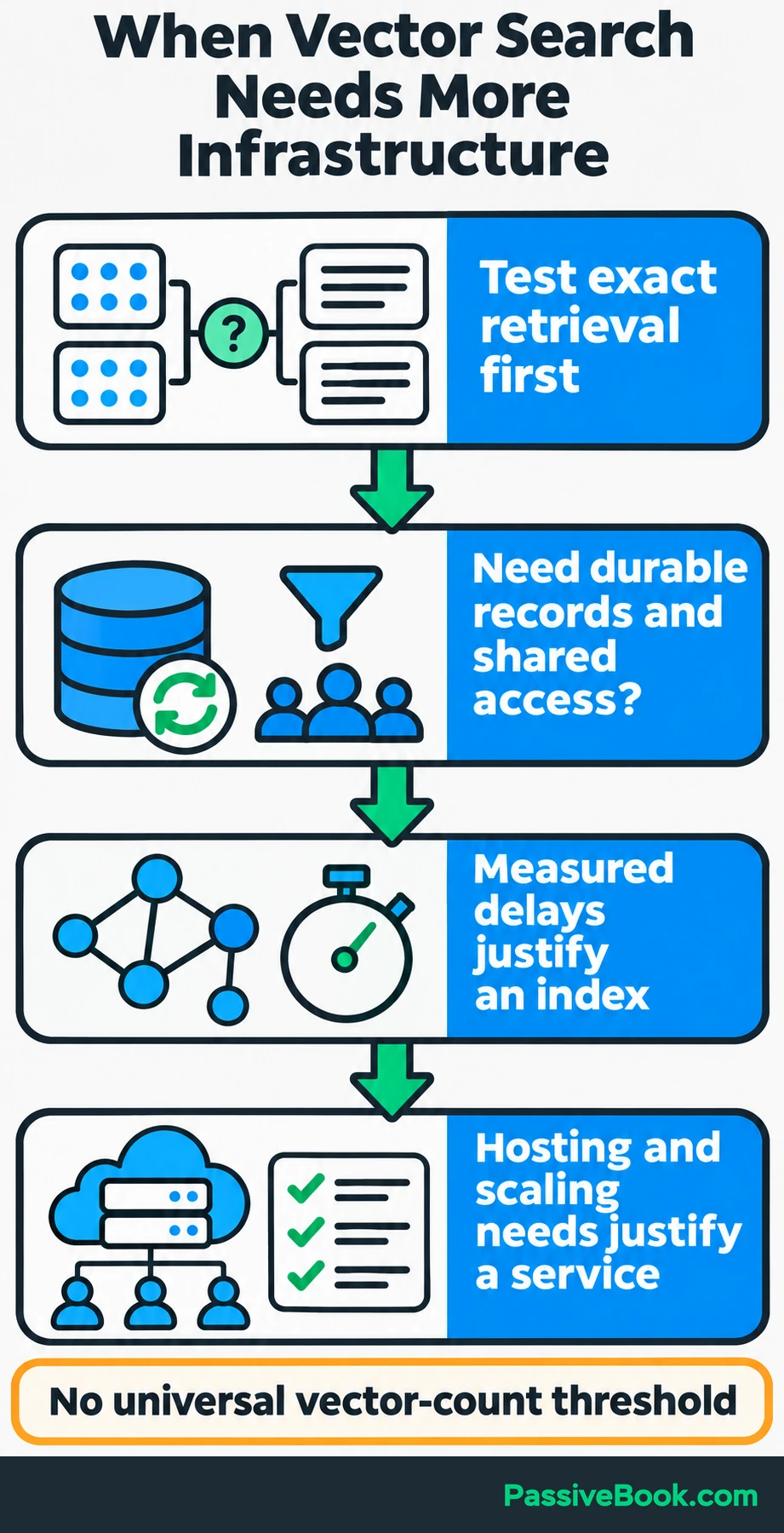
Before choosing infrastructure, run exact search over a representative set of embeddings. Check whether semantic retrieval finds better passages than your existing search.
If it does, decide what the application needs next:
- Durable storage, updates, filters, or shared access justify database storage.
- Measured search delays may justify an approximate index.
- Hosting, scaling, or operational requirements may justify a dedicated service.
If your application already uses PostgreSQL, I would consider pgvector first. It keeps embeddings beside relational records and supports exact search, HNSW, and IVFFlat. The project documents these capabilities.
There is no useful universal rule such as “move at 100,000 vectors.” Dimensions, filters, hardware, traffic, and latency requirements all affect that decision.
I would skip a separate service until a measured requirement earns it a place.
What Determines Storage and Operating Costs?
Count your chunks before comparing plans. Each indexed chunk normally produces one stored vector.
For an illustrative watercolor library, suppose you have 100 lessons averaging 10 chunks each. That produces 1,000 vectors.
To estimate the numeric values alone, multiply the number of vectors by their dimensions and the bytes used for each value:
Raw vector storage = vectors × dimensions × bytes per value

1,000 × 384 × 4 = 1,536,000 bytes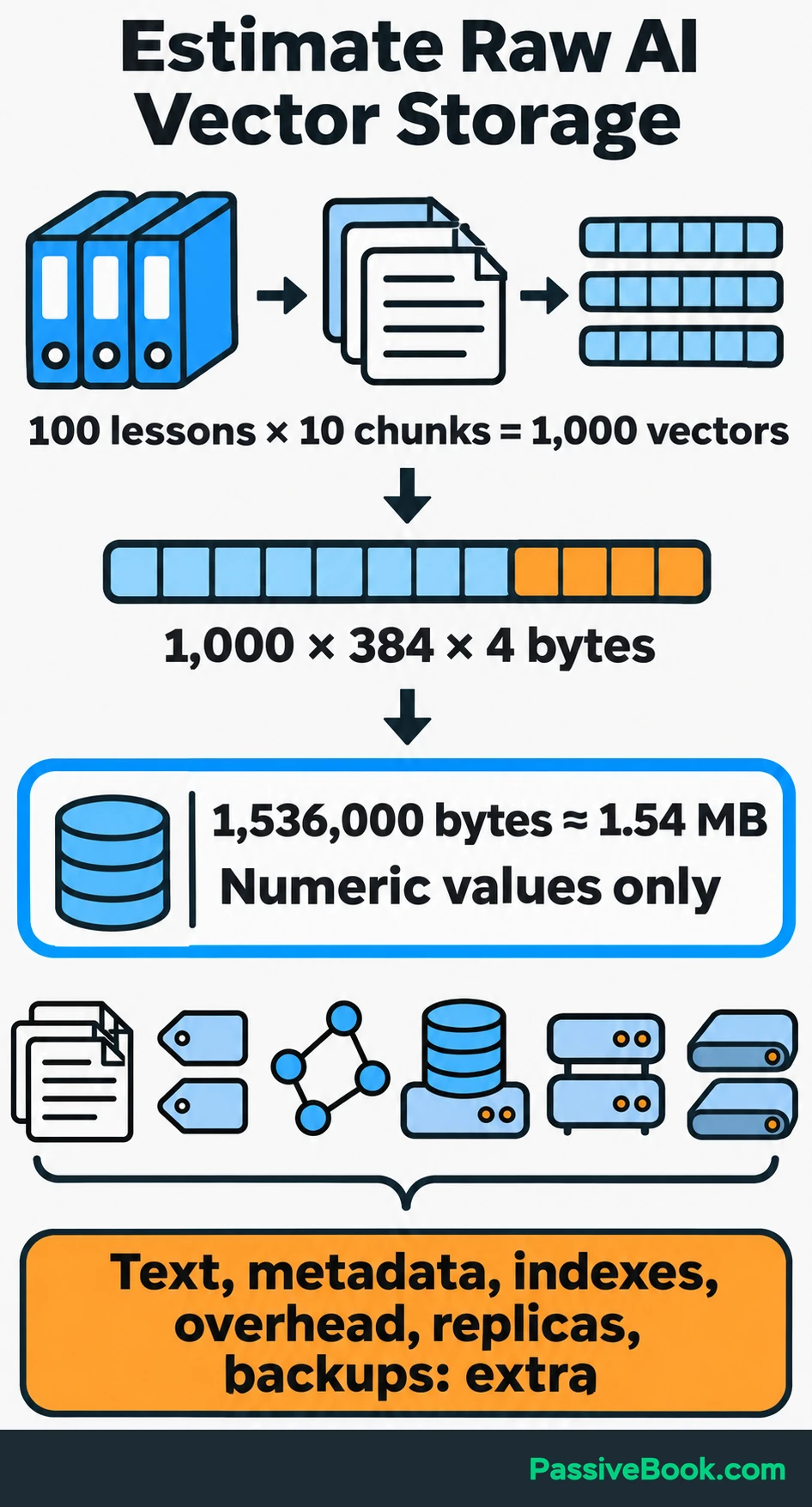
That is approximately 1.54 MB using four-byte values.
It excludes passage text, metadata, indexes, database overhead, replicas, and backups. It also tells you nothing about the memory needed to run the embedding model.
Embedding costs are a separate calculation. For a hosted model billed by input tokens, count the billable tokens across the work you expect it to perform:
Embedding charge =
billable tokens ÷ tokens per billing unit × price per billing unit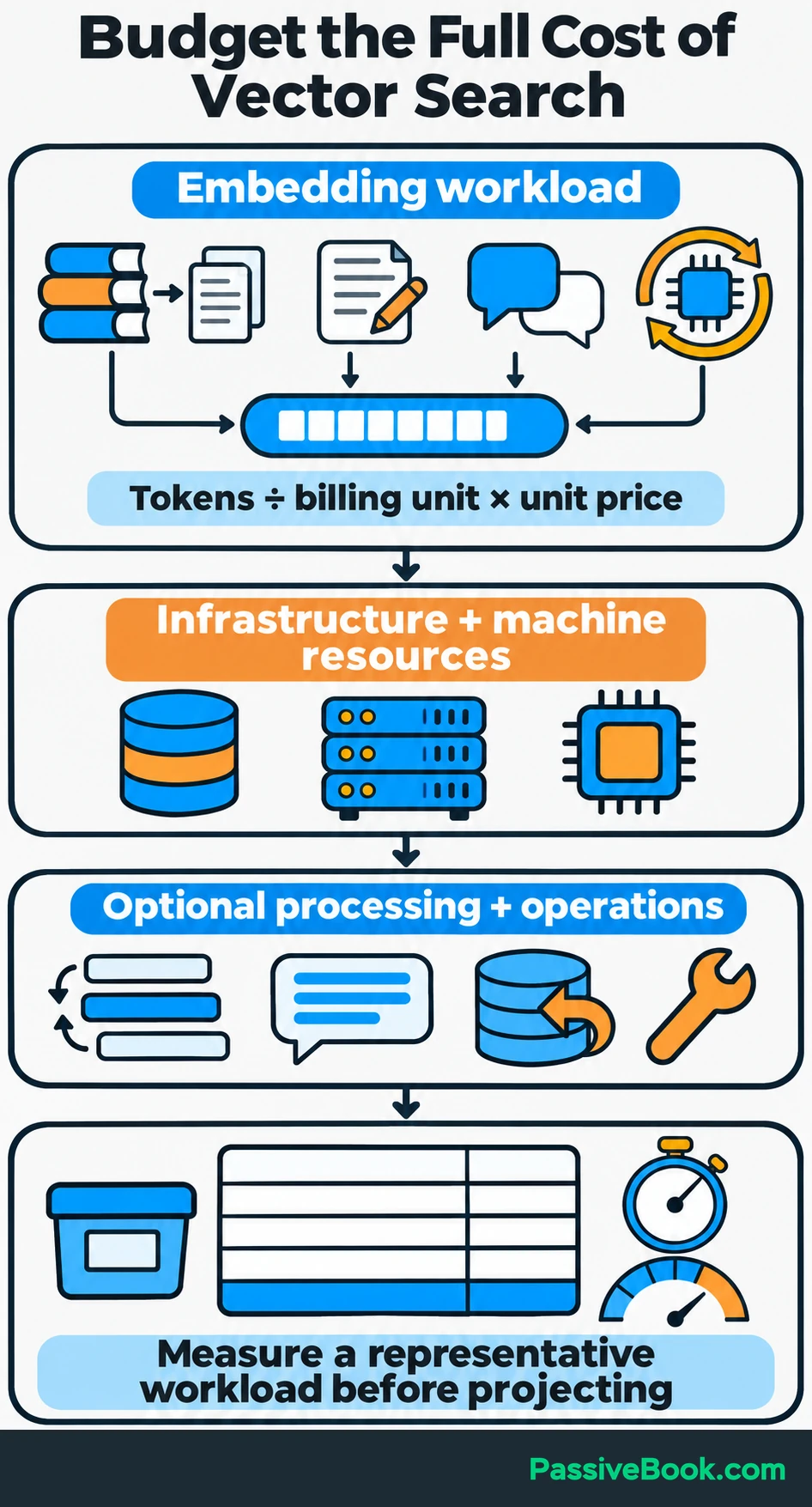
Include:
- The first pass through your source library.
- Changed or added passages.
- Incoming search questions.
- A full rebuild when you change embedding models.
Then budget separately for database hosting, application servers, and generated answers. If you add a reranker to reorder retrieved passages by relevance, include its processing costs too. A local embedding model avoids hosted embedding charges, but it still uses machine resources and processing time.
Before projecting a full workload, index a representative sample and measure storage, memory, ingestion time, and query latency. Include expected traffic and availability needs in that test.
Maintenance belongs in the comparison too. A free server that needs your attention every weekend has found another way to charge you.
Which Starting Option Fits Your Application?
These options can support the same lesson-search feature, but they leave different work on your plate.
| Option | Best starting situation | Free starting route | Operational responsibility | Reason to move beyond it |
|---|---|---|---|---|
| Exact search in application memory | You need to test whether embeddings retrieve useful passages | Run locally without a database subscription | Load saved vectors, manage updates, and run comparisons in your code | Shared access, data management, or measured search performance needs more infrastructure |
| Local Chroma | You want a compact Python prototype with stored records | Use the local persistent client | Manage the machine, database files, and backups | Deployment, concurrent access, or recovery needs exceed the local setup |
| PostgreSQL with pgvector | Your application already uses PostgreSQL or needs relational queries beside vector search | Install the open-source extension on a local PostgreSQL instance | Manage PostgreSQL yourself or choose managed hosting | Measured retrieval needs exceed the setup you can reasonably operate |
| Qdrant Cloud | You want hosted vector storage and less database administration | Use its free prototype cluster | Manage application access, data lifecycle, and recovery needs while the provider runs the service | Traffic, capacity, or availability requirements exceed the free cluster |
Chroma’s persistent client automatically saves local data and loads it again when you reopen the database. Its client documentation describes local persistence.
Qdrant’s free cluster provides one node with 1 GB RAM and 4 GB disk without a credit card. Unused clusters are suspended after one week and deleted after four weeks of inactivity unless reactivated, so I would treat this as a prototype route. Check Qdrant’s current free-cluster terms.
For a first local build, I would use Chroma. For an application already running on PostgreSQL, I would start with pgvector. Managed hosting becomes attractive when operating the database takes time away from improving the feature.
Before paying, compare minimum charges, usage billing, backup and restore provisions, and export options against your workload estimate. A free starting route does not establish the cost of the finished application.
Build a Small Knowledge-base Search
The example below uses Python, Sentence Transformers to create embeddings, and Chroma to store and search them. It runs locally after the model has downloaded and needs no embedding API key.
Use a Python 3.11 virtual environment and a working directory where you can write files. Install the dependencies:
python -m pip install sentence-transformers chromadbThis example has not been execution-tested. It prints Python and dependency versions so you can record the environment used for your run.
Prepare Lesson Chunks and Their Source Metadata
Start with a few lessons and questions they should answer. Extract readable text, retain useful headings, and remove repeated navigation or PDF footers.
On one digital-product site, I found repeated footer text mixed into the passages I was preparing for retrieval. I had been looking at the search settings, but opening the extracted text made the problem obvious. Now I inspect the text before tuning the search.
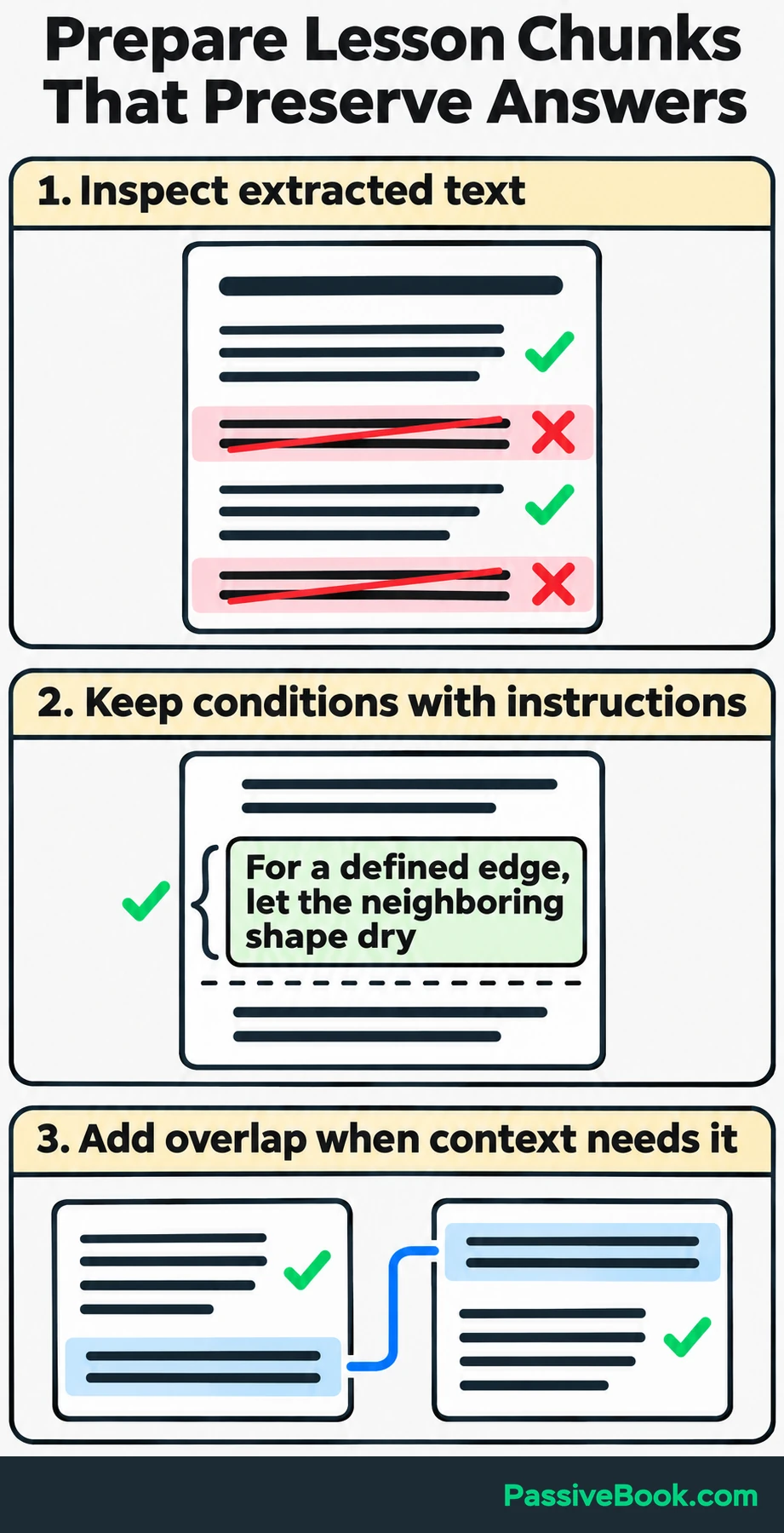
Split at meaningful section and sentence boundaries. Keep enough surrounding explanation for each chunk to stand on its own, and add overlap when a boundary would separate a condition from its instruction.
For this English-language example, we will use sentence-transformers/all-MiniLM-L6-v2. It produces 384-dimensional vectors and truncates inputs beyond 256 wordpieces by default. A wordpiece can be part of a word, so counting words is not enough. The model card specifies its dimensions and input limit.
The script checks complete inputs with the model’s tokenizer, including lesson headings and special tokens. It raises an error instead of silently accepting an oversized passage.
Give chunks stable IDs and retain their lesson, course, source, position, and revision. The sample source URLs below are placeholders to replace with your real lesson links.
Embed and Store the Passages
The complete script includes ingestion and querying so you can save it as watercolor_search.py and run it as one file.
It supplies every embedding explicitly. Chroma therefore stores and searches the vectors you create rather than choosing an embedding model for you.
import platform
from importlib.metadata import version
from time import perf_counter

import chromadb
from sentence_transformers import SentenceTransformer


MODEL_ID = "sentence-transformers/all-MiniLM-L6-v2"
COURSE_ID = "watercolor-basics"
COLLECTION_NAME = "watercolor-minilm-l6-v2-cosine-v1"

# Illustrative lesson excerpts and placeholder source URLs.
lessons = [
    {
        "id": "wb:wet-edges:01",
        "lesson_id": "wet-edges",
        "title": "Controlling Wet Edges",
        "text": (
            "Wet paint can flow into a neighboring wet shape. "
            "For a defined edge, let the neighboring shape dry "
            "before adding another color. For a soft transition, "
            "work while the adjoining wash is still damp."
        ),
    },
    {
        "id": "wb:layers:01",
        "lesson_id": "layers",
        "title": "Letting Layers Dry",
        "text": (
            "Let the first wash dry before painting a transparent "
            "layer over it. Working over a damp layer can disturb "
            "the earlier paint. Try the sequence on a practice "
            "swatch before using it in your painting."
        ),
    },
    {
        "id": "wb:paper:01",
        "lesson_id": "paper",
        "title": "Choosing Watercolor Paper",
        "text": (
            "Use paper made for watercolor when practicing washes. "
            "Compare a smooth sheet with a textured sheet using "
            "the same brush and wash. Note how the surface changes "
            "the marks you can make."
        ),
    },
    {
        "id": "wb:brushes:01",
        "lesson_id": "brushes",
        "title": "Cleaning Your Brush",
        "text": (
            "Rinse the brush when switching colors and check it "
            "on scrap paper before loading fresh paint. Reshape "
            "the tip gently after cleaning and avoid leaving "
            "the brush standing on its bristles."
        ),
    },
]

print("Python:", platform.python_version())
for package in (
    "sentence-transformers",
    "chromadb",
    "transformers",
    "torch",
    "numpy",
):
    print(f"{package}: {version(package)}")

# The first run downloads the model before any local retrieval.
model = SentenceTransformer(MODEL_ID)
print("Model:", MODEL_ID)
print("Maximum input tokens:", model.max_seq_length)

passages = [
    f"{lesson['title']}\n{lesson['text']}"
    for lesson in lessons
]
question = "How do I stop colors running together?"

# Include headings and special tokens in the length check.
for text in passages + [question]:
    token_ids = model.tokenizer(
        text,
        add_special_tokens=True,
        truncation=False,
    )["input_ids"]
    if len(token_ids) > model.max_seq_length:
        raise ValueError(
            f"Input has {len(token_ids)} tokens; "
            f"limit is {model.max_seq_length}. Split it first."
        )

vectors = model.encode(
    passages,
    normalize_embeddings=True,
    convert_to_numpy=True,
)

if vectors.shape != (len(passages), 384):
    raise ValueError(f"Unexpected embedding shape: {vectors.shape}")

metadatas = [
    {
        "course_id": COURSE_ID,
        "lesson_id": lesson["lesson_id"],
        "lesson_title": lesson["title"],
        "source_url": (
            "https://example.com/courses/"
            f"{COURSE_ID}/{lesson['lesson_id']}"
        ),
        "position": 1,
        "revision": 1,
        "language": "en",
        "status": "published",
    }
    for lesson in lessons
]

client = chromadb.PersistentClient(path="./watercolor-db")
collection = client.get_or_create_collection(
    name=COLLECTION_NAME,
    embedding_function=None,
    configuration={"hnsw": {"space": "cosine"}},
)

collection.upsert(
    ids=[lesson["id"] for lesson in lessons],
    embeddings=vectors.tolist(),
    documents=passages,
    metadatas=metadatas,
)

started = perf_counter()
query_vector = model.encode(
    question,
    normalize_embeddings=True,
    convert_to_numpy=True,
).tolist()

if len(query_vector) != 384:
    raise ValueError("Unexpected query embedding dimensions.")

# Demo scope only. In an application, derive permitted course
# scope from the authenticated account on your backend.
results = collection.query(
    query_embeddings=[query_vector],
    n_results=3,
    where={"course_id": COURSE_ID},
    include=["documents", "metadatas", "distances"],
)
elapsed_ms = (perf_counter() - started) * 1000

print(f"\nQuestion: {question}")
print(f"Embedding + database query: {elapsed_ms:.1f} ms")

# [0] selects the results for our single question.
for chunk_id, passage, metadata, distance in zip(
    results["ids"][0],
    results["documents"][0],
    results["metadatas"][0],
    results["distances"][0],
):
    print(f"\n{metadata['lesson_title']} [{chunk_id}]")
    print(f"Cosine distance: {distance:.4f}")
    print(passage)
    print("Source:", metadata["source_url"])
Run it with:
python watercolor_search.pyThe script normalizes the passage embeddings and converts them to lists before storing them. Its upsert operation inserts new IDs or updates records with existing IDs, so rerunning this unchanged sample updates the same four records.
The collection uses cosine distance through Chroma’s HNSW configuration. Keep this collection name tied to this model, preprocessing, and metric; use a separate collection when those choices change. Chroma documents the collection configuration and distance functions.
After a successful run, save the printed versions and capture the installed packages:
python -m pip freeze > requirements.lock.txtEmbed a Question and Retrieve Its Sources
The question uses the same model and normalization as the passages. The database then searches within the course specified by where={"course_id": "watercolor-basics"} and requests three neighbors with n_results=3.
Chroma returns results grouped by input query. That is why the script selects [0], then keeps IDs, passages, metadata, and distances aligned while printing them.
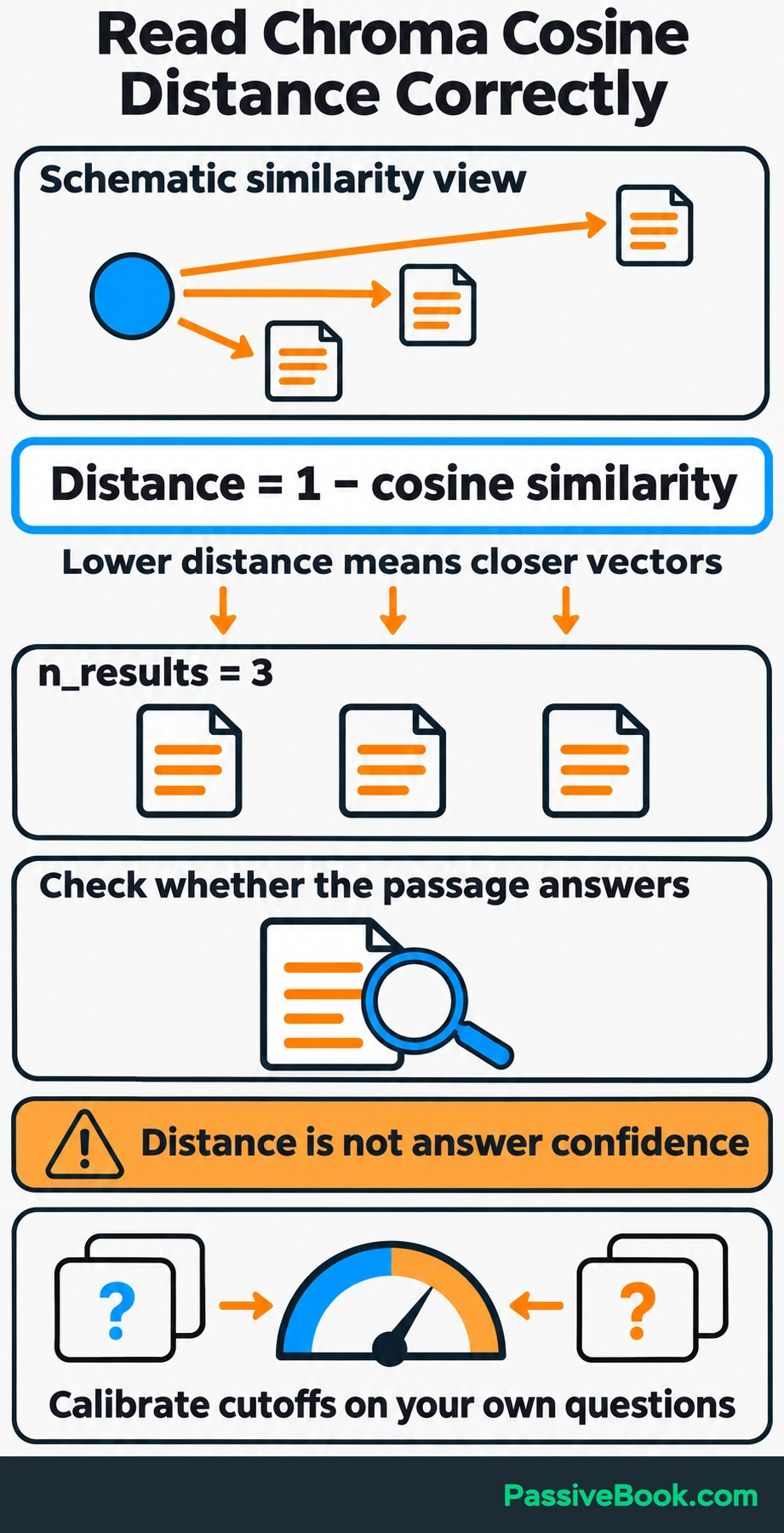
For cosine search, Chroma returns distance calculated as 1 − cosine similarity. Lower values indicate closer matches. They still do not prove that a passage answers the question.
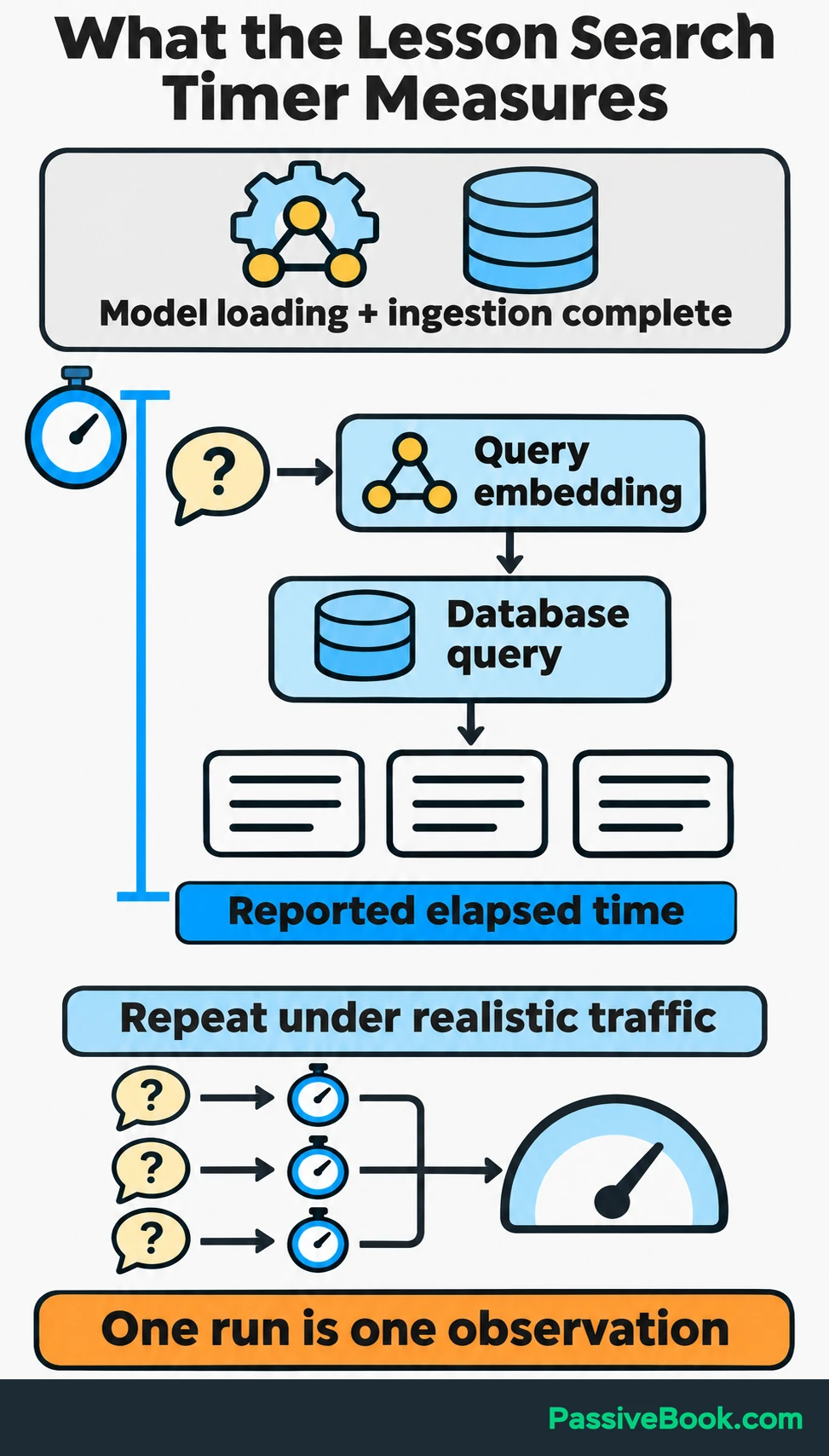
The timing printed by the script covers query embedding and the database request, after model loading and ingestion. It is one observation, so use repeated queries and realistic traffic before making performance decisions.
Before exposing this through a website:
- Keep database access behind your backend.
- Derive permitted courses from the authenticated account.
- Apply those permissions during retrieval.
- Return source links with the passages.
The hardcoded course in the script is demonstration scope, not an access-control system.
Calibrate any distance cutoff using relevant and irrelevant questions from your application. I would skip a universal threshold copied from another project. If the retrieved material cannot support an answer, say that the lesson library does not contain enough information.
Check Retrieval Before Adding Generated Answers
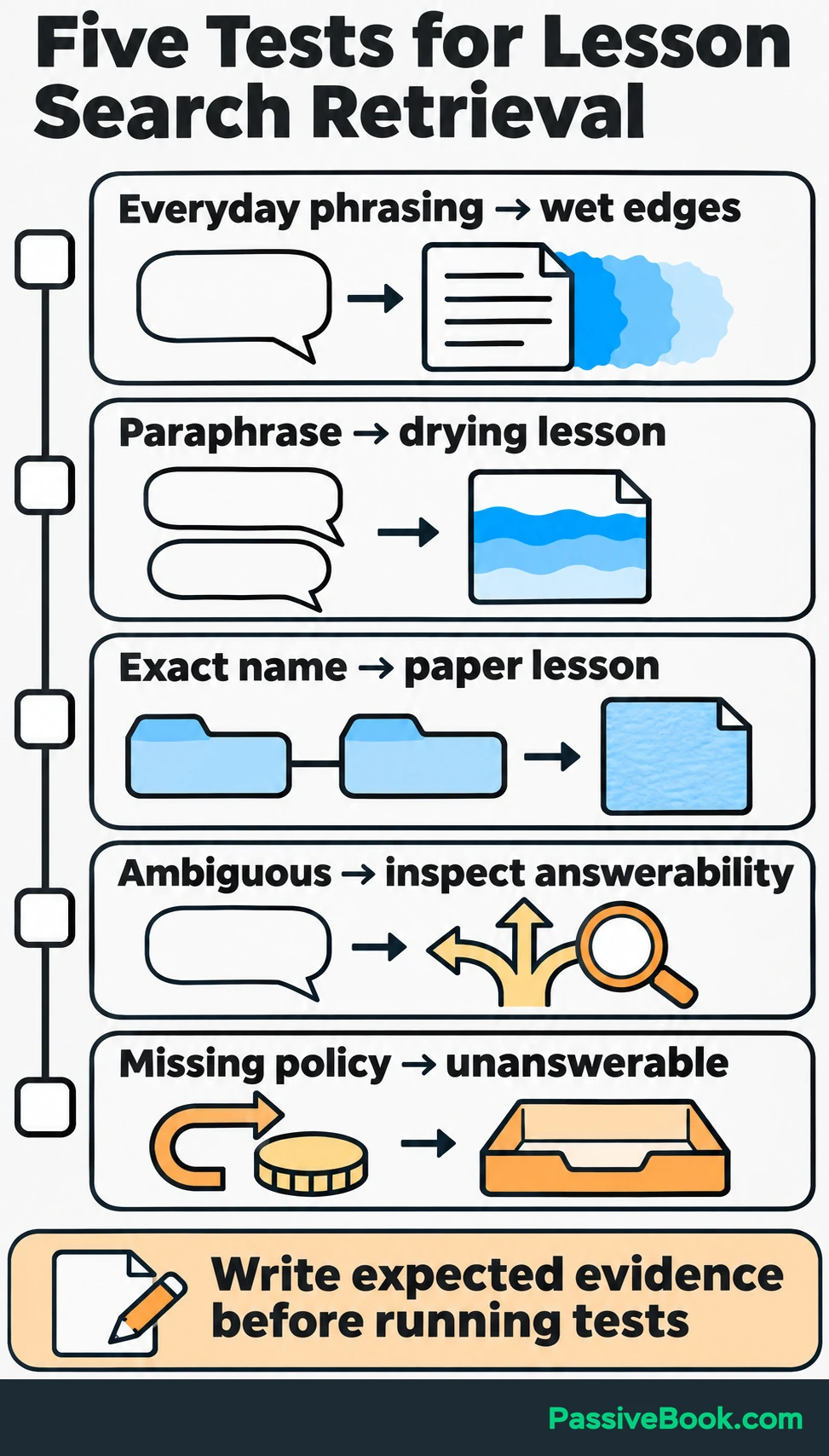
Write down the passage you expect to find before running each test. Otherwise, it is easy to accept anything that sounds vaguely related.
For this sample, begin with the questions below. The script returns neighbors even when none answers the question, so judge the passages yourself.
| Test | Question | What to inspect |
|---|---|---|
| Everyday phrasing | “How do I stop colors running together?” | Whether the wet-edge explanation appears near the top |
| Paraphrase | “When can I paint over the first wash?” | Whether the drying lesson is retrieved |
| Exact lesson name | “Choosing Watercolor Paper” | Whether the matching lesson ranks well |
| Ambiguous request | “Why does this look wrong?” | Whether any passage answers this without more detail about what looks wrong |
| Missing information | “Can I get a refund?” | None of the four passages explains refunds; record this as unanswerable from the sample |
As the library grows, record whether at least one answering passage appears among the requested results. Measure latency separately, and keep questions with no available answer in their own group.
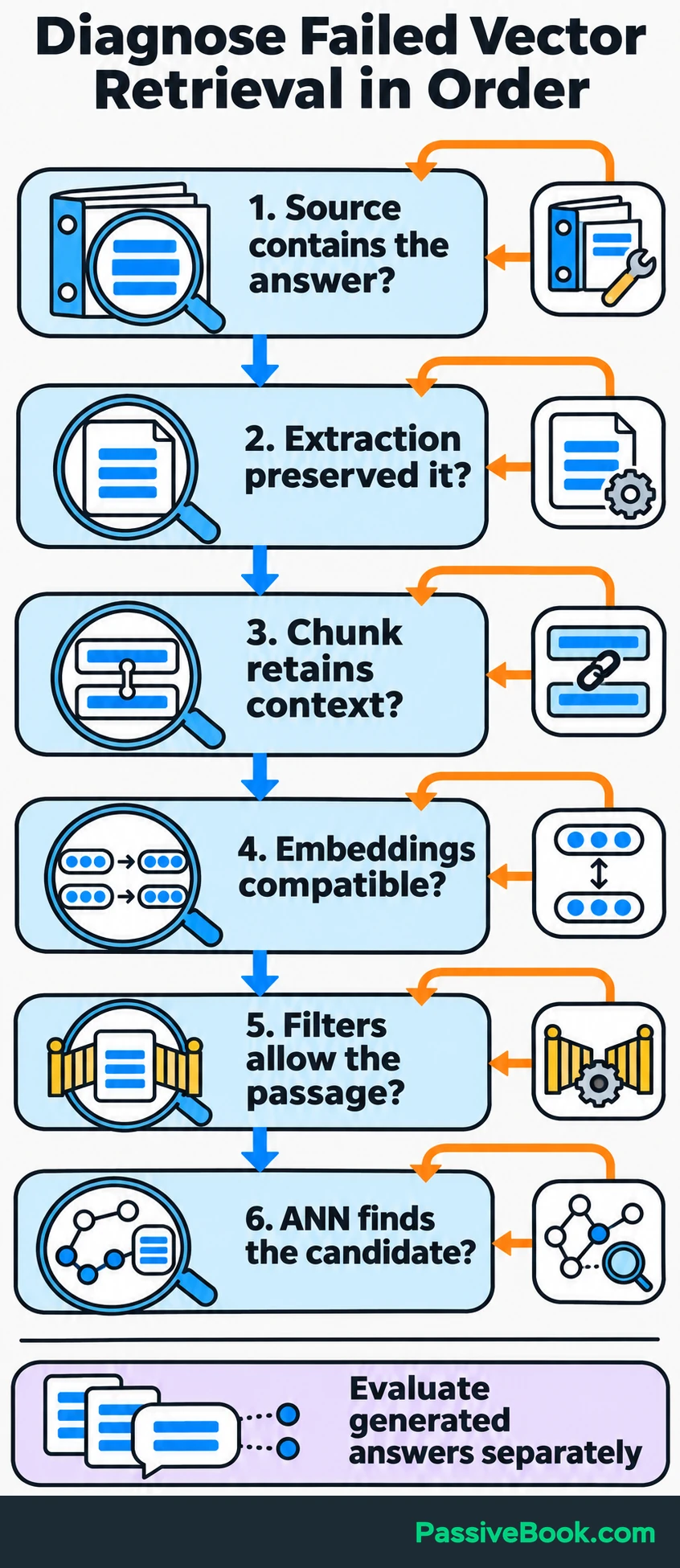
When a test fails, investigate in this order:
- Does the source library contain the answer?
- Did extraction preserve it correctly?
- Did chunking keep the necessary context together?
- Are document and query embeddings compatible?
- Did filters exclude a passage that should have been eligible?
- Did the approximate index miss useful candidates?
Add keyword retrieval when exact terms keep failing. If useful candidates are retrieved but rank poorly, test a reranker. It scores question–passage pairs after the initial search and reorders the candidates. Sentence Transformers describes this retrieve-and-rerank workflow.
Once retrieval works, add RAG by sending useful passages and stable source IDs to the language model. Ask it to answer from those passages and resolve its citations to actual lesson records.
Treat retrieved text as source material, separate from application instructions and tool permissions. A sentence inside an uploaded document should not gain authority to change how your application behaves.
Evaluate generated answers separately from retrieved passages. Keep the same test questions when comparing changes so you can tell whether you improved retrieval, writing, or neither.
Finding the right passage is only part of the job once you add generated answers. A small test pack can help you check supported answers, missing information and instructions hidden inside source text.

Free AI Evaluation Studio


Keep the Knowledge Base Current and Recoverable
A search feature needs an update process as much as an ingestion process.
When a lesson changes, reprocess its chunks and remove obsolete ones. Upserting the new version does not remove surplus chunks left behind when a lesson becomes shorter.
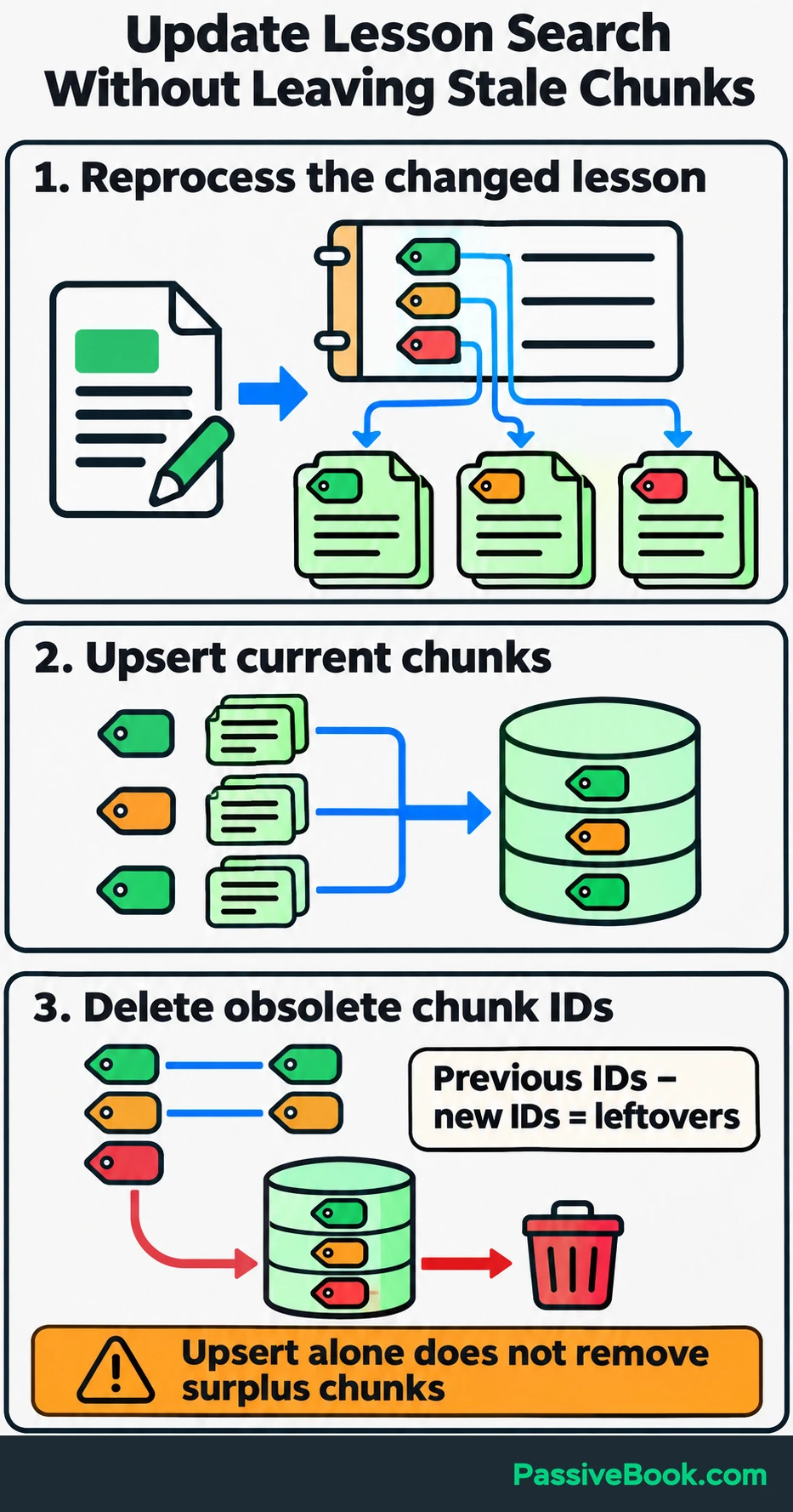
Keep a record of the chunk IDs belonging to each lesson. That makes it possible to compare the previous set with the new set and delete the leftovers.
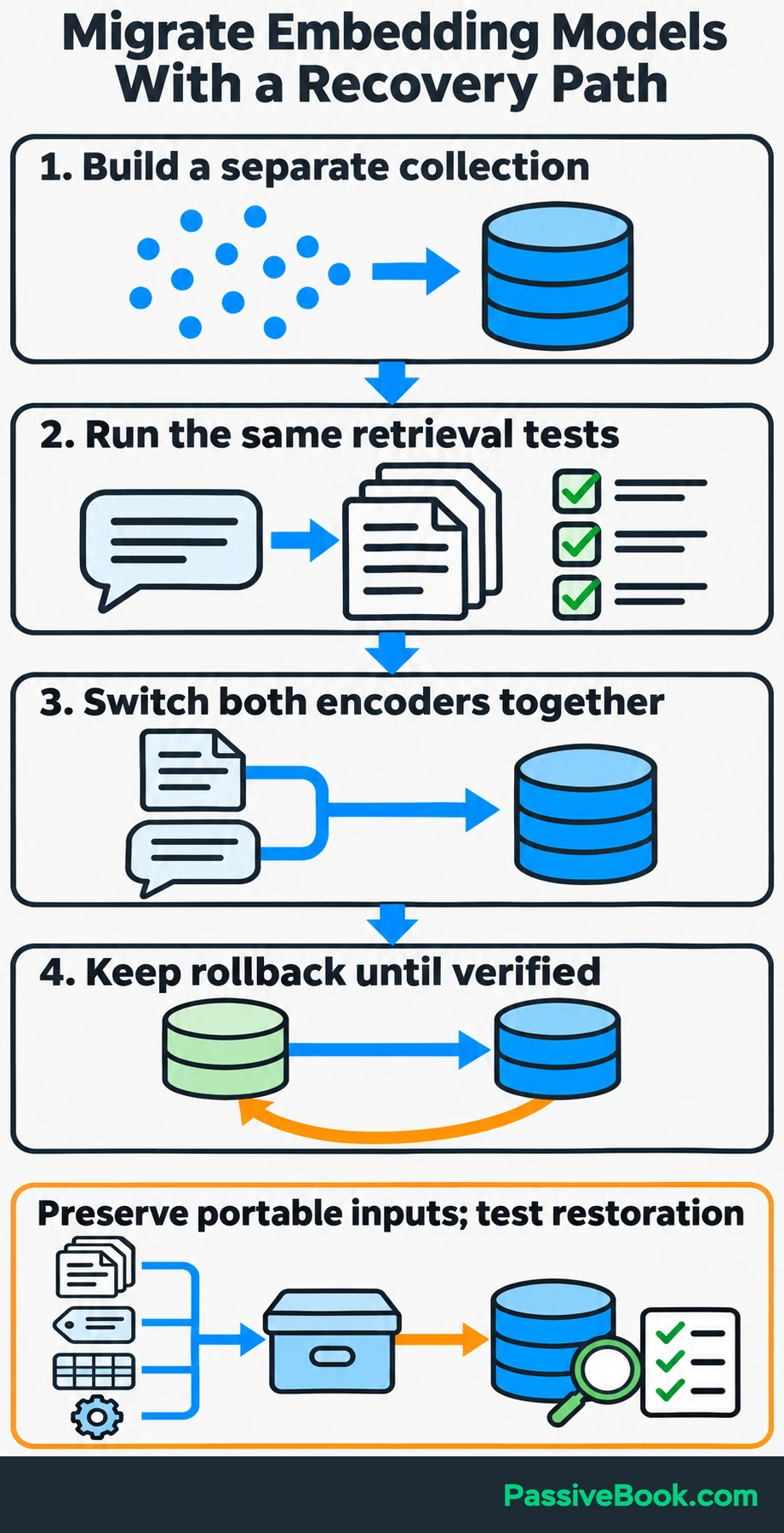
Version your embedding model and preprocessing configuration, including chunking rules and added headings. For a model change, I would:
- Build embeddings in a separate collection.
- Run the existing retrieval tests.
- Switch document and query encoding together.
- Retain a rollback route until the replacement is working.
Monitor ingestion failures, delays between source changes and search updates, query latency, retrieval quality, and spending. Use bounded retries and query timeouts where failures affect the application.
Finally, preserve source documents, chunk IDs, metadata, and embedding settings independently of the provider. Test restoration rather than assuming a backup is usable.
Vector databases for AI embeddings should make useful content easier to retrieve. Keeping your sources and configuration portable also makes the database easier to replace when your needs change.
What Next?
Choose five source passages and write ten questions they should help answer, including two that your material cannot answer. Run the local example with your own content and inspect the retrieved passages before adding generated responses.
Use the social buttons to share this guide when the database decision is holding up a useful search feature.
Which part of your retrieval setup feels least certain: preparing chunks, choosing storage, or judging the results? Leave your answer in the comments, and bring any other questions too.
Share this post with your friends & followers: