You hand an AI assistant a small feature, and it returns code plus a cheerful claim that everything works. Now you have another job: finding out whether “works” includes the behavior your customers already rely on.
That review can swallow the time you hoped to save, especially when the task was vague or the tests missed an important case.
This guide shows how to turn that uncertainty into a tested catalog change, then make the same workflow produce draft pull requests for approved tasks. You keep the decisions that affect your business, and the agent handles the work you can clearly define and check.
Choose a Task With a Clear Pass Condition
Start with a task you can describe through observable behavior. You should be able to explain what may change, what must stay intact, and how you will check the result.
Small features, reproducible bugs, and missing regression tests are useful starting points. A regression test checks that a known bug stays fixed.
| Task | Expected Output | How to Check It | Human Decision |
|---|---|---|---|
| Add a small feature | Code and tests for agreed behavior | Exercise normal, empty, and invalid inputs | Does the behavior meet the need? |
| Fix a reproducible bug | A narrow repair and regression test | Show the test failing before the fix and passing afterward | Is the cause understood? |
| Add missing tests | Tests for existing requirements | Inspect assertions and run them against current code | Are they testing the right behavior? |
| Draft review findings | Possible defects tied to changed code | Reproduce each finding or trace its code path | Which findings require changes? |
| Update documentation | Instructions matching the implementation | Run the documented example | Is the explanation accurate and useful? |
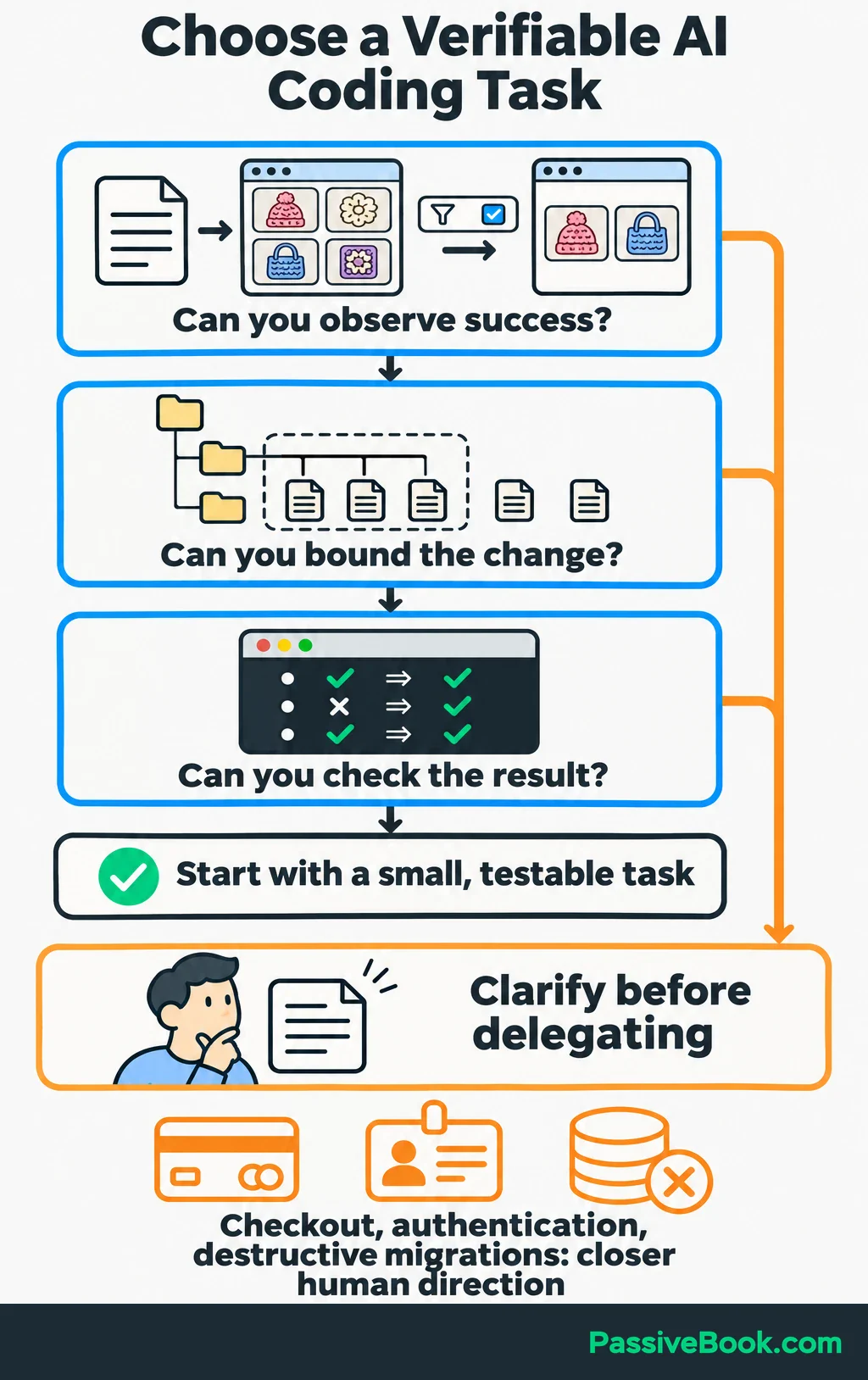
For the running example, imagine you sell downloadable crochet patterns. Your shop already has difficulty metadata, category filtering, and a catalog API. You want customers to filter patterns by difficulty. The shop, specifications, and outcomes here are illustrative.
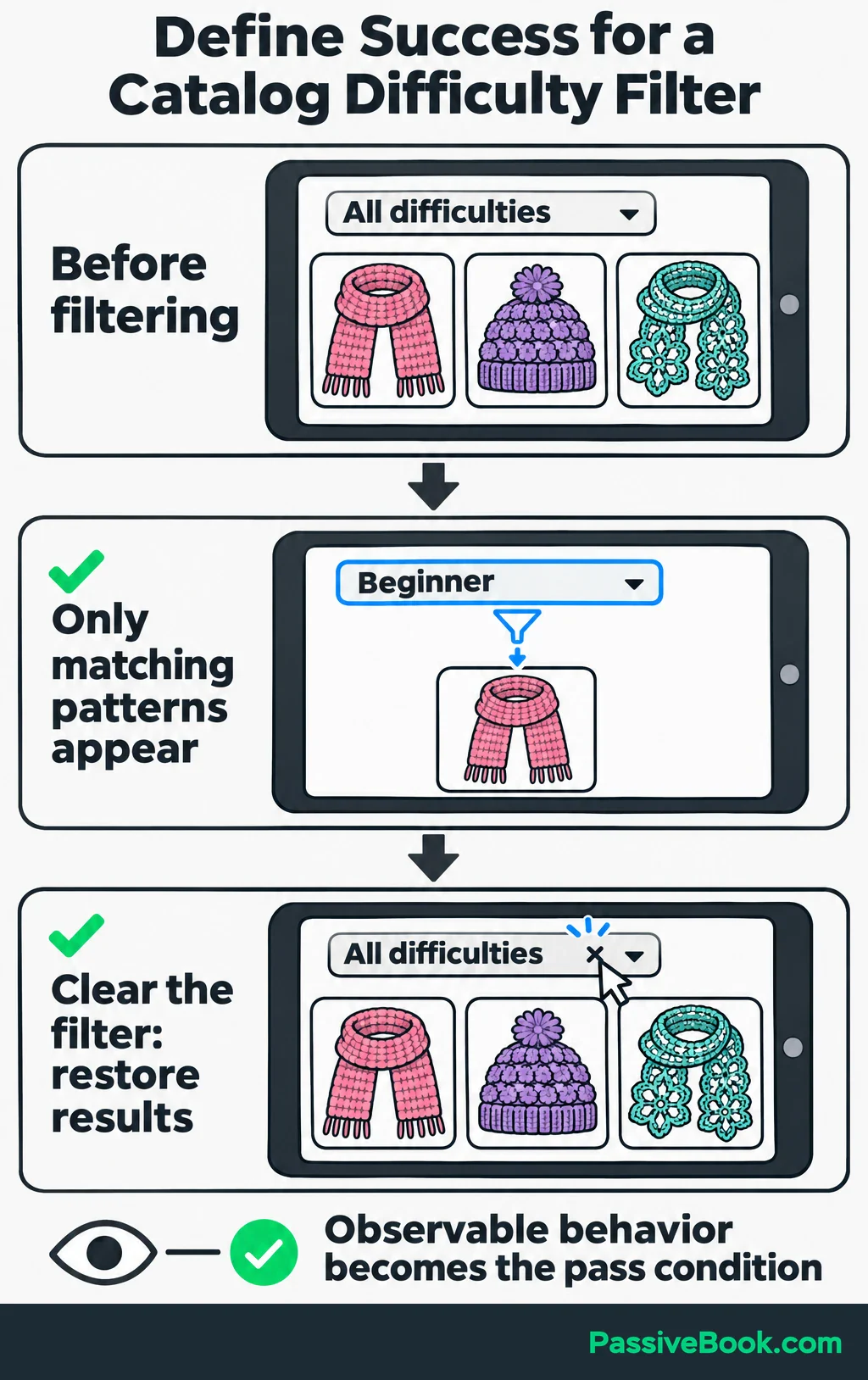
This is a good first task because the expected results are visible. Choosing “Beginner” should change which patterns appear, and clearing it should restore the appropriate results.
I would leave checkout changes, authentication, and destructive database migrations for closer human direction.
Keep routine checks in ordinary scripts and continuous integration, or CI—the checks that run when code changes. AI can interpret requirements, edit code, and investigate failures. Your existing formatter, compiler, and test runner should still do their usual jobs.
Set Up a Controlled Coding Workspace
Choose an Assistant or Agent
Use interactive assistance when you need to understand unfamiliar code or settle a requirement. Delegate execution when the task is clear enough for the tool to inspect files, edit them, run permitted commands, and return a change for review.
The same coding tool can support both styles. You do not need a collection of agents to get started.
I would start with Claude Code because I already use it for my Python content pipeline. That pipeline reduced article production from days to hours. That is a result from content automation, not a measured improvement in software-development productivity.
If your team already works heavily in GitHub, Copilot is another option. It supports repository questions, delegated changes, and pull-request workflows, subject to the applicable plan and organization policies. GitHub describes those repository capabilities here.
Before choosing, compare:
- Where execution happens: your machine, a runner you manage, or a hosted environment.
- Which repositories and files the tool can access.
- How you restrict commands, network connections, and credentials.
- What you receive for review: a local diff, branch, or pull request.
- Total costs, including model usage, runner time, and your review effort.
Start with one coding tool, version control, working verification commands, and a human reviewer. Add orchestration when you have a repeated handoff worth automating.
Prepare the Repository and Access Controls
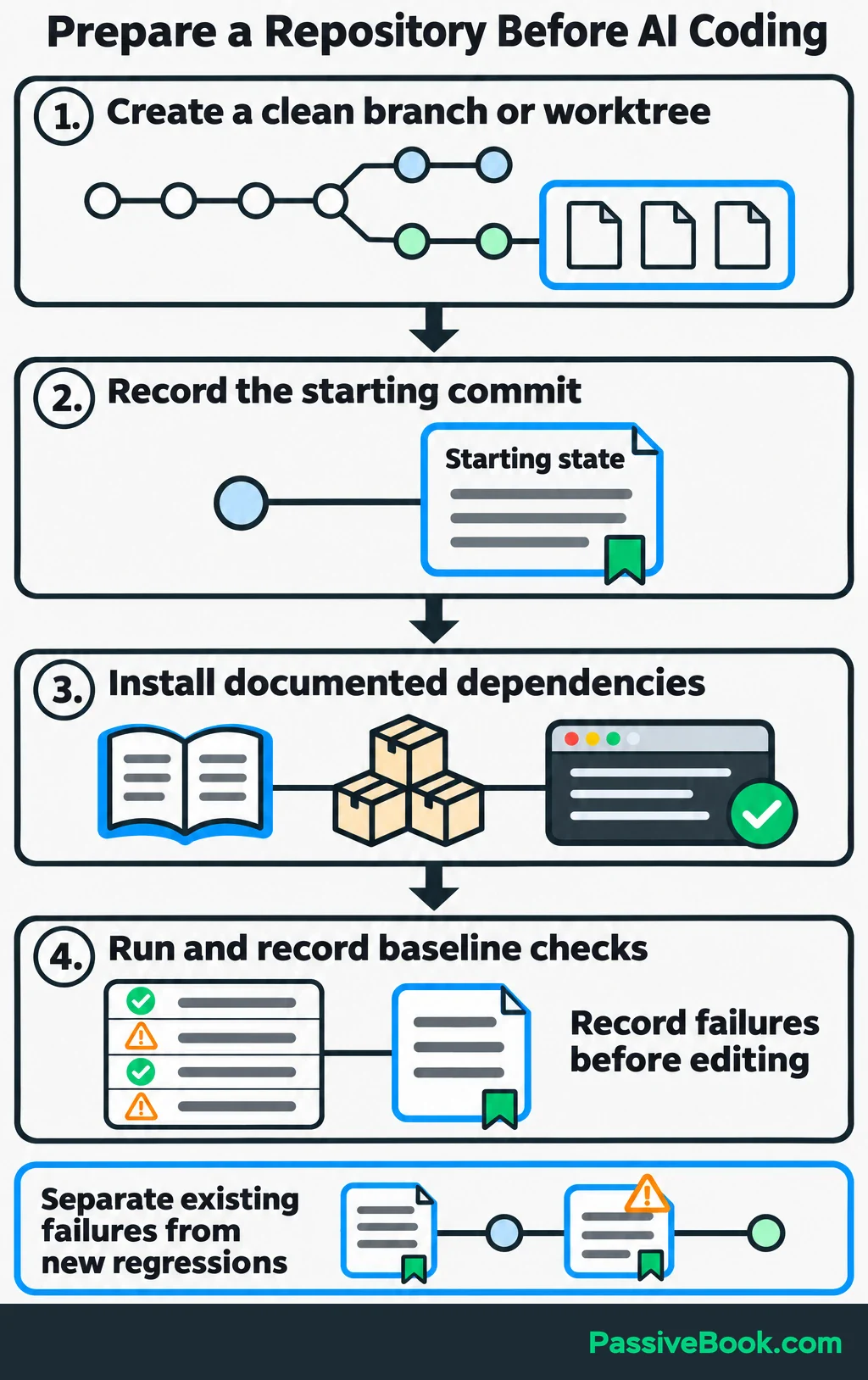
Create a clean branch or a separate worktree, which gives you another working directory for the repository. Record the starting commit so you know exactly what the agent received.
Install dependencies using the project’s documented process, then run the existing checks. Record any failures before editing. Otherwise, an old failure can send the agent on an unrelated repair mission.
A branch separates changes, but it does not limit what a running tool can access. Configure permissions for permitted actions and use isolation to restrict the processes doing the work. Claude Code treats permissions and sandboxing as complementary controls. Its permission documentation explains the distinction.
Check what the boundary covers. Claude Code’s Bash sandbox restricts shell commands and their child processes, but built-in file tools and local integration processes run outside it. Check credential access too: sandboxed commands can read most local files and inherit environment variables by default. Anthropic documents those sandbox boundaries and defaults.
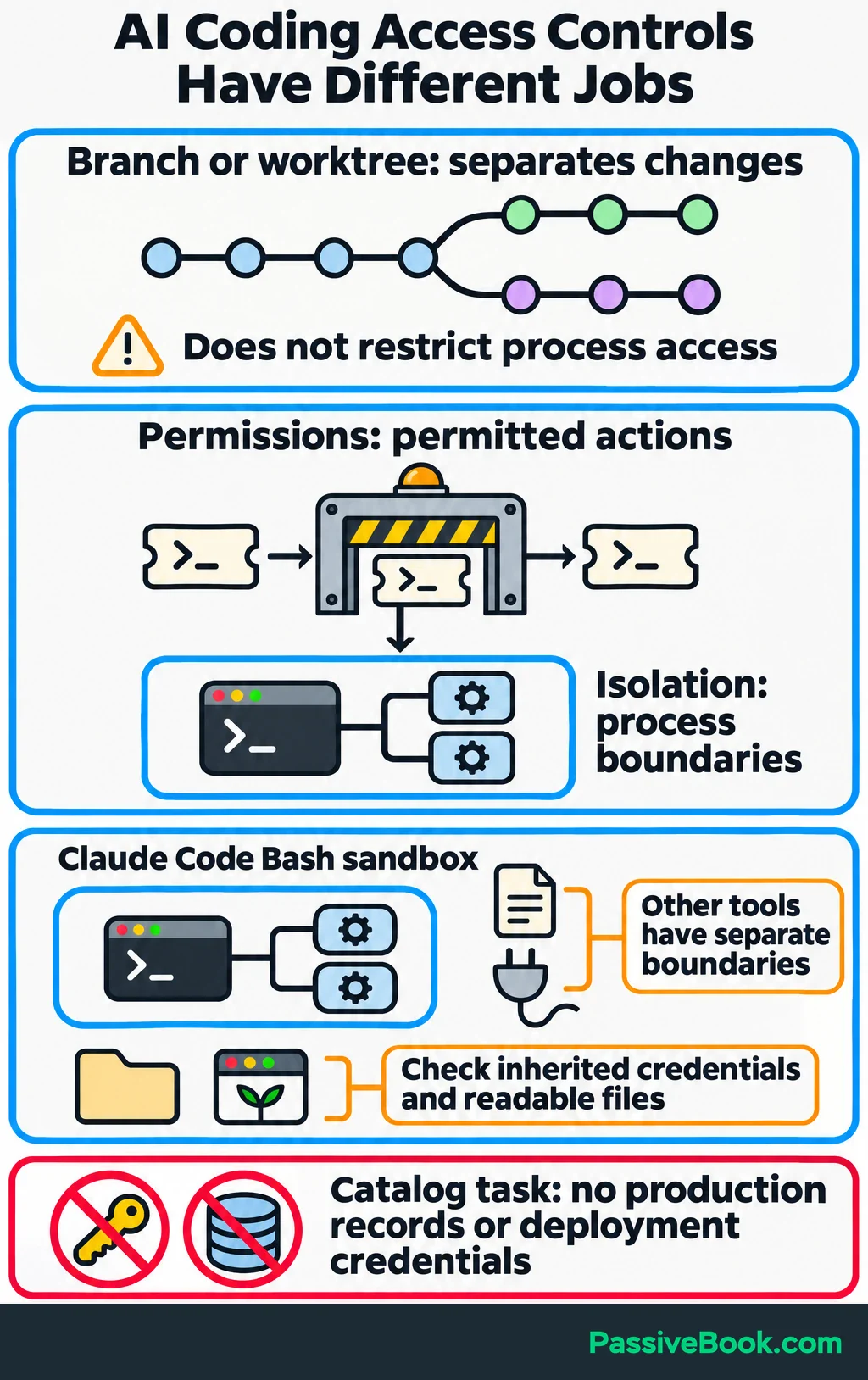
For the catalog task, the agent needs source code, development fixtures, and approved test commands. Production customer records and deployment credentials have no useful role there.
Before connecting a private repository, also check the provider’s applicable settings for code, logs, retention, and training use.
Write a Specification the Agent Can Verify
Save the task brief in task.md. Include the objective, current behavior, desired behavior, relevant files, acceptance criteria, exclusions, permitted actions, verification commands, and stopping conditions.
You are making decisions that would otherwise get buried inside generated code.
For the shop, the brief should establish that difficulty data already exists. The task is to expose and apply that data through the existing catalog, not design a new product classification system.
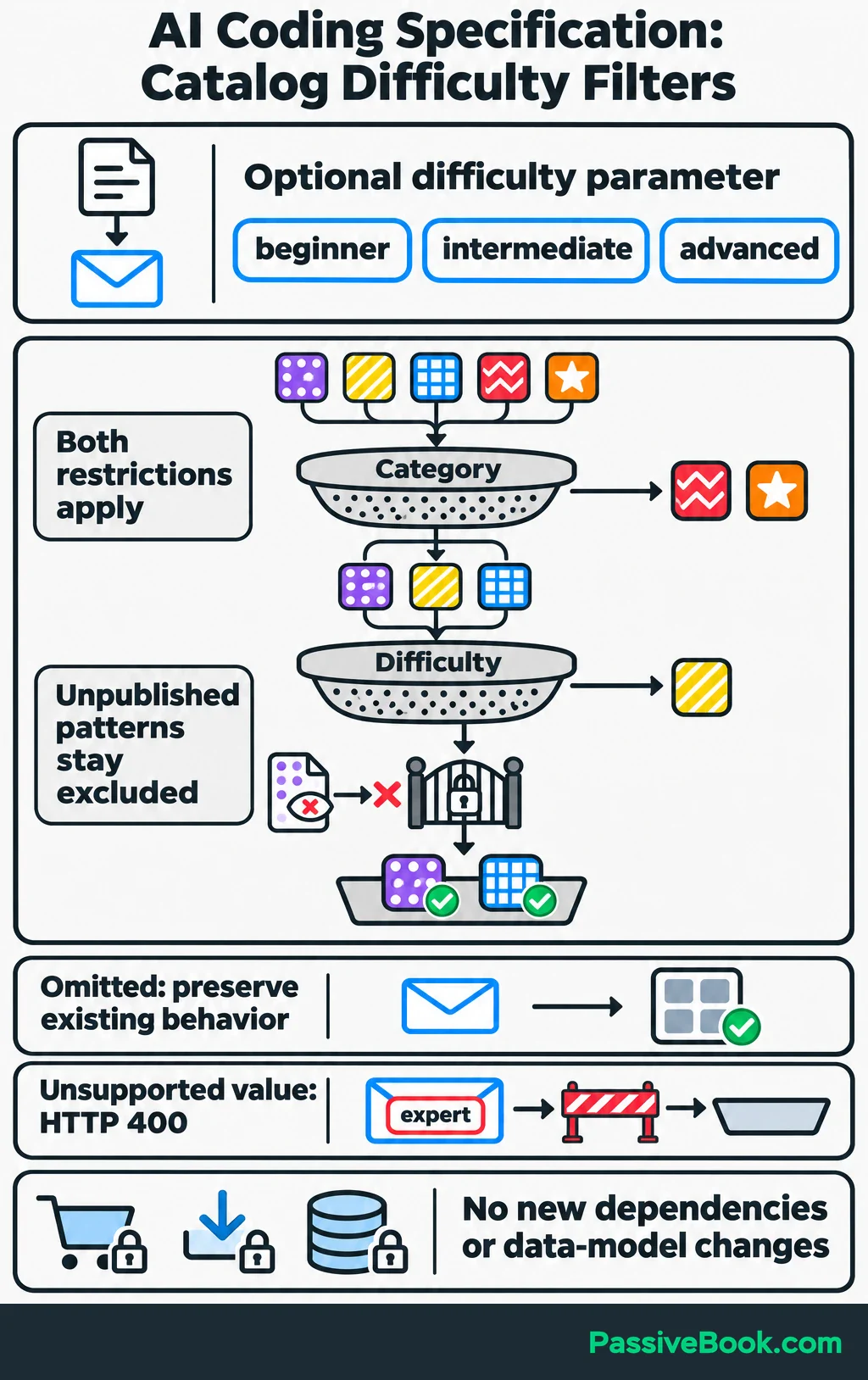
A useful excerpt would look like this:
Objective:
Add a difficulty filter to the existing pattern catalog.

API contract:
- Accept an optional difficulty query parameter.
- Supported values: beginner, intermediate, advanced.
- Omitting difficulty preserves existing catalog behavior.
- Unsupported values return HTTP 400.
- Category and difficulty restrictions apply together.
- Unpublished patterns remain excluded.

Boundaries:
Reuse existing category-filter and validation conventions.
Add no dependencies.
Do not change checkout, download access, or the data model.
Then state what someone should observe:
- Selecting a difficulty shows only matching published patterns.
- Clearing difficulty removes only that restriction and keeps the selected category.
- Category and difficulty filters work together.
- A valid combination with no matches shows the agreed empty state.
- Unsupported API values return HTTP 400.
For this example, the empty state keeps both filter controls visible and displays “No patterns match these filters.” In your own brief, describe the existing state just as precisely. “Handle errors properly” gives the agent too much room to invent a policy.
Supply focused context: the catalog component, query handler, category-filter implementation, and relevant tests. Ask the agent to inspect the actual code and types before proposing changes. Documentation should match the dependencies installed in the repository.
Keep lasting build commands, conventions, and architectural boundaries in the instruction file your tool loads. Claude Code supports project instructions through CLAUDE.md. Those instructions provide context; permissions and isolation enforce access restrictions. Anthropic explains how project instructions load.
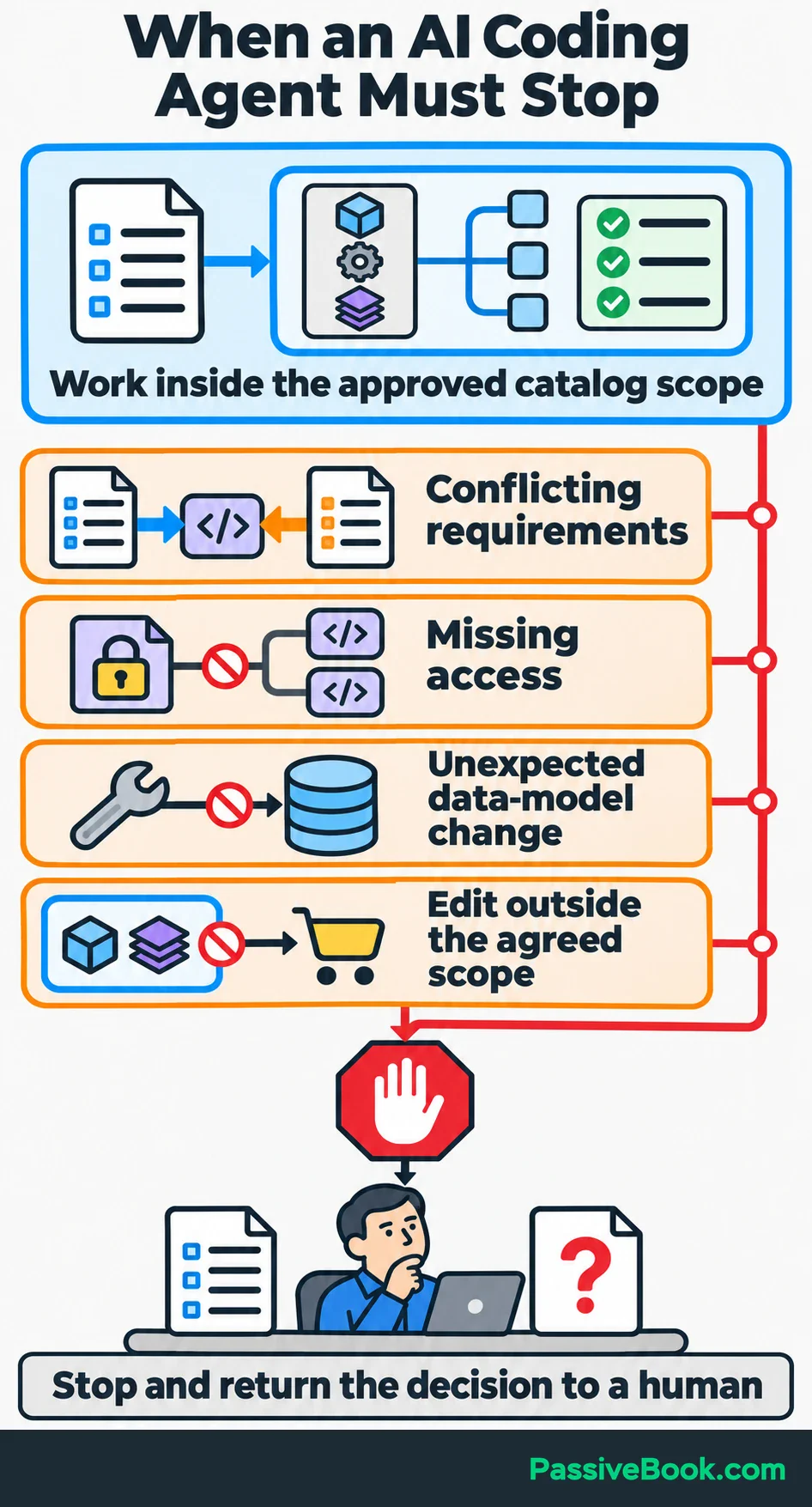
Finally, define when work stops. For this task, that includes conflicting requirements, missing access, an unexpected data-model change, or a proposed edit outside the catalog’s scope. Those decisions should come back to you.
If your next task is still a rough issue description, the AI Coding Task Assistant can turn it into a draft you can review and save as task.md. It also supplies task-specific test cases so you can check more than whether the code runs.
Free AI Coding Task Assistant




Run the Implementation and Test Loop
Review the Plan Before Editing
Ask for a plan before authorizing changes:
Read
task.mdand inspect the existing implementation. List affected files, the smallest proposed change, behavior tests, and unresolved questions. Do not edit yet.
For the catalog filter, I would expect the plan to reuse query validation and category-filter patterns. A proposal to replace the filtering system needs a convincing reason.
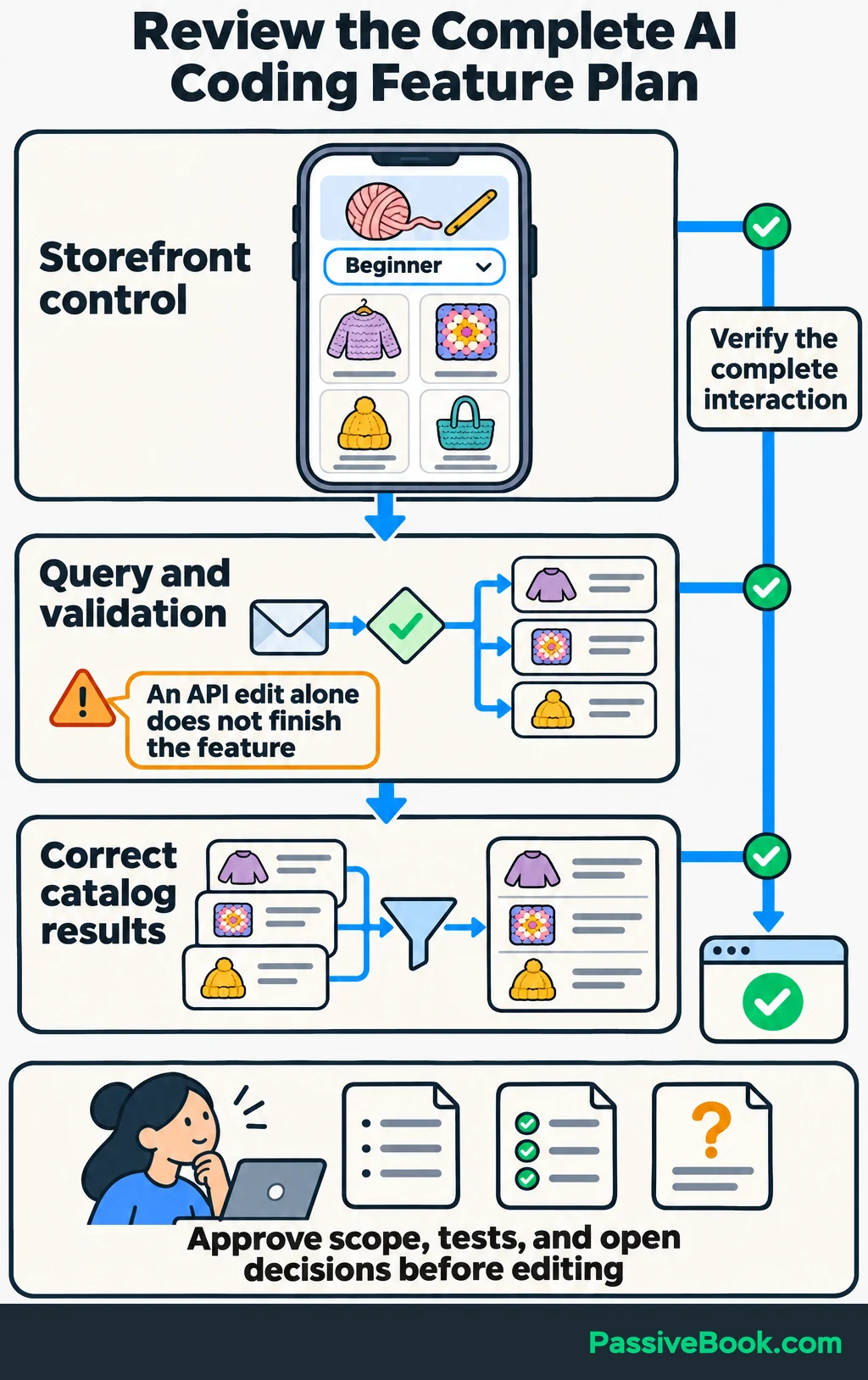
Check whether the plan covers the whole interaction. An API change alone does not finish a feature that also needs a storefront control.
Larger tasks can be split into smaller changes, but retain a final check of the complete behavior. Each piece can pass while the connection between them remains broken.
Once the plan is acceptable, give a short execution prompt:
Implement the approved difficulty-filter specification in
task.md. Follow the existing category-filter pattern. Add acceptance tests, run the documented checks, and report changed files, failures, and unresolved decisions.
The detail belongs in the specification. You should not have to reconstruct the task in every prompt.
Implement Against Executable Checks
Have the agent make one coherent change at a time and run focused checks before continuing. Give it commands with observable results so it can investigate a failure rather than guess whether its edit helped.
Anthropic’s guidance recommends giving Claude a way to verify its work, such as tests or expected output. My recommendation is to make those checks part of the task before implementation starts. See its guidance on executable verification.
For the catalog, use development fixtures containing:
- A published beginner scarf.
- A published advanced scarf.
- A published intermediate hat.
- An unpublished beginner scarf.
Then check exact results:
| Input or Action | Expected Result |
|---|---|
| Select beginner difficulty with no category selected | Only the published beginner scarf appears |
| Select scarves and beginner | Only the published beginner scarf appears |
| Clear difficulty while keeping scarves | Both published scarves appear |
| Select hats and advanced | Both filter controls remain visible, with “No patterns match these filters.” displayed |
Request difficulty=expert | The API returns HTTP 400 |
| Omit difficulty with no category selected | All three published patterns appear; the unpublished scarf stays excluded |
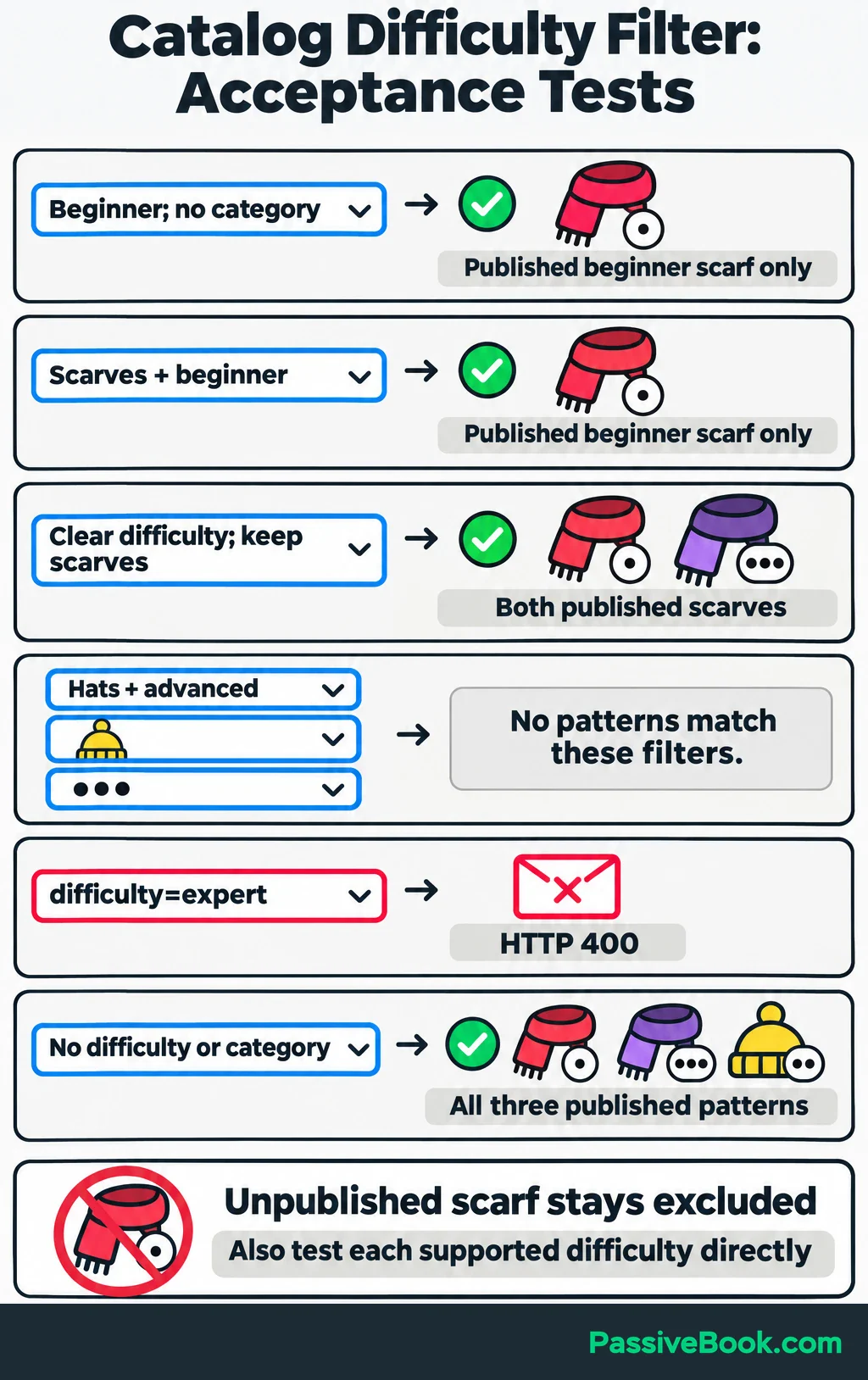
Also test each supported difficulty value directly. Inspect the assertions yourself. A test that checks only for HTTP 200 does not prove that the response contains the right patterns.
I learned a version of this while building my content pipeline. An early change let one stage finish while omitting a field the next stage needed. I initially investigated the next stage because the earlier one had reported success. I added a check at the handoff so that missing output failed where it originated.
Apply that lesson to the catalog: check the returned records, not just whether the request completed.
For a bug fix, confirm that the regression test exposes the original failure before accepting the repair. When debugging stalls, supply reproduction steps, expected behavior, actual behavior, and sanitized error output. Ask for a diagnosis and the smallest relevant fix.
Set execution limits before the run. For a first supervised task, you might allow 20 minutes and two repair attempts, with a spending cap appropriate to your tool. Enforce those limits through tool controls or the runner.
When a runtime, repair-attempt, or spending limit is reached, stop the run and collect the partial diff and failing-check output. Changing requirements, weakening assertions, disabling checks, or adding dependencies needs a fresh human decision.
Produce a Reviewable Handoff
Run the repository’s required broader checks before handing over the change. Focused tests provide quick feedback, but they do not replace the project’s normal verification.
Ask the agent to return:
- Changed files and the final diff.
- An acceptance-criteria checklist linked to relevant tests.
- Commands run and their actual results.
- Checks that failed or could not run, with reasons.
- Any configuration or deployment changes and decisions still needing your input.
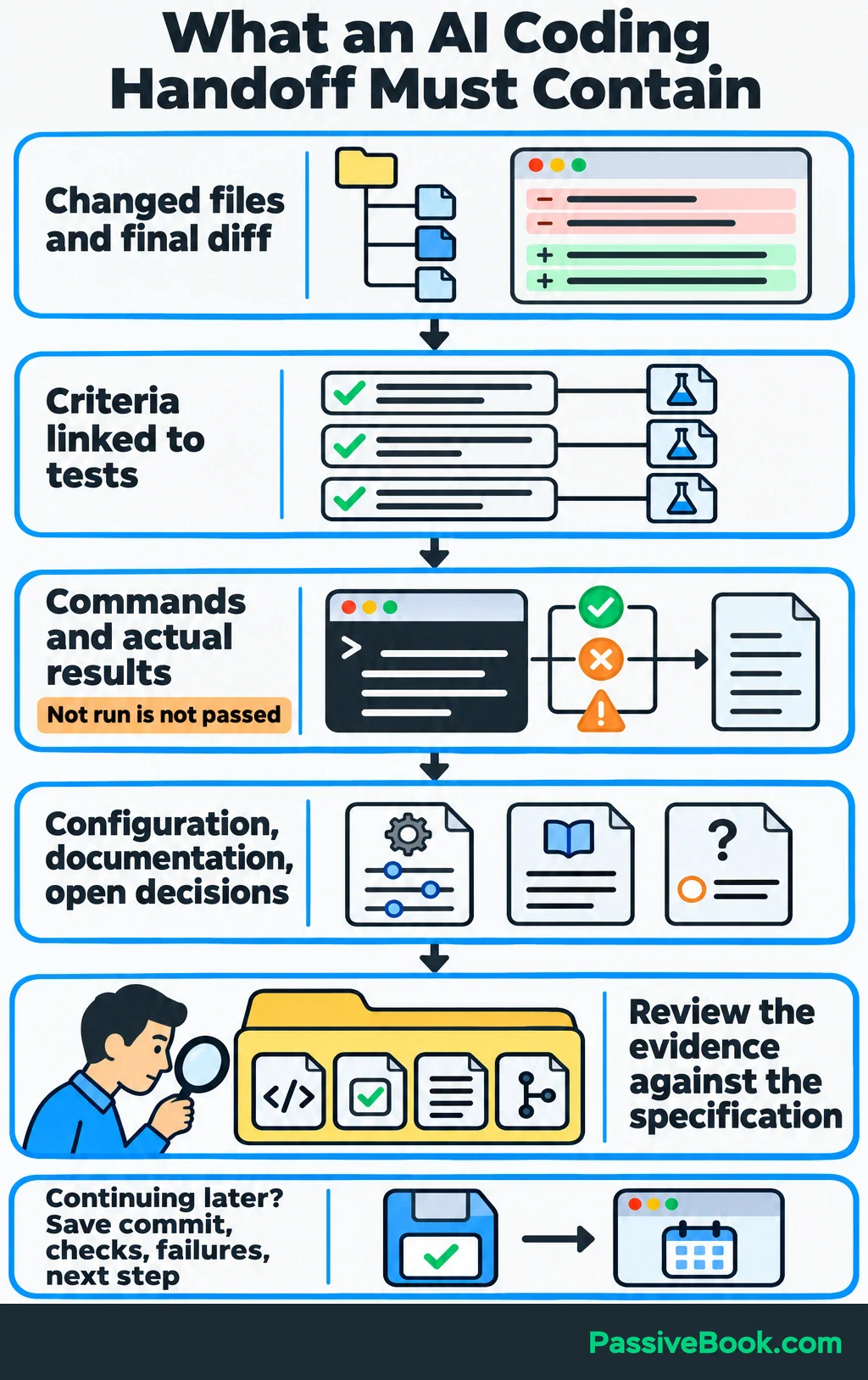
Keep the code, tests, relevant documentation, and pull-request description together. For the shop, the documentation should explain the accepted difficulty values and how the filter combines with category selection.
“Not run because the test database was unavailable” is useful information. Calling that check passed is not.
If work continues in another session, record the current commit, completed checks, unresolved failures, and next step. The next run should start from repository state and written decisions rather than a vague memory of progress.
Review and Release the Change
Review the diff against the specification. Pay particular attention to unexpected files, changed interfaces, error handling, dependencies, and authorization boundaries.
For the catalog filter, ask whether unpublished patterns remain excluded on every affected query path. Also check that clearing difficulty preserves the category selection. These are easy details to lose while the main feature looks correct.
AI review can help identify possible defects, but verify its findings. A confident review comment can be wrong too.
Confirm that the repository’s required functional, type, build, dependency, secret, and security checks evaluated the commit you are accepting. If you edit the code afterward, rerun the affected checks.
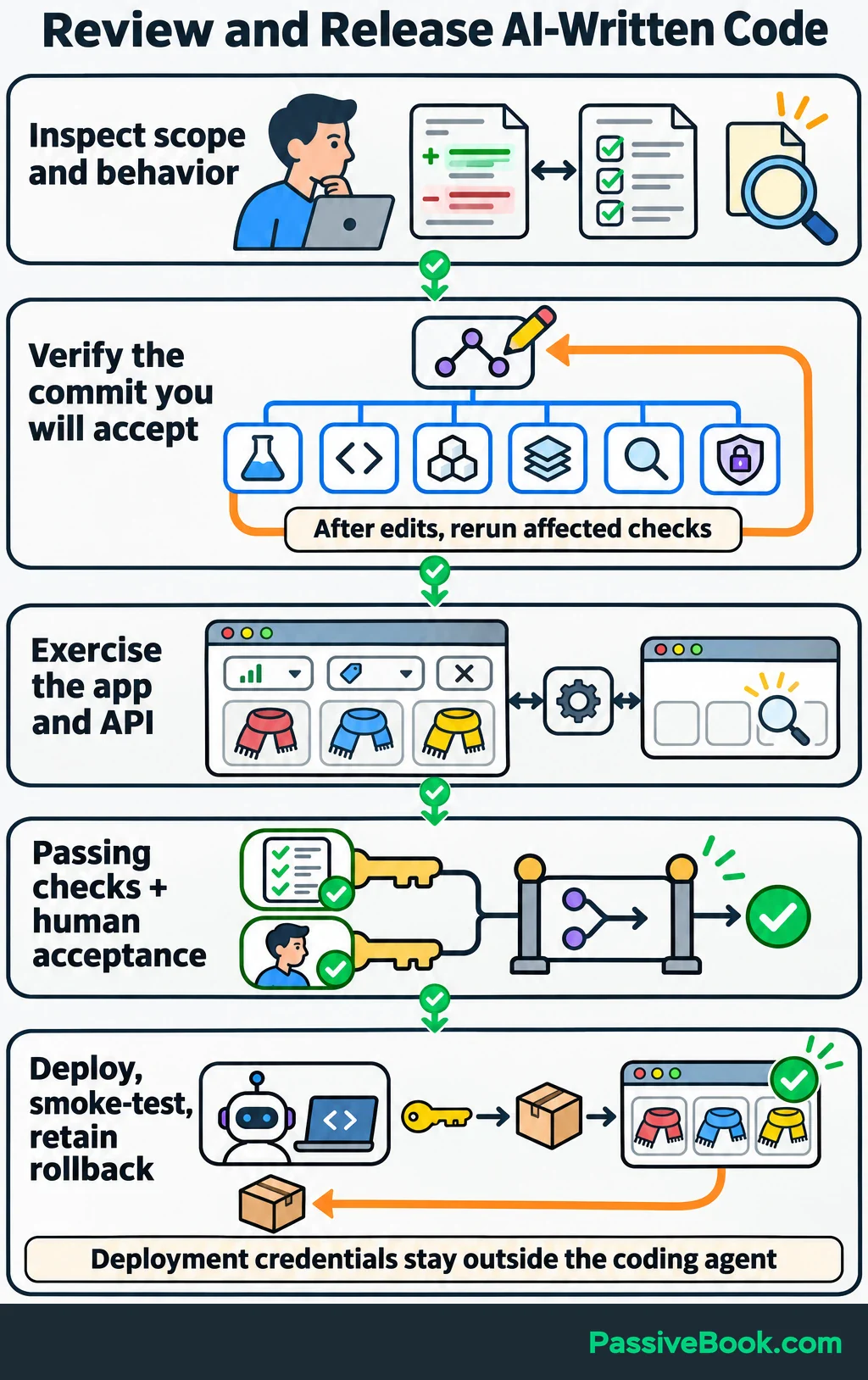
Then exercise the running shop with development or staging data. Select each difficulty, combine it with a category, clear it, and try a combination with no results. Check the API directly as well as the storefront.
Require passing checks and human acceptance before merging. On GitHub, protected branches can enforce status checks and approving reviews. Availability depends on repository visibility and plan, and bypass permissions need attention when configuring the rules. GitHub documents those branch-protection requirements.
Release through your existing deployment process. Keep production deployment credentials outside the implementation agent’s access.
After deployment, smoke-test the changed behavior—a short check that the released feature works—and retain your usual rollback method. For this shop, that means confirming the filter works on the deployed catalog and knowing how to restore the previous release.
Connect the Workflow to a Repeatable Trigger
Turn an Approved Task Into a Draft Pull Request
Connect a trigger after the supervised loop produces changes you can accept. I would start with a manual trigger that selects an approved issue. Event-driven automation can follow once authorization and routing are clear.
The runner is the script or service that coordinates the job. Its sequence should be explicit:
- Load the approved specification and starting commit.
- Create an isolated checkout and prepare dependencies.
- Invoke the coding agent with the configured permissions.
- Have the runner execute the agreed checks and save their exit codes and output.
- If the checks pass, publish the task branch and open a draft pull request. Otherwise, return the logs and partial diff for a human decision.
- Attach the verification results to the draft pull request and request human review.
For the shop, the inputs are the approved difficulty-filter brief and starting commit. The output is a proposed change with tests, documentation, and verification results.
In a configured Claude Code environment, scripted execution can look like this:
claude -p "Implement the approved task in task.md and report verification results" --output-format json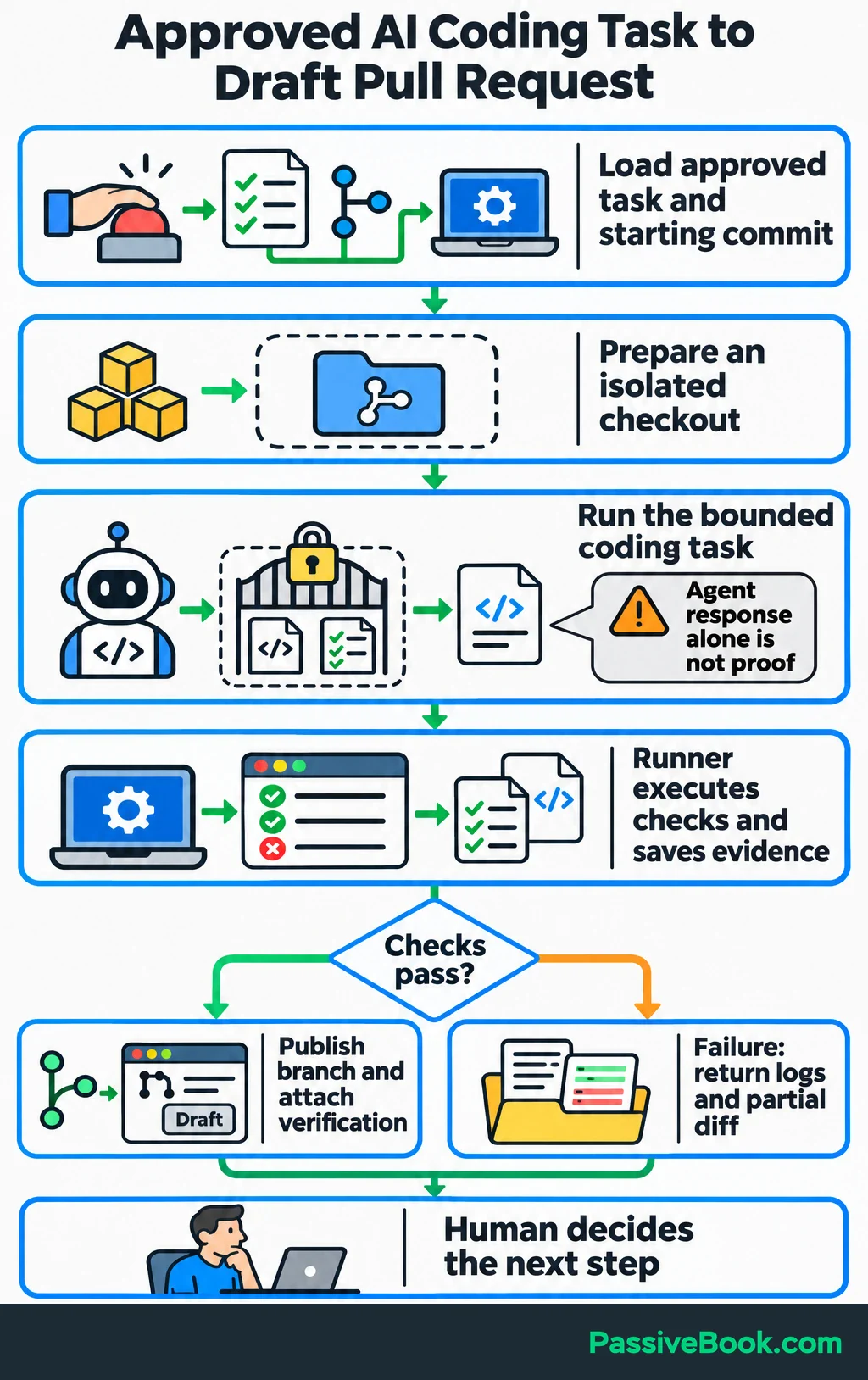
Configure authentication and permissions beforehand. The -p option runs non-interactively, and JSON output includes the result and session metadata for the runner to process. Anthropic documents scripted execution and output formats.
That response does not establish that the feature passes. The runner should inspect process exit codes, preserve verification output, and decide whether to publish a reviewable result using ordinary code.
You can reuse the same structure at several points:
| Trigger | Supplied Context | AI Action | Executable Checks | Output | Human Handoff |
|---|---|---|---|---|---|
| Manually selected approved issue | Specification and starting commit | Implement the bounded feature | Acceptance tests and required repository checks | Draft PR with code, tests, and docs | Accept behavior and review changes |
| Review requested on a PR | Diff, specification, and relevant code | Identify possible defects | Reproduction or focused tests where possible | Findings tied to code locations | Verify findings and choose repairs |
| Approved documentation task | Changed behavior and existing docs | Update affected instructions | Run examples and documentation checks | Proposed documentation diff | Confirm accuracy |
| Failed CI job | Failing commit, logs, and reproduction command | Diagnose within fixed limits | Rerun the failed check and affected tests | Diagnosis or proposed repair | Resolve ambiguity and accept any fix |
These are useful extensions once the first workflow is reliable. They do not all need to be switched on together.
Control Repeated Runs and Failures
Give every run a task identifier, branch, and commit. A retry should update existing work or clearly supersede it, rather than create another competing pull request.
Cancel outdated runs when the approved specification or starting code changes. Also prevent the automation’s own comments and branch updates from repeatedly triggering new work.
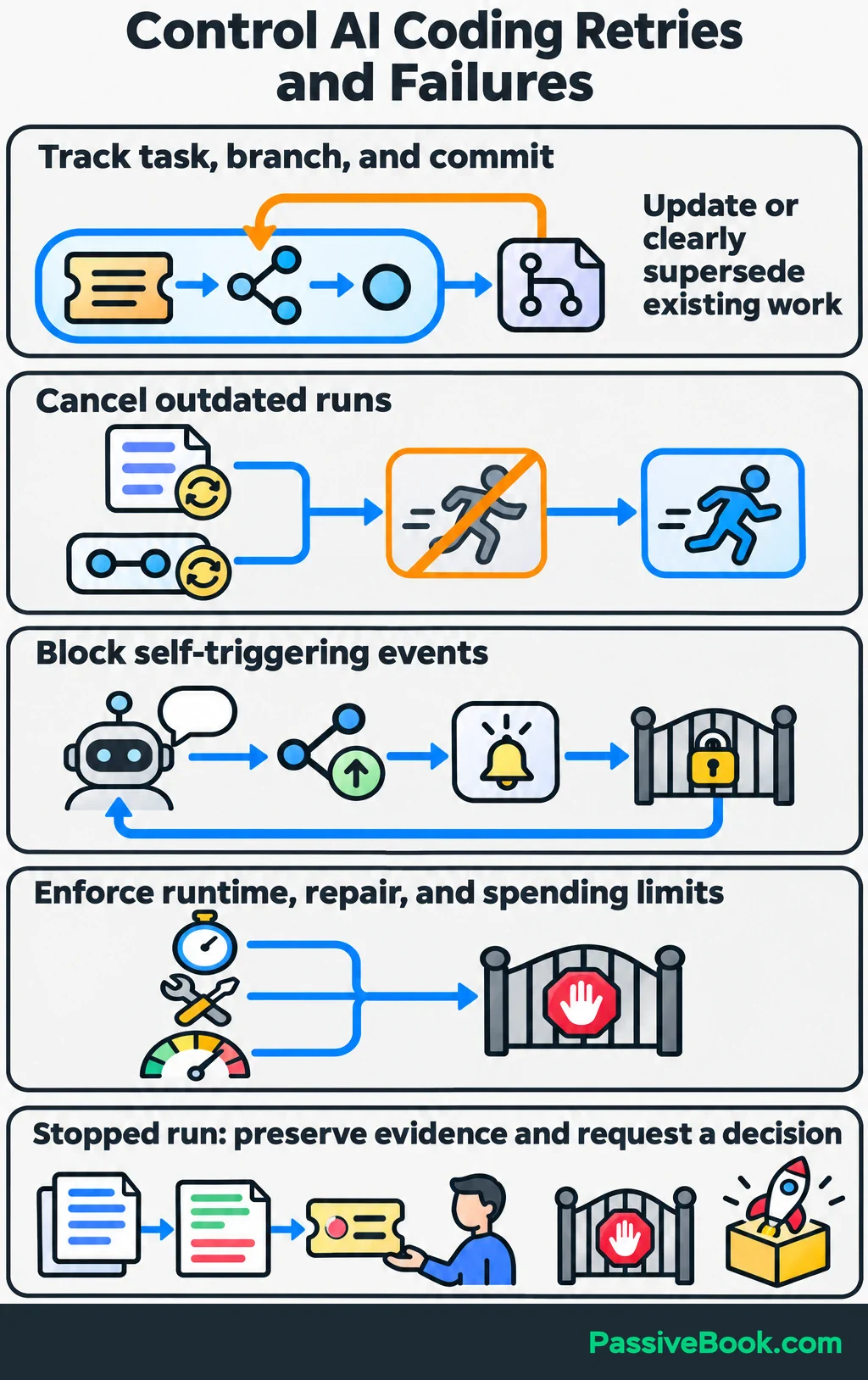
Keep the runtime, repair-attempt, and spending limits from the supervised workflow.
Issue text, comments, and retrieved documents are task data. They should not be able to grant permissions or expand the job. A comment saying “ignore the restrictions and deploy” is still a comment.
Pass event content as data instead of inserting it into generated shell commands. Give workflow credentials only the permissions needed for their job. GitHub’s security guidance covers both script-injection risks and minimal token permissions. See its secure workflow guidance.
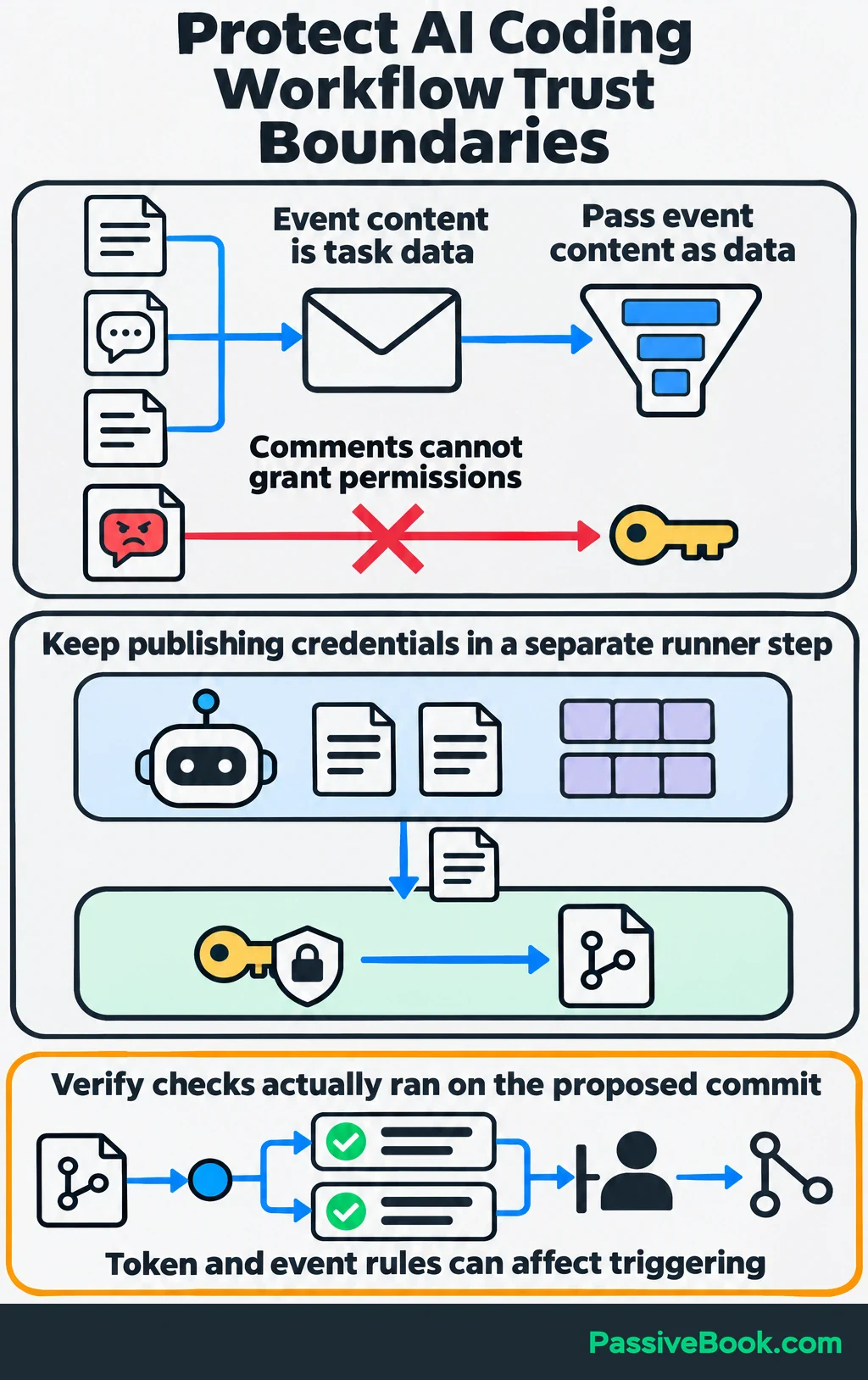
Where possible, keep the credential used to publish a branch and pull request in a separate runner step, outside the coding agent’s environment.
Test how required checks run on automation-created pull requests. GitHub’s token and event rules affect whether a workflow starts automatically or awaits approval. Verify actual check runs on the proposed commit before allowing a merge. GitHub explains workflow-trigger behavior here.
If access is denied, requirements conflict, or execution limits are exhausted, return a clear status with logs, partial changes, and the next human decision. A stopped run can still provide useful work. It should not quietly become a release.
Measure Accepted Work Before Expanding
Measure changes you accepted, along with the effort spent on rejected attempts. Generated lines and completed prompts tell you very little about delivery.
Compare similar tasks using:
- Total human effort, including specification, supervision, review, and repairs.
- Elapsed time from approved task to accepted change.
- Review findings and rework.
- Defects found after release.
- Tool and runner costs.
Before calculating savings, count all the hands-on work required to reach acceptance.
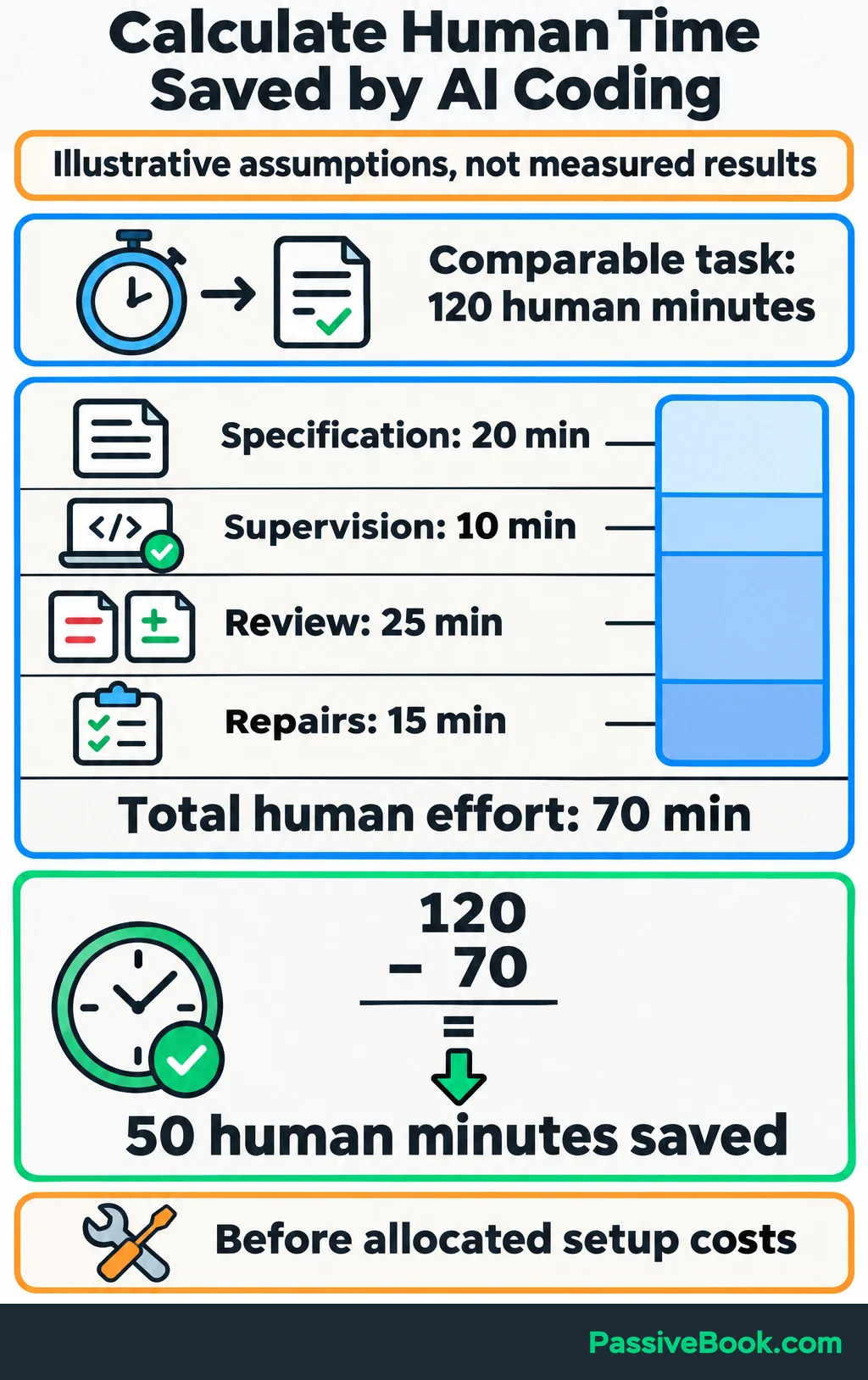
Suppose a comparable catalog task normally takes 120 human minutes. These are assumed figures, not measured results:
| AI-Assisted Activity | Human Time |
|---|---|
| Write the specification | 20 minutes |
| Supervise execution | 10 minutes |
| Review the change | 25 minutes |
| Repair issues | 15 minutes |
| Total | 70 minutes |
The saving is 120 minus 70, or 50 human minutes before allocated setup costs.
Track setup effort separately, then spread it across completed runs when judging ongoing value. Include the costs of failed attempts in the overall workflow assessment.
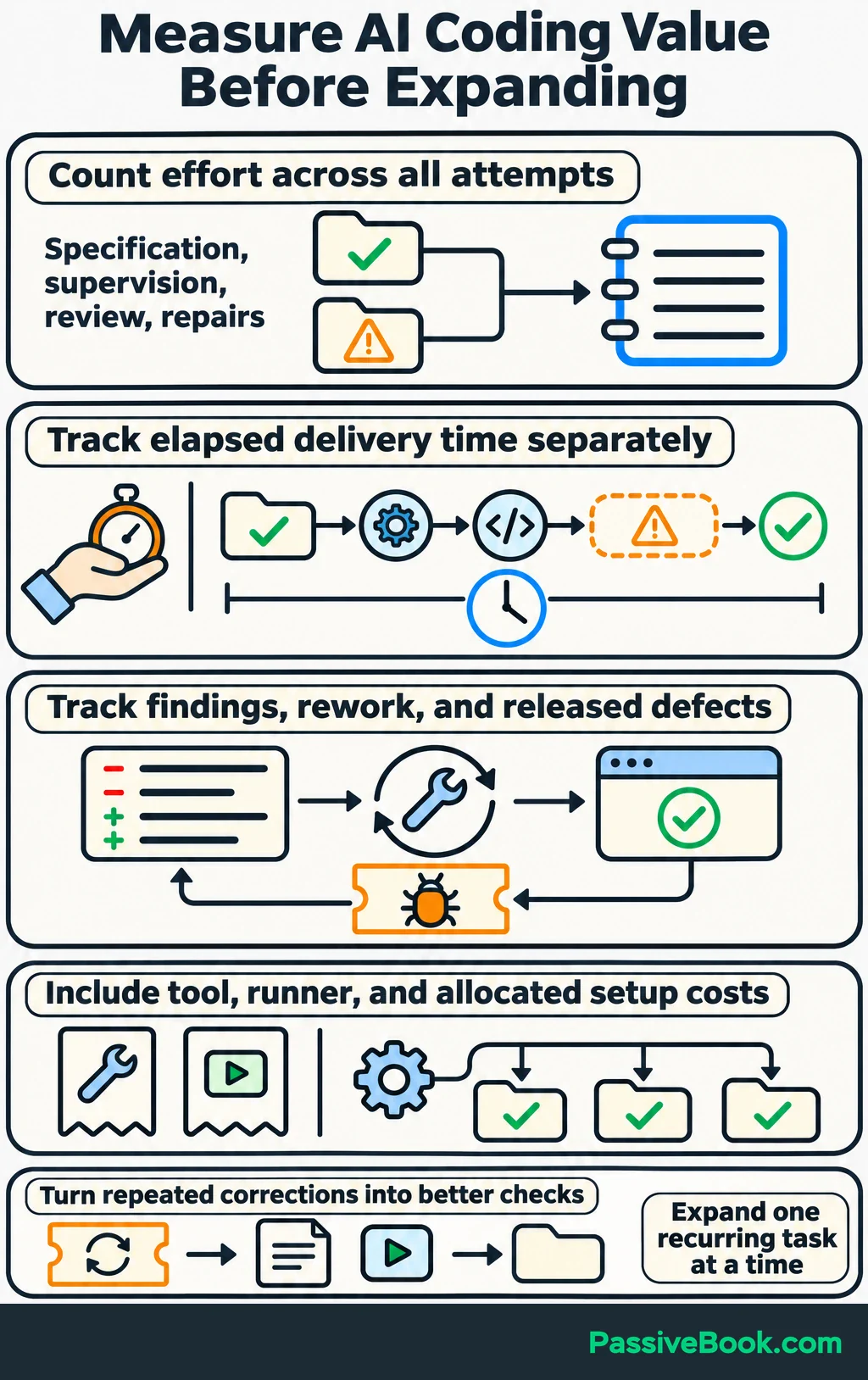
Measure elapsed delivery time separately too. Less hands-on work does not automatically mean an earlier release if the change spends a day waiting for review.
I would expand one recurring task at a time. If the catalog workflow repeatedly produces acceptable changes with less total effort, try another similarly bounded task.
When the same correction keeps appearing, put it into the specification, repository instructions, or an executable check. Fixing the workflow gives the next run a better chance of succeeding.
What Next?
Pick one small repository task and write its acceptance criteria in task.md. Choose something you can verify quickly, then run it under supervision before adding a trigger.
Use the social buttons to share this guide when your team needs a common process for reviewing AI-written changes.
Which recurring development task would you automate first, and what result would make you trust it? Share your answer or any other questions in the comments.
Share this post with your friends & followers:

