You’re reviewing a change to a download endpoint. The tests pass and the file arrives, but you still need to know whether someone could use it to open another customer’s purchase.
AI can offer a second set of eyes, but a confident warning creates its own work. Investigating a false alarm takes time, and dismissing a real defect can leave customer files exposed. To make those warnings easier to judge, this guide works through a download review from first comment to tested fix, with tool choices and GitHub automation you can use for other changes too.
Use AI for a First Pass Before Human Review
Give AI a focused job: inspect a change and identify defects that a human can investigate.
Ask it to look for incorrect behavior, missing permission checks, edge cases, broken interfaces, and regressions. Keep formatters, linters, type checkers, and security scanners alongside it. A formatter can settle spacing without starting a philosophical discussion in your pull request.
Here’s the order I would use:
- Define what the change should do.
- Run the existing checks.
- Give AI the changed code and relevant context.
- Investigate its findings.
- Test any accepted fixes.
- Obtain human approval for the final change.
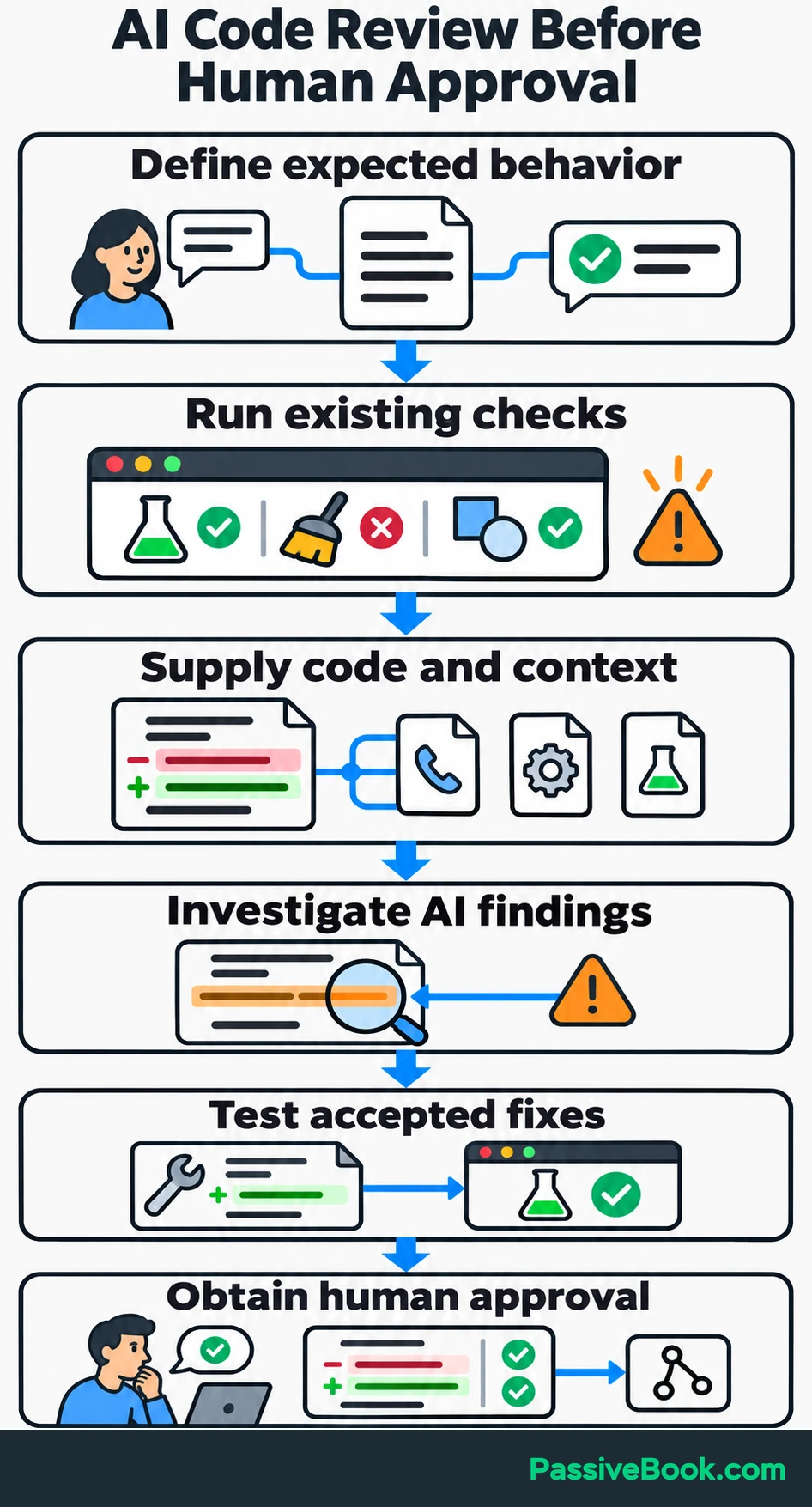
AI can miss bugs, invent problems, and suggest fixes that introduce security issues. GitHub documents all three limitations for Copilot review, so an empty report is no proof that the code is correct. GitHub’s review limitations
Throughout this guide, imagine you sell downloadable sewing patterns and are changing a Python download endpoint. Customers must sign in, and each customer may download only a pattern they paid for.
The shop, code, review comments, and test outcomes below are illustrative. They show the process rather than results from a tool run.
Choose an AI Code Review Tool
Choose where you want the review to happen before comparing subscriptions.
Chat suits a small change when you can supply the necessary code yourself. A repository-aware assistant makes more sense when the reviewer needs to follow helpers, callers, and tests across files. A pull-request reviewer puts feedback where the team already discusses changes.
These can work together. Local review catches problems before you open a pull request, and shared review gives the team a record of what remains.
| Tool | Review Workflow | Cost and Access |
|---|---|---|
| Approved chat assistant | You supply code, requirements, and check results in chat | Existing allowance or usage charges |
| Claude Code | Inspects repository files locally; accepts branches, revision ranges, paths, and pull requests | Session allowance or API billing |
| GitHub Copilot code review | Reviews on GitHub and in supported editors; supports automatic pull-request reviews | Paid access; reviews consume AI credits and can use Actions minutes |
| CodeRabbit | Reviews GitHub or GitLab pull requests, with command-line and editor options | Paid developer subscriptions with usage allowances; free reviews for public repositories |
| Hosted Claude Code Review | Managed GitHub reviews enabled by an organization owner | Separate usage billing for Team and Enterprise; unavailable with zero data retention enabled |
| PR-Agent | Runs from the command line, GitHub Actions, or your own deployment; you maintain configuration and credentials | MIT-licensed software; budget for model usage, infrastructure, and maintenance |
Copilot Free does not include code review. Eligible organizations can enable billed review access for members without licenses, so check organizational access before buying individual subscriptions.
I use Claude Code to build my Python content pipeline, so I would start with local review there before adding another service. Familiarity reduces setup work. It does not make the review more trustworthy.
If your team already works in GitHub and has Copilot access, I would pilot that instead. I would choose PR-Agent when control over execution and configuration justifies maintaining it.
Start with one approved tool. Budget for repeat reviews after pushes, model usage, CI execution, and the time spent investigating comments. “Free software” and “free to operate” are different entries in the spreadsheet.
Prepare the Change and Its Context
Define the Expected Behavior
Keep the change focused on one behavior and include related tests. Move unrelated refactoring into another pull request so reviewers can follow what changed and why.
For the pattern shop, write the download rules before requesting a review:
| Request | Required Behavior |
|---|---|
| Customer A requests A’s paid purchase | Return the purchased pattern |
| Customer B requests A’s paid purchase | Deny access and return no pattern content |
| A visitor requests a purchase without signing in | Reject the request and return no pattern content |
| Customer A requests A’s unpaid purchase | Deny the download and return no pattern content |
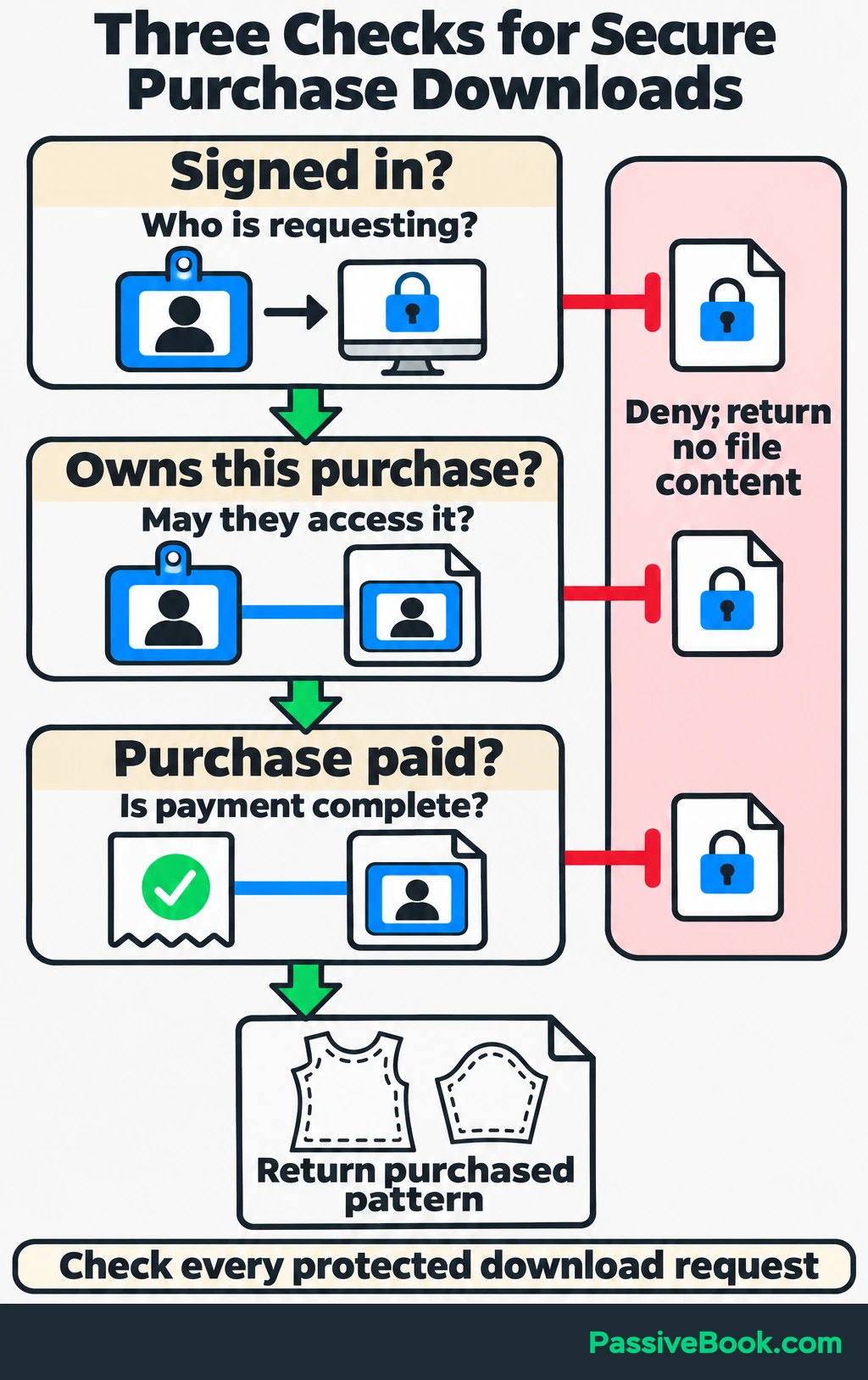
Signing in establishes who the customer is. Authorization establishes whether that customer may access this purchase. One does not replace the other.
Apply the permission check on every protected download request. OWASP recommends validating permissions on every request, including requests made outside the interface you expect people to use. OWASP authorization guidance
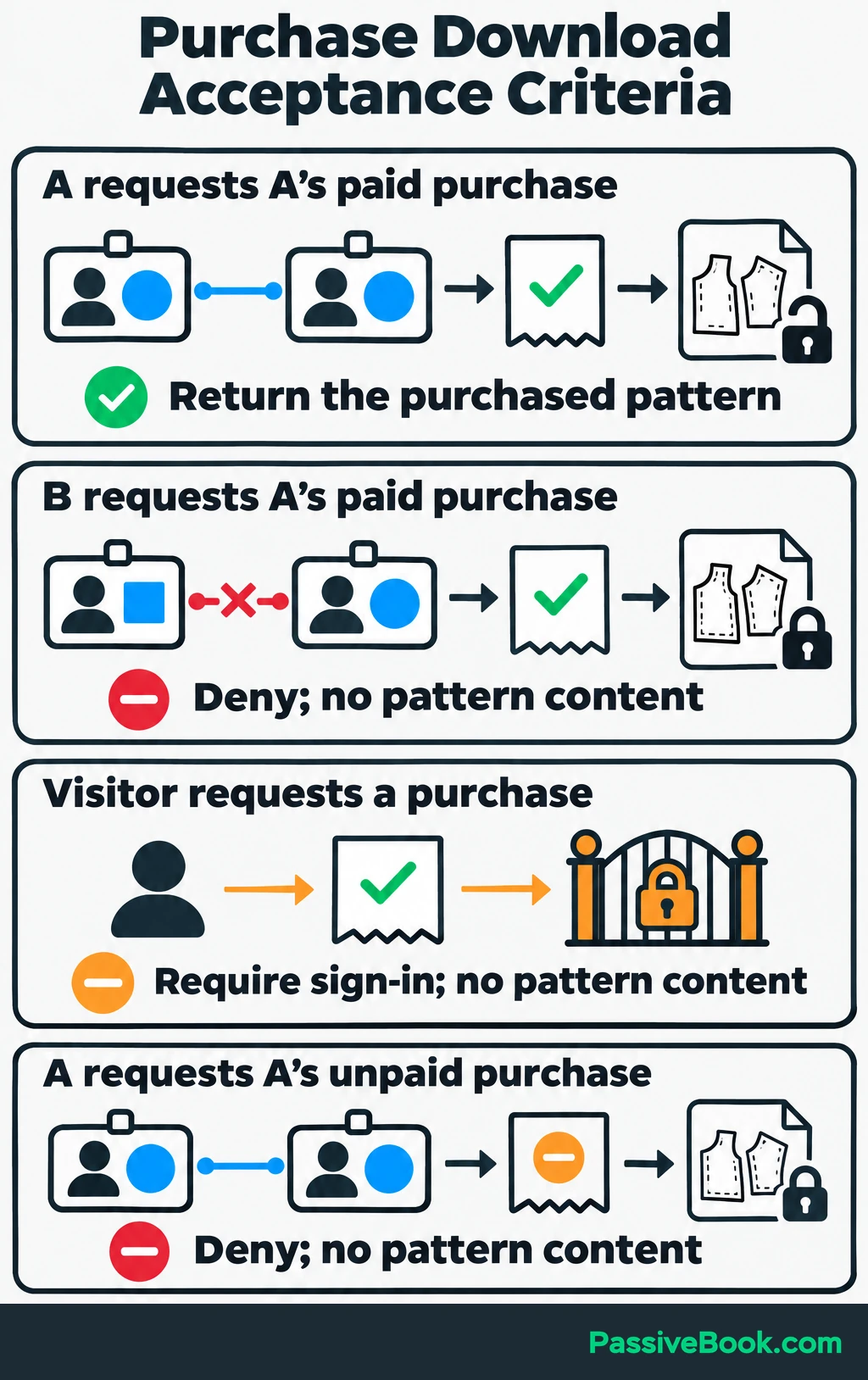
Then add a short checklist covering input handling, failure responses, affected callers, and repository conventions.
Run the relevant tests, linting, type checks, and security checks before AI review. Supply the commands and results, including failures and skipped checks. “Tests pass” tells the reviewer very little if the download tests never ran.
Supply Enough Code to Judge the Change
Start by identifying the target branch and the exact revisions under review.
For committed changes targeting main, fetch the intended base and inspect the difference:
git fetch origin main
git rev-parse origin/main HEAD
git diff origin/main...HEAD
The three-dot comparison shows changes from the branches’ common ancestor to HEAD. Record the commit IDs so later feedback can be tied to the code it actually reviewed.
That comparison excludes unfinished working-tree changes. Supply those separately:
git diff --cached
git diff
git ls-files --others --exclude-standard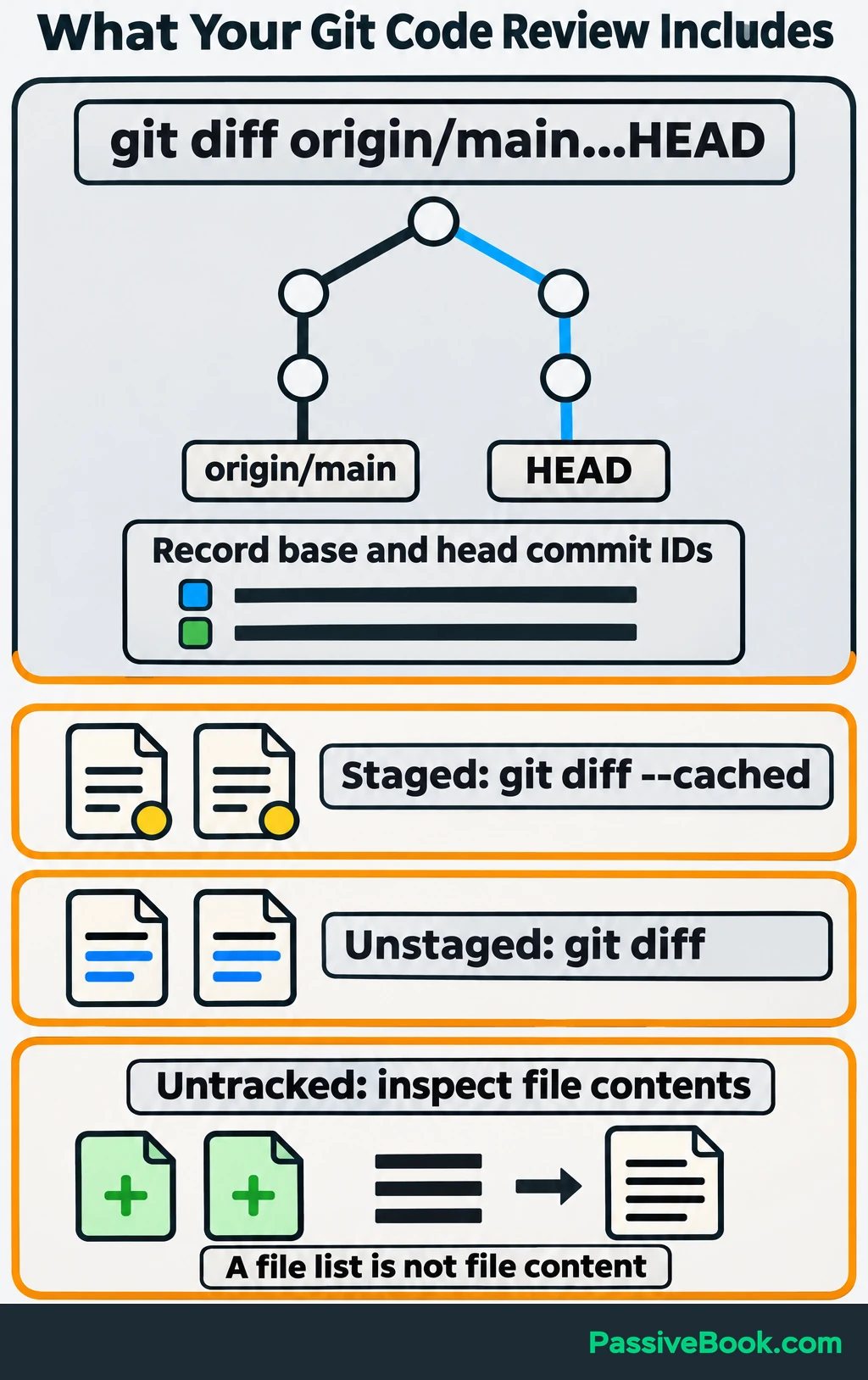
The last command lists new files; it does not include their contents. Inspect them before adding relevant files to the review context.
Give the reviewer:
- The requirement and acceptance criteria.
- The diff and reviewed revisions.
- Affected functions, relevant callers, and shared helpers.
- Data structures and tests needed to understand the behavior.
- Check commands, results, and known gaps.
For the download change, that means the route, purchase lookup, ownership check, and file-delivery path. Follow the dependency chain rather than uploading everything and hoping the important part wins.
Keep standing guidance short. Put architecture boundaries, review priorities, and validation commands in .github/copilot-instructions.md for Copilot or CLAUDE.md for local Claude Code. The prompt can then focus on what makes this change unusual.
Before sharing private code, confirm that the account and deployment meet your repository’s rules for training use and retention. Remove credentials and customer records. Local installation does not guarantee local processing; Claude Code’s data terms, for example, vary by account and deployment. Claude Code data policies
Run a Focused AI Review
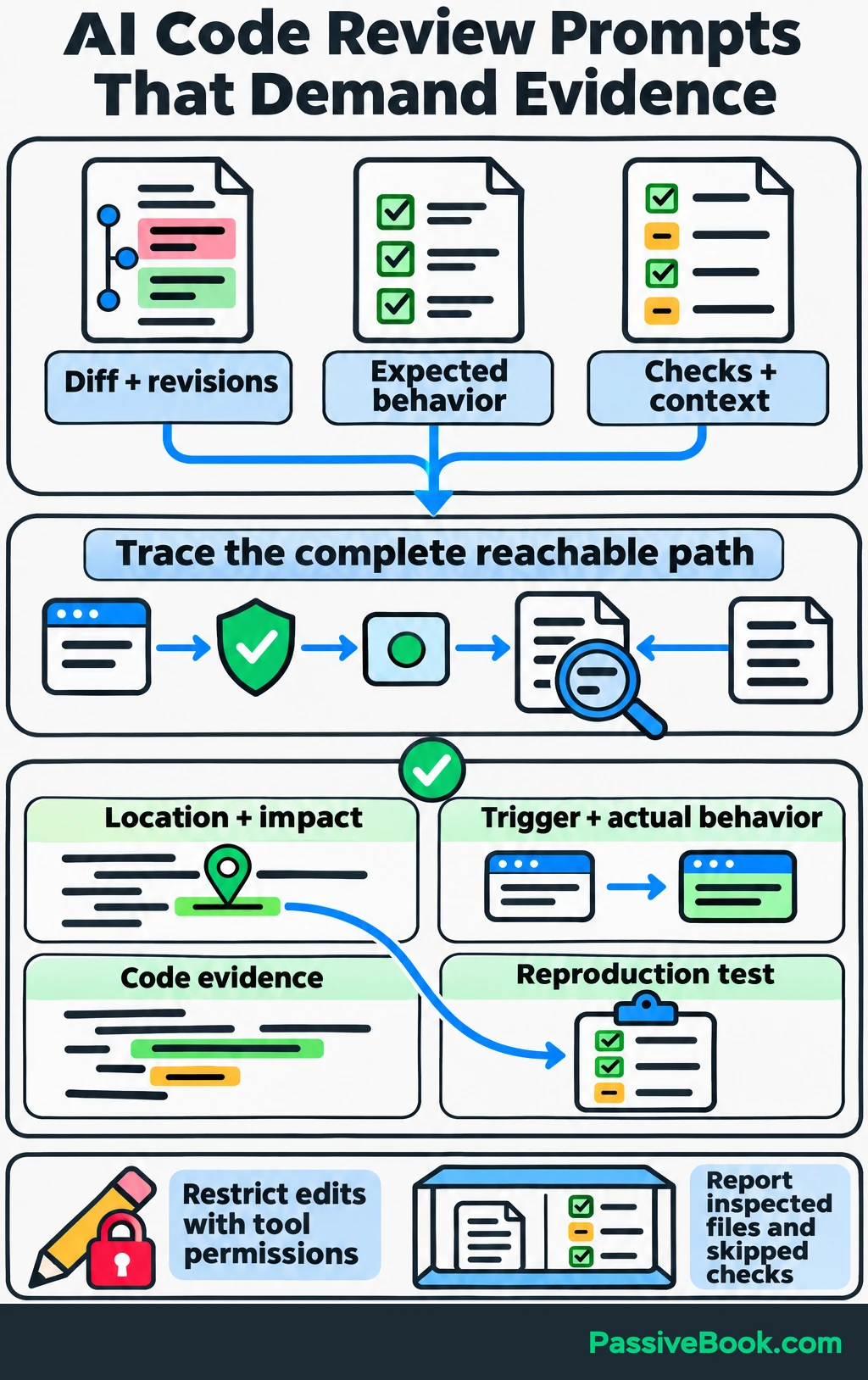
Use a Prompt That Demands Evidence
Begin with a report-only review. Use the tool’s permissions to restrict editing and command execution because a sentence in a prompt is not an access control.
If validation commands are allowed, run them in an isolated checkout with test data and no production credentials.
Here is a reusable prompt you can adapt:
Review the supplied diff between [base commit] and [head commit].

Expected behavior:
[Acceptance criteria]

Repository guidance:
[Architecture boundaries, conventions, and review priorities]

Existing checks:
[Commands, results, failures, and skipped checks]

Inspect the changed code and relevant callers, helpers, and tests.
Prioritize introduced correctness defects, security issues, and regressions.

Trace inputs, permission checks, state changes, outputs, and error paths.
If an interface changes, inspect its consumers.

For each finding, provide:
- Priority and concrete user impact
- File and precise location
- Reachable triggering conditions
- Expected behavior versus actual behavior
- Supporting code and reasoning
- A proposed reproduction or regression test

Separate findings supported by the inspected code from questions needing more context.
Do not invent missing repository behavior or claim checks were run.

Finish with files inspected, checks run, and checks skipped.
Do not edit files. Run only the validation commands explicitly authorized.
This is the core of how to use AI for code review: give it a requirement to test against and demand enough evidence to investigate its answer.
If writing the context and test cases is slowing you down, the AI Code Review Coach can draft both around your change. You still inspect the output and run the tests; the tool gives you a concrete starting point.
Free AI Code Review Coach




In Claude Code, after fetching the intended base, enter this at the Claude Code prompt:
/code-review origin/main...HEADLeave out --fix while you assess findings. The command requests a report without that flag, and edits remain subject to the session’s permissions. Claude Code review behavior
Ask for another pass when you have a distinct unresolved question. For example: “Trace ownership enforcement through the download helpers.” Repeating “look harder” gives you more output without defining what remains uncertain.
Recognize an Actionable Finding
A useful finding connects a reachable input to incorrect behavior. It identifies the responsible code and gives you a way to reproduce the problem.
Suppose download_pattern(purchase_id) contains this change:
- purchase = get_purchase_for_customer(purchase_id, current_user.id)
+ purchase = get_purchase(purchase_id)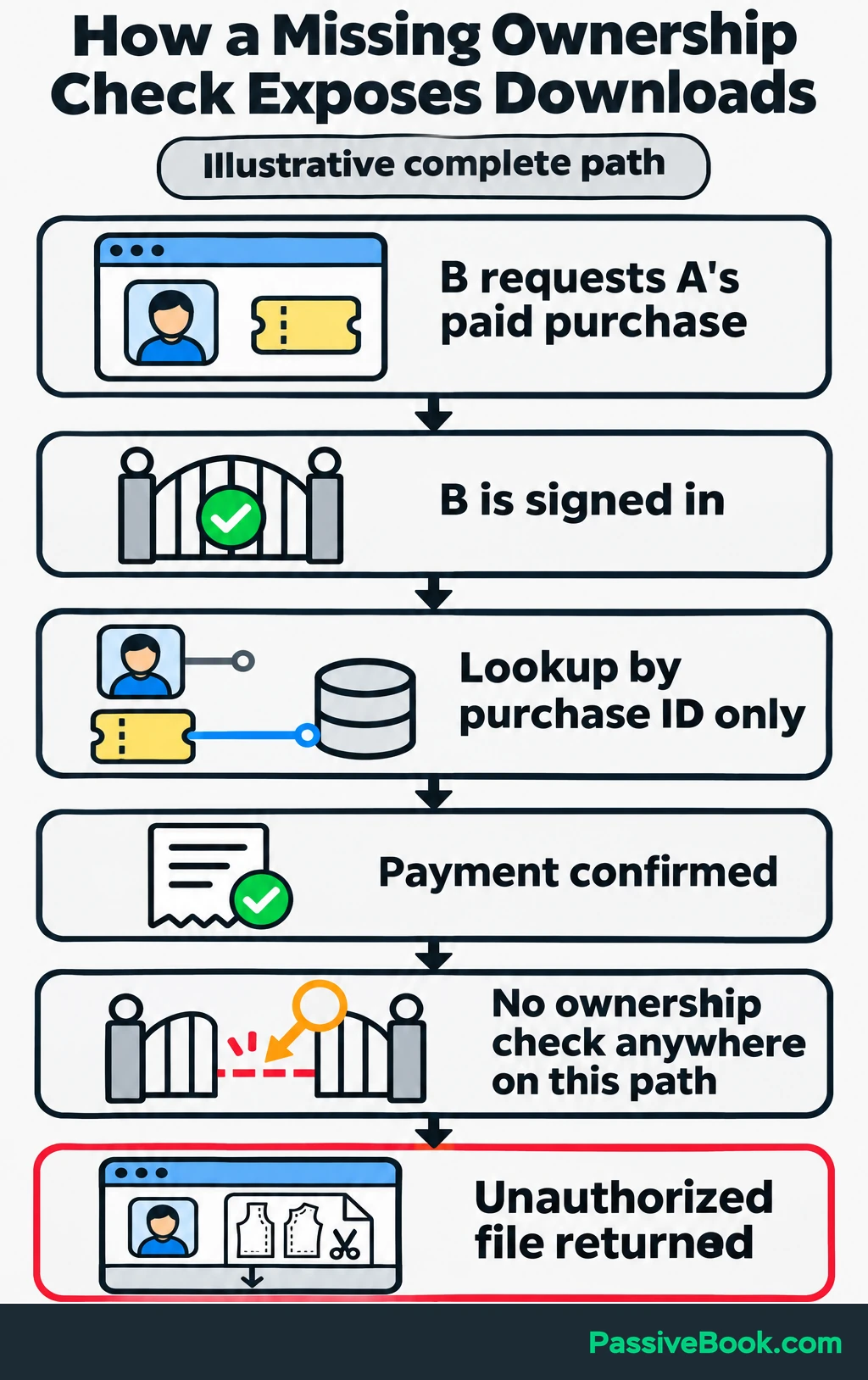
In this example, the remaining flow checks that the visitor is signed in, confirms payment, and sends the file. No middleware, helper, or file-delivery layer checks ownership.
That last detail matters. A lookup by purchase ID alone does not prove a vulnerability if another layer enforces access.
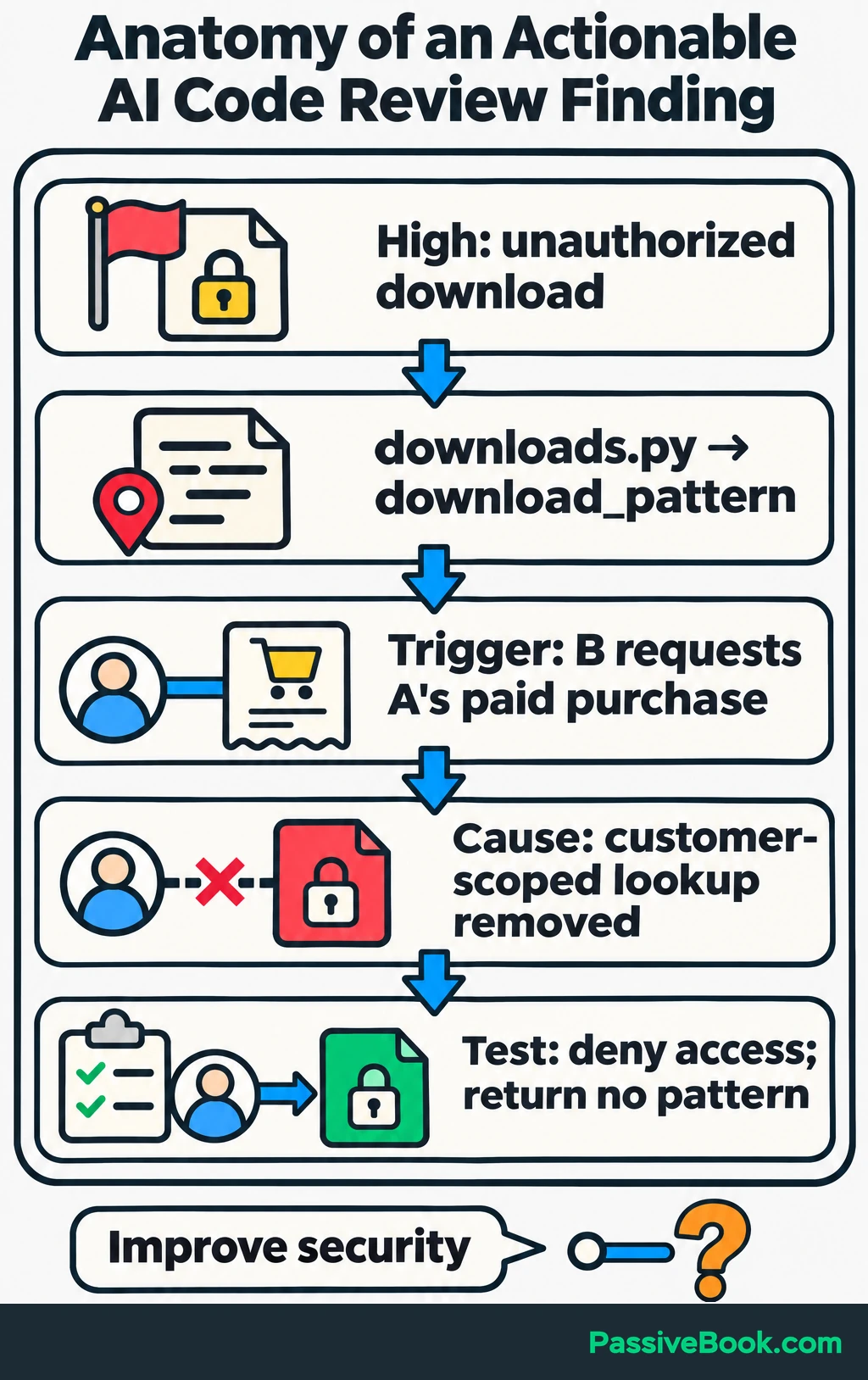
Given the complete path above, an actionable review comment would read:
High priority —
downloads.py,download_pattern: replacing the customer-scoped lookup removes the ownership check. Customer B can request customer A’s paid purchase ID and receive A’s pattern. Authenticate as B, request A’s purchase, and verify that access is denied without returning pattern content.
Compare that with “Consider improving security here.” One gives you an investigation. The other gives you homework with no question attached.
Verify Findings and Test Accepted Fixes
Reproduce the Claimed Defect
Read the cited code before changing anything. Confirm that the input can reach the reported path and that no other check prevents the outcome.
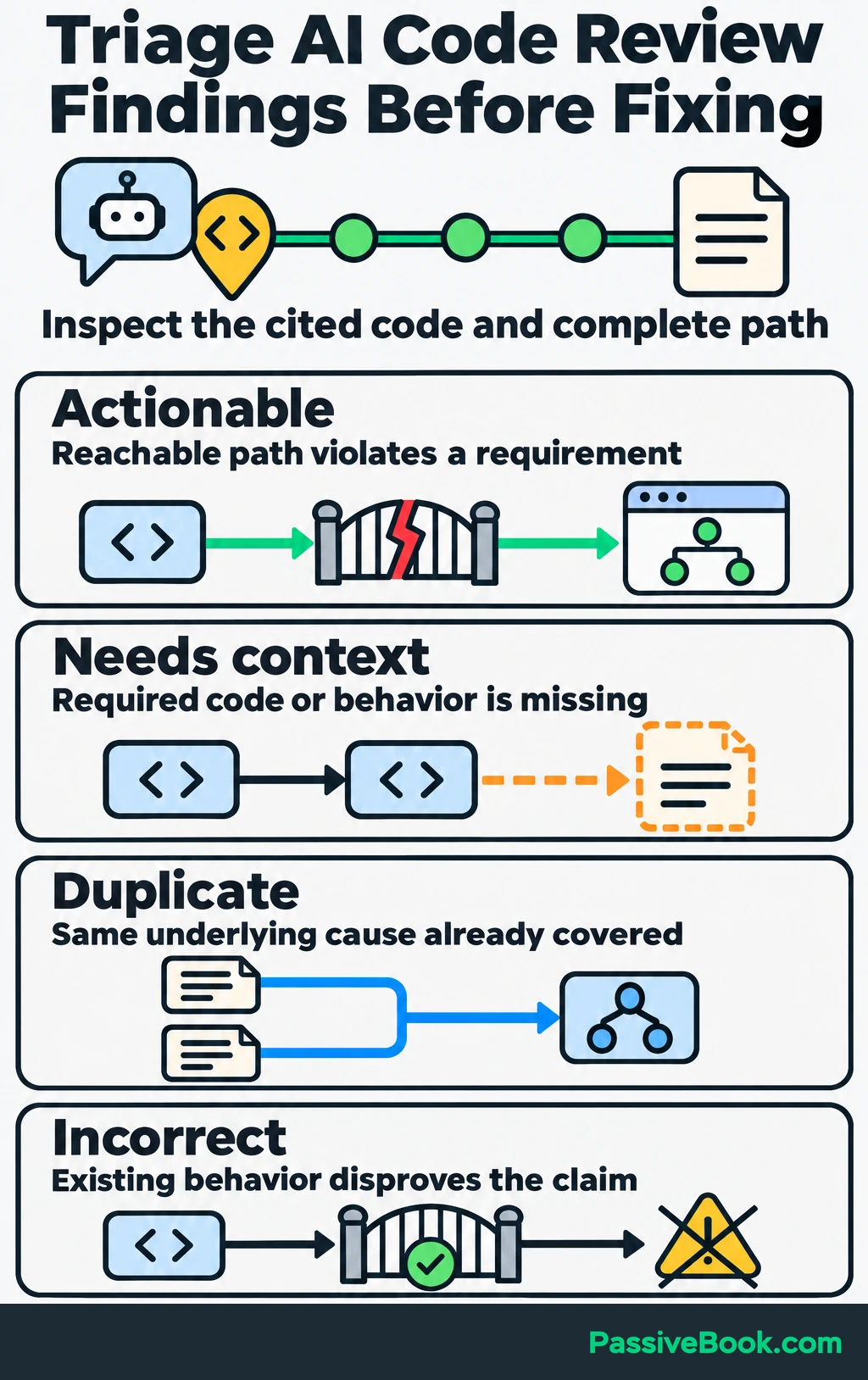
Sort each comment into one of four groups:
- Actionable: The path is reachable and violates the requirement.
- Needs Context: The answer depends on code or behavior not yet inspected.
- Duplicate: Another finding already covers the same cause.
- Incorrect: Existing behavior disproves the claim.
Prioritize consequences. Unauthorized downloads, lost data, and broken operations deserve attention before optional cleanup.
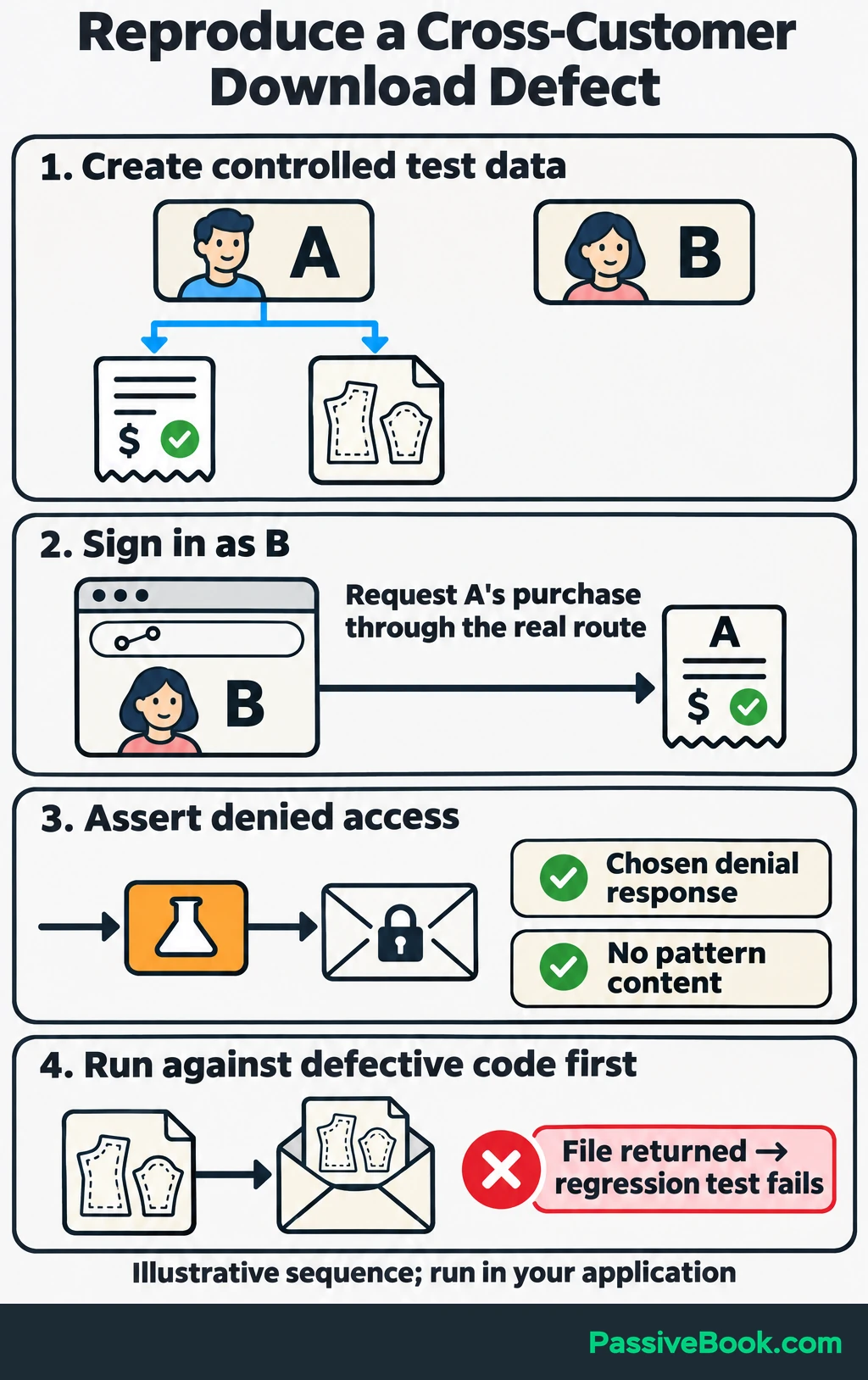
For the pattern shop, create two test customers and a paid purchase belonging to A. Sign in as B and request A’s purchase through the real application route.
The test should expect the application’s chosen denial response and verify that no pattern content is returned. If your application uses 404 to avoid revealing whether another customer’s purchase exists, test that response consistently.
Run this test against the defective implementation first. In the illustrative example, it fails because the response contains the pattern. That establishes the problem independently of the proposed fix.
Then cover the neighboring requirements:
| Test | Expected Result |
|---|---|
| A requests A’s paid purchase | The correct pattern is returned |
| B requests A’s paid purchase | Access is denied without pattern content |
| An unauthenticated visitor requests the download | Authentication is required and no pattern content is returned |
| A requests A’s unpaid purchase | The download is denied |
Check outcomes rather than asserting that a particular helper was called. A test that merely repeats the patch can pass while the requirement remains broken.
When automation is impractical, document a focused manual reproduction with the setup, request, expected result, and observed result.
Review the Patch and Approve the Final Change
Once the defect is confirmed, ask for the smallest fix.
Here, restoring the customer-scoped lookup may be enough, provided the paid-status check remains. Inspect what happens when that lookup finds no accessible purchase. The endpoint should deny access cleanly rather than crash or fall back to an unrestricted lookup.
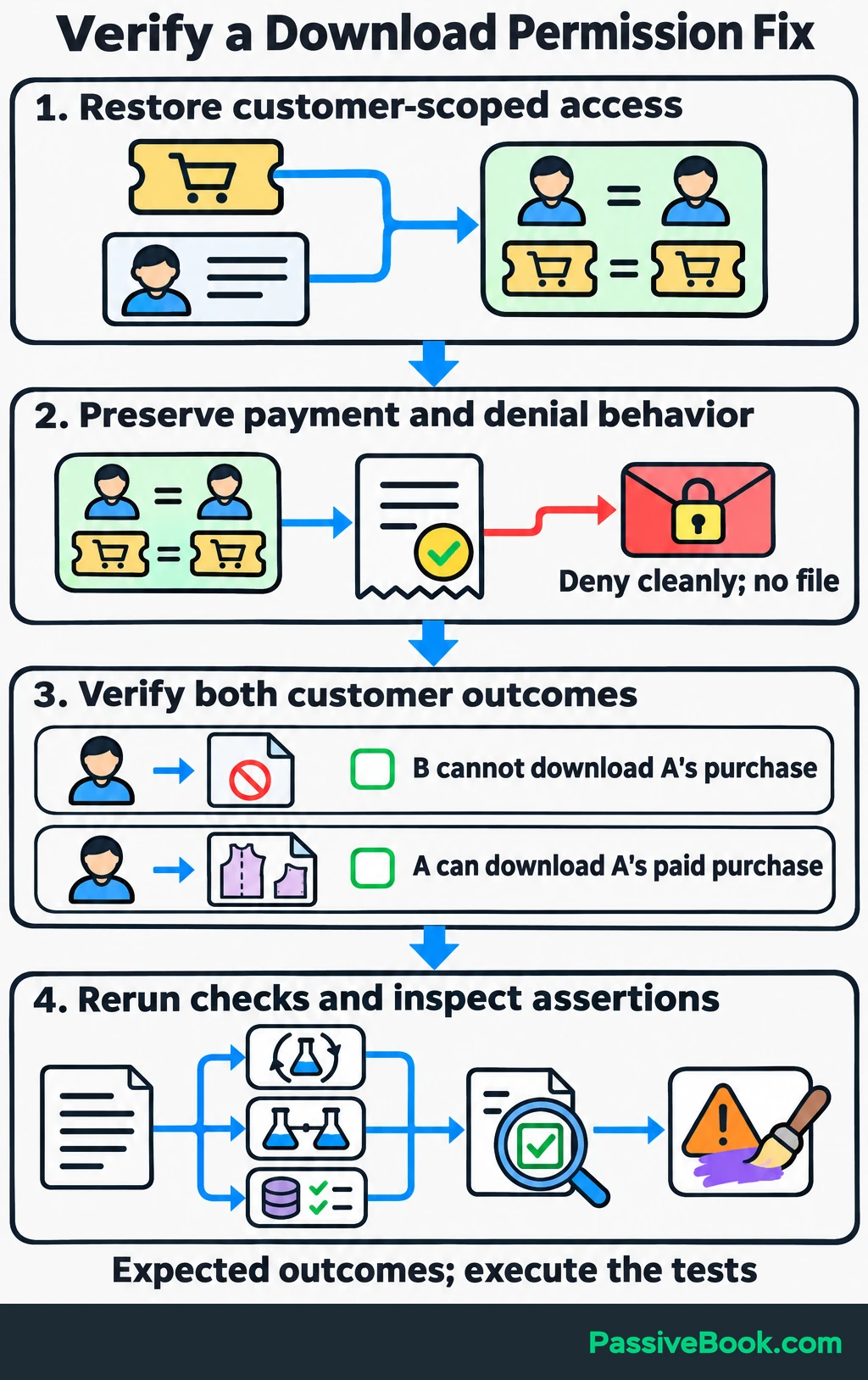
Review the complete patch for unrelated edits and new failure paths. Then rerun the regression test, affected tests, and required repository checks.
In the worked example, the cross-customer test should now pass because B receives no file, while A can still download the paid pattern. Those are the expected outcomes to verify, not a substitute for running the tests.
Read generated assertions as carefully as generated application code. I would reject a “fix” that changes the expected response just to turn the test green. That is repainting the warning light.
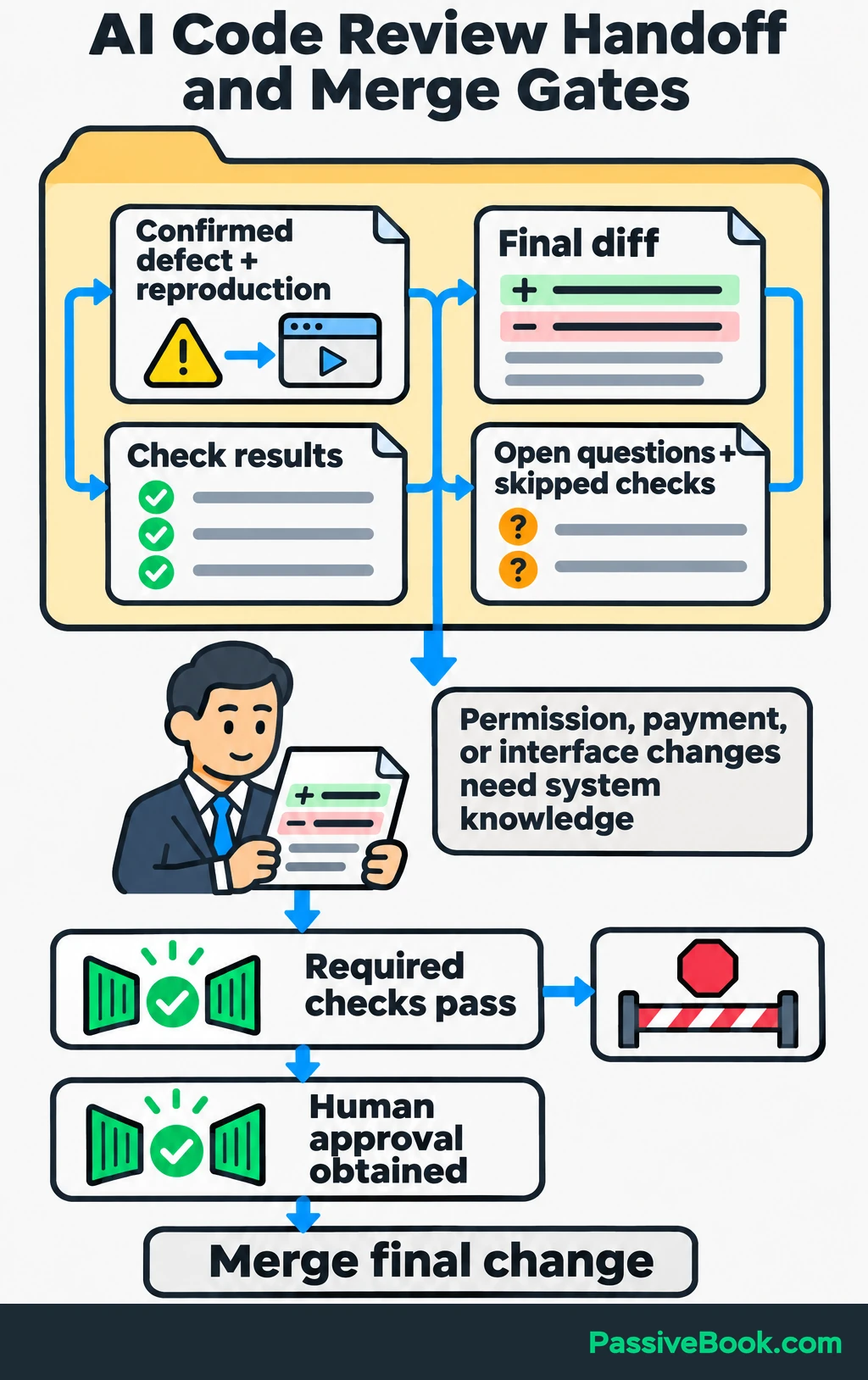
Give the human reviewer a compact handoff containing the confirmed defect, reproduction, final diff, and check results. Include unresolved questions and skipped checks.
Consequential permission, payment, or shared-interface changes should reach someone who understands the affected system. Keep human approval and required checks as explicit merge conditions, including when AI wrote the original code.
Automate Pull-request Reviews
Automate the review request once the manual workflow produces useful findings.
Pilot one integration on a small repository or limited set of pull requests before expanding it.
Configure a Hosted Reviewer on GitHub
For a Copilot pilot, first confirm review access and the organization’s code-review policy. Open a test pull request and request Copilot under its reviewers.
If that works, configure automatic requests:
- Create an active branch ruleset targeting the intended branch.
- Enable “Automatically request Copilot code review.”
- Decide whether to review drafts and new pushes.
- Keep “Allow Copilot approvals to count toward merge requirements” disabled in the repository’s Copilot code-review settings.
When push reviews are off, request another review after fixes; the earlier review covers the old code. Copilot review configuration
Add the ownership requirement to repository instructions:
Download access requires an authenticated customer, ownership of the
requested purchase, and paid status. Check that denied requests return
no file content. Inspect the route, purchase helpers, and file delivery.
Review changes to that guidance too. Copilot loads pull-request instructions from the head branch, which means the same pull request can change both the code and the instructions used to review it. Copilot instruction-loading behavior
Run PR-Agent in GitHub Actions
For trusted contributions from branches inside the same repository, add .github/workflows/pr_agent.yml.
Before enabling this starter, replace <REVIEWED_FULL_COMMIT_SHA> with a reviewed commit from the action’s repository. Store the model credential as an Actions secret. This example uses PR-Agent’s documented OPENAI_KEY variable; a different provider needs matching credential and model configuration.
name: AI review

on:
  pull_request:
    types: [opened, reopened, ready_for_review, synchronize]

permissions: {}

jobs:
  review:
    if: >-
      github.event.sender.type != 'Bot' &&
      github.event.pull_request.head.repo.full_name == github.repository &&
      github.event.pull_request.draft == false
    runs-on: ubuntu-latest
    timeout-minutes: 15

    permissions:
      contents: read
      pull-requests: write
      issues: write

    steps:
      - name: Review pull request
        uses: the-pr-agent/pr-agent@<REVIEWED_FULL_COMMIT_SHA>
        env:
          OPENAI_KEY: ${{ secrets.OPENAI_KEY }}
          GITHUB_TOKEN: ${{ secrets.GITHUB_TOKEN }}
          github_action_config.auto_review: "true"
          github_action_config.auto_describe: "false"
          github_action_config.auto_improve: "false"
          github_action_config.handle_push_trigger: "true"
          github_action_config.push_commands: '["/review"]'
This job fetches pull-request data without checking out application code. Fork pull requests normally lack the model secret and a write-capable token, so this starter skips them. PR-Agent GitHub integration
The synchronize event starts a job after pushes; handle_push_trigger and push_commands tell PR-Agent to run /review. PR-Agent automation settings
Keep builds and tests in a separate job. Treat pull-request text and code as untrusted input, and pin the action to a full commit SHA. GitHub Actions security guidance
Merge the reviewed configuration and open a test pull request. Confirm that the initial review runs, push another commit, and confirm that a new review follows.
Make Review Coverage Visible
A review status should tell you which commit was inspected and whether the review completed.
Distinguish current findings from comments on older revisions; an old successful run does not cover new code.
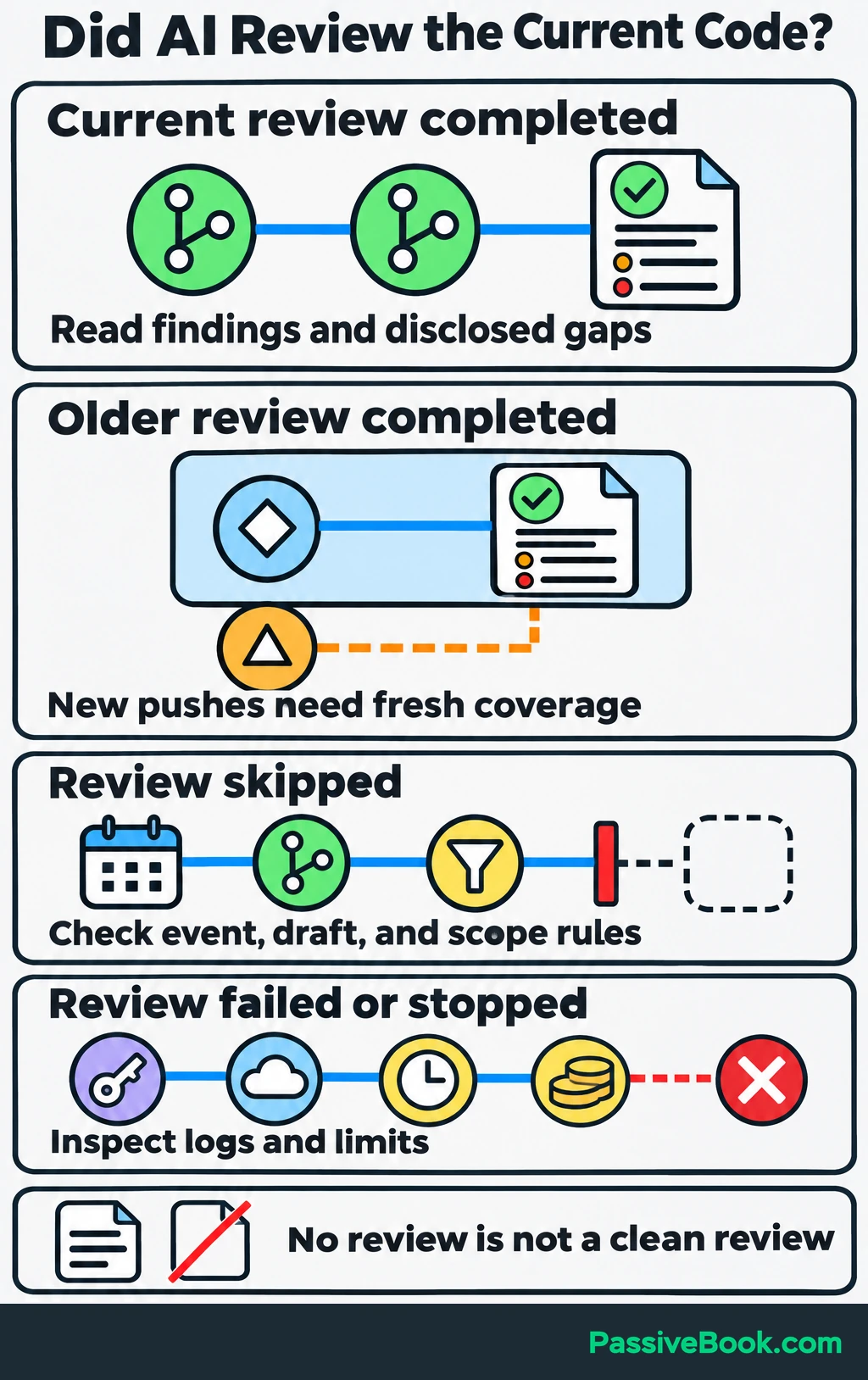
Set limits for runtime, file scope, retries, and spending. Make skipped files, failed runs, and exhausted budgets visible in the status or handoff.
If feedback is missing, check:
- Whether the event qualified, including draft and push rules.
- Repository access and credentials.
- Model budget and service availability.
- Job logs and any reported failures.
“No review arrived” and “the reviewer found no issues” are different states. Your workflow should make that difference obvious.
Improve Feedback Without Adding Review Overhead
Judge the workflow by useful findings and total effort.
For each pilot review, record the confirmed defects, incorrect or duplicate comments, investigation time, review cost, and defects later caught by humans or tests. Include context preparation, waiting, and patch review when judging time savings.
A reviewer that produces ten comments and one useful finding may still help. A reviewer that takes an hour to disprove ten confident warnings is volunteering you for extra work.
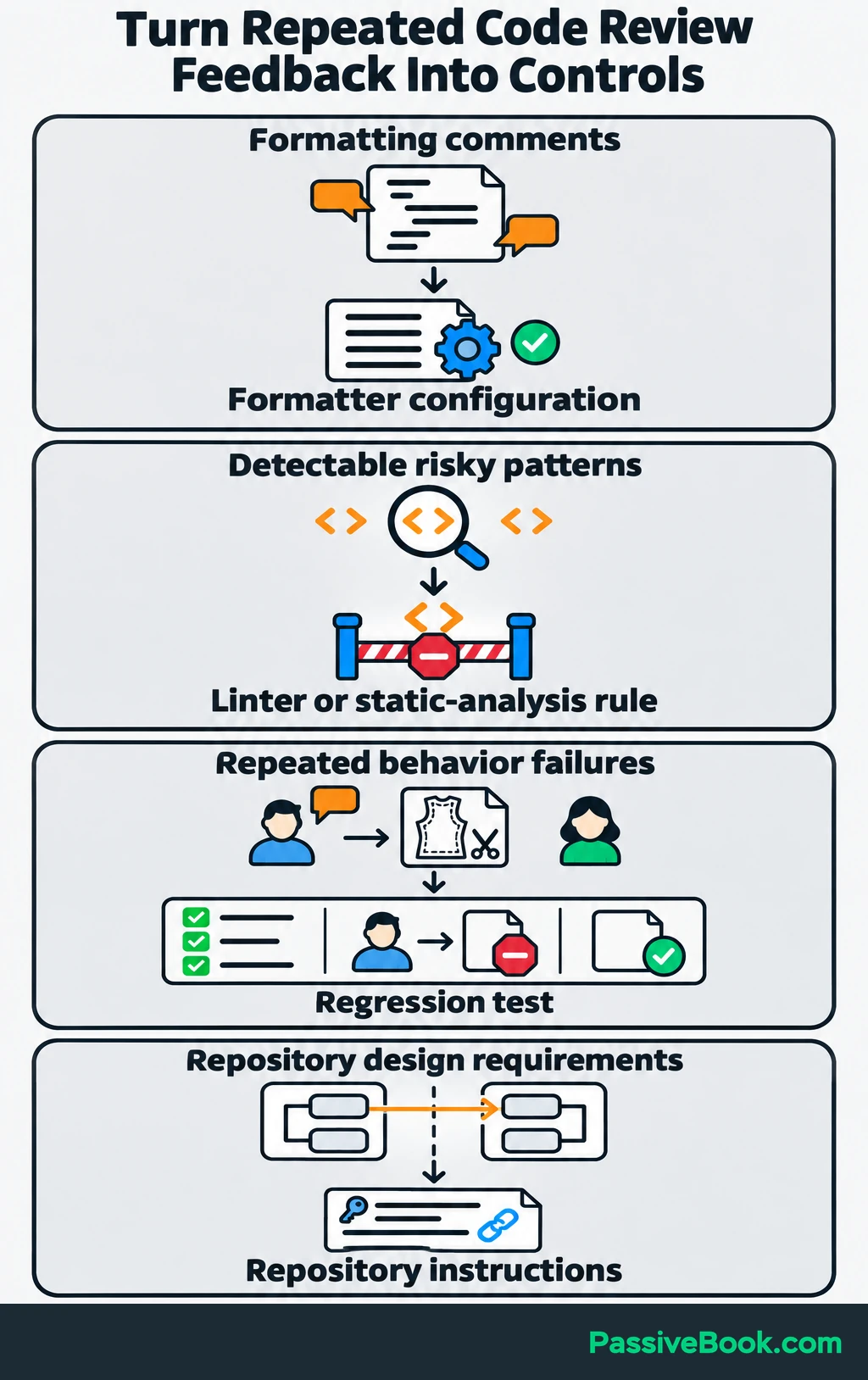
Move recurring feedback into controls that run reliably:
| Recurring Feedback | Durable Control |
|---|---|
| Inconsistent formatting | Formatter configuration |
| A detectable risky code pattern | Linter or static-analysis rule |
| A repeated behavior failure | Regression test |
| A repository-specific design requirement | Concise repository instructions |
For the pattern shop, preserve both the ownership requirement and the cross-customer download test. The instruction helps future reviewers look in the right place, and the test checks the behavior directly.
Expand automation when it keeps contributing actionable findings within your time and spending budget. I would rather have one reviewer I can assess than three bots debating the same helper.
What Next?
Choose one small pending change and write its acceptance criteria before requesting an AI review. Take one finding through reproduction, a focused fix, and validation so you can judge the whole workflow.
Use the social buttons to share this guide when your team needs a common process for turning AI comments into tested changes.
Where does your review process lose the most time: preparing context, investigating findings, or validating fixes? Leave your answer and any other questions in the comments.
Share this post with your friends & followers:

