A cheap marketing tool can become expensive when it needs three other subscriptions to finish the job. Your form collects an email address, but the welcome message needs an upgrade and the sales report needs another connector.
Now you have several bills and a handoff you still manage yourself. Comparing feature lists won’t tell you whether the whole setup works. The comparisons below put 33 tools beside the jobs they do, with prices, connections, and reasons to skip them, so you can connect the first visit to a purchase without paying for overlapping subscriptions.
Which Digital Marketing Tools Should You Choose?
Start with the task that needs doing. My initial shortlist would be Canva for graphics, your existing website or Carrd for a landing page, MailerLite for follow-up, and Google Analytics 4 (GA4) to track visits, signups, and purchases. Add Google Ads when paid search fits your strategy.
The best digital advertising tools depend on how customers discover your offer. Search advertising reaches people looking for something. Visual and video platforms give you room to demonstrate it, but they also create an ongoing production job.
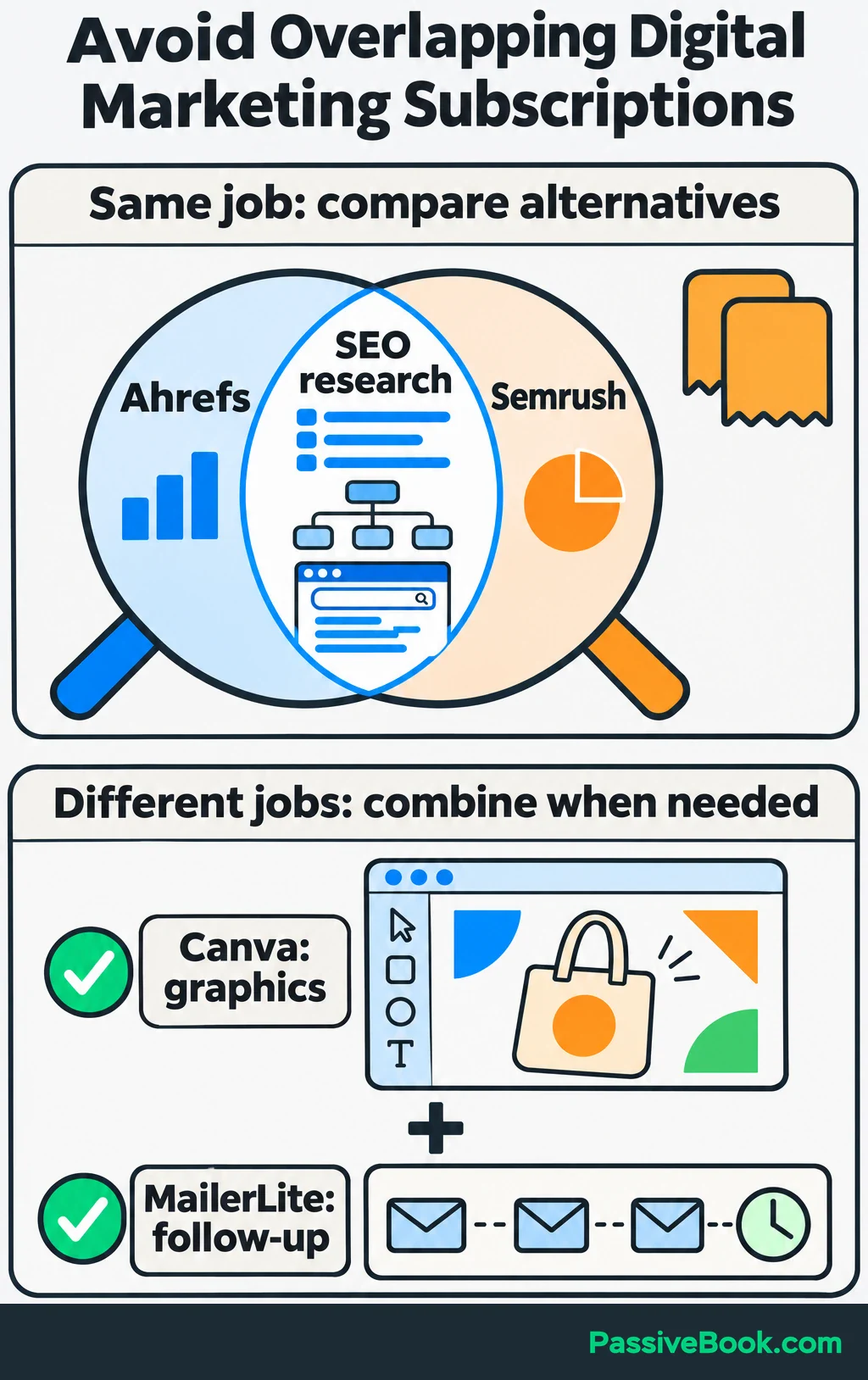
Compare alternatives within the same job. Ahrefs and Semrush overlap in research for search engine optimization (SEO), the work of helping your pages appear in unpaid search results. Canva and an email platform do different work, so owning both can make sense.
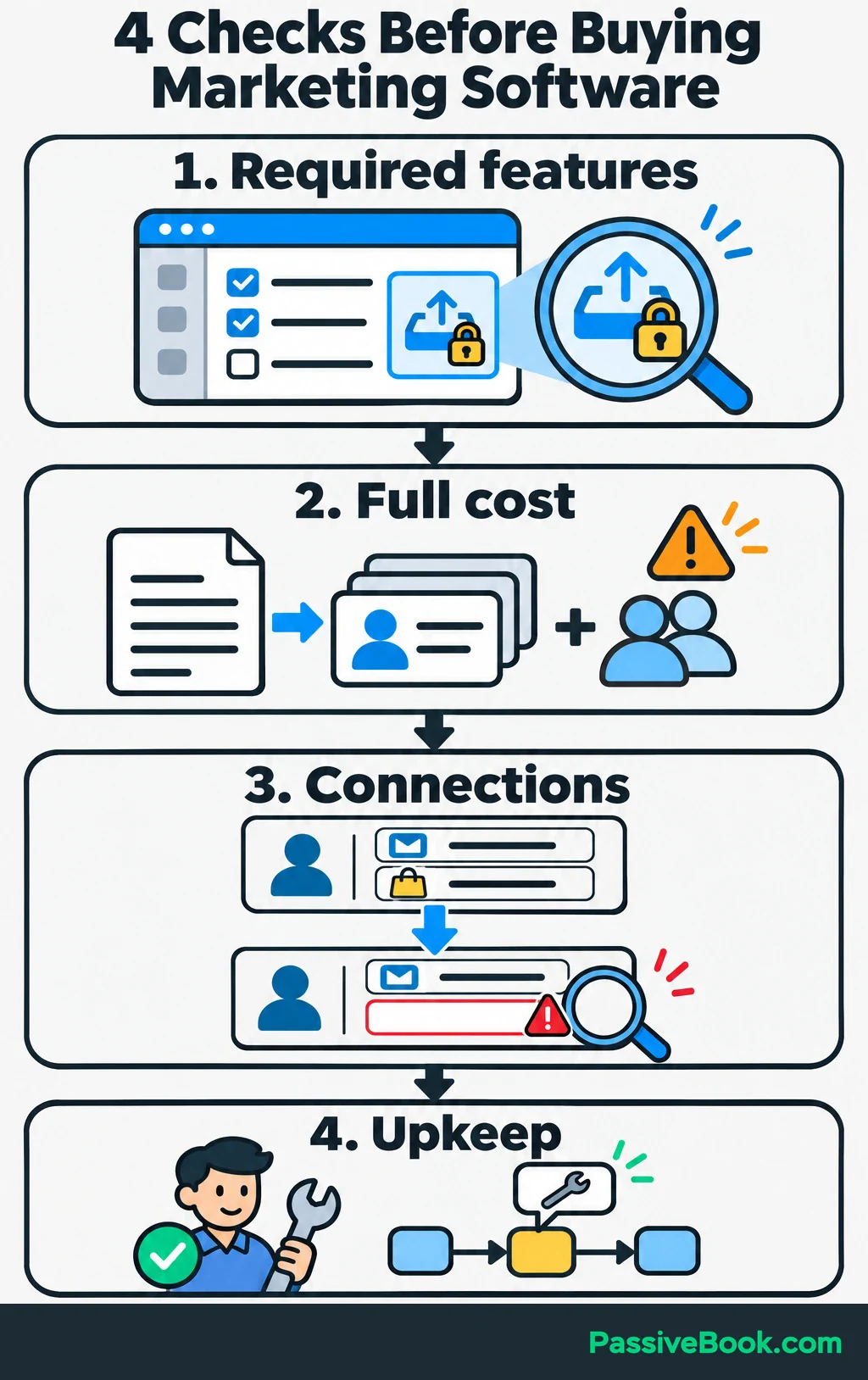
For each shortlisted tool, check four things:
- Required Features: Can the selected plan complete the task?
- Full Cost: What will you pay at your expected usage and next likely increase?
- Connections: Does the integration move the exact information you need?
- Upkeep: Who will configure, check, and repair it?
Throughout this guide, imagine you sell downloadable beginner tote-bag sewing patterns and offer a free fabric-cutting checklist. The campaign choices and costs are illustrations.
This is an editorial shortlist based on published capabilities, pricing, and workflow fit. I haven’t tested all 33 products, and the numbers organize the collection rather than rank measured performance.
Dollar amounts are US dollars unless another currency appears. Prices show whether annual billing is required; check the linked pages before buying. Learning effort is my judgment of the setup and ongoing work.
| Tool and Main Job | Best-fit Use Case and Capabilities | Free Access or Trial | Relevant Paid Price and Billing Basis | Connection or Export Route | Learning Effort and Main Drawback |
|---|---|---|---|---|---|
| 1. Google Ads — paid search | Reach people searching for a product or solution; includes keyword planning | No separate manager subscription; advertising costs money | Campaign spending rather than a fixed software fee | Native GA4 connection | Medium–high; targeting and conversion tracking need regular review |
| 2. Microsoft Advertising — paid search | Extend search campaigns across Microsoft’s network; import eligible Google campaigns | No separate manager subscription; advertising costs money | Pay-per-click spending for search campaigns | Google Ads import; website conversion tracking | Medium; imported settings still need checking |
| 3. Meta Ads Manager — paid social | Manage Facebook and Instagram campaigns and compare ads | Free management tool; delivery is paid | Advertising budget, plus creative production | Website tracking through Meta Pixel or server connections | Medium–high; fresh creative adds ongoing work |
| 4. LinkedIn Campaign Manager — professional targeting | Reach audiences by job title, employer, industry, or seniority | Free management access; delivery is paid | $10 minimum daily budget when using daily budgeting | Lead forms; website measurement through Insight Tag | Medium; professional targeting adds little to an ordinary consumer offer |
| 5. TikTok Ads Manager — video advertising | Demonstrate an offer through short videos | Free management access; delivery is paid | Daily budgets must exceed $50 per campaign and $20 per ad group | TikTok Pixel or Events API | Medium–high; repeated video production can outweigh setup work |
| 6. Pinterest Ads — visual discovery | Promote projects and products in feeds and relevant searches | Business account required; advertiser availability varies | Advertising spend determined by budgets and bidding | Pinterest tag for website conversion measurement | Medium; availability and suitable visual assets matter |
| 7. Google Search Console — search visibility | Inspect queries, clicks, impressions, and indexing for your website | Free | No paid plan needed | Report exports; Data Studio connection | Low–medium; it covers your Google visibility rather than broad competitor research |
| 8. Ubersuggest — SEO research | Research keywords, competing pages, links, and site issues | Limited free access; seven-day trial on monthly subscriptions | Individual lifetime: $290 one-time; non-refundable; monthly options also available | CSV and PDF exports | Low–medium; project, research, and export allowances constrain use |
| 9. Ahrefs — competitor and backlink research | Investigate competing pages, keywords, links, and technical issues | Restricted Ahrefs Free access for verified sites | Starter $29/month; Lite $129/month | Report exports on Lite; none on Starter | Medium; entry pricing comes with research-credit and export restrictions |
| 10. Semrush — SEO research workspace | Combine keyword research, competitor analysis, rank tracking, and audits | Trial offered | SEO $139/month, or $117.33/month billed annually | Research and report exports; connections depend on plan | Medium–high; extra toolkits and unused features can inflate cost |
| 11. Screaming Frog SEO Spider — technical crawling | Find broken links, redirects, duplicate content, and metadata issues | Crawl up to 500 URLs free | £199 per user/year | Spreadsheet exports; paid GA4 and Search Console integrations | Medium–high; findings need interpretation and repair |
| 12. Canva — graphics | Produce reusable ads, Pins, social images, and checklist layouts | Free plan; Pro trial offered | Pro $144/year for one person | Image and PDF exports; supported app connections | Low; premium assets and features require an upgrade |
| 13. Claude — writing and revision | Develop messages, drafts, and variations from an approved brief | Free access with usage limits | Pro $20/month or $200 billed annually | Copy or export approved text into publishing tools | Low to start; claims and product details need human review |
| 14. Loom — screen walkthroughs | Explain printing, assembly, or another screen-based process | 25 videos per person; five-minute screen recordings | Business $18 per paid user/month, billed monthly | Share links and embeds; paid video downloads | Low; limited fit for footage-heavy campaign production |
| 15. The Brief — advertising variations | Adapt creative across many sizes and formats | Seven-day trial | Pro $29/month, billed annually at $348, one seat | Image, HTML5, and video exports; Shopify, Drive, and Dropbox connections | Medium; publishing and ad serving require higher plans |
| 16. Meta Business Suite — organic publishing | Schedule Facebook and Instagram content and handle messages | Free | No subscription needed for core management; ads cost extra | Facebook Page and connected Instagram account | Low–medium; limited to Meta’s publishing environment |
| 17. Buffer — multichannel scheduling | Maintain a simple publishing queue across supported channels | Three channels; ten queued posts per channel | Essentials from $5/channel/month, billed annually | Canva connection; supported social accounts | Low; total cost grows with channel count |
| 18. Metricool — publishing and reporting | Combine scheduling, social analysis, and campaign reports | One brand; 20 posts/month; excludes LinkedIn and X | Starter from $20/month, billed annually, for up to five brands | Paid Canva connection; API and Data Studio connector on Advanced | Medium; reporting and connection requirements can push you up a tier |
| 19. WordPress.org — content website | Build a growing library of articles, product pages, and campaign pages | Software is free | Hosting, domain, maintenance, and optional extensions cost separately | Plugins, APIs, and content exports | Medium; you own the maintenance work |
| 20. Carrd — focused landing pages | Launch a checklist signup or simple product page | Basic free sites; Pro trial offered | Pro Standard $19/year, including ten sites; domain separate | Signup forms for MailerLite and Kit; embeds | Low; less suitable for a growing content library |
| 21. Unbounce — landing-page experiments | Build campaign pages and test variants | Free start offered | Monthly billing: Starter $29, Build $99, Experiment $149 | Build adds custom scripts, pixels, and integrations | Medium; A/B testing requires Experiment |
| 22. MailerLite — email follow-up | Deliver a free download and run a simple sequence | 250 subscribers; 2,500 emails/month | Comfort starts at $12/month; cost scales with subscriber and sending tiers | Native forms and pages; Carrd signup connection | Low–medium; free automation has step limits |
| 23. Kit — creator email | Publish newsletters, tag subscribers, and promote downloads | Up to 10,000 subscribers | Creator $390 billed annually for 1,000 subscribers | Carrd signup connection; supported creator apps | Low–medium; free subscriber capacity doesn’t include unlimited automation |
| 24. FluentCRM — WordPress email automation | Manage contacts and purchase-related follow-up inside WordPress | Free plugin available | Standard Pro license $129/year for one site; delivery costs separate | WordPress integrations; FluentSMTP connects sending services | Medium; sending setup and website resources remain your responsibility |
| 25. Klaviyo — ecommerce follow-up | Build messages around carts, purchases, and customer behavior | 250 active profiles; 500 emails/month | Paid pricing depends on active profiles, sends, and selected channels | Shopify and WooCommerce integrations; APIs | Medium; more data and segmentation work than a basic sequence needs |
| 26. HubSpot Marketing Hub — marketing and CRM | Keep lead capture, marketing, and sales records together | Free tools for two users | Starter standard price $20/seat/month; Professional from $800/month paid annually for 2,000 marketing contacts, plus $3,000 onboarding | App marketplace; imports, exports, and APIs | Medium–high; required automation can create a large tier jump |
| 27. Google Analytics 4 — outcome reporting | Track acquisition, signups, and purchases | Standard version is free | No paid plan needed for the standard setup | Google Ads link; Data Studio connection; report exports | Medium–high; useful reports depend on sound event setup |
| 28. Google Tag Manager — tracking deployment | Coordinate analytics and advertising tags | Standard version is free | No paid plan needed for standard use | Google and third-party tags in a shared website container | Medium–high; incorrect triggers can duplicate or miss events |
| 29. Microsoft Clarity — page interaction analysis | Investigate heatmaps and session recordings | Free | No software subscription needed | Website script; GA4 integration | Low–medium; recordings show behavior but don’t establish its cause |
| 30. Data Studio — dashboards | Combine recurring metrics in shareable reports | Base product is free | Optional third-party connector fees can apply | Google Ads, GA4, Search Console, and Sheets connectors | Medium; combining sources needs consistent definitions |
| 31. Make — visual automation | Connect apps through conditions and multiple actions | 1,000 credits/month | Core from $9/month, billed annually, for 10,000 credits/month | App modules, webhooks, and API requests | Medium; credits accumulate across workflow actions |
| 32. n8n — custom automation | Build workflows with webhooks, APIs, code, and hosting control | Cloud trial; self-hosted Community edition | Cloud Starter €20/month, billed annually, for 2,500 executions/month; self-hosting costs separate | Native nodes, webhooks, HTTP requests, and code | High for self-hosting; updates and monitoring require ownership |
| 33. Zapier — app handoffs | Connect supported triggers and actions with straightforward setup | 100 tasks/month; two-step workflows | Professional from $19.99/month, billed annually; price varies with task allowance | Supported app connections and paid webhooks | Low–medium; action volume and premium apps can raise cost |
Digital Advertising Platforms
Choose one platform around how people discover your offer and the creative you can keep producing. Six advertising accounts create six places to review targeting, spending, and results.
Keep advertising spend separate from software subscriptions and production costs. A free campaign manager still needs a funded campaign.
1. Google Ads — Best for Capturing Search Demand
I would consider Google Search campaigns when customers already search for what you sell. The important distinction is buying intent.
“Downloadable beginner tote-bag pattern” describes a different need from “how to sew.” For the pattern shop, I would investigate the first kind of search before paying to reach everyone interested in sewing.
Use Keyword Planner for ideas and spending forecasts, then review the actual search terms that trigger your ads. Connect GA4 and configure purchase measurement before judging the campaign. Cheap clicks are only useful when they contribute to an outcome you can afford.
2. Microsoft Advertising — Best for Extending Paid Search Reach
Microsoft Advertising is worth considering when another search account could reach suitable customers and you have time to maintain it.
You can import eligible Google Ads campaigns, but review budgets, bids, targeting, and tracking afterward. An import reduces rebuilding; it doesn’t remove the review.
I would compare completed orders and acquisition costs rather than assume this network will be cheaper. If one paid-search account already consumes your available review time, adding another is premature.
3. Meta Ads Manager — Best for Facebook and Instagram Advertising
Choose Meta Ads Manager when images or video can make the offer clear to a consumer audience.
For the sewing-pattern shop, show the finished bag, its useful details, and what the download contains. A buyer should understand that they are purchasing a pattern rather than a physical tote.
I would budget time for new creative alongside campaign management. The first batch of images is a starting point, and the campaign needs someone to review what deserves another variation. Use Meta Business Suite for routine organic publishing and Ads Manager for detailed paid campaign work.
4. LinkedIn Campaign Manager — Best for Professional Audience Targeting
LinkedIn makes sense when someone’s work helps explain why they would buy. Job title, employer, industry, and seniority can then guide targeting.
I would skip it for the pattern shop’s ordinary consumer campaign. Knowing a potential buyer’s employer does little to establish whether they want a weekend sewing project.
5. TikTok Ads Manager — Best for Short-form Video Campaigns
TikTok deserves consideration when you can demonstrate the offer through short videos and keep making suitable footage.
For the pattern shop, a fabric-to-finished-bag sequence could show what the project involves. The video should connect that demonstration to the downloadable pattern.
Before opening the account, assess the production work and the budget thresholds in the table. I would skip this channel if filming and editing would leave no time to review the campaign.
6. Pinterest Ads — Best for Visual Discovery Campaigns
Pinterest Ads fit offers people can plan, make, or try. A finished tote, a fabric layout, and a clear project description give this shop sensible creative starting points.
Check advertising availability for your business location before building the campaign. Add the Pinterest tag when you need website conversion measurement.
My Passive Book experience is with organic blogging and Pinterest, and that makes me comfortable recommending Pinterest as a channel to investigate for suitable visual offers. It doesn’t establish paid campaign results. I would treat advertising as a separate test with its own costs and purchase records.
SEO and Search Research Tools
These tools serve three different jobs. Search Console shows your own Google visibility, research platforms explore outside opportunities, and a crawler checks the website itself.
Choose one main research platform before paying for overlapping subscriptions. Third-party search volumes and competitor traffic figures are estimates, so use them alongside relevance to your products and your own results.
7. Google Search Console — Best for Monitoring Your Google Visibility
Search Console would be my first search tool for an existing website. It shows the queries bringing impressions and clicks, and it helps you inspect indexing problems.
For the pattern shop, start by reviewing existing sewing articles. A useful article with relevant search visibility may deserve an update before you commission another one.
Search Console and GA4 answer different questions. The first explains visibility in Google Search; the second follows recorded activity after visitors arrive. You can use both without buying an SEO suite.
8. Ubersuggest — Best for Focused SEO Research
Ubersuggest is my budget-conscious starting recommendation when its allowances cover the research you need. Use it to build a manageable list of relevant keywords, competing pages, and content opportunities.
For the shop, that means researching questions connected to beginner tote-making and pattern selection, then moving chosen topics into the publishing plan.
I would try the monthly subscription before buying lifetime access because the lifetime purchase is final. Compare project limits, tracked keywords, and exports with work you expect to repeat.
9. Ahrefs — Best for Backlink and Competitor Research
Consider Ahrefs when competitor pages and backlink research regularly influence your publishing decisions.
A useful task might be examining which sites link to beginner sewing resources and what those resources provide. That gives you material to assess, rather than a list of links to copy blindly.
The entry plan’s export restriction matters if research needs to move into a spreadsheet or shared brief. I would choose the plan around the complete task, including that handoff. Compare Ahrefs and Semrush using the same research question before committing to either.
10. Semrush — Best for a Broader SEO Research Workspace
Semrush becomes easier to justify when you repeatedly use keyword research, competitor analysis, rank tracking, and site audits together.
For example, you might research a pattern-related topic, inspect competing pages, publish an article, and monitor its position from the same workspace.
I would skip the broader subscription if you only need an occasional keyword shortlist. The cost should replace recurring work or several tools you already need. A large feature menu is less persuasive when most of it will remain untouched.
11. Screaming Frog SEO Spider — Best for Technical Website Audits
Screaming Frog crawls your website and produces a detailed repair list. It can help you find broken links, redirect problems, duplicate content, and missing or repeated metadata.
For the shop, prioritize product pages, useful articles, and campaign destinations. Fixing a broken link to the pattern checkout matters more than tidying an unused archive page.
The free crawl is a sensible place to start on a small site. I would pay when the site size or advanced features justify it, and reserve time to implement the findings. An exported audit isn’t a repaired website.
Creative and Content Tools
Choose production tools around the assets you repeatedly need. Graphics, copy, screen demonstrations, and large batches of ad variations are different jobs.
You may need complementary tools here, but occasional work rarely justifies a specialist subscription.
12. Canva — Best for Everyday Marketing Graphics
Canva is my first choice for repeatable campaign graphics: Pins, social images, checklist pages, and simple advertisements.
I once slowed down a batch of Pinterest graphics by choosing a fresh layout for every article. I kept redesigning work that already had a usable structure. Reusing a small set of layouts gave me more time to check the headline and destination page.
For the pattern shop, build a few layouts around clear product photos and readable text. Start with Free and upgrade when a specific premium feature repeatedly saves work.
13. Claude — Best for Developing and Revising Marketing Copy
Claude is my primary AI tool for long-form writing and content strategy. I would also use it to develop a campaign message from a clear product brief.
Supply the pattern’s contents, required skill level, printing instructions, customer questions, and approved facts. Then develop one message before adapting it for a page, advertisement, and email.
An instruction such as “Make clear that this is a PDF pattern, not a finished bag” is more useful than “Write persuasive copy.” Review the result for invented features, unsupported promises, and details that don’t match the product.
14. Loom — Best for Short Product Walkthroughs
Loom is useful when a short screen recording can remove a specific point of confusion.
For the pattern shop, record how to open the PDF, choose the correct print settings, and check the test square. Put that walkthrough where buyers need it, rather than expecting everyone to read a long explanation.
I would use the free plan for a small library of short demonstrations. Choose another production process when you need extensive sewing footage, several camera angles, or detailed editing. Loom’s appeal is how quickly you can explain a screen-based task.
15. The Brief — Best for Producing Advertising Variations at Volume
The Brief, formerly Creatopy, is worth comparing when you repeatedly adapt creative across advertising sizes and formats.
The question is how much production work it replaces. If the shop needs a few graphics each month, I would stay with Canva. If repeated resizing and format variations consume a substantial part of production, a specialist tool deserves a trial.
Check the plan carefully when you need publishing or ad serving. The entry plan covers creation and exports, so those later campaign tasks can change the appropriate subscription.
Social Publishing Tools
Native publishing is my starting point when it covers your active channels. A paid scheduler earns its place when a shared queue, approvals, or reporting removes recurring work.
Count the accounts and features you need before comparing prices.
16. Meta Business Suite — Best for Free Facebook and Instagram Management
Meta Business Suite covers a useful set of routine jobs: scheduling posts and stories, answering messages and comments, and checking engagement across a Facebook Page and connected Instagram account.
I would try that workflow before paying for another scheduler.
For the pattern shop, you could prepare a batch of finished-bag photos and useful sewing tips, then schedule them together. There is little reason to add another calendar if the native one handles the work. Consider a third-party tool when you have a concrete need beyond those channels or capabilities.
17. Buffer — Best for Straightforward Multichannel Scheduling
Buffer is a sensible choice when you want a straightforward queue across several supported social channels.
Its Canva connection can reduce repeated asset transfers, and the free plan gives you room to test the publishing process.
I would compare it with native scheduling using a normal week’s workload. Does one queue remove enough switching and copying to matter? Then calculate the paid cost across every required channel. Per-channel pricing is easy to understand, but a modest starting price can become several subscriptions’ worth of spending across many accounts.
18. Metricool — Best for Publishing With Broader Reporting
Metricool deserves a closer look when publishing and reporting need to happen in the same workspace. Its appeal grows when you also use competitor monitoring or advertising reports.
I would choose it over a simpler queue only when those reports answer recurring questions.
Check the plan containing your required connection. Canva support is on paid plans, while API access and the Data Studio connector require Advanced. If you only need to schedule a few posts, those reporting capabilities are unlikely to justify moving up a tier.
Website and Landing-page Tools
Reuse your existing website when it can handle the page, signup, checkout connection, and measurement you need.
A focused landing-page builder can make sense for a small campaign, while a full website platform supports an expanding library of content and products.
19. WordPress.Org — Best for a Flexible Content Website
Self-hosted WordPress is my preference for a growing content business because it gives me control over the website and its connections. My own setup uses GenerateBlocks for building pages.
For the pattern shop, WordPress can hold tutorials, product information, signup forms, and campaign pages together.
The software’s free license doesn’t remove hosting or upkeep costs. I would choose it when the growing website justifies that responsibility. If you already have a suitable WordPress site, build the campaign there before adding another page platform.
20. Carrd — Best for a Simple Campaign Landing Page
Carrd is a strong choice when you need one focused page and want to keep setup modest.
For the shop, that page could offer the fabric-cutting checklist, show a preview, explain who it helps, and collect an email address. Pro Standard supports signup connections to MailerLite and Kit.
I would choose Carrd for validating that offer before building a larger website. If you already need a growing library of sewing tutorials and product pages, use a fuller website platform. Also compare it with the landing page included in your email service before paying.
21. Unbounce — Best for Dedicated Landing-page Experiments
Unbounce makes sense when landing-page experiments are recurring work and you have enough traffic to evaluate a meaningful question.
For example, you might compare a page led by the finished tote with one led by the pattern contents. Decide what the test should teach you before building variants.
The cheapest plan doesn’t include every tracking or testing feature. Use the table to identify the tier containing your required scripts, connections, and A/B testing. I would skip dedicated experimentation software when the immediate job is simply publishing a clear, working signup page.
Email Marketing and CRM Tools
Choose one primary email platform around how people subscribe, what follow-up they need, and whether purchases should change the messages they receive.
A CRM tracks individual customer or sales relationships. Add that work when the buying process needs it, and compare email services at the same contact count, sending volume, and automation requirements.
22. MailerLite — Best for a Small List With Simple Automation
MailerLite is my first hosted option for a small, focused email workflow. Use its included forms and landing page before buying separate capture software.
For the shop, deliver the checklist, explain one useful preparation step, and introduce the pattern. The free plan allows three active automations with up to five steps each, so delays and conditions affect what fits.
I would upgrade when the list or sequence needs it. Check the storefront connection if purchases must stop a promotional message or start a different sequence.
23. Kit — Best for Creator Newsletters and Digital Products
Kit fits a business where publishing, subscriber tagging, and digital-product promotion sit close together.
I would consider it when the newsletter is an ongoing part of how you build the business, rather than only a way to deliver a free file.
The large free subscriber allowance is attractive, but compare the follow-up you need. Unlimited visual automations and sequences belong to a paid plan. For the pattern shop, map the desired sequence first, then decide whether Kit’s creator-focused workflow is worth choosing over a simpler email setup.
24. FluentCRM — Best for Email Automation Inside WordPress
FluentCRM is my choice when email automation belongs inside an existing WordPress business. I use it with FluentSMTP and Amazon SES for sending.
It can keep contacts, segments, sequences, and purchase-related follow-up close to the website. Licensing is based on site count rather than subscriber count.
That suits my preference for control, but sending still needs configuration, and delivery and website resources cost money as usage grows. I would choose hosted email software if maintaining that setup would become another job you keep postponing.
25. Klaviyo — Best for Ecommerce Purchase-based Follow-up
Klaviyo is worth considering when storefront behavior should drive communication. That includes abandoned-cart follow-up, post-purchase messages, and segments based on buying activity.
Its Shopify and WooCommerce connections make it relevant to stores that need those signals.
For the pattern shop, I would start simpler if the whole journey is a checklist followed by one product offer. Klaviyo becomes more interesting when you have a useful reason to distinguish buyers by products, repeat purchases, or other commerce behavior. The data should change what you send, rather than merely fill another dashboard.
26. HubSpot Marketing Hub — Best for Marketing Tied to a Sales CRM
HubSpot fits when marketing activity and individual sales conversations need a shared customer record.
I would choose it when someone must review leads, follow up personally, and track opportunities through a buying process. The sewing-pattern shop’s straightforward subscriber-to-checkout journey doesn’t need that implementation.
Price the tier containing your required automation before making the CRM central to the business. The move from entry tools to Professional is substantial, so a cheap starting account alone is a poor basis for the decision.
Analytics and Conversion Tools
These tools answer different questions. GA4 reports recorded website outcomes, Tag Manager deploys tracking, Clarity helps investigate interaction problems, and Data Studio combines reports.
You can use them together, but each should have a clear job.
27. Google Analytics 4 — Best for Acquisition and Conversion Reporting
Define the actions you care about before building reports. For the pattern shop, those are confirmed checklist signups and completed pattern purchases.
In GA4, record each action as an event and mark it as a key event to highlight it in reports. Connect Google Ads when you need its campaign activity related to website outcomes.
I would check recorded purchases against completed orders before using the reports to change spending. Analytics is useful for comparing acquisition and behavior, but your checkout records remain the place to confirm that an order happened.
28. Google Tag Manager — Best for Managing Website Tracking Tags
Google Tag Manager lets you manage small pieces of tracking code, called tags, for several analytics or advertising tools in one place.
Learn what makes each tag run, then use debugging tools to check those conditions. A test purchase should record once, and an ordinary page visit shouldn’t become a purchase.
I would use a simpler native installation when it meets the need. Adding Tag Manager creates flexibility, but it also gives you another place where a mistaken trigger can affect the reports.
29. Microsoft Clarity — Best for Investigating Landing-page Friction
Clarity’s heatmaps show where visitors click and scroll, and its session recordings let you watch their activity on a page.
Start with a specific question. If visitors rarely reach the pattern’s purchase button, inspect how far they scroll and what they interact with before leaving. That can help you identify something worth checking or changing.
A recording shows actions, so avoid treating it as proof of what a visitor thought. Also configure valid consent signals for traffic from the European Economic Area, UK, and Switzerland because full functionality requires them in those regions.
30. Data Studio — Best for a Shared Marketing Dashboard
Google’s reporting product, formerly Looker Studio, is now called Data Studio. Use it when combining recurring reports saves you repeated work.
For the shop, one useful view might bring together traffic, confirmed signups, purchases, and advertising spend. Keep each metric’s source and definition clear so the dashboard supports a decision.
I would build this after the underlying measurement works. A combined report won’t fix missing purchase events, and third-party connectors can add charges. Start with the built-in Google connections where they cover the data you need.
Workflow Automation Tools
Before choosing an automation platform, write down the trigger, required data, destination, and expected monthly volume.
For a fair comparison, give each platform the same job: receive a checklist request, create or update the subscriber, and record whether the transfer succeeded. Use a working native connection first when it already completes that handoff.
31. Make — Best for Visual Workflows With Branching Logic
Make is my starting recommendation when you want a visual workflow with conditions and several actions, without maintaining a server.
For the shop, it could handle a signup that arrives from a source your email platform doesn’t connect to directly. The workflow might check a field, update the subscriber, and log the result.
Estimate credits across the whole run. Searches, transformations, and actions on repeated records can all add consumption. I would test a small batch and inspect actual usage before estimating the monthly bill from signup volume alone.
32. n8n — Best for Custom Workflows and Hosting Control
I use self-hosted n8n to connect tools. I prefer it when I need control over when apps send data, what information they exchange, or how a custom step runs.
That flexibility is useful when a standard connector stops short of the task. It also asks more of you, especially when you host it yourself.
The Community edition removes a software subscription, but infrastructure, updates, backups, and monitoring remain. I would choose hosted n8n when maintaining the installation would outweigh the savings. Automation should remove recurring work, and server upkeep belongs in that calculation.
33. Zapier — Best for Straightforward App-to-app Handoffs
Zapier is worth choosing when its supported trigger and action complete your connection with little configuration.
I would pay for that convenience if it avoids a fragile workaround or a workflow you struggle to maintain. Check the exact action and required plan before deciding.
The free two-step workflow may handle a simple trigger followed by one action. A process that also searches, branches, and logs results can need more. To compare Zapier with Make and n8n, run the same workflow on each and check which plan covers your expected monthly volume. Their usage counters measure different things.
Choose a Stack Without Overlapping Subscriptions
Match the Tools to One Customer Journey
Map the path before adding subscriptions:
Traffic source → destination page → signup or purchase → follow-up → measurement.
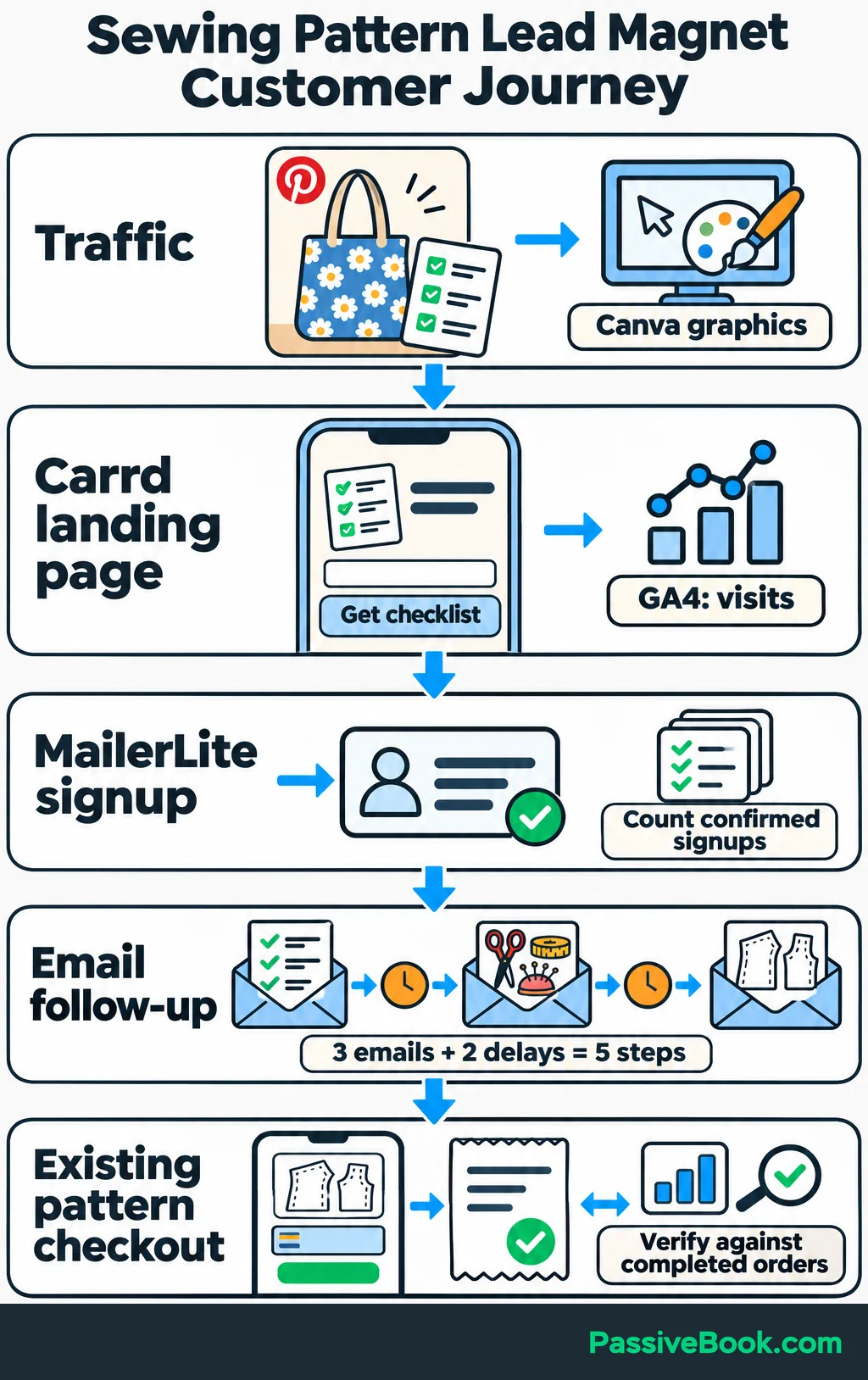
Assign one primary tool to each required job and check which tools already cover more than one. Here is how I would apply that to the sewing-pattern shop’s checklist campaign.
- Create the checklist layout and promotional graphics in Canva Free.
- Publish a Carrd page with a checklist preview, a clear promise, and a signup form.
- Connect the form directly to MailerLite and add signups to the checklist group.
- Use that group to start a short sequence: delivery email, delay, useful preparation email, delay, pattern introduction. Those three emails and two delays use five steps.
- Record visits in GA4 and use MailerLite’s subscriber records to count confirmed signups. Complete a test signup and check both tools.
- Send interested subscribers to the existing pattern checkout, and verify that completed orders reach the records you use to judge sales.
The page message can stay simple: “Get the fabric-cutting checklist before you start your first tote.” It introduces the free resource and leaves the paid pattern for the next part of the journey.
To calculate the lead-capture software subtotal, count only the four selected plans: Canva Free, Carrd Pro Standard, MailerLite Free, and standard GA4. Using the table’s prices, the annual subtotal is $0 + $19 + $0 + $0 = $19 within those plans’ limits.
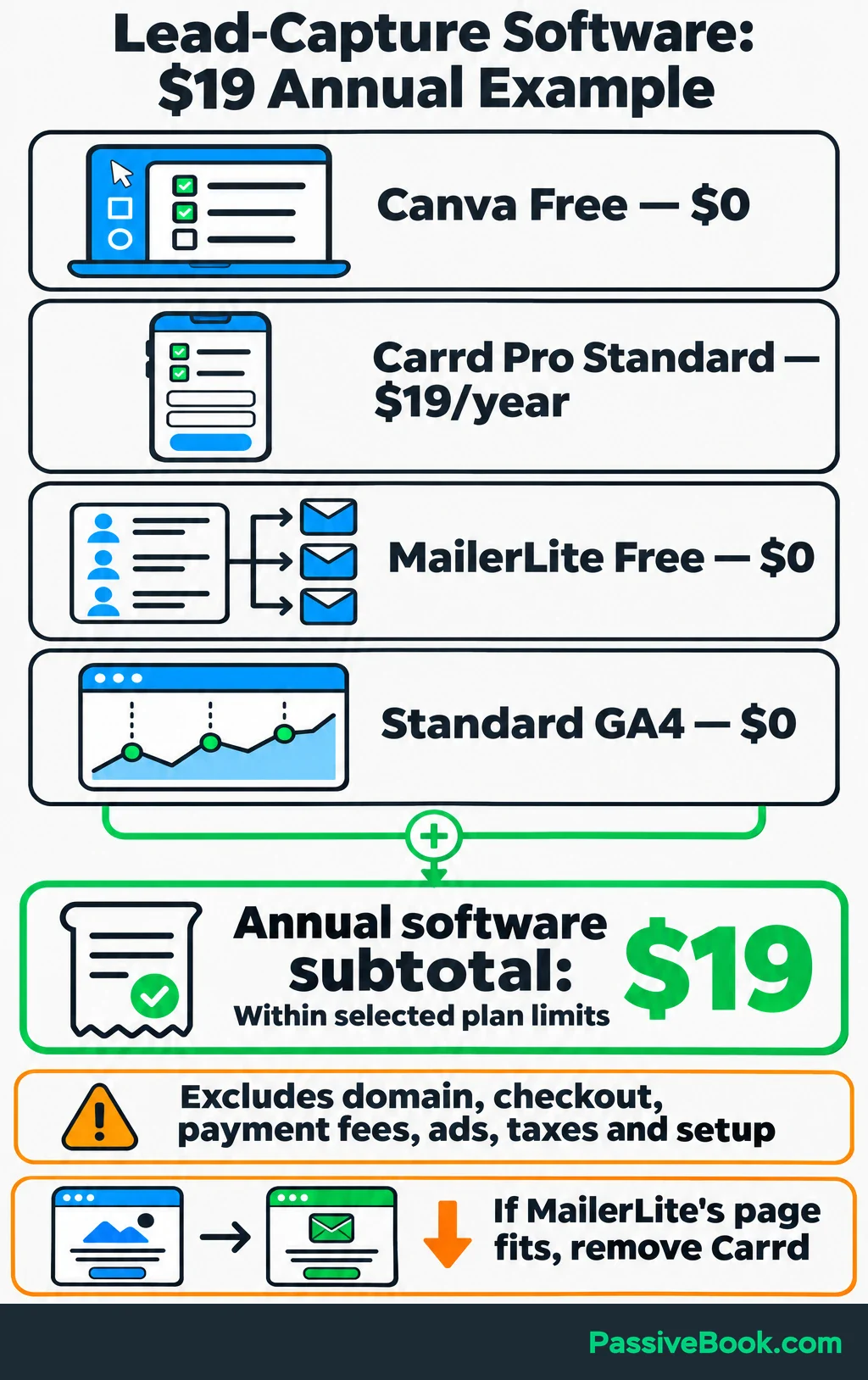
That excludes domain registration, checkout, payment processing, advertising, taxes, and setup work. If MailerLite’s included landing page meets the need, I would skip Carrd and remove that subscription too.
For an existing WordPress business, reuse the website and choose one email platform. My preference would be WordPress with GenerateBlocks and FluentCRM when the maintenance fits, or a hosted email service when simplicity matters more. Add Search Console for organic search work, and pay for external research when it becomes recurring work.
For paid acquisition, add one suitable advertising platform and its conversion measurement. Keep the same page, graphics, and email tools where they already meet the campaign requirements.
Test the Connections Before Committing
A connection needs to complete the handoff you care about.
On one of my digital-product sites, I sent a test signup through an automation and saw the run turn green. The contact arrived, but the product-interest field was blank. I had checked the email address and stopped there.
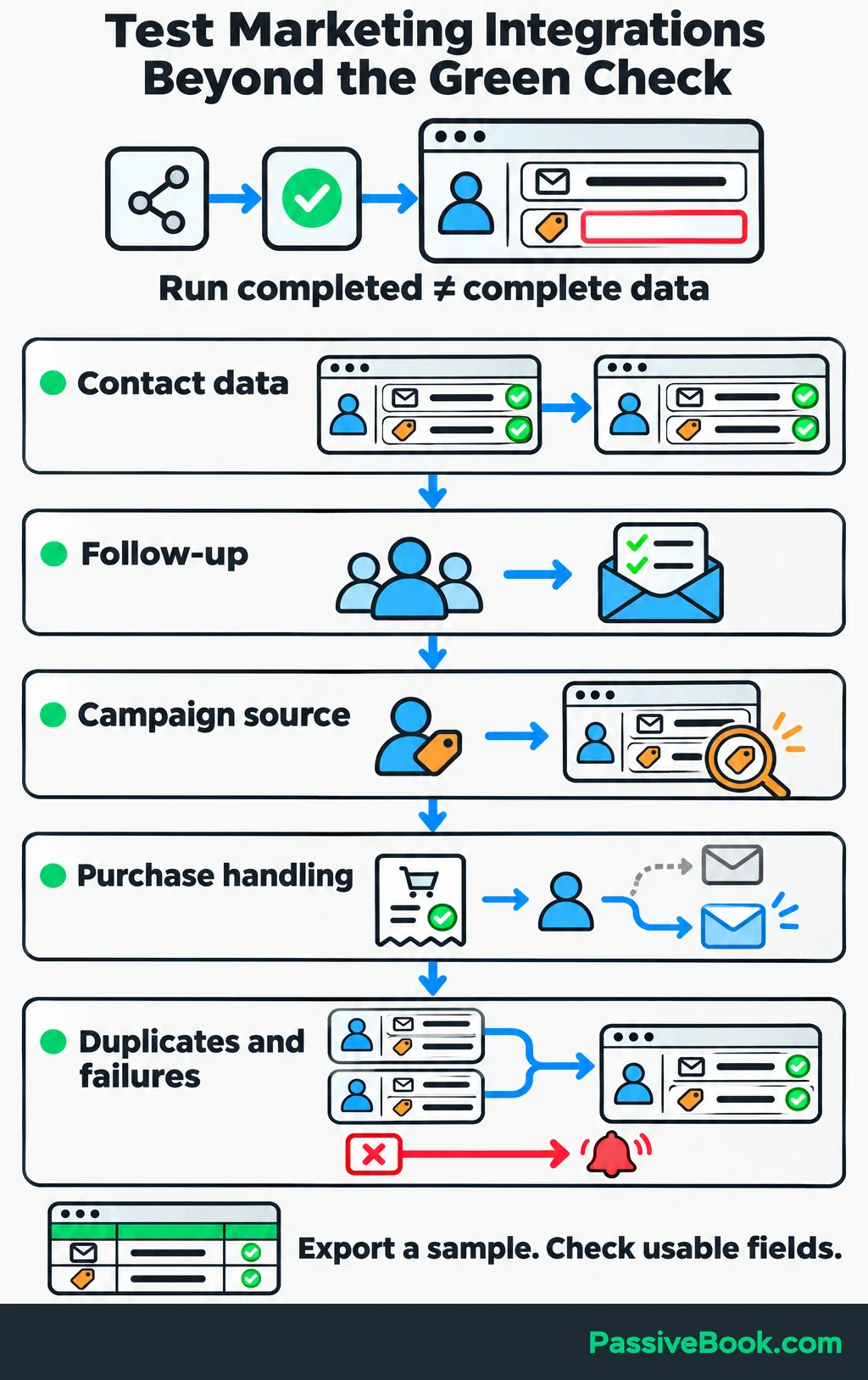
Now I inspect the destination record before treating a successful run as a working connection. For your own setup, test the following:
- Contact Data: The email address and required fields arrive in the right record.
- Follow-up: The correct sequence starts and delivers the promised resource.
- Campaign Information: Source details reach the place where you expect to review them.
- Purchase Handling: The order appears, and any buyer-related follow-up changes correctly.
- Duplicates and Failures: Repeated submissions are handled sensibly, and a failed transfer produces an alert.
Also export a small sample of contacts and campaign data. Check whether the information you would need to move is present and usable. Discovering a missing field during a trial is much cheaper than discovering it during a migration.
Compare the Full Cost at Your Next Usage Level
Calculate the cost of the workflow at current usage and at the next realistic increase. For this shop, that might mean the email list growing beyond the free allowance or a campaign producing more automation runs.
Include:
- Subscriptions: Required tiers, seats, annual commitments, and renewal prices.
- Usage: Contacts, email sends, automation consumption, and connector charges.
- Infrastructure: Hosting, email delivery, backups, and maintenance.
- Campaign Costs: Advertising and creative production, shown separately.
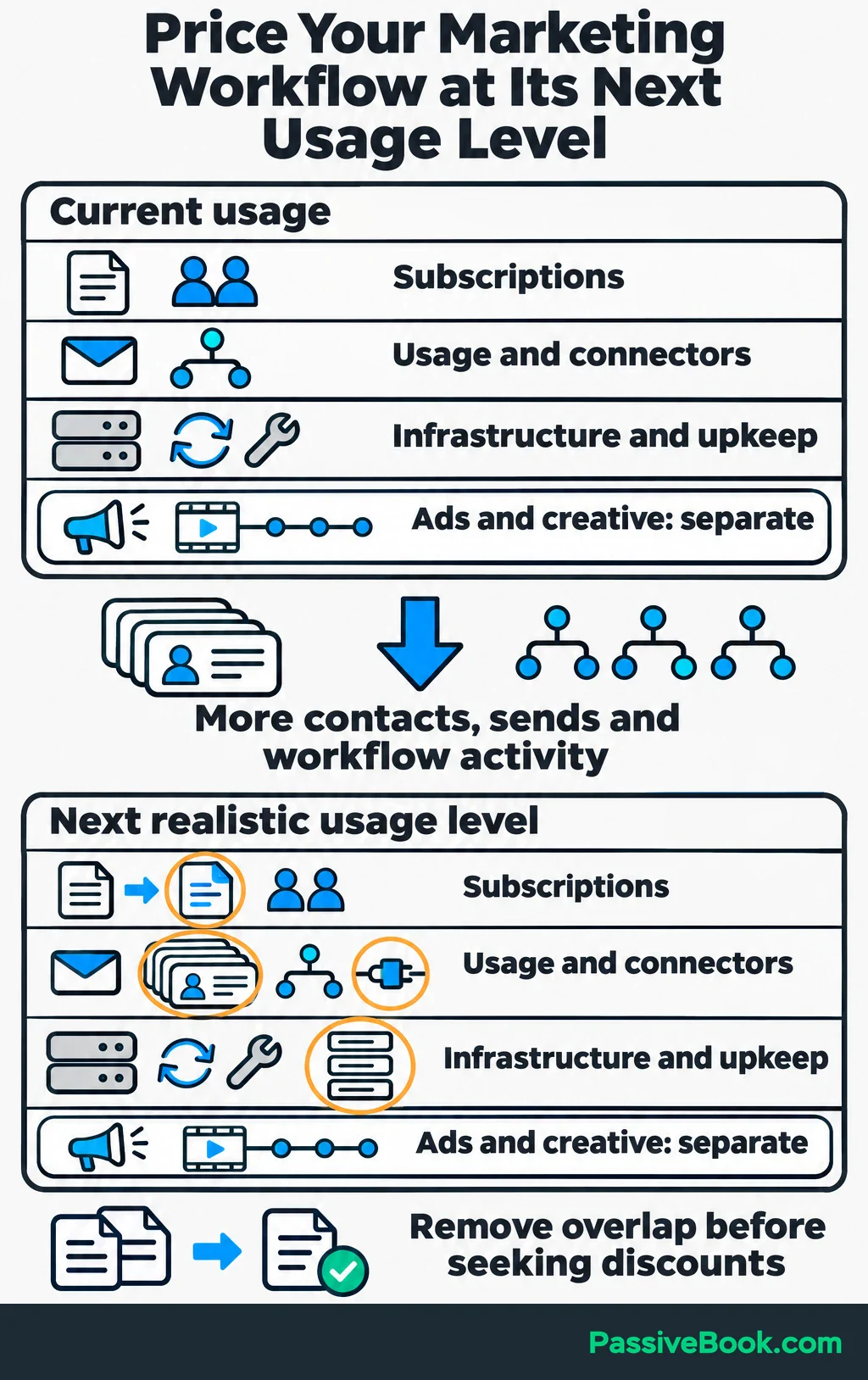
Then ask what the tool contributes. Does it complete a necessary task, improve a recurring decision, or save enough work to justify both its bill and upkeep?
A higher software bill can make sense, but it helps to put a number on what the change needs to deliver. This tracker compares your options and keeps cash savings separate from the value of your time.
Free Software Cost Comparator




I would remove overlapping subscriptions before hunting for discounts. Paying annually for a tool you don’t need simply makes the unnecessary purchase harder to undo.
What Next?
Write down one customer journey and mark the handoff that still needs manual work. Use this comparison to shortlist the tools for that job, then test the complete connection before committing to a paid plan.
Share the guide through the social buttons when you want a tool discussion to include the whole workflow and its cost.
Which part of your current setup creates the most manual work? Tell me in the comments, and add any questions about choosing or connecting these tools.
Share this post with your friends & followers:

