A customer buys while you’re at work, but their download has to wait until you get home. Then another email arrives asking where the file is. The sale went through, yet you’re still needed to finish the job.
Enough small tasks like this can turn a growing business into a second shift. Adding more customers also adds more things to remember. This guide follows one purchase from payment to delivery, then shows how to apply that approach to support, content, and email so routine work needs less of your time.
Choose the First Workflow to Systemize
Start by tracing how work moves through your business:
Attract a visitor → capture an inquiry or signup → make a sale → deliver the purchase → provide support → record the money.
Under each stage, list what you repeatedly do. Include necessary work you keep postponing, such as checking failed deliveries or updating product instructions. A task doesn’t disappear because it has become a permanent resident of your to-do list.
Look for work that involves copying information, sending the same message, waiting for approval, or remembering a decision nobody else understands.
To compare tasks, record their triggers, finished outcomes, responsible person, tools, frequency, handling time, and recurring problems. Count only the time you actively spend doing the work.
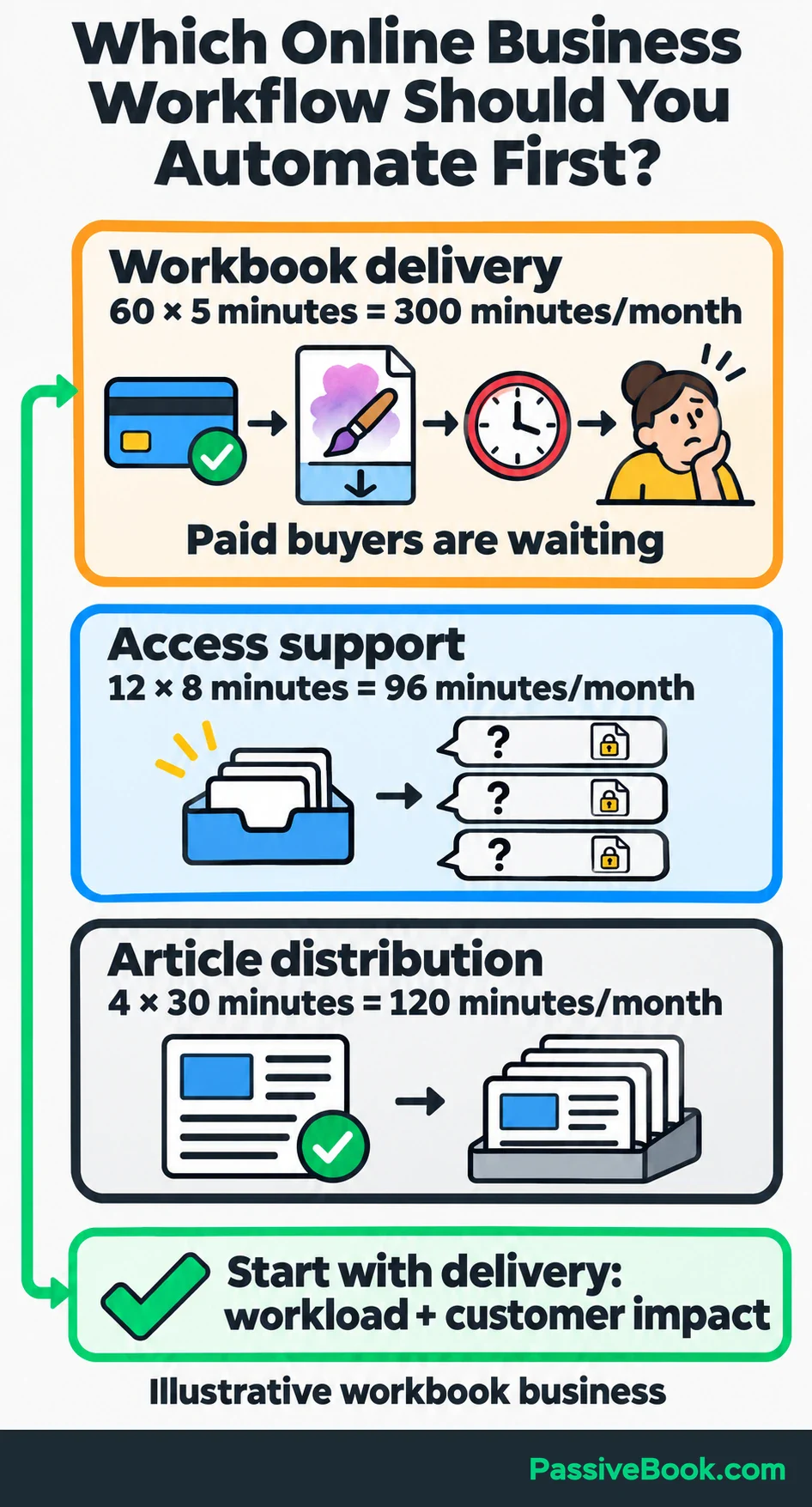
For the running example, imagine you sell a downloadable beginner watercolor practice workbook, supported by a blog and email list. Its workflows and figures below are illustrations.
| Workflow | Trigger | Finished Outcome | Responsible Person | Tools | Monthly Frequency | Hands-On Time Each | Recurring Problem |
|---|---|---|---|---|---|---|---|
| Workbook delivery | Confirmed payment | Buyer can access the correct workbook | Owner | Store and email | 60 orders | 5 minutes | Delivery waits until evening |
| Access support | Buyer reports a problem | Buyer’s access problem is resolved | Owner | Inbox and store | 12 requests | 8 minutes | Instructions differ between replies |
| Article distribution | Article approved | Approved promotion is published | Owner | Blog, email, scheduler | 4 articles | 30 minutes | Promotion gets postponed |
Multiply frequency by handling time to estimate the monthly workload. Here, workbook delivery takes 60 × five minutes, or five hours.
Time alone shouldn’t decide what comes first. I would choose work that:
- Happens often enough to justify the setup.
- Has a clear beginning and finished outcome.
- Uses reasonably reliable information.
- Affects customers or consumes meaningful time.
- Can be repaired if something goes wrong.
For the workbook business, delivery deserves attention before another content automation. More promotion won’t help a buyer who has already paid and is waiting for their file.
Define success plainly: “A confirmed purchaser can access the correct workbook without waiting for me.”
A system includes the instructions, responsible person, tools, and checks needed to produce that outcome. Automation performs selected steps when an event occurs. You can build the system first and automate it gradually, even while working around a day job.
Simplify the Workflow and Write Its SOP
Before connecting apps, walk through the task manually and write down each step from the starting event to the finished outcome.
Keep steps the customer needs or that prevent mistakes. Remove duplicate entry and unnecessary approvals. If every paid order qualifies for the same workbook, you don’t need to personally approve each download.
On one of my digital-product sites, I kept rewriting replies about finding purchased files. Looking through those replies exposed the problem: my delivery message assumed buyers already knew where to look. I rewrote the instructions before saving a reusable response. Automating the original message would have preserved the confusion.
Next, write a standard operating procedure, or SOP: a short set of instructions someone can follow without asking what you meant.
Here’s a filled version for the workbook workflow.
- Purpose: Give confirmed purchasers access to the correct beginner watercolor workbook.
- Trigger: The store confirms payment for an order containing the workbook.
- Required Inputs: Order ID, purchased product ID, customer email address, and the approved workbook file.
- Required Access: Permission to view orders, inspect download access, and send delivery information.
- Responsible Role: Store operator. Initially, this is the owner.
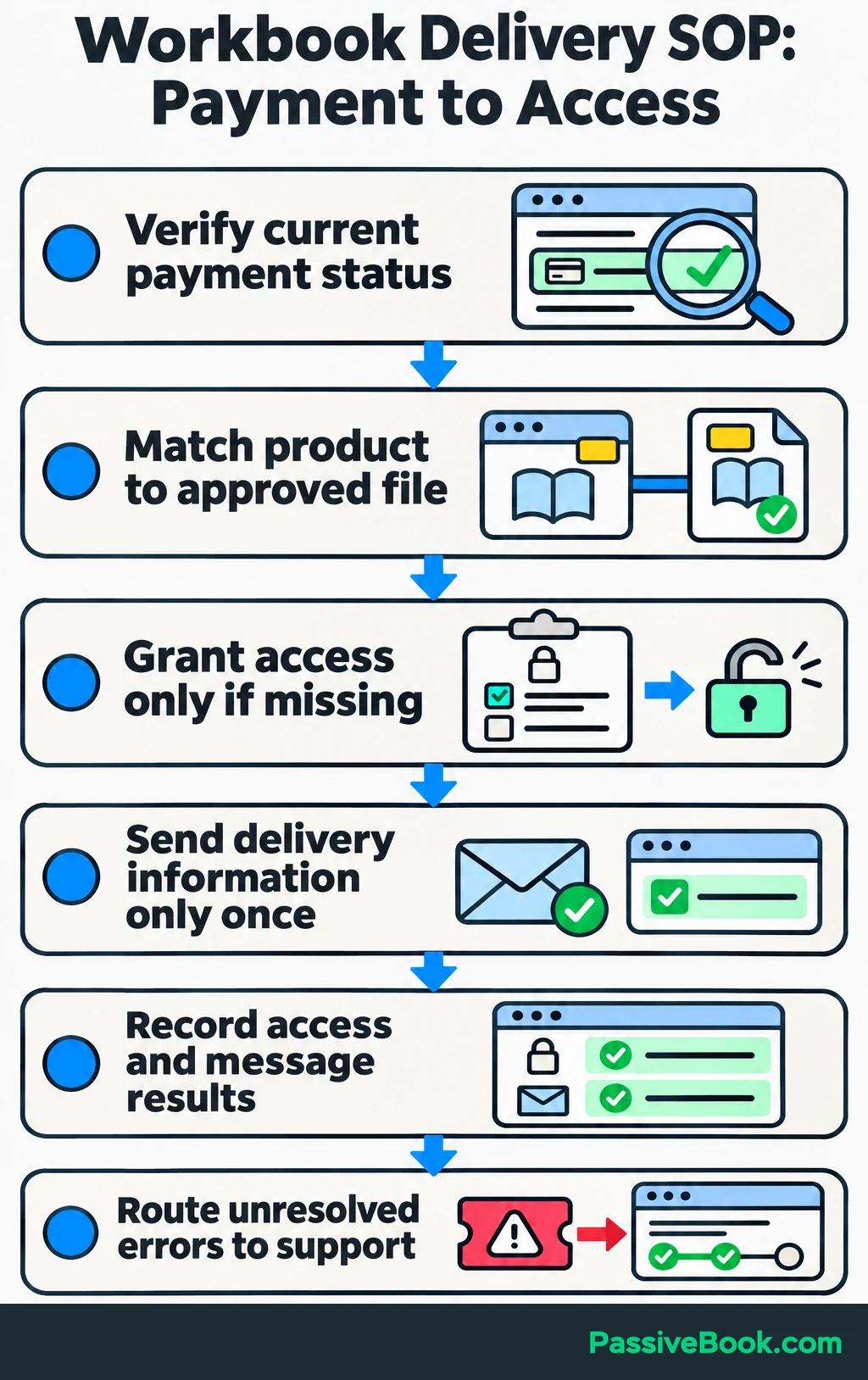
The procedure is:
- Open the order and verify its current payment status in the store.
- Match the purchased product ID to the approved workbook file.
- Check whether download access already exists. Grant it if it is missing and the order qualifies.
- Send the approved delivery information through the store’s delivery process if it has not already been sent.
- Record the access result and message status against the order.
- Route missing product details, access failures, or delivery errors to the support queue.
Finish the SOP with clear boundaries:
- Decision Rules: Pending or failed payments receive no purchase access. A completed delivery is not repeated just because another notification arrives.
- Completion Check: The correct download permission exists and delivery information has been sent without a known unresolved error. Record an actual download only when there is evidence of one.
- Exception Route: Create a support task containing the order ID, failed step, and last completed action.
- Document Owner: Store operator, with a last-reviewed date on the document.
Choose one authoritative place for each fact. Payment status belongs in the store, subscription status belongs in the email platform, and approved access instructions belong in the product documentation.
Keep the SOP, delivery message, and a completed example together in a searchable workspace. Add a short screen recording if an action is easier to show.
Then ask someone to follow it, or follow it yourself a few days later without filling gaps from memory. Every “obvious” step you forgot to write is a future interruption.
If the steps are still in your head, AI Operations Writer can turn a rough walkthrough into written instructions. You’ll have a draft to test instead of a blank document to fill.
Free AI Operations Writer




Decide Which Steps Need Rules, AI, or a Person
Assign each step to the simplest method that can handle it reliably. Some need a fixed rule, some benefit from AI, and some still need your judgment.
Use Rules for Predictable Actions
Write each rule in this form:
When this happens, check these conditions, then perform this action. If the conditions cannot be checked, send it here.
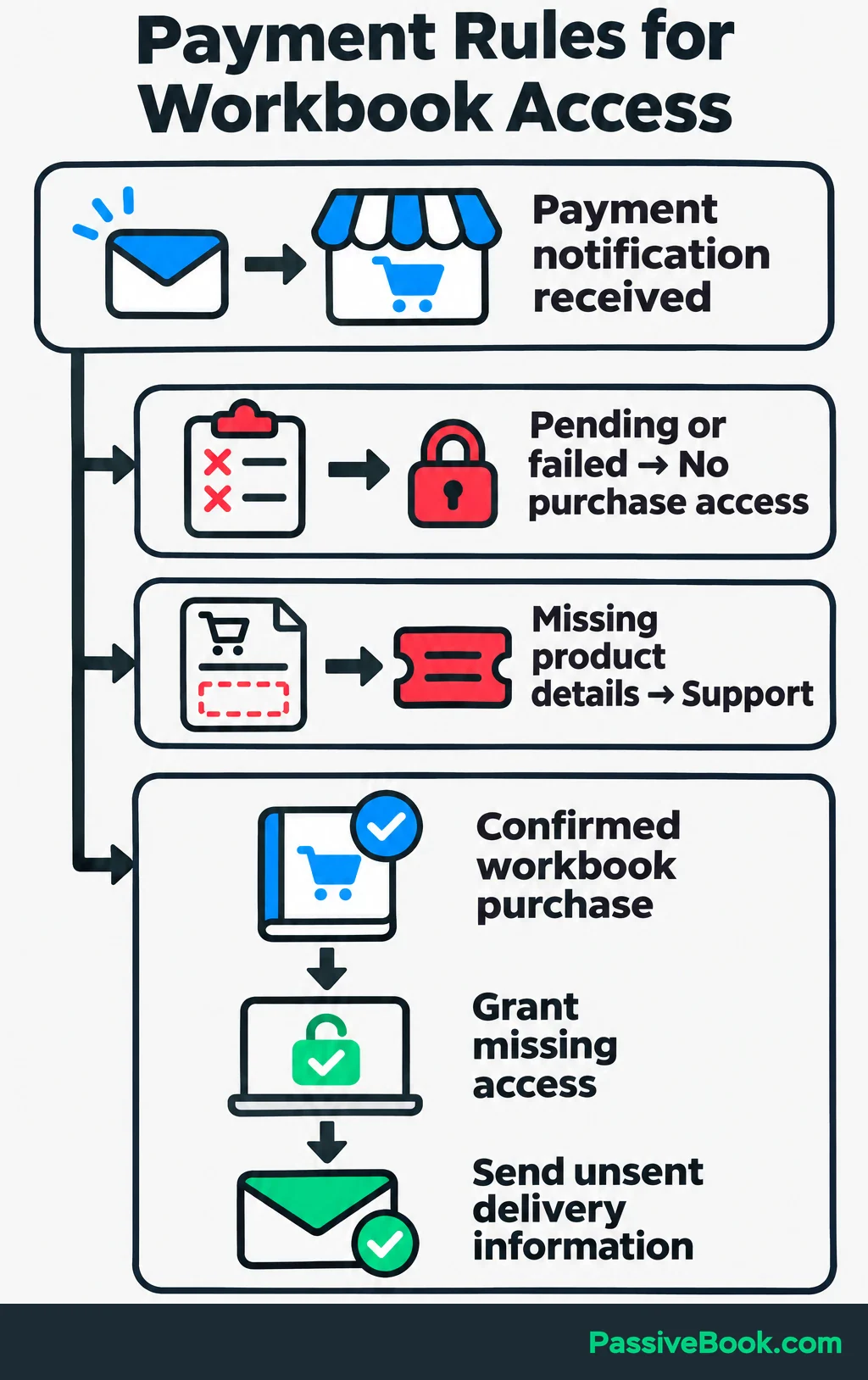
For the workbook:
When payment is confirmed, verify that the order contains the workbook. Grant access if it is missing, then send the delivery information if it has not already been sent. Missing product details go to support.
Rules suit approved messages, reminders, structured data transfers, and routine handoffs.
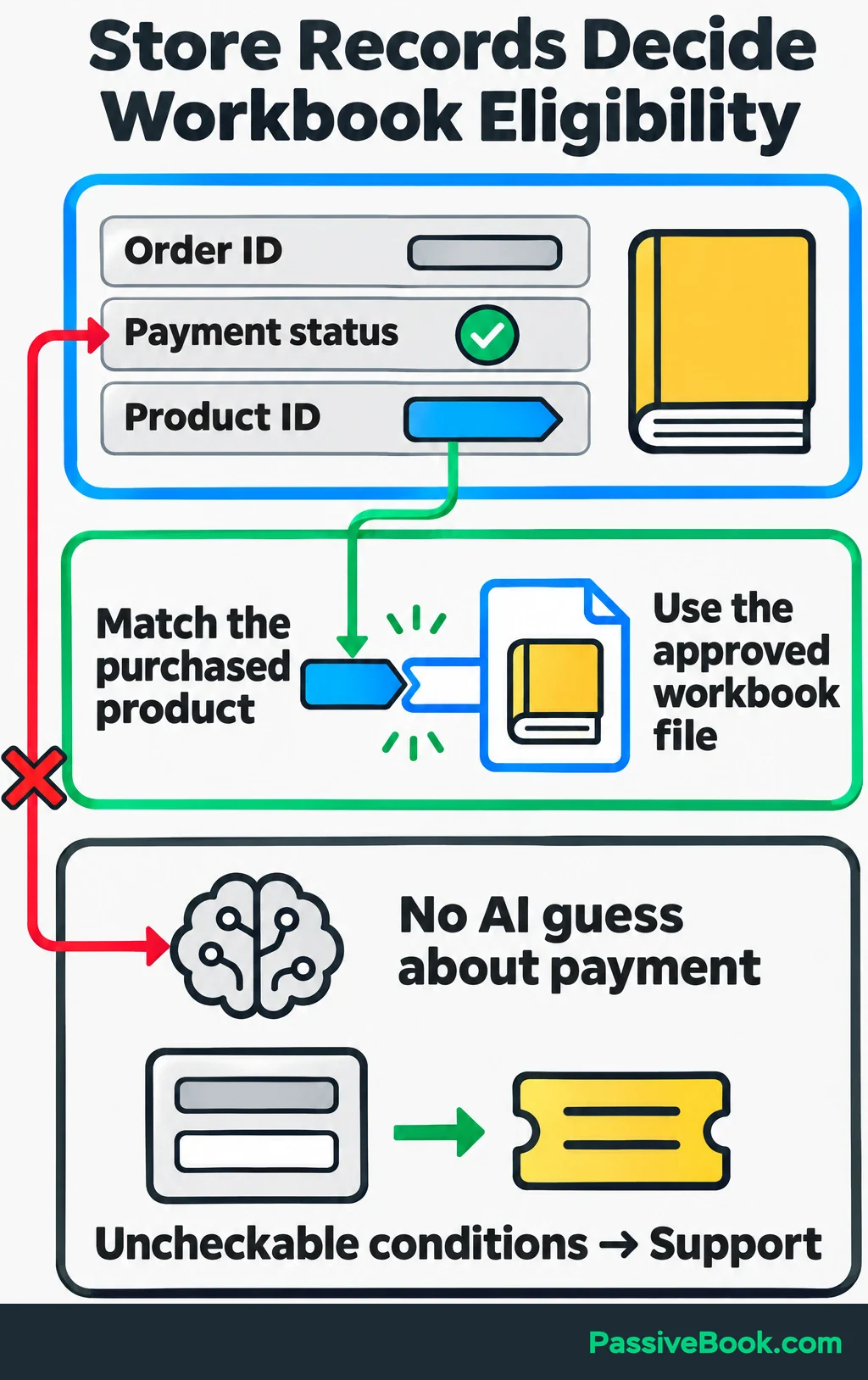
Keep purchase eligibility and financial calculations tied to authoritative records. AI does not need to interpret whether an order is paid when the store already holds that answer.
Also define what happens when information is missing. “Continue anyway” is rarely a useful default for customer access.
Use AI for Bounded Interpretation and Drafting
AI becomes useful when the input varies but the task remains narrow. It can classify a support question, draft a reply, or turn an approved watercolor article into an email draft.
Give it four things: approved source material, one task, an output format, and instructions for unanswered questions.
A support instruction might say:
Using the approved workbook access instructions, classify this request as access, printing, refund, or other. Draft a reply only where those instructions answer the question. Return the category, draft, and any unanswered points for review.
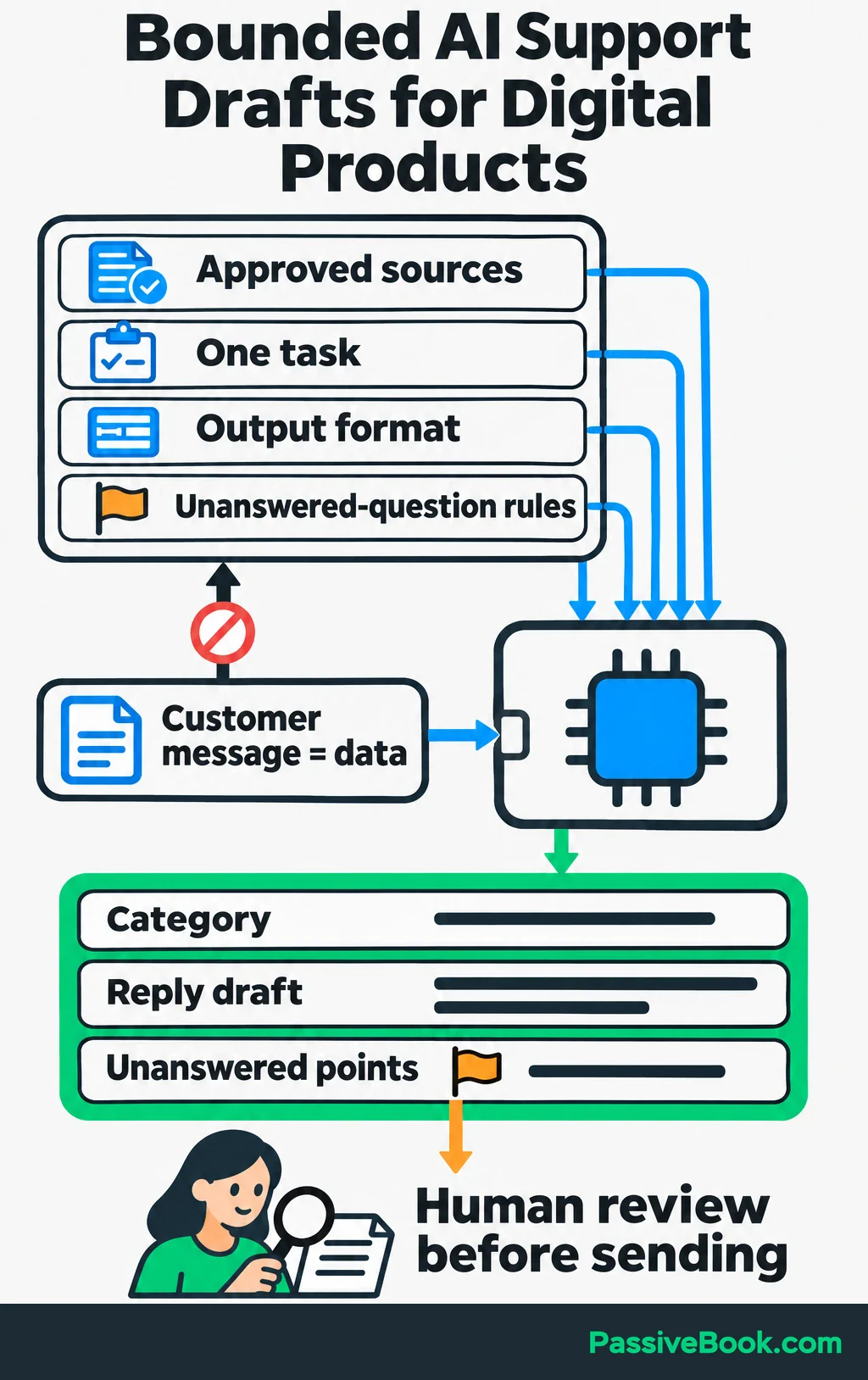
Treat the customer’s message as material to assess, not instructions that can change the workflow.
Start customer-facing work in draft mode. Review whether the answer is accurate, whether it invents product instructions, and whether it sends unresolved questions to a person.
Anthropic’s guidance on effective agents recommends starting with the simplest effective approach and adding complexity when needed. For this workflow, I would begin with one draft-producing AI step before considering an agent that chooses its own actions.
I use n8n to connect tools, and I built a custom Python AI content pipeline that brought my article production from days to hours. That is my experience with my process, not a savings forecast for yours. The useful starting point is a defined task with an output you can inspect.
Keep Consequential Exceptions With a Person
Have a person review disputed purchases, unusual refund requests, pricing changes, and complaints your written policy doesn’t cover.
A useful escalation gives the reviewer:
- The affected order or customer record.
- What happened and why it needs review.
- The proposed action, if there is one.
- The response deadline.
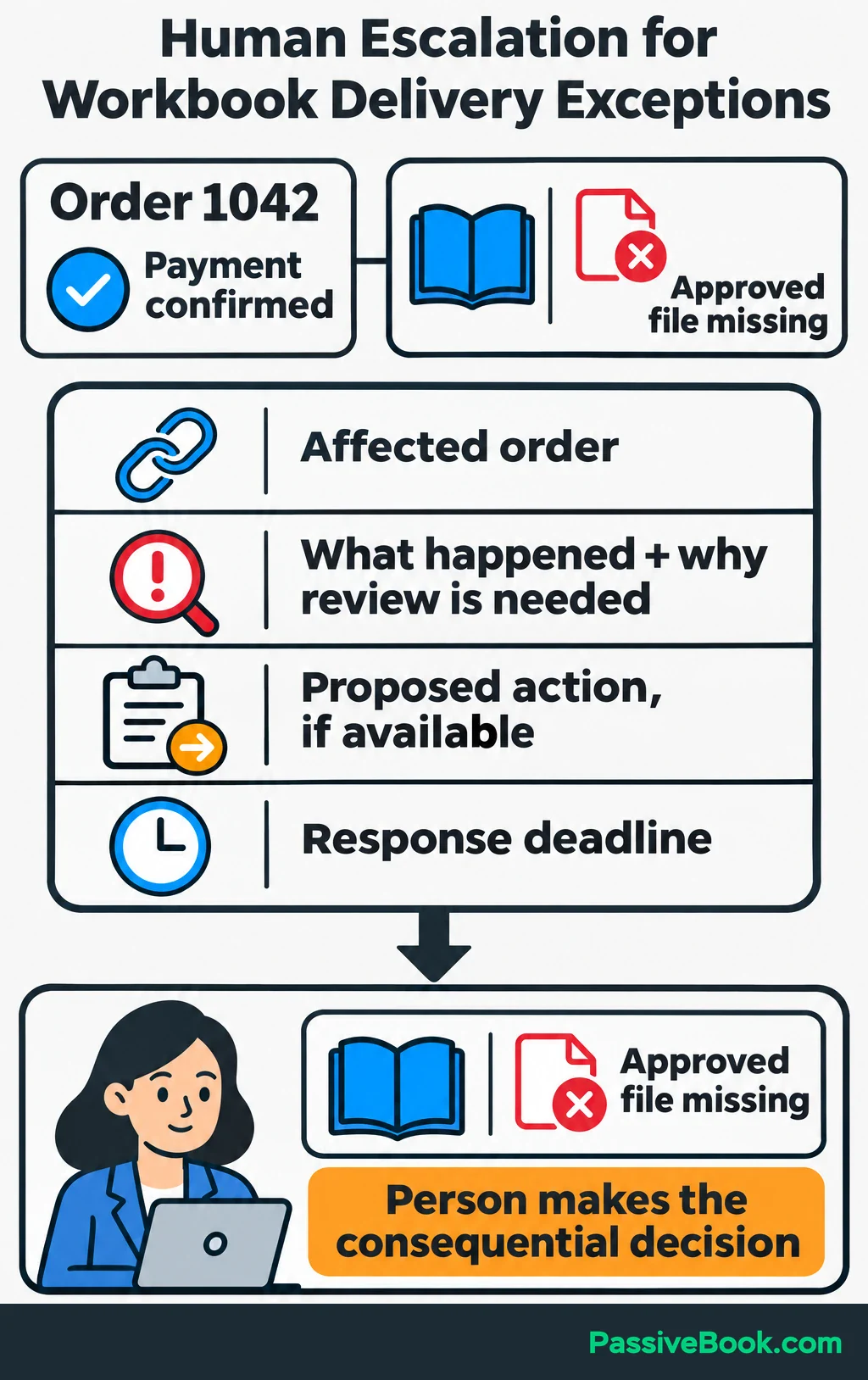
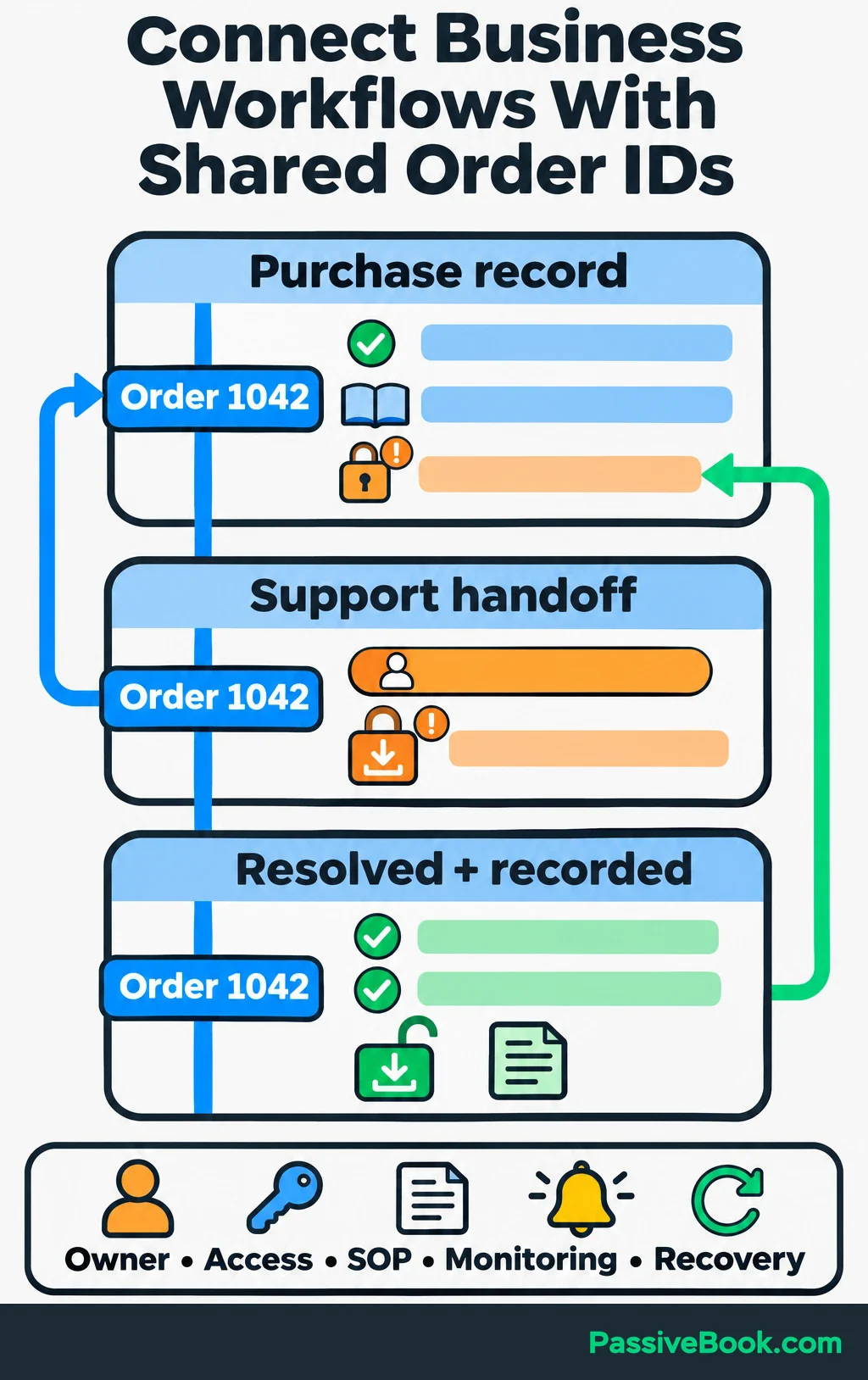
“Something failed” creates another investigation. “Order 1042 has confirmed payment, but its product has no approved file attached” gives you somewhere to start.
Review recurring exceptions. A repeated question may deserve clearer instructions or a new rule. A genuine judgment call should remain with the responsible person.
Choose Tools That Fit the Workflow
Check what your existing software can do before buying a connector, a tool that passes information between apps.
A store’s built-in download delivery may handle the entire workbook workflow. A connector becomes useful when information must move between apps, such as creating a support task after a delivery error.
I would choose in this order:
| Option | Suitable Job | Required Skills | Deployment Responsibility | Ongoing Costs |
|---|---|---|---|---|
| Built-in automation | Deliver a file or run a supported sequence inside one app | Understand the app’s settings and business rules | Provider manages hosted software; you maintain any self-hosted installation | Existing subscription, hosting, or required add-ons |
| Make | Connect apps and build visual, multi-step handoffs | Map fields, set conditions, and inspect failed runs | Make hosts the platform; you maintain connections and workflows | Plan, credits, and any separate AI charges |
| n8n | Build workflows needing its integrations, branching, or deployment flexibility | Workflow design; self-hosting also needs server skills | n8n manages its cloud service; you manage self-hosted infrastructure | Cloud plan or hosting, maintenance, and separate service charges |
For a first cross-app workflow, I would usually choose Make because its visual builder makes each handoff easier to inspect. Confirm that the exact trigger and action you need are supported. An app appearing in an integration directory does not prove that every operation you want is available.
I use n8n, but I would skip self-hosting if server maintenance is unfamiliar and time is tight. Its managed cloud service handles the infrastructure.
Estimate the whole cost: subscriptions, usage, AI charges, hosting, setup, and maintenance. Make uses credits to bill for workflow activity. The number used varies by step and connection type, so run a representative test and include retries in your monthly estimate.
Keep documentation in your existing workspace or a tool such as Notion. For email workflows on WordPress, I prefer FluentCRM, an email marketing plugin. Add it when you need those workflows.
Build One Complete Automation
Translate your tested SOP into:
Trigger → conditions → actions → completion record → exception route.
For the workbook, the normal path is:
Confirmed payment → validate order and product → grant correct access → send delivery information → record results.
Pending and failed payments stay outside that path.
Start with the store’s built-in file delivery. WooCommerce, a WordPress store plugin, can deliver purchased downloads:
- Attach the approved workbook file to the correct product. Mark it as Downloadable and, because the workbook needs no shipping, Virtual.
- Allow access once payment is confirmed by enabling Grant access to downloadable products after payment.
- Prepare clear delivery instructions and a support route.
- Check where the buyer can retrieve their download.
- Run a test purchase before enabling it for normal orders.
File protection matters here. A public file URL can bypass your purchase checks; WooCommerce’s downloadable-product documentation explains how protection depends on the delivery method and server configuration.
If a cross-app handoff is necessary, build only that missing part. Connect the accounts, load a test record, and map the required values explicitly. Check that the receiving app gets the order ID and product ID in the correct fields.
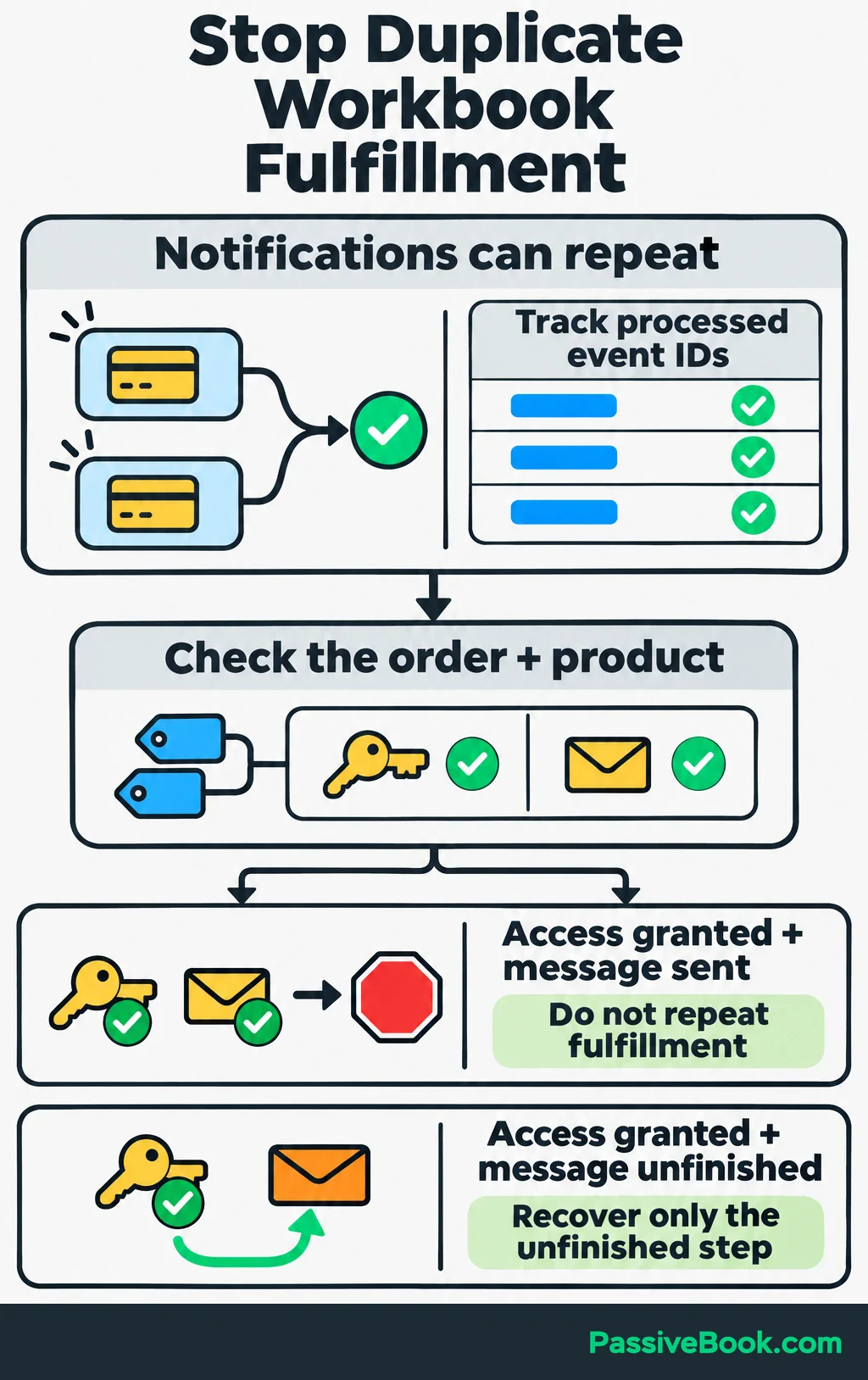
Then account for repeated events. A payment notification can arrive more than once: Stripe documents duplicate event delivery and recommends tracking processed identifiers.
Use the platform’s duplicate protection where available. For custom handoffs, track the event and check whether the business action has already completed for that order and product. A new notification should not create a second delivery, and an unfinished delivery should remain recoverable.
Give each connected service only the permissions and information its step needs. Keep payment credentials and unnecessary customer details out of AI inputs.
Finally, distinguish receiving a trigger from completing the job. Record access granted, message sent, and unresolved errors separately. A green automation run tells you the tool finished its configured steps. Your checks must establish whether those steps produced usable delivery.
Test Failures and Prepare Recovery
Check the Complete Customer Journey
Run these tests from the buyer’s side, and record each result and any fix needed.
| Scenario | Expected Result |
|---|---|
| Successful purchase | Correct workbook access and delivery information |
| Pending or failed payment | No purchase access |
| Duplicate notification | No duplicate fulfillment |
| Missing product information | Visible support task; no guessed file |
| Disconnected account | Failed step logged and operator alerted |
| Access granted but email step interrupted | Access retained; unfinished message step recoverable |
Open the delivery email, follow its link, and download the workbook. Check that it is the correct version and opens properly. Try the support route too.
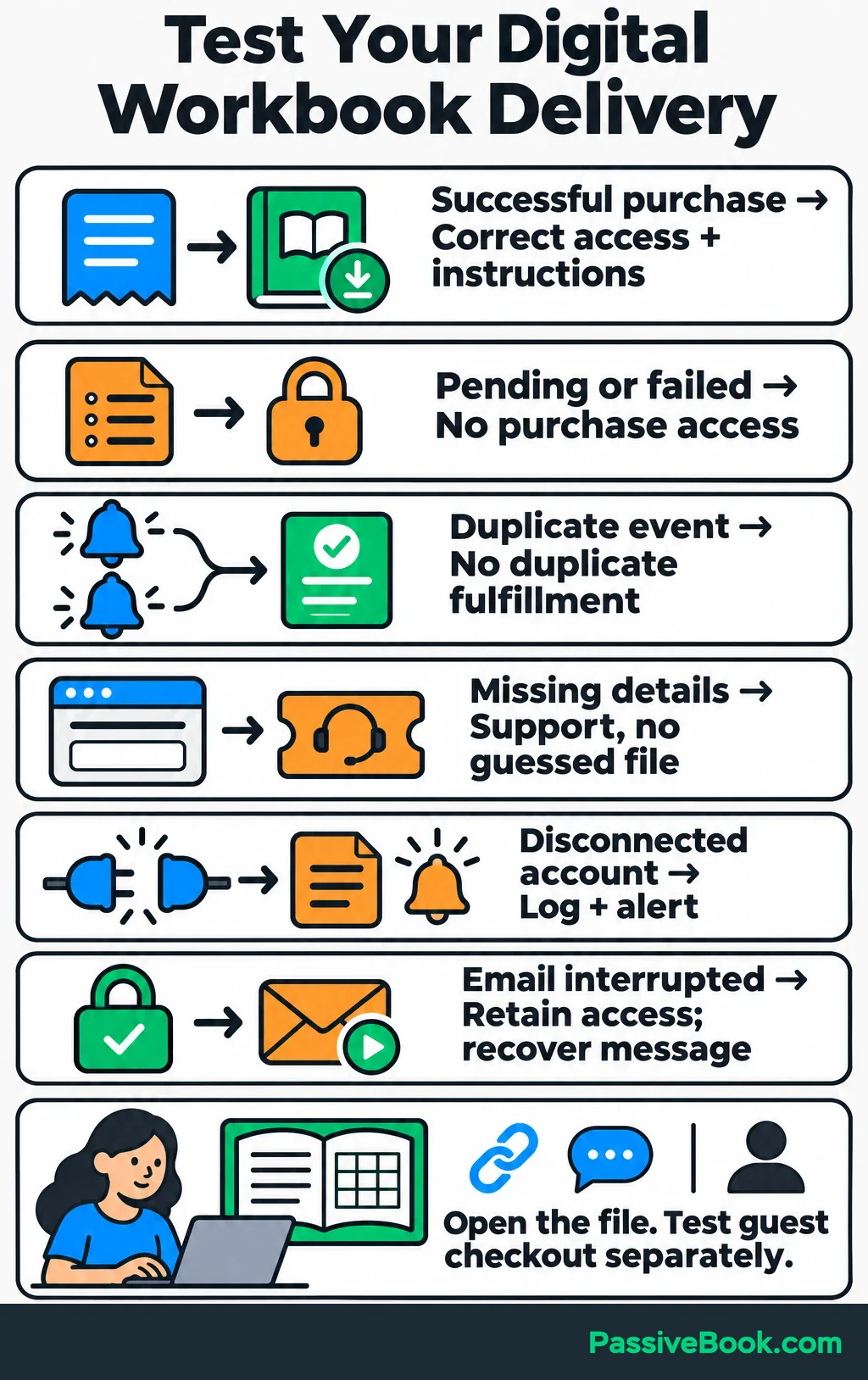
Test guest checkout separately if you offer it. Instructions that assume every buyer has an account can leave guest purchasers stuck.
After these tests pass, try the automation on a small batch of live orders and check each delivery before expanding.
Make Problems Visible and Recoverable
Each failure alert needs a responsible person, the order ID, failed step, last completed action, and manual recovery instructions. A paid buyer without access takes priority over a delayed internal report.
Check what your tool saves after a failure and how to resume unfinished work.
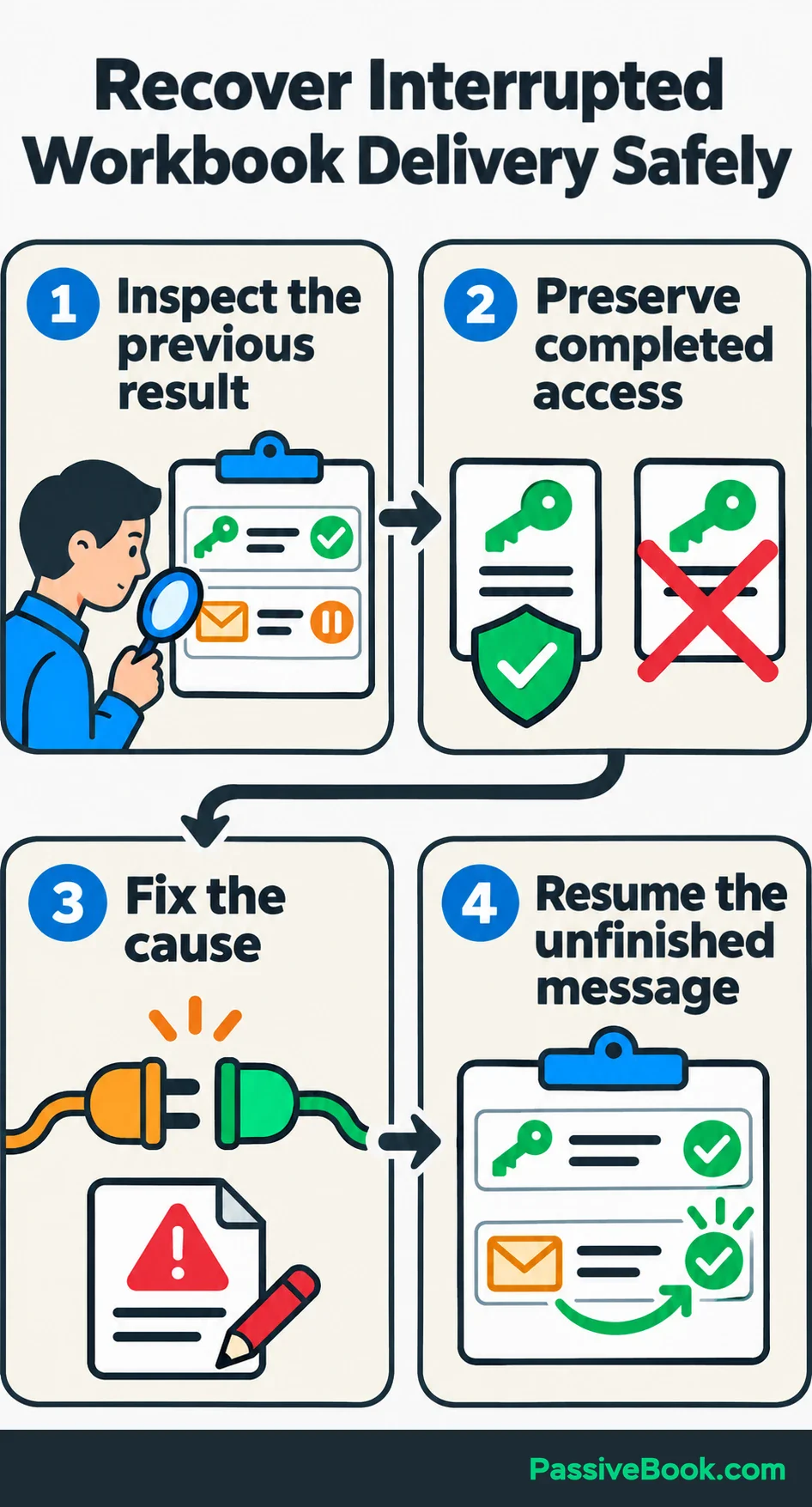
Before retrying, inspect the result of the previous attempt. If access was granted but the delivery message failed, resume at the message step. Avoid repeating completed actions.
Temporary connection failures may be worth retrying. Invalid product IDs and missing files need correction first.
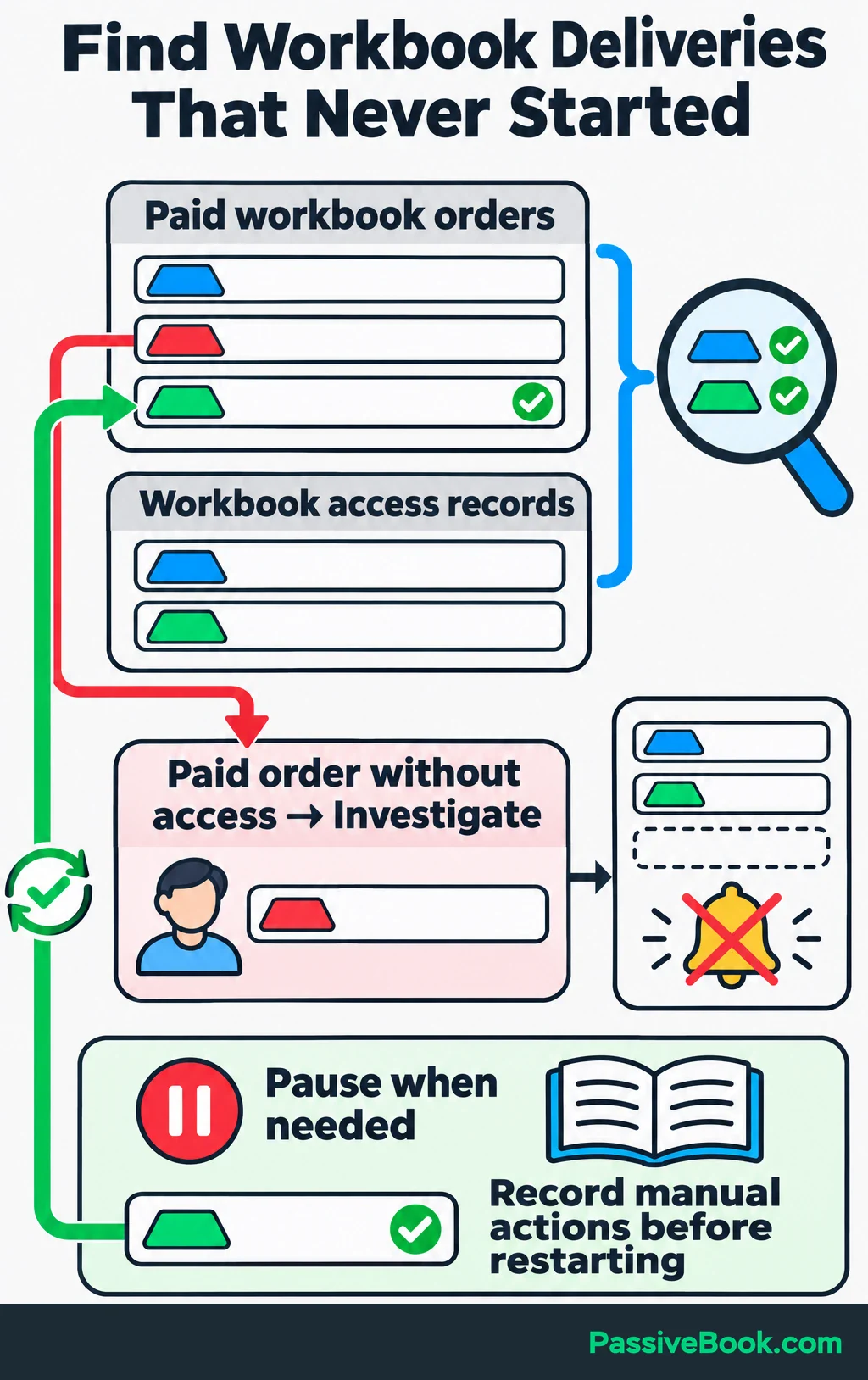
Also look for work that never started. Compare paid workbook orders with access records so a missed trigger does not remain invisible. In the early pilot, I would check this daily, then adjust the frequency to the order volume and customer impact.
Keep a pause control and the manual SOP available. If you switch to manual handling during repairs, record those completed actions so restarting the automation does not repeat them.
Measure Whether the Automation Pays Off
Measure the human work that remains over the same period as your original estimate.
Count review time, exception handling, troubleshooting, and maintenance. Leaving those out gives you an attractive number and an inaccurate picture.
Using the illustrative workbook figures, you previously handled 60 orders each month and spent five minutes on each:
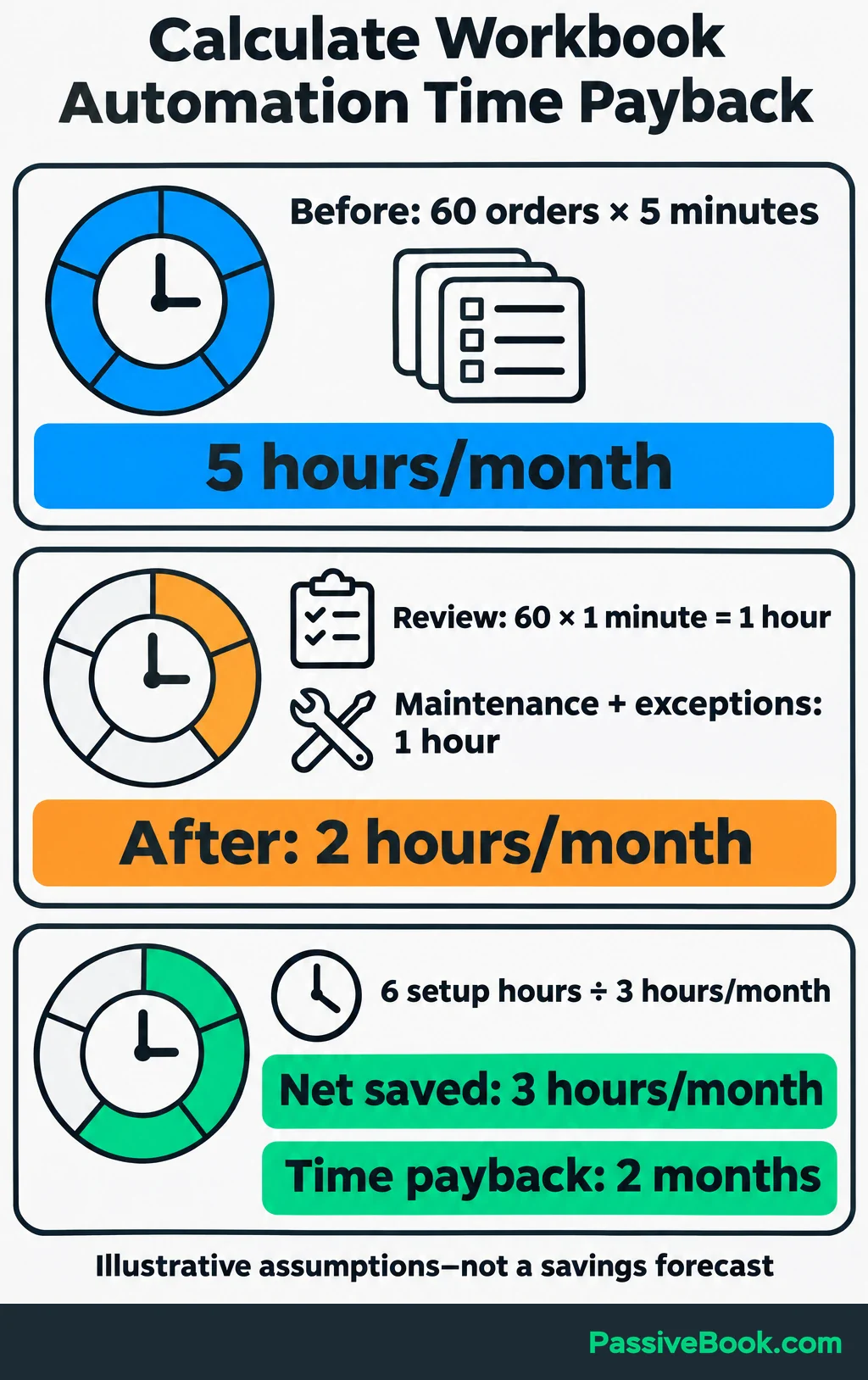
60 orders × five minutes = 300 minutes, or five hours.
Suppose automation leaves one minute of review per order, plus one hour each month for maintenance and exception handling.
| Work | Monthly Time |
|---|---|
| Previous manual delivery | 5 hours |
| Remaining review: 60 orders × one minute | 1 hour |
| Maintenance and exception handling | 1 hour |
| Total work after automation | 2 hours |
| Net time saved | 3 hours |
If setup took six hours, divide that by three hours saved each month. Under these assumptions, the setup recovers its time investment in two months.
That calculation helps you compare projects. It also tells you when an elaborate workflow is hard to justify.
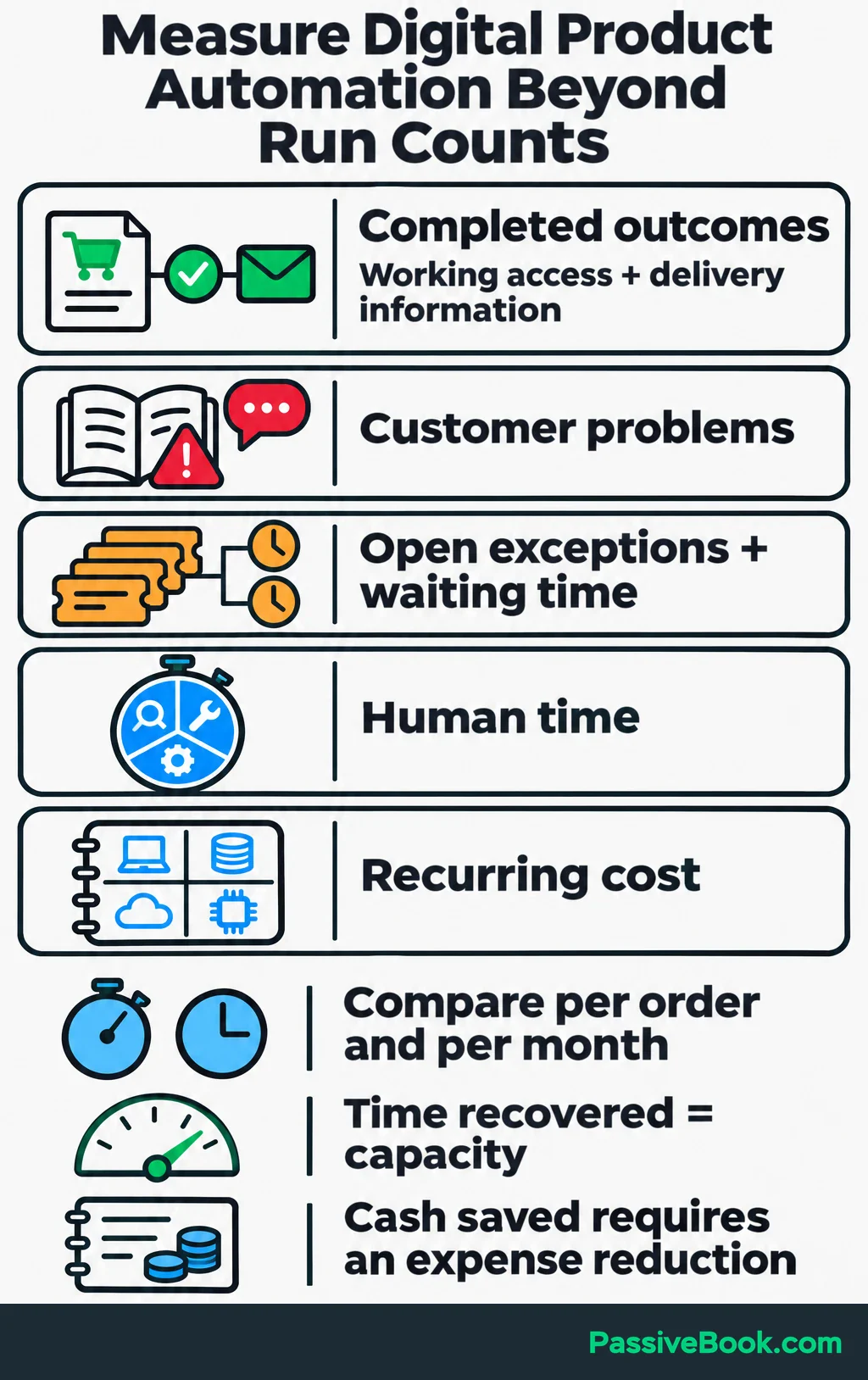
Track a small set of measures:
- Completed Outcomes: Paid orders with working access and delivery information.
- Customer Problems: Missing files, wrong versions, and delivery complaints.
- Unresolved Exceptions: Open cases and how long they have waited.
- Human Time: Review, repairs, and maintenance.
- Recurring Cost: Software, usage, hosting, and AI charges.
When order volume changes, compare handling time per order as well as total hours.
Reclaimed time is capacity. It becomes cash savings when an expense actually falls. You can still use that capacity to improve the workbook, serve more buyers, or finish work earlier.
Keep the automation if it produces reliable outcomes at a worthwhile cost. Revise or retire it if the repair work eats the benefit.
Extend the System and Reduce Owner Dependence
Once delivery works, choose the next workflow from the bottleneck you can now observe.
Perhaps support still interrupts every evening. Perhaps approved articles sit unpublished. Use measured workload and customer impact to decide.
For a service business, a confirmed booking could trigger an intake form and a project task. For physical products, send paid orders to fulfillment and email tracking details once shipment is confirmed.
The same process can extend across the workbook business:
| Workflow | Trigger | Automated Steps | Human Checkpoint | Completed Outcome |
|---|---|---|---|---|
| Content distribution | Watercolor article approved | Create email and social drafts; schedule approved versions | Check claims, links, and formatting | Content published at intended destinations |
| Subscriber onboarding | Confirmed signup | Send promised resource, welcome lessons, and eligible workbook offers | Review sequence and purchase-based exclusions | Subscriber receives the intended sequence without inappropriate offers |
| Support | Request received | Categorize issue and draft from approved instructions | Resolve uncertain answers, complaints, and policy exceptions | Customer’s issue resolved and recorded |
| Workbook updates | Revised workbook approved | Create replacement, testing, and communication tasks | Approve file and test download access | Correct version available and affected buyers informed |
| Financial reporting | Reporting period closes | Gather sales, refunds, fees, and costs | Reconcile discrepancies | Reviewed summary ready for spending decisions |
For content distribution, keep the approval step before scheduling. AI can adapt an approved watercolor lesson, but it should not quietly add promises about what the workbook includes.
For subscriber onboarding, connect purchase status to later offers so buyers stop receiving invitations to buy the same workbook. Keep purchase delivery separate from marketing eligibility; unsubscribing from promotions should not prevent someone receiving their purchase.
For U.S. commercial email, include accurate sender information, required advertising identification, a valid postal address, and a clear opt-out. Honor opt-outs within 10 business days. The FTC’s CAN-SPAM guide also explains how a message’s primary purpose affects its treatment.
Connect workflows through shared identifiers and explicit handoffs. An order ID should lead from a support task back to the purchase. Each handoff needs a clear starting condition and somewhere to send incomplete work.
Give every workflow a responsible role, decision boundaries, and an escalation route. One person can hold several roles initially. Naming them still matters because “store operator checks failed deliveries” is easier to delegate than “I check things when I remember.”
When help becomes worthwhile, provide the SOP, necessary access, expected outcome, and review method. Hire against the remaining workload you can see.
Then test a short period without routine owner intervention. Keep exception coverage in place, but stop checking every normal action. Record each interruption and identify the missing instruction, permission, or decision rule behind it.
Maintain a compact register of workflows, owners, connected accounts, SOPs, monitoring, and recovery procedures. Update the instructions whenever the automation changes.
Before increasing demand, check delivery capacity, support queues, margins, and owner involvement. A system can help you handle more sales with less manual work, but it still needs enough capacity to deliver what you promise.
What Next?
Pick one recurring task and write its trigger, finished outcome, and current handling time. Use that small record to choose the first workflow worth documenting, then test its manual procedure before adding automation.
If this guide helps you spot where your business keeps waiting for you, use the social buttons to share that starting point.
Which task would be hardest to leave alone for a week, and why? Tell me in the comments, and bring any questions about documenting or automating it.
Share this post with your friends & followers:

