A hosting offer says “a few dollars a month,” but checkout wants three years of payments. An email tool is free, but the welcome sequence you planned needs a paid account.
Those differences matter when you’re fitting business expenses around rent, bills, and a day job. A small subscription can also bring setup work and another renewal to remember.
I’ve started businesses with a $100 budget, so I pay attention to what leaves the bank account. This guide compares useful offers by the job they do, the money due upfront, and the costs that remain after the discount ends.
Best Online Business Deals at a Glance
Disclosure: I may earn a commission if you buy through links in this article.
The best deals for online business owners solve a current problem at a cost the business can carry after the promotion ends.
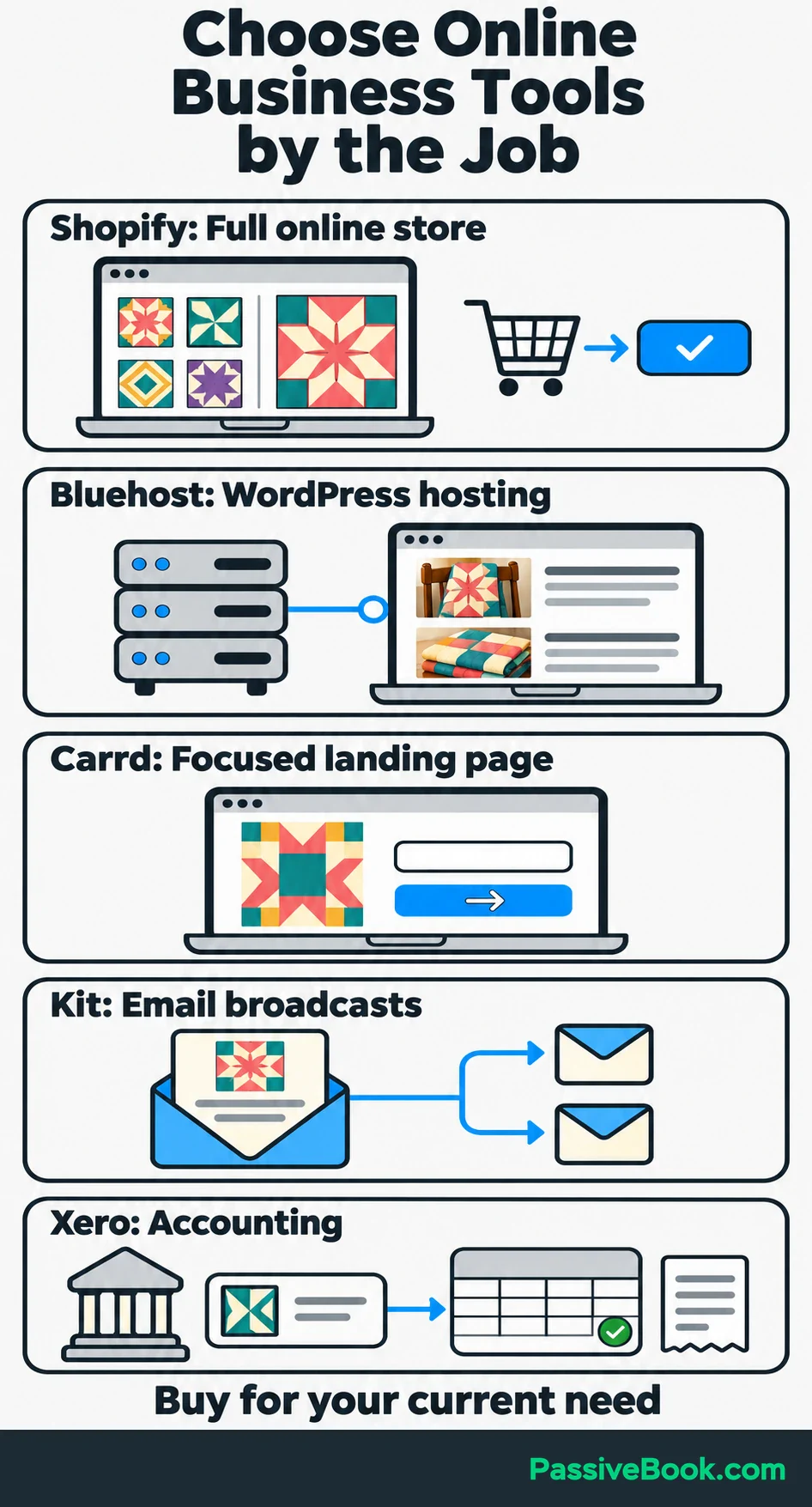
My starting choices are Shopify for a full store, Bluehost for beginner WordPress hosting, Carrd for a focused landing page, Kit for email broadcasts, and Xero for eligible US bookkeeping needs. These tools handle different jobs, and some can work together. Buying all five would rarely be a sensible starting point.
Dollar amounts below are USD before applicable taxes. Local pricing and eligibility can differ. The official links contain the current terms.
| Provider and Plan | Best Use | Initial Payment and Commitment | Ongoing Price | Restrictions, Eligibility and Timing | Official Offer Link |
|---|---|---|---|---|---|
| Shopify Basic | Product catalog, storefront, and checkout | Introductory promotion: three days free, then $1/month for three months with promotional monthly billing | $39/month with monthly billing; annual billing costs $348 upfront, equivalent to $29/month | Processing, apps, and a custom domain can add costs. For new stores offered the promotion; no end date published. | Shopify pricing |
| Bluehost Starter | A WordPress website or blog | Introductory rate: $143.64 upfront for 36 months, advertised as $3.99/month | Listed renewal rate: $9.99/month; a 36-month renewal at that rate would total $359.64 | Three-year upfront commitment; 10GB storage. For new hosting customers choosing the qualifying term; no end date published. | Bluehost pricing |
| Carrd Pro Standard | A simple landing page | Regular annual price: $19 for one year | $19/year at the listed rate | Domain registration and external services cost extra. Available to customers choosing Pro Standard; not a timed promotion. | Carrd plan details |
| Kit Free | Signup forms and one-off emails to your list | Ongoing free plan: $0; no paid billing commitment | $0 within free-plan limits | Up to 10,000 subscribers; automated sequences and visual automations need a paid plan. Not a timed promotion. | Kit Free plan terms |
| Xero Early | Basic accounting for an eligible US business | 80% introductory discount: $5.40/month for three months | $27/month, renewing automatically | Monthly allowance of 20 invoices and five bills; extras excluded from discount. For new US customers buying their first organization directly; no end date published. | Xero pricing and offer terms |
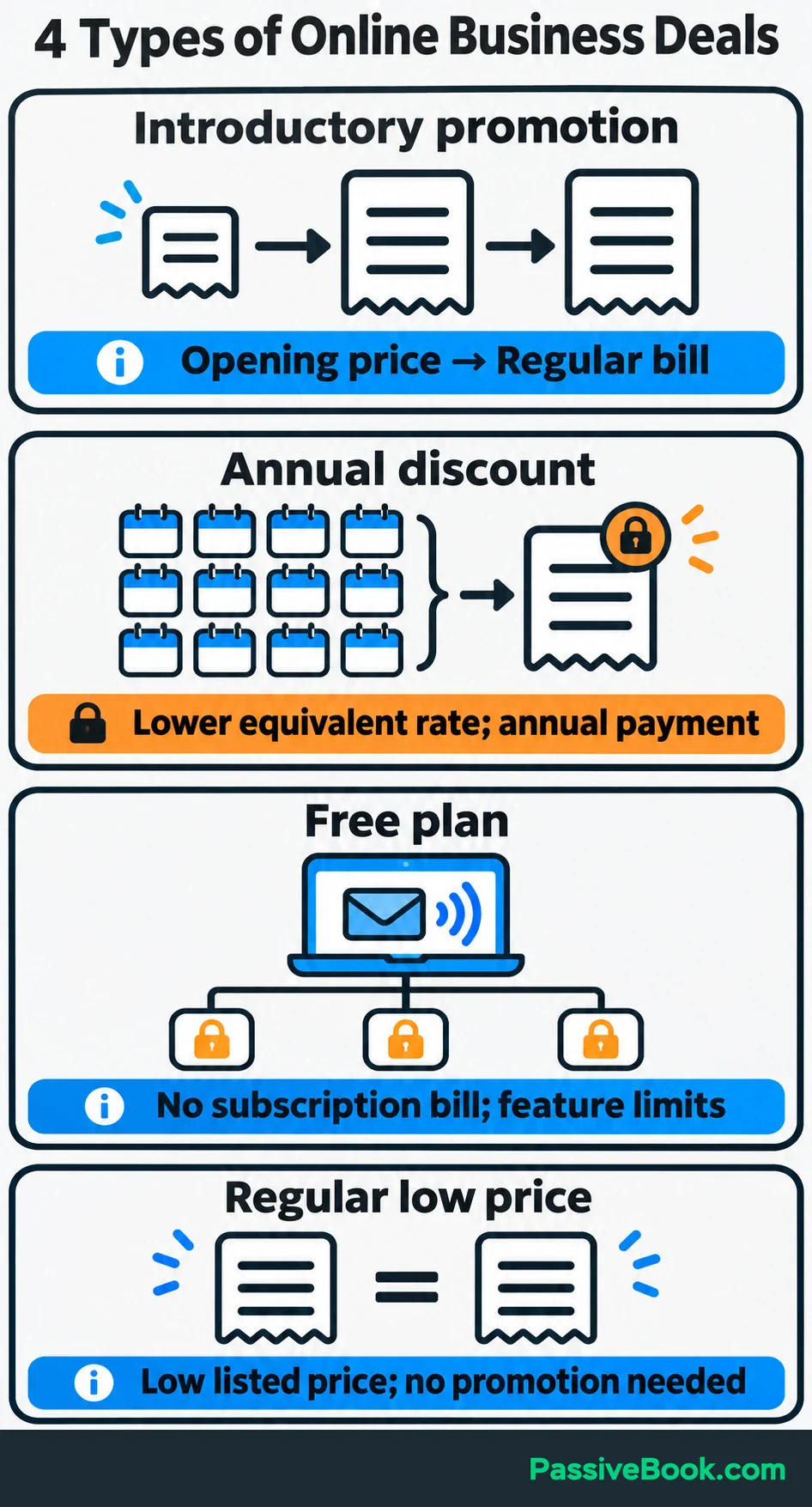
An introductory promotion lowers the opening bill. An annual discount rewards a longer commitment. A free plan has feature limits, and a regular low price does not need a countdown timer.
To make the choices concrete, imagine you sell printable quilting patterns. You might need a page to test interest, a store to deliver downloads, emails for new releases, and software to keep the accounts straight. Buy for the stage you’ve reached.
For physical products, check inventory and shipping features instead of download delivery. For client work, focus on quotes, invoices, and payment tracking rather than a product catalog.
The Best Deals by Business Need
Shopify: Introductory Savings for a Full Online Store
I would choose Shopify when you need a proper storefront with product pages, product management, and checkout. If you only want to collect interest before making your first product, I would start with a simpler page.
For the quilting-pattern shop, the useful test is whether a customer can find a pattern, understand what’s included, pay, and receive the correct file. A handsome homepage is only part of that job.
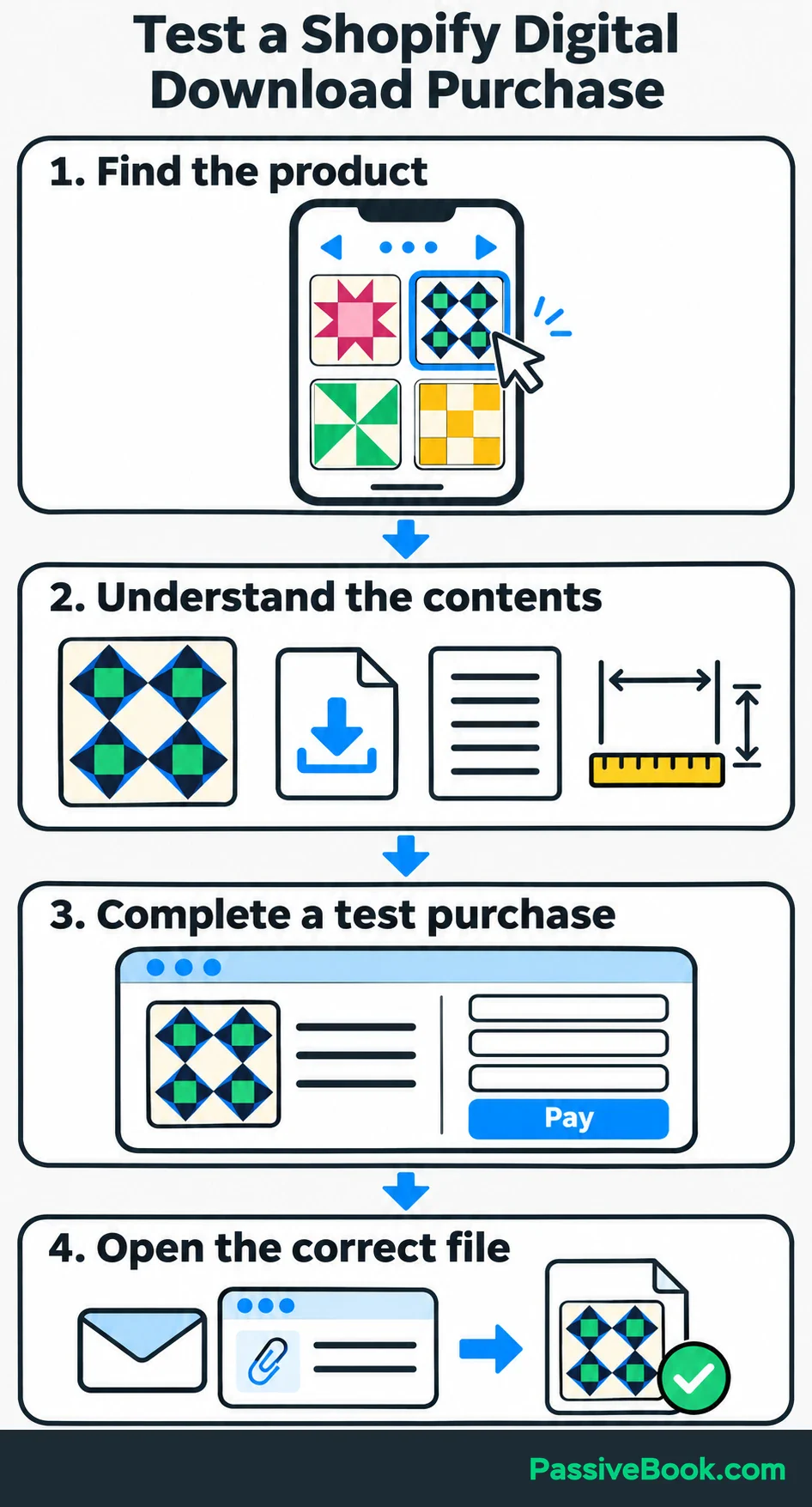
Before starting the trial, prepare one finished pattern, its images, a description, and the download file. Then use the trial to test the buying process. Otherwise, your trial can disappear while you’re still choosing a font.
Budget for:
- Payments: Processing charges and any applicable transaction fees.
- Delivery: Whatever setup you need to send downloadable files.
- Extras: Required apps and a custom domain.
The table separates monthly and annual billing because the annual monthly equivalent is not the amount you can pay each month. I would prove the store works before committing to a longer billing period.
Shopify plans are generally nonrefundable, including after cancellation. Exceptional requests receive individual review, so don’t treat cancellation as a way to recover an unused annual payment. Shopify’s subscription refund policy
Bluehost: Introductory Hosting Savings for a WordPress Site
Bluehost is worth considering when you want a WordPress website or blog and prefer a beginner-oriented hosting option. Hosting gives the site somewhere to run, but you still need to arrange checkout and product delivery.
For the pattern business, this route makes sense if tutorials and articles are central to attracting buyers. You could publish quilting guides and sell patterns using WooCommerce, a plugin that adds a store to WordPress.
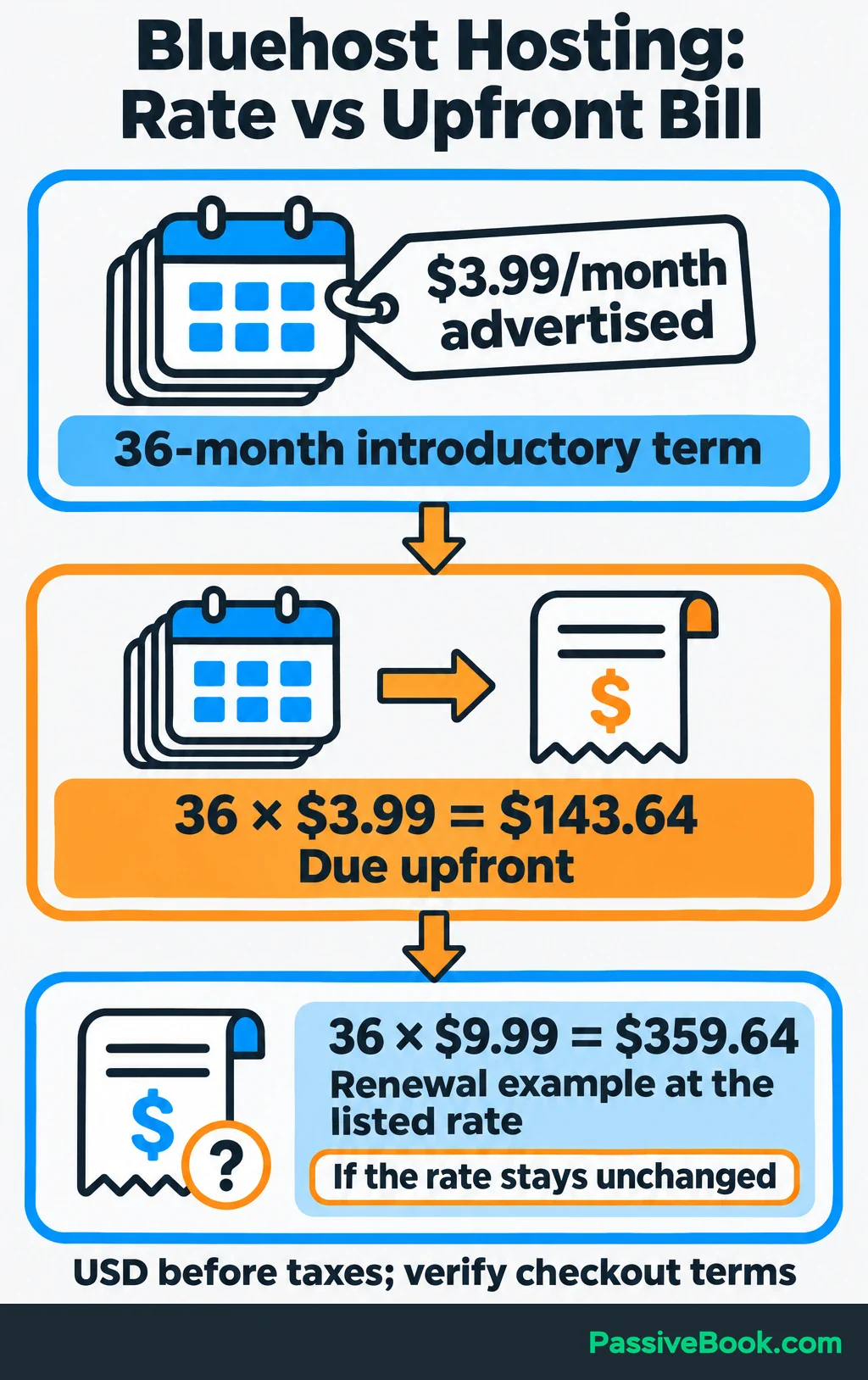
The main buying decision is the commitment. The low advertised monthly rate requires the full three-year payment shown in the table. I would only choose that term if I already intended to keep the website running.
Also check whether the storage allowance covers your images and files. The eligible free domain covers its first year and must be redeemed within 90 days, so later domain renewals belong in your budget.
If your current host works well, price the move before chasing the discount. Migration, testing, and overlapping subscriptions can eat the saving.
Eligible new hosting purchases have a 30-day money-back guarantee. Domain registration, setup, and additional services are excluded, and a domain fee can be deducted from the hosting refund. Bluehost’s refund policy
Carrd: A Low Annual Price for a Simple Landing Page
Carrd is my choice when the job is one focused page: explain an offer and collect interest.
Start by deciding what visitors should do. Then build only what helps them do it. For a new quilting-pattern collection, that might mean a preview image, a short description, and a signup form:
“Get an email when the beginner quilt-pattern collection is ready.”
Pro Standard includes up to 10 sites, custom-domain connections, signup forms, and embeds. You still pay separately for a domain and any outside services you connect.
On one digital-product project, I started building a separate launch page because a dedicated builder seemed like the tidy choice. Then I put the same headline, preview, and form on the existing site. It did the job, so I dropped the extra tool before launch. The useful question was whether I needed another page builder at all.
I would apply that check here. If your website or email platform already provides a suitable landing page, use it.
Carrd’s automatic renewal is optional and uses your account balance. If you enable it, make sure that balance covers renewal or add a saved payment method to fund it automatically. Carrd’s renewal terms
Kit: Free Email Broadcasts for up to 10,000 Subscribers
Kit’s Free plan is a strong starting choice when you want signup forms, landing pages, subscriber tags, and email broadcasts without a subscription bill.
A broadcast is a one-off email you choose to send to your list or a group of subscribers. An automated sequence sends a series of emails after someone subscribes or takes another action.
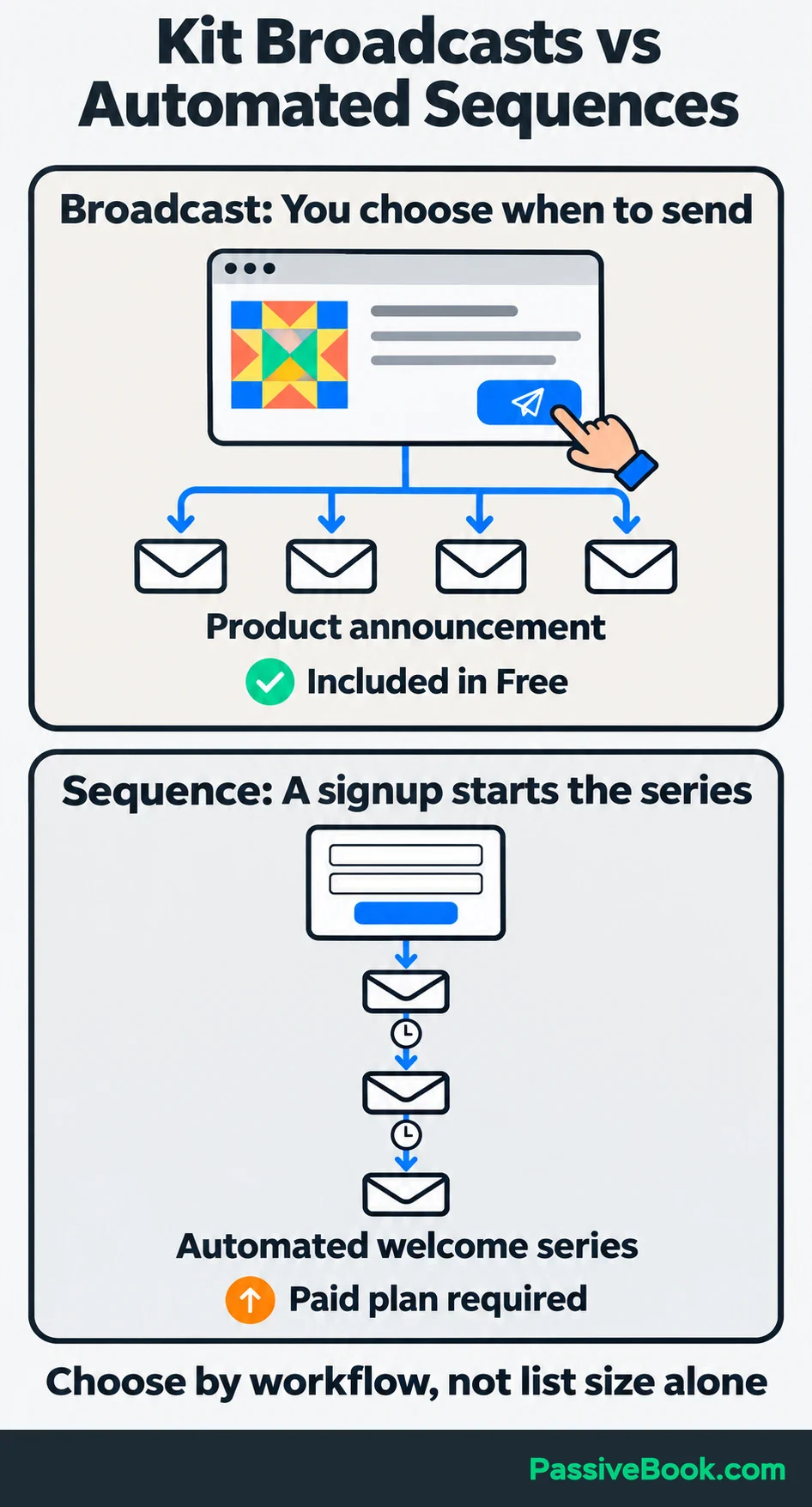
For the pattern shop, you could write a new-release email and send it to interested subscribers. But a welcome series that sends different messages over several days needs features outside the Free plan.
I would write down the emails you need before choosing:
- Product announcements: A broadcast you prepare and send when a pattern launches.
- Welcome sequence: Messages sent automatically after each person subscribes.
- Buyer follow-up: Emails triggered by a purchase or another customer action.
That list makes the upgrade decision clearer than a large subscriber allowance alone.
Free accounts join Kit’s Creator Network, which supports recommendations between creators. You can turn recommendations off without changing the plan.
If you need paid features, compare the full invoice at your expected subscriber count on Kit’s pricing page. An annual discount is useful once you know the workflow fits, but I would test the required automation before paying for a year.
Xero: An Introductory Accounting Discount for Eligible US Businesses
I would choose accounting software with the regular bill in mind. Before considering the promotion, confirm that it supports your bank connections, reporting needs, and accountant’s workflow.
The listed US offer uses code DC80325309US. It applies to the base Early, Growing, or Established subscription and excludes add-ons, usage charges, and payment fees. It cannot be combined with another offer.
For the pattern shop, check how sales reach the accounts. Transactions created by connected apps can count toward Early’s invoice limit, so a small product catalog does not automatically mean the smallest accounting plan fits.
Ask the person setting up your books to show how a sale, refund, and payment-processing fee will be recorded. That tells you more than the discount banner.
Xero requires one month’s notice to cancel, with charges continuing during that period. Set your reminder early enough to cover that notice. Xero’s cancellation terms
How Much Will the Deal Actually Save?
Count everything you must spend over the period you expect to use the tool. That includes the subscription, required extras, usage or transaction charges, setup, migration, overlapping subscriptions, and applicable taxes.
Then compare it with the least expensive option that meets the same needs. Your current tool belongs in that comparison.
A crossed-out price tells you what the provider uses as its reference. It does not establish what your business would otherwise spend.
For example, consider 12 paid months of Xero Early using the rates in the table. Count only the base subscription, with no extras or taxes, and assume those rates remain unchanged:
| Item | Amount |
|---|---|
| First three discounted months | $16.20 |
| Following nine months at the regular rate | $243.00 |
| Total with the introductory offer | $259.20 |
| Twelve months at the regular rate | $324.00 |
| Cash saving over those 12 months | $64.80 |
| Percentage saving over those 12 months | 20% |
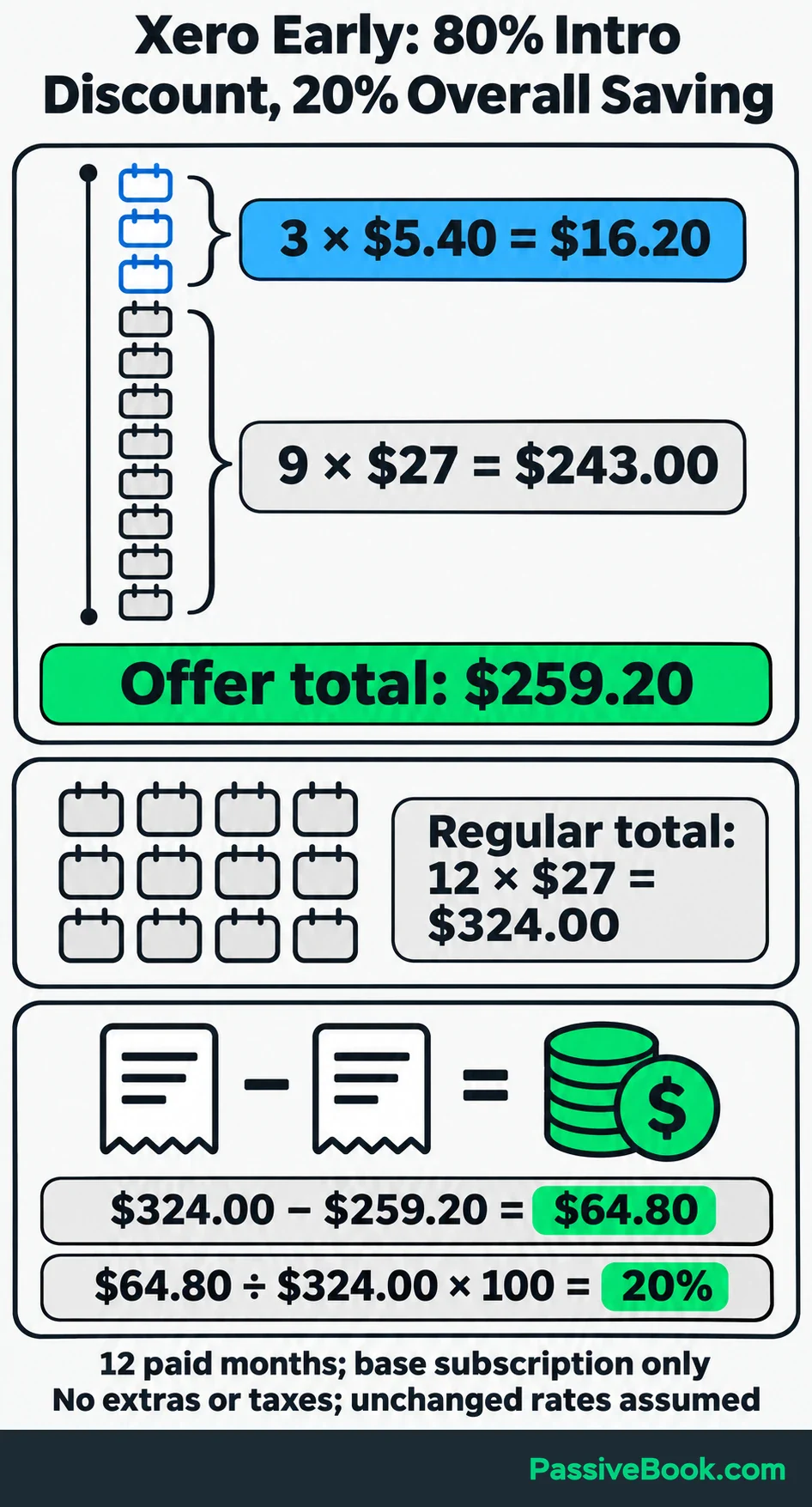
The advertised 80% discount applies to the opening three months. Across this full-year comparison, the saving is 20%.
For any offer, subtract the deal’s total cost from the suitable alternative’s total cost. To express that saving as a percentage, divide it by the alternative’s total cost and multiply by 100.
Keep these comparisons fair:
- Features: Compare plans that can perform the same required work.
- Usage: Use the same order volume and order value when comparing transaction charges.
- Replacement costs: Count an old subscription as a saving only after you cancel it.
- Commitment: Include the full payment you must make, even if you expect to stop using the tool sooner.
A tool can also earn its place by helping you sell more. Work out that break-even point using what each sale contributes after its variable costs.
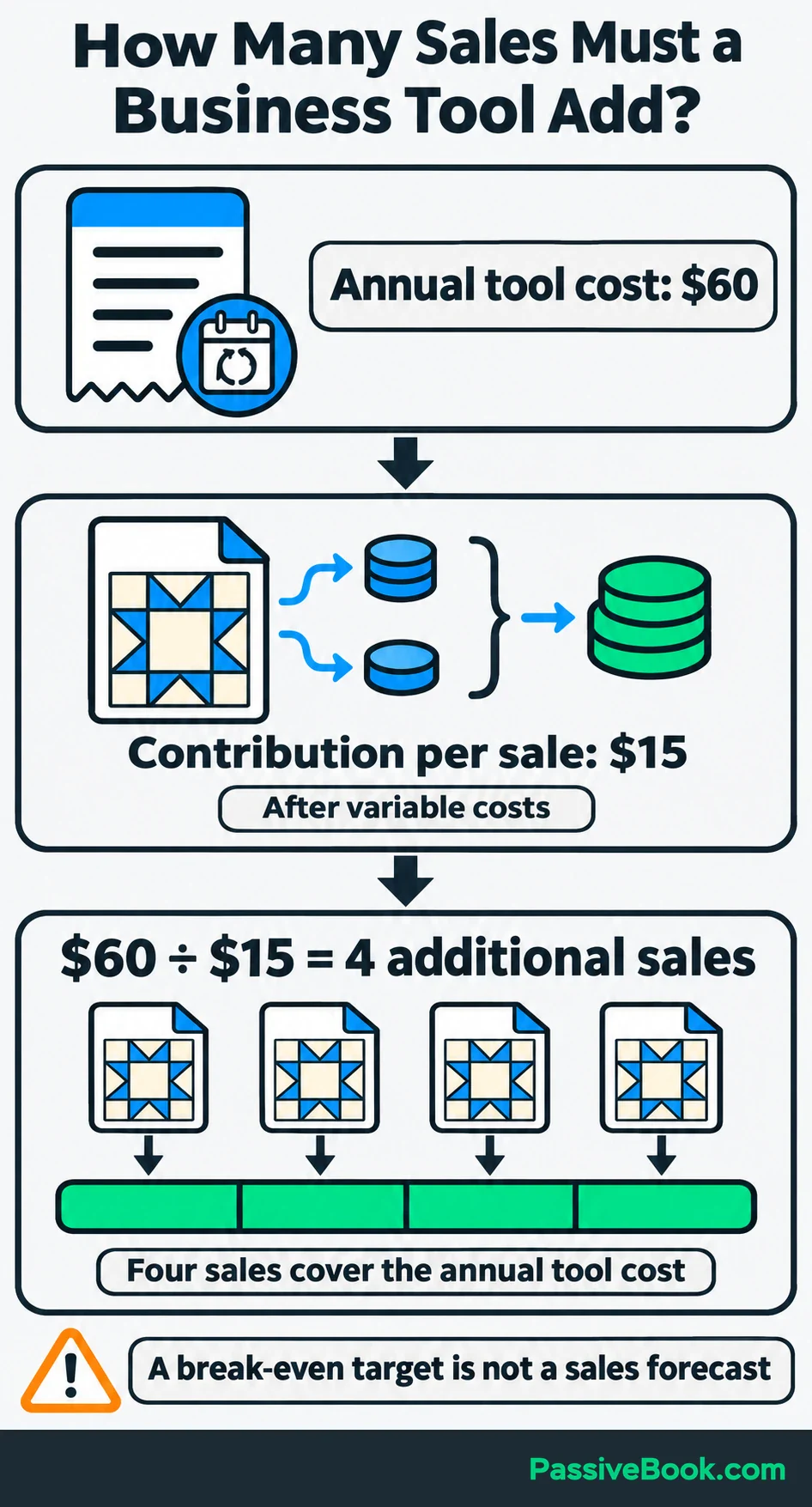
Suppose an optional tool costs $60 a year and each pattern sale leaves $15 after payment fees and other costs that rise with sales. Four additional sales would cover the tool’s annual cost: $60 divided by $15.
That calculation gives you a target. It does not show that the tool will produce those sales.
Time savings deserve a separate line. An hour saved can be valuable, but it does not become cash in the bank unless it reduces an expense or helps you earn money.
The payment schedule can change which option is cheaper, especially if you’ve already paid for another tool. Use the calculator below to compare your quotes and see when a switch would pay for itself.

Free Software Cost Calculator




Check the Offer Before You Pay
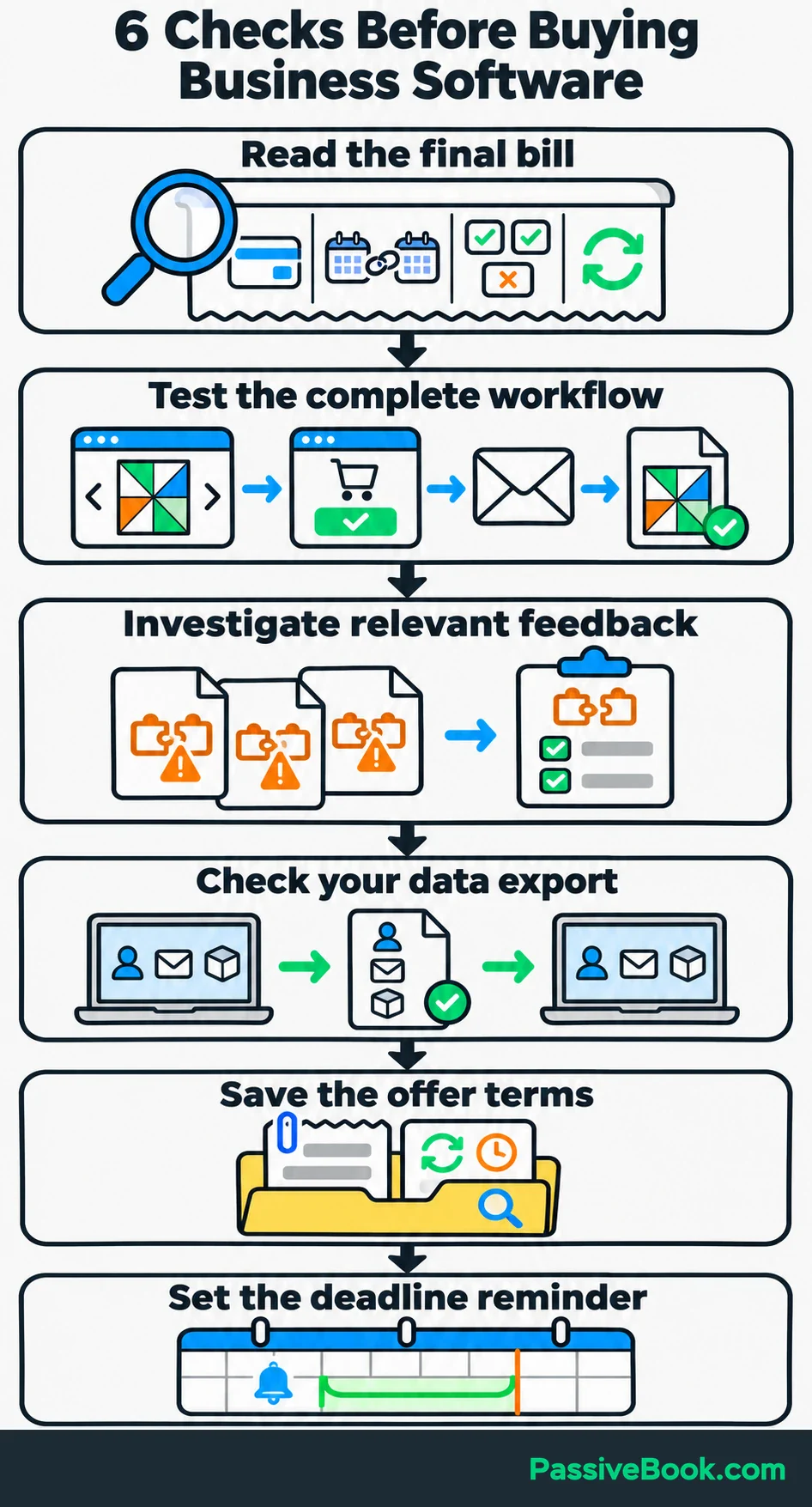
Before entering payment details, confirm what you are buying and test the job you expect it to do.
- Read the final bill: Check the currency, total due now, billing term, selected extras, eligibility, and renewal amount. Remove anything you did not intend to buy.
- Test the complete workflow: For the pattern shop, publish the page, make a test purchase, open the download, and check the customer email. For accounting software, check that a sample transaction matches the corresponding bank record.
- Read relevant user feedback: Look for recent reports about the integration, file delivery, support, or export feature you depend on. Repeated complaints give you something specific to test.
- Check your exit: Confirm how you can export products, customer records, subscribers, or accounting data. An export is more useful when it contains the fields you need in the next tool.
- Save the terms: Keep the offer details with your receipt, including the renewal amount and any cancellation or refund deadline.
- Set the reminder: Use the actual billing or cancellation deadline and allow for any notice period. Don’t assume the renewal date is your last chance to act.
I would buy when an offer removes a current bottleneck or replaces an expense. I would postpone a tool whose main purpose is something I might do later.
That rule still applies during Black Friday. A discount does not create a need, and setting up an unnecessary tool is a fairly elaborate way to avoid working on your product.
What Next?
Pick one subscription you already pay for—or one tool you are about to buy—and compare its full cost over your expected use period with the cheapest suitable alternative. Include the renewal and any work needed to switch.
Use the social buttons to share this guide when the next deal roundup arrives, so the comparison includes the bill after the promotion.
Which recurring expense would you most like to reduce without making your business harder to run? Share it in the comments, and bring any other questions about comparing offers.
Share this post with your friends & followers:

