A payment lands in your bank account, but it doesn’t match your sales total. Somewhere between the checkout and the deposit are refunds, fees and transactions still waiting to settle.
Sorting that out takes time, and handing it to AI raises another concern: will you spend the evening checking its work instead? This guide follows a small digital-product business through expense entries, payment matching and spending decisions, so you can judge where AI could reduce the work and what still needs your approval.
What AI Changes in Finance and Accounting
Accounting records what happened: money received, expenses incurred, refunds issued and balances owed. Finance uses those records to decide what you can afford and where to spend.
AI for finance and accounting can help with both, but the order matters:
- Collect receipts, invoices and transaction records.
- Let software extract information and suggest entries or matches.
- Check the suggestions and approve the records.
- Use those checked records for reports and decisions.
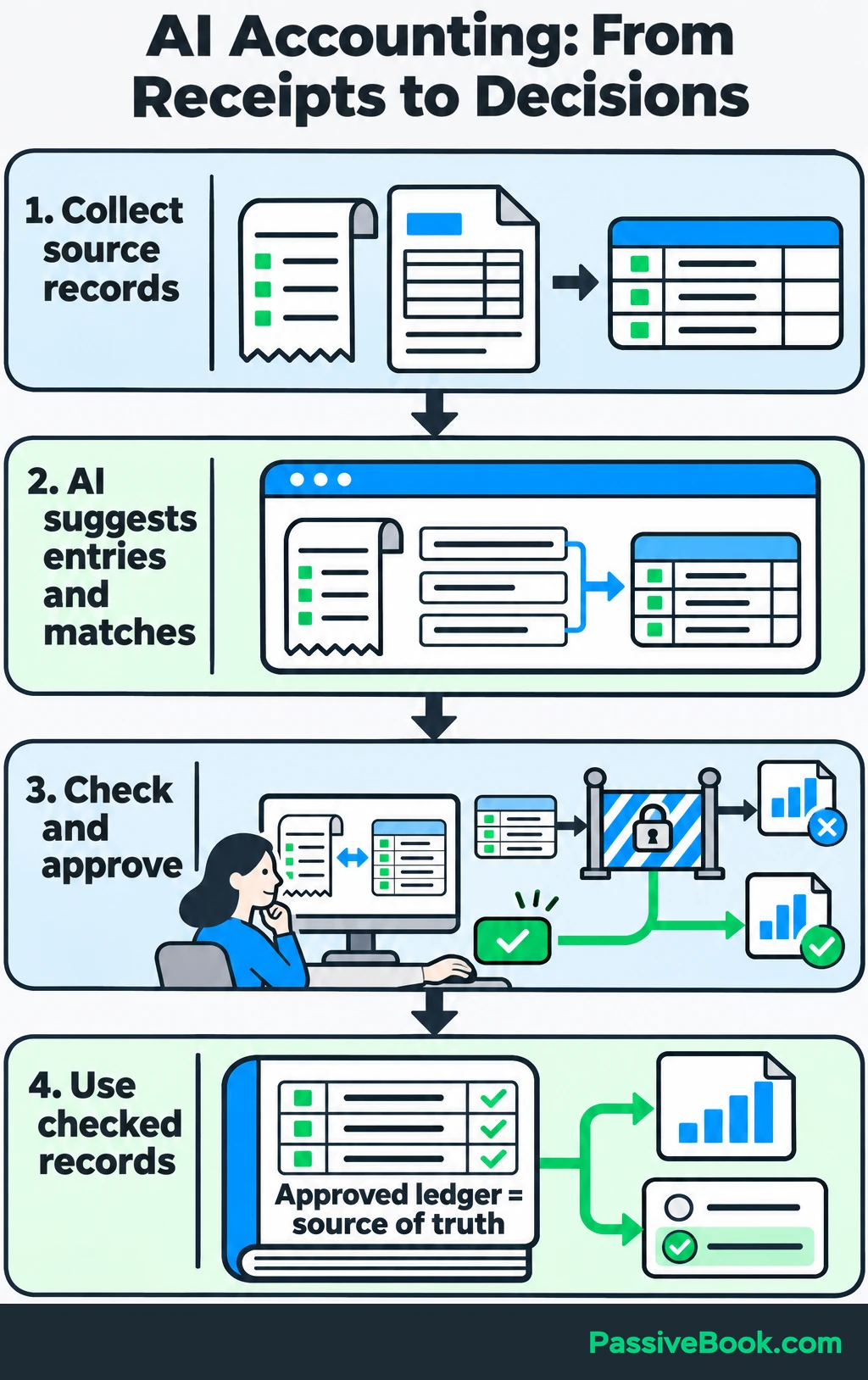
Your accounting ledger—the main record of approved transactions—stays the source of truth. An AI conversation is a place to explore the numbers, but approved changes belong in your books.
Some useful automation needs no AI. A fixed rule can assign a familiar monthly hosting charge to the same expense category. AI becomes useful when documents vary, transaction descriptions are unclear or you want a plain-language explanation of a report.
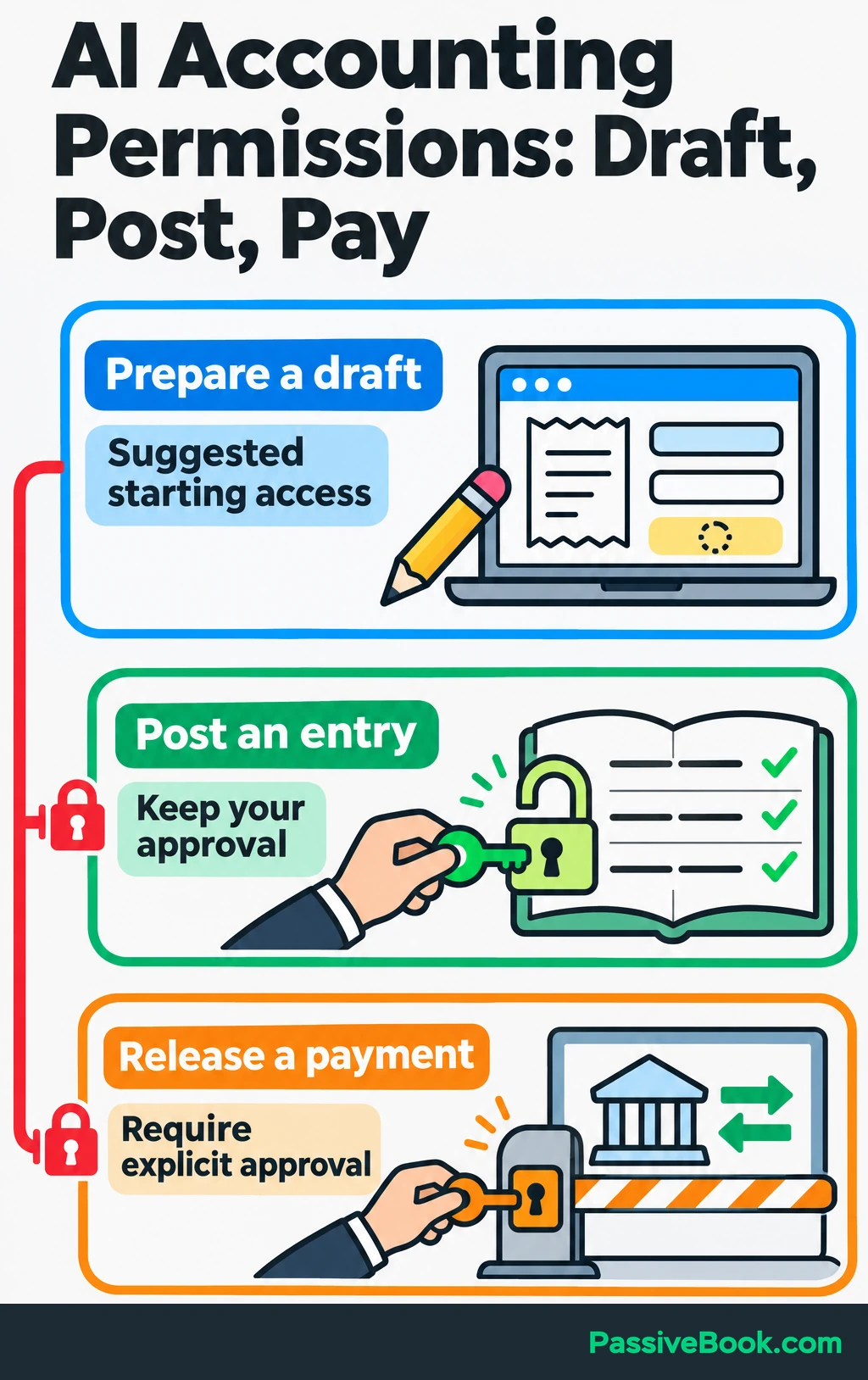
Set permissions around the action. Preparing a suggestion, posting an entry and releasing a payment are three different jobs. I would start with permission to prepare drafts and keep approval with you.
To make this concrete, imagine you sell downloadable beginner watercolor workbooks and collect payments through Stripe. We’ll follow that business through the article. All figures are illustrative.
Where AI Streamlines Everyday Accounting
Capture Receipts and Categorize Expenses
Receipt capture removes some typing, but the useful output is a draft entry linked to its original document.
Collect readable receipts and bills, then have the software extract the supplier, date, currency and amounts. Before approving an entry:
- Compare the extracted details with the document.
- Look for an existing transaction to match.
- Confirm the category reflects what you bought.
- Keep the original receipt attached or clearly referenced.
QuickBooks, for example, can extract receipt information for review and let you add an entry or match an existing transaction. That matching step matters as much as the extraction.
For the workbook business, your design-software receipt may describe an expense already imported from your card account. Match the receipt to that charge. Creating another expense would count the purchase twice.
Keep categories consistent, too. Once you establish how a recurring business subscription should be recorded, a fixed rule may handle it. Review unfamiliar purchases, transfers between your accounts and personal spending separately. Money leaving an account does not automatically make it a business expense.
Match Sales, Refunds and Processor Payouts
Categorization answers, “Where does this transaction belong?” Reconciliation answers, “Do our records agree with the external records, and can we explain any difference?”
A suggested category cannot finish that second job.
For payment-processor activity, connect the sales, refunds and fees to the payout, then match that payout to the bank deposit. AI can propose matches and flag gaps, but verify the amounts using accounting software or spreadsheet formulas.
Here’s the workbook example. Count the customer sales first, then subtract the refund and assumed processing fees to find the payout.
| Activity | Amount |
|---|---|
| 20 workbook sales at $25 each | $500 |
| One refunded sale | −$25 |
| Assumed total processing fees | −$15 |
| Payout received | $460 |
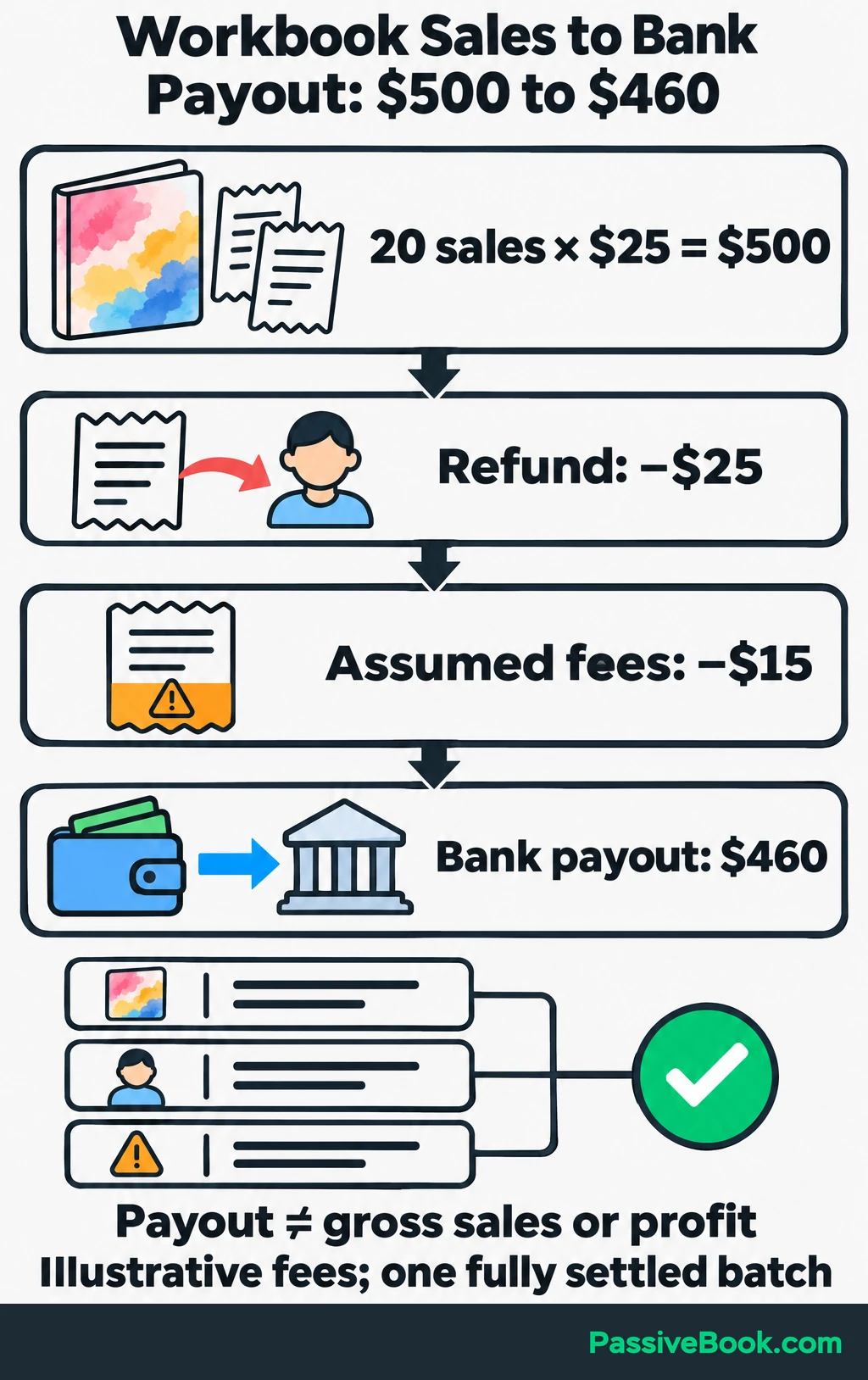
This example assumes everything settles in one payout, with no taxes, currency conversion, withheld funds or other adjustments. The $15 is an illustrative fee total, not Stripe’s published pricing.
Record the sales, refund and fees separately. The $460 deposit is neither gross sales nor profit. When those sales are already recorded, the payout moves money from your processor balance to your bank; it does not create another sale.
For automatic payouts, Stripe’s payout reconciliation report identifies the transactions included in each settlement batch. Use that breakdown to check the payout rather than trying to force a calendar day’s sales to equal a bank deposit.
Then finish the account reconciliation by checking the remaining balance and explaining any unsettled transactions or other differences.
Investigate Exceptions Before Changing Records
An exception is something that needs a closer look. It might be a duplicate bill, a missing receipt, a subscription increase or a transaction with no clear match.
Keep these items in a review queue with the relevant source attached. Each item should tell you what was flagged, where to check it and what remains unresolved.
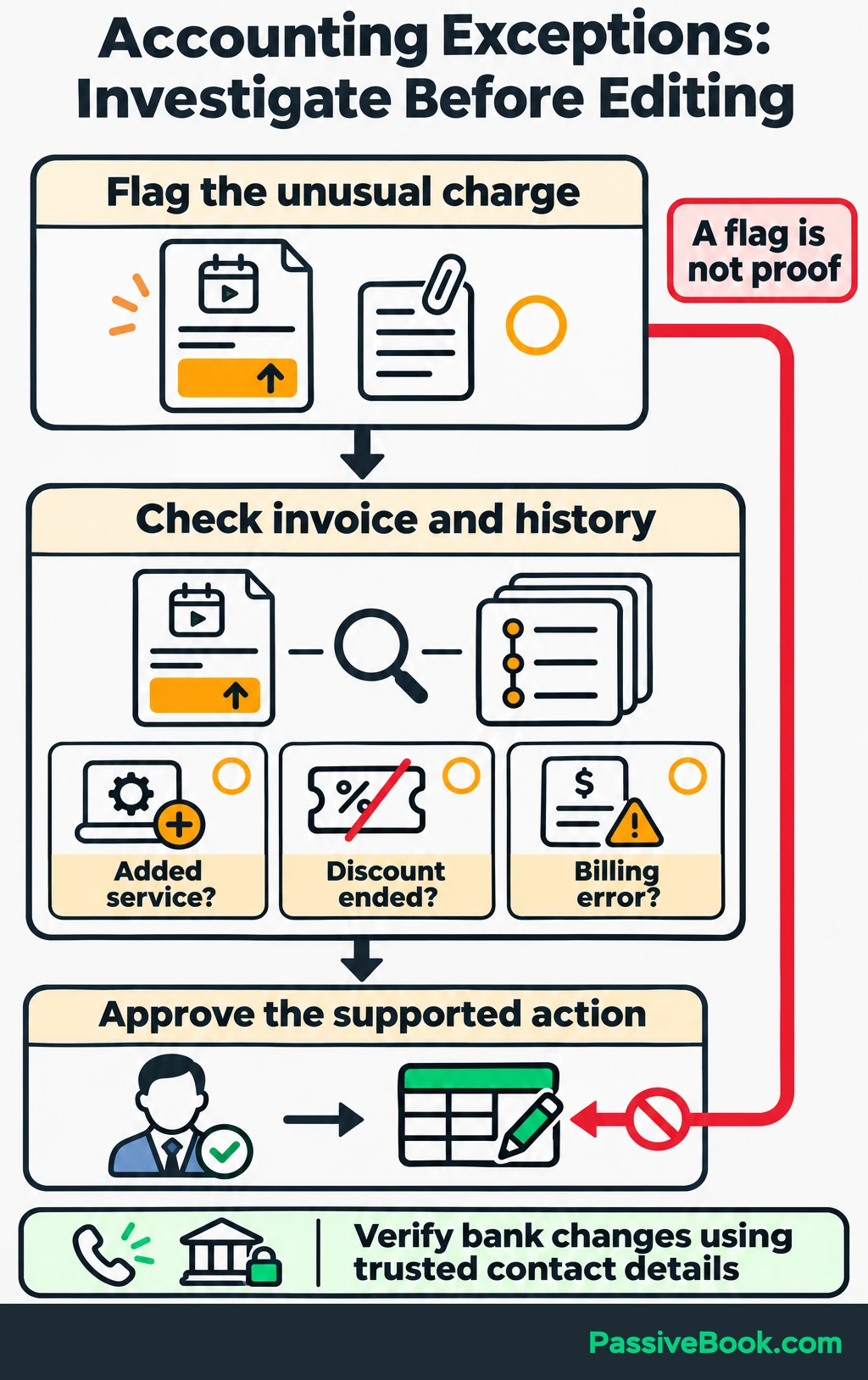
Exact rules work well for repeated identifiers, such as the same supplier and invoice number. AI can help spot possible matches when descriptions differ, but a similarity is a reason to investigate.
Suppose the workbook business’s design subscription costs more than usual. Check the invoice and subscription history before correcting the entry. You may have added a service, lost a discount or received an incorrect charge. The flag alone does not tell you which.
Keep explicit approval for payment releases and supplier bank-detail changes. Verify changed payment instructions through an established contact method, using contact details you already trust.
How AI Supports Financial Decisions
Explain Results From Checked Reports
AI can help you read a report, but first give it numbers worth reading.
Reconcile the relevant accounts and compare consistent reporting periods. Use the same accounting method in both reports, too. Comparing a month recorded when cash moved with one recorded when income was earned can produce a misleading story.
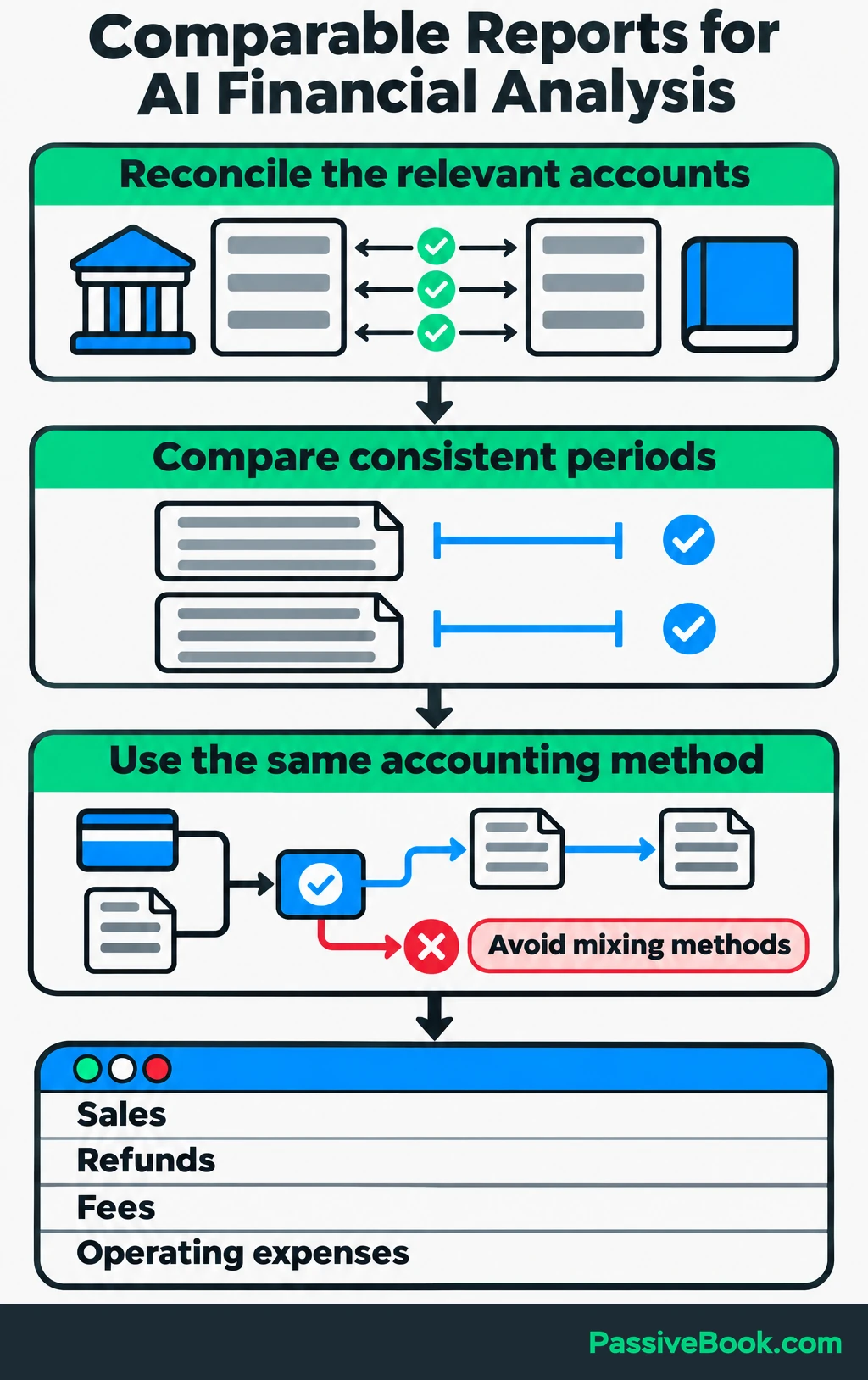
Then ask focused questions. Which sales, refund, fee or operating-expense lines changed most? Where does each claim appear in the report?
You can adapt this prompt:
Compare these two monthly reports. Identify the three largest changes by absolute amount and cite the supporting rows. List questions to investigate. Use only the supplied figures. Separate observed changes from possible explanations, and flag missing information rather than filling it in.
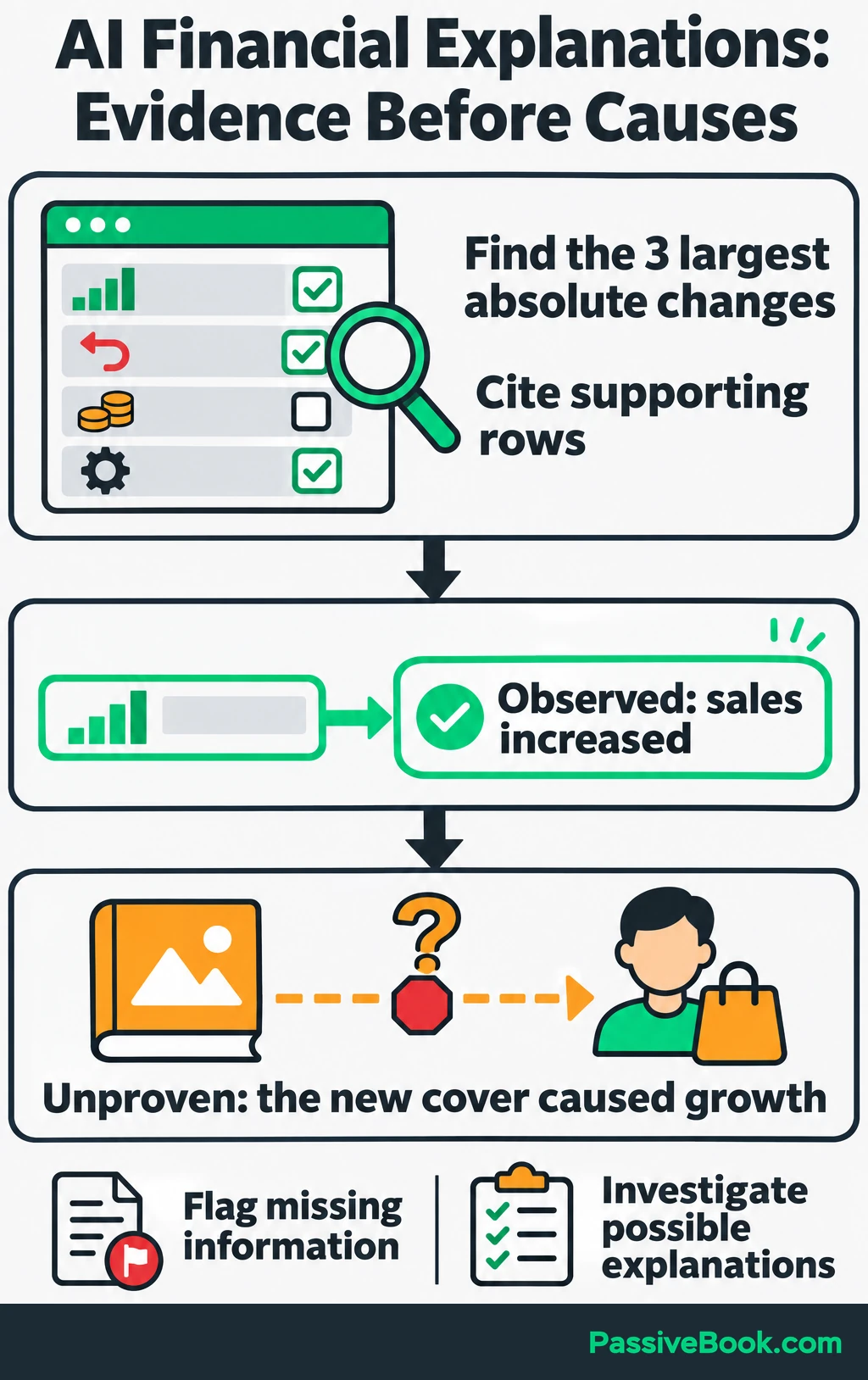
For your workbook business, higher sales are only the start of the review. Check whether profit also improved after refunds, processing fees and operating expenses.
An answer such as “sales rose because your new cover attracted more buyers” goes beyond a financial report. The report may show higher sales, but it does not establish their cause.
NIST, the US standards agency, identifies confidently presented false information as a risk of AI-generated text. My practical response is to require source references and check explanations that could change a spending decision. NIST’s generative AI risk profile, section 2.2
Model Cash Flow Before Committing to Spending
Profit and available cash answer different questions. A profitable month does not guarantee the money will arrive before a bill is due.
Start a cash projection with your opening balance. Add receipts when you expect the money to become available, then subtract scheduled payments, expected refunds and planned withdrawals.
The basic calculation is:
Closing cash = opening cash + receipts − payments
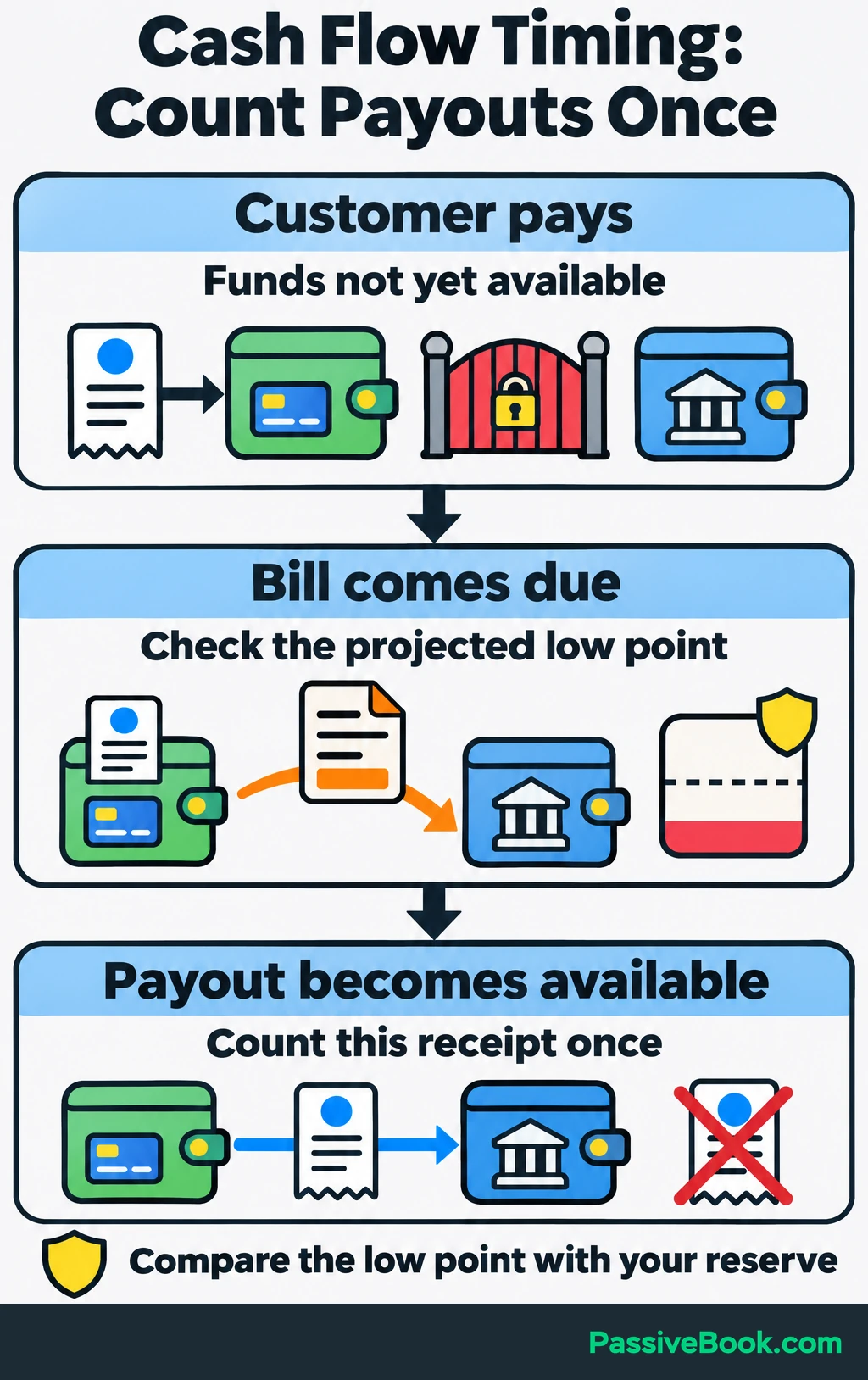
Count unsettled customer payments once, on their expected payout date. Adding both the customer payment and its later bank payout would overstate available cash.
Use spreadsheet formulas or accounting software for the arithmetic. AI can help organize assumptions, identify missing inputs and explain how scenarios differ.
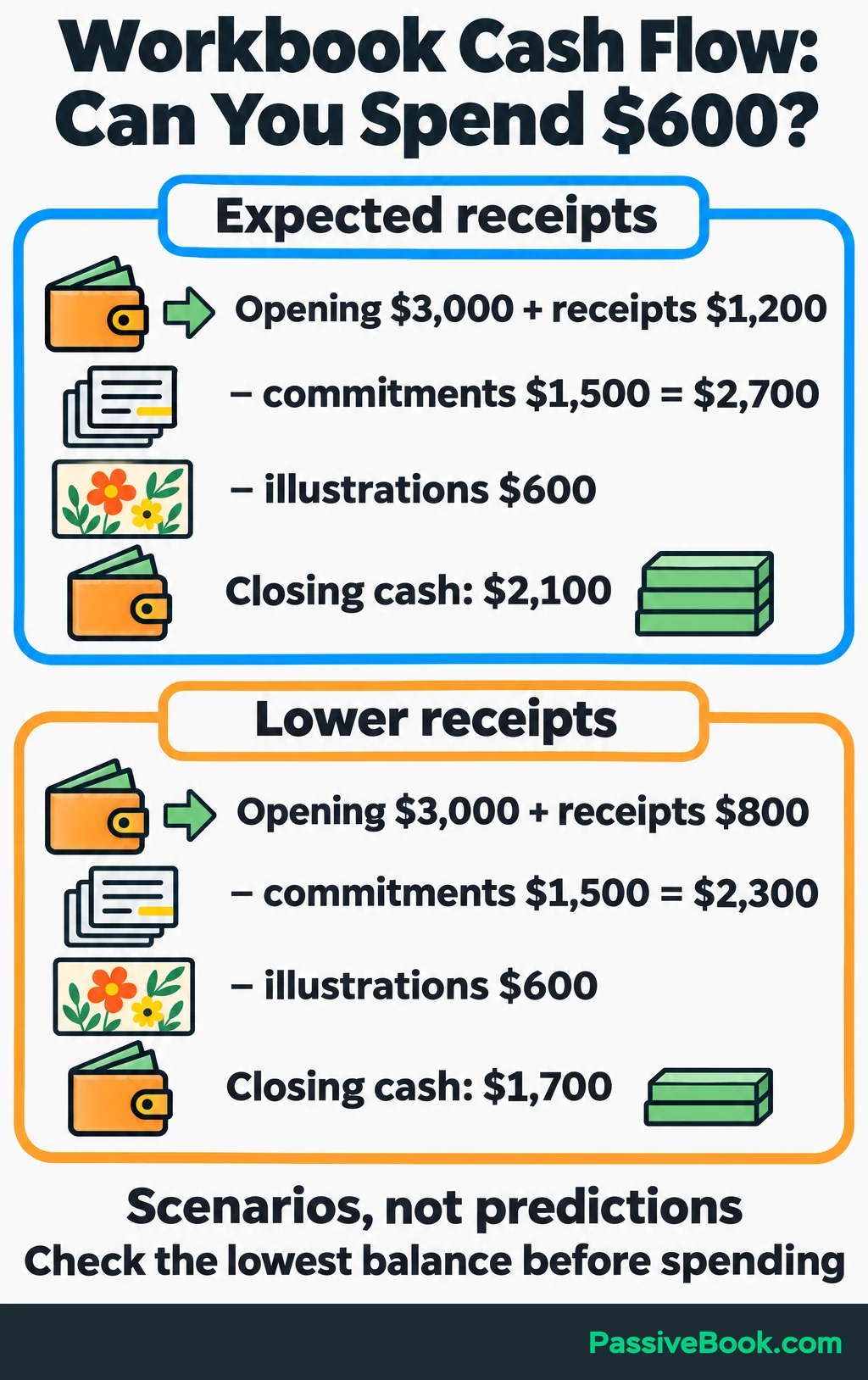
Suppose you’re considering spending $600 on illustrations for the next watercolor workbook. Compare expected receipts with a lower-receipts case:
| Cash movement during the month | Expected receipts | Lower receipts |
|---|---|---|
| Opening cash | $3,000 | $3,000 |
| Expected receipts | +$1,200 | +$800 |
| Committed payments | −$1,500 | −$1,500 |
| Cash before illustration purchase | $2,700 | $2,300 |
| Illustration purchase | −$600 | −$600 |
| Closing cash | $2,100 | $1,700 |
These are spending scenarios, not predictions. Keep the expected receipt dates and payment dates beside the figures.
Check the lowest projected balance during the month, because a comfortable closing balance can hide a shortage halfway through. Compare that low point with the reserve you need for upcoming commitments. If the lower-receipts case leaves too little, reduce or delay the purchase.
The value is having a clear reason to spend or wait.
Which AI Tools Fit Your Workflow?
Choose the task before choosing the subscription. I would first check the accounting system that already holds your records. Moving information between more tools creates more places to check.
QuickBooks and Xero hold your accounting records. Claude can explain checked reports you upload, while Make or n8n connects apps to move documents and proposed entries between them.
| Tool | Task and inputs | Checks to make or configure | Setup and ongoing costs |
|---|---|---|---|
| Accounting system: QuickBooks or Xero | Suggest entries and matches from receipts, bank activity and existing records | Confirm you can inspect sources, edit entries, control approvals and see changes | Account connections, opening-balance checks, subscription or upgrade, optional apps and review time |
| General AI assistant: Claude | Explain checked reports you upload, with dates and row labels | Verify figures and explanations against supplied rows | Manual exports and uploads, subscription and checking time |
| Workflow connector: Make or n8n | Route documents and proposed entries between authorized apps using stable identifiers | Configure draft-only output, duplicate checks and failure logs | Connection setup, usage or hosting, maintenance and review time |
QuickBooks uses transaction details and your history to suggest matches and categories. I would assess whether those suggestions reduce review work on your records before paying for additional capability. QuickBooks AI suggestions
Xero’s US automatic bank reconciliation processes high-confidence statement lines and leaves others for review. It is available on Growing plans and above, so plan eligibility affects the comparison. Xero automatic bank reconciliation
Before buying either, confirm the exact feature, local plan and bank connection you need. Also check whether you can inspect source documents, edit suggestions, control approval, see changes and export usable records.
I’m strict about added subscriptions because of my digital-product projects. On one project, I kept a paid tool between releases because I expected to need it the following week. The release kept moving, and the subscription kept renewing. Now I want a recurring task to justify a recurring bill.
Compare the full cost: upgrades, usage charges, setup, maintenance and your review time. I would choose the least complex option that completes the task reliably.
Before uploading financial data, check how the provider handles retention, model training, third-party access and deletion. NIST identifies sensitive-data leakage and unauthorized disclosure among generative AI’s privacy risks. NIST’s generative AI risk profile, section 2.4
Remove unnecessary customer names, account numbers and other identifiers. Keep matching identifiers where needed, restrict permissions and enable multifactor authentication. For report commentary, monthly totals may be enough; the assistant may have no use for your customer list.
Start With One Controlled Workflow
Define the Task and Approval Point
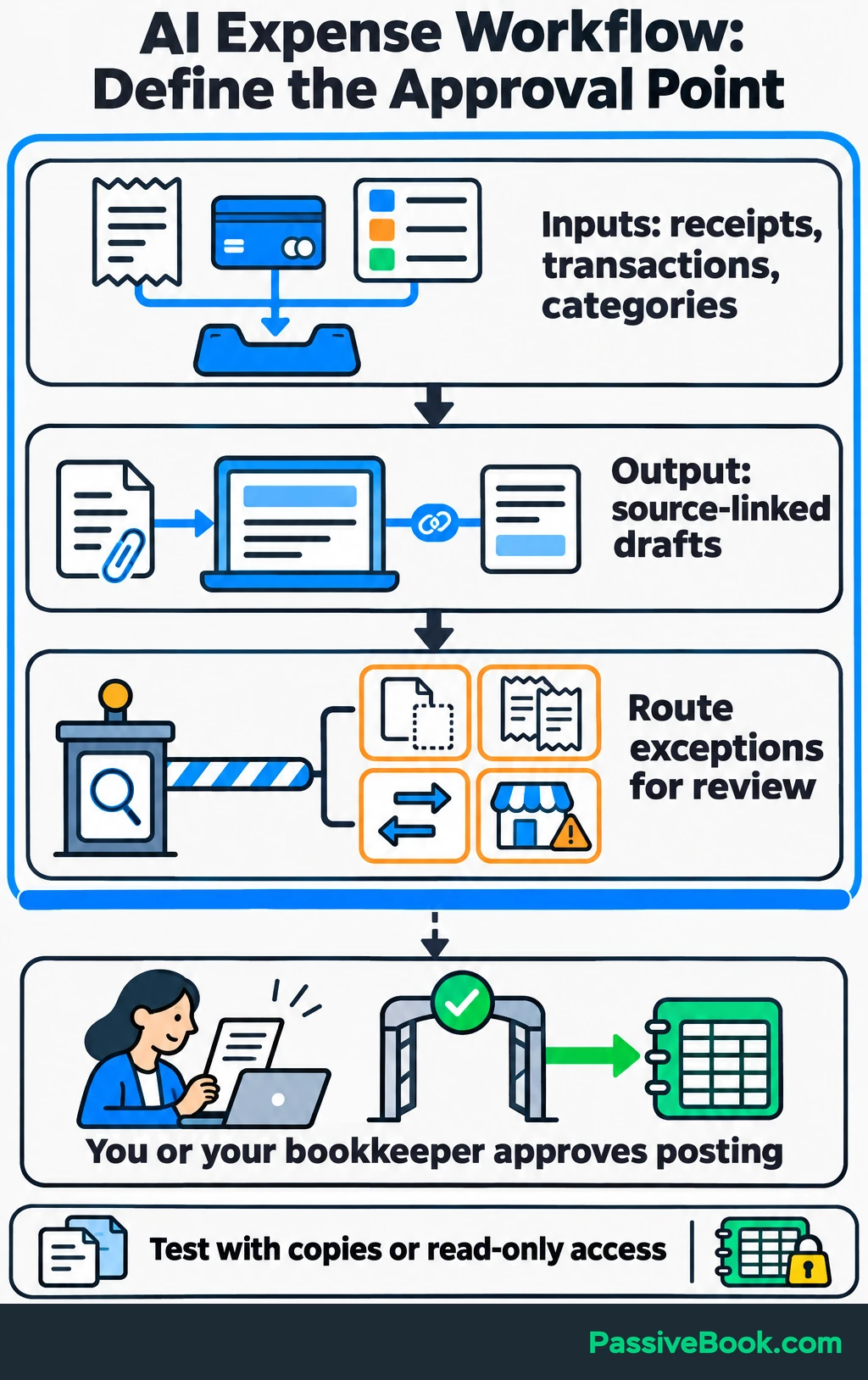
Start with a task small enough to check from beginning to end. For the workbook business, I would choose preparing expense entries.
Write down the boundaries before connecting anything:
- Task: Prepare proposed expense entries from receipts and imported card transactions.
- Inputs: Readable receipts, transaction dates, currencies, identifiers and your existing category list.
- Output: Draft entries linked to their source documents, with possible existing matches shown.
- Exceptions: Missing documents, possible duplicates, transfers and unfamiliar suppliers.
- Approval: You or your bookkeeper checks the drafts before posting.
Measure how long the current process takes, including corrections. Otherwise, you have no useful baseline for judging the new workflow.
For the initial test, use copies, exports or read-only access. Keep the live records unchanged while you find out what the tool gets right and where it needs help.
Test Against Known Records
Use a batch you have already checked manually. Include ordinary transactions and the exceptions the workflow is supposed to handle.
For the workbook business, that could include a routine software receipt, a duplicate copy of it, a transfer between your accounts and a purchase from a new supplier.
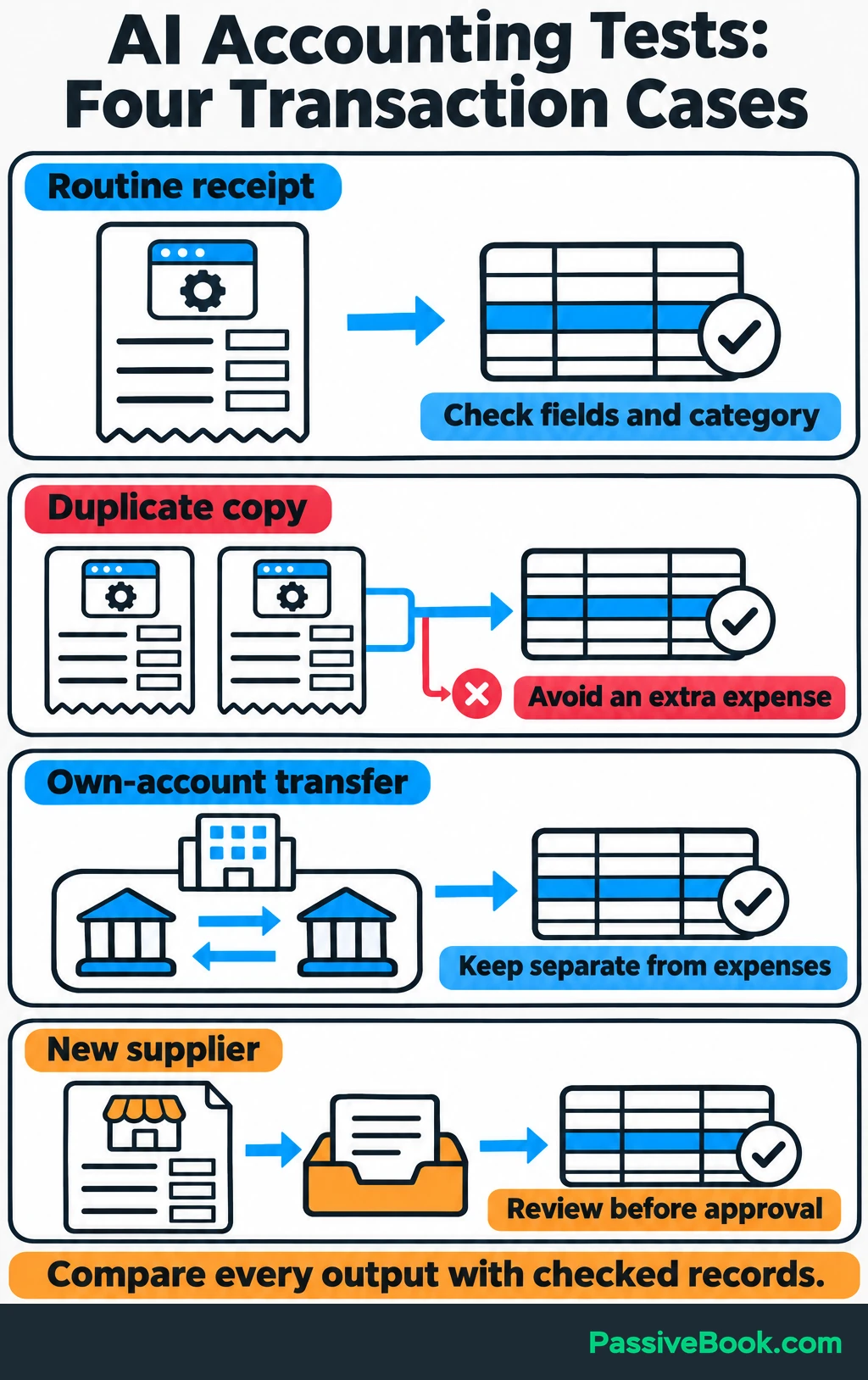
Compare every output with the checked records. Track:
- Completeness: Missing entries and extra entries.
- Accuracy: Incorrect dates, amounts, currencies or categories.
- Matching: Duplicates, wrong matches and unresolved transactions.
- Time: Capture, review, correction and any troubleshooting.
Check the counts and totals as well as individual entries. A clean-looking list can still omit a transaction.
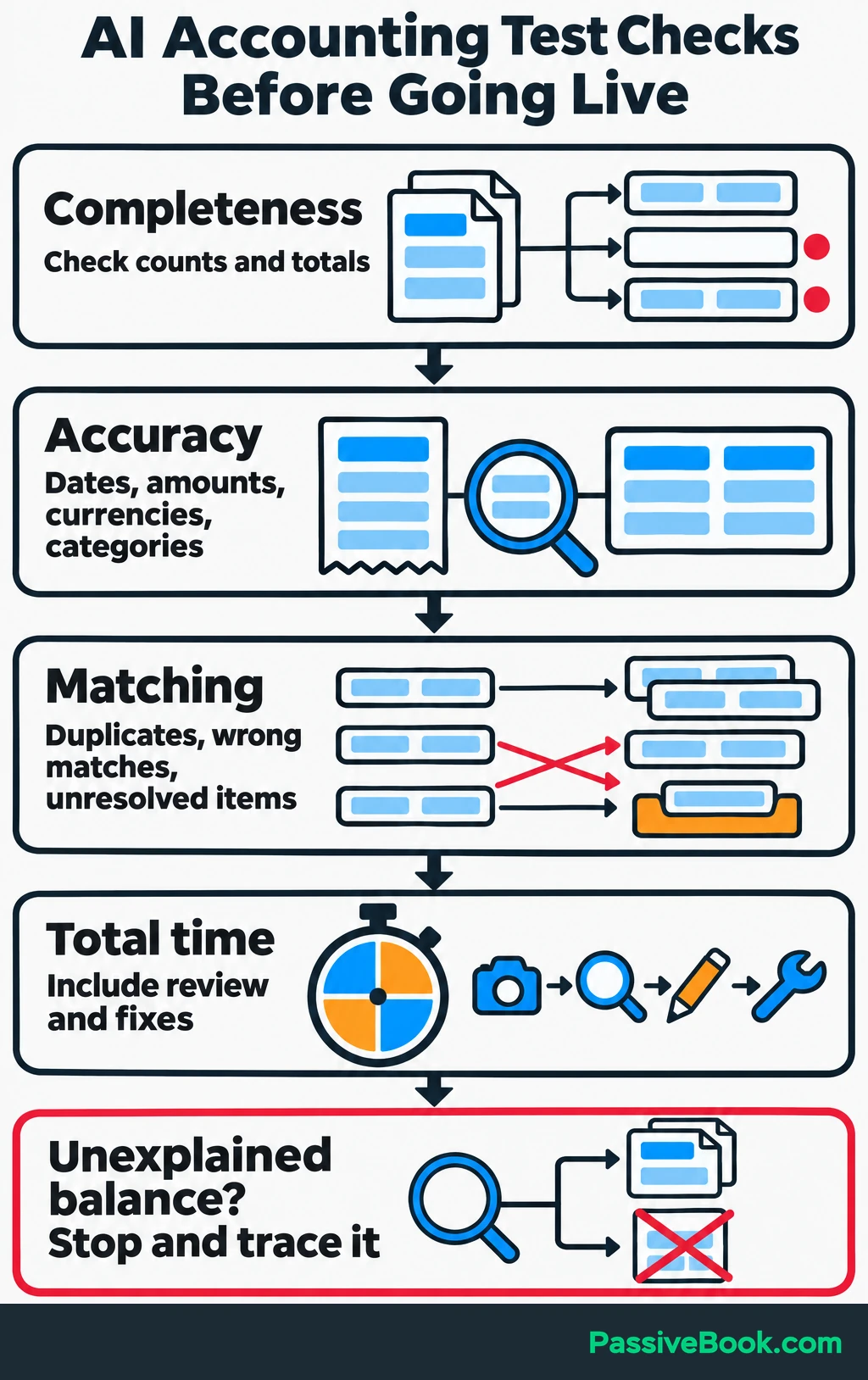
If balances remain unexplained, stop the affected processing and trace the difference. Don’t add an adjustment just to make the numbers agree.
Keep the source documents, approvals and correction history. When accounting treatment or a filing decision is uncertain, take it to a qualified professional in the relevant jurisdiction.
Expand Only When the Benefit Survives Review
Compare the time spent on the same task before and after automation. Include capture, review, corrections and ongoing maintenance in the new total.
For illustration, a task that took 90 minutes and now needs 15 minutes of capture, 25 minutes of review, 10 minutes of corrections and five minutes of maintenance saves 35 minutes per batch.
Compare that saving with the added cost.
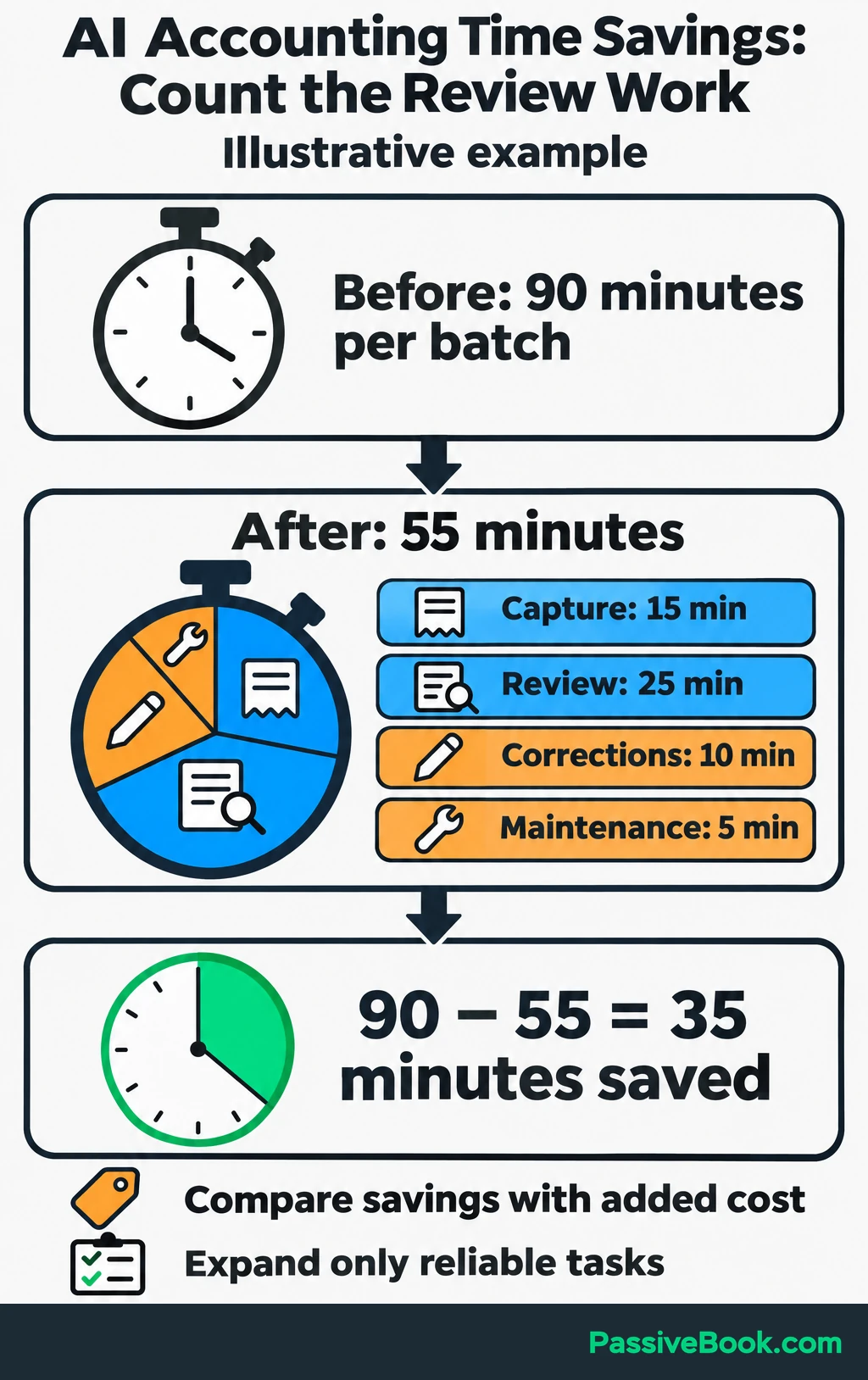
A faster first pass can still leave you with an expensive review job. Use the calculator to see how much checking and correction your expected savings can absorb.
Free Automation Value Calculator




Expand tasks that stay reliable, while keeping exception review and periodic checks of automatically processed records. Recheck affected outputs when an integration, document format or classification rule changes.
If the same error keeps returning, pause that part of the workflow. Keep a usable export and a manual fallback so you can continue recording transactions while you fix it.
What Next?
Choose one recurring expense task and time your next batch from receipt collection through final approval. Then test whether a tool you already have can prepare the same work with less total effort.
If this helped you see where AI could take work off your plate, use the social buttons to share the guide and its review process.
Which financial task would you hand over first, and what would you need to check before trusting the result? Leave your answer, or any other questions, in the comments.
Share this post with your friends & followers:

