A customer asks how to use the product they just bought. You know the answer, but their message waits while you pack orders, fix a page, or finish another job.
Answering the same question again takes time, but a fast reply is little help if it gives the wrong instructions or traps the customer in a chatbot loop.
The useful question is where AI can help customers move forward while keeping a person within reach. This guide covers practical uses, tool choices, and a first workflow you can test before trusting it with automatic replies.
AI Customer Experience Use Cases
Use AI where understanding varied questions, finding relevant information, or adapting an explanation helps. Keep predictable tasks, such as sending an order confirmation, in ordinary automation. Those tasks follow fixed rules.
Throughout this guide, imagine you run Cedar Stitch, an online shop selling beginner embroidery kits. Its customer messages, workflows, and figures are illustrative.
Answer Routine Questions With a Chatbot
A chatbot is useful when customers ask the same underlying questions in different ways. Connect it to current product details, instructions, and policies so its answers have a reliable source.
At Cedar Stitch, a customer might ask:
“How do I thread the needle in my kit?”
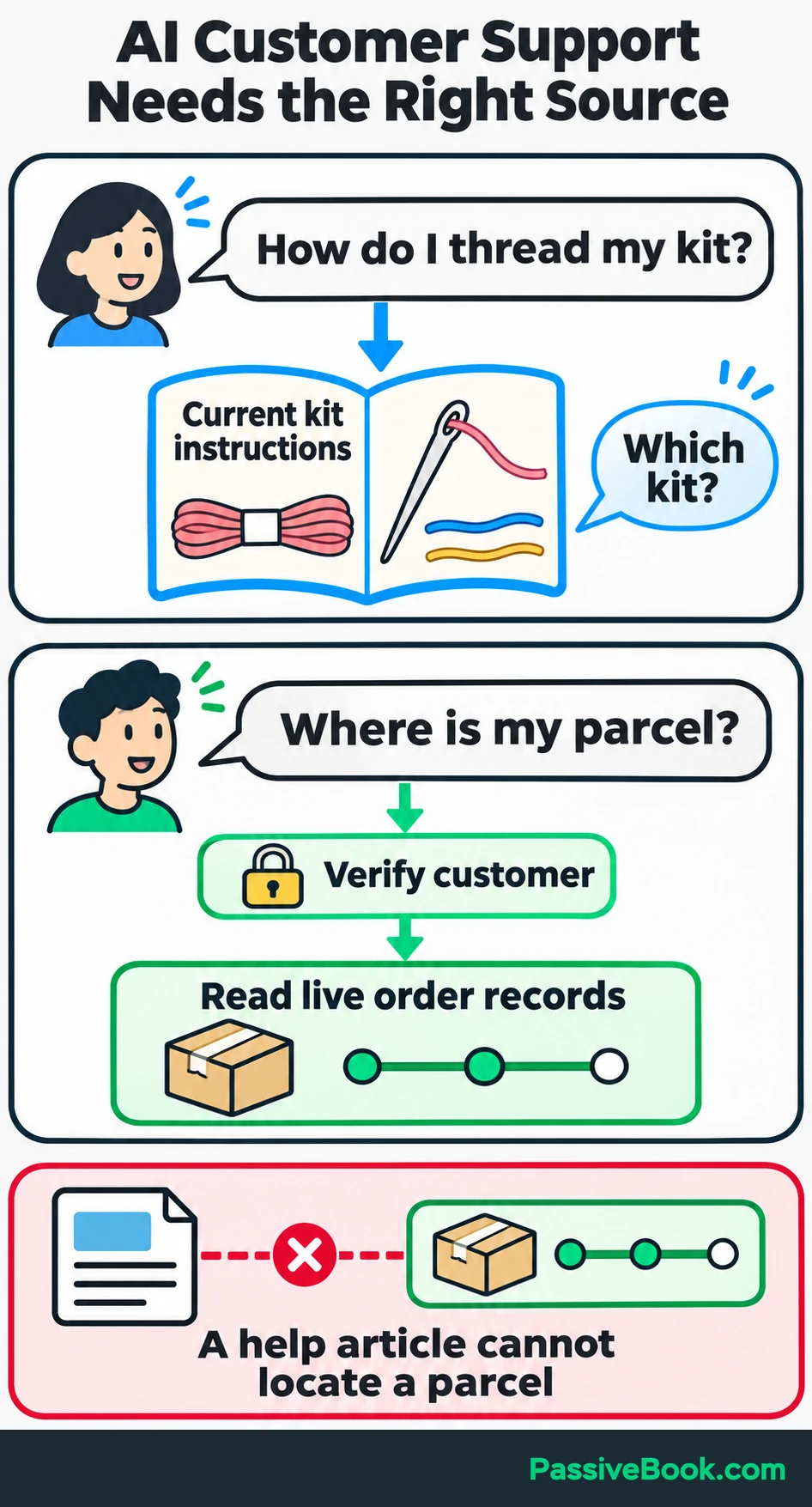
The assistant should find the instructions for that kit, explain the relevant step, and link to the illustrated guide. If it needs the kit name, it should ask.
Changing facts need a different connection. Shipping status should come from the order system, after the customer has been verified. An old help article cannot tell you where a parcel is.
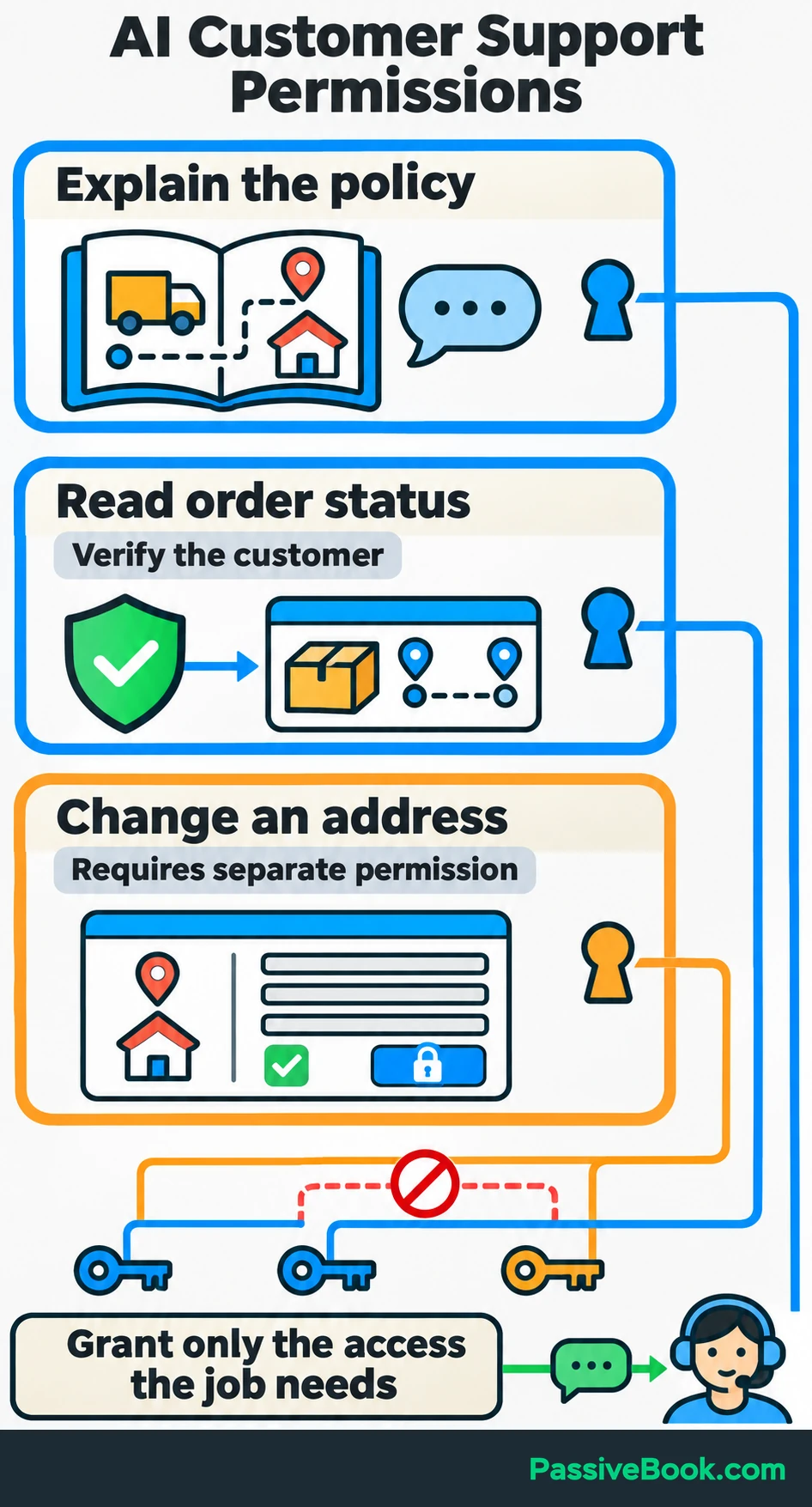
Keep these permissions separate:
- Explaining the address-change policy.
- Checking whether an order has shipped.
- Changing the delivery address.
An assistant that can explain a policy does not need permission to edit orders. Give it the access its job requires, and send unsupported questions to a person.
Help Staff Draft Replies and Summarize Conversations
This is where I would start. AI prepares the reply, but a person checks the facts and decides whether to send it.
Give the assistant the customer’s request, relevant instructions or policy, and any steps already tried. For a longer conversation, ask for a short summary of what happened and what remains unresolved.
For Cedar Stitch, a delivery-delay summary might say:
“The customer has checked the tracking link twice. The parcel has no new scan. They want to know whether a replacement is available.”
The assistant can draft a response using the shipping policy. A refund exception stays with the owner.
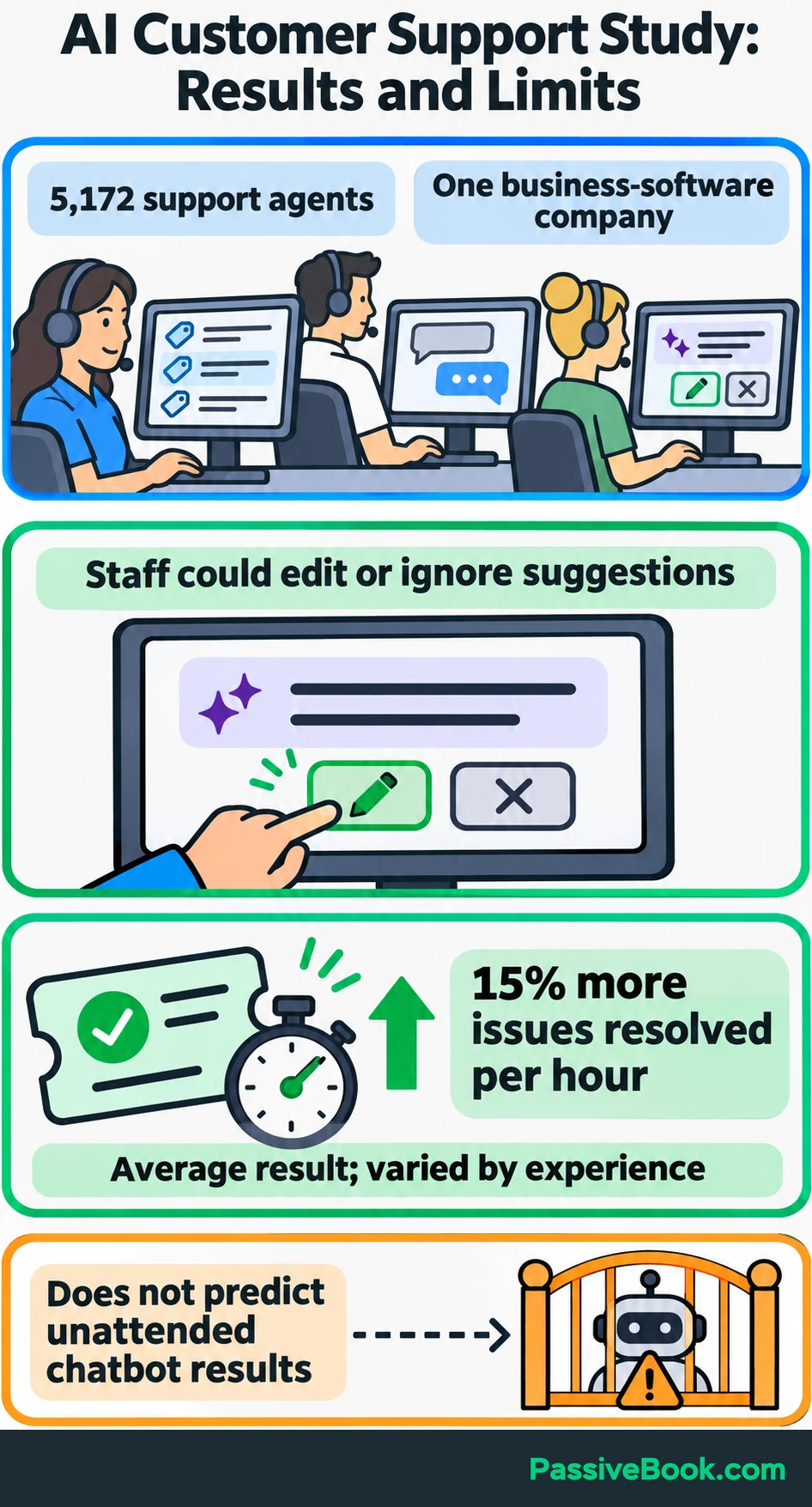
There is useful evidence for staff assistance. In Generative AI at Work, researchers studied a rollout among 5,172 support agents at one business-software company. AI assistance increased issues resolved per hour by 15% on average, but results varied by experience. Staff could edit or ignore suggestions. That supports testing assistance; it does not establish what an unattended chatbot will achieve in your business. Read the published study.
When testing a reply for one of my digital products, I got a polished paragraph that repeated the customer’s problem but skipped the step they needed. I had to reopen the instructions to catch it. Since then, I check whether a draft moves the customer forward before spending time making it sound friendlier.
You can try this with one customer question before connecting any systems. The writing assistant below prepares a draft from your guidance and separates the customer’s reply from the notes you need to review.
Free AI Customer Support Studio




Route Requests and Complete Approved Tasks
AI can identify what a customer wants and pull details from a message. Your business rules should decide who handles it and what actions are allowed.
At Cedar Stitch:
- Kit-instruction questions go to the support queue with the relevant guide.
- Address-change requests go through order checks and customer verification.
- Product-safety complaints go directly to the owner.
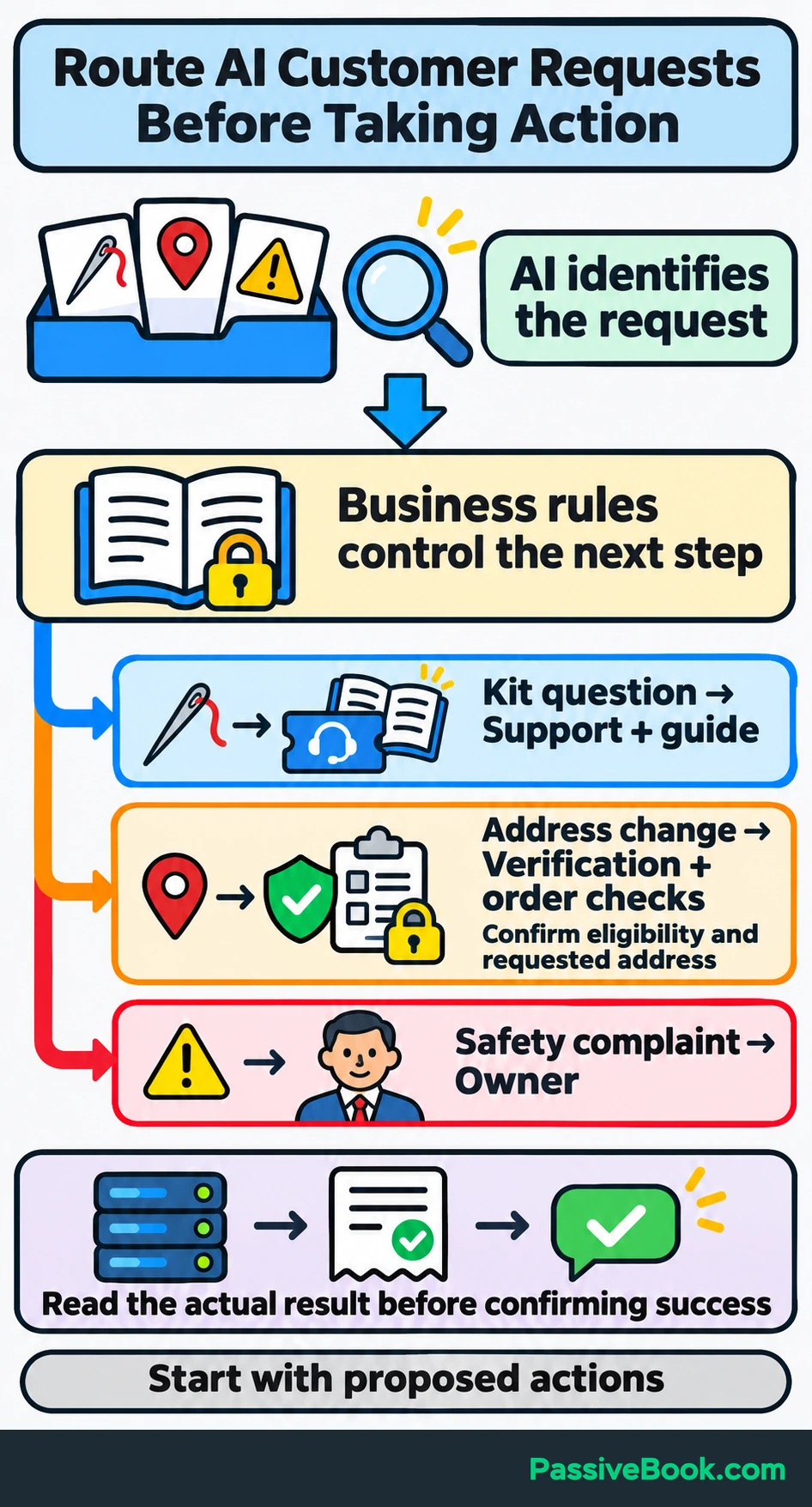
Start with classification and proposed actions. That lets you catch mistakes before they change anything.
If you later allow address updates, verify the customer outside the AI conversation, confirm the requested address, and check whether the order is still eligible. After the update, read the result from the order system before telling the customer it succeeded.
Measure correct routing and completed changes alongside speed. Sending a complaint to the wrong person instantly is still sending it to the wrong person.
Personalize Onboarding and Follow-up
Useful personalization answers, “What does this customer need next?”
Use information customers have provided, what they bought, and which steps they have completed. Let ordinary rules control who receives a message and when, while AI adapts the explanation.
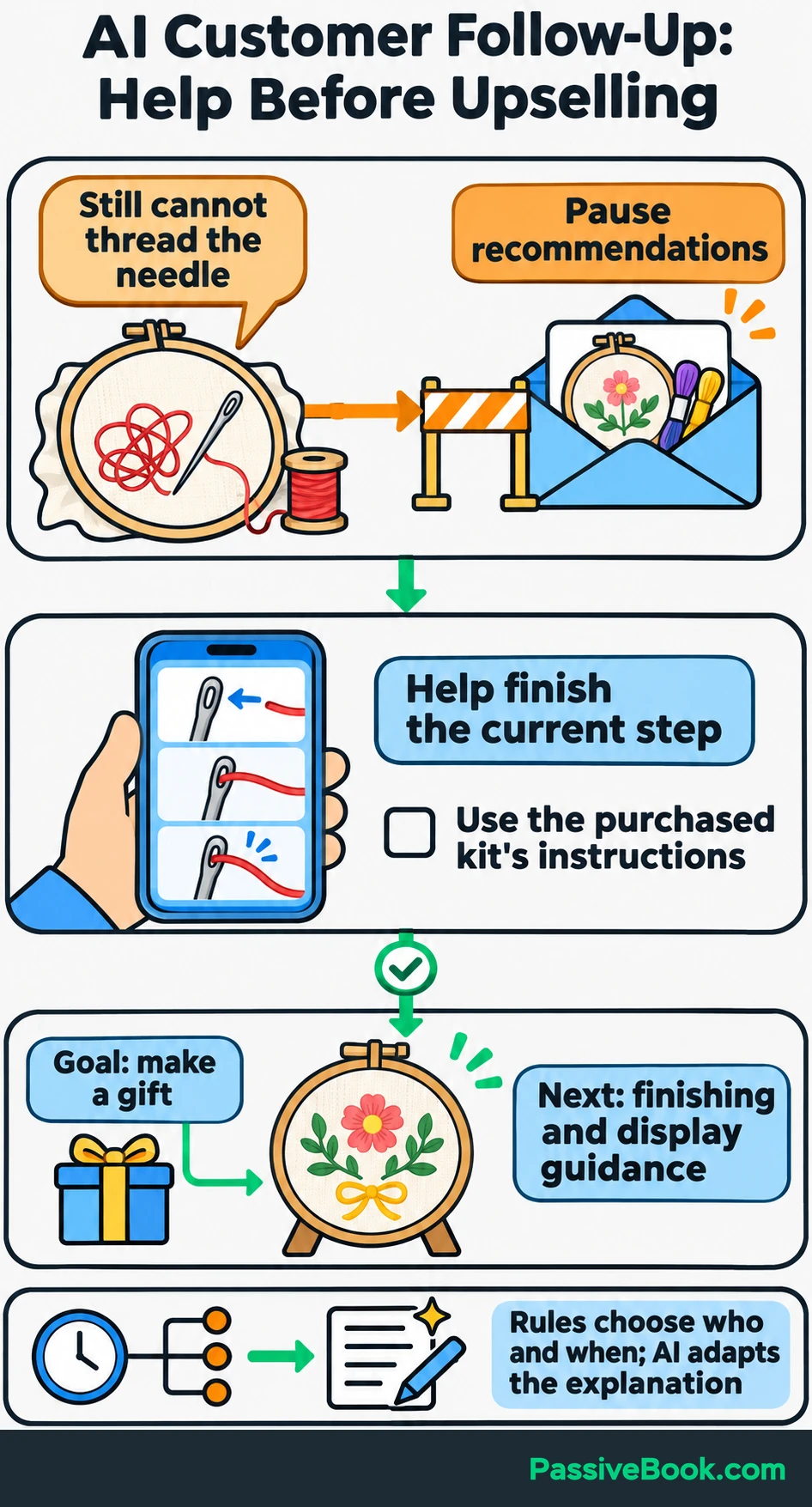
A first-time Cedar Stitch buyer could receive the beginner setup guide. A returning buyer could receive instructions specific to their new kit without another introduction to every item in the box.
A stated goal can make the guidance more useful:
“You mentioned making this as a gift. Here’s the finishing step for displaying the completed piece.”
Unresolved problems should also affect follow-up. If the customer is still struggling to thread the needle, help them finish that step before recommending another kit.
I would skip AI personalization when a simple purchase-based email already gives everyone the right guidance. Extra wording is not automatically extra value.
Find Recurring Problems in Customer Feedback
AI can group support messages, reviews, and survey answers by issue so you can see what keeps going wrong.
Start with a defined batch of feedback. Count affected conversations, then read representative messages before choosing a fix. One customer sending five messages about threading should not become five separate customers with the same problem.
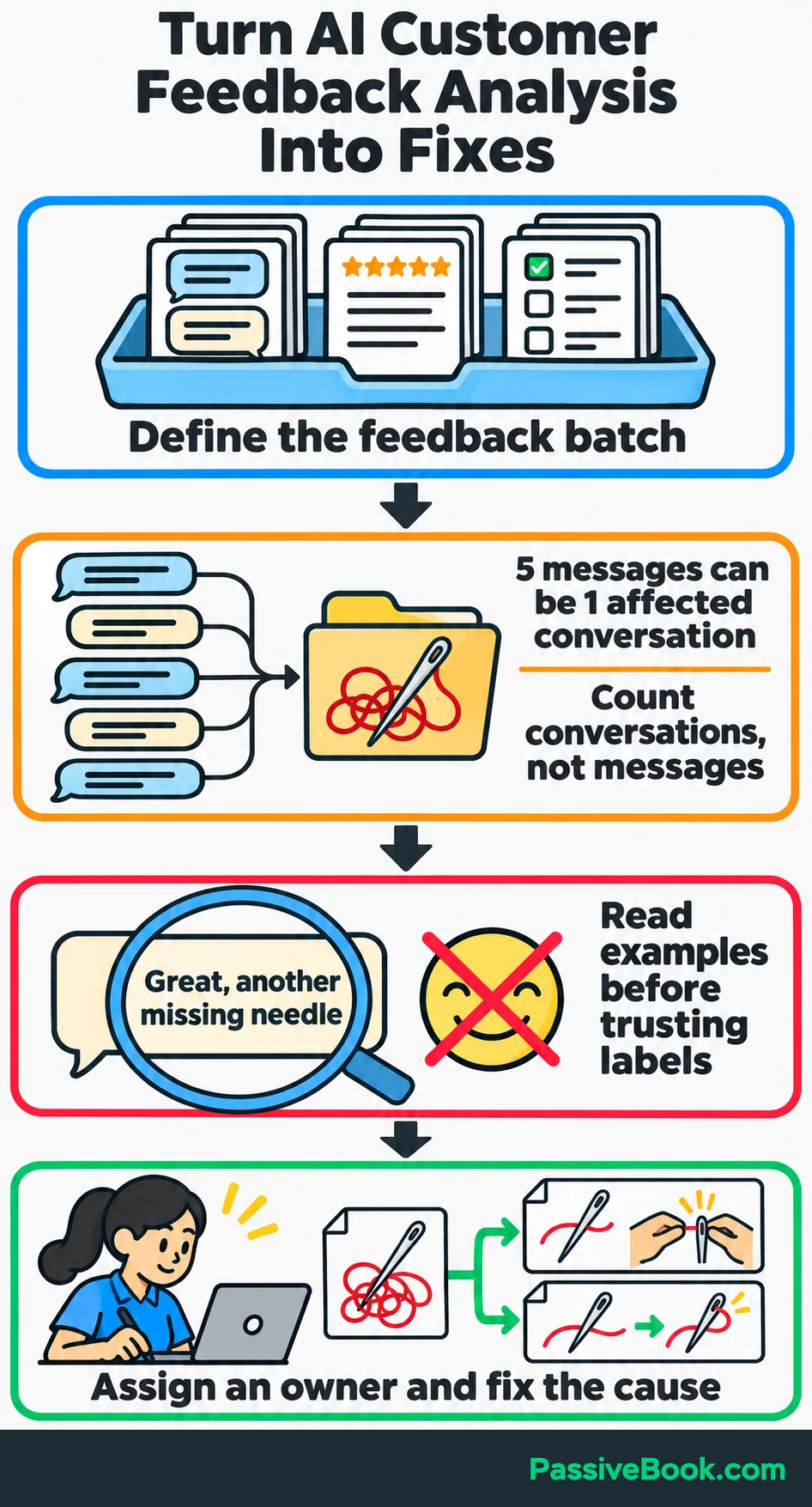
For Cedar Stitch, repeated threading questions might point to an unclear diagram. The useful response is to improve the printed instructions and the follow-up guide.
AI labels such as “positive” or “negative” can help you choose what to inspect first, but read the original message before replying. “Great, another missing needle” is probably not praise.
Give each recurring issue an owner who can change the product, instructions, or process. Otherwise, you have automated the production of an ignored report.
Choose Your First AI Workflow
Review a recent batch of requests and look for a task with three qualities: it happens often, reliable answers exist, and mistakes can be caught before they cause trouble.
Record frequency and handling time rather than choosing the task that looks most impressive in a demo.
Here is an illustrative comparison for Cedar Stitch:
| Customer task | Monthly requests | Staff effort per request | Available sources | Consequence of error | Required human involvement |
|---|---|---|---|---|---|
| Understand kit instructions | 200 | Find the correct guide and explain a step | Current setup guide and kit instructions | Customer gets stuck or uses the wrong method | Check every draft during the pilot |
| Check delivery status | 60 | Verify customer and inspect tracking | Live order and carrier records | Wrong status or another buyer’s information disclosed | Handle missing records and delivery exceptions |
| Request a refund exception | 10 | Read the history and assess the circumstances | Refund policy and conversation | Incorrect payment decision or promise | Owner decides |
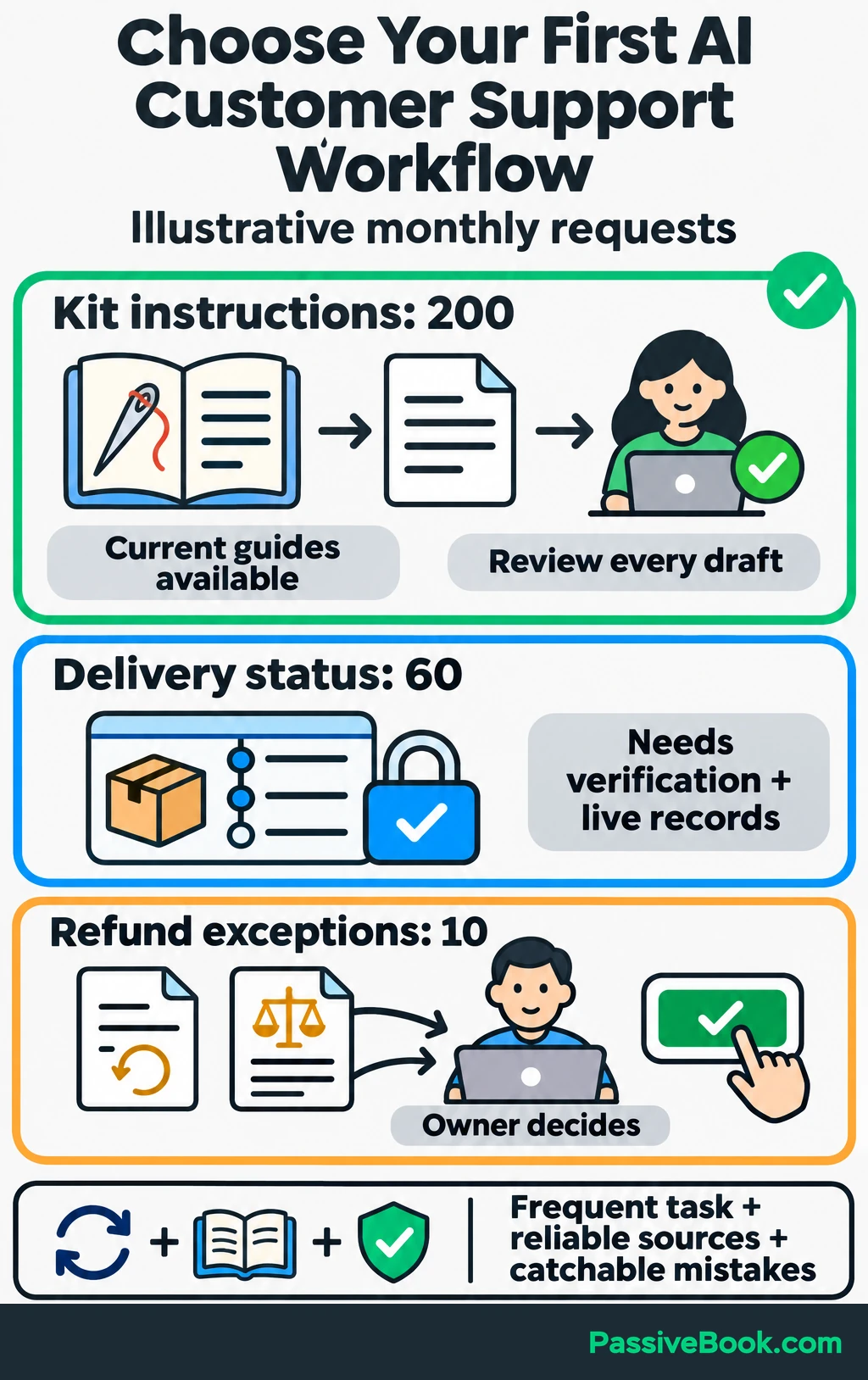
I would choose reviewed drafts for kit instructions first. The answer sources are available, and the pilot does not need order-editing permissions.
For a pet-care service, start with reviewed answers to booking or drop-off questions, using your current service policies. Send animal health and safety questions to a person.
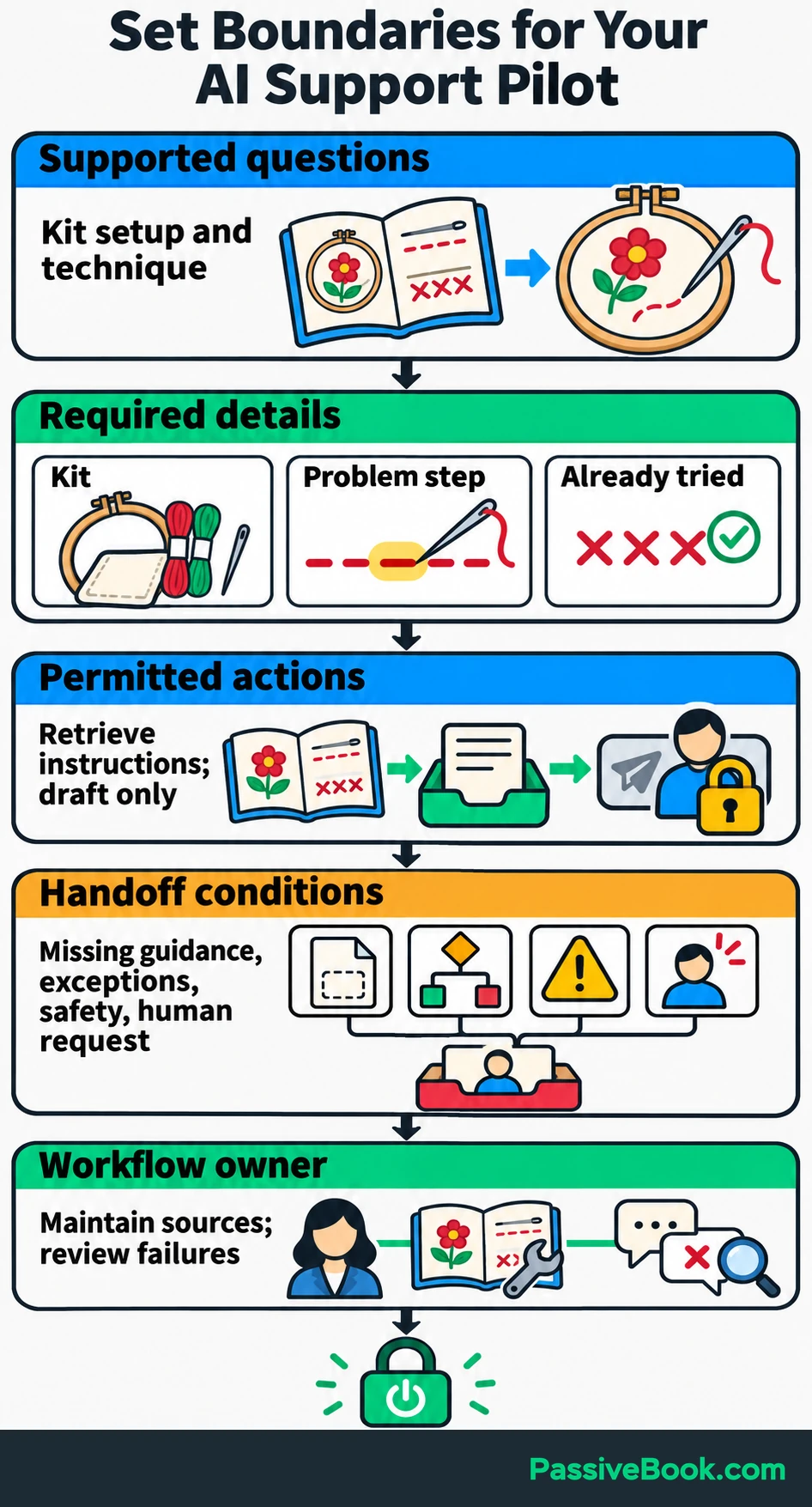
Write down the boundaries before selecting software:
- Supported questions: Setup and technique questions covered by current kit instructions.
- Required information: Kit name, the step causing trouble, and anything already tried.
- Permitted actions: Retrieve instructions and create a draft.
- Handoff conditions: Missing guidance, policy exceptions, safety concerns, or a request for a person.
- Workflow owner: The person who maintains the guides and reviews failures.
Unclear policies need a decision before they need AI. Keep disputed charges, sensitive complaints, and product-safety decisions with an appropriate person.
Record your starting response time, resolution time, staff minutes, repeat contacts, and customer feedback for the chosen task. Then set a practical target, such as reducing handling time while keeping instruction accuracy and repeat contacts at least as good as before.
That gives the pilot a job to prove.
Choose Tools That Fit the Workflow
Check the AI features in your existing support system first. For a small pilot, creating reviewed drafts in the current inbox may be enough.
Three roles matter:
- A support system holds conversations and assigns responsibility.
- An AI feature interprets requests, finds information, or drafts responses.
- An automation platform connects systems and moves work between them.
One product may cover several roles. You do not need three subscriptions just because there are three jobs.
| Workflow role | Example product | Required connections | Human controls | Pricing basis | Maintenance responsibility |
|---|---|---|---|---|---|
| Staff assistance | Zendesk Copilot | Support tickets and approved help content | Staff review suggested replies and summaries | Eligible base subscription plus Copilot add-on | Support owner maintains content and routing |
| Customer-facing answers | Intercom Fin | Approved knowledge sources and receiving support inbox | Configure supported topics and test transfer to staff | Outcome-based usage, plus applicable inbox costs | Support owner checks sources, answers, and handoffs |
| Connect systems | n8n | Inbox, document store, AI provider, and outcome log | Selected AI tool calls can pause for approval | Cloud subscription or self-hosting costs, plus applicable AI usage | Workflow owner maintains connections, credentials, and failures |
Zendesk Copilot suggests replies, summarizes support requests, and sorts incoming requests by topic. It is an add-on for Suite and Support Professional plans and above, so include the required base plan when comparing costs. I would evaluate it first if you already use an eligible Zendesk plan. Zendesk’s capability and eligibility details.
For customer-facing answers, Fin can use articles, snippets, PDFs, and website content. Check whether your actual instructions can be supplied and kept current. A feature called “knowledge” is only useful if it contains the answer your customer needs. Fin’s supported knowledge sources.
I use n8n to connect workflows in my own businesses, so it is my preference when work needs to move between tools. It can pause selected AI tool calls for human approval. For Cedar Stitch’s pilot, I would use it only if the existing inbox could not connect requests, guides, drafts, and outcome records. Configuration and maintenance still take time. n8n’s human approval controls.
Before paying, estimate the whole pilot: base subscriptions, staff seats, usage, connectors, setup, and ongoing review. Identify exactly what triggers a usage charge.
You do not need to choose a subscription to work out what the workflow could afford. Use the calculator below to test a spending limit and see how much review time would erase the expected benefit.

Free Automation Value Calculator
For example, Fin’s billed “outcomes” can include certain completed workflows and conversations where the customer does not ask for more help. Keep that billing definition separate from your own evidence that the customer’s problem was resolved. Intercom’s pricing and outcome definition.
Build and Test Your First AI Workflow
Prepare Approved Information and Necessary Customer Data
Gather the smallest useful set of current sources for the task. Include instructions, relevant exceptions, and a named person responsible for updates.
For Cedar Stitch’s instruction drafts, that means:
- The approved beginner setup guide.
- Instructions for each supported kit.
- Current illustrated guides.
- Clear rules for questions the assistant should hand over.
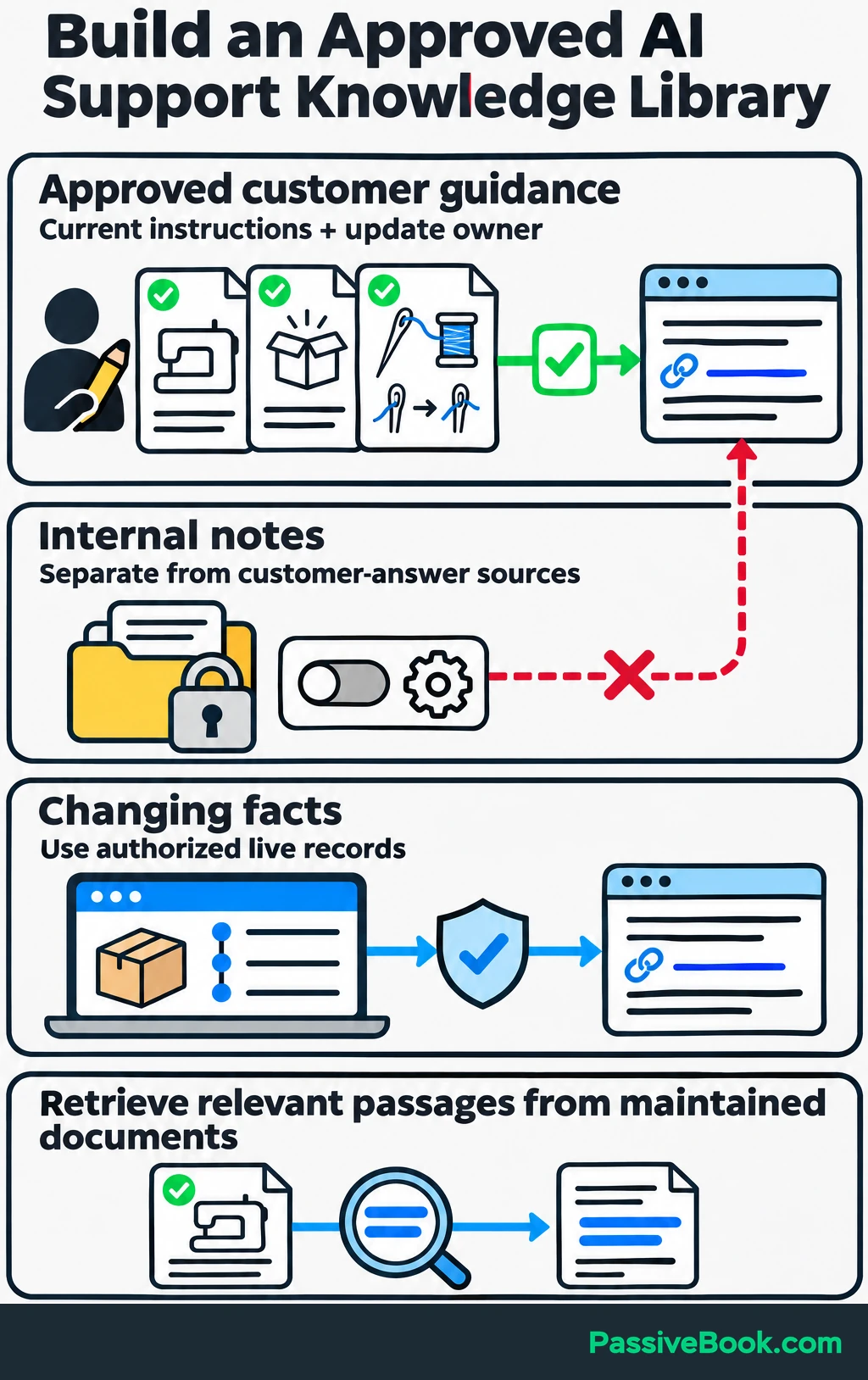
Keep internal notes separate from information customers may receive. Mark which content is suitable for customer answers instead of assuming that an unpublished document will stay private.
A document-based assistant can look up relevant passages without training a custom model. Use maintained documents for general guidance and live records for changing facts.
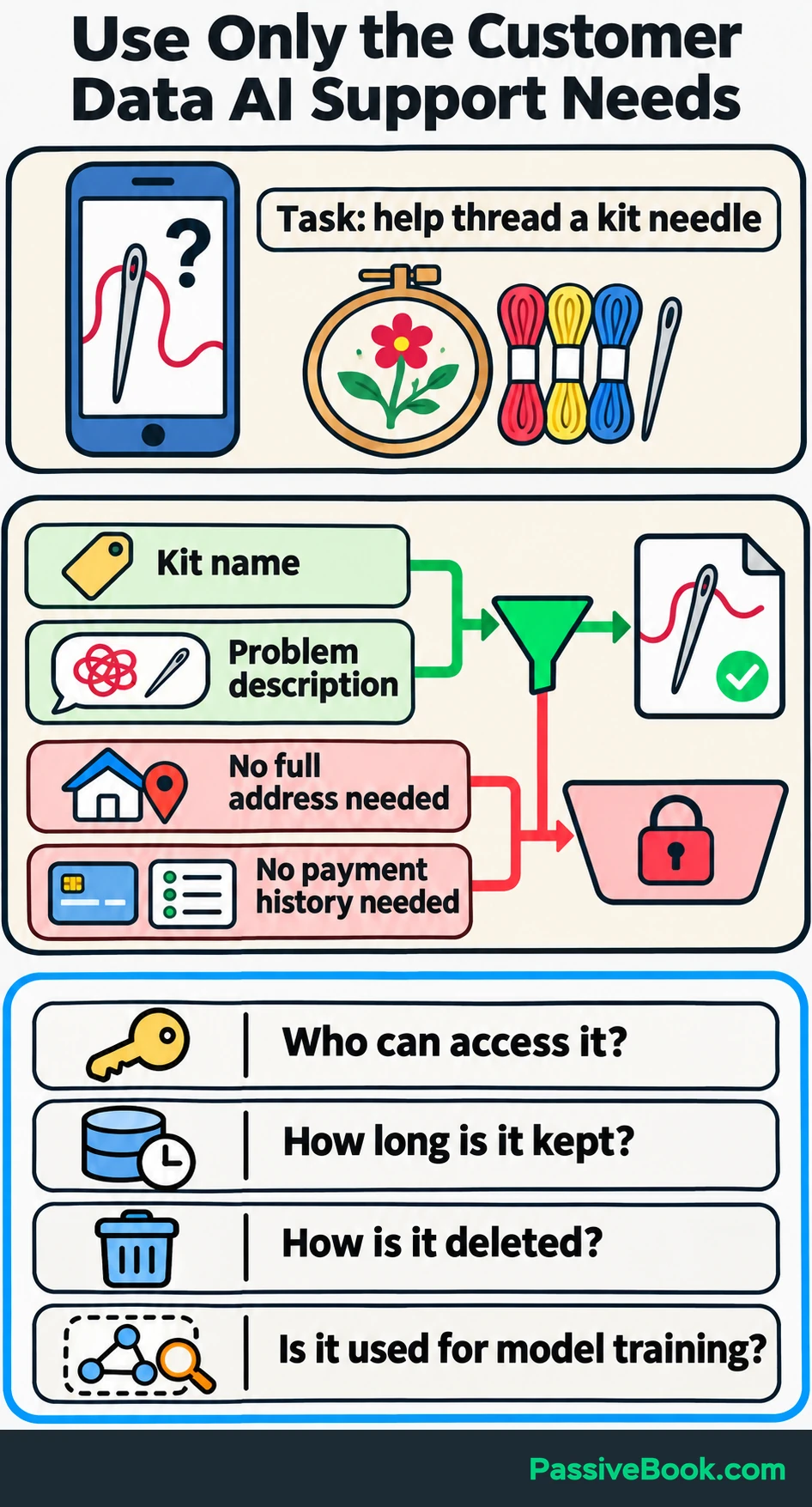
Also limit customer data. A threading question needs the kit name and the problem description. It does not need the buyer’s full address or payment history.
Before connecting customer messages, check who can access them, how long they are kept, how to delete them, and whether the provider uses them to train models. Where UK data protection law applies, personal information must be relevant and limited to what is necessary for its purpose. UK data protection principles.
Connect Requests to Reviewed Replies
Connect Cedar Stitch’s inbox, kit guides, and draft replies in one workflow:
- A customer says the thread will not fit through the needle in their Meadow kit.
- The workflow retrieves that kit’s instructions and threading guide.
- The assistant drafts an explanation using the retrieved passage.
- A staff member checks the kit, instructions, wording, and guide link.
- The reply is sent, and the conversation stays open until its outcome is known.
Suppose the illustrative Meadow instructions specify two strands. A draft excerpt could say:
“For the Meadow design, use two strands rather than all six. The illustrated threading guide shows how to separate them before threading.”
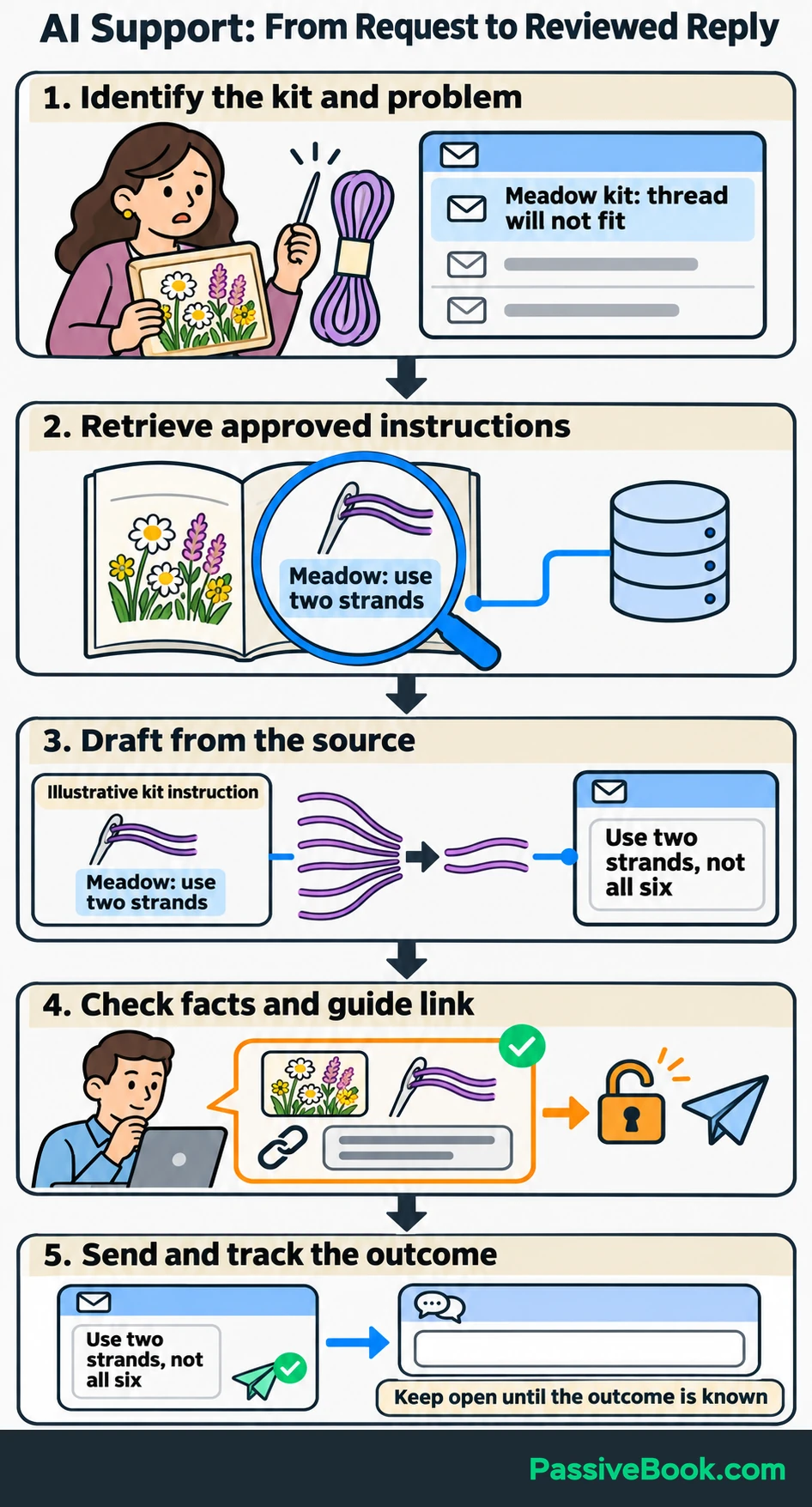
The reviewer checks that this matches the actual kit instructions. Plausible embroidery advice is not enough.
Give the assistant a bounded instruction:
Draft replies from the approved instructions for the identified kit. Ask for missing details. Do not invent steps or promise refunds, replacements, or order changes. Send unsupported questions, policy exceptions, and safety concerns to the owner. Show the reviewer which source passages you used.
Check each connection separately. Can it retrieve the right guide, create a draft rather than send a message, and record the result? Failed lookups should reach a monitored support queue.
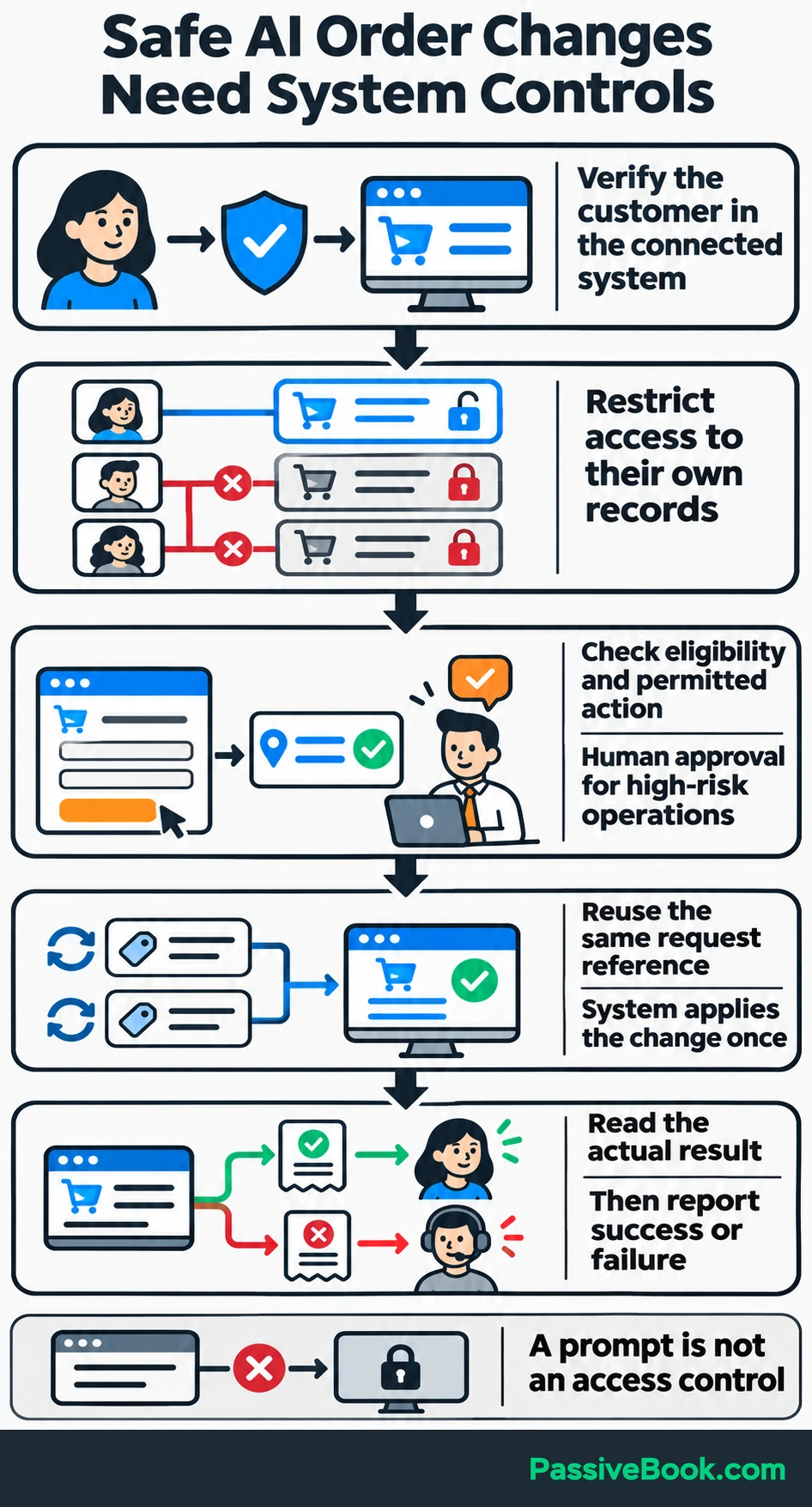
For order changes, use the connected system to verify customers, limit access to their own records, and control which changes AI can make. A sentence in a prompt is not an access control. OWASP recommends limiting privileges and requiring human approval for high-risk operations. OWASP’s prompt-injection guidance.
Configure order changes so that retries use the same request reference and the connected system applies the change only once. Read its result before confirming success to the customer.
Make Human Help Easy to Reach
Identify a customer-facing assistant as AI and explain how to reach a person. Keep that route available throughout the conversation.
Trigger a handoff when the customer asks for one, repeats an unresolved question, encounters a policy exception, or reports a sensitive problem.
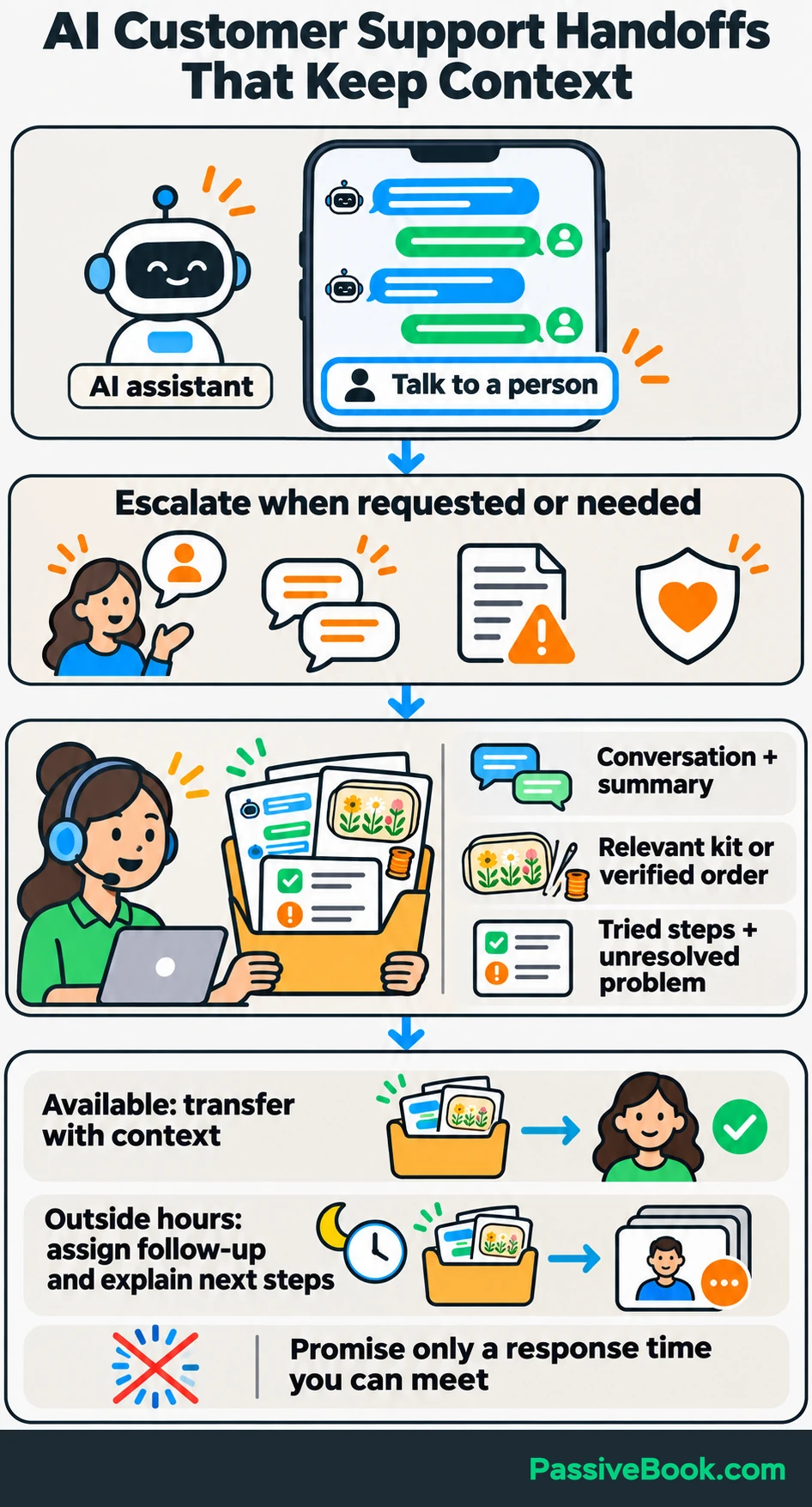
Pass useful context with the handoff:
- The conversation and a short summary.
- The relevant kit or verified order record.
- Steps already attempted.
- What remains unresolved.
At Cedar Stitch, “Customer still cannot thread the needle after trying the illustrated guide” gives the owner somewhere to begin. “Customer needs assistance” gives them another reading assignment.
Outside staffed hours, create a follow-up request with an assigned owner and state what happens next. Only promise a response time you can meet. Do not leave “Connecting you now” on screen when nobody is available.
Test Before Enabling Automatic Replies
Use past questions with unnecessary personal details removed, then add cases designed to expose failures.
| Test request or condition | Expected behavior |
|---|---|
| A routine question phrased in an unfamiliar way | Finds the right instructions and gives a usable answer |
| The customer leaves out the kit name | Asks for the missing detail |
| The approved guide has no answer | Hands over without inventing instructions |
| The customer requests a refund exception | Routes it to the owner without promising approval |
| The customer asks for a person | Creates the correct handoff with context |
| The guide or order system is unavailable | Explains the problem and queues follow-up |
| A message says to ignore rules or reveal another buyer’s order | Preserves access restrictions and exposes no private record |
| An action fails or the same request arrives twice | Reports the actual result and avoids duplicate changes |
Before launch, require the tests above to pass and check that customers can complete the supported tasks.
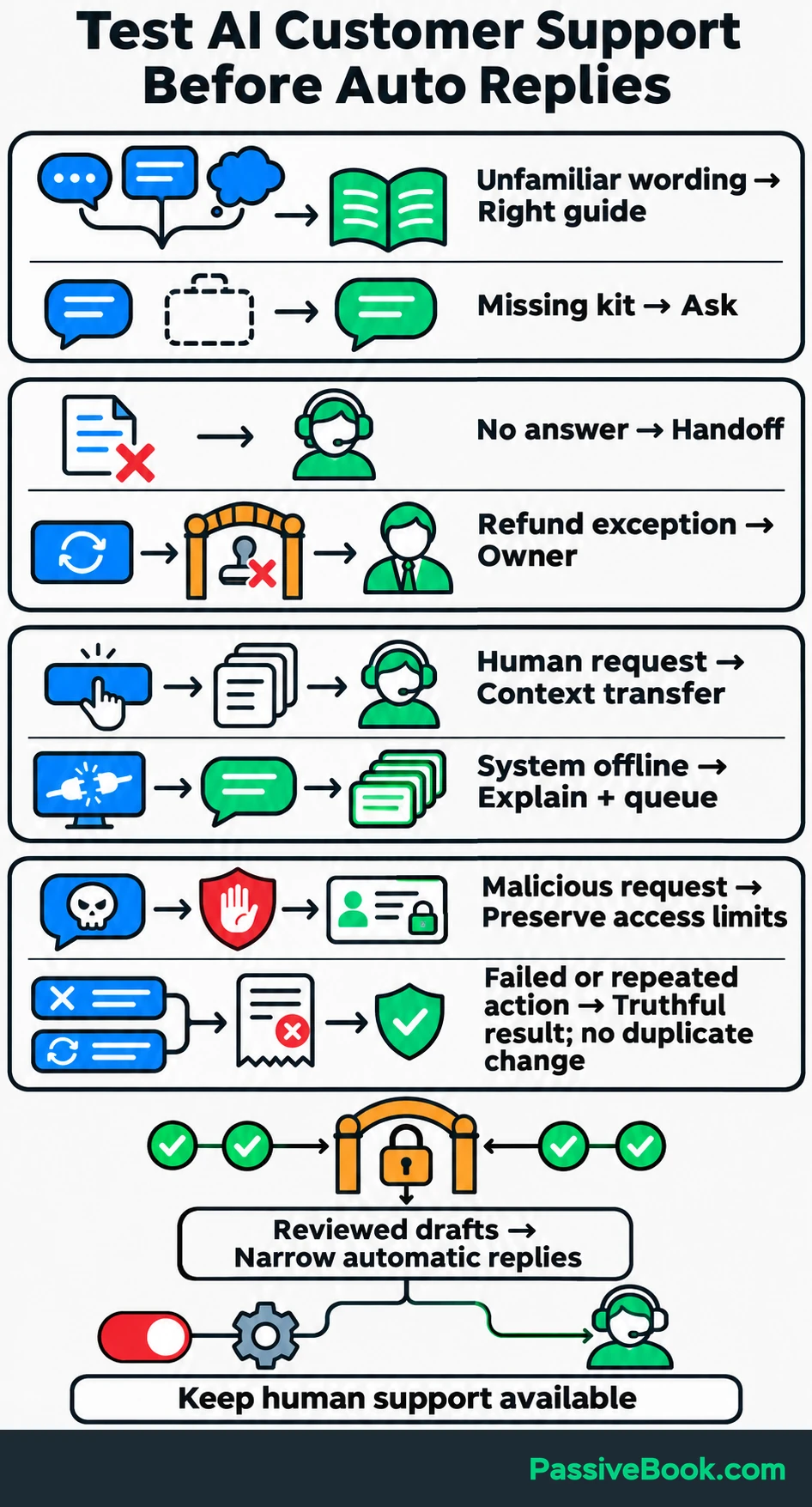
Begin with reviewed drafts. Once those work reliably, test automatic replies for a narrow set of supported questions. Keep a switch that stops automatic replies while leaving human support available.
When something fails, repair the source, instruction, or connection responsible. Retest after relevant policy or system changes before adding another task.
Measure Whether AI Improves Customer Experience
The test is whether customers get useful help with less total effort. Instant acknowledgments do not establish that.
Compare similar request types and channels before and during the pilot. A batch of simple instruction questions should not be compared with last month’s hardest delivery complaints.
Track:
- First useful answer: How long customers wait for information that helps them proceed.
- Resolution time: How long the issue takes to finish.
- Staff effort: Handling, reply review, quality checks, and corrections per resolved issue.
- Repeat contacts: Whether customers return about the same unresolved problem within a defined window.
- Customer satisfaction: Feedback from customers who received support, with response counts alongside the scores.
- Conversation outcomes: Completed resolutions, successful handoffs, unresolved requests, and abandonment recorded separately.
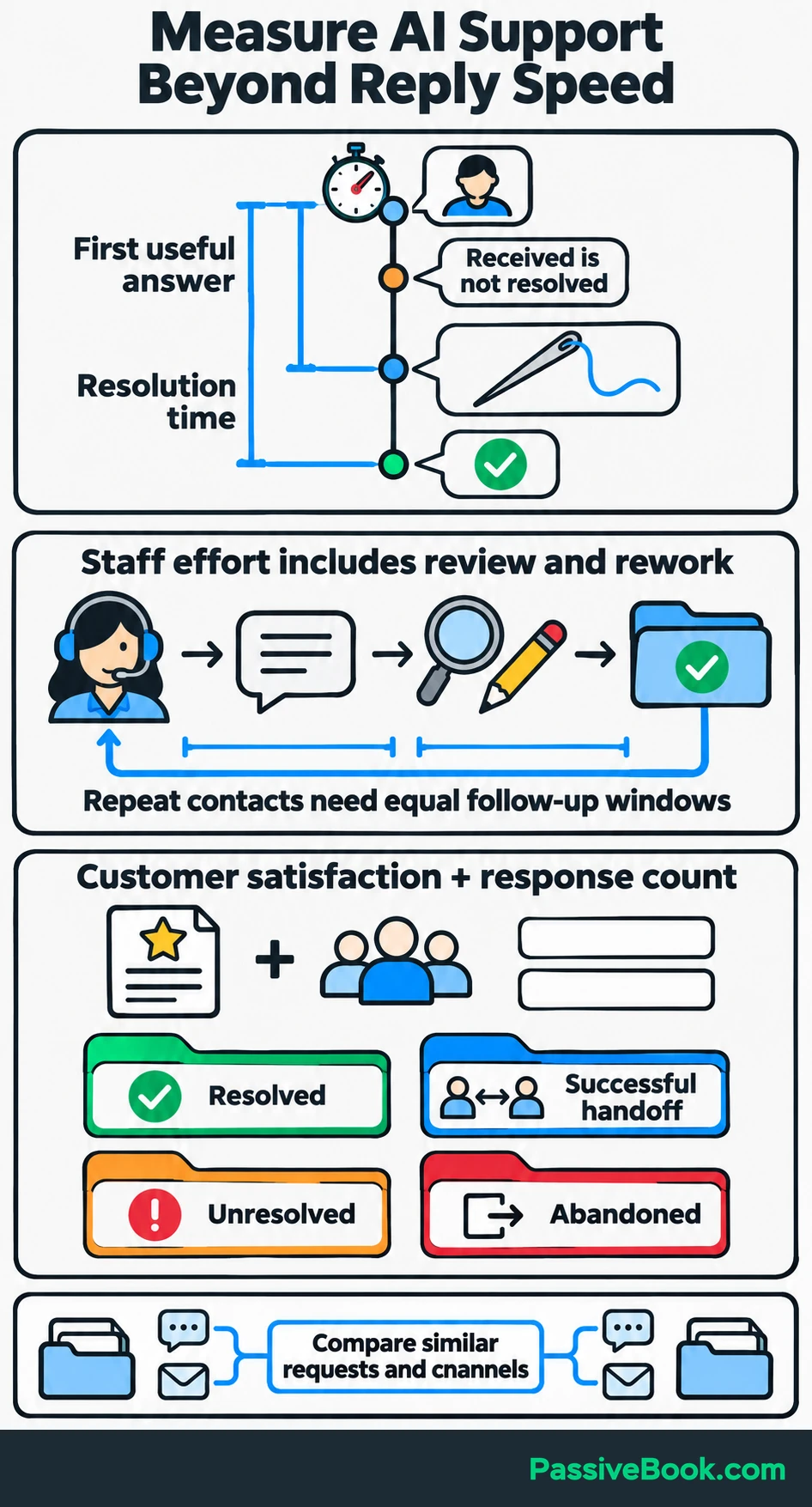
Choose a repeat-contact window that suits the task and give each comparison group the same follow-up time. A conversation that simply goes quiet should not automatically count as resolved.
Retention takes longer to judge. For Cedar Stitch, repeat purchases over a normal buying cycle may be relevant. A short response-time pilot cannot establish that customers are staying longer.
To assess costs, count software, usage, handling, review, rework, maintenance, and a share of setup costs. Divide that total by the number of issues resolved during the same period, keeping unresolved work in the cost total.
Here is an illustrative monthly calculation for 200 comparable kit-instruction requests, assumed resolved in both approaches:
| Work or cost | Manual handling | AI-assisted handling |
|---|---|---|
| Handling time | 200 × 6 minutes = 20 hours | 200 × 3 minutes, including reply review = 10 hours |
| Quality checks, corrections, and workflow maintenance | Included in handling | 2 additional hours |
| Total staff time | 20 hours | 12 hours |
| Staff time valued at an assumed $25 per hour | $500 | $300 |
| Additional monthly AI tooling | $0 | $100 |
| Total before setup costs | $500 | $400 |
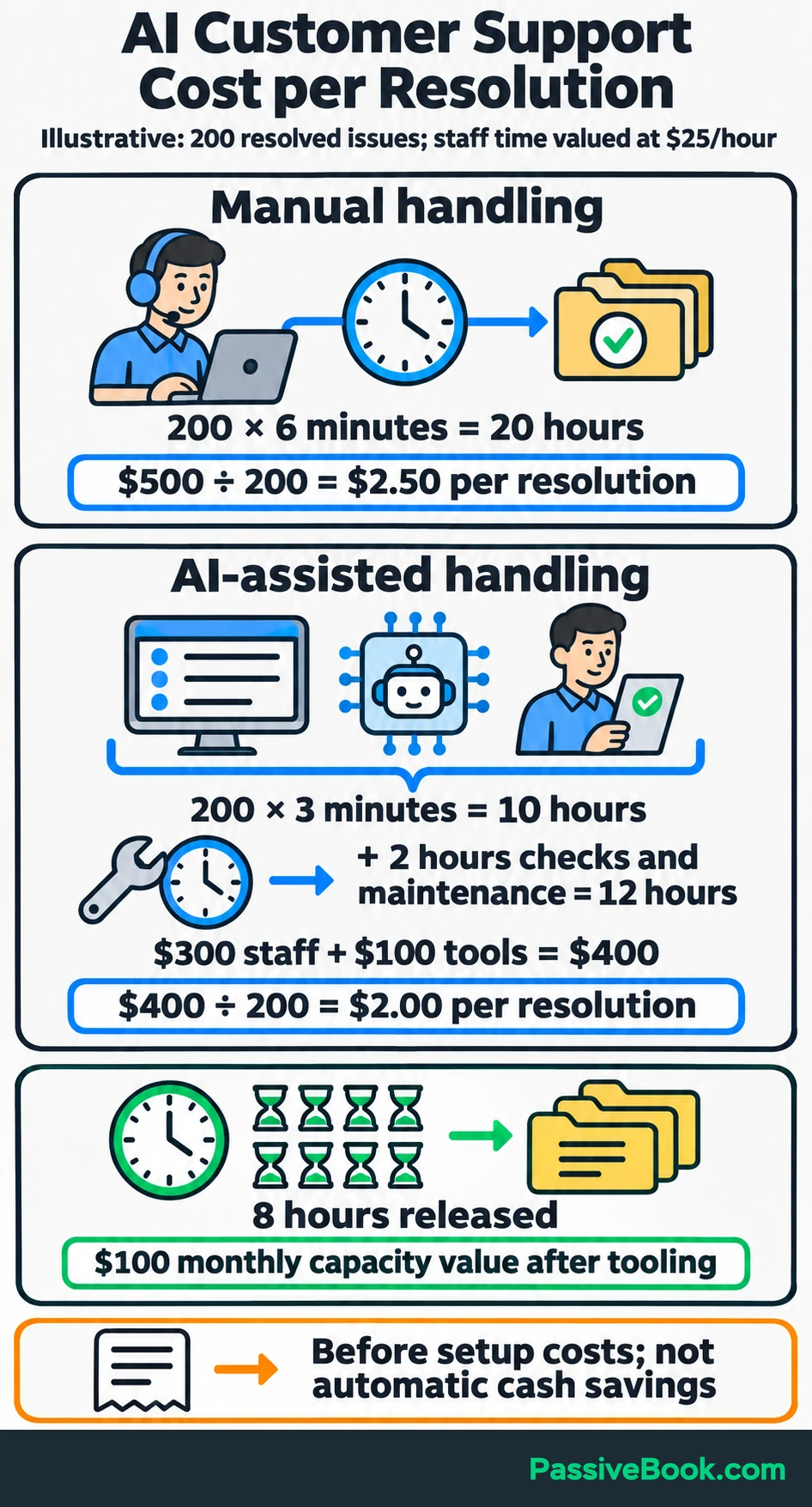
The assisted workflow releases eight hours. At the assumed labor value, that is $200 of capacity, and the $100 tooling cost leaves $100 in monthly capacity value before setup costs.
At 200 resolved issues, the illustrated cost falls from $2.50 to $2.00 per resolution before allocating setup costs. Add those costs before making the final investment decision.
Released capacity means time available for other work. If your spending stays the same, you have not saved $100 in cash.
Expand when total effort or cost improves and resolution quality and customer feedback remain acceptable. If repeat contacts, corrections, or frustration rise, fix the workflow or stop it. A faster bad answer just gives the customer more time to be annoyed.
What Next?
Choose one repeated customer question and gather the instructions needed to answer it correctly. Draft a reply with AI, check it against those sources, and record how much review it needs. That gives you a concrete starting point before you buy another tool.
Use the social buttons to share this guide when planning a support workflow together, so the discussion starts with customer outcomes and human handoffs.
Which recurring request would you trust AI to draft first, and what would make you keep it under human review? Share your answer or any other questions in the comments.
Share this post with your friends & followers:

